A buddy at work is designing an InfoPath form and was befuddled by some awkward behavior in the way InfoPath executes its rule conditions.
So let’s say that you want to execute the following comparison: “If the sum of the order is greater than $500, and, the customer is from either CA or FL, then set a 10% discount rate.” In essence you have a “A & (B | C)” situation. So my pal had a rule that fired which checked these conditions. On the first pass, his rule conditions looked like this:
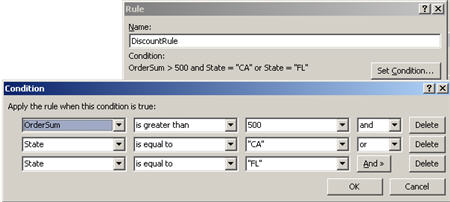
Makes sense, BUT, where does InfoPath put the parentheses? Not where we first thought. The way this rule is written, InfoPath executes it as “(A & B) | C“. That is, if I just enter “FL” into my textbox, the rule passes because as long as the state equals “FL”, the first condition doesn’t matter. The “and’s” take precedence over the “or’s”.
So, how do I get the conditions to line up as I really want? You actually have to break apart the condition to look like “(A & B) | (A & C)” such as:

This way, the two fields on both sides of the “and’s” are grouped together and split by the “or.”
You also max out on the number of rule conditions at 5, so if you have a rule with a large set of conditions, you’ll need to split it up into multiple rules. I still like InfoPath, but man, I’ve been getting punched in the face by little quirks for the past few weeks.
As a complete non-sequitur, I noticed that the BizTalk team just released yet another poster (this one on the BizTalk Adapter Pack and LOB SDK). Besides expecting 14 different blogs on the MSDN site to do nothing but cut and paste the announcement, this also means that I shouldn’t make fun of the team’s poster-producing prowess ever again. I’m still holding out hope for the “Women of BizTalk Server” poster. Fingers crossed.


 Richard Seroter's Architecture Musings
Leave a reply to Mark Marriott Cancel reply