We recently implemented a BizTalk design pattern where on schedule (or demand), records are retrieved from a database, debatched, returned to the MessageBox, and subscribed to by various systems.
Normally, “datastore to datastore” synchronization is a job for an ETL tool, but in our case, using our ETL platform (Informatica) wasn’t a good fit for the use case. Specifically, handling web service destinations and exceptions wasn’t robust enough, and we’d have to modify the existing ETL jobs (or create new ones) for each system who wanted the same data. We also wanted the capability for users to make “on demand” request for historical data to be targeted to their system. A message broker made sense for us.
Here are the steps I followed to create a simple prototype of our solution.
Step #1. Create trigger message/process. A control message is needed to feed into the Bus and kick off the process that retrieves data from the database. We could do straight database polling via an adapter, but we wanted more control than that. So, I utilized Greg’s great Scheduled Task Adapter which can send a message into BizTalk on a defined interval. We also have a manual channel to receive this trigger message if we wish to run an off-cycle data push.
Step #2. Create database and database schemas. I’ve got a simple test table with 30 columns of data.

I then used the Add Generated Items wizard to build a schema for that database table.

Now, because my goal is to retrieve the dataset from the database, and then debatch it, I need a representation of the *single* record. So, I created a new schema, imported the auto-generated schema, set the root node’s “type” to be of the query response record type, and set the Root Reference property.

Step #3. Build workflow (first take). For the orchestration component, I decided to start with the “simple” debatching solution, XPath. My orchestration takes in the “trigger” message, queries the database, gets the batched results, loops through and extracts each individual record, transforms the individual record to a canonical schema, and sends the message to the MessageBox using a direct-bound port. Got all that?

When debatching via XPath, I use the schema I created by importing the auto-generated SQL Server schema.
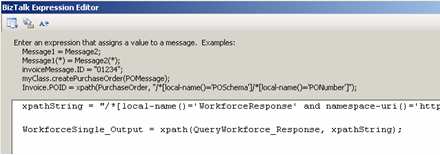
Step #4. Test “first take” workflow. After adding 1000 records to the table (remember, 30 columns each), this orchestration took about 1.5 – 2 minutes to debatch the records from the database and send each individual record to the MessageBox. Not terrible on my virtual machine. However, I was fairly confident that a pipeline-based debatching would be much more efficient.
So, to modify the artifacts above to support pipeline-based debatching, I did the following steps.
Step #1. Modify schemas. Automatic debatching requires the pipeline to process an envelope schema. So, I took my auto-generated SQL Server schema, set its Envelope property to true, and picked the response node as the body. If everything is set up right, then the result message of the pipeline debatching is that schema we built that imports the auto-generated schema.
Step #2. Modify SQL send port and orchestration message type. This is a good one. I mentioned above that you need to use the XmlReceive pipeline for the response channel in the SQL Server request-response send port. However, if I pass the response message through an XmlReceive pipeline with the chosen schema set as an “envelope”, the message will debatch BEFORE it reaches the orchestration. Then I get all sorts of type mismatch exceptions. So, what I did, was change the type of the message coming back from the request-response port to XmlDocument and switched the physical send port to to a passthrough pipeline. Using XmlDocument, any message coming back from the SQL Server send port will get routed back to the orchestration, and using the passthrough pipeline, no debatching will occur.


Step #3. Switch looping to use pipeline debatching. In BizTalk Server 2006, you can call pipelines from orchestrations. I have a variable of type Microsoft.XLANGs.Pipeline.ReceivePipelineOutputMessages, and then (within an Atomic Scope), I called the *default* XmlReceive pipeline using the following code:
Microsoft.XLANGs.Pipeline.XLANGPipelineManager
.ExecuteReceivePipeline(typeof(Microsoft.BizTalk.DefaultPipelines.XMLReceive),
QueryWorkforce_Response);
Then, my loop condition is simply rcvPipeOutputMsgs.MoveNext(), and within a Construct shape, I can extract the individual, debatched message with this code:
WorkforceSingle_Output = null;
rcvPipeOutputMsgs.GetCurrent(WorkforceSingle_Output);
Step #4. Test “final” workflow. Using the same batch size as before (30 columns, 1000 records), it took between 29-36 seconds to debatch and return each individual message to the MessageBox. Compared to nearly 2 minutes for the XPath way, pipeline debatching is significantly more efficient.
So, using this pattern, we can easily add subscribers to these database-only entities with very little impact. One thing I didn’t show here, but in our case, I also stamp each outbound message (from the orchestration) with the “target system.” The trigger message sent from the Scheduled Task Adapter will have this field empty, but if a particular system wants a historical batch of records, we can now send an off-cycle request, and have those records only go to the Send Port owned by that “target system”. Neat stuff.
Technorati Tags: BizTalk


 Richard Seroter's Architecture Musings
Leave a reply to Tomas Restrepo Cancel reply