Often times during development, and even in production, you have a need to create new BizTalk ports that are virtually identical to an existing one.
For instance, in a “content based routing” scenario, odds are you would test this by creating multiple send ports, all with a slight deviation in subscription criteria and destination path. We also have a case where data received by SAP is sent to a series of virtually identical send ports. Because all the SOAP send ports use the same proxy class for transmitting the service, the ONLY difference is the URL itself. But, it’s a hassle to create a new send port each time.
So, I took a few minutes yesterday, and using a BizTalk SDK example as inspiration, wrote a small tool that duplicates existing send ports. If I felt more ambitious I’d make it a custom MMC action, but alas, I’m not that motivated.
When you fire the BizTalk Send Port Duplicator (patent pending) up, the first thing you do is set the server where the BizTalk Management Database resides.

Then, you optionally choose which BizTalk “application” has the port you wish to copy. If you don’t choose an application from the drop down list, then you’ll get all send ports in your BizTalk environment.
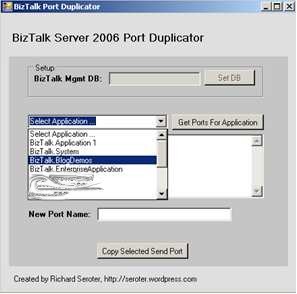
Next, select the send port from the listbox, and type in a name that will be used for the port copy.

The copied send port shows up in the BizTalk Administration Console in the same “application” as the source send port. You can open it up and see nearly all properties copied across. What properties are included? You can copy one-way or two-way ports, filter/subscription, primary transport details (address, retry, handlers), maps, and pipelines. At the moment, I’m not copying secondary transport details, certificates, tracking details, or dynamic ports.
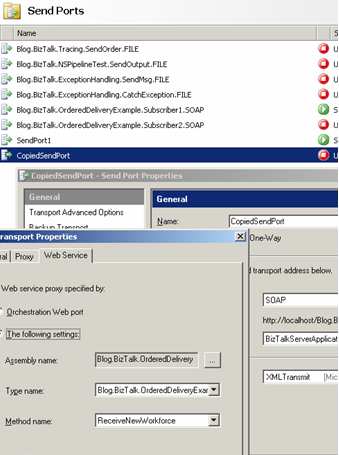
You can download the BizTalk Send Port Duplicator here. I’ve included the source code as well, so feel free to mess around with it.
[UPDATE (10/02/2007)] I’ve updated the application to also support choosing the name of the Management database. Prior, I had hard-coded this value.
Technorati Tags: BizTalk


Leave a reply to monishnagisetty Cancel reply