Avoiding Service Timeouts In High Volume Orchestration Scenarios

We were recently architecting a solution that involved BizTalk calling a synchronous web service from an orchestration in a high volume scenario. What happens if the web service takes a long time to complete? Do you run the risk of timeouts in orchestrations that hadn’t even had a chance to call the service yet?

Let’s say you have an orchestration that calls a synchronous web service, like so …
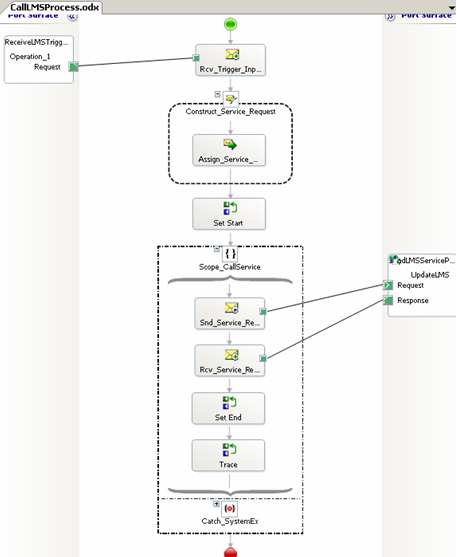
Assume that the downstream system (reached through the web service interface) cannot handle more than a few simultaneous connections. So, you can add the <add address = “*” maxconnection = “2” /> directive to your btsntsvc.exe.config file (actually, you should filter by IP address as to not affect the entire server).

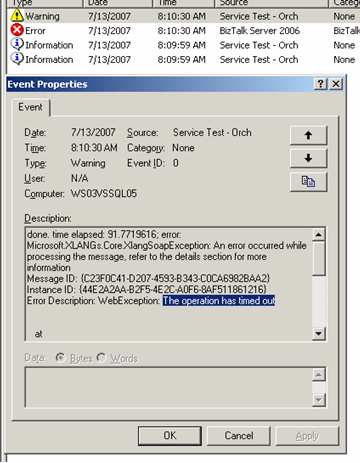
What happens if I have 20 simultaneous orchestrations? I’ve reduced the outbound SOAP threadpool to “2”, so do the orchestrations wait patiently, or fail if they don’t call the service in the allotted time? I started up 3 orchestrations, and called my service (which purposely “sleeps” for 60 seconds to simulate a LONG-running service). As you can see below, I have 3 running instances, but my destination server’s event log only shows the first 2 connections.

The first two calls take 60 seconds, meaning the third message doesn’t call the service until 60 seconds have passed. You can see from my event log below that while the first 2 returned successfully, the third message/orchestration timed out. So, the “timeout” counter starts as soon as the send port is triggered, even if no threads are available.
Now, what I found unexpected was the state of affairs after the timeouts. My next scenario involved dropping a larger batch size (13 messages) and predictably, I had 2 successes and 11 failures on the BizTalk server.

HOWEVER, on my web server, the service actually got called 13 times! That is, the 11 messages that timed out (as far as BizTalk knows), actually went across the wire to the service. I added a unique key to each message just to be sure. It was interesting that after the BizTalk side timed out, all the queued up requests came over at once. So, if you have significant business logic in such a service, you’d want to make sure your orchestration had a compensating step. If you catch a timeout in the orchestration, there should be a compensating step to roll back any action that the service may have committed.

So, how do you avoid this scenario? I tried a few things. First, I wondered if it was the orchestration itself starting the clock on the timeout when it detected a web port, so I removed the web port from the orchestration and used a “regular” port instead. No difference. It became crystal clear that the send port itself is starting the timeout clock, and even if no thread is available, the seconds are clicking by. I also considered using a singleton pattern to throttle the outbound calls, but didn’t love that idea.

Finally, I came upon a solution that worked. If you turn on ordered delivery for the send port, then the send port isn’t called for a message until the previous one succeeds.

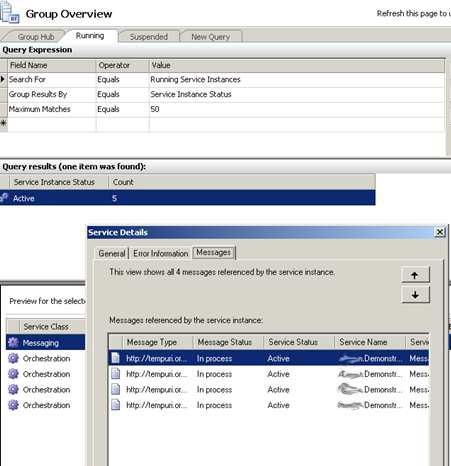
This is one way to force throttling of the send port itself. To test this, I dropped 13 messages, and sure enough, the messages queued up in the send port, and no timeouts occurred.
Even though the final orchestration didn’t get its service response back for nearly 13 minutes, it didn’t timeout.
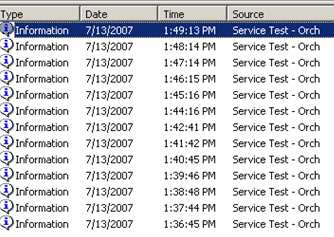
So, while not a fabulous solution, it IS a relatively clean way to make sure that timeouts don’t occur in high volume orchestration-to-service scenarios.

Technorati Tags: ,

Comments

28 responses to “Avoiding Service Timeouts In High Volume Orchestration Scenarios”

  1. Patrick Wellink Avatar

    Hmmmmm,

    This is very intersting….
    Any chanche there is a similar solution for BizTalk 2004 ?

  2. Raghu Avatar
    Raghu

    Hi,

    How did you get the SOAP outbound pool to use only limited number of threads? That is, where would you set this?

    Thanks.

  3. Richard Seroter Avatar

    Raghu,

    That’s the step of adding “” to your BizTalk configuration file. I actually replaced the “*” with my server’s IP address, which means that no more than two outbound HTTP connections are allowed to that IP address at one time.

  4. Richard Seroter Avatar

    Sorry, formatting in my last comment took out the XML. When addding <add address = “*” maxconnection = “2″ /> to the btsntsvc.exe.config file, you can throttle the available threads to that designated URL.

  5. Rajinder Singh Avatar

    We were having this problem in Production this week.
    Setting ordered delivery on the Soap Send Port worked like a charm.
    Thanks

  6. Richard Seroter Avatar

    That’s cool to hear Rajinder, thanks.

  7. […] is to limit the number of concurrent calls to a web service. I’d covered a similar topic in a previous post, and outlined two ways one could try and configure this […]

  8. Henkhell Avatar
    Henkhell

    Excellent work for those who share this information. It works like a charm of god.

  9. Martin Bring Avatar

    I stumbled into your post after struggling with time-outs for a while. At the same time we had performance problem with the services so natural we thought it was a “real” time-out issue.

    Strange behaviour though, I thought the time-out would not start decreasing until mesage really sent to the adapter.

    Hope it will work otherwise in 2009.

  10. Martijn Veldkamp Avatar
    Martijn Veldkamp

    Did the solution combine the two steps?
    So addding to the btsntsvc.exe.config and setting ordered delivery to true?

  11. Richard Seroter Avatar

    Hi Martijn,

    It’s been a little while, but I don’t THINK you’d need both. The ordered delivery forces the server to behave in a single threaded fashion, so the number of concurrent calls allowed shouldn’t matter.

  12. Alex Kaganov Avatar
    Alex Kaganov

    Thanks, Richard!

    I was just directed to this article by Microsoft’s BizTalk Field Engineer – even though we didn’t have this problem he felt important to let us know about this issue.

    As you mentioned, you didn’t like the idea of using the singleton pattern. The problem is though you used that pattern already implemented in the send port. So if the web server could simultaneously process five calls, you have just made your process five times slower than it could be. That’s not to negate your solution – just to point out the issue.

  13. Amit Avatar
    Amit

    we are importing excel files from sharepoint and transferring it to schema and then calling web service to validate all that data from database and getting response which we again post to sharepoint.
    when we trying to import large file which is around 800Kb having total around 1800 records and sending to web service it works in all enviroment except live we are getting below error message ,
    The adapter failed to transmit message going to send port “SendS6fFundingDataImport” with URL “http://netfarm.lsc.local/LSC.S6F.FundingDataImport.WS/S6FFundingDataImportService.asmx”. It will be retransmitted after the retry interval specified for this Send Port. Details:”WebException: The operation has timed out
    i already set msgImportYouthWsRequest(SOAP.ClientConnectionTimeout) = 1200000;
    in orchestration also at web service we set the timeout 20 min and max request size to 100 MB.

    what should i do in this case.

    1. Richard Seroter Avatar

      Amit, what happens with smaller sizes? Is there a threshold where this happens? Are you actually throttling, or sending all these to your web service at once? Where is the timeout occurring?

  14. Christian Avatar
    Christian

    Great article Richard! We’re suffering from the same situation but slightly in reverse – we’re attempting to process several thousand messages through a custom .NET WSE3 adapter, but it looks like .NET only gives us two simultaneous http connections – so we experience the exact same failure, even though the destination web service could handle everything we’d throw at it.
    We’re trying ordered delivery now, but I don’t think that’s going to be performant enough. We’re considering upping the maxconnection count – but besides that we’re not sure how we can throttle down so we’re not trying to simultaneously send a bagillion requests at once.
    Any advice? 🙂

    1. Richard Seroter Avatar

      Christian,

      Max connections is probably your best bet. Just keep it at a number that you know the downstream service won’t fail, even in a burst.

  15. Gary Avatar
    Gary

    Hi,

    I’ve been having timeout issues with calling a web service on a soap adapter. After a bit of experimenting I’ve found that setting the ClientConnectionTimeout (to 90000) on the request message alone does nothing. I’ve followed the steps in this link

    http://msdn.microsoft.com/en-us/library/dd297484(v=bts.10).aspx

    and also set in the web config of my web service a longer timeout period in these elements:

    and

    So all three are set to timeout at 15minutes. Lo and behold my web service call doesn’t timeout anymore! Not sure if doing all 3 is required but at least this is a start for people encountering these errors!!

  16. Gary Avatar
    Gary

    Hi,

    I’ve been having timeout issues with calling a web service on a soap adapter. After a bit of experimenting I’ve found that setting the ClientConnectionTimeout (to 90000) on the request message alone does nothing. I’ve followed the steps in this link

    http://msdn.microsoft.com/en-us/library/dd297484(v=bts.10).aspx

    and also set in the web config of my web service a longer timeout period in these elements:

    “”

    and

    “”

    So all three are set to timeout at 15minutes. Lo and behold my web service call doesn’t timeout anymore! Not sure if doing all 3 is required but at least this is a start for people encountering these errors!!

    Sorry for the repost.. Richard you can delete my first two

    1. Richard Seroter Avatar

      Thanks for sharing, Gary.

  17. Mehdi Avatar
    Mehdi

    Hi Richard,

    Thanks for your great post. We experienced the same issue in our production and I found setting the Order Delivery works for us (at least for now).

    My question is why do we need the convoy orchestrations in this solution? Can’t we just using your first orchestration to genearte instance id and instead of using convoy orchestration we setup three Send Ports which are subscribed each to one instance id and set the order delivery for each send port as well?

    I appreciate your advise on this.

    Thanks!

  18. DipeshA Avatar
    DipeshA

    If you are using BizTalk 2006 or 2006 R2, you want to be aware of the following behavior which is by design and can prove critical in production environments.
    http://support.microsoft.com/kb/952559

  19. Duane Avatar
    Duane

    Richard,

    Have you found this behaviour (timeouts) with WCF (such as WCFHTTP-Basic and BizTalk 2010? I’m still testing the scenario, but my waiting processes weren’t timing out….they just waited. Usually the number of Send Ports were limited.

    Thanks for the great blog and books.

    1. Richard Seroter Avatar

      Hi Duane,

      I haven’t tried this with BizTalk 2010. Interesting that you’re seeing different behavior now. It’d be great if the timeout clock started once the send port actually got ahold of the message!

      1. Duane Avatar
        Duane

        Just an update. The behavior is actually the same as previous versions of BizTalk and adapters. The timeout clock starts staright away. I have max connections defaulted to 2 connections to a given address (www.someplace.com), and when sending a high volume of messages with large payloads, messages begin to timeout, before they even had a turn to call the URL.

  20. […] a nice post from Richard Seroter on How to avoid Service Timeouts In High Volume Orchestration Scenarios but you can find several ways to solve this […]

  21. Tharaka Avatar
    Tharaka

    Thanks, Richard
    We had the same issue and yes. its resolved now.
    Cheers

    1. Sam Avatar
      Sam

      Hi Tharaka…. What was your solution? We’re experiencing the same thing with BT 2013 Enterprise R2 and doing the convoy is the only way we’ve found to stop the timeouts.

  22. Rene Avatar
    Rene

    After setting orderd delivery the messages are still suspended but now not resumable with an time out exception. I am using BizTalk 2010. Any ideas?

Leave a reply to Receiving a time out error while trying to invoke a BizTalk Orchestration exposed as a service (WCF) | Sandro Pereira BizTalk Blog Cancel reply

This site uses Akismet to reduce spam. Learn how your comment data is processed.