I recently went through the process of deploying a BAM model to our new BizTalk infrastructure, and learned a few things about BAM security and deployment along the way.
Given that most BizTalk architects/developers probably play with BAM on a single fully installed machine (BizTalk, SQL, IIS, etc) while running with highest-level permissions, sometimes certain steps can be taken for granted.
To start with, my production environment contains clustered SQL Server 2005 servers and a specific SQL instance created for the BizTalk databases. Both SQL Server Analysis Services and SQL Server Integration Services are installed in the cluster as well. If you have this sort of environment, you’ll need to modify SSIS before continuing. Specifically, you must change the MsDtsSrvr.ini.xml file so that the SSIS points to a named instance of SQL Server (see the Microsoft documentation for details). If you do NOT do this, then running the bm.exe BAM tool will result in everything LOOKING fine, but in fact, no SSIS/DTS packages get created anywhere.
Now, to run the bm.exe, which builds up all the BAM infrastructure (tables, procedures, triggers, packages, cubes, etc), you have to have SSIS on the same machine as the tool itself. Got that? So you can’t run this from a standalone BizTalk box and expect it to work. Another option (instead of installing SQL tools on the BizTalk box) is to install the BAM tools alone on the SQL box. I’ve reviewed a few things, and am fairly sure this is the case, but if anyone wants to challenge that assertion, feel free.
Let’s talk about security. Specifically, adding users to views. Again, most times when you’re developing BAM solutions, you take for granted that you can go to the BAM Portal and views magically appear. But when you’re not running as an Administrator, those views aren’t visible by default. What I did (as practice before doing this in production), was create a local group in my development environment. Then, I ran the following command:
This command does a few things. First, it adds that user/group to the BAMPrimaryImport table as a “user.”
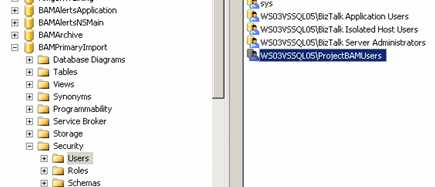
This allows anyone in that group to look at data in the BAM view. If your BAM model contains aggregations, then SQL Analysis cubes get created by the bm.exe tool. A new “role” gets created for you in SQL Analysis services as well …

Now by default, this group is empty. But when you run the “add-account” command, the designated user/group ALSO gets added here.
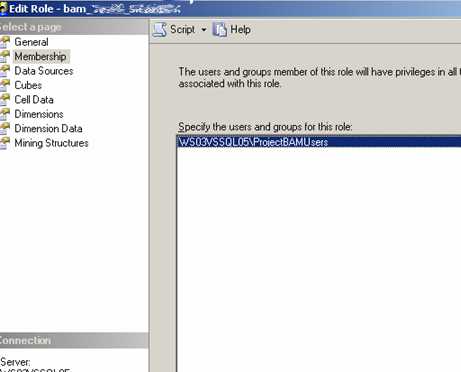
Nice! So instead of doing “add-account” for every individual user, you should require a group to be set up for a particular BAM deployment. If a user tries to view the BAM Portal and is NOT in the designated group, they’d see this …

As soon as I add the logged on user to the pre-defined Windows group (with explicit BAM access), the same user sees this …
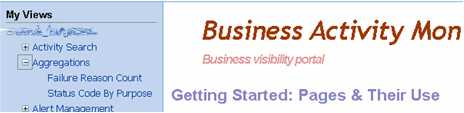
Cool stuff that I haven’t found demonstrated much. I personally spent hours trying to find out why my freakin’ SSIS jobs wouldn’t get created, so the whole “change the obscure SSIS configuration file” might save someone time later on. Any other BAM deployment points folks want to add?
Technorati Tags: BizTalk


Leave a reply to Ron Phillips Cancel reply