Twice last week, I received WSDLs to consume that BizTalk didn’t like. That is, when I would try and load the WSDL via Add Web Reference, I’d get an error like the following:
Could not generate BizTalk files. Unable to import WebService/Schema. Unable to import
binding ‘WebServiceBinding’ from namespace
‘http://xmlns.company.com/interface/project/SubmitSubjectImpl’. Unable to import operation
‘SubmitSubject’. The element ‘http://xmlns.company.com/project/subject:subjectrequest’ is
missing.
I also tried from a “regular” .NET project, and no luck. One of the WSDLs used “imports” (a no-no for importing the web reference), and I’m convinced that the other WSDL’s problem was indeed namespace based. Now in both cases, I didn’t have the luxury of telling the WSDL owner to make changes. So how to get around this? Inspired a bit by Jon’s blog, I decided to try using the .NET Framework tool wsdl.exe. For the WSDL using “imports”, I executed WSDL.exe passing in the WSDL, and parameters for each schema used. Sure enough, I was able to generate a valid C# proxy class. The other offending WSDL was also successfully processed using WSDL.exe. As a result, I now had a proxy class needed to consume this service.
Next I added that proxy class to a .NET class library, built, and GAC’ed it. Next I used the provided schema files to create messages in a BizTalk orchestration corresponding to the request and response message. Finally, I connected this to a “two way” port in the orchestration.
After deploying the BizTalk project, I had to configure the necessary SOAP send port. Unlike a “regular” SOAP send port, I was not using an orchestration port as the proxy. Instead, I am now pointing to the proxy class generated by WSDL.exe. On the Web Service tab of the SOAP port, I chose the assembly and method I needed.
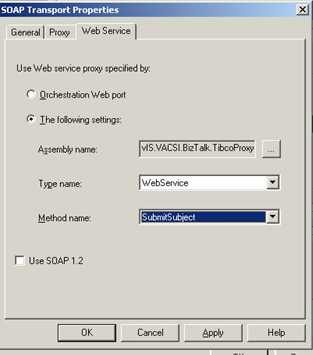
Now assuming everything was set up right, I should have been able to call the web service with no problem. But, if we stick with the base assumption that I’m a total meatball, of COURSE it didn’t work the first time. Instead I got this …
A message sent to adapter “SOAP” on send port “Company.Dept.Project.SendTibcoSvc.SOAP” with URI “http://machinename:1234/ProcessDefinitions/WebService” is suspended.
Error details: Failed to serialize the message part “subjectrequest” into the type “subjectrequest” using namespace “http://xmlns.company.com/project/subject”. Please ensure that the message part stream is created properly.
Obviously the proxy couldn’t serialize my XML message. So, I output the message I was sending to the port, and tried validating it against my schema. Sure enough, I got validation errors like The string ” is not a valid XsdDateTime value. and The string ” is not a valid Integer value.. So, I fixed the source problems, and validation succeeded. Finally, when calling the service again, everything worked perfectly.
Moral of story: you can consume web services WITHOUT using a “web reference” as long as you can build the proxy class. Good stuff.
Technorati Tags: BizTalk, web services


 Richard Seroter's Architecture Musings
Leave a reply to Tricks with Schemas Part 2: Referencing Schemas from Third Party WebServices « Connected Pawns Cancel reply