Category: Windows Server AppFabric

  • Interview Series: Four Questions With … Jürgen Willis

    Greetings and welcome to the 44th interview in my series of talks with leaders in the “connected technology” space. This month, I reached out to Jürgen Willis who is Group Program Manager for the Windows Azure team at Microsoft with responsibility for Windows Workflow Foundation and the new Workflow Manager (on-prem and in Windows Azure). Jürgen frequently contributes blog posts to the Workflow Team blog, and is well known in the community for his participation in the development of BizTalk Server 2004 and Windows Communication Foundation.

    I’ve known Jürgen for years and he’s someone that I really admire for ability to explain technology to any audience. Let’s see how he puts up with my four questions.

    Q: Congrats on releasing the new Workflow Manager 1.0! It seems that after a quiet period, we’re back to have a wide range of Microsoft tools that can solve similar problems. Help me understand some of the cases when I’d use Windows Server AppFabric, and when I’d be bettering off pushing WF services to the Workflow Manager.

    A: Workflow Manager and AppFabric support somewhat different scenarios and have different design goals, much like WorkflowApplication and WorkflowServiceHost in .NET support different scenarios, while leveraging the same WF core.

    WorkflowServiceHost (WFSH) is focused on building workflows that consume WCF SOAP services and are addressable as WCF SOAP services.  The scenario focus is on standalone Enterprise apps/workflows that use service-based composition and integration.  AppFabric, in turn, focuses on adding management capabilities to IIS-hosted WFSH workflows.

    Workflow Manager 1.0 has as its key scenarios: multi-tenant ISVs and cloud scale (we are running the same technology as an Azure service behind Office 365).  From a messaging standpoint, we focused on REST and Service Bus support since that aligns with both our SharePoint integration story, as well as the predominant messaging models in new cloud-based applications.  We had to scope the capabilities in this release largely around the SharePoint scenarios, but we’ve already started planning the next set of capabilities/scenarios for Workflow Manager.

    If you’re using AppFabric and its meeting your needs, it makes sense to stick with that (and you should be sure to check out the new 4.5 investments we made in WFSH).  If you have a longer project timeline and have scenarios that require the multi-tenant and scaleout characteristics of Workflow Manager, are Azure-focused, require workflow/activity definition management or will primarily use REST and/or Service Bus based messaging, then you may want to evaluate Workflow Manager.

    Q: It seems that today’s software is increasingly built using an aggregation of frameworks/technologies as developers aren’t simply trying to use one technology to do everything. That said, what do you think is that sweet spot for Workflow Foundation in enterprise apps or public web applications? When should I realistically introduce WF into my applications instead of simply coding the (stateful) logic?

    A: I would consider WF in my application if I had one or more of these requirements:

    • Authors of the process logic are not full-time developers.  WF provides a great mechanism to provide application extensibility, which allows a broader set of people to extend/author process logic.  We have many examples of ISVs who have used WF to provide extensibility to their applications.  The rehostable WF designer, combined with custom activities specific to the organization/domain allow for a very tailored experience which provides great productivity to people who are domain experts, but perhaps not developers.  We have increasingly seen Enterprises doing similar things, where a central team builds an application that allows various departments to customize their use of the application via the WF tools.
    • The process flow is long running.  WF’s ability to automatically persist and reload workflow instances can remove the need to write a lot of tricky plumbing code for supporting long running process logic.
    • Coordination across multiple external systems/services is required.  WF makes it easier to write this coordination logic, including async messaging handling, parallel execution, correlation to workflow instances,  queued message support, and transactional coordination of inbound/outbound messages with process state.
    • Increased visibility to the process logic is desired.  This can be viewed in a couple of ways.  The graphical layout makes it much clearer what the process flow is – I’ve had many customers tell me about the value of a developer/implementer being able to review the workflow with the business owner to ensure that the requirements are being met.  The second aspect of this is that the workflow tracking data provides pretty thorough data about what’s happening in the process.  We have more we’d like to do in terms of surfacing this information via tools, but all the pieces are there for customers to build rich visualizations today.

    For those new to Workflow, we have a number of resources listed here.

    Q: You and I have spoken many times over the years about rules engines and the Microsoft products that love them. It seems that this is still a very fuzzy domain for Microsoft customers and I personally haven’t seen a mass demand for a more sophisticated rules engine from Microsoft. Is that really the case? Have you received a lot of requests for further investment in rules technology? If not, why do you think that is?

    A: We do get the question pretty regularly about further investments in rules engines, beyond our current BizTalk and WF rules engine technology.  However, rules engines are the kind of investment that is immensely valuable to a minority of our overall audience; to date, the overall priorities from our customers have been higher in other areas.  I do hope that the organization is able to make further investments in this area in the future; I believe there’s a lot of value that we could deliver.

    Q [stupid question]: Halloween is upon us, which means yet another round of trick-or-treating kids wearing tired outfits like princesses, pirates and superheroes. If a creative kid came to my door dressed as a beaver, historically-accurate King Henry VIII, or USB  stick, I’d probably throw an extra Snickers in their bag. What Halloween costume(s) would really impress you?

    A: It would be pretty impressive to see some kids doing a Chinese dragon dance 🙂

    Great answers, Jürgen. That’s some helpful insight into WF that I haven’t seen before.

  • Interview Series: Four Questions With … Hammad Rajjoub

    Greetings and welcome to the 43rd interview in my series of chats with thought leaders in the “connected technologies” domain. This month, I’m happy to have Hammad Rajjoub with us. Hammad is an Architect Advisor for Microsoft, former Microsoft MVP, blogger, published author, and  you can find him on Twitter at @HammadRajjoub.

    Let’s jump in.

    Q: You just published a book on Windows Server AppFabric (my book review here). What do you think is the least-appreciated capability that is provided by this product, and what should developers take a second look at?

    A: I think overall Windows Server AppFabric is an under-utilized technology. I see customers deploying WCF/WF services yet not utilizing AppFabric for hosting, monitoring and caching (note that Windows Server AppFabric is a free product). I will suggest all the developers to look at caching, hosting and monitoring capabilities provided by Windows Server AppFabric and use them appropriately in their ASP.Net, WCF and WF solutions.

    The use of distributed in-memory caching not only helps with performance, but also with scalability. If you cannot scale up then you have to scale out and that is exactly how distributed in-memory caching works for Windows Server AppFabric. Specifically, AppFabric Cache is feature rich and super easy to use. If you are using Windows Server and IIS to host your applications and services, I can’t see any reason why you wouldn’t want to utilize the power of AppFabric Cache.

    Q: As an Architect Advisor, you probably get an increasing number of questions about hybrid solutions that leverage both on-premises and cloud resources. While I would think that the goal of Microsoft (and other software vendors) is to make the communication between cloud and on-premises appear seamless, what considerations should architects explicitly plan for when trying to build solutions that span environments?

    A: Great question! Physical Architecture becomes so much more important. Solutions needs to be designed such that they are intrinsically Service Oriented and are very loosely coupled not only at the component level but at the physical level as well so that you can scale out on demand. Moving existing applications to the cloud is a fairly interesting exercise though. I will recommend architects to take a look at the Microsoft’s guide for building hybrid solutions for the cloud (at http://msdn.microsoft.com/en-us/library/hh871440.aspx).

    More specifically an Architect, working on a hybrid solution, should plan and consider following (non-exhaustive list of) aspects:-

    • data distribution and synchronization
    • protocols and payloads for cross-boundary communication
    • federated identify
    • message routing
    • Health and activity tracking as well as monitoring across hybrid environments

    From a vendor and solution perspective, I will highly recommend to pick a solution stack and technology provider that offers consistent design, development, deployment and monitoring tools across public, private and hybrid cloud environments.

    Q: A customer comes to you today and says that they need to build an internal solution for exchanging data between a few custom and packaged software applications. If we assume they are a Microsoft-friendly shop, how do you begin to identify whether this solution calls for WCF/WF/AppFabric, BizTalk, ASP.NET Web API, or one of the many open source / 3rd party messaging frameworks?

    A:  I think it depends a lot on the nature of the solution and 3rd party systems involved. Windows Server AppFabric are a great fit for solutions built using WCF/WF and ASP.NET technologies. BizTalk is a phenomenal technology for all things EAI with Adapters for SAP, Oracle, and Seibel etc. it’s a go to product for such scenarios. Honestly it depends on the situation. BizTalk is more geared towards EAI and ESB capabilities. WCF/WF and AppFabric are great at exposing LOB capabilities through web services. More often than not we see WCF/WF working side by side with BizTalk.

    Q [stupid question]: The popular business networking site LinkedIn recently launched an “endorsements” feature which lets individuals endorse the particular skills of another individual. This makes it easy for someone to endorse me for something like “Windows Azure” or “Enterprise Integration.” However, it’s also possible to endorse people for skills that are NOT currently in their LinkedIn skills profile. So, someone could theoretically endorse me for things like “firm handshakes”, “COM+”, or “making scrambled eggs.” Which LinkedIn endorsements would you like, and not like, on your profile?

    A: (This is totally new to me 🙂 ). I would like to explicitly opt-in and validate all the “endorsements” before they start appearing on my profile. [Editors Note: Because endorsements do not require validation, I propose that we all endorse Hammad for “.NET 1.0”]

    Thanks to Hammad for taking some time to chat with me!

  • Book Review: Microsoft Windows Server AppFabric Cookbook

    It’s hard to write technical books nowadays. First off, technology changes so fast that there’s nearly a 100% chance that by the time a book is published, its subject has undergone some sort of update. Secondly, there is so much technical content available online that it makes books themselves feel downright stodgy and out-dated. So to succeed, it seems that a technical book must do one of two things: bring forth and entirely different perspective, or address a topic in a format that is easier to digest than what one would find online. This book, the Microsoft Windows Server AppFabric Cookbook by Packt Publishing, does the latter.

    I’ve worked with Windows Server AppFabric (or “Dublin” and “Velocity” as its components were once called) for a while, but I still eagerly accepted a review copy of this book to read. The authors, Rick Garibay and Hammad Rajjoub, are well-respected technologists, and more importantly, I was going on vacation and needed a good book to read on the flights! I’ll get into some details below, but in a nutshell, this is a well-written, easy to read book that covered new ground on a little-understood part of Microsoft’s application platform.

    AppFabric Caching is not something I’ve spent much hands-on time with, and it received strong treatment in this book. You’ll find good details on how and when to use it, and then a broad series of “recipes” for how to do things like install it, configure it, invoke it, secure it, manage it, and much more. I learned a number of things about using cache tags, regions, expiration and notifications, as well as how to use AppFabric cache with ASP.NET apps.

    The AppFabric Hosting chapters go into great depth on using AppFabric for WCF and WF services. I learned a bit more about using AppFabric for hosting REST services, and got a better understanding of some of those management knobs and switches that I used but never truly investigated myself. You’ll find good content on using it with WF services including recipes for persisting workflows, querying workflows, building custom tracking profiles and more. Where this book really excelled was in its discussion of management and scale-out. I got the sense that both authors have used this product in production scenarios and were revealing tidbits about lessons learned from years of experience. There were lots of recipes and tips about (automatically) deploying applications, building multi-node environments, using PowerShell for scripting activities, and securing all aspects of the product.

    I read this book on my Amazon Kindle, and minus a few inconsequential typos and formatting snafus, it was a pleasant experience. Despite having two authors, at no point did I detect a difference in style, voice or authority between the chapters. The authors made generous use of screenshots and code snippets and I can easily say that I learned a lot of new things about this product. Windows Server AppFabric SHOULD BE a no-brainer technology for any organization using WCF and WF. It’s a free and easy way to add better management and functionality to WCF/WF services. Even though its product roadmap is a bit unclear, there’s not a whole lot of lock-in that it involves (minus the caching) , so the risk of adoption is low. If you are using Windows Server AppFabric today, or even evaluating it, I’d strong suggest that you pick up a copy of this book so that you can better understand the use cases and capabilities of this underrated product.

  • Packt Books Making Their Way to the Amazon Kindle

    Just a quick FYI that my last book, Applied Architecture Patterns on the Microsoft Platform, is now available on the Amazon Kindle.  Previously, you could pull the eBook copy over to the device, but that wasn’t ideal.  Hopefully my newest book, Microsoft BizTalk 2010: Line of Business Systems Integration will be Kindle-ready shortly after it launches in the coming weeks.

    While I’ve got a Kindle and use it regularly, I’ll admit that I don’t read technical books on it much.  What about you all?  Do you read electronic copies of technical books or do you prefer the “dead trees” version?

  • Code Uploaded for WCF/WF and AppFabric Connect Demonstration

    A few days ago I wrote a blog post explaining a sample solution that took data into a WF 4.0 service, used the BizTalk Adapter Pack to connect to a SQL Server database, and then leveraged the BizTalk Mapper shape that comes with AppFabric Connect.

    I had promised some folks that I’d share the code, so here it is.

    The code package has the following bits:

    2011.4.13code01

    The Admin folder has a database script for creating the database that the Workflow Service queries.  The CustomerServiceConsoleHost project represents the target system that will receive the data enriched by the Workflow Service.  The CustomerServiceRegWorkflow is the WF 4.0 project that has the Workflow and Mapping within it.  The CustomerMarketingServiceConsoleHost is an additional target service that the RegistrationRouting (instance WCF 4.0 Routing Service) may invoke if the inbound message matches the filter.

    On my machine, I have the Workflow Service and WCF 4.0 Routing Service hosted in IIS, but feel free to monkey around with the solution and hosting choices.  If you have any questions, don’t hesitate to ask.

  • Interview Series: Four Questions With … Jon Fancey

    Welcome to the 29th interview in my never-ending series of chats with thought leaders in the “connected systems” space.  This month, I snagged the legendary Jon Fancey who is an instructor for Pluralsight, co-founder of UK-based consulting shop Affinus, Microsoft MVP, and a well-regarded speaker and author.

    On to the questions!

    Q: During the recent MVP Summit, you and I spoke about some use cases that you have seen for Windows Server AppFabric and the WCF Routing Service.  How do you see companies trying to leverage these technologies?

    A: I think both provide a really useful set of technologies for your toolbox. In particular I like the routing service as it can sometimes really get you out of a hole. A couple of examples to illustrate here of where its great. The first is where protocol translation is necessary, a subtle example of this is where perhaps you need your Silverlight-based app to call a back-end Web service that uses a binding Silverlight doesn’t support. Even though things improved a little in SL4, it still doesn’t support all of WCF’s bindings so you’re out of luck if you don’t own the service you need to call. Put the WCF routing service in as an intermediary however and it can happily solve this problem by binding basic http on the SL slide and anything you need for the service side. It also solves the issue of having to put files (such as the clientaccesspolicy.xml) in the IIS site’s root as this can be done on the routing Web server. Of course it won’t work in all circumstances but you’d be surprised how often it solves a problem. The second example is a common one I see where customers just want routing without all the bells and whistles of something like BizTalk. Routing services has some neat features around failures and retries as well as providing high-performance rules-based message routing. It even allows you to put your own logic in the router via filters as well if you need to.

    Q: You’ve been doing a fair amount of work with SharePoint in recent years.  In your experience, what are some of the most common types of “integrations” that people do from a SharePoint environment?  Where have you used BizTalk to accommodate these, and where do you use other technologies?

    A: One great example of BizTalk and SharePoint together is with BizTalk’s BAM (Business Activity Monitoring). Although BizTalk provides its own BAM portal it doesn’t really provide the functionality most customers require. The ability to create data mash-ups using out of the box Web parts in SharePoint 2010 and the Business Connectivity Services (BCS) feature is great. Not only that but in 2010 it’s also possible now to consume the BizTalk WCF adapters from SharePoint too, making connectivity to back end systems easier than ever for both read and write scenarios, even enabling off-lining of data to Office clients such as Outlook allowing client updates and resynchronization later to the back end system or data source.

    Q: In your experience as an instructor, would you say that BizTalk Server is one of the more daunting products for someone to learn?  If so, why is that? Are there other products from Microsoft with a similar learning curve?

    A:  I’d say that nothing should be daunting to learn with the right instructor and training materials ;). Seriously though, when I starting getting into WSS3.0/MOSS2007 it reminded me a lot of my first experiences with BizTalk Server 2004, not least because it was the third version of the product where everything traditionally all comes together into a great product. I found a dearth of good resources out there to help me and knowledge really was hard won. With 2010 things have improved enormously although the size of the SharePoint feature set does make it daunting to newcomers. The key with any new technology if you really want to be effective in it is to understand it from the ground up – to understand the “why” as well as the “how”. Certainly Pluralsight’s SharePoint Fundamentals course and the On Demand content we have take this approach.

    Q [stupid question]: My company recently barred people from smoking anywhere on the campus.  While I applaud the effort, it caused a nefarious, capitalist idea to spring to my mind.  I could purchase a small school bus to drive around our campus.  For $2, people can get on and smoke their brains out.  I call it the “Smoke Bus.”  Ignoring logistical challenges (e.g. the driver would probably die of cancer within a week), this seems like a moral loser, but money-making winner.  What ideas do you have for something that may be of questionable ethics but a sure fire success?

    A: How about giving all your employees unlimited free sugary caffeinated drinks – oh, wait a minute…

    Thanks for joining us, Jon!

  • Using the BizTalk Adapter Pack and AppFabric Connect in a Workflow Service

    I was recently in New Zealand speaking to a couple user groups and I presented a “data enrichment” pattern that leveraged Microsoft’s Workflow Services.  This Workflow used the BizTalk Adapter Pack to get data out of SQL Server and then used the BizTalk Mapper to produce an enriched output message.  In this blog post, I’ll walk through the steps necessary to build such a Workflow.  If you’re not familiar with AppFabric Connect, check out the Microsoft product page, or a nice long paper (BizTalk and WF/WCF, Better Together) which actually covers a few things that I show in this post, and also Thiago Almeida’s post on installation considerations.

    First off, I’m using Visual Studio 2010 and therefore Workflow Services 4.0.  My project is of type WCF Workflow Service Application.

    2011.4.4wf01

    Before actually building a workflow, I want to generate a few bits first.  In my scenario, I have a downstream service that accepts a “customer registration” message.  I have a SQL Server database with existing customers that I want to match against to see if I can add more information to the “customer registration” message before calling the target service.  Therefore, I want a reference both to my database and my target service.

    If you have installed the BizTalk Adapter Pack, which exposes SQL Server, Oracle, Siebel and SAP systems as WCF services, then right-clicking the Workflow Service project should show you the option to Add Adapter Service Reference

    2011.4.4wf02

    After selecting that option, I see the wizard that lets me browse system metadata and generate proxy classes.  I chose the sqlBinding and set my security settings, server name and initial database catalog.  After connecting to the database, I found my database table (“Customer”) and chose to generate the WF activity to handle the Select operation.

    2011.4.4wf03 

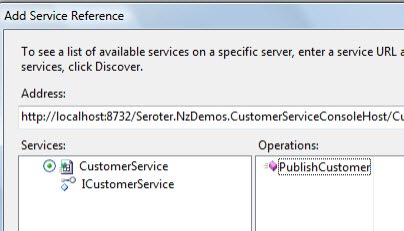
    Next, I added a Service Reference to my project and pointed to my target service which has an operation called PublishCustomer.

    2011.4.4wf04

    After this I built my project to make sure that the Workflow Service activities are properly generated.  Sure enough, when I open the .xamlx file that represents my Workflow Service, I see the customer activities in the Visual Studio toolbox.

    2011.4.4wf05

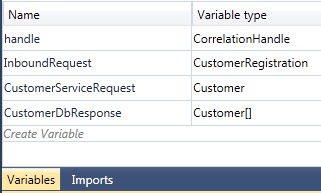
    This service is an asynchronous, one-way service, so I removed the “Receive and Send Reply” activities and replaced it with a single Receive activity.  But, what about my workflow variables?  Let’s create the variables that my Workflow Service needs.  The InboundRequest variable points to a WCF data contract that I added to the project.  The CustomerServiceRequest variable refers to the Customer object generated by my WCF service reference.  Finally, the CustomerDbResponse holds an array of the Customer object generated by the Adapter Service Reference.

    2011.4.4wf06

    With all that in place, let’s flesh out the workflow.  The initial Receive activity has an operation called PublishRegistration and uses the InboundRequest variable.

    2011.4.4wf07

    Next up, I have the custom Workflow activity called SelectActivity.  This is the one generated by the database reference.  It has a series of properties including which columns to bring back (I chose all columns), any query parameters (e.g. a “where” clause) and which variable to put the results in (the CustomerDbResponse).

    2011.4.4wf08

    Now I’m ready to start building the request message for the target service.  In used an Assign shape to instantiate the CustomerServiceRequest variable.  Then I dragged the Mapper activity that is available if you have AppFabric Connect installed.

    2011.4.4wf09

    When then activity is dropped onto the Workflow surface, we get prompted for what “types” represent the source and destination of the map.  The source type is the customer registration that the Workflow initially receives, and the destination is the customer object sent to target service.  Now I can view, edit and save the map between these two data types. The Mapper activity comes in handy when you have a significant number of values to map from a source to destination variable and don’t want to have 45 Assign shapes stuffed into the workflow.

    2011.4.4wf10

    Recall that I want to see if this customer is already known to us.  If they are not, then there are no results from my database query.  To prevent any errors from trying to access a database result that doesn’t exist, I added an If activity that looks to see if there were results from our database query.

    2011.4.4wf11

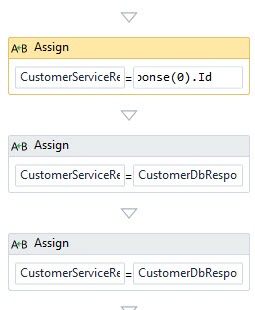
    Within the Then branch, I extract the values from the first result of the database query.  This done through a series of Assign shapes which access the “0” index of the database customer array.

    2011.4.4wf12

    Finally, outside of the previous If block, I added a Persist shape (to protect me against downstream service failures and allow retries from Windows Server AppFabric) and finally, the custom PublishCustomer activity that was created by our WCF service reference.

    2011.4.4wf13

    The result?  A pretty clean Workflow that can be invoked as a WCF service.  Instead of using BizTalk for scenarios like this, Workflow Services provide a simpler, more lightweight means for doing simple data enrichment solutions.  By adding AppFabric Connect and the Mapper activity, in addition to the Persist capability supported by Windows Server AppFabric, you get yourself a pretty viable enterprise solution.

    [UPDATE: You can now download the code for this example via this new blog post]

  • Interview Series: Four Questions With … Steef-Jan Wiggers

    Greetings and welcome to my 28th interview with a thought leader in the “connected technology” domain.  This month, I’ve wrangled Steef-Jan Wiggers into participating in this little carnival of questions.  Steef-Jan is a new Microsoft MVP, blogger, obsessive participant on the MSDN help forums, and an all around good fellow.

    Steef-Jan and I have joined forces here at the Microsoft MVP Summit, so let’s see if I can get him to break his NDA and ruin his life.

    Q: Tell us about a recent integration project that seemed simple at first, but was more complex when you had to actually build it.

    A: Two months ago I embarked on an integration project that is still in progress. It involved messaging with external parties to support a process for taxi drivers applying for personalized card to be used in a board computer in a taxi (in fact each taxi that is driving in the Netherland will have one by 1th of October 2011). The board computer registers resting/driving time, which is important for safety regulations and so on. There is messaging involved using certificates for signing and verifying messages to and from these parties. Working with BizTalk and certificates is according to MSDN documentation pretty straight forward with supported algorithms, but project demanded SHA-256 encryption which is not supported out-of-the box in BizTalk. This made it less straight forward and it would require some kind of customization involving either custom coding throughout or third party products in combination with some custom coding or third party product to be put in and configured appropriately. What it made it more complex was that a Hardware Security Module (HSM) from nCipher was involved as well that contained the private keys. After some debate between project members we decided to choose Chilkat component that supported SHA-256 signing and verifying of messages and incorporated that component with some custom coding in a custom pipeline. Reasoning behind this was that besides the signing and verifying we also had to get access to the HSM through appropriate cryptographic provider. So what seemed simple at first was hard to build and configure in the end. Though working with a security consultant with knowledge of the algorithms, chilkat, coding and HSM helped a lot to have it ready on time.

    Q: Your blog has a recent post about leveraging BizTalk’s WCF-SQL adapter to call SQL Server stored procedures.  What are you decision criteria for how to best communicate with a database from BizTalk?  Do you ever write database access code to invoke from an orchestration, use database functoids in maps, or do you always leverage adapters?

    A: When one want to communicate with a database. One has to look at requirements first and consider some of the factors like manipulating data directly in a table (which a lot of database administrators are not fond of) or applying logic on transaction you want to perform and whether or not you want to customize all of that. My view on this matter is that best choice would be to let BizTalk do messaging, orchestration part (what is it is good at) and let SQL Server do its part (storing data, manipulating data by applying some logic). It is about applying the principle of separation of concerns. So bringing that to level of communication it can best be leveraged by using the available WCF-SQL adapter, bacause this way you separate concern as well. The WCF-SQL adapter is responsible for communication with the database. So the best choice for this from a BizTalk perspective, because it is optimized for it and a developer/administrator only has to do configuring the adapter (communication). By selecting the table or stored-procedure or other functionality you want to use through the adapter one doesn’t has to build any custom access code or maintain it. It saves money and time and functionality you get when having BizTalk in your organization. Basically building access code yourself or using functoids is not option.

    Q: What features from BizTalk would have to be available in Windows Server AppFabric for you to use it in a scenario that you would typically use BizTalk for?  What would have to be added to Windows Azure AppFabric?

    A: I consider messaging capabilities in heterogeneous environments through using adapters something that should be available for Windows Server AppFabric. One can use of WCF as technology for communication within Windows Server AppFabric, but it would also be nice if you could use for instance the FILE or FTP adapter within Windows Workflow services. As for Windows Azure AppFabric I consider features like BAM, BRE. We will see this year in Windows Azure AppFabric an integration part (as a CTP) that will provide common BizTalk Server integration capabilities (e.g. pipeline, transforms, adapters) on Windows Azure. Besides the integration capabilities it will also deliver higher level business user enablement capabilities such as Business Activity Monitoring and Rules, as well as self-service trading partner community portal and provisioning of business-to-business pipelines. So a lot of BizTalk features will also move to the cloud.

    Q [stupid question]: More and more it seems that we are sharing our desktops in web conferences or presenting in conference rooms.  This gives the audience a very intimate look into the applications on your machine, mail in your Inbox, and files on your desktop.  What are some things you can do to surprise people who are taking a sneak peek at your computer during a presentation?  I’m thinking of scary-clown desktop wallpaper, fake email messages about people in the room or a visible Word document named “Toilet Checklist.docx”.  How about you?

    A: I would put a fake TweetDeck as wallpaper for my desk top containing all kinds of funny quotes, strange messages and bizarre comments. Or you could have an animated mouse running on desktop to distract the audience.


    Thanks Steef-Jan.  The Microsoft MVP program is better with folks like you in it.

  • 2010 Year in Review

    I learned a lot this year and I thought I’d take a moment to share some of my favorite blog posts, books and newly discovered blogs.

    Besides continuing to play with BizTalk Server, I also dug deep into Windows Server AppFabric, Microsoft StreamInsight, Windows Azure, Salesforce.com, Amazon AWS, Microsoft Dynamics CRM and enterprise architecture.  I learned some of those technologies for my last book, some was for work, and some was for personal education.  This diversity was probably evident in the types of blog posts I wrote this year.  Some of my most popular, or favorite posts this year were:

    While I find that I use Twitter (@rseroter) instead of blog posts to share interesting links, I still consider blogs to be the best long-form source of information.  Here are a few that I either discovered or followed closer this year:

    I tried to keep up a decent pace of technical and non-technical book reading this year and liked these the most:

    I somehow had a popular year on this blog with 125k+ visits and really appreciate each of you taking the time to read my musings.  I hope we can continue to learn together in 2011.

  • Lesson Learned: WCF Routing Service and the BasicHttpBinding

    Two weeks before submitting the final copy of my latest book, I reran all my chapter demonstrations that had been built during the year.  Since many demos were written with beta versions of products, I figured I should be smart and verify that everything was fine with the most recent releases.  But alas, everything was not fine.

    The demo for my Chapter 8 on content based routing (which can mostly be read online at the Packt site) all of a sudden wouldn’t run.  This demo uses the WCF Routing Service to call Workflow Services which sit in front of LOB system services.  When I ran my demo using the final version of Windows Server AppFabric as the host, I got this dumpster-fire of an error from the Routing Service:

    An unexpected failure occurred. Applications should not attempt to handle this error. For diagnostic purposes, this English message is associated with the failure: ‘Shouldn’t allocate SessionChannels if session-less and impersonating’.

    Now, anytime that a framework error returns zero results from various search engines, you KNOW you are in faaaantastic shape.  After spending hours fiddling with directory permissions, IIS/AppFabric settings and consulting a shaman, I decided to switch WCF bindings and see if that helped.  Workflow Services don’t make binding changes particularly easy (from what I’ve seen; your mileage may vary), so I used a protocol mapping section to flip the default Workflow Service binding from BasicHttpBinding to WsHttpBinding and then also switched the Routing Service to use WsHttpBinding.

    <protocolMapping>
          <add scheme="http" binding="wsHttpBinding"/>
    </protocolMapping>
    

    Voila! It worked.  So, I confidently (and erroneously) added a small block of text in the book chapter telling you that problems with the Routing Service and BasicHttp can be avoided by doing the protocol mapping and using WsHttp in the Routing Service.  I was wrong.

    Once the book went to press, I had some time to rebuild a similar solution from scratch using the BasicHttpBinding.  Naturally, it worked perfectly fine.  So, I went line by line through both solutions and discovered that the Routing Service in my book demo had the following line in the web.config file:

    <serviceHostingEnvironment aspNetCompatibilityEnabled="true" multipleSiteBindingsEnabled="true" />
    

    If I removed the aspNetCompatibilityEnabled property, my solution worked fine.  You can read more about this particular setting here.  What  is interesting is that if I purposely ADD this element to the configuration files of the Workflow Services, I don’t get any errors.  It only seems to cause grief for the Routing Service.  I’m not sure how it got into my configuration file in the first place, but I’m reviewing security footage to see if the dog is to blame.  Still not sure why this worked with the beta of Server AppFabric though.

    So, you’d never hit the above error if you used WsHttpBindings in your Workflow Services and upstream Routing Service, but if you do choose to use the BasicHttpBinding binding for your Routing Service, for all that is holy, please remove that configuration setting.