Category: Windows Azure

  • Sending Messages to Azure AppFabric Service Bus Topics From Iron Foundry

    I recently took a look at Iron Foundry and liked what I found.  Let’s take a bit of a deeper look into how to deploy Iron Foundry .NET solutions that reference additional components.  Specifically, I’ll show you how to use the new Windows Azure AppFabric brokered messaging to reliably send messages from Iron Foundry to an on-premises application.

    The Azure AppFabric v1.5 release contains useful Service Bus capabilities for durable messaging communication through the use of Queues and Topics. The Service Bus still has the Relay Service which is great for invoking services through a cloud relay, but the asynchronous communication through the Relay Service isn’t durable.  Queues and Topics now let you send messages to one or many subscribers and have stronger guarantees of delivery.

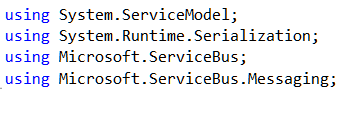
    An Iron Foundry application is just a standard .NET web application.  So, I’ll start with a blank ASP.NET web application and use old-school Web Forms instead of MVC. We need a reference to the Microsoft.ServiceBus.dll that comes with Azure AppFabric v1.5.  With that reference added, I added a new Web Form and included the necessary “using” statements.
    2011.12.23ironfoundry01

    I then built a very simple UI on the Web Form that takes in a handful of values that will be sent to the on-premises subscriber(s) through the Service Bus. Before creating the code that sends a message to a Topic, I defined an “Order” object that represents the data being sent to the topic. This object sits in a shared assembly used by this application that sends the message, and another application that receives a message.

    [DataContract]
        public class Order
        {
            [DataMember]
            public string Id { get; set; }
            [DataMember]
            public string ProdId { get; set; }
            [DataMember]
            public string Quantity { get; set; }
            [DataMember]
            public string Category { get; set; }
            [DataMember]
            public string CustomerId { get; set; }
        }
    

    The “submit” button on the Web Form triggers a click event that contains a flurry of activities.  At the beginning of that click handler, I defined some variables that will be used throughout.

    //define my personal namespace
    string sbNamespace = "richardseroter";
    //issuer name and key
    string issuer = "MY ISSUER";
    string key = "MY PRIVATE KEY";
    
    //set the name of the Topic to post to
    string topicName = "OrderTopic";
    //define a variable that holds messages for the user
    string outputMessage = "result: ";
    

    Next I defined a TokenProvider (to authenticate to my Topic) and a NamespaceManager (which drives most of the activities with the Service Bus).

    //create namespace manager
    TokenProvider tp = TokenProvider.CreateSharedSecretTokenProvider(issuer, key);
    Uri sbUri = ServiceBusEnvironment.CreateServiceUri("sb", sbNamespace, string.Empty);
    NamespaceManager nsm = new NamespaceManager(sbUri, tp);
    

    Now we’re ready to either create a Topic or reference an existing one. If the Topic does NOT exist, then I went ahead and created it, along with two subscriptions.

    //create or retrieve topic
    bool doesExist = nsm.TopicExists(topicName);
    
    if (doesExist == false)
       {
          //topic doesn't exist yet, so create it
          nsm.CreateTopic(topicName);
    
          //create two subscriptions
    
          //create subscription for just messages for Electronics
          SqlFilter eFilter = new SqlFilter("ProductCategory = 'Electronics'");
          nsm.CreateSubscription(topicName, "ElecFilter", eFilter);
    
          //create subscription for just messages for Clothing
          SqlFilter eFilter2 = new SqlFilter("ProductCategory = 'Clothing'");
          nsm.CreateSubscription(topicName, "ClothingFilter", eFilter2);
    
          outputMessage += "Topic/subscription does not exist and was created; ";
        }
    

    At this point we either know that a topic exists, or we created one.  Next, I created a MessageSender which will actually send a message to the Topic.

    //create objects needed to send message to topic
     MessagingFactory factory = MessagingFactory.Create(sbUri, tp);
     MessageSender orderSender = factory.CreateMessageSender(topicName);
    

    We’re now ready to create the actual data object that we send to the Topic.  Here I referenced the Order object we created earlier.  Then I wrapped that Order in the BrokeredMessage object.  This object has a property bag that is used for routing.  I’ve added a property called “ProductCategory” that our Topic subscription uses to make decisions on whether to deliver the message to the subscriber or not.

    //create order
    Order o = new Order();
    o.Id = txtOrderId.Text;
    o.ProdId = txtProdId.Text;
    o.CustomerId = txtCustomerId.Text;
    o.Category = txtCategory.Text;
    o.Quantity = txtQuantity.Text;
    
    //create brokered message object
    BrokeredMessage msg = new BrokeredMessage(o);
    //add properties used for routing
    msg.Properties["ProductCategory"] = o.Category;
    

    Finally, I send the message and write out the data to the screen for the user.

    //send it
    orderSender.Send(msg);
    
    outputMessage += "Message sent; ";
    lblOutput.Text = outputMessage;
    

    I decided to use the command line (Ruby-based) vmc tool to deploy this app to Iron Foundry.  So, I first published my website to a directory on the file system.  Then, I manually copied the Microsoft.ServiceBus.dll to the bin directory of the published site.  Let’s deploy! After logging into my production Iron Foundry account by targeting the api.gofoundry.net management endpoint, I executed a push command and instantly saw my web application move up to the cloud. It takes like 8 seconds from start to finish.

    2011.12.23ironfoundry02

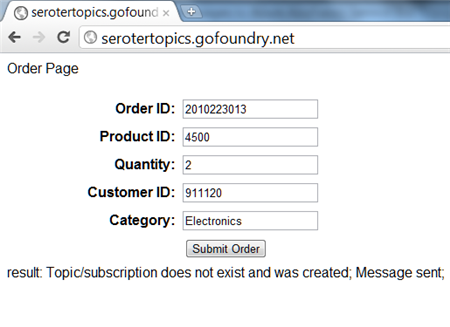
    My site is now online and I can visit it and submit a new order [note that this site isn’t online now, so don’t try and flood my machine with messages!].  When I click the submit button, I can see that a new Topic was created by this application and a message was sent.
    2011.12.23ironfoundry03

    Let’s confirm that we really have a new Topic with subscriptions. I can first confirm this through the Windows Azure Management Console.
    2011.12.23ironfoundry04

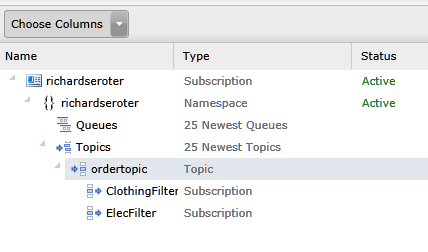
    To see more details, I can use the Service Bus Explorer tool which allows us to browse our Service Bus configuration.  When I launch it, I can see that I have a Topic with a pair of subscriptions and even what Filter I applied.

    2011.12.23ironfoundry05

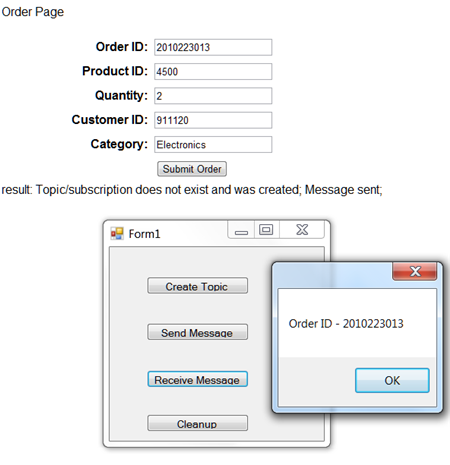
    I previously built a WinForm application that pulls data from an Azure AppFabric Service Bus Topic. When I click the “Receive Message” button, I pull a message from the Topic and we can see that it has the same Order ID as the message submitted from the website.
    2011.12.23ironfoundry06

    If I submit another message from the website, I see a different message because my Topic already exists and I’m simply reusing it.

    2011.12.23ironfoundry07

    Summary

    So what did we see here?  First, I proved that an ASP.NET web application that you want to deploy to the Iron Foundry (onsite or offsite) cloud looks just like any other ASP.NET web application.  I didn’t have to build it differently or do anything special. Secondly, we saw that I can easily use the Windows Azure AppFabric Service Bus to reliably share data between a cloud-hosted application and an on-premises application.

  • Interview Series: Four Questions With … Clemens Vasters

    Greetings and welcome to the 36th interview in my monthly series of chat with thought leaders in connected technologies. This month we have the pleasure of talking to Clemens Vasters who is Principal Technical Lead on Microsoft’s Windows Azure AppFabric team, blogger, speaker, Tweeter, and all around interesting fellow.  He is probably best known for writing the blockbuster book, BizTalk Server 2000: A Beginner’s Guide. Just kidding.  He’s probably best known as a very public face of Microsoft’s Azure team and someone who is instrumental in shaping Microsoft’s cloud and integration platform.

    Let’s see how he stands up to the rigor of Four Questions.

    Q: What principles of distributed systems do you think play an elevated role in cloud-driven software solutions? Where does “integrating with the cloud” introduce differences from “integrating within my data center”?

    A: I believe we need to first differentiate “the cloud” a bit to figure out what elevated concerns are. In a pure IaaS scenario where the customer is effectively renting VM space, the architectural differences between a self-contained  solution in the cloud and on-premises are commonly relatively small. That also explains why IaaS is doing pretty well right now – the workloads don’t have to change radically. That also means that if the app doesn’t scale in your own datacenter it also won’t scale in someone else’s; there’s no magic Pixie dust in the cloud. From an ops perspective, IaaS should be a seamless move if the customer is already running proper datacenter operations today. With that I mean that they are running their systems largely hands-off with nobody having to walk up to the physical box except for dealing with hardware failures.

    The term “self-contained solution” that I mentioned earlier is key here since that’s clearly not always the case. We’ve been preaching EAI for quite a while now and not all workloads will move into cloud environments at once – there will always be a need to bridge between cloud-based workloads and workloads that remain on-premises or workloads that are simply location-bound because that’s where the action is – think of an ATM or a cashier’s register in a restaurant or a check-in terminal at an airport. All these are parts of a system and if you move the respective backend workloads into the cloud your ways of wiring it all together will change somewhat since you now have the public Internet between your assets and the backend. That’s a challenge, but also a tremendous opportunity and that’s what I work on here at Microsoft.

    In PaaS scenarios that are explicitly taking advantage of cloud elasticity, availability, and reach – in which I include “bring your own PaaS” frameworks that are popping up here and there – the architectural differences are more pronounced. Some of these solutions deal with data or connections at very significant scale and that’s where you’re starting to hit the limits of quite a few enterprise infrastructure components. Large enterprises have some 100,000 employees (or more), which obviously first seems like a lot; looking deeper, an individual business solution in that enterprise is used by some fraction of that work-force, but the result is still a number that makes the eyes of salespeople shine. What’s easy to overlook is that that isn’t the interesting set of numbers for an enterprise that leverages IT as a competitive asset  – the more interesting one is how they can deeply engage with the 10+ million consumer customers they have. Once you’re building solutions for an audience of 10+ million people that you want to engage deeply, you’re starting to look differently at how you deal with data and whether you’re willing to hold that all in a single store or to subject records in that data store to a lock held by a transaction coordinator.  You also find that you can no longer take a comfy weekend to upgrade your systems – you run and you upgrade while you run and you don’t lose data while doing it. That’s quite a bit of a difference.

    Q: When building the Azure AppFabric Service Bus, what were some of the trickiest things to work out, from a technical perspective?

    A: There are a few really tricky bits and those are common across many cloud solutions: How do I optimize the use of system resources so that I can run a given target workload on a minimal set of machines to drive down cost? How do I make the system so robust that it self-heals from intermittent error conditions such as a downstream dependency going down? How do I manage shared state in the system? These are the three key questions. The latter is the eternal classic in architecture and the one you hear most noise about. The whole SQL/NoSQL debate is about where and how to hold shared state. Do you partition, do you hold it in a single place, do you shred it across machines, do you flush to disk or keep in memory, what do you cache and for how long, etc, etc. We’re employing a mix of approaches since there’s no single answer across all use-cases. Sometimes you need a query processor right by the data, sometimes you can do without. Sometimes you must have a single authoritative place for a bit of data and sometimes it’s ok to have multiple and even somewhat stale copies.

    I think what I learned most about while working on this here were the first two questions, though. Writing apps while being conscious about what it costs to run them is quite interesting and forces quite a bit of discipline. I/O code that isn’t fully asynchronous doesn’t pass code-review around here anymore. We made a cleanup pass right after shipping the first version of the service and subsequently dropped 33% of the VMs from each deployment with the next rollout while maintaining capacity. That gain was from eliminating all remaining cases of blocking I/O. The self-healing capabilities are probably the most interesting from an architectural perspective. I published a blog article about one of the patterns a while back [here]. The greatest insight here is that failures are just as much part of running the system as successes are and that there’s very little that your app cannot anticipate. If your backend database goes away you log that fact as an alert and probably prevent your system from hitting the database for a minute until the next retry, but your system stays up. Yes, you’ll fail transactions and you may fail (nicely) even back to the end-user, but you stay up. If you put a queue between the user and the database you can even contain that particular problem – albeit you then still need to be resilient against the queue not working.

    Q: The majority of documentation and evangelism of the AppFabric Service Bus has been targeted at developers and application architects. But for mature, risk-averse enterprises, there are other stakeholders like Operations and Information Security who have a big say in the introduction of a technology like this.  Can you give us a brief “Service Bus for Operations” and “Service Bus for Security Professionals” summary that addresses the salient points for those audiences?

    A: The Service Bus is squarely targeted at developers and architects at this time; that’s mostly a function of where we are in the cycle of building out the capabilities. For now we’re an “implementation detail” of apps that want to bet on the technology more than something that an IT Professional would take into their hands and wire something up without writing code or at least craft some config that requires white-box knowledge of the app. I expect that to change quite a bit over time and I expect that you’ll see some of that showing up in the next 12 months. When building apps you need to expect our components to fail just like any other, especially because there’s also quite a bit of stuff that can go wrong on the way. You may have no connectivity to Service Bus, for instance. What the app needs to have in its operational guidance documents is how to interpret these failures, what failure threshold triggers an alert (it’s rarely “1), and where to go (call Microsoft support with this number and with this data) when the failures indicate something entirely unexpected.

    From the security folks we see most concerns about us allowing connectivity into the datacenter with the Relay; for which we’re not doing anything that some other app couldn’t do, we’re just providing it as a capability to build on. If you allow outbound traffic out of a machine you are allowing responses to get back in. That traffic is scoped to the originating app holding the socket. If that app were to choose to leak out information it’d probably be overkill to use Service Bus – it’s much easier to do that by throwing documents on some obscure web site via HTTPS.  Service Bus traffic can be explicitly blocked and we use a dedicated TCP port range to make that simple and we also have headers on our HTTP tunneling traffic that are easy to spot and we won’t ever hide tunneling over HTTPS, so we designed this with such concerns in mind. If an enterprise wants to block Service Bus traffic completely that’s just a matter of telling the network edge systems.

    However, what we’re seeing more of is excitement in IT departments that ‘get it’ and understand that Service Bus can act as an external DMZ for them. We have a number of customers who are pulling internal services to the public network edge using Service Bus, which turns out to be a lot easier than doing that in their own infrastructure, even with full IT support. What helps there is our integration with the Access Control service that provides a security gate at the edge even for services that haven’t been built for public consumption, at all.

    Q [stupid question]: I’m of the opinion that cold scrambled eggs, or cold mashed potatoes are terrible.  Don’t get me started on room-temperature french fries. Similarly, I really enjoy a crisp, cold salad and find warm salads unappealing.  What foods or drinks have to be a certain temperature for you to truly enjoy them?

    A: I’m German. The only possible answer here is “beer”. There are some breweries here in the US that are trying to sell their terrible product by apparently successfully convincing consumers to drink their so called “beer” at a temperature that conveniently numbs down the consumer’s sense of taste first. It’s as super-cold as the Rockies and then also tastes like you’re licking a rock. In odd contrast with this, there are rumors about the structural lack of appropriate beer cooling on certain islands on the other side of the Atlantic…

    Thanks Clemens for participating! Great perspectives.

  • Interview Series: Four Questions With … Ryan CrawCour

    The summer is nearly over, but the “Four Questions” machine continues forward.  In this 34th interview with a “connected technologies” thought leader, we’re talking with Ryan CrawCour who is a solutions architect, virtual technology specialist for Microsoft in the Windows Azure space, popular speaker and user group organizer.

    Q: We’ve seen the recent (CTP) release of the Azure AppFabric Applications tooling.  What problem do you think that this is solving, and do you see this as being something that you would use to build composite applications on the Microsoft platform?

    A: Personally, I am very excited about the work the AppFabric team, in general, is doing. I have been using the AppFabric Applications CTP since the release and am impressed by just how easy and quick it is to build a composite application from a number of building blocks. Building components on the Windows Azure platform is fairly easy, but tying all the individual pieces together (Azure Compute, SQL Azure, Caching, ACS, Service Bus) is sometimes somewhat of a challenge. This is where the AppFabric Applications makes your life so much easier. You can take these individual bits and easily compose an application that you can deploy, manage and monitor as a single logical entity. This is powerful. When you then start looking to include on-premises assets in to your distributed applications in a hybrid architecture AppFabric Applications becomes even more powerful by allowing you to distribute applications between on-premises and the cloud. Wow. It was really amazing when I first saw the Composition Model at work. The tooling, like most Microsoft tools, is brilliant and takes all the guess work and difficult out of doing something which is actually quite complex. I definitely seeing this becoming a weapon in my arsenal. But shhhhh, don’t tell everyone how easy this is to do.

    Q: When building BizTalk Server solutions, where do you find the most security-related challenges?  Integrating with other line of business systems?  Dealing with web services?  Something else?

    A: Dealing with web services with BizTalk Server is easy. The WCF adapters make BizTalk a first class citizen in the web services world. Whatever you can do with WCF today, you can do with BizTalk Server through the power, flexibility and extensibility of WCF. So no, I don’t see dealing with web services as a challenge. I do however find integrating line of business systems a challenge at times. What most people do is simply create a single service account that has “god” rights in each system and then the middleware layer flows all integration through this single user account which has rights to do anything on either system. This makes troubleshooting and tracking of activity very difficult to do. You also lose the ability to see that user X in your CRM system initiated an invoice in your ERP system. Setting up and using Enterprise Single Sign On is the right way to do this, but I find it a lot of work and the process not very easy to follow the first few times. This is potentially the reason most people skip this and go with the easier option.

    Q: The current BizTalk Adapter Pack gives both BizTalk, WF and .NET solutions point-and-click access to SAP, Siebel, Oracle DBs, and SQL Server.  What additional adapters would you like to see added to that Pack?  How about to the BizTalk-specific collection of adapters?

    A: I was saddened to see the discontinuation of adapters for Microsoft Dynamics CRM and AX. I believe that the market is still there for specialized adapters for these systems. Even though they are part of the same product suite they don’t integrate natively and the connector that was recently released is not yet up to Enterprise integration capabilities. We really do need something in the Enterprise space that makes it easy to hook these products together. Sure, I can get at each of these systems through their service layer using WCF and some black magic wizardry but having specific adapters for these products that added value in addition to connectivity would certainly speed up integration.

    Q [stupid question]: You just finished up speaking at TechEd New Zealand which means that you now get to eagerly await attendee feedback.  Whenever someone writes something, presents or generally puts themselves out there, they look forward to hearing what people thought of it.  However, some feedback isn’t particular welcome.   For instance, I’d be creeped out by presentation feedback like “Great session … couldn’t stop staring at your tight pants!” or disheartened by book review like “I have read German fairy tales with more understandable content, and I don’t speak German.” What would be the worst type of comments that you could get as a result of your TechEd session?

    A: Personally I’d be honored that someone took that much interest in my choice of fashion, especially given my discerning taste in clothing. I think something like “Perhaps the presenter should pull up his zipper because being able to read his brand of underwear from the front row is somewhat distracting”. Yup, that would do it. I’d panic wondering if it was laundry day and I had been forced to wear my Sunday (holey) pants. But seriously, feedback on anything I am doing for the community, like presenting at events, is always valuable no matter what. It allows you to improve for the next time.

    I half wonder if I enjoy these interviews more than anyone else, but hopefully you all get something good out of them as well!

  • Interview Series: Four Questions With … Buck Woody

    Hello and welcome to my 30th interview with a thought leader in the “connected technology” space.  This month, I chased down Buck Woody who is a Senior Technology Specialist at Microsoft, database expert and now a cloud guru, regular blogger, manic Tweeter, and all-around interesting chap.

    Let’s jump in.

    Q: High-availability in cloud solutions has been a hot topic lately. When it comes to PaaS solutions like Windows Azure, what should developers and architects do to ensure that a solution remains highly available?

    A: Many of the concepts here  are from the mainframe days I started with. I think the difference with distributed computing (I don’t like the term "cloud" 🙂 ), and specifically with Windows Azure is that it starts with the code. It’s literally a platform that runs code – not only is the hardware abstracted like an Infrastructure-as-a-Service (Iaas) or other VM hosting provider, but so is the operating system and even the runtime environment (such as .NET, C++ or Java). This puts the start of the problem-solving cycle at the software engineering level – and that’s new for companies.

    Another interesting facet is the cost aspect of distributed computing (DC). In a DC world, changing the sorting algorithm to a better one in code can literally save thousands of cycles (and dollars) a year. We’ve always wanted to write fast, solid code, but now that effort has a very direct economic reward.

    Q: Some objections to the hype around cloud computing claim that "cloud" is just a renaming of previously established paradigms (e.g. application hosting). Which aspects of Windows Azure (and cloud computing in general) do you consider to be truly novel and innovative?

    A: Most computing paradigms have a computing element, storage and management, and so on. All that is still available in any DC provider, including Windows Azure. The feature in Windows Azure that is being used in new ways and sort of sets it apart is the Application Fabric. This feature opens up multiple access and authentication paradigms, has "Caching as a Service", a Service Bus component that opens up internal applications and data to DC apps, and more. I think it’s truly something that people will be impressed with when they start using it.

    Another thing that is new is that with Windows Azure you can use any or all of these components separately or together. We have folks coding up apps that only have a computing function, which is called by on-premise systems when they need more capacity. Others are using only storage, and still others are using the Application Fabric as a Service Bus to transfer program results from their internal systems to partners or even other parts of their own company. And of course we have lots of full-fledged applications running all of these parts together.

    Q: Enterprise customers may have (realistic or unfounded) concerns about cloud security, performance and functionality.  As of today, what scenarios would you encourage a customer to build an on-premise solution vs. one in the cloud?

    A: Everyone is completely correct to be concerned about security in the cloud – or anywhere else for that matter. Security is in layers, from the data elements to the code, the facilities, procedures, lots of places. I tend not to store any private data in a DC, but rather keep the sensitive elements on-premises. Normally the architectures we help customers with involves using the Windows Azure Application Fabric to transfer either the sensitive data kept on site to the ultimate destination using encryption and secure channels, or even better, just the result the application is looking for. In one application the credit-card processing portion of a web app was retained by the company, and the rest of the code and data was stored in Azure. Credit card data was sent from the application to the internal system directly; the internal app then sent an "approved" or "not approved" to Azure.

    The point is that security is something that should be a collaboration between facilities, platform provider, and customer code. I’ve got lots of information on that in my Windows Azure Learning Plan on my blog.

    Q [stupid question]: I’m about to publish my 3rd book and whenever my non-technical friends or family find out, they ask the title and upon hearing it, give me a glazed look and a "oh, that’s nice" response.  I’ve decided that I should answer this question differently.  Now if friends ask what my new book is about, I tell them that it’s an erotic vampire thriller about computer programmers in Malaysia.  Working title is "Love Bytes".  If you were to write a non-technical book, what would it be about?

    A: I actually am working on a fiction book. I’ve written five books on technical subjects that have been published, but fiction is another thing entirely. Here are few cool titles for fiction books by IT folks – not sure if someone hasn’t already come up with these (I’m typing this in an airplane with no web 😦 )

    • Haskel and grep’l
    • Little Red Hat Writing Hadoop
    • Jack and the JavaBean Stalk
    • The boy who cried Wolfram Alpha
    • The Princess and the N-P Problem
    • Peter Pan Principle

    Thanks for being such a good sport, Buck.

  • Exposing On-Premise SQL Server Tables As OData Through Windows Azure AppFabric

    Have you played with OData much yet?  The OData protocol allows you to interact with data resources through a RESTful API.  But what if you want to securely expose that OData feed out to external parties?  In this post, I’ll show you the very simple steps for exposing an OData feed through Windows Azure AppFabric.

    • Create ADO.NET Entity Data Model for Target Database.  In a new VS.NET WCF Service project, right click the project and choose to add a new ADO.NET Entity Data Model.  Choose to generate the model from a database.  I’ve selected two tables from my database and generated a model.

      2011.3.23odata1

      2011.3.23odata2

      2011.3.23odata3

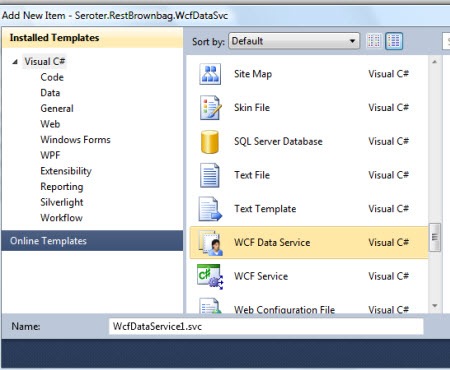
    • Create a new WCF Data Service.  Right-click the Visual Studio project and add a new WCF Data Service.
      2011.3.23odata4
    • Update the WCF Data Service to Use the Entity Model.  The WCF Data Service template has a placeholder where we add the generated object that inherited from ObjectContext.  Then, I uncommented and edited the “config.SetEntitySetAccessRule” line to allow Read on all entities.
      2011.3.23odata6
    • View the Current Service.  Just to make sure everything is configured right so far, I viewed the current service and hit my “/Customers” resource and saw all the customer records from that table.
      2011.3.23odata7
    • Update the web.config to Expose via Azure AppFabric.  The service thus far has not forced me to add anything to my service configuration file.  Now, however, we need to add the appropriate AppFabric Relay bindings so that a trusted partner could securely query my on-premises database in real-time.

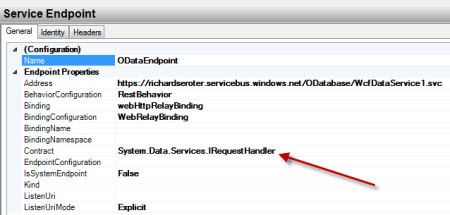
      I added an explicit service to my configuration as none was there before.  I then added my cloud endpoint that leverages the System.Data.Services.IRequestHandler interface. I then created a cloud relay binding configuration that set the relayClientAuthenticationType to None (so that clients do not have to authenticate – it’s a demo, give me a break!).  Finally, I added an endpoint behavior that had both the webHttp behavior element (to support REST operations) and the transportClientEndpointBehavior which identifies which credentials the service uses to bind to the cloud.  I’m using the SharedSecret credential type and providing my Service Bus issuer and password.
      2011.3.23odata8
    • Connect to the Cloud.  At this point, I can connect my service to the cloud.  In this simple case, I right-clicked my OData service in Visual Studio.NET and chose View in Browser.  When this page successfully loads, it indicates that I’ve bound to my cloud namespace.  I then plugged in my cloud address, and sure enough, was able to query my on-premises database through the OData protocol.
      2011.3.23odata9

    That was easy!  If you’d like to learn more about OData, check out the OData site.  Most useful is the page on how to manipulate URIs to interact with the data, and also the live instance of the Northwind database that you can mess with.  This is yet another way that the innovative Azure AppFabric Service Bus lets us leverage data where it rests and allow select internet-connected partners access it.

  • Interview Series: Four Questions With … Rick Garibay

    Welcome to the 27th interview in my series with thought leaders in the “connected systems” space.  This month, we’re sitting down with Rick Garibay who is GM of the Connected Systems group at Neudesic, blogger, Microsoft MVP and rabid tweeter.

    Let’s jump in.

    Q: Lately you’ve been evangelizing Windows Server AppFabric, WF and other new or updated technologies. What are the common questions you get from people, and when do you suspect that adoption of this newer crop of app plat technologies will really take hold?

    A: I think our space has seen two major disruptions over the last couple of years. The first is the shift in Microsoft’s middleware strategy, most tangibly around new investments in Windows Server AppFabric and Azure AppFabric as a compliment to BizTalk Server and the second is the public availability of Windows Azure, making their PaaS offering a reality in a truly integrated manner.

    I think that business leaders are trying to understand how cloud can really help them, so there is a lot of education around the possibilities and helping customers find the right chemistry and psychology for taking advantage of Platform as a Service offerings from providers like Microsoft and Amazon. At the same time, developers and architects I talk to are most interested in learning about what the capabilities and workloads are within AppFabric (which I define as a unified platform for building composite apps on-premise and in the cloud as opposed to focusing too much on Server versus Azure) how they differ from BizTalk, where the overlap is, etc. BizTalk has always been somewhat of a niche product, and BizTalk developers very deeply understand modeling and messaging so the transition to AppFabric/WCF/WF is very natural.

    On the other hand, WCF has been publically available since late 2006, but it’s really only in the last two years or so that I’ve seen developers really embracing it. I still see a lot of non-WCF services out there. WCF and WF both somewhat overshot the market which is common with new technologies that provide far more capabilities that current customers can fully digest or put to use. Value added investments like WCF Data Services, RIA Services, exemplary support for REST and a much more robust Workflow Services story not only showcase what WCF is capable of but have gone a long way in getting this tremendous technology into developer hands who previously may have only scratched the surface or been somewhat intimidated by it in the past. With WF written from the ground up, I think it has much more potential, but the adoption of model-driven development in general, outside of the CSD community is still slow.

    In terms of adoption, I think that Microsoft learned a lot about the space from BizTalk and by really listening to customers. The middleware space is so much different a decade later. The primary objective of Server AppFabric is developer and ops productivity and bringing WCF and WF Services into the mainstream as part of a unified app plat/middleware platform that remains committed to model-driven development, be it declarative or graphical in nature. A big part of that strategy is the simplification of things like hosting, monitoring and persistence while making tremendous strides in modeling technologies like WF and Entity Framework. I get a lot of “Oh wow!” moments when I show how easy it is to package a WF service from Visual Studio, import it into Server AppFabric and set up persistence and tracking with a few simple clicks. It gets even better when ops folks see how easily they can manage and troubleshoot Server AppFabric apps post deployment.

    It’s still early, but I remember how exciting it was when Windows Server 2003 and Vista shipped natively with .NET (as opposed to a separate install), and that was really an inflection point for .NET adoption. I suspect the same will be true when Server AppFabric just ships as a feature you turn on in Windows Server.

    Q: SOA was dead, now it’s back.  How do you think that the most recent MS products (e.g. WF, WCF, Server AppFabric, Windows Azure) support SOA key concepts and help organization become more service oriented?  in what cases are any of these products LESS supportive of true SOA?

    A: You read that report too, huh? 🙂

    In my opinion, the intersection of the two disruptions I mentioned earlier is the enablement of hybrid composite solutions that blur the lines between the traditional on-prem data center and the cloud. Microsoft’s commitment to SOA and model-driven development via the Oslo vision manifested itself into many of the shipping vehicles discussed above and I think that collectively, they allow us to really challenge the way we think about on-premise versus cloud. As a result I think that Microsoft customers today have a unique opportunity to really take a look at what assets are running on premise and/or traditional hosting providers and extend their enterprise presence by identifying the right, high value sweet spots and moving those workloads to Azure Compute, Data or SQL Azure.

    In order to enable these kinds of hybrid solutions, companies need to have a certain level of maturity in how they think about application design and service composition, and SOA is the lynchpin. Ironically, Gartner recently published a report entitled “The Lazerus Effect” which posits that SOA is very much alive. With budgets slowly resuming pre-survival-mode levels, organizations are again funding SOA initiatives, but the demand for agility and quicker time-to-value is going to require a more iterative approach which I think positions the current stack very well.

    To the last part of the question, SOA requires discipline, and I think that often the simplicity of the tooling can be a liability. We’ve seen this in JBOWS un-architectures where web services are scattered across the enterprise with virtually no discoverability, governance or reuse (because they are effortless to create) resulting in highly complex and fragile systems, but this is more of an educational dilemma than a gap in the platform. I also think that how we think about service-orientation has changed somewhat by the proliferation of REST. The fact that you can expose an entity model as an OData service with a single declaration certainly challenges some of the percepts of SOA but makes up for that with amazing agility and time-to-value.

    Q: What’s on your personal learning plan for 2011?  Where do you think the focus of a “connected systems” technologist should be?

    A: I think this is a really exciting time for connected systems because there has never been a more comprehensive, unified platform for building distributed application and the ability to really choose the right tool for the job at hand. I see the connected systems technologist as a “generalizing specialist”, broad across the stack, including BizTalk, and AppFabric (WCF/WF Services/Service Bus)  while wisely choosing the right areas to go deep and iterating as the market demands. Everyone’s “T” shape will be different, but I think building that breadth across the crest will be key.

    I also think that understanding and getting hands on with cloud offerings from Microsoft and Amazon should be added to the mix with an eye on hybrid architectures.

    Personally, I’m very interested in CEP and StreamInsight and plan on diving deep (your book is on my reading list) this year as well as continuing to grow my WF and AppFabric skills. The new BizTalk Adapter Pack is also on my list as I really consider it a flagship extension to AppFabric.

    I’ve also started studying Ruby as a hobby as its been too long since I’ve learned a new language.

    Q [stupid question]: I find it amusing when people start off a sentence with a counter-productive or downright scary disclaimer.  For instance, if someone at work starts off with “This will probably be the stupidest thing anyone has ever said, but …” you can guess that nothing brilliant will follow.  Other examples include “Now, I’m not a racist, but …” or “I would never eat my own children, however …” or “I don’t condone punching horses, but that said …”.  Tell us some terrible ways to start a sentence that would put your audience in a state of unrest.

    A: When I hear someone say “I know this isn’t the cleanest way to do it but…” I usually cringe.

    Thanks Rick!  Hopefully the upcoming MVP Summit gives us all some additional motivation to crank out interesting blog posts on connected systems topics.

  • 2010 Year in Review

    I learned a lot this year and I thought I’d take a moment to share some of my favorite blog posts, books and newly discovered blogs.

    Besides continuing to play with BizTalk Server, I also dug deep into Windows Server AppFabric, Microsoft StreamInsight, Windows Azure, Salesforce.com, Amazon AWS, Microsoft Dynamics CRM and enterprise architecture.  I learned some of those technologies for my last book, some was for work, and some was for personal education.  This diversity was probably evident in the types of blog posts I wrote this year.  Some of my most popular, or favorite posts this year were:

    While I find that I use Twitter (@rseroter) instead of blog posts to share interesting links, I still consider blogs to be the best long-form source of information.  Here are a few that I either discovered or followed closer this year:

    I tried to keep up a decent pace of technical and non-technical book reading this year and liked these the most:

    I somehow had a popular year on this blog with 125k+ visits and really appreciate each of you taking the time to read my musings.  I hope we can continue to learn together in 2011.

  • My Co-Authors Interviewed on Microsoft endpoint.tv

    You want this book!

    -Ron Jacobs, Microsoft

    Ron Jacobs (blog, twitter) runs the Channel9 show called endpoint.tv and he just interviewed Ewan Fairweather and Rama Ramani who were co-authors on my book, Applied Architecture Patterns on the Microsoft Platform.  I’m thrilled that the book has gotten positive reviews and seems to fill a gap in the offerings of traditional technology books.

    Ron made a few key observations during this interview:

    • As people specialize, they lose perspective of other ways to solve similar problems, and this book helps developers and architects “fill the gaps.”
    • Ron found the dimensions our “Decision Framework” to be novel and of critical importance when evaluating technology choices.  Specifically, evaluating a candidate architecture against design, development, operational and organizational factors can lead you down a different path than you might have expected.  Ron specifically liked the “organizational direction” facet which can be overlooked but should play a key role in technology choice.
    • He found the technology primers and full examples of such a wide range of technologies (WCF, WF, Server AppFabric, Windows Azure, BizTalk, SQL Server, StreamInsight) to be among the unique aspects of the book.
    • Ron liked how we actually addressed candidate architectures instead of jumping directly into a demonstration of a “best fit” solution.

    Have you read the book yet?  If so, I’d love to hear your (good or bad) feedback.  If not, Christmas is right around the corner, and what better way to spend the holidays than curling up with a beefy technology book?

  • Interview Series: Four Questions With … Brent Stineman

    Greetings and welcome to the 25th interview in my series of chats with thought leaders in connected systems.  This month, I’ve wrangled Brent Stineman who works for consulting company Sogeti as a manager and lead for their Cloud Services practice,  is one of the first MVPs for Windows Azure, a blogger, and borderline excessive Tweeter.  I wanted to talk with Brent to get his thoughts on the recently wrapped up mini-PDC and the cloud announcements that came forth.  Let’s jump in.

    Q: Like me, you were watching some of the live PDC 2010 feeds and keeping track of key announcements.  Of all the news we heard, what do you think was the most significant announcement? Also, which breakout session did you find the most enlightening and why?

    A: I’ll take the second part first. “Inside Windows Azure” by Mark Russinovich was the session I found the most value in. it removed much of the mystery of what goes on inside the black box of windows Azure. And IMHO, having a good understanding of that will go a long way towards helping people build better Azure services. However, the most significant announcement to me was from Clemens Vasters’ future of Azure AppFabric presentation. I’ve long been a supporter of the Azure AppFabric and its nice to see they’re taking steps to give us broader uses as well as possibly making its service bus component more financially viable.

    Q: Most of my cloud-related blog posts get less traffic than other topics.  Either my writing inexplicably deteriorates on those posts, or many readers just aren’t dealing with cloud on a day-to-day basis.  Where do you see the technology community when it comes to awareness of cloud technologies, and, actually doing production deployments using SaaS, PaaS or IaaS technology?  What do you think the tipping point will be for mass adoption?

    A: There’s still many concerns as well as confusion about cloud computing. I am amazed by the amount of mis-information I encounter when talking with clients. But admittedly, we’re still early in the birth and subsequent adoption of this platform. While some are investing heavily in production usage, I see more folks simply testing the waters. To that end, I’m encouraging them to consider initial implementations outside of just production systems. Just like we did with virtualization, we can start exploring the cloud with development and testing solutions and once we grow more comfortable, move to production. Unfortunately, there won’t be a single tipping point. Each organization will have to find their own equilibrium between on-premises and cloud hosted resources.

    Q: Let’s say that in five years, many of the current, lingering fears about cloud (e.g. security, reliability, performance) dim and cloud platforms simply become another viable choice for most new solutions.  What do you see the role of on-premises software playing?  When will organizations still choose on-premise software/infrastructure over the cloud, even when cloud options exist?

    A: The holy grail for me is that eventually applications can move seamlessly between on-premises and the cloud. I believe we’re already seeing the foundation blocks for this being laid today. However, even when that happens, we’ll see times when performance or data protection needs will require applications to remain on-premises. Issues around bandwidth and network latency will unfortunately be with us for some time to come.

    Q [stupid question]: I recently initiated a game at the office where we share something about ourselves that other may find shocking, or at least mildly surprising.  My “fact” was that I’ve never actually drank a cup of coffee.  One of my co-workers shared the fact that he was a childhood acquaintance with two central figures in presidential assassinations (Hinkley and Jack Ruby).  He’s the current winner.  Brent, tell us something about you that may shock or surprise us.

    A: I have never watched a full episode of either “Seinfeld”  or “Friends”. 10 minutes of either show was about all I could handle. I’m deathly allergic to anything that is “in fashion”. This also likely explains why I break out in a rash whenever I handle an Apple product. 🙂

    Thanks Brent. The cloud is really a critical area to understand for today’s architect and developer. Keep an eye on Brent’s blog for more on the topic.

  • Comparing AWS SimpleDB and Windows Azure Table Storage – Part II

    In my last post, I took an initial look at the Amazon Web Services (AWS) SimpleDB product and compared it to the Microsoft Windows Azure Table storage.  I showed that both solutions are relatively similar in that they embrace a loosely typed, flexible storage strategy and both provide a bit of developer tooling.  In that post, I walked through a demonstration of SimpleDB using the AWS SDK for .NET.

    In this post, I’ll perform a quick demonstration of the Windows Azure Table storage product and then conclude with a few thoughts on the two solution offerings.  Let’s get started.

    Windows Azure Table Storage

    First, I’m going to define a .NET object that represents the entity being stored in the Azure Table storage.  Remember that, as pointed out in the previous post, the Azure Table storage is schema-less so this new .NET object is just a representation used for creating and querying the Azure Table.   It has no bearing on the underlying Azure Table structure. However, accessing the Table through a typed object differs from the AWS SimpleDB which has a fully type-less .NET API model.

    I’ve built a new WinForm .NET project that will interact with the Azure Table.  My Azure Table will hold details about different conferences that are available for attendance.  My “conference record” object inherits from TableServiceEntity.

    public class ConferenceRecord: TableServiceEntity
        {
            public ConferenceRecord()
            {
                PartitionKey = "SeroterPartition1";
                RowKey = System.Guid.NewGuid().ToString();
    
            }
    
            public string ConferenceName { get; set; }
            public DateTime ConferenceStartDate { get; set; }
            public string ConferenceCategory { get; set; }
        }
    

    Notice that I have both a partition key and row key value.  The PartitionKey attribute is used to identify and organize data entities.  Entities with the same PartitionKey are physically co-located which in turn, helps performance.  The RowKey attribute uniquely defines a row within a given partition.  The PartitionKey + RowKey must be a unique combination.

    Next up, I built a table context class which is used to perform operations on the Azure Table.  This class inherits from TableServiceContext and has operations to get, add and update ConferenceRecord objects from the Azure Table.

    public class ConferenceRecordDataContext : TableServiceContext
        {
            public ConferenceRecordDataContext(string baseAddress, StorageCredentials credentials)
                : base(baseAddress, credentials)
            {}
    
            public IQueryable<ConferenceRecord> ConferenceRecords
            {
                get
                {
                    return this.CreateQuery<ConferenceRecord>("ConferenceRecords");
                }
            }
    
            public void AddConferenceRecord(ConferenceRecord confRecord)
            {
                this.AddObject("ConferenceRecords", confRecord);
                this.SaveChanges();
            }
    
            public void UpdateConferenceRecord(ConferenceRecord confRecord)
            {
                this.UpdateObject(confRecord);
                this.SaveChanges();
            }
        }
    

    In my WinForm code, I have a class variable of type CloudStorageAccount which is used to interact with the Azure account.  When the “connect” button is clicked on my WinForm, I establish a connection to the Azure cloud.  This is where Microsoft’s tooling is pretty cool.  I have a local “fabric” that represents the various Azure storage options (table, blob, queue) and can leverage this fabric without ever provisioning a live cloud account.

    2010.10.04storage01

    Connecting to my development storage through the CloudStorageAccount looks like this:

    string connString = "UseDevelopmentStorage=true";
    
    storageAcct = CloudStorageAccount.Parse(connString);
    

    After connecting to the local (or cloud) storage, I can create a new table using the ConferenceRecord type definition, URI of the table, and my cloud credentials.

     CloudTableClient.CreateTablesFromModel(
                    typeof(ConferenceRecordDataContext),
                    storageAcct.TableEndpoint.AbsoluteUri,
                    storageAcct.Credentials);
    

    Now I instantiate my table context object which will add new entities to my table.

    string confName = txtConfName.Text;
    string confType = cbConfType.Text;
    DateTime confDate = dtStartDate.Value;
    
    var context = new ConferenceRecordDataContext(
          storageAcct.TableEndpoint.ToString(),
          storageAcct.Credentials);
    
    ConferenceRecord rec = new ConferenceRecord
     {
           ConferenceName = confName,
           ConferenceCategory = confType,
           ConferenceStartDate = confDate,
      };
    
    context.AddConferenceRecord(rec);
    

    Another nice tool built into Visual Studio 2010 (with the Azure extensions) is the Azure viewer in the Server Explorer window.  Here I can connect to either the local fabric or the cloud account.  Before I run my application for the first time, we can see that my Table list is empty.

    2010.10.04storage02

    If I start up my application and add a few rows, I can see my new Table.

    2010.10.04storage03

    I can do more than just see that my table exists.  I can right-click that table and choose to View Table, which pulls up all the entities within the table.

    2010.10.04storage04

    Performing a lookup from my Azure Table via code is fairly simple and I can either loop through all the entities via a “foreach” and conditional, or, I can use LINQ.  Here I grab all conference records whose ConferenceCategory is equal to “Technology”.

    var val = from c in context.ConferenceRecords
                where c.ConferenceCategory == "Technology"
                select c;
    

    Now, let’s prove that the underlying storage is indeed schema-less.  I’ll go ahead and add a new attribute to the ConferenceRecord object type and populate it’s value in the WinForm UI.  A ConferenceAttendeeLimit of type int was added to the class and then assigned a random value in the UI.  Sure enough, my underlying table was updated with the new “column’” and data value.

    2010.10.04storage05

    I can also update my LINQ query to look for all conferences where the attendee limit is greater than 100, and only my latest column is returned.

    Summary of Part II

    In this second post of the series, we’ve seen that the Windows Azure Table storage product is relatively straightforward to work with.  I find the AWS SimpleDB documentation to be better (and more current) than the Windows Azure storage documentation, but the Visual Studio-integrated tooling for Azure storage is really handy.  AWS has a lower cost of entry as many AWS products don’t charge you a dime until you reach certain usage thresholds.  This differs from Windows Azure where you pretty much pay from day one for any type of usage.

    All in all, both of these products are useful for high-performing, flexible data repositories.  I’d definitely recommend getting more familiar with both solutions.