Category: Windows Azure AppFabric

  • Interview Series: Four Questions With … Brent Stineman

    Greetings and welcome to the 25th interview in my series of chats with thought leaders in connected systems.  This month, I’ve wrangled Brent Stineman who works for consulting company Sogeti as a manager and lead for their Cloud Services practice,  is one of the first MVPs for Windows Azure, a blogger, and borderline excessive Tweeter.  I wanted to talk with Brent to get his thoughts on the recently wrapped up mini-PDC and the cloud announcements that came forth.  Let’s jump in.

    Q: Like me, you were watching some of the live PDC 2010 feeds and keeping track of key announcements.  Of all the news we heard, what do you think was the most significant announcement? Also, which breakout session did you find the most enlightening and why?

    A: I’ll take the second part first. “Inside Windows Azure” by Mark Russinovich was the session I found the most value in. it removed much of the mystery of what goes on inside the black box of windows Azure. And IMHO, having a good understanding of that will go a long way towards helping people build better Azure services. However, the most significant announcement to me was from Clemens Vasters’ future of Azure AppFabric presentation. I’ve long been a supporter of the Azure AppFabric and its nice to see they’re taking steps to give us broader uses as well as possibly making its service bus component more financially viable.

    Q: Most of my cloud-related blog posts get less traffic than other topics.  Either my writing inexplicably deteriorates on those posts, or many readers just aren’t dealing with cloud on a day-to-day basis.  Where do you see the technology community when it comes to awareness of cloud technologies, and, actually doing production deployments using SaaS, PaaS or IaaS technology?  What do you think the tipping point will be for mass adoption?

    A: There’s still many concerns as well as confusion about cloud computing. I am amazed by the amount of mis-information I encounter when talking with clients. But admittedly, we’re still early in the birth and subsequent adoption of this platform. While some are investing heavily in production usage, I see more folks simply testing the waters. To that end, I’m encouraging them to consider initial implementations outside of just production systems. Just like we did with virtualization, we can start exploring the cloud with development and testing solutions and once we grow more comfortable, move to production. Unfortunately, there won’t be a single tipping point. Each organization will have to find their own equilibrium between on-premises and cloud hosted resources.

    Q: Let’s say that in five years, many of the current, lingering fears about cloud (e.g. security, reliability, performance) dim and cloud platforms simply become another viable choice for most new solutions.  What do you see the role of on-premises software playing?  When will organizations still choose on-premise software/infrastructure over the cloud, even when cloud options exist?

    A: The holy grail for me is that eventually applications can move seamlessly between on-premises and the cloud. I believe we’re already seeing the foundation blocks for this being laid today. However, even when that happens, we’ll see times when performance or data protection needs will require applications to remain on-premises. Issues around bandwidth and network latency will unfortunately be with us for some time to come.

    Q [stupid question]: I recently initiated a game at the office where we share something about ourselves that other may find shocking, or at least mildly surprising.  My “fact” was that I’ve never actually drank a cup of coffee.  One of my co-workers shared the fact that he was a childhood acquaintance with two central figures in presidential assassinations (Hinkley and Jack Ruby).  He’s the current winner.  Brent, tell us something about you that may shock or surprise us.

    A: I have never watched a full episode of either “Seinfeld”  or “Friends”. 10 minutes of either show was about all I could handle. I’m deathly allergic to anything that is “in fashion”. This also likely explains why I break out in a rash whenever I handle an Apple product. 🙂

    Thanks Brent. The cloud is really a critical area to understand for today’s architect and developer. Keep an eye on Brent’s blog for more on the topic.

  • Metadata Handling in BizTalk Server 2010 AppFabric Connect for Services

    Microsoft just announced the new BizTalk Server 2010 AppFabric Connect for Services which is a set of tools used to expose BizTalk services to the cloud.  Specifically, you can expose BizTalk endpoints and LOB adapter endpoints to the Azure Service Bus.

    The blog post linked to above has a good overview, but seemed to leave out a lot of details.  So, I downloaded, installed and walked through some scenarios and thought I’d share some findings.  Specifically, I want to show how service metadata for BizTalk endpoints is exposed to cloud consumers. This has been a tricky thing up until now since AppFabric endpoints don’t respect the WCF metadataBehavior so you couldn’t just expose BizTalk receive location metadata without some slight of hand.  I’ve shown previously how you could just handcraft a WSDL and use it in the port and with Azure clients, but that’s a suboptimal solution.

    First off, I built a simple schema that I will expose as a web service.

    2010.10.28.cloud01

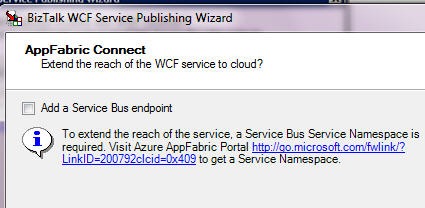
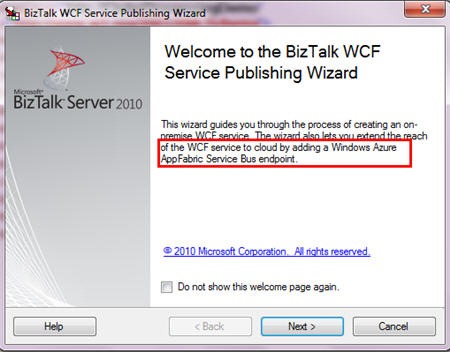
    Next up, I started the BizTalk WCF Service Publishing Wizard and noticed the new wording that came with installing the BizTalk Server 2010 Feature Pack.

    2010.10.28.cloud02

    Interesting.  Next up, I’m asked about creating my on-premises service endpoint and optionally, a receive location and a new on-premise metadata exchange point.

    2010.10.28.cloud03

    On the next wizard page, I’m able to optionally choose to extend this service to the Azure AppFabric cloud.

    2010.10.28.cloud04

    After this, I choose whether to expose an orchestration or schemas as a web service.  I chose to expose schemas as a service (i.e., build a service from scratch vs. using orchestration ports and messages to auto-produce a service).

    2010.10.28.cloud05

    As you can see, I have a one-way service to publish order messages.  Following this screen is the same “choose an on-premises location” page where you set the IIS directory for the new service.

    2010.10.28.cloud06

    After this wizard page is a new one where you set up a Service Bus endpoint.  You pick which Service Bus binding that you want and apply your own service namespace.  You can then choose to enable both a discovery behavior and a metadata exchange behavior.

    2010.10.28.cloud07

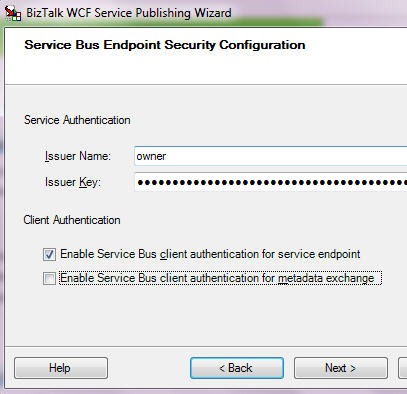
    Finally, we apply our Service Bus credentials for listening to the cloud.  Notice that I force authentication for the service endpoint itself, but not the metadata retrieval.

    2010.10.28.cloud08

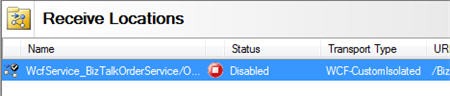
    After the wizard is done, what I expected to see was a set of receive locations.  However, the only receive location that I have is the one using the on-premises WCF binding.

    2010.10.28.cloud09

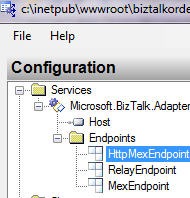
    What the what?  I expected to see a receive location that used the Service Bus binding.  So what happened to all those configuration values I just set?  If you open up the WCF service created in IIS, you can see a whole host of Service Bus configuration settings.   First, we see that there are now three service endpoints.  The three service endpoints below include an on-premises MEX endpoint, a RelayEndpoint that binds to the cloud, and a MEX endpoint that binds to the cloud.

    2010.10.28.cloud10

    That’s a pretty smart way to go.  Instead of trying to hack up the receive location, Microsoft instead beefed up the proxy services to do all the cloud binding.

    I can use IIS 7.5 autostart to make sure that my cloud binding occurs as soon as the service starts (vs. waiting for the first invocation).  Once my receive location and service are started, I can hit my local service, and, see my service is also in my cloud registry.

    2010.10.28.cloud11

    If I drill into my service, I can also see my primary service and my MEX endpoint.

    2010.10.28.cloud12 

    When I click the primary service name in the Azure AppFabric registry, I get an HTTP 401 (unauthorized) error which makes sense since we have a client authentication requirement on this service. 

    If I click the MEX endpoint, I get a weird error.  I seem to recall that you can’t retrieve a MEX WSDL over HTTP.  Or maybe I’m crazy.  But, to test that my MEX endpoint really works, I plugged the MEX URL into an Add Service Reference window in Visual Studio.NET, and sure enough, it pulls back the metadata for my BizTalk-exposed service.

    2010.10.28.cloud14

    All that said, this looks really promising.  Seems like a smart decision to stay away from the receive location and move cloud configuration to the WCF service where it belongs.