I can’t think of any demonstration of the Windows Azure platform AppFabric Service Bus that didn’t show authenticating to the endpoints using the default “owner” account. At the same time, I can’t imagine anyone wanting to do this in real life. In this post, I’ll show you how you should probably define the proper permissions for listening the cloud endpoints and sending to them.
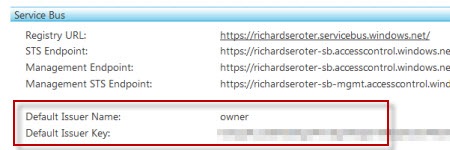
To start with, you’ll want to grab the Azure AppFabric SDK. We’re going to use two pieces from it. First, go to the “ServiceBus\GettingStarted\Echo” demonstration in the SDK and set both projects to start together. Next visit the http://appfabric.azure.com site and grab your default Service Bus issuer and key.

Start up the projects and enter in your service namespace and default issuer name and key. If everything is set up right, you should be able to communicate (through the cloud) between the two windows.

Fantastic. And totally unrealistic. Why would I want to share what are in essence, my namespace administrator permissions, with every service and consumer? Ideally, I should be scoping access to my service and providing specific claims to deal with the Service Bus. How do we do this? The Service Bus has a dedicated Security Token Service (STS) that manages access to the Service Bus. Go to the “AccessControl\ExploringFeatures\Management\AcmBrowser” solution in the AppFabric SDK and build the AcmBrowser. This lets us visually manage our STS.
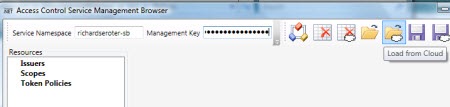
Note that the service namespace value used is your standard namespace PLUS “-sb” at the end. You’ll get really confused (and be looking at the wrong STS) if you leave off the –sb suffix. Once you “load from cloud” you can see all the default settings for connecting the Service Bus. First, we have the default issuer that uses a Symmetric Key algorithm and defines an Issuer Name of “owner.”

Underneath the Issuers, we see a default Scope. This scope is at the root level of my service namespace meaning that the subsequent rules will provide access to this namespace, and anything underneath it.
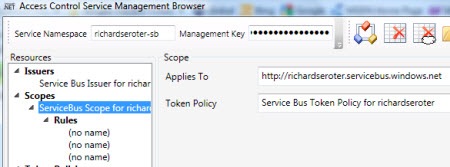
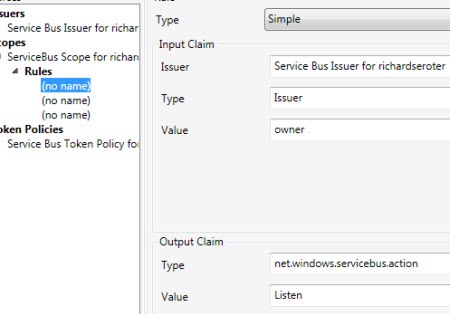
One of the rules below the scope defines who can “Listen” on the scoped endpoint. Here you see that if the service knows the secret key for the “owner” Issuer, then they will be given permission to “Listen” on any service underneath the root namespace.
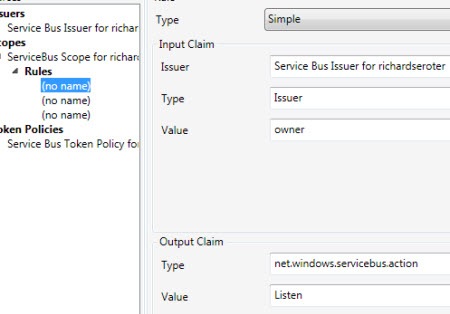
Similarly, there’s another rule that has the same criteria and the output claim lets the client “Send” messages to the Service Bus. So this is what virtually all demonstrations of the Service Bus use. However, as I mentioned earlier, someone who knows the “owner” credentials can listen or send to any service underneath the base namespace. Not good.
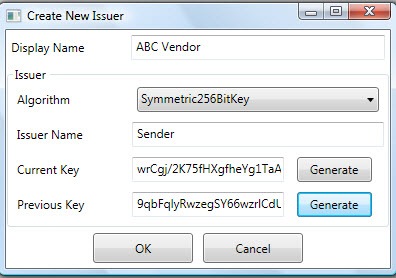
Let’s apply a tad bit more security. I’m going to add two new Issuers (one who can listen, one who can send), and then create a scope specifically for my Echo service where the restricted Issuer is allowed to Listen and the other Issuer can Send.
First, I’ll add an Issuer for my own fictitious company, Seroter Consulting.
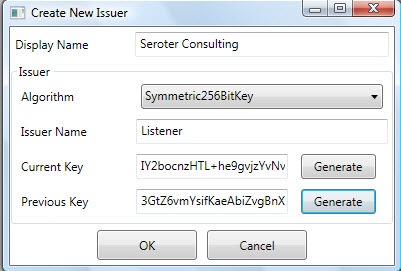
Next I’ll create another Issuer that represents a consumer of my cloud-exposed service.

Wonderful. Now, I want to define a new scope specifically for my EchoService.

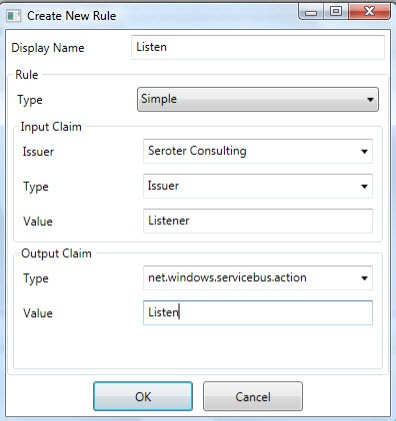
Getting closer. We need rules underneath this scope to govern who can do what with it. So, I added a rule that says that if you know the Seroter Consulting Issuer name “(“Listener”) and key, then you can listen on the service. In real life, you also might go a level lower and create Issuers for specific departments and such.

Finally, I have to create the Send permissions for my vendors. In this rule, if the person knows the Issuer name (“Sender”) and key for the Vendor Issuer, then they can send to the Service Bus.
We are now ready to test this bad boy. Within the AcmBrowser we have to save our updated configuration back to the cloud. There’s a little quirk (which will be fixed soon) where you first have to delete everything in that namespace and THEN save your changes. Basically, there’s no “merge” function. So, I clicked “Clear Service Namespace in the Cloud” button, and then go ahead and “Save to Cloud”.
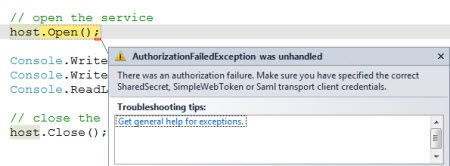
To test our configuration, we can first try to listen to the cloud using the VENDOR AC credentials. As you might expect, I get an authentication error because the vendor output claims don’t include the “net.windows.servicebus.action = Listen” claim.
I then launched both the service and the client, and put the “Listener” issuer name and key into the service and the “Sender” issuer name and key into the client and …

It worked! So now, I have localized credentials that I can pass to my vendor without exposing my whole namespace to that vendor. I also specific credentials for my own service without requiring root namespace access.
To me this seems like the right way to secure Service Bus connections in the real world. Thoughts?











 Richard Seroter's Architecture Musings