Category: Windows Azure AppFabric

  • Sending Messages to Azure AppFabric Service Bus Topics From Iron Foundry

    I recently took a look at Iron Foundry and liked what I found.  Let’s take a bit of a deeper look into how to deploy Iron Foundry .NET solutions that reference additional components.  Specifically, I’ll show you how to use the new Windows Azure AppFabric brokered messaging to reliably send messages from Iron Foundry to an on-premises application.

    The Azure AppFabric v1.5 release contains useful Service Bus capabilities for durable messaging communication through the use of Queues and Topics. The Service Bus still has the Relay Service which is great for invoking services through a cloud relay, but the asynchronous communication through the Relay Service isn’t durable.  Queues and Topics now let you send messages to one or many subscribers and have stronger guarantees of delivery.

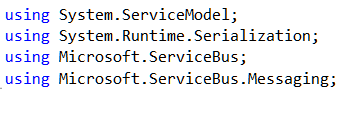
    An Iron Foundry application is just a standard .NET web application.  So, I’ll start with a blank ASP.NET web application and use old-school Web Forms instead of MVC. We need a reference to the Microsoft.ServiceBus.dll that comes with Azure AppFabric v1.5.  With that reference added, I added a new Web Form and included the necessary “using” statements.
    2011.12.23ironfoundry01

    I then built a very simple UI on the Web Form that takes in a handful of values that will be sent to the on-premises subscriber(s) through the Service Bus. Before creating the code that sends a message to a Topic, I defined an “Order” object that represents the data being sent to the topic. This object sits in a shared assembly used by this application that sends the message, and another application that receives a message.

    [DataContract]
        public class Order
        {
            [DataMember]
            public string Id { get; set; }
            [DataMember]
            public string ProdId { get; set; }
            [DataMember]
            public string Quantity { get; set; }
            [DataMember]
            public string Category { get; set; }
            [DataMember]
            public string CustomerId { get; set; }
        }
    

    The “submit” button on the Web Form triggers a click event that contains a flurry of activities.  At the beginning of that click handler, I defined some variables that will be used throughout.

    //define my personal namespace
    string sbNamespace = "richardseroter";
    //issuer name and key
    string issuer = "MY ISSUER";
    string key = "MY PRIVATE KEY";
    
    //set the name of the Topic to post to
    string topicName = "OrderTopic";
    //define a variable that holds messages for the user
    string outputMessage = "result: ";
    

    Next I defined a TokenProvider (to authenticate to my Topic) and a NamespaceManager (which drives most of the activities with the Service Bus).

    //create namespace manager
    TokenProvider tp = TokenProvider.CreateSharedSecretTokenProvider(issuer, key);
    Uri sbUri = ServiceBusEnvironment.CreateServiceUri("sb", sbNamespace, string.Empty);
    NamespaceManager nsm = new NamespaceManager(sbUri, tp);
    

    Now we’re ready to either create a Topic or reference an existing one. If the Topic does NOT exist, then I went ahead and created it, along with two subscriptions.

    //create or retrieve topic
    bool doesExist = nsm.TopicExists(topicName);
    
    if (doesExist == false)
       {
          //topic doesn't exist yet, so create it
          nsm.CreateTopic(topicName);
    
          //create two subscriptions
    
          //create subscription for just messages for Electronics
          SqlFilter eFilter = new SqlFilter("ProductCategory = 'Electronics'");
          nsm.CreateSubscription(topicName, "ElecFilter", eFilter);
    
          //create subscription for just messages for Clothing
          SqlFilter eFilter2 = new SqlFilter("ProductCategory = 'Clothing'");
          nsm.CreateSubscription(topicName, "ClothingFilter", eFilter2);
    
          outputMessage += "Topic/subscription does not exist and was created; ";
        }
    

    At this point we either know that a topic exists, or we created one.  Next, I created a MessageSender which will actually send a message to the Topic.

    //create objects needed to send message to topic
     MessagingFactory factory = MessagingFactory.Create(sbUri, tp);
     MessageSender orderSender = factory.CreateMessageSender(topicName);
    

    We’re now ready to create the actual data object that we send to the Topic.  Here I referenced the Order object we created earlier.  Then I wrapped that Order in the BrokeredMessage object.  This object has a property bag that is used for routing.  I’ve added a property called “ProductCategory” that our Topic subscription uses to make decisions on whether to deliver the message to the subscriber or not.

    //create order
    Order o = new Order();
    o.Id = txtOrderId.Text;
    o.ProdId = txtProdId.Text;
    o.CustomerId = txtCustomerId.Text;
    o.Category = txtCategory.Text;
    o.Quantity = txtQuantity.Text;
    
    //create brokered message object
    BrokeredMessage msg = new BrokeredMessage(o);
    //add properties used for routing
    msg.Properties["ProductCategory"] = o.Category;
    

    Finally, I send the message and write out the data to the screen for the user.

    //send it
    orderSender.Send(msg);
    
    outputMessage += "Message sent; ";
    lblOutput.Text = outputMessage;
    

    I decided to use the command line (Ruby-based) vmc tool to deploy this app to Iron Foundry.  So, I first published my website to a directory on the file system.  Then, I manually copied the Microsoft.ServiceBus.dll to the bin directory of the published site.  Let’s deploy! After logging into my production Iron Foundry account by targeting the api.gofoundry.net management endpoint, I executed a push command and instantly saw my web application move up to the cloud. It takes like 8 seconds from start to finish.

    2011.12.23ironfoundry02

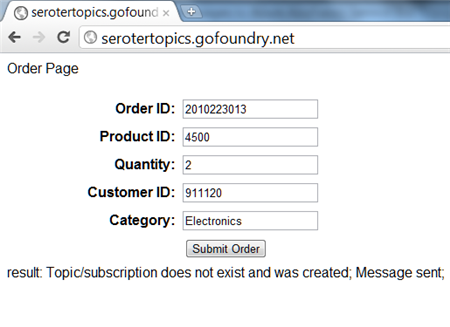
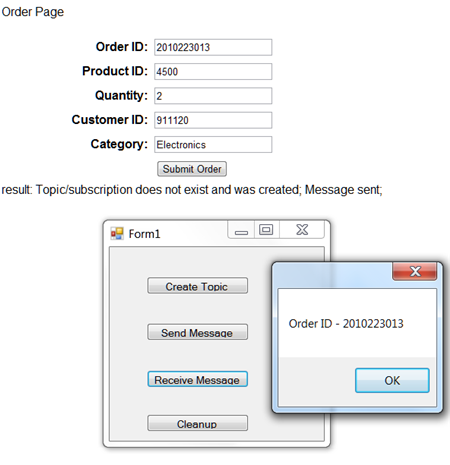
    My site is now online and I can visit it and submit a new order [note that this site isn’t online now, so don’t try and flood my machine with messages!].  When I click the submit button, I can see that a new Topic was created by this application and a message was sent.
    2011.12.23ironfoundry03

    Let’s confirm that we really have a new Topic with subscriptions. I can first confirm this through the Windows Azure Management Console.
    2011.12.23ironfoundry04

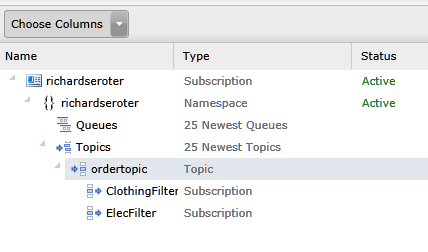
    To see more details, I can use the Service Bus Explorer tool which allows us to browse our Service Bus configuration.  When I launch it, I can see that I have a Topic with a pair of subscriptions and even what Filter I applied.

    2011.12.23ironfoundry05

    I previously built a WinForm application that pulls data from an Azure AppFabric Service Bus Topic. When I click the “Receive Message” button, I pull a message from the Topic and we can see that it has the same Order ID as the message submitted from the website.
    2011.12.23ironfoundry06

    If I submit another message from the website, I see a different message because my Topic already exists and I’m simply reusing it.

    2011.12.23ironfoundry07

    Summary

    So what did we see here?  First, I proved that an ASP.NET web application that you want to deploy to the Iron Foundry (onsite or offsite) cloud looks just like any other ASP.NET web application.  I didn’t have to build it differently or do anything special. Secondly, we saw that I can easily use the Windows Azure AppFabric Service Bus to reliably share data between a cloud-hosted application and an on-premises application.
  • Interview Series: Four Questions With … Clemens Vasters

    Greetings and welcome to the 36th interview in my monthly series of chat with thought leaders in connected technologies. This month we have the pleasure of talking to Clemens Vasters who is Principal Technical Lead on Microsoft’s Windows Azure AppFabric team, blogger, speaker, Tweeter, and all around interesting fellow.  He is probably best known for writing the blockbuster book, BizTalk Server 2000: A Beginner’s Guide. Just kidding.  He’s probably best known as a very public face of Microsoft’s Azure team and someone who is instrumental in shaping Microsoft’s cloud and integration platform.

    Let’s see how he stands up to the rigor of Four Questions.

    Q: What principles of distributed systems do you think play an elevated role in cloud-driven software solutions? Where does “integrating with the cloud” introduce differences from “integrating within my data center”?

    A: I believe we need to first differentiate “the cloud” a bit to figure out what elevated concerns are. In a pure IaaS scenario where the customer is effectively renting VM space, the architectural differences between a self-contained  solution in the cloud and on-premises are commonly relatively small. That also explains why IaaS is doing pretty well right now – the workloads don’t have to change radically. That also means that if the app doesn’t scale in your own datacenter it also won’t scale in someone else’s; there’s no magic Pixie dust in the cloud. From an ops perspective, IaaS should be a seamless move if the customer is already running proper datacenter operations today. With that I mean that they are running their systems largely hands-off with nobody having to walk up to the physical box except for dealing with hardware failures.

    The term “self-contained solution” that I mentioned earlier is key here since that’s clearly not always the case. We’ve been preaching EAI for quite a while now and not all workloads will move into cloud environments at once – there will always be a need to bridge between cloud-based workloads and workloads that remain on-premises or workloads that are simply location-bound because that’s where the action is – think of an ATM or a cashier’s register in a restaurant or a check-in terminal at an airport. All these are parts of a system and if you move the respective backend workloads into the cloud your ways of wiring it all together will change somewhat since you now have the public Internet between your assets and the backend. That’s a challenge, but also a tremendous opportunity and that’s what I work on here at Microsoft.

    In PaaS scenarios that are explicitly taking advantage of cloud elasticity, availability, and reach – in which I include “bring your own PaaS” frameworks that are popping up here and there – the architectural differences are more pronounced. Some of these solutions deal with data or connections at very significant scale and that’s where you’re starting to hit the limits of quite a few enterprise infrastructure components. Large enterprises have some 100,000 employees (or more), which obviously first seems like a lot; looking deeper, an individual business solution in that enterprise is used by some fraction of that work-force, but the result is still a number that makes the eyes of salespeople shine. What’s easy to overlook is that that isn’t the interesting set of numbers for an enterprise that leverages IT as a competitive asset  – the more interesting one is how they can deeply engage with the 10+ million consumer customers they have. Once you’re building solutions for an audience of 10+ million people that you want to engage deeply, you’re starting to look differently at how you deal with data and whether you’re willing to hold that all in a single store or to subject records in that data store to a lock held by a transaction coordinator.  You also find that you can no longer take a comfy weekend to upgrade your systems – you run and you upgrade while you run and you don’t lose data while doing it. That’s quite a bit of a difference.

    Q: When building the Azure AppFabric Service Bus, what were some of the trickiest things to work out, from a technical perspective?

    A: There are a few really tricky bits and those are common across many cloud solutions: How do I optimize the use of system resources so that I can run a given target workload on a minimal set of machines to drive down cost? How do I make the system so robust that it self-heals from intermittent error conditions such as a downstream dependency going down? How do I manage shared state in the system? These are the three key questions. The latter is the eternal classic in architecture and the one you hear most noise about. The whole SQL/NoSQL debate is about where and how to hold shared state. Do you partition, do you hold it in a single place, do you shred it across machines, do you flush to disk or keep in memory, what do you cache and for how long, etc, etc. We’re employing a mix of approaches since there’s no single answer across all use-cases. Sometimes you need a query processor right by the data, sometimes you can do without. Sometimes you must have a single authoritative place for a bit of data and sometimes it’s ok to have multiple and even somewhat stale copies.

    I think what I learned most about while working on this here were the first two questions, though. Writing apps while being conscious about what it costs to run them is quite interesting and forces quite a bit of discipline. I/O code that isn’t fully asynchronous doesn’t pass code-review around here anymore. We made a cleanup pass right after shipping the first version of the service and subsequently dropped 33% of the VMs from each deployment with the next rollout while maintaining capacity. That gain was from eliminating all remaining cases of blocking I/O. The self-healing capabilities are probably the most interesting from an architectural perspective. I published a blog article about one of the patterns a while back [here]. The greatest insight here is that failures are just as much part of running the system as successes are and that there’s very little that your app cannot anticipate. If your backend database goes away you log that fact as an alert and probably prevent your system from hitting the database for a minute until the next retry, but your system stays up. Yes, you’ll fail transactions and you may fail (nicely) even back to the end-user, but you stay up. If you put a queue between the user and the database you can even contain that particular problem – albeit you then still need to be resilient against the queue not working.

    Q: The majority of documentation and evangelism of the AppFabric Service Bus has been targeted at developers and application architects. But for mature, risk-averse enterprises, there are other stakeholders like Operations and Information Security who have a big say in the introduction of a technology like this.  Can you give us a brief “Service Bus for Operations” and “Service Bus for Security Professionals” summary that addresses the salient points for those audiences?

    A: The Service Bus is squarely targeted at developers and architects at this time; that’s mostly a function of where we are in the cycle of building out the capabilities. For now we’re an “implementation detail” of apps that want to bet on the technology more than something that an IT Professional would take into their hands and wire something up without writing code or at least craft some config that requires white-box knowledge of the app. I expect that to change quite a bit over time and I expect that you’ll see some of that showing up in the next 12 months. When building apps you need to expect our components to fail just like any other, especially because there’s also quite a bit of stuff that can go wrong on the way. You may have no connectivity to Service Bus, for instance. What the app needs to have in its operational guidance documents is how to interpret these failures, what failure threshold triggers an alert (it’s rarely “1), and where to go (call Microsoft support with this number and with this data) when the failures indicate something entirely unexpected.

    From the security folks we see most concerns about us allowing connectivity into the datacenter with the Relay; for which we’re not doing anything that some other app couldn’t do, we’re just providing it as a capability to build on. If you allow outbound traffic out of a machine you are allowing responses to get back in. That traffic is scoped to the originating app holding the socket. If that app were to choose to leak out information it’d probably be overkill to use Service Bus – it’s much easier to do that by throwing documents on some obscure web site via HTTPS.  Service Bus traffic can be explicitly blocked and we use a dedicated TCP port range to make that simple and we also have headers on our HTTP tunneling traffic that are easy to spot and we won’t ever hide tunneling over HTTPS, so we designed this with such concerns in mind. If an enterprise wants to block Service Bus traffic completely that’s just a matter of telling the network edge systems.

    However, what we’re seeing more of is excitement in IT departments that ‘get it’ and understand that Service Bus can act as an external DMZ for them. We have a number of customers who are pulling internal services to the public network edge using Service Bus, which turns out to be a lot easier than doing that in their own infrastructure, even with full IT support. What helps there is our integration with the Access Control service that provides a security gate at the edge even for services that haven’t been built for public consumption, at all.

    Q [stupid question]: I’m of the opinion that cold scrambled eggs, or cold mashed potatoes are terrible.  Don’t get me started on room-temperature french fries. Similarly, I really enjoy a crisp, cold salad and find warm salads unappealing.  What foods or drinks have to be a certain temperature for you to truly enjoy them?

    A: I’m German. The only possible answer here is “beer”. There are some breweries here in the US that are trying to sell their terrible product by apparently successfully convincing consumers to drink their so called “beer” at a temperature that conveniently numbs down the consumer’s sense of taste first. It’s as super-cold as the Rockies and then also tastes like you’re licking a rock. In odd contrast with this, there are rumors about the structural lack of appropriate beer cooling on certain islands on the other side of the Atlantic…

    Thanks Clemens for participating! Great perspectives.

  • Integration in the Cloud: Part 3 – Remote Procedure Invocation Pattern

    This post continues a series where I revisit the classic Enterprise Integration Patterns with a cloud twist. So far, I’ve introduced the series and looked at the Shared Database pattern. In this post, we’ll look the second pattern: remote procedure invocation.

    What Is It?

    One uses this remote procedure call (RPC) pattern when they have multiple, independent applications and want to share data or orchestrate cross-application processes. Unlike ETL scenarios where you move data between applications at defined intervals, or the shared database pattern where everyone accesses the same source data, the RPC pattern accesses data/process where it resides. Data typically stays with the source, and the consumer interacts with the other system through defined (service) contracts.

    You often see Service Oriented Architecture (SOA) solutions built around the pattern.  That is, exposing reusable, interoperable, abstract interfaces for encapsulated services that interact with one or many systems.  This is a very familiar pattern for developers and good for mashup pages/services or any application that needs to know something (or do something) before it can proceed. You often do not need guaranteed delivery for these services since the caller is notified of any exceptions from the service and can simply retry the invocation.

    Challenges

    There are a few challenges when leveraging this pattern.

    • There is still some coupling involved. While a well-built service exposes an abstract interface that decouples the caller from the service’s underlying implementation, the caller is still bound the service exposed by the system. Changes to that system or unavailability of that system will affect the caller.
    • Distinct service and capability offerings by each service. Unlike the shared database pattern where everyone agrees on a data schema and central repository, a RPC model leverages many services that reside all across the organization (or internet). One service may want certificate authentication, another uses Kerberos, and another does some weird token-based security. One service may support WS-Attachment and another may not.  Transactions may or may not be supported between services. In an RPC world, you are at the mercy of each service provider’s capabilities and design.
    • RPC is a blocking call. When you call a service that sends a response, you pretty much have to sit around and wait until the response comes back. A caller can design around this a bit using AJAX on a web front end, or using a callback pattern in the middleware tier, but at root, you have a synchronous operation that holds a thread while waiting for a response.
    • Queried data may be transient. If an application calls a service, gets some data, and shows it to a user, that data MAY not be persisted in the calling application. It’s cleaner that way, but, this prevents you from using the data in reports or workflows.  So, you simply have to decide early on if your calls to external services should result in persisted data (that must then either by synchronized or checked on future calls) or transient data.
    • Package software platforms have mixed support. To be sure, most modern software platforms expose their data via web services. Some will let you query the database directly for information. But, there’s very little consistently. Some platforms expose every tiny function as a service (not very abstract) and some expose giant “DoSomething()” functions that take in a generic “object” (too abstract).

    Cloud Considerations

    As far as I can tell, you have three scenarios to support when introducing the cloud to this pattern:

    • Cloud to cloud. I have one SaaS or custom PaaS application and want to consume data from another SaaS or PaaS application. This should be relatively straightforward, but we’ll talk more in a moment about things to consider.
    • On-premises to cloud. There is an on-premises application or messaging engine that wants data from a cloud application. I’d suspect that this is the one that most architects and developers have already played with or built.
    • Cloud to on-premises. A cloud application wants to leverage data or processes that sit within an organization’s internal network. For me, this is the killer scenario. The integration strategy for many cloud vendors consists of “give us your data and move/duplicate your processes here.” But until an organization moves entire off-site (if that ever really happens for large enterprises), there is significant investment in the on-premises assets and we want to unlock those and avoid duplication where possible.

    So what are the  things to think about when doing RPC in a cloud scenario?

    • Security between clouds or to on-premises systems. If integrating two clouds, you need some sort of identity federation, or, you’ll use per-service credentials. That can get tough to manage over time, so it would be nice to leverage cloud providers that can share identity providers. When consuming on premises services from cloud-based applications, you have two clear choices:
      • Use a VPN. This works if you are doing integration with an IaaS-based application where you control the cloud environment a bit (e.g. Amazon Virtual Private Cloud). You can also pull this off a bit with things like the Google Secure Data Connector (for Google Apps for GAE) or Windows Azure Connect.
      • Leverage a reverse proxy and expose data/services to public internet. We can define a intermediary that sits in an internet-facing zone and forwards traffic behind the firewall to the actual services to invoke. Even if this is secured well, some organizations may be wary to expose key business functions or data to the internet.
    • There may be additional latency. For some application, especially based on location, there could be a longer delay when doing these blocking remote procedure calls.  But more likely, you’ll have additional latency due to security.  That is, many providers have a two step process where the first service call against the cloud platform is for getting a security token, and the second call is the actual function call (with the token in the payload).  You may be able to cache the token to avoid the double-hop each time, but this is still something to factor in.
    • Expect to only use HTTP. Few (if any) SaaS applications expose their underlying database. You may be used to doing quick calls against another system by querying it’s data store, but that’s likely a non-starter when working with cloud applications.

    The one option for cloud-to-on-premises that I left out here, and one that I’m convinced is a differentiating piece of Microsoft software, is the Azure AppFabric Service Bus.  Using this technology, I can securely expose on-premises services to the public internet WITHOUT the use of a VPN or reverse proxy. And, these services can be consumed by a wide variety of platforms.  In fact, that’s the basis for the upcoming demonstration.

    Solution Demonstration

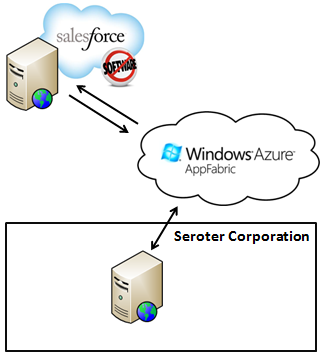
    So what if I have a cloud-based SaaS/PaaS application, say Salesforce.com, and I want to leverage a business service that sits on site.  Specifically, the fictitious Seroter Corporation, a leader in fictitious manufacturing, has an algorithm that they’ve built to calculate the best discount that they can give a vendor. When they moved their CRM platform to Salesforce.com, their sales team still needed access to this calculation. Instead of duplicating the algorithm in their Force.com application, they wanted to access the existing service. Enter the Azure AppFabric Service Bus.

    2011.10.31int01

    Instead of exposing the business service via VPN or reverse proxy, they used the AppFabric Service Bus and the Force.com application simply invokes the service and shows the results.  Note that this pattern (and example) is very similar to the one that I demonstrated in my new book. The only difference is that I’m going directly at the service here instead of going through a BizTalk Server (as I did in the book).

    WCF Service Exposed Via Azure AppFabric Service Bus

    I built a simple Windows Console application to host my RESTful web service. Note that I did this with the 1.0 version of the AppFabric Service Bus SDK.  The contract for the “Discount Service” looks like this:

    [ServiceContract]
        public interface IDiscountService
        {
            [WebGet(UriTemplate = "/{accountId}/Discount")]
            [OperationContract]
            Discount GetDiscountDetails(string accountId);
        }
    
        [DataContract(Namespace = "http://CloudRealTime")]
        public class Discount
        {
            [DataMember]
            public string AccountId { get; set; }
            [DataMember]
            public string DateDelivered { get; set; }
            [DataMember]
            public float DiscountPercentage { get; set; }
            [DataMember]
            public bool IsBestRate { get; set; }
        }
    

    My implementation of this contract is shockingly robust.  If the customer’s ID is equal to 200, they get 10% off.  Otherwise, 5%.

    public class DiscountService: IDiscountService
        {
            public Discount GetDiscountDetails(string accountId)
            {
                Discount d = new Discount();
                d.DateDelivered = DateTime.Now.ToShortDateString();
                d.AccountId = accountId;
    
                if (accountId == "200")
                {
                    d.DiscountPercentage = .10F;
                    d.IsBestRate = true;
                }
                else
                {
                    d.DiscountPercentage = .05F;
                    d.IsBestRate = false;
                }
    
                return d;
    
            }
        }
    

    The secret sauce to any Azure AppFabric Service Bus connection lies in the configuration.  This is where we can tell the service to bind to the Microsoft cloud and provide the address and credentials to do so. My full configuration file looks like this:

    <configuration>
    <startup><supportedRuntime version="v4.0" sku=".NETFramework,Version=v4.0"/></startup><system.serviceModel>
            <behaviors>
                <endpointBehaviors>
                    <behavior name="CloudEndpointBehavior">
                        <webHttp />
                        <transportClientEndpointBehavior>
                            <clientCredentials>
                              <sharedSecret issuerName="ISSUER" issuerSecret="SECRET" />
                            </clientCredentials>
                        </transportClientEndpointBehavior>
                        <serviceRegistrySettings discoveryMode="Public" />
                    </behavior>
                </endpointBehaviors>
            </behaviors>
            <bindings>
                <webHttpRelayBinding>
                  <binding name="CloudBinding">
                    <security relayClientAuthenticationType="None" />
                  </binding>
                </webHttpRelayBinding>
            </bindings>
            <services>
                <service name="QCon.Demos.CloudRealTime.DiscountSvc.DiscountService">
                    <endpoint address="https://richardseroter.servicebus.windows.net/DiscountService"
                        behaviorConfiguration="CloudEndpointBehavior" binding="webHttpRelayBinding"
                        bindingConfiguration="CloudBinding" name="WebHttpRelayEndpoint"
                        contract="IDiscountService" />
                </service>
            </services>
        </system.serviceModel>
    </configuration>
    

    I built this demo both with and without client security turned on.  As you see above, my last version of the demonstration turned off client security.

    In the example above, if I send a request from my Force.com application to https://richardseroter.servicebus.windows.net/DiscountService, my request is relayed from the Microsoft cloud to my live on-premises service. When I test this out from the browser (which is why I earlier turned off client security), I can see that passing in a customer ID of 200 in the URL results in a discount of 10%.

    2011.10.31int02

    Calling the AppFabric Service Bus from Salesforce.com

    With an internet-accessible service ready to go, all that’s left is to invoke it from my custom Force.com page. My page has a button where the user can invoke the service and review the results.  The results may, or may not, get saved to the customer record.  It’s up to the user. The Force.com page uses a custom controller that has the operation which calls the Azure AppFabric endpoint. Note that I’ve had some freakiness lately with this where I get back certificate errors from Azure.  I don’t know what that’s about and am not sure if it’s an Azure problem or Force.com problem.  But, if I call it a few times, it works.  Hence, I had to add exception handling logic to my code!

    public class accountDiscountExtension{
    
        //account variable
        private final Account myAcct;
    
        //constructor which sets the reference to the account being viewed
        public accountDiscountExtension(ApexPages.StandardController controller) {
            this.myAcct = (Account)controller.getRecord();
        }
    
        public void GetDiscountDetails()
        {
            //define HTTP variables
            Http httpProxy = new Http();
            HttpRequest acReq = new HttpRequest();
            HttpRequest sbReq = new HttpRequest();
    
            // ** Getting Security Token from STS
           String acUrl = 'https://richardseroter-sb.accesscontrol.windows.net/WRAPV0.9/';
           String encodedPW = EncodingUtil.urlEncode(acsKey, 'UTF-8');
    
           acReq.setEndpoint(acUrl);
           acReq.setMethod('POST');
           acReq.setBody('wrap_name=ISSUER&wrap_password=' + encodedPW + '&wrap_scope=http://richardseroter.servicebus.windows.net/');
           acReq.setHeader('Content-Type','application/x-www-form-urlencoded');
    
           //** commented out since we turned off client security
           //HttpResponse acRes = httpProxy.send(acReq);
           //String acResult = acRes.getBody();
    
           // clean up result
           //String suffixRemoved = acResult.split('&')[0];
           //String prefixRemoved = suffixRemoved.split('=')[1];
           //String decodedToken = EncodingUtil.urlDecode(prefixRemoved, 'UTF-8');
           //String finalToken = 'WRAP access_token=\"' + decodedToken + '\"';
    
           // setup service bus call
           String sbUrl = 'https://richardseroter.servicebus.windows.net/DiscountService/' + myAcct.AccountNumber + '/Discount';
            sbReq.setEndpoint(sbUrl);
           sbReq.setMethod('GET');
           sbReq.setHeader('Content-Type', 'text/xml');
    
           //** commented out the piece that adds the security token to the header
           //sbReq.setHeader('Authorization', finalToken);
    
           try
           {
           // invoke Service Bus URL
           HttpResponse sbRes = httpProxy.send(sbReq);
           Dom.Document responseDoc = sbRes.getBodyDocument();
           Dom.XMLNode root = responseDoc.getRootElement();
    
           //grab response values
           Dom.XMLNode perNode = root.getChildElement('DiscountPercentage', 'http://CloudRealTime');
           Dom.XMLNode lastUpdatedNode = root.getChildElement('DateDelivered', 'http://CloudRealTime');
           Dom.XMLNode isBestPriceNode = root.getChildElement('IsBestRate', 'http://CloudRealTime');
    
           Decimal perValue;
           String lastUpdatedValue;
           Boolean isBestPriceValue;
    
           if(perNode == null)
           {
               perValue = 0;
           }
           else
           {
               perValue = Decimal.valueOf(perNode.getText());
           }
    
           if(lastUpdatedNode == null)
           {
               lastUpdatedValue = '';
           }
           else
           {
               lastUpdatedValue = lastUpdatedNode.getText();
           }
    
           if(isBestPriceNode == null)
           {
               isBestPriceValue = false;
           }
           else
           {
               isBestPriceValue = Boolean.valueOf(isBestPriceNode.getText());
           }
    
           //set account object values to service result values
           myAcct.DiscountPercentage__c = perValue;
           myAcct.DiscountLastUpdated__c = lastUpdatedValue;
           myAcct.DiscountBestPrice__c = isBestPriceValue;
    
           myAcct.Description = 'Successful query.';
           }
           catch(System.CalloutException e)
           {
              myAcct.Description = 'Oops.  Try again';
           }
        }
    

    Got all that? Just a pair of calls.  The first gets the token from the Access Control Service (and this code likely changes when I upgrade this to use ACS v2) and the second invokes the service.  Then there’s just a bit of housekeeping to handle empty values before finally setting the values that will show up on screen.

    When I invoke my service (using the “Get Discount” button, the controller is invoked and I make a remote call to my AppFabric Service Bus endpoint. The customer below has an account number equal to 200, and thus the returned discount percentage is 10%.2011.10.31int03


    Summary

    Using a remote procedure invocation is great when you need to request data or when you send data somewhere and absolutely have to wait for a response. Cloud applications introduce some wrinkles here as you try to architect secure, high performing queries that span clouds or bridge clouds to on-premises applications. In this example, I showed how one can quickly and easily expose internal services to public cloud applications by using the Windows Azure AppFabric Service Bus.  Regardless of the technology or implementation pattern, we all will be spending a lot of time in the foreseeable future building hybrid architectures so the more familiar we get with the options, the better!

    In the final post in this series, I’ll take a look at using asynchronous messaging between (cloud) systems.

  • Integration in the Cloud: Part 1 – Introduction

    I recently delivered a session at QCon Hangzhou (China) on the topic of “integration in the cloud.” In this series of blog posts, I will walk through a number of demos I built that integrate a variety of technologies like Amazon Web Services (AWS) SimpleDB, Windows Azure AppFabric, Salesforce.com, and a custom Ruby (Sinatra) app on VMWare’s Cloud Foundry.

    Cloud computing is clearly growing in popularity, with Gartner finding that 95% of orgs expect to maintain or increase their 2011.10.27int01investment in software as a service. But how do we prevent new application silos from popping up?  We don’t want to treat SaaS apps as “off site” and thus only do the occasional bulk transfer to get data in/out of the application.  I’m going to take some tried-and-true integration patterns and show how they can apply to cloud integration as well as on-premises integration. Specifically, I’ll demonstrate how three patterns highlighted in the valuable book Enterprise Integration Patterns: Designing, Building and Deploying Messaging Solutions apply to cloud scenarios. These patterns include: shared database, remote procedure invocation and asynchronous messaging .

    In the next post, I’ll walk through the reasons to use a shared database, considerations when leveraging that model, and how to share a single “cloud database” among on premises apps and cloud apps alike.

    Series Links:

  • Testing Out the New AppFabric Service Bus Relay Load Balancing

    The Windows Azure team made a change in the back end to support multiple listeners on a single relay endpoint.  This solves a known challenge with the Service Bus.  Up until now, we had to be creative when building highly available Service Bus solutions since only a single listener could be live at one time.  For more on this change, see Sam Vanhoutte’s descriptive blog post.  In this post, I’m going to walk through an example that tests out the new capability.

    First off, I made sure that I had the v1.5 of the Azure AppFabric SDK. Then, in a VS2010 Console project, I built a very simple RESTful WCF service contract.

    namespace Seroter.ServiceBusLoadBalanceDemo
    {
        [ServiceContract]
        interface IHelloService
        {
            [WebGet(UriTemplate="/{name}")]
            [OperationContract]
            string SayHello(string name);
        }
    }
    

    My service implementation is nothing exciting.

    public class HelloService : IHelloService
        {
            public string SayHello(string name)
            {
                Console.WriteLine("Service called for name: " + name);
                return "Hi there, " + name;
            }
        }
    

    My application configuration for this service looks like this (note that I have all the Service Bus bindings here instead of machine.config):

    <?xml version="1.0"?>
    <configuration>
      <system.serviceModel>
        <behaviors>
          <endpointBehaviors>
            <behavior name="CloudBehavior">
              <webHttp />
              <serviceRegistrySettings discoveryMode="Public" displayName="HelloService" />
              <transportClientEndpointBehavior>
                <clientCredentials>
                  <sharedSecret issuerName="ISSUER" issuerSecret="SECRET" />
                </clientCredentials>
                <!--<tokenProvider>
                  <sharedSecret issuerName="" issuerSecret="" />
                </tokenProvider>-->
              </transportClientEndpointBehavior>
            </behavior>
          </endpointBehaviors>
        </behaviors>
        <bindings>
          <webHttpRelayBinding>
            <binding name="WebRelayBinding">
              <security relayClientAuthenticationType="None" />
            </binding>
          </webHttpRelayBinding>
        </bindings>
        <services>
          <service name="Seroter.ServiceBusLoadBalanceDemo.HelloService">
            <endpoint address="https://<namespace>.servicebus.windows.net/HelloService"
              behaviorConfiguration="CloudBehavior" binding="webHttpRelayBinding"
              bindingConfiguration="WebRelayBinding" name="SBEndpoint" contract="Seroter.ServiceBusLoadBalanceDemo.IHelloService" />
          </service>
        </services>
        <extensions>
          <!-- Adding all known service bus extensions. You can remove the ones you don't need. -->
          <behaviorExtensions>
            <add name="connectionStatusBehavior" type="Microsoft.ServiceBus.Configuration.ConnectionStatusElement, Microsoft.ServiceBus, Version=1.5.0.0, Culture=neutral, PublicKeyToken=31bf3856ad364e35"/>
            <add name="transportClientEndpointBehavior" type="Microsoft.ServiceBus.Configuration.TransportClientEndpointBehaviorElement, Microsoft.ServiceBus, Version=1.5.0.0, Culture=neutral, PublicKeyToken=31bf3856ad364e35"/>
            <add name="serviceRegistrySettings" type="Microsoft.ServiceBus.Configuration.ServiceRegistrySettingsElement, Microsoft.ServiceBus, Version=1.5.0.0, Culture=neutral, PublicKeyToken=31bf3856ad364e35"/>
          </behaviorExtensions>
          <bindingElementExtensions>
            <add name="netMessagingTransport" type="Microsoft.ServiceBus.Messaging.Configuration.NetMessagingTransportExtensionElement, Microsoft.ServiceBus, Version=1.5.0.0, Culture=neutral, PublicKeyToken=31bf3856ad364e35"/>
            <add name="tcpRelayTransport" type="Microsoft.ServiceBus.Configuration.TcpRelayTransportElement, Microsoft.ServiceBus, Version=1.5.0.0, Culture=neutral, PublicKeyToken=31bf3856ad364e35"/>
            <add name="httpRelayTransport" type="Microsoft.ServiceBus.Configuration.HttpRelayTransportElement, Microsoft.ServiceBus, Version=1.5.0.0, Culture=neutral, PublicKeyToken=31bf3856ad364e35"/>
            <add name="httpsRelayTransport" type="Microsoft.ServiceBus.Configuration.HttpsRelayTransportElement, Microsoft.ServiceBus, Version=1.5.0.0, Culture=neutral, PublicKeyToken=31bf3856ad364e35"/>
            <add name="onewayRelayTransport" type="Microsoft.ServiceBus.Configuration.RelayedOnewayTransportElement, Microsoft.ServiceBus, Version=1.5.0.0, Culture=neutral, PublicKeyToken=31bf3856ad364e35"/>
          </bindingElementExtensions>
          <bindingExtensions>
            <add name="basicHttpRelayBinding" type="Microsoft.ServiceBus.Configuration.BasicHttpRelayBindingCollectionElement, Microsoft.ServiceBus, Version=1.5.0.0, Culture=neutral, PublicKeyToken=31bf3856ad364e35"/>
            <add name="webHttpRelayBinding" type="Microsoft.ServiceBus.Configuration.WebHttpRelayBindingCollectionElement, Microsoft.ServiceBus, Version=1.5.0.0, Culture=neutral, PublicKeyToken=31bf3856ad364e35"/>
            <add name="ws2007HttpRelayBinding" type="Microsoft.ServiceBus.Configuration.WS2007HttpRelayBindingCollectionElement, Microsoft.ServiceBus, Version=1.5.0.0, Culture=neutral, PublicKeyToken=31bf3856ad364e35"/>
            <add name="netTcpRelayBinding" type="Microsoft.ServiceBus.Configuration.NetTcpRelayBindingCollectionElement, Microsoft.ServiceBus, Version=1.5.0.0, Culture=neutral, PublicKeyToken=31bf3856ad364e35"/>
            <add name="netOnewayRelayBinding" type="Microsoft.ServiceBus.Configuration.NetOnewayRelayBindingCollectionElement, Microsoft.ServiceBus, Version=1.5.0.0, Culture=neutral, PublicKeyToken=31bf3856ad364e35"/>
            <add name="netEventRelayBinding" type="Microsoft.ServiceBus.Configuration.NetEventRelayBindingCollectionElement, Microsoft.ServiceBus, Version=1.5.0.0, Culture=neutral, PublicKeyToken=31bf3856ad364e35"/>
            <add name="netMessagingBinding" type="Microsoft.ServiceBus.Messaging.Configuration.NetMessagingBindingCollectionElement, Microsoft.ServiceBus, Version=1.5.0.0, Culture=neutral, PublicKeyToken=31bf3856ad364e35"/>
          </bindingExtensions>
        </extensions>
      </system.serviceModel>
    <startup><supportedRuntime version="v4.0" sku=".NETFramework,Version=v4.0"/></startup></configuration>
    

    A few things to note there.  I’m using the legacy access control strategy for the TransportClientEndpointBehavior.  But the biggest thing to notice is that there is nothing in this configuration that deals with load balancing.  Solutions built with the 1.5 SDK should automatically get this capability.

    I went and started up a single instance and called my RESTful service from a browser instance.

    2011.10.27sb01

    I then started up ANOTHER instance of the same service, and it appears connected as well.

    2011.10.27sb02

    When I invoke my service, ONE of the available listeners will get it (not both).

    2011.10.27sb03

    Very cool. Automatic load balancing. You do pay per connection, so you don’t want to set up a ton of these.  But, this goes a long way to make the AppFabric Service Bus a truly reliable, internet-scale messaging tool.  Note that this capability hasn’t been rolled out everywhere yet (as of 10/27/2011 9AM), so you may not yet have this working for your service.

  • Interview Series: Four Questions With … Ryan CrawCour

    The summer is nearly over, but the “Four Questions” machine continues forward.  In this 34th interview with a “connected technologies” thought leader, we’re talking with Ryan CrawCour who is a solutions architect, virtual technology specialist for Microsoft in the Windows Azure space, popular speaker and user group organizer.

    Q: We’ve seen the recent (CTP) release of the Azure AppFabric Applications tooling.  What problem do you think that this is solving, and do you see this as being something that you would use to build composite applications on the Microsoft platform?

    A: Personally, I am very excited about the work the AppFabric team, in general, is doing. I have been using the AppFabric Applications CTP since the release and am impressed by just how easy and quick it is to build a composite application from a number of building blocks. Building components on the Windows Azure platform is fairly easy, but tying all the individual pieces together (Azure Compute, SQL Azure, Caching, ACS, Service Bus) is sometimes somewhat of a challenge. This is where the AppFabric Applications makes your life so much easier. You can take these individual bits and easily compose an application that you can deploy, manage and monitor as a single logical entity. This is powerful. When you then start looking to include on-premises assets in to your distributed applications in a hybrid architecture AppFabric Applications becomes even more powerful by allowing you to distribute applications between on-premises and the cloud. Wow. It was really amazing when I first saw the Composition Model at work. The tooling, like most Microsoft tools, is brilliant and takes all the guess work and difficult out of doing something which is actually quite complex. I definitely seeing this becoming a weapon in my arsenal. But shhhhh, don’t tell everyone how easy this is to do.

    Q: When building BizTalk Server solutions, where do you find the most security-related challenges?  Integrating with other line of business systems?  Dealing with web services?  Something else?

    A: Dealing with web services with BizTalk Server is easy. The WCF adapters make BizTalk a first class citizen in the web services world. Whatever you can do with WCF today, you can do with BizTalk Server through the power, flexibility and extensibility of WCF. So no, I don’t see dealing with web services as a challenge. I do however find integrating line of business systems a challenge at times. What most people do is simply create a single service account that has “god” rights in each system and then the middleware layer flows all integration through this single user account which has rights to do anything on either system. This makes troubleshooting and tracking of activity very difficult to do. You also lose the ability to see that user X in your CRM system initiated an invoice in your ERP system. Setting up and using Enterprise Single Sign On is the right way to do this, but I find it a lot of work and the process not very easy to follow the first few times. This is potentially the reason most people skip this and go with the easier option.

    Q: The current BizTalk Adapter Pack gives both BizTalk, WF and .NET solutions point-and-click access to SAP, Siebel, Oracle DBs, and SQL Server.  What additional adapters would you like to see added to that Pack?  How about to the BizTalk-specific collection of adapters?

    A: I was saddened to see the discontinuation of adapters for Microsoft Dynamics CRM and AX. I believe that the market is still there for specialized adapters for these systems. Even though they are part of the same product suite they don’t integrate natively and the connector that was recently released is not yet up to Enterprise integration capabilities. We really do need something in the Enterprise space that makes it easy to hook these products together. Sure, I can get at each of these systems through their service layer using WCF and some black magic wizardry but having specific adapters for these products that added value in addition to connectivity would certainly speed up integration.

    Q [stupid question]: You just finished up speaking at TechEd New Zealand which means that you now get to eagerly await attendee feedback.  Whenever someone writes something, presents or generally puts themselves out there, they look forward to hearing what people thought of it.  However, some feedback isn’t particular welcome.   For instance, I’d be creeped out by presentation feedback like “Great session … couldn’t stop staring at your tight pants!” or disheartened by book review like “I have read German fairy tales with more understandable content, and I don’t speak German.” What would be the worst type of comments that you could get as a result of your TechEd session?

    A: Personally I’d be honored that someone took that much interest in my choice of fashion, especially given my discerning taste in clothing. I think something like “Perhaps the presenter should pull up his zipper because being able to read his brand of underwear from the front row is somewhat distracting”. Yup, that would do it. I’d panic wondering if it was laundry day and I had been forced to wear my Sunday (holey) pants. But seriously, feedback on anything I am doing for the community, like presenting at events, is always valuable no matter what. It allows you to improve for the next time.

    I half wonder if I enjoy these interviews more than anyone else, but hopefully you all get something good out of them as well!

  • Event Processing in the Cloud with StreamInsight Austin: Part II-Deploying to Windows Azure

    In my previous post, I showed how to build StreamInsight adapters that receive Azure AppFabric messages and send Azure AppFabric messages.  In this post, we see how to use these adapters to push events into a cloud-hosted StreamInsight application and send events back out.

    As a reminder, our final solution contains an on-premises consumer of an Azure AppFabric Service Bus endpoint and that event is relayed to StreamInsight Austin and output events are sent to an Azure AppFabric Service Bus endpoint that relays the event to an on-premises listener.

    2011.7.5streaminsight18

    In order to follow along with this post, you would need to be part of the early adopter program for StreamInsight “Austin”. If not, no worries as you can at least see here how to build cloud-ready StreamInsight applications.

    The StreamInsight “Austin” early adopter package contains a sample Visual Studio 2010 project which deploys an application to the cloud.  I reused the portions of that solution which provisioned cloud instances and pushed components to the cloud.  I changed that solution to use my own StreamInsight application components, but other than that, I made no significant changes to that project.

    Let’s dig in.  First, I logged into the Windows Azure Portal and found the Hosted Services section.

    2011.7.5streaminsight01

    We need a certificate in order to manage our cloud instance.  In this scenario, I am producing a certificate on my machine and sharing it with Windows Azure.  In a command prompt, I navigated to a directory where I wanted my physical certificate dropped.  I then executed the following command:

    makecert -r -pe -a sha1 -n "CN=Windows Azure Authentication Certificate" -ss My -len 2048 -sp "Microsoft Enhanced RSA and AES Cryptographic Provider" -sy 24 testcert.cer
    

    When this command completes, I have a certificate in my directory and see the certificate added to the “Current User” certificate store.

    2011.7.5streaminsight03

    Next, while still in the Certificate Viewer, I exported this certificate (with the private key) out as a PFX.  This file will be used with the Azure instance that gets generated by StreamInsight Austin.  Back in the Windows Azure Portal, I navigated to the Management Certificates section and uploaded the CER file to the Azure subscription associated with StreamInsight Austin.

    2011.7.5streaminsight04

    After this, I made sure that I had a “storage account” defined beneath my Windows Azure account.  This account is used by StreamInsight Austin and deployment fails if no such account exists.

    2011.7.5streaminsight17

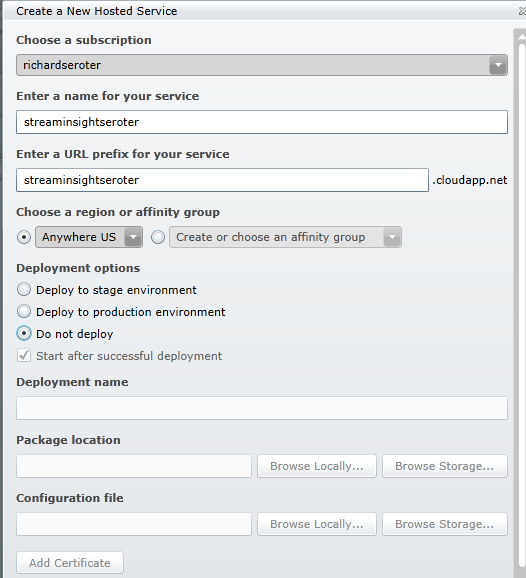
    Finally, I had to create a hosting service underneath my Azure subscription.  The window that pops up after clicking the New Hosted Service button on the ribbon lets you put a service under a subscription and define the deployment options and URL.  Note that I’ve chosen the “do not deploy” option since I have no package to upload to this instance.

    2011.7.5streaminsight05

    The last pre-deployment step is to associate the PFX certificate with this newly created Azure instance.  When doing so, you must provide the password set when exporting the PFX file.

    2011.7.5streaminsight16

    Next, I went to the Visual Studio solution provided with the StreamInsight Austin download.  There are a series of projects in this solution and the ones that I leveraged helped with provisioning the instance, deploying the StreamInsight application, and deleting the provisioned instance.  Note that there is a RESTful API for all of this and these Visual Studio projects just wrap up the operations into a C# API.

    The provisioning project has a configuration file that must contain references to my specific Azure account.  These settings include the SubscriptionId (GUID associated with my Azure subscription), HostedServiceName (matching the Azure service I created earlier), StorageAccountName (name of the storage account for the subscription), StorageAccountKey (giant value visible by clicking “View Access Keys” on the ribbon), ServiceManagementCertificateFilePath (location on local machine where PFX file sits), ServiceManagementCertificatePassword (password provided for PFX file), and ClientCertificatePassword (value used when the provisioning project creates a new certificate).

    Next, I ran the provisioning project which created a new certificate and invoked the StreamInsight Austin provisioning API that puts the StreamInsight binaries into an Azure instance.

    2011.7.5streaminsight06

    When the provisioning is complete, you can see the newly created instance and certificates.

    2011.7.5streaminsight08

    Neat.  It all completed in 5 or so minutes.  Also note that the newly created certificate is in the “My User” certificate store.

    2011.7.5streaminsight09

    I then switched to the “deployment” project provided by StreamInsight Austin.  There are new components that get installed with StreamInsight Austin, including a Package class.  The Package contains references to all of the components that must be uploaded to the Windows Azure instance in order for the query to run.  In my case, I need the Azure AppFabric adapter, my “shared” component, and the Microsoft.ServiceBus.dll that the adapters use.

    PKG.Package package = new PKG.Package("adapters");
    
    package.AddResource(@"Seroter.AustinWalkthrough.SharedObjects.dll");
    package.AddResource(@"Seroter.StreamInsight.AzureAppFabricAdapter.dll");
    package.AddResource(@"Microsoft.ServiceBus.dll");
    

    After updating the project to have the query from my previously built “onsite hosting” project, and updating the project’s configuration file to include the correct Azure instance URL and certificate password, I started up the deployment project.

    2011.7.5streaminsight10

    You can see that my deployment is successful and my StreamInsight query was started.  I can use the RESTful APIs provided by StreamInsight Austin to check on the status of my provisioned instance.  By hitting a specific URL (https://azure.streaminsight.net/HostedServices/{serviceName}/Provisioning), I see the details.

    2011.7.5streaminsight11

    With the query started, I turned on my Azure AppFabric listener service (who receives events from StreamInsight), and my service caller.  The data should flow to the Azure AppFabric endpoint, through StreamInsight Austin, and back out to an Azure AppFabric endpoint.

    2011.7.5streaminsight13

    Content that everything works, and scared that I’d incur runaway hosting charges, I ran the “delete” project with removed my Azure instance and all traces of the application.

    image

    All in all, it’s a fairly straightforward effort.  Your onsite StreamInsight application transitions seamlessly to the cloud.  As mentioned in the first post of the series, the big caveat is that you need event sources that are accessible by the cloud instance.  I leveraged Windows Azure AppFabric to receive events, but you could also do a batch load from an internet-accessible database or file store.

    When would you use StreamInsight Austin?  I can think of a few scenarios that make sense:

    • First and foremost, if you have a wide range of event sources, including cloud hosted ones, having your complex event processing engine close to the data and easily accessible is compelling.
    • Second, Austin makes good sense for variable workloads.  We can run the engine when we need to, and if it only operates on batch data, can shut it down when not in use.  This scenario will even more compelling once the transparent and elastic scale out of StreamInsight Austin is in place.
    • Third, we can use it for proof-of-concept scenarios without requiring on-premises hardware.  By using a service instead of maintaining on-site hardware you offload your management and maintenance to StreamInsight Austin.

    StreamInsight Austin is slated for a public CTP release later this year, so keep an eye out for more info.

  • Is BizTalk Server Going Away At Some Point? Yes. Dead? Nope.

    Another conference, another batch of “BizTalk future” discussions.  This time, it’s the Worldwide Partner Conference in Los Angeles.  Microsoft’s Tony Meleg actually did an excellent job frankly discussing the future of the middle platform and their challenges of branding and cohesion.  I strongly encourage you to watch that session.

    I’ve avoided any discussion on the “Is BizTalk Dead” meme, but I’m feeling frisky and thought I’d provide a bit of analysis and opinion on the topic.  Is the BizTalk Server product SKU going away in a few years?  Likely yes.  However, most integration components of BizTalk will be matured and rebuilt for the new platform over the next many years.

     A Bit of History

    I’m a Microsoft MVP for BizTalk Server and have been working with BizTalk since its beta release in the summer of 2000. When BizTalk was first released, it was a pretty rough piece of software but introduced capabilities not previously available in the Microsoft stack.  BizTalk Server 2002 was pretty much BizTalk 2000 with a few enhancements. I submit that the release of BizTalk Server 2004 was the most transformational, innovative, rapid software release in Microsoft history.   BizTalk Server 2004 introduced an entirely new underlying (pub/sub) engine, Visual Studio development, XSD schema support, new orchestration designer/engine, Human Workflow Services, Business Activity Monitoring, the Business Rules Engine, new adapter model, new Administration tooling, and more.  It was a massive update and one that legitimized the product.

    And … that was the end of significant innovation in the platform.  To be sure, we’ve seen a number of very useful changes to the product since then in the areas of Administration, WCF support, Line of Business adapters, partner management, EDI and more.  But the core engine, design experience, BRE, BAM and the like have undergone only cosmetic updates in the past seven years.  Since BizTalk Server 2004, Microsoft has released products like Windows Workflow, Windows Communication Foundation, SQL Server Service Broker, Windows Azure AppFabric and a host of other products that have innovations in lightweight messaging and easy development. Not to mention the variety of interesting open-source and vendor products that make enterprise messaging simpler.  BizTalk Server simply hasn’t kept up.

    In my opinion, Microsoft just hasn’t known what to do with BizTalk Server for about five years now.  There was the Oslo detour and the “Windows challenge” of supporting existing enterprise customers while trying to figure out how to streamline and upgrade a product.  Microsoft knows that BizTalk Server is a well-built and strategic product, and while it’s the best selling integration server by a mile, it’s still fairly niche and non-integrated with the entire Microsoft stack.

    Choice is a Good Thing

    That said, it’s in vogue to slam BizTalk Server on places like Twitter and blogs.  “It’s too complicated”, “it’s bloated”, “it causes blindness”.  I will contend that for a number of use cases, and if you have people who know what they are doing, one can solve a problem in BizTalk Server faster and more efficiently than using any other product.  A BizTalk expert can take a flat file, parse it, debatch it and route it to Salesforce.com and a Siebel system in 30 minutes (obviously depending on complexity). Those are real scenarios faced by organizations every day. And by the way, as soon as they deploy it they natively get reliable delivery, exception handling, message tracking, centralized management and the like.

    Clearly there are numerous cases when it makes good sense to use another tool like the WCF Routing Service, nServiceBus, Tellago’s Hermes, or any number of other cool messaging solutions.  But it’s not always apples to apples comparisons and equal capabilities.  Sometimes I may want or need a centralized integration server instead of a distributed service bus that relies on each subscriber to grab its own messages, handle exceptions, react to duplicate or out-of-order messaging, and communicate with non-web service based systems.  Anyone who says “never use this” and “only use that” is either naive or selling a product.  Integration in the real world is messy and often requires creative, diverse technologies to solve problems.  Virtually no company is entirely service-oriented, homogenous or running modern software. BizTalk is still the best Microsoft-sold product for reliable messaging between a wide range of systems and technologies.  You’ll find a wide pool of support resources (blogs/discussion groups/developers) that is simply not matched by any other Microsoft-oriented messaging solution.  Doesn’t mean BizTalk is the ONLY choice, but it’s still a VALID choice for a very large set of customers.

    Where is the Platform Going

    Tony Meleg said in his session that Microsoft is “only building one thing.”  They are taking a cloud first model and then enabling the same capabilities for an on premises server.  They are going to keep maintaining the current BizTalk Server (for years, potentially) until new on-premises server is available.  But it’s going to take a while for the vision to turn into products.

    I don’t think that this is a redo of the Oslo situation.  The Azure AppFabric team (and make no mistake, this team is creating the new platform) has a very smart bunch of folks and a clear mission.  They are building very interesting stuff and this last batch of CTPs (queues, topics, application manager) are showing what the future looks like.  And I like it.

    What Does This Mean to Developers?

    Would I tell a developer today to invest in learning BizTalk Server from scratch and making a total living off of it?  I’m not sure.  That said, except for BizTalk orchestrations, you’re seeing from Tony’s session that nearly all of the BizTalk-oriented components (adapters, pipelines, EDI management, mapping, BAM, BRE) will be part of the Microsoft integration server moving forward.  Investments in learning and building solutions on those components today is far from wasted and immensely relevant in the future.  Not to mention that understanding integration patterns like service bus and pub/sub are critical to excelling on the future platforms.

    I’d recommend diversity of skills right now.  One can make a great salary being a BizTalk-only developer today.  No doubt.  But it makes sense to start to work with Windows Azure in order to get a sense of what your future job will hold.  You may decide that you don’t like it and switch to being more WCF based, or non-Microsoft technologies entirely.  Or you may move to different parts of the Microsoft stack and work with StreamInsight, SQL Server, Dynamics CRM, SharePoint, etc.  Just go in with your eyes wide open.

    What Does This Mean to Organizations?

    Many companies will have interesting choices to make in the coming years.  While Tony mentions migration tooling for BizTalk clients, I highly suspect that any move to the new integration platform will require a significant rewrite for a majority of customers.  This is one reason that BizTalk skills will still be relevant for the next decade.  Organizations will either migrate, stay put or switch to new platforms entirely.

    I’d encourage any organization on BizTalk Server today to upgrade to BizTalk 2010 immediately.  That could be the last version they ever install, and if they want to maximize their investment, they should make the move now.  There very well may be 3+ more BizTalk releases in its lifetime, but for companies that only upgrade their enterprise software every 3-5  years, it would be wise to get up to date now and plan a full assessment of their strategy as the Microsoft story comes into focus.

    Summary

    In Tony’s session, he mentioned that the Azure AppFabric Service Bus team is responsible for building next generation messaging platform for Microsoft.  I think that puts Microsoft in good hands.  However, nothing is certain and we may be years from seeing a legitimate on-premises integration server from Microsoft that replaces BizTalk.

    Is BizTalk dead?  No.  But, the product named BizTalk Server is likely not going to be available for sale in 5-10 years.  Components that originated in BizTalk (like pipelines, BAM, etc) will be critical parts of the next generation integration stack from Microsoft and thus investing time to learn and build BizTalk solutions today is not wasted time.  That said, just be proactive about your careers and organizational investments and consider introducing new, interesting messaging technologies into your repertoire.   Deploy nServiceBus, use the WCF Routing Service, try out Hermes, start using the AppFabric Service Bus.  Build an enterprise that uses the best technology for a given scenario and don’t force solutions into a single technology when it doesn’t fit.

    Thoughts?

  • Event Processing in the Cloud with StreamInsight Austin: Part I-Building an Azure AppFabric Adapter

    StreamInsight is Microsoft’s (complex) event processing engine which takes in data and does in-memory pattern matching with the goal of uncovering real-time insight into information.  The StreamInsight team at Microsoft recently announced their upcoming  capability (code named “Austin”) to deploy StreamInsight applications to the Windows Azure cloud.  I got my hands on the early bits for Austin and thought I’d walk through an example of building, deploying and running a cloud-friendly StreamInsight application.  You can find the source code here.

    You may recall that the StreamInsight architecture consists of input/output adapters and any number of “standing queries” that the data flows over.  In order for StreamInsight Austin to be effective, you need a way for the cloud instance to receive input data.  For instance, you could choose to poll a SQL Azure database or pull in a massive file from an Amazon S3 bucket.  The point is that the data needs to be internet accessible.  If you wish to push data into StreamInsight, then you must expose some sort of endpoint on the Azure instance running StreamInsight Austin.  Because we cannot directly host a WCF service on the StreamInsight Austin instance, our best bet is to use Windows Azure AppFabric to receive events.  In this post, I’ll show you how to build an Azure AppFabric adapter for StreamInsight.  In the next post, I’ll walk through the steps to deploy the on-premises StreamInsight application to Windows Azure and StreamInsight Austin.

    As a reference point, the final solution looks like the picture below.  I have a client application which calls an Azure AppFabric Service Bus endpoint started up by StreamInsight Austin, and then take the output of StreamInsight query and send it through an adapter to an Azure AppFabric Service Bus endpoint that relays the message to a subscribing service.

    2011.7.5streaminsight18

    I decided to use the product team’s WCF sample adapter as a foundation for my Azure AppFabric Service Bus adapter.  However, I did make a number of changes in order to simplify it a bit. I have one Visual Studio project that contains shared objects such as the input WCF contract, output WCF contract and StreamInsight Point Event structure.  The Point Event stores a timestamp and dictionary for all the payload values.

    [DataContract]
        public struct WcfPointEvent
        {
            ///
     /// Gets the event payload in the form of key-value pairs. ///
            [DataMember]
            public Dictionary Payload { get; set; }
    
            ///
     /// Gets the start time for the event. ///
            [DataMember]
            public DateTimeOffset StartTime { get; set; }
    
            ///
     /// Gets a value indicating whether the event is an insert or a CTI. ///
            [DataMember]
            public bool IsInsert { get; set; }
        }
    

    Each receiver of the StreamInsight event implements the following WCF interface contract.

    [ServiceContract]
        public interface IPointEventReceiver
        {
            ///
     /// Attempts to dequeue a given point event. The result code indicates whether the operation /// has succeeded, the adapter is suspended -- in which case the operation should be retried later -- /// or whether the adapter has stopped and will no longer return events. ///
            [OperationContract]
            ResultCode PublishEvent(WcfPointEvent result);
        }
    

    The service clients which send messages to StreamInsight via WCF must conform to this interface.

    [ServiceContract]
        public interface IPointInputAdapter
        {
            ///
     /// Attempts to enqueue the given point event. The result code indicates whether the operation /// has succeeded, the adapter is suspended -- in which case the operation should be retried later -- /// or whether the adapter has stopped and can no longer accept events. ///
            [OperationContract]
            ResultCode EnqueueEvent(WcfPointEvent wcfPointEvent);
        }
    

    I built a WCF service (which will be hosted through the Windows Azure AppFabric Service Bus) that implements the IPointEventReceiver interface and prints out one of the values from the dictionary payload.

    public class ReceiveEventService : IPointEventReceiver
        {
            public ResultCode PublishEvent(WcfPointEvent result)
            {
                WcfPointEvent receivedEvent = result;
                Console.WriteLine("Event received: " + receivedEvent.Payload["City"].ToString());
    
                result = receivedEvent;
                return ResultCode.Success;
            }
        }
    

    Now, let’s get into the StreamInsight Azure AppFabric adapter project.  I’ve defined a “configuration object” which holds values that are passed into the adapter at runtime.  These include the service address to host (or consume) and the password used to host the Azure AppFabric service.

    public struct WcfAdapterConfig
        {
            public string ServiceAddress { get; set; }
            public string Username { get; set; }
            public string Password { get; set; }
        }
    

    Both the input and output adapters have the required factory classes and the input adapter uses the declarative CTI model to advance the application time.  For the input adapter itself, the constructor is used to initialize adapter values including the cloud service endpoint.

    public WcfPointInputAdapter(CepEventType eventType, WcfAdapterConfig configInfo)
    {
    this.eventType = eventType;
    this.sync = new object();
    
    // Initialize the service host. The host is opened and closed as the adapter is started
    // and stopped.
    this.host = new ServiceHost(this);
    //define cloud binding
    BasicHttpRelayBinding cloudBinding = new BasicHttpRelayBinding();
    //turn off inbound security
    cloudBinding.Security.RelayClientAuthenticationType = RelayClientAuthenticationType.None;
    
    //add endpoint
    ServiceEndpoint endpoint = host.AddServiceEndpoint((typeof(IPointInputAdapter)), cloudBinding, configInfo.ServiceAddress);
    //define connection binding credentials
    TransportClientEndpointBehavior cloudConnectBehavior = new TransportClientEndpointBehavior();
    cloudConnectBehavior.CredentialType = TransportClientCredentialType.SharedSecret;
    cloudConnectBehavior.Credentials.SharedSecret.IssuerName = configInfo.Username;
    cloudConnectBehavior.Credentials.SharedSecret.IssuerSecret = configInfo.Password;
    endpoint.Behaviors.Add(cloudConnectBehavior);
    
    // Poll the adapter to determine when it is time to stop.
    this.timer = new Timer(CheckStopping);
    this.timer.Change(StopPollingPeriod, Timeout.Infinite);
    }
    

    On “Start()” of the adapter, I start up the WCF host (and connect to the cloud).  My Timer checks the state of the adapter and if the state is “Stopping”, the WCF host is closed.  When the “EnqueueEvent” operation is called by the service client, I create a StreamInsight point event and take all of the values in the payload dictionary and populate the typed class provided at runtime.

    foreach (KeyValuePair keyAndValue in payload)
     {
           //populate values in runtime class with payload values
           int ordinal = this.eventType.Fields[keyAndValue.Key].Ordinal;
           pointEvent.SetField(ordinal, keyAndValue.Value);
      }
     pointEvent.StartTime = startTime;
    
     if (Enqueue(ref pointEvent) == EnqueueOperationResult.Full)
     {
            Ready();
     }


    There is a fair amount of other code in there, but those are the main steps.  As for the output adapter, the constructor instantiates the WCF ChannelFactory for the IPointEventReceiver contract defined earlier.  The address passed in via the WcfAdapterConfig is applied to the Factory.  When StreamInsight invokes the Dequeue operation of the adapter, I pull out the values from the typed class and put them into the payload dictionary of the outbound message.

    // Extract all field values to generate the payload.
    result.Payload = this.eventType.Fields.Values.ToDictionary(
            f => f.Name,
            f => currentEvent.GetField(f.Ordinal));
    
    //publish message to service
    client = factory.CreateChannel();
    client.PublishEvent(result);
    ((IClientChannel)client).Close();
    

    I now have complete adapters to listen to the Azure AppFabric Service Bus and publish to endpoints hosted on the Azure AppFabric Service Bus.

    I’ll now build an on-premises host to test that it all works.  If it does, then the solution can easily be transferred to StreamInsight Austin for cloud hosting.  I first defined the typed class that defines my event.

    public class OrderEvent
        {
            public string City { get; set; }
            public string Product { get; set; }
        }
    

    Recall that my adapter doesn’t know about this class.  The adapter works with the dictionary object and the typed class is passed into the adapter and translated at runtime.  Next up is setup for the StreamInsight host.  After creating a new embedded application, I set up the configuration object representing both the input WCF service and output WCF service.

    //create reference to embedded server
    using (Server server = Server.Create("RSEROTER"))
    {
    
    		//create WCF service config
         WcfAdapterConfig listenWcfConfig = new WcfAdapterConfig()
          {
              Username = "ISSUER",
              Password = "PASSWORD",
              ServiceAddress = "https://richardseroter.servicebus.windows.net/StreamInsight/RSEROTER/InputAdapter"
           };
    
         WcfAdapterConfig subscribeWcfConfig = new WcfAdapterConfig()
         {
               Username = string.Empty,
               Password = string.Empty,
               ServiceAddress = "https://richardseroter.servicebus.windows.net/SIServices/ReceiveEventService"
         };
    
         //create new application on the server
         var myApp = server.CreateApplication("DemoEvents");
    
         //get reference to input stream
         var inputStream = CepStream.Create("input", typeof(WcfInputAdapterFactory), listenWcfConfig, EventShape.Point);
    
         //first query
         var query1 = from i in inputStream
                                select i;
    
         var siQuery = query1.ToQuery(myApp, "SI Query", string.Empty, typeof(WcfOutputAdapterFactory), subscribeWcfConfig, EventShape.Point, StreamEventOrder.FullyOrdered);
    
         siQuery.Start();
        Console.WriteLine("Query started.");
    
        //wait for keystroke to end
        Console.ReadLine();
    
        siQuery.Stop();
        host.Close();
        Console.WriteLine("Query stopped. Press enter to exit application.");
        Console.ReadLine();


    This is now a fully working, cloud-connected, onsite StreamInsight application.  I can take in events from any internal/external service caller and publish output events to any internal/external service.  I find this to be a fairly exciting prospect.  Imaging taking events from your internal Line of Business systems and your external SaaS systems and looking for patterns across those streams.

    Looking for the source code?  Well here you go.  You can run this application today, whether you have StreamInsight Austin or not.  In the next post, I’ll show you how to take this application and deploy it to Windows Azure using StreamInsight Austin.

  • Sending Messages from Salesforce.com to BizTalk Server Through Windows Azure AppFabric

    In a very short time, my latest book (actually Kent Weare’s book) will be released.  One of my chapters covers techniques for integrating BizTalk Server and Salesforce.com.  I recently demonstrated a few of these techniques for the BizTalk User Group Sweden, and I thought I’d briefly cover one of the key scenarios here.  To be sure, this is only a small overview of the pattern, and hopefully it’s enough to get across the main idea, and maybe even encourage to read the book to learn all the gory details!

    I’m bored with the idea that we can only get data from enterprise applications by polling them.  I’ve written about how to poll Salesforce.com from BizTalk, and the topic has been covered quite well by others like Steef-Jan Wiggers and Synthesis Consulting.  While polling has its place, what if I want my application to push a notification to me?  This capability is one of my favorite features of Salesforce.com.  Through the use of Outbound Messaging, we can configure Salesforce.com to call any HTTP endpoint when a user-specified scenario occurs.  For instance, every time a contact’s address changes, Salesforce.com could send a message out with whichever data fields we choose.  Naturally this requires a public-facing web service that Salesforce.com can access.  Instead of exposing a BizTalk Server to the public internet, we can use Azure AppFabric to create a proxy that relays traffic to the internal network.  In this blog post, I’ll show you that Salesforce.com Outbound Messages can be sent though the AppFabric Service Bus to an on-premises BizTalk Server. I haven’t seen anyone try integrating Salesforce.com with Azure AppFabric yet, so hopefully this is the start of many more interesting examples.

    First, a critical point.  Salesforce.com Outbound Messaging is awesome, but it’s fairly restrictive with regards to changing the transport details.  That is, you plug in a URL and have no control over the HTTP call itself.  This means that you cannot inject Azure AppFabric Access Control tokens into a header.  So, Salesforce.com Outbound Messages can only point to an Azure AppFabric service that has its RelayClientAuthenticationType set to “None” (vs. RelayAccessToken).  This means that we have to validate the caller down at the BizTalk layer.  While Salesforce.com Outbound Messages are sent with a client certificate, it does not get passed down to the BizTalk Server as the AppFabric Service Bus swallows certificates before relaying the message on premises.  Therefore, we’ll get a little creative in authenticating the Salesforce.com caller to BizTalk Server. I solved this by adding a token to the Outbound Message payload and using a WCF behavior in BizTalk to match it with the expected value.  See the book chapter for more.

    Let’s get going.  Within the Salesforce.com administrative interface, I created a new Workflow Rule.  This rule checks to see if an Account’s billing address changed.

    1902_06_025

    The rule has a New Outbound Message action which doesn’t yet have an Endpoint address but has all the shared fields identified.

    1902_06_028

    When we’re done with the configuration, we can save the WSDL that complies with the above definition.

    1902_06_029

    On the BizTalk side, I ran the Add Generated Items wizard and consumed the above WSDL.  I then built an orchestration that used the WSDL-generated port on the RECEIVE side in order to expose an orchestration that matched the WSDL provided by Salesforce.com.  Why an orchestration?  When Salesforce.com sends an Outbound Message, it expects a single acknowledgement to confirm receipt.

    1902_06_032

    After deploying the application, I created a receive location where I hosted the Azure AppFabric service directly in BizTalk Server.

    1902_06_033

    After starting the receive location (whose port was tied to my orchestration), I retrieved the Service Bus address and plugged it back into my Salesforce.com Outbound Message’s Endpoint URL.  Once I change the billing address of any Account in Salesforce.com, the Outbound Message is invoked and a message is sent from Salesforce.com to Azure AppFabric and relayed to BizTalk Server.

    I think that this is a compelling pattern.  There are all sorts of variations that we can come up with.  For instance, you could choose to send only an Account ID to BizTalk and then have BizTalk poll Salesforce.com for the full Account details.  This could be helpful if you had a high volume of Outbound Messages and didn’t want to worry about ordering (since each event simply tells BizTalk to pull the latest details).

    If you’re in the Netherlands this week, don’t miss Steef-Jan Wiggers who will be demonstrating this scenario for the local user group.  Or, for the price of one plane ticket from the U.S. to Amsterdam, you can buy 25 copies of the book!