Category: Windows Azure

  • Comparing Clouds : IaaS Scalability Options

    In my first post of this series, I looked at the provisioning experience of five leading cloud Infrastructure-as-a-Service providers. No two were alike, as each offered a unique take.

    Elasticity is an oft-cited reason for using the cloud, so scalability is a key way to assess the suitability of a given cloud to your workloads. Like before, I’ll assess Google Compute Engine, Microsoft Azure, AWS, CenturyLink Cloud, and Digital Ocean. Each cloud will be evaluated based on the ability to scale vertically (i.e. add/remove instance capacity) and horizontally (i.e. add/remove instances) either manually or automatically.

    Let’s get going in alphabetical order.

    DISCLAIMER: I’m the product owner for the CenturyLink Cloud. Obviously my perspective is colored by that. However, I’ve taught three well-received courses on AWS, use Microsoft Azure often as part of my Microsoft MVP status, and spend my day studying the cloud market and playing with cloud technology. While I’m not unbiased, I’m also realistic and can recognize strengths and weaknesses of many vendors in the space.

    Amazon Web Services

    How do you scale vertically?

    In reality, AWS treats individual virtual servers as immutable. There are some complex resizing rules, and local storage cannot be resized at any time.  Resizing an AWS image also results in all new public and private IP addresses. Honestly, you’re really building a new server when you choose to resize.

    If you want to add CPU/memory capacity to a running virtual machine – and you’re not trying to resize to an instance type of a different virtualization type – then you must stop it first.  You cannot resize instances between different virtualization types, so you may want to carefully plan for this. Note that stopping an AWS VM means that anything on the ephemeral storage is destroyed.

    2014.11.19cloud01

    Once the VM is stopped, it’s easy to switch to a new instance type. Note that you have to be familiar with the instance types (e.g. size and cost) as you aren’t given any visual indicator of what you’re signing up for. Once you choose a new instance type, simply start up the instance.

    2014.11.19cloud02

    Want to add storage to an existing AWS instance? You don’t do that from the “instances” view in their Console, but instead, create an EBS volume separately and attach it later.
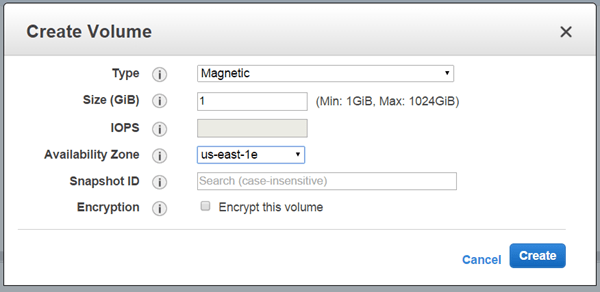
    2014.11.19cloud03

    Attaching is easy, but you do have to remember your instance name.
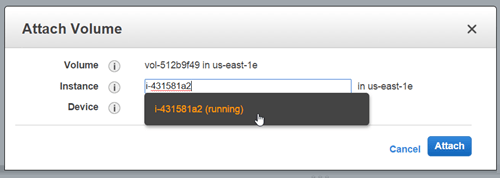
    2014.11.19cloud04

    By changing instance type, and adding EBS volumes, teams can vertically scale their resources.

    How do you scale horizontally?

    AWS strongly encourages customers to build horizontally-scalable apps, and their rich Auto Scaling service supports that. Auto Scaling works by adding (or removing) virtual resources from a pool based on policies.

    2014.11.19cloud05

    When creating an Auto Scaling policy, you first choose the machine image profile (the instance type and template to add to the Auto Scale group), and then define the Auto Scale group. These details include which availability zone(s) to add servers to, how many servers to start with, and which load balancer pool to use.

    2014.11.19cloud06

    With those details in place, the user then sets up the scaling policy (if they wish) which controls when to scale out and when to scale in. One can use Auto Scale to keep the group at a fixed size (and turn up instances if one goes away), or keep the pool size fluid based on usage metrics or schedule.
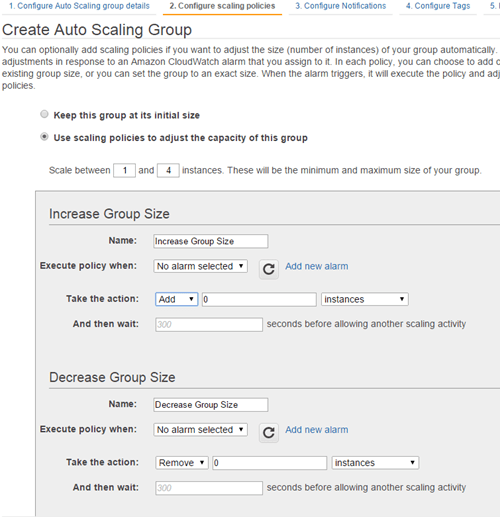
    2014.11.19cloud07

    Amazon has a very nice horizontal scaling solution that works automatically, or manually. Users are free to set up infrastructure Auto Scale groups, or, use AWS-only services like Elastic Beanstalk to wrap up Auto Scale in an application-centric package.

    CenturyLink Cloud

    How do you scale vertically?

    CenturyLink Cloud offers a few ways to add new capacity to existing virtual servers.

    First off, users can resize running servers by adding/removing vCPUs and memory, and growing storage. When adding capacity, the new resources are typically added without requiring a power cycle on the server and there’s no data loss associated with a server resize. Also, note that when you look at dialing resources up and down, the projected impact on cost is reflected.

    2014.11.19cloud08

    Users add more storage to a given server by resizing any existing drives (including root) and by adding entirely new volumes.

    2014.11.19cloud10

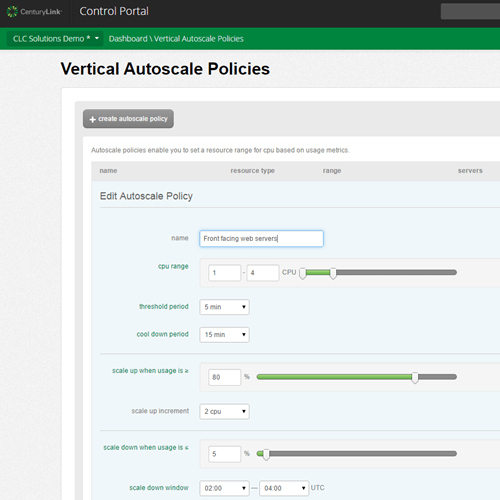
    If the cloud workload has spiky CPU consumption, then the user can set up a vertical Autoscale policy that adds and removes CPU capacity. When creating these per-server policies, users choose a CPU min/max range, how long to collect metrics before scaling, and how long to wait before another scale event (“cool down period”). Because scaling down (removing vCPUs) requires a reboot, the user is asked for a time window when it’s ok to cycle the server.
    2014.11.19cloud09


    How do you scale horizontally?

    Like any cloud, CenturyLink Cloud makes it easy to manually add new servers to a fleet. Over the summer, CenturyLink added a Horizontal Autoscale service that powers servers on and off based on CPU and memory consumption thresholds. These policies – defined once and available in any region – call out minimum sizing, monitoring period threshold, cool down period, scale out increment, scale in increment, and CPU/RAM utilization thresholds.

    2014.11.19cloud11

    Unlike other public clouds, CenturyLink organizes servers by “groups.” Horizontal Autoscale policies are applied at the Group level, and are bound to a load balancer pool when applied. When a scale event occurs, the servers are powered on and off within seconds. Parked servers only incur cost for storage and OS licensing (if applicable), but there still is a cost to this model that doesn’t exist in the AWS-like model of instantiating and tearing down servers each time.

    2014.11.19cloud12

    CenturyLink Cloud provides a few ways to quickly scale vertically (manually or automatically without rebooting), and now, horizontally. While the autoscaling capability isn’t as feature-rich as what AWS offers, the platform recognizes the fact that workloads have different scale vectors and benefit from capacity being added up or out.

    Digital Ocean

    How do you scale vertically?

    Digital Ocean offers a pair of ways to scale a droplet (virtual instance).

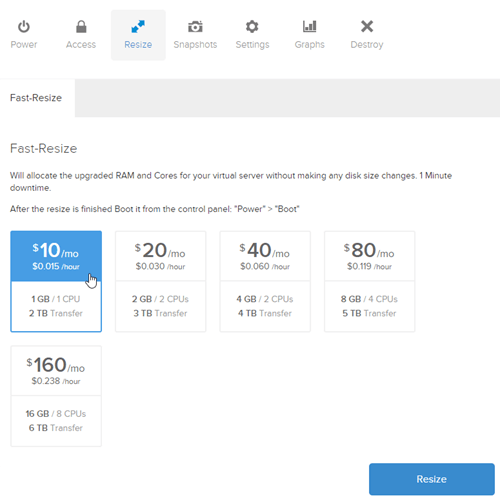
    First, users can do a “Fast-Resize” which quickly increases or decreases CPU and memory. A droplet must be powered off to resize.

    2014.11.19cloud13

    After shutting the droplet down and choosing a new droplet size, the additional capacity is added in seconds.
    2014.11.19cloud15

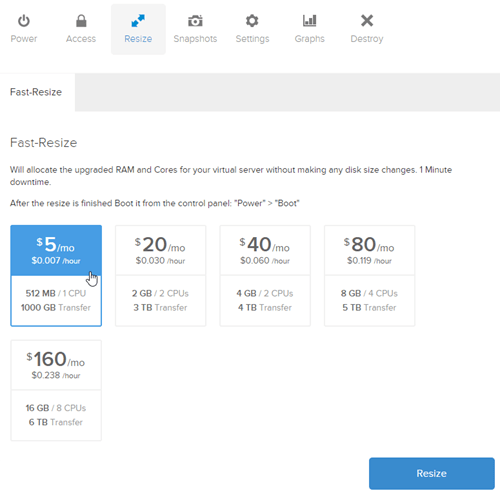
    Once a droplet is sized up, it’s easy to (power off) and size down again.
    2014.11.19cloud16

    If you want to change your disk size as well, Digital Ocean offers a “Migrate-Resize” model where you first take a snapshot of your (powered off) droplet.

    2014.11.19cloud17

    Then, you create an entirely new droplet, but choose that snapshot as the “base.” This way, you end up with a new (larger) droplet with all the data from the original one.

    2014.11.19cloud18


    How do you scale horizontally?

    You do it manually. There are no automated techniques for adding more machines when a usage threshold is exceeded. They do tout their API as a way to detect scale conditions and quickly clone droplets to add more to a running fleet.

    Digital Ocean is known for its ease, performance, and simplicity. There isn’t the level of sophistication and automation you find elsewhere, but the scaling experience is very straightforward.

    Google Compute Engine

    How do you scale vertically?

    Google lets you add more storage to a running virtual machine. Persistent disks can be shared among many machines, although only one machine at a time can have read/write permission.

    2014.11.19cloud20

    Interestingly, Google Compute Engine doesn’t support an upgrade/downgrade to different instance types, so there’s no way to add/remove CPU or memory from a machine. They recommend creating a new virtual machine and attaching the persistent disks from the original one. So, “more storage” is the only vertical scaling capability currently offered here.

    How do you scale horizontally?

    Up until a week ago, Google didn’t have an auto scaling solution. That changed, and now the Compute Engine Autoscaler is in beta.

    First, you need to set up an instance template for use by the Autoscaler. This is the same data you provide when creating an actual running instance. In this case, it’s template-ized for future use.

    2014.11.19cloud21

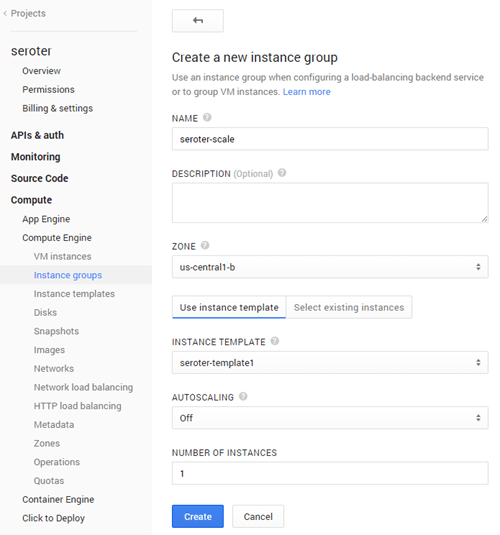
    Then, create an instance group that lets you collectively manage a group of resources. Here’s the view of it, before I chose to set “Autoscaling” to “On.”
    2014.11.19cloud22

    Turning Autoscaling on results in new settings popping up. Specifically, the autoscale trigger (choices: CPU usage, HTTP load balancer usage, monitoring metric), the usage threshold, instance min/max, and cool-down period.
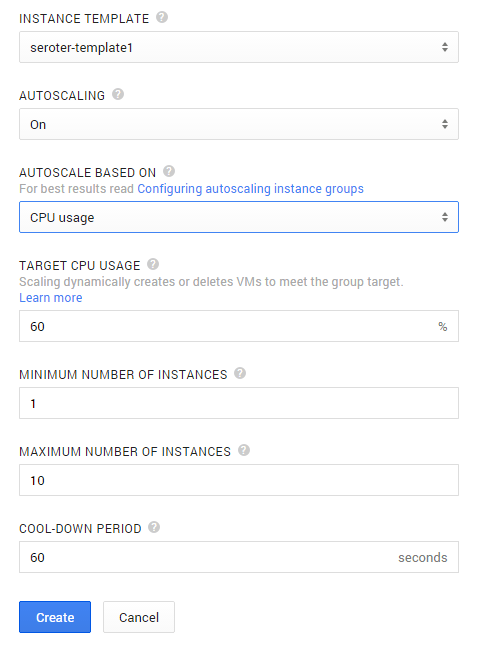
    2014.11.19cloud23

    You can use this with HTTP or network load balanced instance groups to load balance multiple app tiers independently.

    Google doesn’t offer much in the way of vertical resizing, but the horizontal auto scaling story is quickly catching up to the rest.

    Microsoft Azure

    How do you scale vertically?

    Microsoft provides a handful of vertical scaling options. For a virtual server instance, a user can change the instance type in order to get more/less CPU and memory. It appears from my testing that this typically requires a reboot of the server.

    2014.11.19cloud24

    Azure users can also add new, empty disks to a given server. It doesn’t appear as if you can resize existing disks.

    2014.11.19cloud25

    How do you scale horizontally?

    Microsoft, like all clouds, makes it easy to add more virtual instances manually. They also have a horizontal auto scale capability. First, you must put servers into an “availability set” together. This is accomplished by first putting them into the same “cloud service” in Azure. In the screenshot below, seroterscale is the name of my cloud service, and both the two instances are part of the same availability set.

    2014.11.19cloud26

    Somewhat annoyingly, all these machines have to be the exact same size (which is the requirement in some other clouds too, minus CenturyLink). So after I resized my second server, I was able to muck with the auto scale settings. Note that Azure auto scale also works by enabling/disabling existing virtual instances versus creating or destroying instances.
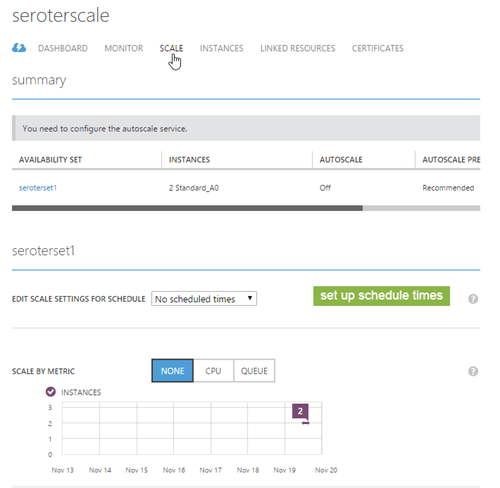
    2014.11.19cloud27

    Notice that you have two choices. First, you can scale based on scheduled time.

    2014.11.19cloud28

    Either by schedule or by metric, you specify how many instances to turn on/off based on the upper/lower CPU threshold. It’s also possible to scale based on the queue depth of a Service Bus queue.

    2014.11.19cloud29

    Microsoft gives you a few good options for bumping up the resources on existing machines, while also enabling more servers in the fleet to offset planned or unplanned demand.

    Summary

    As with my assessment of cloud provisioning experiences, each cloud provider’s scaling story mirrors their view of the world. Amazon has a broad, sophisticated, and complex feature set, and their manual and Auto Scaling capabilities reflects that. CenturyLink Cloud focuses on greenfield and legacy workloads, and thus has a scaling story that’s focused on supporting both modern scale-out systems as well as traditional systems that prefer to scale up. Digital Ocean is all about fast acquisition of resources and an API centric management story, and their basic scaling options demonstrate that. Google focuses a lot on quickly getting lots of immutable resources, and their limited vertical scaling shows that. Their new horizontal scaling service complements their perspective. Finally, Microsoft’s experience for vertical scaling mirrors AWS, while their horizontal scaling is a bit complicated, but functional.

    Unless you’re only working with modern applications, it’s likely your scaling needs will differ by application. Hopefully this look across providers gave you a sense for the different capabilities out there, and what you might want to keep in mind when designing your systems!

  • Comparing Clouds: IaaS Provisioning Experience

    Comparing Clouds: IaaS Provisioning Experience

    There is no perfect cloud platform. Shocking, I know. Organizations choose the cloud that best fits their values and needs. Many factors go into those choices, and it can depend on who is evaluating the options. A CIO may care most about the vendor’s total product portfolio, strategic direction, and ability to fit into the organization’s IT environment. A developer may look at which cloud offers the ability to compose and deploy the most scalable, feature-rich applications. An Ops engineer may care about which cloud gives them the best way to design and manage a robust, durable environment. In this series of blogs posts, I’m going to look at five leading cloud platforms (Microsoft Azure, Google Compute Engine, AWS, Digital Ocean, and CenturyLink Cloud) and briefly assess the experience they offer to those building and managing their cloud portfolio. In this first post, I’ll flex the infrastructure provisioning experience of each provider.

    DISCLAIMER: I’m the product owner for the CenturyLink Cloud. Obviously my perspective is colored by that. However, I’ve taught three well-received courses on AWS, use Microsoft Azure often as part of my Microsoft MVP status, and spend my day studying the cloud market and playing with cloud technology. While I’m not unbiased, I’m also realistic and can recognize strengths and weaknesses of many vendors in the space.

    I’m going to assess each vendor across three major criteria: how do you provision resources, what key options are available, and what stands out in the experience.

    Microsoft Azure

    Microsoft added an IaaS service last year. Their portfolio of cloud services is impressive as they continue to add unique capabilities.

    How do you provision resources?

    Nearly all Azure resources are provisioned from the same Portal (except for a few new services that are only available in their next generation Preview Portal). Servers can be built via API as well. Users can select from a range of Windows and Linux templates (but no Red Hat Linux). Microsoft also offers some templates loaded with Microsoft software like SharePoint, Dynamics, and BizTalk Server.

    2014.10.19provision01

    When building a server, users can set the server’s name and select from a handful of pre-defined instance sizes.

    2014.10.19provision02

    Finally, the user sets the virtual machine configuration attributes and access ports.

    2014.10.19provision03

    What key options are available?

    Microsoft makes it fairly easy to reference to custom-built virtual machine image templates when building new servers.

    2014.10.19provision04

    Microsoft lets you set up or reference a “cloud service” in order to set up a load balanced pool

    2014.10.19provision06

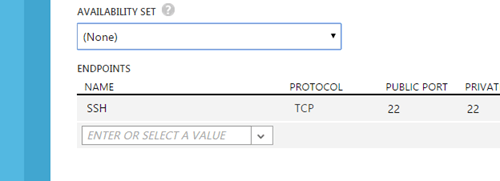
    Finally, there’s an option to spread the server across fault domains via “availability sets” and set up ports for public access.

    2014.10.19provision07

    What stands out?

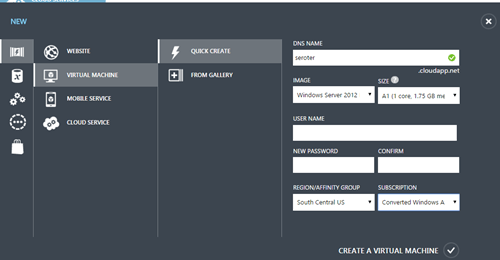
    Microsoft offers a “Quick Create” option where users can spin up VMs by just providing a couple basic values.

    2014.10.19provision08

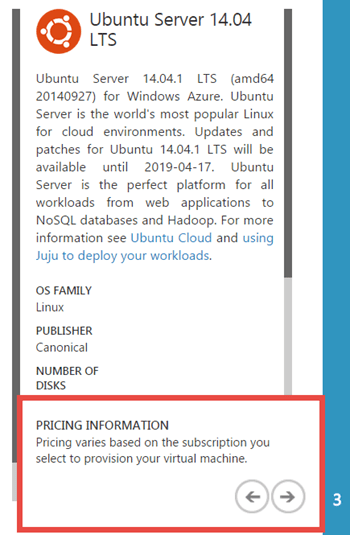
    Lots of VM instance sizes, no sense of the cost while you’re walking through the provisioning process.

    2014.10.19provision09

    Developers can choose from any open source image hosted in the VM Depot. This gives users a fairly easy way to deploy a variety of open source platforms onto Azure.

    2014.10.19provision05

    Google Compute Engine

    Google also added an IaaS product to their portfolio last year. They don’t appear to be investing much in the UI experience, but their commitment to fast acquisition of robust servers is undeniable.

    How do you provision resources?

    Servers are provisioned from the same console used to deploy most any Google cloud service. Of course, you can also provision servers via the REST API.

    2014.10.19provision10

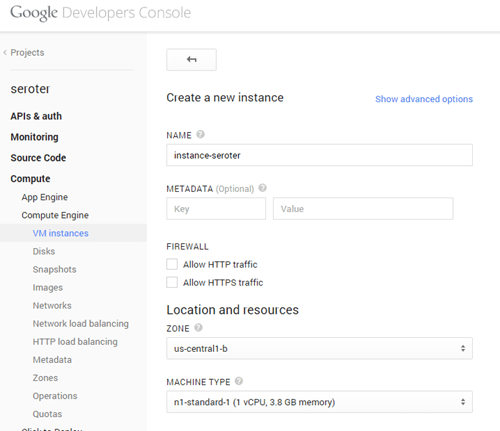
    By default, users see a basic server provisioning page.

    2014.10.19provision11

    The user chooses a location for their server, what instance size to use, the base OS image, which network to join, and whether to provide a public IP address.

    2014.10.19provision12

    What key options are available?

    Google lets you pick your boot disk (standard or SSD type).

    2014.10.19provision13

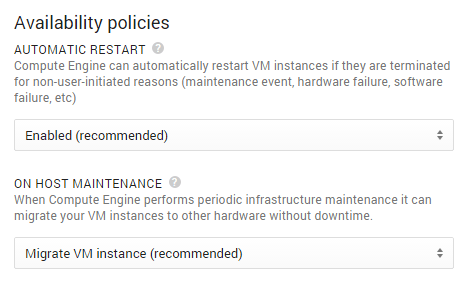
    Users have the choice of a few “availability options.” This includes an automatic VM restart for non-user initiated actions (e.g. hardware failure), and the choice to migrate or terminate VMs when host maintenance occurs.

    2014.10.19provision14

    Google let’s you choose which other Google services you can access from a cloud VM.

    2014.10.19provision15

    What stands out?

    Google does a nice job of letting you opt-in to specific behavior. For instance, you choose whether to allow HTTP/HTTPS traffic, whether to use fixed or ephemeral public IPs, how host failures/maintenance should be handled, and which other services can be accessed, Google gives a lot of say to the user. It’s very clear as to what each option does. While there are some things you may have to look up to understand (e.g. “what exactly is their concept of a ‘network’?”), the user experience is very straightforward and easy enough for a newbie and powerful enough for a pro.

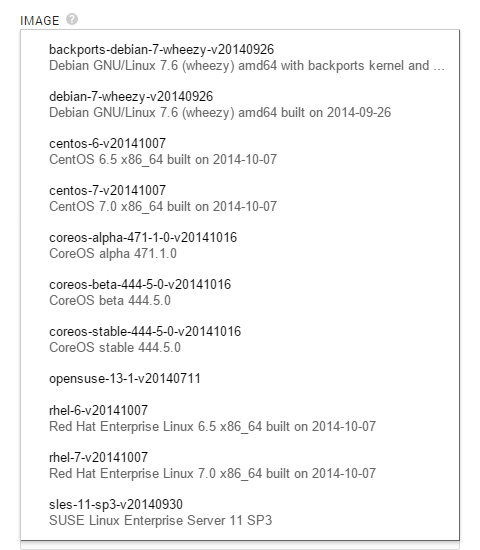
    Another thing that stands out here is the relatively sparse set of built-in OS options. You get a decent variety of Linux flavors, but no Ubuntu. And no Windows.

    2014.10.19provision16

    Amazon Web Services

    Amazon EC2 is the original IaaS, and AWS has since added tons of additional application services to their catalog.

    How do you provision resources?

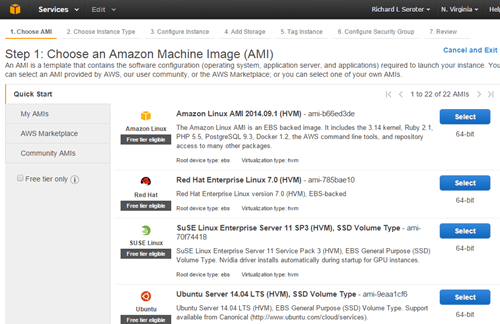
    AWS gives you both a web console and API to provision resources. Provisioning in the UI starts by asking the user to choose a base machine image. There are a set of “quick start” ones, you can browse a massive catalog, or use a custom-built one.

    2014.10.19provision17

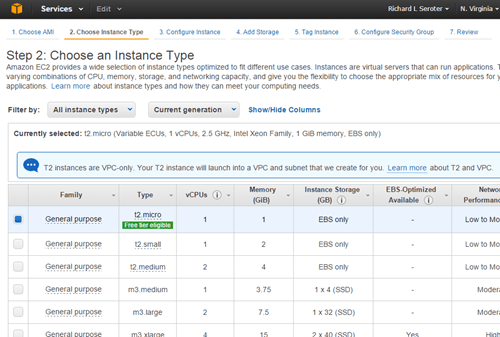
    Once the user chooses the base template, they select from a giant list of instance types. Like the above providers, this instance type list contains a mix of different sizes and performance levels.

    2014.10.19provision18

    At this stage, you CAN “review and launch” and skip the more advanced configuration. But, we’ll keep going. This next step gives you options for how many instances to spin up, where to put this (optionally) in a virtual private space,

    2014.10.19provision19

    Next you can add storage volumes to the instance, set metadata tags on the instance, and finally configure which security group to apply. Security groups act like a firewall policy.

    2014.10.19provision20

    What key options are available?

    The broader question might be what is NOT available! Amazon gives users a broad set of image templates to pick from. That’s very nice for those who want to stand up pre-configured boxes with software ready to go. EC2 instance sizes represent a key decision point, as you have 30+ different choices. Each one serves a different purpose.

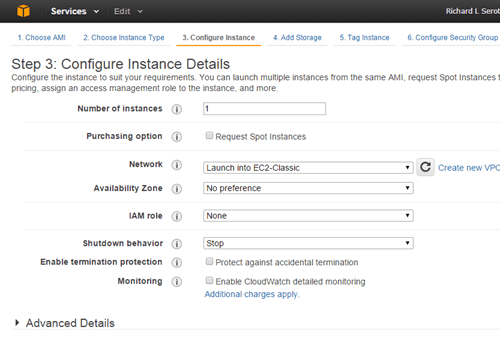
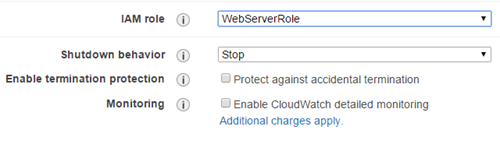
    AWS offers some instance configurations that are very important to the user. Identity and Access Management (IAM) roles are nice because it lets the server run with a certain set of credentials. This way, the developer doesn’t have to embed credentials on the server itself when accessing other AWS services.  The local storage in EC2 is ephemeral, so the “shutdown behavior” option is important. If you stop a box, you retain storage, if you terminate it, any local storage is destroyed.

    2014.10.19provision21

    Security groups (shown above) are ridiculously important as they control inbound traffic. A casual policy gives you a large attack surface.

    What stands out?

    It’s hard to ignore the complexity of the EC2 provisioning process. It’s very powerful, but there are a LOT of decisions to make and opportunities to go sideways. Users need to be smart and consider their choices carefully (although admittedly, many instance-level settings can be changed after the fact if a mistake is made).

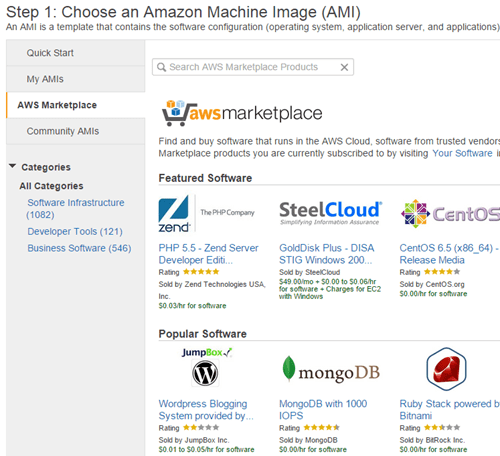
    The AWS community catalog has 34,000+ machine images, and the official marketplace has nearly 2000 machine images. Pretty epic.

    2014.10.19provision23

    Amazon makes it easy to spin up many instances of the same type. Very handy when building large clusters of identical machines.

    2014.10.19provision22

    Digital Ocean

    Digital Ocean is a fast-growing, successful provider of virtual infrastructure.

    How do you provision resources?

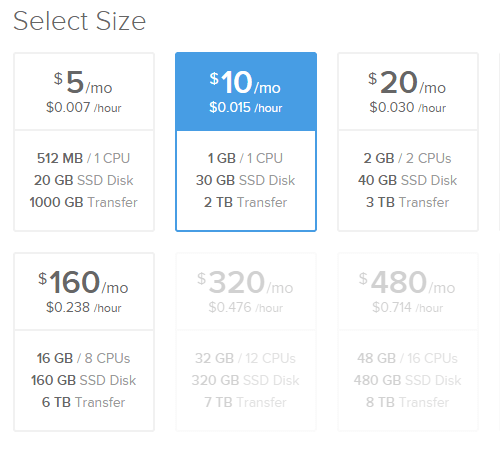
    Droplets (the Digital Ocean equivalent of a virtual machine) are provisioned via web console and API. For the web console, it’s a very straightforward process that’s completed in a single page. There are 9 possible options (of which 3 require approval to use) for Droplet sizing.

    2014.10.19provision24

    The user then chooses where to run the Droplet, and which image to use. That’s about it!

    What key options are available?

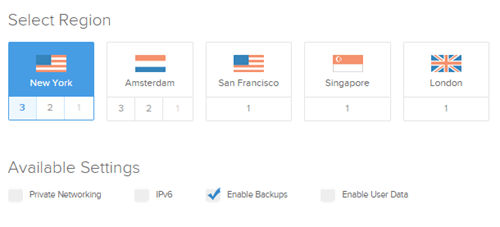
    Hidden beneath this simple façade are some useful options.  First, Digital Ocean makes it easy to choose which location, and see what extended options are available in each. The descriptions for each “available setting” are a bit light, so it’s up the user to figure out the implications of each.

    2014.10.19provision25

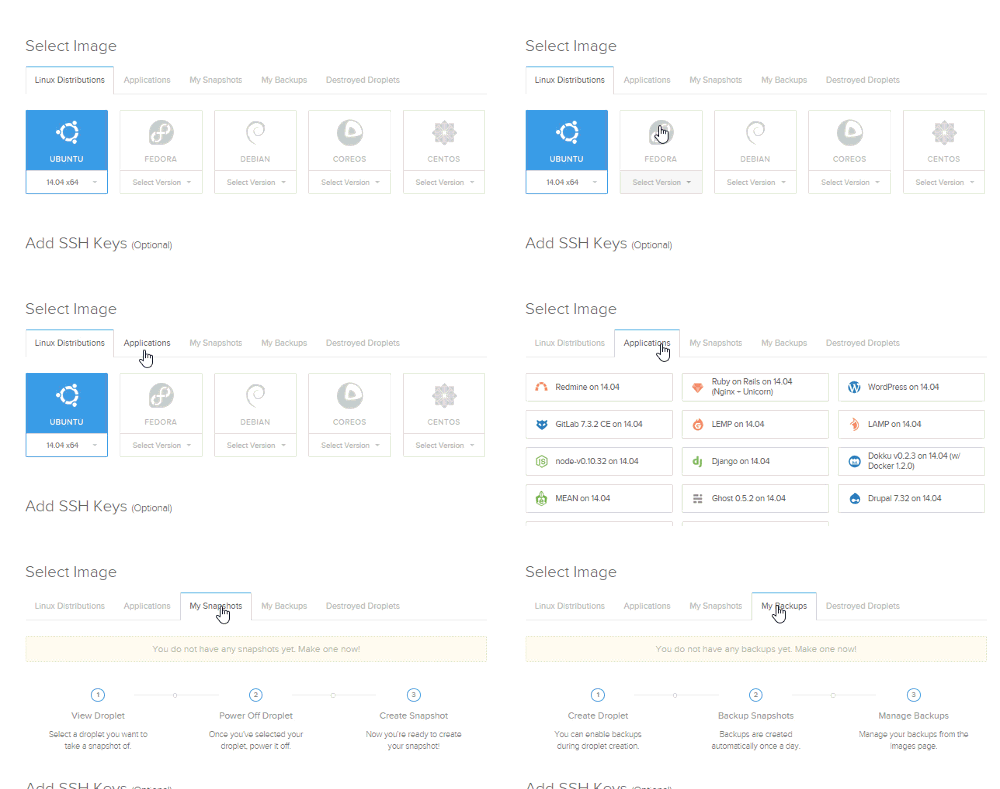
    Digital Ocean just supports Linux, but they offer a good list of distributions, and even some ready-to-go application environments.

    2014.10.19provision26

    What stands out?

    Digital Ocean thrives on simplicity and clear pricing. Developers can fly through this process when creating servers, and the cost of each Droplet is obvious.

    2014.10.19provision27

    CenturyLink Cloud

    CenturyLink – a global telecommunications company with 50+ data centers and $20 billion in annual revenue –  has used acquisitions to build out its cloud portfolio. Starting with Savvis in 2011, and then continuing with AppFog and Tier 3 in 2013.

    How do you provision resources?

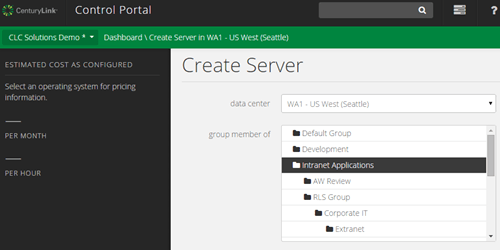
    Like everyone else, CenturyLink Cloud provides both a web and API channel for creating virtual servers. The process starts in the web console by selecting a data center to deploy to, and which collection of servers (called a “group”) to add this to.

    2014.10.19provision28

    Next, the user chooses whether to make the server “managed” or not. A managed server is secured, administered, and monitored by CenturyLink engineers, while still giving the user full access to the virtual server. There are just two server “types” in the CenturyLink Cloud: standard servers with SAN-backed storage, or Hyperscale servers with local SSD storage. If the user chooses a Hyperscale server, they can then select an anti-affinity policy. The user then selects an operating system (or customized template), and will see the projected price show up on the left hand side.

    2014.10.19provision29

    The user then chooses the size of the server and which network to put it on.

    What key options are available?

    Unlike the other clouds highlighted here, the CenturyLink Cloud doesn’t have the concept of “instance sizes.” Instead, users choose the exact amount of CPU, memory, and storage to add to a server. For CPU, users can also choose vertical Autoscale policies that scale a server up and down based on CPU consumption.

    2014.10.19provision30

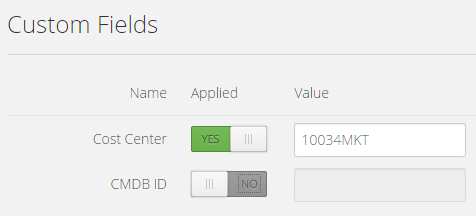
    Like a few other clouds, CenturyLink offers a tagging ability. These “custom fields” can store data that describes the server.

    2014.10.19provision31

    It’s easy to forget to delete a temporary server, so the platform offers the ability to set a time-to-live. The server gets deleted on the date selected.

    2014.10.19provision32

    What stands out?

    In this assessment, only Digital Ocean and CenturyLink actually have price transparency. It’s nice to actually know what you’re spending.

    2014.10.19provision33

    CenturyLink’s flexible sizing is convenient for those who don’t want to fit their app or workload into a fixed instance size. Similar to Digital Ocean, CenturyLink doesn’t offer 19 different types of servers to choose from. Every server has the same performance profile.

    Summary

    Each cloud offers their own unique way of creating virtual assets. There’s great power in offering rich, sophisticated provisioning controls, but there’s also benefit to delivering a slimmed down, focused provisioning experience. There are many commonalities between these services, but each one has a unique value proposition. In my subsequent posts in this series, I’ll look at the post-provisioning management experience, APIs, and more.

  • What Would the Best Franken-Cloud Look Like?

    What if you could take all infrastructure cloud providers and combine their best assets into a single, perfect cloud? What would it look like?

    In my day job, I regularly see the sorts of things that cloud users ask for from a public cloud. These 9 things represent some of the most common requests:

    1. Scale. Can the platform give me virtually infinite capacity anywhere in the world?
    2. Low price. Is the cost of compute/storage low?
    3. Innovative internal platform. Does the underlying platform reflect next-generation thinking that will be relevant in years to come?
    4. On-premises parity. Can I use on-premises tools and technologies alongside this cloud platform?
    5. Strong ecosystem. Is it possible to fill in gaps or enrich the platform through the use of 3rd party products or services? Is there a solid API that partners can work with?
    6. Application services. Are there services I can use to compose applications faster and reduce ongoing maintenance cost?
    7. Management experience. Does the platform have good “day 2” management capabilities that let me function at scale with a large footprint?
    8. Available support. How can I get help setting up and running my cloud?
    9. Simplicity. Is there an easy on-ramp and can I quickly get tasks done?

    Which cloud providers offer the BEST option for each capability? We could argue until we’re blue in the face, but we’re just having fun here. In many cases, the gap between the “best” and “second best” is tiny and I could make the case that a few different clouds do every single item above pretty well. But that’s no fun, so here’s what components of each vendor that I’d combine into the “perfect” cloud.

    DISCLAIMER: I’m the product owner for the CenturyLink Cloud. Obviously my perspective is colored by that. However, I’ve taught three well-received courses on AWS, use Microsoft Azure often as part of my Microsoft MVP status, and spend my day studying the cloud market and playing with cloud technology. While I’m not unbiased, I’m also realistic and can recognize strengths and weaknesses of many vendors in the space.

    2014.08.26cloud1

    Google Compute Engine – BEST: Innovative Platform

    Difficult to judge without insider knowledge of everyone’s cloud guts, but I’ll throw this one to Google. Every cloud provider has solved some tricky distributed systems problems, but Google’s forward-thinking work with containers has made it possible for them to do things at massive scale. While their current Windows Server support is pretty lame – and that could impact whether this is really a legit “use-for-everything cloud” for large companies – I believe they’ll keep applying their unique knowledge to the cloud platform.

    Microsoft Azure – BEST: On-premises Parity, Application Services

    It’s unrealistic to ask any established company to throw away all their investments in on-premises technology and tools, so clouds that ease the transition have a leg up. Microsoft offers a handful of cloud services with on-premises parallels (Active Directory, SQL Server, SharePoint Online, VMs based on Hyper-V) that make the transition simpler. There’s management through System Center, and a good set of hybrid networking options. They still have a lot of cloud-only products or cloud-only constraints, but they do a solid job of creating a unified story.

    It’s difficult to say who has a “better” set of application services, AWS or Microsoft. AWS has a very powerful catalog of services for data storage, application streaming, queuing, and mobile development. I’ll give a slight edge to Microsoft for a better set of application integration services, web app hosting services, and identity services.

    Most of these are modular microservices that can be mashed up with applications running in any other cloud. That’s welcome news to those who prefer other clouds for primary workloads, but can benefit from the point services offered by companies like Microsoft.

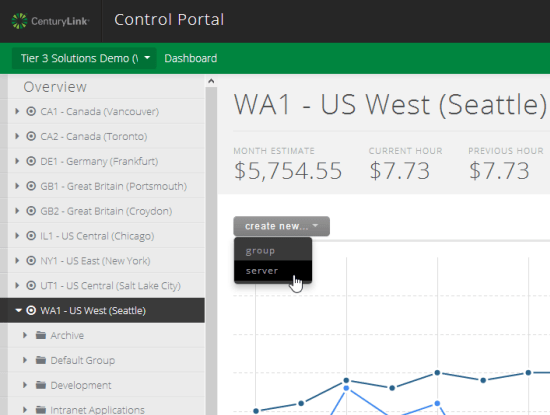
    CenturyLink Cloud – BEST: Management Experience

    2014.08.26cloud2Many cloud providers focus on the “acquire stuff” experience and leave the “manage stuff” experience lacking. Whether your cloud resources live for 3 days or three years, there are maintenance activities. CenturyLink Cloud lets you create account hierarchies to represent your org, organize virtual servers into “groups”, act on those servers as a group, see cross-DC server health at a glance, and more. It’s a focus of this platform, and it differs from most other clouds that give you a flat list of cloud servers per data center and a limited number of UI-driven management tools. With the rise of configuration management as a mainstream toolset, platforms with limited UIs can still offer robust means for managing servers at scale. But, CenturyLink Cloud is focused on everything from account management and price transparency, to bulk server management in the platform.
     

    Rackspace – BEST: Support

    Rackspace has recently pivoted from offering a do-it-yourself IaaS and now offers cloud with managed services. “Fanantical Support” has been Rackspace’s mantra for years – and by all accounts, one they’ve lived up to – and now they are committing fully to a white-glove, managed cloud. In addition, they offer DevOps consultative services, DBA services, general professional services, and more. They’ve also got solid support documentation and support forums for those who are trying to do some things on their own. Many (most?) other clouds do a nice job of offering up self-service or consultative support, but Rackspace makes it a core focus.

    Amazon Web Services – BEST: Scale, Ecosystem

    Yes, AWS does a lot of things very well. If you’re looking for a lot of web-scale capacity anywhere in the world, AWS is tough to beat. They clearly have lots of capacity, and run more cloud workloads that pretty much everyone else combined. Each cloud provider seems to be expanding rapidly, but if you are identifying who has scaled the most, you have to say AWS.

    On “ecosystem” you could ague that Microsoft has a strong story, but realistically, Amazon’s got everyone beat. Any decent cloud-enabled tool knows how to talk to the AWS API, there are entire OSS toolsets built around the platform, and they have a marketplace stuffed with virtual appliances and compatible products. Not to mention, there are lots of AWS developers out there writing about the services, attending meetups, and building tools to help other developers out.

    Digital Ocean – BEST: Low Price, Simplicity

    Digital Ocean has really become a darling of developers. Why? Even with the infrastructure price wars going on among the large cloud providers, Digital Ocean has a really easy-to-understand, low price. Whether kicking the tires or deploying massive apps, Digital Ocean gives you a very price-competitive Linux-hosting service. Now, the “total cost of cloud” is a heck of a lot more than compute and storage costs, but, those are factors that resonates with people the most when first assessing clouds.

    For “simplicity”, you could argue for a lot of different providers here. Digital Ocean doesn’t offer a lots of knobs to turn, or organize their platform in a way that maps to most enterprise IT org structures, but you can’t argue with the straightforward user experience. You can go from “Hmm, I wonder what this is?” to “I’m up and running!” in about 60 seconds. That’s … a frictionless experience.

    Summary

    If you did this exercise on your own, you could easily expand the list of capabilities (e.g. ancillary services, performance, configuration options, security compliance), and swap around some of the providers. I didn’t even list out other nice cloud vendors like IBM/SoftLayer, Linode, and Joyent. You could probably slot them into some of the “winner” positions based on your own perspective.

    In reality, there is no “perfect” cloud (yet). There are always tradeoffs associated with each service and some capabilities that matter to you more than others. This thought experiment helped me think through the market, and hopefully gave you a something to consider!

  • Integrating Microsoft Azure BizTalk Services with Salesforce.com

    BizTalk Services is far from the most mature cloud-based integration solution, but it’s viable one for certain scenarios. I haven’t seen a whole lot of demos that show how to send data to SaaS endpoints, so I thought I’d spend some of my weekend trying to make that happen. In this blog post, I’m going to walk through the steps necessary to make BizTalk Services send a message to a Salesforce REST endpoint.

    I had four major questions to answer before setting out on this adventure:

    1. How to authenticate? Salesforce uses an OAuth-based security model where the caller acquires a token and uses it in subsequent service calls.
    2. How to pass in credentials at runtime? I didn’t want to hardcode the Salesforce credentials in code.
    3. How to call the endpoint itself? I needed to figure out the proper endpoint binding configuration and the right way to pass in the headers.
    4. How to debug the damn thing. BizTalk Services – like most cloud hosted platforms without an on-premises equivalent – is a black box and decent testing tools are a must.

    The answers to first two is “write a custom component.” Fortunately, BizTalk Services has an extensibility point where developers can throw custom code into a Bridge. I added a class library project and added the following class which takes in a series of credential parameters from the Bridge design surface, calls the Salesforce login endpoint, and puts the security token into a message context property for later use. I also dumped a few other values into context to help with debugging. Note that this library references the great JSON.NET NuGet package.

    using System;
    using System.Collections.Generic;
    using System.Linq;
    using System.Text;
    using System.Threading.Tasks;
    
    using Microsoft.BizTalk.Services;
    
    using System.Net.Http;
    using System.Net.Http.Headers;
    using Newtonsoft.Json.Linq;
    
    namespace SeroterDemo
    {
        public class SetPropertiesInspector : IMessageInspector
        {
            [PipelinePropertyAttribute(Name = "SfdcUserName")]
            public string SfdcUserName_Value { get; set; }
    
            [PipelinePropertyAttribute(Name = "SfdcPassword")]
            public string SfdcPassword_Value { get; set; }
    
            [PipelinePropertyAttribute(Name = "SfdcToken")]
            public string SfdcToken_Value { get; set; }
    
            [PipelinePropertyAttribute(Name = "SfdcConsumerKey")]
            public string SfdcConsumerKey_Value { get; set; }
    
            [PipelinePropertyAttribute(Name = "SfdcConsumerSecret")]
            public string SfdcConsumerSecret_Value { get; set; }
    
            private string oauthToken = "ABCDEF";
    
            public Task Execute(IMessage message, IMessageInspectorContext context)
            {
                return Task.Factory.StartNew(() =>
                {
                    if (null != message)
                    {
                        HttpClient authClient = new HttpClient();
    
                        //create login password value
                        string loginPassword = SfdcPassword_Value + SfdcToken_Value;
    
                        //prepare payload
                        HttpContent content = new FormUrlEncodedContent(new Dictionary<string, string>
                            {
                                {"grant_type","password"},
                                {"client_id",SfdcConsumerKey_Value},
                                {"client_secret",SfdcConsumerSecret_Value},
                                {"username",SfdcUserName_Value},
                                {"password",loginPassword}
                            }
                            );
    
                        //post request and make sure to wait for response
                        var message2 = authClient.PostAsync("https://login.salesforce.com/services/oauth2/token", content).Result;
    
                        string responseString = message2.Content.ReadAsStringAsync().Result;
    
                        //extract token
                        JObject obj = JObject.Parse(responseString);
                        oauthToken = (string)obj["access_token"];
    
                        //throw values into context to prove they made it into the class OK
                        message.Promote("consumerkey", SfdcConsumerKey_Value);
                        message.Promote("consumersecret", SfdcConsumerSecret_Value);
                        message.Promote("response", responseString);
                        //put token itself into context
                        string propertyName = "OAuthToken";
                        message.Promote(propertyName, oauthToken);
                    }
                });
            }
        }
    }
    

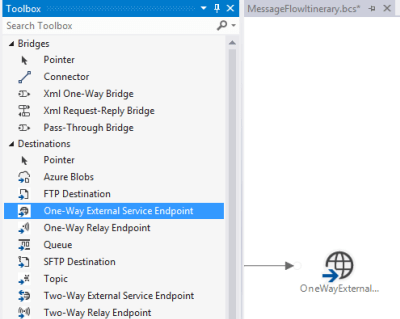
    With that code in place, I focused next on getting the write endpoint definition in place to call Salesforce. I used the One Way External Service Endpoint destination, which by default, uses the BasicHttp WCF binding.

    2014.07.14mabs01

    Now *ideally*, the REST endpoint is pulled from the authentication request and applied at runtime. However, I’m not exactly sure how to take the value from the authentication call and override a configured endpoint address. So, for this example, I called the Salesforce authentication endpoint from an outside application and pulled out the returned service endpoint manually. Not perfect, but good enough for this scenario. Below is the configuration file I created for this destination shape. Notice that I switched the binding to webHttp and set the security mode.

    <configuration>
      <system.serviceModel>
        <bindings>
          <webHttpBinding>
            <binding name="restBinding">
              <security mode="Transport" />
            </binding>
          </webHttpBinding>
        </bindings>
        <client>
          <clear />
          <endpoint address="https://na15.salesforce.com/services/data/v25.0/sobjects/Account"
            binding="webHttpBinding" bindingConfiguration="restBinding"
            contract="System.ServiceModel.Routing.ISimplexDatagramRouter"
            name="OneWayExternalServiceEndpointReference1" />
        </client>
      </system.serviceModel>
    </configuration>
    

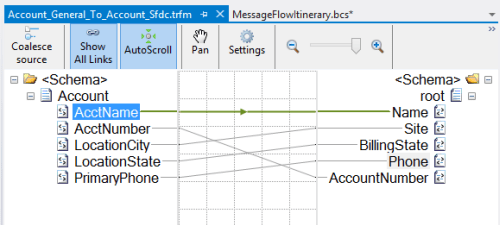
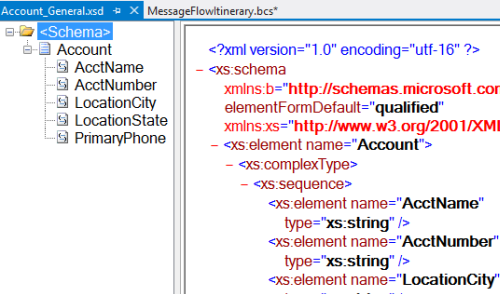
    With this in place, I created a pair of XML schemas and a map. The first schema represents a generic “account” definition.

    2014.07.14mabs02

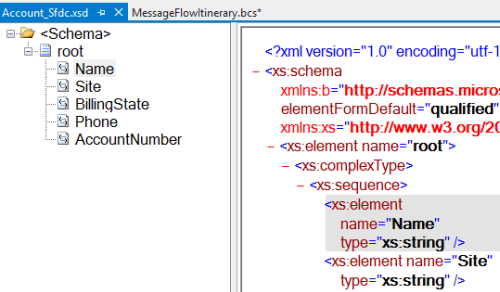
    My next schema defines the format expected by the Salesforce REST endpoint. It’s basically a root node called “root” (with no namespace) and elements named after the field names in Salesforce.

    2014.07.14mabs03

    As expected, my mapping between these two is super complicated. I’ll give you a moment to study its subtle beauty.

    2014.07.14mabs04

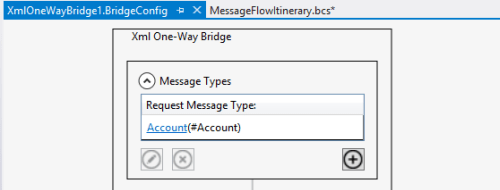
    With those in place, I was ready to build out my bridge.  I dragged an Xml One-Way Bridge shape to the message flow surface. There were two goals of my bridge: transform the message, and put the credentials into context. I started the bridge by defining the input message type. This is the first schema I created which describes the generic account message.

    2014.07.14mabs05

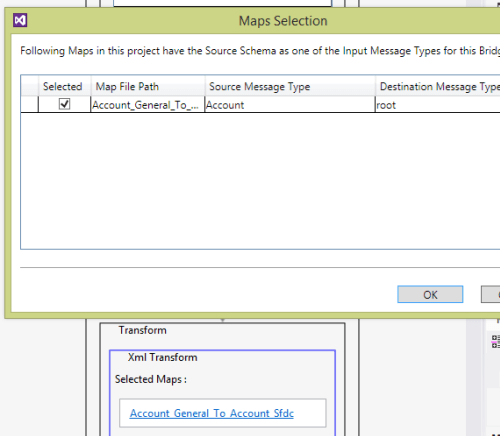
    Choosing a map is easy; just add the appropriate map to the collection property on the Transform stage.

    2014.07.14mabs06

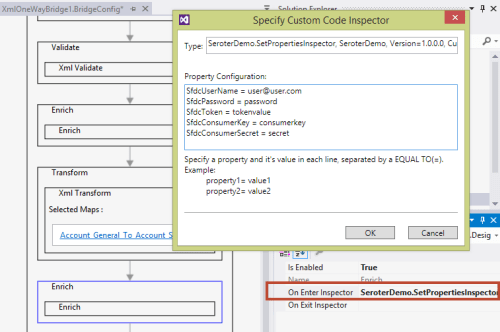
    With the message transformed, I had to then get the property bag configured with the right context properties. On the final Enrich stage of the pipeline, I chose the On Enter Inspector to select the code to run when this stage gets started. I entered the fully qualified name, and then on separate lines, put the values for each (authorization) property I defined in the class above. Note that you do NOT wrap these values in quotes. I wasted an hour trying to figure out why my values weren’t working correctly!

    2014.07.14mabs07

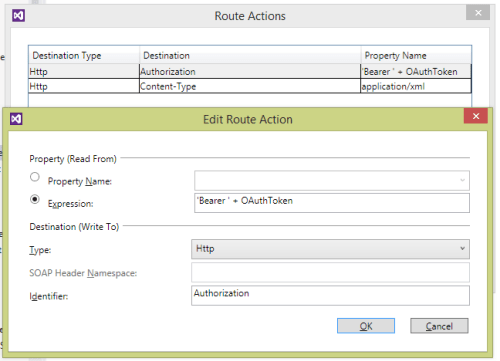
    The web service endpoint was already configured above, so all that was left was to configure the connector. The connector between the bridge and destination shapes was set to route all the messages to that single destination (“Filter condition: 1=1”). The most important configuration was the headers. Clicking the Route Actions property of the connector opens up a window to set any SOAP or HTTP headers on the outbound message. I defined a pair of headers. One sets the content-type so that Salesforce knows I’m sending it an XML message, and the second defines the authorization header as a combination of the word “Bearer” (in single quotes!) and the OAuthToken context value we created above.

    2014.07.14mabs08

    At this point, I had a finished message flow itinerary and deployed the project to a running instance of BizTalk Services. Now to test it. I first tested it by putting a Service Bus Queue at the beginning of the flow and pumping messages through. After the 20th vague error message, I decided to crack this nut open.  I installed the BizTalk Services Explorer extension from the Visual Studio Gallery. This tool promises to aid in debugging and management of BizTalk Services resources and is actually pretty handy. It’s also not documented at all, but documentation is for sissies anyway.

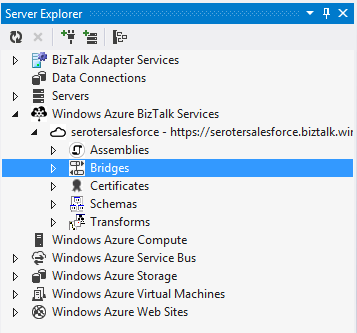
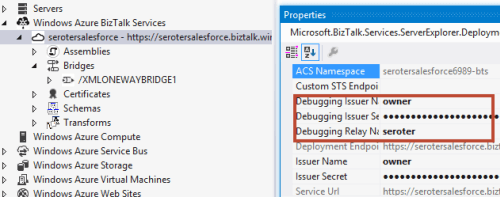
    Once installed, you get a nice little management interface inside the Server Explorer view in Visual Studio.

    2014.07.14mabs09

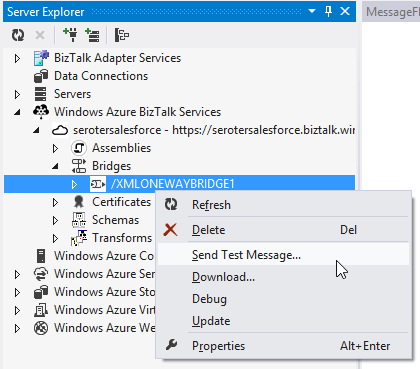
    I could just send a test message in (and specify the payload myself), but that’s pretty much the same as what I was doing from my own client application.

    2014.07.14mabs10

    No, I wanted to see inside the process a bit. First, I set up the appropriate credentials for calling the bridge endpoint. Do NOT try and use the debugging function if you have a Queue or Topic as your input channel! It only works with Relay input.

    2014.07.14mabs11

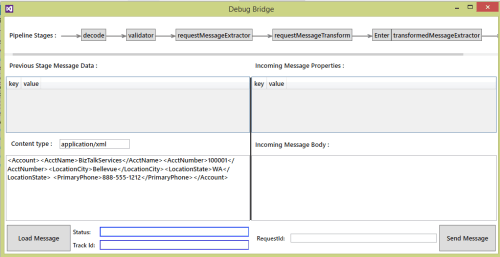
    I then right-clicked the bridge and chose “Debug.” After entering my source XML, I submitted the initial message into the bridge. This tool shows you each stage of the bridge as well as the corresponding payload and context properties.

    2014.07.14mabs12

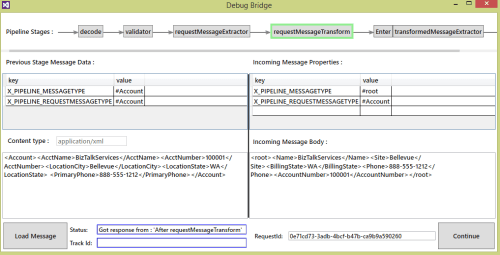
    At the Transform stage, I could see that my message was being correctly mapped to the Salesforce-ready structure.

    2014.07.14mabs13

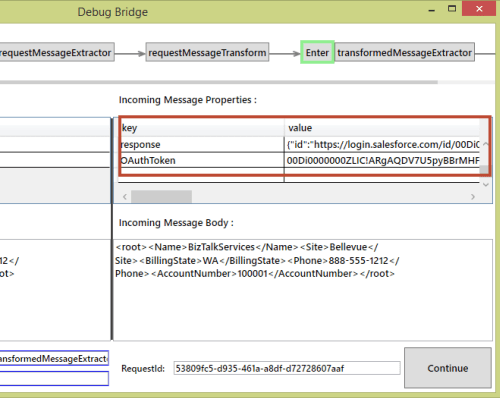
    After the Enrich stage – where we had our custom code callout – I saw my new context values, including the OAuth token.

    2014.07.14mabs14

    The whole process completes with an error, only because Salesforce returns an XML response and I don’t handle it. Checking Salesforce showed that my new account definitely made it across.

    2014.07.14mabs15

    This took me longer than I thought, just given the general newness of the platform and lack of deep documentation. Also, my bridge occasionally flakes out because it seems to “forget” the authorization property configuration values that are part of the bridge definition. I had to redeploy my project to make it “remember” them again. I’m sure it’s a “me” problem, but there may be some best practices on custom code properties that I don’t know yet.

    Now that you’ve seen how to extend BizTalk Services, hopefully you can use this same flow when sending messages to all sorts of SaaS systems.

  • TechEd NA Videos Now Online

    I recently had the pleasure of speaking at Microsoft TechEd in Houston, TX, and the videos of those sessions are now online. A few thousand people have already watched them, but I thought it’d be good to share it here as well.

    The first one– Architecting Resilient (Cloud) Applications — went through a series of principles for high available application design, and then I showed how to build an ASP.NET that took advantage of Microsoft Azure’s resilience capabilities.

    The second session — Practical DevOps for Data Center Efficiency — covered some principles of DevOps, and the various tools that can complement the required change in organization culture.

    Some of my DevOps talk was taken from an InfoQ article I was writing, and that article is now online. Exploring the ENTIRE DevOps Toolchain for (Cloud) Teams walks through the DevOps tool set in more detail and explains how the various tools help you achieve your objectives.

    I’ve got some upcoming posts queued up for the blog, but wanted to share what I’ve been doing elsewhere for the past few weeks.

  • Join Me at Microsoft TechEd to Talk DevOps, Cloud Application Architecture

    In a couple weeks, I’ll be invading Houston, TX to deliver a pair of sessions at Microsoft TechEd. This conference – one of the largest annual Microsoft events – focuses on technology available today for developers and IT professionals. I made a pair of proposals to this conference back in January (hoping to increase my odds), and inexplicably, they chose both. So, I accidentally doubled my work.

    The first session, titled Architecting Resilient (Cloud) Applications looks at the principles, patterns, and technology you can use to build highly available cloud applications. For fun, I retooled the highly available web application that I built for my pair of Pluralsight courses, Architecting Highly Available Systems on AWS and Optimizing and Managing Distributed Systems on AWS. This application now takes advantage of Azure Web Sites, Virtual Machines, Traffic Manager, Cache, Service Bus, SQL Database, Storage, and CDN. While I’ll be demonstrating a variety of Microsoft Azure services (because it’s a Microsoft conference), all of the principles/patterns apply to virtually any quality cloud platform.
    My second session is called Practical DevOps for Data Center Efficiency. In reality, this is a talk about “DevOps for Windows people.” I’ll cover what DevOps is, what the full set of technologies are that support a DevOps culture, and then show off a set of Windows-friendly demos of Vagrant, Puppet, and Visual Studio Online. The best DevOps tools have been late-arriving to Windows, but now some of the best capabilities are available across OS platforms and I’m excited to share this with the TechEd crowd.

    If you’re attending TechEd, don’t hesitate to stop by and say hi. If you think either of these talks are interesting for other conferences, let me know that too!

  • Windows Azure BizTalk Services Just Became 19% More Interesting

    Buried in the laundry list of new Windows Azure features outlined by Scott Guthrie was a mention of some pretty intriguing updates to Windows Azure BizTalk Services (WABS). Specifically, this cloud-based brokered messaging service can now accept messages from Windows Azure Service Bus Topics and Queues ( there were some other updates to the service as well, and you can read about them on the BizTalk team blog). Why does this make the service more interesting to me? Because it makes this a more useful service for cloud integration scenarios. Instead of only offering REST or FTP input channels, WABS now lets you build complex scenarios that use the powerful pub-sub capabilities of Windows Azure Service Bus brokered messaging. This blog post will take a brief look at how to use these new features, and why they matter.

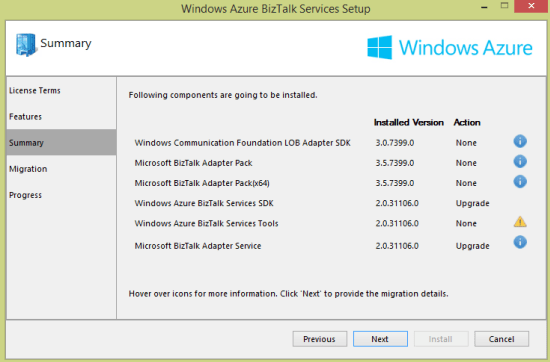
    First off, there’s a new set of developer components to use. Download the installer to get the new capabilities.

    2014.02.21biztalk01

    I’m digging this new style of Windows installer that lets you know which components need upgrading.

    2014.02.21biztalk02

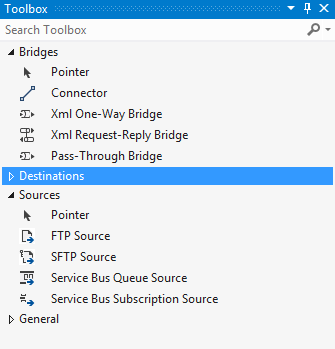
    After finishing the upgrade, I fired up Visual Studio 2012 (as I didn’t see a template added for Visual Studio 2013 usage), and created a new WABS project. Sure enough, there are two new “sources” in the Toolbox.

    2014.02.21biztalk05

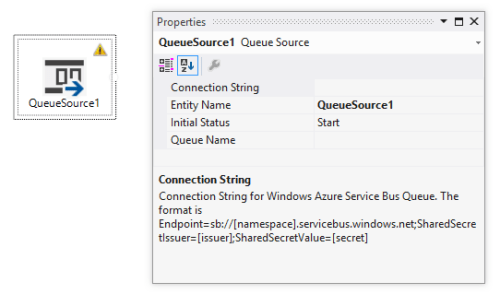
    What are the properties of each? When I added the Service Bus Queue Source to the bridge configuration, I saw that you add a connection string and queue name.

    2014.02.21biztalk06

    For Service Bus Topics, you use a Service Bus Subscription Source and specify the connection string and subscription name.

    2014.02.21biztalk07

    What was missing in the first release of WABS was the ability to do durable messaging as an input channel. In addition, the WABS bridge engine still doesn’t support a broadcast scenario, so if you want to send the same message to 10 different endpoints, you can’t. One solution was to use the Topic destination, but what if you wanted to add endpoint-specific transformations or lookup logic first? You’re out of luck. NOW, you could build a solution where you take in messages from a combination of queues, REST endpoints, and topic subscriptions, and route it accordingly. Need to send a message to 5 recipients? Now you send it to a topic, and then have bridges that respond to each topic subscription with endpoint-specific transformation and logic. MUCH better. You just have more options to build reliable integrations between endpoints now.

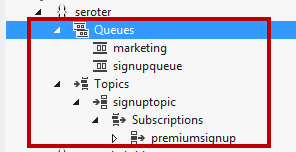
    Let’s deploy an example. I used the Sever Explorer in Visual Studio to create a new queue and a topic with a single subscription. I also added another queue (“marketing”) that will receive all the inbound messages.

    2014.02.21biztalk08

    I then built a bridge configuration that took in messages from multiple sources (queue and topic) and routed to a single queue.

    2014.02.21biztalk09

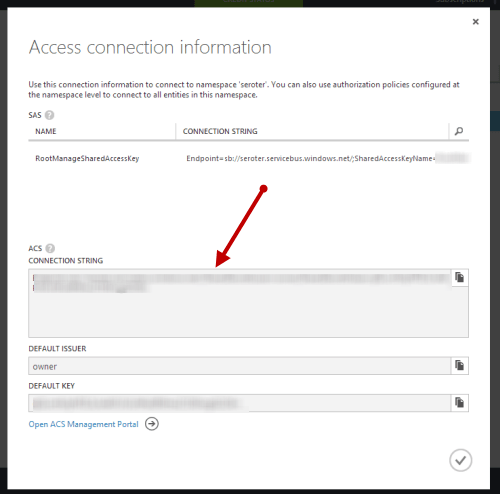
    Configuring the sources isn’t as easy as it should be. I still have to copy in a connection string (vs. look it up from somewhere), but it’s not too painful. The Windows Azure Portal does a nice job of showing you the connection string value you need.

    2014.02.21biztalk10

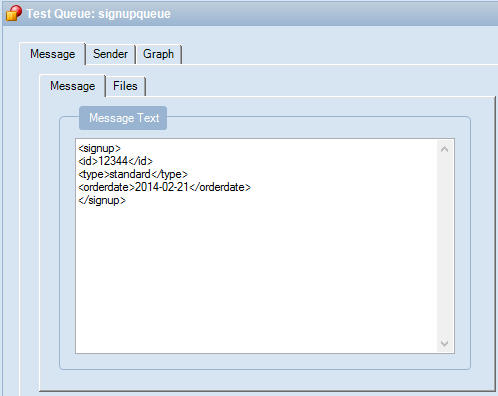
    After deploying the bridge successfully, I opened up the Service Bus Explorer and sent a message to the input queue.

    2014.02.21biztalk11

    I then sent another message to the input topic.

    2014.02.21biztalk12

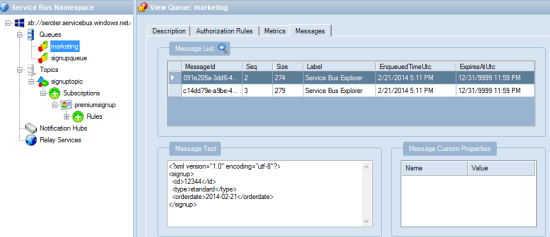
    After a second or two, I queried the “marketing” queue which should have both messages routed through the WABS bridge. Hey, there it is! Both messages were instantly routed to the destination queue.

    2014.02.21biztalk13

    WABS is a very new, but interesting tool in the integration-as-a-service space. This February update makes it more likely that I’d recommend it for legitimate cloud integration scenarios.

  • Upcoming Speaking Engagements in London and Seattle

    In a few weeks, I’ll kick off a run of conference presentations that I’m really looking forward to.

    First, I’ll be in London for the BizTalk Summit 2014 event put on by the BizTalk360 team. In my talk “When To Use What: A Look at Choosing Integration Technology”, I take a fresh look at the topic of my book from a few years ago. I’ll walk through each integration-related technology from Microsoft and use a “buy, hold, or sell” rating to indicate my opinion on its suitability for a project today. Then I’ll discuss a decision framework for choosing among this wide variety of technologies, before closing with an example solution. The speaker list for this event is fantastic, and apparently there are only a handful of tickets remaining.

    The month after this, I’ll be in Seattle speaking at the ALM Forum. This well-respected event for agile software practitioners is held annually and I’m very excited to be part of the program. I am clearly the least distinguished speaker in the group, and I’m totally ok with that. I’m speaking in the Practices of DevOps track and my topic is “How Any Organization Can Transition to DevOps – 10 Practical Strategies Gleaned from a Cloud Startup.” Here I’ll drill into a practical set of tips I learned by witnessing (and participating in) a DevOps transformation at Tier 3 (now CenturyLink Cloud). I’m amped for this event as it’s fun to do case studies and share advice that can help others.

    If you’re able to attend either of those events, look me up!

  • Data Stream Processing with Amazon Kinesis and .NET Applications

    Amazon Kinesis is a new data stream processing service from AWS that makes it possible to ingest and read high volumes of data in real-time. That description may sound vaguely familiar to those who followed Microsoft’s attempts to put their CEP engine StreamInsight into the Windows Azure cloud as part of “Project Austin.” Two major differences between the two: Kinesis doesn’t have the stream query aspects of StreamInsight, and Amazon actually SHIPPED their product.

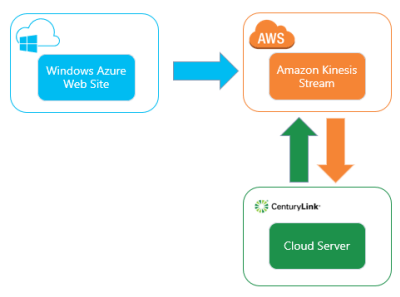
    Kinesis looks pretty cool, and I wanted to try out a scenario where I have (1) a Windows Azure Web Site that generates data, (2) Amazon Kinesis processing data, and (3) an application in the CenturyLink Cloud which is reading the data stream.

    2014.01.08kinesis05

    What is Amazon Kinesis?

    Kinesis provides a managed service that handles the intake, storage, and transportation of real-time streams of data. Each stream can handle nearly unlimited data volumes. Users set up shards which are the means for scaling up (and down) the capacity of the stream. All the data that comes into the a Kinesis stream is replicated across AWS availability zones within a region. This provides a great high availability story. Additionally, multiple sources can write to a stream, and a stream can be read by multiple applications.

    Data is available in the stream for up to 24 hours, meaning that applications (readers) can pull shard records based on multiple schemes: given sequence number, oldest record, latest record. Kinesis uses DynamoDB to store application state (like checkpoints). You can interact with Kinesis via the provided REST API or via platform SDKs.

    What DOESN’T Kinesis do? It doesn’t have any sort of adapter model, so it’s up to the developer to build producers (writers) and applications (readers). There is a nice client library for Java that has a lot of built in logic for application load balancing and such. But for the most part, this is still a developer-oriented solution for building big data processing solutions.

    Setting up Amazon Kinesis

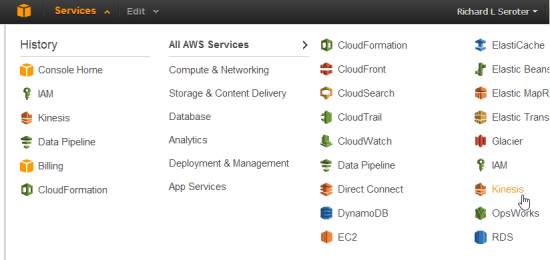
    First off, I logged into the AWS console and located Kinesis in the navigation menu.

    2014.01.08kinesis01

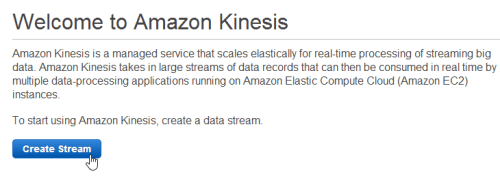
    I’m then given the choice to create a new stream.

    2014.01.08kinesis02

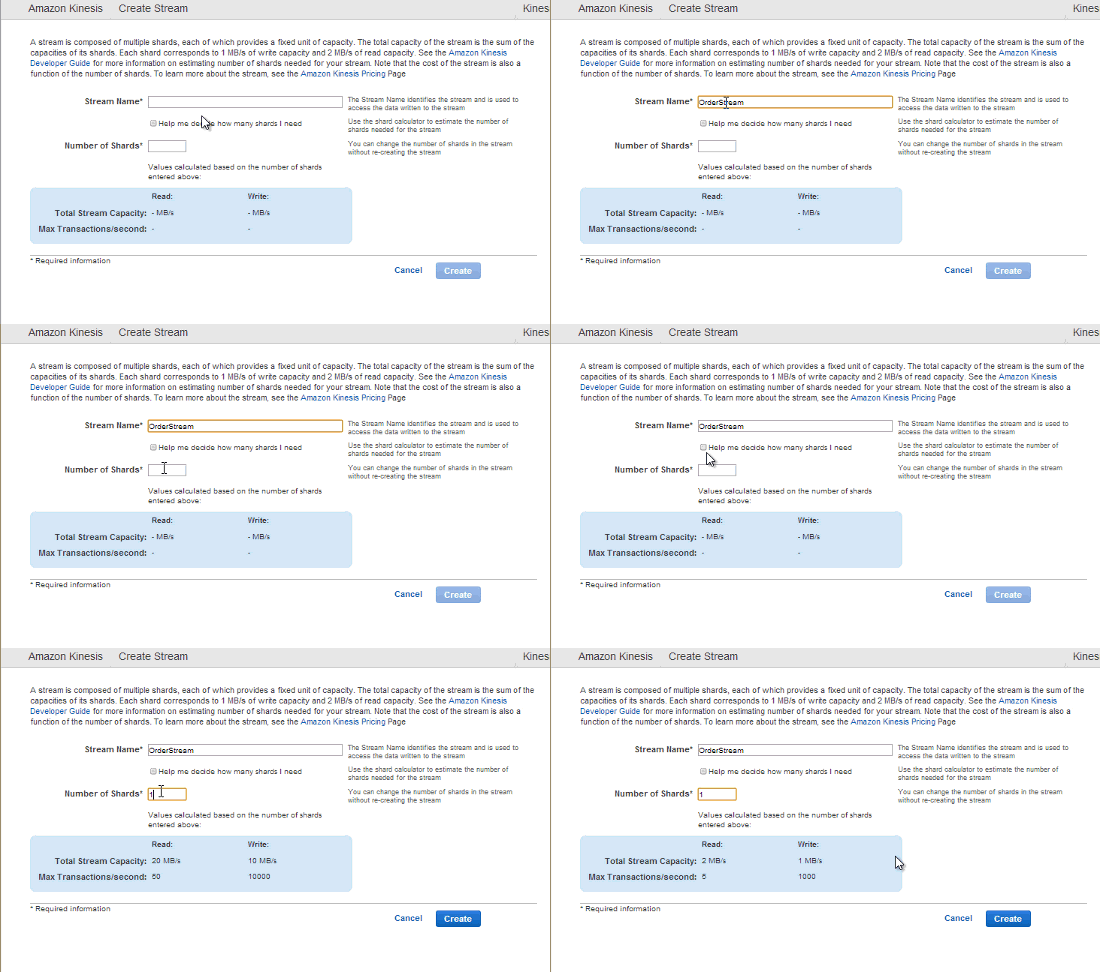
    Next, I need to choose the initial number of shards for the stream. I can either put in the number myself, or use a calculator that helps me estimate how many shards I’ll need based on my data volume.

    2014.01.08kinesis03

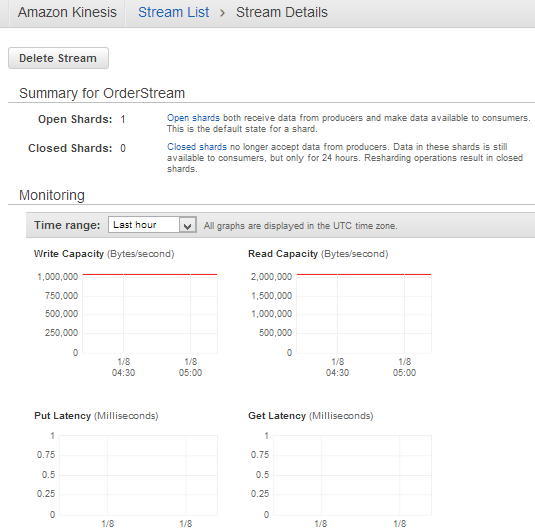
    After a few seconds, my managed Kinesis stream is ready to use. For a given stream, I can see available shards, and some CloudWatch metrics related to capacity, latency, and requests.

    2014.01.08kinesis04

    I now have an environment for use!

    Creating a data producer

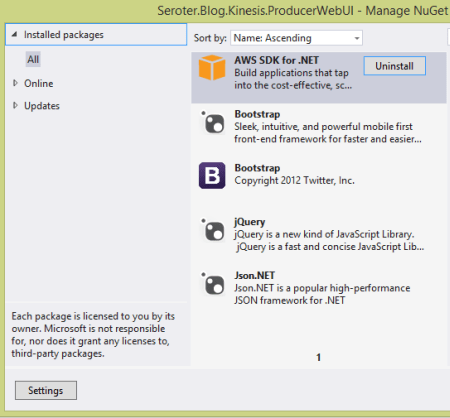
    Now I was ready to build an ASP.NET web site that publishes data to the Kinesis endpoint. The AWS SDK for .NET already Kinesis objects, so no reason to make this more complicated than it has to be. My ASP.NET site has NuGet packages that reference JSON.NET (for JSON serialization), AWS SDK, jQuery, and Bootstrap.

    2014.01.08kinesis06

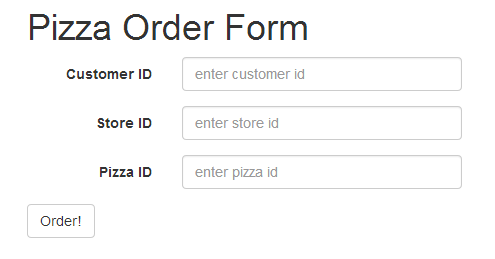
    The web application is fairly basic. It’s for ordering pizza from a global chain. Imagine sending order info to Kinesis and seeing real-time reactions to marketing campaigns, weather trends, and more. Kinesis isn’t a messaging engine per se, but it’s for collecting and analyzing data. Here, I’m collecting some simplistic data in a form.
    2014.01.08kinesis07

    When clicking the “order” button, I build up the request and send it to a particular Kinesis stream. First, I added the following “using” statements:

    using Newtonsoft.Json;
    using Amazon.Kinesis;
    using Amazon.Kinesis.Model;
    using System.IO;
    using System.Text;
    

    The button click event has the following (documented) code.  Notice a few things. My AWS credentials are stored in the web.config file, and I pass in an AmazonKinesisConfig to the client constructor. Why? I need to tell the client library which AWS region my Kinesis stream is in so that it can build the proper request URL. See that I added a few properties to the actual put request object. First, I set the stream name. Second, I added a partition key which is used to place the record in a given shard. It’s a way of putting “like” records in a particular shard.

    protected void btnOrder_Click(object sender, EventArgs e)
        {
            //generate unique order id
            string orderId = System.Guid.NewGuid().ToString();
    
            //build up the CLR order object
            Order o = new Order() { Id = orderId, Source = "web", StoreId = storeid.Text, PizzaId = pizzaid.Text, Timestamp = DateTime.Now.ToString() };
    
            //convert to byte array in prep for adding to stream
            byte[] oByte = Encoding.UTF8.GetBytes(JsonConvert.SerializeObject(o));
    
            //create stream object to add to Kinesis request
            using (MemoryStream ms = new MemoryStream(oByte))
            {
                //create config that points to AWS region
                AmazonKinesisConfig config = new AmazonKinesisConfig();
                config.RegionEndpoint = Amazon.RegionEndpoint.USEast1;
    
                //create client that pulls creds from web.config and takes in Kinesis config
                AmazonKinesisClient client = new AmazonKinesisClient(config);
    
                //create put request
                PutRecordRequest requestRecord = new PutRecordRequest();
                //list name of Kinesis stream
                requestRecord.StreamName = "OrderStream";
                //give partition key that is used to place record in particular shard
                requestRecord.PartitionKey = "weborder";
                //add record as memorystream
                requestRecord.Data = ms;
    
                //PUT the record to Kinesis
                PutRecordResponse responseRecord = client.PutRecord(requestRecord);
    
                //show shard ID and sequence number to user
                lblShardId.Text = "Shard ID: " + responseRecord.ShardId;
                lblSequence.Text = "Sequence #:" + responseRecord.SequenceNumber;
            }
        }
    

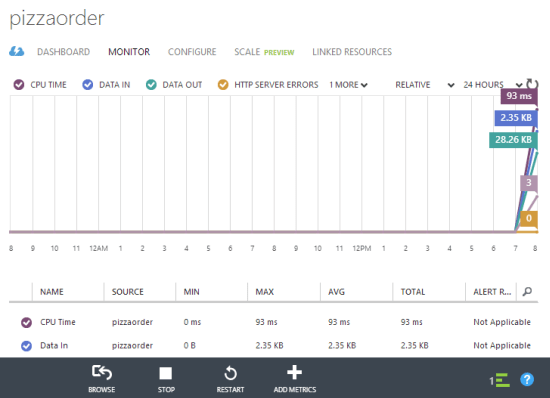
    With the web application done, I published it to a Windows Azure Web Site. This is super easy to do with Visual Studio 2013, and within a few seconds my application was there.

    2014.01.08kinesis08

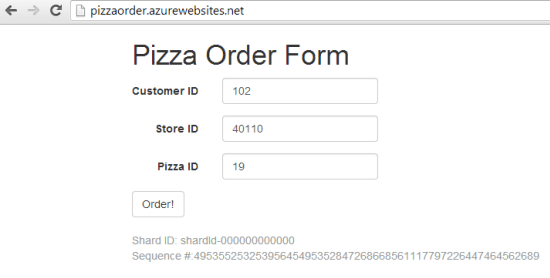
    Finally, I submitted a bunch of records to Kinesis by adding pizza orders. Notice the shard ID and sequence number that Kinesis returns from each PUT request.

    2014.01.08kinesis09

    Creating a Kinesis application (record consumer)

    To realistically read data from a Kinesis stream, there are three steps. First, you need to describe the stream in order to find out the shards. If I want a fleet of servers to run this application and read the stream, I’d need a way for each application to claim a shard to work on. The second step is to retrieve a “shard iterator” for a given shard. The iterator points to a place in the shard where I want to start reading data. Recall from above that I can start with the latest unread records, oldest records, or at a specific point in the shard. The third and final step is to get the records from a particular iterator. Part of the result set of this operation is a “next iterator” value. In my code, if I find another iterator value, I once again call the “get records” operation to pull any records from that iterator position.

    Here’s the total code block, documented for your benefit.

    private static void ReadFromKinesis()
    {
        //create config that points to Kinesis region
        AmazonKinesisConfig config = new AmazonKinesisConfig();
        config.RegionEndpoint = Amazon.RegionEndpoint.USEast1;
    
       //create new client object
       AmazonKinesisClient client = new AmazonKinesisClient(config);
    
       //Step #1 - describe stream to find out the shards it contains
       DescribeStreamRequest describeRequest = new DescribeStreamRequest();
       describeRequest.StreamName = "OrderStream";
    
       DescribeStreamResponse describeResponse = client.DescribeStream(describeRequest);
       List<Shard> shards = describeResponse.StreamDescription.Shards;
       foreach(Shard s in shards)
       {
           Console.WriteLine("shard: " + s.ShardId);
       }
    
       //grab the only shard ID in this stream
       string primaryShardId = shards[0].ShardId;
    
       //Step #2 - get iterator for this shard
       GetShardIteratorRequest iteratorRequest = new GetShardIteratorRequest();
       iteratorRequest.StreamName = "OrderStream";
       iteratorRequest.ShardId = primaryShardId;
       iteratorRequest.ShardIteratorType = ShardIteratorType.TRIM_HORIZON;
    
       GetShardIteratorResponse iteratorResponse = client.GetShardIterator(iteratorRequest);
       string iterator = iteratorResponse.ShardIterator;
    
       Console.WriteLine("Iterator: " + iterator);
    
       //Step #3 - get records in this iterator
       GetShardRecords(client, iterator);
    
       Console.WriteLine("All records read.");
       Console.ReadLine();
    }
    
    private static void GetShardRecords(AmazonKinesisClient client, string iteratorId)
    {
       //create reqest
       GetRecordsRequest getRequest = new GetRecordsRequest();
       getRequest.Limit = 100;
       getRequest.ShardIterator = iteratorId;
    
       //call "get" operation and get everything in this shard range
       GetRecordsResponse getResponse = client.GetRecords(getRequest);
       //get reference to next iterator for this shard
       string nextIterator = getResponse.NextShardIterator;
       //retrieve records
       List<Record> records = getResponse.Records;
    
       //print out each record's data value
       foreach (Record r in records)
       {
           //pull out (JSON) data in this record
           string s = Encoding.UTF8.GetString(r.Data.ToArray());
           Console.WriteLine("Record: " + s);
           Console.WriteLine("Partition Key: " + r.PartitionKey);
       }
    
       if(null != nextIterator)
       {
           //if there's another iterator, call operation again
           GetShardRecords(client, nextIterator);
       }
    }
    

    Now I had a working Kinesis application that can run anywhere. Clearly it’s easy to run this on AWS EC2 servers (and the SDK does a nice job with retrieving temporary credentials for apps running within EC2), but there’s a good chance that cloud users have a diverse portfolio of providers. Let’s say I love the application services from AWS, but like the server performance and management capabilities from CenturyLink. In this case, I built a Windows Server to run my Kinesis application.

    2014.01.08kinesis10

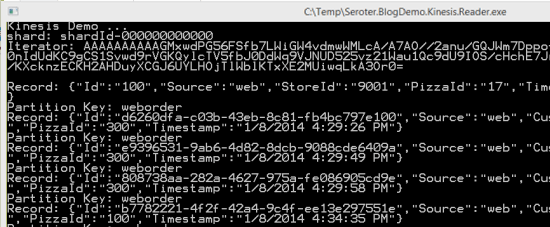
    With my server ready, I ran the application and saw my shards, my iterators, and my data records.

    2014.01.08kinesis11

    Very cool and pretty simple. Don’t forget that each data consumer has some work to do to parse the stream, find the (partition) data they want, and perform queries on it. You can imagine loading this into an Observable and using LINQ queries on it to aggregate data. Regardless, it’s very nice to have a durable stream processing service that supports replays and multiple readers.

    Summary

    The “internet of things” is here, and companies that can quickly gather and analyze data will have a major advantage. Amazon Kinesis is an important service to that end, but don’t think of it as something that ONLY works with other applications in the AWS cloud. We saw here that you could have all sorts of data producers running on devices, on-premises, or in other clouds. The Kinesis applications that consume data can also run virtually anywhere. The modern architect recognizes that composite applications are the way to go, and hopefully this helped you understand another services that’s available to you!

  • How Do BizTalk Services Work? I Asked the Product Team to Find Out

    Windows Azure BizTalk Services was recently released by Microsoft, and you can find a fair bit about this cloud service online. I wrote up a simple walkthrough, Sam Vanhoutte did a nice comparison of features between BizTalk Server and BizTalk Services,  the Neudesic folks have an extensive series of blog posts about it, and the product documentation isn’t half bad.

    However, I wanted to learn more about how the service itself works, so I reached out to Karthik Bharathy who is a senior PM on the BizTalk team and part of the team that shipped BizTalk Services. I threw a handful of technical questions at him, and I got back some fantastic answers. Hopefully you learn something new;  I sure did!

    Richard: Explain what happens after I deploy an app. Do you store the package in my storage account and add it to a new VM that’s in a BizTalk Unit?

    Karthik: Let’s start with some background information – the app that you are referring today is the VS project with a combination of the bridge configuration and artifacts like maps, schemas and DLLs. When you deploy the project, each of the artifacts and the bridge configuration are uploaded into one by one. The same notion also applies through the BizTalk Portal when you are deploying an agreement and uploading artifacts to the resources.

    The bridge configuration represents the flow of the message in the pipeline in XML format. Every time you build BizTalk Services project in Visual Studio, an <entityName>.Pipeline.atom is generated in the project bins folder. This atom file is the XML representation of the pipeline configuration. For example, under the <pipelines> section you can see the bridges configured along with the route information. You can also get a similar listing by issuing a GET operation on the bridge endpoint with the right ACS credentials.

    Now let’s say the bridge is configured with Runtime URL <deploymentURL>/myBridge1. After you click deploy, the pipeline configuration gets published in the repository of the <deploymentURL> for handling /myBridge1. For every message sent to the <deploymentURL>, the role looks at the complete path including /myBridge1 and load the pipeline configuration from the repository. Once the pipeline configuration is loaded, the message is processed per the configuration. If the configuration does not exist, then an error is returned to the caller.

    Richard: What about scaling an integration application? How does that work?

    Karthik: Messages are processed by integration roles in the deployment. When the customer initiates a scale operation, we update the service configuration to add/remove instances based on the ask. The BizTalk Services deployment updates its state during scaling operation and new messages to the deployment is handled by one of the instances of the role. This is similar to how Web or Worker roles are scaled up/down in Azure today.

    Richard: Is there any durability in the bridge? What if a downstream endpoint is offline?

    Karthik: The concept of a bridge is close to a messaging channel if we may borrow the phrase from Enterprise Integration Patterns. It helps in bridging the impedance between two messaging systems. As such the bridge is a stateless system and does not have persistence built into it. Therefore bridges need to report any processing errors back to the sender. In the case where the downstream endpoint is offline, the bridge propagates the error back to the sender – the semantics are slightly different a) based on the bridge and b) based on the source from where the message has been picked up.

    For EAI, bridges with HTTP the error code is sent back to the sender while with the same bridge using an FTP head, the system tries to pickup and process the message again from the source at regular intervals (and errors out eventually). In both cases you can see relevant track records in the portal.

    For B2B, our customers rarely intend to send an HTTP error back to their partners. When the message cannot be sent to a downstream (success) endpoint, the message is routed to the suspend endpoint. You might argue that the suspend endpoint could be down as well – while this is generally a bad idea to put in a flaky target in success or suspend endpoints, we don’t rule out this possibility. In the worst case we deliver the error code back to the sender.

    Richard: Bridges resemble BizTalk Server ESB Toolkit itineraries. Did you ever consider re-using that model?

    Karthik: ESB is an architectural pattern and you should look at the concept of bridge as being part of the ESB model for BizTalk Services on Azure. The sources and destinations are similar to the on-ramp, off-ramp model and the core processing is part of the bridge. Of course, additional capabilities like exception management, governance, alerts will need to added to bring it closer to the ESB Toolkit.

    Richard: How exactly does the high availability option work?

    Karthik: Let’s revisit the scaling flow we talked about earlier. If we had a scale >=2, you essentially have a system that can process messages even when one of the machines can down in your configuration. If one of the machines are down, the load balancer in our system routes the message to the running instances. For example, this is taken care of during “refresh” when customers can restart their deployment after updating a user DLL. This ensures message processing is not impacted.

    Richard: It looks like backup and restore is for the BizTalk Services configuration, not tracking data. What’s the recommended way to save/store an audit trail for messages?

    Karthik: The purpose of backup and restore is for the deployment configuration including schemas, maps, bridges, agreements. The tracking data comes from the Azure SQL database provided by the customer. The customer can add the standard backup/restore tools directly on that storage. To save/store an audit of messages, you have couple of options at the moment – with B2B you can turn archiving on either AS2 or X12 processing and with EAI you can plug-in an IMessageInspector extension that can read the IMessage data and save it to an external store.

    Richard: What part of the platform are you most excited about?

    Karthik: Various aspects of the platform are exciting – we started off building capabilities with ‘AppFabric Connect’ to enable server customers leverage existing investments with the cloud. Today, we have built a richer set of functionality with BizTalk Adapter services to connect popular LOBs with Bridges. In the case of B2B, BizTalk Server traditionally exposed functionality for IT Operators to manage trading partner relationships using the Admin Console. Today, we have a rich TPM functionality in the BizTalk Portal and also have the OM API public for the developer community. In EAI we allow extending message processing using custom code  If I should call out one I like, it has to be custom code enablement. The dedicated deployment model managed by Microsoft makes this possible. It is always a challenge to enable user DLL to execute without providing some sort of sandboxing. Then there are also requirements around performance guarantees. BizTalk Services dedicated deployment takes care of all these – if the code behaves in an unexpected way, only that deployment is affected. As the resources are isolated, there are also better guarantees about the performance. In a configuration driven experience this makes integration a whole lot simpler.

    Thanks Karthik for an informative chat!