Category: WCF/WF

  • Reason #207 Why the BizTalk WCF Adapter is Better Than the SOAP Adapter

    In writing my book, I’ve had a chance to compare the two BizTalk service generation wizards, and I now remember why the BizTalk Web Services Publishing Wizard (ASMX) drove me nuts.

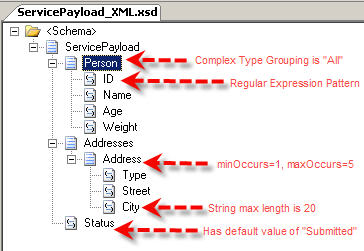
    Let’s look at how the WCF Wizard and ASMX Wizard take the same schema, and expose it as a service.  I’ve purposely included some complexity in the schema to demonstrate the capabilities (or lack thereof) of each Wizard.  Here is my schema, with notations indicating the node properties that I added.

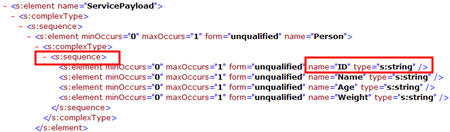
    Now, I’ve run both the BizTalk Web Services Publishing Wizard (ASMX) and the BizTalk WCF Service Publishing Wizard (WCF) on this schema and pulled up WSDL of each.   First of all, let’s look at the ASMX WSDL.  Here is the start of the schema definition.  Notice that the “Person” element was switched back to “sequence” from my XSD definition of “all.”  Secondly, see that my regular expression no longer exists in the “ID” node.

    We continue this depressing journey by reviewing the rest of the ASMX schema.  Here you can see that a new schema type was created for my repeating “address” node, but I lost my occurrence boundaries.  The “minOccurs” is now 0, and the “maxOccurs” is unbounded.  Sweet.  Also notice that my “Status” field has no default value, and the “City” node doesn’t have a field restriction.

    So, not a good story there.  If you’ve thoughtfully designed a schema to include a bit of validation logic, you’re S.O.L.  Does the WCF WSDL look any better, or will I be forced to cry out in anger and shake my monitor in frustration?  Lucky for me (and my monitor), the WCF wizard keeps the ENTIRE schema intact when publishing the service endpoint.

    There you go.  WCF Wizard respects your schema, while the ASMX Wizard punches your schema in the face.  I think it’s now time to take the ASMX Wizard to the backyard, tie it to a tree, and shoot it.  Then, tell your son it “ran away but you got a brand NEW Wizard!”

    Technorati Tags:

  • Differences in BizTalk Subscription Handling for SOAP and WCF Adapter Messages

    I recently encountered a bit of a “gotcha” when looking at how BizTalk receives WCF messages through its adapters.  I expected my orchestration subscription for messages arriving from either the SOAP adapter or WCF adapter to behave similarly, but alas, they do not.

    Let’s say I have two schemas.  I’m building an RPC-style service that takes in a query message and returns the data entity that it finds.  I have a “CustomerQuery_XML.xsd” and “Customer_XML.xsd” schema in BizTalk.

    Let’s assume I want to be very SOA/loosely-coupled so I build my web service from my schemas BEFORE I create my implementation logic (e.g. orchestration).  To demonstrate the point of the post, I’ll need to create one endpoint with the BizTalk Web Services Publishing Wizard and another with the BizTalk WCF Service Publishing Wizard (using the WCF-BasicHTTP adapter).  For both, I take in the “query” message and return the “entity” message through a two-way operation named “GetCustomer.”

    Now, let’s add an orchestration to the mix.  My orchestration takes in the query message and returns the entity message.  More importantly, note that my logical port’s operation name matches the name of the service operation I designated in the service generation wizards.

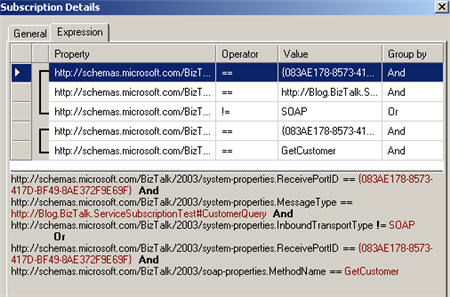
    Why does this matter?  Once I bind my orchestration’s logical port to my physical receive location (in this case, pointing to the ASMX service), I get the following subscription inserted into the MessageBox:

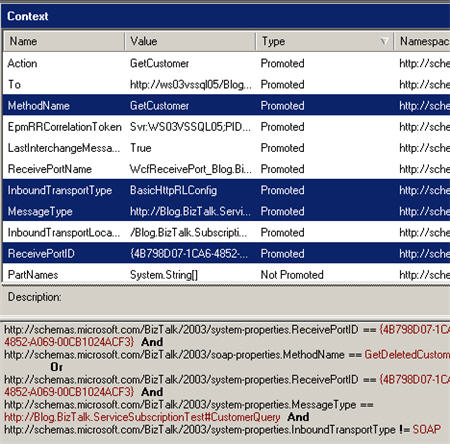
    Notice that it’s saying that our orchestration will take messages if (a) they come from a particular port, are of a certain type, and not using a SOAP transport, or (b) they come from a particular port and has a specific SOAP method called.  This is so that I can add non-SOAP receive locations to this particular port, and still have them arrive at the orchestration.  If I picked this up from the FILE adapter, I clearly wouldn’t have a SOAP method that matches the orchestration’s logical port operation name.

    For comparison purposes, note that the subscription created by binding the orchestration to the WCF receive location looks identical (except for a different port ID).

    Let’s call the SOAP version of the service (and assume it has been bound to the orchestration).  If we “stop” the orchestration, we can see that a message is queued up, and that it’s context value match one part of our subscription (receive port with a particular ID, and the SOAP method name matching our subscription).  Note that because the InboundTransportType was “SOAP” that the first part of the subscription was followed.

    If I rebuild this orchestration with a DIFFERENT port operation name (“GetDeletedCustomer”) and resubmit through the SOAP adapter, I’ll get a subscription error because the inbound message (with the now-mismatched operation in the client’s service proxy) doesn’t match the subscription criteria.

    You can see there that we still apply the first port of the subscription (because the inbound transport type is SOAP), and in this case, the new method name doesn’t match the method used to call the service.

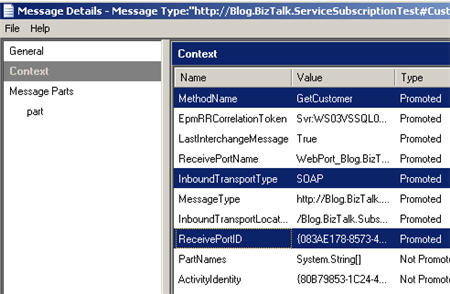
    Can you guess where I’m going?  If I switch back and bind the orchestration to the WCF receive location, and call that service (with now-mismatched operations still in place), everything works fine. Wait, what??  How did that work?  If I pause the orchestration, we can see how the context data differs for messages arriving at a WCF endpoint.

    As you can see, my InboundTransportType for this receive location is “BasicHttpRLConfig” which means that the subscription is now evaluated against the alternate criteria: port ID, message type and !=SOAP.

    Conclusion

    So, from what I can see, the actual operation name of the WCF service no longer corresponds to the orchestration logical port’s operation name.  It doesn’t matter anymore.  The subscription treats WCF messages just like it would FILE or MSMQ messages.  I guess from a “coupling” perspective this is good since the orchestration (e.g. business logic) is now even more loosely coupled from the service interface.

    Technorati Tags: ,

  • Impact of Database Availability on BizTalk Web Services

    My buddy Victor asked me the other day about the relationship between IIS and the BizTalk databases.  That is, if we restart the SQL Server service or server, what happens to messages that are still submitted to the BizTalk web services on an active IIS server?

    So, I put together a really quick application where I tested four scenarios: downstream host unavailable, IIS unavailable, receive location offline, and SQL Server unavailable.

    Also, to legitimately gauge service behavior, I exposed both classic ASMX services and WCF services for my BizTalk application.  Both services were built as one-way HTTP services hosted in IIS.  The published data is then routed to a single FILE send port via message-type routing.


    Scenario: Processing Host is Unavailable

    For this scenario, I simply disabled the in-process host that runs the send port subscribing to messages published by the services.

    Result: Messages are published with no problem, and everything is queued up until the in-process host comes online.  No message loss and no errors to the service callers.


    Scenario: IIS is Unavailable

    Here I turned off the IIS website hosting the services.

    Result: As expected, both the ASMX and WCF services returned errors to the client application.  The ASMX service returned an error saying:

    error: System.Net.WebException: Unable to connect to the remote server —> System.Net.Sockets.SocketException: No connection could be made because the target machine actively refused it 127.0.0.1:80

    The WCF service returned the following error:

    error: System.ServiceModel.EndpointNotFoundException: Could not connect to http://myserver/Blog.Biztalk.AvailabilityTestWCF/ContractService.svc. TCP error code 10061: No connection could be made because the target machine actively refused it 192.168.131.65:80.  —> System.Net.WebException: Unable to connect to the remote server —> System.Net.Sockets.SocketException: No connection could be made because the target machine actively refused it 192.168.131.65:80

    So the client gets an error, no message is submitted to BizTalk by either service, and the client will be expected to try again later.


    Scenario: Receive Location is Offline

    Now I’ve turned off the actual receive locations.  The website is up and running, but the BizTalk receive locations aren’t listening for the inbound messages.

    Result:  The ASMX service returns a success message (HTTP 202), even though no message is published to BizTalk.  There is an error in the System Event log stating:

    The Messaging Engine could not find the receive location for URI:”/Blog.Biztalk.AvailabilityTest/ContractService.asmx”.\
    Please verify the receive location exists and is enabled.

    However, the client does NOT get an error even though no message was published (or suspended) by BizTalk.

    The WCF service returns an HTTP error and the following message to the client:

    error: System.ServiceModel.ServiceActivationException: The requested service, ‘http://myserver/Blog.Biztalk.AvailabilityTestWCF/ContractService.svc’ could not be activated. See the server’s diagnostic trace logs for more information.

    In this case again, no message is published, BUT, at least the client knows that a problem occurred.  Much better than the ASMX behavior.


    Scenario: SQL Server is Offline

    In this case, I’ve shut down the SQL Server service and the in-process hosts that are running.

    Result: The ASMX service continued to return HTTP success messages, even though it could not publish to the MessageBox.  The IsolatedHost (which runs the Message Agent) can’t connect, but the client isn’t told this.

    The WCF service, however, returns the same error it did on the previous scenario.  So it did not publish the message either, but, again, it returned a proper exception to the client.

    Looking at the IIS logs, I wanted to confirm the service response.  For the ASMX service call when the database was offline, I can see the following entry:

    POST /Blog.Biztalk.AvailabilityTest/ContractService.asmx – 80 – 127.0.0.1 202 0 0

    Notice the HTTP 202 returned to the client.  The next entry in the log file represents my call to the WCF service while the database was still down:

    POST /Blog.Biztalk.AvailabilityTestWCF/ContractService.svc – 80 – 192.168.131.65 – 500 0 0

    Notice the HTTP 500 error which represents an internal server error returned to the caller.


    Summary

    So, we can conclude that ASMX services do a lousy job of reporting what actually happens after it tries to publish messages to the BizTalk bus.  Unless the IIS server is explicitly taken down during database server maintenance or restarts, you run the real risk of losing messages without the client being aware of it.  For WCF services, we see much better handling of message publishing problems.   This is probably due to the fact that the BizTalk WCF service host relies heavily on the BizTalk configuration database and receive location availability to complete its operations.  While it still can’t save the inbound requests, it at least tells the caller that something went wrong.

    Anyone else have different experiences than the ones I demonstrated above?

    Technorati Tags: , BizTalk

  • Interview Series: Four Questions With … Tomas Restrepo

    There are a plethora of great technologists in the “connected systems” space, and I thought it would be fun to interview a different one each month.  These are short, four question interviews where I ask about experiences with technology.  The last question will always be a fairly stupid, silly question that might only amuse me.  So be it.  I used to do these sorts of interviews when I wrote newsletters for Avanade and Microsoft, so if I happen to reuse a previously asked stupid question, it’s because I liked it, and assume that most of my current readers never saw those old newsletters.  I’m a cheater like that.

    To start things off, let’s have a chat with Tomas Restrepo.  Blogger extraordinaire , Microsoft MVP, and all around good guy.

    Q: Tomas, you’ve consistently been out in front of many Connected Systems technologies such as BizTalk Server and WCF.  What Microsoft technologies are on your “to do” list, why, and how do you plan to learn them?

    A:  That’s really a tough question to answer. There’s just so much stuff coming out of Redmond these days, and, to be honest, it’s still to early to tell yet how much of it is going to “stick” and what might be abandoned down the road in favor of something else.

    Sometimes learning a new technology in depth can be quite time consuming, so you want to be careful when choosing what to invest your time in. What I’m currently trying to do is follow a few rules:

    • Try to be aware of “what’s out there” and at least know what it does and what it is good for.
    • Figure out which things are interesting enough (or show enough potential) to dig into a bit deeper. Not enough to master them, but enough to know the big concepts behind them and how to apply them.
      These are stuff you play with a little bit, and would consider good enough to start a POC with them if the need arises and then dig into them big time when you start a project with them.
    • Stuff that’s really important that you want to really spend a lot of time tinkering with them and mastering them.

    I think there are some interesting things out there worth keeping an eye on. For example, I don’t do much web development these days, but if I had to, I’d immediate dig deeper into the ASP.NET MVC framework. I’m already familiar with Castle’s monorail and somewhat with rails and other similar technologies, so it should be easier to get started.

    I’m also definitely looking forward to some of the stuff in Oslo. Obviously the core framework and WCF stuff is going to be pretty interesting there. I’ve been keeping an eye on the cloud services (BizTalk Services) stuff as well, but I’m really waiting there for a project idea that really demands those capabilities before spending more time with them.

    Certainly there’s a lot of things that will be coming out in the next one-two years such as the updates to the big products (SQL, Visual Studio and so on), and those will get their fair share of time when the time comes.

    Q: In your experience, what is your criteria for deciding between either using (a) a broker such as BizTalk Server between systems or (b) directly consuming interfaces/services between systems?

    A:  I think this is one case where there are both technical and non-technical reasons for making this decision.

    On the technical side I very much try to start questioning whether any kind of mediation is required/desired and whether BizTalk is the right kind of tool for that job. In particularly, I’d look into the latency and performance requirements, the protocols being used for the services and the amount of data that needs to be transferred between systems.

    Part of this is looking to see if, for example, the project is in a low-latency scenario or perhaps if it’s really a set of bulk data processes more suitable to something like SSIS.

    Another thing to look for is whether you need the kind of capabilities that BizTalk offers. For example, would the interface be better served with Pub/Sub support? Would the Pub/Sub support in BizTalk be enough, or does it require heavier duty pub/sub with thousands of subscribers and possibly transient (non-persistent) subscriptions?

    BizTalk has some great support for some kind of messaging scenarios, but it also has limitations that can constrain your solution heavily. Sometimes you can clobber your project needs into BizTalk by extending the product in different ways (thank goodness for its extensibility!), but it’s not always the best option available.

    On the non-technical side, a few aspects that matter are: Does the client already own a BizTalk license they can use? If not, can the project/client budget take assume that cost? Sometimes it can be negotiated, but other times it’s just not an option. Besides the raw cost of licensing, there are of course knowledge aspects, like, does the company have people already familiar with the technology?

    In other words, I’ve found that the non-technical aspects of the use/don’t use BizTalk aren’t too different from the kind of aspects you’d consider for acquisition of any new technology. That said, BizTalk does pose it’s own challenges on an organization because of it’s complexity.

    That said, I do try to be very careful to avoid looking at the world with technology-tainted glasses. It’s important to approach a new project with an open mind and figure out what the best technology to solve the client needs are, instead of starting with a given technology (BizTalk, in this case) and try to cram the project requirements into it whatever the cost. Sometimes the non-technical aspects of the project might suggest/impose a technology decision on you, but even in that case it’s important to take a step back, breath deeply and make sure it’s the best option available to you.

    Q: You’ve been working with a variety of non-Microsoft technologies lately.  What are some of the interoperability considerations you’ve come across recently?  Share any “gotchas” you’ve encountered while getting different platforms to play nicely together.

    A:  No matter how you look at it, interoperability isn’t easy, and you can’t take it for granted. It’s something you need to keep very much in check every step of the way and verify it time and time again.

    Certainly Web Services (of both the SOAP and REST varieties) have helped here somewhat, but not all interoperability issues come from the lower-level transport protocols; sometimes the application / service interface design can have a bit impact on interoperability.

    One rule I try to follow is to design for interoperability. For example, if I’m designing a new service interface, I want to know who my clients are going to be; what technology they are going to be using and what constrains they might have.

    Sometimes, the best option you can take is to stick to the basics: simple works. That’s actually one of the beauties of REST architectures. As long as you’ve got an XML parser and an HTTP client, you’re in business, and HTTP is known well enough (and has such a good tooling around it for development and diagnosis) that it really helps a lot.

    Basic SOAP is also pretty good nowadays, if used correctly. The WS-* specs, like WS-Security and friends are pretty important in some scenarios. They are published standards, yes, but getting interoperability isn’t as easy as with plain SOAP and rest, because they are very complex specifications.

    For example, if you’re using message-level encryption, and you run into trouble, then raw protocol level interception won’t help you at all to diagnose the issue; you really need tooling support on your SOAP stack for this (WCF’s is pretty good).

    Once you get into using X.509 certificates for encryption/signing or even just for raw authentication, things can get hairy pretty quickly. Mostly this is because a lot of people don’t quite understand how X.509 certificate validation works, and common problems arise from invalid certificates, certificates installed to the wrong store, or just because someone forgot to deploy the entire certificate trust chain.

    By themselves, they are not though problems to solve, but diagnosing them can be very challenging at times because the tooling isn’t always very good at reporting the right reasons for failure. Anyone who has been stuck with a “Error validating server identity” kind of error can attest to that 🙂

    WS-Security specs also have the pose another challenge, and it’s that there are multiple versions of those specs out there, and sometimes you find yourself using one version with your partner using another. You have to be very careful in specifying and validating the right protocol version.

    Q [stupid question]:  Everyone has that one secret pet peeve that makes them crazy.  I’ll admit that mine is “mysterious stickiness.”  I shudder at the thought of touching a surface and coming away with a unwanted adhesive.  Ugh.  Tell us, what is something that really drives you nuts?

    A: Cockroaches. I hate cockroaches. They give me the creeps.

    Seriously speaking, though, I think that my main problem is that I can be very impatient about the little things. Stuff like getting short delays from things can drive me crazy (a stuck keyboard or mouse can really go out of this world).

    Hope you all find these interviews a bit interesting or at least mildly amusing.

    Technorati Tags: ,

  • Enabling Data-Driven Permissions in SharePoint Using Windows Workflow

    A group I’m working with was looking to use SharePoint to capture data entered by a number of international employees.  They asked if SharePoint could restrict access to a given list item based on the value in a particular column.  So, if the user created a line item designated for “Germany”, then automatically, the list item would only allow German users to read the line.  My answer was “that seems possible, but that’s not out of the box behavior.”  So, I went and built the necessary Windows Workflow, and thought I’d share it here.

    In my development environment, I needed Windows Groups to represent the individual countries.  So, I created users and groups for a mix of countries, with an example of one country (“Canada”) allowing multiple groups to have access to its items.

    Next, I created a new SharePoint list where I map the country to the list of Windows groups that I want to provide “Contributor” rights to.

    Next, I have the actual list of items, with a SharePoint “lookup” column pointing back to the “country mapping” list.
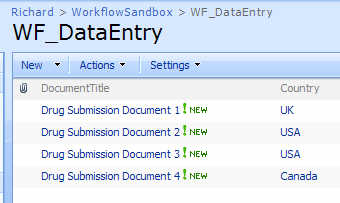
    If I look at any item’s permissions upon initial data entry, I can see that it inherits its permissions from its parent.

    So, what I want to do is break that inheritance, look up the correct group(s) associated with that line item, and apply those permissions.  Sounds like a job for Windows Workflow.
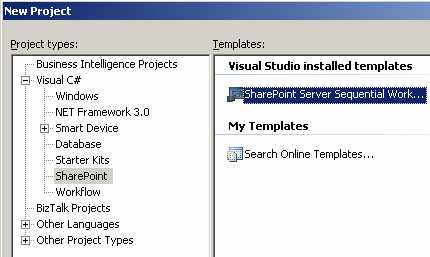
    After creating the new SharePoint Sequential Workflow, I strong named the assembly, and then built it (with nothing in it yet) and GAC-ed it so that I could extract the strong name key value.

    Next, I had to fill out the feature.xml, workflow.xml and modify the PostBuildActions.bat file.

    My feature.xml file looks like this (with values you’d have to change in bold) …

    <Feature Id=”18EC8BDA-46B2-4379-9ED1-B0CF6DE46C61″ Title=”Data Driven Permission Change Feature” Description=”This feature adds permissions” Version=”12.0.0.0″ Scope=”Site” ReceiverAssembly=”Microsoft.Office.Workflow.Feature, Version=12.0.0.0, Culture=neutral, PublicKeyToken=71e9bce111e9429c” ReceiverClass= “Microsoft.Office.Workflow.Feature. WorkflowFeatureReceiver” xmlns=”http://schemas.microsoft.com/sharepoint/”&gt; <ElementManifests> <ElementManifest Location=”workflow.xml” /> </ElementManifests> <Properties> <Property Key=”GloballyAvailable” Value=”true” /> <Property Key=”RegisterForms” Value=”*.xsn” /> </Properties> </Feature>

    So far so good.  Then my workflow.xml file looks like this …

    <Elements xmlns=”http://schemas.microsoft.com/sharepoint/”&gt; <Workflow Name=”Data Driven Permission Change Workflow” Description=”This workflow sets permissions” Id=”80837EFD-485E-4247-BDED-294C70F6C686″ CodeBesideClass= “DataDrivenPermissionWF.PermissionWorkflow” CodeBesideAssembly= “DataDrivenPermissionWF, Version=1.0.0.0, Culture=neutral, PublicKeyToken=111111111111″ StatusUrl=”_layouts/WrkStat.aspx”> <Categories/> <MetaData> <AssociateOnActivation>false</AssociateOnActivation> </MetaData> </Workflow> </Elements>

    After this, I had to change the PostBuildActions.bat file to actually point to my SharePoint site.  By default, it publishes to “http://localhost&#8221;.  Now I can actually build the workflow.  I’ve kept things pretty simple here.  After adding the two shapes, I set the token value and changed the names of the shapes.
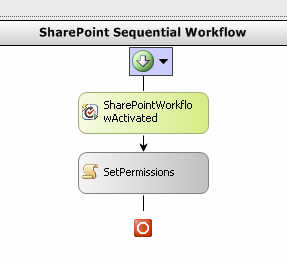
    The “Activated” shape is responsible for setting member variables.

    private void SharePointWorkflowActivated_Invoked (object sender, ExternalDataEventArgs e) { //set member variable values from //the inbound list context webId = workflowProperties.WebId; siteId = workflowProperties.SiteId; listId = workflowProperties.ListId; itemId = workflowProperties.ItemId; }

    Make sure that you’re not an idiot like me and spend 30 minutes trying to figure out why all these “workflow properties” were empty before realizing that you haven’t told the workflow to populate it.

    The meat of this workflow now all rests in the next “code” shape.  I probably could have (and would) refactor this into more modular bits, but for now, it’s all in a single shape.

    I start off by grabbing fresh references to the SharePoint web, site, list and item by using the IDs captured earlier.  Yes, I know that the workflow properties collection has these as well, but I went this route.

    //all the id’s for the site, current list and item SPSite site = new SPSite(siteId); SPWeb web = site.OpenWeb(webId); SPList list = web.Lists[listId]; SPListItem listItem = list.GetItemById(itemId);

    Next, I can explicitly break the item’s permission inheritance.

    //break from parent permissions listItem.BreakRoleInheritance(false);

    Next, to properly account for updates, I went and removed all existing permissions. I needed this in the case that you pick one country value, and decide to change it later. I wanted to make sure that no stale or invalid permissions remained.

    //delete any existing permissions in the //case that this is an update to an item SPRoleAssignmentCollection currentRoles = listItem.RoleAssignments; foreach (SPRoleAssignment role in listItem.RoleAssignments) { role.RoleDefinitionBindings.RemoveAll(); role.Update(); }

    I need the country value actually entered in the line item, so I grab that here.

    //get country value from list item string selectedCountry = listItem[“Country”].ToString(); SPFieldLookupValue countryLookupField = new SPFieldLookupValue(selectedCountry);

    I used the SPFieldLookupValue type to be able to easily extract the country value. If read as a straight string, you get something like “1;#Canada” where it’s a mix of the field ID plus value.

    Now that I know which country was entered, I can query my country list to figure out what group permissions I can add.   So, I built up a CAML query using the “country” value I just extracted.

    //build query string against second list string queryString = “<Where><Eq> <FieldRef Name=’Title’ /> <Value Type=’Text’>”+ countryLookupField.LookupValue +”</Value> </Eq></Where>”; SPQuery countryQuery = new SPQuery(); countryQuery.Query = queryString; //perform lookup on second list Guid lookupListGuid = new Guid(“9DD18A79-9295-47BC-A4AA-363D53DA2336”); SPList groupList = web.Lists[lookupListGuid]; SPListItemCollection countryItemCollection = groupList.GetItems(countryQuery)

    We’re getting close.  Now that I have the country list item collection, I can yank out the country record, and read the associated Windows groups (split by a “;” delimiter).

    //get pointer to country list item SPListItem countryListItem = countryItemCollection[0]; string countryPermissions = countryListItem[“CountryPermissionGroups”].ToString(); char[] permissionDelimiter = { ‘;’ }; //get array of permissions for this country string[] permissionArray = countryPermissions.Split(permissionDelimiter);

    Now that I have an array of permission groups, I have to explicitly add them as “Contributors” to the list item.

    //add each permission for the country to the list item foreach (string permissionGroup in permissionArray) { //create”contributor” role SPRoleDefinition roleDef = web.RoleDefinitions.GetByType(SPRoleType.Contributor); SPRoleAssignment roleAssignment = new SPRoleAssignment( permissionGroup, string.Empty, string.Empty, string.Empty); roleAssignment.RoleDefinitionBindings.Add(roleDef); //update list item with new assignment listItem.RoleAssignments.Add(roleAssignment); }

    After all that, there’s only one more line of code.  And, it’s the most important one.

    //final update listItem.Update();

    Whew. Ok, when you build the project, by default, the solution isn’t deployed to SharePoint. When you’re ready to deploy to SharePoint, go ahead and view the project properties, look at the build events, and change the last part of the post build command line from NODEPLOY to DEPLOY. If you build again, your Visual Studio.NET output window should show a successful deployment of the feature and workflow.

    Back in the SharePoint list where the data is entered, we can now add this new workflow to the list.  Whatever name you gave the workflow should show up in the choices for workflow templates.
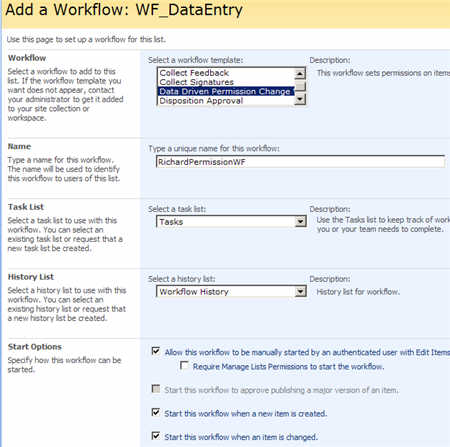
    So, if I enter a new list item, the workflow immediately fires and I can see that the permissions for the Canadian entry now has two permission groups attached.

    Also notice (in yellow) the fact that this list item no longer inherits permissions from its parent folder or list.  If I change this list item to now be associated with the UK, and retrigger the workflow, then I only have a single “UK” group there.

    So there you go.  Making data-driven permissions possible on SharePoint list items.  This saves a lot of time over manually going into each item and setting it’s permissions.

    Thoughts?  Any improvements I should make?

    Technorati Tags:

  • New BizTalk Performance, WCF Whitepapers

    I was looking for a particular download today on the Microsoft site, and came across a couple of new whitepapers.  Check out the Microsoft BizTalk Server Performance Optimization Guide which 220+ pages of performance factors, analytic tools, planning/preparing/executing a performance assessment, identifying bottlenecks, how to test, and optimizing operating system / network / database  level settings.

    Also check out the new whitepaper on BizTalk 2006 R2 integration with WCF.  This is a different paper than Aaron’s WCF adapter paper from last year.

    And not sure if you’ve seen this, but the BizTalk support engineers are blogging now and chat about orchestration performance and other topics.  The recent post covers singletons, which is of recent interest to folks I know.

    Technorati Tags: , WCF

  • New WCF Management Pack for SOA Software

    I was on a conference call with those characters from SOA Software and they were demonstrating their BizTalk Management Pack.  They also spent a lot of time covering their in-development WCF binding.

    Moving forward, SOA Software is releasing Microsoft-friendly agents for …

    • IIS 6.0 (SOAP/HTTP)
    • WCF (any transport)
    • BizTalk (any transport)
    • BizTalk-WCF (any transport)

    All of these (except the BizTalk agent) support policy enforcement.  That is, the BizTalk agent only does message recording and monitoring whereas the other agents support the full suite of SOA Software policies (e.g. security, XSLT, etc).

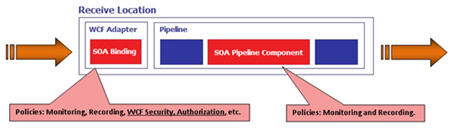
    So what is the difference between the BizTalk agent, and the BizTalk-WCF agent?  The relationship can be represented as such:

    The BizTalk-only agent is really a pipeline component which captures things from inside the BizTalk bus.  This means that it will work with ANY inbound our outbound adapter.  Nice.  The SOA Software WCF binding is at the WCF adapter layer, and allows for full policy enforcement at the adapter layer.  However, this is ONLY for the BizTalk WCF adapters, not the other adapters.

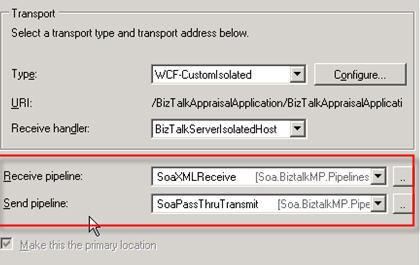
    So if I had a WCF endpoint that I wanted to play with SOA Software, I could first attach the out-of-the-box SOA Software pipelines to the receive location.

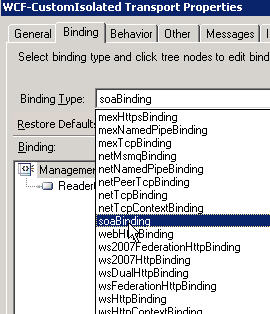
    Next, in the WCF-CustomIsolated adapter configuration, I can specify the new soaBinding type.

    I don’t HAVE to do the pipeline AND the WCF binding if I have a WCF endpoint, but, if I want to capture the data from multiple perspectives, I can.  For that binding, there are a few properties that matter.  Mostly importantly, note that I do NOT have to specify which policy to apply.  The appropriate policy details are recovered at runtime, so making changes to the policy requires no changes to this configuration.

    From within the SOA Software management interface, I can review my BizTalk endpoints (interpreted as operations on a WSDL that represents the BizTalk “application”).

    Notice that this is a managed BizTalk receive location.   If I sent something through this managed receive location (with a policy set to record and monitor the traffic) I could see a real-time chart of activity, and, see the message payload.

    Notice that I see all the context values, AND, the payload in a CDATA block.  This supports BizTalk flat file scenarios.

    As for the WCF binding, you would install the SOA WCF binding on the client machine, and it becomes available to developers who want to call the SOA-managed WCF service.  The binding looks up the policy details at runtime, again shielding the developer from too much hard coding of information.

    So what’s cool here?  I like that the BizTalk agent works for ALL BizTalk adapters.  You can create a Service Level Agreement (SLA) policy where more than 10 faults to an Oracle adapter send port results in an email to a system owner.  Or if traffic to a particular FILE receive location goes above a certain level (per day), then raise an issue.  From the WCF side, it’s very nice that all WCF transports are supported for service management and that service policy information is dynamically identified at runtime versus embedded in configuration details.

    If you’re a BizTalk shop, and you have yet to go nuts with SOAP and services, you can still get some serious value from using the BizTalk agent from SOA Software.  If you’ve fully embraced services, and are already on the WCF bandwagon, the upcoming WCF binding from SOA Software provides a vital way to apply service lifecycle and management to your environment.

    Technorati Tags: , , WCF

  • All Source Code Posted for BizTalk + WCF Articles

    I just finished zipping up all the source code for my recent set of articles over at TopXML.com.  Specifically, I just added the source code for the set of articles on publishing WCF services out of BizTalk (with security, transactions, attachments) and the source code for all the BizTalk Adapter Pack demonstrations that utilized the Oracle adapter.  I make no promises that the code is attractive, contains best practices, or avoids the use of obscenities in the comments.


    Series Summary
     BizTalk and WCF: Part I, Operation Patterns Get the source code!
     BizTalk and WCF: Part II, Security Patterns
     BizTalk and WCF: Part III, Transaction Patterns
     BizTalk and WCF: Part IV, Attachment Patterns
     BizTalk and WCF: Part V, Publishing Operations Patterns Get the source code!
    BizTalk and WCF: Part VI, Publishing Advanced Service Patterns
    BizTalk and WCF: Part VII, About the BizTalk Adapter Pack Get the source code!
    BizTalk and WCF: Part VIII, BizTalk Adapter Pack Service Model Patterns
    BizTalk and WCF: Part IX, BizTalk Adapter Pack BizTalk Patterns


    Technorati Tags: ,

  • Flowing Transactions To Oracle Using Adapter Pack

    So the documentation that comes with the BizTalk Adapter Pack makes scant reference to flowing transactions to the adapters.  That is, if I want to call the “Insert” operation on an “Orders” table, but only commit that if the “Insert” operation on the “Order Items” table succeeds, how do I wrap those operations in a single transaction?

    WCF has great transaction support, and the BizTalk Adapter Pack is built on WCF, but the product documentation for the Oracle adapter states:

    The Oracle Database adapter does not support performing transactions on the Oracle database using System.Transaction. The adapter supports transactions using OracleTransaction.

    Limitations of BizTalk Adapter 3.0 for Oracle Database

    Hmmm.  That’s pretty much the only time transactions are mentioned at all.  That makes it sound like I cannot wrap my service calls in a System.Transaction and have to use the OracleTransaction object from the ODP.NET bits.  What better way to confirm this than by actually testing it?

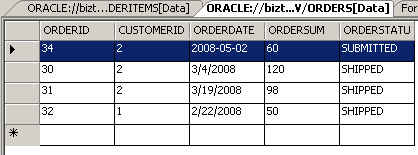
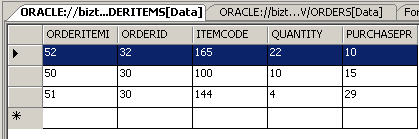
    I’m using the example from my TopXML.com articles.  So in that article, I mention inserting into two tables sequentially via proxy classes.  So, what happens if I take that same block of “insert” code and purposely create an error in the second set of data (e.g. use a non-existent “OrderID”)?  An exception occurred during the second operation, but the first insert command succeeded …

    Notice that my “Orders” table has a record in it, but the “OrderItems” table has no corresponding items for OrderID #34.  So, I’m stuck in an inconsistent state.  Not good.

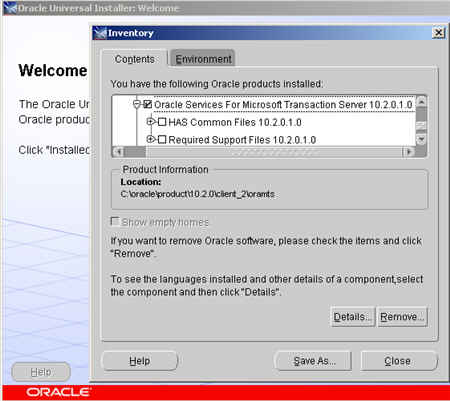
    On a whim, I decided to wrap the entire block of “insert” code inside a System.Transaction.TransactionScope block to see what would happen.  On the first execution, I got an error saying “Unable to Load OraMTS“.  Interesting.  Looked like the System.Transaction in my code is converted to an Oracle transaction by the adapter and the OraMTS object (from the Oracle client) wasn’t found.  So, I went back to my Oracle client installation and made sure to install the Oracle Services for Microsoft Transaction Server.

    Now, if I executed my code again, with the same error in the 2nd set of insert commands, the database remained in a consistent state, and the first insert did not commit.  So you CAN wrap these service invocations inside a System.Transacton object (at least for the Oracle adapter) to daisy-chain atomic operations.

    Overall, the documentation for the BizTalk Adapter Pack is top notch, but the complete absence of transaction instructions seems curious.

    Technorati Tags: ,

  • Material from San Diego .NET User Group Presentation

    Earlier this week, I grabbed a couple new CDs, hopped in the car, and drove down to San Diego to present at the .NET User Group’s Connected Systems meeting.  The topic was the BizTalk Adapter Pack and I outlined what the BAP is, what the core use cases are, and demonstrated how to build a solution using it.

    My presentation is here.  I called out a few resources for folks looking to learn about the BizTalk Adapter Pack.  They include:

    I’ve been accepted into the Microsoft TAP for the Adapter Pack Office Developers Program, so hopefully I’ll be able to demonstrate how to use the BAP within Office applications.

    Technorati Tags: ,