Category: WCF/WF

  • 2010 Year in Review

    I learned a lot this year and I thought I’d take a moment to share some of my favorite blog posts, books and newly discovered blogs.

    Besides continuing to play with BizTalk Server, I also dug deep into Windows Server AppFabric, Microsoft StreamInsight, Windows Azure, Salesforce.com, Amazon AWS, Microsoft Dynamics CRM and enterprise architecture.  I learned some of those technologies for my last book, some was for work, and some was for personal education.  This diversity was probably evident in the types of blog posts I wrote this year.  Some of my most popular, or favorite posts this year were:

    While I find that I use Twitter (@rseroter) instead of blog posts to share interesting links, I still consider blogs to be the best long-form source of information.  Here are a few that I either discovered or followed closer this year:

    I tried to keep up a decent pace of technical and non-technical book reading this year and liked these the most:

    I somehow had a popular year on this blog with 125k+ visits and really appreciate each of you taking the time to read my musings.  I hope we can continue to learn together in 2011.

  • My Co-Authors Interviewed on Microsoft endpoint.tv

    You want this book!

    -Ron Jacobs, Microsoft

    Ron Jacobs (blog, twitter) runs the Channel9 show called endpoint.tv and he just interviewed Ewan Fairweather and Rama Ramani who were co-authors on my book, Applied Architecture Patterns on the Microsoft Platform.  I’m thrilled that the book has gotten positive reviews and seems to fill a gap in the offerings of traditional technology books.

    Ron made a few key observations during this interview:

    • As people specialize, they lose perspective of other ways to solve similar problems, and this book helps developers and architects “fill the gaps.”
    • Ron found the dimensions our “Decision Framework” to be novel and of critical importance when evaluating technology choices.  Specifically, evaluating a candidate architecture against design, development, operational and organizational factors can lead you down a different path than you might have expected.  Ron specifically liked the “organizational direction” facet which can be overlooked but should play a key role in technology choice.
    • He found the technology primers and full examples of such a wide range of technologies (WCF, WF, Server AppFabric, Windows Azure, BizTalk, SQL Server, StreamInsight) to be among the unique aspects of the book.
    • Ron liked how we actually addressed candidate architectures instead of jumping directly into a demonstration of a “best fit” solution.

    Have you read the book yet?  If so, I’d love to hear your (good or bad) feedback.  If not, Christmas is right around the corner, and what better way to spend the holidays than curling up with a beefy technology book?

  • Error with One-Way WSDL Operations and BizTalk Receive Locations

    Do you ever do WSDL-first web service development?  Regardless of the reason that you do this (e.g. you’re an architectural-purist, your mother didn’t hold you enough), this style of service design typically works fine with BizTalk Server solutions.  However, if you decide to build a one-way input service, you’ll encounter an annoying, but understandable error.

    Let’s play this scenario out.  I’ve hand-built a WSDL that takes in an “employee update” message through a one-way service.  That is, no response is needed by the party that invokes the service.

    The topmost WSDL node defines some default namespace values and then has a type declaration which describes our schema.

    <wsdl:definitions name="EmployeeUpdateService"
    targetNamespace="http://Seroter.OneWayWsdlTest.EmployeeProcessing"
    xmlns:wsdl="http://schemas.xmlsoap.org/wsdl/"
    xmlns:soap="http://schemas.xmlsoap.org/wsdl/soap/"
    xmlns:tns="http://Seroter.OneWayWsdlTest.EmployeeProcessing">
      <!-- declare types-->
      <wsdl:types>
        <xs:schema xmlns="http://Seroter.OneWayWsdlTest.EmployeeProcessing" xmlns:b="http://schemas.microsoft.com/BizTalk/2003" targetNamespace="http://Seroter.OneWayWsdlTest.EmployeeProcessing" xmlns:xs="http://www.w3.org/2001/XMLSchema">
          <xs:element name="EmployeeUpdate">
            <xs:complexType>
              <xs:sequence>
                <xs:element name="EmpId" type="xs:string" />
                <xs:element name="UpdateType" type="xs:string" />
                <xs:element name="DateUpdated" type="xs:string" />
              </xs:sequence>
            </xs:complexType>
          </xs:element>
        </xs:schema>
      </wsdl:types>
    

    Next, I defined my input message, port type with an operation that accepts that message, and then a binding that uses that port type.

    <!-- declare messages-->
      <wsdl:message name="Request">
        <wsdl:part name="part" element="tns:EmployeeUpdate" />
      </wsdl:message>
      <!-- decare port types-->
      <wsdl:portType name="EmployeeUpdate_PortType">
        <wsdl:operation name="PublishEmployeeRequest">
          <wsdl:input message="tns:Request" />
        </wsdl:operation>
      </wsdl:portType>
      <!-- declare binding-->
      <wsdl:binding name="EmployeeUpdate_Binding" type="tns:EmployeeUpdate_PortType">
        <soap:binding transport="http://schemas.xmlsoap.org/soap/http"/>
        <wsdl:operation name="PublishEmployeeRequest">
          <soap:operation soapAction="PublishEmployeeRequest"
          style="document"/>
          <wsdl:input>
            <soap:body use ="literal"/>
          </wsdl:input>
        </wsdl:operation>
      </wsdl:binding>
    

    Finally, I created a service declaration that has an endpoint URL selected.

    <!-- declare service-->
      <wsdl:service name="EmployeeUpdateService">
        <wsdl:port binding="tns:EmployeeUpdate_Binding" name="EmployeeUpdatePort">
          <soap:address location="http://localhost:8087/EmployeeUpdateService/Service.svc"/>
        </wsdl:port>
      </wsdl:service>
    </wsdl:definitions>
    

    I copied this WSDL to the root of my web server that so that it has a URL that can be referenced later.

    Let’s jump into a BizTalk project now.  Note that if you design a service this way (WSDL-first), you CAN use the BizTalk WCF Service Consuming Wizard to generate the schemas and orchestration messaging ports for a RECEIVE scenario.  We typically use this wizard to build artifacts to consume a service, but this actually works pretty well for building services as well.  Anyway, I’m going to take the schema definition from my WSDL and manually create a new XSD file.

    2010.12.05oneway01

    This is the only artifact I need to develop.  I deployed the BizTalk project and switched to the BizTalk Administration Console where I will build a receive port/location that hosts a WCF endpoint.   First though, I created a one-way Send Port which subscribes to my message’s type property and emits the file to disk.

    2010.12.05oneway02

    Next I added a new one-way receive port that will host the service.  It uses the WCF-Custom adapter so that I can host the service in-process instead of forcing me to physically build a service to reside in IIS.

    2010.12.05oneway03

    On the General tab I set the address to the value from the WSDL (http://localhost:8087/EmployeeUpdateService/Service.svc).  On the Binding tab I chose the basicHttpBinding.  Finally, on the Behavior tab, I added a Service Behavior and selected the serviceMetadata behavior from the list.  I set the externalMetadataLocation to the URL of my custom WSDL and flipped the httpGetEnabled value to True.

    2010.12.05oneway04

    If everything is configured correctly, the receive location is started, and the BizTalk host is started (and thus, the WCF service host is opened), I can hit the URL of my BizTalk endpoint and see the metadata page.

    2010.12.05oneway05

    All that’s left to do is consume this service.  Instead of building a custom application that calls this service, I can leverage the WCF Test Client that ships with the .NET Framework.  After adding a reference to my BizTalk-hosted service, and invoking the service, two things happened.  First, the message is successfully processed by BizTalk and a file is dropped to disk (via my Send Port).  But secondly, and most important, my service call resulted in an error:

    The one-way operation returned a non-null message with Action=”.

    Yowza.  While I could technically catch that error in code and just ignore it (since BizTalk processed everything just fine), that’d be pretty lazy.  We want to know why this happened!  I got this error because a“one way” BizTalk receive location still sends a message back to the caller and my service client wasn’t expecting it.  A WSDL file with a true one-way operation results in a WCF client that expects an IsOneWay=true interaction pattern.  However, BizTalk doesn’t support true one-way interactions.  It supports operations that return no data (e.g. “void”) only.  So, by putting a hand-built WSDL that demanded an asynchronous service on a BizTalk receive location that cannot support it, we end up with a mismatch.

    How do I fix this?  Actually, it’s fairly simple.  I returned to my hand-built WSDL and added a new, empty message declaration.

    <!-- declare messages-->
      <wsdl:message name="Request">
        <wsdl:part name="part" element="tns:EmployeeUpdate" />
      </wsdl:message>
      <wsdl:message name="Response" />
    

    I then made that message the output value of my operation in both my port type and binding.

    <!-- decare port types-->
      <wsdl:portType name="EmployeeUpdate_PortType">
        <wsdl:operation name="PublishEmployeeRequest">
          <wsdl:input message="tns:Request" />
          <wsdl:output message="tns:Response" />
        </wsdl:operation>
      </wsdl:portType>
      <!-- declare binding-->
      <wsdl:binding name="EmployeeUpdate_Binding" type="tns:EmployeeUpdate_PortType">
        <soap:binding transport="http://schemas.xmlsoap.org/soap/http"/>
        <wsdl:operation name="PublishEmployeeRequest">
          <soap:operation soapAction="PublishEmployeeRequest"
          style="document"/>
          <wsdl:input>
            <soap:body use ="literal"/>
          </wsdl:input>
          <wsdl:output>
            <soap:body use ="literal"/>
          </wsdl:output>
        </wsdl:operation>
      </wsdl:binding>
    

    After copying the WSDL back to IIS (so that my service’s metadata was up to date), I refreshed the service in the WCF Test Client.  I called the service again, and this time, got no error while the file was once again successfully written to disk by the send port.

    2010.12.05oneway06

    BizTalk Server, and the .NET Framework in general, have decent, but not great support for WSDL-first development.  Therefore, it’s wise to be aware of any gotchas or quirks when going this route.

  • Metadata Handling in BizTalk Server 2010 AppFabric Connect for Services

    Microsoft just announced the new BizTalk Server 2010 AppFabric Connect for Services which is a set of tools used to expose BizTalk services to the cloud.  Specifically, you can expose BizTalk endpoints and LOB adapter endpoints to the Azure Service Bus.

    The blog post linked to above has a good overview, but seemed to leave out a lot of details.  So, I downloaded, installed and walked through some scenarios and thought I’d share some findings.  Specifically, I want to show how service metadata for BizTalk endpoints is exposed to cloud consumers. This has been a tricky thing up until now since AppFabric endpoints don’t respect the WCF metadataBehavior so you couldn’t just expose BizTalk receive location metadata without some slight of hand.  I’ve shown previously how you could just handcraft a WSDL and use it in the port and with Azure clients, but that’s a suboptimal solution.

    First off, I built a simple schema that I will expose as a web service.

    2010.10.28.cloud01

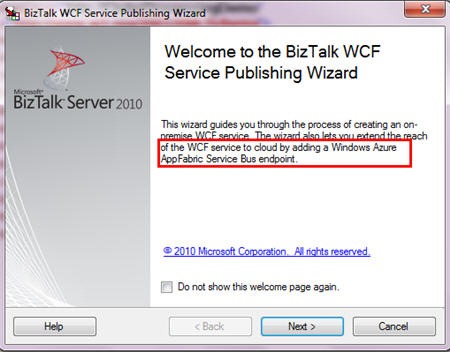
    Next up, I started the BizTalk WCF Service Publishing Wizard and noticed the new wording that came with installing the BizTalk Server 2010 Feature Pack.

    2010.10.28.cloud02

    Interesting.  Next up, I’m asked about creating my on-premises service endpoint and optionally, a receive location and a new on-premise metadata exchange point.

    2010.10.28.cloud03

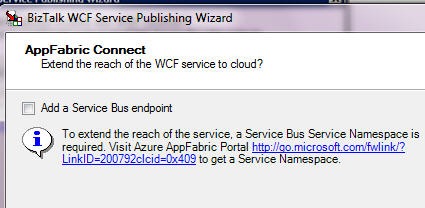
    On the next wizard page, I’m able to optionally choose to extend this service to the Azure AppFabric cloud.

    2010.10.28.cloud04

    After this, I choose whether to expose an orchestration or schemas as a web service.  I chose to expose schemas as a service (i.e., build a service from scratch vs. using orchestration ports and messages to auto-produce a service).

    2010.10.28.cloud05

    As you can see, I have a one-way service to publish order messages.  Following this screen is the same “choose an on-premises location” page where you set the IIS directory for the new service.

    2010.10.28.cloud06

    After this wizard page is a new one where you set up a Service Bus endpoint.  You pick which Service Bus binding that you want and apply your own service namespace.  You can then choose to enable both a discovery behavior and a metadata exchange behavior.

    2010.10.28.cloud07

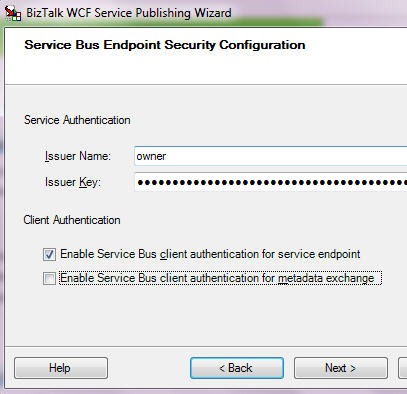
    Finally, we apply our Service Bus credentials for listening to the cloud.  Notice that I force authentication for the service endpoint itself, but not the metadata retrieval.

    2010.10.28.cloud08

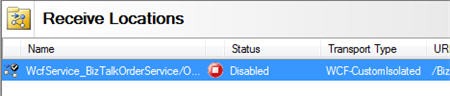
    After the wizard is done, what I expected to see was a set of receive locations.  However, the only receive location that I have is the one using the on-premises WCF binding.

    2010.10.28.cloud09

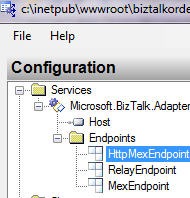
    What the what?  I expected to see a receive location that used the Service Bus binding.  So what happened to all those configuration values I just set?  If you open up the WCF service created in IIS, you can see a whole host of Service Bus configuration settings.   First, we see that there are now three service endpoints.  The three service endpoints below include an on-premises MEX endpoint, a RelayEndpoint that binds to the cloud, and a MEX endpoint that binds to the cloud.

    2010.10.28.cloud10

    That’s a pretty smart way to go.  Instead of trying to hack up the receive location, Microsoft instead beefed up the proxy services to do all the cloud binding.

    I can use IIS 7.5 autostart to make sure that my cloud binding occurs as soon as the service starts (vs. waiting for the first invocation).  Once my receive location and service are started, I can hit my local service, and, see my service is also in my cloud registry.

    2010.10.28.cloud11

    If I drill into my service, I can also see my primary service and my MEX endpoint.

    2010.10.28.cloud12 

    When I click the primary service name in the Azure AppFabric registry, I get an HTTP 401 (unauthorized) error which makes sense since we have a client authentication requirement on this service. 

    If I click the MEX endpoint, I get a weird error.  I seem to recall that you can’t retrieve a MEX WSDL over HTTP.  Or maybe I’m crazy.  But, to test that my MEX endpoint really works, I plugged the MEX URL into an Add Service Reference window in Visual Studio.NET, and sure enough, it pulls back the metadata for my BizTalk-exposed service.

    2010.10.28.cloud14

    All that said, this looks really promising.  Seems like a smart decision to stay away from the receive location and move cloud configuration to the WCF service where it belongs.

  • Lesson Learned: WCF Routing Service and the BasicHttpBinding

    Two weeks before submitting the final copy of my latest book, I reran all my chapter demonstrations that had been built during the year.  Since many demos were written with beta versions of products, I figured I should be smart and verify that everything was fine with the most recent releases.  But alas, everything was not fine.

    The demo for my Chapter 8 on content based routing (which can mostly be read online at the Packt site) all of a sudden wouldn’t run.  This demo uses the WCF Routing Service to call Workflow Services which sit in front of LOB system services.  When I ran my demo using the final version of Windows Server AppFabric as the host, I got this dumpster-fire of an error from the Routing Service:

    An unexpected failure occurred. Applications should not attempt to handle this error. For diagnostic purposes, this English message is associated with the failure: ‘Shouldn’t allocate SessionChannels if session-less and impersonating’.

    Now, anytime that a framework error returns zero results from various search engines, you KNOW you are in faaaantastic shape.  After spending hours fiddling with directory permissions, IIS/AppFabric settings and consulting a shaman, I decided to switch WCF bindings and see if that helped.  Workflow Services don’t make binding changes particularly easy (from what I’ve seen; your mileage may vary), so I used a protocol mapping section to flip the default Workflow Service binding from BasicHttpBinding to WsHttpBinding and then also switched the Routing Service to use WsHttpBinding.

    <protocolMapping>
          <add scheme="http" binding="wsHttpBinding"/>
    </protocolMapping>
    

    Voila! It worked.  So, I confidently (and erroneously) added a small block of text in the book chapter telling you that problems with the Routing Service and BasicHttp can be avoided by doing the protocol mapping and using WsHttp in the Routing Service.  I was wrong.

    Once the book went to press, I had some time to rebuild a similar solution from scratch using the BasicHttpBinding.  Naturally, it worked perfectly fine.  So, I went line by line through both solutions and discovered that the Routing Service in my book demo had the following line in the web.config file:

    <serviceHostingEnvironment aspNetCompatibilityEnabled="true" multipleSiteBindingsEnabled="true" />
    

    If I removed the aspNetCompatibilityEnabled property, my solution worked fine.  You can read more about this particular setting here.  What  is interesting is that if I purposely ADD this element to the configuration files of the Workflow Services, I don’t get any errors.  It only seems to cause grief for the Routing Service.  I’m not sure how it got into my configuration file in the first place, but I’m reviewing security footage to see if the dog is to blame.  Still not sure why this worked with the beta of Server AppFabric though.

    So, you’d never hit the above error if you used WsHttpBindings in your Workflow Services and upstream Routing Service, but if you do choose to use the BasicHttpBinding binding for your Routing Service, for all that is holy, please remove that configuration setting.

  • Book’s Sample Chapter, Articles and Press Release

    The book is now widely available and our publisher is starting up the promotion machine.  At the bottom of this post is the publisher’s press release.  Also, we now have one sample chapter online (Mike Sexton’s Debatching Bulk Data) as well as two articles representing some of the material from my Content Based Routing chapter (Part 1 – Content Based Routing on the Microsoft Platform, Part II – Building the Content Based Routing Solution on the Microsoft Platform).  This hopefully provides a good sneak peak into the book’s style.

    ## PRESS RELEASE ##

    Solve business problems on the Microsoft application platform using Packt’s new book

     Applied Architecture Patterns on the Microsoft Platform is a new book from Packt that offers an architectural methodology for choosing Microsoft application platform technologies. Written by a team of specialists in the Microsoft space, this book examines new technologies such as Windows Server AppFabric, StreamInsight, and Windows Azure Platform, and their application in real-world solutions.

     Filled with live examples on how to use the latest Microsoft technologies, this book guides developers through thirteen architectural patterns utilizing code samples for a wide variety of technologies including Windows Server AppFabric, Windows Azure Platform AppFabric, SQL Server (including Integration Services, Service Broker, and StreamInsight), BizTalk Server, Windows Communication Foundation (WCF), and Windows Workflow Foundation (WF).

     This book is broken down into 4 different sections. Part 1 starts with getting readers up to speed with various Microsoft technologies. Part 2 concentrates on messaging patterns and the inclusion of use cases highlighting content-based routing. Part 3 digs into bulk data processing, and multi-master synchronization. Finally the last part covers performance-related patterns including low latency, failover to the cloud, and reference data caching.

     Developers can learn about the core components of BizTalk Server 2010, with an emphasis on BizTalk Server versus Windows Workflow and BizTalk Server versus SQL Server. They will not only be in a position to develop their first Windows Azure Platform AppFabric, and SQL Azure applications but will also learn to master data management and data governance of SQL Server Integration Services, Microsoft Sync Framework, and SQL Server Service Broker.

     Architects, developers, and managers wanting to get up to speed on selecting the most appropriate platform for a particular problem will find this book to be a useful and beneficial read. This book is out now and is available from Packt. For more information, please visit the site.

    [Cross posted on Book’s dedicated website]

  • Do you know the Microsoft Customer Advisory Teams? You should.

    For those who live and work with Microsoft application platform technologies, the Microsoft Customer Advisory Teams (CAT) are a great source of real-world info about products and technology.  These are the small, expert-level teams whose sole job is to make sure customers are successful with Microsoft technology.  Last month I had the pleasure of presenting to both the SQL CAT and Server AppFabric CAT teams about blogging and best practices and thought I’d throw a quick plug out for these groups here.

    First off, the SQL CAT team (dedicated website here) has a regular blog of best practices, and link to the best whitepapers for SQL admins, architects, and developers.  I’m not remotely a great SQL Server guy, but I love following this team’s work and picking up tidbits that make me slightly more dangerous at work.  If you actually need to engage these guys on a project, contact your Microsoft rep.

    As for the Windows Server AppFabric CAT team, they also have a team blog with great expert content.  This team, which contains the artists-formerly-known-as-BizTalk-Rangers, provides deep expertise on BizTalk Server, Windows Server AppFabric, WCF, WF, AppFabric Caching and StreamInsight.  You’ll find a great bunch of architects on this team including Tim Wieman, Mark Simms, Rama Ramani, Paolo Salvatori and more, all led by Suren Machiraju and the delightfully frantic Curt Peterson. They’ve recently produced posts about using BizTalk with the AppFabric Service Bus, material on the Entity Framework,  and a ridiculously big and meaty post from Mark Simms about building StreamInsight apps.

    I highly recommend subscribing to both these team blogs and following SQL CAT on twitter (@sqlcat).

    Share

  • I’m Heading to Sweden to Deliver a 2-Day Workshop

    The incomparable Mikael Håkansson has just published the details of my next visit to Sweden this September. After I told Mikael about my latest book, we thought it might be epic to put together a 2 day workshop that highlights the “when to use what” discussion.  Two of my co-authors, Stephen Thomas and Ewan Fairweather, will be joining me for busy couple of days at the Microsoft Sweden office.  This is the first time that Stephen and Ewan have seen my agenda, so, surprise guys!

    We plan to summarize each core technology in the Microsoft application platform and then dig into six of the patterns that we discuss in the book.  I hope this is a great way to introduce a broad audience to the nuances of each technology and have a spirited discussion of how to choose the best tool for a given situation.

    If other user groups would be interested in us repeating this session, let me know.  We take payment in the form of plane tickets, puppies or gold bullion.

    Share

  • Announcing My New Book: Applied Architecture Patterns on the Microsoft Platform

    So my new book is available for pre-order here and I’ve also published our companion website. This is not like any technical book you’ve read before.  Let me back up a bit.

    Last May (2009) I was chatting with Ewan Fairweather of Microsoft and we agreed that with so many different Microsoft platform technologies, it was hard for even the most ambitious architect/developer to know when to use which tool.  A book idea was born.

    Over the summer, Ewan and I started crafting a series of standard architecture patterns that we wanted to figure out which Microsoft tool solved best.  We also started the hunt for a set of co-authors to bring expertise in areas where we were less familiar.  At the end of the summer, Ewan and I had suckered in Stephen Thomas (of BizTalk fame), Mike Sexton (top DB architect at Avanade) and Rama Ramani (Microsoft guy on AppFabric Caching team).   All of us finally pared down our list of patterns to 13 and started off on this adventure.  Packt Publishing eagerly jumped at the book idea and started cracking the whip on the writing phase.

    So what did we write? Our book starts off by briefly explaining the core technologies in the Microsoft application platform including Windows Workflow Foundation, Windows Communication Foundation, BizTalk Server, SQL Server (SSIS and Service Broker), Windows Server AppFabric, Windows Azure Platform and StreamInsight.  After these “primer” chapters, we have a discussion about our Decision Framework that contains our organized approach to assessing technology fit to a given problem area.  We then jump into our Pattern chapters where we first give you a real world use case, discuss the pattern that would solve the problem, evaluate multiple candidate architectures based on different application technologies, and finally select a winner prior to actually building the “winning” solution.

    In this book you’ll find discussion and deep demonstration of all the key parts of the Microsoft application platform.  This book isn’t a tutorial on any one technology, but rather,  it’s intended to provide the busy architect/developer/manager/executive with an assessment of the current state of Microsoft’s solution offerings and how to choose the right one to solve your problem.

    This is a different kind of book. I haven’t seen anything like it.  Either you will love it or hate it.  I sincerely hope it’s the former, as we’ve spent over a year trying to write something interesting, had a lot of fun doing it, and hope that energy comes across to the reader.

    So go out there and pre-order, or check out the site that I set up specifically for the book: http://AppliedArchitecturePatterns.com.

    I’ll be sure to let you all know when the book ships!

  • Using the New BizTalk Mapper Shape in a Windows Workflow Service

    So hidden within the plethora of announcements about the BizTalk Server 2010 beta launch was a mention of AppFabric integration.  The best that I can tell, this has to do with some hooks between BizTalk and Windows Workflow.  One of them is pretty darn cool, and I’m going to show it off here.

    In my admittedly limited exposure thus far to Windows Workflow (WF), one thing that jumped out was the relatively clumsy way to copy data between objects.  Now, you get a new “BizTalk Mapper” shape in your Windows Workflow activity palette which lets you use the full power of the (new) BizTalk Mapper from within a WF.

    First off, I created a new .NET 4.0 Workflow Service.  This service accepts bookings into a Pet Hotel and returns a confirmation code.  I created a pair of objects to represent the request and response messages.

    namespace Seroter.Blog.WorkflowServiceXForm
    {
        public class PetBookingRequest
        {
            public string PetName { get; set; }
            public PetList PetType { get; set; }
            public DateTime CheckIn { get; set; }
            public DateTime CheckOut { get; set; }
            public string OwnerFirstName { get; set; }
            public string OwnerLastName {get; set; }
        }
    
        public class PetBookingConfirmation
        {
            public string ConfirmationCode { get; set; }
            public string OwnerName { get; set; }
            public string PetName { get; set; }
        }
    
        public enum PetList
        {
            Dog,
            Cat,
            Fish,
            Barracuda
        }
    }
    

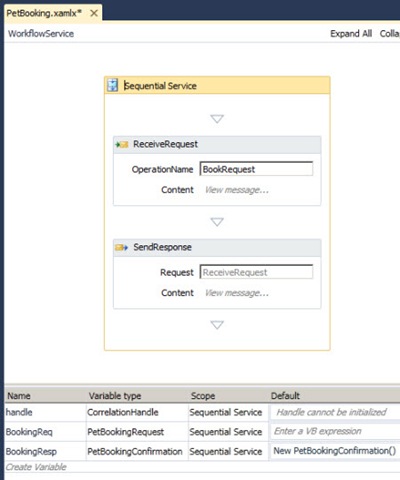
    Then I created WF variables for those objects and associated them with the request and response shapes of the Workflow Service.

    2010.5.24wfmap01

    To show the standard experience (or if you don’t have BizTalk 2010 installed), I’ve put an “Assignment” shape in my workflow to take the “PetName” value from the request message and stick it into the Response message.

    2010.5.24wfmap02

    After compiling and running the service, I invoked it from the WCF Test Client tool.  Sure enough, I can pass in a request object and get back the response with the “PetName” populated.

    2010.5.24wfmap03

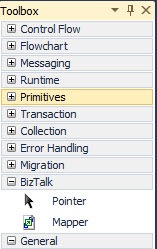
    Let’s return to our workflow.  When I installed the BizTalk 2010 beta, I saw a new shape pop up on the Windows Workflow activity palette.  It’s under a “BizTalk” tab name and called “Mapper.”

    2010.5.24wfmap04

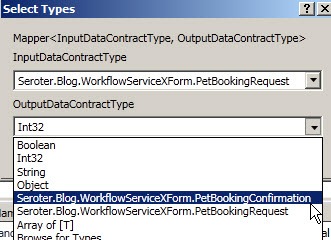
    Neato.  When I drag the shape onto my workflow, I’m prompted for the data types of my source and destination message.  I could choose primitive types, or custom types (like I have).

    2010.5.24wfmap05

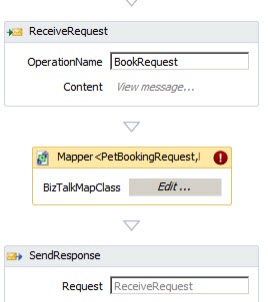
    After that, I see an unconfigured “Mapper” shape in my workflow. 

    2010.5.24wfmap06

    After setting the explicit names of my source and destination variables in the activity’s Property window, I clicked the “Edit” button of the shape.  I’m asked whether I want to create a new map, or leverage an existing one.

     2010.5.24wfmap07

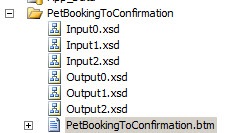
    This results in a series of files being generated, and a new *.btm file (BizTalk Map) appears.

    2010.5.24wfmap08

    In poking around those XSD files, I saw that two of them were just for base data type definitions, and one of them contained my actual message definition.  What also impressed me was that my code enumeration was properly transferred to an XSD enumeration.

    2010.5.24wfmap09

    Now let’s look at the Mapper itself.  As you’d expect, we get the shiny new Mapper interface included in BizTalk Server 2010.  I’ve got my source data type on the left and destination data type on the right.

    2010.5.24wfmap10

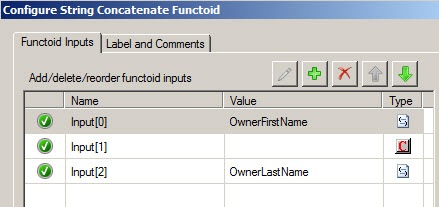
    What’s pretty cool is that besides getting the graphical mapper, I also get access to all the standard BizTalk functoids.  So, I dragged a “Concatenate” functoid onto the map and joined the OwnerLastName and OwnerFirstName and threw it into the OwnerName field.

    2010.5.24wfmap11

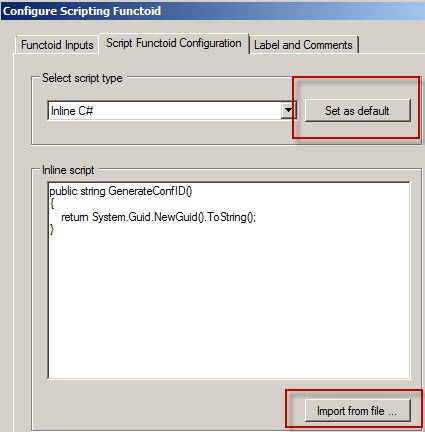
    Next, I want to create a confirmation code out of a GUID.  I dragged a “Scripting” functoid onto the map and double clicked.  It’s great that double-clicking now brings up ALL functoid configuration options.  Here, I’ve chosen to embed some C# code (vs. pointing to external assembly or writing custom XSLT) that generates a new GUID and returns it.  Also, notice that I can set “Inline C#” as a default option, AND, import from an external class file.  That’s fantastic since I can write and maintain code elsewhere and simply import it into this limited editor.

    2010.5.24wfmap13

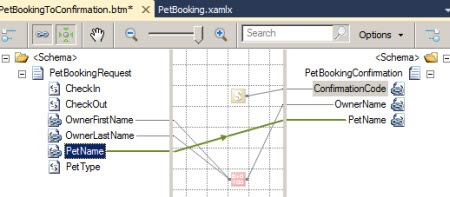
    Finally, I completed my map by connected the PetName nodes.

    2010.5.24wfmap12

    After once again building and running the Workflow Service, I can see that my values get mapped across, and a new GUID shows up as my confirmation value.

    2010.5.24wfmap14

    I gotta be honest, this was REALLY easy.  I’m super impressed with where Windows Workflow is and think that adding the power of the BizTalk Mapper is a killer feature.  What a great way to save time and even get reuse from BizTalk projects, or, aid in the migration of BizTalk solutions to WF ones.

    UPDATE: Apparently this WF activity gets installed when you install the WCF LOB Adpater SDK update for BizTalk Server 2010.  JUST installing BizTalk Server 2010 won’t provide you the activity.

    Share