Category: WCF/WF

  • Is BizTalk Server Going Away At Some Point? Yes. Dead? Nope.

    Another conference, another batch of “BizTalk future” discussions.  This time, it’s the Worldwide Partner Conference in Los Angeles.  Microsoft’s Tony Meleg actually did an excellent job frankly discussing the future of the middle platform and their challenges of branding and cohesion.  I strongly encourage you to watch that session.

    I’ve avoided any discussion on the “Is BizTalk Dead” meme, but I’m feeling frisky and thought I’d provide a bit of analysis and opinion on the topic.  Is the BizTalk Server product SKU going away in a few years?  Likely yes.  However, most integration components of BizTalk will be matured and rebuilt for the new platform over the next many years.

     A Bit of History

    I’m a Microsoft MVP for BizTalk Server and have been working with BizTalk since its beta release in the summer of 2000. When BizTalk was first released, it was a pretty rough piece of software but introduced capabilities not previously available in the Microsoft stack.  BizTalk Server 2002 was pretty much BizTalk 2000 with a few enhancements. I submit that the release of BizTalk Server 2004 was the most transformational, innovative, rapid software release in Microsoft history.   BizTalk Server 2004 introduced an entirely new underlying (pub/sub) engine, Visual Studio development, XSD schema support, new orchestration designer/engine, Human Workflow Services, Business Activity Monitoring, the Business Rules Engine, new adapter model, new Administration tooling, and more.  It was a massive update and one that legitimized the product.

    And … that was the end of significant innovation in the platform.  To be sure, we’ve seen a number of very useful changes to the product since then in the areas of Administration, WCF support, Line of Business adapters, partner management, EDI and more.  But the core engine, design experience, BRE, BAM and the like have undergone only cosmetic updates in the past seven years.  Since BizTalk Server 2004, Microsoft has released products like Windows Workflow, Windows Communication Foundation, SQL Server Service Broker, Windows Azure AppFabric and a host of other products that have innovations in lightweight messaging and easy development. Not to mention the variety of interesting open-source and vendor products that make enterprise messaging simpler.  BizTalk Server simply hasn’t kept up.

    In my opinion, Microsoft just hasn’t known what to do with BizTalk Server for about five years now.  There was the Oslo detour and the “Windows challenge” of supporting existing enterprise customers while trying to figure out how to streamline and upgrade a product.  Microsoft knows that BizTalk Server is a well-built and strategic product, and while it’s the best selling integration server by a mile, it’s still fairly niche and non-integrated with the entire Microsoft stack.

    Choice is a Good Thing

    That said, it’s in vogue to slam BizTalk Server on places like Twitter and blogs.  “It’s too complicated”, “it’s bloated”, “it causes blindness”.  I will contend that for a number of use cases, and if you have people who know what they are doing, one can solve a problem in BizTalk Server faster and more efficiently than using any other product.  A BizTalk expert can take a flat file, parse it, debatch it and route it to Salesforce.com and a Siebel system in 30 minutes (obviously depending on complexity). Those are real scenarios faced by organizations every day. And by the way, as soon as they deploy it they natively get reliable delivery, exception handling, message tracking, centralized management and the like.

    Clearly there are numerous cases when it makes good sense to use another tool like the WCF Routing Service, nServiceBus, Tellago’s Hermes, or any number of other cool messaging solutions.  But it’s not always apples to apples comparisons and equal capabilities.  Sometimes I may want or need a centralized integration server instead of a distributed service bus that relies on each subscriber to grab its own messages, handle exceptions, react to duplicate or out-of-order messaging, and communicate with non-web service based systems.  Anyone who says “never use this” and “only use that” is either naive or selling a product.  Integration in the real world is messy and often requires creative, diverse technologies to solve problems.  Virtually no company is entirely service-oriented, homogenous or running modern software. BizTalk is still the best Microsoft-sold product for reliable messaging between a wide range of systems and technologies.  You’ll find a wide pool of support resources (blogs/discussion groups/developers) that is simply not matched by any other Microsoft-oriented messaging solution.  Doesn’t mean BizTalk is the ONLY choice, but it’s still a VALID choice for a very large set of customers.

    Where is the Platform Going

    Tony Meleg said in his session that Microsoft is “only building one thing.”  They are taking a cloud first model and then enabling the same capabilities for an on premises server.  They are going to keep maintaining the current BizTalk Server (for years, potentially) until new on-premises server is available.  But it’s going to take a while for the vision to turn into products.

    I don’t think that this is a redo of the Oslo situation.  The Azure AppFabric team (and make no mistake, this team is creating the new platform) has a very smart bunch of folks and a clear mission.  They are building very interesting stuff and this last batch of CTPs (queues, topics, application manager) are showing what the future looks like.  And I like it.

    What Does This Mean to Developers?

    Would I tell a developer today to invest in learning BizTalk Server from scratch and making a total living off of it?  I’m not sure.  That said, except for BizTalk orchestrations, you’re seeing from Tony’s session that nearly all of the BizTalk-oriented components (adapters, pipelines, EDI management, mapping, BAM, BRE) will be part of the Microsoft integration server moving forward.  Investments in learning and building solutions on those components today is far from wasted and immensely relevant in the future.  Not to mention that understanding integration patterns like service bus and pub/sub are critical to excelling on the future platforms.

    I’d recommend diversity of skills right now.  One can make a great salary being a BizTalk-only developer today.  No doubt.  But it makes sense to start to work with Windows Azure in order to get a sense of what your future job will hold.  You may decide that you don’t like it and switch to being more WCF based, or non-Microsoft technologies entirely.  Or you may move to different parts of the Microsoft stack and work with StreamInsight, SQL Server, Dynamics CRM, SharePoint, etc.  Just go in with your eyes wide open.

    What Does This Mean to Organizations?

    Many companies will have interesting choices to make in the coming years.  While Tony mentions migration tooling for BizTalk clients, I highly suspect that any move to the new integration platform will require a significant rewrite for a majority of customers.  This is one reason that BizTalk skills will still be relevant for the next decade.  Organizations will either migrate, stay put or switch to new platforms entirely.

    I’d encourage any organization on BizTalk Server today to upgrade to BizTalk 2010 immediately.  That could be the last version they ever install, and if they want to maximize their investment, they should make the move now.  There very well may be 3+ more BizTalk releases in its lifetime, but for companies that only upgrade their enterprise software every 3-5  years, it would be wise to get up to date now and plan a full assessment of their strategy as the Microsoft story comes into focus.

    Summary

    In Tony’s session, he mentioned that the Azure AppFabric Service Bus team is responsible for building next generation messaging platform for Microsoft.  I think that puts Microsoft in good hands.  However, nothing is certain and we may be years from seeing a legitimate on-premises integration server from Microsoft that replaces BizTalk.

    Is BizTalk dead?  No.  But, the product named BizTalk Server is likely not going to be available for sale in 5-10 years.  Components that originated in BizTalk (like pipelines, BAM, etc) will be critical parts of the next generation integration stack from Microsoft and thus investing time to learn and build BizTalk solutions today is not wasted time.  That said, just be proactive about your careers and organizational investments and consider introducing new, interesting messaging technologies into your repertoire.   Deploy nServiceBus, use the WCF Routing Service, try out Hermes, start using the AppFabric Service Bus.  Build an enterprise that uses the best technology for a given scenario and don’t force solutions into a single technology when it doesn’t fit.

    Thoughts?

  • Event Processing in the Cloud with StreamInsight Austin: Part I-Building an Azure AppFabric Adapter

    StreamInsight is Microsoft’s (complex) event processing engine which takes in data and does in-memory pattern matching with the goal of uncovering real-time insight into information.  The StreamInsight team at Microsoft recently announced their upcoming  capability (code named “Austin”) to deploy StreamInsight applications to the Windows Azure cloud.  I got my hands on the early bits for Austin and thought I’d walk through an example of building, deploying and running a cloud-friendly StreamInsight application.  You can find the source code here.

    You may recall that the StreamInsight architecture consists of input/output adapters and any number of “standing queries” that the data flows over.  In order for StreamInsight Austin to be effective, you need a way for the cloud instance to receive input data.  For instance, you could choose to poll a SQL Azure database or pull in a massive file from an Amazon S3 bucket.  The point is that the data needs to be internet accessible.  If you wish to push data into StreamInsight, then you must expose some sort of endpoint on the Azure instance running StreamInsight Austin.  Because we cannot directly host a WCF service on the StreamInsight Austin instance, our best bet is to use Windows Azure AppFabric to receive events.  In this post, I’ll show you how to build an Azure AppFabric adapter for StreamInsight.  In the next post, I’ll walk through the steps to deploy the on-premises StreamInsight application to Windows Azure and StreamInsight Austin.

    As a reference point, the final solution looks like the picture below.  I have a client application which calls an Azure AppFabric Service Bus endpoint started up by StreamInsight Austin, and then take the output of StreamInsight query and send it through an adapter to an Azure AppFabric Service Bus endpoint that relays the message to a subscribing service.

    2011.7.5streaminsight18

    I decided to use the product team’s WCF sample adapter as a foundation for my Azure AppFabric Service Bus adapter.  However, I did make a number of changes in order to simplify it a bit. I have one Visual Studio project that contains shared objects such as the input WCF contract, output WCF contract and StreamInsight Point Event structure.  The Point Event stores a timestamp and dictionary for all the payload values.

    [DataContract]
        public struct WcfPointEvent
        {
            ///
     /// Gets the event payload in the form of key-value pairs. ///
            [DataMember]
            public Dictionary Payload { get; set; }
    
            ///
     /// Gets the start time for the event. ///
            [DataMember]
            public DateTimeOffset StartTime { get; set; }
    
            ///
     /// Gets a value indicating whether the event is an insert or a CTI. ///
            [DataMember]
            public bool IsInsert { get; set; }
        }
    

    Each receiver of the StreamInsight event implements the following WCF interface contract.

    [ServiceContract]
        public interface IPointEventReceiver
        {
            ///
     /// Attempts to dequeue a given point event. The result code indicates whether the operation /// has succeeded, the adapter is suspended -- in which case the operation should be retried later -- /// or whether the adapter has stopped and will no longer return events. ///
            [OperationContract]
            ResultCode PublishEvent(WcfPointEvent result);
        }
    

    The service clients which send messages to StreamInsight via WCF must conform to this interface.

    [ServiceContract]
        public interface IPointInputAdapter
        {
            ///
     /// Attempts to enqueue the given point event. The result code indicates whether the operation /// has succeeded, the adapter is suspended -- in which case the operation should be retried later -- /// or whether the adapter has stopped and can no longer accept events. ///
            [OperationContract]
            ResultCode EnqueueEvent(WcfPointEvent wcfPointEvent);
        }
    

    I built a WCF service (which will be hosted through the Windows Azure AppFabric Service Bus) that implements the IPointEventReceiver interface and prints out one of the values from the dictionary payload.

    public class ReceiveEventService : IPointEventReceiver
        {
            public ResultCode PublishEvent(WcfPointEvent result)
            {
                WcfPointEvent receivedEvent = result;
                Console.WriteLine("Event received: " + receivedEvent.Payload["City"].ToString());
    
                result = receivedEvent;
                return ResultCode.Success;
            }
        }
    

    Now, let’s get into the StreamInsight Azure AppFabric adapter project.  I’ve defined a “configuration object” which holds values that are passed into the adapter at runtime.  These include the service address to host (or consume) and the password used to host the Azure AppFabric service.

    public struct WcfAdapterConfig
        {
            public string ServiceAddress { get; set; }
            public string Username { get; set; }
            public string Password { get; set; }
        }
    

    Both the input and output adapters have the required factory classes and the input adapter uses the declarative CTI model to advance the application time.  For the input adapter itself, the constructor is used to initialize adapter values including the cloud service endpoint.

    public WcfPointInputAdapter(CepEventType eventType, WcfAdapterConfig configInfo)
    {
    this.eventType = eventType;
    this.sync = new object();
    
    // Initialize the service host. The host is opened and closed as the adapter is started
    // and stopped.
    this.host = new ServiceHost(this);
    //define cloud binding
    BasicHttpRelayBinding cloudBinding = new BasicHttpRelayBinding();
    //turn off inbound security
    cloudBinding.Security.RelayClientAuthenticationType = RelayClientAuthenticationType.None;
    
    //add endpoint
    ServiceEndpoint endpoint = host.AddServiceEndpoint((typeof(IPointInputAdapter)), cloudBinding, configInfo.ServiceAddress);
    //define connection binding credentials
    TransportClientEndpointBehavior cloudConnectBehavior = new TransportClientEndpointBehavior();
    cloudConnectBehavior.CredentialType = TransportClientCredentialType.SharedSecret;
    cloudConnectBehavior.Credentials.SharedSecret.IssuerName = configInfo.Username;
    cloudConnectBehavior.Credentials.SharedSecret.IssuerSecret = configInfo.Password;
    endpoint.Behaviors.Add(cloudConnectBehavior);
    
    // Poll the adapter to determine when it is time to stop.
    this.timer = new Timer(CheckStopping);
    this.timer.Change(StopPollingPeriod, Timeout.Infinite);
    }
    

    On “Start()” of the adapter, I start up the WCF host (and connect to the cloud).  My Timer checks the state of the adapter and if the state is “Stopping”, the WCF host is closed.  When the “EnqueueEvent” operation is called by the service client, I create a StreamInsight point event and take all of the values in the payload dictionary and populate the typed class provided at runtime.

    foreach (KeyValuePair keyAndValue in payload)
     {
           //populate values in runtime class with payload values
           int ordinal = this.eventType.Fields[keyAndValue.Key].Ordinal;
           pointEvent.SetField(ordinal, keyAndValue.Value);
      }
     pointEvent.StartTime = startTime;
    
     if (Enqueue(ref pointEvent) == EnqueueOperationResult.Full)
     {
            Ready();
     }


    There is a fair amount of other code in there, but those are the main steps.  As for the output adapter, the constructor instantiates the WCF ChannelFactory for the IPointEventReceiver contract defined earlier.  The address passed in via the WcfAdapterConfig is applied to the Factory.  When StreamInsight invokes the Dequeue operation of the adapter, I pull out the values from the typed class and put them into the payload dictionary of the outbound message.

    // Extract all field values to generate the payload.
    result.Payload = this.eventType.Fields.Values.ToDictionary(
            f => f.Name,
            f => currentEvent.GetField(f.Ordinal));
    
    //publish message to service
    client = factory.CreateChannel();
    client.PublishEvent(result);
    ((IClientChannel)client).Close();
    

    I now have complete adapters to listen to the Azure AppFabric Service Bus and publish to endpoints hosted on the Azure AppFabric Service Bus.

    I’ll now build an on-premises host to test that it all works.  If it does, then the solution can easily be transferred to StreamInsight Austin for cloud hosting.  I first defined the typed class that defines my event.

    public class OrderEvent
        {
            public string City { get; set; }
            public string Product { get; set; }
        }
    

    Recall that my adapter doesn’t know about this class.  The adapter works with the dictionary object and the typed class is passed into the adapter and translated at runtime.  Next up is setup for the StreamInsight host.  After creating a new embedded application, I set up the configuration object representing both the input WCF service and output WCF service.

    //create reference to embedded server
    using (Server server = Server.Create("RSEROTER"))
    {
    
    		//create WCF service config
         WcfAdapterConfig listenWcfConfig = new WcfAdapterConfig()
          {
              Username = "ISSUER",
              Password = "PASSWORD",
              ServiceAddress = "https://richardseroter.servicebus.windows.net/StreamInsight/RSEROTER/InputAdapter"
           };
    
         WcfAdapterConfig subscribeWcfConfig = new WcfAdapterConfig()
         {
               Username = string.Empty,
               Password = string.Empty,
               ServiceAddress = "https://richardseroter.servicebus.windows.net/SIServices/ReceiveEventService"
         };
    
         //create new application on the server
         var myApp = server.CreateApplication("DemoEvents");
    
         //get reference to input stream
         var inputStream = CepStream.Create("input", typeof(WcfInputAdapterFactory), listenWcfConfig, EventShape.Point);
    
         //first query
         var query1 = from i in inputStream
                                select i;
    
         var siQuery = query1.ToQuery(myApp, "SI Query", string.Empty, typeof(WcfOutputAdapterFactory), subscribeWcfConfig, EventShape.Point, StreamEventOrder.FullyOrdered);
    
         siQuery.Start();
        Console.WriteLine("Query started.");
    
        //wait for keystroke to end
        Console.ReadLine();
    
        siQuery.Stop();
        host.Close();
        Console.WriteLine("Query stopped. Press enter to exit application.");
        Console.ReadLine();


    This is now a fully working, cloud-connected, onsite StreamInsight application.  I can take in events from any internal/external service caller and publish output events to any internal/external service.  I find this to be a fairly exciting prospect.  Imaging taking events from your internal Line of Business systems and your external SaaS systems and looking for patterns across those streams.

    Looking for the source code?  Well here you go.  You can run this application today, whether you have StreamInsight Austin or not.  In the next post, I’ll show you how to take this application and deploy it to Windows Azure using StreamInsight Austin.

  • Packt Books Making Their Way to the Amazon Kindle

    Just a quick FYI that my last book, Applied Architecture Patterns on the Microsoft Platform, is now available on the Amazon Kindle.  Previously, you could pull the eBook copy over to the device, but that wasn’t ideal.  Hopefully my newest book, Microsoft BizTalk 2010: Line of Business Systems Integration will be Kindle-ready shortly after it launches in the coming weeks.

    While I’ve got a Kindle and use it regularly, I’ll admit that I don’t read technical books on it much.  What about you all?  Do you read electronic copies of technical books or do you prefer the “dead trees” version?

  • Code Uploaded for WCF/WF and AppFabric Connect Demonstration

    A few days ago I wrote a blog post explaining a sample solution that took data into a WF 4.0 service, used the BizTalk Adapter Pack to connect to a SQL Server database, and then leveraged the BizTalk Mapper shape that comes with AppFabric Connect.

    I had promised some folks that I’d share the code, so here it is.

    The code package has the following bits:

    2011.4.13code01

    The Admin folder has a database script for creating the database that the Workflow Service queries.  The CustomerServiceConsoleHost project represents the target system that will receive the data enriched by the Workflow Service.  The CustomerServiceRegWorkflow is the WF 4.0 project that has the Workflow and Mapping within it.  The CustomerMarketingServiceConsoleHost is an additional target service that the RegistrationRouting (instance WCF 4.0 Routing Service) may invoke if the inbound message matches the filter.

    On my machine, I have the Workflow Service and WCF 4.0 Routing Service hosted in IIS, but feel free to monkey around with the solution and hosting choices.  If you have any questions, don’t hesitate to ask.

  • Interview Series: Four Questions With … Jon Fancey

    Welcome to the 29th interview in my never-ending series of chats with thought leaders in the “connected systems” space.  This month, I snagged the legendary Jon Fancey who is an instructor for Pluralsight, co-founder of UK-based consulting shop Affinus, Microsoft MVP, and a well-regarded speaker and author.

    On to the questions!

    Q: During the recent MVP Summit, you and I spoke about some use cases that you have seen for Windows Server AppFabric and the WCF Routing Service.  How do you see companies trying to leverage these technologies?

    A: I think both provide a really useful set of technologies for your toolbox. In particular I like the routing service as it can sometimes really get you out of a hole. A couple of examples to illustrate here of where its great. The first is where protocol translation is necessary, a subtle example of this is where perhaps you need your Silverlight-based app to call a back-end Web service that uses a binding Silverlight doesn’t support. Even though things improved a little in SL4, it still doesn’t support all of WCF’s bindings so you’re out of luck if you don’t own the service you need to call. Put the WCF routing service in as an intermediary however and it can happily solve this problem by binding basic http on the SL slide and anything you need for the service side. It also solves the issue of having to put files (such as the clientaccesspolicy.xml) in the IIS site’s root as this can be done on the routing Web server. Of course it won’t work in all circumstances but you’d be surprised how often it solves a problem. The second example is a common one I see where customers just want routing without all the bells and whistles of something like BizTalk. Routing services has some neat features around failures and retries as well as providing high-performance rules-based message routing. It even allows you to put your own logic in the router via filters as well if you need to.

    Q: You’ve been doing a fair amount of work with SharePoint in recent years.  In your experience, what are some of the most common types of “integrations” that people do from a SharePoint environment?  Where have you used BizTalk to accommodate these, and where do you use other technologies?

    A: One great example of BizTalk and SharePoint together is with BizTalk’s BAM (Business Activity Monitoring). Although BizTalk provides its own BAM portal it doesn’t really provide the functionality most customers require. The ability to create data mash-ups using out of the box Web parts in SharePoint 2010 and the Business Connectivity Services (BCS) feature is great. Not only that but in 2010 it’s also possible now to consume the BizTalk WCF adapters from SharePoint too, making connectivity to back end systems easier than ever for both read and write scenarios, even enabling off-lining of data to Office clients such as Outlook allowing client updates and resynchronization later to the back end system or data source.

    Q: In your experience as an instructor, would you say that BizTalk Server is one of the more daunting products for someone to learn?  If so, why is that? Are there other products from Microsoft with a similar learning curve?

    A:  I’d say that nothing should be daunting to learn with the right instructor and training materials ;). Seriously though, when I starting getting into WSS3.0/MOSS2007 it reminded me a lot of my first experiences with BizTalk Server 2004, not least because it was the third version of the product where everything traditionally all comes together into a great product. I found a dearth of good resources out there to help me and knowledge really was hard won. With 2010 things have improved enormously although the size of the SharePoint feature set does make it daunting to newcomers. The key with any new technology if you really want to be effective in it is to understand it from the ground up – to understand the “why” as well as the “how”. Certainly Pluralsight’s SharePoint Fundamentals course and the On Demand content we have take this approach.

    Q [stupid question]: My company recently barred people from smoking anywhere on the campus.  While I applaud the effort, it caused a nefarious, capitalist idea to spring to my mind.  I could purchase a small school bus to drive around our campus.  For $2, people can get on and smoke their brains out.  I call it the “Smoke Bus.”  Ignoring logistical challenges (e.g. the driver would probably die of cancer within a week), this seems like a moral loser, but money-making winner.  What ideas do you have for something that may be of questionable ethics but a sure fire success?

    A: How about giving all your employees unlimited free sugary caffeinated drinks – oh, wait a minute…

    Thanks for joining us, Jon!

  • Using the BizTalk Adapter Pack and AppFabric Connect in a Workflow Service

    I was recently in New Zealand speaking to a couple user groups and I presented a “data enrichment” pattern that leveraged Microsoft’s Workflow Services.  This Workflow used the BizTalk Adapter Pack to get data out of SQL Server and then used the BizTalk Mapper to produce an enriched output message.  In this blog post, I’ll walk through the steps necessary to build such a Workflow.  If you’re not familiar with AppFabric Connect, check out the Microsoft product page, or a nice long paper (BizTalk and WF/WCF, Better Together) which actually covers a few things that I show in this post, and also Thiago Almeida’s post on installation considerations.

    First off, I’m using Visual Studio 2010 and therefore Workflow Services 4.0.  My project is of type WCF Workflow Service Application.

    2011.4.4wf01

    Before actually building a workflow, I want to generate a few bits first.  In my scenario, I have a downstream service that accepts a “customer registration” message.  I have a SQL Server database with existing customers that I want to match against to see if I can add more information to the “customer registration” message before calling the target service.  Therefore, I want a reference both to my database and my target service.

    If you have installed the BizTalk Adapter Pack, which exposes SQL Server, Oracle, Siebel and SAP systems as WCF services, then right-clicking the Workflow Service project should show you the option to Add Adapter Service Reference

    2011.4.4wf02

    After selecting that option, I see the wizard that lets me browse system metadata and generate proxy classes.  I chose the sqlBinding and set my security settings, server name and initial database catalog.  After connecting to the database, I found my database table (“Customer”) and chose to generate the WF activity to handle the Select operation.

    2011.4.4wf03 

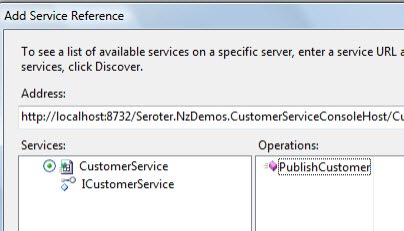
    Next, I added a Service Reference to my project and pointed to my target service which has an operation called PublishCustomer.

    2011.4.4wf04

    After this I built my project to make sure that the Workflow Service activities are properly generated.  Sure enough, when I open the .xamlx file that represents my Workflow Service, I see the customer activities in the Visual Studio toolbox.

    2011.4.4wf05

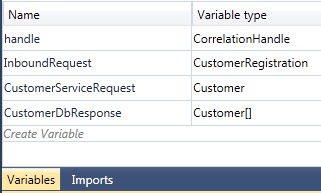
    This service is an asynchronous, one-way service, so I removed the “Receive and Send Reply” activities and replaced it with a single Receive activity.  But, what about my workflow variables?  Let’s create the variables that my Workflow Service needs.  The InboundRequest variable points to a WCF data contract that I added to the project.  The CustomerServiceRequest variable refers to the Customer object generated by my WCF service reference.  Finally, the CustomerDbResponse holds an array of the Customer object generated by the Adapter Service Reference.

    2011.4.4wf06

    With all that in place, let’s flesh out the workflow.  The initial Receive activity has an operation called PublishRegistration and uses the InboundRequest variable.

    2011.4.4wf07

    Next up, I have the custom Workflow activity called SelectActivity.  This is the one generated by the database reference.  It has a series of properties including which columns to bring back (I chose all columns), any query parameters (e.g. a “where” clause) and which variable to put the results in (the CustomerDbResponse).

    2011.4.4wf08

    Now I’m ready to start building the request message for the target service.  In used an Assign shape to instantiate the CustomerServiceRequest variable.  Then I dragged the Mapper activity that is available if you have AppFabric Connect installed.

    2011.4.4wf09

    When then activity is dropped onto the Workflow surface, we get prompted for what “types” represent the source and destination of the map.  The source type is the customer registration that the Workflow initially receives, and the destination is the customer object sent to target service.  Now I can view, edit and save the map between these two data types. The Mapper activity comes in handy when you have a significant number of values to map from a source to destination variable and don’t want to have 45 Assign shapes stuffed into the workflow.

    2011.4.4wf10

    Recall that I want to see if this customer is already known to us.  If they are not, then there are no results from my database query.  To prevent any errors from trying to access a database result that doesn’t exist, I added an If activity that looks to see if there were results from our database query.

    2011.4.4wf11

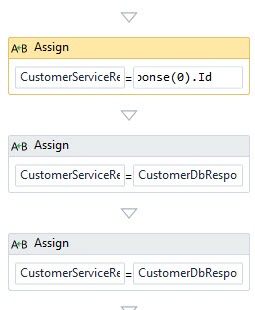
    Within the Then branch, I extract the values from the first result of the database query.  This done through a series of Assign shapes which access the “0” index of the database customer array.

    2011.4.4wf12

    Finally, outside of the previous If block, I added a Persist shape (to protect me against downstream service failures and allow retries from Windows Server AppFabric) and finally, the custom PublishCustomer activity that was created by our WCF service reference.

    2011.4.4wf13

    The result?  A pretty clean Workflow that can be invoked as a WCF service.  Instead of using BizTalk for scenarios like this, Workflow Services provide a simpler, more lightweight means for doing simple data enrichment solutions.  By adding AppFabric Connect and the Mapper activity, in addition to the Persist capability supported by Windows Server AppFabric, you get yourself a pretty viable enterprise solution.

    [UPDATE: You can now download the code for this example via this new blog post]

  • Exposing On-Premise SQL Server Tables As OData Through Windows Azure AppFabric

    Have you played with OData much yet?  The OData protocol allows you to interact with data resources through a RESTful API.  But what if you want to securely expose that OData feed out to external parties?  In this post, I’ll show you the very simple steps for exposing an OData feed through Windows Azure AppFabric.

    • Create ADO.NET Entity Data Model for Target Database.  In a new VS.NET WCF Service project, right click the project and choose to add a new ADO.NET Entity Data Model.  Choose to generate the model from a database.  I’ve selected two tables from my database and generated a model.

      2011.3.23odata1

      2011.3.23odata2

      2011.3.23odata3

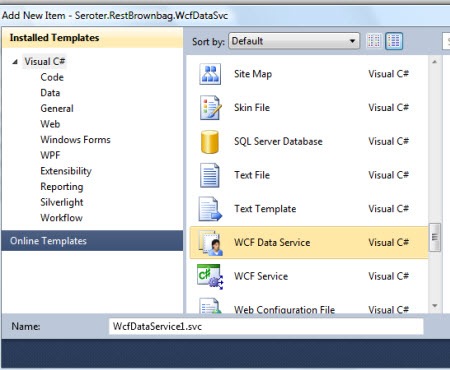
    • Create a new WCF Data Service.  Right-click the Visual Studio project and add a new WCF Data Service.
      2011.3.23odata4
    • Update the WCF Data Service to Use the Entity Model.  The WCF Data Service template has a placeholder where we add the generated object that inherited from ObjectContext.  Then, I uncommented and edited the “config.SetEntitySetAccessRule” line to allow Read on all entities.
      2011.3.23odata6
    • View the Current Service.  Just to make sure everything is configured right so far, I viewed the current service and hit my “/Customers” resource and saw all the customer records from that table.
      2011.3.23odata7
    • Update the web.config to Expose via Azure AppFabric.  The service thus far has not forced me to add anything to my service configuration file.  Now, however, we need to add the appropriate AppFabric Relay bindings so that a trusted partner could securely query my on-premises database in real-time.

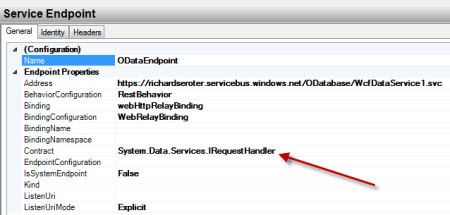
      I added an explicit service to my configuration as none was there before.  I then added my cloud endpoint that leverages the System.Data.Services.IRequestHandler interface. I then created a cloud relay binding configuration that set the relayClientAuthenticationType to None (so that clients do not have to authenticate – it’s a demo, give me a break!).  Finally, I added an endpoint behavior that had both the webHttp behavior element (to support REST operations) and the transportClientEndpointBehavior which identifies which credentials the service uses to bind to the cloud.  I’m using the SharedSecret credential type and providing my Service Bus issuer and password.
      2011.3.23odata8
    • Connect to the Cloud.  At this point, I can connect my service to the cloud.  In this simple case, I right-clicked my OData service in Visual Studio.NET and chose View in Browser.  When this page successfully loads, it indicates that I’ve bound to my cloud namespace.  I then plugged in my cloud address, and sure enough, was able to query my on-premises database through the OData protocol.
      2011.3.23odata9

    That was easy!  If you’d like to learn more about OData, check out the OData site.  Most useful is the page on how to manipulate URIs to interact with the data, and also the live instance of the Northwind database that you can mess with.  This is yet another way that the innovative Azure AppFabric Service Bus lets us leverage data where it rests and allow select internet-connected partners access it.

  • WCF Routing Service Deep Dive: Part II–Using Filters

    In the first part of this series, I compared the WCF Routing Service with BizTalk Server for messaging routing scenarios.  That post was a decent initial assessment of the Routing Service, but if I stopped there, I wouldn’t be giving the additional information needed for you to make a well-informed decision.  In this post, we’ll take a look at a few of the filters offered by the Routing Service and how to accommodate a host of messaging scenarios.

    Filtering by SOAP Action

    If you have multiple operations within a single contract, you may want to leverage the ActionMessageFilter in the Routing Service.  Why might we use this filter?  In one case, you could decide to multicast a message to all services that implement the same action.  If you had a dozen retail offices who all implement a SOAP operation called “NotifyProductChange”, you could easily define each branch office endpoint in the Routing Service configuration and send one-way notifications to each service.  I

    n the case below, we want to send all operations related to event planning to a single endpoint and let the router figure out where to send each request type.

    I’ve got two services.  One implements a series of operations for occasions (event) that happen at a company’s headquarters.  The second service has operations for dealing with attendees at any particular event.  The WCF contract for the first service is as so:

     [ServiceContract(Namespace="http://Seroter.WcfRoutingDemos/Contract")]
        public interface IEventService
        {
            [OperationContract(Action = "http://Seroter.WcfRoutingDemos/RegisterEvent")]
            string RegisterEvent(EventDetails details);
    
            [OperationContract(Action = "http://Seroter.WcfRoutingDemos/LookupEvent")]
            EventDetails LookupEvent(string eventId);
        }
    
    [DataContract(Namespace="http://Seroter.WcfRoutingDemos/Data")]
        public class EventDetails
        {
            [DataMember]
            public string EventName { get; set; }
            [DataMember]
            public string EventLocation { get; set; }
            [DataMember]
            public int AttendeeCount { get; set; }
            [DataMember]
            public string EventDate { get; set; }
            [DataMember]
            public float EventDuration { get; set; }
            [DataMember]
            public bool FoodNeeded { get; set; }
        }
    

    The second contract looks like this:

    [ServiceContract(Namespace = "http://Seroter.WcfRoutingDemos/Contract")]
        public interface IAttendeeService
        {
             [OperationContract(Action = "http://Seroter.WcfRoutingDemos/RegisterAttendee")]
             string RegisterAttendee(AttendeeDetails details);
        }
    
         [DataContract(Namespace = "http://Seroter.WcfRoutingDemos/Data")]
         public class AttendeeDetails
         {
             [DataMember]
             public string LastName { get; set; }
             [DataMember]
             public string FirstName { get; set; }
             [DataMember]
             public string Dept { get; set; }
             [DataMember]
             public string EventId { get; set; }
             
         }
    

    These two services are hosted in a console-based service host that exposes the services on basic HTTP channels.  This implementation of the Routing Service is hosted in IIS and its service file (.svc) has a declaration that points it to the fully qualified path of the WCF Routing Service.

    <%@ ServiceHost Language="C#" Debug="true" Service="System.ServiceModel.Routing.RoutingService,System.ServiceModel.Routing, version=4.0.0.0, Culture=neutral,PublicKeyToken=31bf3856ad364e35"  %>
    

    The web configuration of the Routing Service is where all the fun is.  I first defined the Routing Service (with name System.ServiceModel.Routing.RoutingService) and contract System.ServiceModel.Routing.IRequestReplyRouter.  The Routing Service offers multiple contracts; in this case, I’m using the synchronous one which does NOT support multi-cast. My Routing Service has two client endpoints; one for each service created above.

    Let’s check out the filters.  In this case, I have two filters with a filterType of Action. The filterData attribute of the filter is set to the Action value for each service’s SOAP action.

    <filters>
         <filter name="RegisterEventFilter" filterType="Action" filterData="http://Seroter.WcfRoutingDemos/RegisterEvent"/>
         <filter name="RegisterAttendeeFilter" filterType="Action" filterData="http://Seroter.WcfRoutingDemos/RegisterAttendee"/>
    </filters>
    

    Next, the filter table maps the filter to which WCF endpoint will get invoked.

    <filterTable name="EventRoutingTable">
          <add filterName="RegisterEventFilter" endpointName="CAEvents" priority="0"/>
          <add filterName="RegisterAttendeeFilter" endpointName="AttendeeService" priority="0"/>
    </filterTable>
    

    I also have a WCF service behavior that contains the RoutingBehavior with the filterTableName equal to my previously defined filter table.  Finally, I updated my Routing Service definition to include a reference to this service behavior.

    <behaviors>
    <serviceBehaviors>
           <behavior name="RoutingBehavior">
              <routing routeOnHeadersOnly="false" filterTableName="EventRoutingTable" />
              <serviceDebug includeExceptionDetailInFaults="true" />
           </behavior>
        </serviceBehaviors>
    </behaviors>
    <services>
    	 <service behaviorConfiguration="RoutingBehavior" name="System.ServiceModel.Routing.RoutingService">
     		<endpoint binding="basicHttpBinding" bindingConfiguration=""
       name="RoutingEndpoint" contract="System.ServiceModel.Routing.IRequestReplyRouter" />
    	 </service>
    </services>
    

    What all this means is that I can now send either Attendee Registration OR Event Registration to the exact same endpoint address and the messages will route to the correct underlying service based on the SOAP action of the message.

    2011.1.13routing02

    Filtering by XPath

    Another useful way to route messages is by looking at the payloads themselves.  The WCF Routing Service has an XPath filter that lets you poke into the message body to find a match to a particular XPath query.  In this scenario, as an extension of the previous, we still have a service that processes events for California, and now we want a new service that receives events for Washington state.  Our Routing Service should steer requests to either the California service or Washington service based on the “location” node of the message payload.

    Within the routing configuration, I have a namespace table that allows me to set up an alias used during XPath queries.

    <namespaceTable>
        <add prefix="custom" namespace="http://Seroter.WcfRoutingDemos/Data"/>
    </namespaceTable>
    

    Next, I have two filters with a filterType of XPath and a filterData attribute that holds the specific XPath statement.

    <filters>
        <filter name="CAEventFilter" filterType="XPath" filterData="//custom:EventLocation='CA'"/>
        <filter name="WAEventFilter" filterType="XPath" filterData="//custom:EventLocation='WA'"/>
    </filters>
    

    The filter table maps each XPath filter to a given endpoint.

    <filterTables>
            <filterTable name="EventRoutingTable">
              <add filterName="CAEventFilter" endpointName="CAEvents" priority="0" />
              <add filterName="WAEventFilter" endpointName="WAEvents" priority="0" />
            </filterTable>
          </filterTables>
    

    When I call my (routing) service now and pass in a Washington event and a California event I can see that each distinct service is called.

    2011.1.13routing01

    Note that you can build XPath statements using operations that combine criteria.  For instance, what if we wanted every event with an attendee count greater than 50 to go to the California service to be evaluated first.  My filters below include the California filter that has an “or” between two criteria.

    <filter name="CAEventFilter" filterType="XPath" filterData="//custom:EventLocation='CA' or //custom:AttendeeCount > 50"/>
    <filter name="WAEventFilter" filterType="XPath" filterData="//custom:EventLocation='WA'"/>
    

    As it stands, if I execute the Routing Service again, and pass in a WA location for 60 users, I get an error because BOTH filters match.  The error tells me that “ Multicast is not supported with Request-Reply communication.”  So, we need to leverage the priority attribute of the filter to make sure that the California filter is evaluated first and if a match is found, the second filter is skipped.

    <add filterName="RegisterAndCAFilter" endpointName="CAEvents" priority="3" />
    <add filterName="RegisterAndWAFilter" endpointName="WAEvents" priority="2" />
    

    Sure enough, when I call the service again, we can see that I have a Washington location, but because of the size of the meeting, the California service was called.

    2011.1.13routing03

    Complex Filters Through Joins

    There may arise a need to do more complex filters that mix different filter types.  Previously we saw that it’s relatively easy to build a composite XPath query.  However, what if we want to combine the SOAP action filter along with the XPath filter?  Just enabling the previous attendee service filter (so that we have three total filters in the table) actually does work just fine.  However, for demonstration purposes, I’ve created a new filter using the And type and combine the registration Action filter to each registration XPath filter.

    <filters>
            <filter name="RegisterEventFilter" filterType="Action" filterData="http://Seroter.WcfRoutingDemos/RegisterEvent"/>
            <filter name="RegisterAttendeeFilter" filterType="Action" filterData="http://Seroter.WcfRoutingDemos/RegisterAttendee"/>
            <filter name="CAEventFilter" filterType="XPath" filterData="//custom:EventLocation='CA' or //custom:AttendeeCount > 50"/>
            <filter name="WAEventFilter" filterType="XPath" filterData="//custom:EventLocation='WA'"/>
            <!-- *and* filter -->
            <filter name="RegisterAndCAFilter" filterType="And" filter1="RegisterEventFilter" filter2="CAEventFilter"/>
            <filter name="RegisterAndWAFilter" filterType="And" filter1="RegisterEventFilter" filter2="WAEventFilter"/>
    </filters>
    

    In this scenario, a request that matches both criteria will result in the corresponding endpoint being invoked.  As I mentioned, this particular example works WITHOUT the composite query, but in real life, you might combine the endpoint address with the SOAP action, or a custom filter along with XPath.  Be aware that an And filter only allows the aggregation of two filters.  I have not yet tried making the criteria in one And filter equal to other And filters to see if you can chain more than two criteria together.  I could see that working though.

    Applying a “Match All” Filter

    The final filter we’ll look at is the “match all” filter which does exactly what its name says.  Any message that arrives at the Routing Service endpoint will call the endpoint associated with the “match all” filter (except for a scenario mentioned later).  This is valuable if you have a diagnostic service that subscribes to every message for logging purposes.  We could also use this if we had a Routing Service receiving a very specific set of messages and we wanted to ALSO send those messages somewhere else, like BizTalk Server.

    One critical caveat for this filter is that it only applies to one way or duplex Routing Service instances.  Two synchronous services cannot receive the same inbound message.  So, if I added a MatchAll filter to my current configuration, an error would occur when invoking the Routing Service.  Note that the Routing Service contract type is associated with the WCF service endpoint.  To use the MatchAll filter, we need another Routing Service endpoint that leverages the ISimplexDatagramRouter contract.  ALSO, because the filter table is tied to a service behavior (not endpoint behavior), we actually need an entirely different Routing Service definition.

    I have a new Routing Service with its own XML configuration and routing table.  Back in my IEventService contract, I’ve added a new one way interface that accepts updates to events.

    [ServiceContract(Namespace="http://Seroter.WcfRoutingDemos/Contract")]
        public interface IEventService
        {
            [OperationContract(Action = "http://Seroter.WcfRoutingDemos/RegisterEvent")]
            string RegisterEvent(EventDetails details);
    
            [OperationContract(Action = "http://Seroter.WcfRoutingDemos/LookupEvent")]
            EventDetails LookupEvent(string eventId);
    
            [OperationContract(Action = "http://Seroter.WcfRoutingDemos/UpdateEvent", IsOneWay=true)]
            void UpdateEvent(EventDetails details);
        }
    

    I want my new Routing Service to front this operation.  My web.config for the Routing Service has two client endpoints, one for each (CA and WA) event service.  My Routing Service declaration in the configuration now uses the one way contract.

    <service behaviorConfiguration="RoutingBehaviorOneWay" name="System.ServiceModel.Routing.RoutingService">
    	<endpoint binding="basicHttpBinding" bindingConfiguration=""
    		 name="RoutingEndpoint" contract="System.ServiceModel.Routing.ISimplexDatagramRouter" />
    </service>
    

    I have the filters I previously used which route based on the location of the event.  Notice that both of my filters now have a priority of 0.  We’ll see what this means in just a moment.

    <filters>
    	<filter name="CAEventFilter" filterType="XPath" filterData="//custom:EventLocation='CA' or //custom:AttendeeCount > 50"/>
    	<filter name="WAEventFilter" filterType="XPath" filterData="//custom:EventLocation='WA'"/>		
    </filters>
    <filterTables>
    	<filterTable name="EventRoutingTableOneWay">
    		<add filterName="CAEventFilter" endpointName="CAEvents" priority="0" />
    		<add filterName="WAEventFilter" endpointName="WAEvents" priority="0" />
    	</filterTable>
    </filterTables>
    

    When I send both a California event update request and then a Washington event update request to this Routing Service, I can see that both one-way updates successfully routed to the correct underlying service.

    2011.1.13routing04

    Recall that I set my filter’s priority value to 0.  I am now able to multi-cast because I am using one-way services.  If I send a request for a WA event update with more than 50 attendees (which was previously routed to the CA service), I now have BOTH services receive this request.

    2011.1.13routing05

    Now I can also able to use the MatchAll filter.  I’ve created an additional service that logs all messages it receives.  It is defined by this contract:

    [ServiceContract(Namespace = "http://Seroter.WcfRoutingDemos/Contract")]
        public interface IAdminService
        {
            [OperationContract(IsOneWay = true, Action = "*")]
            void LogMessage(Message msg);
        }
    

    Note that it’s got an “any” action type.  If you put anything else here, this operation would fail to match the inbound message and the service would not get called.  My filters and filter table now reflect this new logging service.  Notice that I have a MatchAll filter in the list.  This filter will get called every time. 

    <filters>
    	<filter name="CAEventFilter" filterType="XPath" filterData="//custom:EventLocation='CA' or //custom:AttendeeCount > 50"/>
    	<filter name="WAEventFilter" filterType="XPath" filterData="//custom:EventLocation='WA'"/>
    	<!-- logging service -->
    	<filter name="LoggingServiceFilter" filterType="MatchAll"/>
    </filters>
    <filterTables>
    	<filterTable name="EventRoutingTableOneWay">
    		<add filterName="CAEventFilter" endpointName="CAEvents" priority="0" />
    		<add filterName="WAEventFilter" endpointName="WAEvents" priority="0" />
    		<!-- logging service -->
    		<add filterName="LoggingServiceFilter"  endpointName="LoggingService" priority="0"/>
    	</filterTable>
    </filterTables>
    

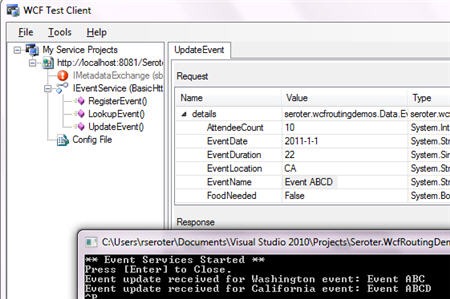
    When I send in a California event update, notice that both the California service AND the logging service are called.

    2011.1.13routing06

    Finally, what happens if the MatchAll filter has a lower priority than other filters?  Does it get skipped?  Yes, yes it does.  Filter priorities still trump anything else.  What if the MatchAll filter has the highest priority, does it stop processing any other filters?  Sure enough, it does.  Carefully consider your priority values because only filters with matching priority values will guarantee to be evaluated.

    Summary

    The Routing Service has some pretty handy filters that give you multiple ways to evaluate inbound messages.  I’m interested to see how people mix and match the Routing Service contract types (two-way, one-way) in IIS hosted services as most demos I’ve seen show the Service being self-hosted.  I think you have to create separate service projects for each contract type you wish to support, but if you have a way to have both services in a single project, I’d like to hear it.

  • WCF Routing Service Deep Dive: Part I–Comparing to BizTalk Server

    One common complaint about BizTalk Server is that it’s not particular lightweight (many moving parts) and isn’t easy for an expert .NET developer to pick up immediately. I suspect this is one reason why we’ve seen multiple other .NET service buses (e.g. nServiceBus) pop up as viable alternatives.

    So, when it was announced that WCF 4.0 would include a built-in “Routing Service”, this piqued my interest. To be clear, the Routing Service does NOT claim to be a service bus, nor should it, but, for many real-time message routing scenarios, it is actually a nice fit. I wrote about the Routing Service in my Applied Architecture Patterns book and you can read an excerpt of that chapter on the Packt Publishing siteIn a nutshell, the WCF Routing Service is a SOAP service broker that uses a variety of filters to steer traffic to specific endpoints. If you know how to build WCF services and deploy them to IIS, then you can very quickly learn how to leverage the Routing Service.

    But how does the Routing Service compare to BizTalk Server? Let’s line them up against a few key dimensions and see if this helps us choose the right tool for a given situation.  If an “X” is gray in color, then I’m indicating that a capability is supported, but isn’t implemented as robustly as the compared technology.

    Capability BTS WCF Comments
    Transport and Content
    Receive message via one protocol and route message through another X X Both technologies can translate transports.
    Multiple input transport channels X X BizTalk has more options, of course, since it supports LOB system adapters, and protocols such as FTP and POP3.
    Process multiple file formats X The Routing Service only handles XML whereas BizTalk handles multiple other encodings.
    Accepts multiple message types through single endpoint X X This is the default behavior for the Routing Service.  BizTalk can do this with some adapters easier than others.
    Supports RESTful services Surprisingly, neither do.  Hopefully this comes in the next version of both technologies.
    Routing Rules
    Route based on body of the message X X BizTalk requires you to “promote” nodes to enable routing while Routing Service allows you to use XPath and route based on any node.  Difficult to leverage repeating nodes in BizTalk or easily add new routable ones.
    Route on both message metadata and endpoint metadata X X For the Routing Service, this includes the endpoint address, endpoint name and SOAP action
    Routing criteria can be aggregated. X X BizTalk allows a complex mix of criteria that can be combined with both “and” and “or” statements.  The Routing Service lets you “and” two distinct filters.
    Multiple recipients can receive the same message. X X Both technologies support multi-cast for async operations.
    Quality of Service
    Reliable delivery through retries on exception X X BizTalk allows you configure both the number of retries and interval between attempts while the Routing Service does some automatic retries for specific types of errors (e.g. timeouts).
    Reliable delivery through backup delivery endpoints X X Both technologies let you define a service (or endpoint) to route to if the primary transport fails.
    Reliable delivery through durable messaging X BizTalk uses a “store and forward” pattern that ensures either delivery or persistence.  The Routing Service has no underlying backing store.
    Operations
    Configuration stored centrally in a database X BizTalk configuration is stored in a central database while Routing Service relies on its XML configuration file.  In some cases, the agility of a file-based configuration may be preferred.

    While there are clearly a great number of reasons to leverage BizTalk for enterprise messaging (adapters, pub/sub engine, strong developer tooling, high availability, etc), for straightforward content-based routing scenarios, the WCF Routing Service is a great fit.

    This is the first blog post in a short series that explains some details of the WCF Routing Service including filter configuration, error handling and more.  Hope you stick around.

  • BizTalk + WCF Article Series Moved to My Blog

    In 2008 I was paid to write a series of articles about how BizTalk Server and WCF integrated. As a result of that nine-part series, I was pinged about writing my first book, which turned into my second book, and so on. So, I hold a fondness for that series of articles.

    That said, I’ve been bothered that the site that hosted those articles has apparently gone unattended and is, according to my Chrome browser, infested with malware. So, in the interest of the community and sharing what I thought was interested content, I’ve gone ahead and made all of the articles available on this blog. You can find the jump page for the whole series here.

    In the unlikely event that I’m asked by that site to remove the articles from my blog, I will do so.  However, I don’t expect that and hope that folks can benefit from what I wrote a couple years ago.