Category: WCF/WF

  • Capabilities and Limitations of “Contract First” Feature in Microsoft Workflow Services 4.5

    I think we’ve moved well past the point of believing that “every service should be a workflow” and other things that I heard when Microsoft was first plugging their Workflow Foundation. However, there still seem to be many cases where executing a visually modeled workflow is useful. Specifically, they are very helpful when you have long running interactions that must retain state. When Microsoft revamped Workflow Services with the .NET 4.0 release, it became really simple to build workflows that were exposed as WCF services. But, despite all the “contract first” hoopla with WCF, Workflow Services were inexplicably left out of that. You couldn’t start the construction of a Workflow Service by designing a contract that described the operations and data payloads. That has all been rectified in .NET 4.5 as now developers can do true contract-first development with Workflow Services. In this blog post, I’ll show you how to build a contract-first Workflow Service, and, include a list of all the WCF contract properties that get respected by the workflow engine.

    First off, there is an MSDN article (How to: Create a workflow service that consumes an existing service contract) that touches on this, but there are no pictures and limited details, and my readers demand both, dammit.

    To begin with, I created a new Workflow Services project in Visual Studio 2012.
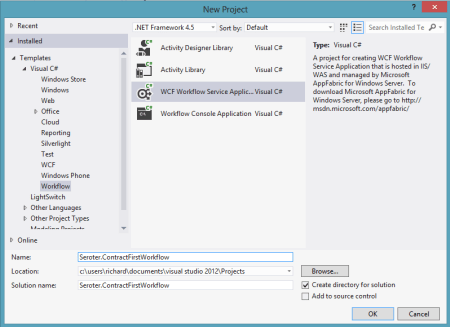
    2012.10.12wf01

    Then, I chose to add a new class directly to the Workflow Services project.

    2012.10.12wf02

    Within this new class filed, named IOrderService, I defined a new WCF service contract that included an operation that processes new orders. You can see below that I have one contract and two data payloads (“order” and “order confirmation”).

    namespace Seroter.ContractFirstWorkflow
    {
        [ServiceContract(
            Name="OrderService",
            Namespace="http://Seroter.Demos")]
        public interface IOrderService
        {
            [OperationContract(Name="SubmitOrder")]
            OrderConfirmation Submit(Order customerOrder);
        }
    
        [DataContract(Name="CustomerOrder")]
        public class Order
        {    
            [DataMember]
            public int ProductId { get; set; }
            [DataMember]
            public int CustomerId { get; set; }
            [DataMember]
            public int Quantity { get; set; }
            [DataMember]
            public string OrderDate { get; set; }
    
            public string ExtraField { get; set; }
        }
    
        [DataContract]
        public class OrderConfirmation
        {
            [DataMember]
            public int OrderId { get; set; }
            [DataMember]
            public string TrackingId { get; set; }
            [DataMember]
            public string Status { get; set; }
        }
    }
    

    Now which WCF service/operation/data/message/fault contract attributes are supported by the workflow engine? You can’t find that information from Microsoft at the moment, so I reached out to the product team, and they generously shared the content below. You can see that a good portion of the contract attributes are supported, but there are a number of key ones (e.g. callback and session) that won’t make it over. Also, from my own experimentation, you also can’t use the RESTful attributes like WebGet/WebInvoke.

    Attribute Property Name Supported Description
    Service Contract CallbackContract No Gets or sets the type of callback contract when the contract is a duplex contract.
    ConfigurationName No Gets or sets the name used to locate the service in an application configuration file.
    HasProtectionLevel Yes Gets a value that indicates whether the member has a protection level assigned.
    Name Yes Gets or sets the name for the <portType> element in Web Services Description Language (WSDL).
    Namespace Yes Gets or sets the namespace of the <portType> element in Web Services Description Language (WSDL).
    ProtectionLevel Yes Specifies whether the binding for the contract must support the value of the ProtectionLevel property.
    SessionMode No Gets or sets whether sessions are allowed, not allowed or required.
    TypeId No When implemented in a derived class, gets a unique identifier for this Attribute. (Inherited from Attribute.)
    Operation Contract Action Yes Gets or sets the WS-Addressing action of the request message.
    AsyncPattern No Indicates that an operation is implemented asynchronously using a Begin<methodName> and End<methodName> method pair in a service contract.
    HasProtectionLevel Yes Gets a value that indicates whether the messages for this operation must be encrypted, signed, or both.
    IsInitiating No Gets or sets a value that indicates whether the method implements an operation that can initiate a session on the server(if such a session exists).
    IsOneWay Yes Gets or sets a value that indicates whether an operation returns a reply message.
    IsTerminating No Gets or sets a value that indicates whether the service operation causes the server to close the session after the reply message, if any, is sent.
    Name Yes Gets or sets the name of the operation.
    ProtectionLevel Yes Gets or sets a value that specifies whether the messages of an operation must be encrypted, signed, or both.
    ReplyAction Yes Gets or sets the value of the SOAP action for the reply message of the operation.
    TypeId No When implemented in a derived class, gets a unique identifier for this Attribute. (Inherited from Attribute.)
    Message Contract HasProtectionLevel Yes Gets a value that indicates whether the message has a protection level.
    IsWrapped Yes Gets or sets a value that specifies whether the message body has a wrapper element.
    ProtectionLevel No Gets or sets a value that specified whether the message must be encrypted, signed, or both.
    TypeId Yes When implemented in a derived class, gets a unique identifier for this Attribute. (Inherited from Attribute.)
    WrapperName Yes Gets or sets the name of the wrapper element of the message body.
    WrapperNamespace No Gets or sets the namespace of the message body wrapper element.
    Data Contract IsReference No Gets or sets a value that indicates whether to preserve object reference data.
    Name Yes Gets or sets the name of the data contract for the type.
    Namespace Yes Gets or sets the namespace for the data contract for the type.
    TypeId No When implemented in a derived class, gets a unique identifier for this Attribute. (Inherited from Attribute.)
    Fault Contract Action Yes Gets or sets the action of the SOAP fault message that is specified as part of the operation contract.
    DetailType Yes Gets the type of a serializable object that contains error information.
    HasProtectionLevel No Gets a value that indicates whether the SOAP fault message has a protection level assigned.
    Name No Gets or sets the name of the fault message in Web Services Description Language (WSDL).
    Namespace No Gets or sets the namespace of the SOAP fault.
    ProtectionLevel No Specifies the level of protection the SOAP fault requires from the binding.
    TypeId No When implemented in a derived class, gets a unique identifier for this Attribute. (Inherited from Attribute.)

    With the contract in place, I could then right-click the workflow project and choose to Import Service Contract.

    2012.10.12wf03

    From here, I chose which interface to import. Notice that I can look inside my current project, or, browse any of the assemblies referenced in the project.

    2012.10.12wf04


    After the WCF contract was imported, I got a notice that I “will see the generated activities in the toolbox after you rebuild the project.” Since I don’t mind following instructions, I rebuilt my project and looked at the Visual Studio toolbox.
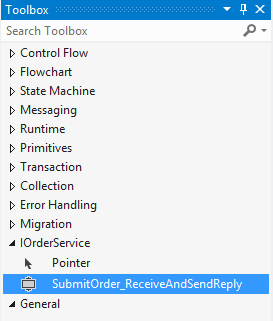
    2012.10.12wf05

    Nice! So now I could drag this shape onto my Workflow and check out how my WCF contract attributes got mapped over. First off, the “name” attribute of my contract operation (“SubmitOrder”) differed from the name of the operation itself (“Submit”). You can see here that the operation name of the Workflow Service correctly uses the attribute value, not the operation name.
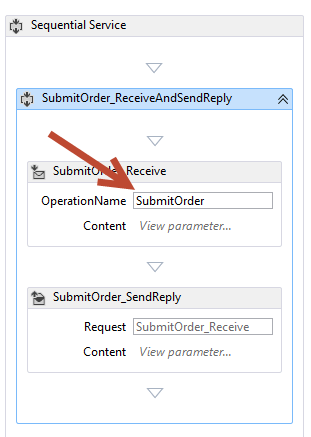
    2012.10.12wf06

    What was interesting to me is that none of my DataContract attributes got recognized in the Workflow itself. If you recall from above, I set the “name” attribute of the DataContract for “Order” to “CustomerOrder” and excluded one of the fields, “ExtraField”, from the contract. However, the data type in my workflow is called “Order”, and I can still access the “ExtraField.”

    2012.10.12wf07

    So maybe these attribute values only get reflected in the external contract, not the internal data types. Let’s find out! After starting the Workflow Service and inspecting the WSDL, sure enough, the “type” of the inbound request corresponds to the data contract attribute (“CustomerOrder”).

    2012.10.12wf09

    In addition, the field (“ExtraField”) that I excluded from the data contract is also nowhere to be found in the type definition.

    2012.10.12wf10

    Finally, the name and namespace of the service should reflect the values I defined in the service contract. And indeed they do. The target namespace of the service is the value I set in the contract, and the port type reflects the overall name of the service.

    2012.10.12wf11

    2012.10.12wf12


    All that’s left to do is test the service, which I did in the WCF Test Client.

    2012.10.12wf13

    The service worked fine. That was easy. So if you have existing service contracts and want to use Workflow Services to model out the business logic, you can now do so.

  • Trying Out the New Windows Azure Portal Support for Relay Services

    Scott Guthrie announced a handful of changes to the Windows Azure Portal, and among them, was the long-awaited migration of Service Bus resources from the old-and-busted Silverlight Portal to the new HTML hotness portal. You’ll find some really nice additions to the Service Bus Queues and Topics. In addition to creating new queues/topics, you can also monitor them pretty well. You still can’t submit test messages (ala Amazon Web Services and their Management Portal), but it’s going in the right direction.

    2012.10.08sb05

    One thing that caught my eye was the “Relays” portion of this. In the “add” wizard, you see that you can “quick create” a Service Bus relay.

    2012.10.08sb02

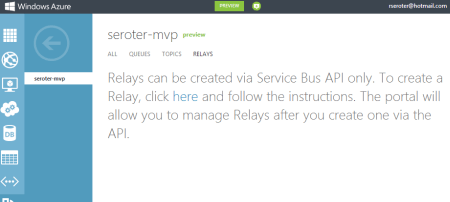
    However, all this does is create the namespace, not a relay service itself, as can be confirmed by viewing the message on the Relays portion of the Portal.

    2012.10.08sb03

    So, this portal is just for the *management* of relays. Fair enough. Let’s see what sort of management I get! I created a very simple REST service that listens to the Windows Azure Service Bus.  I pulled in the proper NuGet package so that I had all the Service Bus configuration values and assembly references. Then, I proceeded to configure this service using the webHttpRelayBinding.

    2012.10.08sb06

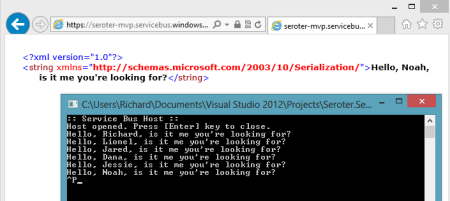
    I started up the service and invoked it a few times. I was hoping that I’d see performance metrics like those found with Service Bus Queues/Topics.

    2012.10.08sb07

    However, when I returned to the Windows Azure Portal, all I saw was the name of my Relay service and confirmation of a single listener. This is still an improvement from the old portal where you really couldn’t see what you had deployed. So, it’s progress!

    2012.10.08sb08

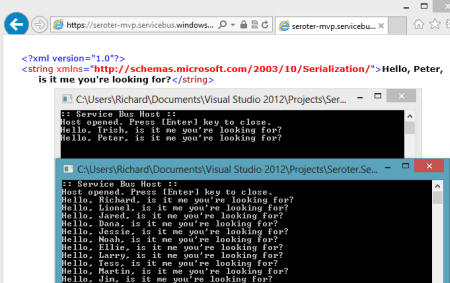
    You can see the Service Bus load balancing feature represented here. I started up a second instance of my “hello service” listener and pumped through a few more messages. I could see that messages were being sent to either of my two listeners.

    2012.10.08sb09

    Back in the Windows Azure Portal, I immediately saw that I now had two listeners.

    2012.10.08sb10

    Good stuff. I’d still like to see monitoring/throughput information added here for the Relay services. But, this is still  more useful than the last version of the Portal. And for those looking to use Topics/Queues, this is a significant upgrade in overall user experience.

  • Interview Series: Four Questions With … Hammad Rajjoub

    Greetings and welcome to the 43rd interview in my series of chats with thought leaders in the “connected technologies” domain. This month, I’m happy to have Hammad Rajjoub with us. Hammad is an Architect Advisor for Microsoft, former Microsoft MVP, blogger, published author, and  you can find him on Twitter at @HammadRajjoub.

    Let’s jump in.

    Q: You just published a book on Windows Server AppFabric (my book review here). What do you think is the least-appreciated capability that is provided by this product, and what should developers take a second look at?

    A: I think overall Windows Server AppFabric is an under-utilized technology. I see customers deploying WCF/WF services yet not utilizing AppFabric for hosting, monitoring and caching (note that Windows Server AppFabric is a free product). I will suggest all the developers to look at caching, hosting and monitoring capabilities provided by Windows Server AppFabric and use them appropriately in their ASP.Net, WCF and WF solutions.

    The use of distributed in-memory caching not only helps with performance, but also with scalability. If you cannot scale up then you have to scale out and that is exactly how distributed in-memory caching works for Windows Server AppFabric. Specifically, AppFabric Cache is feature rich and super easy to use. If you are using Windows Server and IIS to host your applications and services, I can’t see any reason why you wouldn’t want to utilize the power of AppFabric Cache.

    Q: As an Architect Advisor, you probably get an increasing number of questions about hybrid solutions that leverage both on-premises and cloud resources. While I would think that the goal of Microsoft (and other software vendors) is to make the communication between cloud and on-premises appear seamless, what considerations should architects explicitly plan for when trying to build solutions that span environments?

    A: Great question! Physical Architecture becomes so much more important. Solutions needs to be designed such that they are intrinsically Service Oriented and are very loosely coupled not only at the component level but at the physical level as well so that you can scale out on demand. Moving existing applications to the cloud is a fairly interesting exercise though. I will recommend architects to take a look at the Microsoft’s guide for building hybrid solutions for the cloud (at http://msdn.microsoft.com/en-us/library/hh871440.aspx).

    More specifically an Architect, working on a hybrid solution, should plan and consider following (non-exhaustive list of) aspects:-

    • data distribution and synchronization
    • protocols and payloads for cross-boundary communication
    • federated identify
    • message routing
    • Health and activity tracking as well as monitoring across hybrid environments

    From a vendor and solution perspective, I will highly recommend to pick a solution stack and technology provider that offers consistent design, development, deployment and monitoring tools across public, private and hybrid cloud environments.

    Q: A customer comes to you today and says that they need to build an internal solution for exchanging data between a few custom and packaged software applications. If we assume they are a Microsoft-friendly shop, how do you begin to identify whether this solution calls for WCF/WF/AppFabric, BizTalk, ASP.NET Web API, or one of the many open source / 3rd party messaging frameworks?

    A:  I think it depends a lot on the nature of the solution and 3rd party systems involved. Windows Server AppFabric are a great fit for solutions built using WCF/WF and ASP.NET technologies. BizTalk is a phenomenal technology for all things EAI with Adapters for SAP, Oracle, and Seibel etc. it’s a go to product for such scenarios. Honestly it depends on the situation. BizTalk is more geared towards EAI and ESB capabilities. WCF/WF and AppFabric are great at exposing LOB capabilities through web services. More often than not we see WCF/WF working side by side with BizTalk.

    Q [stupid question]: The popular business networking site LinkedIn recently launched an “endorsements” feature which lets individuals endorse the particular skills of another individual. This makes it easy for someone to endorse me for something like “Windows Azure” or “Enterprise Integration.” However, it’s also possible to endorse people for skills that are NOT currently in their LinkedIn skills profile. So, someone could theoretically endorse me for things like “firm handshakes”, “COM+”, or “making scrambled eggs.” Which LinkedIn endorsements would you like, and not like, on your profile?

    A: (This is totally new to me 🙂 ). I would like to explicitly opt-in and validate all the “endorsements” before they start appearing on my profile. [Editors Note: Because endorsements do not require validation, I propose that we all endorse Hammad for “.NET 1.0”]

    Thanks to Hammad for taking some time to chat with me!

  • Book Review: Microsoft Windows Server AppFabric Cookbook

    It’s hard to write technical books nowadays. First off, technology changes so fast that there’s nearly a 100% chance that by the time a book is published, its subject has undergone some sort of update. Secondly, there is so much technical content available online that it makes books themselves feel downright stodgy and out-dated. So to succeed, it seems that a technical book must do one of two things: bring forth and entirely different perspective, or address a topic in a format that is easier to digest than what one would find online. This book, the Microsoft Windows Server AppFabric Cookbook by Packt Publishing, does the latter.

    I’ve worked with Windows Server AppFabric (or “Dublin” and “Velocity” as its components were once called) for a while, but I still eagerly accepted a review copy of this book to read. The authors, Rick Garibay and Hammad Rajjoub, are well-respected technologists, and more importantly, I was going on vacation and needed a good book to read on the flights! I’ll get into some details below, but in a nutshell, this is a well-written, easy to read book that covered new ground on a little-understood part of Microsoft’s application platform.

    AppFabric Caching is not something I’ve spent much hands-on time with, and it received strong treatment in this book. You’ll find good details on how and when to use it, and then a broad series of “recipes” for how to do things like install it, configure it, invoke it, secure it, manage it, and much more. I learned a number of things about using cache tags, regions, expiration and notifications, as well as how to use AppFabric cache with ASP.NET apps.

    The AppFabric Hosting chapters go into great depth on using AppFabric for WCF and WF services. I learned a bit more about using AppFabric for hosting REST services, and got a better understanding of some of those management knobs and switches that I used but never truly investigated myself. You’ll find good content on using it with WF services including recipes for persisting workflows, querying workflows, building custom tracking profiles and more. Where this book really excelled was in its discussion of management and scale-out. I got the sense that both authors have used this product in production scenarios and were revealing tidbits about lessons learned from years of experience. There were lots of recipes and tips about (automatically) deploying applications, building multi-node environments, using PowerShell for scripting activities, and securing all aspects of the product.

    I read this book on my Amazon Kindle, and minus a few inconsequential typos and formatting snafus, it was a pleasant experience. Despite having two authors, at no point did I detect a difference in style, voice or authority between the chapters. The authors made generous use of screenshots and code snippets and I can easily say that I learned a lot of new things about this product. Windows Server AppFabric SHOULD BE a no-brainer technology for any organization using WCF and WF. It’s a free and easy way to add better management and functionality to WCF/WF services. Even though its product roadmap is a bit unclear, there’s not a whole lot of lock-in that it involves (minus the caching) , so the risk of adoption is low. If you are using Windows Server AppFabric today, or even evaluating it, I’d strong suggest that you pick up a copy of this book so that you can better understand the use cases and capabilities of this underrated product.

  • Using SignalR To Push StreamInsight Events to Client Browsers

    I’ve spent some time recently working with the asynchronous web event messaging engine SignalR. This framework uses JavaScript (with jQuery) on the client and ASP.NET on the server to enable very interactive communication patterns. The coolest part is being able to have the server-side application call a JavaScript function on each connected browser client. While many SignalR demos you see have focused on scenarios like chat applications, I was thinking  of how to use SignalR to notify business users of interesting events within an enterprise. Wouldn’t it be fascinating if business events (e.g. “Project X requirements document updated”, “Big customer added in US West region”, “Production Mail Server offline”, “FAQ web page visits up 78% today”) were published from source applications and pushed to a live dashboard-type web application available to users? If I want to process these fast moving events and perform rich aggregations over windows of events, then Microsoft StreamInsight is a great addition to a SignalR-based solution. In this blog post, I’m going to walk through a demonstration of using SignalR to push business events through StreamInsight and into a Tweetdeck-like browser client.

    Solution Overview

    So what are we building? To make sure that we keep an eye on the whole picture while building the individual components, I’ve summarized the solution here.

    2012.03.01signalr05

    Basically, the browser client will first (through jQuery) call a server operation that adds that client to a message group (e.g. “security events”). Events are then sent from source applications to StreamInsight where they are processed. StreamInsight then calls a WCF service that is part of the ASP.NET web application. Finally, the WCF Service uses the SignalR framework to invoke the “addEventMsg()” function on each connected browser client. Sound like fun? Good. Let’s jump in.

    Setting up the SignalR application

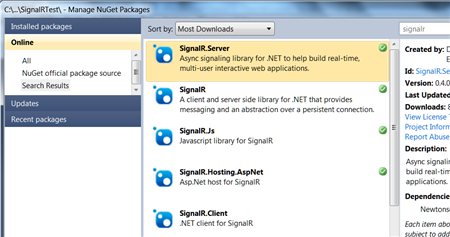
    I started out by creating a new ASP.NET web application. I then used the NuGet extension to locate the SignalR libraries that I wanted to use.

    2012.03.01signalr01

    Once the packages were chosen from NuGet, they got automatically added to my ASP.NET app.

    2012.03.01signalr02

    The next thing to do was add the appropriate JavaScript references at the top of the page. Note the last one. It is a virtual JavaScript location (you won’t find it in the design-time application) that is generated by the SignalR framework. This script, which you can view in the browser at runtime, holds all the JavaScript code that corresponds to the server/browser methods defined in my ASP.NET application.

    2012.03.01signalr04

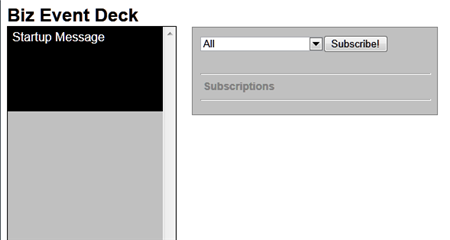
    After this, I added the HTML and ASP.NET controls necessary to visualize my Tweetdeck-like event viewer. Besides a column where each event shows up, I also added a listbox that holds all the types of events that someone might subscribe to. Maybe one set of users just want security-oriented events, or another wants events related to a given IT project.

    2012.03.01signalr03

    With my look-and-feel in place, I then moved on to adding some server-side components. I first created a new class (BizEventController.cs) that uses the SignalR “Hubs” connection model. This class holds a single operation that gets called by the JavaScript in the browser and adds the client to a given messaging group. Later, I can target a SignalR message to a given group.

    using System;
    using System.Collections.Generic;
    using System.Linq;
    using System.Web;
    
    //added reference to SignalR
    using SignalR.Hubs;
    
    ///
    <summary> /// Summary description for BizEventController /// </summary>
    
    public class BizEventController : Hub
    {
        public void AddSubscription(string eventType)
        {
            AddToGroup(eventType);
        }
    }
    

    I then switched back to the ASP.NET page and added the JavaScript guts of my SignalR application. Specifically, the code below (1) defines an operation on my client-side hub (that gets called by the server) and (2) calls the server side controller that adds clients to a given message group.

    $(function () {
                //create arrays for use in showing formatted date string
                var days = ['Sun', 'Mon', 'Tues', 'Wed', 'Thur', 'Fri', 'Sat'];
                var months = ['Jan', 'Feb', 'Mar', 'Apr', 'May', 'June', 'July', 'Aug', 'Sept', 'Oct', 'Nov', 'Dec'];
    
                // create proxy that uses in dynamic signalr/hubs file
                var bizEDeck = $.connection.bizEventController;
    
                // Declare a function on the chat hub so the server can invoke it
                bizEDeck.addEventMsg = function (message) {
                    //format date
                    var receiptDate = new Date();
                    var formattedDt = days[receiptDate.getDay()] + ' ' + months[receiptDate.getMonth()] + ' ' + receiptDate.getDate() + ' ' + receiptDate.getHours() + ':' + receiptDate.getMinutes();
                    //add new "message" to deck column
                    $('#deck').prepend('</pre>
    <div>' + message + '' + formattedDt + ' via StreamInsight</div>
    <pre>
    ');
                };
    
                //act on "subscribe" button
                $("#groupadd").click(function () {
                    //call subscription function in server code
                    bizEDeck.addSubscription($('#group').val());
                    //add entry in "subscriptions" section
                    $('#subs').append($('#group').val() + '</pre>
    
    <hr />
    
    <pre>');
                });
    
                // Start the connection
                $.connection.hub.start();
            });
    

    Building the web service that StreamInsight will call to update browsers

    The UI piece was now complete. Next, I wanted a web service that StreamInsight could call and pass in business events that would get pushed to each browser client. I’m leveraging a previously-built StreamInsight WCF adapter that can be used to receive web service request and call web service endpoints. I built a WCF service and in the underlying class, I pull the list of all connected clients and invoke the JavaScript function.

    using System;
    using System.Collections.Generic;
    using System.Linq;
    using System.Runtime.Serialization;
    using System.ServiceModel;
    using System.Text;
    
    using SignalR;
    using SignalR.Infrastructure;
    using SignalR.Hosting.AspNet;
    using StreamInsight.Samples.Adapters.Wcf;
    using Seroter.SI.AzureAppFabricAdapter;
    
    public class NotificationService : IPointEventReceiver
    {
    	//implement the operation included in interface definition
    	public ResultCode PublishEvent(WcfPointEvent result)
    	{
    		//get category from key/value payload
    		string cat = result.Payload["Category"].ToString();
    		//get message from key/value payload
    		string msg = result.Payload["EventMessage"].ToString();
    
    		//get SignalR connection manager
    		IConnectionManager mgr = AspNetHost.DependencyResolver.Resolve();
    		//retrieve list of all connected clients
    		dynamic clients = mgr.GetClients();
    
    		//send message to all clients for given category
    		clients[cat].addEventMsg(msg);
    		//also send message to anyone subscribed to all events
    		clients["All"].addEventMsg(msg);
    
    		return ResultCode.Success;
    	}
    }
    

    Preparing StreamInsight to receive, aggregate and forward events

    The website is ready, the service is exposed, and all that’s left is to get events and process them. Specifically, I used a WCF adapter to create an endpoint and listen for events from sources, wrote a few queries, and then sent the output to the WCF service created above.

    The StreamInsight application is below. It includes the creation of the embedded server and all other sorts of fun stuff.

    using System;
    using System.Collections.Generic;
    using System.Linq;
    using System.Text;
    
    using Microsoft.ComplexEventProcessing;
    using Microsoft.ComplexEventProcessing.Linq;
    using Seroter.SI.AzureAppFabricAdapter;
    using StreamInsight.Samples.Adapters.Wcf;
    
    namespace SignalRTest.StreamInsightHost
    {
        class Program
        {
            static void Main(string[] args)
            {
                Console.WriteLine(":: Starting embedded StreamInsight server ::");
    
                //create SI server
                using(Server server = Server.Create("RSEROTERv12"))
                {
                    //create SI application
                    Application app = server.CreateApplication("SeroterSignalR");
    
                    //create input adapter configuration
                    WcfAdapterConfig inConfig = new WcfAdapterConfig()
                    {
                        Password = "",
                        RequireAccessToken = false,
                        Username  = "",
                        ServiceAddress = "http://localhost:80/StreamInsightv12/RSEROTER/InputAdapter"
                    };
    
                    //create output adapter configuration
                    WcfAdapterConfig outConfig = new WcfAdapterConfig()
                    {
                        Password = "",
                        RequireAccessToken = false,
                        Username = "",
                        ServiceAddress = "http://localhost:6412/SignalRTest/NotificationService.svc"
                    };
    
                    //create event stream from the source adapter
                    CepStream input = CepStream.Create("BizEventStream", typeof(WcfInputAdapterFactory), inConfig, EventShape.Point);
                    //build initial LINQ query that is a simple passthrough
                    var eventQuery = from i in input
                                     select i;
    
                    //create unbounded SI query that doesn't emit to specific adapter
                    var query0 = eventQuery.ToQuery(app, "BizQueryRaw", string.Empty, EventShape.Point, StreamEventOrder.FullyOrdered);
                    query0.Start();
    
                    //create another query that latches onto previous query
                    //filters out all individual web hits used in later agg query
                    var eventQuery1 = from i in query0.ToStream()
                                      where i.Category != "Web"
                                      select i;
    
                    //another query that groups events by type; used here for web site hits
                    var eventQuery2 = from i in query0.ToStream()
                                      group i by i.Category into EventGroup
                                      from win in EventGroup.TumblingWindow(TimeSpan.FromSeconds(10))
                                      select new BizEvent
                                      {
                                          Category = EventGroup.Key,
                                          EventMessage = win.Count().ToString() + " web visits in the past 10 seconds"
                                      };
                    //new query that takes result of previous and just emits web groups
                    var eventQuery3 = from i in eventQuery2
                                      where i.Category == "Web"
                                      select i;
    
                    //create new SI queries bound to WCF output adapter
                    var query1 = eventQuery1.ToQuery(app, "BizQuery1", string.Empty, typeof(WcfOutputAdapterFactory), outConfig, EventShape.Point, StreamEventOrder.FullyOrdered);
                    var query2 = eventQuery3.ToQuery(app, "BizQuery2", string.Empty, typeof(WcfOutputAdapterFactory), outConfig, EventShape.Point, StreamEventOrder.FullyOrdered);
    
                    //start queries
                    query1.Start();
                    query2.Start();
                    Console.WriteLine("Query started. Press [Enter] to stop.");
    
                    Console.ReadLine();
                    //stop all queries
                    query1.Stop();
                    query2.Stop();
                    query0.Stop();
                    Console.Write("Query stopped.");
                    Console.ReadLine();
    
                }
            }
    
            private class BizEvent
            {
                public string Category { get; set; }
                public string EventMessage { get; set; }
            }
        }
    }
    

    Everything is now complete. Let’s move on to testing with a simple event generator that I created.

    Testing the solution

    I built a simple WinForm application that generates business events or a user-defined number of simulated website visits. The business events are passed through StreamInsight, and the website hits are aggregated so that StreamInsight can emit the count of hits every ten seconds.

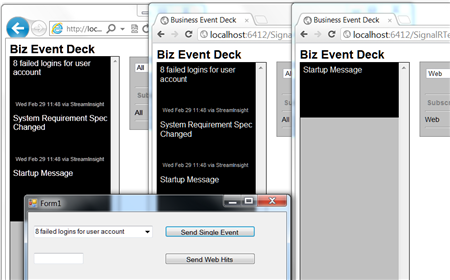
    To highlight the SignalR experience, I launched three browser instances with two different group subscriptions. The first two subscribe to all events, and the third one subscribes just to website-based events. For the latter, the client JavaScript function won’t get invoked by the server unless the events are in the “Web” category.

    The screenshot below shows the three browser instances launched (one in IE, two in Chrome).

    2012.03.01signalr06

    Next, I launched my event-generator app and StreamInsight host. I sent in a couple of business (not web) events and hoped to see them show up in two of the browser instances.

    2012.03.01signalr07

    As expected, two of the browser clients were instantly updated with these events, and the other subscriber was not. Next, I sent in a handful of simulated website hit events and observed the results.

    2012.03.01signalr08

    Cool! So all three browser instances were instantly updated with ten-second-counts of website events that were received.

    Summary

    SignalR is an awesome framework for providing real-time, interactive, bi-directional communication between clients and servers. I think there’s a lot of value of using SignalR for dashboards, widgets and event monitoring interfaces. In this post we saw a simple “business event monitor” application that enterprise users could leverage to keep up to date on what’s happening within enterprise systems. I used StreamInsight here, but you could use BizTalk Server or any application that can send events to web services.

    What do you think? Where do you see value for SignalR?

    UPDATE:I’ve made the source code for this project available and you can retrieve it from here.
  • First Look: Deploying .NET Web Apps to Cloud Foundry via Iron Foundry

    It’s been a good week for .NET developers who like the cloud.  First, Microsoft makes a huge update to Windows Azure that improves everything from billing to support for lots of non-Microsoft platforms like memcached and Node.js. Second, there was a significant announcement today from Tier 3 regarding support for .NET in a Cloud Foundry environment.

    I’ve written a bit about Cloud Foundry in the past, and have watched it become one of the most popular platforms for cloud developers.  While Cloud Foundry supports a diverse set of platforms like Java, Ruby and Node.js, .NET has been conspicuous absent from that list.  That’s where Tier 3 jumped in.  They’ve forked the Cloud Foundry offering and made a .NET version (called Iron Foundry) that can run by an online hosted provider, or, in your own data center. Your own private, open source .NET PaaS.  That’s a big deal.

    I’ve been working a bit with their team for the past few weeks, and if you’d like to read more from their technical team, check out the article that I wrote for InfoQ.com today.  Let’s jump in and try and deploy a very simple RESTful WCF service to Iron Foundry using the tools they’ve made available.

    Demo

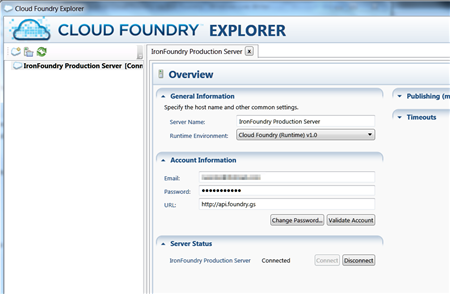
    First off, I pulled the source code from their GitHub library.  After building that, I made sure that I could open up their standalone Cloud Foundry Explorer tool and log into my account. This tool also plugs into Visual Studio 2010, and I’ll show that soon [12/22 update: note that Iron Foundry’s production URL has changed from the value used in the screenshot below].

    2011.12.13ironfoundry01

    It’s a nice little tool that shows me any apps I have running, and lets me interact with them.  But, I have no apps deployed here, so let’s change that!  How about we go with a very simple WCF contract that returns a customer object when the caller hits a specific URI.  Here’s the WCF contract:

    [ServiceContract]
        public interface ICustomer
        {
            [OperationContract]
            [WebGet(UriTemplate = "/{id}")]
            Customer GetCustomer(string id);
        }
    
        [DataContract]
        public class Customer
        {
            [DataMember]
            public string Id { get; set; }
            [DataMember]
            public string FullName { get; set; }
            [DataMember]
            public string Country { get; set; }
            [DataMember]
            public DateTime DateRegistered { get; set; }
        }
    

    The implementation of this service is extremely simple.  Based on the input ID, I return one of a few different customer records.

    public class CustomerService : ICustomer
        {
            public Customer GetCustomer(string id)
            {
                Customer c = new Customer();
                c.Id = id;
    
                switch (id)
                {
                    case "100":
                        c.FullName = "Richard Seroter";
                        c.Country = "USA";
                        c.DateRegistered = DateTime.Parse("2011-08-24");
                        break;
                    case "200":
                        c.FullName = "Jared Wray";
                        c.Country = "USA";
                        c.DateRegistered = DateTime.Parse("2011-06-05");
                        break;
                    default:
                        c.FullName = "Shantu Roy";
                        c.Country = "USA";
                        c.DateRegistered = DateTime.Parse("2011-05-11");
                        break;
                }
    
                return c;
            }
    

    My WCF service configuration is also pretty straightforward.  However, note that I do NOT specify a full service address. When I asked one of the Iron Foundry developers about this he said:

    When an application is deployed, the cloud controller picks a server out of our farm of servers to which to deploy the application. On that server, a random high port number is chosen and a dedicated web site and app pool is configured to use that port. The router service then uses that URL (http://server:49367) when requests come in to http://<application&gt;.gofoundry.net

    <configuration>
    <system.web>
    <compilation debug="true" targetFramework="4.0" />
    </system.web>
    <system.serviceModel>
    <bindings>
    <webHttpBinding>
    <binding name="WebBinding" />
    </webHttpBinding>
    </bindings>
    <services>
    <service name="Seroter.IronFoundry.WcfRestServiceDemo.CustomerService">
    <endpoint address="CustomerService" behaviorConfiguration="RestBehavior"
    binding="webHttpBinding" bindingConfiguration="WebBinding" contract="Seroter.IronFoundry.WcfRestServiceDemo.ICustomer" />
    </service>
    </services>
    <behaviors>
    <endpointBehaviors>
    <behavior name="RestBehavior">
    <webHttp helpEnabled="true" />
    </behavior>
    </endpointBehaviors>
    <serviceBehaviors>
    <behavior name="">
    <serviceMetadata httpGetEnabled="true" />
    <serviceDebug includeExceptionDetailInFaults="true" />
    </behavior>
    </serviceBehaviors>
    </behaviors>
    <serviceHostingEnvironment multipleSiteBindingsEnabled="true" />
    </system.serviceModel>
    <system.webServer>
    <modules runAllManagedModulesForAllRequests="true"/>
    </system.webServer>
    <connectionStrings></connectionStrings>
    </configuration>
    

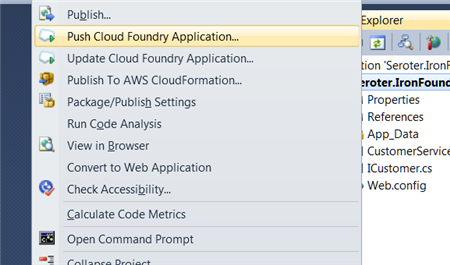
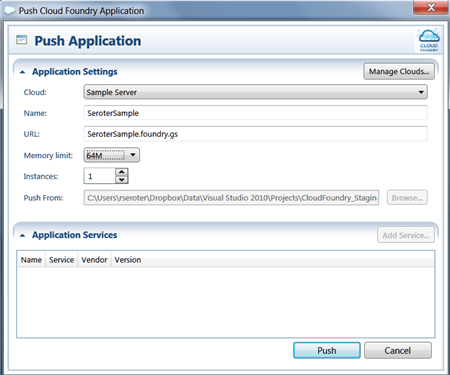
    I’m not ready to deploy this application. While  I could use the standalone Cloud Foundry Explorer that I showed you before, or even the vmc command line, the easiest one is the Visual Studio plug in.  By right-clicking my project, I can choose Push Cloud Foundry Application which launches the Cloud Foundry Explorer.

    2011.12.13ironfoundry02

    Now I can select my existing Iron Foundry configuration named Sample Server (which points to the Iron Foundry endpoint and includes my account credentials), select a name for my application, choose a URL, and pick both the memory size (64MB up to 2048MB) and application instance count [12/22 update: note that Iron Foundry’s production URL has changed from the value used in the screenshot below].

    2011.12.13ironfoundry03

    The application is then pushed to the cloud. What’s awesome is that the application is instantly available after publishing.  No waits, no delays.  Want to see the app in action?  Based on the values I entered during deployment, you can hit the URL at http://serotersample6.gofoundry.net/CustomerService.svc/CustomerService/100. [12/22 update: note that Iron Foundry’s production URL has changed, so the working URL above doesn’t match the values I showed in the screenshots]

    2011.12.13ironfoundry04

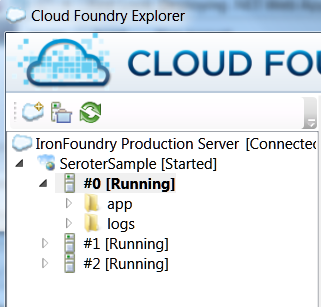
    Sweet.  Now let’s check out some diagnostic info, shall we?  I can fire up the standalone Cloud Foundry Explorer and see my application running.

    2011.12.13ironfoundry05

    What can I do now?  On the right side of the screen, I have options to change/add URLs that map to my service, increase my allocated memory, or modify the number of application instances.

    2011.12.13ironfoundry06

    On the bottom left of the this screen, I can find out details of the instances that I’m running on.  Here, I’m on a single instance and my app has been running for 5 minutes.

    2011.12.13ironfoundry07

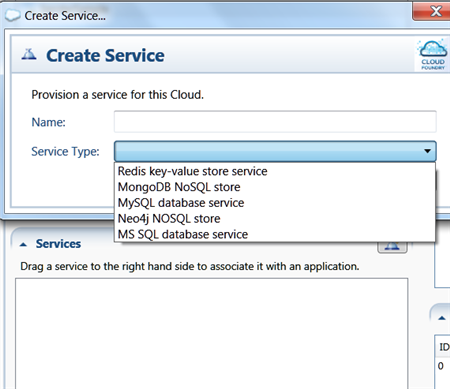
    Finally,  I can provision application services associated with my web application.

    2011.12.13ironfoundry08

    Let’s change my instance count.  I was blown away when I simply “upticked” the Instances value and instantly I saw another instance provisioned.  I don’t think Azure is anywhere near as fast.

    2011.12.13ironfoundry11

    2011.12.13ironfoundry12

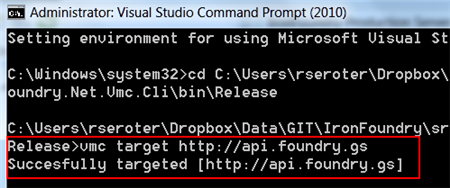
    What if I like using the vmc command line tool to administer my Iron Foundry application?  Let’s try that out. I went to the .NET version of the vmc tool that came with the Iron Foundry code download, and targeted the API just like you would in “regular” Cloud Foundry.[12/22 update: note that Iron Foundry’s production URL has changed from the value used in the screenshot below].

    2011.12.13ironfoundry09

    It’s awesome (and I guess, expected) that all the vmc commands work the same and I can prove that by issuing the “vmc apps” command which should show me my running applications.

    2011.12.13ironfoundry10

    Not everything was supported yet on my build, so if I want to increase the instance count or memory, I’d jump back to the Cloud Foundry Explorer tool.

    Summary

    What a great offering. Imagine deploying this within your company as a way to have a private PaaS. Or using it as a public PaaS and have the same deployment experience for .NET, Java, Ruby and Node applications.  I’m definitely going to troll through the source code since I know what a smart bunch build the “original” Cloud Foundry and I want to see how the cool underpinnings of that (internal pub/sub, cloud controller, router, etc) translated to .NET.

    I encourage you to take a look.  I like Windows Azure, but more choice is a good thing and I congratulate the Tier 3 team on open sourcing their offering and doing such a cool service for the community.

  • Integration in the Cloud: Part 3 – Remote Procedure Invocation Pattern

    This post continues a series where I revisit the classic Enterprise Integration Patterns with a cloud twist. So far, I’ve introduced the series and looked at the Shared Database pattern. In this post, we’ll look the second pattern: remote procedure invocation.

    What Is It?

    One uses this remote procedure call (RPC) pattern when they have multiple, independent applications and want to share data or orchestrate cross-application processes. Unlike ETL scenarios where you move data between applications at defined intervals, or the shared database pattern where everyone accesses the same source data, the RPC pattern accesses data/process where it resides. Data typically stays with the source, and the consumer interacts with the other system through defined (service) contracts.

    You often see Service Oriented Architecture (SOA) solutions built around the pattern.  That is, exposing reusable, interoperable, abstract interfaces for encapsulated services that interact with one or many systems.  This is a very familiar pattern for developers and good for mashup pages/services or any application that needs to know something (or do something) before it can proceed. You often do not need guaranteed delivery for these services since the caller is notified of any exceptions from the service and can simply retry the invocation.

    Challenges

    There are a few challenges when leveraging this pattern.

    • There is still some coupling involved. While a well-built service exposes an abstract interface that decouples the caller from the service’s underlying implementation, the caller is still bound the service exposed by the system. Changes to that system or unavailability of that system will affect the caller.
    • Distinct service and capability offerings by each service. Unlike the shared database pattern where everyone agrees on a data schema and central repository, a RPC model leverages many services that reside all across the organization (or internet). One service may want certificate authentication, another uses Kerberos, and another does some weird token-based security. One service may support WS-Attachment and another may not.  Transactions may or may not be supported between services. In an RPC world, you are at the mercy of each service provider’s capabilities and design.
    • RPC is a blocking call. When you call a service that sends a response, you pretty much have to sit around and wait until the response comes back. A caller can design around this a bit using AJAX on a web front end, or using a callback pattern in the middleware tier, but at root, you have a synchronous operation that holds a thread while waiting for a response.
    • Queried data may be transient. If an application calls a service, gets some data, and shows it to a user, that data MAY not be persisted in the calling application. It’s cleaner that way, but, this prevents you from using the data in reports or workflows.  So, you simply have to decide early on if your calls to external services should result in persisted data (that must then either by synchronized or checked on future calls) or transient data.
    • Package software platforms have mixed support. To be sure, most modern software platforms expose their data via web services. Some will let you query the database directly for information. But, there’s very little consistently. Some platforms expose every tiny function as a service (not very abstract) and some expose giant “DoSomething()” functions that take in a generic “object” (too abstract).

    Cloud Considerations

    As far as I can tell, you have three scenarios to support when introducing the cloud to this pattern:

    • Cloud to cloud. I have one SaaS or custom PaaS application and want to consume data from another SaaS or PaaS application. This should be relatively straightforward, but we’ll talk more in a moment about things to consider.
    • On-premises to cloud. There is an on-premises application or messaging engine that wants data from a cloud application. I’d suspect that this is the one that most architects and developers have already played with or built.
    • Cloud to on-premises. A cloud application wants to leverage data or processes that sit within an organization’s internal network. For me, this is the killer scenario. The integration strategy for many cloud vendors consists of “give us your data and move/duplicate your processes here.” But until an organization moves entire off-site (if that ever really happens for large enterprises), there is significant investment in the on-premises assets and we want to unlock those and avoid duplication where possible.

    So what are the  things to think about when doing RPC in a cloud scenario?

    • Security between clouds or to on-premises systems. If integrating two clouds, you need some sort of identity federation, or, you’ll use per-service credentials. That can get tough to manage over time, so it would be nice to leverage cloud providers that can share identity providers. When consuming on premises services from cloud-based applications, you have two clear choices:
      • Use a VPN. This works if you are doing integration with an IaaS-based application where you control the cloud environment a bit (e.g. Amazon Virtual Private Cloud). You can also pull this off a bit with things like the Google Secure Data Connector (for Google Apps for GAE) or Windows Azure Connect.
      • Leverage a reverse proxy and expose data/services to public internet. We can define a intermediary that sits in an internet-facing zone and forwards traffic behind the firewall to the actual services to invoke. Even if this is secured well, some organizations may be wary to expose key business functions or data to the internet.
    • There may be additional latency. For some application, especially based on location, there could be a longer delay when doing these blocking remote procedure calls.  But more likely, you’ll have additional latency due to security.  That is, many providers have a two step process where the first service call against the cloud platform is for getting a security token, and the second call is the actual function call (with the token in the payload).  You may be able to cache the token to avoid the double-hop each time, but this is still something to factor in.
    • Expect to only use HTTP. Few (if any) SaaS applications expose their underlying database. You may be used to doing quick calls against another system by querying it’s data store, but that’s likely a non-starter when working with cloud applications.

    The one option for cloud-to-on-premises that I left out here, and one that I’m convinced is a differentiating piece of Microsoft software, is the Azure AppFabric Service Bus.  Using this technology, I can securely expose on-premises services to the public internet WITHOUT the use of a VPN or reverse proxy. And, these services can be consumed by a wide variety of platforms.  In fact, that’s the basis for the upcoming demonstration.

    Solution Demonstration

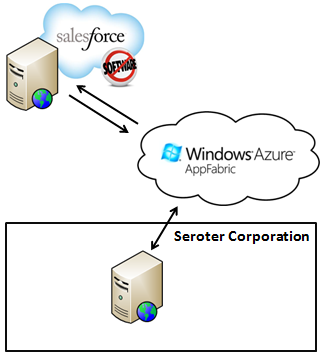
    So what if I have a cloud-based SaaS/PaaS application, say Salesforce.com, and I want to leverage a business service that sits on site.  Specifically, the fictitious Seroter Corporation, a leader in fictitious manufacturing, has an algorithm that they’ve built to calculate the best discount that they can give a vendor. When they moved their CRM platform to Salesforce.com, their sales team still needed access to this calculation. Instead of duplicating the algorithm in their Force.com application, they wanted to access the existing service. Enter the Azure AppFabric Service Bus.

    2011.10.31int01

    Instead of exposing the business service via VPN or reverse proxy, they used the AppFabric Service Bus and the Force.com application simply invokes the service and shows the results.  Note that this pattern (and example) is very similar to the one that I demonstrated in my new book. The only difference is that I’m going directly at the service here instead of going through a BizTalk Server (as I did in the book).

    WCF Service Exposed Via Azure AppFabric Service Bus

    I built a simple Windows Console application to host my RESTful web service. Note that I did this with the 1.0 version of the AppFabric Service Bus SDK.  The contract for the “Discount Service” looks like this:

    [ServiceContract]
        public interface IDiscountService
        {
            [WebGet(UriTemplate = "/{accountId}/Discount")]
            [OperationContract]
            Discount GetDiscountDetails(string accountId);
        }
    
        [DataContract(Namespace = "http://CloudRealTime")]
        public class Discount
        {
            [DataMember]
            public string AccountId { get; set; }
            [DataMember]
            public string DateDelivered { get; set; }
            [DataMember]
            public float DiscountPercentage { get; set; }
            [DataMember]
            public bool IsBestRate { get; set; }
        }
    

    My implementation of this contract is shockingly robust.  If the customer’s ID is equal to 200, they get 10% off.  Otherwise, 5%.

    public class DiscountService: IDiscountService
        {
            public Discount GetDiscountDetails(string accountId)
            {
                Discount d = new Discount();
                d.DateDelivered = DateTime.Now.ToShortDateString();
                d.AccountId = accountId;
    
                if (accountId == "200")
                {
                    d.DiscountPercentage = .10F;
                    d.IsBestRate = true;
                }
                else
                {
                    d.DiscountPercentage = .05F;
                    d.IsBestRate = false;
                }
    
                return d;
    
            }
        }
    

    The secret sauce to any Azure AppFabric Service Bus connection lies in the configuration.  This is where we can tell the service to bind to the Microsoft cloud and provide the address and credentials to do so. My full configuration file looks like this:

    <configuration>
    <startup><supportedRuntime version="v4.0" sku=".NETFramework,Version=v4.0"/></startup><system.serviceModel>
            <behaviors>
                <endpointBehaviors>
                    <behavior name="CloudEndpointBehavior">
                        <webHttp />
                        <transportClientEndpointBehavior>
                            <clientCredentials>
                              <sharedSecret issuerName="ISSUER" issuerSecret="SECRET" />
                            </clientCredentials>
                        </transportClientEndpointBehavior>
                        <serviceRegistrySettings discoveryMode="Public" />
                    </behavior>
                </endpointBehaviors>
            </behaviors>
            <bindings>
                <webHttpRelayBinding>
                  <binding name="CloudBinding">
                    <security relayClientAuthenticationType="None" />
                  </binding>
                </webHttpRelayBinding>
            </bindings>
            <services>
                <service name="QCon.Demos.CloudRealTime.DiscountSvc.DiscountService">
                    <endpoint address="https://richardseroter.servicebus.windows.net/DiscountService"
                        behaviorConfiguration="CloudEndpointBehavior" binding="webHttpRelayBinding"
                        bindingConfiguration="CloudBinding" name="WebHttpRelayEndpoint"
                        contract="IDiscountService" />
                </service>
            </services>
        </system.serviceModel>
    </configuration>
    

    I built this demo both with and without client security turned on.  As you see above, my last version of the demonstration turned off client security.

    In the example above, if I send a request from my Force.com application to https://richardseroter.servicebus.windows.net/DiscountService, my request is relayed from the Microsoft cloud to my live on-premises service. When I test this out from the browser (which is why I earlier turned off client security), I can see that passing in a customer ID of 200 in the URL results in a discount of 10%.

    2011.10.31int02

    Calling the AppFabric Service Bus from Salesforce.com

    With an internet-accessible service ready to go, all that’s left is to invoke it from my custom Force.com page. My page has a button where the user can invoke the service and review the results.  The results may, or may not, get saved to the customer record.  It’s up to the user. The Force.com page uses a custom controller that has the operation which calls the Azure AppFabric endpoint. Note that I’ve had some freakiness lately with this where I get back certificate errors from Azure.  I don’t know what that’s about and am not sure if it’s an Azure problem or Force.com problem.  But, if I call it a few times, it works.  Hence, I had to add exception handling logic to my code!

    public class accountDiscountExtension{
    
        //account variable
        private final Account myAcct;
    
        //constructor which sets the reference to the account being viewed
        public accountDiscountExtension(ApexPages.StandardController controller) {
            this.myAcct = (Account)controller.getRecord();
        }
    
        public void GetDiscountDetails()
        {
            //define HTTP variables
            Http httpProxy = new Http();
            HttpRequest acReq = new HttpRequest();
            HttpRequest sbReq = new HttpRequest();
    
            // ** Getting Security Token from STS
           String acUrl = 'https://richardseroter-sb.accesscontrol.windows.net/WRAPV0.9/';
           String encodedPW = EncodingUtil.urlEncode(acsKey, 'UTF-8');
    
           acReq.setEndpoint(acUrl);
           acReq.setMethod('POST');
           acReq.setBody('wrap_name=ISSUER&wrap_password=' + encodedPW + '&wrap_scope=http://richardseroter.servicebus.windows.net/');
           acReq.setHeader('Content-Type','application/x-www-form-urlencoded');
    
           //** commented out since we turned off client security
           //HttpResponse acRes = httpProxy.send(acReq);
           //String acResult = acRes.getBody();
    
           // clean up result
           //String suffixRemoved = acResult.split('&')[0];
           //String prefixRemoved = suffixRemoved.split('=')[1];
           //String decodedToken = EncodingUtil.urlDecode(prefixRemoved, 'UTF-8');
           //String finalToken = 'WRAP access_token=\"' + decodedToken + '\"';
    
           // setup service bus call
           String sbUrl = 'https://richardseroter.servicebus.windows.net/DiscountService/' + myAcct.AccountNumber + '/Discount';
            sbReq.setEndpoint(sbUrl);
           sbReq.setMethod('GET');
           sbReq.setHeader('Content-Type', 'text/xml');
    
           //** commented out the piece that adds the security token to the header
           //sbReq.setHeader('Authorization', finalToken);
    
           try
           {
           // invoke Service Bus URL
           HttpResponse sbRes = httpProxy.send(sbReq);
           Dom.Document responseDoc = sbRes.getBodyDocument();
           Dom.XMLNode root = responseDoc.getRootElement();
    
           //grab response values
           Dom.XMLNode perNode = root.getChildElement('DiscountPercentage', 'http://CloudRealTime');
           Dom.XMLNode lastUpdatedNode = root.getChildElement('DateDelivered', 'http://CloudRealTime');
           Dom.XMLNode isBestPriceNode = root.getChildElement('IsBestRate', 'http://CloudRealTime');
    
           Decimal perValue;
           String lastUpdatedValue;
           Boolean isBestPriceValue;
    
           if(perNode == null)
           {
               perValue = 0;
           }
           else
           {
               perValue = Decimal.valueOf(perNode.getText());
           }
    
           if(lastUpdatedNode == null)
           {
               lastUpdatedValue = '';
           }
           else
           {
               lastUpdatedValue = lastUpdatedNode.getText();
           }
    
           if(isBestPriceNode == null)
           {
               isBestPriceValue = false;
           }
           else
           {
               isBestPriceValue = Boolean.valueOf(isBestPriceNode.getText());
           }
    
           //set account object values to service result values
           myAcct.DiscountPercentage__c = perValue;
           myAcct.DiscountLastUpdated__c = lastUpdatedValue;
           myAcct.DiscountBestPrice__c = isBestPriceValue;
    
           myAcct.Description = 'Successful query.';
           }
           catch(System.CalloutException e)
           {
              myAcct.Description = 'Oops.  Try again';
           }
        }
    

    Got all that? Just a pair of calls.  The first gets the token from the Access Control Service (and this code likely changes when I upgrade this to use ACS v2) and the second invokes the service.  Then there’s just a bit of housekeeping to handle empty values before finally setting the values that will show up on screen.

    When I invoke my service (using the “Get Discount” button, the controller is invoked and I make a remote call to my AppFabric Service Bus endpoint. The customer below has an account number equal to 200, and thus the returned discount percentage is 10%.2011.10.31int03


    Summary

    Using a remote procedure invocation is great when you need to request data or when you send data somewhere and absolutely have to wait for a response. Cloud applications introduce some wrinkles here as you try to architect secure, high performing queries that span clouds or bridge clouds to on-premises applications. In this example, I showed how one can quickly and easily expose internal services to public cloud applications by using the Windows Azure AppFabric Service Bus.  Regardless of the technology or implementation pattern, we all will be spending a lot of time in the foreseeable future building hybrid architectures so the more familiar we get with the options, the better!

    In the final post in this series, I’ll take a look at using asynchronous messaging between (cloud) systems.

  • Interview Series: Four Questions With … Scott Seely

    Autumn is upon us, but the Four Questions continue.  Welcome to the 35th interview in my ongoing series of chats with “connected technology” thought leaders.  This month, we’ve wrangled Scott Seely (@sseely) who is a consultant, Microsoft MVP, Microsoft Regional Director, noted author, and Pluralsight trainer. Scott is a smart fellow on topics like distributed computing and building big apps that work!

    Let’s jump in.

    Q: You have a Pluralsight course named “WCF for Architects.” In a nutshell, what are the core aspects of WCF that an architect should know, even if they won’t ever dig into the framework or build a service themselves?

    A: Architects should know that WCF has all the facilities and hooks one might need to build a robust messaging system. Architects should spend time thinking about how their WCF services will interact with other consumers and what technologies the consumers use. This knowledge will assist in picking appropriate versioning policies, message formats, and security for any services their applications expose. For example, if I know that my clients will primarily be PHP and Ruby, I will make different choices than for a .NET or Java based client.

    Q: As we continue to build bigger systems that span applications and organizations, where does one even begin to start troubleshooting performance and functional problems?  How does one architect a solution to make it easier to analyze later on?  Or, if you get stuck taking on a system that is behaving badly, where do you begin?

    A: What I’ve seen is that really big interdependencies in a system creates a brittle system. One should take advantage of the fact that we can build discrete, interconnected systems. These systems can be composed of many special purpose, simple, standalone processes. Each system should provide a special service (send email, process payments, manage customers) and do that one thing well. Other systems then consume those endpoints as services. It then becomes simpler to manage and debug the systems that are unresponsive or behaving badly. You do need to spend a lot of time thinking about application manageability at this level: logging, health monitoring, and so on are important design items along with the business processes that are being automated. For each system, what you will do is ask and answer these questions:

    • How can I tell that this feature is healthy?
    • What should happen when the feature becomes unhealthy?
    • How can I log this?
    • When should a human be notified via email, telephone, etc.?

    If you are analyzing a system that is behaving badly, you need to start with basic “is it plugged in?” type testing. This is exactly what it sounds like: analyze the components in the system and make sure that each connection is functioning correctly. All too often, this is what is actually wrong. It might be a changed password, and downed database, or something else. The connections frequently point to the exact problem. After that, look for the logging that was implemented. This might be the Windows Event Log, log4net files, or something else. You need to figure out which system or systems actually has an issue, then begin fixing there. It helps to know what “normal” is for the system as well.

    Q: Although you are a Pluralsight instructor and possibly biased, what do you think is the preferred way for developers/architects today to learn new technologies?  Are books passé, in favor of articles/blogs/videos/podcasts?  Over the past 6 months, which educational medium have you employed to learn something new?

    A: I think that written materials have never been the preferred way for humans to learn. We are social animals and we tend to learn best through storytelling, demonstration, and experimentation. To learn new to you technologies, the best way seems to be to find a project and a mentor that can help you over any bumps in the road. Pluralsight is a great proxy for an actual mentor because we can tell the stories and demonstrate how to use the technology. Over the last 6 months, I’ve been using personal projects and mentors to learn new (to me) technology.

    Q [stupid question]: I recently got into a big Facebook debate with some friends over my claim that the movie The Fifth Element is the most rewatchable sci-fi movie of the last 15 years. I made this declaration based on the fact that it seems that whenever I catch that movie on TV, I almost always have to stop and watch it through.  What television show or movie sucks you in, regardless of how many times you have seen it?

    A: The movie that continues to do this for me is Rudy. Yeah, it’s a football movie, but it is also one of the best tales of how real people actually achieve their dreams. Real people who succeed look at where they want to be and then figure out what that path looks like. They enlist mentors to help figure out what the path looks like, adjust the path and the goal as they receive new information, and keep moving forward. While I’ve never been confused with an athlete, I have been confused with someone who had natural talent! There are a few moments in that movie that make me cry with joy every time I see it. When Rudy gets accepted to Notre Dame, when he gets onto the team, and when he gets to play on the field, I get so emotional because I’m reminded how exhilarating it is when years of planning and executing pay off. That realization happens in an instant and unleashes a wave a relief that all that work did have a purpose. For me, these moments happened upon receiving a final copy of my first book; my first day at Microsoft; my first day working on Indigo (aka WCF); and later teaching for companies like Wintellect and Pluralsight. Getting to that stage isn’t instantaneous. To the best of my knowledge, Rudy is the best portrayal of what that journey looks like and feels like.

    Thanks Scott! I will admit that the last scene in Rudy, where he sacks the quarterback and gets carried off the field, absolutely destroys me every time.

  • Adding Dynamics CRM 2011 Records from a Windows Workflow Service

    I’ve written a couple blog posts (and even a book chapter!) on how to integrate BizTalk Server with Microsoft Dynamics CRM 2011, and I figured that I should take some of my own advice and diversify my experiences.  So, I thought that I’d demonstrate how to consume Dynamics CRM 2011 web services from a .NET 4.0 Workflow Service.

    First off, why would I do this?  Many reasons.  One really good one is the durability that WF Services + Server AppFabric offers you.  We can create a Workflow Service that fronts the Dynamics CRM 2011 services and let upstream callers asynchronously invoke our Workflow Service without waiting for a response or requiring Dynamics CRM to be online. Or, you could use Workflow Services to put a friendly proxy API in front of the notoriously unfriendly CRM SOAP API.

    Let’s dig in.  I created a new Workflow Services project in Visual Studio 2010 and immediately added a service reference.

    2011.8.30crm01

    After adding the reference, I rebuilt the Visual Studio project and magically got Workflow Activities that match all the operations exposed by the Dynamics CRM service.

    2011.8.30crm02

    A promising start.  Next I defined a C# class to represent a canonical “Customer” object.  I sketched out a simple Workflow Service that takes in a Customer object and returns a string value indicating that the Customer was received by the service.

    2011.8.30crm04

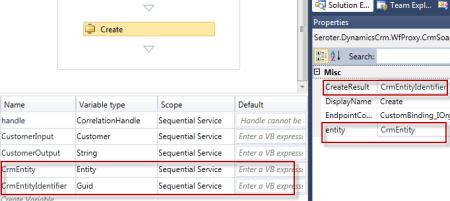
    I then added two more variables that are needed for calling the “Create” operation in the Dynamics CRM service. First, I created a variable for the “entity” object that was added to the project from my service reference, and then I added another variable for the GUID response that is returned after creating an entity.

    2011.8.30crm05

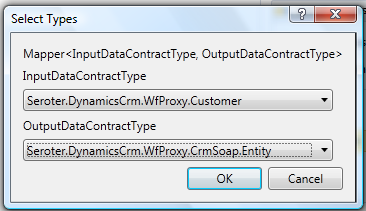
    Now I need to instantiate the “CrmEntity” variable.  Here’s where I can use the BizTalk Mapper shape that comes with the LOB adapter installation and BizTalk Server 2010. I dragged the Mapper shape from the Widows Workflow toolbox and get asked for the source and destination data types.

    2011.8.30crm06

    I then created a new Map.

    2011.8.30crm07

    I then built a map using the strategy I employed in previous posts.  Specifically, I copied each source node to a Looping functoid, and then connected each source to Scripting functoid with an XSLT Call Template inside that contained the script to create the key/value pair structure in the destination.

    2011.8.30crm10

    After saving and building the Workflow Service, I invoked the service via the WCF Test Client. I sent in some data and hoped to see a matching record in Dynamics CRM.

    2011.8.30crm08

    If I go to my Dynamics CRM 2011 instance, I can find a record for my dog, Watson.

    2011.8.30crm09

    So, that was pretty simple.  You can use the ease of creation and deployment of Workflow Services while combining the power of the BizTalk Mapper.

  • Event Processing in the Cloud with StreamInsight Austin: Part II-Deploying to Windows Azure

    In my previous post, I showed how to build StreamInsight adapters that receive Azure AppFabric messages and send Azure AppFabric messages.  In this post, we see how to use these adapters to push events into a cloud-hosted StreamInsight application and send events back out.

    As a reminder, our final solution contains an on-premises consumer of an Azure AppFabric Service Bus endpoint and that event is relayed to StreamInsight Austin and output events are sent to an Azure AppFabric Service Bus endpoint that relays the event to an on-premises listener.

    2011.7.5streaminsight18

    In order to follow along with this post, you would need to be part of the early adopter program for StreamInsight “Austin”. If not, no worries as you can at least see here how to build cloud-ready StreamInsight applications.

    The StreamInsight “Austin” early adopter package contains a sample Visual Studio 2010 project which deploys an application to the cloud.  I reused the portions of that solution which provisioned cloud instances and pushed components to the cloud.  I changed that solution to use my own StreamInsight application components, but other than that, I made no significant changes to that project.

    Let’s dig in.  First, I logged into the Windows Azure Portal and found the Hosted Services section.

    2011.7.5streaminsight01

    We need a certificate in order to manage our cloud instance.  In this scenario, I am producing a certificate on my machine and sharing it with Windows Azure.  In a command prompt, I navigated to a directory where I wanted my physical certificate dropped.  I then executed the following command:

    makecert -r -pe -a sha1 -n "CN=Windows Azure Authentication Certificate" -ss My -len 2048 -sp "Microsoft Enhanced RSA and AES Cryptographic Provider" -sy 24 testcert.cer
    

    When this command completes, I have a certificate in my directory and see the certificate added to the “Current User” certificate store.

    2011.7.5streaminsight03

    Next, while still in the Certificate Viewer, I exported this certificate (with the private key) out as a PFX.  This file will be used with the Azure instance that gets generated by StreamInsight Austin.  Back in the Windows Azure Portal, I navigated to the Management Certificates section and uploaded the CER file to the Azure subscription associated with StreamInsight Austin.

    2011.7.5streaminsight04

    After this, I made sure that I had a “storage account” defined beneath my Windows Azure account.  This account is used by StreamInsight Austin and deployment fails if no such account exists.

    2011.7.5streaminsight17

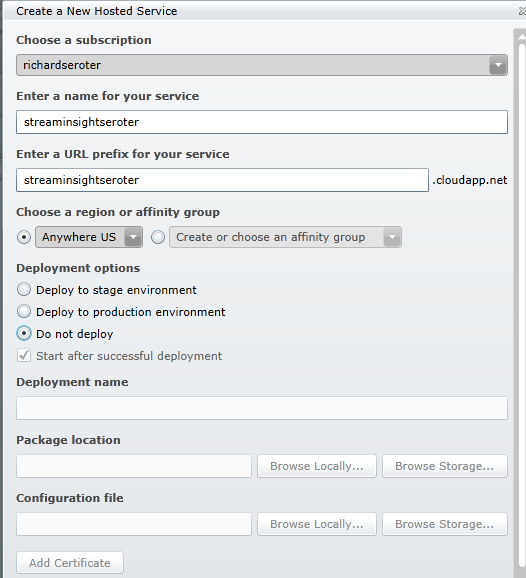
    Finally, I had to create a hosting service underneath my Azure subscription.  The window that pops up after clicking the New Hosted Service button on the ribbon lets you put a service under a subscription and define the deployment options and URL.  Note that I’ve chosen the “do not deploy” option since I have no package to upload to this instance.

    2011.7.5streaminsight05

    The last pre-deployment step is to associate the PFX certificate with this newly created Azure instance.  When doing so, you must provide the password set when exporting the PFX file.

    2011.7.5streaminsight16

    Next, I went to the Visual Studio solution provided with the StreamInsight Austin download.  There are a series of projects in this solution and the ones that I leveraged helped with provisioning the instance, deploying the StreamInsight application, and deleting the provisioned instance.  Note that there is a RESTful API for all of this and these Visual Studio projects just wrap up the operations into a C# API.

    The provisioning project has a configuration file that must contain references to my specific Azure account.  These settings include the SubscriptionId (GUID associated with my Azure subscription), HostedServiceName (matching the Azure service I created earlier), StorageAccountName (name of the storage account for the subscription), StorageAccountKey (giant value visible by clicking “View Access Keys” on the ribbon), ServiceManagementCertificateFilePath (location on local machine where PFX file sits), ServiceManagementCertificatePassword (password provided for PFX file), and ClientCertificatePassword (value used when the provisioning project creates a new certificate).

    Next, I ran the provisioning project which created a new certificate and invoked the StreamInsight Austin provisioning API that puts the StreamInsight binaries into an Azure instance.

    2011.7.5streaminsight06

    When the provisioning is complete, you can see the newly created instance and certificates.

    2011.7.5streaminsight08

    Neat.  It all completed in 5 or so minutes.  Also note that the newly created certificate is in the “My User” certificate store.

    2011.7.5streaminsight09

    I then switched to the “deployment” project provided by StreamInsight Austin.  There are new components that get installed with StreamInsight Austin, including a Package class.  The Package contains references to all of the components that must be uploaded to the Windows Azure instance in order for the query to run.  In my case, I need the Azure AppFabric adapter, my “shared” component, and the Microsoft.ServiceBus.dll that the adapters use.

    PKG.Package package = new PKG.Package("adapters");
    
    package.AddResource(@"Seroter.AustinWalkthrough.SharedObjects.dll");
    package.AddResource(@"Seroter.StreamInsight.AzureAppFabricAdapter.dll");
    package.AddResource(@"Microsoft.ServiceBus.dll");
    

    After updating the project to have the query from my previously built “onsite hosting” project, and updating the project’s configuration file to include the correct Azure instance URL and certificate password, I started up the deployment project.

    2011.7.5streaminsight10

    You can see that my deployment is successful and my StreamInsight query was started.  I can use the RESTful APIs provided by StreamInsight Austin to check on the status of my provisioned instance.  By hitting a specific URL (https://azure.streaminsight.net/HostedServices/{serviceName}/Provisioning), I see the details.

    2011.7.5streaminsight11

    With the query started, I turned on my Azure AppFabric listener service (who receives events from StreamInsight), and my service caller.  The data should flow to the Azure AppFabric endpoint, through StreamInsight Austin, and back out to an Azure AppFabric endpoint.

    2011.7.5streaminsight13

    Content that everything works, and scared that I’d incur runaway hosting charges, I ran the “delete” project with removed my Azure instance and all traces of the application.

    image

    All in all, it’s a fairly straightforward effort.  Your onsite StreamInsight application transitions seamlessly to the cloud.  As mentioned in the first post of the series, the big caveat is that you need event sources that are accessible by the cloud instance.  I leveraged Windows Azure AppFabric to receive events, but you could also do a batch load from an internet-accessible database or file store.

    When would you use StreamInsight Austin?  I can think of a few scenarios that make sense:

    • First and foremost, if you have a wide range of event sources, including cloud hosted ones, having your complex event processing engine close to the data and easily accessible is compelling.
    • Second, Austin makes good sense for variable workloads.  We can run the engine when we need to, and if it only operates on batch data, can shut it down when not in use.  This scenario will even more compelling once the transparent and elastic scale out of StreamInsight Austin is in place.
    • Third, we can use it for proof-of-concept scenarios without requiring on-premises hardware.  By using a service instead of maintaining on-site hardware you offload your management and maintenance to StreamInsight Austin.

    StreamInsight Austin is slated for a public CTP release later this year, so keep an eye out for more info.