Category: WCF/WF

  • Wait, THAT runs on Pivotal Cloud Foundry? Part 5 – .NET Framework apps

    Wait, THAT runs on Pivotal Cloud Foundry? Part 5 – .NET Framework apps

    Looking for a host suitable for .NET Framework apps? Windows Server virtual machines are almost your only option. The only public cloud PaaS product that offers a higher abstraction than virtual machines is Azure’s App Service. And that’s not really meant to run an entire enterprise portfolio. So … what to do? Don’t say “switch to .NET Core and run on all the Linux-based platforms” because that’s cheating. What can you do today? The best option you don’t know about is Pivotal Cloud Foundry (PCF). In this post, I’ll show you how to easily deploy and operate .NET apps in PCF on any infrastructure.

    This is part five of a five part series. Hopefully you’ve enjoyed my exploration of workloads you might not expect to see on a cloud-native platform like PCF.

    About PAS for Windows

    Quickly, I want to tell you about Pivotal Application Service (PAS) for Windows. Recall that PCF is really made up of two software abstractions atop a sophisticated infrastructure management platform (BOSH): Pivotal Application Service (for apps) and Pivotal Container Service (for raw containers). PAS for Windows extends PAS with managed Windows Server instances. As an operator, you can deploy, patch, upgrade, and operate Windows Server instances entirely through automation. For developers, you get a on-demand, scalable host that supports remote debugging and much more. I feel pretty safe saying that this is better than whatever you’re doing today for Windows workloads!

    PAS for Windows extends PAS and uses all the same machinery

    Deploying a WCF application to PCF

    Let’s do this. First, I confirmed that I had a Windows “stack” available to me. In my PCF environment, I ran a cf stacks command.

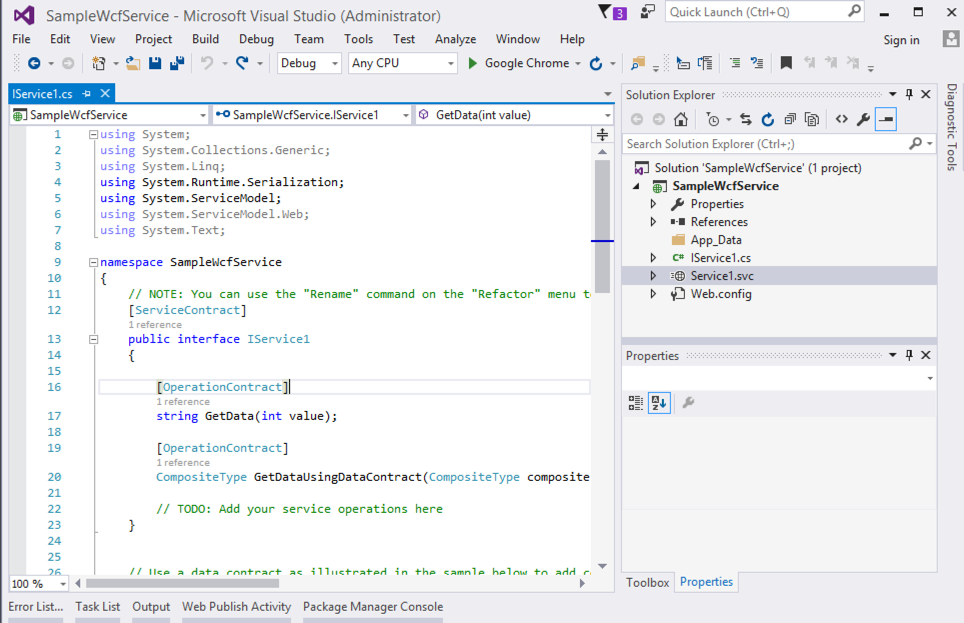
    Yup, all good. I created a new Windows Communication Foundation (WCF) application targeting .NET Framework 4.0. All of your apps aren’t using the latest framework, so why should my sample? Note that you can run all types of classic .NET projects in PCF: ASP.NET Web Forms, MVC, Web API, WCF, console, and more.

    My WCF service doesn’t need to change at all to run in PCF. To publish to PCF, I just need to provide a set of command line parameters, or, write a manifest with those parameters. My manifest looked like this:

    ---
    applications:
    - name: blog-demo-wcf
    memory: 256M
    instances: 1
    buildpack: hwc_buildpack
    stack: windows2016
    env:
    betaflag: on

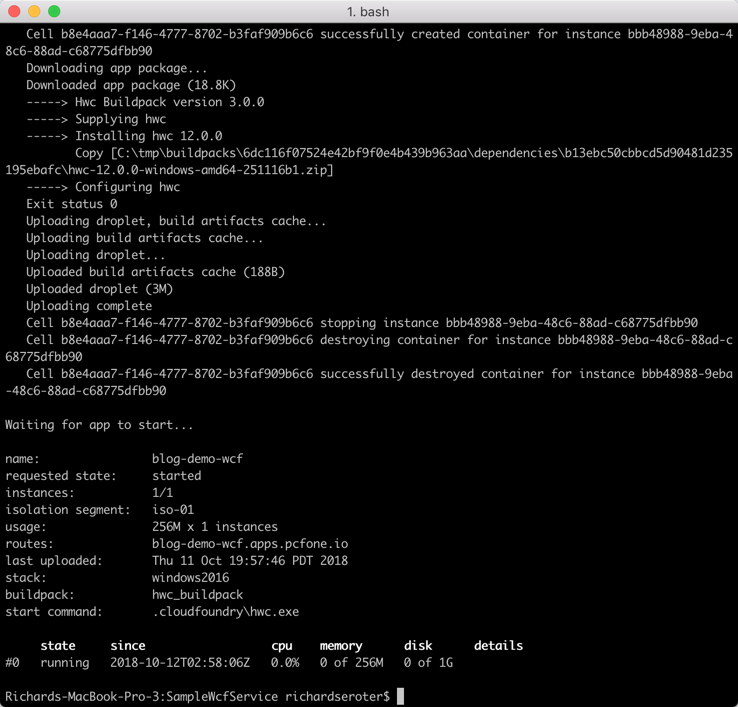
    There’s a buildpack just for .NET apps on Windows and all I have to do is push the code itself. About fifteen seconds after typing cf push, my WCF service was packaged up and loaded into a Windows Server container.

    Browsing the endpoint returned that familiar page of WCF service metadata. 

    Operating your .NET app on PCF

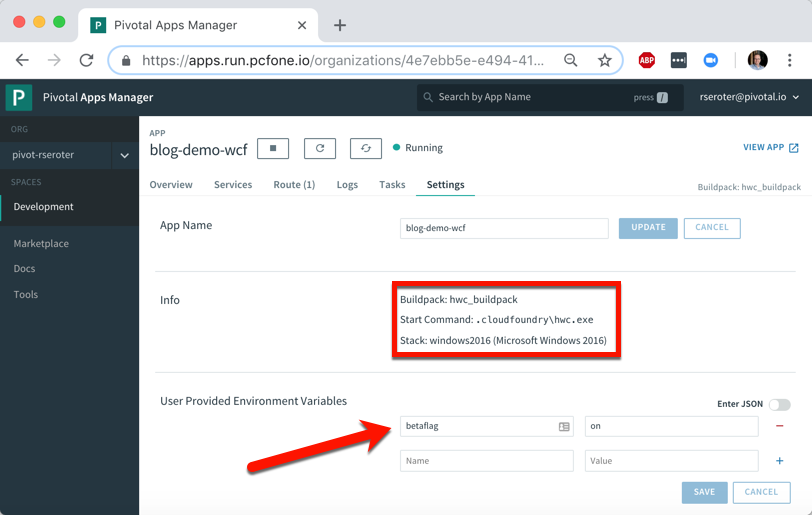
    It’s one thing to deploy an app, it’s another thing to manage it. PCF makes that pretty easy. After deploying a .NET app, I see some helpful metadata. It shows me the stack, buildpack, and any environment variables visible to the app.

    How long does it take you to get a new instance of your .NET app into production today? Weeks? Months? I just scaled up from one to three Windows container instances in less than ten seconds. I just love that.

    Any app written in any language gets access to the same set of PCF functionality. Your .NET Framework apps get built-in log aggregation, metrics and monitoring, autoscaling, and more. All in a multi-tenant environment. And with straightforward access to anything in the marketplace through the Service Broker interface. Want your .NET Framework app to talk to Azure’s Cosmos DB or Google Cloud Spanner? Just use the broker.

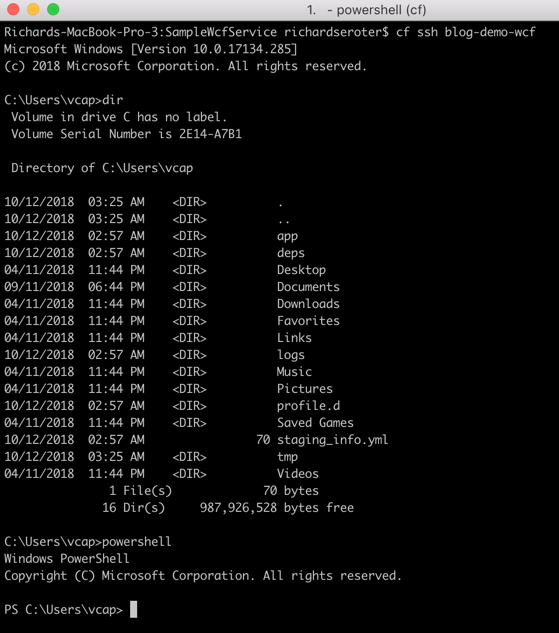
    Oh, and don’t forget that because PAS for Windows uses legit Windows Server containers, each app instance gets its own copy of the file system, registry, and GAC. You can see this by SSH-ing into the container. Yes, I said you could SSH in. It’s just a cf ssh command.

    That’s a full Windows file system, and I can even spin up Powershell in there. Crazy times.

  • Integrating Microsoft Azure BizTalk Services with Salesforce.com

    BizTalk Services is far from the most mature cloud-based integration solution, but it’s viable one for certain scenarios. I haven’t seen a whole lot of demos that show how to send data to SaaS endpoints, so I thought I’d spend some of my weekend trying to make that happen. In this blog post, I’m going to walk through the steps necessary to make BizTalk Services send a message to a Salesforce REST endpoint.

    I had four major questions to answer before setting out on this adventure:

    1. How to authenticate? Salesforce uses an OAuth-based security model where the caller acquires a token and uses it in subsequent service calls.
    2. How to pass in credentials at runtime? I didn’t want to hardcode the Salesforce credentials in code.
    3. How to call the endpoint itself? I needed to figure out the proper endpoint binding configuration and the right way to pass in the headers.
    4. How to debug the damn thing. BizTalk Services – like most cloud hosted platforms without an on-premises equivalent – is a black box and decent testing tools are a must.

    The answers to first two is “write a custom component.” Fortunately, BizTalk Services has an extensibility point where developers can throw custom code into a Bridge. I added a class library project and added the following class which takes in a series of credential parameters from the Bridge design surface, calls the Salesforce login endpoint, and puts the security token into a message context property for later use. I also dumped a few other values into context to help with debugging. Note that this library references the great JSON.NET NuGet package.

    using System;
    using System.Collections.Generic;
    using System.Linq;
    using System.Text;
    using System.Threading.Tasks;
    
    using Microsoft.BizTalk.Services;
    
    using System.Net.Http;
    using System.Net.Http.Headers;
    using Newtonsoft.Json.Linq;
    
    namespace SeroterDemo
    {
        public class SetPropertiesInspector : IMessageInspector
        {
            [PipelinePropertyAttribute(Name = "SfdcUserName")]
            public string SfdcUserName_Value { get; set; }
    
            [PipelinePropertyAttribute(Name = "SfdcPassword")]
            public string SfdcPassword_Value { get; set; }
    
            [PipelinePropertyAttribute(Name = "SfdcToken")]
            public string SfdcToken_Value { get; set; }
    
            [PipelinePropertyAttribute(Name = "SfdcConsumerKey")]
            public string SfdcConsumerKey_Value { get; set; }
    
            [PipelinePropertyAttribute(Name = "SfdcConsumerSecret")]
            public string SfdcConsumerSecret_Value { get; set; }
    
            private string oauthToken = "ABCDEF";
    
            public Task Execute(IMessage message, IMessageInspectorContext context)
            {
                return Task.Factory.StartNew(() =>
                {
                    if (null != message)
                    {
                        HttpClient authClient = new HttpClient();
    
                        //create login password value
                        string loginPassword = SfdcPassword_Value + SfdcToken_Value;
    
                        //prepare payload
                        HttpContent content = new FormUrlEncodedContent(new Dictionary<string, string>
                            {
                                {"grant_type","password"},
                                {"client_id",SfdcConsumerKey_Value},
                                {"client_secret",SfdcConsumerSecret_Value},
                                {"username",SfdcUserName_Value},
                                {"password",loginPassword}
                            }
                            );
    
                        //post request and make sure to wait for response
                        var message2 = authClient.PostAsync("https://login.salesforce.com/services/oauth2/token", content).Result;
    
                        string responseString = message2.Content.ReadAsStringAsync().Result;
    
                        //extract token
                        JObject obj = JObject.Parse(responseString);
                        oauthToken = (string)obj["access_token"];
    
                        //throw values into context to prove they made it into the class OK
                        message.Promote("consumerkey", SfdcConsumerKey_Value);
                        message.Promote("consumersecret", SfdcConsumerSecret_Value);
                        message.Promote("response", responseString);
                        //put token itself into context
                        string propertyName = "OAuthToken";
                        message.Promote(propertyName, oauthToken);
                    }
                });
            }
        }
    }
    

    With that code in place, I focused next on getting the write endpoint definition in place to call Salesforce. I used the One Way External Service Endpoint destination, which by default, uses the BasicHttp WCF binding.
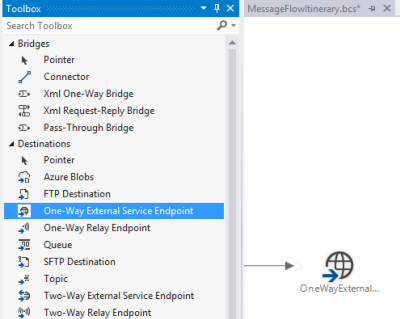
    2014.07.14mabs01

    Now *ideally*, the REST endpoint is pulled from the authentication request and applied at runtime. However, I’m not exactly sure how to take the value from the authentication call and override a configured endpoint address. So, for this example, I called the Salesforce authentication endpoint from an outside application and pulled out the returned service endpoint manually. Not perfect, but good enough for this scenario. Below is the configuration file I created for this destination shape. Notice that I switched the binding to webHttp and set the security mode.

    <configuration>
      <system.serviceModel>
        <bindings>
          <webHttpBinding>
            <binding name="restBinding">
              <security mode="Transport" />
            </binding>
          </webHttpBinding>
        </bindings>
        <client>
          <clear />
          <endpoint address="https://na15.salesforce.com/services/data/v25.0/sobjects/Account"
            binding="webHttpBinding" bindingConfiguration="restBinding"
            contract="System.ServiceModel.Routing.ISimplexDatagramRouter"
            name="OneWayExternalServiceEndpointReference1" />
        </client>
      </system.serviceModel>
    </configuration>
    

    With this in place, I created a pair of XML schemas and a map. The first schema represents a generic “account” definition.
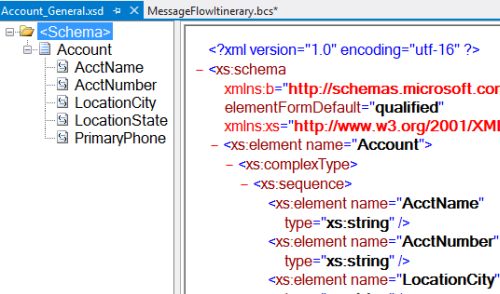
    2014.07.14mabs02

    My next schema defines the format expected by the Salesforce REST endpoint. It’s basically a root node called “root” (with no namespace) and elements named after the field names in Salesforce.
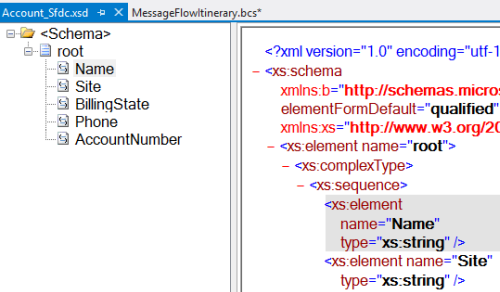
    2014.07.14mabs03

    As expected, my mapping between these two is super complicated. I’ll give you a moment to study its subtle beauty.
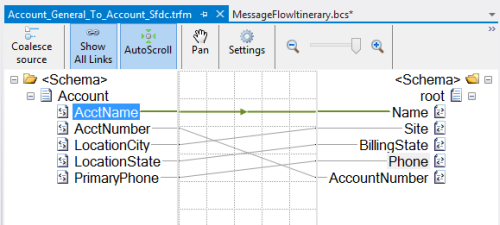
    2014.07.14mabs04

    With those in place, I was ready to build out my bridge.  I dragged an Xml One-Way Bridge shape to the message flow surface. There were two goals of my bridge: transform the message, and put the credentials into context. I started the bridge by defining the input message type. This is the first schema I created which describes the generic account message.
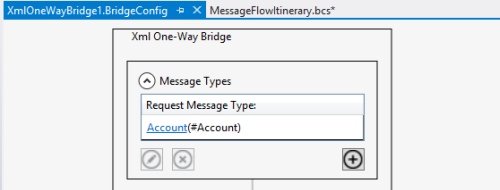
    2014.07.14mabs05

    Choosing a map is easy; just add the appropriate map to the collection property on the Transform stage.
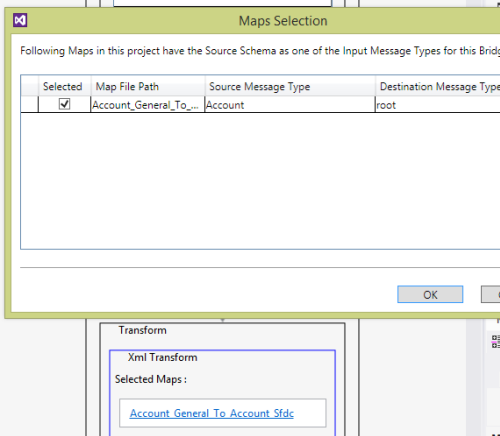
    2014.07.14mabs06

    With the message transformed, I had to then get the property bag configured with the right context properties. On the final Enrich stage of the pipeline, I chose the On Enter Inspector to select the code to run when this stage gets started. I entered the fully qualified name, and then on separate lines, put the values for each (authorization) property I defined in the class above. Note that you do NOT wrap these values in quotes. I wasted an hour trying to figure out why my values weren’t working correctly!
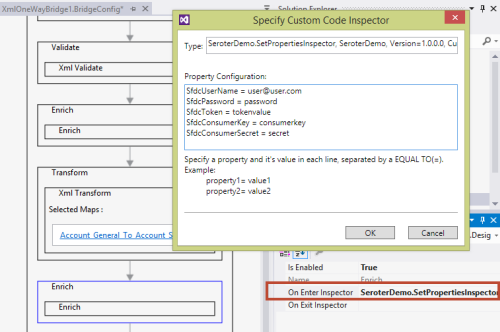
    2014.07.14mabs07

    The web service endpoint was already configured above, so all that was left was to configure the connector. The connector between the bridge and destination shapes was set to route all the messages to that single destination (“Filter condition: 1=1”). The most important configuration was the headers. Clicking the Route Actions property of the connector opens up a window to set any SOAP or HTTP headers on the outbound message. I defined a pair of headers. One sets the content-type so that Salesforce knows I’m sending it an XML message, and the second defines the authorization header as a combination of the word “Bearer” (in single quotes!) and the OAuthToken context value we created above.
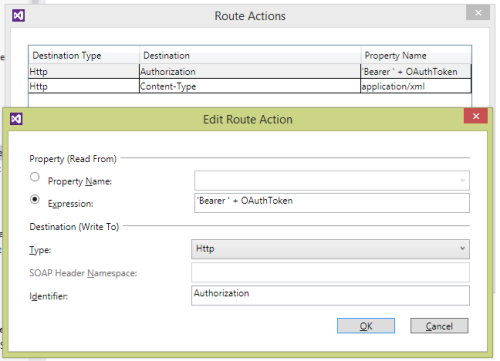
    2014.07.14mabs08

    At this point, I had a finished message flow itinerary and deployed the project to a running instance of BizTalk Services. Now to test it. I first tested it by putting a Service Bus Queue at the beginning of the flow and pumping messages through. After the 20th vague error message, I decided to crack this nut open.  I installed the BizTalk Services Explorer extension from the Visual Studio Gallery. This tool promises to aid in debugging and management of BizTalk Services resources and is actually pretty handy. It’s also not documented at all, but documentation is for sissies anyway.

    Once installed, you get a nice little management interface inside the Server Explorer view in Visual Studio.
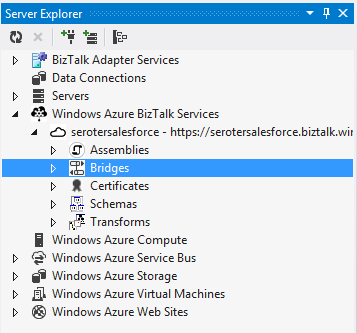
    2014.07.14mabs09

    I could just send a test message in (and specify the payload myself), but that’s pretty much the same as what I was doing from my own client application.
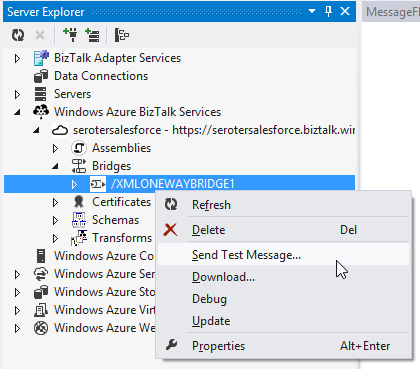
    2014.07.14mabs10

    No, I wanted to see inside the process a bit. First, I set up the appropriate credentials for calling the bridge endpoint. Do NOT try and use the debugging function if you have a Queue or Topic as your input channel! It only works with Relay input.
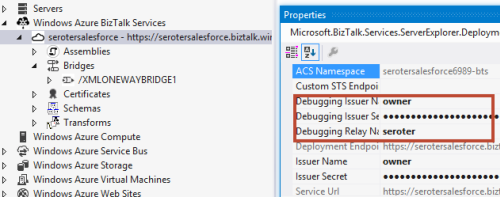
    2014.07.14mabs11

    I then right-clicked the bridge and chose “Debug.” After entering my source XML, I submitted the initial message into the bridge. This tool shows you each stage of the bridge as well as the corresponding payload and context properties.
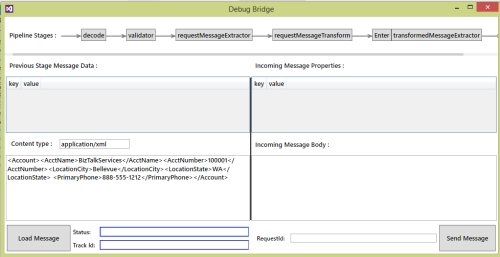
    2014.07.14mabs12

    At the Transform stage, I could see that my message was being correctly mapped to the Salesforce-ready structure.
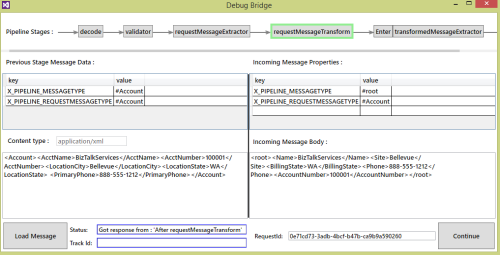
    2014.07.14mabs13

    After the Enrich stage – where we had our custom code callout – I saw my new context values, including the OAuth token.
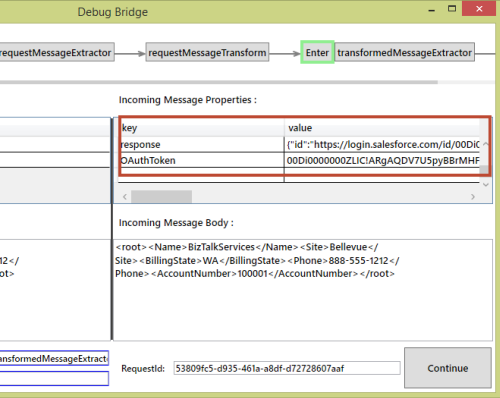
    2014.07.14mabs14

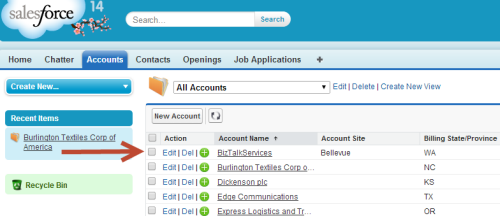
    The whole process completes with an error, only because Salesforce returns an XML response and I don’t handle it. Checking Salesforce showed that my new account definitely made it across.
    2014.07.14mabs15

    This took me longer than I thought, just given the general newness of the platform and lack of deep documentation. Also, my bridge occasionally flakes out because it seems to “forget” the authorization property configuration values that are part of the bridge definition. I had to redeploy my project to make it “remember” them again. I’m sure it’s a “me” problem, but there may be some best practices on custom code properties that I don’t know yet.

    Now that you’ve seen how to extend BizTalk Services, hopefully you can use this same flow when sending messages to all sorts of SaaS systems.

  • TechEd North America Session Recap, Recording Link

    Last week I had the pleasure of visiting New Orleans to present at TechEd North America. My session, Patterns of Cloud Integration, was recorded and is now available on Channel9 for everyone to view.

    I made the bold (or “reckless”, depending on your perspective) decision to show off as many technology demos as possible so that attendees could get a broad view of the options available for integrating applications, data, identity, and networks. Being a Microsoft conference, many of my demonstrations highlighted aspects of the Microsoft product portfolio – including one of the first public demos of Windows Azure BizTalk Services – but I also snuck in a few other technologies as well. My demos included:

    1. [Application Integration] BizTalk Server 2013 calls REST-based Salesforce.com endpoint and authenticates with custom WCF behavior. Secondary demo also showed using SignalR to incrementally return the results of multiple calls to Salesforce.com.
    2. [Application Integration] ASP.NET application running in Windows Azure Web Sites using the Windows Azure Service Bus Relay Service to invoke a web service on my laptop.
    3. [Application Integration] App running in Windows Azure Web Sites sending message to Windows Azure BizTalk Services. Message then dropped to one of three queues that was polled by Node.js application running in CloudFoundry.com.
    4. [Application Integration] App running in Windows Azure Web Sites sending message to Windows Azure Service Bus Topic, and polled by both a Node.js application in CloudFoundry.com, and a BizTalk Server 2013 server on-premises.
    5. [Application/Data Integration] ASP.NET application that uses local SQL Server database but changes connection string (only) to instead point to shared database running in Windows Azure.
    6. [Data Integration] Windows Azure SQL Database replicated to on-premises SQL Server database through the use of Windows Azure SQL Data Sync.
    7. [Data Integration] Account list from Salesforce.com copied into on-premises SQL Server database by running ETL job through the Informatica Cloud.
    8. [Identity Integration] Using a single set of credentials to invoke an on-premises web service from a custom VisualForce page in Salesforce.com. Web service exposed via Windows Azure Service Bus Relay.
    9. [Identity Integration] ASP.NET application running in Windows Azure Web Sites that authenticates users stored in Windows Azure Active Directory.
    10. [Identity Integration] Node.js application running in CloudFoundry.com that authenticates users stored in an on-premises Active Directory that’s running Active Directory Federation Services (AD FS).
    11. [Identity Integration] ASP.NET application that authenticates users via trusted web identity providers (Google, Microsoft, Yahoo) through Windows Azure Access Control Service.
    12. [Network Integration] Using new Windows Azure point-to-site VPN to access Windows Azure Virtual Machines that aren’t exposed to the public internet.

    Against all odds, each of these demos worked fine during the presentation. And I somehow finished with 2 minutes to spare. I’m grateful to see that my speaker scores were in the top 10% of the 350+ breakouts, and hope you’ll take some time to watch it. Feedback welcome!

  • My New Pluralsight Course – Patterns of Cloud Integration – Is Now Live

    I’ve been hard at work on a new Pluralsight video course and it’s now live and available for viewing. This course, Patterns of Cloud Integration,  takes you through how application and data integration differ when adding cloud endpoints. The course highlights the 4 integration styles/patterns introduced in the excellent Enterprise Integration Patterns book and discusses the considerations, benefits, and challenges of using them with cloud systems. There are five core modules in the course:
    • Integration in the Cloud. An overview of the new challenges of integrating with cloud systems as well as a summary of each of the four integration patterns that are covered in the rest of the course.
    • Remote Procedure Call. Sometimes you need information or business logic stored in an independent system and RPC is still a valid way to get it. Doing this with a cloud system on one (or both!) ends can be a challenge and we cover the technologies and gotchas here.
    • Asynchronous Messaging. Messaging is a fantastic way to do loosely coupled system architecture, but there are still a number of things to consider when doing this with the cloud.
    • Shared Database. If every system has to be consistent at the same time, then using a shared database is the way to go. This can be a challenge at cloud scale, and we review some options.
    • File Transfer. Good old-fashioned file transfers still make sense in many cases. Here I show a new crop of tools that make ETL easy to use!

    Because “the cloud” consists of so many unique and interesting technologies, I was determined to not just focus on the products and services from any one vendor. So, I decided to show off a ton of different technologies including:

    Whew! This represents years of work as I’ve written about or spoken on this topic for a while. It was fun to collect all sorts of tidbits, talk to colleagues, and experiment with technologies in order to create a formal course on the topic. There’s a ton more to talk about besides just what’s in this 4 hour course, but I hope that it sparks discussion and helps us continue to get better at linking systems, regardless of their physical location.

  • Using ASP.NET SignalR to Publish Incremental Responses from Scatter-Gather BizTalk Workflow

    While in Europe last week presenting at the Integration Days event, I showed off some demonstration of cool new technologies working with existing integration tools. One of those demos combined SignalR and BizTalk Server in a novel way.

    One of the use cases for an integration bus like BizTalk Server is to aggregate data from multiple back end systems and return a composite message (also known as a Scatter-Gather pattern). In some cases, it may make sense to do this as part of a synchronous endpoint where a web service caller makes a request, and BizTalk returns an aggregated response. However, we all know that BizTalk Server’s durable messaging architecture introduces latency into the communication flow, and trying to do this sort of operation may not scale well when the number of callers goes way up. So how can we deliver a high-performing, scalable solution that will accommodate today’s highly interactive web applications? In this solution that I build, I used ASP.NET and SignalR to send incremental messages from BizTalk back to the calling web application.

    2013.02.01signalr01

    The end user wants to search for product inventory that may be recorded in multiple systems. We don’t want our web application to have to query these systems individually, and would rather put an aggregator in the middle. Instead of exposing the scatter-gather BizTalk orchestration in a request-response fashion, I’ve chosen to expose an asynchronous inbound channel, and will then send messages back to the ASP.NET web application as soon as each inventory system respond.

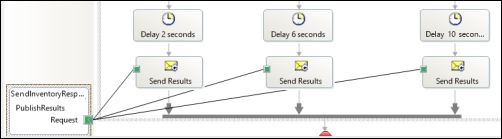
    First off, I have a BizTalk orchestration. It takes in the inventory lookup request and makes a parallel query to three different inventory systems. In this demonstration, I don’t actually query back-end systems, but simulate the activity by introducing a delay into each parallel branch.

    2013.02.01signalr02

    As each branch concludes, I send the response immediately to a one-way send port. This is in contrast to the “standard” scatter-gather pattern where we’d wait for all parallel branches to complete and then aggregate all the responses into a single message. This way, we are providing incremental feedback, a more responsive application, and protection against a poor-performing inventory system.

    2013.02.01signalr03

    After building and deploying this solution, I walked through the WCF Service Publishing Wizard in order to create the web service on-ramp into the BizTalk orchestration.

    2013.02.01signalr04

    I couldn’t yet create the BizTalk send port as I didn’t have an endpoint to send the inventory responses to. Next up, I built the ASP.NET web application that also had a WCF service for accepting the inventory messages. First, in a new ASP.NET project in Visual Studio, I added a service reference to my BizTalk-generated service. I then added the NuGet package for SignalR, and a new class to act as my SignalR “hub.” The Hub represents the code that the client browser will invoke on the server. In this case, the client code needs to invoke a “lookup inventory” action which will forwards a request to BizTalk Server. It’s important to notice that I’m acquiring and transmitting the unique connection ID associated with the particular browser client.

    public class NotifyHub : Hub
        {
            /// <summary>
            /// Operation called by client code to lookup inventory for a given item #
            /// </summary>
            /// <param name="itemId"></param>
            public void LookupInventory(string itemId)
            {
                //get this caller's unique browser connection ID
                string clientId = Context.ConnectionId;
    
                LookupService.IntegrationDays_SignalRDemo_BT_ProcessInventoryRequest_ReceiveInventoryRequestPortClient c =
                    new LookupService.IntegrationDays_SignalRDemo_BT_ProcessInventoryRequest_ReceiveInventoryRequestPortClient();
    
                LookupService.InventoryLookupRequest req = new LookupService.InventoryLookupRequest();
                req.ClientId = clientId;
                req.ItemId = itemId;
    
                //invoke async service
                c.LookupInventory(req);
            }
        }
    

    Next, I added a single Web Form to this ASP.NET project. There’s nothing in the code-behind file as we’re dealing entirely with jQuery and client-side fun. The HTML markup of the page is pretty simple and contains a single textbox that accepts a inventory part number, and a button that triggers a lookup. You’ll also notice a DIV with an ID of “responselist” which will hold all the responses sent back from BizTalk Server.

    2013.02.01signalr07

    The real magic of the page (and SignalR) happens in the head of the HTML page. Here I referenced all the necessary JavaScript libraries for SignalR and jQuery. Then I established a reference to the server-side SignalR Hub. Then you’ll notice that I create a function that the *server* can call when it has data for me. So the *server* will call the “addLookupResponse” operation on my page. Awesome. Finally, I start up the connection and define the click function that the button on the page triggers.

    <head runat="server">
        <title>Inventory Lookup</title>
        <!--Script references. -->
        <!--Reference the jQuery library. -->
        <script src="Scripts/jquery-1.6.4.min.js" ></script>
        <!--Reference the SignalR library. -->
        <script src="Scripts/jquery.signalR-1.0.0-rc1.js"></script>
        <!--Reference the autogenerated SignalR hub script. -->
        <script src="<%= ResolveUrl("~/signalr/hubs") %>"></script>
        <!--Add script to update the page--> 
        <script type="text/javascript">
            $(function () {
                // Declare a proxy to reference the hub. 
                var notify = $.connection.notifyHub;
    
                // Create a function that the hub can call to broadcast messages.
                notify.client.addLookupResponse = function (providerId, stockAmount) {
                    $('#responselist').append('<div>Provider <b>' + providerId + '</b> has <b>' + stockAmount + '</b> units in stock.</div>');
                };
    
                // Start the connection.
                $.connection.hub.start().done(function () {
                    $('#dolookup').click(function () {
                        notify.server.lookupInventory($('#itemid').val());
                        $('#responselist').append('<div>Checking global inventory ...</div>');
                    });
                });
            });
        </script>
    </head>
    

    Nearly done! All that’s left is to open up a channel for BizTalk to send messages to the target browser connection. I added a WCF service to this existing ASP.NET project. The WCF contract has a single operation for BizTalk to call.

    [ServiceContract]
        public interface IInventoryResponseService
        {
            [OperationContract]
            void PublishResults(string clientId, string providerId, string itemId, int stockAmount);
        }
    

    Notice that BizTalk is sending back the client (connection) ID corresponding to whoever made this inventory request. SignalR makes it possible to send messages to ALL connected clients, a group of clients, or even individual clients. In this case, I only want to transmit a message to the browser client that made this specific request.

    public class InventoryResponseService : IInventoryResponseService
        {
            /// <summary>
            /// Send message to single connected client
            /// </summary>
            /// <param name="clientId"></param>
            /// <param name="providerId"></param>
            /// <param name="itemId"></param>
            /// <param name="stockAmount"></param>
            public void PublishResults(string clientId, string providerId, string itemId, int stockAmount)
            {
                var context = GlobalHost.ConnectionManager.GetHubContext<NotifyHub>();
    
    			 //send the inventory stock amount to an individual client
                context.Clients.Client(clientId).addLookupResponse(providerId, stockAmount);
            }
        }
    

    After adding the rest of the necessary WCF service details to the web.config file of the project, I added a new BizTalk send port targeting the service. Once the entire BizTalk project was started up (receive location for the on-ramp WCF service, orchestration that calls inventory systems, send port that sends responses to the web application), I browsed to my ASP.NET site.

    2013.02.01signalr05

    For this demonstration, I opened a couple browser instances to prove that each one was getting unique results based on whatever inventory part was queried. Sure enough, a few seconds after entering in a random part identifier, data starting trickling back. On each browser client, results were returned in a staggered fashion as each back-end system returned data.

    2013.02.01signalr06

    I’m biased of course, but I think that this is a pretty cool query pattern. You can have the best of BizTalk (e.g. visually modeled workflow for scatter-gather, broad application adapter choice) while not sacrificing interactivity and performance.

    In the spirit of sharing, I’ve made the source code available on GitHub. Feel free to browse it, pull it, and try this on your own. Let me know what you think!

  • January 2013 Trip to Europe to Speak on (Cloud) Integration, Identity Management

    In a couple weeks, I’m off to Amsterdam and Gothenburg to speak at a pair of events. First, on January 22nd I’ll be in Amsterdam at an event hosted by middleware service provider ESTREME. There will be a handful of speakers, and I’ll be presenting on the Patterns of Cloud Integration. It should be a fun chat about the challenges and techniques for applying application integration patterns in cloud settings.

    Next up, I’m heading to Gothenburg (Sweden) to speak at the annual Integration Days event hosted by Enfo Zystems. This two day event is held January 24th and 25th and features multiple tracks and a couple dozen sessions. My session on the 24th, called Cross Platform Security Done Right, focuses on identity management in distributed scenarios. I’ve got 7 demos lined up that take advantage of Windows Azure ACS, Active Directory Federation Services, Node.js, Salesforce.com and more. My session on the 25th, called Embracing the Emerging Integration Endpoints, looks at how existing integration tools can connect to up-and-coming technologies. Here I have another 7 demos that show off the ASP.NET Web API, SignalR, StreamInsight, Node.js, Amazon Web Services, Windows Azure Service Bus, Salesforce.com and the Informatica Cloud. Mikael Hakansson will be taking bets as to whether I’ll make it through all the demos in the allotted time.
    It should be a fun trip, and thanks to Steef-Jan Wiggers and Mikael for organizing my agenda. I hope to see some of you all in the audience!

  • 2012 Year in Review

    2012 was a fun year. I added 50+ blog posts, built Pluralsight courses about Force.com and Amazon Web Services, kept writing regularly for InfoQ.com, and got 2/3 of the way done my graduate degree in Engineering. It was a blast visiting Australia to talk about integration technologies, going to Microsoft Convergence to talk about CRM best practices, speaking about security at the Dreamforce conference, and attending the inaugural AWS re:Invent conference in Las Vegas. Besides all that, I changed employers, got married, sold my home and adopted some dogs.

    Below are some highlights of what I’ve written and books that I’ve read this past year.

    These are a handful of the blog posts that I enjoyed writing the most.

    I read a number of interesting books this year, and these were some of my favorites.

    A sincere thanks to all of you for continuing to read what I write, and I hope to keep throwing out posts that you find useful (or at least mildly amusing).

  • Exploring REST Capabilities of BizTalk Server 2013 (Part 2: Consuming REST Endpoints)

    In my previous post, I looked at how the BizTalk Server 2013 beta supports the receipt of messages through REST endpoints. In this post, I’ll show off a couple of scenarios for sending BizTalk messages to REST service endpoints. Even though the BizTalk adapter is based on the WCF REST binding, all my demonstrations are with non-WCF services (just to prove everything works the same).

    Scenario #1 Consuming “GET” Service From an Orchestration

    In this first case, I planned on invoking a “GET” operation and processing the response in an orchestration. Specifically, I wanted to receive an invoice in one currency, and use a RESTful currency conversation service to flip the currency to US dollars.  There are two key quirks to this adapter that you should be aware of:

    • Consumed REST services cannot have an “&” symbol in the URL. This meant that I had to find a currency conversion service that did NOT use ampersands. You’d think that this would be easy, but many services use a syntax like “/currency?from=AUD&to=USD”, and the adapter doesn’t like that one bit. While “?” seems acceptable, ampersands most definitely are not.
    • The adapter throws an error on GET. Neither GET nor DELETE requests expect a message payload (as they are entirely URL driven), and the adapter throws an error if you send a GET request to an endpoint. This is a problem because you can’t natively send an empty message to an adapter endpoint. Below, I’ll show you one way to get around this. However, I consider this an unacceptable flaw that deserves to be fixed before BizTalk Server 2013 is released.

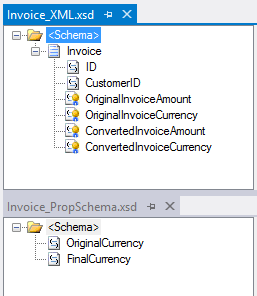
    For this demonstration, I used the adapter-friendly currency conversion service at Exchange Rate API. To get started, I created a new schema for “Invoice” and a property schema that held the values that needed to be passed to the send adapter.

    2012.11.19rest01

    Next, I built an orchestration that received this message from a (FILE) adapter, routed a GET request to the currency conversion service, and then multiplied the source currency by the returned conversion rate. In the orchestration, I routed the original Invoice message to the GET service, even though I knew I’d have to strip out the body before completing the request. Also, the Exchange Rate API service returns its result as text (not XML or JSON), so I set the response message type as XmlDocument. I then built a helper component that took in the service response message and returned a string.

    public static class Utilities
        {
            public static string ConvertMessageToString(XLANGMessage msg)
            {
                string retval = "0";
    
                using (StreamReader reader = new StreamReader((Stream)msg[0].RetrieveAs(typeof(Stream))))
                {
                    retval = reader.ReadToEnd();
                }
    
                return retval;
            }
        }
    

    Here’s the final orchestration.

    2012.11.19rest02

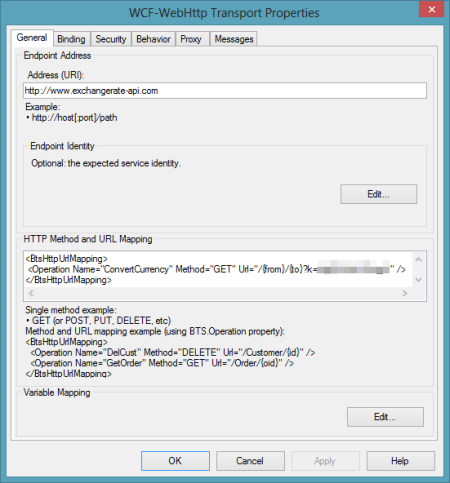
    After building and deploying this BizTalk project (with the two schemas and one orchestration), I created a FILE receive location to pull in the original invoice. I then configured a WCF-WebHttp send port. First, I set the base address to the Exchange Rate API URL, and then set an operation (which matched the name of the operation I set on the orchestration send port) that mapped to the GET verb with a parameterized URL.

    2012.11.19rest03

    I set those URL parameters by clicking the Edit button under Variable Mapping and choosing which property schema value mapped to each URL parameter.

    2012.11.19rest04

    This scenario was nearly done. All that was left was to strip out the body of message so that the GET wouldn’t fail. Fortunately, Saravana Kumar already built a simple pipeline component that erases the message body. I built the pipeline component, added it to a custom pipeline, and deployed the pipeline.

    2012.11.19rest05

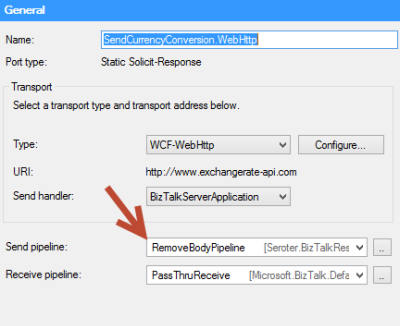
    Finally, I made sure that my send port used this new pipeline.

    2012.11.19rest06

    With all my receive/send ports created and configured, and my orchestration enlisted, I dropped a sample file into a folder monitored by the FILE receive adapter. This sample invoice was for 100 Australian dollars, and I wanted the output invoice to translate that amount to U.S. dollars. Sure enough, the REST service was called, and I got back a modified invoice.

    <ns0:Invoice xmlns:ns0="http://Seroter.BizTalkRestDemo">
      <ID>100</ID>
      <CustomerID>10022</CustomerID>
      <OriginalInvoiceAmount>100</OriginalInvoiceAmount>
      <OriginalInvoiceCurrency>AUD</OriginalInvoiceCurrency>
      <ConvertedInvoiceAmount>103.935900</ConvertedInvoiceAmount>
      <ConvertedInvoiceCurrency>USD</ConvertedInvoiceCurrency>
    </ns0:Invoice>
    

    So we can see that GET works pretty well (and should prove to be VERY useful as more and more services switch to a RESTful model), but you have to be careful on both the URLs you access, and the body you (don’t) send.

    Scenario #2 Invoking a “DELETE” Command Via Messaging Only

    Let’s try a messaging-only solution that avoids orchestration and calls a service with a DELETE verb. For fun, I wanted to try using the WCF-WebHttp adapter with the “single operation format” instead of the XML format that lets you list multiple operations, verbs and URLs.

    In this case, I wrote an ASP.NET Web API service that defines an “Invoice” model, and has a controller with a single operation that responds to DELETE requests (and writes a trace statement).

    public class InvoiceController : ApiController
        {
            public HttpResponseMessage DeleteInvoice(string id)
            {
                System.Diagnostics.Debug.WriteLine("Deleting invoice ... " + id);
                return new HttpResponseMessage(HttpStatusCode.NoContent);
            }
        }
    

    With my REST service ready to go, I created a new send port that would subscribe directly on the input message and call this service. The structured of the “single operation format” isn’t really explained, so I surmised that all it included was the HTTP verb that would be executed against the adapter’s URL. So, the URL must be fixed, and cannot contain any dynamic parameter values. For instance:

    2012.11.19rest08

    To be sure, the scenario above make zero sense. You’d never  really hardcode a URL that pointed to a specific transaction resource. HOWEVER, there could be a reference data URL (think of lists of US states, or current currency value) that might be fixed and useful to embed in an adapter. Nonetheless, my demos aren’t always about making sense, but about flexing the technology. So, I went ahead and started this send port (WITHOUT changing it’s pipeline from “passthrough” to “remove body”) and dropped an invoice file to be picked up. Sure enough, the file was picked up, the service was called, and the output was visible in my Visual Studio 2012 output window.

    2012.11.19rest09

    Interestingly enough, the call to DELETE did NOT require me to suppress the message body. Seems that Microsoft doesn’t explicitly forbid this, even though payloads aren’t typically sent as part of DELETE requests.

    Summary

    In these two articles, we looked at REST support in the BizTalk Server 2013 (beta). Overall, I like what I see. SOAP services aren’t going anywhere anytime soon, but the trend is clear: more and more services use a RESTful API and a modern integration bus has to adapt. I’d like to see more JSON support, but admittedly haven’t tried those scenarios with these adapters.

    What do you think? Will the addition of REST adapters make your life easier for both exposing and consuming endpoints?

  • Exploring REST Capabilities of BizTalk Server 2013 (Part 1: Exposing REST Endpoints)

    The BizTalk Server 2013 beta is out there now and I thought I’d take a look at one of the key additions to the platform. In this current age of lightweight integration and IFTTT simplicity, one has to wonder where BizTalk will continue to play. That said, a clean support of RESTful services will go a long way to keeping BizTalk relevant for both on-premises and cloud-based integration scenarios. Some smart folks have messed around with getting previous version of BizTalk to behave RESTfully, but now there is REAL support for GET/POST/PUT/DELETE in the BizTalk engine.

    I decided to play with two aspects of REST services and BizTalk Server 2013: exposing REST endpoints and consuming REST endpoints. In this first post, I’ll take a look at exposing REST endpoints.

    Scenario #1: Exposing Synchronous REST Service with Orchestration

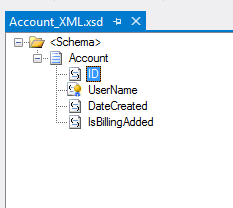
    In this scenario, I wanted to use the BizTalk-provided WCF Service Publishing Wizard to generate a REST endpoint. Let’s assume that I want to let modern web applications send new “account” records into our ESB for further processing. Since these accounts are associated with different websites, we want a REST service URL that identifies which website property they are part of. The simple schema of an account looked like this:

    2012.11.12rest01

    I also added a property schema that had fields for the website property ID and the account ID. The “property ID” node’s source was set to MessageContextPropertyBase because its value wouldn’t exist in the message itself, but rather, it would solely exists in the message context.

    2012.11.12rest02

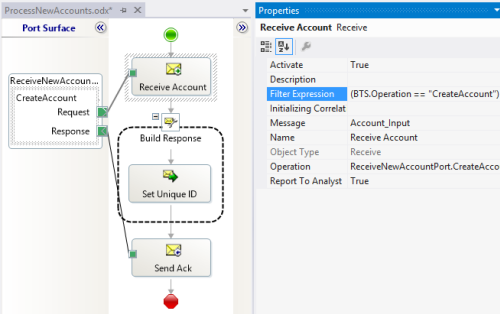
    I could stop here and just deploy this, but let’s explore a bit further. Specifically, I want an orchestration that receives new account messages and sets the unique ID value before returning a message to the caller. This orchestration directly subscribes to the BizTalk MessageBox and looks for any messages with a target operation called “CreateAccount.”

    2012.11.12rest03

    After building and deploying the project, I then started up the WCF Service Publishing Wizard. Notice that we can now select WCF-WebHttp as a valid source adapter type. Recall that this is the WCF binding that supports RESTful services.

    2012.11.12rest04

    After choosing the new web service address, I located my new service in IIS and a new Receive Location in the BizTalk Engine.

    2012.11.12rest05

    The new Receive Location had a number of interesting REST-based settings. First, I could choose the URL and map the URL parameters to message property (schema) values. Notice here that I created a single operation called “CreateAccount” and associated with the HTTP POST verb.

    2012.11.12rest06

    How do I access that “{pid}” value (which holds the website property identifier) in the URL from within my BizTalk process? The Variable Mapping section of the adapter configuration lets me put these URL values into the message context.

    2012.11.12rest07

    With that done, I bound this receive port/location to the orchestration, started everything up, and fired up Fiddler. I used Fiddler to invoke the service because I wanted to ensure that there was no WCF-specific stuff visible from the service consumer’s perspective. Below, you can see that I crafted a URL that included a website property (“MSWeb”) and a message body that is missing an account ID.

    2012.11.12rest08

    After performing an HTTP POST to that address, I immediately got back an HTTP 200 code and a message containing the newly minted account ID.

    2012.11.12rest09

    There is a setting in the adapter to set outbound headers, but I haven’t seen a way yet to change the HTTP status code itself. Ideally, the scenario above would have returned an HTTP 202 code (“accepted”) vs. a 200. Either way, what an easy, quick way to generate interoperable REST endpoints!


    Scenario #2: Exposing Asynchronous REST Service for Messaging-Only Solution

    Let’s do a variation on our previous example so that we can investigate the messages a bit further. In this messaging-only solution (i.e. no orchestration in the middle), I wanted to receive either PUT or DELETE messages and asynchronously route them to a subsequent system. There are no new bits to deploy as I reused the schemas that were built earlier. However, I  did generate a new, one-way WCF REST service for getting these messages into the engine.

    In this receive location configuration, I added two operations (“UpdateAccount”, “DeleteAccount”) and set the corresponding HTTP verb and URI template.

    2012.11.12rest12

    I could list as many service operations as I wanted here, and notice  that I had TWO parameters (“pid”, “aid”) in the URI template. I was glad to see that I could build up complex addresses with multiple parameters. Each parameter was then mapping to a property schema entry.

    2012.11.12rest13

    After saving the receive location configuration, I configured a quick FILE send port. I left this port enlisted (but not started) so that I could see what the message looked like as it traveled through BizTalk. On the send port, I had a choice of new filter criteria that were related to the new WCF-WebHttp adapter. Notice that I could filter messages based on inbound HTTP method, headers, and more.

    2012.11.12rest14

    For this particular example, I filtered on the BTS.Operation which is set based on whatever URL is invoked.

    2012.11.12rest15

    I returned to Fiddler and changed the URL, switched my HTTP method from POST to PUT and submitted the request.

    2012.11.12rest16

    I got an HTTP 200 code back, and within BizTalk, I could see a single suspended message that was waiting for my Send Port to start. Opening that message revealed all the interesting context properties that were available. Notice that the operation name that I mapped to a URL in the receive adapter is there, along with various HTTP header and verbs. Also see that my two URL parameters were successfully promoted into context.

    2012.11.12rest17


    Summary

    That was a quick look at exposing REST endpoints. Hopefully that gives you a sense of the native aspect of this new capability. In the next post, I’ll show you how to consume REST services.

  • Interview Series: Four Questions With … Jürgen Willis

    Greetings and welcome to the 44th interview in my series of talks with leaders in the “connected technology” space. This month, I reached out to Jürgen Willis who is Group Program Manager for the Windows Azure team at Microsoft with responsibility for Windows Workflow Foundation and the new Workflow Manager (on-prem and in Windows Azure). Jürgen frequently contributes blog posts to the Workflow Team blog, and is well known in the community for his participation in the development of BizTalk Server 2004 and Windows Communication Foundation.

    I’ve known Jürgen for years and he’s someone that I really admire for ability to explain technology to any audience. Let’s see how he puts up with my four questions.

    Q: Congrats on releasing the new Workflow Manager 1.0! It seems that after a quiet period, we’re back to have a wide range of Microsoft tools that can solve similar problems. Help me understand some of the cases when I’d use Windows Server AppFabric, and when I’d be bettering off pushing WF services to the Workflow Manager.

    A: Workflow Manager and AppFabric support somewhat different scenarios and have different design goals, much like WorkflowApplication and WorkflowServiceHost in .NET support different scenarios, while leveraging the same WF core.

    WorkflowServiceHost (WFSH) is focused on building workflows that consume WCF SOAP services and are addressable as WCF SOAP services.  The scenario focus is on standalone Enterprise apps/workflows that use service-based composition and integration.  AppFabric, in turn, focuses on adding management capabilities to IIS-hosted WFSH workflows.

    Workflow Manager 1.0 has as its key scenarios: multi-tenant ISVs and cloud scale (we are running the same technology as an Azure service behind Office 365).  From a messaging standpoint, we focused on REST and Service Bus support since that aligns with both our SharePoint integration story, as well as the predominant messaging models in new cloud-based applications.  We had to scope the capabilities in this release largely around the SharePoint scenarios, but we’ve already started planning the next set of capabilities/scenarios for Workflow Manager.

    If you’re using AppFabric and its meeting your needs, it makes sense to stick with that (and you should be sure to check out the new 4.5 investments we made in WFSH).  If you have a longer project timeline and have scenarios that require the multi-tenant and scaleout characteristics of Workflow Manager, are Azure-focused, require workflow/activity definition management or will primarily use REST and/or Service Bus based messaging, then you may want to evaluate Workflow Manager.

    Q: It seems that today’s software is increasingly built using an aggregation of frameworks/technologies as developers aren’t simply trying to use one technology to do everything. That said, what do you think is that sweet spot for Workflow Foundation in enterprise apps or public web applications? When should I realistically introduce WF into my applications instead of simply coding the (stateful) logic?

    A: I would consider WF in my application if I had one or more of these requirements:

    • Authors of the process logic are not full-time developers.  WF provides a great mechanism to provide application extensibility, which allows a broader set of people to extend/author process logic.  We have many examples of ISVs who have used WF to provide extensibility to their applications.  The rehostable WF designer, combined with custom activities specific to the organization/domain allow for a very tailored experience which provides great productivity to people who are domain experts, but perhaps not developers.  We have increasingly seen Enterprises doing similar things, where a central team builds an application that allows various departments to customize their use of the application via the WF tools.
    • The process flow is long running.  WF’s ability to automatically persist and reload workflow instances can remove the need to write a lot of tricky plumbing code for supporting long running process logic.
    • Coordination across multiple external systems/services is required.  WF makes it easier to write this coordination logic, including async messaging handling, parallel execution, correlation to workflow instances,  queued message support, and transactional coordination of inbound/outbound messages with process state.
    • Increased visibility to the process logic is desired.  This can be viewed in a couple of ways.  The graphical layout makes it much clearer what the process flow is – I’ve had many customers tell me about the value of a developer/implementer being able to review the workflow with the business owner to ensure that the requirements are being met.  The second aspect of this is that the workflow tracking data provides pretty thorough data about what’s happening in the process.  We have more we’d like to do in terms of surfacing this information via tools, but all the pieces are there for customers to build rich visualizations today.

    For those new to Workflow, we have a number of resources listed here.

    Q: You and I have spoken many times over the years about rules engines and the Microsoft products that love them. It seems that this is still a very fuzzy domain for Microsoft customers and I personally haven’t seen a mass demand for a more sophisticated rules engine from Microsoft. Is that really the case? Have you received a lot of requests for further investment in rules technology? If not, why do you think that is?

    A: We do get the question pretty regularly about further investments in rules engines, beyond our current BizTalk and WF rules engine technology.  However, rules engines are the kind of investment that is immensely valuable to a minority of our overall audience; to date, the overall priorities from our customers have been higher in other areas.  I do hope that the organization is able to make further investments in this area in the future; I believe there’s a lot of value that we could deliver.

    Q [stupid question]: Halloween is upon us, which means yet another round of trick-or-treating kids wearing tired outfits like princesses, pirates and superheroes. If a creative kid came to my door dressed as a beaver, historically-accurate King Henry VIII, or USB  stick, I’d probably throw an extra Snickers in their bag. What Halloween costume(s) would really impress you?

    A: It would be pretty impressive to see some kids doing a Chinese dragon dance 🙂

    Great answers, Jürgen. That’s some helpful insight into WF that I haven’t seen before.