Category: Tier 3 Web Fabric

  • Where the heck do I host my … .NET app?

    In this short series of posts, I’m looking at the various options for hosting different types of applications. I first looked at Node.js and its diverse ecosystem of providers, and now I’m looking at where to host your .NET application. Regardless of whether you think .NET is passé or not, the reality is that there are millions upon millions of .NET developers and it’s one of the standard platforms at enterprises worldwide. Obviously Microsoft’s own cloud will be an attractive place to run .NET web applications, but there may be more options than you think.

    I’m not listing a giant matrix of providers, but rather, I’m going briefly describe 6 different .NET PaaS-like providers and assess them against the following criteria:

    • Versions of the .NET framework supported.
    • Supported capabilities.
    • Commitment to the platform.
    • Complementary services offered.
    • Pricing plans.
    • Access to underlying hosting infrastructure.
    • API and tools available.
    • Support material offered.

    The providers below are NOT ranked. I made it alphabetical to ensure no perception of preference.

    Amazon Web Services

    AWS offers a few ways to host .NET applications, including running them raw on Windows EC2 instances, or via Elastic Beanstalk or CloudFormation for a more orchestrated experience. The AWS Toolkit for Visual Studio gives Windows developers an easy experience for provisioning and managing their .NET applications.

    Versions Capabilities Commitment Add’l Services
    Works with .NET 4.5 and below. Load balancing, health monitoring, versioning (w/ Elastic Beanstalk), environmental variables, Auto Scaling Early partner with Microsoft on licensing, and dedicated Windows and .NET Dev Center, and regularly updated SDKs. AWS has a vast array of complementary services including caching, relational and NoSQL databases, queuing, workflow, and more. Note that many are proprietary to AWS.


    Pricing Plans Infrastructure Access API and Tools Support
    There is no charge for the Elastic Beanstalk or CloudFormation for deployment, and you just pay for consumed compute, memory, storage, and bandwidth. While deployment frameworks like Elastic Beanstalk and CloudFormation wrap an application into a container, you can still RDP into the host Windows servers. AWS has both SOAP and REST APIs for the platform, and apps deployed via Elastic Beanstalk or Cloud Formation can be managed by API. SDK for .NET includes full set of typed objects and Visual Studio plugins. Pretty comprehensive documentation, active discussion forums for .NET, and the option of paid support plans.

    AppHarbor

    AppHarbor has been around for a while and offers a .NET only PaaS platform that actually runs on AWS servers.

    Versions Capabilities Commitment Add’l Services
    Supports .NET 4.5 and older versions. Push via Git/Mercurial/
    Subversion/TFS, unit test integration, load balancing, auto scaling, SSL, worker processes, logging, application management console
    Focused solely on .NET and regularly updated blog indicates active evangelism. Offers an add-ons repository where you can add databases, New Relic APM, queuing, search, email, caching, and more to a given app.


    Pricing Plans Infrastructure Access API and Tools Support
    Pricing page shows three different models ranging from a free tier to $199 per month for more compute capacity. No direct virtual machine access. Fairly comprehensive API for deploying and managing apps and environments. Management console for GUI interactions. Offer knowledge base, discussion forums. Also encourage use of StackOverflow.

    Apprenda

    While not a public PaaS provider, you’d be remiss to ignore this innovative, comprehensive private PaaS for .NET applications. Their SaaS-oriented history is evident in their product which excels at making internal .NET applications multi-tenant, metered, billable, and manageable.

    Versions Capabilities Commitment Add’l Services
    Supports .NET 4.5 and some earlier versions. Load balancing, scaling, versioning, failure recovery, authentication and authorization services, logging, metering, account management, worker processes, rich web UI. Very focused on private PaaS and .NET and recognized by Gartner as a leader in this space. Not going anywhere. Can integrate and manage databases, queuing systems.


    Pricing Plans Infrastructure Access API and Tools Support
    They do not publicly list pricing, but offer a free cloud sandbox, downloadable dev version, and a licensed, subscription based product. It manages existing server environments, and makes it simple to remote desktop into a server. Have REST-based management API, and an SDK for using Apprenda services from .NET application. Visual Studio extension for deploying apps. Offers forums, very thorough documentation, and assumingly some specific support plans for paid customers.

    Snapp

    Brand new product who offers an interesting-looking (beta) public PaaS for .NET applications. Launched by longtime .NET hosting provider DiscountASP.net.

    Versions Capabilities Commitment Add’l Services
    Support for .NET 4.5 Deploy via FTP/Git/web/TFS, staging environment baked in, exception management, versioning, reporting Obviously very new, but good backing and sole focus is .NET. None that I can tell.


    Pricing Plans Infrastructure Access API and Tools Support
    Free beta from now until Sept 2013 when pricing will be announced. None mentioned; using Microsoft Anteres (Web Sites for Windows Server) technology. No API or SDKs identified yet. Developer uses their web UI interface. No KB yet, but forums started.

    Tier 3

    Cloud IaaS provider who also offers a Cloud Foundry-based PaaS called Web Fabric that also supports .NET through the open-source Iron Foundry extensions. Anyone can also take Cloud Foundry + Iron Foundry and run their own multi-language private PaaS within their own data center. FULL DISCLOSURE: This is the company I work for!

    Versions Capabilities Commitment Add’l Services
    .NET 4.0 and previous versions. Scaling, logging, load balancing, per-customer isolated environments, multi-language (Ruby, Java, .NET, Node.js, PHP, Python), basic management from web UI. Strong. Founder and CTO of Tier 3 started Iron Foundry project. Comes with databases such as SQL Server, MySQL, Redis, MongoDB, PostgreSQL. Includes RabbitMQ service. New Relic integration included. Connect with IaaS instances.


    Pricing Plans Infrastructure Access API and Tools Support
    Currently costs $360 for software stack plus IaaS charges. No direct access to underlying VMs, but tunneling to database instances supported. Support for Cloud Foundry APIs. Use Cloud Foundry management tools or community ones like Thor. Knowledge base, ticketing system, phone support included.

    Windows Azure

    The big kahuna. The Microsoft cloud is clearly one to consider whenever evaluating destinations for a .NET application. Depending on the use case, applications can be deployed in virtual machines, Cloud Services, or Web Sites. For this assessment, I’m considering Windows Azure Web Sites.

    Versions Capabilities Commitment Add’l Services
    Support for .NET 4.5 and previous versions. Deploy via Git/TFS/Dropbox, load balancing, auto scaling, SSL, logging, multi-language support (.NET, Node.js, PHP, Python), strong management interface. Do I have to really answer this? Obviously very strong. Access to the wide array of Azure services including SQL Server databases, Service Bus (queues/relay/topics), IaaS services, mobile services and much more.


    Pricing Plans Infrastructure Access API and Tools Support
    Pay as you go, with features dependent on whether you’re using free, shared, or standard tier. None for Windows Azure Web Sites. Can switch to Cloud Services if you need VM-level access. Management via REST API, integrated with Visual Studio tools, PowerShell commandlets available, and SDKs available for different languages. Support forums, good documentation and samples, and paid support available.

    Summary

    The .NET cloud hosting ecosystem may be more diverse than you thought! It’s not as broad as with an open-source platform like Node.js, but that’s not really a surprise given the necessity of running .NET on Windows (ignoring Mono for this discussion). These providers run the gamut from straight up PaaS providers like AppHarbor, to ones with an infrastructure-bent like AWS. Apprenda does a nice job with the private space, and Microsoft clearly offers the widest range of options for hosting a .NET application. However, there are plenty of valid reasons to choose one of the other vendors, so keep your options open when assessing the marketplace!
  • Where the heck do I host my … Node.js app?

    It’s a great time to be a developer. Also a confusing time. We are at a point where there are dozens of legit places that forward-thinking developers can run their apps in the cloud. I’ll be taking a look at a few different types of applications in a brief series of “where the heck do I host my …” blog posts. My goal with this series is to help developers wade through the sea of providers and choose the right one for their situation. In this first one, I’m looking at Node.js. It’s the darling of the startup set and is gaining awareness among a broad of developers. It also may be the single most supported platform in the cloud. Amazing for a technology that didn’t exist just a few years ago (although some saw the impending popularity explosion coming).

    Instead of visualizing the results in a giant matrix that would be impossible to read and suffer from data minimization, I’m going briefly describe 11 different Node providers and assess them against the following criteria:

    • Versions of Node.js supported.
    • Supported capabilities.
    • Commitment to the platform.
    • Complementary services offered.
    • Pricing plans.
    • Access to underlying hosting infrastructure.
    • API and tools available.
    • Support material offered.

    The providers below are NOT ranked. I made it alphabetical to ensure no perception of preference.

    Amazon Web Services

    AWS offers Node.js as part of its Elastic Beanstalk service. Elastic Beanstalk is a container system that makes it straightforward to package applications and push to AWS in a “PaaS-like” way. Developers and administrators can still access underlying virtual machines, but can still act on the application as a whole for actions like version management.

    Versions Capabilities Commitment Add’l Services
    Min version is 0.8.6, max version is 0.8.21 (reference) Load balancing, versioning, WebSockets, health monitoring, Nginx/ Apache support, global data centers Not a core focus, but seem committed to diverse platform support. Good SDK and reasonable documentation. Integration with RDS database, DNS services


    Pricing Plans Infrastructure Access API and Tools Support
    No cost for Beanstalk apps, just costs for consumed resources Can use API, GUI console, CLI, and direct SSH access to VM host. Fairly complete API, Git deploy tools  Active support forums, good documentation, AWS support plans for platform services

    AppFog

    AppFog runs a Cloud Foundry v1 cloud and was recently acquired by Savvis.

    Versions Capabilities Commitment Add’l Services
    Min version is 0.4.12, max version is 0.8.14 (reference) Load balancing, scale up/out, health monitoring, library of add-ons (through partners) Acquired Nodester (Node.js provider) a while back; unclear as to future direction with Savvis Add-ons offered by partners; DB services like MySQL, PostgreSQL, Redis; messaging with RabbitMQ


    Pricing Plans Infrastructure Access API and Tools Support
    Free tier for 2GB of memory and 100MB storage; Up to $720 per month for SSL, greater storage and RAM (reference) No direct infrastructure access, but tunneling supported for access to application services Appears that API is used through CLI only; web console for application management Support forums for all users, ticket-based or dedicated support for paid users

    CloudFoundry.com

    Cloud Foundry, from Pivotal, is an open-source PaaS that can run in the public cloud or on-premises. The open source version (cloudfoundry.org) serves as a baseline for numerous PaaS providers including AppFog, Tier 3, Stackato, and more.

    Versions Capabilities Commitment Add’l Services
    Default is 0.10.x Load balancing, scale up/out, health monitoring, management dashboard Part of many supported platforms, but regular attention paid to Node (e.g. auto-reconfig). DBs like PostgreSQL, MongoDB, Redis and MySQL; App services like RabbitMQ


    Pricing Plans Infrastructure Access API and Tools Support
    Developer edition has free trial, then $0.03/GB/hr for apps plus price per svc. No direct infrastructure access, but support for tunneling into app services.  Use CLI tool (cf), several IDEs, build tool integration, RESTful API Support documents, FAQs, source code links.services provided Pivotal

    dotCloud

    Billed as the first multi-language PaaS, dotCloud is a popular provider that has also open-sourced a majority of its framework.

    Versions Capabilities Commitment Add’l Services
    v0.4.x, v0.6.x, v0.8.x, and defaults to v.0.4.x. (reference) WebSockets, worker services support, troubleshooting logs, load balancing, vertical/horizontal scaling , SSL Not a lot of dedicated tutorials (compared to other languages), but great Node.js support across platform services. Databases like MySQL, MongoDB, and Redis; Solr for search, SMTP, custom service extentions


    Pricing Plans Infrastructure Access API and Tools Support
    No free tier, but pay per stack deployed No direct infrastructure access, but can SSH into services and do Nginx configurations CLI used to manage applications as the API doesn’t appear to be public; web dashboard provides monitoring and some configuration Documentation, Q&A on StackOverflow, and a support email address.

    EngineYard

    Longtime PaaS provider well known for Ruby on Rails support, but also hosts apps written in other languages. Runs on AWS infrastructure.

    Versions Capabilities Commitment Add’l Services
    0.8.11, 0.6.21 (reference) Git integration, WebSockets, access to environmental variables, background jobs, scalability Dedicated resource center for Node, and a fair number of Node-specific blog posts Chef support, dedicated environments, add-ons library, hosted databases for MySQL, Riak, and PostgreSQL.


    Pricing Plans Infrastructure Access API and Tools Support
    500 hours free on signup, then pay as you go. SSH access to instances, databases Offers rich CLI, web console, and API. Basic support through ticketing system (and docs/forums), and paid, premium tier.

    Heroku

    Owned by Salesforce.com, this platform has been around for a while and got started supporting Ruby, and has since added Java, Node.js, Python and others.

    Versions Capabilities Commitment Add’l Services
    From 0.4.7 through 0.10.15 (reference) Git support, application scaling, worker processes, long polling (no WebSockets), SSL Clearly not the top priority, but a decent set of capabilities and services. Heroku Postgres (database-as-a-service), big marketplace of add-ons


    Pricing Plans Infrastructure Access API and Tools Support
    Free starter account, then pay as you go. No raw infrastructure access. CLI tool (called toolbelt), platform API, web console Basic support for all customers via dev center, and paid support options.

    Joyent

    The official corporate sponsor of Node.js, Joyent is an IaaS provider that offers developers Node.js appliances for hosting applications.

    Versions Capabilities Commitment Add’l Services
    0.8.11 by default, but developers can install newer versions (reference). Admin dashboard shows that you can create Node images with 0.10.5, however. Server resizing, scale out, WebSockets Strong commitment to overall platform, less likely to become a managed PaaS provider Memcached support, access to IaaS infrastructure, Manta object storage, application stack templates


    Pricing Plans Infrastructure Access API and Tools Support
    Free trial, and pay as you go Native infrastructure access to servers running Node.js Restful API for accessing cloud servers, web console. Debugging and perf tools for Node.js apps. Self service support for anyone, paid support option

    Modulus.io

    A relative newcomer, these folks are focused solely on Node.js application hosting.

    Versions Capabilities Commitment Add’l Services
    0.2.0 to current release Persistent storage access, WebSockets, SSL, deep statistics, scale out, custom domains, session affinity, Git integration Strong, as this is the only platform the company is supporting. Offers a strong set of functional capabilities. Built in MongoDB integration


    Pricing Plans Infrastructure Access API and Tools Support
    Each scale unit costs $0.02 per hour, with separate costs for file storage and DB usage No direct infrastructure access Web portal or CLI Basic support options include email, Google group, Twitter

    Nodejitsu

    The leading pure-play Node.js hosting provider and a regular contributor of assets to the community.

    Versions Capabilities Commitment Add’l Services
    0.6.x, 0.8.x (reference) GitHub integration, WebSockets, load balancer, sticky sessions, versioning, SSL, custom domains, continuous deployment Extremely strong, and proven over years of existence Free (non high traffic) databases via CouchDB, MongoDB, Redis


    Pricing Plans Infrastructure Access API and Tools Support
    Free trial, free hosting of open source apps, otherwise pay per compute unit No direct infrastructure access Supports CLI, JSON API, web interface IRC, GitHub issues, or email

    OpenShift

    Open source platform-as-a-service from Red Hat that supports Node.js among a number of other platforms.

    Versions Capabilities Commitment Add’l Services
    Supports all available versions (Auto) scale out, Git integration, WebSockets, load balancing Dedicated attention to Node.js, but one of many supported platforms. Databases like MySQL, MongoDB, PostgreSQL; additional tools through partners


    Pricing Plans Infrastructure Access API and Tools Support
    Three free “gears” (scale units), and pay as you go after that SSH access available Offers CLI, web console Provides KB, forums, and a paid support plan

    Windows Azure

    Polyglot cloud offered by Microsoft that has made Node.js a first-class citizen on Windows Azure Web Sites. Can also deploy via Web Roles or on raw VMs.

    Versions Capabilities Commitment Add’l Services
    0.6.17, 0.6.20, and 0.8.4 (reference) Scale out, load balancing, health monitoring, Git/Dropbox integration, SSL, WebSockets Surprisingly robust Node.js development center, and SDK support Integration with Windows Azure SQL Database, Service Bus (messaging), Identity, Mobile Services


    Pricing Plans Infrastructure Access API and Tools Support
    Pay as you go, or 6-12 month plans None for apps deployed to Windows Azure Web Sites IDE integration, REST API,  CLI, PowerShell, web console, SDKs for other Azure services. Forums and knowledge base for general support, paid tier also available

    Summary

    This isn’t a complete list of providers, but hits upon the most popular ones. You’ve really got a choice between IaaS providers with Node.js-friendly features, pure-play Node.js cloud providers, and polyglot clouds who offer Node.js as part of a family of supported platforms. If you’re deploying a standalone Node.js app that doesn’t integrate with much besides a database, then the pure-play vendors like Nodejitsu are a fantastic choice. If you have more complex systems made up of components written in multiple languages, or requiring advanced services like messaging or identity, then some of the polyglot clouds like Windows Azure are a better choice. And if you are trying to compliment your existing cloud infrastructure environment by adding Node.js applications, then using something like AWS is probably your best bet.

    Thoughts? Any favorites out there?

  • Deploying a Cloud Foundry v2 Application to New Pivotal Cloud Environment

    Cloud Foundry v2 has been talked about for a while – and being an open-source project, it’s easy to follow along with the roadmaps, docs, and source code – and now it’s being released into the wild. Cloud Foundry is shepherded by Pivotal (spun off from VMware earlier this year) and they have launched a hosted version of Cloud Foundry v2. It has a free trial and a series of paid tiers (coming soon). Unlike most public PaaS platforms, Cloud Foundry can also be run privately and that’s where Pivotal is expected to focus.

    I’ve deployed a fair number of apps to Cloud Foundry environments over the past two years (including Tier 3’s Web Fabric that introduces .NET support) and wanted to take this new stuff for a spin. I built a Node.js v0.10.11 application (source code here) to check out the new deployment and management experience offered by Pivotal.

    This basic application uses the secret Google API to do currency conversion. The app ran fine on my local machine and was almost ready for the Pivotal cloud.

    2013.06.19cf01

    Deploying an application

    Instead of using the old vmc command for interacting with Cloud Foundry environments, we now have the cf command tool for targeting Cloud Foundry v2 environments. The first step was to install cf. Then I prepared my application for running in Cloud Foundry v2. Note that I had to make two changes that I never had to make when deploying to Cloud Foundry v1 environments. First, I had to explicitly set my Node version in the package.json file. The docs imply that this is optional, but my deployment failed when I didn’t have it there. Nonetheless, it doesn’t hurt anything. So, my package.json file looked like this:

    {
      "name": "serotercurrencyconverter",
      "version": "0.0.1",
      "private": true,
      "scripts": {
        "start": "node app.js"
      },
      "dependencies": {
        "express": "3.2.6",
        "jade": "*"
      },
       "engines": {
       "node": ">= 0.10.0"
      }
    }
    

    The second change I made involved setting the start command for my Node.js application. I can’t recall ever being forced to do that before, although once again, it’s not a bad thing. This YML file was generated for me during deployment, so we’ll get to that in a moment.

    I started a command prompt and navigated to the directory that held my Node app. In then used the cf target api.run.pivotal.io command to point the cf tool at the Pivotal cloud. Then I used cf login to provide my credentials and chose a “space”; in this case, my “development” space. The cf push command started the ball rolling on my deployment. I was asked for an application name, instance count, memory limit, domain, and associated services (e.g. database, messaging). Finally, I was asked if I want to save my configuration, and I said yes.

    2013.06.19cf02

    After a few moments, I get an error saying that I failed to provide a start command and therefore my application didn’t stage. No problem. I opened up the manifest.yml file that was automatically added to the project, and added an entry indicating how to start the application.

    ---
    applications:
    - name: serotercurrency
      memory: 64M
      instances: 1
      url: serotercurrency.cfapps.io
      path: .
      command: node app.js
    

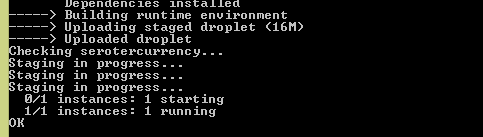
    I did another cf push with a —reset flag to make sure it accepted the updated yml file. A few seconds, later, my app shows as running.

    2013.06.19cf03

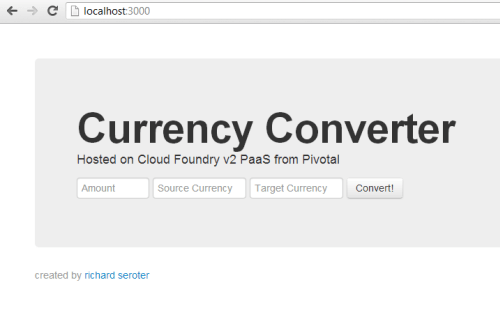
    Sure enough, visiting the application URL pulls up the (working) page.

    2013.06.19cf06

    Interacting with the app from the console

    Congrats to me, I’ve got an app deployed! The new cf tool has a lot more functionality than the old vmc tool did. But you’ll still find all the important operations for managing and maintaining your applications. For instance, I can easily see all the applications that I’ve deployed using cf apps.

    2013.06.19cf04

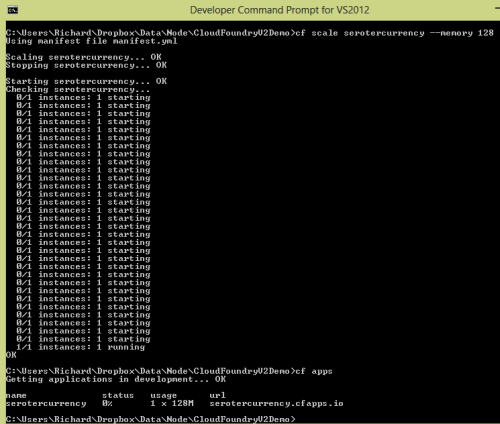
    Scaling an application was simple. I simply ran cf scale and provided the application name, which dimension to scale (app instances, memory, storage) and the amount.

    2013.06.19cf05

    Interested in the utilization statistics of an application? Just run cf stats to see how much CPU, memory and disk is being consumed.

    2013.06.19cf07

    All very good stuff. Take a look at all the commands that cf has to offer. Next up, let’s see the fancy new portal for managing Pivotal-hosted Cloud Foundry v2 applications.

    Interacting with the app from the Pivotal management portal

    Up until now, most of my interactions with Cloud Foundry environments were through vmc. Many hosting vendors created GUI layers on top, but I honestly didn’t spend too much time with them. The new Cloud Foundry management experience that Pivotal offers is pretty slick. While not nearly as mature yet as other leading PaaS portals, it shows the start of a powerful interface. Note that this web-based interface will likely be Pivotal-specific and not checked in to the public source code repository. It represents a value-added feature for those who come to Pivotal for their commercial Cloud Foundry offering.

    2013.06.19cf08

    Cloud Foundry v2 has the concepts of organizations, spaces, and applications. I have an organization called “Seroter”, and default “spaces” for development, staging, and production. I can add and delete spaces as I see fit. This structure provides a way to segment access to applications so that companies can effectively control who has what type of access to various application containers. In my development space, you can see that I have a single application, and a single user.

    2013.06.19cf09

    I can invite more users to my space, and assign them one of a handful of pre-defined (and fixed) roles. There are broad organization-based roles (organization manager, billing manager, auditing manager), and three space-based roles (space manager, space developer, space auditor).

    2013.06.19cf10

    Drilling into an individual application shows me the health of the application, instance count, bound services, utilization statistics, uptime, and more.

    2013.06.19cf11

    It doesn’t appear that Pivotal is offering their own hosted services as before (databases like PostgreSQL and MongoDB; messaging services like RabbitMQ) and is leveraging a marketplace of cloud providers. If you choose to add a new service – or click the “marketplace” link on the top navigation – you’re taken to a view where a handful of providers offer a variety of application services.

    2013.06.19cf12

    Summary

    There’s lots to like about Cloud Foundry v2. It’s undergone some significant plumbing changes while retaining a familiar developer experience. The cf tool is a big upgrade from the previous tool, and the Pivotal management portal provides a very nice interface that flexes some of the structural changes (e.g. spaces) introduced in Cloud Foundry v2. For companies looking for a public or private PaaS that works well with multiple languages/frameworks, Cloud Foundry should absolutely be on your list.

  • IaaS vs. PaaS: Deploying a Web Application

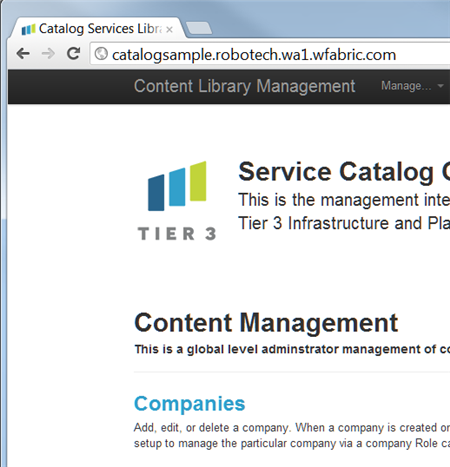
    My buddy and partner-in-crime, Adron Hall, built a web application that we at Tier 3 plan on using for our internal/external product catalog. He initially deployed the app (ASP.NET + SQL Server DB) to our IaaS fabric, but wanted to compare THAT experience with the steps to deploy to our PaaS (Web Fabric) instead. So, while Adron has written up his experience on the IaaS side, I thought I’d throw out my experience taking an existing web app and deploying it to our PaaS.

    Adron had the source control for the application in a private Github and I used the very nice Github for Windows to pull it.

    2012.07.06paas01

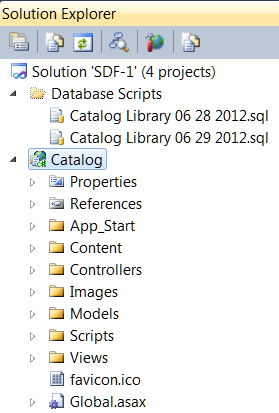
    After opening the solution in Visual Studio, I could see that Adron’s solution had four projects (and a set of database creation scripts, because he’s a nice guy).

    2012.07.06paas02

    The primary project, Catalog, was an ASP.NET MVC application that interacts with a SQL Server database for storing and returning details about our products. To successfully push this to the Tier 3 Web Fabric (or any PaaS, really), I needed to do three things:

    1. Deploy this application to the PaaS fabric.
    2. Create the database in a PaaS-accessible repository.
    3. Update (if necessary) the database connection string for the web application.

    That SHOULD be a lot simpler than building out a multi-node server environment, installing software, opening ports and all that infrastructure stuff that gets in the way of deploying cool software. It’s definitely necessary to have SOMEONE doing all that great infrastructure stuff, but preferably, not me. Let’s walk through the three steps I just outlined.

    1. Deploy this application to the PaaS fabric.

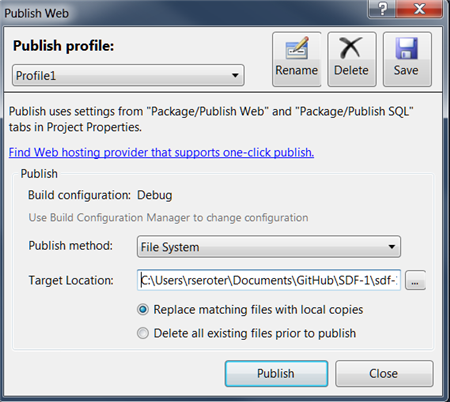
    The firs thing that I did was right-click the Catalog project in Visual Studio and select “Publish.” This built the project and gave me a deploy-ready version of the application on my file system.

    2012.07.06paas03

    Unlike other PaaS platforms that are completely multi-tenant, a Tier 3 Web Fabric environment is instantiated for each customer. Anybody can go into our Control Portal and provision themselves a dedicated PaaS that supports all sorts of frameworks/languages while being physically separated from other customers. In this case, Adron created a Web Fabric environment that this web application would get deployed to. I opened up the Cloud Foundry Explorer tool, added an entry (with credentials) for the Web Fabric environment, and chose to “Push” my application.

    2012.07.06paas04

    After choosing a name for my application and selecting the provisioning size, I was good to go.

    2012.07.06paas06

    In a few seconds, my application was running on Web Fabric. From start to finish, this first step (“deploy app to PaaS”) took less than three minutes.

    2012.07.06paas07

    2. Create the database in a PaaS-accessible repository

    Our application was up and running but clicking through it reveals the obvious: there’s no database yet! This next step required me to provision a database that my web application could access. Fortunately for me, “SQL Server databases” is one of the many Web Fabric services available to developers. From the Cloud Foundry Explorer, I added an instance of this database service.

    2012.07.06paas08

    With the service created, I bound it to my CatalogSample application. Binding a service to an application caused my application’s web.config to get updated with connection details for the (database) service.

    2012.07.06paas09

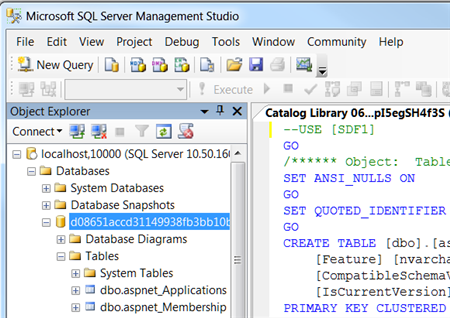
    I wanted to run Adron’s database scripts against the instance so that I could get the tables our application needed, so I took advantage of the Cloud Foundry Caldecott technology which lets you tunnel into a service and interact with it. In this case, it’s very easy to create a quick connection to my SQL Server service, and then use the SQL Management Studio against my database.

    2012.07.06paas10

    With my tunnel up and running, and credentials returned, I could then open up SQL Management Studio and connect. After running Adron’s script, I then saw a multiple of tables in my database.

    2012.07.06paas11

    At this point, I had my application deployed and database provisioned. This particular step took about 3 minutes total. In the final step, I needed to update the connection strings in Adron’s web application so that they pointed to my Web Fabric database service.

    3. Update (if necessary) the database connection string for the web application.

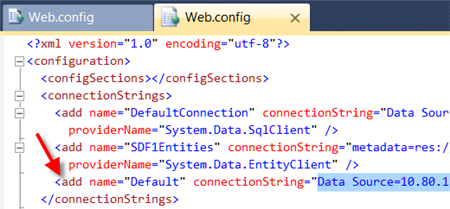
    As I mentioned earlier, when you bind a Web Fabric application service to an application, the application’s configuration file gets updated with connection details. What this means is that a new connection string named “Default” is added to the web.config. If you already have one named “Default”, then that connection string is overwritten with the details for the Web Fabric database. This is GREAT when you want to develop against a local DB, but be confident that the push to a public PaaS won’t require code/config changes.

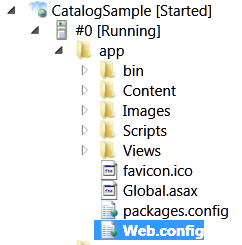
    So how did I get ahold of this new connection string? From the Cloud Foundry Explorer, I browsed to my application and opened the web.config file.

    2012.07.06paas12

    I could see the new, appended “Default” connection string in the Web Fabric application.

    2012.07.06paas13

    I simply took that connection string and replaced the values in Adron’s other two connection strings. Moving forward, I’ll harass Adron into using a single “Default” connection string that gets rewritten on deployment. After republishing my application, and doing another push to Web Fabric from the Cloud Foundry Explorer, our application was now fully operational. I could browse, create, edit and delete records in this data-driven product catalog application.

    2012.07.06paas14

    This final step took me a couple minutes to complete.

    Summary

    Not every application will cleanly migrate to the cloud, or offer the right cost savings to justify the effort (as Christian Reilly pointed out in a series of tweets with me and a corresponding link to his great post on the topic). But in this exercise, I took an existing, data-driven ASP.NET MVC application and moved the entire thing to the Tier 3 Web Fabric in about 10 minutes. Don’t forget to check out Adron’s post to see how he did this deployment to an IaaS environment.

    There are reasons to take an existing application and move it to an IaaS-like environment instead of a PaaS, but as you’ve seen here, it’s REALLY straightforward to use a PaaS and avoid the messiness of the underlying hosting infrastructure!