Category: StreamInsight

  • Book’s Sample Chapter, Articles and Press Release

    The book is now widely available and our publisher is starting up the promotion machine.  At the bottom of this post is the publisher’s press release.  Also, we now have one sample chapter online (Mike Sexton’s Debatching Bulk Data) as well as two articles representing some of the material from my Content Based Routing chapter (Part 1 – Content Based Routing on the Microsoft Platform, Part II – Building the Content Based Routing Solution on the Microsoft Platform).  This hopefully provides a good sneak peak into the book’s style.

    ## PRESS RELEASE ##

    Solve business problems on the Microsoft application platform using Packt’s new book

     Applied Architecture Patterns on the Microsoft Platform is a new book from Packt that offers an architectural methodology for choosing Microsoft application platform technologies. Written by a team of specialists in the Microsoft space, this book examines new technologies such as Windows Server AppFabric, StreamInsight, and Windows Azure Platform, and their application in real-world solutions.

     Filled with live examples on how to use the latest Microsoft technologies, this book guides developers through thirteen architectural patterns utilizing code samples for a wide variety of technologies including Windows Server AppFabric, Windows Azure Platform AppFabric, SQL Server (including Integration Services, Service Broker, and StreamInsight), BizTalk Server, Windows Communication Foundation (WCF), and Windows Workflow Foundation (WF).

     This book is broken down into 4 different sections. Part 1 starts with getting readers up to speed with various Microsoft technologies. Part 2 concentrates on messaging patterns and the inclusion of use cases highlighting content-based routing. Part 3 digs into bulk data processing, and multi-master synchronization. Finally the last part covers performance-related patterns including low latency, failover to the cloud, and reference data caching.

     Developers can learn about the core components of BizTalk Server 2010, with an emphasis on BizTalk Server versus Windows Workflow and BizTalk Server versus SQL Server. They will not only be in a position to develop their first Windows Azure Platform AppFabric, and SQL Azure applications but will also learn to master data management and data governance of SQL Server Integration Services, Microsoft Sync Framework, and SQL Server Service Broker.

     Architects, developers, and managers wanting to get up to speed on selecting the most appropriate platform for a particular problem will find this book to be a useful and beneficial read. This book is out now and is available from Packt. For more information, please visit the site.

    [Cross posted on Book’s dedicated website]

  • And … The New Book is Released

    Nearly 16 months after a book idea was born, the journey is now complete.  Today, you can find our book, Applied Architecture Patterns on the Microsoft Platform, in stock at Amazon.com and for purchase and download at the Packt Publishing site.

    I am currently in Stockholm along with co-authors Stephen Thomas and Ewan Fairweather delivering a 2 day workshop for the BizTalk User Group Sweden.  We’re providing overviews of the core Microsoft application platform technologies and then excerpting the book to show how we analyzed a particular use case, chose a technology and then implemented it.  It’s our first chance to see if this book was a crazy idea, or actually useful.  So far, the reaction has been positive.  Of course, the Swedes are such a nice bunch that they may just be humoring me.

    I have absolutely no idea how this book will be received by you all.  I hope you find it to be a unique tool for evaluating architecture and building solutions on Microsoft technology.  If you DON’T like it, then I’ll blame this book idea on Ewan.

  • Interview Series: Four Questions With … Mark Simms

    Happy September and welcome to the 23rd interview with a thought leader in the “connected technology” space.  This month I grabbed Mark Simms who is member of Microsoft’s AppFabric Customer Advisory team, blogger, author and willing recipient of my random emails.

    Mark is an expert on Microsoft StreamInsight and has a lot of practical customer experience with the product.  Let’s see what he has to say.

    Q: While event-driven architecture (EDA) and complex event processing (CEP) are hardly new concepts, there does seem to be momentum in these areas.  While typically a model for financial services, EDA and CEP have gained a following in other arenas as well.  To what might you attribute this increased attention in event processing and which other industries do you see taking advantage of this paradigm?

    A: I tend to think about technology in terms of tipping points, driven by need.  The financial sector, driven by the flood of market data, risks and trades was the first to hit the challenge of needing timely analytics (and by need, we mean worth the money to get), spawning the development of a number of complex event processing engines.  As with all specialized engines, they do an amazing job within their design sphere, but run into limitations when you try to take them outside of their comfort zone.  At the same time, technology drivers such as (truly) distributed computing, scale-out architectures and “managed by somebody” elastic computing fabrics (ok, ok, I’ll call it the “Cloud”) have led to an environment wherein the volume of data being created is staggering – but the volume of information that can be processed (and stored, etc) hasn’t.

    Whereas I spend most of my time lately working on two sectors (process control – oil & gas, smart grids, utilities and web analytics), the incoming freight train of cloud computing is going to land the challenge of dealing with correlating nuggets of information spread across both space and time into some semblance of coherence.  In essence, finding the proverbial needle in the stack of needles tumbling down an escalator is coming soon to a project near you.

    Q: It’s one thing to bake the publication and consumption of events directly into a new system.  But what are some strategies and patterns for event-enabling existing packaged or custom applications?

    A: This depends both on the type of events that are of interest, and the overall architecture of the system.  Message based architectures leveraging a rich subscription infrastructure are an ideal candidate for ease of event-enabling.  CEP engines can attach to key endpoints and observe messages and metadata, inferring events, patterns, etc.  For more monolithic systems there are still a range of options.  Since very little of interest happens on a single machine (other than StarCraft 2’s single player campaign), there’s almost always a network interface that can be tapped into.  As an example on our platform, one might leverage WCF interceptors to extract events from the metadata of a given service call and transfer the event to a centralized StreamInsight instance for processing.  Another approach that can be leveraged with most applications on the Microsoft platform is to extract messages from ETW logs and infer events for processing – between StreamInsight’s ability to handle real-time and historical data, this opens up some very compelling approaches to optimization, performance tuning, etc, for Windows applications.

    Ultimately, it comes down to finding some observable feed of data from the existing system and converting that feed into some usual stream of events.  If the data simply doesn’t exist in an accessible form, alas, StreamInsight does not ship with magic event pixie dust.

    Q: Microsoft StreamInsight leverages a few foundational Microsoft technologies like .NET and LINQ.  What are other parts of the Microsoft stack (applications or platforms) that you see complimenting StreamInsight, and how?

    A: StreamInsight is about taking in a stream of data, and extracting relevant information from that data by way of pattern matching, temporal windows, exception detection and the like.  This implies two things – data comes from somewhere, and information goes somewhere else.  This opens up a world wherein pretty much every technology under the fluorescent lamps is a candidate for complimenting StreamInsight.  Rather than get into a meandering and potentially dreadfully boring bulleted list of doom, here’s some of (but not the only :)) top of mind technologies I think about:

    • SQL Server.  I’ve been a SQL Server guy for the better part of a decade now (after a somewhat interminable sojourn in the land of Oracle and mysql), and for pretty much every project I’m involved with that’s where some portion of the data lives.  Either as the repository for reference data, destination for filtered and aggregate results, or the warehouse of historical data to mine for temporal patterns (think ETL into StreamInsight) the rest of SQL Server suite of technology is never far away.  In a somewhat ironic sense, as I write up my answers, I’m working on a SQL output adapter in the background leveraging SQL Service Broker for handling rate conversion and bursty data.
    • App Fabric Cache. Filling a similar complementary role in terms of a data repository as SQL Server (in a less transactional & durable sense), I look to AppFabric Cache to provide a distributed store for reference data, and a “holding pond” of sorts to handle architectural patterns such as holding on to 30 minutes worth of aggregated results to “feed” newly connecting clients.
    • SharePoint and Silverlight.  Ultimately, every bit of the technology is at some point trying to improve the lot of its users – the fingers and eyeballs factor.  Great alignment SharePoint, combined with Silverlight for delivering rich client experiences (a necessity for visualizing fast-moving data – the vast majority of all visualization tools and frameworks assume that the data is relatively stationary) will be a crucial element in putting a face on the value that StreamInsight delivers.

    Q [stupid question]: They say you can’t teach old dogs new tricks.  I think that in some cases that’s a good thing.  I recently saw a television commercial for shaving cream and noticed that the face-actor shaved slightly differently than I do.  I wondered if I’ve been doing it wrong for 20 years and tried out the new way.  After stopping the bleeding and regaining consciousness, I decided there was absolutely no reason to change my shaving strategy.  Give us an example or two of things that you’re too old or too indifferent to change.

    A: One of the interesting things about being stuck in a rut is that it’s often a very comfortable rut.  If I wasn’t on the road, I’d ask my wife who would no doubt have a (completely accurate) laundry list of these sorts of habits. 

    One of the best aspects of my job on the AFCAT team is our relentless inquisitive drive to charge out into unknown technical territory.  I’m never happier than when I’m learning something new, whether it be figuring out how to apply a new technology or trying to master a new recipe or style of cuisine.  Coupled with a recent international relocation that broke a few of my more self-obvious long standing habits (Tom Horton’s coffee, ketchup chips, a 10-year D&D campaign), this is probably the hardest question to answer.

    With the aforementioned lack of a neutral opinion to fall back on, I’m going to have to pull a +1 on your shaving example – I’ve been using the same shaving cream for almost two decades now, and the last time I tried switching up, I reconfirmed that I am indeed rather violently allergic to every single other shaving balm on the planet 😉

    Thanks Mark.  Keep an eye on his blog and the AppFabric CAT team blog for more in-depth details on the Microsoft platform technologies.

    Share

  • Do you know the Microsoft Customer Advisory Teams? You should.

    For those who live and work with Microsoft application platform technologies, the Microsoft Customer Advisory Teams (CAT) are a great source of real-world info about products and technology.  These are the small, expert-level teams whose sole job is to make sure customers are successful with Microsoft technology.  Last month I had the pleasure of presenting to both the SQL CAT and Server AppFabric CAT teams about blogging and best practices and thought I’d throw a quick plug out for these groups here.

    First off, the SQL CAT team (dedicated website here) has a regular blog of best practices, and link to the best whitepapers for SQL admins, architects, and developers.  I’m not remotely a great SQL Server guy, but I love following this team’s work and picking up tidbits that make me slightly more dangerous at work.  If you actually need to engage these guys on a project, contact your Microsoft rep.

    As for the Windows Server AppFabric CAT team, they also have a team blog with great expert content.  This team, which contains the artists-formerly-known-as-BizTalk-Rangers, provides deep expertise on BizTalk Server, Windows Server AppFabric, WCF, WF, AppFabric Caching and StreamInsight.  You’ll find a great bunch of architects on this team including Tim Wieman, Mark Simms, Rama Ramani, Paolo Salvatori and more, all led by Suren Machiraju and the delightfully frantic Curt Peterson. They’ve recently produced posts about using BizTalk with the AppFabric Service Bus, material on the Entity Framework,  and a ridiculously big and meaty post from Mark Simms about building StreamInsight apps.

    I highly recommend subscribing to both these team blogs and following SQL CAT on twitter (@sqlcat).

    Share

  • Sending StreamInsight Events to BizTalk Through New Web (SOAP/REST) Adapter

    One StreamInsight usage scenario frequently discussed by the product team involves sending a subset of events (or aggregated complex events) to the Enterprise Service Bus for additional processing and distribution.  As I’ve mentioned before, StreamInsight doesn’t come with any out-of-the-box adapters.  So if you want to make this usage scenario a reality, it’s up to you to figure out how to do it.  In this post, I hope to give you a head start (and code) to making this happen.  I’ve built a StreamInsight web adapter which lets StreamInsight send either SOAP or REST-style messages to an endpoint. We can use this adapter to send messages to BizTalk, or any web endpoint.  Buckle up, this is a long one.

    Designing the Adapter

    In the StreamInsight SDK  you’ll find some solid examples of StreamInsight adapters that you can use as a template to build your own.  I’ve built a few so far myself and demonstrate how to build an MSMQ publication adapter in my new book.  But I hadn’t built a consumer adapter yet, so I had to think about the right design strategy.

    The first design choice was whether to build a typed or untyped adapter.  While typed adapters are easier to craft since you are building to a known data payload, you don’t get any reuse out of the adapter.  So, the first (easy) decision was to build an untyped adapter that could send any payload to a web endpoint.

    The second consideration was how to call the downstream web endpoint.  I decided to use the System.Net.HttpWebRequest object to publish the payload and not try to do an IOC pattern with proxy classes.  By using this mechanism, I can apply the same code to call a SOAP endpoint or invoke various HTTP verbs on a RESTful endpoint.

    Finally, I had to decide how to actually convert the StreamInsight events to the expected XML payload of my web endpoints.  I figured that leveraging XSLT was a solid plan.  I can take the inbound event, and via a runtime configuration property, apply an XML transformation stylesheet to the event and produce output that my web endpoint requires.

    Ok, with all of these considerations in place, let’s build the adapter.  Note that you are completely allowed to disagree with any of the choices above and modify my adapter to fit your needs.

    Building the Adapter

    First off, I built the adapter’s configuration object.  These are the settings that we apply at runtime when we bind a StreamInsight query to an adapter.  Consider this to be reference data that we don’t want to hardcode into our adapter.

    public struct WebOutputConfig
        {
            public string XslPath { get; set; }
            public string ServiceAddress { get; set; }
            public string HttpMethod { get; set; }
            public string SoapAction { get; set; }
            public bool IsSoap { get; set; }
        }
    

    Note that my configuration accepts the path to an XSLT file, the URL of the target service, the HTTP method to apply, and if we are calling a SOAP endpoint, what the SOAP Action value is.

    Next I create my actual adapter class.  It inherits from the untyped PointOutputAdapter class.

    public class WebPointOutput: PointOutputAdapter
        {
            //store reference to CEP event
            private CepEventType bindTimeEventType;
            private string serviceAddress;
            private string httpMethod;
            private string soapAction;
            private bool isSoap;
            private XslCompiledTransform consumerXform;
    
            public WebPointOutput(WebOutputConfig configInfo, CepEventType eventType)
            {
                this.bindTimeEventType = eventType;
                this.serviceAddress = configInfo.ServiceAddress;
                this.httpMethod = configInfo.HttpMethod;
                this.soapAction = configInfo.SoapAction;
                this.isSoap = configInfo.IsSoap;
    
                //load up transform
                consumerXform = new XslCompiledTransform(false);
                consumerXform.Load(configInfo.XslPath);
            }
      }
    

    The adapter stores internal references to the configuration values it received and the constructor instantiates the XSL transformation object using the XSL path passed into the adapter.

    Before writing the primary operation which calls the service, we need a helper function which takes the key/value pairs from the CEP event and creates a dictionary out of them.  We will later convert this dictionary into a generic XML structure that we’ll apply our XSLT against.

    private Dictionary<string, string> GetCepEventFields(PointEvent currentEvent)
            {
                Dictionary<string, string> cepFields = new Dictionary<string, string>();
    
                for (int ordinal = 0; ordinal < bindTimeEventType.FieldsByOrdinal.Count; ordinal++)
                {
                    CepEventTypeField evtField = bindTimeEventType.FieldsByOrdinal[ordinal];
                    cepFields.Add(evtField.Name, currentEvent.GetField(ordinal).ToString());
                }
                return cepFields;
            }
    

    See above that I loop through all the fields in the event and add each one (name and value) to a dictionary object.

    Now we can build our primary function which takes the StreamInsight event and calls the web endpoint.  After the code snippet, I’ll comment on a few key points.

    private void ConsumeEvents()
      {
          //create new point event
          PointEvent currentEvent = default(PointEvent);
          try
          {
              while (true)
              {
                  if (AdapterState.Stopping == AdapterState)
                  {
                     Stopped();
                     return;
                  }
    
                  if (DequeueOperationResult.Empty == Dequeue(out currentEvent))
                 {
                     Ready();
                     return;
                  }
    
                 //only publish insert events and ignore CTIs
                 if (currentEvent.EventKind == EventKind.Insert)
                 {
                    // ** begin service call
                    //convert CEP message to XML for transformation
                    XDocument intermediaryDoc = new XDocument(
                    new XElement("Root",
                    GetCepEventFields(currentEvent).Select(field => new XElement("Property",
                        new XElement("Name", field.Key),
                        new XElement("Value", field.Value)
                        ))));
    
                    //transform CEP event fields to output format
                    XDocument returnDoc = new XDocument();
                    using (XmlWriter writer = returnDoc.CreateWriter())
                    {
                      consumerXform.Transform(intermediaryDoc.CreateReader(), (XsltArgumentList)null, writer);
                    }
    
                    //call service
                    HttpWebRequest req = (HttpWebRequest)HttpWebRequest.Create(serviceAddress);
                    req.Method = httpMethod;
                    req.ContentType = "text/xml";
                    if (isSoap)
                        req.Headers.Add("SOAPAction", soapAction);
    
                    using (Stream reqStream = req.GetRequestStream())
                    {
                        var bytes = Encoding.UTF8.GetBytes(returnDoc.ToString());
                        reqStream.Write(bytes, 0, bytes.Length);
                        reqStream.Close();
                    }
    
                    var resp = (HttpWebResponse)req.GetResponse();
                   }
    
                 // Every received event needs to be released.
                 ReleaseEvent(ref currentEvent);
             }
          }
          catch (AdapterException e)
          {
             System.IO.File.WriteAllText(
                @"C:\temp\" + System.Guid.NewGuid().ToString() + "_eventerror.txt", "Error: " + e.ToString());
           }
       }
    

    First, notice that I do NOT emit CTI events.  Next see that I use a bit of LINQ to take the results of the event-to-dictionary conversion and create an XML document (XDocument) consisting of name/value pairs.  I then take this “intermediary XML” and pass it through an XslCompiledTransform using whichever XSLT was provided during adapter configuration.  The resulting XML is then streamed to the web endpoint via the HttpWebRequest object.  There are probably performance improvements that can be done here, but hey, it’s a proof-of-concept!

    The final piece of this adapter is to fill in the required “start” and “resume” operations.

    public override void Resume()
            {
                new Thread(this.ConsumeEvents).Start();
            }
    
            public override void Start()
            {
                new Thread(this.ConsumeEvents).Start();
            }
    
            protected override void Dispose(bool disposing)
            {
                base.Dispose(disposing);
            }
    

    Finally, I have to create an adapter factory which spins up my adapter when the StreamInsight query gets started up.  Since we are using an untyped adapter, there isn’t any logic needed to pick the “right” output adapter.

    public class WebOutputFactory : IOutputAdapterFactory<WebOutputConfig>
     {
         public OutputAdapterBase Create(WebOutputConfig configInfo, EventShape eventShape, CepEventType cepEventType)
         {
             OutputAdapterBase adapter = default(OutputAdapterBase);
             adapter = new WebPointOutput(configInfo, cepEventType);
    
             return adapter;
         }
     }
    

    With that, we have a complete StreamInsight consumer adapter.

    Using the Adapter

    How can we use this fancy, new adapter?  In one scenario, we can use StreamInsight to process a high volume of events, filter out the “noise”, and amplify events of specific interest.  Or, we can empower StreamInsight to look for trends within the stream over a particular time duration and share these complex events whenever one is encountered.

    2010.07.08StreaminsightBts03

    For this post, I’ll show the latter example.  I have a StreamInsight application which generates call center events every half second and sends them to an embedded StreamInsight server.   I do some aggregation over a window of time and if a complex event is detected, the web adapter is called and BizTalk receives the message for further processing.  Note that nothing prevents me from substituting WCF Services or Azure-based services for BizTalk in this case.  Well, except for security which I have NOT added to my adapter.  Didn’t figure out a clean way to store and send credentials yet.

    BizTalk Setup

    Let’s set up the BizTalk application that StreamInsight will publish to.  First I created a simple schema that represents the event data I want BizTalk to receive.

    2010.07.08StreaminsightBts02

    In real life I’d add an orchestration or two to process the event data, but this post is already ginormous and you all get the point.  So, let’s jump right to exposing this schema as part of a BizTalk service contract.  I walked through the BizTalk WCF Publishing Wizard and produced a one-way service that takes in my CallThresholdEvent message.

    2010.07.08StreaminsightBts01

    Once the service is created, I built the requisite receive port/location and a send port which subscribes on the CallThresholdEvent message.

    All we need now is the right XSLT to transform the CEP event message to the WCF service contract message format.  How do we get that? The easiest way to get the correct XML is to invoke the service in the WCF Test Client and steal the SOAP payload it builds to call the service.  I pointed the WCF Test Client to my endpoint and invoked the service.

    2010.07.08StreaminsightBts04

    Once I confirmed that the service worked (and emitted a file from the send port), I switched the view from “formatted” to “xml” and could view the XML that was sent across the wire.
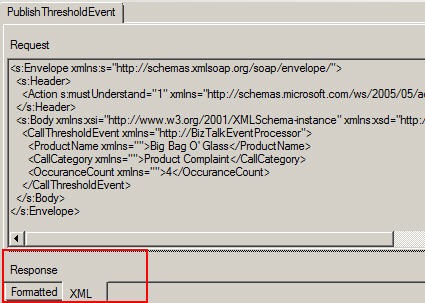
    2010.07.08StreaminsightBts05

    I took the “request” XML and created a new XSLT file with this request structure created in the root template.

    <xsl:template match="*">
        <s:Envelope xmlns:s="http://schemas.xmlsoap.org/soap/envelope/">
          <s:Header>
            <!--<Action s:mustUnderstand="1" xmlns="http://schemas.microsoft.com/ws/2005/05/addressing/none">PublishThresholdEvent</Action>-->
          </s:Header>
          <s:Body xmlns:xsi="http://www.w3.org/2001/XMLSchema-instance" xmlns:xsd="http://www.w3.org/2001/XMLSchema">
            <CallThresholdEvent xmlns="http://BizTalkEventProcessor">
              <ProductName xmlns="">
                <xsl:value-of select="Property[Name = 'EvtProd']/Value"/>
              </ProductName>
              <CallCategory xmlns="">
                <xsl:value-of select="Property[Name = 'EvtType']/Value"/>
              </CallCategory>
              <OccuranceCount xmlns="">
                <xsl:value-of select="Property[Name = 'EvtCount']/Value"/>
              </OccuranceCount>
              <TimeReceived xmlns=""></TimeReceived>
            </CallThresholdEvent>
          </s:Body>
        </s:Envelope>
      </xsl:template>
    

    Note that you should NOT send the Action header as WCF takes care of that and the service endpoint barfs with an HTTP 500 if you send it.  It also takes roughly 96 hours to figure out that this is the problem.  Consider yourself warned.

    At this point, I have all I need in BizTalk to call the service successfully.

    StreamInsight Setup

    The first query in my StreamInsight application performs an aggregation of events over a “tumbling” window.

    var inputStream = CepStream<CallCenterRequestEventType>.Create("input", typeof(CallCenterAdapterFactory), config, EventShape.Point);
    
     var callTypeCount =
              from w in inputStream
              group w by new { w.RequestType, w.Product } into appGroup
              from x in appGroup.TumblingWindow(
                      TimeSpan.FromSeconds(15),
                      HoppingWindowOutputPolicy.ClipToWindowEnd)
               select new EventTypeSummary
               {
                   EvtType = appGroup.Key.RequestType,
                   EvtProd = appGroup.Key.Product,
                   EvtCount = x.Count()
                };
    

    In the query above, I take the call center event input stream and put the incoming events into groups based on the event type (e.g. “Info Request”, “Product Complaint”, “Account Change”) and product the customer is calling about.  I base these groups on a tumbling window that lasts 15 seconds.  This means that the window is flushed every 15 seconds and started fresh.  I then take the output of the window grouping and put it into a new, known type named EventTypeSummary.  If I use an anonymous type here instead, I get a “System.IndexOutOfRangeException: Index was outside the bounds of the array” error.

    I next take the result of the first query and make it the input into a second query.  This one looks at any groups emitted by the first query and filters them based on a criteria my ESB is interested in.

    var callTypeThreshold =
                from summary in callTypeCount
                where summary.EvtCount > 3 && summary.EvtType == "Product Complaint"
                select summary;
    

    Above, I am looking for any “summary events” where the call type is a product complaint and there have been more than 3 of them for a specific product (during a given window).

    Before I register my query, I need to define the StreamInsight adapter configuration for my web endpoint.  Recall above that we defined a structure to hold parameters that we will pass into the adapter at runtime.

    var webAdapterBizTalkConfig = new WebOutputConfig()
     {
        HttpMethod = "POST",
        IsSoap = true,
        ServiceAddress = "http://localhost/BizTalkEventProcessingService/BizTalkEventProcessingService.svc",
        SoapAction = "PublishThresholdEvent",
        XslPath = @"[path]\CallCenterEvent_To_BizTalkSoapService.xslt"
      };
    

    Above, you’ll see the service address pointing to my BizTalk-generated WCF endpoint, the SOAP action for my service, and a pointer to the XSLT that I created to transform the CEP event to a SOAP payload.

    Finally, I registered the query and start it.

    var allQuery = callTypeThreshold.ToQuery(
                             myApp,
                             "Threshold Events",
                             string.Empty,
                             typeof(WebOutputFactory),
                             webAdapterBizTalkConfig,
                             EventShape.Point,
                             StreamEventOrder.FullyOrdered);
    

    You can see that I pass in my web adapter factory type and the adapter configuration properties defined earlier.

    The Result

    When all this is in place, I start up my StreamInsight application, begin generating events, and can observe BizTalk messages getting written to disk.
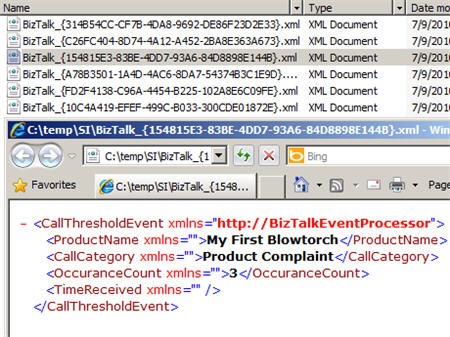
    2010.07.08StreaminsightBts06

    In this post we saw how I can link StreamInsight with BizTalk Server through a WCF channel.  You can grab the source code for the StreamInsight Web Adapter here. I’ve done some basic testing of the adapter against both RESTful and SOAP services, but there are great odds that you’ll find something I missed.  However, it hopefully gives you a great head start when building a StreamInsight solution that emits events to web endpoints.

    Share

  • Leveraging and Managing the StreamInsight Standalone Host

    In my recent post that addressed the key things that you should know about Microsoft StreamInsight, I mentioned the multiple hosting options that are at your disposal.  Most StreamInsight examples (and documentation) that you find demonstrate the “embedded” server option where the custom application that you build hosts the StreamInsight engine in-process.  In this post, I’m going to dig into how you take advantage of the out-of-process standalone server for StreamInsight.  I’m also going to give you a little application I created that fills the gaps in the visual tooling for StreamInsight.

    If you chose to leverage the embedded server model, your code would probably start off something like this:

    //create embedded server
    using (Server server = Server.Create("RSEROTER"))
    {
    
    //create application in the embedded server
    var myApp = server.CreateApplication("SampleEvents");
    
    // .. create query, start query
    
    }
    

    This type of solution is perfectly acceptable and provides the developer with plenty of control over the way the queries are managed.  However, you don’t get the high availability and reuse that the standalone server offers.

    Creating the Host

    So how do we use the remote, standalone host?  When you install StreamInsight, you are given the option to create a server host instance.

    2010.06.27si05

    Above, you can see that I created an instance named RSEROTER.  When the installation is completed, a folder is created in the StreamInsight directory.

    2010.06.27si01

    A Windows Service is also created for this instance, and it uses a configuration file from folder created above.

    2010.06.27si02

    Configuring the Host

    To be able to start this Windows Service, you’ll have to make sure that the endpoint address referenced in the service’s configuration file matches a registered endpoint for the server.  The configuration file for this StreamInsight host looks like this:

    2010.06.27si03

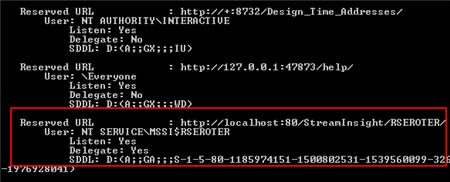
    The endpoint address for the StreamInsight Management Service needs to be one of the addresses in my server’s reserved list.  Go to a command prompt and type netsh http show urlacl to see reserved endpoints and associated accounts.  Mine looks like this:

    2010.06.27si04

    If your addresses and permissions line up, your service will start just fine. If your StreamInsight Windows Service uses a logon account that doesn’t have rights to the reserved endpoint, then the Windows Service won’t start. If the values in the configuration file and the registered endpoint list differ, the service won’t start. If you plan on using both an embedded and standalone server model concurrently, you will want to register a different URL and port for the embedded endpoints.

    In my case, I changed the user account associated with my registered endpoint so that the StreamInsight Windows Service could open the endpoint. First I deleted the existing registered entry by using netsh http delete urlacl url=http://localhost:80/StreamInsight/RSEROTER/ and then added a new entry back with the right account (Network Service in my case) via netsh http add urlacl url=http://localhost:80/StreamInsight/RSEROTER user=”Network Service”. The StreamInsight installation guide has more details on setting up the right user accounts to prevent “access is denied” errors when connecting the debugger or trying to create/read server applications.

    Considerations for Standalone Host Model

    Now that you have a StreamInsight server instance started up, what should you know? Unlike the “embedded” StreamInsight hosting model where your application starts up and runs the StreamInsight engine in process, the standalone model uses a remote connection-based strategy.  The other thing to remember is that because you are using an out-of-process service, you also have to strong-name and GAC the assemblies containing your event payload definitions and adapters. Note that if you forget to start the Windows Service, you’ll get a warning that the WCF endpoint is in a faulted state.  Finally, be aware that you can only explicitly create a management endpoint in code if you have an embedded server.

    Before I show you how to deploy queries to this standalone host, I should tell you about the management activities you CANNOT do via the only graphical tool that StreamInsight provides, the StreamInsight Event Flow Debugger.  The Debugger allows you to view existing applications, show queries included in applications, and both start and stop queries.  What you CANNOT do graphically is create applications, delete applications and delete queries.  So, I’ve built a tool that lets you do this.

    The New StreamInsight Server Manager

    Prior to writing code that connects to the StreamInsight server and deploys queries, I want to create the application container on the server.  I open up my StreamInsight Server Manager, connect to my endpoint (value read from my application’s configuration file) and choose to Create a new server application.

    2010.06.27si06

    Once you have an application, you can right-click it and choose to either Delete the application or view any queries associated with it.

    2010.06.27si07

    Coding to and Using the Standalone Server Instance

    Let’s write some code!  I’ve built a console application that creates or starts a StreamInsight query.  First off, I use a “connect” operation to link to my standalone server host.

    //connect to standalone server
    using(Server server = Server.Connect(new System.ServiceModel.EndpointAddress(@"http://localhost/StreamInsight/RSEROTER")))
    {
    
    }
    

    I then find the application that I created earlier.

    Application myApp;
    //get reference to existing application
    myApp = server.Applications["CallCenterEvents"];
    

    If my query is already on the server, than this application will just start it up.  Note that I could have also used my StreamInsight Server Manager or the Event Flow Debugger to simply start a server query.  I don’t need a custom application for that if I have a standalone server model.  But, this is what starting the query in code looks like:

    //if query already exists, just start it
    if (myApp.Queries.ContainsKey("All Events"))
    {
    Query eventQuery = myApp.Queries["All Events"];
    eventQuery.Start();
    
    //wait for keystroke to end
    Console.ReadLine();
    
    eventQuery.Stop();
    
    }
    

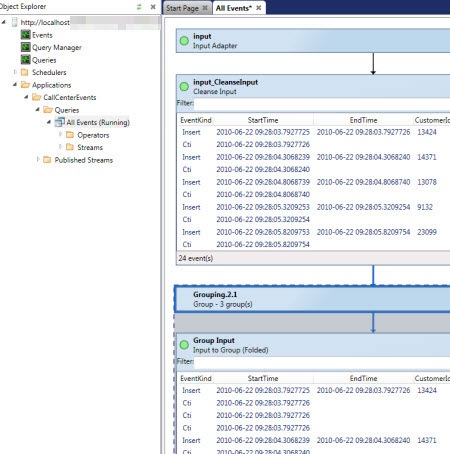
    If my query does NOT exist, then I create the query and start it up.  When I start my custom application, I can see from the StreamInsight Event Flow Debugger that my query is running.

    2010.06.27si08

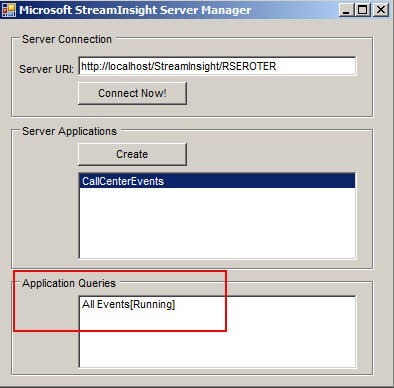
    If I flip to my StreamInsight Server Manager application, I can also see the query (and it’s status).

    2010.06.27si09

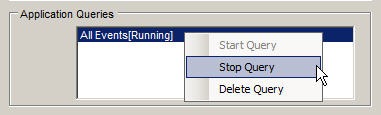
    Unlike the Event Flow Debugger, this application also lets you delete queries.

    2010.06.27si10

    Because I’m using the standalone server host option, I could choose to stop my custom application and my query is still available on the server.  I can now start and stop this query using the Event Flow Debugger or my StreamInsight Server Manager.

    2010.06.27si11

    Summary

    I expect that we’ll soon see more from Microsoft on building highly available StreamInsight solutions by using the standalone instance model.  This model is a great way to get reuse out of adapters and queries and get metadata durability in a central server host.  When using the standalone instance model you just have to remember the few things I pointed out above (e.g. using the GAC, getting the management endpoint set up right).

    You can grab the executable and source code for the StreamInsight Server Manager here.  As you can expect from me in these situations, this is hardly production code.  But, it works fairly well and solves a problem.  It also may prove a decent example of how to access and loop through StreamInsight applications and queries.  Enjoy.

    Share

  • 6 Things to Know About Microsoft StreamInsight

    Microsoft StreamInsight is a new product included with SQL Server 2008 R2.  It is Microsoft’s first foray into the event stream processing and complex event processing market that already has its share of mature products and thought leaders.  I’ve spent a reasonable amount of time with the product over the past 8 months and thought I’d try and give you a quick look at the things you should know about it.

    1. Event processing is about continuous intelligence.  An event can be all sorts of things ranging from a customer’s change of address to a meter read on an electrical meter.  When you have an event driven architecture, you’re dealing with asynchronous communication of data as it happens to consumers who can choose how to act upon it.  The term “complex event processing” refers to gathering knowledge from multiple (simple) business events into smaller sets of summary events.  I can join data from multiple streams and detect event patterns that may have not been visible without the collective intelligence. Unlike traditional database driven applications where you constantly submit queries against a standing set of data, an event processing solution deploys a set of compiled queries that the event data passes through.  This is a paradigm shift for many, and can be tricky to get your head around, but it’s a compelling way to compliment an enterprise business intelligence strategy and improve the availability of information to those who need it.
    2. Queries are written using LINQ.  The StreamInsight team chose LINQ as their mechanism for authoring declarative queries.  As you would hope, you can write a fairly wide set of queries that filter content, join distinct streams, perform calculations and much more.  What if I wanted to have my customer call center send out a quick event whenever a particular product was named in a customer complaint?  My query can filter out all the other products that get mentioned and amplify events about the target product:
      var filterQuery =
            from e in callCenterInputStream
            where e.Product == "Seroterum" select e;
      

      One huge aspect of StreamInsight queries relates to aggregation.  Individual event calculation and filtering is cool, but what if we want to know what is happening over a period of time?  This is where windows come into play.  If I want to perform a count, average, or summation of events, I need to specify a particular time window that I’m interested in.  For instance, let’s say that I wanted to know the most popular pages on a website over the past fifteen minutes, and wanted to recalculate that total every minute.  So every minute, calculate the count of hits per page over the past fifteen minutes.  This is called a Hopping Window. 

      var activeSessions = from w in websiteInputStream
                                  group w by w.PageName into pageGroup
                                  from x in pageGroup.HoppingWindow(
                                      TimeSpan.FromMinutes(15),
                                      TimeSpan.FromMinutes(1),
                                      HoppingWindowOutputPolicy.ClipToWindowEnd)
                                  select new PageSummarySummary
                                  {
                                      PageName = pageGroup.Key,
                                     TotalRequests = x.Count()
                                   };
      

      I’ll have more on this topic in a subsequent blog post but for now, know that there are additional windows available in StreamInsight and I HIGHLY recommend reading this great new paper on the topic from the StreamInsight team.

    3. Queries can be reused and chained.  A very nice aspect of an event processing solution is the ability to link together queries.  Consider a scenario where the first query takes thousands of events per second and filters out the noise and leaves me only with a subset of events that I care about.  I can use the output of that query in another query which performs additional calculations or aggregation against this more targeted event stream.  Or, consider a “pub/sub” scenario where I receive a stream of events from one source but have multiple output targets.  I can take the results from one stream and leverage it in many others.
    4. StreamInsight uses an adapter model for the input and output of data.  When you build up a StreamInsight solution, you end up creating or leveraging adapters.  The product doesn’t come with any production-level adapters yet, but fortunately there are a decent number of best-practice samples available.  In my upcoming book I show you how to build an MSMQ adapter which takes data from a queue and feeds it into the StreamInsight engine.  Adapters can be written in a generic, untyped fashion and therefore support easy reuse, or, they can be written to expect a particular event payload.  As you’d expect, it’s easier to write a specific adapter, but there are obviously long term benefits to building reusable, generic adapters.
    5. There are multiple hosting options.  If you choose, you can create an in-process StreamInsight server which hosts queries and uses adapters to connect to data publishers and consumers.  This is probably the easiest option to build, and you get the most control over the engine.  There is also an option to use a central StreamInsight server which installs as a Windows Service on a machine.  Whereas the first option leverages a “Server.Create()” operation, the latter option uses a “Server.Connect()” manner for working with the Engine.  I’m writing a follow up post shortly on how to leverage the remote server option, so stay tuned.  For now, just know that you have choices for hosting.
    6. Debugging in StreamInsight is good, but overall administration is immature.   The product ships with a fairly interesting debugging tool which also acts as the only graphical UI for doing rudimentary management of a server.  For instance, when you connect to a server (in process or hosted) you can see the “applications” and queries you’ve deployed.
      2010.6.22si01
      When a query is running, you can choose to record the activities, and then play back the stream.  This is great for seeing how your query was processed across the various LINQ operations (e.g. joins, counts). 
      2010.6.22si02
      Also baked into the Debugger are some nice root cause analysis capabilities and tracing of an event through the query steps.  You also get a fair amount of server-wide diagnostics about the engine and queries.  However, there are no other graphical tools for administering the server.  You’ll find yourself writing code or using PowerShell to perform other administrative tasks.  I expect this to be an area where you see a mix of community tools and product group samples fill the void until future releases produce a more robust administration interface.

    That’s StreamInsight in a nutshell.  If you want to learn more, I’ve written a chapter about StreamInsight in my upcoming book, and also maintain a StreamInsight Resources page on the book’s website.

  • I’m Heading to Sweden to Deliver a 2-Day Workshop

    The incomparable Mikael Håkansson has just published the details of my next visit to Sweden this September. After I told Mikael about my latest book, we thought it might be epic to put together a 2 day workshop that highlights the “when to use what” discussion.  Two of my co-authors, Stephen Thomas and Ewan Fairweather, will be joining me for busy couple of days at the Microsoft Sweden office.  This is the first time that Stephen and Ewan have seen my agenda, so, surprise guys!

    We plan to summarize each core technology in the Microsoft application platform and then dig into six of the patterns that we discuss in the book.  I hope this is a great way to introduce a broad audience to the nuances of each technology and have a spirited discussion of how to choose the best tool for a given situation.

    If other user groups would be interested in us repeating this session, let me know.  We take payment in the form of plane tickets, puppies or gold bullion.

    Share

  • Announcing My New Book: Applied Architecture Patterns on the Microsoft Platform

    So my new book is available for pre-order here and I’ve also published our companion website. This is not like any technical book you’ve read before.  Let me back up a bit.

    Last May (2009) I was chatting with Ewan Fairweather of Microsoft and we agreed that with so many different Microsoft platform technologies, it was hard for even the most ambitious architect/developer to know when to use which tool.  A book idea was born.

    Over the summer, Ewan and I started crafting a series of standard architecture patterns that we wanted to figure out which Microsoft tool solved best.  We also started the hunt for a set of co-authors to bring expertise in areas where we were less familiar.  At the end of the summer, Ewan and I had suckered in Stephen Thomas (of BizTalk fame), Mike Sexton (top DB architect at Avanade) and Rama Ramani (Microsoft guy on AppFabric Caching team).   All of us finally pared down our list of patterns to 13 and started off on this adventure.  Packt Publishing eagerly jumped at the book idea and started cracking the whip on the writing phase.

    So what did we write? Our book starts off by briefly explaining the core technologies in the Microsoft application platform including Windows Workflow Foundation, Windows Communication Foundation, BizTalk Server, SQL Server (SSIS and Service Broker), Windows Server AppFabric, Windows Azure Platform and StreamInsight.  After these “primer” chapters, we have a discussion about our Decision Framework that contains our organized approach to assessing technology fit to a given problem area.  We then jump into our Pattern chapters where we first give you a real world use case, discuss the pattern that would solve the problem, evaluate multiple candidate architectures based on different application technologies, and finally select a winner prior to actually building the “winning” solution.

    In this book you’ll find discussion and deep demonstration of all the key parts of the Microsoft application platform.  This book isn’t a tutorial on any one technology, but rather,  it’s intended to provide the busy architect/developer/manager/executive with an assessment of the current state of Microsoft’s solution offerings and how to choose the right one to solve your problem.

    This is a different kind of book. I haven’t seen anything like it.  Either you will love it or hate it.  I sincerely hope it’s the former, as we’ve spent over a year trying to write something interesting, had a lot of fun doing it, and hope that energy comes across to the reader.

    So go out there and pre-order, or check out the site that I set up specifically for the book: http://AppliedArchitecturePatterns.com.

    I’ll be sure to let you all know when the book ships!

  • Microsoft’s Strategy of “Framework First”, “Host Second”

    I’ll say up front that this post is more of just thoughts in my head vs. any deep insight. 

    It hit me on Friday (as a result of a discussion list I’m on) that many of the recent additions to Microsoft’s application platform portfolio are first released as frameworks, and only later are afforded a proper hosting environment.

    We saw this a few years ago with Windows Workflow, and to a lesser extent, Windows Communication Foundation.  In both cases, nearly all demonstration showed a form of self-hosting, primarily because that was the most flexible development choice you had.  However, it was also the most work and least enterprise-ready choice you had.  With WCF, you could host in IIS, but it hardly provided any rich configuration or management of services.

    Here in 2010, we finally get a legitimate host for both WCF and WF in the form of the Windows Server AppFabric (“Dublin”) environment.  This should make the story for WF and WCF significantly more compelling. But we’re in the midst of two new platform technologies from Microsoft that also have less than stellar “host” providers.  With the Windows Azure AppFabric Service Bus, you can host on-premise endpoints and enable a secure, cloud-based relay for external consumers.  Really great stuff.  But, so far, there is no fantastic story for hosting these Service Bus endpoints on-premise.  It’s my understanding that the IIS story is incomplete, so you either self-host it (Windows Service, etc) or even use something like BizTalk to host it. 

    We also have StreamInsight about to come out.  This is Microsoft’s first foray into the Complex Event Processing space, and StreamInsight looks promising.  But in reality, you’re getting a toolkit and engine.  There’s no story (yet) around a centrally managed, load balanced, highly available enterprise server to host the engine and its queries.  Or at least I haven’t seen it.  Maybe I missed it.

    I wonder what this will do to adoption of these two new technologies.  Most anyone will admit that uptake of WCF and WF has been slow (but steady), and that can’t be entirely attributed to the hosting story, but I’m sure in WF’s case, it didn’t help.

    I can partially understand the Microsoft strategy here.  If the underlying technology isn’t fully baked, having a kick-ass host doesn’t help much.  But, you could also stagger the release of capabilities in exchange for having day-1 access to an enterprise-ready container.

    Do you think that you’d be less likely to deploy StreamInsight or Azure Service Bus endpoints without a fully-functional vendor-provided hosting environment?

    Share