Category: StreamInsight

  • January 2013 Trip to Europe to Speak on (Cloud) Integration, Identity Management

    In a couple weeks, I’m off to Amsterdam and Gothenburg to speak at a pair of events. First, on January 22nd I’ll be in Amsterdam at an event hosted by middleware service provider ESTREME. There will be a handful of speakers, and I’ll be presenting on the Patterns of Cloud Integration. It should be a fun chat about the challenges and techniques for applying application integration patterns in cloud settings.

    Next up, I’m heading to Gothenburg (Sweden) to speak at the annual Integration Days event hosted by Enfo Zystems. This two day event is held January 24th and 25th and features multiple tracks and a couple dozen sessions. My session on the 24th, called Cross Platform Security Done Right, focuses on identity management in distributed scenarios. I’ve got 7 demos lined up that take advantage of Windows Azure ACS, Active Directory Federation Services, Node.js, Salesforce.com and more. My session on the 25th, called Embracing the Emerging Integration Endpoints, looks at how existing integration tools can connect to up-and-coming technologies. Here I have another 7 demos that show off the ASP.NET Web API, SignalR, StreamInsight, Node.js, Amazon Web Services, Windows Azure Service Bus, Salesforce.com and the Informatica Cloud. Mikael Hakansson will be taking bets as to whether I’ll make it through all the demos in the allotted time.

    It should be a fun trip, and thanks to Steef-Jan Wiggers and Mikael for organizing my agenda. I hope to see some of you all in the audience!

  • 2012 Year in Review

    2012 was a fun year. I added 50+ blog posts, built Pluralsight courses about Force.com and Amazon Web Services, kept writing regularly for InfoQ.com, and got 2/3 of the way done my graduate degree in Engineering. It was a blast visiting Australia to talk about integration technologies, going to Microsoft Convergence to talk about CRM best practices, speaking about security at the Dreamforce conference, and attending the inaugural AWS re:Invent conference in Las Vegas. Besides all that, I changed employers, got married, sold my home and adopted some dogs.

    Below are some highlights of what I’ve written and books that I’ve read this past year.

    These are a handful of the blog posts that I enjoyed writing the most.

    I read a number of interesting books this year, and these were some of my favorites.

    A sincere thanks to all of you for continuing to read what I write, and I hope to keep throwing out posts that you find useful (or at least mildly amusing).

  • Using StreamInsight 2.1 and IEnumerable to Process SQL Server Data

    The StreamInsight team recently released a major new version of their Complex Event Processing engine and I’ve finally gotten a chance to start playing around with it. StreamInsight 2.1 introduced a new programming model that elevated the importance of IEnumerable/IObservable as event sources/sinks and deprioritized the traditional adapter model. In order to truly replace the adapter model with IEnumerable/IObservable objects, we need to prove that we can do equal interactions with sources/sinks. My first test of this is what inspired this post. In this post, I’m going to try and retrieve data (events) stored in a Microsoft SQL Server database.

    Before we get started, I’ll let you know that my complete Visual Studio project is available in my Github. Feel free to browse it, fork it, suggest changes or make fun of it.

    The first thing I have is a SQL Server database. Let’s assume that server logs are loaded into this database and analyzed at a later time. For each log event, I store an ID, server name, event level (“Information”, “Warning”, “Error”) and the timestamp.

    2012.08.03si01

    Fortunately for us, the .NET framework makes it relatively easy to get an IEnumerable from a SQL Server result set. In order to write a good LINQ query, I also wanted the results to be in a strongly typed collection. So, I took advantage of the useful Translate operation that comes with the LINQ DataContext class. First, I defined a class that mapped to the database table.

    public class ServerEvent
        {
            public int Id { get; set; }
            public string ServerName { get; set; }
            public string Level { get; set; }
            public DateTime Timestamp { get; set; }
        }
    

    In the method defined below (“GetEvents()”), I connect to my database, execute a command, and return a strongly typed IEnumerable collection.

    private static IEnumerable<ServerEvent> GetEvents()
    {
       //define connection string
       string connString = "Data Source=.;Initial Catalog=DemoDb;Integrated Security=SSPI;";
    
       //create enumerable to hold results
       IEnumerable<ServerEvent> result;
    
       //define dataconext object which is used later for translating results to objects
       DataContext dc = new DataContext(connString);
                
       //initiate and open connection
       conn = (SqlConnection)dc.Connection;
       conn.Open();
    
       //return all events stored in the SQL Server table
       SqlCommand command = new SqlCommand("select ID, ServerName, Level, Timestamp From ServerEvent", conn);
                
       //get the database results and set the connection to close after results are read
       SqlDataReader dataReader = command.ExecuteReader(System.Data.CommandBehavior.CloseConnection);
    
       //use "translate" to flip the reader stream to an Enumerable of my custom object type
       result = dc.Translate<ServerEvent>(dataReader);
                
       return result;
    }
    

    Now let’s take a peek at the StreamInsight code. After creating an embedded server and application (see the Github code for the full source), I instantiated my event source. This command is new in StreamInsight 2.1, and basically, I’m defining a point stream that invokes my “GetEvents()” method and treats each IEnumerable entry as a new point event (“CreateInsert”) with a timestamp derived from the data itself.

    //define the (point event) source by creating an enumerable from the GetEvents operation
     var source = app.DefineEnumerable<ServerEvent>(() => GetEvents()).
             ToPointStreamable<ServerEvent, ServerEvent>(
                   e => PointEvent.CreateInsert<ServerEvent>(e.Timestamp, e), 
                   AdvanceTimeSettings.StrictlyIncreasingStartTime);
    

    After that, I defined my initial query. This is nothing more than a passthrough query, and doesn’t highlight anything unique to StreamInsight. Baby steps first!

    //write LINQ query against event stream
     var query = from ev in source
                        select ev;
    

    Next, I have my event sink, or output. This uses an IObservable which writes the output event to a Console window.

    //create observer as sink and write results to console
     var sink = app.DefineObserver(() =>
                       Observer.Create<ServerEvent>(x => Console.WriteLine(x.ServerName + ": " + x.Level)));
    

    Finally, I bind the query to the sink and run it.

    //bind the query to the sink
    using (IDisposable proc = query.Bind<ServerEvent>(sink).Run("MyProcess"))
    {
           Console.WriteLine("Press [Enter] to close the application.");
           Console.ReadLine();
    }
    

    When I run the application, I can see each event printed out.

    2012.08.03si02

    Let’s try something more complicated. Let’s skip to a query that uses both groups and windows and highlights the value of using StreamInsight to process this data. In this 3rd query (you can view the 2nd one in the source code), I group each event based on their event level (e.g. “Error”) and create three minute event windows. The result of this should be a breakdown of each type of event level and a count of occurrences during a given window.

    var query3 = from ev in source
                         group ev by ev.Level into levelgroup
                         from win in levelgroup.TumblingWindow(TimeSpan.FromMinutes(3))
                         select new EventSummary
                         {
                               EventCount = win.Count(),
                               EventMessage = levelgroup.Key
                          };
    

    When I run the application again, I see each grouping and count. Imagine using this data in real-time to detect a emerging trend and proactively prevent a widespread outage.

    2012.08.03si03

    I have a lot more to learn about how the new object model in StreamInsight 2.1 works, but it looks promising. I previously built a SQL Server StreamInsight adapter that polled a database (for more real-time results), and would love to figure out a way to make that happen with IObservable.

    Download StreamInsight 2.1, take a walk through the new product team samples, and let me know if you come up with cool new ways to pull and push data into this engine!

  • Adding Voice To Event Processing Applications Using Microsoft StreamInsight and Twilio

    I recently did an in-person demonstration of how to use the cool Twilio service to send voice messages when Microsoft StreamInsight detected a fraud condition. In this blog post, I’ll walk through how I built the StreamInsight adapter, Twilio handler service and plugged it all together.

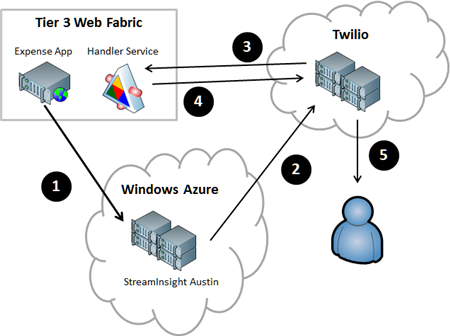
    Here is what I built, with each numbered activity explained below.

    2012.06.07twilio01

    1. Expense web application sends events to StreamInsight Austin. I built an ASP.NET web site that I deployed to the Iron Foundry environment that is provided by Tier 3’s Web Fabric offering. This web app takes in expense records from users and sends those events to the yet-to-be-released StreamInsight Austin platform. StreamInsight is Microsoft’s complex event processing engine that is capable of processing hundreds of thousands of events per second through a set of deployed queries. StreamInsight code-named Austin is the Windows Azure hosted version of StreamInsight that will be generally available in the near future. The events are sent by the Expense application to the HTTP endpoint provided by StreamInsight Austin.
    2. StreamInsight adapter triggers a call to the Twilio service. When a query pattern is matched in StreamInsight, the custom output adapter is called. This adapter uses the Twilio SDK for .NET to either initiate a phone call or send an SMS text message.
    3. Twilio service hits a URL that generates the call script. The Twilio VOIP technology works by calling a URL and getting back the Twilio Markup Language (TwiML) that describes what to say to the phone call recipient. Instead of providing a static TwiML (XML) file that instructs Twilio to say the same thing in each phone call, I built a simple WCF Handler Service that takes in URL parameters and returns a customized TwiML message.
    4. Return TwiML message to Twilio service. That TwiML that the WCF service produces is retrieved and parsed by Twilio.
    5. Place phone call to target. When StreamInsight invokes the Twilio service (step 2), it passes in the phone number of the call recipient. Now that Twilio has called the Handler Service and gotten back the TwiML instructions, it can ring the phone number and read the message.

    Sound interesting?  I’m going to tackle this in order of execution (from above), not necessary order of construction (where you’d realistically build them in this order: (1) Twilio Handler Service, (2) StreamInsight adapter, (3) StreamInsight application, (4) Expense web site). Let’s dive in.

    1. Sending events from the Expense web application to StreamInsight

    This site is a simple ASP.NET website that I’ve deployed up to Tier 3’s hosted Iron Foundry environment.

    2012.06.07twilio02

    Whenever you provision a StreamInsight Austin environment in the current “preview” mode, you get an HTTP endpoint for receiving events into the engine. This HTTP endpoint accepts JSON or XML messages. In my case, I’m throwing a JSON message at the endpoint. Right now the endpoint expects a generic event message, but in the future, we should see StreamInsight Austin be capable of taking in custom event formats.

    //pull Austin URL from configuration file
    string destination = ConfigurationManager.AppSettings["EventDestinationId"];
    //build JSON message consisting of required headers, and data payload
    string jsonPayload = "{\"DestinationID\":\"http:\\/\\/sample\\/\",\"Payload\":[{\"Key\":\"CustomerName\",\"Value\":\""+ txtRelatedParty.Text +"\"},{\"Key\":\"InteractionType\",\"Value\":\"Expense\"}],\"SourceID\":\"http:\\/\\/dummy\\/\",\"Version\":{\"_Build\":-1,\"_Major\":1,\"_Minor\":0,\"_Revision\":-1}}";
    
    //update URL with JSON flag
    string requestUrl = ConfigurationManager.AppSettings["AustinEndpoint"] + "json?batching=false";
    HttpWebRequest request = HttpWebRequest.Create(requestUrl) as HttpWebRequest;
    
    //set HTTP headers
    request.Method = "POST";
    request.ContentType = "application/json";
    
    using (Stream dataStream = request.GetRequestStream())
     {
         string postBody = jsonPayload;
    
         // Create POST data and convert it to a byte array.
         byte[] byteArray = Encoding.UTF8.GetBytes(postBody);
         dataStream.Write(byteArray, 0, byteArray.Length);
      }
    
    HttpWebResponse response = null;
    
    try
    {
        response = (HttpWebResponse)request.GetResponse();
     }
     catch (Exception ex)
     { }
    

    2. Building the StreamInsight application and Twilio adapter

    The Twilio adapter that I built is a “typed adapter” which means that it expects a specific payload. That “Fraud Alert Event” object that the adapter expects looks like this:

    public class FraudAlertEvent
        {
            public string CustomerName { get; set; }
            public string ExpenseDate { get; set; }
            public string AlertMessage { get; set; }
        }
    

    Next, I built up the actual adapter. I used NuGet to discover and add the Twilio SDK to my Visual Studio project.

    2012.06.07twilio03

    Below is the code for my adapter, with comments inline. Basically, I dequeue events that matched the StreamInsight query I deployed, and then use the Twilio API to either initiate a phone call or send a text message.

    public class TwilioPointOutputAdapter : TypedPointOutputAdapter
        {
            //member variables
            string acctId = string.Empty;
            string acctToken = string.Empty;
            string url = string.Empty;
            string phoneNum = string.Empty;
            string phoneOrMsg = string.Empty;
            TwilioRestClient twilioProxy;
    
            public TwilioPointOutputAdapter(AdapterConfig config)
            {
                //set member variables using values from runtime config values
                this.acctId = config.AccountId;
                this.acctToken = config.AuthToken;
                this.phoneOrMsg = config.PhoneOrMessage;
                this.phoneNum = config.TargetPhoneNumber;
                this.url = config.HandlerUrl;
            }
    
            ///
    <summary> /// When the adapter is resumed by the engine, start dequeuing events again /// </summary>
            public override void  Resume()
            {
                DequeueEvent();
            }
    
            ///
    <summary> /// When the adapter is started up, begin dequeuing events /// </summary>
            public override void  Start()
            {
                DequeueEvent();
            }
    
            ///
    <summary> /// Function that pulls events from the engine and calls the Twilio service /// </summary>
            void DequeueEvent()
            {
    		var twilioProxy = new TwilioRestClient(this.acctId, this.acctToken);
    
                while (true)
                {
                    try
                    {
                        //if the SI engine has issued a command to stop the adapter
                        if (AdapterState.Stopping == AdapterState)
                        {
                            Stopped();
    
                            return;
                        }
    
                        //create an event
                        PointEvent currentEvent = default(PointEvent);
    
                        //dequeue the event from the engine
                        DequeueOperationResult result = Dequeue(out currentEvent);
    
                        //if there is nothing there, tell the engine we're ready for more
                        if (DequeueOperationResult.Empty == result)
                        {
                            Ready();
                            return;
                        }
    
                        //if we find an event to process ...
                        if (currentEvent.EventKind == EventKind.Insert)
                        {
                            //append event-specific values to the Twilio handler service URL
                            string urlparams = "?val=0&action=Please%20look%20at%20" + currentEvent.Payload.CustomerName + "%20expenses";
    
                            //create object that holds call criteria
                            CallOptions opts = new CallOptions();
                            opts.Method = "GET";
                            opts.To = phoneNum;
                            opts.From = "+14155992671";
                            opts.Url = this.url + urlparams;
    
                            //if a phone call ...
                            if (phoneOrMsg == "phone")
                            {
                                //make the call
                                var call = twilioProxy.InitiateOutboundCall(opts);
                            }
                            else
                            {
                                //send an SMS message
                                var msg = twilioProxy.SendSmsMessage(opts.From, opts.To, "Fraud has occurred with " + currentEvent.Payload.CustomerName);
                            }
                        }
                        //cleanup the event
                        ReleaseEvent(ref currentEvent);
                    }
                    catch (Exception ex)
                    {
                        throw ex;
                    }
                }
            }
        }
    

    Next, I created my StreamInsight Austin application. Instead of using the command line sample provided by the StreamInsight team, I created a little WinForm app that handles the provisioning of the environment, the deployment of the query, and the sending of test event messages.

    2012.06.07twilio04

    The code that deploys the “fraud detection” query takes care of creating the LINQ query, defining the StreamInsight query that uses the Twilio adapter, and starting up the query in the StreamInsight Austin environment. My Expense web application sends events that contain a CustomerName and InteractionType (e.g. “sale”, “complaint”, etc).

    private void CreateQueries()
    {
    		...
    
    		//put inbound events into 30-second windows
         var custQuery = from i in allStream
              group i by new { Name = i.CustomerName, iType = i.InteractionType } into CustomerGroups
              from win in CustomerGroups.TumblingWindow(TimeSpan.FromSeconds(30), HoppingWindowOutputPolicy.ClipToWindowEnd)
              select new { ct = win.Count(), Cust = CustomerGroups.Key.Name, Type = CustomerGroups.Key.iType };
    
         //if there are more than two expenses for the same company in the window, raise event
         var thresholdQuery = from c in custQuery
                       where c.ct > 2 && c.Type == "Expense"
                       select new FraudAlertEvent
                       {
                              CustomerName = c.Cust,
                              AlertMessage = "Too many expenses!",
                              ExpenseDate = DateTime.Now.ToString()
                        };
    
          //call DeployQuery which instantiates StreamInsight Query
          Query query5 = DeployQuery(thresholdQuery, "Threshold Query");
           query5.Start();
    		...
    }
    
    private Query DeployQuery(CepStream queryStream, string queryName)
    {
          //setup Twilio adapter configuration settings
          var outputConfig = new AdapterConfig
           {
                AccountId = ConfigurationManager.AppSettings["TwilioAcctID"],
                AuthToken = ConfigurationManager.AppSettings["TwilioAcctToken"],
                TargetPhoneNumber = "+1111-111-1111",
                PhoneOrMessage = "phone",
                HandlerUrl = "http://twiliohandlerservice.ironfoundry.me/Handler.svc/Alert/Expense%20Fraud"
           };
    
          //add logging message
          lbMessages.Items.Add(string.Format("Creating new query '{0}'...", queryName));
    
          //define StreamInsight query that uses this output adapter and configuration
          Query query = queryStream.ToQuery(
                queryName,
                "",
                typeof(TwilioAdapterOutputFactory),
                outputConfig,
                EventShape.Point,
                StreamEventOrder.FullyOrdered);
    
          //return query to caller
          return query;
    }
    

    3. Creating the Twilio Handler Service hosted in Tier 3’s Web Fabric environment

    If you’re an eagle-eyed reader, you may have noticed my “HandlerUrl” property in the adapter configuration above. That URL points to a public address that the Twilio service uses to retrieve the speaking instructions for a phone call. Since I wanted to create a contextual phone message, I decided to build a WCF service that returns valid TwiML generated on demand. My WCF contract returns an XMLElement and takes in values that help drive the type of content in the TwiML message.

    [ServiceContract]
        public interface IHandler
        {
            [OperationContract]
            [WebGet(
                BodyStyle = WebMessageBodyStyle.Bare,
                RequestFormat = WebMessageFormat.Xml,
                ResponseFormat = WebMessageFormat.Xml,
                UriTemplate = "Alert/{thresholdType}?val={thresholdValue}&action={action}"
                )]
            XmlElement GenerateHandler(string thresholdType, string thresholdValue, string action);
        }
    

    The implementation of this service contract isn’t super interesting, but, I’ll include it anyway. Basically, if you provide a “thresholdValue” of zero (e.g. it doesn’t matter what value was exceeded), then I create a TwiML message that uses a woman’s voice to tell the call recipient that a threshold was exceeded and some action is required. If the “thresholdValue” is not zero, then this pleasant woman tells the call recipient about the limit that was exceeded.

            public XmlElement GenerateHandler(string thresholdType, string thresholdValue, string action)
            {
                string xml = string.Empty;
    
                if (thresholdValue == "0")
                {
                    xml = "<!--?xml version='1.0' encoding='utf-8' ?-->" +
                "" +
                "" +
                    "The " + thresholdType + " alert was triggered. " + action + "." +
                    "" +
                "";
                }
                else
                {
                    xml = "<!--?xml version='1.0' encoding='utf-8' ?-->" +
                "" +
                "" +
                    "The " + thresholdType + " value is " + thresholdValue + " and has exceeded the threshold limit. " + action + "." +
                    "" +
                "";
                }
    
                XmlDocument d = new XmlDocument();
                d.LoadXml(xml);
    
                return d.DocumentElement;
            }
        }
    

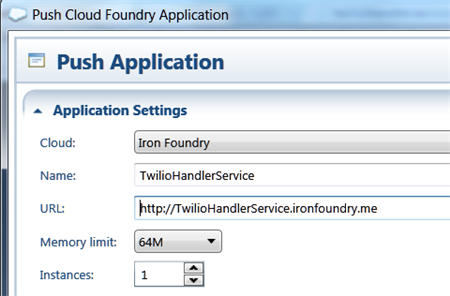
    I then did a quick push of this web service to my Web Fabric / Iron Foundry environment.

    2012.06.07twilio05

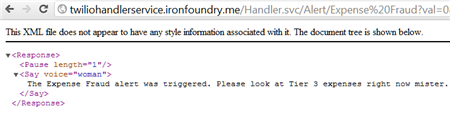
    I confirmed that my service was online (and you can too as I’ve left this service up) by hitting the URL and seeing valid TwiML returned.

    2012.06.07twilio06

    4. Test the solution and confirm the phone call

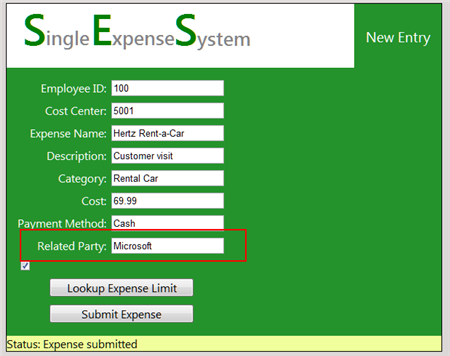
    Let’s commit some fraud on my website! I went to my Expense website, and according to my StreamInsight query, if I submitted more than 2 expenses for single client (in this case, “Microsoft”) within a 30 second window, a fraud event should be generated, and I should receive a phone call.

    2012.06.07twilio07

    After submitting a handful of events, I can monitor the Twilio dashboard and see when a phone call is being attempted and completed.

    2012.06.07twilio08

    Sure enough, I received a phone call. I captured the audio, which you can listen to here.

    Summary

    So what did we see? We saw that our Event Processing Engine in the cloud can receive events from public websites and trigger phone/text messages through the sweet Twilio service. One of the key benefits to StreamInsight Austin (vs. an onsite StreamInsight deployment) is the convenience of having an environment that can be easily reached by both on-premises and off-premises (web) applications. This can help you do true real-time monitoring vs. doing batch loads from off-premises apps into the on-premises Event Processing engine. And, the same adapter framework applies to either the onsite or cloud StreamInsight environment, so my Twilio adapter works fine, regardless of deployment model.

    The Twilio service provides a very simple way to inject voice into applications. While not appropriate for all cases, obviously, there are a host of interesting use cases that are enhanced by this service. Marrying StreamInsight and Twilio seems like a useful way to make very interactive CEP notifications possible!

  • Richard Going to Oz to Deliver an Integration Workshop? This is Happening.

    At the most recent MS MVP Summit, Dean Robertson, founder of IT consultancy Mexia, approached me about visiting Australia for a speaking tour. Since I like both speaking and koalas, this seemed like a good match.

    As a result, we’ve organized sessions for which you can now register to attend. I’ll be in Brisbane, Melbourne and Sydney talking about the overall Microsoft integration stack, with special attention paid to recent additions to the Windows Azure integration toolset. As usual, there MCpromoshould be lots of practical demonstrations that help to show the “why”, “when” and “how” of each technology.

    If you’re in Australia, New Zealand or just needed an excuse to finally head down under, then come on over! It should be lots of fun.

  • Three Software Updates to be Aware Of

    In the past few days, there have been three sizable product announcements that should be of interest to the cloud/integration community. Specifically, there are noticeable improvements to Microsoft’s CEP engine StreamInsight, Windows Azure’s integration services, and Tier 3’s Iron Foundry PaaS.

    First off, the Microsoft StreamInsight team recently outlined changes that are coming in their StreamInsight 2.1 release. This is actually a pretty major update with some fundamental modification to the programmatic object model. I can attest to the fact that it can be challenge to build up the necessary host/query/adapter plumbing necessary to get a solution rolling, and the StreamInsight team has acknowledged this. The new object model will be a bit more straightforward. Also, we’ll see IEnumerable and IObservable become more first-class citizens in the platform. Developers are going to be encouraged to use IEnumerable/IObservable in lieu of adapters in both embedded AND server-based deployment scenarios. In addition to changes to the object model, we’ll also see improved checkpointing (failure recovery) support. If you want to learn more about StreamInsight, and are a Pluralsight subscriber, you can watch my course on this product.

    Next up, Microsoft released the latest CTP for its Windows Azure Service Bus EAI and EDI components. As a refresher, these are “BizTalk in the cloud”-like services that improve connectivity, message processing and partner collaboration for hybrid situations. I summarized this product in an InfoQ article written in December 2011. So what’s new? Microsoft issued a description of the core changes, but in a nutshell, the components are maturing. The tooling is improving, the message processing engine can handle flat files or XML, the mapping and schema designers have enhanced functionality, and the EDI offering is more complete. You can download this release from the Microsoft site.

    Finally, those cats at Tier 3 have unleashed a substantial update to their open-source Iron Foundry (public or private) .NET PaaS offering. The big takeaway is that Iron Foundry is now feature-competitive with its parent project, the wildly popular Cloud Foundry. Iron Foundry now supports a full suite of languages (.NET as well as Ruby, Java, PHP, Python, Node.js), multiple backend databases (SQL Server, Postgres, MySQL, Redis, MongoDB), and queuing support through Rabbit MQ. In addition, they’ve turned on the ability to tunnel into backend services (like SQL Server) so you don’t necessarily need to apply the monkey business that I employed a few months back. Tier 3 has also beefed up the hosting environment so that people who try out their hosted version of Iron Foundry can have a stable, reliable experience. A multi-language, private PaaS with nearly all the services that I need to build apps? Yes, please.

    Each of the above releases is interesting in its own way and to me, they have relationships with one another. The Azure services enable a whole new set of integration scenarios, Iron Foundry makes it simple to move web applications between environments, and StreamInsight helps me quickly make sense of the data being generated by my applications. It’s a fun time to be an architect or developer!

  • Using SignalR To Push StreamInsight Events to Client Browsers

    I’ve spent some time recently working with the asynchronous web event messaging engine SignalR. This framework uses JavaScript (with jQuery) on the client and ASP.NET on the server to enable very interactive communication patterns. The coolest part is being able to have the server-side application call a JavaScript function on each connected browser client. While many SignalR demos you see have focused on scenarios like chat applications, I was thinking  of how to use SignalR to notify business users of interesting events within an enterprise. Wouldn’t it be fascinating if business events (e.g. “Project X requirements document updated”, “Big customer added in US West region”, “Production Mail Server offline”, “FAQ web page visits up 78% today”) were published from source applications and pushed to a live dashboard-type web application available to users? If I want to process these fast moving events and perform rich aggregations over windows of events, then Microsoft StreamInsight is a great addition to a SignalR-based solution. In this blog post, I’m going to walk through a demonstration of using SignalR to push business events through StreamInsight and into a Tweetdeck-like browser client.

    Solution Overview

    So what are we building? To make sure that we keep an eye on the whole picture while building the individual components, I’ve summarized the solution here.

    2012.03.01signalr05

    Basically, the browser client will first (through jQuery) call a server operation that adds that client to a message group (e.g. “security events”). Events are then sent from source applications to StreamInsight where they are processed. StreamInsight then calls a WCF service that is part of the ASP.NET web application. Finally, the WCF Service uses the SignalR framework to invoke the “addEventMsg()” function on each connected browser client. Sound like fun? Good. Let’s jump in.

    Setting up the SignalR application

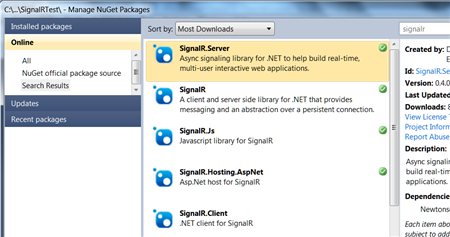
    I started out by creating a new ASP.NET web application. I then used the NuGet extension to locate the SignalR libraries that I wanted to use.
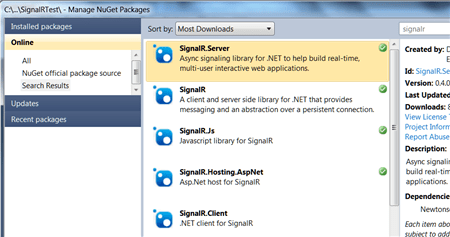
    2012.03.01signalr01

    Once the packages were chosen from NuGet, they got automatically added to my ASP.NET app.

    2012.03.01signalr02

    The next thing to do was add the appropriate JavaScript references at the top of the page. Note the last one. It is a virtual JavaScript location (you won’t find it in the design-time application) that is generated by the SignalR framework. This script, which you can view in the browser at runtime, holds all the JavaScript code that corresponds to the server/browser methods defined in my ASP.NET application.

    2012.03.01signalr04

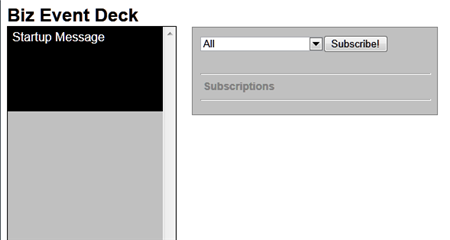
    After this, I added the HTML and ASP.NET controls necessary to visualize my Tweetdeck-like event viewer. Besides a column where each event shows up, I also added a listbox that holds all the types of events that someone might subscribe to. Maybe one set of users just want security-oriented events, or another wants events related to a given IT project.
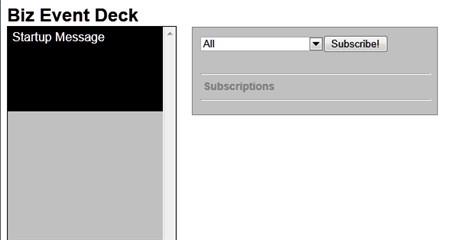
    2012.03.01signalr03

    With my look-and-feel in place, I then moved on to adding some server-side components. I first created a new class (BizEventController.cs) that uses the SignalR “Hubs” connection model. This class holds a single operation that gets called by the JavaScript in the browser and adds the client to a given messaging group. Later, I can target a SignalR message to a given group.

    using System;
    using System.Collections.Generic;
    using System.Linq;
    using System.Web;
    
    //added reference to SignalR
    using SignalR.Hubs;
    
    ///
    <summary> /// Summary description for BizEventController /// </summary>
    
    public class BizEventController : Hub
    {
        public void AddSubscription(string eventType)
        {
            AddToGroup(eventType);
        }
    }
    

    I then switched back to the ASP.NET page and added the JavaScript guts of my SignalR application. Specifically, the code below (1) defines an operation on my client-side hub (that gets called by the server) and (2) calls the server side controller that adds clients to a given message group.

    $(function () {
                //create arrays for use in showing formatted date string
                var days = ['Sun', 'Mon', 'Tues', 'Wed', 'Thur', 'Fri', 'Sat'];
                var months = ['Jan', 'Feb', 'Mar', 'Apr', 'May', 'June', 'July', 'Aug', 'Sept', 'Oct', 'Nov', 'Dec'];
    
                // create proxy that uses in dynamic signalr/hubs file
                var bizEDeck = $.connection.bizEventController;
    
                // Declare a function on the chat hub so the server can invoke it
                bizEDeck.addEventMsg = function (message) {
                    //format date
                    var receiptDate = new Date();
                    var formattedDt = days[receiptDate.getDay()] + ' ' + months[receiptDate.getMonth()] + ' ' + receiptDate.getDate() + ' ' + receiptDate.getHours() + ':' + receiptDate.getMinutes();
                    //add new "message" to deck column
                    $('#deck').prepend('</pre>
    <div>' + message + '' + formattedDt + ' via StreamInsight</div>
    <pre>
    ');
                };
    
                //act on "subscribe" button
                $("#groupadd").click(function () {
                    //call subscription function in server code
                    bizEDeck.addSubscription($('#group').val());
                    //add entry in "subscriptions" section
                    $('#subs').append($('#group').val() + '</pre>
    
    <hr />
    
    <pre>');
                });
    
                // Start the connection
                $.connection.hub.start();
            });
    

    Building the web service that StreamInsight will call to update browsers

    The UI piece was now complete. Next, I wanted a web service that StreamInsight could call and pass in business events that would get pushed to each browser client. I’m leveraging a previously-built StreamInsight WCF adapter that can be used to receive web service request and call web service endpoints. I built a WCF service and in the underlying class, I pull the list of all connected clients and invoke the JavaScript function.

    using System;
    using System.Collections.Generic;
    using System.Linq;
    using System.Runtime.Serialization;
    using System.ServiceModel;
    using System.Text;
    
    using SignalR;
    using SignalR.Infrastructure;
    using SignalR.Hosting.AspNet;
    using StreamInsight.Samples.Adapters.Wcf;
    using Seroter.SI.AzureAppFabricAdapter;
    
    public class NotificationService : IPointEventReceiver
    {
    	//implement the operation included in interface definition
    	public ResultCode PublishEvent(WcfPointEvent result)
    	{
    		//get category from key/value payload
    		string cat = result.Payload["Category"].ToString();
    		//get message from key/value payload
    		string msg = result.Payload["EventMessage"].ToString();
    
    		//get SignalR connection manager
    		IConnectionManager mgr = AspNetHost.DependencyResolver.Resolve();
    		//retrieve list of all connected clients
    		dynamic clients = mgr.GetClients();
    
    		//send message to all clients for given category
    		clients[cat].addEventMsg(msg);
    		//also send message to anyone subscribed to all events
    		clients["All"].addEventMsg(msg);
    
    		return ResultCode.Success;
    	}
    }
    

    Preparing StreamInsight to receive, aggregate and forward events

    The website is ready, the service is exposed, and all that’s left is to get events and process them. Specifically, I used a WCF adapter to create an endpoint and listen for events from sources, wrote a few queries, and then sent the output to the WCF service created above.

    The StreamInsight application is below. It includes the creation of the embedded server and all other sorts of fun stuff.

    using System;
    using System.Collections.Generic;
    using System.Linq;
    using System.Text;
    
    using Microsoft.ComplexEventProcessing;
    using Microsoft.ComplexEventProcessing.Linq;
    using Seroter.SI.AzureAppFabricAdapter;
    using StreamInsight.Samples.Adapters.Wcf;
    
    namespace SignalRTest.StreamInsightHost
    {
        class Program
        {
            static void Main(string[] args)
            {
                Console.WriteLine(":: Starting embedded StreamInsight server ::");
    
                //create SI server
                using(Server server = Server.Create("RSEROTERv12"))
                {
                    //create SI application
                    Application app = server.CreateApplication("SeroterSignalR");
    
                    //create input adapter configuration
                    WcfAdapterConfig inConfig = new WcfAdapterConfig()
                    {
                        Password = "",
                        RequireAccessToken = false,
                        Username  = "",
                        ServiceAddress = "http://localhost:80/StreamInsightv12/RSEROTER/InputAdapter"
                    };
    
                    //create output adapter configuration
                    WcfAdapterConfig outConfig = new WcfAdapterConfig()
                    {
                        Password = "",
                        RequireAccessToken = false,
                        Username = "",
                        ServiceAddress = "http://localhost:6412/SignalRTest/NotificationService.svc"
                    };
    
                    //create event stream from the source adapter
                    CepStream input = CepStream.Create("BizEventStream", typeof(WcfInputAdapterFactory), inConfig, EventShape.Point);
                    //build initial LINQ query that is a simple passthrough
                    var eventQuery = from i in input
                                     select i;
    
                    //create unbounded SI query that doesn't emit to specific adapter
                    var query0 = eventQuery.ToQuery(app, "BizQueryRaw", string.Empty, EventShape.Point, StreamEventOrder.FullyOrdered);
                    query0.Start();
    
                    //create another query that latches onto previous query
                    //filters out all individual web hits used in later agg query
                    var eventQuery1 = from i in query0.ToStream()
                                      where i.Category != "Web"
                                      select i;
    
                    //another query that groups events by type; used here for web site hits
                    var eventQuery2 = from i in query0.ToStream()
                                      group i by i.Category into EventGroup
                                      from win in EventGroup.TumblingWindow(TimeSpan.FromSeconds(10))
                                      select new BizEvent
                                      {
                                          Category = EventGroup.Key,
                                          EventMessage = win.Count().ToString() + " web visits in the past 10 seconds"
                                      };
                    //new query that takes result of previous and just emits web groups
                    var eventQuery3 = from i in eventQuery2
                                      where i.Category == "Web"
                                      select i;
    
                    //create new SI queries bound to WCF output adapter
                    var query1 = eventQuery1.ToQuery(app, "BizQuery1", string.Empty, typeof(WcfOutputAdapterFactory), outConfig, EventShape.Point, StreamEventOrder.FullyOrdered);
                    var query2 = eventQuery3.ToQuery(app, "BizQuery2", string.Empty, typeof(WcfOutputAdapterFactory), outConfig, EventShape.Point, StreamEventOrder.FullyOrdered);
    
                    //start queries
                    query1.Start();
                    query2.Start();
                    Console.WriteLine("Query started. Press [Enter] to stop.");
    
                    Console.ReadLine();
                    //stop all queries
                    query1.Stop();
                    query2.Stop();
                    query0.Stop();
                    Console.Write("Query stopped.");
                    Console.ReadLine();
    
                }
            }
    
            private class BizEvent
            {
                public string Category { get; set; }
                public string EventMessage { get; set; }
            }
        }
    }
    

    Everything is now complete. Let’s move on to testing with a simple event generator that I created.

    Testing the solution

    I built a simple WinForm application that generates business events or a user-defined number of simulated website visits. The business events are passed through StreamInsight, and the website hits are aggregated so that StreamInsight can emit the count of hits every ten seconds.

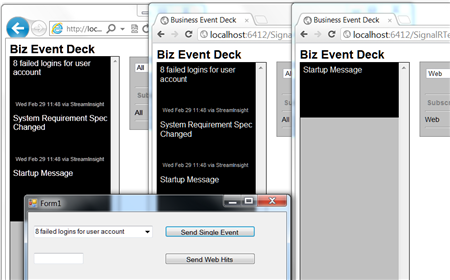
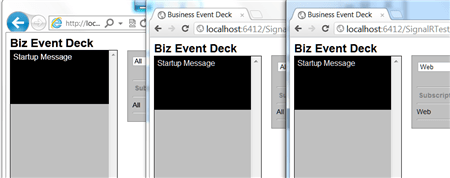
    To highlight the SignalR experience, I launched three browser instances with two different group subscriptions. The first two subscribe to all events, and the third one subscribes just to website-based events. For the latter, the client JavaScript function won’t get invoked by the server unless the events are in the “Web” category.

    The screenshot below shows the three browser instances launched (one in IE, two in Chrome).
    2012.03.01signalr06

    Next, I launched my event-generator app and StreamInsight host. I sent in a couple of business (not web) events and hoped to see them show up in two of the browser instances.
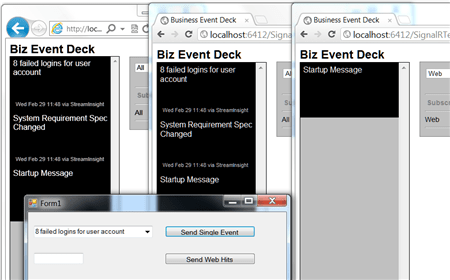
    2012.03.01signalr07

    As expected, two of the browser clients were instantly updated with these events, and the other subscriber was not. Next, I sent in a handful of simulated website hit events and observed the results.

    2012.03.01signalr08

    Cool! So all three browser instances were instantly updated with ten-second-counts of website events that were received.

    Summary

    SignalR is an awesome framework for providing real-time, interactive, bi-directional communication between clients and servers. I think there’s a lot of value of using SignalR for dashboards, widgets and event monitoring interfaces. In this post we saw a simple “business event monitor” application that enterprise users could leverage to keep up to date on what’s happening within enterprise systems. I used StreamInsight here, but you could use BizTalk Server or any application that can send events to web services.

    What do you think? Where do you see value for SignalR?

    UPDATE:I’ve made the source code for this project available and you can retrieve it from here.
  • Watch the First Module Of My StreamInsight Course … For Free

    I recently authored and published a Pluralsight course on StreamInsight. As part of a marketing agreement between Microsoft and Pluralsight, the first module of this course is now available on Microsoft’s TechNet site. On the middle right of the page, you’ll see a promo section where you can launch this introductory module. No sign up, no email address required, nothing. Just click and watch.

    If you’ve been curious about what StreamInsight is, or have an odd interest in hearing me speak, now’s the time to indulge yourself. If you like where the course is going, I’d strongly encourage you to sign up for a Pluralsight subscription, which is one of the best investments that a developer can make.

  • My StreamInsight Course for Pluralsight is Now Available

    I’ve been working for the past number of months on a comprehensive Pluralsight training course on Microsoft StreamInsight. I was hoping that I could bang out the course in a short amount of time, but I quickly learned that I needed to get much deeper into the product before I was comfortable producing credible training material.

    The first seven modules of the course are now online at Pluralsight under the title StreamInsight Fundamentals.  The final (yet to be finished) module will be on building resilient applications and leveraging the new checkpointing feature.  This is a complex topic, and I am building a full end to end demo from scratch, and didn’t want that holding up the primary modules of the course.

    So what did I build? Seven modules totaling about 4 1/2 hours of content.  Each module is very demo-heavy with a focus on realistic scenarios and none of the “let’s assume you have an object of type A with a property called Foo” stuff.

    • Module 1 – Introducing StreamInsight. This module is a brief introduction into event driven architecture, complex event processing and the basics of the StreamInsight product.
    • Module 2 – Developing StreamInsight Queries. Lots of content here cover filtering, projection, event windows, grouping, aggregation, TopK, join, union and a host of timestamp modification examples. This is the longest module because it’s arguably the most important topic (but still watch the other ones!).
    • Module 3 – Extending StreamInsight LINQ Queries. When out-of-the-box operators won’t do, build your own!  This module looks at all the supported ways to add extensions to StreamInsight LINQ.
    • Module 4 – StreamInsight Event Sources: IObservable and IEnumerable. Here I walk through how to use both IObservable and IEnumerable objects as either the source or sink in a StreamInsight application.  The IObservable stuff was fun to build, but also took the longest for me to fully understand.
    • Module 5 – StreamInsight Event Sources: Developing Adapters. This module covers the strategies and techniques for building both input and output adapters. Together we’ll build a typed MSMQ input adapter and an untyped MSMQ output adapter.  Good times will be had by all.
    • Module 6 – Hosting StreamInsight Applications.  In this module, I show how to host StreamInsight within an application or by leveraging the standalone service.  I also go through a series of examples on how you chain queries (and streams) together and leverage their reusable nature.
    • Module 7 – Monitoring and Troubleshooting StreamInsight Applications. Here I show all the ways to collect diagnostic data on StreamInsight applications and then go through event flow analysis using the Event Flow Debugger.

    All in all, it was fun thinking up the structure, preparing the material, building the demos, and producing the training videos.  There hasn’t been a whole lot of StreamInsight material out there, so hopefully this helps developers and architects who are trying to get up to speed on this very cool and powerful technology.

  • Interview Series: Four Questions With … Allan Mitchell

    Greetings and welcome my 33rd interview with a thought leader in the “connected technology” space.  This month, we’ve got the distinct pleasure of talking to Allan Mitchell.  Allan is a SQL Server MVP, speaker and both joint owner and Integration Director of the new consulting shop, Copper Blue Consulting.   Allan’s got excellent experience in the ETL space and has been an early adopter and contributor to Microsoft StreamInsight.

    On to the questions!

    Q: Are the current data integration tools that you use adequate for scenarios involving “Big Data”? What do you do in scenarios when you have massive sets of structured or unstructured data that need to be moved and analyzed?

    A: Big Data. My favorite definition of big data is:

    “Data so large that you have to think about it. How will you move it, store it, analyze it or make it available to others.”

    This does of course make it subjective to the person with the data. What is big for me is not always big for someone else. Objectively, however, according to a study by the University of Southern California, digital media accounted for just 25% of all the information in the world. By 2007, however, it accounted for 94%. It is estimated that 4 exabytes (4 x 10^19) of unique information will be generated this year – more than in the previous 5,000 years. So Big Data should be firmly on the roadmap of any information strategy.

    Back to the question: I do not always have the luxury of big bandwidth so moving serious amounts of data over the network is prohibitive in terms of speed and resource utilization. If the data is so large then I am a fan of having a backup taken and then restoring it on another server because this method tends to invite less trouble.

    Werner Vogels, CTO of Amazon, says that DHL is still the preferred way for customers to move “huge” data from a data center and put it onto Amazon’s cloud offering. I think this shows we still have some way to go. Research is taking place, however, that will support the movement of Big Data. NTT Japan, for example, have tested a fiber optic cable that pushes 14 trillion bits per second down a single strand of fiber – equivalent of 2660 CDs per second. Although this is not readily available at the moment, the technology will be in place.

    Analysis of large datasets is interesting. As TS Eliot wrote in his poem, ‘Where is the knowledge we have lost in information?’ There seems little point in storing PBs of data if no-one can use it/analyze it. Storing for storing’s sake seems a little strange. Jim Gray talked about this in his book “The Fourth Paradigm” a must read for people interested in data explosion. Visualizing data is one way of accessing the nuggets of knowledge in large datasets. For example, new demands to analyze social media data means that visualizing Big Data is going to become more relevant; there is little point in storing lots of data if it cannot be used.

    Q: As the Microsoft platform story continues to evolve, where do you see a Complex Event Processing engine sit within an enterprise landscape? Is it part of the Business Intelligence stack because of its value in analytics, or is it closer to the middleware stack because of its event distribution capabilities?

    A: That is a very good question and I think the answer is “it depends.”

    Event distribution could lead us into one of your passions, BizTalk Server (BTS). BTS does a very good job of doing messaging around the business and has the ability to handle long running processes. StreamInsight, of course, is not really that type of application.

    I personally see it as an “Intelligence” tool. StreamInsight has some very powerful features in its temporal algebra and the ability to do “ETL” in close to real-time is a game changer. If you choose to load a traditional data warehouse (ODS, DW) with these events then that is fine, and lots of business benefit can be gained. A key use for me of such a technology is the ability to react to events in real-time. Being able to respond to something that is happening, when it is happening, is a key feature in my eyes. The response could be a piece of workflow, for example, or it could be a human interaction. Waiting for the overnight ETL load to tell you that your systems shut down yesterday because of overheating is not much help. What you really want is be able to notice the rise in temperature over time as it is happening, and deal with it there and then.

    Q: With StreamInsight 1.2 out the door and StreamInsight Austin on the way, what are additional capabilities that you would like to see added to the platform?

    A: I would love to see some abstraction away from the execution engine and the host. Let me explain.

    Imagine a fabric. Imagine StreamInsight plugged into the fabric on one side and hardware plugged in the other. The fabric would take the workload from StreamInsight and partition it across the hardware nodes plugged in to the fabric. Those hardware nodes could be a mix of hardware from a big server to a netbook (Think Teradata) StreamInsight is unaware of what is going and wouldn’t care even if it did know. You could then have scale out of operators within a graph across hardware nodes ala Map Reduce. I think the scale out story for StreamInsight needs strengthening / clarified.

    Q [stupid question]: When I got to work today, I realized that I barely remembered my driving experience. Ignoring the safety implications, sometimes we simply slip into auto-pilot when doing the same thing over and over. What is an example of something in your professional or personal life that you do without even thinking about it?

    A: On a personal level I am a keen follower of rules around the English language. I find myself correcting people, senior people, in meetings. This leads to some interesting “moments”. The things I most often respond to are:

    1. Splitting of infinitives

    2. Ending sentences with prepositions

    On a professional level I always follow the principle laid down in Occam’s razor (lex parsimoniae):

    “Frustra fit per plura quod potest fieri per pauciora”

    “When you have two competing theories that make exactly the same predictions, the simpler one is the better.”

    There is of course a more recent version of Occam’s Razor: K.I.S.S. (keep it simple stupid)!

    Thanks Allan for participating!