Category: SOA

  • Creating a “Flat File” Shared Database with Amazon S3 and Node.js

    In my latest Pluralsight video training course – Patterns of Cloud Integration – I addressed application and data integration scenarios that involve cloud endpoints. In the “shared database” module of the course, I discussed integration options where parties relied on a common (cloud) data repository. One of my solutions was inspired by Amazon CTO Werner Vogels who briefly discussed this scenario during his keynote at last Fall’s AWS re:Invent conference. Vogels talked about the tight coupling that initially existed between Amazon.com and IMDB (the Internet Movie Database). Amazon.com pulls data from IMDB to supplement various pages, but they saw that they were forcing IMDB to scale whenever Amazon.com had a burst. Their solution was to decouple Amazon.com and IMDB by injecting a a shared database between them. What was that database? It was HTML snippets produced by IMDB and stored in the hyper-scalable Amazon S3 object storage. In this way, the source system (IMDB) could make scheduled or real-time updates to their HTML snippet library, and Amazon.com (and others) could pummel S3 as much as they wanted without impacting IMDB. You can also read a great Hacker News thread on this “flat file database” pattern as well. In this blog post, I’m going to show you how I created a flat file database in S3 and pulled the data into a Node.js application.

    Creating HTML Snippets

    This pattern relies on a process that takes data from a source, and converts it into ready to consume HTML. That source – whether a (relational) database or line of business system – may have data organized in a different way that what’s needed by the consumer. In this case, imagine combining data from multiple database tables into a single HTML representation. This particular demo addresses farm animals, so assume that I pulled data (pictures, record details) into one HTML file for each animal.

    2013.05.06-s301

    In my demo, I simply built these HTML files by hand, but in real-life, you’d use a scheduled service or trigger action to produce these HTML files. If the HTML files need to be closely in sync with the data source, then you’d probably look to establish an HTML build engine that ran whenever the source data changed. If you’re dealing with relatively static information, then a scheduled job is fine.

    Adding HTML Snippets to Amazon S3

    Amazon S3 has a useful portal and robust API. For my demonstration I loaded these snippets into a “bucket” via the AWS portal. In real life, you’d probably publish these objects to S3 via the API as the final stage of an HTML build pipeline.

    In this case, I created a bucket called “FarmSnippets” and uploaded four different HTML files.

    2013.05.06-s302

    My goal was to be able to list all the items in a bucket and see meaningful descriptions of each animal (and not the meaningless name of an HTML file). So, I renamed each object to something that described the animal. The S3 API (exposed through the Node.js module) doesn’t give you access to much metadata, so this was one way to share information about what was in each file.

    2013.05.06-s303

    At this point, I had a set of HTML files in an Amazon S3 bucket that other applications could access.

    Reading those HTML Snippets from a Node.js Application

    Next, I created a Node.js application that consumed the new AWS SDK for Node.js. Note that AWS also ships SDKs for Ruby, Python, .NET, Java and more, so this demo can work for most any development stack. In this case, I used JetBrains WebStorm and the Express framework  and Jade template engine to quickly crank out an application that listed everything in my S3 bucket showed individual items.

    In the Node.js router (controller) handling the default page of the web site, I loaded up the AWS SDK and issued a simple listObjects command.

    //reference the AWS SDK
    var aws = require('aws-sdk');
    
    exports.index = function(req, res){
    
        //load AWS credentials
        aws.config.loadFromPath('./credentials.json');
        //instantiate S3 manager
        var svc = new aws.S3;
    
        //set bucket query parameter
        var params = {
          Bucket: "FarmSnippets"
        };
    
        //list all the objects in a bucket
        svc.client.listObjects(params, function(err, data){
            if(err){
                console.log(err);
            } else {
                console.log(data);
                //yank out the contents
                var results = data.Contents;
                //send parameters to the page for rendering
                res.render('index', { title: 'Product List', objs: results });
            }
        });
    };
    

    Next, I built out the Jade template page that renders these results. Here I looped through each object in the collection and used the “Key” value to create a hyperlink and show the HTML file’s name.

    block content
        div.content
          h1 Seroter Farms - Animal Marketplace
          h2= title
          p Browse for animals that you'd like to purchase from our farm.
          b Cows
          p
              table.producttable
                tr
                    td.header Animal Details
                each obj in objs
                    tr
                        td.cell
                            a(href='/animal/#{obj.Key}') #{obj.Key}
    

    When the user clicks the hyperlink on this page, it should take them to a “details” page. The route (controller) for this page takes the object ID from the querystring and retrieves the individual HTML snippet from S3. It then reads the content of the HTML file and makes it available for the rendered page.

    //reference the AWS SDK
    var aws = require('aws-sdk');
    
    exports.list = function(req, res){
    
        //get the animal ID from the querystring
        var animalid = req.params.id;
    
        //load up AWS credentials
        aws.config.loadFromPath('./credentials.json');
        //instantiate S3 manager
        var svc = new aws.S3;
    
        //get object parameters
        var params = {
            Bucket: "FarmSnippets",
            Key: animalid
        };
    
        //get an individual object and return the string of HTML within it
        svc.client.getObject(params, function(err, data){
            if(err){
                console.log(err);
            } else {
                console.log(data.Body.toString());
                var snippet = data.Body.toString();
                res.render('animal', { title: 'Animal Details', details: snippet });
            }
        });
    };
    

    Finally, I built the Jade template that shows our selected animal. In this case, I used a Jade technique to unescaped HTML so that the tags in the HTML file (held in the “details” variable) were actually interpreted.

    block content
        div.content
            h1 Seroter Farms - Animal Marketplace
            h2= title
            p Good choice! Here are the details for the selected animal.
            | !{details}
    

    That’s all there was! Let’s test it out.

    Testing the Solution

    After starting up my Node.js project, I visited the URL.

    2013.05.06-s304

    You can see that it lists each object in the S3 bucket and shows the (friendly) name of the object. Clicking the hyperlink for a given object sends me to the details page which renders the HTML within the S3 object.

    2013.05.06-s305

    Sure enough, it rendered the exact HTML that was included in the snippet. If my source system changes and updates S3 with new or changed HTML snippets, the consuming application(s) will instantly see it. This “database” can easily be consumed by Node.js applications or any application that can talk to the Amazon S3 web API.

    Summary

    While it definitely makes sense in some cases to provide shared access to the source repository, the pattern shown here is a nice fit for loosely coupled scenarios where we don’t want – or need – consuming systems to bang on our source data systems.

    What do you think? Have you used this sort of pattern before? Do you have cases where providing pre-formatted content might be better than asking consumers to query and merge the data themselves?

    Want to see more about this pattern and others? Check out my Pluralsight course called Patterns of Cloud Integration.
  • My New Pluralsight Course – Patterns of Cloud Integration – Is Now Live

    I’ve been hard at work on a new Pluralsight video course and it’s now live and available for viewing. This course, Patterns of Cloud Integration,  takes you through how application and data integration differ when adding cloud endpoints. The course highlights the 4 integration styles/patterns introduced in the excellent Enterprise Integration Patterns book and discusses the considerations, benefits, and challenges of using them with cloud systems. There are five core modules in the course:

    • Integration in the Cloud. An overview of the new challenges of integrating with cloud systems as well as a summary of each of the four integration patterns that are covered in the rest of the course.
    • Remote Procedure Call. Sometimes you need information or business logic stored in an independent system and RPC is still a valid way to get it. Doing this with a cloud system on one (or both!) ends can be a challenge and we cover the technologies and gotchas here.
    • Asynchronous Messaging. Messaging is a fantastic way to do loosely coupled system architecture, but there are still a number of things to consider when doing this with the cloud.
    • Shared Database. If every system has to be consistent at the same time, then using a shared database is the way to go. This can be a challenge at cloud scale, and we review some options.
    • File Transfer. Good old-fashioned file transfers still make sense in many cases. Here I show a new crop of tools that make ETL easy to use!

    Because “the cloud” consists of so many unique and interesting technologies, I was determined to not just focus on the products and services from any one vendor. So, I decided to show off a ton of different technologies including:

    Whew! This represents years of work as I’ve written about or spoken on this topic for a while. It was fun to collect all sorts of tidbits, talk to colleagues, and experiment with technologies in order to create a formal course on the topic. There’s a ton more to talk about besides just what’s in this 4 hour course, but I hope that it sparks discussion and helps us continue to get better at linking systems, regardless of their physical location.

  • Using ASP.NET SignalR to Publish Incremental Responses from Scatter-Gather BizTalk Workflow

    While in Europe last week presenting at the Integration Days event, I showed off some demonstration of cool new technologies working with existing integration tools. One of those demos combined SignalR and BizTalk Server in a novel way.

    One of the use cases for an integration bus like BizTalk Server is to aggregate data from multiple back end systems and return a composite message (also known as a Scatter-Gather pattern). In some cases, it may make sense to do this as part of a synchronous endpoint where a web service caller makes a request, and BizTalk returns an aggregated response. However, we all know that BizTalk Server’s durable messaging architecture introduces latency into the communication flow, and trying to do this sort of operation may not scale well when the number of callers goes way up. So how can we deliver a high-performing, scalable solution that will accommodate today’s highly interactive web applications? In this solution that I build, I used ASP.NET and SignalR to send incremental messages from BizTalk back to the calling web application.

    2013.02.01signalr01

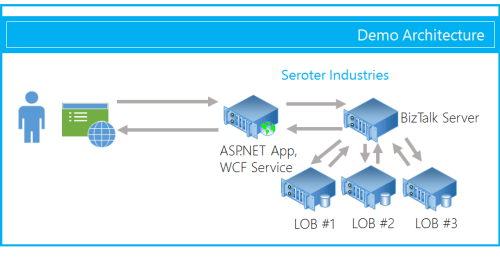
    The end user wants to search for product inventory that may be recorded in multiple systems. We don’t want our web application to have to query these systems individually, and would rather put an aggregator in the middle. Instead of exposing the scatter-gather BizTalk orchestration in a request-response fashion, I’ve chosen to expose an asynchronous inbound channel, and will then send messages back to the ASP.NET web application as soon as each inventory system respond.

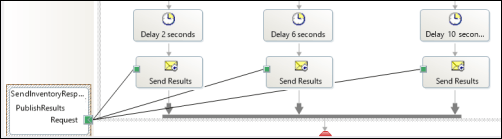
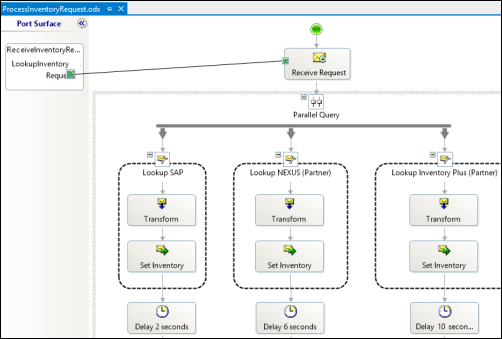
    First off, I have a BizTalk orchestration. It takes in the inventory lookup request and makes a parallel query to three different inventory systems. In this demonstration, I don’t actually query back-end systems, but simulate the activity by introducing a delay into each parallel branch.

    2013.02.01signalr02

    As each branch concludes, I send the response immediately to a one-way send port. This is in contrast to the “standard” scatter-gather pattern where we’d wait for all parallel branches to complete and then aggregate all the responses into a single message. This way, we are providing incremental feedback, a more responsive application, and protection against a poor-performing inventory system.

    2013.02.01signalr03

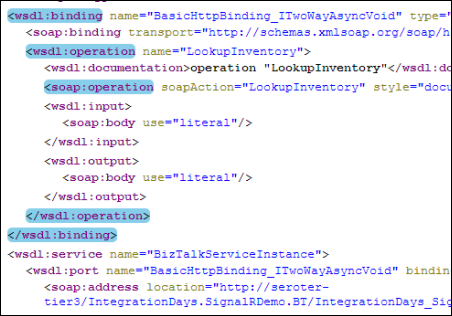
    After building and deploying this solution, I walked through the WCF Service Publishing Wizard in order to create the web service on-ramp into the BizTalk orchestration.

    2013.02.01signalr04

    I couldn’t yet create the BizTalk send port as I didn’t have an endpoint to send the inventory responses to. Next up, I built the ASP.NET web application that also had a WCF service for accepting the inventory messages. First, in a new ASP.NET project in Visual Studio, I added a service reference to my BizTalk-generated service. I then added the NuGet package for SignalR, and a new class to act as my SignalR “hub.” The Hub represents the code that the client browser will invoke on the server. In this case, the client code needs to invoke a “lookup inventory” action which will forwards a request to BizTalk Server. It’s important to notice that I’m acquiring and transmitting the unique connection ID associated with the particular browser client.

    public class NotifyHub : Hub
        {
            /// <summary>
            /// Operation called by client code to lookup inventory for a given item #
            /// </summary>
            /// <param name="itemId"></param>
            public void LookupInventory(string itemId)
            {
                //get this caller's unique browser connection ID
                string clientId = Context.ConnectionId;
    
                LookupService.IntegrationDays_SignalRDemo_BT_ProcessInventoryRequest_ReceiveInventoryRequestPortClient c =
                    new LookupService.IntegrationDays_SignalRDemo_BT_ProcessInventoryRequest_ReceiveInventoryRequestPortClient();
    
                LookupService.InventoryLookupRequest req = new LookupService.InventoryLookupRequest();
                req.ClientId = clientId;
                req.ItemId = itemId;
    
                //invoke async service
                c.LookupInventory(req);
            }
        }
    

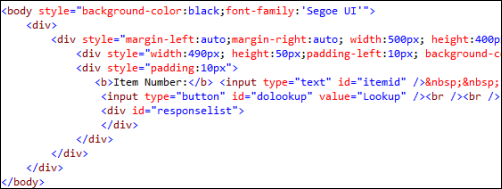
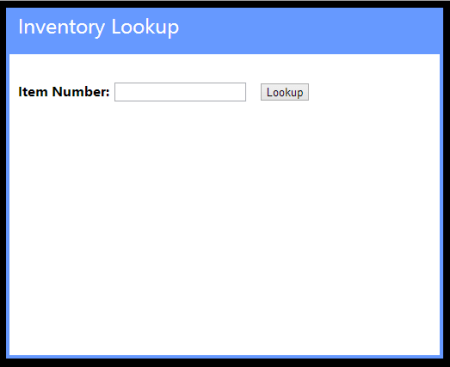
    Next, I added a single Web Form to this ASP.NET project. There’s nothing in the code-behind file as we’re dealing entirely with jQuery and client-side fun. The HTML markup of the page is pretty simple and contains a single textbox that accepts a inventory part number, and a button that triggers a lookup. You’ll also notice a DIV with an ID of “responselist” which will hold all the responses sent back from BizTalk Server.

    2013.02.01signalr07

    The real magic of the page (and SignalR) happens in the head of the HTML page. Here I referenced all the necessary JavaScript libraries for SignalR and jQuery. Then I established a reference to the server-side SignalR Hub. Then you’ll notice that I create a function that the *server* can call when it has data for me. So the *server* will call the “addLookupResponse” operation on my page. Awesome. Finally, I start up the connection and define the click function that the button on the page triggers.

    <head runat="server">
        <title>Inventory Lookup</title>
        <!--Script references. -->
        <!--Reference the jQuery library. -->
        <script src="Scripts/jquery-1.6.4.min.js" ></script>
        <!--Reference the SignalR library. -->
        <script src="Scripts/jquery.signalR-1.0.0-rc1.js"></script>
        <!--Reference the autogenerated SignalR hub script. -->
        <script src="<%= ResolveUrl("~/signalr/hubs") %>"></script>
        <!--Add script to update the page--> 
        <script type="text/javascript">
            $(function () {
                // Declare a proxy to reference the hub. 
                var notify = $.connection.notifyHub;
    
                // Create a function that the hub can call to broadcast messages.
                notify.client.addLookupResponse = function (providerId, stockAmount) {
                    $('#responselist').append('<div>Provider <b>' + providerId + '</b> has <b>' + stockAmount + '</b> units in stock.</div>');
                };
    
                // Start the connection.
                $.connection.hub.start().done(function () {
                    $('#dolookup').click(function () {
                        notify.server.lookupInventory($('#itemid').val());
                        $('#responselist').append('<div>Checking global inventory ...</div>');
                    });
                });
            });
        </script>
    </head>
    

    Nearly done! All that’s left is to open up a channel for BizTalk to send messages to the target browser connection. I added a WCF service to this existing ASP.NET project. The WCF contract has a single operation for BizTalk to call.

    [ServiceContract]
        public interface IInventoryResponseService
        {
            [OperationContract]
            void PublishResults(string clientId, string providerId, string itemId, int stockAmount);
        }
    

    Notice that BizTalk is sending back the client (connection) ID corresponding to whoever made this inventory request. SignalR makes it possible to send messages to ALL connected clients, a group of clients, or even individual clients. In this case, I only want to transmit a message to the browser client that made this specific request.

    public class InventoryResponseService : IInventoryResponseService
        {
            /// <summary>
            /// Send message to single connected client
            /// </summary>
            /// <param name="clientId"></param>
            /// <param name="providerId"></param>
            /// <param name="itemId"></param>
            /// <param name="stockAmount"></param>
            public void PublishResults(string clientId, string providerId, string itemId, int stockAmount)
            {
                var context = GlobalHost.ConnectionManager.GetHubContext<NotifyHub>();
    
    			 //send the inventory stock amount to an individual client
                context.Clients.Client(clientId).addLookupResponse(providerId, stockAmount);
            }
        }
    

    After adding the rest of the necessary WCF service details to the web.config file of the project, I added a new BizTalk send port targeting the service. Once the entire BizTalk project was started up (receive location for the on-ramp WCF service, orchestration that calls inventory systems, send port that sends responses to the web application), I browsed to my ASP.NET site.

    2013.02.01signalr05

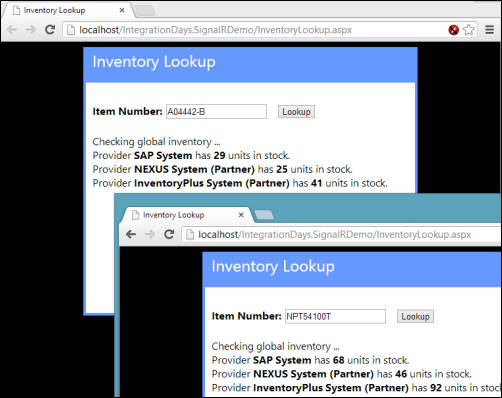
    For this demonstration, I opened a couple browser instances to prove that each one was getting unique results based on whatever inventory part was queried. Sure enough, a few seconds after entering in a random part identifier, data starting trickling back. On each browser client, results were returned in a staggered fashion as each back-end system returned data.

    2013.02.01signalr06

    I’m biased of course, but I think that this is a pretty cool query pattern. You can have the best of BizTalk (e.g. visually modeled workflow for scatter-gather, broad application adapter choice) while not sacrificing interactivity and performance.

    In the spirit of sharing, I’ve made the source code available on GitHub. Feel free to browse it, pull it, and try this on your own. Let me know what you think!

  • January 2013 Trip to Europe to Speak on (Cloud) Integration, Identity Management

    In a couple weeks, I’m off to Amsterdam and Gothenburg to speak at a pair of events. First, on January 22nd I’ll be in Amsterdam at an event hosted by middleware service provider ESTREME. There will be a handful of speakers, and I’ll be presenting on the Patterns of Cloud Integration. It should be a fun chat about the challenges and techniques for applying application integration patterns in cloud settings.

    Next up, I’m heading to Gothenburg (Sweden) to speak at the annual Integration Days event hosted by Enfo Zystems. This two day event is held January 24th and 25th and features multiple tracks and a couple dozen sessions. My session on the 24th, called Cross Platform Security Done Right, focuses on identity management in distributed scenarios. I’ve got 7 demos lined up that take advantage of Windows Azure ACS, Active Directory Federation Services, Node.js, Salesforce.com and more. My session on the 25th, called Embracing the Emerging Integration Endpoints, looks at how existing integration tools can connect to up-and-coming technologies. Here I have another 7 demos that show off the ASP.NET Web API, SignalR, StreamInsight, Node.js, Amazon Web Services, Windows Azure Service Bus, Salesforce.com and the Informatica Cloud. Mikael Hakansson will be taking bets as to whether I’ll make it through all the demos in the allotted time.

    It should be a fun trip, and thanks to Steef-Jan Wiggers and Mikael for organizing my agenda. I hope to see some of you all in the audience!

  • 2012 Year in Review

    2012 was a fun year. I added 50+ blog posts, built Pluralsight courses about Force.com and Amazon Web Services, kept writing regularly for InfoQ.com, and got 2/3 of the way done my graduate degree in Engineering. It was a blast visiting Australia to talk about integration technologies, going to Microsoft Convergence to talk about CRM best practices, speaking about security at the Dreamforce conference, and attending the inaugural AWS re:Invent conference in Las Vegas. Besides all that, I changed employers, got married, sold my home and adopted some dogs.

    Below are some highlights of what I’ve written and books that I’ve read this past year.

    These are a handful of the blog posts that I enjoyed writing the most.

    I read a number of interesting books this year, and these were some of my favorites.

    A sincere thanks to all of you for continuing to read what I write, and I hope to keep throwing out posts that you find useful (or at least mildly amusing).

  • Exploring REST Capabilities of BizTalk Server 2013 (Part 2: Consuming REST Endpoints)

    In my previous post, I looked at how the BizTalk Server 2013 beta supports the receipt of messages through REST endpoints. In this post, I’ll show off a couple of scenarios for sending BizTalk messages to REST service endpoints. Even though the BizTalk adapter is based on the WCF REST binding, all my demonstrations are with non-WCF services (just to prove everything works the same).

    Scenario #1 Consuming “GET” Service From an Orchestration

    In this first case, I planned on invoking a “GET” operation and processing the response in an orchestration. Specifically, I wanted to receive an invoice in one currency, and use a RESTful currency conversation service to flip the currency to US dollars.  There are two key quirks to this adapter that you should be aware of:

    • Consumed REST services cannot have an “&” symbol in the URL. This meant that I had to find a currency conversion service that did NOT use ampersands. You’d think that this would be easy, but many services use a syntax like “/currency?from=AUD&to=USD”, and the adapter doesn’t like that one bit. While “?” seems acceptable, ampersands most definitely are not.
    • The adapter throws an error on GET. Neither GET nor DELETE requests expect a message payload (as they are entirely URL driven), and the adapter throws an error if you send a GET request to an endpoint. This is a problem because you can’t natively send an empty message to an adapter endpoint. Below, I’ll show you one way to get around this. However, I consider this an unacceptable flaw that deserves to be fixed before BizTalk Server 2013 is released.

    For this demonstration, I used the adapter-friendly currency conversion service at Exchange Rate API. To get started, I created a new schema for “Invoice” and a property schema that held the values that needed to be passed to the send adapter.

    2012.11.19rest01

    Next, I built an orchestration that received this message from a (FILE) adapter, routed a GET request to the currency conversion service, and then multiplied the source currency by the returned conversion rate. In the orchestration, I routed the original Invoice message to the GET service, even though I knew I’d have to strip out the body before completing the request. Also, the Exchange Rate API service returns its result as text (not XML or JSON), so I set the response message type as XmlDocument. I then built a helper component that took in the service response message and returned a string.

    public static class Utilities
        {
            public static string ConvertMessageToString(XLANGMessage msg)
            {
                string retval = "0";
    
                using (StreamReader reader = new StreamReader((Stream)msg[0].RetrieveAs(typeof(Stream))))
                {
                    retval = reader.ReadToEnd();
                }
    
                return retval;
            }
        }
    

    Here’s the final orchestration.

    2012.11.19rest02

    After building and deploying this BizTalk project (with the two schemas and one orchestration), I created a FILE receive location to pull in the original invoice. I then configured a WCF-WebHttp send port. First, I set the base address to the Exchange Rate API URL, and then set an operation (which matched the name of the operation I set on the orchestration send port) that mapped to the GET verb with a parameterized URL.

    2012.11.19rest03

    I set those URL parameters by clicking the Edit button under Variable Mapping and choosing which property schema value mapped to each URL parameter.

    2012.11.19rest04

    This scenario was nearly done. All that was left was to strip out the body of message so that the GET wouldn’t fail. Fortunately, Saravana Kumar already built a simple pipeline component that erases the message body. I built the pipeline component, added it to a custom pipeline, and deployed the pipeline.

    2012.11.19rest05

    Finally, I made sure that my send port used this new pipeline.

    2012.11.19rest06

    With all my receive/send ports created and configured, and my orchestration enlisted, I dropped a sample file into a folder monitored by the FILE receive adapter. This sample invoice was for 100 Australian dollars, and I wanted the output invoice to translate that amount to U.S. dollars. Sure enough, the REST service was called, and I got back a modified invoice.

    <ns0:Invoice xmlns:ns0="http://Seroter.BizTalkRestDemo">
      <ID>100</ID>
      <CustomerID>10022</CustomerID>
      <OriginalInvoiceAmount>100</OriginalInvoiceAmount>
      <OriginalInvoiceCurrency>AUD</OriginalInvoiceCurrency>
      <ConvertedInvoiceAmount>103.935900</ConvertedInvoiceAmount>
      <ConvertedInvoiceCurrency>USD</ConvertedInvoiceCurrency>
    </ns0:Invoice>
    

    So we can see that GET works pretty well (and should prove to be VERY useful as more and more services switch to a RESTful model), but you have to be careful on both the URLs you access, and the body you (don’t) send.

    Scenario #2 Invoking a “DELETE” Command Via Messaging Only

    Let’s try a messaging-only solution that avoids orchestration and calls a service with a DELETE verb. For fun, I wanted to try using the WCF-WebHttp adapter with the “single operation format” instead of the XML format that lets you list multiple operations, verbs and URLs.

    In this case, I wrote an ASP.NET Web API service that defines an “Invoice” model, and has a controller with a single operation that responds to DELETE requests (and writes a trace statement).

    public class InvoiceController : ApiController
        {
            public HttpResponseMessage DeleteInvoice(string id)
            {
                System.Diagnostics.Debug.WriteLine("Deleting invoice ... " + id);
                return new HttpResponseMessage(HttpStatusCode.NoContent);
            }
        }
    

    With my REST service ready to go, I created a new send port that would subscribe directly on the input message and call this service. The structured of the “single operation format” isn’t really explained, so I surmised that all it included was the HTTP verb that would be executed against the adapter’s URL. So, the URL must be fixed, and cannot contain any dynamic parameter values. For instance:

    2012.11.19rest08

    To be sure, the scenario above make zero sense. You’d never  really hardcode a URL that pointed to a specific transaction resource. HOWEVER, there could be a reference data URL (think of lists of US states, or current currency value) that might be fixed and useful to embed in an adapter. Nonetheless, my demos aren’t always about making sense, but about flexing the technology. So, I went ahead and started this send port (WITHOUT changing it’s pipeline from “passthrough” to “remove body”) and dropped an invoice file to be picked up. Sure enough, the file was picked up, the service was called, and the output was visible in my Visual Studio 2012 output window.

    2012.11.19rest09

    Interestingly enough, the call to DELETE did NOT require me to suppress the message body. Seems that Microsoft doesn’t explicitly forbid this, even though payloads aren’t typically sent as part of DELETE requests.

    Summary

    In these two articles, we looked at REST support in the BizTalk Server 2013 (beta). Overall, I like what I see. SOAP services aren’t going anywhere anytime soon, but the trend is clear: more and more services use a RESTful API and a modern integration bus has to adapt. I’d like to see more JSON support, but admittedly haven’t tried those scenarios with these adapters.

    What do you think? Will the addition of REST adapters make your life easier for both exposing and consuming endpoints?

  • Exploring REST Capabilities of BizTalk Server 2013 (Part 1: Exposing REST Endpoints)

    The BizTalk Server 2013 beta is out there now and I thought I’d take a look at one of the key additions to the platform. In this current age of lightweight integration and IFTTT simplicity, one has to wonder where BizTalk will continue to play. That said, a clean support of RESTful services will go a long way to keeping BizTalk relevant for both on-premises and cloud-based integration scenarios. Some smart folks have messed around with getting previous version of BizTalk to behave RESTfully, but now there is REAL support for GET/POST/PUT/DELETE in the BizTalk engine.

    I decided to play with two aspects of REST services and BizTalk Server 2013: exposing REST endpoints and consuming REST endpoints. In this first post, I’ll take a look at exposing REST endpoints.

    Scenario #1: Exposing Synchronous REST Service with Orchestration

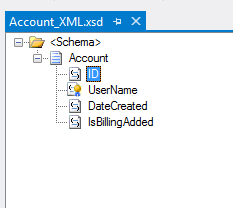
    In this scenario, I wanted to use the BizTalk-provided WCF Service Publishing Wizard to generate a REST endpoint. Let’s assume that I want to let modern web applications send new “account” records into our ESB for further processing. Since these accounts are associated with different websites, we want a REST service URL that identifies which website property they are part of. The simple schema of an account looked like this:

    2012.11.12rest01

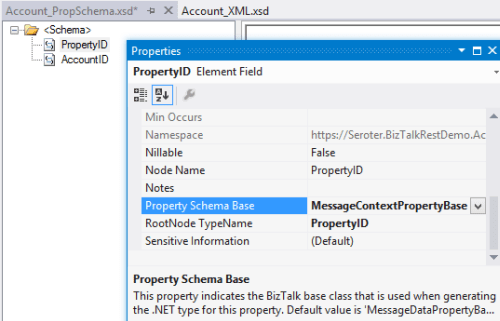
    I also added a property schema that had fields for the website property ID and the account ID. The “property ID” node’s source was set to MessageContextPropertyBase because its value wouldn’t exist in the message itself, but rather, it would solely exists in the message context.

    2012.11.12rest02

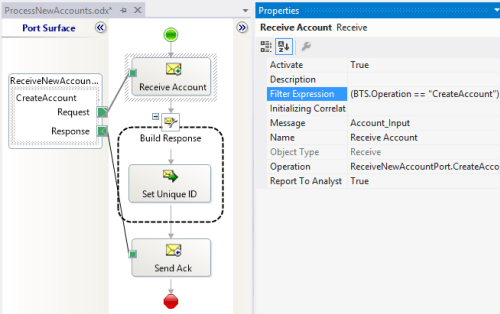
    I could stop here and just deploy this, but let’s explore a bit further. Specifically, I want an orchestration that receives new account messages and sets the unique ID value before returning a message to the caller. This orchestration directly subscribes to the BizTalk MessageBox and looks for any messages with a target operation called “CreateAccount.”

    2012.11.12rest03

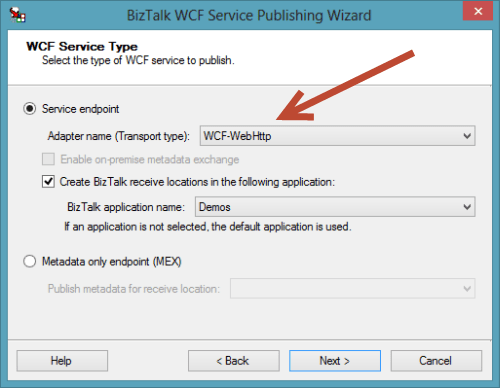
    After building and deploying the project, I then started up the WCF Service Publishing Wizard. Notice that we can now select WCF-WebHttp as a valid source adapter type. Recall that this is the WCF binding that supports RESTful services.

    2012.11.12rest04

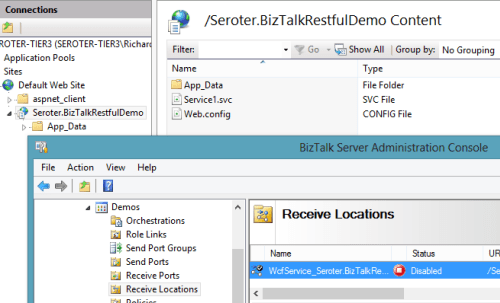
    After choosing the new web service address, I located my new service in IIS and a new Receive Location in the BizTalk Engine.

    2012.11.12rest05

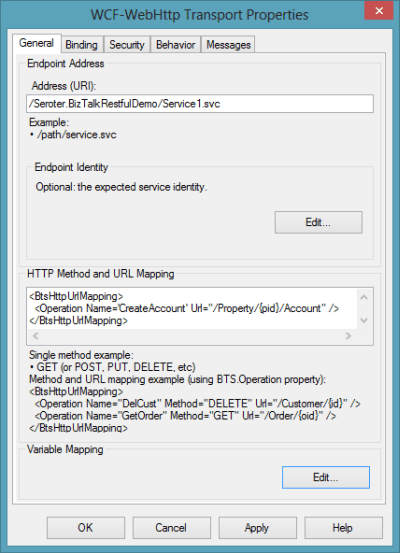
    The new Receive Location had a number of interesting REST-based settings. First, I could choose the URL and map the URL parameters to message property (schema) values. Notice here that I created a single operation called “CreateAccount” and associated with the HTTP POST verb.

    2012.11.12rest06

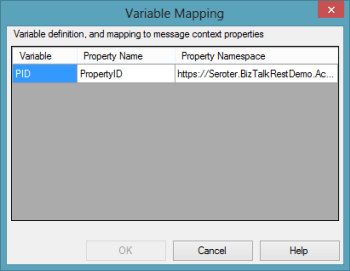
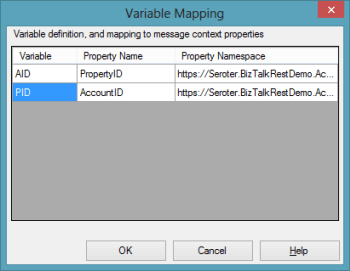
    How do I access that “{pid}” value (which holds the website property identifier) in the URL from within my BizTalk process? The Variable Mapping section of the adapter configuration lets me put these URL values into the message context.

    2012.11.12rest07

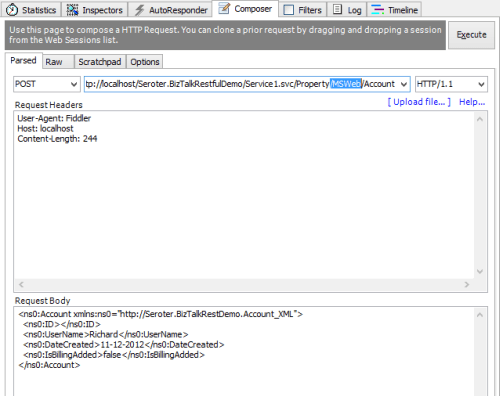
    With that done, I bound this receive port/location to the orchestration, started everything up, and fired up Fiddler. I used Fiddler to invoke the service because I wanted to ensure that there was no WCF-specific stuff visible from the service consumer’s perspective. Below, you can see that I crafted a URL that included a website property (“MSWeb”) and a message body that is missing an account ID.

    2012.11.12rest08

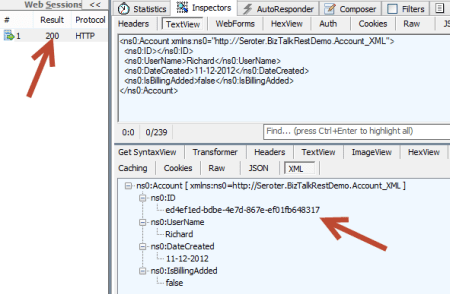
    After performing an HTTP POST to that address, I immediately got back an HTTP 200 code and a message containing the newly minted account ID.

    2012.11.12rest09

    There is a setting in the adapter to set outbound headers, but I haven’t seen a way yet to change the HTTP status code itself. Ideally, the scenario above would have returned an HTTP 202 code (“accepted”) vs. a 200. Either way, what an easy, quick way to generate interoperable REST endpoints!


    Scenario #2: Exposing Asynchronous REST Service for Messaging-Only Solution

    Let’s do a variation on our previous example so that we can investigate the messages a bit further. In this messaging-only solution (i.e. no orchestration in the middle), I wanted to receive either PUT or DELETE messages and asynchronously route them to a subsequent system. There are no new bits to deploy as I reused the schemas that were built earlier. However, I  did generate a new, one-way WCF REST service for getting these messages into the engine.

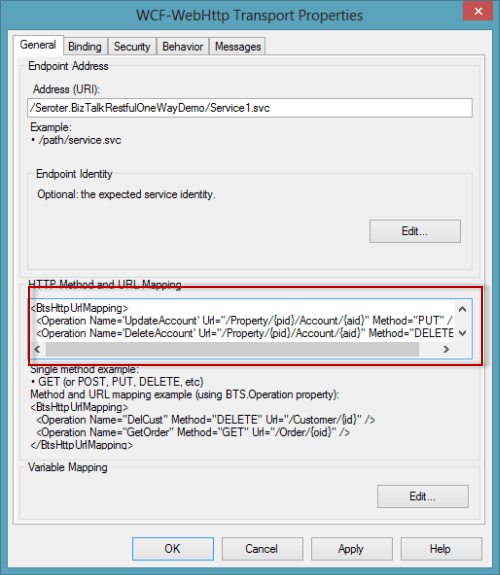
    In this receive location configuration, I added two operations (“UpdateAccount”, “DeleteAccount”) and set the corresponding HTTP verb and URI template.

    2012.11.12rest12

    I could list as many service operations as I wanted here, and notice  that I had TWO parameters (“pid”, “aid”) in the URI template. I was glad to see that I could build up complex addresses with multiple parameters. Each parameter was then mapping to a property schema entry.

    2012.11.12rest13

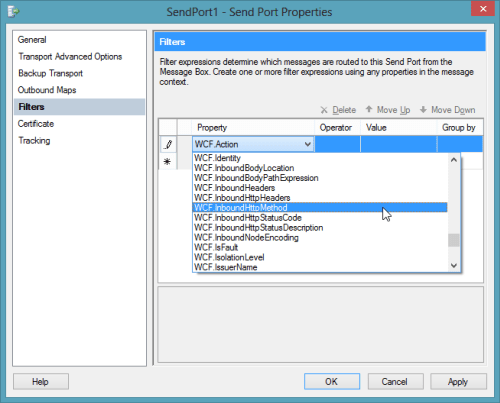
    After saving the receive location configuration, I configured a quick FILE send port. I left this port enlisted (but not started) so that I could see what the message looked like as it traveled through BizTalk. On the send port, I had a choice of new filter criteria that were related to the new WCF-WebHttp adapter. Notice that I could filter messages based on inbound HTTP method, headers, and more.

    2012.11.12rest14

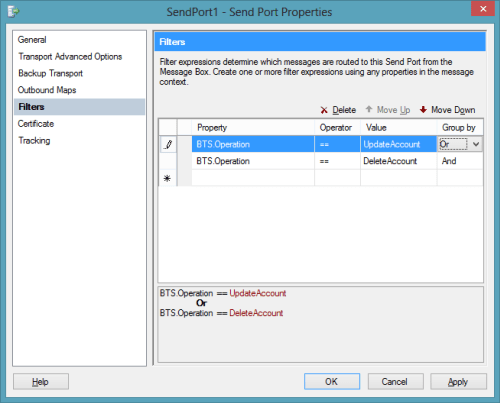
    For this particular example, I filtered on the BTS.Operation which is set based on whatever URL is invoked.

    2012.11.12rest15

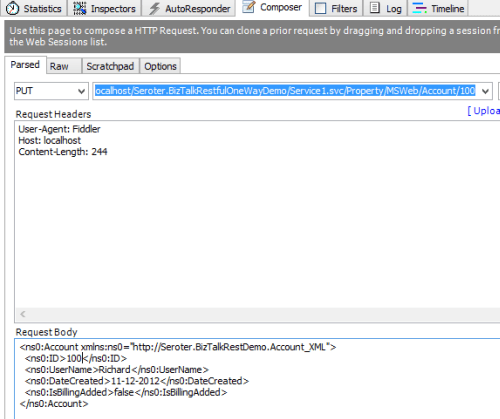
    I returned to Fiddler and changed the URL, switched my HTTP method from POST to PUT and submitted the request.

    2012.11.12rest16

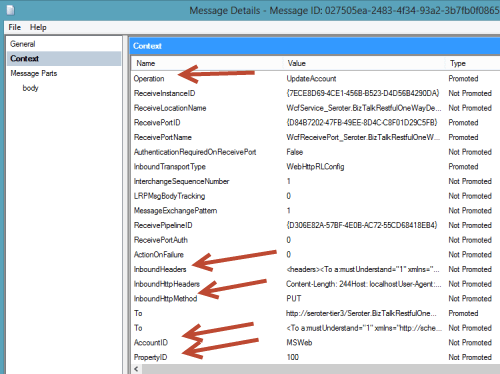
    I got an HTTP 200 code back, and within BizTalk, I could see a single suspended message that was waiting for my Send Port to start. Opening that message revealed all the interesting context properties that were available. Notice that the operation name that I mapped to a URL in the receive adapter is there, along with various HTTP header and verbs. Also see that my two URL parameters were successfully promoted into context.

    2012.11.12rest17


    Summary

    That was a quick look at exposing REST endpoints. Hopefully that gives you a sense of the native aspect of this new capability. In the next post, I’ll show you how to consume REST services.

  • Links to Recent Articles Written Elsewhere

    Besides this blog, I still write regularly for InfoQ.com as well in as a pair of blogs for my employer, Tier 3. It’s always a fun exercise for me to figure out what content should go where, but I do my best to spread it around. Anyway, in the past couple weeks, I’ve written a few different posts that may (or may not) be of interest to you:

    Lots of great things happening in the tech space, so there’s never a shortage of cool things to investigate and write about!

  • Capabilities and Limitations of “Contract First” Feature in Microsoft Workflow Services 4.5

    I think we’ve moved well past the point of believing that “every service should be a workflow” and other things that I heard when Microsoft was first plugging their Workflow Foundation. However, there still seem to be many cases where executing a visually modeled workflow is useful. Specifically, they are very helpful when you have long running interactions that must retain state. When Microsoft revamped Workflow Services with the .NET 4.0 release, it became really simple to build workflows that were exposed as WCF services. But, despite all the “contract first” hoopla with WCF, Workflow Services were inexplicably left out of that. You couldn’t start the construction of a Workflow Service by designing a contract that described the operations and data payloads. That has all been rectified in .NET 4.5 as now developers can do true contract-first development with Workflow Services. In this blog post, I’ll show you how to build a contract-first Workflow Service, and, include a list of all the WCF contract properties that get respected by the workflow engine.
    First off, there is an MSDN article (How to: Create a workflow service that consumes an existing service contract) that touches on this, but there are no pictures and limited details, and my readers demand both, dammit.

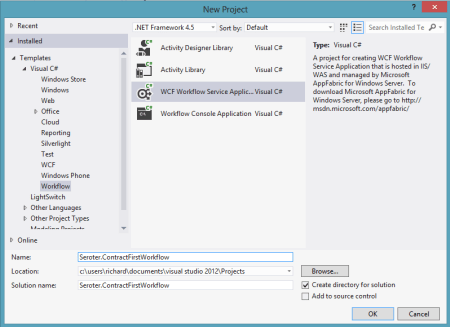
    To begin with, I created a new Workflow Services project in Visual Studio 2012.

    2012.10.12wf01

    Then, I chose to add a new class directly to the Workflow Services project.

    2012.10.12wf02

    Within this new class filed, named IOrderService, I defined a new WCF service contract that included an operation that processes new orders. You can see below that I have one contract and two data payloads (“order” and “order confirmation”).

    namespace Seroter.ContractFirstWorkflow
    {
        [ServiceContract(
            Name="OrderService",
            Namespace="http://Seroter.Demos")]
        public interface IOrderService
        {
            [OperationContract(Name="SubmitOrder")]
            OrderConfirmation Submit(Order customerOrder);
        }
    
        [DataContract(Name="CustomerOrder")]
        public class Order
        {    
            [DataMember]
            public int ProductId { get; set; }
            [DataMember]
            public int CustomerId { get; set; }
            [DataMember]
            public int Quantity { get; set; }
            [DataMember]
            public string OrderDate { get; set; }
    
            public string ExtraField { get; set; }
        }
    
        [DataContract]
        public class OrderConfirmation
        {
            [DataMember]
            public int OrderId { get; set; }
            [DataMember]
            public string TrackingId { get; set; }
            [DataMember]
            public string Status { get; set; }
        }
    }
    

    Now which WCF service/operation/data/message/fault contract attributes are supported by the workflow engine? You can’t find that information from Microsoft at the moment, so I reached out to the product team, and they generously shared the content below. You can see that a good portion of the contract attributes are supported, but there are a number of key ones (e.g. callback and session) that won’t make it over. Also, from my own experimentation, you also can’t use the RESTful attributes like WebGet/WebInvoke.

    Attribute Property Name Supported Description
    Service Contract CallbackContract No Gets or sets the type of callback contract when the contract is a duplex contract.
    ConfigurationName No Gets or sets the name used to locate the service in an application configuration file.
    HasProtectionLevel Yes Gets a value that indicates whether the member has a protection level assigned.
    Name Yes Gets or sets the name for the <portType> element in Web Services Description Language (WSDL).
    Namespace Yes Gets or sets the namespace of the <portType> element in Web Services Description Language (WSDL).
    ProtectionLevel Yes Specifies whether the binding for the contract must support the value of the ProtectionLevel property.
    SessionMode No Gets or sets whether sessions are allowed, not allowed or required.
    TypeId No When implemented in a derived class, gets a unique identifier for this Attribute. (Inherited from Attribute.)
    Operation Contract Action Yes Gets or sets the WS-Addressing action of the request message.
    AsyncPattern No Indicates that an operation is implemented asynchronously using a Begin<methodName> and End<methodName> method pair in a service contract.
    HasProtectionLevel Yes Gets a value that indicates whether the messages for this operation must be encrypted, signed, or both.
    IsInitiating No Gets or sets a value that indicates whether the method implements an operation that can initiate a session on the server(if such a session exists).
    IsOneWay Yes Gets or sets a value that indicates whether an operation returns a reply message.
    IsTerminating No Gets or sets a value that indicates whether the service operation causes the server to close the session after the reply message, if any, is sent.
    Name Yes Gets or sets the name of the operation.
    ProtectionLevel Yes Gets or sets a value that specifies whether the messages of an operation must be encrypted, signed, or both.
    ReplyAction Yes Gets or sets the value of the SOAP action for the reply message of the operation.
    TypeId No When implemented in a derived class, gets a unique identifier for this Attribute. (Inherited from Attribute.)
    Message Contract HasProtectionLevel Yes Gets a value that indicates whether the message has a protection level.
    IsWrapped Yes Gets or sets a value that specifies whether the message body has a wrapper element.
    ProtectionLevel No Gets or sets a value that specified whether the message must be encrypted, signed, or both.
    TypeId Yes When implemented in a derived class, gets a unique identifier for this Attribute. (Inherited from Attribute.)
    WrapperName Yes Gets or sets the name of the wrapper element of the message body.
    WrapperNamespace No Gets or sets the namespace of the message body wrapper element.
    Data Contract IsReference No Gets or sets a value that indicates whether to preserve object reference data.
    Name Yes Gets or sets the name of the data contract for the type.
    Namespace Yes Gets or sets the namespace for the data contract for the type.
    TypeId No When implemented in a derived class, gets a unique identifier for this Attribute. (Inherited from Attribute.)
    Fault Contract Action Yes Gets or sets the action of the SOAP fault message that is specified as part of the operation contract.
    DetailType Yes Gets the type of a serializable object that contains error information.
    HasProtectionLevel No Gets a value that indicates whether the SOAP fault message has a protection level assigned.
    Name No Gets or sets the name of the fault message in Web Services Description Language (WSDL).
    Namespace No Gets or sets the namespace of the SOAP fault.
    ProtectionLevel No Specifies the level of protection the SOAP fault requires from the binding.
    TypeId No When implemented in a derived class, gets a unique identifier for this Attribute. (Inherited from Attribute.)

    With the contract in place, I could then right-click the workflow project and choose to Import Service Contract.

    2012.10.12wf03

    From here, I chose which interface to import. Notice that I can look inside my current project, or, browse any of the assemblies referenced in the project.

    2012.10.12wf04


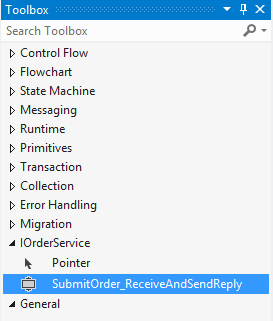
    After the WCF contract was imported, I got a notice that I “will see the generated activities in the toolbox after you rebuild the project.” Since I don’t mind following instructions, I rebuilt my project and looked at the Visual Studio toolbox.

    2012.10.12wf05

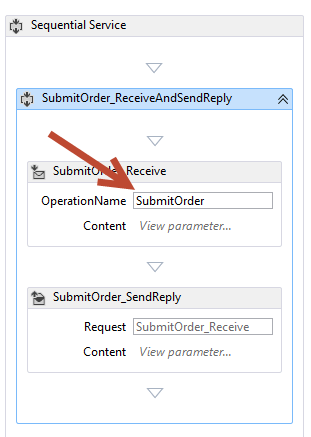
    Nice! So now I could drag this shape onto my Workflow and check out how my WCF contract attributes got mapped over. First off, the “name” attribute of my contract operation (“SubmitOrder”) differed from the name of the operation itself (“Submit”). You can see here that the operation name of the Workflow Service correctly uses the attribute value, not the operation name.

    2012.10.12wf06

    What was interesting to me is that none of my DataContract attributes got recognized in the Workflow itself. If you recall from above, I set the “name” attribute of the DataContract for “Order” to “CustomerOrder” and excluded one of the fields, “ExtraField”, from the contract. However, the data type in my workflow is called “Order”, and I can still access the “ExtraField.”

    2012.10.12wf07

    So maybe these attribute values only get reflected in the external contract, not the internal data types. Let’s find out! After starting the Workflow Service and inspecting the WSDL, sure enough, the “type” of the inbound request corresponds to the data contract attribute (“CustomerOrder”).

    2012.10.12wf09

    In addition, the field (“ExtraField”) that I excluded from the data contract is also nowhere to be found in the type definition.

    2012.10.12wf10

    Finally, the name and namespace of the service should reflect the values I defined in the service contract. And indeed they do. The target namespace of the service is the value I set in the contract, and the port type reflects the overall name of the service.

    2012.10.12wf11

    2012.10.12wf12


    All that’s left to do is test the service, which I did in the WCF Test Client.

    2012.10.12wf13

    The service worked fine. That was easy. So if you have existing service contracts and want to use Workflow Services to model out the business logic, you can now do so.

  • Trying Out the New Windows Azure Portal Support for Relay Services

    Scott Guthrie announced a handful of changes to the Windows Azure Portal, and among them, was the long-awaited migration of Service Bus resources from the old-and-busted Silverlight Portal to the new HTML hotness portal. You’ll find some really nice additions to the Service Bus Queues and Topics. In addition to creating new queues/topics, you can also monitor them pretty well. You still can’t submit test messages (ala Amazon Web Services and their Management Portal), but it’s going in the right direction.

    2012.10.08sb05

    One thing that caught my eye was the “Relays” portion of this. In the “add” wizard, you see that you can “quick create” a Service Bus relay.

    2012.10.08sb02

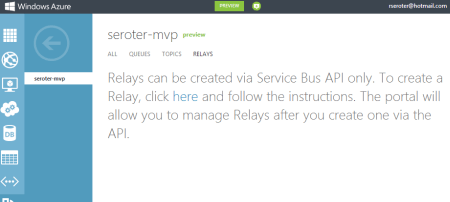
    However, all this does is create the namespace, not a relay service itself, as can be confirmed by viewing the message on the Relays portion of the Portal.

    2012.10.08sb03

    So, this portal is just for the *management* of relays. Fair enough. Let’s see what sort of management I get! I created a very simple REST service that listens to the Windows Azure Service Bus.  I pulled in the proper NuGet package so that I had all the Service Bus configuration values and assembly references. Then, I proceeded to configure this service using the webHttpRelayBinding.

    2012.10.08sb06

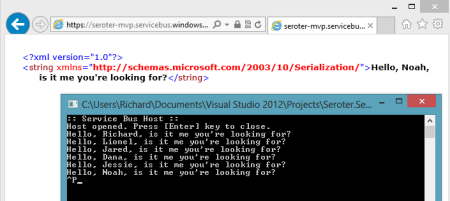
    I started up the service and invoked it a few times. I was hoping that I’d see performance metrics like those found with Service Bus Queues/Topics.

    2012.10.08sb07

    However, when I returned to the Windows Azure Portal, all I saw was the name of my Relay service and confirmation of a single listener. This is still an improvement from the old portal where you really couldn’t see what you had deployed. So, it’s progress!

    2012.10.08sb08

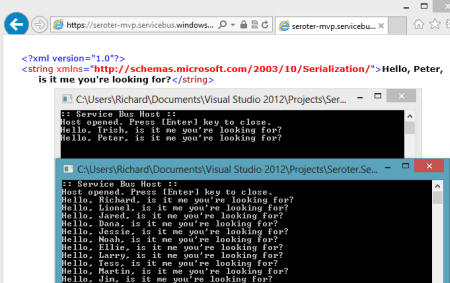
    You can see the Service Bus load balancing feature represented here. I started up a second instance of my “hello service” listener and pumped through a few more messages. I could see that messages were being sent to either of my two listeners.

    2012.10.08sb09

    Back in the Windows Azure Portal, I immediately saw that I now had two listeners.

    2012.10.08sb10

    Good stuff. I’d still like to see monitoring/throughput information added here for the Relay services. But, this is still  more useful than the last version of the Portal. And for those looking to use Topics/Queues, this is a significant upgrade in overall user experience.