Category: SOA

  • Interview Series: Four Questions With … Jon Flanders

    You’re probably surprised that I’ve kept this up, aren’t you.  Here we are, five interviews into this series and still going strong.  This month, we chat with the one Flanders that Homer Simpson actually appreciates: Jon Flanders.  Jon is a blogger, MVP, thought leader in the SOA space, and is comfortable wearing a skirt. Jon has recently released his book RESTful .NET to critical acclaim and has taken a break from his whirlwind book tour (and the thousands of screaming ladies) to engage in a little Q&A with us.

    Q: Tell us why a developer who has always built SOAP-based web services should care about REST. Why is it worth it to them to learn a different paradigm and what benefit does this paradigm offer to enterprise services that typically are built in a SOAP/RPC fashion?

    A:  What I typically tell people here is two things.

    1) REST has some significant advantages over traditional RPC styles (which most SOAP-based services are). GET results can be cached, REST services are *more* interoperable than SOAP and WS-*, and the statelessness constraint encourages more scalable implementations, and the uniform interface (GET, POST, PUT, DELETE) make building and using services much simpler than custom APIs (which SOAP-based services are because each one is a custom interface). If you use all of the constraints of REST (specifically the hypermedia constraint), you also get a highly decoupled implementation.

    2) Because of these advantages, most of the non-Microsoft parts of the computer industry have moved towards a RESTful approach already, and Microsoft is currently moving that way. When you look at ADO.NET Data Services, Windows Azure, you see a lot of Microsoft’s effort going into building RESTful services. Because of this, even if you aren’t planning on implementing all your services using REST, you probably will be consuming one or more RESTful services in the near future.

    In the end, I don’t advocate moving away from SOAP/WS-* where it makes sense or is necessary (for things like transactional calls between .NET and Java for example), but I think more services than people think could benefit from using a RESTful approach.

    Q: Outside of the plethora of WCF related things you inevitably learned during the writing of your latest book, what more general “service design” concepts/principles/pitfalls have you picked up as a result of authoring this book?

    A: Nothing really new. The concept/principle I believe in most is Keep it Simple Stupid (KISS).

    Q: In addition to being an author, blogger, instructor, and part-time samurai, you also do consulting work. Tell us about the most complicated BizTalk Server project you ever worked on and how you solved the business problem.

    A:  Honestly, I’ve never been involved in a “real” BizTalk Server project (what do they say “those who can’t teach” ;-)). I have built a number of fairly complex demos for Microsoft using BizTalk, probably the most complicated demo involved using BizTalk Server with BizTalk Services (now .NET Services).

    Q [stupid question]: You regularly make the rounds in the conference circuit and naturally meet folks who only know you by your online presence. What’s the oddest thing someone has remarked to you upon meeting you in person for the first time? For me, on multiple occasions, I got a “oh, I thought you were taller.” Apparently I have the writing style of a 7 footer.

    A:  Where’s the kilt?

    Hope you all are enjoying this series, and if you have interest in being added to my “interview queue”, do let me know.

    Technorati Tags: , ,

  • Application Architecture "Pocket Guides" From Microsoft

    Was trolling CodePlex today and noticed that those Patterns and Practices cats just released a neat little set of short architecture guides that cover a few specific architectural areas including the Agile architecture method, web application architecturemobile architecture, rich Internet application (RIA) architecturerich client architecture, and finally, service architecture.

    The service guide is a fairly useful little document that spells out a few important things.  It covers different considerations for SOA services, data services and workflow services.  I like the sections which cover items such as considerations for each design area (e.g. exception management, message endpoints, authentication, etc), as well as the considerations for each service layer.  There are brief descriptions of common patterns, and a handy checklist for evaluating your service architecture. 

    Overall, a pleasant read.  May not be breaking new ground for some of you, but if anything, this set of guides should encourage you to read about a particular architecture topic you aren’t that familiar with.

    Technorati Tags:

  • Interview Series: Four Questions With … Yossi Dahan

    We continue our monthly look at thought leaders in the “connected systems” space by interviewing Yossi Dahan.  Yossi is a great technologist,  prolific blogger, Microsoft MVP as well as a good tipper.  Yossi recently attending Microsoft’s PDC conference in Los Angeles, and I wanted to get some insight from him as to what he saw there.

    Yossi provides some great insight into technology, and also tests the PG-13 limits of my blog with his answer to this month’s “stupid question.”  Enjoy.

    Q: At the just-completed Microsoft PDC conference, we saw a wide range of new technologies announced including Azure, Oslo, and Dublin. Given that you have a real job and can’t play with technology all day, which of the just-announced products/frameworks do you expect to spend the most time with, and why?

    A:  I will undoubtedly try to spend as much as I can looking at all of the above as I sincerely believe they are all pieces of a big change that is coming to how software is developed and run; of course, you are quite right, and it is rather unlikely that anyone with a day job will be able to spend enough time learning all of these, and so I think I will probably focus initially at the Azure platform and the services built on top of that.

    The main reason is that out of the various technologies announced during PDC and the weeks leading to it, I believe that the Azure platform is the one with the highest impact on how software is architected and designed; also, if my understanding is correct (and there are not concrete statements on this one yet) it is the .net services and bit of the Azure platform that will be the first “out of the door” while there is still some time before we could consider using Dublin or Oslo in a production environment.

    If I have a little bit more time left (or maybe “offline” time) to spend on anything else Oslo’s “M” would be what I’d spend it on. I find this (defining modeling and textual dsls) a fascinating area and I really want to look deeper into this; it kind of doing my head in at the moment, just trying to grasp the concepts and potential they carry, but I have a feeling that for some of us this can make a big difference in how we work (and help others work).

    Last I would add that I’m already looking at some of the Geneva aspects, mostly the Geneva Framework (formerly known as “Zermatt”) and think this will also become a very common component in the enterprise environment.

    Q: You and I were recently chatting about a PDC pre-conference session that you attending where Juval Lowy was trying to convince the audience that “everything should be a service.” Explain what he meant by that, and whether or not you agree.

    A:  It would be pretentious of me to try to explain Juval’s ideas, so let’s just say I’ll try to convey some of the points I’ve taken from his talk…

    Basically Juval argues that WCF is a lot more than just a “framework for developing services” much like .net is more than just a “framework for developing web services” as it was once presented; he argues that WCF services have so much “goodness” that it would be silly not to want to use them for every class developed and he goes on to give quite a few examples, here are a couple of examples (he must have had over half a dozen)– Take the timeout default behavior in WCF for example – with WCF every call to a service operation has built in support for timeout, so if the method’s implementation takes forever (because of a deadlock situation for example, or simply an endless loop) the caller would receive a timeout exception after the configured time; this is a great feature, and to implement it in custom code, while possible, will take some effort (on the client side); to implement it around every method call seems unthinkable, let alone in every client out there.

    Another example that Juval goes through is tracing – with WCF you get built in tracking for each method call, including correlation of multiple logs (client and server for example etc) and the trace viewer provided with the framework; how much effort would it take you to build that into your code? with WCF you simply get it for free through configuration; quite neat.

    Juval goes on to list many such benefits like Fault tolerance , built-in performance counters, security, reliability, transactions, versioning tolerance etc. I will not repeat all of it here, but I hope you get the point; Juval actually goes as far as suggesting that every class should be a service – including type once known as primitive types such as String and Integer (they are already classes in .net, and now Juval suggests they could benefit from being a service)

    That was pretty much Juval’s point of view as I understand it; as for my perspective – do I like his idea? I certainly think it’s a great a food-for-thought exercise; do I agree? Not completely. It is true that WCF incorporates a lot of goodies, and I love it, but – and there’s a big but – it comes with a cost; it comes with a performance cost, which Juval tries to play down, but I think he’s taking a rather convenient stand; it comes with a complexity cost – WCF is not simple, especially when you start to combine things like security, reliability, transactions, instance management; do we want/need all that complexity in every class we write? I doubt it.

    Many of the benefits Juval lists really only apply once you’ve decided you want to use services; if I’m not using services – do I need reliable messaging? Do I need security? It’s easy to argue for WCF once you’ve decided that you need to run everything as a service, which I guess is Juval’s starting point, but if you’re not in that thinking mode (yet?), and I am certainly not – then you might think he has gone just a little bit too far 🙂

    Now – I was never interested in looking too far into the future, I’m pretty much a now-and-there-and-around-the-corner type of guy who argues that it’s important to know where things are going but in my day to day job I need to give my client’s solid advice on what they can (and should) do now. Looking into the future performance is certainly going to be less of an issue, and I’m sure WCF management will improve significantly (Dublin is already a great step in the right direction) so we might end up very close; but that’s not present tense.

    It is worth noting that I do not at all disagree that we will be seeing a lot more services; we’ve already seeing a lot of enterprises and ISV’s adopt SOA architecture of one flavor or another, and the cloud services/platforms will only add more capabilities in that space, so I don’t want to play down the role of services and WCF in enterprise IT, I just think this will still be, for the foreseen future at least, another tool in the toolbox, albeit a major one.

    Q: As we now know that BizTalk Server has a new lease on life (i.e. releases planned after 2009), what types of engine-level changes would you like to see? In your opinion, what would make BizTalk messaging even more robust?

    A:  I should probably start by saying that I truly believe that BizTalk is, and has been for a while now, a very complete and mature product, and while there are clearly a few quirks and rough edges, the good definitely out-weighs the bad… I suspect it was not by chance that you have asked me to focus on engine-level changes – most of the stuff I have “on my list” is related to user experience – both developer and administrator, there are less things that I believe need changing around the engine, but here are a few examples –

    One thing I would have like to see is the management database thinned a little bit – I don’t think, for example, that the entire schema is needed in the database (which makes deployment of updates harder); I would imagine that this could have been reduced in scope to store only xpaths related to promoted/distinguished fields etc.

    I also think, as both me and Mike Stephenson talked about in the past, that it would be a good idea to get rid of the compiled-pipeline concept and instead make it a configuration artifact, such as send ports for example; at the end of the day all a pipeline is just a set of components and their properties, represented as xml; sounds familiar? Doesn’t it feel suspiciously like a binding file element?

    While I don’t know if you would consider the above as engine-level changes (I think they could be considered as such), the next one certainly is –

    Better support for low latency scenario; several people have mentioned this in the past – BizTalk is great (no! really!) but it seems to be positioned a little bit in the middle – it’s not the best tool for large batch files processing (ETL is the technology of choice there), but with the latency introduced by multiple message box hops it is hard to position it in low latency scenarios; I know that Dublin is getting into that space, but I think Microsoft will do well to add in-memory pub-sub support to BizTalk to better support low latency scenarios.

    Others on the list – Somebody clever (not mentioning names!) once suggested giving better control over (orchestration) instance throttling, I completely second that. Also nice to have would be the ability to run a map on a typeless message (XmlDocument) – let my xslt figure out which template to run .

    Not much to ask, is it!?

    Q [stupid question]: If you work in the same office for quite a while, you may tend to let your guard down and ask questions or make comments that you wouldn’t typically say to strangers. Everyone’s had those awkward moments such as congratulating a woman on her pregnancy when no such congratulations were in order. Or, my new personal favorite, someone walking into your office and saying “Last night I had a wildly vivid, erotic dream and you were in it!” What is your example of a terribly awkward “office” conversation?

    A:  Unfortunately finding embarrassing moments is not very hard, here’s one from the far history , I just hope I can correctly paint the scene –

    Quite a few years ago, let’s just say – before BizTalk was invented – I did a relatively small project in Sydney, Australia. The client was a lingerie company wishing to build a web application to compete with Victoria’s Secret very successful ecommerce web site, and I was called to the flag to build that.

    The owners of the company, if my memory serves me right, were a couple of playboy type guys (with most of the staff seem to be either ex-models or models-to-be) and once or twice a week they would come over to our dev shop, accompanied by one or two such assistants, to discuss the current status and any open issues around the development and design.

    I can’t remember what it was now, but there was this one thing they kept asking for time after time which made absolutely no sense – not from a visual design or usability perspective, not from an architecture perspective, and, as these things often go, it was also very hard to achieve technically; and so we constantly had debates in those meetings about whether and how we should implement this requirement. In one of those meetings they kept going on and on about this thing, while me and my Australian colleagues (yes – worth stating that was not at all alone in my reluctance to implement this) were trying to explain why it was so difficult to implement, but mostly, why it simply does not make sense as a feature on the web site. Eventually, being quite young and inexperienced (and Israeli, some would say) I got into a slightly too heated debate about it and eventually lost my cool and said, rather loudly, something like – “I only have two words to say– I can’t”.

    On its own – it’s not too bad (although now I know that such discussions are often doomed to failure from the beginning, but I had much less experience back then :)), but, and here’s the hard thing to explain perhaps, stupidly, I was trying at the time, with a fair bit of effort, to assume an Australian accent. Being Israeli, brought up on American television and having been in Australia for just about 3 weeks at the time, it did not go too well as you can imagine, and mostly it screwed up any chance I could have to be understandable, and that’s when not in a way-too-heated- debates; and so what I said and what they heard were two completely different things (I’m sure you can guess what they had in mind). Being the playboy types that they were they were certainly not going to let this one slip and so I they were having a laugh at my expense for the rest of that meeting (and the rest of that week in fact); much to my embarrassment.

    At least it made me stop trying to assume any accents, and with me working all over Europe, then landing in the north of England and now living just outside London I would say – good thing that I did, it’s all messed up as it is!

    Great job Yossi.  You are an engrossing storyteller.
    Technorati Tags: , ,

  • Reason #207 Why the BizTalk WCF Adapter is Better Than the SOAP Adapter

    In writing my book, I’ve had a chance to compare the two BizTalk service generation wizards, and I now remember why the BizTalk Web Services Publishing Wizard (ASMX) drove me nuts.

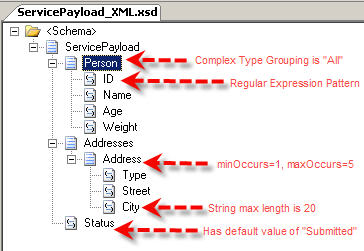
    Let’s look at how the WCF Wizard and ASMX Wizard take the same schema, and expose it as a service.  I’ve purposely included some complexity in the schema to demonstrate the capabilities (or lack thereof) of each Wizard.  Here is my schema, with notations indicating the node properties that I added.

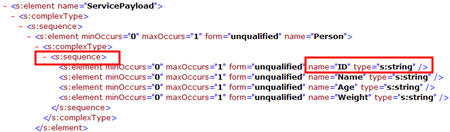
    Now, I’ve run both the BizTalk Web Services Publishing Wizard (ASMX) and the BizTalk WCF Service Publishing Wizard (WCF) on this schema and pulled up WSDL of each.   First of all, let’s look at the ASMX WSDL.  Here is the start of the schema definition.  Notice that the “Person” element was switched back to “sequence” from my XSD definition of “all.”  Secondly, see that my regular expression no longer exists in the “ID” node.

    We continue this depressing journey by reviewing the rest of the ASMX schema.  Here you can see that a new schema type was created for my repeating “address” node, but I lost my occurrence boundaries.  The “minOccurs” is now 0, and the “maxOccurs” is unbounded.  Sweet.  Also notice that my “Status” field has no default value, and the “City” node doesn’t have a field restriction.

    So, not a good story there.  If you’ve thoughtfully designed a schema to include a bit of validation logic, you’re S.O.L.  Does the WCF WSDL look any better, or will I be forced to cry out in anger and shake my monitor in frustration?  Lucky for me (and my monitor), the WCF wizard keeps the ENTIRE schema intact when publishing the service endpoint.

    There you go.  WCF Wizard respects your schema, while the ASMX Wizard punches your schema in the face.  I think it’s now time to take the ASMX Wizard to the backyard, tie it to a tree, and shoot it.  Then, tell your son it “ran away but you got a brand NEW Wizard!”

    Technorati Tags:

  • Building Enterprise Mashups using RSSBus: Part IV

    We conclude this series of blog posts by demonstrating how to take a set of feeds, and mash them up into a single RSS feed using RSSBus.

    If you’ve been following this blog series, you’ll know that I was asked by my leadership to prove that RSSBus could generate a 360° view of a “contact” by (a) producing RSS feeds from disparate data sources such as databases, web services and Excel workbooks and (b) combining multiple feeds to produce a unified view of a data entity.  Our target architecture looks a bit like this:

    In this post, I’ll show you how to mash up all those individual feeds, and also how to put a friendly HTML front end on the resulting RSS data.

    Building the Aggregate Feed

    First off, my new aggregate feed asks for two required parameters: first name and last name of the desired contact.

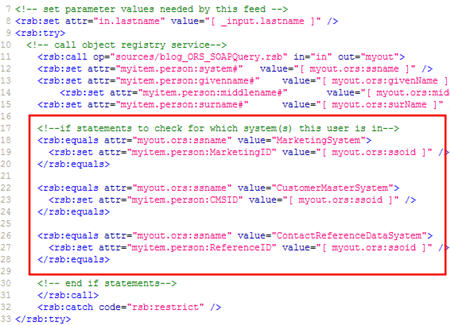
    Next, I’m ready to call my first sub-feed.  Here, I set the input parameter required by the feed (“in.lastname”), and make a call to the existing feed.  Recall that this feed calls my “object registry service” which tells me every system that knows about this contact.  I’ve taken the values I get back, and put them into a “person” namespace.  The “call” block executes for each response value (e.g. if the user is in 5 systems, this block will execute 5 times), so I have a conditional statement (see red box) that looks to see which system is being returned, and setting a specific feed value based on that.

    I set unique feed items for each system (e.g. “person:MarketingID”) so that I can later do a check to see if a particular item exists prior to calling the feed for that system.  See here that I do a “check” to see if “MarketingID” exists, and if so, I set the input parameter for that feed, and call that feed.

    You may notice that I have “try … catch” blocks in the script.  Here I’m specifically catching “access denied” blocks and writing a note to the feed instead of just blowing up with a permission error.

    Next, I called the other data feeds in the same manner as this one above.  That is, I checked to see if the system-specific attribute existed, and if so, called the feed corresponding to that system.   My “reference data” feed which serves up Microsoft Excel data returns a data node that holds the blog feed for the contact.  I took that value (if it exists) and then called the built-in RSSBus Feed Connector’s feedGet operation and passed in the URL of my contact’s blog feed.  This returns me whatever is served up by my contact’s external blog.

    Neat.  So, now I have a single RSS feed that combines data from web services, Google web queries, Excel workbooks, SQL Server databases, and external blog feeds.  If I view this new, monster feed, I get a very denormalized, flat data set.

    You can see (in red) that when data repeating occurred (for example, multiple contact “interactions”), the related values, such as which date goes with which location, isn’t immediately obvious.  Nonetheless, I have a feed that can be consumed in SharePoint, Microsoft Outlook 2007, Newsgator, or any of your favorite RSS readers.

    Building a RSSBus HTML Template

    How about presenting this data entity in a business-friendly HTML template instead of a scary XML file?  No problem.  RSSBus offers the concept of “templates” where you can design an HTML front end for the feed.

    Much like an ASP.NET page, you can mix script and server side code in the HTML form.  Here, I call the mashup feed in my template, and begin processing the result set (from the “object registry service”).  Notice that I can use an enumeration to loop through, and print out, each of the systems that my contact resides in.  This enumeration (and being able to pull out the “_value” index) is a critical way to associate data elements that are part of a repeating result set.

    To further drive that point home, consider the repeating set of “interactions” I have for each contact.  I might have a dozen sets of “interaction type + date + location” values that must be presented together in order to make sense.  Here you can see that I once again use an enumeration to  print out each date/type/location that are related.

    The result?  I constructed a single “dashboard” that shows me the results of each feed as a different widget on the page.   For a sales rep about to visit a physician, this is a great way for them to get a holistic customer view made up of attributes from every system that knows anything about that customer.  This even includes a public web (Google) query and a feed from their personal, professional, or organization’s blog.  No need for our user to log into 6 different systems to get data, rather, I present my own little virtual data store.

    Conclusion

    In these four blog posts, I explained a common data visibility problem, and showed how RSSBus is one creative tool you can use to solve it.  I suspect that no organization has all their data in an RSS-ready format, so applications like RSSBus are a great example of adapter technology that makes data extraction and integration seamless.  Mashups are a powerful way to get a single real-time look at information that spans applications/systems/organizations and they enable users to make more informed decisions, faster.

    Technorati Tags: ,

  • Building Enterprise Mashups using RSSBus: Part III

    In the first two posts of this series, I looked at how to aggregate data from multiple sources and mash them up into a single data entity that could be consumed by an RSS client.  In this post, I will show off the new SOAP Connector from RSSBus.

    Earlier in this series, I talked about mashing up data residing in databases, Excel workbooks and existing web services.  In my scenario, I have an existing web service that returns a set of master data about our customers.  This includes contact details and which sales reps are assigned to this customer.  Let’s see how I can go about calling this service through RSSBus.

    Building an SOAP Feed

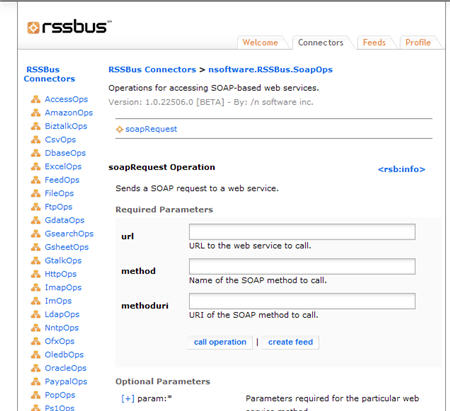
    First of all, let’s take a look at what parameters are available to the new RSSBus SOAP Connector.  The default properties that this connector needs are: URL, web method, and method URI (SOAP action).  However, there are a generous amount of additional, optional parameters such as parameter declaration, specific XML nodes to return, SOAP header, credentials, proxy server details and more.

    At the beginning of my RSSBus *.rsb file (which generates the XML feed), I specify the name of the feed, and, call out a specific input parameter (“customerid”) that the feed will require.

    Next, I set the properties that I want to pass to the connector.  Specifically, I identify the web service URL, method name, SOAP action, input parameter, and the place where I want to log all inbound requests and outbound responses.

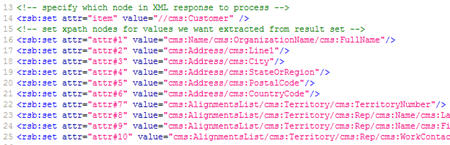
    Now I can get a bit fancy.  I can pull out a particular node of the response, and work just with that.  Here, I dig into the XML service response and indicate that I only want the “Customer” node to be included in the result stream.  After that, I call out a series of XPath statements that point to the individual target nodes within that “Customer” node.  So, the final result stream will only contain these target nodes.

    Here I call the web method, and take the response values and put them into a new “cms” (“Customer Master System”) namespace with friendlier node names.  Note that the values returned by the SOAP connector are named after the XPath used to locate them.  For example, an XPath of “/Name/OrganizationName/FullName” would result in a SOAP Connector response element named “Name_OrganizationName_FullName.”  As you can imagine, the names for deep XPath statements could get quite unwieldy.

    If I make a request to this feed, I get back a nice clean result set.

    Now, I have one additional web service that I need to call from RSSBus.  If you recall from part I of this series, I need a way to know WHICH systems a particular contact resides in.  My company has a “object registry service” that stores contacts along with a pointer to the systems (and keys) that know something about that contact.  So, I can use this service to identify which feeds I need to call in order to get a complete picture of my contact.

    This RSSBus script takes in the name of the contact to find, calls my ORS (“object registry service”) service, and returns the systems that this person resides in.  In the resulting feed below, you can see that the ORS service found three records for this contact, and provides the name of the system (and primary key identifier) for each one.

    What’s Next?

    We’re close now.  I have feeds for a database, Excel workbook, Google web query, and two SOAP queries.  All that remains is to create the single feed that mashes up these system feeds and returns the single data result.

    Stay tuned for the exciting conclusion.

    Technorati Tags: ,

  • Building Enterprise Mashups using RSSBus: Part II

    In the previous post, I laid out a data visibility problem and proposed using RSSBus to build an enterprise mashup that inflates a single data entity whose attributes reside in multiple disparate systems.

    Before a mashup can be built, we actually need the source data in a ready-to-mashup format.   For the mashup I am building, my “contact” data resides in 3 different repositories:

    • Database containing the interactions we’ve had with a particular contact
    • Web service talking to a CRM system which holds core contact information
    • Excel spreadsheet containing external reference data such as the contact’s public web page and blog

    On top of this, my mashup will also return a Google result set based on the contact’s first and last name.  If available, I also want to retrieve the latest information from the contact’s personal blog (if they have one).

    In this post, I will show how to create the feeds for the database, Excel spreadsheet, and Google query.

    Building an Excel Feed

    My first data source is an Excel spreadsheet.  The Excel Connector provided by RSSBus has a variety of operations that let you add rows to sheets, list worksheets in a workbook, create new workbooks, and get data out of an existing spreadsheet.

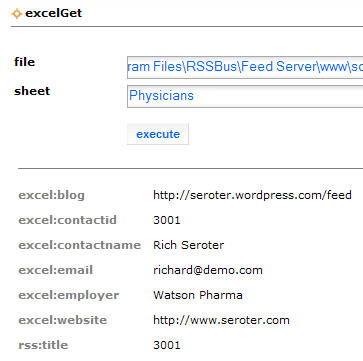
    For our case, we used the excelGet operation that accepts the file path of the workbook, and which sheet to pull data from.  A simple test can be executed right from the connector page.

    The result of this query (formatted in HTML) looks like this:

    Notice how the Excel data comes back using an “excel” namespace prefix.

    In my case, I don’t want to return the contents of the entire workbook, but rather, only the record for an individual contact.  So, from this Connector page, I can choose to create a feed out of my sample query, and then I can modify the RSBScript to filter my results, and, to put my result set into a different namespace than “excel.”

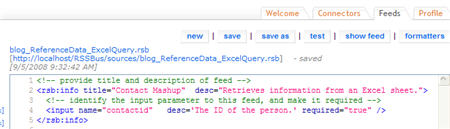
    At the top of my new feed, I outline the title of the feed, and, create a new required input parameter named “contactid.”  Input parameters are passed to the feed via the querystring.

    Next, I need to set the parameters needed by the Excel Connector.  You may recall that we set the parameters when we tested the Connector earlier.

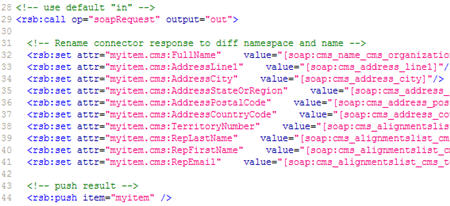
    Now comes the meat of the feed.  Here I “call” the Excel operation, do an “equals” check to see if the row in the spreadsheet is for the contact with the designated contact ID.  If I find such a row, then I create a new “myitem” entity and populate this hash with the values returned by the Connector and sitting in an “excel” namespace.  Finally, I “push” this item to the response stream.

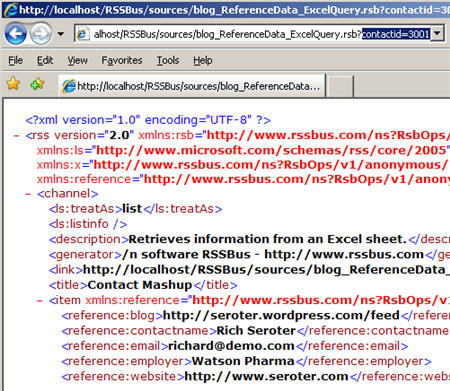
    So what does this completed feed look like?  Below you can see our feed item containing the nodes in a “reference” namespace.  I now have a valid RSS feed that monitors an Excel workbook.  Hooray for me!

    Building a Database Feed

    Now, let’s take an existing SQL Server database and return some results as RSS.  In my scenario, I have a table for all our contacts, and another table with all the interactions we’ve had with that customer (e.g. lunch, office visit, speaker invitation).  The RSSBus SQL Server Connector has a wide range of operations available which perform database inserts, updates, deletes, as well as stored procedure calls, and schema queries for tables, views and more.

    This feed starts much the same as the last one with a title and description.  I’ve also added a required input parameter for the contact ID stored in the database.  Next I have to set the parameters (connection and query) needed by the sqlQuery operation.

    Note that most connector operations have a wide range of optional parameters.  For the sqlQuery operation, these optional parameters include things like “maxrows” and “timeout.”

    Now I need to call the operation.  Like the feed above, this feed takes things that come back in the “sql” namespace and put it into an “interactions” namespace.  Be aware that the “push” statement pushes EACH returned row as a separate feed item.

    What does my response look like?  The image below shows how I returned three items in this feed; each represents a different interaction with this contact.

    Now I have two feeds based on existing data repositories, and didn’t have to make a single change to those applications to support their RSS-ification.

    Building a Google Feed

    The final feed we’ll look at here is public internet search for our selected contact.  The Google search results should come back in an RSS format that can be consumed by my mashup feed.

    My feed takes in two required parameters: “firstname” and “lastname.”   Next, I need the two critical parameters for the Google gSearchWeb operation.  I first must pass in a valid Google API token (you’ll need to acquire one), and, the search string.

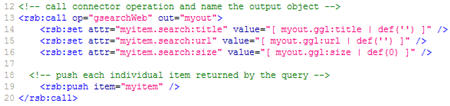
    Now I call the operation, and push each result out.

    Neato.  I can call Google on the fly and make custom queries based on my contact.

    What’s Next?

    Here we saw how easy it is to build the RSSBus script necessary to expose RSS feeds from systems that don’t actually speak RSS.

    Next, we’ll see how to work with new RSSBus SOAP connector to query our CRM system, AND, to query my “object registry service” which returns all the system primary keys related to my contact.  After that, we’ll see how to mash all these feeds up, and return a single “contact” entity to the RSS client.

    Technorati Tags: ,

  • Building Enterprise Mashups using RSSBus: Part I

    I’ve been a fan of RSSBus from /n software for some time. A few weeks ago our Executive Director / Chief Architect / Technology Overlord recently asked me to build a real, live enterprise mashup application to demonstrate for our IT leadership group. Our goal was to show that RSSBus could be used to quickly and efficiently aggregate data in compelling new ways.   In the next few posts, I’m going to walk through our use case, and how I built a solution to solve this.

    Before getting into the “what” and “how”, I want to first say that the “how I built a solution” line above isn’t entirely true.  The folks at RSSBus actually built most of the solution for me, and all I did was tweak and customize it a bit.  If you ever get a chance to work with rock stars Ralph James, Amit Sharma or Tom Hearn, jump at it.  I’ll also note that I am working with a pre-release version 2.0 of RSSBus that has new features such as a SOAP connector.

    The Problem

    As with most large organizations, we have a multiple systems and repositories that contain different aspects of the same data entity.  A “contact” at my company has some attributes stored in our ERP system, some in custom built systems, and some more in COTS applications.  Maintaining a true system of record is difficult in our environment and trying to keep enterprise data repositories in sync is no small task.

    Some questions I want answers to …

    • How does a sales rep heading out on a physician visit get a full 360 degree view of the customer that shows EVERYTHING we know about this person?
    • How do I allow people to be proactively notified of any changes to a given sales region or key contact?
    • How do I easily accommodate new data sources (e.g. COTS application, public internet blog or website)?
    • Where can I apply the appropriate security measures to make sure that sensitive contact details are only available for those allowed to see them?  For instance, sales folks may not be allowed to see what clinical trials a physician is participating in, while scientists are not allowed to see marketing activities that a physician has been involved with.

    This category of problem can also extend to “complex event processing” scenarios where you want to be able to perform intelligent surveillance on related events that span systems.   However, the problem I’m addressing for us at this moment has to do with data aggregation, not event aggregation.

    A Solution

    One valid solution to this problem is to use XML feeds (RSS / Atom) from source systems and aggregate them to return a single, complete view of the target data entity.

    Why XML feeds instead of a new database repository?  Our reasons include:

    • Subscription model using XML feeds provides users with a great ability to discover, organize and monitor data that sits in multiple places
    • Consumption experience NOT dictated by data generator as end users can choose to eat this data in their feed reader (e.g. Outlook 2007), Excel, SharePoint or custom application
    • Provides a virtual, on-demand data aggregation with minimal changes needed in source systems
    • The pub/sub nature of XML feeds gives users more “sensors” into key data elements in an organization and allows them to receive and act on data in a more timely fashion
    • XML feeds allow an alternate level of service where a query does not have to return real time data or in an immediate fashion

    Once I have a feed for each system that stores “contact” details, I want to mash them all up and return a single XML feed that shows an entity whose data comes from all types of data stores.

    Now, how do I know which systems this “contact” exists in? At my company, we have a “object registry service” that our applications use to both publish and query enterprise objects.  For instance, we have CRM applications which send “insert” and “update” commands to this service when contact data has changed.  This service is responsible for performing data cleansing on inbound data, and matching inbound objects to existing objects.  The “Richard Seroter” contact inserted by System A should be matched to the “Richard L Seroter” that was already inserted by System B.  What this service stores is only enough information to perform this matching, and, the originating system and primary key.  So, the point is, I can query this service for “Richard Seroter”, and get back all records matching this query, AND, which system (and ID) stores information about this handsome character.

    One other wrinkle.  Clearly, many (most?) COTS and custom applications do NOT offer RSS feeds for their underlying data.   So how do I go down this route of XML feeds with systems that don’t natively “talk” RSS? This is where RSSBus comes in.

    What is RSSBus?

    RSSBus is a lightweight, completely web-based platform for building and publishing XML feeds out of a wide variety of source systems.  It’s a service bus of sorts that takes advantage of the loose contract of RSS to expose and aggregate feeds into interesting business services.

    RSSBus uses an impressive array of “connectors” to sources such as Amazon Web Services, PayPal, Microsoft CRM, MySQL databases, Federal Express, Twitter, FTP, LDAP, BizTalk Server and much more.  This means that you can create a feed out of a file directory, or use XML feeds to create new LDAP accounts.   Endless possibilities.

    The RSSBus Administration Console can be used to browse connectors, and then use a visual wizard to prototype and generate XML feeds.  You also have full access to the robust RSBScript language which is actually used to generate the raw feeds and optionally, the RSBTemplates which present feed data in an HTML format.  It’s almost a misnomer to call the product RSSBus since data can be emitted not only as RSS, but also ATOM, XLS, CSV, JSON, HTML and SOAP.

    Why is RSSBus a good solution for my problem?  Some reasons include:

    • Minimal programming needed to connect to a wide range of mixed platform technologies
    • Strong ability to combine feeds into a single information source
    • Deep scripting and function library for working with and formatting feed data
    • Nice support for feed caching and feed security
    • Can separate data (XML) from presentation logic

    RSSBus is NOT a complete XML feed management solution by itself.  That is, RSSBus doesn’t have the full feed discovery and management that an Enterprise Server (NGES) from Newsgator is.  However, note that NGES now plays with RSSBus so that the powerful feeds generated by RSSBus can be managed by NGES.

    What’s Next?

    In the next set of posts, I’ll look at how I exposed individual RSS feeds from a mix of data sources including Microsoft Excel spreadsheets, databases, web services, and Google queries.  After that, I’ll show you how to mash up the individual feeds into a single entity.  Then, I MAY demonstrate how to apply security and caching aspects to the mashup.

    Technorati Tags: ,

  • Impact of Database Availability on BizTalk Web Services

    My buddy Victor asked me the other day about the relationship between IIS and the BizTalk databases.  That is, if we restart the SQL Server service or server, what happens to messages that are still submitted to the BizTalk web services on an active IIS server?

    So, I put together a really quick application where I tested four scenarios: downstream host unavailable, IIS unavailable, receive location offline, and SQL Server unavailable.

    Also, to legitimately gauge service behavior, I exposed both classic ASMX services and WCF services for my BizTalk application.  Both services were built as one-way HTTP services hosted in IIS.  The published data is then routed to a single FILE send port via message-type routing.


    Scenario: Processing Host is Unavailable

    For this scenario, I simply disabled the in-process host that runs the send port subscribing to messages published by the services.

    Result: Messages are published with no problem, and everything is queued up until the in-process host comes online.  No message loss and no errors to the service callers.


    Scenario: IIS is Unavailable

    Here I turned off the IIS website hosting the services.

    Result: As expected, both the ASMX and WCF services returned errors to the client application.  The ASMX service returned an error saying:

    error: System.Net.WebException: Unable to connect to the remote server —> System.Net.Sockets.SocketException: No connection could be made because the target machine actively refused it 127.0.0.1:80

    The WCF service returned the following error:

    error: System.ServiceModel.EndpointNotFoundException: Could not connect to http://myserver/Blog.Biztalk.AvailabilityTestWCF/ContractService.svc. TCP error code 10061: No connection could be made because the target machine actively refused it 192.168.131.65:80.  —> System.Net.WebException: Unable to connect to the remote server —> System.Net.Sockets.SocketException: No connection could be made because the target machine actively refused it 192.168.131.65:80

    So the client gets an error, no message is submitted to BizTalk by either service, and the client will be expected to try again later.


    Scenario: Receive Location is Offline

    Now I’ve turned off the actual receive locations.  The website is up and running, but the BizTalk receive locations aren’t listening for the inbound messages.

    Result:  The ASMX service returns a success message (HTTP 202), even though no message is published to BizTalk.  There is an error in the System Event log stating:

    The Messaging Engine could not find the receive location for URI:”/Blog.Biztalk.AvailabilityTest/ContractService.asmx”.\
    Please verify the receive location exists and is enabled.

    However, the client does NOT get an error even though no message was published (or suspended) by BizTalk.

    The WCF service returns an HTTP error and the following message to the client:

    error: System.ServiceModel.ServiceActivationException: The requested service, ‘http://myserver/Blog.Biztalk.AvailabilityTestWCF/ContractService.svc’ could not be activated. See the server’s diagnostic trace logs for more information.

    In this case again, no message is published, BUT, at least the client knows that a problem occurred.  Much better than the ASMX behavior.


    Scenario: SQL Server is Offline

    In this case, I’ve shut down the SQL Server service and the in-process hosts that are running.

    Result: The ASMX service continued to return HTTP success messages, even though it could not publish to the MessageBox.  The IsolatedHost (which runs the Message Agent) can’t connect, but the client isn’t told this.

    The WCF service, however, returns the same error it did on the previous scenario.  So it did not publish the message either, but, again, it returned a proper exception to the client.

    Looking at the IIS logs, I wanted to confirm the service response.  For the ASMX service call when the database was offline, I can see the following entry:

    POST /Blog.Biztalk.AvailabilityTest/ContractService.asmx – 80 – 127.0.0.1 202 0 0

    Notice the HTTP 202 returned to the client.  The next entry in the log file represents my call to the WCF service while the database was still down:

    POST /Blog.Biztalk.AvailabilityTestWCF/ContractService.svc – 80 – 192.168.131.65 – 500 0 0

    Notice the HTTP 500 error which represents an internal server error returned to the caller.


    Summary

    So, we can conclude that ASMX services do a lousy job of reporting what actually happens after it tries to publish messages to the BizTalk bus.  Unless the IIS server is explicitly taken down during database server maintenance or restarts, you run the real risk of losing messages without the client being aware of it.  For WCF services, we see much better handling of message publishing problems.   This is probably due to the fact that the BizTalk WCF service host relies heavily on the BizTalk configuration database and receive location availability to complete its operations.  While it still can’t save the inbound requests, it at least tells the caller that something went wrong.

    Anyone else have different experiences than the ones I demonstrated above?

    Technorati Tags: , BizTalk

  • Trying *Real* Contract First Development With BizTalk Server

    A while back on my old MSDN blog, I demonstrated the concept of “contract first” development in BizTalk through the publishing of schema-only web services using the Web Services Publishing Wizard.  However, Paul Petrov rightly pointed out later that my summary didn’t truly reflect a contract-first development style.

    Recently my manager had asked me about contract-first development in WCF, and casually asked if we had ever identified that pattern for BizTalk-based development.  So, I thought I’d revisit this topic, but start with the WSDL this time.  I’m in the UK this week on business, so what better use of my depressing awake-way-to-early mornings than writing BizTalk posts?

    So like Paul had mentioned in his post, a true service contract isn’t just the schema, but contains all sort of characteristics that may often be found in a WSDL file.  In many cases (including my company), a service is designed first using tools that generate WSDLs and XSDs. Then, those artifacts are shared with service developers who build services that either conform to that service (if exposing an endpoint) or consume it from other applications.

    I’ll start with a simple WSDL file that contains a schema definition and a request/response operation called HelloWorld.  The schema contains a few constraints such as maxOccurs and minOccurs, and a length restriction on one of the fields.

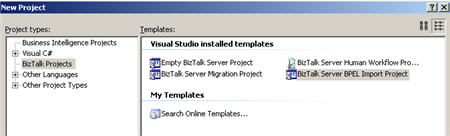
    What I’d like to do is have BizTalk consume the WSDL, and then generate a service that respects that WSDL.  How does BizTalk eat a WSDL?  Through the use of the dark and mysterious BPEL Import BizTalk project type.

    After choosing this project type, a wizard pops up and asks you for the artifacts that make up the service.  In my case, I just pointed it to the WSDL which had an embedded schema definition.

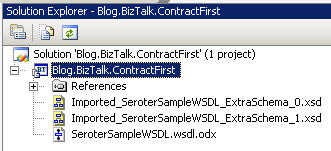
    After an “import succeeded” message, I’m left with a new project and three files which represent my schema (and base types), and an orchestration that includes the auto-generated port types and schemas.

    For simplicity’s sake, I’ll just build out the provided orchestration, with the goal of exposing it as a web service.  First, I add a new configured port to the orchestration design surface, careful to choose the generated port type provided to me.

    I’m not sure why, but my generated multi-part message isn’t configured right, and I had to manually choose the correct schema type for the message part.

    Next, I built two messages (request and response) which used the generated multi-part message types.

    Finally, I added send/receive shapes (and a construct) in order to complete the simple orchestration.

    I’ll show what happens when using the ASMX Web Publishing Wizard, but first, let’s be forward thinking and use the WCF Service Publishing Wizard.  I chose a WCF-BasicHTTP endpoint with metadata so that I can inspect the WSDL generated by my service and compare it against the original.  You’ll notice that the “service name” of the service is a combination of the orchestration type name and namespace, and, the “service port” is the name of the orchestration port.  Feel free to change those.

    I then had to change the target namespace value to reflect the target namespace I used in the original WSDL file.

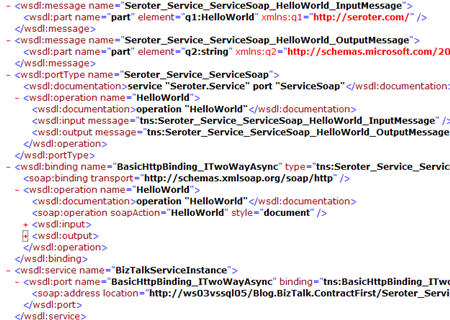
    After completing the wizard (and build a receive location so that my service could be hosted and activated), I compared the WSDL generated by BizTalk with my original one.  While all of the schema attributes were successfully preserved (including original restrictions), the rest of the base WSDL attributes did not transfer.  Specifically, things like the SOAP action and service name were different, not to mention all the other attribute names.
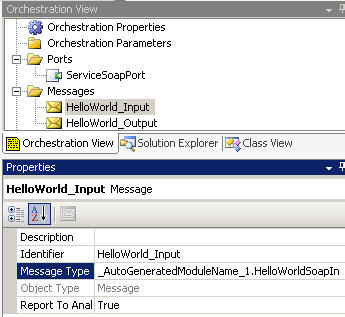
    I went back and repeated this process with the ASMX Web Publishing Wizard, and there were differences.  First, the wizard actually kept my original target namespace (probably by reading the Module XML Target Namespace property of the generated orchestration) and also allowed manual choice of “bare” or “wrapped” services.  The actual generated WSDL wasn’t much better than the WCF wizard (SOAPAction still not right), and worse, the schema definition was stripped of important restriction characteristics.  This is a known problem, but, annoying nonetheless.

    At this point, you can argue that this is a moo point since I can take advantage of the ExternalMetadataLocation property on the Metadata Behavior in my generated configuration file.  What this does is allow me to point to any WSDL and use IT as the external facing contract definition.  This doesn’t change my service implementation, but, would allow me to use the original WSDL file.  If I set that configuration attribute, then browsing my BizTalk-generated service’s metadata returns the base WSDL.

    One of the key things to remember here is that the SOAPAction value you use is the value set in the BizTalk “MethodName” context attribute.  This value is used to match inbound messages to their orchestration subscription (when bound to a SOAP port).  If these don’t line up, you get “subscription not found” errors when you call this service.  So, if I generate my WCF contract using the original WSDL, and submit that message to my WCF endpoint, the message context looks like this:

    And remember that my orchestration port’s generated “operation” property was “HelloWorld” and thus my MessageBox subscription is:

    So, if you plan on using an external WSDL, make sure you line these values up.  Also note that the orchestration port’s “operation” property doesn’t accept an “http://xxx” style value, so pick something else 😉

    I plan on including this topic in the upcoming book, but didn’t feel like squirreling it away until then.   It’s an interesting topic, and I’d be curious as to other’s attempts and getting BizTalk to conform to existing service contracts.

    Technorati Tags: , BizTalk