Category: Salesforce.com

  • Integration in the Cloud: Part 2 – Shared Database Pattern

    In the last post, I kicked off this series of blogs addressing how we can apply classic enterprise integration patterns to cloud scenarios.  Let’s look at the first pattern: shared database.

    What Is It?

    Sharing data via extract-transform-load (ETL) obviously isn’t timely.  So what if system need the absolute latest data available? I might need a shared database for reporting purposes, reference data, or even transactional data. You would use this pattern when you have common data (or a common data structure) but multiple different consuming interfaces.

    For transactional data, a multi-tenant cloud application typically uses a shared database for all customers (because a common data model is used), but the data itself is segmented by customer. In a reference data scenario, we may have both a common schema AND a shared set of data.  This gives everyone a single data definition and encourages consistency across applications as everyone leverages the shared data.

    Challenges

    We face a few different challenges when planning to use this pattern.

    • It can be tough to design.  Getting consensus on anything in IT isn’t easy, and common, reusable data schemas are no different.  It takes a concerted effort to define a shared format that everyone will leverage.
    • You may bump into contention problems. If you have multiple applications manipulating the same transactional data, they you can experience locks or attempts to overwrite new data with old data.
    • There may be performance issues if there are multiple heavy users of shared databases.  This is where concepts like sharding can come into play as a way to alleviate contention.
    • Packaged software products rarely (if ever) allow you to use a different primary data store. Some software does let you call out to shared databases for reference data, however.

    Cloud Considerations

    When doing “shared databases” in the cloud, you have to consider the following things:

    • Web-only access protocols.  While SQL Azure actually lets you use traditional database protocols, the vast majority of online databases have (RESTful) web APIs only.
    • Identity handling will likely be unique per database provider, unlike in an on-premises environment where you can leverage a shared user directory. You’ll have to see what identity providers are available for a given cloud database provider, and if you can do role-based, granular access controls.
    • Many providers use sharding techniques by default and separate data into distinct domains. You’ll have to factor this into how you define your data profile. How will you build a data model based on split data?
    • Using relational databases or schema-less databases. We have this same choice for on-premises databases, but something to consider when thinking about HOW your cloud database is being used. One style may make more sense than another based on the scenario.
    • Cloud providers may throttle usage.  A cloud database like AWS SimpleDB throttles the number of web service PUTs per second.  You could get around this by using multiple domains (since you are throttled per domain) or by batching commands and executing fewer commands.

    Solution Demonstration

    So here’s what I built.  The solution uses a shared AWS SimpleDB to store “interactions” with a given customer of a fictitious company (the wildly successful Seroter Corporation). A Salesforce.com user adds customer interactions from the sales team, and an on-site CRM system adds interactions with the customer from our on-site call center.  Customers want to see all the different interactions they have had with the company.  Seroter Corporation could build an application that virtually aggregates this data on the fly, or, they could always put all their interactions into a single database that everyone can reference.  In this case, I built a Ruby application in VMWare’s Cloud Foundry which views this shared database and lets customers view their history with the company.

    2011.10.27int02

    Let’s walk through each piece, and the tips/tricks that I can offer from making Salesforce.com, Ruby and .NET all use the same API to pull data from Amazon SimpleDB.

    SimpleDB

    First off, I created a SimpleDB domain to hold all the customer Interactions.  Right now, it has four rows in it. Note that I’m using the AWS Toolkit for Visual Studio to muck with the database.

    2011.10.27int03

    I leveraged the AWS Identity and Access Management to create a user account for all my applications to use.  This user has limited rights on this database and can only do read operations.

    2011.10.27int04

    That’s about it.  I’m ready to build my three consuming applications.

    .NET Client Calling AWS

    The basic steps of consuming most of the AWS platform services are: create timestamp, create signture string, hash the signature string, build query string, call service.  I decided to NOT use any SDKs and instead call the native SimpleDB REST API from all three consuming applications.  This way, I don’t learn one SDK just to have to start over again when I consume the database from a different client.

    First off, let’s build the timestamp string which must be in a specific formatNote that encoded values must be uppercase.  If you forget this, plan on losing a Sunday afternoon.

    //take current date time and format it as AWS expects
    timestamp = DateTime.Now.ToUniversalTime().ToString("yyyy-MM-ddTHH:mm:ss.fffZ");
    //switch the lowercase encoded value to uppercase to avoid Armageddon
    timestamp = HttpUtility.UrlEncode(timestamp).Replace("%3a", "%3A");
    

    Next, I built my querystring against the SimpleDB database.  Here, I’m getting back all interactions for a customer with a given ID.

    //define querystring
    string selectExpression = "select * from SeroterInteractions where CustomerId = '" + CustomerId + "'";
    //encode it, and uppercase the encoded values
    string fSelectExpression = HttpUtility.UrlPathEncode(selectExpression).Replace("*", "%2A").Replace("=", "%3D").Replace("'", "%27");
    

    Now I build the string that gets hashed as request signature.  The point here is that AWS compares the hashed string with the request it receives and verifies that the payload of the request wasn’t tampered with.  Note that all parameters after the AWSAccessKeyId field must be listed in alphabetical order.

    string stringToConvert2 = "GET\n" +
                "sdb.amazonaws.com\n" +
                "/\n" +
                "AWSAccessKeyId=ACCESS_KEY" +
                "&Action=Select" +
                "&SelectExpression=" + fSelectExpression +
                "&SignatureMethod=HmacSHA1" +
                "&SignatureVersion=2" +
                "&Timestamp=" + timestamp +
                "&Version=2009-04-15";
    

    Now, we encode the string.  I used the HMACSHA1 encoding algorithm.

    //private key tied to my AWS user account
    string awsPrivateKey = "PRIVATE KEY";
    Encoding ae = new UTF8Encoding();
    HMACSHA1 signature = new HMACSHA1();
    //set key of signature to byte array of private key
    signature.Key = ae.GetBytes(awsPrivateKey);
    //convert signature string
    byte[] bytes = ae.GetBytes(stringtoConvert2);
    //hash it
     byte[] moreBytes = signature.ComputeHash(bytes);
    //base64 encode the string
    string encodedCanonical = Convert.ToBase64String(moreBytes);
    //URL encode the string
     string urlEncodedCanonical = HttpUtility.UrlEncode(encodedCanonical).Replace("%3d", "%3D");
    

    We’re ready to build the actual RESTful request URL for SimpleDB.  This contains most of the values from the signature string plus the hashed value of the signature string itself. Note that failures to properly encode values, or order the attributes will result in maddening “signature does not match” exceptions from the AWS service.  Whenever I encountered that (which was often) it was because I had messed up encoding or ordering.

    string simpleDbUrl2 = "https://sdb.amazonaws.com/?Action=Select" +
                "&Version=2009-04-15" +
                "&Timestamp=" + timestamp +
                "&SelectExpression=" + fSelectExpression +
                "&Signature=" + urlEncodedCanonical +
                "&SignatureVersion=2" +
                "&SignatureMethod=HmacSHA1" +
                "&AWSAccessKeyId=ACCESS_KEY";
    

    Finally, I used the HttpWebRequest object to call the AWS endpoint using this URL and get the response.  What I didn’t show is that I parsed the response XML and loaded it into a DataGrid on my WinForm application.

    HttpWebRequest req = WebRequest.Create(simpleDbUrl2) as HttpWebRequest;
    
    using (HttpWebResponse resp = req.GetResponse() as HttpWebResponse)
     {
           StreamReader reader = new StreamReader(resp.GetResponseStream());
    
            string responseXml = reader.ReadToEnd();
             XmlDocument doc = new XmlDocument();
             doc.LoadXml(responseXml);
    
             //parse and load result into objects bound to data grid
      }
    

    The .NET client application looks like this after it retrieves the three SimpleDB domain rows tied to the customer ID provided.

    2011.10.27int05

    Ruby App in Cloud Foundry Calling AWS

    Let’s see how I built a Ruby application that talks to AWS SimpleDB. This won’t be a walkthrough of Ruby or Cloud Foundry, but rather, just the key parts of the web application that I built.

    My first decision was how to process the results of the AWS call.  I decided to use XSLT to parse the XML response.  I chose the Nokogiri gem for Ruby which lets me process XML content pretty easily. One wrinkle with this is because I’m working on a Windows machine, and using a Windows gem (which isn’t supported once deployed to Cloud Foundry), I need to do some tweaking with my Gemfile file. After building the web app (“bundle package”) but before deployment (“bundle install”), I have to open the Gemfile.lock file and remove all the “Windows stuff” from the “nokogiri” entry.

    That said, below is my Ruby code that starts with the libraries that I used.

    require 'sinatra' # includes the library
    require 'haml'
    require 'nokogiri'
    require 'date'
    require 'uri'
    require 'openssl'
    require 'base64'
    require 'open-uri'
    require 'cgi'
    

    Next, I have defined a “get” operation which responds when someone hits the “lookup” path and passes in a customer ID.  I’ll use this customer ID to query AWS. Then, I extract the path parameter into a local variable and then define the XSLT that will parse the AWS SimpleDB results. I don’t love my XPath on the template match, but it works.

    get '/lookup/:uid' do	# method call, on get of the lookup path, do the following
    
    	@userid = params[:uid]
    
    	#-- define stylesheet
    	xsl ="
    		<xsl:stylesheet version='1.0' xmlns:xsl='http://www.w3.org/1999/XSL/Transform' xmlns:aws='http://sdb.amazonaws.com/doc/2009-04-15/'>
      		<xsl:output method='xml' encoding='UTF-8' indent='yes'/>
      		<xsl:strip-space elements='*'/>
    		<xsl:template match='/'>
    			<table class='interactionTable' cellspacing='0' cellpadding='4'>
    				<tr>
    					<td class='iHeader'>Customer ID</td>
    					<td class='iHeader'>Date</td>
    					<td class='iHeader'>Inquiry Type</td>
    					<td class='iHeader'>Product</td>
    					<td class='iHeader'>Source</td>
    					<td class='iHeader'>Interaction ID</td>
    				</tr>
    				<xsl:apply-templates select='//aws:Item' />
    			</table>
    		</xsl:template>
      		<xsl:template match='aws:Item'>
    
    			<tr>
    				<td class='iRow'><xsl:value-of select='./aws:Attribute[1]/aws:Value' /></td>
    				<td class='iRow'><xsl:value-of select='./aws:Attribute[4]/aws:Value' /></td>
    				<td class='iRow'><xsl:value-of select='./aws:Attribute[3]/aws:Value' /></td>
    				<td class='iRow'><xsl:value-of select='./aws:Attribute[5]/aws:Value' /></td>
    				<td class='iRow'><xsl:value-of select='./aws:Attribute[2]/aws:Value' /></td>
    				<td class='iRow'><xsl:value-of select='./aws:Name' /></td>
    
    			</tr>
    
      		</xsl:template>
    		</xsl:stylesheet>
    		"
    
    	#-- load stylesheet
    	xsltdoc = Nokogiri::XSLT(xsl)
    

    Next is my AWS-specific code which creates a properly formatted/encoded timestamp, encoded query statement, signature string, and query string.  Then I call the URL and send the response through the XSLT which I end up displaying in a template file.

    #-- define timestamp variable and format
    	@timestamp = Time.now
    	@timestamp = @timestamp.strftime("%Y-%m-%dT%H:%M:%SZ")
    	@ftimestamp = CGI.escape(@timestamp)
    
    	#-- define query statement and encode correctly
    	#@querystatement = "select * from SeroterInteractions"
    	@fquerystatement = CGI.escape("select * from SeroterInteractions where CustomerId = '" + @userid + "'")
    	@fquerystatement = @fquerystatement.gsub("+", "%20")
    
    	#-- create signing string
    	@stringtosign = "GET\nsdb.amazonaws.com\n/\nAWSAccessKeyId=ACCESS_KEY&Action=Select&SelectExpression=" + @fquerystatement + "&SignatureMethod=HmacSHA1&SignatureVersion=2&Timestamp=" + @ftimestamp + "&Version=2009-04-15"
    
    	#-- create hashed signature using key variable defined elsewhere
    	@esignature = CGI.escape(Base64.encode64(OpenSSL::HMAC.digest('sha1',@@awskey, @stringtosign)).chomp)
    
    	#-- create AWS SimpleDb query URL
    	@dburl = "https://sdb.amazonaws.com/?Action=Select&Version=2009-04-15&Timestamp=" + @ftimestamp + "&SelectExpression=" + @fquerystatement + "&Signature=" + @esignature + "&SignatureVersion=2&SignatureMethod=HmacSHA1&AWSAccessKeyId=ACCESS_KEY"
    
    	#-- load XML returned from query
    	@doc = Nokogiri::XML(open(@dburl))
    
    	#-- transform result using XSLT
    	@var = xsltdoc.transform(@doc)
    

    When everything is in place, I hit my URL and the Ruby code calls the AWS service for the requested customer ID, passes the result through the XSLT, and emits a table of matching “customer interactions.”
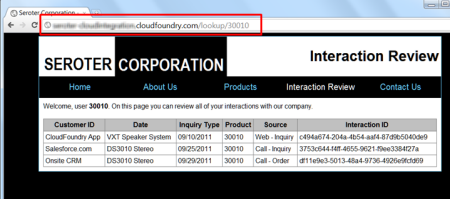
    2011.10.27int06

    Neat.  So now I have two applications (my .NET client and Ruby app in Cloud Foundry) that have live looks into the same shared database.  One more to go!

    Force.com Application Calling AWS

    Making a (Sales)force.com application talk to AWS SimpleDB is pretty easy once you follow the same steps as I have in the previous two applications.  It’s just a matter of slightly different syntax. In this case, I’m going to present the results on a Force.com Apex page using a “data table” which means i need typed objects for each “customer interaction” that comes back from AWS. So, after creating a custom Apex object of type UserInteraction, I started my custom controller for my Apex page.

    public class interactionLookupExtension
    {
     private final Contact myContact;
    //create list array of UserInteractions
     private List<UserInteractions> interactionsList = new List<UserInteractions>();
    //define namespace used by SimpleDB
     private String ns = 'http://sdb.amazonaws.com/doc/2009-04-15/';
    
     public interactionLookupExtension(ApexPages.StandardController controller) {
           //get reference to Force.com contact used on the Apex page
    		this.myContact = (Contact)controller.getRecord();
        }
    

    Now comes the fun part: calling the service.  You may notice that the sequence is nearly identical to the other code we’ve built.

    public void GetInteractions()
     {
         //get customer ID for selected contact
         String inputId = myContact.Global_ID__c;
         interactionsList.Clear();
    
         //create objects for HTTP communication
         Http httpProxy = new Http();
         HttpRequest simpleDbReq = new HttpRequest();
    
    	  //format timestamp
         Datetime currentTime = System.now();
         String formattedTime = currentTime.formatGmt('yyyy-MM-dd')+'T'+ currentTime.formatGmt('HH:mm:ss')+'.'+ currentTime.formatGmt('SSS')+'Z';
         formattedTime = EncodingUtil.urlEncode(formattedTime, 'UTF-8');
    
     	  //create and encode query statement
         String selectExpression = EncodingUtil.urlEncode('select * from SeroterInteractions where CustomerId=\'' + inputId + '\'', 'UTF-8');
         selectExpression = selectExpression.replace('+','%20');
         selectExpression = selectExpression.replace('*', '%2A');
    
    	  //create signing string
         String stringToSign = 'GET\nsdb.amazonaws.com\n/\nAWSAccessKeyId=ACCESS_KEY&Action=Select&SelectExpression=' + selectExpression + '&SignatureMethod=HmacSHA1&SignatureVersion=2&Timestamp=' + formattedTime + '&Version=2009-04-15';
         String algorithmName = 'HMacSHA1';
         Blob mac = Crypto.generateMac(algorithmName, Blob.valueOf(stringToSign),Blob.valueOf(awsKey));
         String macUrl = EncodingUtil.urlEncode(EncodingUtil.base64Encode(mac), 'UTF-8');
    
    	  //build up AWS request URL
         String dbUrl = 'https://sdb.amazonaws.com/?Action=Select&Version=2009-04-15&Timestamp=' + formattedTime + '&SelectExpression=' + selectExpression + '&Signature=' + macUrl + '&SignatureVersion=2&SignatureMethod=HmacSHA1&AWSAccessKeyId=ACCESS_KEY';
    
    	  //set HTTP values
         simpleDbReq.setEndpoint(dbUrl);
         simpleDbReq.setMethod('GET');
         //call URL
         HttpResponse dbResponse = httpProxy.send(simpleDbReq);
         //Use XML DOM objects to load response
         Dom.Document responseDoc = dbResponse.getBodyDocument();
         Dom.XMLNode selectResponse = responseDoc.getRootElement();
         Dom.XMLNode selectResult = selectResponse.getChildElements()[0];
    
         //loop through each returned interaction and add it to array
         for(Dom.XMLNode itemNode: selectResult.getChildElements())
         {
            String interactionId = itemNode.getChildElements()[0].getText();
            String interactionType = itemNode.getChildElements()[2].getChildElement('Value', ns).getText();
            String customerId= itemNode.getChildElements()[5].getChildElement('Value', ns).getText();
            String interactionDate = itemNode.getChildElements()[3].getChildElement('Value', ns).getText();
            String interactionSource = itemNode.getChildElements()[2].getChildElement('Value', ns).getText();
            String interactionProduct = itemNode.getChildElements()[4].getChildElement('Value', ns).getText();
    
            UserInteractions i2 = new UserInteractions();
            i2.InteractionId = interactionId;
            i2.InteractionType = interactionType;
            i2.CustomerId = customerId;
            i2.InteractionDate = interactionDate;
            i2.InteractionSource = interactionSource;
            i2.InteractionProduct = interactionProduct;
    
            interactionsList.Add(i2);
         }
       }
    

    Then, on my Apex page, I have a data table bound to the interactionList variable.  As a result, my final page looks like this:
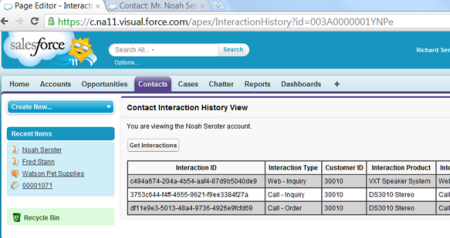
    2011.10.27int07

    That’s all there is to it.  When I add a new row to my SimpleDB database, it is instantly shown in my on-site .NET app, my Cloud Foundry app and my Force.com app.  No file sharing, no synchronization needed.

    Summary

    The shared database pattern is a useful one when you need to have the same data instantly available to all consumers.  In my three examples here, both on-site and cloud applications shared a single cloud database.  This allowed them to all have a completely accurate view of whatever interactions a given customer had with a company.  This sort of pattern works well for reference data where you have limited points of possible contention.

    In the next post, I’ll walk through a way to do remote procedure invocation with cloud applications.

  • Integration in the Cloud: Part 1 – Introduction

    I recently delivered a session at QCon Hangzhou (China) on the topic of “integration in the cloud.” In this series of blog posts, I will walk through a number of demos I built that integrate a variety of technologies like Amazon Web Services (AWS) SimpleDB, Windows Azure AppFabric, Salesforce.com, and a custom Ruby (Sinatra) app on VMWare’s Cloud Foundry.

    Cloud computing is clearly growing in popularity, with Gartner finding that 95% of orgs expect to maintain or increase their 2011.10.27int01investment in software as a service. But how do we prevent new application silos from popping up?  We don’t want to treat SaaS apps as “off site” and thus only do the occasional bulk transfer to get data in/out of the application.  I’m going to take some tried-and-true integration patterns and show how they can apply to cloud integration as well as on-premises integration. Specifically, I’ll demonstrate how three patterns highlighted in the valuable book Enterprise Integration Patterns: Designing, Building and Deploying Messaging Solutions apply to cloud scenarios. These patterns include: shared database, remote procedure invocation and asynchronous messaging .

    In the next post, I’ll walk through the reasons to use a shared database, considerations when leveraging that model, and how to share a single “cloud database” among on premises apps and cloud apps alike.

    Series Links:

  • When to use SDKs and when to go “Go Native”

    I’m going to China next week to speak at QCon and have spent the last few weeks building up some (hopefully interesting) demos.  One of my talks is on “cloud integration patterns” and my corresponding demos involve Windows Azure, a .NET client application, Salesforce.com, Amazon Web Services (AWS) and Cloud Foundry. Much of the integration that I show uses AWS storage and I had to decide whether I should try and use their SDKs or go straight at their web service interface.  More and more, that seems to be a tough choice.

    Everyone loves a good SDK. AWS has SDKs for Java, .NET, Ruby and PHP. Microsoft provides an SDK for .NET, Java, PHP and Ruby as well. However, I often come across two issues when using SDKs:

    1. Lack of SDK for every platform. While many vendors do a decent job of providing toolkits and SDKs for key languages, you never see one for everything.  So, even if you the SDK for one app, you may not have it for another.  In my case, I could have used the AWS SDK for .NET for my “on-premises” application, but would have still likely needed to figure out the native API for the Salesforce.com and Cloud Foundry apps.
    2. Abstraction of API details. It’s interesting that we continue to see layers of abstraction added to technology stacks.  The difference between using the native, RESTful API for the Azure AppFabric Service Bus (think using HttpWebRequest) is pretty different than using the SDK objects. However, there’s something to be said for understanding what’s actually happening when consuming a service.  SDKs frequently hide so much detail that the developer has no idea what’s really going on.  Sometimes that’s fine, but to point #1, the information about using an SDK is rarely portable to environments where no SDK exists.

    I’ll write up the details of my QCon demos in a series of blog posts, but needless to say, using the AWS REST API is much different than going through the SDK.  The SDK makes it very simple to query or update SimpleDB for example, but the native API requires some knowledge about formatting the timestamp, creating a hashed signature string and parsing the response.  I decided early on to go at the REST API instead of the .NET SDK for AWS, and while it took longer to get my .NET-based integration working, it was relatively easy to take the same code (language changes notwithstanding) and load it into Cloud Foundry (via Ruby) and Salesforce.com (via Apex). Also, I now really understand how to securely interact with AWS storage services, regardless of platform.  I wouldn’t know this if I only used the SDK.

    I thought of this issue again when reading a great post on using the new Azure Service Bus Queues. The post clearly explains how to use the Azure AppFabric SDK to send and receive messages from Queues.  But when I finished, I also realized that I haven’t seen many examples of how to do any of the new Service Bus things in non-.NET environments.  I personally think that Microsoft can tell an amazing cloud integration story if they just make it clearer how to use their Service Bus resources on any platform.  Would we be better off seeing more examples of leveraging the Service Bus from a diverse set of technologies?

    So what do you think?  Do SDKs make us lazy developers, or are we smarter for not concerning ourselves with plumbing if a vendor has reliably abstracted it for us?  Or should developers first work with the native APIs, and then decide if their production-ready code should use an SDK instead?

  • Sending Messages from Salesforce.com to BizTalk Server Through Windows Azure AppFabric

    In a very short time, my latest book (actually Kent Weare’s book) will be released.  One of my chapters covers techniques for integrating BizTalk Server and Salesforce.com.  I recently demonstrated a few of these techniques for the BizTalk User Group Sweden, and I thought I’d briefly cover one of the key scenarios here.  To be sure, this is only a small overview of the pattern, and hopefully it’s enough to get across the main idea, and maybe even encourage to read the book to learn all the gory details!

    I’m bored with the idea that we can only get data from enterprise applications by polling them.  I’ve written about how to poll Salesforce.com from BizTalk, and the topic has been covered quite well by others like Steef-Jan Wiggers and Synthesis Consulting.  While polling has its place, what if I want my application to push a notification to me?  This capability is one of my favorite features of Salesforce.com.  Through the use of Outbound Messaging, we can configure Salesforce.com to call any HTTP endpoint when a user-specified scenario occurs.  For instance, every time a contact’s address changes, Salesforce.com could send a message out with whichever data fields we choose.  Naturally this requires a public-facing web service that Salesforce.com can access.  Instead of exposing a BizTalk Server to the public internet, we can use Azure AppFabric to create a proxy that relays traffic to the internal network.  In this blog post, I’ll show you that Salesforce.com Outbound Messages can be sent though the AppFabric Service Bus to an on-premises BizTalk Server. I haven’t seen anyone try integrating Salesforce.com with Azure AppFabric yet, so hopefully this is the start of many more interesting examples.

    First, a critical point.  Salesforce.com Outbound Messaging is awesome, but it’s fairly restrictive with regards to changing the transport details.  That is, you plug in a URL and have no control over the HTTP call itself.  This means that you cannot inject Azure AppFabric Access Control tokens into a header.  So, Salesforce.com Outbound Messages can only point to an Azure AppFabric service that has its RelayClientAuthenticationType set to “None” (vs. RelayAccessToken).  This means that we have to validate the caller down at the BizTalk layer.  While Salesforce.com Outbound Messages are sent with a client certificate, it does not get passed down to the BizTalk Server as the AppFabric Service Bus swallows certificates before relaying the message on premises.  Therefore, we’ll get a little creative in authenticating the Salesforce.com caller to BizTalk Server. I solved this by adding a token to the Outbound Message payload and using a WCF behavior in BizTalk to match it with the expected value.  See the book chapter for more.

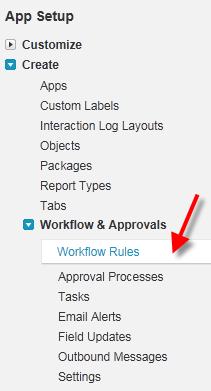
    Let’s get going.  Within the Salesforce.com administrative interface, I created a new Workflow Rule.  This rule checks to see if an Account’s billing address changed.

    1902_06_025

    The rule has a New Outbound Message action which doesn’t yet have an Endpoint address but has all the shared fields identified.

    1902_06_028

    When we’re done with the configuration, we can save the WSDL that complies with the above definition.

    1902_06_029

    On the BizTalk side, I ran the Add Generated Items wizard and consumed the above WSDL.  I then built an orchestration that used the WSDL-generated port on the RECEIVE side in order to expose an orchestration that matched the WSDL provided by Salesforce.com.  Why an orchestration?  When Salesforce.com sends an Outbound Message, it expects a single acknowledgement to confirm receipt.

    1902_06_032

    After deploying the application, I created a receive location where I hosted the Azure AppFabric service directly in BizTalk Server.

    1902_06_033

    After starting the receive location (whose port was tied to my orchestration), I retrieved the Service Bus address and plugged it back into my Salesforce.com Outbound Message’s Endpoint URL.  Once I change the billing address of any Account in Salesforce.com, the Outbound Message is invoked and a message is sent from Salesforce.com to Azure AppFabric and relayed to BizTalk Server.

    I think that this is a compelling pattern.  There are all sorts of variations that we can come up with.  For instance, you could choose to send only an Account ID to BizTalk and then have BizTalk poll Salesforce.com for the full Account details.  This could be helpful if you had a high volume of Outbound Messages and didn’t want to worry about ordering (since each event simply tells BizTalk to pull the latest details).

    If you’re in the Netherlands this week, don’t miss Steef-Jan Wiggers who will be demonstrating this scenario for the local user group.  Or, for the price of one plane ticket from the U.S. to Amsterdam, you can buy 25 copies of the book!

  • Packt Books Making Their Way to the Amazon Kindle

    Just a quick FYI that my last book, Applied Architecture Patterns on the Microsoft Platform, is now available on the Amazon Kindle.  Previously, you could pull the eBook copy over to the device, but that wasn’t ideal.  Hopefully my newest book, Microsoft BizTalk 2010: Line of Business Systems Integration will be Kindle-ready shortly after it launches in the coming weeks.

    While I’ve got a Kindle and use it regularly, I’ll admit that I don’t read technical books on it much.  What about you all?  Do you read electronic copies of technical books or do you prefer the “dead trees” version?

  • New Book Coming, Trip to Stockholm Coming Sooner

    My new book will be released shortly and next week I’m heading over to the BizTalk User Group Sweden to chat about it.

    The book, Microsoft BizTalk 2010: Line of Business Systems Integration (Packt Publishing, 2011) was conceived by BizTalk MVP Kent Weare and somehow he suckered me into writing a few chapters.  Actually, the reason that I keep writing books is because it offers me a great way to really dig into a technology and try to uncover new things.  In this book, I’ve contributed chapters about integrating with the following technologies:

    • Windows Azure AppFabric.  In this chapter I talk about how to integrate BizTalk with Windows Azure AppFabric and show a number of demos related to securely receiving and sending messages.
    • Salesforce.com.  Here I looked at how to both send to, and receive data from the software-as-a-service CRM leader.  I’ve got a couple of really fun demos here that show things that no one else has tried yet.  That either makes me creative or insane.  Probably both.
    • Microsoft Dynamics CRM.  This chapter shows how to create and query records in Dynamics CRM and explains one way of pushing data from Dynamics CRM to BizTalk Server.

    In next week’s trip with Kent to Stockholm, we will cover a number of product-neutral tips for integrating with Line of Business systems.  I’ve baked up a few new demos with the above mentioned technologies in order to talk about strategies and options for integration.

    As an aside, I think I’m done with writing books for a while.  I’ve enjoyed the process, but in this ever-changing field of technology it’s so difficult to remain relevant when writing over a 12 month period.  Instead, I’ve found that I can be more timely by publishing training for Pluralsight, writing for InfoQ.com and keeping up with this blog. I hope to see some of you next week in Stockholm and look forward to your feedback on the new book.

  • Sending Messages from BizTalk to Salesforce.com Chatter Service

    The US football Super Bowl was a bit of a coming-out party for the cool Chatter service offered by Salesforce.com. Salesforce.com aired a few commercials about the service and reached an enormous audience.  Chatter is a Facebook-like capability in Salesforce.com (or as a limited, standalone version at Chatter.com) that lets you follow and comment on various objects (e.g. users, customers, opportunities).  It’s an interesting way to opt-in to information within an enterprise and one of the few social tools that may actually get embraced within an organization.

    While users of a Salesforce.com application may be frequent publishers to Chatter, one could also foresee significant value in having enterprise systems also updating objects in Chatter. What if Salesforce.com is a company’s primary tool for managing a sales team? Within Salesforce.com they maintain details about territories, accounts, customers and other items relevant to the sales cycle. However, what if we want to communicate events that have occurred in other systems (e.g. customer inquiries, product returns) and are relevant to the sales team? We could blast out emails, create reports or try and stash these data points on the Salesforce.com records themselves. Or, we could publish messages to Chatter and let subscribers use (or ignore) the information as they see fit. What if a company uses an enterprise service bus such as BizTalk Server to act as a central, on-premises message broker? In this post, we’ll see how BizTalk can send relevant events to Chatter as part of its standard message distribution within an organization.

    If you have Chatter turned on within Salesforce.com, you’ll see the Chatter block above entities such as Accounts. Below, see that I have one message automatically added upon account creation and I added another indicating that I am going to visit the customer.

    2011.2.6chatter01

    The Chatter API (see example Chatter Cookbook here) is not apparently part of the default SOAP WSDL (“enterprise WSDL”) but does seem to be available in their new REST API. Since BizTalk Server doesn’t talk REST, I needed to create a simple service that adds a Chatter feed post when invoked. Luckily, this is really easy to do.

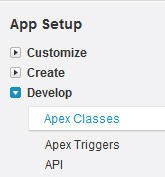
    First, I went to the Setup screens within my Salesforce.com account. From there I chose to Develop a new Apex Class where I could define a web service.

    2011.2.6chatter02

    I then created a very simple bit of code which defines a web service along with a single operation. This operation takes in any object ID (so that I can use this for any Salesforce.com object) and a string variable holding the message to add to the Chatter feed. Within the operation I created a FeedPost object, set the object ID and defined the content of the post. Finally, I inserted the post.

    2011.2.6chatter03

    Once I saved the class, I have the option of viewing the WSDL associated with the class.

    2011.2.6chatter04

    As a side note, I’m going to take a shortcut here for the sake of brevity. API calls to Salesforce.com require a SessionHeader that includes a generated token. You acquire this time-sensitive token by referencing the Salesforce.com Enterprise WSDL and passing in your SalesForce.com credentials to the Login operation. For this demo, I’m going to acquire this token out-of-band and manually inject it into my messages.

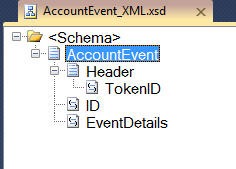
    At this point, I have all I need to call my Chatter service. I created a BizTalk project with a single schema that will hold an Account ID and a message we want to send to Chatter.

    2011.2.6chatter05

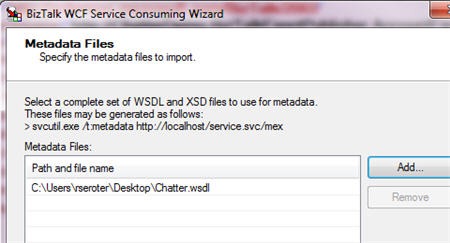
    Next, I walked through the Add Generated Items wizard to consume a WCF service and point to my ObjectChatter WSDL file.

    2011.2.6chatter06

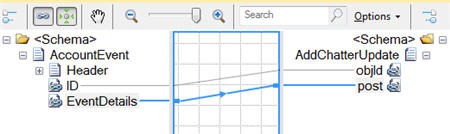
    The result of this wizard is some binding files, a schema defining the messages, and an orchestration that has the port and message type definitions. Because I have to pass a session token in the HTTP header, I’m going to use an orchestration to do so. For simplicity sake, I’m going to reuse the orchestration that was generated by the wizard. This orchestration takes in my AccountEvent message, creates a Chatter-ready message, adds a token to the header, and sends the message out.

    The map looks liked this:

    2011.2.6chatter07

    The orchestration looks like this:

    2011.2.6chatter08

    FYI, the header addition was coded as such:

    ChatterRequest(WCF.Headers) = "<headers><SessionHeader xmlns='urn:enterprise.soap.sforce.com'><sessionId>" 
    + AccountEventInput.Header.TokenID + 
    "</sessionId></SessionHeader></headers>";

    After deploying the application, I created a BizTalk receive location to pick up the event notification message. Next, I chose to import the send port configuration from the wizard-generated binding file. The send port uses a basic HTTP binding and points to the endpoint address of my custom web service.

    2011.2.6chatter09

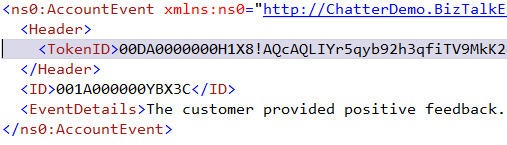
    After starting all the ports, and binding my orchestration to them, I sent a sample message into BizTalk Server.

    2011.2.6chatter10

    As I hoped, the message went straight to Salesforce.com and instantly updated my Chatter feed.

    2011.2.6chatter11

    What we saw here was a very easy way to send data from my enterprise messaging solution to the very innovative information dissemination engine provided by Salesforce.com. I’m personally very interested in “cloud integration” solutions because if we aren’t careful, our shiny new cloud applications will become yet another data silo in our overall enterprise architecture.  The ability to share data, in real-time, between (on or off premise) platforms is a killer scenario for me.