Category: OSS

  • Building an Azure-powered Concourse pipeline for Kubernetes  – Part 2: Packaging and containerizing code

    Building an Azure-powered Concourse pipeline for Kubernetes – Part 2: Packaging and containerizing code

    Let’s continuously deliver an ASP.NET Core app to Kubernetes using Concourse. In part one of this blog series, I showed you how to set up your environment to follow along with me. It’s easy; just set up Azure Container Registry, Azure Storage, Azure Kubernetes Service, and Concourse. In this post, we’ll start our pipeline by pulling source code, running unit tests, generating a container image that’s stored in Azure Container Registry, and generating a tarball for Azure Blob Storage.

    We’re building this pipeline with Concourse. Concourse has three core primitives: tasks, jobs, and resources. Tasks form jobs, jobs form pipelines, and state is stored in resources. Concourse is essentially stateless, meaning there are no artifacts on the server after a build. You also don’t register any plugins or extensions. Rather, the pipeline is executed in containers that go away after the pipeline finishes. Any state — be it source code or Docker images — resides in durable resources, not Concourse itself.

    Let’s start building a pipeline.

    Pulling source code

    A Concourse pipeline is defined in YAML. Concourse ships with a handful of “known” resource types including Amazon S3, git, and Cloud Foundry. There are dozens and dozens of community ones, and it’s not hard to build your own. Because my source code is stored in GitHub, I can use the out-of-the-box resource type for git.

    At the top of my pipeline, I declared that resource.

    ---
    resources:
    - name: source-code
      type: git
      icon: github-circle
      source:
        uri: https://github.com/rseroter/seroter-api-k8s
        branch: master
    

    I’ve gave the resource a name (“source-code”) and identified where the code lives. That’s it! Note that when you deploy a pipeline, Concourse produces containers that “check” resources on a schedule for any changes that should trigger a pipeline.

    Running unit tests

    Next up? Build a working version of a pipeline that does something. Specifically, it should execute unit tests. That means we need to define a job.

    A job has a build plan. That build plan contains any of three things: get steps (to retrieve a resource), put steps (to push something to a resource), and task steps (to run a script). Our job below has one get step (to retrieve source code), and one task (to execute the xUnit tests).

    jobs:
    - name: run-unit-tests
      plan:
      - get: source-code
        trigger: true
      - task: first-task
        config: 
          platform: linux
          image_resource:
            type: docker-image
            source: {repository: mcr.microsoft.com/dotnet/core/sdk}
          inputs:
          - name: source-code
          run:
              path: sh
              args:
              - -exec
              - |
                dotnet test ./source-code/seroter-api-k8s/seroter-api-k8s.csproj 
    

    Let’s break it down. First, my “plan” gets the source-code resource. And because I set “trigger: true” Concourse will kick off this job whenever it detects a change in the source code.

    Next, my build plan has a “task” step. Tasks run in containers, so you need to choose a base image that runs the user-defined script. I chose the Microsoft-provided .NET Core image so that I’d be confident it had all the necessary .NET tooling installed. Note that my task has an “input.” Since tasks are like functions, they have inputs and outputs. Anything I input into the task is mounted into the container and is available to any scripts. So, by making the source-code an input, my shell script can party on the source code retrieved by Concourse.

    Finally, I embedded a short script that invokes the “dotnet test” command. If I were being responsible, I’d refactor this embedded script into an external file and reference that file. But hey, this is easier to read.

    This is now a valid pipeline. In the previous post, I had you install the fly CLI to interact with Concourse. From the fly CLI, I deploy pipelines with the following command:

    fly -t rs set-pipeline -c azure-k8s-rev1.yml -p azure-k8s-rev1

    That command says to use the “rs” target (which points to a given Concourse instance), use the YAML file holding the pipeline, and name this pipeline azure-k8s-rev1. It deployed instantly, and looked like this in the Concourse web dashboard.
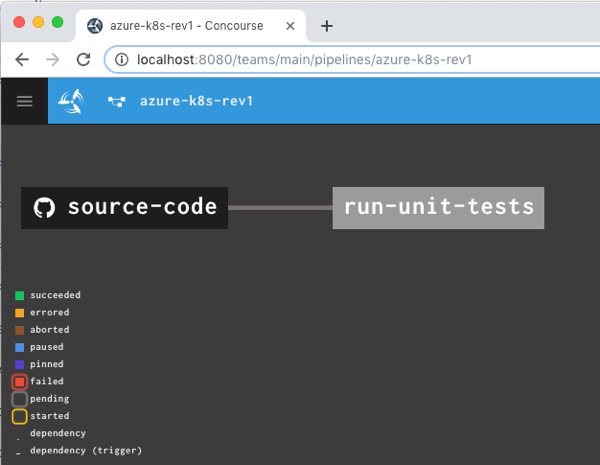
    After unpausing the pipeline so that it came alive, I saw the “run unit tests” job start running. It’s easy to view what a job is doing, and I saw that it loaded the container image from Microsoft, mounted the source code, ran my script and turned “green” because all my tests passed.
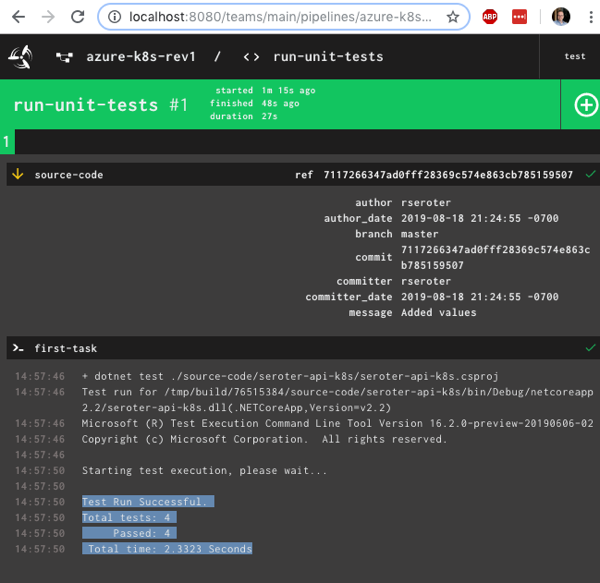
    Nice! I had a working pipeline. Now to generate a container image.

    Producing and publishing a container image

    A pipeline that just run tests is kinda weird. I need to do something when tests pass. In my case, I wanted to generate a Docker image. Another of the built-in Concourse resource types is “docker-image” which generates a container image and puts it into a registry. Here’s the resource definition that worked with Azure Container Registry:

    resources:
    - name: source-code
      [...]
    - name: azure-container-registry
      type: docker-image
      icon: docker
      source:
        repository: myrepository.azurecr.io/seroter-api-k8s
        tag: latest
        username: ((azure-registry-username))
        password: ((azure-registry-password))
    

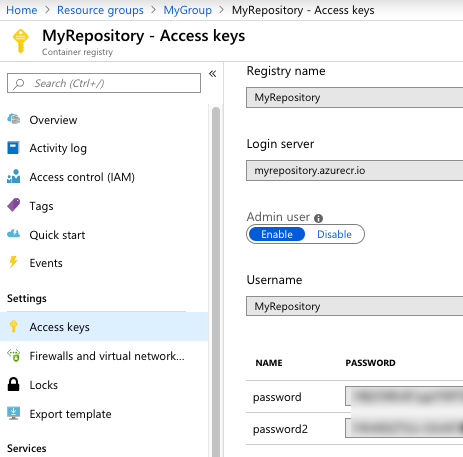
    Where do you get those Azure Container Registry values? From the Azure Portal, they’re visible under “Access keys.” I grabbed the Username and one of the passwords.
    Next, I added a new job to the pipeline.

    jobs:
    - name: run-unit-tests
      [...]
    - name: containerize-app
      plan:
      - get: source-code
        trigger: true
        passed:
        - run-unit-tests
      - put: azure-container-registry
        params:
          build: ./source-code
          tag_as_latest: true
    

    What’s this job doing? Notice that I “get” the source code again. I also set a “passed” attribute meaning this will only run if the unit test step completes successfully. This is how you start chaining jobs together into a pipeline! Then I “put” into the registry. Recall from the first blog post that I generated a Dockerfile from within Visual Studio for Mac, and here, I point to it. The resource does a “docker build” with that Dockerfile, tags the resulting image as the “latest” one, and pushes to the registry.

    I pushed this as a new pipeline to Concourse:

    fly -t rs set-pipeline -c azure-k8s-rev2.yml -p azure-k8s-rev2

    I now had something that looked like a pipeline.
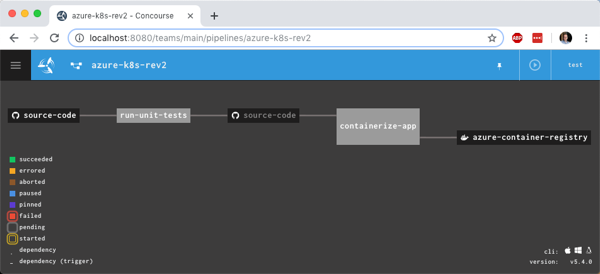
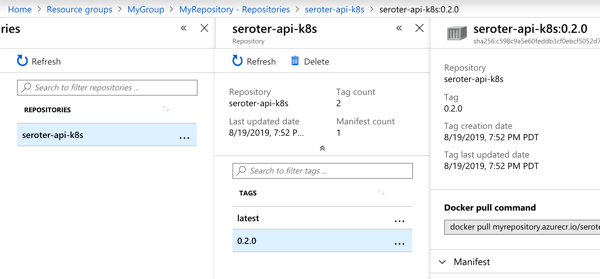
    I manually triggered the “run unit tests” job, and after it completed, the “containerize app” job ran. When that was finished, I checked Azure Container Registry and saw a new repository one with image in it.

    Generating and storing a tarball

    Not every platform wants to run containers. BLASPHEMY! BURN THE HERETIC! Calm down. Some platforms happily take your source code and run it. So our pipeline should also generate a single artifact with all the published ASP.NET Core files.

    I wanted to store this blob in Azure Storage. Since Azure Storage isn’t a built-in Concourse resource type, I needed to reference a community one. No problem finding one. For non-core resources, you have to declare the resource type in the pipeline YAML.

    resource_types:
    - name: azure-blobstore
      type: docker-image
      source:
        repository: pcfabr/azure-blobstore-resource
    

    A resource type declaration is fairly simple; it’s just a type (often docker-image) and then the repo to get it from.

    Next, I needed the standard resource definition. Here’s the one I created for Azure Storage:

    name: azure-blobstore
      type: azure-blobstore
      icon: azure
      source:
        storage_account_name: ((azure-storage-account-name))
        storage_account_key: ((azure-storage-account-key))
        container: coreapp
        versioned_file: app.tar.gz
    

    Here the “type” matches the resource type name I set earlier. Then I set the credentials (retrieved from the “Access keys” section in the Azure Portal), container name (pre-created in the first blog post), and the name of the file to upload. Regex is supported here too.

    Finally, I added a new job that takes source code, runs a “publish” command, and creates a tarball from the result.

    jobs:
    - name: run-unit-tests
      [...]
    - name: containerize-app
      [...]
    - name: package-app
      plan:
      - get: source-code
        trigger: true
        passed:
        - run-unit-tests
      - task: first-task
        config:
          platform: linux
          image_resource:
            type: docker-image
            source: {repository: mcr.microsoft.com/dotnet/core/sdk}
          inputs:
          - name: source-code
          outputs:
          - name: compiled-app
          - name: artifact-repo
          run:
              path: sh
              args:
              - -exec
              - |
                dotnet publish ./source-code/seroter-api-k8s/seroter-api-k8s.csproj -o .././compiled-app
                tar -czvf ./artifact-repo/app.tar.gz ./compiled-app
                ls
      - put: azure-blobstore
        params:
          file: artifact-repo/app.tar.gz
    

    Note that this job is also triggered when unit tests succeed. But it’s not connected to the containerization job, so it runs in parallel. Also note that in addition to an input, I also have outputs defined on the task. This generates folders that are visible to subsequent steps in the job. I dropped the tarball into the “artifact-repo” folder, and then “put” that file into Azure Blob Storage.

    I deployed this pipeline as yet another revision:

    fly -t rs set-pipeline -c azure-k8s-rev3.yml -p azure-k8s-rev3

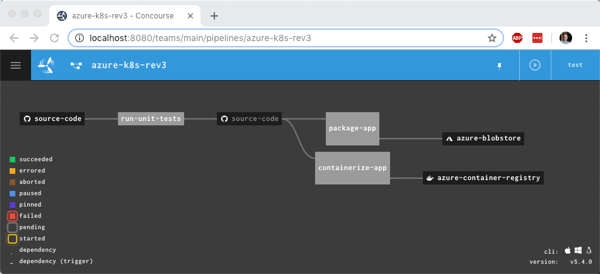
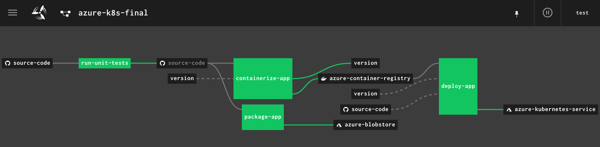
    Now this pipeline’s looking pretty hot. Notice that I have parallel jobs that fire after I run unit tests.

    I once again triggered the unit test job, and watched the subsequent jobs fire. After the pipeline finished, I had another updated container image in Azure Container Registry and a file sitting in Azure Storage.

    Adding semantic version to the container image

    I could stop there and push to Kubernetes (next post!), but I wanted to do one more thing. I don’t like publishing Docker images with the “latest” tag. I want a real version number. It makes sense for many reasons, not the least of which is that Kubernetes won’t pick up changes to a container if the tag doesn’t change! Fortunately, Concourse has a default resource type for semantic versioning.

    There are a few backing stores for the version number. Since Concourse is stateless, we need to keep the version value outside of Concourse itself. I chose a git backend. Specifically, I added a branch named “version” to my GitHub repo, and added a single file (no extension) named “version”. I started the version at 0.1.0.
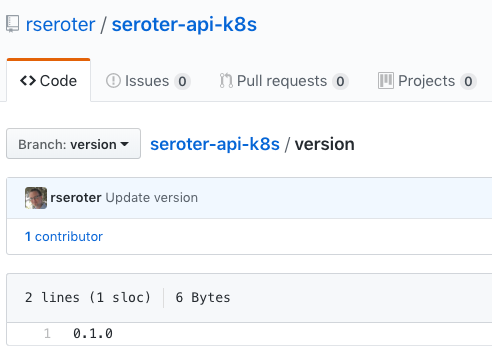
    Then, I ensured that my GitHub account had an SSH key associated with it. I needed this so that Concourse could write changes to this version file sitting in GitHub.

    I added a new resource to my pipeline definition, referencing the built-in semver resource type.

    - name: version  
      type: semver
      source:
        driver: git
        uri: git@github.com:rseroter/seroter-api-k8s.git
        branch: version
        file: version
        private_key: |
            -----BEGIN OPENSSH PRIVATE KEY-----
            [...]
            -----END OPENSSH PRIVATE KEY-----
    

    In that resource definition, I pointed at the repo URI, branch, file name, and embedded the private key for my account.

    Next, I updated the existing “containerization” job to get the version resource, use it, and then update it.

    jobs:
    - name: run-unit-tests
      [...] 
    - name: containerize-app
      plan:
      - get: source-code
        trigger: true
        passed:
        - run-unit-tests
      - get: version
        params: {bump: minor}
      - put: azure-container-registry
        params:
          build: ./source-code
          tag_file: version/version
          tag_as_latest: true
      - put: version
        params: {file: version/version}
    - name: package-app
      [...]
    

    First, I added another ‘get” for version. Notice that its parameter increments the number by one minor version. Then, see that the “put” for the container registry uses “version/version” as the tag file. This ensures our Docker image is tagged with the semantic version number. Finally, notice I “put” the incremented version file back into GitHub after using it successfully.

    I deployed a fourth revision of this pipeline using this command:

    fly -t rs set-pipeline -c azure-k8s-rev4.yml -p azure-k8s-rev4

    You see the pipeline, post-execution, below. The “version” resource comes into and out of the “containerize app” job.
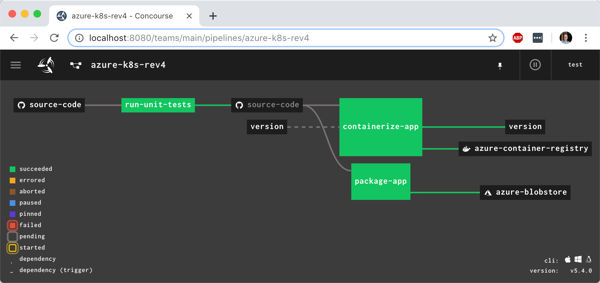
    With the pipeline done, I saw that the “version” value in GitHub was incremented by the pipeline, and most importantly, our Docker image has a version tag.
    In this blog post, we saw how to gradually build up a pipeline that retrieves source and prepares it for downstream deployment. Concourse is fun and easy to use, and its extensibility made it straightforward to deal with managed Azure services. In the final blog post of this series, we’ll take pipeline-generated Docker image and deploy it to Azure Kubernetes Service.
  • Building an Azure-powered Concourse pipeline for Kubernetes  – Part 1: Setup

    Building an Azure-powered Concourse pipeline for Kubernetes – Part 1: Setup

    Isn’t it frustrating to build great software and helplessly watch as it waits to get deployed? We don’t just want to build software in small batches, we want to ship it in small batches. This helps us learn faster, and gives our users a non-stop stream of new value.

    I’m a big fan of Concourse. It’s a continuous integration platform that reflects modern cloud-native values: it’s open source, container-native, stateless, and developer-friendly. And all pipeline definitions are declarative (via YAML) and easily source controlled. I wanted to learn how build a Concourse pipeline that unit tests an ASP.NET Core app, packages it up and stashes a tarball in Azure Storage, creates a Docker container and stores it in Azure Container Registry, and then deploy the app to Azure Kubernetes Service. In this three part blog series, we’ll do just that! Here’s the final pipeline:

    This first posts looks at everything I did to set up the scenario.

    My ASP.NET Core web app

    I used Visual Studio for Mac to build a new ASP.NET Core Web API. I added NuGet package dependencies to xunit and xunit.runner.visualstudio. The API controller is super basic, with three operations.

    [Route("api/[controller]")]
    [ApiController]
    public class ValuesController : ControllerBase
    {
        [HttpGet]
        public ActionResult<IEnumerable<string>> Get()
        {
            return new string[] { "value1", "value2" };
        }
    
        [HttpGet("{id}")]
        public string Get(int id)
        {
            return "value1";
        }
    
        [HttpGet("{id}/status")]
        public string GetOrderStatus(int id)
        {
            if (id > 0 && id <= 20)
            {
                return "shipped";
            }
            else
            {
                return "processing";
            }
        }
    }
    

    I also added a Testing class for unit tests.

        public class TestClass
        {
            private ValuesController _vc;
    
            public TestClass()
            {
                _vc = new ValuesController();
            }
    
            [Fact]
            public void Test1()
            {
                Assert.Equal("value1", _vc.Get(1));
            }
    
            [Theory]
            [InlineData(1)]
            [InlineData(3)]
            [InlineData(9)]
            public void Test2(int value)
            {
                Assert.Equal("shipped", _vc.GetOrderStatus(value));
            }
        }
    

    Next, I right-clicked my project and added “Docker Support.”

    What this does is add a Docker Compose project to the solution, and Dockerfile to the project. Due to relative paths and such, if you try and “docker build” from directly within the project directory containing the Docker file, Docker gets angry. It’s meant to be invoked from the parent directory with a path to the project’s directory, like:

    docker build -f seroter-api-k8s/Dockerfile .

    I wasn’t sure if my pipeline could handle that nuance when containerizing my app, so just went ahead and moved the generated Dockerfile to the parent directory like in the screenshot below. From here, I could just execute the docker build command.

    You can find the complete project up on my GitHub.

    Instantiating an Azure Container Registry

    Where should we store our pipeline-created container images? You’ve got lots of options. You could use the Docker Hub, self-managed OSS projects like VMware’s Harbor, or cloud-specific services like Azure Container Registry. Since I’m trying to use all-things Azure, I chose the latter.

    It’s easy to set up an ACR. Once I provided the couple parameters via the Azure Dashboard, I had a running, managed container registry.

    Provisioning an Azure Storage blob

    Container images are great. We may also want the raw published .NET project package for archival purposes, or to deploy to non-container runtimes. I chose Azure Storage for this purpose.

    I created a blob storage account named seroterbuilds, and then a single blob container named coreapp. This isn’t a Docker container, but just a logical construct to hold blobs.

    Creating an Azure Kubernetes Cluster

    It’s not hard to find a way to run Kubernetes. I think my hair stylist sells a distribution. You can certainly spin up your own vanilla server environment from the OSS bits. Or run it on your desktop with minikube. Or run an enterprise-grade version anywhere with something like VMware PKS. Or run it via managed service with something like Azure Kubernetes Service (AKS).

    AKS is easy to set up, and I provided the version (1.13.9), node pool size, service principal for authentication, and basic HTTP routing for hosted containers. My 3-node cluster was up and running in a few minutes.

    Starting up a Concourse environment

    Finally, Concourse. If you visit the Concourse website, there’s a link to a Docker Compose file you can download and start up via docker-compose up. This starts up the database, worker, and web node components needed to host pipelines.

    Once Concourse is up and running, the web-based Dashboard is available on localhost:8080.

    From there you can find links (bottom left) to downloads for the command line tool (called fly). This is the primary UX for deploying and troubleshooting pipelines.

    With fly installed, we create a “target” that points to our environment. Do this with the following statement. Note that I’m using “rs” (my initials) as the alias, which gets used for each fly command.

    fly -t rs login -c http://localhost:8080

    Once I request a Concourse login (default username is “test” and password is “test”), I’m routed to the dashboard to get a token, which gets loaded automatically into the CLI.

    At this point, we’ve got a functional ASP.NET Core app, a container registry, an object storage destination, a managed Kubernetes environment, and a Concourse. In the next post, we’ll build the first part of our Azure-focused pipeline that reads source code, runs tests, and packages the artifacts.

  • Deploying a platform (Spring Cloud Data Flow) to Azure Kubernetes Service

    Deploying a platform (Spring Cloud Data Flow) to Azure Kubernetes Service

    Platforms should run on Kubernetes, apps should run on PaaS. That simple heuristic seems to resonate with the companies I talk to. When you have access to both environments, it makes sense to figure out what runs where. PaaS is ideal when you have custom code and want an app-aware environment that wires everything together. It’s about velocity, and straightforward Day 2 management. Kubernetes is a great choice when you have closely coordinated, distributed components with multiple exposed network ports and a need to access to infrastructure primitives. You know, a platform! Things like databases, message brokers, and hey, integration platforms. In this post, I see what it takes to get a platform up and running on Azure’s new Kubernetes service.
    While Kubernetes itself is getting to be a fairly standard component, each public cloud offers it up in a slightly different fashion. Some clouds manage the full control plane, others don’t. Some are on the latest version of Kubernetes, others aren’t. When you want a consistent Kubernetes experience in every infrastructure pool, you typically use an installable product like Pivotal Container Service (PKS).  But I’ll be cloud-specific in this demo, since I wanted to take Azure Kubernetes Service (AKS) for a spin. And we’ll use Spring Cloud Data Flow as our “platform” to install on AKS.

    To start with, I went to the Azure Portal and chose to add a new instance of AKS. I was first asked to name my cluster, choose a location, pick a Kubernetes version, and set my initial cluster size.

    For my networking configuration, I turned on “HTTP application routing” which gives me a basic (non-production grade) ingress controller. Since my Spring Cloud Data Flow is routable and this is a basic demo, it’ll work fine.

    After about eleven minutes, I had a fully operational Kubernetes cluster.

    Now, this is a “managed” service from Microsoft, but they definitely show you all the guts of what’s stood up to support it. When I checked out the Azure Resource Group that AKS created, it was … full. So, this is apparently the hooves and snouts of the AKS sausage. It’s there, but I don’t want to know about it.

    The Azure Cloud Shell is a hidden gem of the Microsoft cloud. It’s a browser-based shell that’s stuffed with powerful components. Instead of prepping my local machine to talk to AKS, I just used this. From the Azure Portal, I spun up the Shell, loaded my credentials to the AKS cluster, and used the kubectl command to check out my nodes.

    Groovy. Let’s install stuff. Spring Cloud Data Flow (SCDF) makes it easy to build data pipelines. These pipelines are really just standalone apps that get stitched together to form a sequential data processing pipeline. SCDF is a platform itself; it’s made up of a server, Redis node, MySQL node, and messaging broker (RabbitMQ, Apache Kafka, etc). It runs atop a number of different engines, including Cloud Foundry or Kubernetes. Spring Cloud Data Flow for Kubernetes has simple instructions for installing it via Helm.

    I issued a Helm command from the Azure Cloud Shell (as Helm is pre-installed there) and in moments, had SCDF deployed.

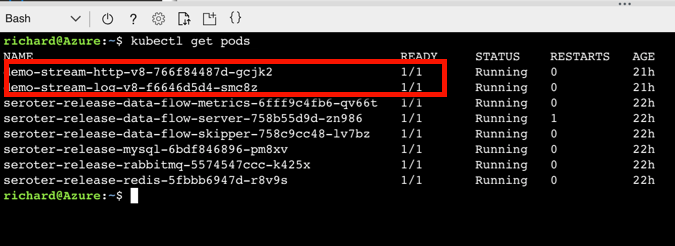
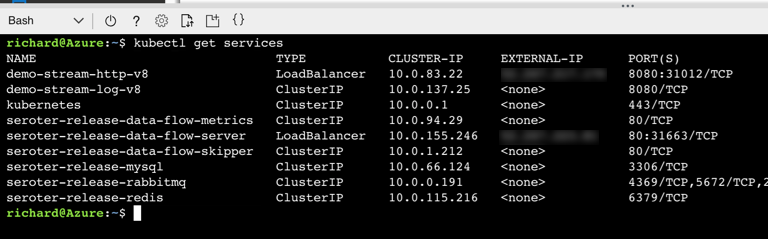
    When it finished, I saw that I had new Kubernetes pods running, and a load balancer service for routing traffic to the Data Flow server.

    SCDF offers up a handful of pre-built “apps” to bake into pipelines, but the real power comes from building your own apps. I showed that off a few weeks ago, so for this demo, I’ll keep it simple. This streaming pipeline simply takes in an HTTP request, and drop the payload into a log file. THRILLING!

    The power of a platform like SCDF comes out during deployment of a pipeline. See here that I chose Kubernetes as my underlying engine, created a load balancer service (to make my HTTP component routable) via a property setting, and could have optionally chose different instance counts for each component in the pipeline. Love that.

    If you have GUI-fatique, you can always set these deploy-time properties via free text. I won’t judge you.

    After deploying my streaming pipeline, I saw new pods shows up in AKS: one pod for each component of my pipeline.

    I ran the kubectl get services command to confirm that SCDF built out a load balancer service for the HTTP app and assigned a public IP.

    SCDF reads runtime information from the underlying engine (AKS, in this case) and showed me that my HTTP app was running, and its URL.

    I spun up Postman and sent a bunch of JSON payloads to the first component of the SCDF pipeline running on AKS. 

    I then ran a kubectl logs [log app’s pod name] command to check the logs of the pipeline component that’s supposed to write logs.

    And that’s it. In a very short period of time, I stood up a Kubernetes cluster, deployed a platform on top of it, and tested it out. AKS makes this fairly easy, and the fact that it’s vanilla Kubernetes is nice. When using public cloud container-as-a-service products or installable software that runs everywhere, consider Kubernetes a great choice for running platforms. 

  • Wait, THAT runs on Pivotal Cloud Foundry? Part 4 – Data pipelines

    Wait, THAT runs on Pivotal Cloud Foundry? Part 4 – Data pipelines

    Streaming is all the rage! No, not binge-watching Arrested Development on Netflix. Rather, I mean data stream processing: ingesting and handling infinite datasets. Instead of chewing through a nightly or weekly batch of records, you’re doing near real-time processing. Done correctly, this helps you improve data quality and make faster decisions. But how do you arrange the sequence of steps to process that data? Data pipelines! In this post, I’ll show you that this is yet another unexpected workload that runs pretty darn well on Pivotal Cloud Foundry (PCF).

    So far in this series, we’ve looked at other workloads ranging from Docker images to batch jobs.

    Let’s build a pipeline that processes a stream of shipment data that flows out of a relational database, gets enriched with additional info, and finally gets written to a log.

    Spinning up Spring Cloud Data Flow on PCF

    You could do streaming a few ways in PCF. You could manually deploy a PCF-managed instance of RabbitMQ, Solace PubSub+, or Apache Kafka. Or connect to a cloud-based broker like Azure Service Bus or Google Pub/Sub through a Service Broker. Any of those options give you a messaging backbone, but a data pipeline often involves a sequence of orchestrated steps. One turnkey solution that combines lightweight messaging with smart orchestration is Spring Cloud Data Flow (SCDF).

    While it’s not that challenging to install SCDF yourself, PCF bundles it all up into a single package. All it takes is deploying the “Data Flow Server” from the PCF marketplace.

    After BOSH built and deployed the Spring Cloud Data Flow server and dependent services (database, Redis cache, RabbitMQ instance), I also provisioned an instance of PostgreSQL from Crunchy Data. This is the source to my data stream.

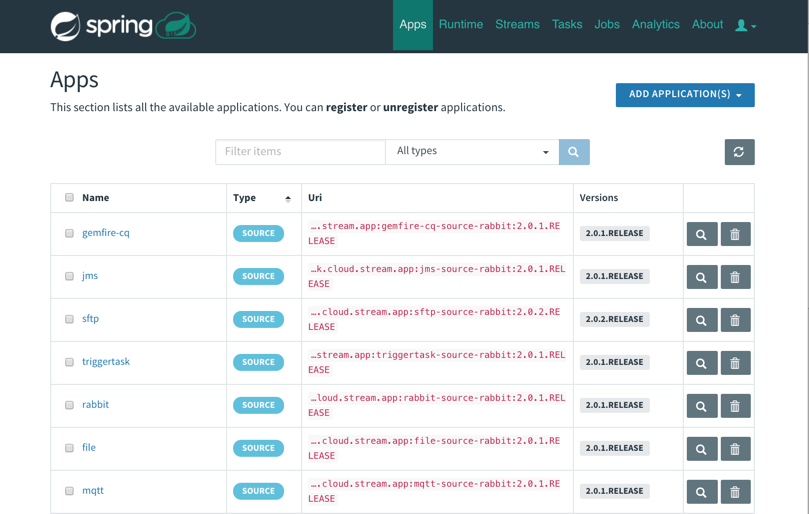
    That was easy.  From this screen on PCF Apps Manager, I could click through and log into the SCDF dashboard. From here, I loaded all the Spring Cloud Stream App Starters. These are “just” Spring Boot apps, but we can use these to build data streams. We can build our own apps to, but it’s great to pre-load these starters. Note that everything I’m doing with this dashboard you can also do with a CLI.

    With that, I had everything I needed to build out my data pipeline. 

    Building and deploying a data pipeline

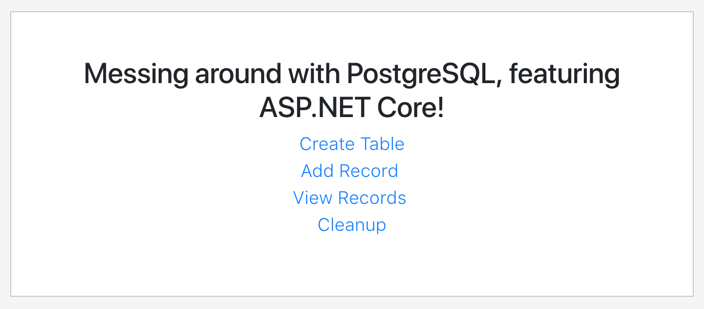
    Before building my pipeline, I wanted to prep my PostgreSQL database. To do this, I built a simple ASP.NET Core app that created a data table and added records. I deployed this to PCF, bound it to the Crunchy Data instance, and now had a way to instantiate my relational database and add rows.

    I wanted to enrich data as part of my data pipeline. When a “shipment” record comes out of PostgreSQL, it has an identifier for which warehouse it came from. I wanted to use that ID to look up the US state associated with the warehouse. I could try and use an out-of-the-box App Starter to do it, or just build my own. I chose the latter. What’s wicked is these are just Spring Cloud Stream apps. I created a new app from start.spring.io, created a POJO that represents a “warehouse shipment”, added an annotation and a method, and assembled the jar file. No other configurations needed! 

    @EnableBinding(Processor.class)
    @SpringBootApplication
    public class DemoPipelineEnricherApplication {
    
      public static void main(String[] args) {
         SpringApplication.run(DemoPipelineEnricherApplication.class, 
      args);
      }
    
      @StreamListener(Processor.INPUT)
      @SendTo(Processor.OUTPUT)
      public shipment EnrichShipment(shipment s) {
        switch(s.warehouse_id) {
        case 400:
            s.warehouse_location="CA";
            break;
        case 401:
            s.warehouse_location="WA";
            break;
        case 402:
            s.warehouse_location="TX";
            break;
        case 403:
            s.warehouse_location="FL";
            break;
        }
        return s;
      }
    }

    To make this app available to my new data pipeline, I needed to register it with the SCDF server. That means the jar file needed to be visible to the server. I uploaded the jar file to GitHub (better choices include the Maven repo, or another legit artifact repository) and registered it:

    It’s pipeline time! I designed a pipeline that started with a JDBC source, sent the individual rows to my “enricher” app, and then routed the results to the application log. For fun, I also tapped that result stream to count how many messages came in for each US state.

    The pipeline definition is something you can add to source control and version like any other deployment artifact. My pipeline looks like:

    warehouse-stream=jdbc
    --spring.datasource.username='[username]'
    --spring.datasource.url='jdbc:postgresql://[url]:5432/shipments'
    --jdbc.max-rows-per-poll=5 --jdbc.query='SELECT * FROM WarehouseShipments WHERE
    is_read=FALSE' --jdbc.update='UPDATE WarehouseShipments SET is_read=TRUE WHERE
    is_read=FALSE;' --spring.datasource.password='[password]' |
    demo-enricher | log 

    What’s cool is that after creating the stream, I had all sorts of deployment options for each app in the pipeline. That means that each app could have its own instance count and resource allocation. Much better than coarsely scaling the whole pipeline when just one component needs to scale! 

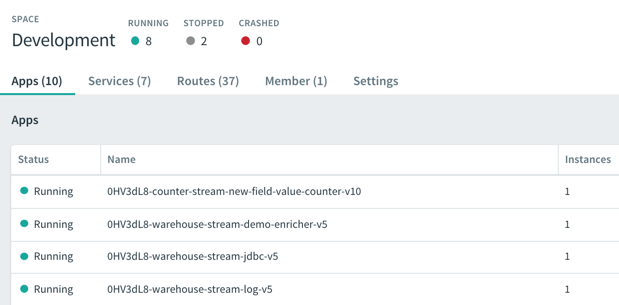
    After deploying the streams, I saw the underlying Spring Boot apps deployed to my PCF environment. SCDF is pretty sophisticated but still an easy-to-use platform!

    I continually added records to my PostgreSQL database, and saw them immediately stream through SCDF on PCF. Each individual message got enriched with additional details before printing out to the log.

    In this post, we saw that data pipelines have a natural home in PCF. Spring Cloud Data Flow is an ideal replacement for heavyweight ESB products in certain scenarios, and a replacement for ETL in others. Give it a try on PCF, Kubernetes, or other runtimes.

  • Creating a continuous integration pipeline in Concourse for a test-infused ASP.NET Core app

    Creating a continuous integration pipeline in Concourse for a test-infused ASP.NET Core app

    Trying to significantly improve your company’s ability to build and run good software? Forget Docker, public cloud, Kubernetes, service meshes, Cloud Foundry, serverless, and the rest of it. Over the years, I’ve learned the most important place you should start: continuous integration and delivery pipelines. Arguably, “apps on pipeline” is the most important “transformation” metric to track. Not “deploys per day” or “number of microservices.” It’s about how many apps you’ve lit up for repeatable, automated deployment. That’s a legit measure of how serious you are about being responsive and secure.

    All this means I needed to get smarter with Concourse, one of my favorite tools for CI (and a little CD). I decided to build an ASP.NET Core app, and continuously integrate and deliver it to a Cloud Foundry environment running in AWS. Let’s go!

    First off, I needed an app. I spun up a new ASP.NET Core Web API project with a couple REST endpoints. You can grab the source code here. Most of my code demos don’t include tests because I’m in marketing now, so YOLO, but a trustworthy pipeline needs testable code. If you’re a .NET dev, xUnit is your friend. It’s maintained by my friend Brad, so I basically chose it because of peer pressure. My .csproj file included a few references to bring xUnit into my project:

    • “Microsoft.NET.Test.Sdk” Version=”15.7.0″
    • “xunit” Version=”2.3.1″
    • “xunit.runner.visualstudio” Version=”2.3.1″

    Then, I created a class to hold the tests for my web controller. I included one test with a basic assertion, and another “theory” with an input data set. These are comically simple, but prove the point!

       public class TestClass {
            private ValuesController _vc;
    public TestClass() {
                _vc = new ValuesController();
            }
    
            [Fact]
            public void Test1(){
                Assert.Equal("pivotal", _vc.Get(1));
            }
    
            [Theory]
            [InlineData(1)]
            [InlineData(3)]
            [InlineData(20)]
            public void Test2(int value) {
                Assert.Equal("public", _vc.GetPublicStatus(value));
            }
        }
    

    When I ran dotnet test against the above app, I got an expected error because the third inline data source led to a test failure, since my controller only returns “public” companies when the input value is between 1 and 10. Commenting the offending inline data source led to a successful test run.

    2018.06.06-concourse-02

    Ok, the app was done. Now, to put it on a pipeline. If you’ve ever used shameful swear words when wrangling your CI server, maybe it’s worth joining all the folks who switched to Concourse. It’s a pretty straightforward OSS tool that uses a declarative model and containers for defining and running pipelines, respectively. Getting started is super simple. If you’re running Docker on your desktop, that’s your easiest route. Just grab this Docker Compose file from the Concourse GitHub repo. I renamed mine to docker-compose.yml, jumped into a Terminal session, switched to the folder holding this YAML file, and ran docker-compose up -d. After a second or two, I had a PostgreSQL server (for state) and a Concourse server. PROVE IT, you say. Hit localhost:8080, and you’ll see the Concourse dashboard.

    2018.06.06-concourse-01

    Besides this UX, we interface with Concourse via a CLI tool called fly. I downloaded it from here. I then used fly to add my local environment as a “target” to manage. Instead of plugging in the whole URL every time I interacted with Concourse, I created an alias (“rs”) using fly -t rs login -c http://localhost:8080. If you get a warning to sync your version of fly with your version of Concourse, just enter fly -t rs sync and it gets updated. Neato.

    Next up? The pipeline. Pipelines are defined in YAML and are made up of resources and jobs. One of the great things about a declarative model, is that I can run my CI tests against any Concourse by just passing in this (source-controlled) pipeline definition. No point-and-ciick configurations, no prerequisite components to install. Love it. First up, I defined a couple resources. One was my GitHub repo, the second was my target Cloud Foundry environment. In the real world, you’d externalize the Cloud Foundry credentials, and call out to files to build the app, etc. For your benefit, I compressed to a single YAML file.

    resources:
    - name: seroter-source
      type: git
      source:
        uri: https://github.com/rseroter/xunit-tested-dotnetcore
        branch: master
    - name: pcf-on-aws
      type: cf
      source:
        api: https://api.run.pivotal.io
        skip_cert_check: false
        username: XXXXX
        password: XXXXX
        organization: seroter-dev
        space: development
    

    Those resources tell Concourse where to get the stuff it needs to run the jobs. The first job used the GitHub resource to grab the source code. Then it used the Microsoft-provided Docker image to run the dotnet test command.

    jobs:
    - name: aspnetcore-unit-tests
      plan:
        - get: seroter-source
          trigger: true
        - task: run-tests
          privileged: true
          config:
            platform: linux
            inputs:
            - name: seroter-source
            image_resource:
                type: docker-image
                source:
                  repository: microsoft/aspnetcore-build
            run:
                path: sh
                args:
                - -exc
                - |
                    cd ./seroter-source
                    dotnet restore
                    dotnet test
    

    Concourse isn’t really a CD tool, but it does a nice basic job of getting code to a defined destination. The second job deploys the code to Cloud Foundry. It also uses the source code resource and only fires if the test job succeeds. This ensures that only fully-tested code makes its way to the hosting environment. If I were being more responsible, I’d take the results of the test job, drop it into an artifact repo, and then use that artifact for deployment. But hey, you get the idea!

    jobs:
    - name: aspnetcore-unit-tests
      [...]
    - name: deploy-to-prod
      plan:
        - get: seroter-source
          trigger: true
          passed: [aspnetcore-unit-tests]
        - put: pcf-on-aws
          params:
            manifest: seroter-source/manifest.yml
    

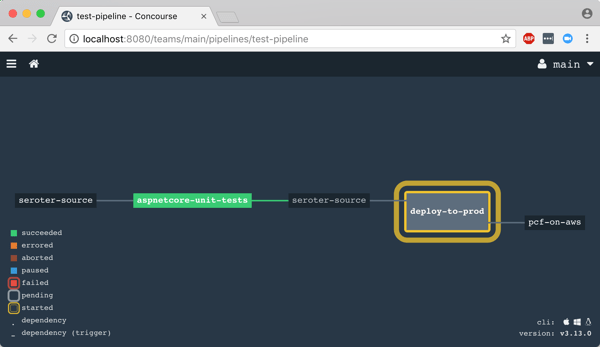
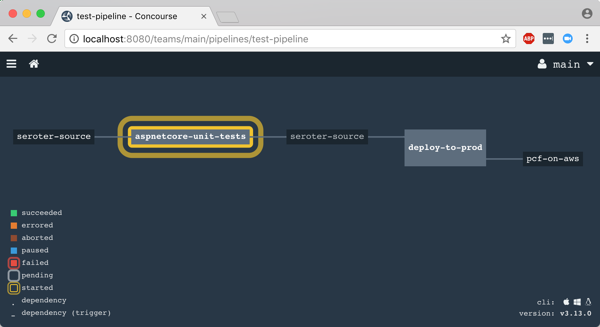
    That was it! I was ready to deploy the pipeline (pipeline.yml) to Concourse. From the Terminal, I executed fly -t rs set-pipeline -p test-pipeline -c pipeline.yml. Immediately, I saw my pipeline show up in the Concourse Dashboard.

    2018.06.06-concourse-03

    After I unpaused my pipeline, it fired up automatically.

    2018.06.06-concourse-05

    Remember, my job specified a Microsoft-provided container for building the app. Concourse started this job by downloading the Docker image.

    2018.06.06-concourse-04

    After downloading the image, the job kicked off the dotnet test command and confirmed that all my tests passed.

    2018.06.06-concourse-06

    Terrific. Since my next job was set to trigger when the first one succeeded, I immediately saw the “deploy” job spin up.

    2018.06.06-concourse-07

    This job knew how to publish content to Cloud Foundry, and used the provided parameters to deploy the app in a few seconds. Note that there are other resource types if you’re not a Cloud Foundry user. Nobody’s perfect!

    2018.06.06-concourse-08

    The pipeline run was finished, and I confirmed that the app was actually deployed.

    2018.06.06-concourse-09

    Finished? Yes, but I wanted to see a failure in my pipeline! So, I changed my xUnit tests and defined inline data that wouldn’t pass. After committing code to GitHub, my pipeline kicked off automatically. Once again it was tested in the pipeline, and this time, failed. Because it failed, the next step (deployment) didn’t happen. Perfect.

    2018.06.06-concourse-10

    If you’re looking for a CI tool that people actually like using, check out Concourse. Regardless of what you use, focus your energy on getting (all?) apps on pipelines. You don’t do it because you have to ship software every hour, as most apps don’t need it. It’s about shipping whenever you need to, with no drama. Whether you’re adding features or patching vulnerabilities, having pipelines for your apps means you’re actually becoming a customer-centric, software-driven company.

  • How to use the Kafka interface of Azure Event Hubs with Spring Cloud Stream

    How to use the Kafka interface of Azure Event Hubs with Spring Cloud Stream

    When I think of the word “imposter” my mind goes to movies where the criminal is revealed after their disguise is removed. But imposters don’t have to be evil geniuses. Sometimes imposters are good. You may buy generic types of pharmaceuticals or swap out beef for a meat-less hamburger. The goal is to get the experience of what you’re after, but through secondary means. In that sense, Azure Event Hubs is a fantastic imposter.

    Now to be sure, Azure Event Hubs is a terrific standalone cloud service. If you need to reliably ingest tons of events in a scalable way, there aren’t many (any?) better options.

    Microsoft’s gotten into the habit of putting facades onto their cloud services to turn them into credible imposters. For instance, Azure Cosmos DB has its own native interface, but also ones that mimic MongoDB and Apache Cassandra. Azure Event Hubs got into the action by recently adding an Apache Kafka interface. If you have apps or tools that use those interfaces, it’s much easier to adopt the Azure “equivalents” now. Azure isn’t actually offering MongoDB, Cassandra, or Kafka, but their first party services resemble them enough that you don’t have to change code to get the benefits of Azure’s global scale. Good strategy.

    Java developers everywhere use Spring Cloud Stream to talk to popular message brokers like RabbitMQ and Apache Kafka. I thought it’d be fun to see if Spring Cloud Stream “just works” with the new Event Hubs interface. LET’S SEE WHAT HAPPENS.

    Creating our Azure Event Hub

    I started in the Microsoft Azure portal. From there, I chose to add a new Event Hubs namespace which holds all my actual Event Hubs. For kicks, I chose the “basic” pricing tier which allows a single consumer group and a hundred connections. I set the “enable Kafka” flag and configured three throughput units (each Event Hubs partition scales to a maximum of one throughput unit).

    2018.05.29-kafka-01

    Once I had an Event Hubs namespace, I added an Event Hub to it. I gave the Event Hub a name, and three partitions to spread the data. If I had chosen a plan besides “basic”, I would have also been able to set the message retention period beyond one day.

    2018.05.29-kafka-02

    That’s it. Might be the simplest possible way to create a Kafka-like service!

    Spring Boot project setup

    The whole point of Spring Boot is to eliminate boilerplate code and make it easier to focus on building robust apps. For example, you don’t want to mess with all that broker-specific logic when you want to pass messages or events around. Spring Boot and Spring Cloud Stream make it straightforward.

    To get going, I went to start.spring.io. Devs create over 800,000 projects per month from here, so I added two more to the mix. My first project (source code here) added Spring Cloud Stream and Web dependencies. This is my message producer. Then I created a second project (source code here) with the Spring Cloud Stream dependency. This one acts as my message consumer.

    2018.05.29-kafka-03

    This is a Maven project, so I added one more dependency directly to the pom.xml file. This one tells my project to activate the Kafka-specific objects upon application startup.

    
      org.springframework.cloud
      spring-cloud-stream-binder-kafka


    Configuring the producer

    With my projects created, it was time to configure them. First up, the producer.

    I made this one simple for demo purposes. First, I added Spring Boot annotations on the primary class. The @RestController one exposes annotated operations as HTTP endpoints. The second annotation was @EnableBinding(Source.class) which set this up as a Spring Cloud Stream object that used channels identified in the default “Source” class.

    Next, I autowired a Source object that gets autoconfigured by the Spring Boot process at startup. Finally, I defined a method that responds to HTTP POST requests and sends a message to the “output” channel. This is where the message is sent to Event Hubs, but notice that my code is completely unaware of that fact.

    @EnableBinding(Source.class)
    @RestController
    @SpringBootApplication
    public class EventHubsKafkaApplication {
    
      public static void main(String[] args) {
    	SpringApplication.run(EventHubsKafkaApplication.class, args);
      }
    
      @Autowired
      Source mySource;
    
      @RequestMapping(method=RequestMethod.POST, path="/")
      public String PublishMessage(@RequestBody String company) {
        mySource.output().send(MessageBuilder.withPayload(company).build());
    
        return "success";
      }
    }
    

    That’s all the code I needed to test this out. All that was left for my producer was to configure the application.properties file. This lets me set some of the properties needed to connect to my message broker. Before setting them, I went back to the Microsoft Azure portal and grabbed the connection string for my Event Hub.

    2018.05.29-kafka-04
    With that connection string in hand, I set up my application.properties file. First, I defined my brokers. In this case, it’s the fully qualified domain name of my Event Hubs namespace. Next I set the channel destination, in this case, the Event Hub named “eh1.” Finally, I configured my security settings, which includes the connection string.

    spring.cloud.stream.kafka.binder.brokers=rseroter-eventhubs-tu1-cg1.servicebus.windows.net:9093
    spring.cloud.stream.bindings.output.destination=eh1
    
    spring.cloud.stream.kafka.binder.configuration.sasl.jaas.config=org.apache.kafka.common.security.plain.PlainLoginModule required username="$ConnectionString" password="Endpoint=sb://rseroter-eventhubs-tu1-cg1.servicebus.windows.net/;SharedAccessKeyName=RootManageSharedAccessKey;SharedAccessKey=";
    spring.cloud.stream.kafka.binder.configuration.sasl.mechanism=PLAIN
    spring.cloud.stream.kafka.binder.configuration.security.protocol=SASL_SSL
    

    With that, the producer app was done.

    Configuring the consumer

    The consumer app is even simpler! Its main class also has an @EnableBinding annotation, and this one binds to the channels in the default Sink class. Then, it makes use of the very handy @StreamListener which grabs data from the sink and handles content negotiation.

    @EnableBinding(Sink.class)
    @SpringBootApplication
    public class EventHubsKafkaConsumerApplication {
    
      public static void main(String[] args) {
        SpringApplication.run(EventHubsKafkaConsumerApplication.class, args);
      }
    
      @StreamListener(target=Sink.INPUT)
      public void logMessages(String msg) {
        System.out.println("message is: " + msg);
    }
    

    This was all the code needed to talk to a message broker or event stream processor and do something when a message arrives. Amazing.

    The application properties for the consumer are virtually identical to the producer. The only difference is the second property that refers to the input channel, versus the producer that refers to the output channel.

    spring.cloud.stream.kafka.binder.brokers=rseroter-eventhubs-tu1-cg1.servicebus.windows.net:9093
    spring.cloud.stream.bindings.input.destination=eh1
    
    spring.cloud.stream.kafka.binder.configuration.sasl.jaas.config=org.apache.kafka.common.security.plain.PlainLoginModule required username="$ConnectionString" password="Endpoint=sb://rseroter-eventhubs-tu1-cg1.servicebus.windows.net/;SharedAccessKeyName=RootManageSharedAccessKey;SharedAccessKey=";
    spring.cloud.stream.kafka.binder.configuration.sasl.mechanism=PLAIN
    spring.cloud.stream.kafka.binder.configuration.security.protocol=SASL_SSL
    

    With that, I had two working apps.

    Testing everything

    I first ran a simple test. This involved starting up both the producer and the consumer apps. The producer noticed that I had three partitions, and handled accordingly. The consumer recognized the three partitions as well, and joined an anonymous consumer group (as we didn’t specify one).

    2018.05.29-kafka-05

    I kicked up Postman and posted a JSON message to the REST endpoint exposed by my app. I sent in messages with company names of company-1, company-2, and company-3. You can see here that they show up in my consumer app!

    2018.05.29-kafka-08

    To make sure this wasn’t some other witchcraft going on, I checked the Microsoft Azure portal, and sure enough, see the connections and messages counted.

    2018.05.29-kafka-07

    Simple, right?

    BONUS: Messing with Kafka Consumer Groups

    I wanted to try something else, too. Kafka offers “consumer groups” where a single consumer instance within the group gets the message. This lets you load balance by having multiple instances of your consumer app, without each one getting a copy of the message. Every consumer group gets the message, so the same message may get read many times by different consumer groups. Azure Event Hubs has the same concept, and it behaves the same way. Spring Cloud Stream also offers this abstraction, even when the underlying broker (e.g. RabbitMQ) doesn’t offer it.

    I could set the consumer group property directly in the application.properties file. Just add “spring.cloud.stream.bindings.input.group=app1” to it. But I wanted to pass this in at application startup so that I could start up multiple instances of the app with different consumer group values.

    I started up an instance of my consumer (java -jar event-hubs-kafka-consumer-0.0.1-SNAPSHOT.jar –spring.cloud.stream.bindings.input.group=app1) and passed in that property. Notice that it read the full log (because this is the first time the consumer group saw it), and the consumer group is indicated in the log.

    2018.05.29-kafka-09

    Interestingly, when I started a second instance, it didn’t grab what was already read by the consumer group (expected), but when I sent in three more events, BOTH instances got a copy (not expected). Saw some other weirdness when I set the “partitioned=true” on the consumer, and provided an “instanceIndex” number for each consumer app instance.

    2018.05.29-kafka-10

    What’s ALSO interesting is that even though I set up an Event Hubs namespace for a single consumer group, I can apparently create as many as I want with the Kafka interface. Here, I started up another instance of my consumer, but with a different consumer group ID (java -jar event-hubs-kafka-consumer-0.0.1-SNAPSHOT.jar –spring.cloud.stream.bindings.input.group=app2), and it also read the full log, as you’d expect from a new consumer group. In fact, I created two new ones (app2, app3) and both worked.

    2018.05.29-kafka-11

    So, it seems like the consumer group limits aren’t applying here. I checked the consumer groups in Azure to see if these were being created behind the scenes, but using the Azure API, I still only saw the $Default one there. I have no idea where the Kafka consumer groups show up but they’re clearly in place. Otherwise, I wouldn’t have seen the correct behavior as each new consumer group came online!

    2018.05.29-kafka-12

    I’ll chalk it up to one of two possible things: (1) I’m a mediocre programmer so I probably screwed something up, or (2) it’s an alpha product and everything might not be wired up just yet. Or both!

    Regardless, it’s VERY simple to try out a Kafka-compatible interface on a cloud-hosted service thanks to Azure Event Hubs and Spring Cloud Stream. Kafka users should keep an eye on Azure Event Hubs as a legit option for a cloud-hosted event stream processor.

  • 2017 in Review: Reading and Writing Highlights

    kid-3What a fun year. Lots of things to be grateful for. Took on some more responsibility at Pivotal, helped put on a couple conferences, recorded a couple dozen podcast episodes, wrote news/articles/eMags for InfoQ.com, delivered a couple Pluralsight courses (DevOps, and Java related), received my 10th straight Microsoft MVP award, wrote some blog posts, spoke at a bunch of conferences, and added a third kid to the mix.

    Each year, I like to recap some of the things I enjoyed writing and reading. Enjoy!

    Things I Wrote

    I swear that I’m writing as much as I ever have, but it definitely doesn’t all show up in one place anymore! Here are a few things I churned out that made me happy.

    Things I Read

    I plowed through thirty four books this year, mostly on my wonderful Kindle. As usual, I choose a mix of biographies, history, sports, religion, leadership, and mystery/thriller. Here’s a handful of the ones I enjoyed the most.

    • Apollo 8: The Thrilling Story of the First Mission to the Moon, by Jeffrey Kluger (@jeffreykluger). Brilliant storytelling about our race to the moon. There was a perfect mix of character backstory, science, and narrative. Really well done.
    • Boyd: The Fighter Pilot Who Changed the Art of War, by Robert Coram (@RobertBCoram). I had mixed feelings after finishing this. Boyd’s lessons on maneuverability are game-changing. His impact on the world is massive. But this well-written story also highlights a man obsessed; one who grossly neglected his family. Important book for multiple reasons.
    • The Game: Inside the Secret World of Major League Baseball’s Power Brokers, by Jon Pessah (@JonPessah). Gosh, I love baseball books. This one highlights the Bud Selig era as commissioner, the rise of steroid usage, complex labor negotiations, and the burst of new stadiums. Some amazing behind-the-scenes insight here.
    • Not Forgotten: The True Story of My Imprisonment in North Korea, by Kenneth Bae. One might think that an American held in captivity by North Koreans longer than anyone since the Korean War would be angry. Rather, Bae demonstrates sympathy and compassion for people who aren’t exposed to a better way. Good story.
    • Shoe Dog: A Memoir by the Creator of Nike, by Phil Knight (@NikeUnleash). I went and bought new Nikes after this. MISSION ACCOMPLISHED PHIL KNIGHT. This was a fantastic book. Knight’s passion and drive to get Blue Ribbon (later, Nike) off the ground was inspiring. People can create impactful businesses even if they don’t feel an intense calling, but there’s something special about those that do.
    • Dynasty: The Rise and Fall of the House of Cesar, by Tom Holland (@holland_tom). This is somewhat of a “part 2” from Holland’s previous work. Long, but engaging, this book tells the tale of the first five emperors. It’s far from a dry history book, as Holland does a admirable job weaving specific details into an overarching story. Books like this always remind me that nothing happens in politics today that didn’t already happen thousands of years ago.
    • Avenue of Spies: A True Story of Terror, Espionage, and One American Family’s Heroic Resistance in Nazi-Occupied Paris, by Alex Kershaw (@kershaw_alex). Would you protect the most vulnerable, even if your life was on the line as a result? Many during WWII faced that choice. This book tells the story of one family’s decision, the impact they had, and the hard price they paid.
    • Stalling for Time: My Life as an FBI Hostage Negotiator, by Gary Noesner. Fascinating book that explains the principles of hostage negotiation, but also lays out the challenge of introducing it to an FBI conditioned to respond with force. Lots of useful nuggets in here for people who manage complex situations and teams.
    • The Things Our Fathers Saw: The Untold Stories of the World War II Generation from Hometown, USA, by Matthew Rozell (@marozell). Intensely personal stories from those who fought in WWII, with a focus on the battles in the Pacific. Harrowing, tragic, inspiring. Very well written.
    • I Don’t Have Enough Faith to Be an Atheist, by Norman Geisler (@NormGeisler) and Frank Turek (@Frank_Turek). Why are we here? Where did we come from? This book outlines the beautiful intersection of objective truth, science, philosophy, history, and faith. It’s a compelling arrangement of info.
    • The Late Show, by Michael Connelly (@Connellybooks). I’d read a book on kangaroo mating rituals if Connelly wrote it. Love his stuff. This new cop-thriller introduced a multi-dimensional lead character. Hopefully Connelly builds a new series of books around her.
    • The Toyota Way: 14 Management Principles from the World’s Greatest Manufacturer, by Jeffrey Liker. Ceremonies and “best practices” don’t matter if you have the wrong foundation. Liker’s must-read book lays out, piece by piece, the fundamental principles that help Toyota achieve operational excellence. Everyone in technology should read this and absorb the lessons. It puts weight behind all the DevOps and continuous delivery concepts we debate.
    • One Mission: How Leaders Build a Team of Teams, by Chris Fussell (@FussellChris). I read, and enjoyed, Team of Teams last year. Great story on the necessity to build adaptable organizations. The goal of this book is to answer *how* you create an adaptable organization. Fussell uses examples from both military and private industry to explain how to establish trust, create common purpose, establish a shared consciousness, and create spaces for “empowered execution.”
    • Win Bigly: Persuasion in a World Where Facts Don’t Matter, by Scott Adams (@ScottAdamsSays). What do Obama, Steve Jobs, Madonna, and Trump have in common? Remarkable persuasion skills, according to Adams. In his latest book, Adams deconstructs the 2016 election, and intermixes a few dozen persuasion tips you can use to develop more convincing arguments.
    • Value Stream Mapping: How to Visualize Work and Align Leadership for Organizational Transformation, by Karen Martin (@KarenMartinOpEx) and Mike Osterling (@leanmike). How does work get done, and are you working on things that matter? I’d suspect that most folks in IT can’t confidently answer either of those questions. That’s not the way IT orgs were set up. But I’ve noticed a change during the past year+, and there’s a renewed focus on outcomes. This book does a terrific job helping you understand how work flows, techniques for mapping it, where to focus your energy, and how to measure the success of your efforts.
    • The Five Dysfunctions of a Team, by Patrick Lencioni (@patricklencioni). I’ll admit that I’m sometimes surprised when teams of “all stars” fail to deliver as expected. Lencioni spins a fictitious tale of a leader and her team, and how they work through the five core dysfunctions of any team. Many of you will sadly nod your head while reading this book, but you’ll also walk away with ideas for improving your situation.
    • Setting the Table: The Transforming Power of Hospitality in Business, by Danny Meyer (@dhmeyer). How does your company make people feel? I loved Meyer’s distinction between providing a service and displaying hospitality in a restaurant setting, and the lesson is applicable to any industry. A focus on hospitality will also impact the type of people you hire. Great book that that leaves you hungry and inspired.
    • Extreme Ownership: How U.S. Navy SEALs Lead and Win, by Jocko Willink (@jockowillink) and Leif Babin (@LeifBabin). As a manager, are you ready to take responsibility for everything your team does? That’s what leaders do. Willink and Babin explain that leaders take extreme ownership of anything impacting their mission. Good story, with examples, of how this plays out in reality. Their advice isn’t easy to follow, but the impact is undeniable.
    • Strategy: A History, by Sir Lawrence Freedman (@LawDavF). This book wasn’t what I expected—I thought it’d be more about specific strategies, not strategy as a whole. But there was a lot to like here. The author looks at how strategy played a part in military, political, and business settings.
    • Radical Candor: Be a Kick-Ass Boss Without Losing Your Humanity, by Kim Scott (@kimballscott). I had a couple hundred highlights in this book, so yes, it spoke to me. Scott credibly looks at how to guide a high performing team by fostering strong relationships. The idea of “radical candor” altered my professional behavior and hopefully makes me a better boss and colleague.
    • The Lean Startup: How’s Today’s Entrepreneurs Use Continuous Innovation to Create Radically Successful Businesses, by Eric Ries (@ericries). A modern classic, this book walks entrepreneurs through a process for validated learning and figuring out the right thing to build. Ries sprinkles his advice with real-life stories as proof points, and offers credible direction for those trying to build things that matter.
    • Hooked: How to Build Habit-Forming Products, by Nir Eyal (@nireyal). It’s not about tricking people into using products, but rather, helping people do things they already want to do. Eyal shares some extremely useful guidance for those building (and marketing) products that become indispensable.
    • The Art of Action: How Leaders Close the Gap between Plans, Actions, and Results, by Stephen Bungay. Wide-ranging book that covers a history of strategy, but also focuses on techniques for creating an action-oriented environment that delivers positive results.

    Thank you all for spending some time with me in 2017, and I look forward to learning alongside you all in 2018.

  • Yes, You Can Use a Single Service Registry for .NET and Java Microservices

    Years ago, I could recall lots of phone numbers from memory. Now? It’d be tough to come up with more than two. There’s so many ways to contact each person that I know (phone, email(s), Twitter, WhatsApp, etc) and I depend heavily on my address book. As you start using microservices in your architecture, you’ll discover that you also need a good address book to find services at runtime. But unlike classic solutions such as configuration management databases or UDDI registries, a modern “address book” is different. Why? As microservices get deployed, scaled, and updated, their “address” is fluid. To account for that, any modern address book cannot have stale references. Enter Eureka from Netflix. While baked into Spring Cloud for Java users, Eureka isn’t easily available to .NET microservices. That changed with the OSS Steeltoe library, and I thought I’d show that off here.

    Building a Eureka Server

    Thanks to Spring Cloud, it’s easy to set up a Eureka registry for your services to talk to.

    First, I used Spring Tool Suite to build a new Spring Boot app. In the app creation wizard, I chose the “Eureka Server” package dependency (spring-cloud-starter-eureka-server). If you aren’t using Spring Tool Suite, check out the awesome web-based Spring Intializr to generate project scaffolding to import into any Java IDE.

    2017.03.29-eureka-01

    Next up, there was a LOT of code to write to bring up a Eureka server.

    @EnableEurekaServer
    @SpringBootApplication
    public class PsPlaceholderEurekaServerApplication {
    
      public static void main(String[] args) {
        SpringApplication.run(PsPlaceholderEurekaServerApplication.class, args);
      }
    }
    

    Seriously, that’s it. Bonkers. All that remained was adding a few properties. I set a couple of cosmetic properties (“datacenter” and “environment”), and then told Eureka to NOT register itself with the server, and to NOT retrieve a copy of the registry.

    server.port=8761
    
    # value used for AWS, here can be anything
    eureka.datacenter=seattle
    eureka.environment=prod
    
    # no need to register the server with the server
    eureka.client.register-with-eureka=false
    
    # don't need a local copy of the registry
    eureka.client.fetch-registry=false
    

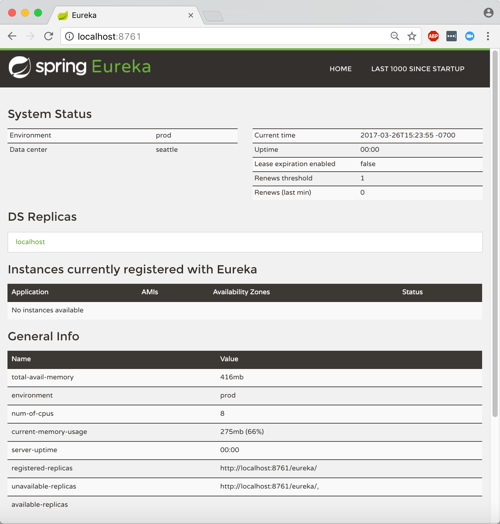
    I started up the app, navigated to the right URL, and saw the Eureka Server dashboard. There was a bunch of system status info, and an (empty) list of registered servers. Note that Eureka stores its registry in memory. The registry is a live look at the environment because services send a heartbeat to state that they’re online. No need to persist anything to disk.

    2017.03.29-eureka-02

    Building a Eureka Server (Alternative, No-Java Way)

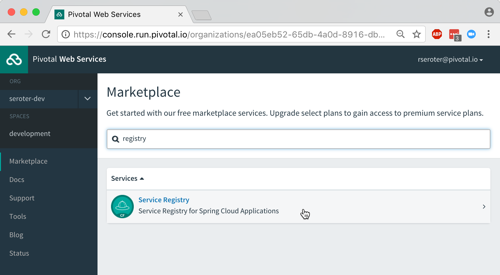
    Now you might say “I don’t know Java and don’t want to learn it.” Fair enough. If you’re a Pivotal customer, than you’re in luck. Spring Cloud Services bundles up key Spring Cloud projects and runs them “as a service” in your Cloud Foundry environment. One such service is the Eureka Service Registry. You can try this out for free in Pivotal Web Services.

    2017.03.29-eureka-03

    After clicking a couple buttons, and waiting about 30 seconds, I had a registry! No Java required.

    2017.03.29-eureka-04

    Registering a Java Service

    Great, I had a registry. Now what? I wanted to add a Java and .NET service to my local registry.

    First up, Java. I created a new Spring Boot application, and chose the “Eureka Discovery” package dependency (spring-cloud-starter-eureka).

    I set up a super awesome REST service that says “hello from Spring Boot.” What about registering with Eureka? It took a single @EnableEurekaClient annotation in my code.

    @EnableEurekaClient
    @RestController
    @SpringBootApplication
    public class PsPlaceholderEurekaServiceApplication {
    
       public static void main(String[] args) {
    
          SpringApplication.run(PsPlaceholderEurekaServiceApplication.class, args);
       }
    
       @RequestMapping("/")
       public String SayHello() {
          return "hello from Spring Boot!";
       }
    }
    

    In the bootstrap.properties file, I set the “spring.application.name” property. This told Eureka what to label my service in the registry. In my application.properties file, I specified that I should register with Eureka, and to send health data along with my service’s heartbeat.

    eureka.client.register-with-eureka=true
    eureka.client.fetch-registry=false
    
    #can intentionally set the host name
    eureka.instance.hostname=localhost
    
    eureka.client.healthcheck.enabled=true
    

    With this in place, I started up my Java service, and sure enough, saw it in the Eureka registry. Cool!

    2017.03.29-eureka-05

    Registering a .NET Service

    .NET developers, rejoice! We can enjoy all kinds of microservices goodness by using libraries like Steeltoe. And it works with .NET Framework and .NET Core apps.

    In this example, I chose to use .NET Core. Here’s my sequence of commands in the wicked .NET Core CLI:

    dotnet new webapi
    dotnet add package Steeltoe.Discovery.Client -v 1.0.0-rc2
    dotnet restore
    dotnet build
    dotnet run

    Just running those commands gave me a Web API project with a dependency on Steeltoe’s discovery package. The latter two commands built and ran the app itself.

    The “webapi” project shell sets up a default REST controller, and for this demo, I just kept that. The only necessary code changes occurred in the Startup.cs class.

    Here, I added a using directive for “Steeltoe.Discovery.Client”, and updated the ConfigureServices and Configure operations to each include references to the discovery client.

    // This method gets called by the runtime. Use this method to add services to the container.
     public void ConfigureServices(IServiceCollection services)
            {
                // Add framework services.
                services.AddMvc();
                services.AddDiscoveryClient(Configuration);
            }
    
    // This method gets called by the runtime. Use this method to configure the HTTP request pipeline.
    public void Configure(IApplicationBuilder app, IHostingEnvironment env, ILoggerFactory loggerFactory)
            {
                loggerFactory.AddConsole(Configuration.GetSection("Logging"));
                loggerFactory.AddDebug();
    
                app.UseMvc();
                app.UseDiscoveryClient();
            }
    

    Finally, I added a few entries to the appsettings.json file. First I set a “spring.application.name” value, just like I did with my Spring Boot app. This tells the registry what to label my service. Then I have a block of Eureka settings including the registry URL, whether I should register with Eureka (yes!), pull a local copy of the registry (no!), and how to find my instance.
    {
      "Logging": {
        "IncludeScopes": false,
        "LogLevel": {
          "Default": "Warning",
          "System": "Information",
          "Microsoft": "Information"
        }
      },
      "spring": {
        "application": {
          "name":  "dotnet-demo-service"
        }
      },
      "eureka": {
        "client": {
          "serviceUrl": "http://localhost:8761/eureka/",
          "shouldRegisterWithEureka": true,
          "shouldFetchRegistry": false
        },
        "instance": {
          "hostname": "localhost",
          "port": 5000
        }
      }
    }
    

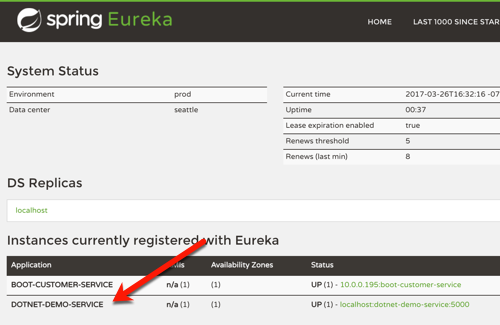
    When I ran the “dotnet build” and “dotnet run” commands, I saw my .NET service show up in the Eureka registry. BAM!

    2017.03.29-eureka-06

    Performing Discovery From a Java App

    It’s all nice and good to have an up-to-date address book, but it’s kinda worthless if nobody ever calls you!

    How would I yank service information from the registry for a Java app? It’s easy. First, I created a new Spring Boot project, and used the same “Eureka Discovery” package dependency (spring-cloud-starter-eureka) as before.

    In the application properties file, I specified that I *do* want a local copy of the registry, but do *not* need to register the client app as an available service. I’m just a client here, so no need to do register or give heartbeats.

    server.port=8081
    eureka.client.register-with-eureka=false
    eureka.client.fetch-registry=true
    eureka.client.healthcheck.enabled=false
    

    In my application code, I annotated my main class with @EnableDiscoveryClient, created a load balanced RestTemplate bean, autowired a variable to it, and then defined an operation that used it.

    @EnableDiscoveryClient
    @SpringBootApplication
    public class PsPlaceholderEurekaServiceConsumerApplication {
    
      public static void main(String[] args) {
        SpringApplication.run(PsPlaceholderEurekaServiceConsumerApplication.class, args);
      }
    
      @LoadBalanced
      @Bean
      public RestTemplate restTemplate(RestTemplateBuilder builder) {
         return builder.build();
      }
    }
    
    @RestController
    @Component
    class ConsumerController {
    
      //available now with load balanced bean
      @Autowired
      private RestTemplate restTemplate;
    
      @RequestMapping("/service-instancesrt")
      public String GetServiceInstancesRt() {
    
        String response = restTemplate.getForObject("http://dotnet-demo-service/api/values", String.class);
        return response;
      }
    }
    

    What’s pretty cool is that RestTemplate object is injected with enough smarts to replace the service name from the registry (“dotnet-demo-service”) with the actual URL when it makes the API call. When I invoked my local endpoint, it passed through the request to the microservice it looked up in the registry, and returned the result.

    2017.03.29-eureka-07

    Performing Discovery From a .NET App

    Finally, let’s see how a .NET app would pull a reference from the Eureka registry and use it.

    I created a new project based on the ASP.NET Core MVC template. And then I added the Steeltoe package for service discovery.

    dotnet new mvc
    dotnet add package Steeltoe.Discovery.Client -v 1.0.0-rc2
    dotnet restore

    With this MVC template, I got some basic scaffolding for a sample website. I just extended this by adding a new view (called “Demo”) and controller method. No content in the method right away.

    Just like before, I updated the Startup.cs class by first adding a reference to “Steeltoe.Discovery.Client” and updating the “ConfigureServices” and “Configure” methods.

    ASP.NET Core offers some nice dependency injection stuff. So with the code update above, I now had a “DiscoveryClient” object available for any controller or service to use. So, back in the controller, I added a variable for DiscoveryHttpClientHandler. Then I instantiated that object in the controller constructor, and used it in the new controller method to call a Eureka-registered Java service. Note once again that I only needed the registered service name, and the client libraries flipped this to the address/port of my actual service.

    public class HomeController : Controller
    {
      //added for demonstration
      DiscoveryHttpClientHandler _handler;
    
      public HomeController(IDiscoveryClient client) {
          _handler = new DiscoveryHttpClientHandler(client);
      }
    
      public IActionResult Demo()
      {
          HttpClient c = new HttpClient(_handler, false);
          //call service using registered alias
          string s = c.GetStringAsync("http://boot-customer-service").Result;
    
          ViewData["Message"] = "Service result is: " + s;
    
          return View();
       }
    }
    

    Finally, I added a few things to my appsettings.json file so that the Steeltoe client library knew how to behave. I gave the application a name, and told it to *not* register itself with Eureka, but only to fetch the registry and cache it locally.
    {
      "Logging": {
        "IncludeScopes": false,
        "LogLevel": {
          "Default": "Warning"
        }
      },
      "spring": {
        "application": {
          "name":  "dotnet-demo-service-client"
        }
      },
      "eureka": {
        "client": {
          "serviceUrl": "http://localhost:8761/eureka/",
          "shouldRegisterWithEureka": false,
          "shouldFetchRegistry": true
        },
        "instance": {
          "hostname": "localhost",
          "port": 5001
        }
      }
    }
    

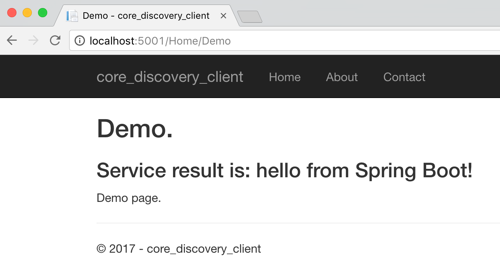
    After that, I started up by ASP.NET Core app, hit the webpage, and saw a result from my Spring Boot service.

    2017.03.29-eureka-08

    That was fun! Some sort of service registry is extremely helpful when adopting a microservices architecture. Instead of using hard-coding references or stale data stores, an always-accurate registry gives you the best chance of surviving in a fluid microservices environment. Now, thanks to Steeltoe, you can use the same registry for your Java, .NET (and even Node.js) services.

  • My new Pluralsight course—Developing Java microservices with Spring Cloud—is now available

    Java is back. To be sure, it never really left, but it did appear to take a backseat during the past decade. While new, lightweight, mobile-friendly languages rose to prominence, Java—saddled with cumbersome frameworks and an uncertain future—seemed destined to be used only by the most traditional of enterprises.

    But that didn’t happen. It wasn’t just enterprises that depended on Java, but innovative startups. And heavyweight Java frameworks evolved into more approachable, simple-to-use tools. Case in point: the open-source Spring dependency injection framework. Spring’s been a mainstay of Java development for years, but its XML-heavy configuration model made it increasingly unwieldy. Enter Spring Boot in 2014. Spring Boot introduced an opinionated, convention-over-configuration model to Spring and instantly improved developer productivity. And now, companies large and small are using it at an astonishing rate.

    Spring Cloud followed in 2015. This open-source project included a host of capabilities—including a number of projects from Netflix engineering—for teams building modern web apps and distributed systems. It’s now downloaded hundreds of thousands of times per month.

    Behind all this Spring goodness is Pivotal, the company I work for. We’re the primary sponsor of Spring and after joining Pivotal in April, I thought it’d be fun to teach a course on these technologies. There’s just so much going on in Spring Cloud, that I’m doing a two-partner. First up: Java Microservices with Spring Cloud: Developing Services.

    In this five-hour course, we look at some of the Spring Cloud projects that help you build modern microservices. In the second part of the course (which I’m starting on soon), we’ll dig into the Spring Cloud projects that help you coordinate interactions between microservices (think load balancing, circuit breakers, messaging). So what’s in this current course? It’s got five action-packed modules:

    1. Introduction to Microservices, Spring Boot, and Spring Cloud. Here we talk about the core characteristics of microservices, describe Spring Boot, build a quick sample app using Spring Boot, walk through the Spring Cloud projects, and review the apps we’ll build throughout the course.
    2. Simplifying Environment Managed with Centralized Config. Spring Cloud Config makes it super easy to stand up and consume a Git-backed configuration store. In this module we see how to create a Config Server, review all the ways to query configs, see how to setup secure access, work to configure encryption, and more. What’s cool is that the Config Server is HTTP accessible, so while it’s simple to consume in Spring Boot apps with annotated variables, it’s almost just as easy to consume from ANY other type of app.
    3. Offloading Async Activities with Lightweight, Short-Lived Tasks. Modern software teams don’t just build web apps. No, more and more microservices are being built as short-lived, serverless activities. Here, we look at Spring Cloud Task explore how to build event-driven services that get instantiated, do their work, and gracefully shut down. We see how to build Tasks, store their execution history in a MySQL database, and even build a Task that gets instantiated by an HTTP-initiated message to RabbitMQ.
    4. Securing Your Microservices with a Declarative Model. As an industry, we keep SAYING that security is important in our apps, but it still seems to be an area of neglect. Spring Cloud Security is for teams that recognize the challenge of applying traditional security approaches to microservices, and want an authorization scheme that scales. In this module we talk about OAuth 2.0, see how to perform Authorization Code flows, build our own resource server and flow tokens between services, and even build a custom authorization server. Through it all, we see how to add annotations to code that secure our services with minimal fuss.
    5. Chasing Down Performance Issues Using Distributed Tracing. One of the underrated challenges of building microservices is recognizing the impact of latency on a distributed architecture. Where are there problems? Did we create service interactions that are suboptimal? Here, we look at Spring Cloud Sleuth for automatic instrumentation of virtually EVERY communication path. Then we see how Zipkin surfaces latency issues and lets you instantly visualize the bottlenecks.

    This course was a labor of love for the last 6 months. I learned a ton, and I think I’ve documented and explained things that are difficult to find elsewhere in one place. If you’re a Java dev or looking to add some cloud-native patterns to your microservices, I hope you’ll jet over to Pluralsight and check this course out!

  • Modern Open Source Messaging: Apache Kafka, RabbitMQ and NATS in Action

    Modern Open Source Messaging: Apache Kafka, RabbitMQ and NATS in Action

    Last week I was in London to present at INTEGRATE 2016. While the conference is oriented towards Microsoft technology, I mixed it up by covering a set of messaging technologies in the open source space; you can view my presentation here. There’s so much happening right now in the messaging arena, and developers have never had so many tools available to process data and link systems together. In this post, I’ll recap the demos I built to test out Apache Kafka, RabbitMQ, and NATS.

    One thing I tried to make clear in my presentation was how these open source tools differ from classic ESB software. A few things you’ll notice as you check out the technologies below:

    • Modern brokers are good at one thing. Instead of cramming in every sort of workflow, business intelligence, and adapter framework in the software, these OSS services are simply great at ingesting and routing lots of data. They are typically lightweight, but deployable in highly available configurations as well.
    • Endpoints now have significant responsibility. Traditional brokers took on tasks such as message transformation, reliable transportation, long-running orchestration between endpoints, and more. The endpoints could afford to be passive, mostly-untouched participants in the integration. These modern engines don’t cede control to a centralized bus, but rather use the bus only to transport opaque data. Endpoints need to be smarter and I think that’s a good thing.
    • Integration is approachable for ALL devs. Maybe a controversial opinion, but I don’t think integration work belongs in an” integration team.” If agility matters to you, then you can’t silo off a key function and force (micro)service teams to line up to get their work done. Integration work needs to be democratized, and many of these OSS tools make integration very approachable to any developer.

    Apache Kafka

    With Kafka you can do both real-time and batch processing. Ingest tons of data, route via publish-subscribe (or queuing). The broker barely knows anything about the consumer. All that’s really stored is an “offset” value that specifies where in the log the consumer left off. Unlike many integration brokers that assume consumers are mostly online, Kafka can successfully persist a lot of data, and supports “replay” scenarios. The architecture is fairly unique; topics are arranged in partitions (for parallelism), and partitions are replicated across nodes (for high availability).

    For this set of demos, I used Vagrant to stand up an Ubuntu box, and then installed both Zookeeper and Kafka. I also installed Kafka Manager, built by the engineering team at Yahoo!. I showed the conference audience this UI, and then added a new topic to hold server telemetry data.

    2016-05-17-messaging01

    All my demo apps were built with Node.js. For the Kafka demos, I used the kafka-node module. The consumer is simple: write 50 messages to our “server-stats” Kafka topic.

    var serverTelemetry = {server:'zkee-022', cpu: 11.2, mem: 0.70, storage: 0.30, timestamp:'2016-05-11:01:19:22'};
    
    var kafka = require('../../node_modules/kafka-node'),
        Producer = kafka.Producer,
        client = new kafka.Client('127.0.0.1:2181/'),
        producer = new Producer(client),
        payloads = [
            { topic: 'server-stats', messages: [JSON.stringify(serverTelemetry)] }
        ];
    
    producer.on('error', function (err) {
        console.log(err);
    });
    producer.on('ready', function () {
    
        console.log('producer ready ...')
        for(i=0; i<50; i++) {
            producer.send(payloads, function (err, data) {
                console.log(data);
            });
        }
    });
    

    Before consuming the data (and it doesn’t matter that we haven’t even defined a consumer yet; Kafka stores the data regardless), I showed that the topic had 50 messages in it, and no consumers.

    2016-05-17-messaging02

    Then, I kicked up a consumer with a group ID of “rta” (for real time analytics) and read from the topic.

    var kafka = require('../../node_modules/kafka-node'),
        Consumer = kafka.Consumer,
        client = new kafka.Client('127.0.0.1:2181/'),
        consumer = new Consumer(
            client,
            [
                { topic: 'server-stats' }
            ],
            {
                groupId: 'rta'
            }
        );
    
        consumer.on('message', function (message) {
            console.log(message);
        });
    

    After running the code, I could see that my consumer was all caught up, with no “lag” in Kafka.

    2016-05-17-messaging03
    For my second Kafka demo, I showed off the replay capability. Data is removed from Kafka based on an expiration policy, but assuming the data is still there, consumers can go back in time and replay from any available point. In the code below, I go back to offset position 40 and read everything from that point on. Super useful if apps fail to process data and you need to try again, or if you have batch processing needs.

    var kafka = require('../../node_modules/kafka-node'),
        Consumer = kafka.Consumer,
        client = new kafka.Client('127.0.0.1:2181/'),
        consumer = new Consumer(
            client,
            [
                { topic: 'server-stats', offset: 40 }
            ],
            {
                groupId: 'rta',
                fromOffset: true
            }
        );
    
        consumer.on('message', function (message) {
            console.log(message);
        });
    

    RabbitMQ

    RabbitMQ is a messaging engine that follows the AMQP 0.9.1 definition of a broker. It follows a standard store-and-forward pattern where you have the option to store the data in RAM, on disk, or both. It supports a variety of message routing paradigms. RabbitMQ can be deployed in a clustered fashion for performance, and mirrored fashion for high availability. Consumers listen directly on queues, but publishers only know about “exchanges.” These exchanges are linked to queues via bindings, which specify the routing paradigm (among other things).

    For these demos (I only had time to do two of them at the conference), I used Vagrant to build another Ubuntu box and installed RabbitMQ and the management console. The management console is straightforward and easy to use.

    2016-05-17-messaging04

    For the first demo, I did a publish-subscribe example. First, I added a pair of queues: notes1 and notes2. I then showed how to create an exchange. In order to send the inbound message to ALL subscribers, I used a fanout routing type. Other options include direct (specific routing key), topic (depends on matching a routing key pattern), or headers (route on message headers).

    2016-05-17-messaging05

    I have an option to bind this exchange to another exchange or a queue. Here, see that I bound it to the new queues I created.

    2016-05-17-messaging06

    Any message into this exchange goes to both bound queues. My Node.js application used the amqplib module to publish a message.

    var amqp = require('../../node_modules/amqplib/callback_api');
    
    amqp.connect('amqp://rseroter:rseroter@localhost:5672/', function(err, conn) {
      conn.createChannel(function(err, ch) {
        var exchange = 'integratenotes';
    
        //exchange, no specific queue, message
        ch.publish(exchange, '', new Buffer('Session: Open-source messaging. Notes: Richard is now showing off RabbitMQ.'));
        console.log(" [x] Sent message");
      });
      setTimeout(function() { conn.close(); process.exit(0) }, 500);
    });
    

    As you’d expect, both apps listening on the queue got the message. The second demo used a direct routing with specific routing keys. This means that each queue will receive messages if their binding matches the provided routing key.

    2016-05-17-messaging07

    That’s handy, but you can also use a topic binding and then apply wildcards. This helps you route based on a pattern matching scenario. In this case, the first queue will receive a message if the routing key has 3 sections separated by a period, and the third value equals “slides.” So “day2.seroter.slides” would work, but “day2.seroter.recap” wouldn’t. The second queue gets a message only if the routing key starts with “day2”, has any middle value, and then “recap.”

    2016-05-17-messaging08

    NATS

    If you’re looking for a high velocity communication bus that supports a host of patterns that aren’t realistic with traditional integration buses, then NATS is worth a look! NATS was originally built with Ruby and achieved a respectable 150k messages per second. The team rewrote it in Go, and now you can do an absurd 8-11 million messages per second. It’s tiny, just a 3MB Docker image! NATS doesn’t do persistent messaging; if you’re offline, you don’t get the message. It works as a publish-subscribe engine, but you can also get synthetic queuing. It also aggressively protects itself, and will auto-prune consumers that are offline or can’t keep up.

    In my first demo, I did a poor man’s performance test. To be clear, this is not a good performance test. But I wanted to show that even a synchronous loop in Node.js could achieve well over a million messages per second. Here I pumped in 12 million messages and watched the stats using nats-top.

    2016-05-17-messaging09

    1.6 million messages per second, and barely using any CPU. Awesome.

    The next demo was a new type of pattern. In a microservices world, it’s important to locate service at runtime, not hard-code references to them at design time. Solutions like Consul are great, but if you have a performant message bus, you can actually use THAT as the right loosely coupled intermediary. Here, an app wants to look up a service endpoint, so it publishes a request and waits to hear back from which service instances are online.

    // Server connection
    var nats = require('../../node_modules/nats').connect();
    
    console.log('startup ...');
    
    nats.request('service2.endpoint', function(response) {
        console.log('service is online at endpoint: ' + response);
    });
    

    Each microservice then has a listener attached to NATS and replies if it gets an “are you online?” request.

    // Server connection
    var nats = require('../../node_modules/nats').connect();
    
    console.log('startup ...');
    
    //everyone listens
    nats.subscribe('service2.endpoint', function(request, replyTo) {
        nats.publish(replyTo, 'available at http://www.seroter.com/service2');
    });
    

    When I called the endpoint, I got back a pair of responses, since both services answered. The client then chooses which instance to call. Or, I could put the service listeners into a “queue group” which means that only one subscriber gets the request. Given that consumers aren’t part of the NATS routing table if they are offline, I can be confident that whoever responds, is actually online.

    // Server connection
    var nats = require('../../node_modules/nats').connect();
    
    console.log('startup ...');
    
    //subscribe with queue groups, so that only one responds
    nats.subscribe('service2.endpoint', {'queue': 'availability'}, function(request, replyTo) {
        nats.publish(replyTo, 'available at http://www.seroter.com/service2');
    });
    

    It’s a cool pattern. It only works if you can trust your bus. Any significant delay introduced by the messaging bus, and your apps slow to a crawl.

    Summary

    I came away from INTEGRATE 2016 impressed with Microsoft’s innovative work with integration-oriented Azure services. Event Hubs, Logic Apps and the like are going to change how we process data and events in the cloud. For those who want to run their own engines – and at no commercial licensing cost – it’s exciting to explore the open source domain. Kafka, RabbitMQ, and NATS are each different, and may complement your existing integration strategy, but they’re each worth a deep look!