Category: .NET

  • Interesting BizTalk Links From This Week

    I usually despise blogs that do nothing but link to other posts (breaking rule #11 in Jeff’s list of blog clichés), but, there were a few BizTalk/service things that caught my eye this week and I thought I’d briefly point them out.

    Good stuff.

    Technorati Tags:

  • Behavior Of Static Objects In BizTalk Runtime

    I recently answered a BizTalk newsgroup post where the fellow was asking how static objects would be shared amongst BizTalk components. I stated that a correctly built singleton should be available to all artifacts in the host’s AppDomain. However, I wasn’t 1000% sure what that looked like, so I had to build out an example.

    When I say a “correctly built singleton”, I mean a thread-safe static object. My particular singleton for this example looks like this:

    public class CommonLogger
        {
            //static members are lazily initialized, but thread-safe
            private static readonly CommonLogger singleton =
                new CommonLogger();
            private int Id;
            private string appDomainName;
    
            //Explicit static constructor 
            static CommonLogger() { }
            private CommonLogger() 
            {
                appDomainName = AppDomain.CurrentDomain.FriendlyName;
    
                System.Random r = new Random();
                //set "unique" id
                Id = r.Next(0, 100);
    
                //trace
                System.Diagnostics.Debug.WriteLine
    	("[AppDomain: " + appDomainName + ", ID: " + 
                    Id.ToString() + "] Logger started up ... ");
            }
    
            //Accessor
            public static CommonLogger Instance
            {
                get
                {
                    return singleton;
                }
            }
    
            public void LogMessage(string msg)
            {
                System.Diagnostics.Debug.WriteLine
    	("[AppDomain: " + appDomainName + "; ID: " + 
                      Id.ToString() + "] Message logged ... " + msg);
            }
        }
    

    I also built a “wrapper” class which retrieves the “Instance” object for BizTalk artifacts that couldn’t access the Instance directly (e.g. maps, orchestration).

    Next, I built a custom pipeline component (send or receive) where the “Execute” operation makes a call to my CommonLogger component. That code is fairly straightforward and looks like this …

    public IBaseMessage Execute(IPipelineContext pc, IBaseMessage inmsg)
            {
                //call singleton logger
                CommonLogger.Instance.LogMessage
                   ("calling from " + _PipelineType + " component");
    
                // this way, it's a passthrough pipeline component
                return inmsg;
            }
    

    Next, I created a simple map containing a Scripting functoid that called out to my CommonLogger. Because the Scripting functoid can’t call an operation on my Instance property, I used the “Wrapper” class which executes the operation on the Instance.

    Then I went ahead and created both a send and receive pipeline, each with my custom “logging” component built in. After deploying the BizTalk projects, I added my map and pipeline to both the receive and send port. So, there are four places that should be interacting with my CommonLogger object. What’s the expected result of this run? I should see “Logger started up” (constructor) once, and then a bunch of logged messages using the same instance. Sure enough …

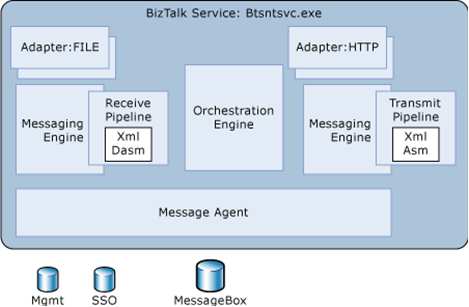
    Nice. What happens if I throw orchestration into the mix? Would it share the object instantiated by the End Point Manager (EPM)? If you read Saravana’s post, you get the impression that every object in a single host should share an AppDomain, and thus static objects. I wasn’t convinced that this was the case.

    I’ve also added a business rule to the equation, to see how that plays with the orchestration.

    I bounced my host instance (thus flushing any cached objects), and reran my initial scenario (with orchestration/rules included):
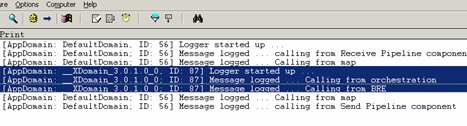
    Very interesting. The orchestration ran in a different AppDomain, and thus created its own CommonLogger instance. Given that XLANG is a separate subsystem within the BizTalk service, its not impossible to believe that it runs in a separate AppDomain.
    If I run my scenario again, without bouncing the host instance, I would expect to see no new instantiations, and objects being reused. Image below is the same as the previous one (first run), with the subsequent run in the same window.

    Indeed, the maps/pipeline reused their singleton instance, and the orchestration/rules reused their particular instance. Now you can read all about creating your own named AppDomains for orchestrations in this MSDN documentation, and maybe, because I don’t have a named instance for this orchestration to run in, an ad-hoc one is being created and used. Either way, it seems that the EPM and XLANG subsystems run in different AppDomains within a given host instance.

    I also experimented with moving my artifacts into different hosts. In this scenario, I moved my send port out of the shared host, and into a new host. Given that we’re now in an entirely different Windows service, I’d hardly expect any object sharing. Sure enough …

    As you can see, now three different instances of my singleton object exist and are actively being used within their given AppDomain. Does this matter much? In most cases, not really. I’m still getting the value of caching and using a thread-safe singleton object. There just happen to be more than one instance being used by the BizTalk subsystems. That doesn’t negate the value of the pattern. But, still valuable to know.

    Technorati Tags:

  • Performance Showdown Between BRE and WF

    If you’ve got a couple hours free, and are interested in the performance of the two primary business rules offerings from Microsoft, check out the latest post by Charles Young.

    Charles does some comically thorough analysis and comparison of the Windows Workflow rules engine and the Microsoft Business Rules Engine that ships with BizTalk Server. He looks at performance with relation to rule set size, startup time, fact size, caching and so forth. His conclusion is that the Microsoft Business Rules Engine generally performs better than the WF Rules Engine. However, there are lots of considerations that go into that conclusion, so I heartily encourage you to read and digest Charles’ post.

    Technorati Tags:

  • Troubleshooting “Canceled Web Request”

    Recently, when calling web services from the BizTalk environment, we were seeing intermittent instances of the “WebException: The request was aborted: The request was canceled” error message in the application Event Log. This occurred mostly under heavy load situations, but could be duplicated even with fairly small load.

    If you search online for this exception, you’ll often see folks just say to “turn off keep-alives” which we all agreed was a cheap way to solve a issue while introducing performance problems. To dig further into why this connection to the WebLogic server was getting dropped, we actually began listening in on protocol communication using Wireshark. I started going bleary-eyed looking for ACK and FIN and everything else, so I went and applied .NET tracing to the BizTalk configuration file (btsntsvc.exe.config). The BizTalk documentation shows you how to set up System.Net logging in BizTalk (for more information on the settings, you can read this).

    My config is slightly different, but looks like this …

    <system.diagnostics>
        <sources>
          <source name="System.Net">
            <listeners>
              <add name="System.Net"/>
            </listeners>
          </source>
          <source name="System.Net.Sockets">
            <listeners>
              <add name="System.Net"/>
            </listeners>
          </source>
          <source name="System.Net.Cache">
            <listeners>
              <add name="System.Net"/>
            </listeners>
          </source>
        </sources>
        <switches>
          <add name="System.Net" value="Verbose" />
          <add name="System.Net.Sockets" value="Error" />
          <add name="System.Net.Cache"  value="Verbose" />
        </switches>
        <sharedListeners>
          <add name="System.Net"
               type="System.Diagnostics.TextWriterTraceListener"
               initializeData="c:\BizTalkTrace.log"   />
        </sharedListeners>
        <trace autoflush="true" />
      </system.diagnostics>
      

    What this yielded was a great log file containing a more readable format than reading straight network communication. Specifically, when the request was canceled message showed up in the Event Log, I jumped to the .NET trace log and found this message …
    A connection that was expected to be kept alive was closed by the server.

    So indeed, keep-alives were causing a problem. Much more useful than the message that pops up in the Event Log. When we did turn keep-alives off on the destination WebLogic server (just as a test), the problem went away. But, that couldn’t be our final solution. We finally discovered that the keep-alive timeouts were different on the .NET box (BizTalk) and the WebLogic server. WebLogic had a keep-alive of 30 seconds, while it appears that the .NET framework uses the same value for keep-alives as for service timeouts (e.g. 90 seconds). The Windows box was attempting to reuse a connection while the WebLogic box had disconnected it. So, we modified the WebLogic application by synchronizing the keep-alive timeout with the Windows/BizTalk box, and the problem went away complete.

    Now, we still get the responsible network connection pooling of keep-alives, while still solving the problem of canceled web requests.

    Technorati Tags:

  • Choosing Between WF Rules and BizTalk Business Rules Engine

    If you’re still facing issues deciding which sort of workflow/rules technology from Microsoft to use (e.g. Windows Workflow vs. BizTalk), check out the latest well-written piece by Charles Young. He covers many of the specific differences to consider when deciding which Microsoft technology will work best for your given application.

    Technorati Tags: , ,

  • More on Microsoft’s ESB Guidance

    Marty Wasznicky of the BizTalk product team is back from the blogging dead and talking about Microsoft’s ESB Guidance.

    The last time this character posted on the blog was immediately after he and I taught a brutal BizTalk “commando” class in 2005. Keep an eye on him since he’s the primary architect behind the ESB Guidance bits and a wealth of BizTalk knowledge.

    My company is actually running the “Exception Management” bits from ESB Guidance in production as we speak. I put some of the early release bits into a key application, and it’s great to now allow business users to review and resubmit business exception data from a SharePoint site.

    Technorati Tags:

  • Summer Reading List

    I’m fortunate that my company does a summer shutdown during the July 4th week. I plan on taking a day or so of that “free” time off to learn a new technology or go deeper in something that I’ve only touched at a cursory level.

    I’ve recently read a few books (below) that were quite good and I’m on the lookout for others.

    All of those were great. I can’t recommend the CLR book enough. Great resource.

    I’d love suggestions on books/topics that I should learn more about. I’ve been meaning to do serious WCF stuff for awhile. Maybe look at different angles on “security” or “collaboration”? Know of any fantastic “development project management” books?

  • BizTalk Handling of Exceptions in One-Way Web Services

    I’m currently working on the design of the “fan out” process from our ERP system (SAP) and we’ve had lots of discussions around asynchronous services and exception handling.

    The pattern we’ve started with is that BizTalk receives the message from SAP and fans it out using one-way send ports (and web services) to each interested subscriber. However, some folks have expressed concern about how exceptions within the various services get handled. In a true one-way architecture, BizTalk is never alerted that the service failed, and the service owner is responsible for gracefully handling all exceptions.

    If a .NET developer builds a very plain web service, their web method may be something like this:

    [WebMethod]
    public void DoSomethingCool(CoolObject co) {   throw new Exception(“bad moon rising”);

    }

    So what does this actually generate? If you look, the actual contract generated from this yields a response message!

    You can see there that the service caller would expect a confirmation message back. If BizTalk calls this service, even from a one-way send port, it will wait for this response message. For the service above that fails, BizTalk shows the following result:

    The proper way (as opposed to the lazy way above) to build a one-way .NET web service is to add the attribute tag below.

    [SoapDocumentMethod(OneWay = true)]
    [WebMethod]
    public void DoSomethingCool(CoolObject co) {   throw new Exception(“bad moon rising”);

    }

    If you build THIS service, then the contract looks like this …

    Notice that the only response BizTalk (or any caller) is expecting is a HTTP 200 response. If anything besides the base connection fails, BizTalk won’t know or care. If I call the service now, there is no indication (Event Log, Suspended Messages) that anything went wrong.

    The first web service above is the equivalent of writing the web method as such …

    [SoapDocumentMethod(OneWay = false)]
    [WebMethod]
    public void DoSomethingCool(CoolObject co) {   throw new Exception(“bad moon rising”);

    }

    Setting OneWay=false would force this method to return a response message. So what does this response message REALLY look like? I traced the web service call, and indeed, you get a DoSomethingCoolResponse message that is apparently just eaten up by BizTalk (no need to subscribe to the response) …

    Now what if the web service times out on these “fake” one way calls? Would BizTalk really raise an error, or would it simply say “ok, I sent it, never got a response, but that’s cool.” I added a 2 minute “sleep” to my service and tried it out. Sure enough, BizTalk DID suspend the message (or set it for retry, depending on your settings).

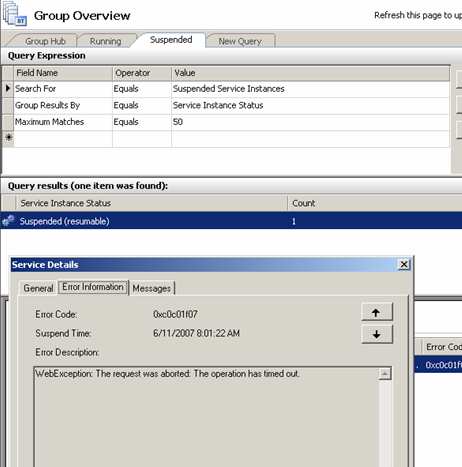
    The only exception that will cause either a two-way OR one-way service to suspend is if the connection fails. If I shut down the web server, calling either type of service results in a suspended (or retry) message like so …

    While it’s super that a service that returns no data can still return a basic success acknowledgement, there are broad implications that need to be thought out. Do you really want BizTalk to catch an exception thrown by your service? If the code is bad, all the retries are going to fail anyway. What about keeping messages in order? Do you really want to use “ordered delivery” and thus block all messages following the “bad” service call? I’m a bigger fan of letting the service itself catch the exception, log the ID of the object coming in, and on a scheduled basis, go retrieve the actual data from the system of record, vs. trying to make BizTalk keep things all synchronized.

    Any architecture experiences with one-way services or patterns you wish to share? Talk to me.

    Technorati Tags:

  • Calling Inline .NET Code From Inline XSLT In BizTalk

    A while back I wrote about calling external assemblies from within a BizTalk map. A problem I mentioned was that the member variable in the class that the map was calling seemed to be getting shared amongst execution instances. Each map creates a sequential page number in the XSLT and puts it into the destination XML. However, I’d see output where the first message had pages “1..3..5..7..8” and the second message had pages “2..4..6..9.” Very strange. I thought I fixed the problem, but it surfaced today in our Test environment.

    So, I set out to keep everything local to the map and get rid of external assembly calls. After banging my head for a few minutes, I came up the perfect solution. I decided to mix inline script with inline XSLT. “Madness” you say? I built a small test scenario. The map I constructed looks like this:

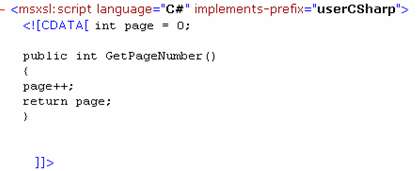
    In the first Scripting functoid, I have “inline C#” selected, and I created a global variable. I then have a function to increment that variable and return the next number in sequence.

    Did you know that you could have “global variables” in a map? Neat stuff. If I check out the XSLT that BizTalk generates for my map, I can see my function exposed as such:

    Now I know how to call this within my XSLT! The second Scripting functoid’s inline XSLT looks like this:


    Notice that I can call the C# method written in the previous functoid with this code:

    <xsl:value-of select=”userCSharp:GetPageNumber()”/>

    The “prefix” is the auto-generated one from the XSLT. Now, all the calculations are happening locally within the map, and not relying on outside components. The result of this map is a document that looks like this:

    There you go. Using global variables within a BizTalk map and calling a C# function from within the XSLT itself.

    Technorati Tags:

  • Consuming Web Services in BizTalk Without Web Reference

    Twice last week, I received WSDLs to consume that BizTalk didn’t like. That is, when I would try and load the WSDL via Add Web Reference, I’d get an error like the following:

    Could not generate BizTalk files. Unable to import WebService/Schema. Unable to import
    binding ‘WebServiceBinding’ from namespace
    http://xmlns.company.com/interface/project/SubmitSubjectImpl&#8217;. Unable to import operation
    ‘SubmitSubject’. The element ‘http://xmlns.company.com/project/subject:subjectrequest&#8217; is
    missing.

    I also tried from a “regular” .NET project, and no luck. One of the WSDLs used “imports” (a no-no for importing the web reference), and I’m convinced that the other WSDL’s problem was indeed namespace based. Now in both cases, I didn’t have the luxury of telling the WSDL owner to make changes. So how to get around this? Inspired a bit by Jon’s blog, I decided to try using the .NET Framework tool wsdl.exe. For the WSDL using “imports”, I executed WSDL.exe passing in the WSDL, and parameters for each schema used. Sure enough, I was able to generate a valid C# proxy class. The other offending WSDL was also successfully processed using WSDL.exe. As a result, I now had a proxy class needed to consume this service.

    Next I added that proxy class to a .NET class library, built, and GAC’ed it. Next I used the provided schema files to create messages in a BizTalk orchestration corresponding to the request and response message. Finally, I connected this to a “two way” port in the orchestration.

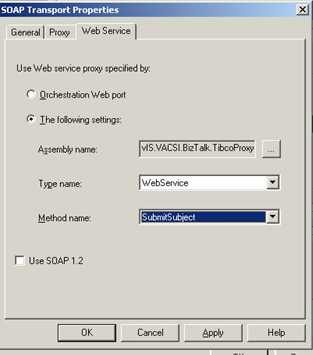
    After deploying the BizTalk project, I had to configure the necessary SOAP send port. Unlike a “regular” SOAP send port, I was not using an orchestration port as the proxy. Instead, I am now pointing to the proxy class generated by WSDL.exe. On the Web Service tab of the SOAP port, I chose the assembly and method I needed.

    Now assuming everything was set up right, I should have been able to call the web service with no problem. But, if we stick with the base assumption that I’m a total meatball, of COURSE it didn’t work the first time. Instead I got this …


    A message sent to adapter “SOAP” on send port “Company.Dept.Project.SendTibcoSvc.SOAP” with URI “http://machinename:1234/ProcessDefinitions/WebService&#8221; is suspended.
    Error details: Failed to serialize the message part “subjectrequest” into the type “subjectrequest” using namespace “http://xmlns.company.com/project/subject&#8221;. Please ensure that the message part stream is created properly.

    Obviously the proxy couldn’t serialize my XML message. So, I output the message I was sending to the port, and tried validating it against my schema. Sure enough, I got validation errors like The string ” is not a valid XsdDateTime value. and The string ” is not a valid Integer value.. So, I fixed the source problems, and validation succeeded. Finally, when calling the service again, everything worked perfectly.

    Moral of story: you can consume web services WITHOUT using a “web reference” as long as you can build the proxy class. Good stuff.

    Technorati Tags: ,