Category: .NET

  • Applying Role-Based Security to BizTalk Feeds From RSSBus

    I recently showed how one could use RSSBus to generate RSS feeds for BizTalk service metrics on an application-by-application basis.  The last mile, for me, was getting security applied to a given feed.  I only have a single file that generates all the feeds, but, I still need to apply role-based security restraints on the data.

    This was a fun exercise.  First, I had to switch my RSSBus installation to use Windows authentication, vs. the Forms authentication that the default installation uses.  Next I removed the “anonymous access” capabilities from the IIS web site virtual directory.  I need those steps done first because I plan on checking to see if the calling user is in the Active Directory group associated with a given BizTalk application.

    Now the interesting part.  RSSBus allows you to generate custom “formatters” for presenting data in the feed.  In my case, I have a formatter which does a security check.  Their great technical folks provided me a skeleton formatter (and way too much personal assistance!) which I’ve embellished a bit.

    First off, I have a class which implements the RSSBus formatter interface.

    public class checksecurity : nsoftware.RSSBus.RSBFormatter
    

    Next I need to implement the required operation, “Format” which is where I’ll check the security credentials of the caller.

    public string Format(string[] value, string[] param)
    {
       string appname = "not_defined";
       string username = "anonymous";
       bool hasAccess = false;
    	
       //check inbound params for null
       if (value != null && value[0] != null)
       {
         appname = value[0];
         //grab username of RSS caller
         username = HttpContext.Current.User.Identity.Name;
         if (HttpContext.Current != null)
         {
            //check cache
    	if (HttpContext.Current.Cache["BizTalkAppMapping"] == null)
            {
              //inflate object from XML config file
              BizTalkAppMappingManager appMapping = LoadBizTalkMappings();
    
              //read role associated with input BizTalk app name
              string mappedRole = appMapping.BizTalkMapping[appname];
    
              //check access for this user
              hasAccess = HttpContext.Current.User.IsInRole(mappedRole);
    
              //pop object into cache with file dependency
              System.Web.Caching.CacheDependency fileDep = 
                   new System.Web.Caching.CacheDependency
                       (@"BizTalkApplicationMapping.xml");
              HttpContext.Current.Cache.Insert
                       ("BizTalkAppMapping", appMapping, fileDep);
             }
            else
             {
              //read object and allowable role from cache
              string mappedRole = 
                   ((BizTalkAppMappingManager)
                        HttpContext.Current.Cache["BizTalkAppMapping"])
                           .BizTalkMapping[appname];
    
             //check access for this user
             hasAccess = HttpContext.Current.User.IsInRole(mappedRole);
              }
         }
      }
      if (hasAccess == false) 
            throw new RSBException("access_violation", "Access denied.");
                
      //no need to return any value
      return "";
    }
    

    A few things to note in the code above.  I call a function named “LoadBizTalkMappings” which reads an XML file from disk (BizTalkApplicationMapping.xml), serializes it into an object, and returns that object.  That XML file contains name/value pairs of BizTalk application names and Active Directory domain groups.  Notice that I use the “IsInRole” operation on the Principal object to discover if this user can view this particular feed.  Finally, see that I’m using web caching with a file dependency.  After the first load, my mapping object is read from cache instead of pulled from disk. When new applications come on board, or a AD group account changes, simply changing my XML configuration file will invalidate my cache and force a reload on the next RSS request.  Neato.

    That’s all well and good, but how do I use this thing?  First, in my RSSBus web directory, I created an “App_Code” directory and put my class files (formatter and BizTalkApplicationMappingManager) in there.  Then they get dynamically compiled upon web request.  The next step is tricky.  I originally had my formatter called within my RSSBus file where my input parameters were set.  However, I discovered that due to my RSS caching setup, once the feed was cached, the security check was bypassed!  So, instead, I put my formatter request in the RSSBus cache statement itself.  Now I’m assured that it’ll run each time.

    So what do I have now?  I have RSS urls such as http://server/rssbus/BizTalkOperations.rsb?app=Application1 which will only return results for “Application1” if the caller is in the AD group defined in my XML configuration file.  Even though I have caching turned on, the RSSBus engine checks my security formatter prior to returning the cached RSS feed.  Cool.

    Is this the most practical application in the world?  Nah.  But, RSS can play an interesting role inside enterprises when tracking operational performance and this was a fun way to demonstrate that.  And now, I have a secure way of allowing business personnel to see the levels of activity through the BizTalk systems they own.  That’s not a bad thing.

    Technorati Tags: ,

  • [Help] XML Serialization Result is Different in Separate Environments

    Here’s one for you.  I have two Windows Server 2003 environments, and in one environment, a .NET object correctly serializes to XML, and in the next environment it does not.

    Let’s set this up.  First, I have an existing schema like below where my datetime/number types are both nillable, and have a minOccurs of 0.  So, they could exist and be null, or not exist entirely.

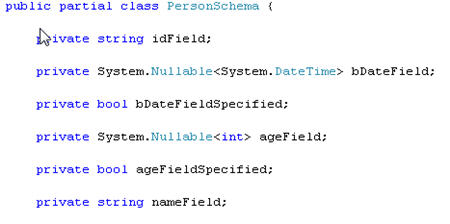
    Next, I generate a typed object for this schema using xsd.exe.  The generated class contains my schema nodes, of course, but xsd.exe also inserts these boolean “[fieldname] + Specified” variables.  Now these field accessors have the XmlIgnoreAttribute, so they don’t get included in the XML document, but rather can be used to check if a field exists.  If the value is false, the the XML serializer doesn’t include the corresponding field in the output.

    So far so good.  I’ve built a really simple application that takes an XML string and loads it into my .NET object via the XmlSerializer Framework object.  On my development machine, executing this step results in a MessageBox window that shows the object properties after the Xml deserialization occurred.

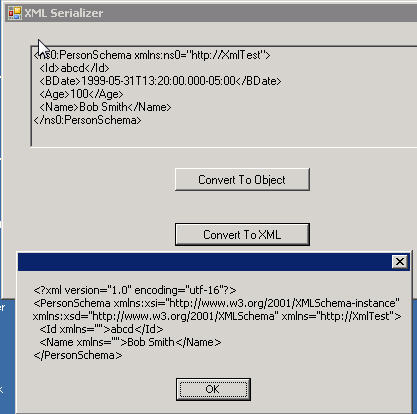
    As you can see, all the values in my original XML document converted fine, and, the “specified” fields are both set to true because the corresponding fields have values.  If I take this little application, and run it on our common development environment, I get the exact same result (I’ve also tested this on some co-worker’s machines).  However, if I run this application in our TEST environment (same OS, same .NET framework version as previously tested environments), I get the following result:

    What, what, what??  I still have values present for the integer (“Age”) and datetime (“BirthDate”) but the “specified” fields are now false.  What’s the ramification?  Turning this object back into XML in this TEST environment results in this …

    Yowza.  Now those fields don’t get serialized back into the XML document.  Not good.  As for solutions, the quickest one is to remove the auto-generated “specified” fields from the .NET object which results in everything serializing and deserializing just fine.  However, I don’t like mucking with auto-generated code because you have to remember what changes you’ve made for all future releases.

    Thoughts as to what could cause this?  A .NET hotfix, something environmental? I’ve included my little test application here, so feel free to download and execute the quick test on your machine and post the results in the comments.

    Technorati Tags:

  • Presentations Available Online for Microsoft SOA/BPM Conference

    If you missed the recent SOA & BPM Conference from Microsoft, you can now review nearly all of the presentation decks via the conference website.

    Visit the presentation download page to grab PDF versions of material.

    Technorati Tags:

  • XML, Web Services and Special Characters

    If you’ve worked with XML technologies for any reasonable amount of time, you’re aware of the considerations when dealing with “special” characters. This recently came up at work, so I thought I’d share a few quick thoughts.

    One of the developers was doing an HTTP post of XML content to a .NET web service. However, we discovered that a few of the records coming across had invalid characters.

    Now you probably know that the following message is considered invalid XML:

    <Person>
    	<Name>Richard</Name>
    	<Nickname>Thunder & Lightning</Nickname>
    </Person>
    

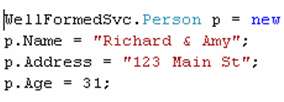
    The ampersand (“&”) isn’t allowed within a node’s text. Neither are “<“, “>” and a few others. Now if you call a web service by first doing an “Add Web Reference” in Visual Studio.NET, you are using a proxy class that covers up all the XML/SOAP stuff going on underneath. The proxy class (Reference.cs) inherits System.Web.Services.Protocols.SoapHttpClientProtocol, which you can see (using Reflector) takes care of proper serialization using the XmlWriter object. So setting my web service parameters like so …

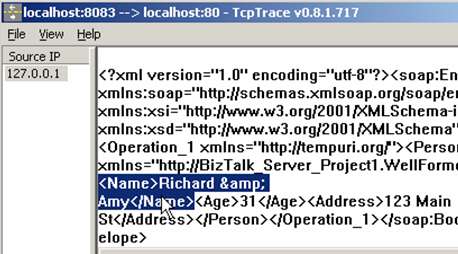
    When this actually goes across the wire to my web service, the payload has been appropriate encoded and the ampersand has been replaced …

    However, if I decided to do my own HTTP post to the service and bypass a proxy, this is NOT the way to do it ..

    HttpWebRequest webRequest = 
       (HttpWebRequest)HttpWebRequest.Create("http://localhost/bl/sv.asmx");
    webRequest.Method = "POST";
    webRequest.ContentType = "text/xml";
    
    using (Stream reqStream = webRequest.GetRequestStream())
    {
    
      string body = "<soap:Envelope xmlns:soap="+
      "\"http://schemas.xmlsoap.org/soap/envelope/\">"+
      "<soap:Body><Operation_1 xmlns=\"http://tempuri.org/\">" +
      "<ns0:Person xmlns:ns0=\"http://testnamespace\">" +
      "<ns0:Name>Richard & Amy</ns0:Name>" +
      "<ns0:Age>10</ns0:Age>" +
       "<ns0:Address>411 Broad Street</ns0:Address>" +
      "</ns0:Person>" +
      "</Operation_1></soap:Body></soap:Envelope>";
    
        byte[] bodyBytes = Encoding.UTF8.GetBytes(body);
        reqStream.Write(bodyBytes, 0, bodyBytes.Length);
    
    }
    HttpWebResponse webResponse = 
       (HttpWebResponse)webRequest.GetResponse();
    MessageBox.Show("submitted, " + webResponse.StatusCode);
    
    webResponse.Close();
    

    Why is this bad? This may work for most scenarios, but in the case above, I have a special character (“&”) that is about to go unmolested across the wire …

    Instead, the code above should be augmented to use an XmlTextWriter to build up the XML payload. These types of errors are such a freakin’ pain to debug since no errors actually get thrown when the receiving service fails to serialize the bad XML into a .NET object. In a BizTalk world, this means no SOAP exception to the caller, no suspended message, no error in the Event Log. Virtually no trace (outside of the IIS logs). Not good.

    BizTalk itself doesn’t like poorly constructed XML either. The XmlReceive pipeline, in addition to “typing” the message (http://namespace#root) also parses the message. So while everyone says that the default XmlReceive pipeline doesn’t validate the structure (meaning XSD structure) of the message, it DOES validate the XML structure of the message. Keep that in mind. If I try to pass an invalid XML document (special characters, unclosed tags) that WILL bomb out in the pipeline layer.

    If you try to cheat, and do pass-through pipelines and use XmlDocument as your initial orchestration message (thus bypassing any peeking at the message by BizTalk), you will still receive errors when you try to interact with the message later on. If you set the XmlDocument to the actual message variable in the orchestration, the message gets parsed at that time and fails if the structure is invalid.

    So, this is probably elementary for you smart people, but it’s one of those little things that you might forget about. Be careful about generating XML content via string building and instead consider using XmlDocuments or XmlWriters to make sure that your content passes XML parsing rules.

    Technorati Tags: ,

  • Adventures With WCF and BizTalk

    After my mini-rant on WCF last week, I figured that my only course of action was to spend a bit of my free time actually re-learning WCF (+ BizTalk) and building out the scenarios that most interest me.

    In my effort to move my WCF skill set from “able to talk about it” to “somewhat dangerous”, I built each of the following scenarios:

    Scenario Comments
    Service hosted in Windows Form (HTTP) Pretty simple to build the service contract, and use operations made up of simple types and complex types (using [DataContract]). Fairly straightforward to modify the app.config used by the WinForm host to hold the Http endpoint (and provide metadata support). Screwed around with various metadata options for a while, and found this blog post on metadata publication options quite useful during my adventures. To consume the service, I used svcutil.exe to build the message, client objects and sample configuration file. Decided to call the service using the client vs. going directly at the ChannelFactory.
    Service hosted in Windows Form (TCP) Liked that the ServiceHost class automatically loads up all the endpoints in the host configuration. No need to explicitly “start” each one. Don’t love that by default, the generated configuration file (from svcutil.exe) uses the same identifier for the bindingConfiguration and name values. This mixed me up for a second, so I’ve taken to changing the name value to something very specific.
    Service hosted in IIS I don’t learn well by “copy/paste” scenarios, but I DO like having a reference model to compare against. That said, this post on hosting WCF services in IIS is quite useful to use as a guide. Deploying to IIS was easier than I expected. My previous opinion that setting up WCF services takes too many steps must have been a result of getting burned by an early build of Indigo.
    Service generated by BizTalk (WSHttp) and hosted in IIS BizTalk WCF Wizard is fairly solid. Deployed a new WSHttp service to IIS, used svcutil.exe to build the necessary consuming components, and ripped out the bits from the generated configuration file and added them to my existing “WCF Consumer” application. See the steps below which I followed to get my BizTalk-generated service ready to run.
    Service Generated By BizTalk (TCP) and hosted in BizTalk I added a receive location to the receive port generated by the WCF Wizard in the scenario above. I then walked through the WCF Wizard again, this time creating a MEX endpoint in IIS to provide the contract/channel information for the service consumer. As expected (but still neat to see), the endpoint in the app.config generated by svcutil.exe had the actual TCP endpoint stored, not the MEX endpoint in IIS. Of course that’s how it’s supposed to work, but I’m easily amused. I was able to call this service using identical code (except for the endpoint configuration name) as the WSHttp BizTalk service.
    Service Generated by BizTalk (WSHttp) and hosted in BizTalk This excites me a bit. Hosting my web service in process without needing to use IIS. I plan on exploring this scenario much more to identify how handling is different on an in-process hosted web service vs. an IIS hosted on (how exceptions are handled, security configuration, load balancing). To make this work, I created yet another receive location on the above created receive port, set the adapter as WCF-Custom and chose the WS-Http binding. I also added a metadata behavior in case I wanted to generate any bits using svcutil.exe. Instead of generating any new bits, I simply added an endpoint to my configuration file while reusing the same binding, bindingConfiguration and contract as my other WsHttp service. After switching my code to use this new endpoint configuration, everything processed successfully.
    Consuming basicHttp WCF service via classic “add web reference” This was my “backwards compatible” test. Could I build a fancy WCF service that my non-WCF clients could consume easily? If I charge forward with WCF, do I risk screwing up the plethora of systems that use SOAP Basic Profile 1.1 as their web interface? My WCF service provided a basicHttp binding in addition to more robust binding options. In Visual Studio.NET I did an “add web reference” and attempted to use this WCF service as I would a “classic” SOAP service. And … it worked perfectly. So it shouldn’t matter if a sizable part of my organization can’t utilize WS* features in the near future. I can still “downgrade” services for their consumption, while providing next-level capabilities to clients that support it.

    I’ve got a few more scenarios queued up (UriTemplates, security configurations, transactions and reliable sessions), but so far, things are looking good. My wall of skepticism is slowly crumbling.

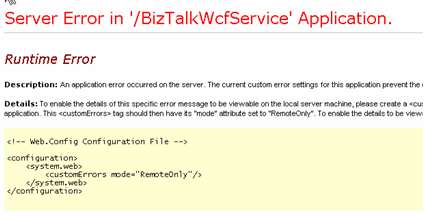
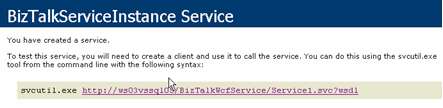
    That said, I still had a bit of work to first get all this running. First off, I got the dreaded plain text shows up when browsing the svc file issue. I reinstalled .NET Framework 3.0 and reassociated it with IIS and it appears that this cleared things up. However, after first walking through the BizTalk WCF Publishing Wizard, I got the following page upon browsing the generated IIS-hosted web service:

    Ok, next step was to add <customErrors mode=”Off”/> to the web.config file. This now resulted in this error:

    Once again, SharePoint screws me up. If you’ve got SharePoint on the box, you need to add <trust level=”Full” originUrl=”” /> to your web.config file. In fairness, this is mentioned in the BizTalk walkthrough as a “note”. After adding this setting, I now got this message:

    That’s cool. The WSHttpWebServiceHostFactory used by the service is in tune with the BizTalk configuration, so it knows the receive location is currently disabled. Once I enable the receive location, I get this:

    All in all, a nice experience. A bit of trial and error to get things right, but that’s the best way to learn, right?

    Technorati Tags: ,

  • SoCal BizTalk [and WCF/WF] User Groups Started Up

    BizTalk Server has always benefitted by a strong community of contributors. One might argue that the PRIMARY reason that BizTalk took hold with so many shops is the availability of information in newsgroups, blogs, user groups, open source projects, and discussion boards. For the longest time, the official Microsoft documentation was a bit thin, so the community provided the depth of information that developers needed. Clearly Microsoft has done a significantly better job explaining the guts of BizTalk and providing solid samples and tools, but, the BizTalk community is where I still look to for creative ideas and innovative solutions.

    All that said, I’m glad to see that Southern California is finally getting BizTalk (and WCF/WF) user groups set up. Group discussion and debate is often where the best ideas originate. In SoCal we now have …

    Southern California has dozens of BizTalk customers, ranging in scale from 70+ processors to one processor. Each organization has unique use cases, but there’s a wide cross-section of common challenges and best practices. We also have some of the brightest and most forward-thinking implementation partners, so I’ll be jazzed to hear what those folks have to say as well. I’m looking forward to hanging out with the LA UG crowd.

    Technorati Tags:

  • Painful Oracle Connectivity Problems

    I’ve spent the better part of this week wrestling with Oracle connectivity issues, and figured I’d share a few things I’ve discovered.

    A recent BizTalk application deployment included an orchestration that does a simple update to an Oracle table. Instead of using the Oracle adapter, I used .NET component and the objects in the System.Data.OracleClient .NET framework namespace. As usual, everything worked fine in the development and test environments.

    Upon moving to production, all of a sudden I was seeing the following error with some frequency:

    Logging failure … System.InvalidOperationException: Timeout expired. The timeout period elapsed prior to obtaining a connection from the pool. This may have occurred because all pooled connections were in use and max pool size was reached.
    at System.Data.ProviderBase.DbConnectionFactory.GetConnection(DbConnection owningConnection)

    Yowza. The most common reason for this occuring is failing to properly close/dispose a database connection. After scouring the code, I was positive that this wasn’t the case. After a bit of research, I came across the following two Microsoft .NET Framework hotfixes:

    So in a nutshell, bad database connections are by default, returned to the connection pool. Nice. I went ahead and applied this hotfix in production, but still saw intermittent (but less frequent) occurences of the error above.

    Next, I decided to turn on the SQL/Oracle performance counters so that I could actually see the pooling going on. There are a few counters that are “off” by default (including NumberOfActiveConnections and NumberOfFreeConnections) and require a flag in the application configuration file. To add these counters, go to the BTSNTSvc.exe.config file, and add the following section …

    <system.diagnostics>
        <switches>
          <add name="ConnectionPoolPerformanceCounterDetail"
               value="4"/>
        </switches>
      </system.diagnostics>
    

    Now, on my BizTalk server, I can add performance counters for the .NET Data Provider for Oracle and see exactly what’s going on.

    For my error above, the most important counter to initially review is NumberofReclaimedConnections which indicates how many database connections were cleaned up by the .NET Garbage Collector and not closed properly. If this number was greater than 0, or increasing over time, then clearly I’d have a connection leak problem. In my case, even under intense load, this value stayed at 0.

    When reviewing the NumberOfFreeConnections counter, I noticed that this was usually 0. Because my database connection string didn’t include any pooling details, I wasn’t sure how many connections the pool allocated automatically. As desperation set in, I decided to tweak my connection string to explicitly set pooling conditions (new part in bold):

    User Id=useracct1;Password=secretpassword;
       Data Source=prod_system.company.com;
       Pooling=yes;Max Pool Size=100;Min Pool Size=5;
    

    Once I did this, my counters looked like my picture above, with a minimum of 5 connections available in the pool. As I type this (2 days after applying this “fix”), the problem has yet to resurface. I’m not declaring victory yet since it’s too small of a sample size.

    However, given the grief that this has caused me, I’m tempted to switch from the System.Data.OracleClient to the System.Data.Odbc objects where I’ve had previous success and never seen this error in production. My other choice is give up my dream of using the API altogether and use the BizTalk Oracle adapter instead. Thoughts?

    To add insult to my week of Oracle connectivity hell, I’ve noticed that the Oracle adapter for a DIFFERENT application has been spitting this message out with greater occasion …


    Failed to send notification : System.AccessViolationException: Attempted to read or write protected memory. This is often an indication that other memory is corrupt.

    Naturally the message in the Event Log doesn’t tell me which send/receive port this is associated with because that would make troubleshooting less exciting. Anyone else see this rascal when using the Microsoft Biztalk Adapters for Enterprise Applications? I’ve also see it on occasion with my .NET code solution.

    All of this is the reason I missed the Los Angeles BizTalk Server 2006 R2 launch event this week. I’m still bitter. However, I’m told that bets were made at the event as to whether I’d blog more or less while out on paternity leave in a week or two, so it’s nice to know they were thinking of me! Stay tuned.

    Technorati Tags: ,

  • Issue When Serializing BizTalk Auto-Generated Schemas To .NET Objects

    Yesterday a co-worker of mine was having issues serializing an auto-generated BizTalk schema into a .NET object. We found an obscure fix that solved the problem.

    In Darren’s Professional BizTalk Server 2006 book, he’s a proponent of working with serializable classes (instead of messages) where possible. In our case, my buddy Prashant was doing some mass Oracle table updates using data retrieved from the BizTalk Siebel adapter. Instead of having countless “Oracle Insert” messages, we discussed simply turning the Siebel messages into .NET objects and using a helper class to do one big transactional insert.

    So, he took the Siebel adapter schemas, ran them through xsd.exe, and ended up with a nice .NET object representing all the nodes in the schema. However, upon doing the XLANGMessage “RetrieveAs” operation, he got a gnarly error (actual type names removed) stating:

    Cannot use XLANGMessage.RetrieveAs to convert message part part with type [SampleNamespace].[TypeName]+QueryEx2Response to type QueryEx2Response.”

    Exception type: InvalidCastException
    Source: Microsoft.XLANGs.Engine
    Target Site: System.Object RetrieveAs(System.Type)

    Unable to generate a temporary class (result=1).
    error CS0030:
    Cannot convert type ‘Customer_Complaint_Case_BCResultRecord[]’ to
    ‘Customer_Complaint_Case_BCResultRecord’
    error CS0029:
    Cannot implicitly convert type
    ‘Customer_Complaint_Case_BCResultRecord’ to
    ‘Customer_Complaint_Case_BCResultRecord[]’

    Ouch. Well from reading that, clearly there looks like a problem serializing that “BCResultRecord” array. After doing a quick web search, I came across a newsgroup post discussing the same serialization problem we hit. The solution? Add a temporary “attribute” to the unbounded item to force the xsd.exe tool to properly deal with array types. So, before the change, my offending piece of the Siebel-generated XSD looked like this:

    <xsd:complexType name="Customer_Complaint_Case_BCResultRecordSet">
        <xsd:sequence>
          <xsd:element minOccurs="0" maxOccurs="unbounded" 
    	  name="Customer_Complaint_Case_BCResultRecord" 
    	  type="BizObj:Customer_Complaint_Case_BCResultRecord" />
        </xsd:sequence>
      </xsd:complexType>
      

    When running xsd.exe, the generated type looked like this …

    public partial class QueryEx2Response {
        
        private Customer_Complaint_Case_BCResultRecord[][] 
    	    Customer_Complaint_Case_BCResultRecordSetField;
        
        [System.Xml.Serialization.XmlArrayItemAttribute
    	(typeof(Customer_Complaint_Case_BCResultRecord),
    	 Namespace="http://schemas.microsoft.com/Business_Objects",
    	  IsNullable=false)]
        public Customer_Complaint_Case_BCResultRecord[][] 
                       Customer_Complaint_Case_BCResultRecordSet {
            get {
             return this.Customer_Complaint_Case_BCResultRecordSetField;
            }
            set {
             this.Customer_Complaint_Case_BCResultRecordSetField = value;
            }
        }
    }
    

    Here’s where the problem was. So, I *temporarily* tweaked the schema to add the temporary attribute …

    <xsd:complexType name="Customer_Complaint_Case_BCResultRecordSet">
        <xsd:sequence>
          <xsd:element minOccurs="0" maxOccurs="unbounded" 
    	  name="Customer_Complaint_Case_BCResultRecord" 
    	  type="BizObj:Customer_Complaint_Case_BCResultRecord" />
        </xsd:sequence>
        <xsd:attribute name="temp" type="xsd:string" />
      </xsd:complexType>
      

    NOW, after re-running xsd.exe, my generated type looked like this …

    public partial class QueryEx2Response {
        
        private Customer_Complaint_Case_BCResultRecordSet[] 
    	Customer_Complaint_Case_BCResultRecordSetField;
        
        [System.Xml.Serialization.XmlElementAttribute
    	("Customer_Complaint_Case_BCResultRecordSet")]
        public Customer_Complaint_Case_BCResultRecordSet[] 
                      Customer_Complaint_Case_BCResultRecordSet {
            get {
             return this.Customer_Complaint_Case_BCResultRecordSetField;
            }
            set {
             this.Customer_Complaint_Case_BCResultRecordSetField = value;
            }
        }
    }
    

    You can see how the generated class now recognizes the “BCResultRecordSet” object as an array, vs. using a double-array of type “BCResultRecord.” Also, the metadata about accessor changed from being a XmlArrayItemAttribute to a XmlElementAttribute. Once this change was made, everything worked perfectly.

    I was able to successfully switch the schema back to it’s original form (sans “temporary attribute”), and the serialization still worked fine. The key was adding that temporary attribute for the creation of the serializable class only. You don’t need to keep this temporarily attribute in the schema after that.

    I suspect that this situation would arise for many of the auto-generated schemas from the BizTalk adapters (Siebel, Oracle, Peoplesoft, SQL Server etc). It’s quite nice to deal with these messages as pure .NET objects, but watch out for tricky serialization issues.

    Technorati Tags:

  • Securely Storing Passwords for Accessing SOA Software Managed Services

    One tricky aspect of consuming a web service managed by SOA Software is that the credentials used in calling the service must be explicitly identified in the calling code. So, I came up with a solution to securely and efficiently manage many credentials using a single password stored in Enterprise Single Sign On

    A web service managed by SOA Software may have many different policies attached. There are options for authentication, authorization, encryption, monitoring and much more. To ease the confusion on the developers calling such services, SOA Software provides a clean API that abstracts away the underlying policy requirements. This API speaks to the Gateway, which attaches all the headers needed to comply with the policy and then forwards the call to the service itself. The code that a service client would implement might look like this …

    Credential soaCredential = 
        new Credential("soa user", "soa password");
    
    //Bridge is not required if we are not load balancing
    SDKBridgeLBHAMgr lbhamgr = new SDKBridgeLBHAMgr();
    lbhamgr.AddAddress("http://server:9999");
    
    //pass in credential and boolean indicating whether to 
    //encrypt content being passed to Gateway
    WSClient wscl = new WSClient(soaCredential, false);
    WSClientRequest wsreq = wscl.CreateRequest();
    
    //This credential is for requesting (domain) user. 
    Credential requestCredential = 
        new Credential("DOMAIN\user", "domain password");
    
    wsreq.BindToServiceAutoConfigureNoHALB("unique service key", 
        WSClientConstants.QOS_HTTP, requestCredential);
    

    The “Credential” object here doesn’t accept a Principal object or anything similar, but rather, needs specific values entered. Hence my problem. Clearly, I’m not going to store clear text values here. Given that I will have dozens of these service consumers, I hesitate to use Single Sign On to store all of these individual sets of credentials (even though my tool makes it much simpler to do so).

    My solution? I decided to generate a single key (and salt) that will be used to hash the username and password values. We originally were going to store these hashed values in the code base, but realized that the credentials kept changing between environments. So, I’ve created a database that stores the secure values. At no point are the credentials stored in clear text in the database, configuration files, or source code.

    Let’s walk through each component of the solution.

    Step #1

    Create an SSO application to store the single password and salt used to encrypt/decrypt all the individual credential components. I used the SSO Configuration Store Application Manager tool to whip something up. Then upon instantiation of my “CryptoManager”, I retrieve those values from SSO and cache them in the singleton (thus saving the SSO roundtrip upon each service call).

    Step #2

    I need a strong encryption mechanism to take the SOA Software service passwords and turn them into gibberish to the snooping eye. So, I built a class that encrypts a string (for design time), and then decrypts the string (for runtime). You’ll notice my usage of the ssoPassword and ssoSalt values retrieved from SSO. The encryption operation looks like this …

    /// <summary>
    /// Symmetric encryption algorithm which uses a single key and salt 
    /// securely stored in Enterprise Single Sign On.  There are four 
    /// possible symmetric algorithms available in the .NET Framework 
    /// (including DES, Triple-DES, RC2, Rijndael/AES). Rijndael offers 
    /// the greatest key length of .NET encryption algorithms (256 bit) 
    /// and is currently the most secure encryption method.  
    /// For more on the Rijndael algorithm, see 
    /// http://en.wikipedia.org/wiki/Rijndael
    /// </summary>
    /// <param name="clearString"></param>
    /// <returns></returns>
    public string EncryptStringValue(string clearString)
    {
        //create instance of Rijndael class
        RijndaelManaged RijnadaelCipher = new RijndaelManaged();
        //let add padding to ensure no problems with encrypted data 
        //not being an even multiple of block size
        //ISO10126 adds random padding bytes, vs. PKCS7 which does an 
        //identical sequence of bytes
        RijnadaelCipher.Padding = PaddingMode.ISO10126;
    
        //convert input string to a byte array
        byte[] inputBytes = Encoding.Unicode.GetBytes(clearString);
    
        //using a salt makes it harder to guess the password.
        byte[] saltBytes = Encoding.Unicode.GetBytes(ssoSalt);
    
        //Derives a key from a password
        PasswordDeriveBytes secretKey = 
    	    new PasswordDeriveBytes(ssoPassword, saltBytes);
    
        //create encryptor which converts blocks of text to cipher value 
        //use 32 bytes for secret key
        //and 16 bytes for initialization vector (IV)
        ICryptoTransform Encryptor = 
    	    RijnadaelCipher.CreateEncryptor(secretKey.GetBytes(32), 
                     secretKey.GetBytes(16));
    
        //stream to hold the response of the encryption process
        MemoryStream ms = new MemoryStream();
    
        //process data through CryptoStream and fill MemoryStream
        CryptoStream cryptoStream = 
    	    new CryptoStream(ms, Encryptor, CryptoStreamMode.Write);
        cryptoStream.Write(inputBytes, 0, inputBytes.Length);
    
        //flush encrypted bytes
        cryptoStream.FlushFinalBlock();
    
        //convert value into byte array from MemoryStream
        byte[] cipherByte = ms.ToArray();
    
        //cleanup
        //technically closing the CryptoStream also flushes
        cryptoStream.Close();
        cryptoStream.Dispose();
        ms.Close();
        ms.Dispose();
    
        //put value into base64 encoded string
        string encryptedValue = 
            System.Convert.ToBase64String(cipherByte);
    
        //return string to caller
        return encryptedValue;
    }
    

    For decryption, it looks pretty similar to the encryption operation …

    public string DecryptStringValue(string hashString)
    {
        //create instance of Rijndael class
        RijndaelManaged RijnadaelCipher = new RijndaelManaged();
        RijnadaelCipher.Padding = PaddingMode.ISO10126;
    
        //convert input (hashed) string to a byte array
        byte[] encryptedBytes = Convert.FromBase64String(hashString);
    
        //convert salt value to byte array
        byte[] saltBytes = Encoding.Unicode.GetBytes(ssoSalt);
    
        //Derives a key from a password
        PasswordDeriveBytes secretKey = 
    	    new PasswordDeriveBytes(ssoPassword, saltBytes);
    
        //create decryptor which converts blocks of text to cipher value
    	//use 32 bytes for secret key
        //and 16 bytes for initialization vector (IV)
        ICryptoTransform Decryptor = 
    	    RijnadaelCipher.CreateDecryptor(secretKey.GetBytes(32), 
                     secretKey.GetBytes(16));
    
        MemoryStream ms = new MemoryStream(encryptedBytes);
    
        //process data through CryptoStream and fill MemoryStream
        CryptoStream cryptoStream = 
    	    new CryptoStream(ms, Decryptor, CryptoStreamMode.Read);
    
        //leave enough room for plain text byte array by using length of 
    	//encrypted value (which won't ever be longer than clear text)
        byte[] plainText = new byte[encryptedBytes.Length];
    
        //do decryption
        int decryptedCount = 
            cryptoStream.Read(plainText, 0, plainText.Length);
    
        //cleanup
        ms.Close();
        ms.Dispose();
        cryptoStream.Close();
        cryptoStream.Dispose();
    
        //convert byte array of characters back to Unicode string
        string decryptedValue = 
            Encoding.Unicode.GetString(plainText, 0, decryptedCount);
    
        //return plain text value to caller
        return decryptedValue;
    }
    

    Step #3

    All right. Now I have an object that BizTalk will call to decrypt credentials at runtime. However, I don’t want these (hashed) credentials stored in the source code itself. This would force the team to rebuild the components for each deployment environment. So, I created a small database (SOAServiceUserDb) that stores the service destination URL (as the primary key) and credentials for each service.

    Step #4

    Now I built a “DatabaseManager” singleton object which upon instantiation, queries my SOAServiceUserDb database for all the web service entries, and loads them into a member Dictionary object. The “value” of my dictionary’s name/value pair is a ServiceUser object that stores the two sets of credentials that SOA Software needs.

    Finally, I have my actual implementation object that ties it all together. The web service proxy class first talks to the DatabaseManager to get back a loaded “ServiceUser” object containing the hashed credentials for the service endpoint about to be called.

    //read the URL used in the web service proxy; call DatabaseManager
    ServiceUser svcUser = 
        DatabaseManager.Instance.GetServiceUserAccountByUrl(this.Url);
    

    I then call into my CrytoManager class to take these hashed member values and convert them back to clear text.

    string bridgeUser = 
        CryptoManager.Instance.DecryptStringValue(svcUser.BridgeUserHash);
    string bridgePw = 
        CryptoManager.Instance.DecryptStringValue(svcUser.BridgePwHash);
    string reqUser = 
        CryptoManager.Instance.DecryptStringValue(svcUser.RequestUserHash);
    string reqPw = 
        CryptoManager.Instance.DecryptStringValue(svcUser.RequestPwHash);
    

    Now the SOA Software gateway API uses these variables instead of hard coded text.

    So, when a new service comes online, we take the required credentials and pass them through my encryption algorithm to get a hash value, then add a record in the SOAServiceUserDb to store the hash value, and that’s about it. As we migrate between environments, we simply have to keep our database in sync. Given that my only real risk in this solution is using a single password/salt to hash all my values, I feel much better knowing that the critical password is securely stored in Single Sign On.

    I would think that this strategy stretches well beyond my use case here. Thoughts as to how this could apply in other “single password” scenarios?

    Technorati Tags:

  • Utilizing Spring.NET To Integrate BizTalk and SOA Software

    I recently had the situation where I wanted to reuse a web service proxy class for multiple BizTalk send ports but I required a unique code snippet specific to each send port.

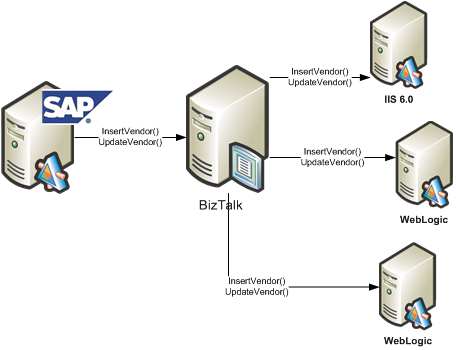
    We use SAP XI to send data to BizTalk which in turn, fans out the data to interested systems. Let’s say that one of those SAP objects pertains to each of our external Vendors. Each consumer of the Vendor data (i.e. BizTalk, and then each downstream system) consumes the same WSDL. That is, each subscriber of Vendor data receives the same object type and has the same service operations.

    So, I can generate a single proxy class using WSDL.exe and my “Vendor” WSDL, and use that proxy class for each BizTalk send port. It doesn’t matter the technology platform of my destination system, as this proxy should work fine whether the downstream service is Java, .NET, Unix, Windows, whatever.

    Now the challenge. We use SOA Software Service Manager to manage and secure our web services. As I pointed out during my posts about SOA Software and BizTalk, each caller of a service managed by Service Manager needs to add the appropriate headers to conform to the service policy. That is, if the web service operation requires a SAML token, then the service caller must inject that. Instead of forcing the developer to figure out how to correctly add the required headers, SOA Software provides an SDK which does this logic for you. However, each service may have different policies with different credentials required. So, how do I use the same proxy class, but inject subscriber-specific code at runtime in the send port?

    What I wanted was to do a basic Inversion of Control (IOC) pattern and inject code at runtime. At its base, an IOC pattern is simply really, really, really late binding. That’s all there is to it. So, the key is to find an easy to use framework that exploits this pattern. We are fairly regular uses of Spring (for Java), so I thought I’d utilize Spring.NET in my adventures here.

    I need four things to make this solution work:

      • A simple interface created that is implemented by the subscribing service team and contains the code specific to their Service Manager policy settings.
      • A Spring.NET configuration file which references these implemented interfaces
      • A singleton object which reads the configuration file once and provides BizTalk with pointers to these objects

    A modified web service proxy class that consumes the correct Service Manager code for a given send port

    First, I need an interface defined. Mine is comically simple.

    public interface IExecServiceManager
    {
    bool PrepareServiceCall();
    }

    Each web service subscriber can build a .NET component library that implements that interface. The “PrepareServiceCall” operation contains the code necessary to apply Service Manager policies.

    Next I need a valid Spring.NET configuration file. Now, I could have extended the standard btsntsvc.exe.config BizTalk configuration file (ala Enterprise Library), but, I actually PREFER keeping this separate. Easier to maintain, less clutter in the BizTalk configuration file. My Spring.NET configuration looks like this …

    <object name=”http://localhost/ERP.Vendor.Subscriber2
    /SubscriberService.asmx”
    type=”Demonstration.IOC.SystemBServiceSetup.ServiceSetup, Demonstration.IOC.SystemBServiceSetup” singleton=”false”/>
    </objects>

    I created two classes which implemented the previously defined interface and referenced them in that configuration file.

    Next I wanted a singleton object to load the configuration file and keep in memory. This is what trigger my research into BizTalk and singletons a while back. My singleton has a primary operation called LoadFactory during the initial constructor …

    using Spring.Context;
    using Spring.Objects.Factory.Xml;
    using Spring.Core.IO;

    private void LoadFactory()
    {
    IResource objectList = new FileSystemResource
    (@”C:\BizTalk\Projects\Demonstration.IOC\ServiceSetupObjects.xml”);
    //set private static value
    xmlFactory = new XmlObjectFactory(objectList);}

    Finally, I modified the auto-generated web service proxy class to utilize Spring.NET and load my Service Manager implementation class at runtime.

    using Spring.Context;
    using Spring.Objects.Factory.Xml;
    using Spring.Core.IO;
    using Demonstration.IOC.InterfaceObject;

    public void ProcessNewVendor(NewVendorType NewVendor)
    {//get WS URL, which can be used as our Spring config key
    string factoryKey = this.Url;

    //get pointer to factory
    XmlObjectFactory xmlFactory =
    XmlObjectFactorySingleton.Instance.GetFactory();

    //get the implementation object as an interface
    IExecServiceManager serviceSetup =
    xmlFactory.GetObject(factoryKey) as IExecServiceManager;

    //execute send port-specific code
    bool responseValue = serviceSetup.PrepareServiceCall();

    this.Invoke(“ProcessNewVendor”, new object[] {
    NewVendor});
    }

    Now, when a new subscriber comes online, all we do is create an implementation of IExecServiceManager, GAC it, and update the Spring.NET configuration file. The other option would have been to create separate web service proxy classes for each downstream subscriber, which would be a mess to maintain.

    I’m sure we’ll come up with many other ways to use Spring.NET and IOC patterns within BizTalk. However, you can easily go overboard with this dependency injection stuff and end up with an academically brilliant, but practically stupid architecture. I’m a big fan of maintainable simplicity.

    Technorati Tags: