Category: Microservices

  • Integration trends you should care about

    Everyone’s doing integration nowadays. It’s not just the grizzled vet who reminisces about EDI or the seasoned DBA who can design snowflake schemas for a data warehouse in their sleep. No, now we have data scientists mashing up data sources, developers processing streams and connecting things via APIs, and “citizen integrators” (non-technical users) building event-driven actions on their own. It’s wild.

    Here, I’ll take a look at a few things to keep an eye on, and the implications for you.

    iPaaS

    Research company Gartner coined the term Integration Platform-as-a-Service (iPaaS) to represent services that offer application integration capabilities in the cloud. Gartner delivers an annual assessment of these vendors in the form of a Magic Quadrant, and released the 2016 version back in March. While revenue in this space is still relatively small, the market is growing by 50%, and Gartner predicts that by 2019, iPaaS will be the preferred option for new projects. Kent Weare recently conducted an excellent InfoQ virtual panel about iPaaS with representatives from SnapLogic, Microsoft, and Mulesoft. I found a number of useful tidbits in there, and drew a few conclusions:

    • The vendors are pushing their own endpoint connectors, but all seem to (somewhat grudgingly) recognize the value of consume “raw” APIs without a forced abstraction.
    • An iPaaS model won’t take off unless it’s seen as viable for existing, on-premises systems. Latency and security matter, and it still seems like there’s work to be done here to ensure that iPaaS products can handle all the speed and connectivity requirements.
    • Elasticity is an increasingly important value proposition of iPaaS. Instead of trying to build out a complete integration stack themselves that handle peak traffic, companies want something that dynamically scales. This is especially true given that Internet-of-Things is seem as a huge driver of iPaaS in the years ahead.
    • User experience is more important than ever, and these vendors are paying special attention to the graphical UI. At the same time, they’ll need to keep working on the technical interface for things like automated testing. They seemed well positioned, however, to work with new types of transient microservices and short-lived containers.

    There’s some cool stuff in the iPaaS space. It’s definitely worth your time to read Kent’s panel and explore some of these technologies more closely.

    Microservices-driven integration

    Have you heard of “microservices”? Of course you have, unless you’ve been asleep for the past eighteen months. This model of single-purpose, independently deployable services has taken off as groups rebel against the monolithic apps (and teams!) they’re saddled with today.

    You’ll often hear microservices proponents question the usefulness of an Enterprise Service Bus. Why? They point out that ESBs are typically managed in organization silos, centralize too much of the processing, and offer much more functionality than most teams need. If you look at your application components arranged as a graph instead of a stack, then you realize a different integration toolset is needed.

    Back in May, I was at Integrate 2016 where I delivered a talk on the Open Source Messaging Landscape (video now online). Lightweight messaging is BACK, baby! I’m seeing more and more teams looking to (open source) distributed messaging solutions when connecting their disparate services. This means software like Kafka, RabbitMQ, ZeroMQ, and NATS are going to continue to increase in relevance in the months and years ahead.

    How are you supposed to orchestrate all these microservices integrations? That’s not an easy answer. One technology that’s trying to address this is Spring Cloud Data Flow. I saw a demo a couple week back, and walked away very impressed.

    Spring Cloud Data Flow is software that helps you create and run pipelines of data microservices. These microservices are loosely coupled but linked through a shared messaging layer and sit atop a variety of runtimes including Kubernetes, Apache Mesos, and Cloud Foundry. This gives you a very cool way to design and run modern system integration.

    Serverless and “citizen integrators”

    Microservices is a hot trend, but “serverless” is probably even hotter! A more accurate name is “function as a service” and engineer Mike Roberts wrote a great piece that covers criteria and use cases. Basically, it’s about running short-lived, often asynchronous, single operations without any knowledge about the underlying infrastructure.

    This matters for integration people not just because you’ll see more and more messaging-oriented scenarios interacting with serverless engines, but because it’s opened up the door for many citizen developers to build event-driven integrations. These integration services meet the definition of “serverless” with their pay-pay-use, short-lived actions that abstract the infrastructure.

    Look at the crazy popularity of IFTTT. “Regular” people can design pretty darn powerful integrations that start with an external trigger and end with an action. This stuff isn’t just for making automatic updates to Pinterest. Have you investigated Zapier? Their directory of connectors contains an impressive array of leading CRM, Finance, and Support systems that anyone can use. Microsoft’s in the game now with Flow for simple cloud-based workflows. Developers can take advantage of serverless products like AWS Lambda and Webtask (from Auth0) when custom code is needed.

    Implications

    What does all this mean to you? First and foremost, integration is hot again! I’m willing to bet that you’d benefit from investing some time in learning new and emerging tech. If you haven’t learned anything new in the integration space over the past two years, you’ve missed a lot. Take a course, pick up a book, or just hack around.

    Recognize the growth of microservices and think about how it impacts your team. What tools will developers use to connect their services? What needs to be upgraded? What does this type of distributed integration do to your tracing and troubleshooting procedures? How can you break down the organizational silos and keep the “integration team” from being a bottleneck? Take a look at messaging software that can complement existing ESB software.

    Finally, don’t miss out on this “citizen integrator” trend. How can you help your less technical colleagues connect their systems in novel ways? The world will always need integration specialists, but it’s important to support the growing needs of those who shouldn’t have to queue up for help from the experts.

    What do you think? Any integration trends that stand out to you?

  • Modern Open Source Messaging: Apache Kafka, RabbitMQ and NATS in Action

    Modern Open Source Messaging: Apache Kafka, RabbitMQ and NATS in Action

    Last week I was in London to present at INTEGRATE 2016. While the conference is oriented towards Microsoft technology, I mixed it up by covering a set of messaging technologies in the open source space; you can view my presentation here. There’s so much happening right now in the messaging arena, and developers have never had so many tools available to process data and link systems together. In this post, I’ll recap the demos I built to test out Apache Kafka, RabbitMQ, and NATS.

    One thing I tried to make clear in my presentation was how these open source tools differ from classic ESB software. A few things you’ll notice as you check out the technologies below:

    • Modern brokers are good at one thing. Instead of cramming in every sort of workflow, business intelligence, and adapter framework in the software, these OSS services are simply great at ingesting and routing lots of data. They are typically lightweight, but deployable in highly available configurations as well.
    • Endpoints now have significant responsibility. Traditional brokers took on tasks such as message transformation, reliable transportation, long-running orchestration between endpoints, and more. The endpoints could afford to be passive, mostly-untouched participants in the integration. These modern engines don’t cede control to a centralized bus, but rather use the bus only to transport opaque data. Endpoints need to be smarter and I think that’s a good thing.
    • Integration is approachable for ALL devs. Maybe a controversial opinion, but I don’t think integration work belongs in an” integration team.” If agility matters to you, then you can’t silo off a key function and force (micro)service teams to line up to get their work done. Integration work needs to be democratized, and many of these OSS tools make integration very approachable to any developer.

    Apache Kafka

    With Kafka you can do both real-time and batch processing. Ingest tons of data, route via publish-subscribe (or queuing). The broker barely knows anything about the consumer. All that’s really stored is an “offset” value that specifies where in the log the consumer left off. Unlike many integration brokers that assume consumers are mostly online, Kafka can successfully persist a lot of data, and supports “replay” scenarios. The architecture is fairly unique; topics are arranged in partitions (for parallelism), and partitions are replicated across nodes (for high availability).

    For this set of demos, I used Vagrant to stand up an Ubuntu box, and then installed both Zookeeper and Kafka. I also installed Kafka Manager, built by the engineering team at Yahoo!. I showed the conference audience this UI, and then added a new topic to hold server telemetry data.

    2016-05-17-messaging01

    All my demo apps were built with Node.js. For the Kafka demos, I used the kafka-node module. The consumer is simple: write 50 messages to our “server-stats” Kafka topic.

    var serverTelemetry = {server:'zkee-022', cpu: 11.2, mem: 0.70, storage: 0.30, timestamp:'2016-05-11:01:19:22'};
    
    var kafka = require('../../node_modules/kafka-node'),
        Producer = kafka.Producer,
        client = new kafka.Client('127.0.0.1:2181/'),
        producer = new Producer(client),
        payloads = [
            { topic: 'server-stats', messages: [JSON.stringify(serverTelemetry)] }
        ];
    
    producer.on('error', function (err) {
        console.log(err);
    });
    producer.on('ready', function () {
    
        console.log('producer ready ...')
        for(i=0; i<50; i++) {
            producer.send(payloads, function (err, data) {
                console.log(data);
            });
        }
    });
    

    Before consuming the data (and it doesn’t matter that we haven’t even defined a consumer yet; Kafka stores the data regardless), I showed that the topic had 50 messages in it, and no consumers.

    2016-05-17-messaging02

    Then, I kicked up a consumer with a group ID of “rta” (for real time analytics) and read from the topic.

    var kafka = require('../../node_modules/kafka-node'),
        Consumer = kafka.Consumer,
        client = new kafka.Client('127.0.0.1:2181/'),
        consumer = new Consumer(
            client,
            [
                { topic: 'server-stats' }
            ],
            {
                groupId: 'rta'
            }
        );
    
        consumer.on('message', function (message) {
            console.log(message);
        });
    

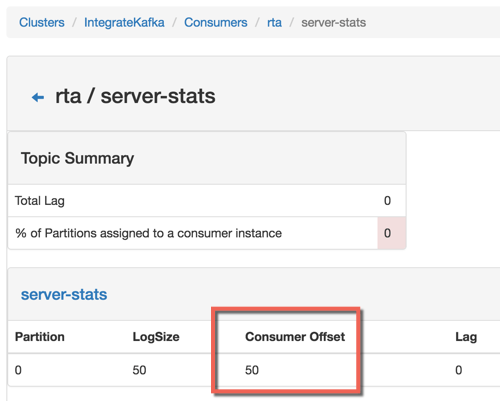
    After running the code, I could see that my consumer was all caught up, with no “lag” in Kafka.

    2016-05-17-messaging03
    For my second Kafka demo, I showed off the replay capability. Data is removed from Kafka based on an expiration policy, but assuming the data is still there, consumers can go back in time and replay from any available point. In the code below, I go back to offset position 40 and read everything from that point on. Super useful if apps fail to process data and you need to try again, or if you have batch processing needs.

    var kafka = require('../../node_modules/kafka-node'),
        Consumer = kafka.Consumer,
        client = new kafka.Client('127.0.0.1:2181/'),
        consumer = new Consumer(
            client,
            [
                { topic: 'server-stats', offset: 40 }
            ],
            {
                groupId: 'rta',
                fromOffset: true
            }
        );
    
        consumer.on('message', function (message) {
            console.log(message);
        });
    

    RabbitMQ

    RabbitMQ is a messaging engine that follows the AMQP 0.9.1 definition of a broker. It follows a standard store-and-forward pattern where you have the option to store the data in RAM, on disk, or both. It supports a variety of message routing paradigms. RabbitMQ can be deployed in a clustered fashion for performance, and mirrored fashion for high availability. Consumers listen directly on queues, but publishers only know about “exchanges.” These exchanges are linked to queues via bindings, which specify the routing paradigm (among other things).

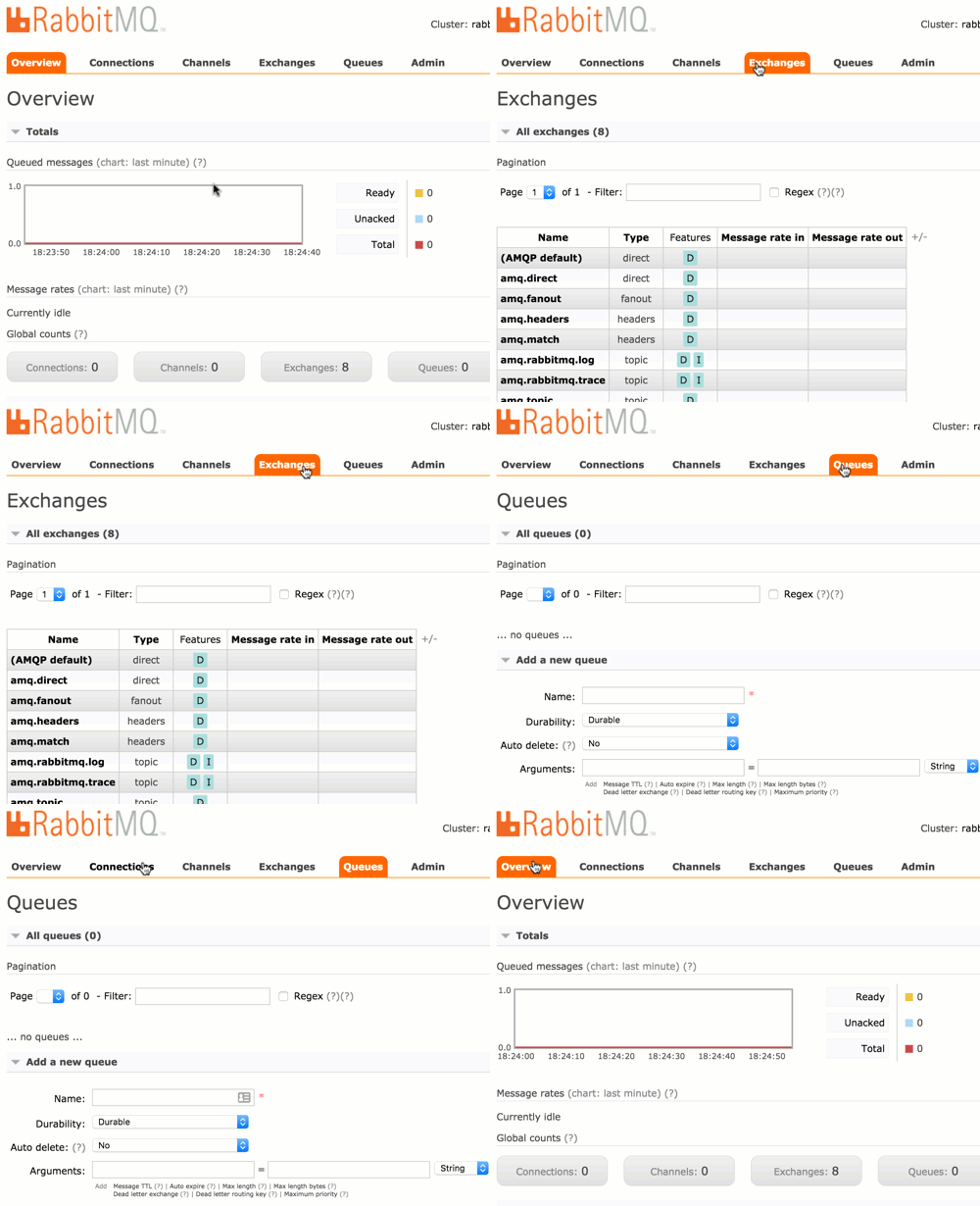
    For these demos (I only had time to do two of them at the conference), I used Vagrant to build another Ubuntu box and installed RabbitMQ and the management console. The management console is straightforward and easy to use.

    2016-05-17-messaging04

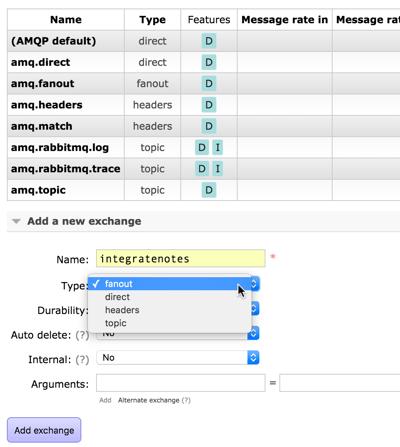
    For the first demo, I did a publish-subscribe example. First, I added a pair of queues: notes1 and notes2. I then showed how to create an exchange. In order to send the inbound message to ALL subscribers, I used a fanout routing type. Other options include direct (specific routing key), topic (depends on matching a routing key pattern), or headers (route on message headers).

    2016-05-17-messaging05

    I have an option to bind this exchange to another exchange or a queue. Here, see that I bound it to the new queues I created.

    2016-05-17-messaging06

    Any message into this exchange goes to both bound queues. My Node.js application used the amqplib module to publish a message.

    var amqp = require('../../node_modules/amqplib/callback_api');
    
    amqp.connect('amqp://rseroter:rseroter@localhost:5672/', function(err, conn) {
      conn.createChannel(function(err, ch) {
        var exchange = 'integratenotes';
    
        //exchange, no specific queue, message
        ch.publish(exchange, '', new Buffer('Session: Open-source messaging. Notes: Richard is now showing off RabbitMQ.'));
        console.log(" [x] Sent message");
      });
      setTimeout(function() { conn.close(); process.exit(0) }, 500);
    });
    

    As you’d expect, both apps listening on the queue got the message. The second demo used a direct routing with specific routing keys. This means that each queue will receive messages if their binding matches the provided routing key.

    2016-05-17-messaging07

    That’s handy, but you can also use a topic binding and then apply wildcards. This helps you route based on a pattern matching scenario. In this case, the first queue will receive a message if the routing key has 3 sections separated by a period, and the third value equals “slides.” So “day2.seroter.slides” would work, but “day2.seroter.recap” wouldn’t. The second queue gets a message only if the routing key starts with “day2”, has any middle value, and then “recap.”

    2016-05-17-messaging08

    NATS

    If you’re looking for a high velocity communication bus that supports a host of patterns that aren’t realistic with traditional integration buses, then NATS is worth a look! NATS was originally built with Ruby and achieved a respectable 150k messages per second. The team rewrote it in Go, and now you can do an absurd 8-11 million messages per second. It’s tiny, just a 3MB Docker image! NATS doesn’t do persistent messaging; if you’re offline, you don’t get the message. It works as a publish-subscribe engine, but you can also get synthetic queuing. It also aggressively protects itself, and will auto-prune consumers that are offline or can’t keep up.

    In my first demo, I did a poor man’s performance test. To be clear, this is not a good performance test. But I wanted to show that even a synchronous loop in Node.js could achieve well over a million messages per second. Here I pumped in 12 million messages and watched the stats using nats-top.

    2016-05-17-messaging09

    1.6 million messages per second, and barely using any CPU. Awesome.

    The next demo was a new type of pattern. In a microservices world, it’s important to locate service at runtime, not hard-code references to them at design time. Solutions like Consul are great, but if you have a performant message bus, you can actually use THAT as the right loosely coupled intermediary. Here, an app wants to look up a service endpoint, so it publishes a request and waits to hear back from which service instances are online.

    // Server connection
    var nats = require('../../node_modules/nats').connect();
    
    console.log('startup ...');
    
    nats.request('service2.endpoint', function(response) {
        console.log('service is online at endpoint: ' + response);
    });
    

    Each microservice then has a listener attached to NATS and replies if it gets an “are you online?” request.

    // Server connection
    var nats = require('../../node_modules/nats').connect();
    
    console.log('startup ...');
    
    //everyone listens
    nats.subscribe('service2.endpoint', function(request, replyTo) {
        nats.publish(replyTo, 'available at http://www.seroter.com/service2');
    });
    

    When I called the endpoint, I got back a pair of responses, since both services answered. The client then chooses which instance to call. Or, I could put the service listeners into a “queue group” which means that only one subscriber gets the request. Given that consumers aren’t part of the NATS routing table if they are offline, I can be confident that whoever responds, is actually online.

    // Server connection
    var nats = require('../../node_modules/nats').connect();
    
    console.log('startup ...');
    
    //subscribe with queue groups, so that only one responds
    nats.subscribe('service2.endpoint', {'queue': 'availability'}, function(request, replyTo) {
        nats.publish(replyTo, 'available at http://www.seroter.com/service2');
    });
    

    It’s a cool pattern. It only works if you can trust your bus. Any significant delay introduced by the messaging bus, and your apps slow to a crawl.

    Summary

    I came away from INTEGRATE 2016 impressed with Microsoft’s innovative work with integration-oriented Azure services. Event Hubs, Logic Apps and the like are going to change how we process data and events in the cloud. For those who want to run their own engines – and at no commercial licensing cost – it’s exciting to explore the open source domain. Kafka, RabbitMQ, and NATS are each different, and may complement your existing integration strategy, but they’re each worth a deep look!