Category: InfoPath

  • InfoPath Rules Grouping Behavior (And New BizTalk Posters)

    A buddy at work is designing an InfoPath form and was befuddled by some awkward behavior in the way InfoPath executes its rule conditions.

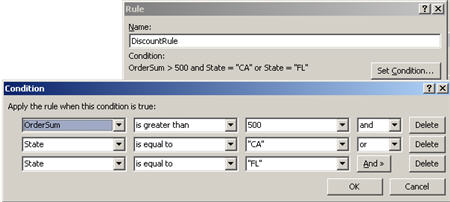
    So let’s say that you want to execute the following comparison:  “If the sum of the order is greater than $500, and, the customer is from either CA or FL, then set a 10% discount rate.”  In essence you have a “A & (B | C)” situation.  So my pal had a rule that fired which checked these conditions.  On the first pass, his rule conditions looked like this:

    Makes sense, BUT, where does InfoPath put the parentheses?  Not where we first thought.  The way this rule is written, InfoPath executes it as “(A & B) | C“.  That is, if I just enter “FL” into my textbox, the rule passes because as long as the state equals “FL”, the first condition doesn’t matter.   The “and’s” take precedence over the “or’s”.

    So, how do I get the conditions to line up as I really want?  You actually have to break apart the condition to look like “(A & B) | (A & C)” such as:

    This way, the two fields on both sides of the “and’s” are grouped together and split by the “or.”

    You also max out on the number of rule conditions at 5, so if you have a rule with a large set of conditions, you’ll need to split it up into multiple rules.  I still like InfoPath, but man, I’ve been getting punched in the face by little quirks for the past few weeks.

    As a complete non-sequitur, I noticed that the BizTalk team just released yet another poster (this one on the BizTalk Adapter Pack and LOB SDK).  Besides expecting 14 different blogs on the MSDN site to do nothing but cut and paste the announcement,  this also means that I shouldn’t make fun of the team’s poster-producing prowess ever again.   I’m still holding out hope for the “Women of BizTalk Server” poster.  Fingers crossed.

    Technorati Tags: , BizTalk

  • Building InfoPath Web Forms With Cascading Lists

    We’re replacing one of our critical systems, and one of the system analysts was looking for a way to capture key data entities in the existing system, and every system/form/report that used each entity.  Someone suggested SharePoint and I got myself roped into prototyping a solution.

    Because of the many-to-one relationship being captured (e.g. one entity may map to fields in multiple systems), a straight out SharePoint list didn’t make sense.  I have yet to see a great way to do parent/child relationships in SharePoint lists.  So, I proposed an InfoPath form.

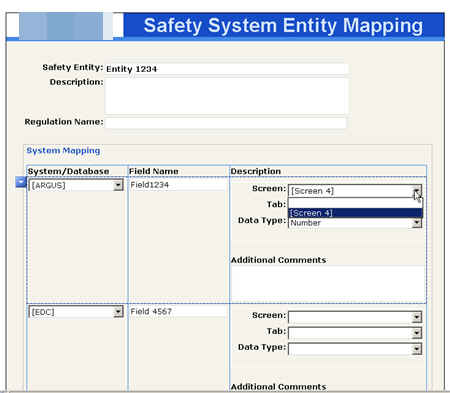
    I started by building up SharePoint lists of reference data.  For instance, I have one list with all the various impacted systems, another with the screens for a given system (using a lookup field to the first list), and another with tabs that are present on a given screen (with a lookup field to the second list).  In my InfoPath form, I’d like to pick a system, auto-populate a list of screens in that system, and if you pick a screen, show all the tabs.

    Using the InfoPath rich client, one can utilize the “filter” feature and create cascading drown downs by filtering the data source results based on a previously selected value.  However for InfoPath Form Services enabled forms, you see this instead:

    Son of a!  The suggestions I found to get around this included either (a) write custom code to filter the result set, or (b) use a web service.  I know that InfoPath Form Services is a limited version of the rich client, but I hate that the response to every missing feature is “write a web service.”  However, that’s still a better option than putting code in the form because I don’t want to deal with “administrator approved” forms in my environment.

    So, I wrote a freakin’ web service.  I have operations that take in a value (e.g. system), and uses the out-of-the-box SharePoint web services to return the results I want.  The code looks like this …

    Notice that I’m using the GetListItems method on the SharePoint WSDL.  I pass in a CAML statement to filter the results returned from my “system screens” SharePoint list.  Since I don’t like to complain about EVERYTHING, it is pretty cool that even though my operation returns a generic XMLDocument, InfoPath was smart enough to figure out the return schema when I added a data connection to the service.

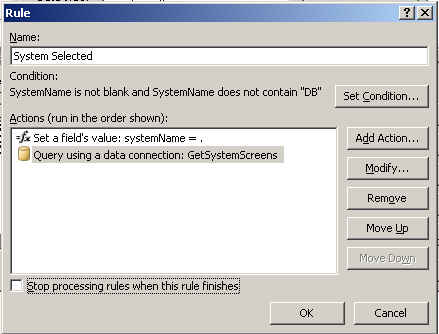
    What next?  Well, I have a drop down list bound to this web service data connection, but chose to NOT retrieve the information when the form opened.  It’s data is conditional based on which system was selected, so calling this web service is dependant on choosing a system.  So, on my “systems” drop down list, I have a rule that fires if the user actually selected a system.  The rule action first sets the input parameter of the web service schema to the value in the “systems” drop down list.  Next, it performs the “Query Using A Data Connection” function to call the custom web service.

    So what do I have?  I’ve got a nice form that gets all its data from external SharePoint lists, and cascades its drop downs like a mad man.

    Of course after I deployed this, I was asked about reporting/filtering on this data.  The tricky thing is, the list of system mappings is obviously a repeating field.  So when publishing this form to SharePoint, and asked to promote columns, I have to choose whether to pick the first, last, count or merge of system fields.

    I chose merge, because I want the data surfaced on a column.  However, the column type that gets created in the SharePoint list is a “multiple lines of text”, which cannot be sorted or filtered.

    So how to see a filtered view of this data?  What if the business person wants to see all entities that touch system “X”?  I considered about 72 different options (views, custom columns updated by WF on the list, connected web parts, data sheet view, etc) before deciding to build a new InfoPath form and new web service that could give me the filtered results.  My web service takes in all possible filter criteria (system name, system screen, system tab) and based on which values came into the operation, builds up the appropriate CAML statement.  Then, in my new form, I have all the search criteria in drop down lists (reusing my custom web service from above to cascade them), and puts the query results in a repeating table.  One table column is a hyperlink that takes the user to the InfoPath form containing the chosen entity.  Had to figure out that the hyperlink control’s data source had be specially formatted so that I could have a dynamic link:

    concat(http://sharepointsite/sites/IS/division/Program/IntakeDist/Safety%20Entity%20Definition%20List/, @ows_LinkFilename)

    This takes my static URL, and appends the InfoPath XML file name.  Now I have another form that can be opened up and used to query and investigate the data entities.

    That was a fun exercise.  I’m sure there’s probably a better way to do some of the things I did, so if you have suggestions, let me know.  I do really like InfoPath Form Services, but once you really start trying to meet very specific requirements, you have to start getting creative to work around the limitations.

    Technorati Tags: ,

  • Using the BizTalk Adapter Pack to Load Oracle Data into InfoPath 2007 Forms

    One of the glaring omissions from InfoPath 2007 is integration with non SQL Server data repositories.  For retrieving reference data (query data), your only choice is SQL Server.  That’s lousy.  For submitting data, your only choice is SQL Server or Microsoft Access, and, you can only submit to a database when using the thick client version of InfoPath.  That is, you can’t do a direct database submission on the InfoPath Forms Services version of a form.  This also sucks.  SharePoint isn’t much better, as the SharePoint Designer integration with ODBC data sources (such as Oracle) is clumsy at best, and in our experience, not really functional.

    But, complaining gets me nowhere.  So, how can I cleanly interface between InfoPath and Oracle, which is the overwhelming database preference in my current environment?  What I’ll show here is how to use the BizTalk Adapter Pack to generate the service stubs I need to query and publish to Oracle databases.  I’ll be publishing another article on TopXML.com that digs deeply into the BizTalk Adapter Pack, so I won’t go into great depth here on what it is.   But the short description is:  the BizTalk Adapter Pack contains Line of Business (LOB) adapters that use a common WCF infrastructure which can be consumed by WCF clients, ADO.NET clients (for ETL scenarios), BizTalk clients (for robust workflow, EAI scenarios), or basic SOAP clients (for single operation scenarios).  I’m building an example for the last option.

    First off, I need data in my Oracle database tables.  If you are a regular Visual Studio.NET user, you know that you can access ODBC data sources (such as Oracle) using the built-in Server Explorer.  This works fine for data entry, but if you want true control over the database, you need more.  One really nice option (from Oracle itself) is the Oracle Developer Tools for Visual Studio.   This is a nice plug in for VS.NET that gives you most of what you need for Oracle design tasks.

    Lots of great stuff in there.  For my purposes, I needed a new table to start with.

    Then I had to fill in some initial data.
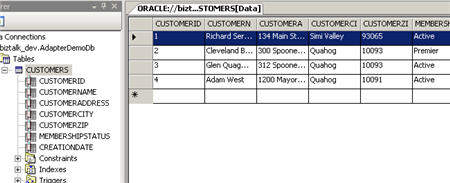
    Now we can actually build the service which interacts with this table.  First, I created a new “WCF Service Library” project in Visual Studio.NET.  From there, once the BizTalk Adapter Pack is installed, I can select Add Adapter Service Reference from the “Add” menu.

    This opens a window where I can select my connection criteria, browse objects in my repository, and select the operations I want.  The first thing to do is configure the URI.  After choosing which binding to use (in my case, the OracleDbBinding), I have to set the DataSourceName value.  This is the identifier in my Oracle tnsnames.ora file.  We no longer use System DSN entries to connect to Oracle and instead put database details in the tnsnames.ora file.  After setting the data source, I have to put the username and password for my Oracle database.
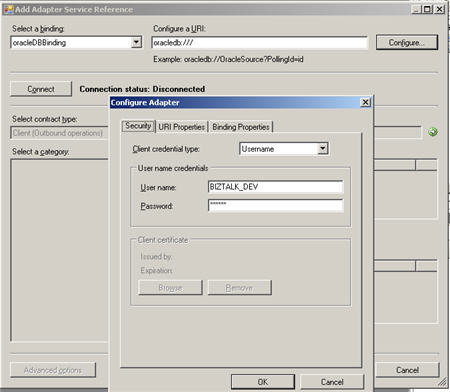
    Once all my connection details are set, I can connect to my database.  Now, I can search (*new feature alert*) and browse the database tables, views, functions, packages and procedures.

    After choosing my database table operation (“Select”) and closing out the window, I get an auto-generated application configuration file, and, a class containing all the interfaces, contracts and proxy code needed to consume this database service.  Now, as stated earlier, I want to take this WCF service, and expose it out for basic SOAP clients (i.e. InfoPath/SharePoint).  Before building the web service proxy around this WCF client, I want to add a brand new service interface.  I don’t want to directly expose the Adapter Pack interface, but rather, put a simpler interface out to my SOAP clients.

    So, in this WCF Service Library project, I added a new class containing a WCF ServiceContract and OperationContract, as well as the service which implements those contracts and calls my auto-generated Adapter Pack proxy.

    So I have a friendly service interface which abstracts some of the BizTalk Adapter Pack details, but calls the auto-generated Oracle Adapter bits when it’s operation is invoked.

    Now, I need to put this service into a web-ready container.  All I have now is the library project.  So, I created a new “Web Site” project of type “WCF Service.”  I don’t need much from this service, so the underlying “cs” file can be deleted.  Then, after adding a reference to my WCF Service Library project, I have to modify the Service.svc file so that it points at my implementation class (“Seroter.Demo.BizTalkAdapterPack.CustomerSvcLibrary.CustomerQuery”) for it’s “Service” attribute.    After this, all that remains is to set up the web.config file to both see my Oracle Adapter endpoint (as a service) and expose new endpoints for my SOAP clients.  After copying the information from the auto-generated app.config file (that should still be in the WCF Service Library project) into my web.config, I can launch the Service Configuration Editor to make the remaining web.config changes.  Specifically, I need to add a new service (and endpoint), and provide a metadata behavior so that clients can query the service metadata.

    So now I have a client endpoint (which uses the BizTalk Adapter Pack Oracle binding), and a new service with an HTTP endpoint that basic SOAP clients can use.  After creating a new virtual directory in IIS 6.0, and pointing to the WCF Service project, I now have a ready-to-go database access service.

    From InfoPath 2007, I can now call and consume this service to pull reference data from Oracle.  Specifically, I created a new data connection, pointed to the IIS service, and chose the operation I needed.

    Now I can drag the repeating results node to the InfoPath form and create a table.  If I preview the form, the service gets called, and the results are displayed.
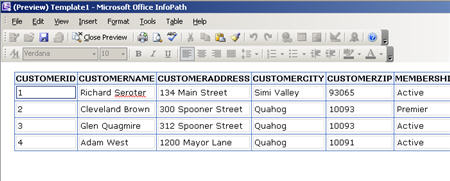
    That was easy!  Took about a dozen lines of code and a configuration file setup.   In a later post, I’ll show how to use this service to populate data forms in SharePoint as well.

    Technorati Tags:  ,

  • InfoPath 2007 Scenarios With BizTalk Server 2006 R2

    I’m a fan of InfoPath, but one barrier to entry has been the need to install the client software on user machines.  We have one deployed solution that uses it (as part of ESB Guidance), but I wanted to explore the new Forms Services capability and see how I can use that to simplify BizTalk workflow use cases.  In this post, I will examine a few common use cases, and demonstrate how I built them.  The theme of the solution is the workflow around system support incident management.

    InfoPath Setup

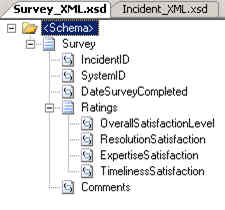
    To build this solution, first I needed schemas with which to generate the necessary InfoPath forms.  So, within a new BizTalk project I created an “Incident” schema that looked like this:

    Next, I have a “Survey” schema which the system owner will fill out after the incident has been successfully resolved.

    After deploying the BizTalk solution, I went ahead and built a Web Service using the BizTalk Web Services Publishing Wizard so that incidents can be sent from InfoPath directly back to the running BizTalk workflow process.

    Now, I can go ahead and build the necessary InfoPath forms.  When designing the form, I’ve chosen to support both the InfoPath rich client AND, InfoPath Forms Services.
    The form itself is fairly basic.  It simply uses the XSD schema as a data source and allows for capture of incident data.

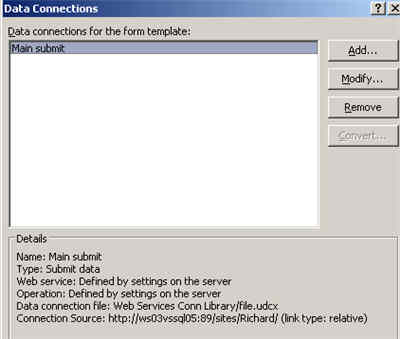
    The first tricky part was getting the “Submit” action to work.  On my first iteration building this, the rich client could submit to the web service just fine, but the Forms Services version kept giving me “an error occurred accessing the data source.”  So, I had to learn all about UDC files and SharePoint data connections (thanks to the InfoPath Team Blog and Mark Bower‘s posts).  So, my InfoPath form’s “submit action” now points to a SharePoint-managed data connection.
    I then deployed this Incident form to my SharePoint server.  When deploying forms in InfoPath 2007, you’ll see that Forms Services is mentioned.

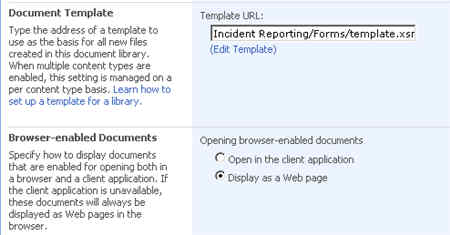
    Once deployed, I can go to the SharePoint document library’s Advanced Settings and set the form to open in the browser by default.

    Next I built and deployed the “Survey” form which will be saved directly to the SharePoint library, so no extra submit action is needed.

    BizTalk Setup

    On the BizTalk side, I built a simple workflow to demonstrate the following use cases:

    • Emailing a link to a InfoPath form existing in SharePoint
    • Receiving submitted feedback from InfoPath back into BizTalk
    • Emailing a link to a “new” document for someone to fill out and save in SharePoint

    Also, to deal with the ridiculous InfoPath/SharePoint namespace bug, I decided to build a Jeff Lynch-style map so that now my promoted columns show up in the SharePoint document library.

    To send the first email (asking the user to fill out the Incident Report), I need the correct URL to embed in the email message.  Since I clearly need a Incident to refer to in this hyperlink, I first send the Incident to the SharePoint library.  Because I dynamically set the file name, I have that value in my orchestration, and can use it for my email link.  The link looks like:

    http://myserver:89/sites/Richard/Incident%20Reporting/”+wssMessageName+”?OpenIn=Browser

    The next hyperlink I need is for the “Survey” so that I can ask someone to create an entirely new form (that doesn’t already exist in the SharePoint document library).  What does that look like?

    http://myserver:89/sites/Richard/Satisfaction%20Survey/Forms/template.xsn?
    SaveLocation=http://myserver:89/sites/Richard/Satisfaction%20Survey&
    Source=http://myserver:89/sites/Richard/Satisfaction%20Survey&
    OpenIn=Browser

    Running the Scenario

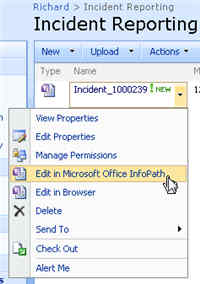
    Ok, so let’s kick this off and see how it looks.  When I drop a file (to signify a system sending an incident report), I expect to see a message sent to SharePoint, AND, an email with a link to the same document.  In my SharePoint library I see …

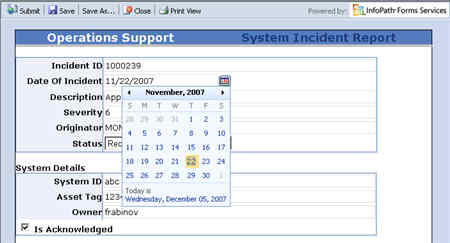
    Notice that a form can be viewed either in the rich client or browser.  In my email box I have a link to the web version of my Incident form.  Clicking that link brings me to the form served up by InfoPath Forms Services.

    Notice that I have both “save” and “submit” buttons available on the web form.  The “submit” button will trigger the default submit action, which in my case, calls my BizTalk-generated web service.

    Once the form submits, I then get a receipt (via my orchestration), and, a request to fill out a satisfaction survey.  The email link creates a new empty form, that when saved, will appear in my SharePoint document library.  Notice that I turned off “submit” in this form, since there is no submit action.

    Summary

    So, unlike with InfoPath 2003, InfoPath 2007 makes it very easy to design a form once, and have it surfaced up via the rich client, web browser, or mobile browser with no additional effort.  From a BizTalk perspective, instead of emailing forms around and trying to keep track of them, we can now send links to web forms and be confident that any user, regardless of platform or software install, can participate in our workflow.   This should make it much more compelling to use InfoPath + SharePoint in workflow solutions instead of doing custom development.

    Technorati Tags: , ,

  • Problem With InfoPath 2007 and SharePoint Namespace Handling

    I was working with some InfoPath 2007 + MOSS 2007 + BizTalk Server 2006 R2 scenarios, and accidentally came across a possible problem with how InfoPath is managing namespaces for promoted columns.

    Now I suspect the problem is actually “me”, since the scenario I’m outlining below seems to be too big of a problem otherwise. Let’s assume I have a very simple XSD schema which I will use to build an InfoPath form which in turn, is published to SharePoint. My schema looks like this …

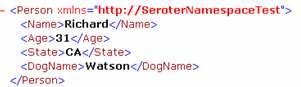
    Given that schema (notice ElementFormDefault is set to Qualified) the following two instances are considered equivalent.


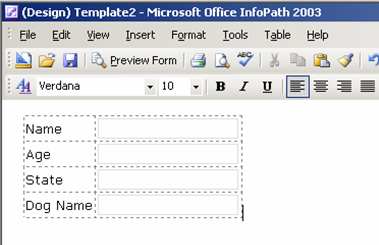
    Whether there’s a namespace prefix on the element or not doesn’t matter. And as with any BizTalk-developed schema, there is no default namespace prefix set on this XSD. Next, I went to my InfoPath 2003 + SharePoint 2003 + BizTalk Server 2006 environment to build an InfoPath form based on this schema.

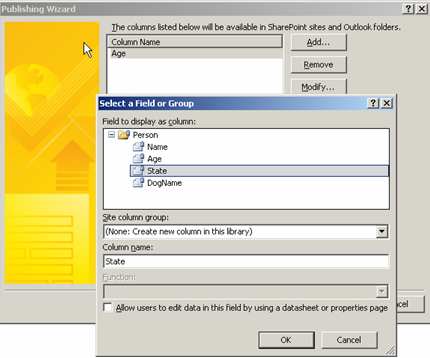
    During the publication of this form to SharePoint, I specified two elements from my XSD that I wish to display as columns in the SharePoint document library.

    Just to peek at how these elements are promoted, I decided to “unpack” the InfoPath form and look at the source files.

    If you look inside the manifest.xsf file, you’d fine a node where the promoted columns are referenced.

    <xsf:listProperties>
    	<xsf:fields>
    		<xsf:field name="Age" 
    		columnName="{...}" 
    		node="/ns1:Person/ns1:Age" type="xsd:string">
    		</xsf:field>
    		<xsf:field name="State" 
    		columnName="{...}" 
    		node="/ns1:Person/ns1:State" type="xsd:string">
    		</xsf:field>
    	</xsf:fields>
    </xsf:listProperties>
    

    A namespace prefix (defined at the top of the manifest file) is used here (ns1). If I upload the two XML files I showed above (one with a namespace prefix for the elements, the other without), I still get the promoted values I was seeking since a particular namespace prefix should be irrelevant.

    That’s the behavior that I’m used to, and have developed around. When BizTalk publishes these documents to this library, the same result (promoted columns) occurs.

    Now let’s switch to the InfoPath 2007 + MOSS 2007 environment and build the same solution. Taking the exact same XSD schema and XML instances, I went ahead and built an InfoPath 2007 form and selected to publish it to the MOSS server.

    While I have InfoPath Forms Server configured, this particular form was not set up to use it. Like my InfoPath 2003 form, this form has the same columns promoted.

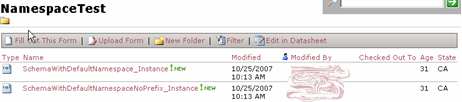
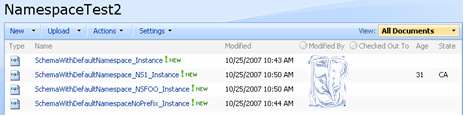
    However, after publishing to MOSS, and uploading my two XML instance files, I have NO promoted values!

    Just in case “ns0” is already used, I created two more instance files, one with a namespace prefix of “foo” and one with a namespace prefix of “ns1.” Only using a namespace prefix of ns1 results in the XML elements getting promoted.

    If I unpack the InfoPath 2007 form, the node in the manifest representing the promoted columns has identical syntax to the InfoPath 2003 form. If I fill out the InfoPath form from the MOSS document library directly, the columns ARE promoted, but peeking at the underlying XML shows that a default namespace of ns1 is used.

    So what’s going on here? I can’t buy that you HAVE to use “ns1” as the namespace prefix in order to promote columns in InfoPath 2007 + MOSS when InfoPath 2003 + SharePoint doesn’t require this (arbitrary) behavior. The prefix should be irrelevant.

    Did I miss a (new) step in the MOSS environment? Does my schema require something different? Does this appear to be an InfoPath thing or SharePoint thing? Am I just a monkey?

    I noticed this when publishing messages from BizTalk Server 2006 R2 to SharePoint and being unable to get the promoted values to show up. I really find it silly to have to worry about setting up explicit namespace prefixes. Any thoughts are appreciated.

    Technorati Tags: ,