Category: General

  • How I Avoid Writer’s Block

    I was reading Buck Woody’s great How I Prepare for Presentations blog post and it reminded me of a question that I often get from people.  Whenever I release a book, article, Pluralsight training class or do a presentation, I’m asked “how do you write so much?”  Maybe the underlying question is really “Why do you hate your family?” or “Have you ever seen the sun on a Saturday?”  Regardless, this is my technique for keeping up a busy writing schedule.

    Build a Simple Schedule

    Buck talks about a “slide a day” leading up to a presentation.  While I don’t slot my time exactly like that, I do arrange my time so that I have dedicated time to write.  Even at work, I block off my calendar to “do work” vs. just leveraging any free time that pops up. 

    For each of the three books that I’ve written or contributed to, I follow a three week cycle.  First week, I research the topic.  Second week, I build all the demonstrations that the chapter will include.  In the final week, I write and proof-read the chapter.

    For Pluralsight training, I keep a similar rhythm.  Research for a week or so, build out all my demonstrations, write all the slides.  I often put my plan into an Excel workbook for all the chapters/modules that I’m writing so that I stay on schedule.  If I didn’t have a schedule, I’d drift aimlessly or lose perspective of how much I’ve finished and how much work remains.

    Figure Out the Main Point

    This is also mentioned in Buck’s post.  Notice that I put this AFTER the schedule creation.  Regardless of the intent of the chapter/blog post/training module/presentation, you still have a generic block of work to do and need a plan.  But, to refine the plan and figure out WHAT you are going to work on, you need to identify what the purpose of your work is.

    For a presentation, the “focus” is answering the “what do I want attendees to walk away with?” For a blog post, the “focus” answers the “why am I writing this?” question.  For a training module, the “focus” covers “what are the primary topics I’m going to cover?”

    Decompose Work into Sections

    I’ve heard that saying that architects don’t see a big problem, they see a lot of small problems.  Decomposing my work into manageable chunks is the secret to my work. I never stare at a blank page and start typing a chapter/post/module.  I first write all the H1 headings, then the H2 headings, and then the H3 headings.  For a book chapter, this is the main points, sub topics to that point, and if necessary, one further level down.

    Now, all I do is fill in the sections.  For the last book, I have H1 headers like “Communication from BizTalk Server to Salesforce.com” and then H2 headings like “Configuring the Foundational BizTalk Components” and “Customizing Salesforce.com data entities.”  Once that is done, I’m left with relatively small chunks of work to do in each sitting. I just find this strategy much less imposing and it doesn’t feel like “I have to write a book” but more like “I have to write a couple pages.”

    Summary

    It’s not rocket science.  I don’t have any secret besides rampant decomposition of my work.  The only thing I didn’t put here is that I would have zero ability to write if I didn’t have passion for what I do.  There’s no way I’d carve out the time and do the work if I didn’t find it fun.  So if you are thinking of writing a book (which I encourage people to do, just for the experience), pick something that you WANT to do.  Otherwise, all the focus, planning and decomposition in the world won’t help when you’re 4 months in and hitting the wall!

    Any other tips people have for tackling large writing projects?

  • Leveraging Exchange 2007 Web Services to Find Open Conference Rooms

    Do you enjoy trying to find free conference rooms for meetings?  If you do, you’re probably a psycho who eats puppies.  I work at the headquarter campus of a large company with dozens upon dozens of buildings.  Apparently the sole function of my company is to hold meetings since it’s easier to find Hoffa’s body than a free conference room at 2 o’clock in the afternoon.  So what’s an architect with a free hour to do?  Build a solution!

    I did NOT build a solution to free up more conference rooms.  That involves firing lots of people.  Not my call.  But, I DID build a solution to browse all the conference rooms of a particular building (or buildings) and show me the results all at once.  MS Exchange 2007 has a pretty nice web service API located at https://%5Bserver%5D/ews/exchange.asmx.

    2010.4.23conf

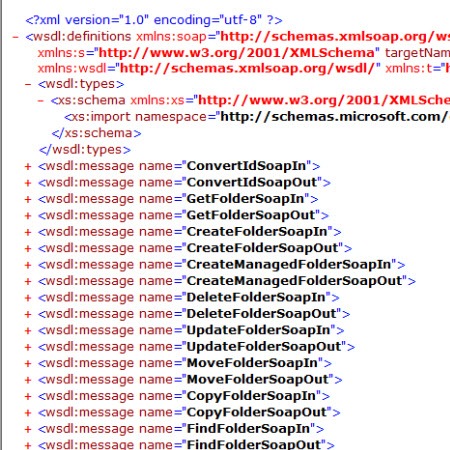
    The service operation I was interested in was GetUserAvailability.  This guy takes in a list of users (or rooms if they are addressable) and a time window and tells if you the schedule for that user/room.

    2010.4.23conf2

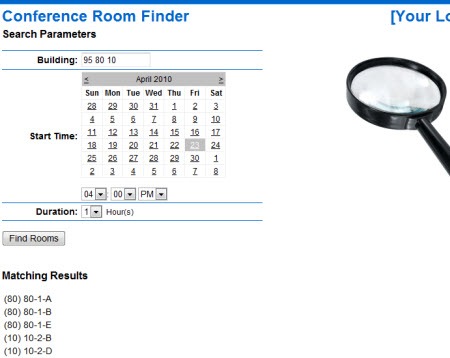
    Note that I’m including the full solution package for download below, so I’ll only highlight a few code snippets here.  My user interface looks like this:

    2010.4.23conf3

    I take in a building number (or numbers), and have a calendar for picking which day you’re interested in.  I then have a time picker, and duration list.  Finally I have a ListVIew control to show the rooms that are free at the chosen time.  A quick quirk to note: so if I say show me rooms that are free from 10AM-11AM, someone isn’t technically free if they have a meeting that ends at 10 or starts at 11.  The endpoints of the other meeting overlap with the “free” time.  So, I had to add one second to the request time, and subtract one second from the end time to make this work right.  Why am I telling you this?  Because the shortest window that you can request via this API is 30 minutes.  So if you have meeting times of 30 minutes or less, my “second-subtraction” won’t work since the ACTUAL duration request is 28 minutes and 58 seconds.  This is why I hard code the duration window so that users can’t choose meetings that are less than an hour.  If you have a more clever way to solve this, feel free!

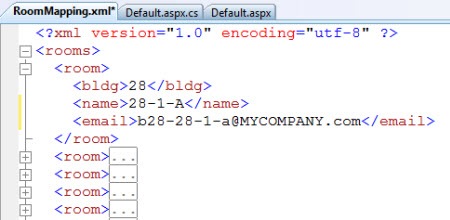
    Before I get into the code that makes the magic happen, I want to highlight how I stored the building-to-room mapping.  I found no easy way to query “show me all conference rooms for a particular building” via any service operation, so, I built an XML configuration file to do this.  Inside the configuration file, I store the building number, the conference room “friendly” name, and the Exchange email address of the room.

    2010.4.23conf4

    I’ll use LINQ in code to load this XML file up and pull out only the rooms that the user requested.  On to the code!

    I defined a “Rooms” class and a “RoomList” class which consists of a List of Rooms.  When you pass in a building number, the RoomList object yanks the rooms from the configuration file, and does LINQ query to filter the XML nodes and populate a list of rooms that match the building (or buildings) selected by the user.

    class Room
    {
        public string Name { get; set; }
        public string Email { get; set; }
        public string Bldg { get; set; }
    
    }
    
    class RoomList : List<Room>
    {
        public void Load(string bldg)
        {
            XDocument doc = XDocument.Load(HttpContext.Current.Server.MapPath("RoomMapping.xml"));
    
            var query = from XElem in doc.Descendants("room")
                        where bldg.Contains(XElem.Element("bldg").Value)
                        select new Room
                        {
                            Name = XElem.Element("name").Value,
                            Bldg = XElem.Element("bldg").Value,
                            Email = XElem.Element("email").Value
                        };
            this.Clear();
            AddRange(query);
        }
    }
    

    With this in place, we can populate the “Find Rooms” button action.  The full code is below, and reasonably commented.

    protected void btnFindRooms_Click(object sender, EventArgs e)
        {
            //note: meetings must be 1 hour or more
    
            //load up rooms from configuration file
            RoomList rooms = new RoomList();
            rooms.Load(txtBldg.Text);
    
            //create string list to hold free room #s
            List<string> freeRooms = new List<string>();
    
            //create service proxy
            ExchangeSvcWeb.ExchangeServiceBinding service =
                new ExchangeSvcWeb.ExchangeServiceBinding();
    
            //define credentials and target URL
            ICredentials c = CredentialCache.DefaultNetworkCredentials;
            service.Credentials = c;
            service.Url = "https://[SERVER]/ews/exchange.asmx";
    
            //create request object
            ExchangeSvcWeb.GetUserAvailabilityRequestType request =
                new ExchangeSvcWeb.GetUserAvailabilityRequestType();
    
            //add mailboxes to search from building/room mapping file
            ExchangeSvcWeb.MailboxData[] mailboxes = new ExchangeSvcWeb.MailboxData[rooms.Count];
            for (int i = 0; i < rooms.Count; i++)
            {
                mailboxes[i] = new ExchangeSvcWeb.MailboxData();
                ExchangeSvcWeb.EmailAddress addr = new ExchangeSvcWeb.EmailAddress();
                addr.Address = rooms[i].Email;
                addr.Name = string.Empty;
    
                mailboxes[i].Email = addr;
            }
            //add mailboxes to request
            request.MailboxDataArray = mailboxes;
    
            //Set TimeZone stuff
            request.TimeZone = new ExchangeSvcWeb.SerializableTimeZone();
            request.TimeZone.Bias = 480;
            request.TimeZone.StandardTime = new ExchangeSvcWeb.SerializableTimeZoneTime();
            request.TimeZone.StandardTime.Bias = 0;
            request.TimeZone.StandardTime.DayOfWeek = ExchangeSvcWeb.DayOfWeekType.Sunday.ToString();
            request.TimeZone.StandardTime.DayOrder = 1;
            request.TimeZone.StandardTime.Month = 11;
            request.TimeZone.StandardTime.Time = "02:00:00";
            request.TimeZone.DaylightTime = new ExchangeSvcWeb.SerializableTimeZoneTime();
            request.TimeZone.DaylightTime.Bias = -60;
            request.TimeZone.DaylightTime.DayOfWeek = ExchangeSvcWeb.DayOfWeekType.Sunday.ToString();
            request.TimeZone.DaylightTime.DayOrder = 2;
            request.TimeZone.DaylightTime.Month = 3;
            request.TimeZone.DaylightTime.Time = "02:00:00";
    
            //build string to expected format: 4/21/2010 04:00:00 PM
            string startString = calStartDate.SelectedDate.ToString("MM/dd/yyyy");
            startString += " " + ddlHour.SelectedValue + ":" + ddlMinute.SelectedValue + ":00 " + ddlTimeOfDay.SelectedValue;
            DateTime startDate = DateTime.Parse(startString);
            DateTime endDate = startDate.AddHours(Convert.ToInt32(ddlDuration.SelectedValue));
    
            //identify the time to compare if the user is free/busy
            ExchangeSvcWeb.Duration duration = new ExchangeSvcWeb.Duration();
            //add second to look for truly "free" time
            duration.StartTime = startDate.AddSeconds(1);
            //subtract second
            duration.EndTime = endDate.AddSeconds(-1);
    
            // Identify the options for comparing free/busy
            ExchangeSvcWeb.FreeBusyViewOptionsType viewOptions =
                new ExchangeSvcWeb.FreeBusyViewOptionsType();
            viewOptions.TimeWindow = duration;
            viewOptions.RequestedView = ExchangeSvcWeb.FreeBusyViewType.Detailed;
            viewOptions.RequestedViewSpecified = true;
            request.FreeBusyViewOptions = viewOptions;
    
            //call service!
            ExchangeSvcWeb.GetUserAvailabilityResponseType response =
                service.GetUserAvailability(request);
    
            //loop through responses for EACH room
            for (int i = 0; i < response.FreeBusyResponseArray.Length; i++)
            {
                //if there is a result for the room
                if (response.FreeBusyResponseArray[i].FreeBusyView.CalendarEventArray != null && response.FreeBusyResponseArray[i].FreeBusyView.CalendarEventArray.Length > 0)
                {
                    //** conflicts exist
                }
                else  //room is free!
                {
                    freeRooms.Add("(" +rooms[i].Bldg + ") " + rooms[i].Name);
                }
    
            }
    
            //show list view
            lblResults.Visible = true;
    
            //bind to room list
            lvAvailableRooms.DataSource = freeRooms;
            lvAvailableRooms.DataBind();
    
        }
    

    Once all that’s in place, I can run the app, search one or multiple buildings (by separating with a space) and see all the rooms that are free at that particular time.

    2010.4.23conf5

    I figure that this will save me about 14 seconds per day, so I should pay back my effort to build it some time this year.  Hopefully!  I’m 109% positive that some of you could take this and clean it up (by moving my “room list load” feature to the load event of the page, for example), so have at it.  You can grab the full source code here.

    Share

  • MVP Again

    Thanks to the Microsoft team for granting me a third straight BizTalk MVP.  I suspect that they keep doing this just to see what regrettable statements I’ll make at the next MVP Summit.  Either way, it’s an honor to receive, and I’m grateful for the perks it has to offer.

    I need to get ready for the Summit in February by preparing my list of ludicrous product features which I’ll be demanding be added to BizTalk Server 2011 (e.g. use text files for storage instead of the MessageBox, XBox-themed skins for the Mapper, functoids that multiply any number by pi, low latency processing, etc).

    Anyway, thanks to all of you who continue to visit here, buy my book, and put up with my shenanigans.  Always appreciated.

    Share

  • 2008 : Year in Review

    As 2009 starts, I thought I’d take a quick gander at the 2008 posts I enjoyed writing the most, and a few of my favorite (non-technical) blogs that I discovered this year.

    Early last year I embarked on a 9-part series of articles about how BizTalk and WCF integrate.  I learned a lot in the process and finally forced myself to really learn WCF.

    Throughout the year I threw out a few ideas around project guidance ranging from getting started with a commitment to the BizTalk platform, how to determine if you’re progressing in your SOA vision, a checklist you can use before migrating projects between environments and another checklist for ensuring that your solutions follow SOA principles.

    I also enjoyed digging into specific problems and uncovering ways to solve them.  Among other things, we looked at ways to throttle orchestrations, aggregating messages, putting data-driven permissions on SharePoint lists via Windows Workflow, doing contract first development with BizTalk, implementing an in-memory resquencer, and comparing code generation differences between the BizTalk ASMX and WCF wizards.   Another highlight for me was the work with RSSBus and investigating how to use RSS to enable real-time data mashups.

    The most fun I’ve had on the blog this year is probably the interview series I started up over the summer.  It’s been insightful to pick the brains of some of our smartest colleagues and force them to answer an increasingly bizarre set of questions.  So far, Tomas Restrepo, Alan Smith, Matt Milner, Yossi Dahan, and Jon Flanders have all been subjected to my dementia.  The next interview will be posted next week.

    I read too many blogs as it is, but there’s always room for fun new ones.  A few (non-technical) that I’ve grown attached to this year are …

    • It Might Be Dangerous… You Go First.  This is the blog of Paul DePodesta who is a front office assistant for the San Diego Padres (baseball).  He’s a smart guy and it’s really cool that he has an open, frank conversation with fans where the thought process of a professional baseball team is shared publicly.
    • Anthony Bourdain’s Blog.  If you watch the Travel Channel or have read Bourdain’s books, you’ll appreciate this great blog.  Tony’s the coolest, and when I watch or read him, I feel a bit like George Costanza around Tony the “mimbo“.
    • We the Robots.  The comics here just kill me.  For some reason I always chuckle at perfectly-placed obscenities.
    • Photoshop Disasters. Great blog where every day you see a professional image (from a company’s website, etc) that demonstrates a shocking Photoshop mistake (missing arms, etc).
    • The “Blog” of “Unnecessary” Quotation Marks.  Title says it all.  If you hate people putting quotes in “strange” places, then “this” is the blog for you.
    • F*ck You, Penguin.  I wish I had thought of this one.  This guy posts a picture of a cute animal every day and then proceeds to put these bastards in their place.  I love the internet.

    I hope to keep the party going in 2009.  I found out yesterday that my MVP was renewed, so hopefully that keeps me motivated to keep pumping out new material.  My book on SOA patterns with BizTalk 2009 should be out in the April timeframe, so that’s something to watch out for as well.

    I’ve appreciated all the various feedback this year, and hope to maintain your interest in the year ahead.

  • [BizTalk] Interview Advice

    I recently completed another round of interviews for my company in the search for BizTalk consultants. Yet again, it was a fairly depressing experience. I offer a few humble tips to folks claiming to be BizTalk architects/developers.

    My first pet peeve is gigantic resumes. I know that headhunters often beef these things up, but if your resume has more pages than you have years of job experience, that’s a red flag. Brevity, people. If you’re still listing the top 14 accomplishments from your college internship in 1999, it’s time to reevaluate your resume building skills.

    In terms of the interview itself, I do NOT favor the types of questions that can be answered with one word or sentence (e.g. “tell me all the options when right-clicking a functoid” or “list me all the BizTalk adapters”). That doesn’t tell me anything about your skills. Tell me why you’d choose the HTTP adapter over the SOAP adapter. THAT’S a question.

    A few tips if you’re out there selling yourself as a BizTalk person …

    • Don’t list every possible subsystem/feature in BizTalk on your resume and claim experience. I simply don’t believe that EVERY person has used BAS. Come on. FYI, if you throw “Enterprise Single Sign On” on your resume, be ready for a question from me.
    • When you claim to be a BizTalk architect, and I ask you to explain the concept of “promoted values”, and you tell me that “I like to just promote any values in a schema that feel important”, the next sound you will hear is me stabbing myself in the neck.
    • When I see “experience building complicated orchestrations” on your resume, but my questions about “patterns” or “exception handling strategies” completely befuddle you, you’ve destroyed a piece of my soul.
    • When you tell me that you’ve participated in full lifecycle implementations (design –> test) on BizTalk projects, and I ask you what your next step is after requirements have been gathered by the business, and your answer is “start coding” … you’re not getting the job.
    • If you claim extensive experience with BizTalk application deployment, but you can’t tell me what artifacts may go into an MSI package, you’re not scoring any points.
    • While I appreciate honestly when I ask you for your BizTalk strengths and weaknesses, your chosen weakness should not be listed on your resume as an “expert with …”
    • If you tell me that you’ve spent significant time building BizTalk solutions that integrate with a database, and I ask how you poll for database records to kick off a process, the answer I’m looking for does not include “I build lots of custom data access classes.”
    • Finally, an interviewer can tell when you’re simply regurgitating an answer from a book or website. I want to hear answers in your own words. If you’ve stammered through the entire interview, but when I ask about the Business Rules Engine you provide an sweeping, poetic answer, I know you’re faking it.

    Sigh. I go into virtually every interview wanting to love the candidate, and roughly 75% of the time, I complete the interview sitting in a pool of my own tears. Any other tips you want to throw out there for BizTalk job candidates?

    Technorati Tags:

  • View XSLT Output In Internet Explorer

    Yesterday I was working on some XSLT stylesheets, and was testing them in Internet Explorer. That is, I was applying the <?xml-stylesheet type=”text/xsl” href=”<stylesheet>.xsl”?> declaration to the top of my XML document, and then viewing the transformed output in IE. However, you can’t view the underlying result of the output in IE, only the original XML source.

    After scrounging around, I came across this tool from Microsoft which adds a shell to Internet Explorer that lets you view the XSLT output in the browser. Once installed (and don’t forget the last step of installing the *.inf files), you can right click the browser window and do a “View XSL Output”. Nice.

    Technorati Tags:

  • Next Chapter

    I’m Richard Seroter, formerly a Microsoft Technology Specialist for BizTalk Server (old blog at http://blogs.msdn.com/RichardBPI).  My new employer, a large biotech company in the greater Los Angeles area) is encouraging me to continue my blogging, so here we go.

    Look for the same things I did on my old blog: code bits, tips, pointers to cool community resources, and broad technical discussion.

    Technorati Tags: