Category: General Architecture

  • First look: Triggering Google Cloud Run with events generated by GCP services

    First look: Triggering Google Cloud Run with events generated by GCP services

    When you think about “events” in an event-driven architecture, what comes to mind? Maybe you think of business-oriented events like “file uploaded”, “employee hired”, “invoice sent”, “fraud detected”, or “batch job completed.” You might emit (or consume) these types of events in your application to develop more responsive systems. 

    What I find even more interesting right now are the events generated by the systems beneath our applications. Imagine what your architects, security pros, and sys admins could do if they could react to databases being provisioned, users getting deleted, firewall being changed, or DNS zone getting updated. This sort of thing is what truly enables the “trust, but verify” approach for empowered software teams. Let those teams run free, but “listen” to things that might be out of compliance.

    This week, the Google Cloud team announced Events for Cloud Run, in beta this September. What this capability does is let you trigger serverless containers when lifecycle events happen in most any Google Cloud service. These lifecycle events are in the CloudEvents format, and distributed (behind the scenes) to Cloud Run via Google Cloud PubSub. For reference, this capability bears some resemblance to AWS EventBridge and Azure Event GridIn this post, I’ll give you a look at Events for Cloud Run, and show you how simple it is to use.

    Code and deploy the Cloud Run service

    Developers deploy containers to Cloud Run. Let’s not get ahead of ourselves. First, let’s build the app. This app is Seroter-quality, and will just do the basics. I’ll read the incoming event and log it out. This is a simple ASP.NET Core app, with the source code in GitHub

    I’ve got a single controller that responds to a POST command coming from the eventing system. I take that incoming event, serialize from JSON to a string, and print it out. Events for Cloud Run accepts either custom events, or CloudEvents from GCP services. If I detect a custom event, I decode the payload and print it out. Otherwise, I just log the whole CloudEvent.

    namespace core_sample_api.Controllers
    {
        [ApiController]
        [Route("")]
        public class Eventsontroller : ControllerBase
        {
            private readonly ILogger<Eventsontroller> _logger;
            public Eventsontroller(ILogger<Eventsontroller> logger)
            {
                _logger = logger;
            }
            [HttpPost]
            public void Post(object receivedEvent)
            {
                Console.WriteLine("POST endpoint called");
                string s = JsonSerializer.Serialize(receivedEvent);
                //see if custom event with "message" root property
                using(JsonDocument d = JsonDocument.Parse(s)){
                    JsonElement root = d.RootElement;
                    if(root.TryGetProperty("message", out JsonElement msg)) {
                        Console.WriteLine("Custom event detected");
                        JsonElement rawData = msg.GetProperty("data");
                        //decode
                        string data = System.Text.Encoding.UTF8.GetString(Convert.FromBase64String(rawData.GetString()));
                        Console.WriteLine("Data value is: " + data);
                    }
                }
                Console.WriteLine("Data: " + s);
            }
        }
    }
    

    After checking all my source code into GitHub, I was ready to deploy it to Cloud Run. Note that you can use my same repo to continue on this example!

    I switched over to the GCP Console, and chose to create a new Cloud Run service. I picked a region and service name. Then I could have chosen either an existing container image, or, continuous deployment from a git repo. I chose the latter. First I picked my GitHub repo to get source from.

    Then, instead of requiring a Dockerfile, I picked the new Cloud Buildpacks support. This takes my source code and generates a container for me. Sweet. 

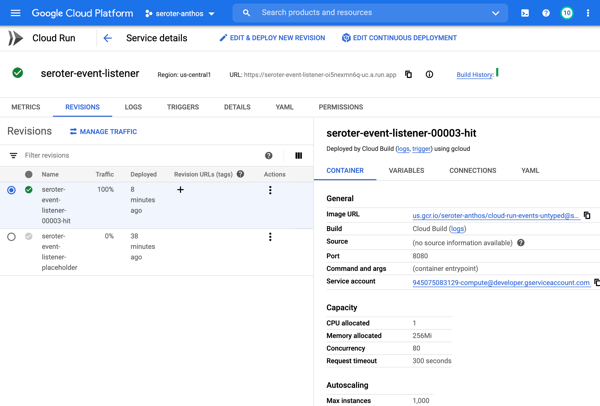
    After choosing my code source and build process, I kept the default HTTP trigger. After a few moments, I had a running service.

    Add triggers to Cloud Run

    Next up, adding a trigger. By default, the “triggers” tab shows the single HTTP trigger I set up earlier. 

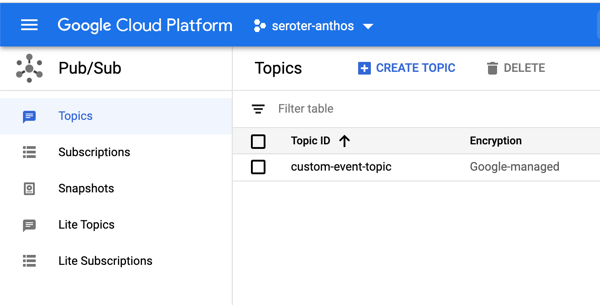
    I wanted to show custom events in addition to CloudEvents ones, so I went to the PubSub dashboard and created a new queue that would trigger Cloud Run.

    Back in the Cloud Run UX, I added a new trigger. I chose the trigger type of “com.google.cloud.pubsub.topic.publish” and picked the Topic I created earlier. After saving the trigger, I saw it show up in the list.

    After this, I wanted to trigger my Cloud Run service with CloudEvents. If you’re receiving events from Google Cloud services, you’ll have to enable Data Access Logs so that events can be spun up from Cloud Logs. I’m going to listen for events from Cloud Storage and Cloud Build, so I turned on audit logging for each.

    All that was left to define the final triggers. For Cloud Storage, I chose the storage.create.bucket trigger.

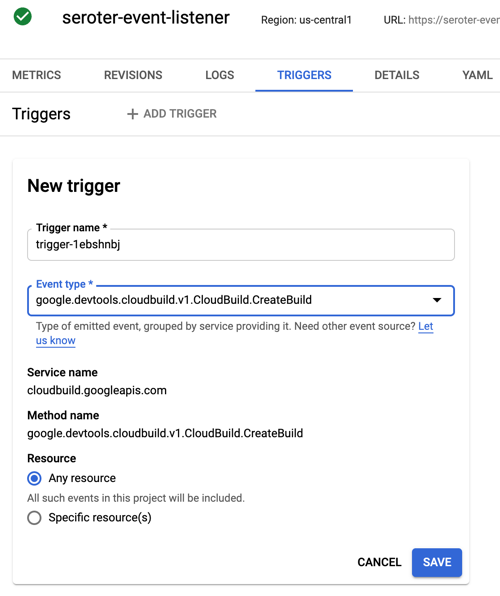
    I wanted to react to Cloud Build, so that I could see whenever a build started.

    Terrific. Now I was ready to test. I sent in a message to PubSub to trigger the custom event.

    I checked the logs for Cloud Run, and almost immediately saw that the service ran, accepted the event, and logged the body.

    Next, I tested Cloud Storage by adding a new bucket.

    Almost immediately, I saw a CloudEvent in the log.

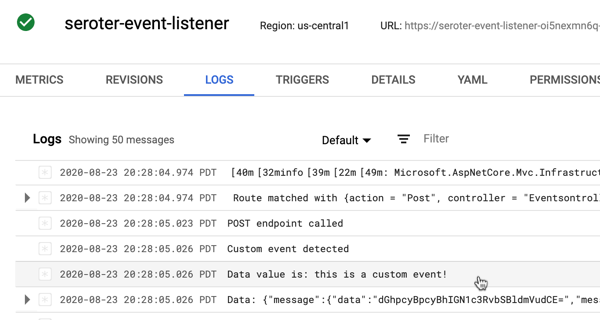
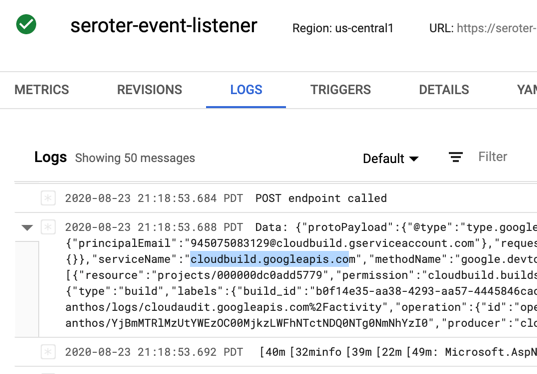
    Finally, I kicked off a new Build pipeline, and saw an event indicating that Cloud Run received a message, and logged it.

    If you care about what happens inside the systems your apps depend on, take a look at the new Events for Cloud Run and start tapping into the action.

  • Google Cloud Pub/Sub has three unique features that help it deliver value for app integrators

    Google Cloud Pub/Sub has three unique features that help it deliver value for app integrators

    This week I’m once again speaking at INTEGRATE, a terrific Microsoft-oriented conference focused on app integration. This may be the last year I’m invited, so before I did my talk, I wanted to ensure I was up-to-speed on Google Cloud’s integration-related services. One that I was aware of, but not super familiar with, was Google Cloud Pub/Sub. My first impression was that this was a standard messaging service like Amazon SQS or Azure Service Bus. Indeed, it is a messaging service, but it does more.

    Here are three unique aspects to Pub/Sub that might give you a better way to solve integration problems.

    #1 – Global control plane with multi-region topics

    When creating a Pub/Sub topic—an object that accepts a feed of messages—you’re only asked one major question: what’s the ID?

    In the other major cloud messaging services, you select a geographic region along with the topic name. While you can, of course, interact with those messaging instances from any other region via the API, you’ll pay the latency cost. Not so with Pub/Sub. From the documentation (bolding mine):

    Cloud Pub/Sub offers global data access in that publisher and subscriber clients are not aware of the location of the servers to which they connect or how those services route the data.

    Pub/Sub’s load balancing mechanisms direct publisher traffic to the nearest GCP data center where data storage is allowed, as defined in the Resource Location Restriction section of the IAM & admin console. This means that publishers in multiple regions may publish messages to a single topic with low latency. Any individual message is stored in a single region. However, a topic may have messages stored in many regions. When a subscriber client requests messages published to this topic, it connects to the nearest server which aggregates data from all messages published to the topic for delivery to the client.

    That’s a fascinating architecture, and it means you get terrific publisher performance from anywhere.

    #2 – Supports both pull and push subscriptions for a topic

    Messaging queues typically store data until it’s retrieved by the subscriber. That’s ideal for transferring messages, or work, between systems. Let’s see an example with Pub/Sub.

    I first used the Google Cloud Console to create a pull-based subscription for the topic. You can see a variety of other settings (with sensible defaults) around acknowledgement deadlines, message retention, and more.

    I then created a pair of .NET Core applications. One pushes messages to the topic, another pulls messages from the corresponding subscription. Google created NuGet packages for each of the major Cloud services—which is better than one mega-package that talks to all services—that you can see listed here on GitHub. Here’s the Pub/Sub package that added to both projects.

    The code for the (authenticated) publisher app is straightforward, and the API was easy to understand.

    using Google.Cloud.PubSub.V1;
    using Google.Protobuf;
    
    ...
    
     public string PublishMessages()
     {
       PublisherServiceApiClient publisher = PublisherServiceApiClient.Create();
                
       //create messages
       PubsubMessage message1 = new PubsubMessage {Data = ByteString.CopyFromUtf8("Julie")};
       PubsubMessage message2 = new PubsubMessage {Data = ByteString.CopyFromUtf8("Hazel")};
       PubsubMessage message3 = new PubsubMessage {Data = ByteString.CopyFromUtf8("Frank")};
    
       //load into a collection
       IEnumerable<PubsubMessage> messages = new PubsubMessage[] {
          message1,
          message2,
          message3
        };
                
       //publish messages
       PublishResponse response = publisher.Publish("projects/seroter-anthos/topics/seroter-topic", messages);
                
       return "success";
     }
    

    After I ran the publisher app, I switched to the web-based Console and saw that the subscription had three un-acknowledged messages. So, it worked.

    The subscribing app? Equally straightforward. Here, I asked for up to ten messages associated with the subscription, and once I processed then, I sent “acknowledgements” back to Pub/Sub. This removes the messages from the queue so that I don’t see them again.

    using Google.Cloud.PubSub.V1;
    using Google.Protobuf;
    
    ...
    
      public IEnumerable<String> ReadMessages()
      {
         List<string> names = new List<string>();
    
         SubscriberServiceApiClient subscriber = SubscriberServiceApiClient.Create();
         SubscriptionName subscriptionName = new SubscriptionName("seroter-anthos", "sub1");
    
         PullResponse response = subscriber.Pull(subscriptionName, true, 10);
         foreach(ReceivedMessage msg in response.ReceivedMessages) {
             names.Add(msg.Message.Data.ToStringUtf8());
         }
    
         if(response.ReceivedMessages.Count > 0) {
             //ack the message so we don't receive it again
             subscriber.Acknowledge(subscriptionName, response.ReceivedMessages.Select(m => m.AckId));
         }
    
         return names;
     }
    

    When I start up the subscriber app, it reads the three available messages in the queue. If I pull from the queue again, I get no results (as expected).

    As an aside, the Google Cloud Console is really outstanding for interacting with managed services. I built .NET Core apps to test out Pub/Sub, but I could have done everything within the Console itself. I can publish messages:

    And then retrieve those message, with an option to acknowledge them as well:

    Great stuff.

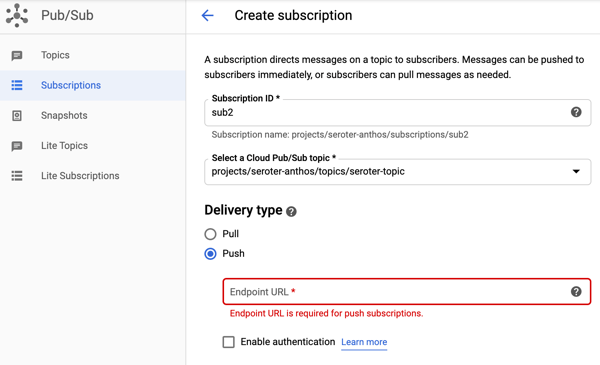
    But back to the point of this section, I can use Pub/Sub to create pull subscriptions and push subscriptions. We’ve been conditioned by cloud vendors to expect distinct services for each variation in functionality. One example is with messaging services, where you see unique services for queuing, event streaming, notifications, and more. Here with Pub/Sub, I’m getting a notification service and queuing service together. A “push” subscription doesn’t wait for the subscriber to request work; it pushes the message to the designated (optionally, authenticated) endpoint. You might provide the URL of an application webhook, an API, a function, or whatever should respond immediately to your message.

    I like this capability, and it simplifies your architecture.

    #3 – Supports message replay within an existing subscription and for new subscriptions

    One of the things I’ve found most attractive about event processing engines is the durability and replay-ability functionality. Unlike a traditional message queue, an event processor is based on a durable log where you can rewind and pull data from any point. That’s cool. Your event streaming engine isn’t a database or system of record, but a useful snapshot in time of an event stream. What if you could get the queuing semantics you want, with that durability you like from event streaming? Pub/Sub does that.

    This again harkens back to point #2, where Pub/Sub absorbs functionality from other specialized services. Let me show you what I found.

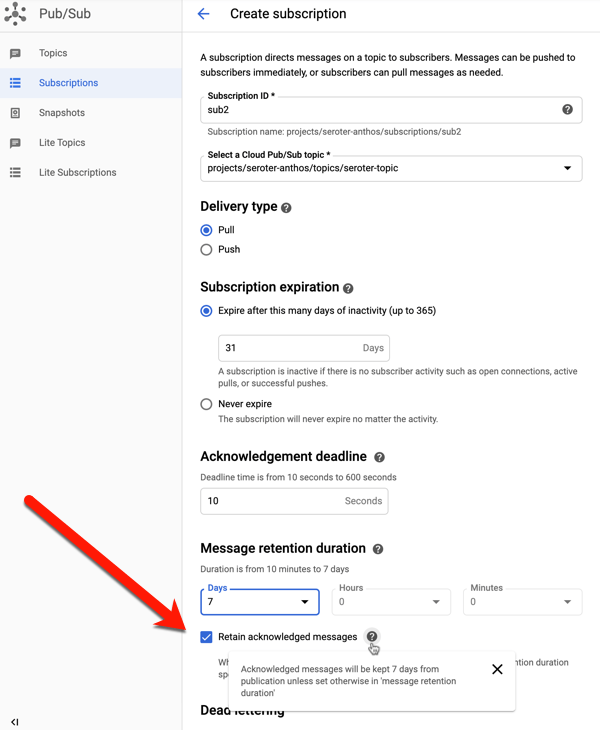
    When creating a subscription (or editing an existing one), you have the option to retain acknowledged messages. This keeps these messages around for whatever the duration is for the subscription (up to seven days).

    To try this out, I sent in four messages to the topic, with bodies of “test1”, “test2”, “test3”, and “test4.” I then viewed, and acknowledged, all of them.

    If I do another “pull” there are no more messages. This is standard queuing behavior. An empty queue is a happy queue. But what if something went wrong downstream? You’d typically have to go back upstream and resubmit the message. Because I saved acknowledged messages, I can use the “seek” functionality to replay!

    Hey now. That’s pretty wicked. When I pull from the subscription again, any message after the date/time specified shows up again.

    And I get unlimited bites at this apple. I can choose to replay again, and again, and again. You can imagine all sorts of scenarios where this sort of protection can come in handy.

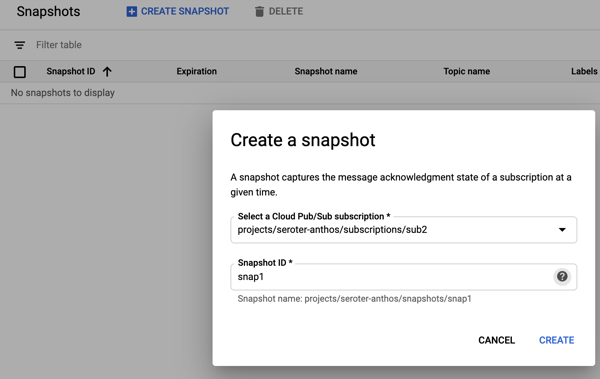
    Ok, but what about new subscribers? What about a system that comes online and wants a batch of messages that went through the system yesterday? This is where snapshots are powerful. They store the state of any unacknowledged messages in the subscription, and any new messages published after the snapshot was taken. To demonstrate this, I sent in three more messages, with bodies of “test 5”, “test6” and “test7.” Then I took a snapshot on the subscription.

    I read all the new messages from the subscription, and acknowledged them. Within this Pub/Sub subscription, I chose to “replay”, load the snapshot, and saw these messages again. That could be useful if I took a snapshot pre-deploy of code changes, something went wrong, and I wanted to process everything from that snapshot. But what if I want access to this past data from another subscription?

    I created a new subscription called “sub3.” This might represent a new system that just came online, or even a tap that wants to analyze the last four days of data. Initially, this subscription has no associated messages. That makes sense; it only sees messages that arrived after the subscription was created. From this additional subscription, I chose to “replay” and selected the existing snapshot.

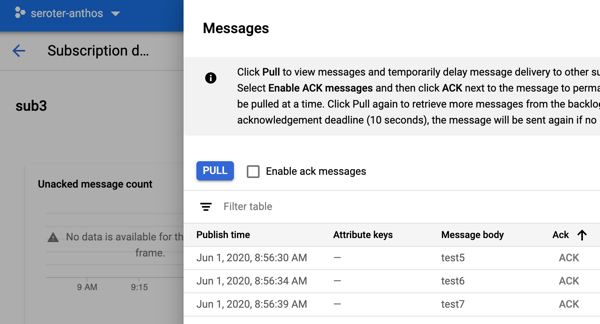
    After that, I went to my subscription to view messages, and I saw the three messages from the other subscription’s snapshot.

    Wow, that’s powerful. New subscribers don’t always have to start from scratch thanks to this feature.

    It might be worth it for you to take an extended look at Google Cloud Pub/Sub. It’s got many of the features you expect from a scaled cloud service, with a few extra features that may delight you.

  • Creating an event-driven architecture out of existing, non-event-driven systems

    Creating an event-driven architecture out of existing, non-event-driven systems

    Function-as-a-service gets all the glory in the serverless world, but the eventing backplane is the unheralded star of modern architectures, serverless or otherwise. Don’t get me wrong, scale-to-zero compute is cool. But is your company really transforming because you’re using fewer VMs? I’d be surprised. No, it seems that big benefits comes from a reimagined architecture, often powered by (managed) software that emit and consume events. If you have this in place, creative developers can quickly build out systems by tapping into event streams. If you have a large organization, and business systems that many IT projects tap into, this sort of event-driven architecture can truly speed up delivery.

    But I doubt that most existing software at your company is powered by triggers and events. How can you start being more event-driven with all the systems you have in place now? In this post, I’ll look at three techniques I’ve used or seen.

    First up, what do you need at your disposal? What’s the critical tech if you want to event-enable your existing SaaS or on-premises software? How about:

    • Event bus/backbone. You need an intermediary to route events among systems. It might be on-premises or in the public cloud, in-memory or persistent, open source or commercial. The important thing is having a way to fan-out the information instead of only offering point-to-point linkages.
    • Connector library. How are you getting events to and from software systems? You may use HTTP APIs or some other protocol. What you want is a way to uniformly talk to most source/destination systems without having to learn the nuances of each system. A series of pre-built connectors play a big part.
    • Schema registry. Optional, but important. What do the events looks like? Can I discover the available events and how to tap into them?
    • Event-capable targets. Your downstream systems need to be able to absorb events. They might need a translation layer or buffer to do so.

    MOST importantly, you need developers/architects that understand asynchronous programming, stateful stream processing, and distributed systems. Buying the technology doesn’t matter if you don’t know how to best use it.

    Let’s look at how you might use these technologies and skills to event-ify your systems. In the comments, tell me what I’m missing!

    Option #1: Light up natively event-driven capabilities in the software

    Some software is already event-ready and waiting for you to turn it on! Congrats if you use a wide variety of SaaS systems like Salesforce (via outbound messaging), Oracle Cloud products (e.g. Commerce Cloud), GSuite (via push notifications), Office 365 (via graph API) and many more. Heck, even some cloud-based databases like Azure Cosmos DB offer a change feed you can snack on. It’s just a matter of using these things.

    On-premises software can work here as well. A decade ago, I worked at Amgen and we created an architecture where SAP events were broadcasted through a broker, versus countless individual systems trying to query SAP directly. SAP natively supported eventing then, and plenty of systems do now.

    For either case—SaaS systems or on-premises software—you have to decide where the events go. You can absolutely publish events to single-system web endpoints. But realistically, you want these events to go into an event backplane so that everyone (who’s allowed) can party on the event stream.

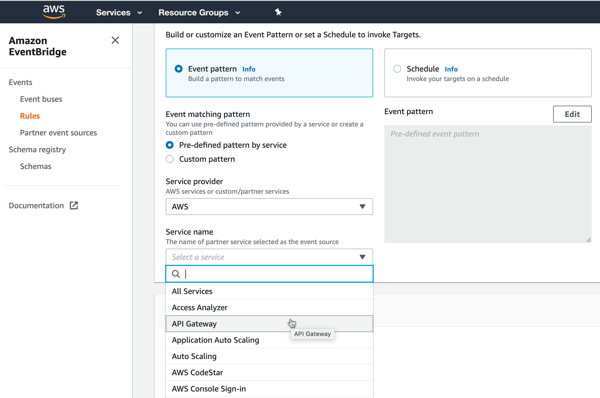
    AWS has a nice offering that helps here. Amazon EventBridge came out last year with a lot of fanfare. It’s a fully managed (serverless!) service for ingesting and routing events. EventBridge takes in events from dozens of AWS services, and (as of this writing) twenty-five partners. It has a nice schema registry as well, so you can quickly understand the events you have access to. The list of integrated SaaS offerings is a little light, but getting better. 

    Given their long history in the app integration space, Microsoft also has a good cloud story here. Their eventing subsystem, called Azure Event Grid, ingests events from Azure (or custom) sources, and offers sophisticated routing rules. Today, its built-in event sources are all Azure services. If you’re looking to receive events from a SaaS system, you bolt on Azure Logic Apps. This service has a deep array of connectors that talk to virtually every system you can think of. Many of these connectors—including SharePointSalesforceWorkdayMicrosoft Dynamics 365, and Smartsheet—support push-based triggers from the SaaS source. It’s fairly easy to create a Logic App that receives a trigger, and publishes to Azure Event Grid.

    And you can always use “traditional” service brokers like Microsoft’s BizTalk Server which offer connectors, and pub/sub routing on any infrastructure, on-premises or off.

    Option #2: Turn request-driven APIs into event streams

    What if your software doesn’t have triggers or webhooks built in? That doesn’t mean you’re out of luck. 

    Virtually all modern packaged (on-premises or SaaS) software offers APIs. Even many custom-built apps do. These APIs are mostly request-response based (versus push-based async, or request-stream) but we can work with this.

    One pattern? Have a scheduler call those request-response APIs and turn the results into broadcasted events. Is it wasteful? Yes, polling typically is. But, the wasted polling cycles are worth it if you want to create a more dynamic architecture.

    Microsoft Azure users have good options. Specifically, you can quickly set up an Azure Logic App that talks to most everything, and then drops the results to Azure EventGrid for broadcast to all interested parties. Logic Apps also supports debatching, so you can parse the polled results and create an outbound stream of individual events. Below, every minute I’m listing records from ServiceNow that I publish to EventGrid.

    Note that Amazon EventBridge also supports scheduled invocation of targets. Those targets include batch job queues, code pipelines, ECS tasks, Lambda functions, and more.

    Option #3: Hack the subsystems to generate events

    You’ll have cases where you don’t have APIs at all. Just give up? NEVER. 

    A last resort is poking into the underlying subsystems. That means generating events from file shares, FTP locations, queues, and databases. Now, be careful here. You need to REALLY know your software before doing this. If you create a change feed for the database that comes with your packaged software, you could end up with data integrity issues. So, I’d probably never do this unless it was a custom-built (or well-understood) system.

    How do public cloud platforms help? Amazon EventBridge primarily integrates with AWS services today. That means if your custom or packaged app runs in AWS, you can trigger events off the foundational pieces. You might trigger events off EC2 state changes, new objects added to S3 blob storage, deleted users in the identity management system, and more. Most of these are about the service lifecycle, versus about the data going through the service, but still useful.

    In Azure, the EventGrid service ingests events from lots of foundational Azure services. You can listen on many of the same types of things that Amazon EventBridge does. That includes blob storage, although nothing yet on virtual machines.

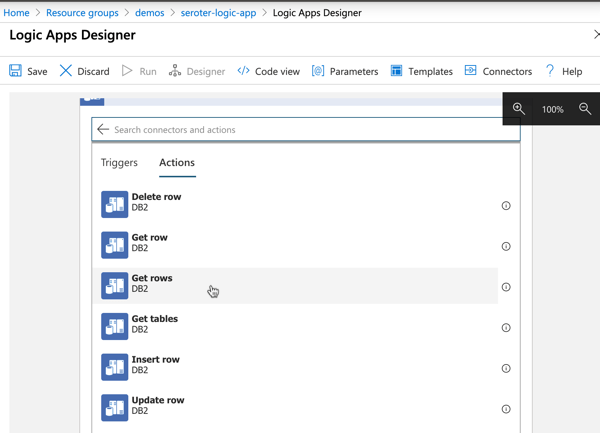
    Your best bet in Azure may be once again to use Logic Apps and turn subsystem queries into an outbound event stream. In this example, I’m monitoring IBM DB2 database changes, and publishing events. 

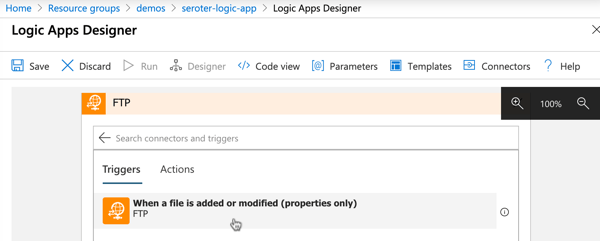
    I could do the same with triggers on FTP locations …

    … and file shares.

    In all those cases, it’s fairly straightforward to publish the queried items to Azure EventGrid for fan-out processing to trigger-based recipient systems

    Ideally, you have option #1 at your disposal. If not, you can selectively choose #2 or #3 to get more events flowing in your architecture. Are there other patterns and techniques you use to generate events out of existing systems?

  • My new Pluralsight course—DevOps in Hard Places—is now available

    My new Pluralsight course—DevOps in Hard Places—is now available

    Design user-centric products and continuously deliver your software to production while collecting and incorporating feedback the whole time? Easy peasy. Well, if you’re a software startup. What about everyone else in the real world? What gets in your way and sucks the life from your eager soul? You name it, siloed organizations, outsourcing arrangements, overworked teams, regulatory constraints, annual budgeting processes, and legacy apps all add friction. I created a new Pluralsight course that looks at these challenges, and offers techniques for finding success.

    Home page for the course on Pluralsight

    DevOps in Hard Places is my 21st Pluralsight course, and hopefully one of the most useful ones. It clocks in at about 90 minutes, and is based on my own experience, the experience of people at other large companies, and feedback from some smart folks.

    You’ll find three modules in this course, looking at the people, process, and technology challenges you face making a DevOps model successful in complex organizations. For each focus area, I review the status quo, how that impacts your chance of success, and 2-3 techniques that you can leverage.

    The first looks at the people-related issues, and various ways to overcome them. In my experience, few people WANT to be blockers, but change is hard, and you have to lead the way.

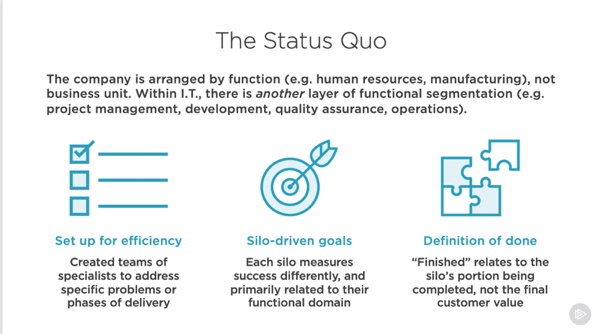
    The status quo facing orgs with siloed structures

    The second module looks at processes that make a continuous delivery mindset difficult. I don’t know of too many processes that are SUPPOSED to be awful—except expense reporting which is designed to make you retire early—but over time, many processes make it difficult to get things done quickly.

    How annual budgeting processes make adopting DevOps harder

    Finally, we go over the hard technology scenarios that keep you from realizing your potential. If you have these problems, congratulations, it means you’ve been in business for a while and have technology that your company depends on. Now is the time to address some of those things holding you back.

    One technique for doing DevOps with databases and middleware

    Let me know what you think, and I hope this course helps you get un-stuck or recharged in your effort to get better at software.

  • 2019 in Review: Watching, Reading, and Writing Highlights

    Be still and wait. This was the best advice I heard in 2019, and it took until the end of the year for me to realize it. Usually, when I itch for a change, I go all in, right away. I’m prone to thinking that “patience” is really just “indecision.” It’s not. The best things that happened this year were the things that didn’t happen when I wanted! I’m grateful for an eventful, productive, and joyful year where every situation worked out for the best.

    2019 was something else. My family grew, we upgraded homes, my team was amazing, my company was acquired by VMware, I spoke at a few events around the world, chaired a tech conference, kept up a podcast, created a couple new Pluralsight classes, continued writing for InfoQ.com, and was awarded a Microsoft MVP for the 12th straight time.

    For the last decade+, I’ve started each year by recapping the last one. I usually look back at things I wrote, and books I read. This year, I’ll also add “things I watched.”

    Things I Watched

    I don’t want a ton of “regular” TV—although I am addicted to Bob’s Burgers and really like the new FBI—and found myself streaming or downloading more things while traveling this year. These shows/seasons stood out to me:

    Crashing – Season 3 [HBO] Pete Holmes is one of my favorite stand-up comedians, and this show has some legit funny moments, but it’s also complex, dark, and real. This was a good season with a great ending.

    BoJack Horseman – Season 5 [Netflix] Again, a show with absurdist humor, but also a dark, sobering streak. I’m got to catch up on the latest season, but this one was solid.

    Orange is the New Black – Season 7 [Netflix] This show has had some ups and downs, but I’ve stuck with it because I really like the cast, and there are enough surprises to keep me hooked. This final season of the show was intense and satisfying.

    Bosch – Season 4 [Amazon Prime] Probably the best thing I watched this year? I love this show. I’ve read all the books the show is based on, but the actors and writers have given this its own tone. This was a super tense season, and I couldn’t stop watching.

    Schitt’s Creek – Seasons 1-4 [Netflix] Tremendous cast and my favorite overall show from 2019. Great writing, and some of the best characters on TV. Highly recommended.

    Jack Ryan – Season 1 [Amazon Prime] Wow, what a show. Throughly enjoyed the story and cast. Plenty of twists and turns that led me to binge watch this on one of my trips this year.

    Things I Wrote

    I kept up a reasonable writing rhythm on my own blog, as well as publication to the Pivotal blog and InfoQ.com site. Here were a few pieces I enjoyed writing the most:

    [Pivotal blog] Five part series on digital transformation. You know what you should never do? Write a blog post and in it, promise that you’ll write four more. SO MUCH PRESSURE. After the overview post, I looked at the paradox of choice, design thinking, data processing, and automated delivery. I’m proud of how it all ended up.

    [blog] Which of the 295,680 platform combinations will you create on Microsoft Azure? The point of this post wasn’t that Microsoft, or any cloud provider for that matter, has a lot of unique services. They do, but the point was that we are prone to thinking that we’re getting a complete solution from someone, but really getting some really cool components to stitch together.

    [Pivotal blog] Kubernetes is a platform for building platforms. Here’s what that means. This is probably my favorite piece I wrote this year. It required a healthy amount of research and peer review, and dug into something I see very few people talking about.

    [blog] Go “multi-cloud” while *still* using unique cloud services? I did it using Spring Boot and MongoDB APIs. There’s so many strawman arguments on Twitter when it comes to multi-cloud that it’s like a scarecrow convention. Most people I see using multiple clouds aren’t dumb or lazy. They have real reasons, including a well-founded lack of trust in putting all their tech in one vendor’s basket. This blog post looked at how to get the best of all worlds.

    [blog] Looking to continuously test and patch container images? I’ll show you one way. I’m not sure when I give up on being a hands on technology person. Maybe never? This was a demo I put together for my VMworld Barcelona talk, and like the final result.

    [blog] Building an Azure-powered Concourse pipeline for Kubernetes – Part 3: Deploying containers to Kubernetes. I waved the white flag and learned Kubernetes this year. One way I forced myself to do so was sign up to teach an all-day class with my friend Rocky. While leading up to that, I wrote up this 3-part series of posts on continuous delivery of containers.

    [blog] Want to yank configuration values from your .NET Core apps? Here’s how to store and access them in Azure and AWS. It’s fun to play with brand new tech, curse at it, and document your journey for others so they curse less. Here I tried out Microsoft’s new configuration storage service, and compared it to other options.

    [blog] First Look: Building Java microservices with the new Azure Spring Cloud. Sometimes it’s fun to be first. Pivotal worked with Microsoft on this offering, so on the day it was announced, I had a blog post ready to go. Keep an eye on this service in 2020; I think it’ll be big.

    [InfoQ] Swim Open Sources Platform That Challenges Conventional Wisdom in Distributed Computing. One reason I keep writing for InfoQ is that it helps me discover exciting new things. I don’t know if SWIM will be a thing long term, but their integrated story is unconventional in today’s “I’ll build it all myself” world.

    [InfoQ] Weaveworks Releases Ignite, AWS Firecracker-Powered Software for Running Containers as VMs. The other reason I keep writing for InfoQ is that I get to talk to interesting people and learn from them. Here, I engaged in an informative Q&A with Alexis and pulled out some useful tidbits about GitOps.

    [InfoQ] Cloudflare Releases Workers KV, a Serverless Key-Value Store at the Edge. Feels like edge computing has the potential to disrupt our current thinking about what a “cloud” is. I kept an eye on Cloudflare this year, and this edge database warranted a closer look.

    Things I Read

    I like to try and read a few books a month, but my pace was tested this year. Mainly because I chose to read a handful of enormous biographies that took a while to get through. I REGRET NOTHING. Among the 32 books I ended up finishing in 2019, these were my favorites:

    Churchill: Walking with Destiny by Andrew Roberts (@aroberts_andrew). This was the most “highlighted” book on my Kindle this year. I knew the caricature, but not the man himself. This was a remarkably detailed and insightful look into one of the giants of the 20th century, and maybe all of history. He made plenty of mistakes, and plenty of brilliant decisions. His prolific writing and painting were news to me. He’s a lesson in productivity.

    At Home: A Short History of Private Life by Bill Bryson. This could be my favorite read of 2019. Bryson walks around his old home, and tells the story of how each room played a part in the evolution of private life. It’s a fun, fascinating look at the history of kitchens, studies, bedrooms, living rooms, and more. I promise that after you read this book, you’ll be more interesting at parties.

    Messengers: Who We Listen To, Who We Don’t, and Why by Stephen Martin (@scienceofyes) and Joseph Marks (@Joemarks13). Why is it that good ideas get ignored and bad ideas embraced? Sometimes it depends on who the messenger is. I enjoyed this book that looked at eight traits that reliably predict if you’ll listen to the messenger: status, competence, attractiveness, dominance, warm, vulnerability, trustworthiness, and charisma.

    Six Days of War: June 1967 and the Making of the Modern Middle East by Michael Oren (@DrMichaelOren). What a story. I had only a fuzzy understanding of what led us to the Middle East we know today. This was a well-written, engaging book about one of the most consequential events of the 20th century.

    The Unicorn Project: A Novel about Developers, Digital Disruption, and Thriving in the Age of Data by Gene Kim (@RealGeneKim). The Phoenix Project is a must-read for anyone trying to modernize IT. Gene wrote that book from a top-down leadership perspective. In The Unicorn Project, he looks at the same situation, but from the bottom-up perspective. While written in novel form, the book is full of actionable advice on how to chip away at the decades of bureaucratic cruft that demoralizes IT and prevents forward progress.

    Talk Triggers: The Complete Guide to Creating Customers with Word of Mouth by Jay Baer (@jaybaer) and Daniel Lemin (@daniellemin). Does your business have a “talk trigger” that leads customers to voluntarily tell your story to others? I liked the ideas put forth by the authors, and the challenge to break out from the pack with an approach (NOT a marketing gimmick) that really resonates with customers.

    I Heart Logs: Event Data, Stream Processing, and Data Integration by Jay Kreps (@jaykreps). It can seem like Apache Kafka is the answer to everything nowadays. But go back to the beginning and read Jay’s great book on the value of the humble log. And how it facilitates continuous data processing in ways that preceding technologies struggled with.

    Kafka: The Definitive Guide: Real-Time Data and Stream Processing at Scale by Neha Narkhede (@nehanarkhede), Gwen Shapira (@gwenshap), and Todd Palino (@bonkoif). Apache Kafka is probably one of the five most impactful OSS projects of the last ten years, and you’d benefit from reading this book by the people who know it. Check it out for a great deep dive into how it works, how to use it, and how to operate it.

    The Players Ball: A Genius, a Con Man, and the Secret History of the Internet’s Rise by David Kushner (@davidkushner). Terrific story that you’ve probably never heard before, but have felt its impact. It’s a wild tale of the early days of the Web where the owner of sex.com—who also created match.com—had it stolen, and fought to get it back. It’s hard to believe this is a true story.

    Mortal Prey by John Sanford. I’ve read a dozen+ of the books in this series, and keep coming back for more. I’m a sucker for a crime story, and this is a great one. Good characters, well-paced plots.

    Your God is Too Safe: Rediscovering the Wonder of a God You Can’t Control by Mark Buchanan (@markaldham). A powerful challenge that I needed to hear last year. You can extrapolate the main point to many domains—is something you embrace (spirituality, social cause, etc) a hobby, or a belief? Is it something convenient to have when you want it, or something powerful you do without regard for the consequences? We should push ourselves to get off the fence!

    Escaping the Build Trap: How Effective Product Management Creates Real Value by Melissa Perri (@lissijean). I’m not a product manager any longer, but I still care deeply about building the right things. Melissa’s book is a must-read for people in any role, as the “build trap” (success measured by output instead of outcomes) infects an entire organization, not just those directly developing products. It’s not an easy change to make, but this book offers tangible guidance to making the transition.

    Project to Product: How to Survive and Thrive in the Age of Digital Disruption with the Flow Framework by Mik Kersten (@mik_kersten). This is such a valuable book for anyone trying to unleash their “stuck” I.T. organization. Mik does a terrific job explaining what’s not working given today’s realities, and how to unify an organization around the value streams that matter. The “flow framework” that he pioneered, and explains here, is a brilliant way of visualizing and tracking meaningful work.

    Range: Why Generalists Triumph in a Specialized World by David Epstein (@DavidEpstein). I felt “seen” when I read this. Admittedly, I’ve always felt like an oddball who wasn’t exceptional at one thing, but pretty good at a number of things. This book makes the case that breadth is great, and most of today’s challenges demand knowledge transfer between disciplines and big-picture perspective. If you’re a parent, read this to avoid over-specializing your child at the cost of their broader development. And if you’re starting or midway through a career, read this for inspiration on what to do next.

    John Newton: From Disgrace to Amazing Grace by Jonathan Aitken. Sure, everyone knows the song, but do you know the man? He had a remarkable life. He was the captain of a slave ship, later a pastor and prolific writer, and directly influenced the end of the slave trade.

    Blue Ocean Shift: Beyond Competing – Proven Steps to Inspire Confidence and Seize New Growth by W. Chan Kim and Renee Mauborgne. This is a book about surviving disruption, and thriving. It’s about breaking out of the red, bloody ocean of competition and finding a clear, blue ocean to dominate. I liked the guidance and techniques presented here. Great read.

    Leonardo da Vinci by Walter Isaacson (@WalterIsaacson). Huge biography, well worth the time commitment. Leonardo had range. Mostly self-taught, da Vinci studying a variety of topics, and preferred working through ideas to actually executing on them. That’s why he had so many unfinished projects! It’s amazing to think of his lasting impact on art, science, and engineering, and I was inspired by his insatiable curiosity.

    AI Superpowers: China, Silicon Valley, and the New World Order by Kai-Fu Lee (@kaifulee). Get past some of the hype on artificial intelligence, and read this grounded book on what’s happening RIGHT NOW. This book will make you much smarter on the history of AI research, and what AI even means. It also explains how China has a leg up on the rest of the world, and gives you practical scenarios where AI will have a big impact on our lives.

    Never Split the Difference: Negotiating As If Your Life Depended On It by Chris Voss (@VossNegotiation) and Tahl Raz (@tahlraz). I’m fascinated by the psychology of persuasion. Who better to learn negotiation from than an FBI’s international kidnapping negotiator? He promotes empathy over arguments, and while the book is full of tactics, it’s not about insincere manipulation. It’s about getting to a mutually beneficial state.

    Amazing Grace: William Wilberforce and the Heroic Campaign to End Slavery by Eric Metaxas (@ericmetaxas). It’s tragic that this generation doesn’t know or appreciate Wilberforce. The author says that Wilberforce could be the “greatest social reformer in the history of the world.” Why? His decades-long campaign to abolish slavery from Europe took bravery, conviction, and effort you rarely see today. Terrific story, well written.

    Unlearn: : Let Go of Past Success to Achieve Extraordinary Results by Barry O’Reilly (@barryoreilly). Barry says that “unlearning” is a system of letting go and adapting to the present state. He gives good examples, and offers actionable guidance for leaders and team members. This strikes me as a good book for a team to read together.

    The Soul of a New Machine by Tracy Kidder. Our computer industry is younger than we tend to realize. This is such a great book on the early days, featuring Data General’s quest to design and build a new minicomputer. You can feel the pressure and tension this team was under. Many of the topics in the book—disruption, software compatibility, experimentation, software testing, hiring and retention—are still crazy relevant today.

    Billion Dollar Whale: The Man Who Fooled Wall Street, Hollywood, and the World by Tom Wright (@TomWrightAsia) and Bradley Hope (@bradleyhope). Jho Low is a con man, but that sells him short. It’s hard not to admire his brazenness. He set up shell companies, siphoned money from government funds, and had access to more cash than almost any human alive. And he spent it. Low befriended celebrities and fooled auditors, until it all came crashing down just a few years ago.

    Multipliers: How the Best Leaders Make Everyone Smarter by Liz Wiseman (@LizWiseman). It’s taken me very long (too long?) to appreciate that good managers don’t just get out of the way, they make me better. Wiseman challenges us to release the untapped potential of our organizations, and people. She contrasts the behavior of leaders that diminish their teams, and those that multiply their impact. Lots of food for thought here, and it made a direct impact on me this year.

    Darwin’s Doubt: The Explosive Origin of Animal Life and the Case for Intelligent Design by Stephen Meyer (@StephenCMeyer). The vast majority of this fascinating, well-researched book is an exploration of the fossil record and a deep dive into Darwin’s theory, and how it holds up to the scientific research since then. Whether or not you agree with the conclusion that random mutation and natural selection alone can’t explain the diverse life that emerged on Earth over millions of years, it will give you a humbling appreciation for the biological fundamentals of life.

    Napoleon: A Life by Adam Zamoyski. This was another monster biography that took me months to finish. Worth it. I had superficial knowledge of Napoleon. From humble beginnings, his ambition and talent took him to military celebrity, and eventually, the Emperorship. This meticulously researched book was an engaging read, and educational on the time period itself, not just Bonaparte’s rise and fall.

    The Paradox of Choice: Why More Is Less by Barry Schwartz. I know I’ve used this term for year’s since it was part of other book’s I’ve read. But I wanted to go to the source. We hate having no choices, but are often paralyzed by having too many. This book explores the effects of choice on us, and why more is often less. It’s a valuable read, regardless of what job you have.

    I say it every year, but thank you for having me as part of your universe in 2019. You do have a lot of choices of what to read or watch, and I truly appreciate when you take time to turn that attention to something of mine. Here’s to a great 2020!

  • Fronting web sites, a classic .NET app, and a serverless function with Spring Cloud Gateway

    Fronting web sites, a classic .NET app, and a serverless function with Spring Cloud Gateway

    Automating deployment of custom code and infrastructure? Not always easy, but feels like a solved problem. It gets trickier when you want to use automation to instantiate and continuously update databases and middleware. Why? This type of software stores state which makes upgrades more sensitive. You also may be purchasing this type of software from vendors who haven’t provided a full set of automation-friendly APIs. Let’s zero in on one type of middleware: API gateways.

    API gateways do lots of things. They selectively expose private services to wider audiences. With routing rules, they make it possible to move clients between versions of a service without them noticing. They protect downstream services by offering capabilities like rate limiting and caching. And they offer a viable way for those with a microservices architecture to secure services without requiring each service to do their own authentication. Historically, your API gateway was a monolith of its own. But a new crop of automation-friendly OSS (and cloud-hosted) options are available, and this gives you new ways to deploy many API gateway instances that get continuously updated.

    I’ve been playing around with Spring Cloud Gateway, which despite its name, can proxy traffic to a lot more than just Spring Boot applications. In fact, I wanted to try and create a configuration-only-no-code API Gateway that could do three things:

    1. Weighted routing between “regular’ web pages on the internet.
    2. Add headers to a JavaScript function running in Microsoft Azure.
    3. Performing rate-limiting on a classic ASP.NET Web Service running on the Pivotal Platform.

    Before starting, let me back up and briefly explain what Spring Cloud Gateway is. Basically, it’s a project that turns a Spring Boot app into an API gateway that routes requests while applying cross-cutting functionality for things like security. Requests come in, and if the request matches a declared route, the request is passed through a series of filters, sent to the target endpoint, and “post” filters get applied on the way back to the client. Spring Cloud Gateway built on a Reactive base, which means it’s non-blocking and efficiently handles many simultaneous requests.

    The biggest takeaway? This is just an app. You can write tests and do continuous integration. You can put it on a pipeline and continuously deliver your API gateway. That’s awesome.

    Note that you can easily follow along with the steps below without ANY Java knowledge! Everything I’m doing using configuration you can also do with the Java DSL, but I wanted to prove how straightforward the configuration-only option is.

    Creating the Spring Cloud Gateway project

    This is the first, and easiest, part of this demonstration. I went to start.spring.io, and generated a new Spring Boot project. This project has dependencies on Gateway (to turn this into an API gateway), Spring Data Reactive Redis (for storing rate limiting info), and Spring Boot Actuator (so we get “free” metrics and insight into the gateway). Click this link to generate an identical project.

    Doing weighed routing between web pages

    For the first demonstration, I wanted to send traffic to either spring.io or pivotal.io/spring-app-framework. You might use weighted routing to do A/B testing with different versions of your site, or even to send a subset of traffic to a new API.

    I added an application.yml file (to replace the default application.properties file) to hold all my configuration settings. Here’s the configuration, and we’ll go through it bit by bit.

    spring:
      cloud:
        gateway:
          routes:
          # doing weighted routing between two sites
          - id: test1
            uri: https://www.pivotal.io
            predicates:
            - Path=/spring
            - Weight=group1, 3
            filters:
            - SetPath=/spring-app-framework
          - id: test2
            uri: https://www.spring.io
            predicates:
            - Path=/spring
            - Weight=group1, 7
            filters:
            - SetPath=/
    

    Each “route” is represented by a section in the YAML configuration. A route has a URI (which represents the downstream host), and a route predicate that indicates the path on the gateway you’re invoking. For example, in this case, my path is “/spring” which means that sending a request to “localhost:8080/spring” would map to this route configuration.

    Now, you’ll see I have two routes with the same path. These are part of the same weighted routing group, which means that traffic to /spring will go to one of the two downstream endpoints. The second endpoint is heavily weighted (7 vs 3), so most traffic goes there. Also see that I applied one filter to clear out the path. If I didn’t do this, then requests to localhost:8080/spring would result in a call to spring.io/spring, as the path (and querystring) is forwarded. Instead, I stripped that off for requests to spring.io, and added the secondary path into the pivotal.io endpoint.

    I’ve got Java and Maven installed locally, so a simple command (mvn spring-boot:run) starts up my Spring Cloud Gateway. Note that so far, I’ve written exactly zero code. Thanks to Spring Boot autoconfiguration and dependency management, all the right packages exist and runtime objects get inflated. Score!

    Once, the Spring Cloud Gateway was up and running, I pinged the Gateway’s endpoint in the browser. Note that some browser’s try to be helpful by caching things, which screws up a weighted routing demo! I opened the Chrome DevTools and disabled request caching before running a test.

    That worked great. Our gateway serves up a single endpoint, but through basic configuration, I can direct a subset of traffic somewhere else.

    Adding headers to serverless function calls

    Next, I wanted to stick my gateway in front of some serverless functions running in Azure Functions. You could imagine having a legacy system that you were slowly strangling and replacing with managed services, and leveraging Spring Cloud Gateway to intercept calls and redirect to the new destination.

    For this example, I built a dead-simple JavaScript function that’s triggered via HTTP call. I added a line of code that prints out all the request headers before sending a response to the caller.

    The Spring Cloud Gateway configuration is fairly simple. Let’s walk through it.

    spring:
      cloud:
        gateway:
          routes:
          # doing weighted routing between two sites
          - id: test1
            ...
          # adding a header to an Azure Function request
          - id: test3
            uri: https://seroter-function-app.azurewebsites.net
            predicates:
            - Path=/function
            filters:
            - SetPath=/api/HttpTrigger1
            - SetRequestHeader=X-Request-Seroter, Pivotal
    

    Like before, I set the URI to the target host, and set a gateway path. On the pre-filters, I reset the path (removing the /function and replacing with the “real” path to the Azure Function) and added a new request header.

    I started up the Spring Cloud Gateway project and sent in a request via Postman. My function expects a “name” value, which I provided as a query parameter.

    I jumped back to the Azure Portal and checked the logs associated with my Azure Function. Sure enough, I see all the HTTP request headers, including the random one that I added via the gateway. You could imagine this type of functionality helping if you have modern endpoints and legacy clients and need to translate between them!

    Applying rate limiting to an ASP.NET Web Service

    You know what types of apps can benefit from an API Gateway? Legacy apps that weren’t designed for high load or modern clients. One example is rate limiting. Your legacy service may not be able to handle internet-scale requests, or have a dependency on a downstream system that isn’t mean to get pummeled with traffic. You can apply request caching and rate limiting to prevent clients from burying the legacy app.

    First off, I built a classic ASP.NET Web Service. I hoped to never use SOAP again, but I’m dedicated to my craft.

    I did a “cf push” to my Pivotal Application Service environment and deployed two instances of the app to a Windows environment. In a few seconds, I had a publicly-accessible endpoint.

    Then it was back to my Gateway configuration. To do rate limiting, you need a way to identify callers. You know, some way to say that client X has exceeded their limit. Out of the box, there’s a rate limiter that uses Redis to store information about clients. That means I need a Redis instance. The simplest answer is “Docker”, so I ran a simple command to get Redis running locally (docker run --name my-redis -d -p 6379:6379 redis).

    I also needed a way to identify the caller. Here, I finally had to write some code. Specifically, this rate limiter filter expects a “key resolver.” I don’t see a way to declare one via configuration, so I opened the .java file in my project and added a Bean declaration that pulls a query parameter named “user.” That’s not enterprise ready (as you’d probably pull source IP, or something from a header), but this’ll do.

    @SpringBootApplication
    public class CloudGatewayDemo1Application {
    
      public static void main(String[] args) {	 
       SpringApplication.run(CloudGatewayDemo1Application.class, args);
      }
    	
      @Bean
      KeyResolver userKeyResolver() {
        return exchange -> 
       Mono.just(exchange.getRequest().getQueryParams().getFirst("user"));
      }
    }
    

    All that was left was my configuration. Besides adding rate limiting, I also wanted to to shield the caller from setting all those gnarly SOAP-related headings, so I added filters for that too.

    spring:
      cloud:
        gateway:
          routes:
          # doing weighted routing between two sites
          - id: test1
            ...
            
          # adding a header to an Azure Function request
          - id: test3
            ...
            
          # introducing rate limiting for ASP.NET Web Service
          - id: test4
            uri: https://aspnet-web-service.apps.pcfone.io
            predicates:
            - Path=/dotnet
            filters:
            - name: RequestRateLimiter
              args:
                key-resolver: "#{@userKeyResolver}"
                redis-rate-limiter.replenishRate: 1
                redis-rate-limiter.burstCapacity: 1
            - SetPath=/MyService.asmx
            - SetRequestHeader=SOAPAction, http://pivotal.io/SayHi
            - SetRequestHeader=Content-Type, text/xml
            - SetRequestHeader=Accept, text/xml
    

    Here, I set the replenish rate, which is how many request per second per user, and burst capacity, which is the max number of requests in a single second. And I set the key resolver to that custom bean that reads the “user” querystring parameter. Finally, notice the three request headers.

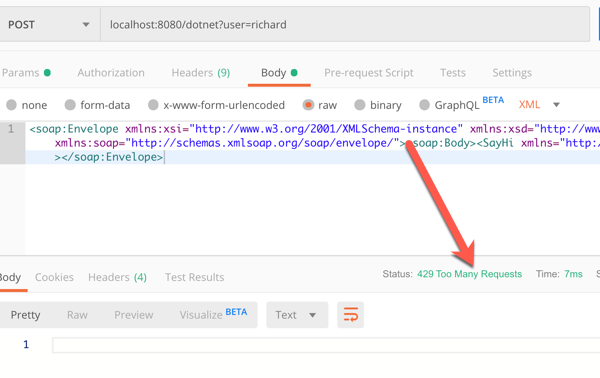
    I once again started up the Spring Cloud Gateway, and send a SOAP payload (no extra headers) to the localhost:8080/dotnet endpoint.

    A single call returned the expected response. If I rapidly submitted requests in, I saw an HTTP 429 response.

    So almost zero code to do some fairly sophisticated things with my gateway. None of those things involved a Java microservice, although obviously, Spring Cloud Gateway does some very nice things for Spring Boot apps.

    I like this trend of microservices-machinery-as-code where I can test and deploy middleware the same way I do custom apps. The more things we can reliably deliver via automation, the more bottlenecks we can remove.

  • First Look: Building Java microservices with the new Azure Spring Cloud

    First Look: Building Java microservices with the new Azure Spring Cloud

    One of the defining characteristics of the public cloud is choice. Need to host an app? On-premises, your choices were a virtual machine or a virtual machine. Now? A public cloud like Microsoft Azure offers nearly a dozen options. You’ve got spectrum of choices ranging from complete control over the stack (e.g. Azure Virtual Machines) to opinionated runtimes (e.g. Azure Functions). While some of these options, like Azure App Service, cater to custom software, no platforms cater to a specific language or framework. Until today.

    At Pivotal’s SpringOne Platform conference, Microsoft took the wraps off Azure Spring Cloud. This first-party managed service sits atop Azure Kubernetes Service and helps Java developers run cloud-native apps. How? It runs managed instances of Spring Cloud components like a Config Server and Service Registry. It builds secure container images using Cloud Native Buildpacks and kpack (both, Pivotal-sponsored OSS). It offers secure binding to other Azure services like Cosmos DB. It has integrated load balancing, log streaming, monitoring, and distributed tracing. And it delivers rolling upgrades and blue-green deployments so that it’s easy to continuously deliver changes. At the moment, Azure Spring Cloud is available as a private preview, so I thought I’d give you a quick tour.

    First off, since it’s a first-party service, I can provision instances via the az command line tool, or the Azure Portal. From the Azure Portal, it’s quite simple. You just provide an Azure subscription, target region, and resource name.

    Once my instance was created, I accessed the unique dashboard for Azure Spring Cloud. I saw some of the standard things that are part of every service (e.g. activity log, access control), as well as the service-specific things like Apps, Config Server, Deployments, and more.

    A Spring Cloud Config Server pulls and aggregates name-value pairs from various sources and serves them up to your application via a single interface. In a typical architecture, you have to host that somewhere. For Azure Spring Cloud, it’s a managed service. So, all I need to do is point this instance to a repository holding my configuration files, and I’m set.

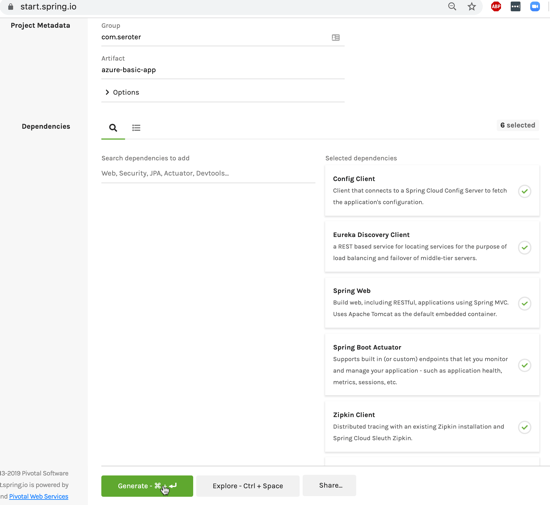
    There’s no “special” way to build Spring Boot apps that run here. They’re just … apps. So I went to start.spring.io to generate my project scaffolding. Here, I chose dependencies for web, eureka (service registry), config client, actuator (health monitoring), and zipkin + sleuth (distributed tracing). Click here to generate an identical project.

    My sample code is basic here. I just expose a REST endpoint, and pull a property value from the attached configuration store.

    @RestController
    @SpringBootApplication
    public class AzureBasicAppApplication {
    
    	public static void main(String[] args) {
    	  SpringApplication.run(AzureBasicAppApplication.class, args);
    	}
    	
    	@Value("${company:Not configured by a Spring Cloud Server}")
            private String company;
    	
    	@GetMapping("/hello")
    	public String Hello() {
    	  return "hello, from " + company;
    	}
    }
    

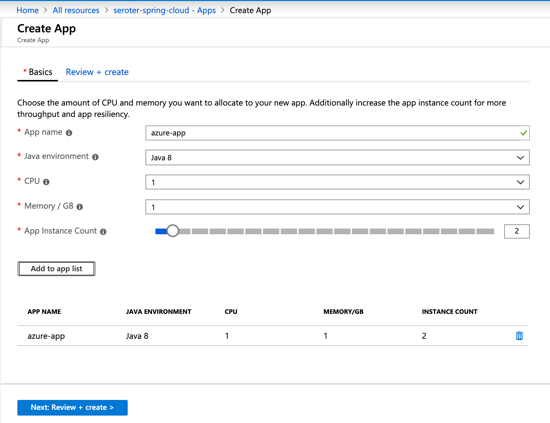
    To deploy, first I create an application from the CLI or Portal. “Creating” the application doesn’t deploy it, as that’s a separate step.

    With that created, I packaged my Spring Boot app into a JAR file, and deployed it via the az CLI.

    az spring-cloud app deploy -n azure-app --jar-path azure-basic-app-0.0.1-SNAPSHOT.jar

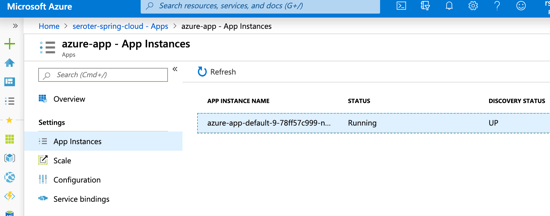
    What happened next? Azure Spring Cloud created a container image, stored it in an Azure Container Registry, and deployed it to AKS. And you don’t need to care about any of that, as you can’t access the registry or AKS! It’s plumbing, that forms a platform. After a few moments, I saw my running instance, and the service registry shows that my instance is UP.

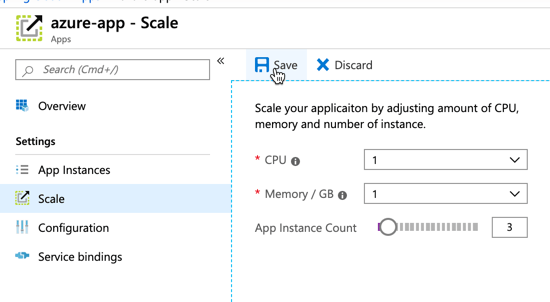
    We’re dealing with containers here, so scaling is fast and easy. The “scale” section lets me scale up with more RAM and CPU, or out with more instances.

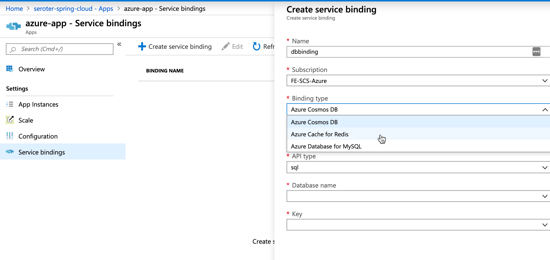
    Cloud native, 12-factor apps should treat backing services like attached resources. Azure Spring Cloud embodies this by letting me set up service bindings. Here, I set up a linkage to another Azure service, and at runtime, its credentials and connection string are injected into the app’s configuration. All of this is handled auto-magically by the Spring Boot starters from Azure.

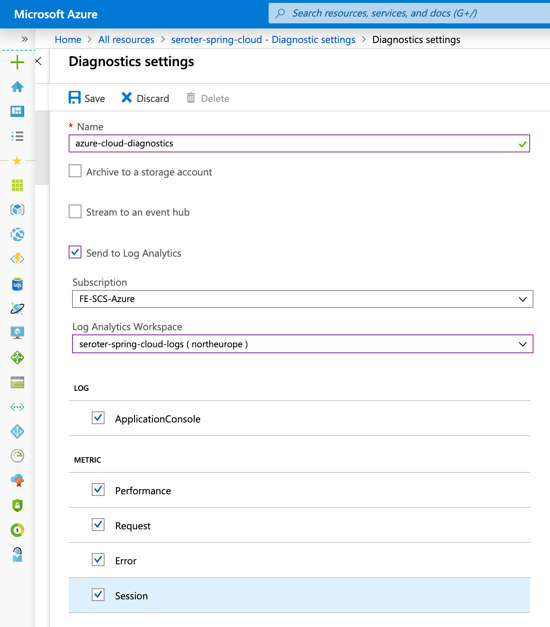
    Logging data goes into Azure Monitor. You can set up Log Analytics for analysis, or pump out to a third party Application Performance Monitoring tool.

    So you have logging, you have built-in monitoring, and you ALSO get distributed tracing. For microservices, this helps you inspect the call graph and see where your performance bottlenecks are. The pic below is from an example app built by Julien at Microsoft.

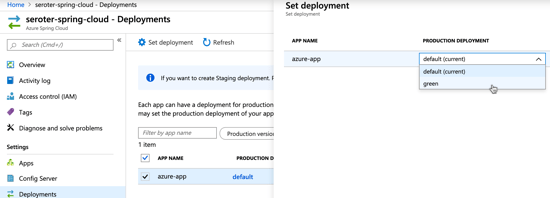
    Finally, I can do blue/green deploy. This means that I deploy a second instance of the app (via the az CLI, it’s another “deployment”), can independently test it, and then choose to swap traffic over to that instance when I’m ready. If something goes wrong, I can switch back.

    So far, it’s pretty impressive. This is one of the first industry examples of turning Kubernetes into an actual application platform. There’s more functionality planned as the service moves to public preview, beta, and general availability. I’m happy to see Microsoft make such a big bet on Spring, and even happier that developers have a premium option for running Java apps in the public cloud.

  • Building an Azure-powered Concourse pipeline for Kubernetes  – Part 3: Deploying containers to Kubernetes

    Building an Azure-powered Concourse pipeline for Kubernetes – Part 3: Deploying containers to Kubernetes

    So far in this blog series, we’ve set up our local machine and cloud environment, and built the initial portion of a continuous delivery pipeline. That pipeline, built using the popular OSS tool Concourse, pulls source code from GitHub, generates a Docker image that’s stored in Azure Container Registry, and produces a tarball that’s stashed in Azure Blob Storage. What’s left? Deploying our container image to Azure Kubernetes Service (AKS). Let’s go.

    Generating AKS credentials

    Back in blog post one, we set up a basic AKS cluster. For Concourse to talk to AKS, we need credentials!

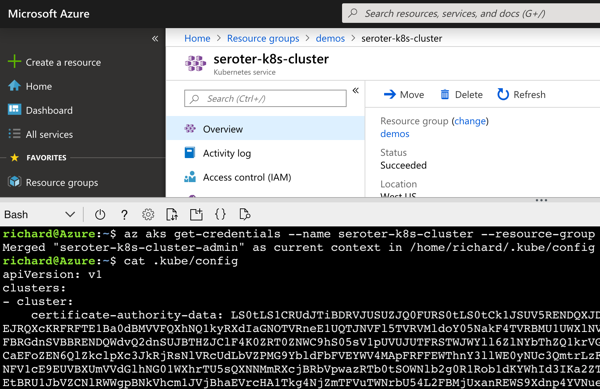
    From within the Azure Portal, I started up an instance of the Cloud Shell. This is a hosted Bash environment with lots of pre-loaded tools. From here, I used the AKS CLI to get the administrator credentials for my cluster.

    az aks get-credentials --name seroter-k8s-cluster --resource-group demos --admin

    This command generated a configuration file with URLs, users, certificates, and tokens.

    I copied this file locally for use later in my pipeline.

    Creating a role-binding for permission to deploy

    The administrative user doesn’t automatically have rights to do much in the default cluster namespace. Without explicitly allowing permissions, you’ll get some gnarly “does not have access” errors when doing most anything. Enter role-based access controls. I created a new rolebinding named “admin” with admin rights in the cluster, and mapped to the existing clusterAdmin user.

    kubectl create rolebinding admin --clusterrole=admin --user=clusterAdmin --namespace=default

    Now I knew that Concourse could effectively interact with my Kubernetes cluster.

    Giving AKS access to Azure Container Registry

    Right now, Azure Container Registry (ACR) doesn’t support an anonymous access strategy. Everything happens via authenticated users. The Kubernetes cluster needs access to its container registry, so I followed these instructions to connect ACR to AKS. Pretty easy!

    Creating Kubernetes deployment and service definitions

    Concourse is going to apply a Kubernetes deployment to create pods of containers in the cluster. Then, Concourse will apply a Kubernetes service to expose my pod with a routable endpoint.

    I created a pair of configurations and added them to the ci folder of my source code.

    The deployment looks like:

    apiVersion: extensions/v1beta1
     kind: Deployment
     metadata:
       name: demo-app
       namespace: default
       labels:
         app: demo-app
     spec:
       replicas: 1
       template:
         metadata:
           labels:
             app: demo-app
         spec:
           containers:
           - name: demo-app
             image: myrepository.azurecr.io/seroter-api-k8s:latest
             imagePullPolicy: Always
             ports:
             - containerPort: 8080
           restartPolicy: Always 
    

    This is a pretty basic deployment definition. It points to the latest image in the ACR and deploys a single instance (replicas: 1).

    My service is also fairly simple, and AKS will provision the necessary Azure Load Balancer and public IP addresses.

     apiVersion: v1
     kind: Service
     metadata:
       name: demo-app
       namespace: default
       labels:
         app: demo-app
     spec:
       selector:
         app: demo-app
       type: LoadBalancer
       ports:
         - name: web
           protocol: TCP
           port: 80
           targetPort: 80 
    

    I now had all the artifacts necessary to finish up the Concourse pipeline.

    Adding Kubernetes resource definitions to the Concourse pipeline

    First, I added a new resource type to the Concourse pipeline. Because Kubernetes isn’t a baked-in resource type, we need to pull in a community definition. No problem. This one’s pretty popular. It’s important than the Kubernetes client and server are expecting the same Kubernetes version, so I set the tag to match my AKS version.

    resource_types:
    - name: kubernetes
      type: docker-image
      source:
        repository: zlabjp/kubernetes-resource
        tag: "1.13"
    

    Next, I had to declare my resource itself. It has references to the credentials we generated earlier.

    resources:
    - name: azure-kubernetes-service
      type: kubernetes
      icon: azure
      source:
        server: ((k8s-server))
        namespace: default
        token: ((k8s-token))
        certificate_authority: |
          -----BEGIN CERTIFICATE-----
          [...]
          -----END CERTIFICATE-----
    

    There are a few key things to note here. First, the “server” refers to the cluster DNS server name in the credentials file. The “token” refers to the token associated with the clusterAdmin user. For me, it’s the last “user” called out in the credentials file. Finally, let’s talk about the certificate authority. This value comes from the “certificate-authority-data” entry associated with the cluster DNS server. HOWEVER, this value is base64 encoded, and I needed a decoded value. So, I decoded it, and embedded it as you see above.

    The last part of the pipeline? The job!

    jobs:
    - name: run-unit-tests
      [...]
    - name: containerize-app
      [...]
    - name: package-app
      [...]
    - name: deploy-app
      plan:
      - get: azure-container-registry
        trigger: true
        passed:
        - containerize-app
      - get: source-code
      - get: version
      - put: azure-kubernetes-service
        params:
          kubectl: apply -f ./source-code/seroter-api-k8s/ci/deployment.yaml -f ./source-code/seroter-api-k8s/ci/service.yaml
      - put: azure-kubernetes-service
        params:
          kubectl: |
            patch deployment demo-app -p '{"spec":{"template":{"spec":{"containers":[{"name":"demo-app","image":"myrepository.azurecr.io/seroter-api-k8s:'$(cat version/version)'"}]}}}}' 
    

    Let’s unpack this. First, I “get” the Azure Container Registry resource. When it changes (because it gets a new version of the container), it triggers this job. It only fires if the “containerize app” job passes first. Then I get the source code (so that I can grab the deployment.yaml and service.yaml files I put in the ci folder), and I get the semantic version.

    Next I “put” to the AKS resource, twice. In essence, this resource executes kubectl commands. The first command does a kubectl apply for both the deployment and service. On the first run, it provisions the pod and exposes it via a service. However, because the container image tag in the deployment file is to “latest”, Kubernetes actually won’t retrieve new images with that tag after I apply a deployment. So, I “patched” the deployment in a second “put” step and set the deployment’s image tag to the semantic version. This triggers a pod refresh!

    Deploy and run the Concourse pipeline

    I deployed the pipeline as a new revision with this command:

    fly -t rs set-pipeline -c azure-k8s-final.yml -p azure-k8s-final

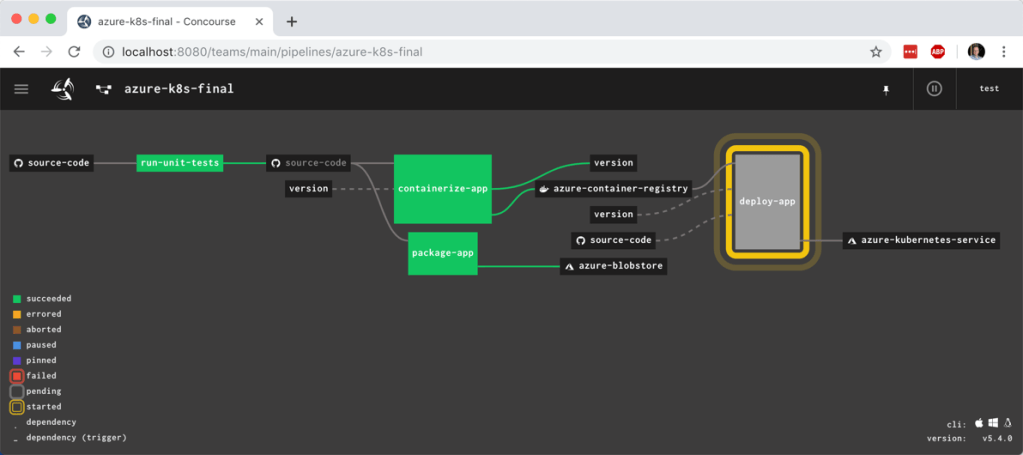
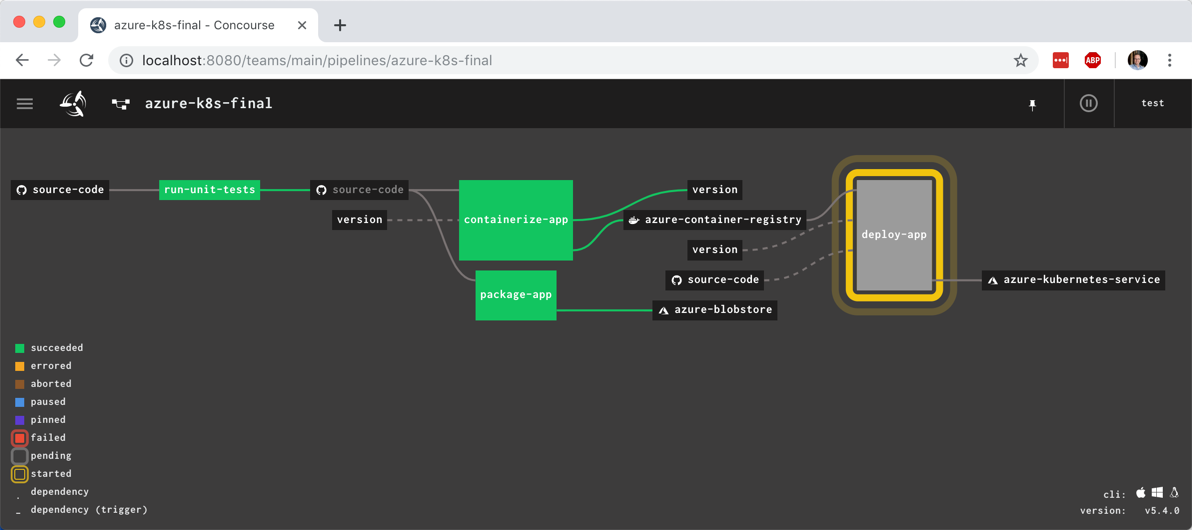
    I unpaused the pipeline and watched it start up. It quickly reached and completed the “deploy to AKS” stage.

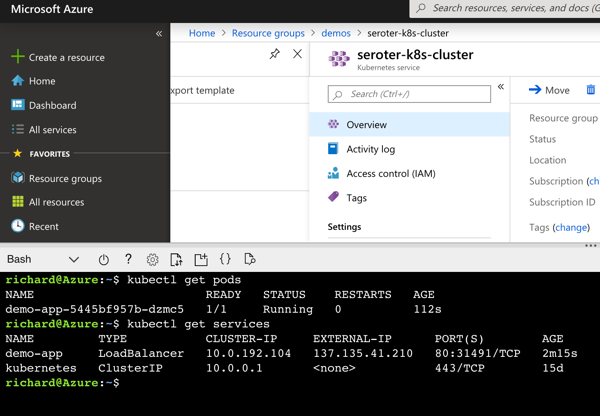
    But did it actually work? I jumped back into the Azure Cloud Shell to check it out. First, I ran a kubectl get pods command. Then, a kubectl get services command. The first showed our running pod, and the second showed the external IP assigned to my pod.

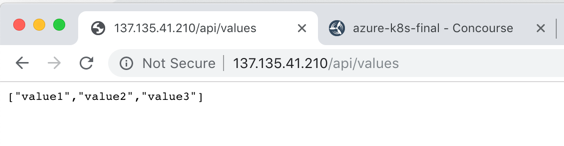
    I also issued a request to that URL in the browser, and got back my ASP.NET Core API results.

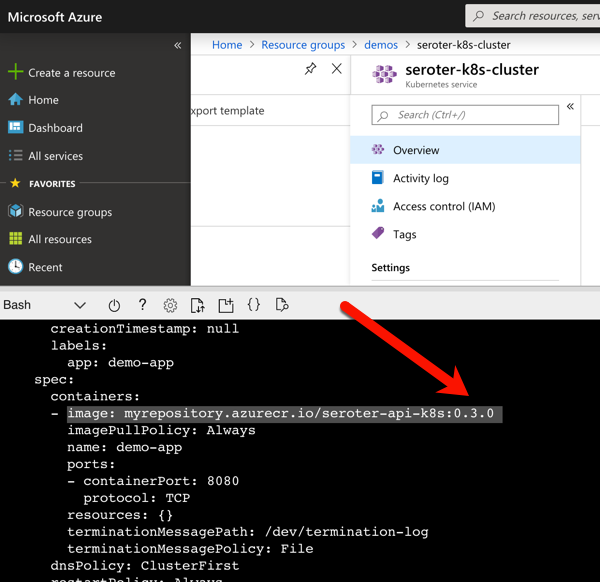
    Also to prove that my “patch” command worked, I ran the kubectl get deployment demo-app –output=yaml command to see which container image my deployment referenced. As you can see below, it no longer references “latest” but rather, a semantic version number.

    With all of these settings, I now have a pipeline that “just works” whenever I updated my ASP.NET Core source code. It tests the code, packages it up, and deploys it to AKS in seconds. I’ve added all the pipelines we created here to GitHub so that you can easily try this all out.

    Whatever CI/CD tool you use, invest in automating your path to production.

  • Building an Azure-powered Concourse pipeline for Kubernetes  – Part 2: Packaging and containerizing code

    Building an Azure-powered Concourse pipeline for Kubernetes – Part 2: Packaging and containerizing code

    Let’s continuously deliver an ASP.NET Core app to Kubernetes using Concourse. In part one of this blog series, I showed you how to set up your environment to follow along with me. It’s easy; just set up Azure Container Registry, Azure Storage, Azure Kubernetes Service, and Concourse. In this post, we’ll start our pipeline by pulling source code, running unit tests, generating a container image that’s stored in Azure Container Registry, and generating a tarball for Azure Blob Storage.

    We’re building this pipeline with Concourse. Concourse has three core primitives: tasks, jobs, and resources. Tasks form jobs, jobs form pipelines, and state is stored in resources. Concourse is essentially stateless, meaning there are no artifacts on the server after a build. You also don’t register any plugins or extensions. Rather, the pipeline is executed in containers that go away after the pipeline finishes. Any state — be it source code or Docker images — resides in durable resources, not Concourse itself.

    Let’s start building a pipeline.

    Pulling source code

    A Concourse pipeline is defined in YAML. Concourse ships with a handful of “known” resource types including Amazon S3, git, and Cloud Foundry. There are dozens and dozens of community ones, and it’s not hard to build your own. Because my source code is stored in GitHub, I can use the out-of-the-box resource type for git.

    At the top of my pipeline, I declared that resource.

    ---
    resources:
    - name: source-code
      type: git
      icon: github-circle
      source:
        uri: https://github.com/rseroter/seroter-api-k8s
        branch: master
    

    I’ve gave the resource a name (“source-code”) and identified where the code lives. That’s it! Note that when you deploy a pipeline, Concourse produces containers that “check” resources on a schedule for any changes that should trigger a pipeline.

    Running unit tests

    Next up? Build a working version of a pipeline that does something. Specifically, it should execute unit tests. That means we need to define a job.

    A job has a build plan. That build plan contains any of three things: get steps (to retrieve a resource), put steps (to push something to a resource), and task steps (to run a script). Our job below has one get step (to retrieve source code), and one task (to execute the xUnit tests).

    jobs:
    - name: run-unit-tests
      plan:
      - get: source-code
        trigger: true
      - task: first-task
        config: 
          platform: linux
          image_resource:
            type: docker-image
            source: {repository: mcr.microsoft.com/dotnet/core/sdk}
          inputs:
          - name: source-code
          run:
              path: sh
              args:
              - -exec
              - |
                dotnet test ./source-code/seroter-api-k8s/seroter-api-k8s.csproj 
    

    Let’s break it down. First, my “plan” gets the source-code resource. And because I set “trigger: true” Concourse will kick off this job whenever it detects a change in the source code.

    Next, my build plan has a “task” step. Tasks run in containers, so you need to choose a base image that runs the user-defined script. I chose the Microsoft-provided .NET Core image so that I’d be confident it had all the necessary .NET tooling installed. Note that my task has an “input.” Since tasks are like functions, they have inputs and outputs. Anything I input into the task is mounted into the container and is available to any scripts. So, by making the source-code an input, my shell script can party on the source code retrieved by Concourse.

    Finally, I embedded a short script that invokes the “dotnet test” command. If I were being responsible, I’d refactor this embedded script into an external file and reference that file. But hey, this is easier to read.

    This is now a valid pipeline. In the previous post, I had you install the fly CLI to interact with Concourse. From the fly CLI, I deploy pipelines with the following command:

    fly -t rs set-pipeline -c azure-k8s-rev1.yml -p azure-k8s-rev1

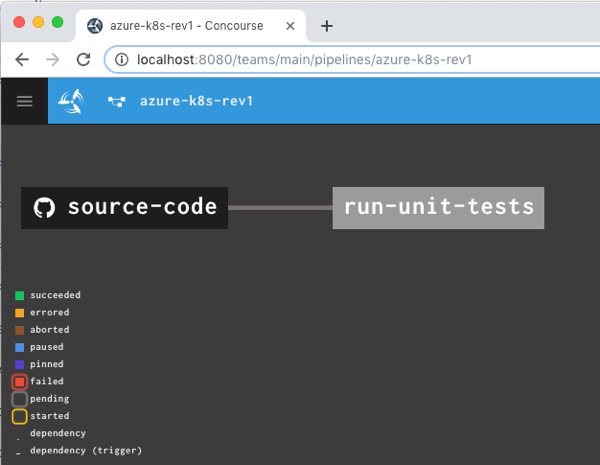
    That command says to use the “rs” target (which points to a given Concourse instance), use the YAML file holding the pipeline, and name this pipeline azure-k8s-rev1. It deployed instantly, and looked like this in the Concourse web dashboard.

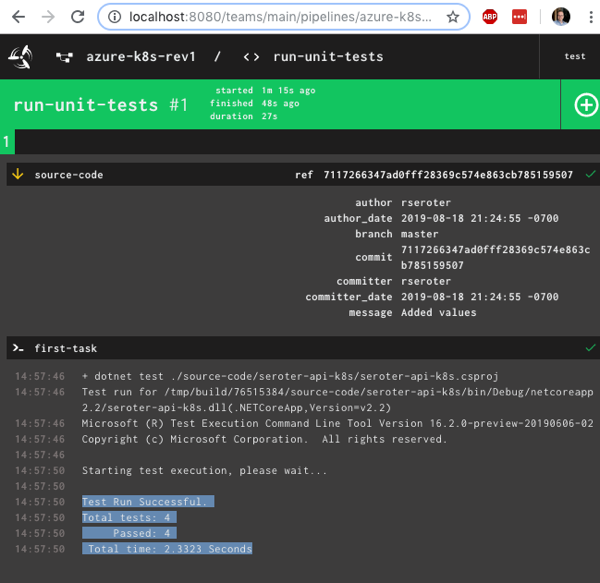
    After unpausing the pipeline so that it came alive, I saw the “run unit tests” job start running. It’s easy to view what a job is doing, and I saw that it loaded the container image from Microsoft, mounted the source code, ran my script and turned “green” because all my tests passed.

    Nice! I had a working pipeline. Now to generate a container image.

    Producing and publishing a container image

    A pipeline that just run tests is kinda weird. I need to do something when tests pass. In my case, I wanted to generate a Docker image. Another of the built-in Concourse resource types is “docker-image” which generates a container image and puts it into a registry. Here’s the resource definition that worked with Azure Container Registry:

    resources:
    - name: source-code
      [...]
    - name: azure-container-registry
      type: docker-image
      icon: docker
      source:
        repository: myrepository.azurecr.io/seroter-api-k8s
        tag: latest
        username: ((azure-registry-username))
        password: ((azure-registry-password))
    

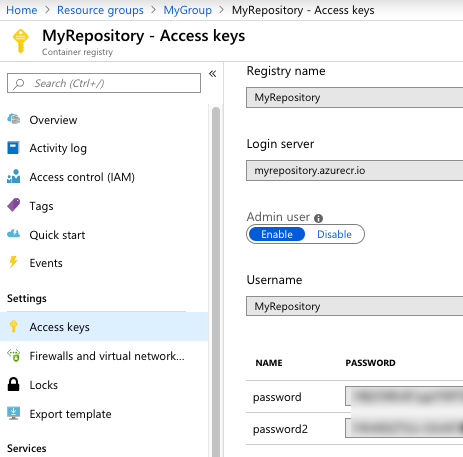
    Where do you get those Azure Container Registry values? From the Azure Portal, they’re visible under “Access keys.” I grabbed the Username and one of the passwords.

    Next, I added a new job to the pipeline.

    jobs:
    - name: run-unit-tests
      [...]
    - name: containerize-app
      plan:
      - get: source-code
        trigger: true
        passed:
        - run-unit-tests
      - put: azure-container-registry
        params:
          build: ./source-code
          tag_as_latest: true
    

    What’s this job doing? Notice that I “get” the source code again. I also set a “passed” attribute meaning this will only run if the unit test step completes successfully. This is how you start chaining jobs together into a pipeline! Then I “put” into the registry. Recall from the first blog post that I generated a Dockerfile from within Visual Studio for Mac, and here, I point to it. The resource does a “docker build” with that Dockerfile, tags the resulting image as the “latest” one, and pushes to the registry.

    I pushed this as a new pipeline to Concourse:

    fly -t rs set-pipeline -c azure-k8s-rev2.yml -p azure-k8s-rev2

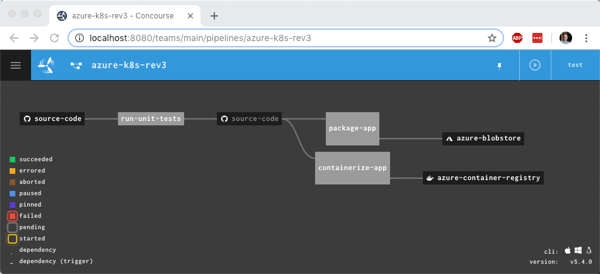
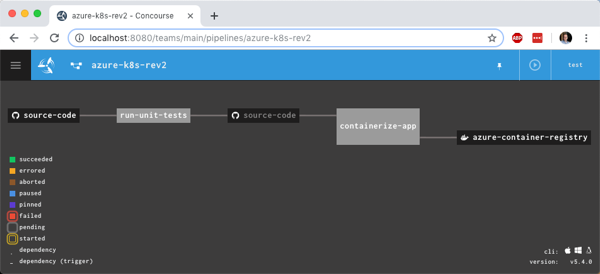
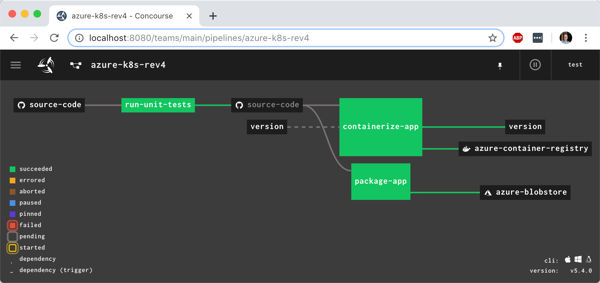
    I now had something that looked like a pipeline.

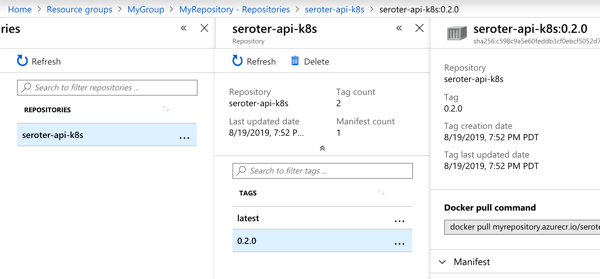
    I manually triggered the “run unit tests” job, and after it completed, the “containerize app” job ran. When that was finished, I checked Azure Container Registry and saw a new repository one with image in it.

    Generating and storing a tarball

    Not every platform wants to run containers. BLASPHEMY! BURN THE HERETIC! Calm down. Some platforms happily take your source code and run it. So our pipeline should also generate a single artifact with all the published ASP.NET Core files.

    I wanted to store this blob in Azure Storage. Since Azure Storage isn’t a built-in Concourse resource type, I needed to reference a community one. No problem finding one. For non-core resources, you have to declare the resource type in the pipeline YAML.

    resource_types:
    - name: azure-blobstore
      type: docker-image
      source:
        repository: pcfabr/azure-blobstore-resource
    

    A resource type declaration is fairly simple; it’s just a type (often docker-image) and then the repo to get it from.

    Next, I needed the standard resource definition. Here’s the one I created for Azure Storage:

    name: azure-blobstore
      type: azure-blobstore
      icon: azure
      source:
        storage_account_name: ((azure-storage-account-name))
        storage_account_key: ((azure-storage-account-key))
        container: coreapp
        versioned_file: app.tar.gz
    

    Here the “type” matches the resource type name I set earlier. Then I set the credentials (retrieved from the “Access keys” section in the Azure Portal), container name (pre-created in the first blog post), and the name of the file to upload. Regex is supported here too.

    Finally, I added a new job that takes source code, runs a “publish” command, and creates a tarball from the result.

    jobs:
    - name: run-unit-tests
      [...]
    - name: containerize-app
      [...]
    - name: package-app
      plan:
      - get: source-code
        trigger: true
        passed:
        - run-unit-tests
      - task: first-task
        config:
          platform: linux
          image_resource:
            type: docker-image
            source: {repository: mcr.microsoft.com/dotnet/core/sdk}
          inputs:
          - name: source-code
          outputs:
          - name: compiled-app
          - name: artifact-repo
          run:
              path: sh
              args:
              - -exec
              - |
                dotnet publish ./source-code/seroter-api-k8s/seroter-api-k8s.csproj -o .././compiled-app
                tar -czvf ./artifact-repo/app.tar.gz ./compiled-app
                ls
      - put: azure-blobstore
        params:
          file: artifact-repo/app.tar.gz
    

    Note that this job is also triggered when unit tests succeed. But it’s not connected to the containerization job, so it runs in parallel. Also note that in addition to an input, I also have outputs defined on the task. This generates folders that are visible to subsequent steps in the job. I dropped the tarball into the “artifact-repo” folder, and then “put” that file into Azure Blob Storage.

    I deployed this pipeline as yet another revision:

    fly -t rs set-pipeline -c azure-k8s-rev3.yml -p azure-k8s-rev3

    Now this pipeline’s looking pretty hot. Notice that I have parallel jobs that fire after I run unit tests.

    I once again triggered the unit test job, and watched the subsequent jobs fire. After the pipeline finished, I had another updated container image in Azure Container Registry and a file sitting in Azure Storage.

    Adding semantic version to the container image

    I could stop there and push to Kubernetes (next post!), but I wanted to do one more thing. I don’t like publishing Docker images with the “latest” tag. I want a real version number. It makes sense for many reasons, not the least of which is that Kubernetes won’t pick up changes to a container if the tag doesn’t change! Fortunately, Concourse has a default resource type for semantic versioning.

    There are a few backing stores for the version number. Since Concourse is stateless, we need to keep the version value outside of Concourse itself. I chose a git backend. Specifically, I added a branch named “version” to my GitHub repo, and added a single file (no extension) named “version”. I started the version at 0.1.0.

    Then, I ensured that my GitHub account had an SSH key associated with it. I needed this so that Concourse could write changes to this version file sitting in GitHub.

    I added a new resource to my pipeline definition, referencing the built-in semver resource type.

    - name: version  
      type: semver
      source:
        driver: git
        uri: git@github.com:rseroter/seroter-api-k8s.git
        branch: version
        file: version
        private_key: |
            -----BEGIN OPENSSH PRIVATE KEY-----
            [...]
            -----END OPENSSH PRIVATE KEY-----
    

    In that resource definition, I pointed at the repo URI, branch, file name, and embedded the private key for my account.

    Next, I updated the existing “containerization” job to get the version resource, use it, and then update it.

    jobs:
    - name: run-unit-tests
      [...] 
    - name: containerize-app
      plan:
      - get: source-code
        trigger: true
        passed:
        - run-unit-tests
      - get: version
        params: {bump: minor}
      - put: azure-container-registry
        params:
          build: ./source-code
          tag_file: version/version
          tag_as_latest: true
      - put: version
        params: {file: version/version}
    - name: package-app
      [...]
    

    First, I added another ‘get” for version. Notice that its parameter increments the number by one minor version. Then, see that the “put” for the container registry uses “version/version” as the tag file. This ensures our Docker image is tagged with the semantic version number. Finally, notice I “put” the incremented version file back into GitHub after using it successfully.

    I deployed a fourth revision of this pipeline using this command:

    fly -t rs set-pipeline -c azure-k8s-rev4.yml -p azure-k8s-rev4

    You see the pipeline, post-execution, below. The “version” resource comes into and out of the “containerize app” job.

    With the pipeline done, I saw that the “version” value in GitHub was incremented by the pipeline, and most importantly, our Docker image has a version tag.

    In this blog post, we saw how to gradually build up a pipeline that retrieves source and prepares it for downstream deployment. Concourse is fun and easy to use, and its extensibility made it straightforward to deal with managed Azure services. In the final blog post of this series, we’ll take pipeline-generated Docker image and deploy it to Azure Kubernetes Service.

  • What happens to sleeping instances when you update long-running AWS Lambdas, Azure Functions, and Azure Logic Apps?

    What happens to sleeping instances when you update long-running AWS Lambdas, Azure Functions, and Azure Logic Apps?

    Serverless things don’t always complete their work in milliseconds. With the introduction of AWS Step Functions and Azure Durable Functions, we have compute instances that exist for hours, days, or even months. With serverless workflow tools like Azure Logic Apps, it’s also easy to build long-running processes. So in this world of continuous delivery and almost-too-easy update processes, what happens when you update the underlying definition of things that have running instances? Do they use the version they started with? Do they pick up changes and run with those after waking up? Do they crash and cause the heat death of the universe? I was curious, so I tried it out.

    Azure Durable Functions

    Azure Durable Functions extends “regular” Azure Functions. They introduce a stateful processing layer by defining an “orchestrator” that calls Azure Functions, checkpoints progress, and manages intermediate state.

    Let’s build one, and then update it to see what happens to the running instances.

    First, I created a new Function App in the Azure Portal. A Function App holds individual functions. This one uses the “consumption plan” so I only pay for the time a function runs, and contains .NET-based functions. Also note that it provisions a storage account, which we’ll end up using for checkpointing.

    Durable Functions are made up of a client function that create an orchestration, orchestration functions that coordinate work, and activity functions that actually do the work. From the Azure Portal, I could see a template for creating an HTTP client (or starter) function.

    The function code generated by the template works as-is.

    #r "Microsoft.Azure.WebJobs.Extensions.DurableTask"
    #r "Newtonsoft.Json"
    
    using System.Net;
    
    public static async Task<HttpResponseMessage> Run(
        HttpRequestMessage req,
        DurableOrchestrationClient starter,
        string functionName,
        ILogger log)
    {
        // Function input comes from the request content.
        dynamic eventData = await req.Content.ReadAsAsync<object>();
    
        // Pass the function name as part of the route 
        string instanceId = await starter.StartNewAsync(functionName, eventData);
    
        log.LogInformation($"Started orchestration with ID = '{instanceId}'.");
    
        return starter.CreateCheckStatusResponse(req, instanceId);
    }

    Next I created the activity function. Like with the client function, the Azure Portal generates a working function from the template. It simply takes in a string, and returns a polite greeting.

    #r "Microsoft.Azure.WebJobs.Extensions.DurableTask"
    
    public static string Run(string name)
    {
        return $"Hello {name}!";
    }

    The final step was to create the orchestrator function. The template-generated code is below. Notice that our orchestrator calls the “hello” function three times with three different inputs, and aggregates the return values into a single output.

    #r "Microsoft.Azure.WebJobs.Extensions.DurableTask"
    
    public static async Task<List<string>> Run(DurableOrchestrationContext context)
    {
        var outputs = new List<string>();
    
        outputs.Add(await context.CallActivityAsync<string>("Hello", "Tokyo"));
        outputs.Add(await context.CallActivityAsync<string>("Hello", "Seattle"));
        outputs.Add(await context.CallActivityAsync<string>("Hello", "London"));
    
        // returns ["Hello Tokyo!", "Hello Seattle!", "Hello London!"]
        return outputs;

    After saving this function, I went back to the starter/client function and clicked the “Get function URL” link to get the URL I need to invoke to instantiate this orchestrator. Then, I plugged that into Postman, and submitted a POST request.

    Since the Durable Function is working asynchronously, I get back URIs to check the status, or terminate the orchestrator. I invoked the “get status” endpoint, and saw the aggregated results returned from the orchestrator function.

    So it all worked. Terrific. Next I wanted to add a delay in between activity function calls to simulate a long-running process. What’s interesting with Durable Functions is that every time it gets results back from an async call (or timer), it reruns the entire orchestrator from scratch. Now, it checks the execution log to avoid calling the same operation again, but this made me wonder how it would respond if I added *new* activities in the mix, or deleted activities.

    First, I added some instrumentation to the orchestrator function (and injected function input) so that I could see more about what was happening. In the code below, if we’re not replaying activities (so, first time it’s being called), it traces out a message.

    public static async Task<List<string>> Run(DurableOrchestrationContext context, ILogger log)
    {
        var outputs = new List<string>();
    
        outputs.Add(await context.CallActivityAsync<string>("Hello", "Tokyo"));
        if (!context.IsReplaying) log.LogInformation("Called function once.");
    
        outputs.Add(await context.CallActivityAsync<string>("Hello", "Seattle"));
        if (!context.IsReplaying) log.LogInformation("Called function twice.");
    
        outputs.Add(await context.CallActivityAsync<string>("Hello", "London"));
        if (!context.IsReplaying) log.LogInformation("Called function thrice.");
    
        // returns ["Hello Tokyo!", "Hello Seattle!", "Hello London!"]
        return outputs;
    }

    After saving this update, I triggered the client function again, and with the streaming “Logs” view open in the Portal. Here, I saw trace statements for each call to an activity function.

    A durable function supports Timers that pause processing for up to seven days. I added the following code between the second and third function calls. This pauses the function for 30 seconds.

        if (!context.IsReplaying) log.LogInformation("Starting delay.");
        DateTime deadline = context.CurrentUtcDateTime.Add(TimeSpan.FromSeconds(30));
        await context.CreateTimer(deadline, System.Threading.CancellationToken.None);
        if (!context.IsReplaying) log.LogInformation("Delay finished.");

    If you trigger the client function again, it will take 30-ish seconds to get results back, as expected.

    Next I tested three scenarios to see how Durable Functions handled them:

    1. Wait until the orchestrator hits the timer, and change the payload for an activity function call that executed before the timer started. What happens when the framework tries to re-run a step that’s changed? I changed the first function’s payload from “Tokyo” to “Mumbai” after the function instance had already passed the first call, and was paused at the timer. After the function resumed from the timer, the orchestrator failed with a message of: “Non-Deterministic workflow detected: TaskScheduledEvent: 0 TaskScheduled Hello.” Didn’t like that. Changing the call signature, or apparently even the payload is a no-no if you don’t want to break running instances.
    2. Wait until the orchestrator hits the timer, and update the function to introduce a new activity function call in code above the timer. Does the framework execute that new function call when it wakes up and re-runs, or ignore it? Indeed, it runs it. So after the timer wrapped up, the NEW, earlier function call got invoked, AND it ran the timer again before continuing. That part surprised me, and it only kinda worked. Instead of returning the expected value from the activity function, I got a “2” back. And some times when I tested this, I got the above “non-deterministic workflow” error. So, your mileage may vary.
    3. Add an activity call after the timer, and see if it executes it after the delay is over. Does the orchestrator “see” the new activity call I added to the code after it woke back up? The first time I tried this, I again got the “non-deterministic workflow” error, but with a few more tests, I saw it actually executed the new function after waking back up, AND running the timer a second time.

    What have we learned? The “version” a Durable Function starts with isn’t serialized and used for the entirety of the execution. It’s picking up things changing along the way. Be very aware of side effects! For a number of these tests, I also had to “try again” and would see different results. I feel like I was breaking Azure Functions!

    What’s the right way to version these? Microsoft offers some advice, which ranges from “do nothing and let things fail” to “deploy an entirely new function.” But from these tests, I’d advise against changing function definitions outside of explicitly deploying new versions.

    Azure Logic Apps

    Let’s take a look at Logic Apps. This managed workflow service is designed for constructing processes that integrate a variety of sources and targets. It supports hundreds of connectors to things likes Salesforce.com, Amazon Redshift, Slack, OneDrive, and more. A Logic App can run for 90 days in the multi-tenant environment, and up to a year in the dedicated environment. So, most users of Logic Apps are going to have instances in-flight when it comes time to deploy updates.

    To test this out, I first created a couple of Azure Functions that Logic Apps could call. These JavaScript functions are super lame, and just return a greeting.

    Next up, I created a Logic App. It’s easy.

    After a few moments, I could jump in and start designing my workflow. As a “serverless” service, Logic Apps only run when invoked, and start with a trigger. I chose the HTTP trigger.

    My Logic App takes in an HTTP request, has a 45 second “delay” (which could represent waiting for new input, or a long-running API call) before invoke our simple Azure Function.

    I saved the Logic App, called the HTTP endpoint via Postman, and waited. After about 45 seconds, I saw that everything succeeded.

    Next, I kicked off another instance, and quickly went in and added another Function call after the first one. What would Logic Apps do with that after the delay was over? It ignored the new function call. Then I kicked off another Logic Apps instance, and quickly deleted the second function call. Would the instance wake up and now only call one Function? Nope, it called them both.

    So it appears that Logic Apps snapshot the workflow when it starts, and it executes that version, regardless of what changes in the underlying definition after the fact. That seems good. It results in a more consistent, predictable process. Logic Apps does have the concept of versioning, and you can promote previous versions to the active one as needed.

    AWS Step Functions

    AWS doesn’t have something exactly like Logic Apps, but AWS Step Functions is somewhat similar to Azure Durable Functions. With Step Functions, you can chain together a series of AWS services into a workflow. It basically builds a state machine that you craft in their JSON-based Amazon State Language. A given Step Function can be idle for up to a year, so again. you’ll probably have long-running instances going at all times!

    I jumped into the AWS console and started with their “hello world” template.

    This state machine has a couple basic states that execute immediately. Then I added a 20 second wait.

    After deploying the Step Function, it was easy to see that it ran everything quickly and successfully.

    Next, I kicked off a new instance, and added a new step to the state machine while the instance was waiting. The Step Function that was running ignored it.

    When I kicked off another Step Function and removed the step after the wait step, it also ignored it. It seems pretty clear that AWS Step Functions snapshot the workflow at the start proceed with that snapshot, even if the underlying definition changes. I didn’t find much documentation around formally versioning Step Functions, but it seems to keep you fairly safe from side effects.

    With all of these, it’s important to realize that you also have to consider versioning of downstream calls. I could have an unchanged Logic App, but the function or API it invokes had its plumbing entirely updated after the Logic App started running. There’s no way to snapshot the state of all the dependencies! That’s normal in a distributed system. But, something to remember.

    Have you observed any different behavior with these stateful serverless products?