Category: General Architecture

  • BizTalk Server and SOA Software Together, Part II

    [Series Links: Part I / Part II / Part III / Part IV]

    In the previous post, we did a high level look at SOA Software and the core modules of that platform that my company is using. Now, let’s dig a bit deeper in one of the base subsystems, the Management Server.

    At its core, the SOA Software Management Server allows you to configure your services by applying appropriate policies. The Management Server also provides the monitoring component, but we’ll discuss that in the “monitoring and alerting” post that will follow this one. Here we’ll focus a bit more on registering and managing services using SOA Software.

    To manually register a service, you can start from the SOA Software Service Manager Dashboard. The wizard window asks you for the WSDL of your physical service.


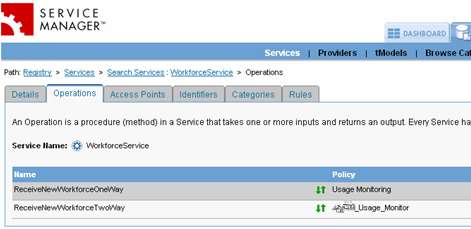
    Then you can choose which operations on the service you wish to manage. “Managing” the operation gives you the ability apply policies, record and monitor data, and so forth.

    Finally, you choose a default policy to use. This can be changed after the wizard is complete.

    Now, SOA Software has the concept of a “virtual service”. These virtual services act as proxies that can be deployed on different machines, and, may be an aggregate of operations from multiple “physical” services. For instance, I may create four different web services that interact with a “vendor” object. Maybe a few operations on two of those services are going to be publicly exposed to outside parties. I can create a single “virtual service” made up of operations from two of those services, and deploy that “virtual service” to a locked down box in the DMZ. The same “physical service” may be part of multiple “virtual services”. Now because you can apply different policies to each operation in a service, it’s conceivable that you attach different policies to the same “physical service” (by virtualizing it) in order to target different audiences. Maybe the “GetVendor()” operation, when used internally, goes through a particular virtual service that only confirms that the user has a valid Active Directory account. However, when “GetVendor()” is exposed publicly, THAT virtual service operation may require a policy that does encryption/decryption AND authentication. Or, you may have a different service level agreement (SLA) for external parties than for those internal users. No problem, just apply different SLA policies to each individual virtual service. When I create a virtual service, I can choose which operations, from which services, to include.


    Note that the physical services being aggregated could be on different servers, and even different application server platforms. No reason I can’t have a virtual service that combines related operations from services in IIS 6.0 and Weblogic.

    Services may also get “auto discovered” if they are deployed to a box with the SOA Software agent running. Once a service is managed (either through auto-discovery, or manually), you open up a wealth of management options for that particular service. The most eye-catching part is the real-time feed of usage data.


    This Flash object updates in real time so that you can see each service call and how long it takes. By mousing over the bars, you can see specific details about the time the operation took to execute. Nice!

    You may think that with all these “virtual services” floating around that it could be a challenge to remember what the correlations are between services. Have no fear, the “Service Relationships” widget provides another Flash-based view of the connection between virtual and physical services.

    By moving your mouse over the “services” in this window, you can see the details about each service in the relationship tree.

    Finally, the Portal provides plenty of ways to see metadata about services and perform maintenance tasks. The “Actions” widget associated with each service exposes various functions.
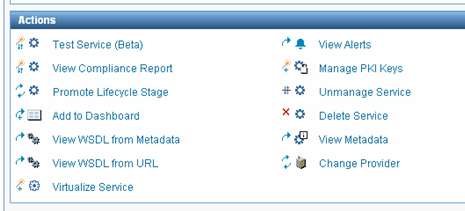

    You can view a copy of the WSDL, virtualize a given service, and much more. One of my favorites is the “Test Service” function. This actually allows you to execute the service itself. My initial thought was that this would be similar to the ASP.NET Web Services testing page that is shown in IIS. That is, if you have simple type parameters (ints, strings, etc), then test away. However, the default ASP.NET Web Services test page doesn’t allow you to test complex type parameters. HOWEVER, the SOA Software web services tester actually parses out the complex type and lets you test those as well!

    That’s great stuff. Unexpected, and very useful.

    The SOA Software Management Server is a great way to centralize management and ownership of services. The ability to generate proxy services that abstract the underlying services has enormous implications for distributed environments. In the next part of this series, I’ll tackle the Policy Manager subsystem.

    Technorati Tags: ,

  • BizTalk Server and SOA Software Together, Part I

    [Series Links: Part I / Part II / Part III / Part IV]

    Recently, the company I work for purchased a web services management platform solution from SOA Software. This post starts a short series where I will highlight the key features of the platform, and, how to integrate BizTalk with this solution.

    SOA Software provides us with that “last mile” web services capability set that should help my organization realize our vision of a truly enterprise SOA. Specifically, SOA Software provides us with four key functions:

    • Centralized management, including automatic service discovery
    • Fully UDDI 2.0 compliant service registry (UPDATE: UDDI 3.0 compliance as well)
    • Application of service “policy” via configuration
    • Full-featured monitoring and customized alerting

    In this first post, I’ll do a very high level overview of each of those functions.

    Centralized management, including automatic service discovery
    Each of our web servers will have a SOA Software “discovery” agent installed which detects when new web services are deployed to the box. The supported application servers include Websphere, Weblogic, Tomcat and IIS. So this plays very well in a Microsoft, or non-Microsoft shop. Once a web service has been discovered, it can be centrally managed. “Managing” a service can mean applying security policies, establishing service level agreements, apply access/deny rules, and more.

    Fully UDDI 2.0 compliant service registry (UPDATE: UDDI 3.0 compliance as well)
    It’s nice that SOA Software provides us a service registry out of the box. No need to purchase and integrate another company’s registry solution. The registry has a fairly rich “search” capability where I can search for service by name, usage, category and more.


    What are categories? Once a service is managed, you can group the service using user-defined categories. Much nicer than having a registry that just shows a dump of every service with no way to organize them.

    Application of service “policy” via configuration
    While you could potentially do without the previous two features (even though it makes life significantly easier), the SOA Software Policy Manager service is where you really get your money’s worth. Without TOUCHING the code or configuration files of a deployed service, you can apply a “policy” to that service. Because each service is hosted on a web server with a SOA Software management agent, all service requests can be intercepted. SOA Software acts as an intermediary between the service client and service provider. A service policy may include:

    • message logging
    • authentication
    • compression/decompression
    • encryption/decryption
    • validation
    • much more …


    Those are examples of “management” policies. I’ll also show you “SLA” policies, and more in the later post. Each method of a given service can have a different policy attached. I can’t stress how cool this stuff is. When someone builds a service, they don’t have to do anything special for this service management capability. All of it occurs at the management point, not development point.

    Full-featured monitoring and customized alerting
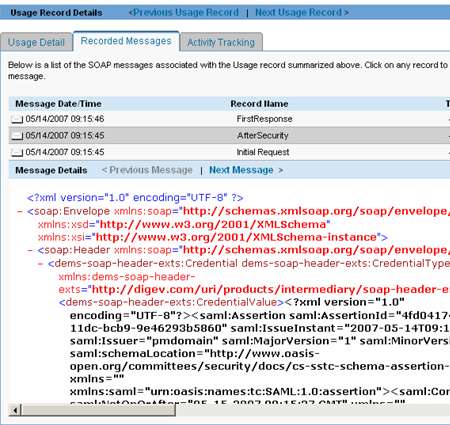
    A robust monitoring module is so important if you want to evaluate service usage trends in your organization. I can capture the payload of the SOAP messages coming in and out of the services. This includes the ability to see the services before/after policies have been applied. The view below shows my message after a SAML token has been applied.

    I can also see various reports about service response time, usage and more. So far, that is just passive reporting. I have to go query for data to discover a problem. What if I have a SLA set up, and NEED to be very proactive about service interruptions or problems? You can subscribe to alerts already configured, or, create your own. I can build an SLA Policy to ensure that if response time goes above a certain amount, or the number of SOAP faults exceeds an acceptable amount, then send me an email message.

    In the next few posts, I’ll show more details about these key subsystems. Finally, I’ll show how BizTalk can call one of these SOA Software-managed services. The service *caller* requires a bit of code (in order to inject the headers necessary to conform to the policies), but SOA Software has made it fairly straightforward.

    Technorati Tags: ,

  • Testing Ordered Delivery Scenarios With BizTalk

    One of the technology backbones of my company moving forward is the use of BizTalk to “fan out” messages from our ERP system (SAP). Instead of having hundreds of direct interfaces to SAP by downstream systems who need real-time data, we can use BizTalk to receive a single message from SAP (XI), and distribute it to all interested parties. One issue brought up recently was “ordered delivery” and ensuring that if a downstream system needs messages delivered in the order sent by SAP, that BizTalk honor it. So, I set out to test a variety of scenarios using BizTalk’s built-in ordered delivery capabilities.

    Setup: I exposed a BizTalk schema as a web service to simulate our publishing receiver from SAP. A simple Windows Form is sending messages to this web service, and stamping each one with a sequence number. I then built a couple of web services to act as “subscribers” of these SAP data events. These web services publish the data to a database table, thus letting me see the exact order of messages delivered. Each SOAP send port has a subscription based on message type.

    Scenario #1: Send port, no ordered delivery
    When a series of messages are published to the receiving web service and routed to the subscriber without ordered delivery, the result may look like this:


    As you can see, even on my single development machine, the order gets mixed up. This is due to batch processing and the multi-threaded nature of BizTalk message distribution.

    Scenario #2: Send port, ordered delivery turned on
    To turn ordered delivery on, all we need to do is check a box on the send port (this assumes that your inbound transport can deliver messages in order. Examples include MSMQ, SOAP and HTTP).


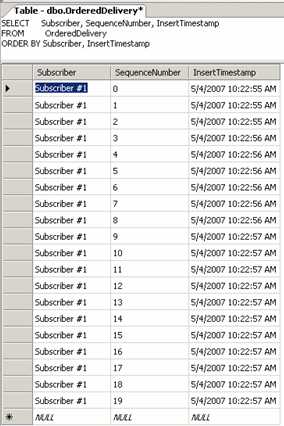
    The result in the database looks like this:


    So you can see that all the messages are in sequential order.

    Scenario #3: One send port no ordered delivery, one send port WITH ordered delivery
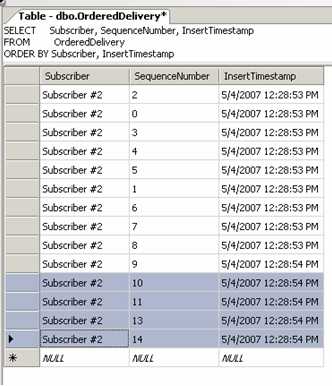
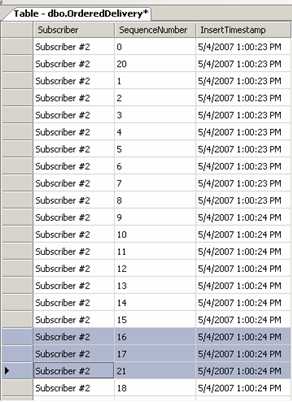
    I wanted to prove that ordered delivery only impacted the corresponding port. When sending the message into BizTalk with two send ports subscribing, the data looked like this:


    “Subscriber #1” kept everything in order, but “Subscriber #2” delivered messages a bit more haphazardly.

    Scenario #4: Non-ordered delivery send port, no retries, and error in service
    So what if the service raises an error? When there are no retries, and the send port doesn’t have an ordered delivery requirement, the result looks like this:


    The bad message (#12) is simply skipped (because it is now suspended).

    Scenario #5: Ordered delivery send port, retries enabled, and error in service
    How about for an ordered delivery send port? What if there’s an error in the service call, and retries are turned on for the port? Also, the “cancel if error” is turned off. Check this out:


    The messages queue up waiting for the first one to retry, and hopefully succeed. We’ll see more of this in a moment.

    Scenario #6: Ordered delivery send port, NO retries, and error in service
    This time, there’s an error in the service, and no retries. Also, the “cancel if error” flag is still turned off. The result is:


    So the messages still get delivered AFTER the bad message has been encountered. That’s expected, since we told BizTalk to keep going, even for the ordered delivery port.

    Scenario #7: Ordered delivery send port, NO retries, “cancel if error” turned on, and error in service
    What if we reproduce the previous scenario, BUT, turn “cancel if error” on? This flag can be set on the send port here:


    What you’re telling BizTalk is that if any message fails for this ordered delivery port, stop processing until this error can be corrected. This is useful if you’re concerned that an “insert new contact” message failed, but you expect a “modify existing customer” to be following. Clearly the “modify” message will fail unless the “insert” gets figured out. The result of this?


    Processing stopped after message #11 because message #12 failed. The send port is still “started”, but you’ll find a suspended message. If you open it up, you’ll see that all following messages are queued up until the offender gets resolved.

    Scenario #8: Send port stopped, and restarted for a non-ordered delivery send port
    What if we KNOW that a downstream system is unavailable (e.g. maintenance) and want to prevent the inevitable failure of delivery? Maybe we want to shut off the send port, queue up the messages, and once the unavailable system is back online, open the distribution pipeline again. For a non-ordered delivery port, after restarting a stopped send port, the output looked like this:


    The messages are in a crazy order, as you can see.

    Scenario #9: Send port stopped, and restarted for an ordered delivery send port
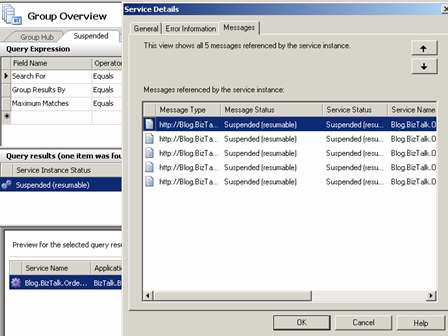
    Final scenario. What if we stop an ordered delivery port, and then start it back up later? Do we retain the correct ordering? When I sent five messages in, I got a suspended instance with five messages:


    If I send in three MORE messages, they actually get added to this suspended instance:


    Once I finally turn the subscriber service back on, all messages were sent in the same order received.

    So there you go. Ordered delivery is a fairly powerful concept, and not particularly hard to do with BizTalk. It greatly impacts performance because the send port won’t send subsequent messages until a delivery confirmation is received, but, in many cases that performance impact is outweighed by business requirements.

    Technorati Tags:

  • Production-Ready BAM Security and Deployment

    I recently went through the process of deploying a BAM model to our new BizTalk infrastructure, and learned a few things about BAM security and deployment along the way.

    Given that most BizTalk architects/developers probably play with BAM on a single fully installed machine (BizTalk, SQL, IIS, etc) while running with highest-level permissions, sometimes certain steps can be taken for granted.

    To start with, my production environment contains clustered SQL Server 2005 servers and a specific SQL instance created for the BizTalk databases. Both SQL Server Analysis Services and SQL Server Integration Services are installed in the cluster as well. If you have this sort of environment, you’ll need to modify SSIS before continuing. Specifically, you must change the MsDtsSrvr.ini.xml file so that the SSIS points to a named instance of SQL Server (see the Microsoft documentation for details). If you do NOT do this, then running the bm.exe BAM tool will result in everything LOOKING fine, but in fact, no SSIS/DTS packages get created anywhere.

    Now, to run the bm.exe, which builds up all the BAM infrastructure (tables, procedures, triggers, packages, cubes, etc), you have to have SSIS on the same machine as the tool itself. Got that? So you can’t run this from a standalone BizTalk box and expect it to work. Another option (instead of installing SQL tools on the BizTalk box) is to install the BAM tools alone on the SQL box. I’ve reviewed a few things, and am fairly sure this is the case, but if anyone wants to challenge that assertion, feel free.

    Let’s talk about security. Specifically, adding users to views. Again, most times when you’re developing BAM solutions, you take for granted that you can go to the BAM Portal and views magically appear. But when you’re not running as an Administrator, those views aren’t visible by default. What I did (as practice before doing this in production), was create a local group in my development environment. Then, I ran the following command:

    bm.exe add-account -AccountName:”machine\ProjectBAMUsers” -View:viewname

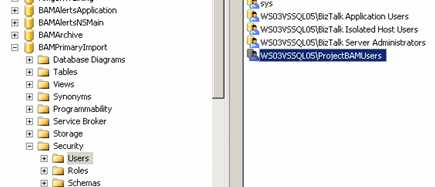
    This command does a few things. First, it adds that user/group to the BAMPrimaryImport table as a “user.”

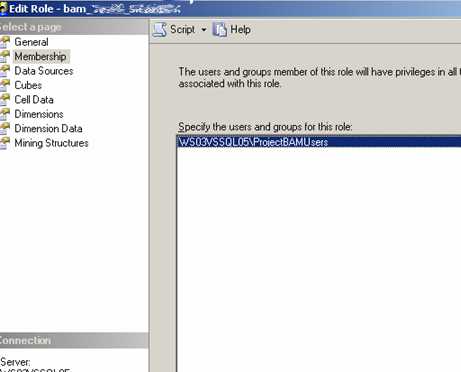
    This allows anyone in that group to look at data in the BAM view. If your BAM model contains aggregations, then SQL Analysis cubes get created by the bm.exe tool. A new “role” gets created for you in SQL Analysis services as well …

    Now by default, this group is empty. But when you run the “add-account” command, the designated user/group ALSO gets added here.

    Nice! So instead of doing “add-account” for every individual user, you should require a group to be set up for a particular BAM deployment. If a user tries to view the BAM Portal and is NOT in the designated group, they’d see this …

    As soon as I add the logged on user to the pre-defined Windows group (with explicit BAM access), the same user sees this …

    Cool stuff that I haven’t found demonstrated much. I personally spent hours trying to find out why my freakin’ SSIS jobs wouldn’t get created, so the whole “change the obscure SSIS configuration file” might save someone time later on. Any other BAM deployment points folks want to add?

    Technorati Tags:

  • BizTalk-Based Internet Service Bus

    Lots of stuff today about BizTalk Services, the new offering from Microsoft that exposes an “Internet Service Bus” built upon BizTalk. Good summaries by Mick and Chris. There’s also a very nice article in eWeek
    (not the one linked to from the Labs site) entitled Microsoft’s BizTalk Services Simplify SOA that talks about the strategic important of these software services.

    While intellectually interesting to me, I’m hard-pressed at the moment to see a use case within my organization itself. Steve Martin of the BizTalk team has a good write up and hits the target audience: We see BizTalk Services as a complement to “traditional” BizTalk Server uses on premise. As you need to coordinate SOA on a broader scale beyond the organization, we see the introduction of hosted services as one way to help support federation of business process, messaging, and identity across boundaries.

    Well said.

    Technorati Tags:

  • SOA Resources

    On the same morning I read that there’s a pending “drought” of architects who really “get” SOA and can sell it to the business, I see a great SOA reading list from Loosely Coupled Thinking. I’ve also spent a bit of time recently re-reading some of the old MS Architect Journal issues(issue 2, and issue 8 have some stand-out material). Reading volumes of whitepapers doesn’t make someone a good architect, but combine that with implementation experience and diversity of ideas and you’re on the right track. Of course, since I don’t work for Microsoft anymore, I can stop being such a MS homer, so what are your favorite non-MS authored architecture/SOA resources that everyone should bookmark?

    Technorati Tags: