Category: General Architecture

  • CTP3 of ESB Guidance Released

    Some very cool updates in the just-released CTP3 of ESB Guidance. The changes that caught my eye include:

    • Download the full Help file in CHM format. Check out what’s new in this release, sample projects, and a fair explanation of how to perform basic tasks using the package.
    • New endpoint “resolver” framework. Dynamically determine endpoint and mapping settings for inbound messages. Interesting capability that I don’t have much use for (yet).
    • Partial support for request/response on-ramps. An on-ramp is the way to generically accept messages onto the bus by receiving in an XmlDocument parameter. I’ll have to dig in and see what “partial support” means. Obviously the bus would need to send a response back to the caller, so I’ll be interested to see how that’s done.
    • BizTalk runtime query services. Looks like it uses the BizTalk WMI interfaces to pull back information about hosts, applications, messages, message bodies and more. I could see a variety of ways I can use this to surface up environment data.
    • SOA Software integration. This one excites me the most. I’m a fan (and user) of SOA Software’s web service management platform, and from the looks of it, I can now more easily plug in any (?) receive location and send port into Service Manager’s monitoring infrastructure. Nice.

    I also noticed a few things on Exception Management that I hadn’t seen yet. It’s going to be a pain to rebuild all my existing ESB Guidance Exception Management solution bits, so I’ll wait to recommend an upgrade until after the final release (which isn’t far off!).

    All in all, this is maturing quite nicely. Well done guys.

    Technorati Tags: ,

  • Troubleshooting “Canceled Web Request”

    Recently, when calling web services from the BizTalk environment, we were seeing intermittent instances of the “WebException: The request was aborted: The request was canceled” error message in the application Event Log. This occurred mostly under heavy load situations, but could be duplicated even with fairly small load.

    If you search online for this exception, you’ll often see folks just say to “turn off keep-alives” which we all agreed was a cheap way to solve a issue while introducing performance problems. To dig further into why this connection to the WebLogic server was getting dropped, we actually began listening in on protocol communication using Wireshark. I started going bleary-eyed looking for ACK and FIN and everything else, so I went and applied .NET tracing to the BizTalk configuration file (btsntsvc.exe.config). The BizTalk documentation shows you how to set up System.Net logging in BizTalk (for more information on the settings, you can read this).

    My config is slightly different, but looks like this …

    <system.diagnostics>
        <sources>
          <source name="System.Net">
            <listeners>
              <add name="System.Net"/>
            </listeners>
          </source>
          <source name="System.Net.Sockets">
            <listeners>
              <add name="System.Net"/>
            </listeners>
          </source>
          <source name="System.Net.Cache">
            <listeners>
              <add name="System.Net"/>
            </listeners>
          </source>
        </sources>
        <switches>
          <add name="System.Net" value="Verbose" />
          <add name="System.Net.Sockets" value="Error" />
          <add name="System.Net.Cache"  value="Verbose" />
        </switches>
        <sharedListeners>
          <add name="System.Net"
               type="System.Diagnostics.TextWriterTraceListener"
               initializeData="c:\BizTalkTrace.log"   />
        </sharedListeners>
        <trace autoflush="true" />
      </system.diagnostics>
      

    What this yielded was a great log file containing a more readable format than reading straight network communication. Specifically, when the request was canceled message showed up in the Event Log, I jumped to the .NET trace log and found this message …
    A connection that was expected to be kept alive was closed by the server.

    So indeed, keep-alives were causing a problem. Much more useful than the message that pops up in the Event Log. When we did turn keep-alives off on the destination WebLogic server (just as a test), the problem went away. But, that couldn’t be our final solution. We finally discovered that the keep-alive timeouts were different on the .NET box (BizTalk) and the WebLogic server. WebLogic had a keep-alive of 30 seconds, while it appears that the .NET framework uses the same value for keep-alives as for service timeouts (e.g. 90 seconds). The Windows box was attempting to reuse a connection while the WebLogic box had disconnected it. So, we modified the WebLogic application by synchronizing the keep-alive timeout with the Windows/BizTalk box, and the problem went away complete.

    Now, we still get the responsible network connection pooling of keep-alives, while still solving the problem of canceled web requests.

    Technorati Tags:

  • BizTalk Sending Updated Version of Message to SOAP Recipients

    What happens to downstream SOAP recipients if the message sent from BizTalk is a different “version” than the original?

    Let’s assume I have an enterprise schema that represents my company’s employees (e.g. “Workforce”). BizTalk receives this object from SAP and fans it out to a variety of downstream systems (via SOAP). Because direct messaging with the SOAP adapter is occurring, a proxy class is needed to call the web service (vs. an orchestration). Because every subscriber service implements the same enterprise schema and WSDL, a single proxy class in BizTalk can be reused for each recipient.

    Using “wsdl.exe” I do code generation on the enterprise WSDL to build an interface object (using the wsdl /serverinterface command) that is implemented by the subscribing web service (thus ensuring that each subscriber respects the enterprise WSDL contract). I also use wsdl.exe to build the service proxy component that BizTalk requires to call the service. Finally, I use xsd.exe to build a separate class with the types represented in the enterprise schema.

    Now what if a department requests new fields to be added to this object? How will this affect each downstream subscriber? For significant changes (e.g. backwards breaking changes such as removal of required fields, changing node names), the namespace of the schema will be updated to reflect the change. This would force a rebuild and recompile of subscribers of this new message. For more minor changes, no namespace update will occur.

    We had a debate about how a .NET web service would handle the receipt of “unexpected” elements when the namespace has not been changed. That is, what if we just sent this new data to each subscriber without having them recompile their project with the latest auto-generated code (interface, proxy, types) from the enterprise schema/WSDL? Some folks thought that the .NET web service would reject the inbound message because it wouldn’t serialize the unknown types. I wasn’t 100% sure of that, so I ran a few tests.

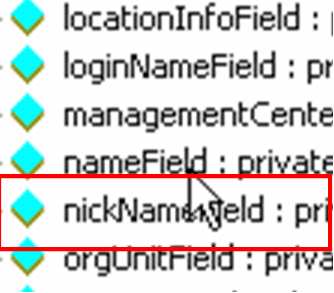
    For this test, I added a new value to the auto-generated “types” class (which is used by the interface class and proxy class).

    I then build and GAC the updated proxy component. I also made sure that the subscriber web service still has the “old” auto-generated code.

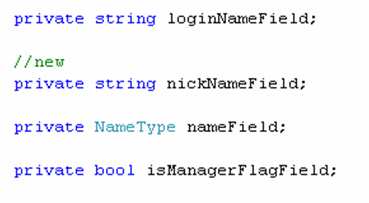
    {New) Object used by BizTalk service proxy:

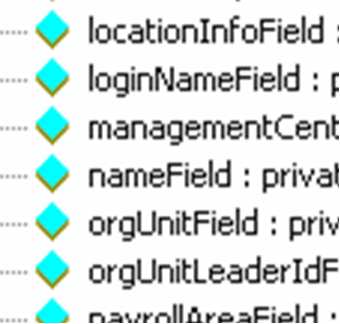
    {Old) Object used by subscriber web service:

    So, we’ve established that the web service knows nothing about “nickname”. If I add that field to my input document, and pass it in, route it to my subscriber port, what do you think happens? The first line of the web service writes a message to the event log, thus proving whether or not the service has successfully been called.

    I’ve turned on tcptrace so that I can ensure that “nickname” actually got transferred over the wire. Sure enough, the SOAP request contains my new field …

    Most importantly, an Event Log entry shows up, proving that my service was called with no problem.

    Interesting. So unexpected data elements are simply not serialized into the input object type, and no exception is thrown. I also tried using the “old” proxy class (e.g. without “nickname” in it) within BizTalk, and if schema validation is turned OFF, BizTalk also accepts the “extra” fields, but, since the “nickname” doesn’t exist in the proxy, does NOT send it over the wire, even though it was in the original XML message. Within the subscriber service, I could have serialized the object BACK into its XML format, and then applied an XML schema validation, and this would have raised a validation exception.

    Conclusion
    This is all good to know, but NOT a pattern or principle we will adopt. Instead, when changes are made to the enterprise schemas, we will create a new BizTalk map that “downgrades” the message in the subscriber send port. This way, we can gracefully update the subscribers at a later time, while still ensuring that they get the same message format today as they did yesterday. When the subscriber has recompiled their service with the latest auto-generated code, THEN we can remove the map from their send port and let them receive the newest elements.

    Technorati Tags: ,

  • Choosing Between WF Rules and BizTalk Business Rules Engine

    If you’re still facing issues deciding which sort of workflow/rules technology from Microsoft to use (e.g. Windows Workflow vs. BizTalk), check out the latest well-written piece by Charles Young. He covers many of the specific differences to consider when deciding which Microsoft technology will work best for your given application.

    Technorati Tags: , ,

  • Avoiding Service Timeouts In High Volume Orchestration Scenarios

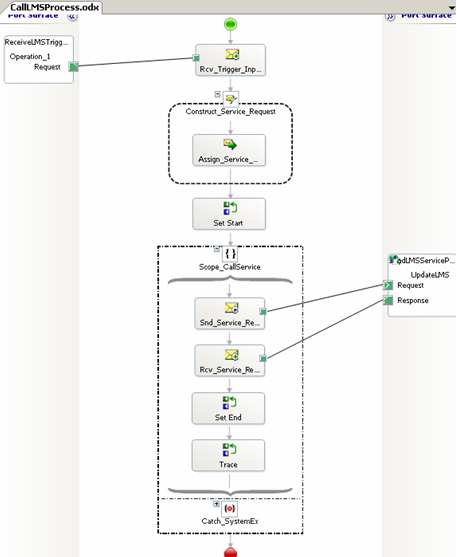
    We were recently architecting a solution that involved BizTalk calling a synchronous web service from an orchestration in a high volume scenario. What happens if the web service takes a long time to complete? Do you run the risk of timeouts in orchestrations that hadn’t even had a chance to call the service yet?

    Let’s say you have an orchestration that calls a synchronous web service, like so …

    Assume that the downstream system (reached through the web service interface) cannot handle more than a few simultaneous connections. So, you can add the <add address = “*” maxconnection = “2” /> directive to your btsntsvc.exe.config file (actually, you should filter by IP address as to not affect the entire server).

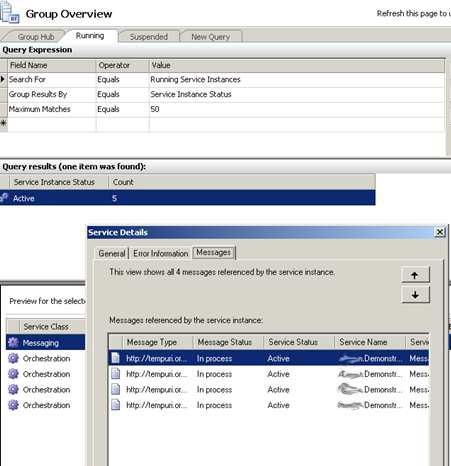
    What happens if I have 20 simultaneous orchestrations? I’ve reduced the outbound SOAP threadpool to “2”, so do the orchestrations wait patiently, or fail if they don’t call the service in the allotted time? I started up 3 orchestrations, and called my service (which purposely “sleeps” for 60 seconds to simulate a LONG-running service). As you can see below, I have 3 running instances, but my destination server’s event log only shows the first 2 connections.

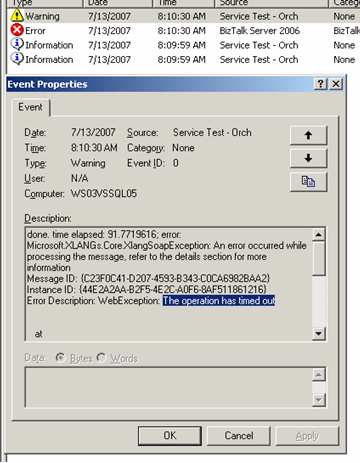
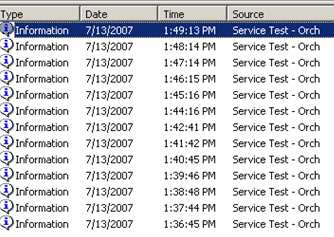
    The first two calls take 60 seconds, meaning the third message doesn’t call the service until 60 seconds have passed. You can see from my event log below that while the first 2 returned successfully, the third message/orchestration timed out. So, the “timeout” counter starts as soon as the send port is triggered, even if no threads are available.

    Now, what I found unexpected was the state of affairs after the timeouts. My next scenario involved dropping a larger batch size (13 messages) and predictably, I had 2 successes and 11 failures on the BizTalk server.

    HOWEVER, on my web server, the service actually got called 13 times! That is, the 11 messages that timed out (as far as BizTalk knows), actually went across the wire to the service. I added a unique key to each message just to be sure. It was interesting that after the BizTalk side timed out, all the queued up requests came over at once. So, if you have significant business logic in such a service, you’d want to make sure your orchestration had a compensating step. If you catch a timeout in the orchestration, there should be a compensating step to roll back any action that the service may have committed.

    So, how do you avoid this scenario? I tried a few things. First, I wondered if it was the orchestration itself starting the clock on the timeout when it detected a web port, so I removed the web port from the orchestration and used a “regular” port instead. No difference. It became crystal clear that the send port itself is starting the timeout clock, and even if no thread is available, the seconds are clicking by. I also considered using a singleton pattern to throttle the outbound calls, but didn’t love that idea.

    Finally, I came upon a solution that worked. If you turn on ordered delivery for the send port, then the send port isn’t called for a message until the previous one succeeds.

    This is one way to force throttling of the send port itself. To test this, I dropped 13 messages, and sure enough, the messages queued up in the send port, and no timeouts occurred.

    Even though the final orchestration didn’t get its service response back for nearly 13 minutes, it didn’t timeout.

    So, while not a fabulous solution, it IS a relatively clean way to make sure that timeouts don’t occur in high volume orchestration-to-service scenarios.

    Technorati Tags: ,

  • Delayed Validation of Web Service Input to BizTalk

    Back on the old blog, I posted about creating web services for BizTalk that accepted generic XML. In one of my current projects, a similar scenario came up. We have a WSDL that we must conform to, but wanted to accept generic content and validate AFTER the message reaches BizTalk.

    Our SAP system will publish messages in real-time to BizTalk. The WSDL for the service SAP will consume is already defined. So, we built a web service for BizTalk (using the Web Services Publishing Wizard) that conforms to that WSDL. When data comes into the service, BizTalk routes it around to all interested parties. The SOAP request looks like this …

    But what if the data is structurally incorrect? Because the auto-generated web service serializes the SOAP input into a strongly typed object, a request with an invalid structure never reaches the code that sends the payload to BizTalk. The serialization into the type fails, no exception is thrown (because the service call is asynchronous from SAP), and there are no exceptions in the Event Log or within BizTalk. Yikes! The only proof that the service was even called exists in the [IIS 6.0] web server logs. I can see here that a POST was made, but nowhere else can I verify that a connection was attempted.

    So I don’t like that. I want an audit trail that minimally shows me that BizTalk received the message. So, if we change the service input to something more generic (while still conforming to the WSDL), we can get the message into BizTalk and then validate it. How do you make the service more generic? I took the auto-generated BizTalk web service, and modified the method (changes in bold):

    public void ProcessModifySAPVendor([System.Xml.Serialization.XmlAnyElement]System.Xml.XmlElement part)
    {System.Collections.ArrayList inHeaders = null;
    System.Collections.ArrayList inoutHeaders = null;
    System.Collections.ArrayList inoutHeaderResponses = null;
    System.Collections.ArrayList outHeaderResponses = null;
    System.Web.Services.Protocols.SoapUnknownHeader[] unknownHeaderResponses = null;

    // Parameter information
    object[] invokeParams = new object[] {part};
    Microsoft.BizTalk.WebServices.ServerProxy.ParamInfo[] inParamInfos =
    new Microsoft.BizTalk.WebServices.ServerProxy.ParamInfo[]
    {
    new Microsoft.BizTalk.WebServices.ServerProxy.ParamInfo(
    typeof(System.Xml.XmlElement)
    , “part”)
    };

    Microsoft.BizTalk.WebServices.ServerProxy.ParamInfo[] outParamInfos = null;
    string bodyTypeAssemblyQualifiedName = null;
    // BizTalk invocation
    this.Invoke(“ProcessModifySAPVendor”,
    invokeParams, inParamInfos, outParamInfos, 0,
    bodyTypeAssemblyQualifiedName, inHeaders,
    inoutHeaders, out inoutHeaderResponses,
    out outHeaderResponses, null, null, null,
    out unknownHeaderResponses, true, false);
    }

    If you want to see more about the XmlAnyElement, check out this article. So once I modify my service this way, the SOAP request for the service now looks like this …

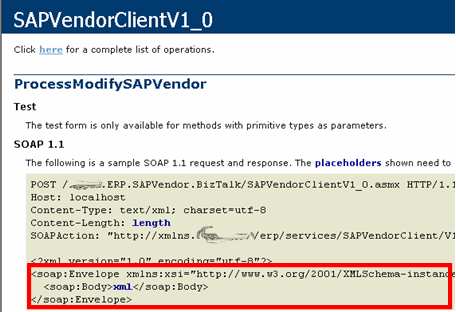
    The service caller can execute this service operation without changing anything. The same SOAP action and operation name and namespaces still apply. We’ve only made the payload generic. Now, the next step for us was to have a custom receive pipeline that validated the content. Here, on the XmlDisassembler pipeline component, I chose to Validate document structure on the inbound message.

    Now, if I send in a lousy message (bad structure, invalid data types, etc), I get the [IIS 6.0] web server log mention, but I ALSO get a suspended message within BizTalk! The message was able to be received, and only got validated after it had successfully reached the BizTalk infrastructure. Now, I have a record of the message and details about what went wrong …

    Now, I wouldn’t advise this pattern in most cases. Services or components that take “any” object/content are dangerous and a bit lazy. That said, in our case, this is a service that is ONLY called by one system (SAP), and, provides us with a much-needed validation/audit capability.

    Technorati Tags:

  • Summer Reading List

    I’m fortunate that my company does a summer shutdown during the July 4th week. I plan on taking a day or so of that “free” time off to learn a new technology or go deeper in something that I’ve only touched at a cursory level.

    I’ve recently read a few books (below) that were quite good and I’m on the lookout for others.

    All of those were great. I can’t recommend the CLR book enough. Great resource.

    I’d love suggestions on books/topics that I should learn more about. I’ve been meaning to do serious WCF stuff for awhile. Maybe look at different angles on “security” or “collaboration”? Know of any fantastic “development project management” books?

  • BizTalk ESB Guidance In The Wild

    Well, thanks to Chris for letting me know that ESB Guidance for BizTalk Server was added to Codeplex.

    I’m actually deploying an application this week based on the Exception Management code. I changed it around a bit, but having these bits accelerated my development significantly. Now I need to find a way to upgrade to these current components!

    Technorati Tags: ,

  • BizTalk Server and SOA Software Together, Part IV

    [Series Links: Part I / Part II / Part III / Part IV]

    In the first three parts of this series, I’ve shown you how SOA Software enables “last mile” web service management and configuration. Now, let’s focus on HOW you call a service that is managed by SOA Software Service Manager. If you add a policy to a service which requires specific authorization headers, then clearly you expect the service caller to add those headers. However, a developer probably doesn’t want to get bogged down in adding SAML tokens or applying digital signatures.

    SOA Software provides a Gateway Service which sits in between the client and service endpoint. A .NET/Java SDK is provided for clients to interact with this Gateway Service. Using the SDK, developers can work with an API that provides support for:

    • SOA Software Service Manager security
      • Encryption / decryption, signing / verifying, compression / decompression, credentials
    • WS-Encryption / WS-Decryption
    • Transport neutrality (choose HTTP, HTTPS, JMS)
    • Dynamic binding (based on UDDI)
    • Endpoint auto-configuration

    So, by using functions in a rich SDK API, the developer can avoid building complexity and guesswork into the construction of a service message managed by a robust policy. Now, let’s make it even easier. The last option in my list above (“Endpoint auto-configuration”) means that instead of asking the service caller to know how to pack up the service payload, do it for them.

    Within the SOA Software Service Manager you can set up a friendly identifier for the web service. Then, from client code, you can use the Gateway SDK to lookup all the policy information for a given service, and build up the message accordingly. That is, the developer writes 1 line of code to apply all the necessary policy bindings. The Gateway service then receives this command (auto-configuration) from the client, and packs up the message with a format required by the policy before forwarding the service call on to the destination. Cool!

    Now if I call a SOA Software managed web service (which has an “authentication” component in its policy) from BizTalk using the standard SOAP adapter (with an orchestration feeding it), I get the following error:
    Error details: SoapHeaderException: An error has occurred authenticating based on Credentials

    Great! So how do we get around this? My first thought was a pipeline component which would call the Gateway SDK code. I tried this, but it failed. The Gateway SDK code needs to be on the same calling thread as the actual service call. So, I needed to move this code as close to the adapter as possible. Thanks to the stud support folks at SOA Software, they suggested doing a SOAP send port with a proxy class (versus using the default “Orchestration web port” settings). So, I auto-generated a proxy class using wsdl.exe, and added the “gateway bridge” code to the corresponding web method.

    My send port then looked like this …

    I also had to change the send port’s URL to point to the Gateway service URL. So now, no part of my project points to the ACTUAL web service. Rather, I point to the Gateway service which adds all the necessary policy code before forwarding traffic to the real web service endpoint. Making these changes resulted in BizTalk working perfectly. No custom adapters, no need to unnecessary interject orchestration and fairly simple maintenance.

    Now, one concern I had was that using this architecture, my service caller (e.g. BizTalk) forwards a web service call to another box hosting the Gateway service, which then forwards the message on to the final service endpoint. Because service policy information is applied by the Gateway service, I can be confident that no one can sniff or tamper with messages leaving the Gateway machine. However, what about that call from my client TO the Gateway? Do I now have to do some HTTPS transmission JUST to get the Gateway?

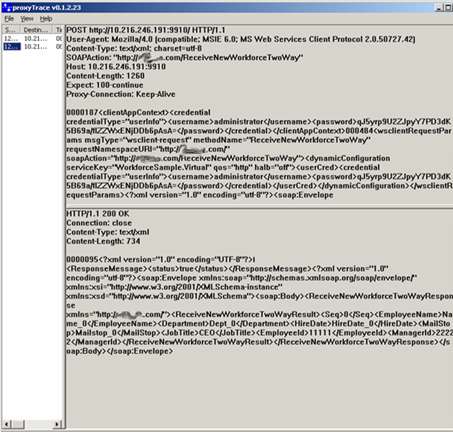
    Thankfully, the SOA Software folks thought of this. A parameter in the API call to the Gateway actually enables the payload to be fully encrypted. How do I test this? I’m using the great tools from PocketSOAP. You could use TCPTrace, but I actually like ProxyTrace more since the BizTalk setup is trivial. Using ProxyTrace, I can see the actual message being sent by the BizTalk SOAP adapter.

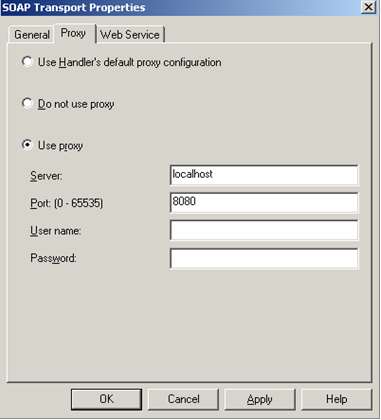
    After you start ProxyTrace (and tell it which port to listen on), you simply change your SOAP adapter (or HTTP adapter) “Proxy” tab like so:

    Once I call my service, I can now see the raw payload sent it, and the raw data returned. As you can see below, my message to the Gateway is in clear text (the password has been automatically hashed), and no funky policy headers have been applied yet.

    If I rebuild my SOAP proxy class (which contains the Gateway SDK code) to have the “encryptMessage” set to “true”, then my transmission out of the BizTalk box looks like this:

    I love that. Very simple, quite effective. If I check the recorded message in the SOA Software Service Manager portal site, I can see that after the Gateway processes the message, all the required policy elements have been added.

    Takeaway: To attach management and policy functionality to a service does NOT require changing anything in the service itself. No changing configuration files, code, etc. To CALL a service that is managed by SOA Software, you can use either the Java or .NET Gateway SDK to abstract the actual complexity required to attach relevant policy data.

    Great stuff. These folks are working on cutting-edge things, and I’m constantly surprised at the overall thoughtfulness and completeness of their platform. Highly recommended.

    Technorati Tags: ,

  • BizTalk Server and SOA Software Together, Part III

    [Series Links: Part I / Part II / Part III / Part IV]

    In the last post we looked at how SOA Software is used to manage and maintain web services. Today, let’s look at how we can configure web service “policies” to do everything from encryption to load balancing.

    So far we’ve seen that a give service managed by SOA Software can have a “policy” attached to it. What is a “policy” really? The types of policies we’ll look at here include “management” policies, “SLA” policies, and “access” policies. For a BizTalk developer, think of a management policy as a pipeline. The management policy configuration page looks like this:

    You have a series of components to handle the request message, and series of components to handle the response message. Again, very much like a BizTalk pipeline. For the Record component in this template, you can configure it as such:
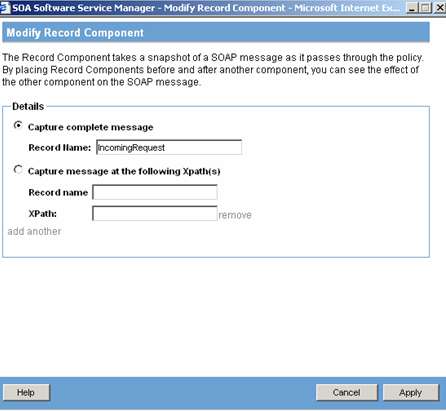
    You can snag either the entire payload, or choose to grab only a specific record(s). Odds are, you’d only have a policy do this much recording of data during a test or debugging scenario. But, it’s quite useful if you’ve got a series of complex components (encryption, etc) and want to print out the result after a particular stage.

    The Security policy component is quite powerful. You can perform authentication checks to ensure that the service client is a valid user in a defined identity system. After choosing which identity system the policy should confirm against, you next choose the means of capturing the actual identity. Choices include SAML, x509 certificates, HTTP Basic Auth, and more. From this component you can also apply or verify digital signatures.

    If you choose to, you can also apply WS-Encryption and WS-Decryption capabilities. The WS-Encryption lets you choose the way to encrypt, and then WHAT to encrypt. So you could identify 4 nodes in your SOAP payload that contain sensitive data, and ONLY encrypt those fields.

    You could also choose to manipulate the message a bit by using the Strip Element component. Let’s say that you’ve already verified a signature, or received credentials in the payload that are now unnecessary. You could strip those out before sending the message on to the next hop. Nice.

    For performance reasons, you may also want to use a Caching component. In this case, the Policy will compare the SOAP body/envelope and if it matches an instance in cache, the cached response message is immediately returned.

    Other valuable management policy components include:

    • Authorization
    • Schema Validation
    • Dynamic Management (where you can re-route the service to different service locations based on rules)
    • Data Transformation
    • Compression/Decompression
    • Load Balancing

    Those were examples of “management” policies in SOA Software. You also have the ability to create additional policy types. One interesting one is the SLA Policy. In this type of policy, you can dictate performance-related metrics that should result in a system level alert. For instance, my policy below says that if SOA Software encounters more than 25 SOAP faults in a 1 day period, raise an alert. And remember, this specific policy can be associated with individual services and operations.

    There’s also the concept of Access Policies which can be used to restrict traffic to a given service. If you had an external vendor calling your service, you could create a policy that says that a particular user/company can only execute the service 500 times a day, or, only between the hours of 8am-5pm Monday through Wednesday.

    Now you could have the concern that managing these policies, and who is using them, could be a nightmare. What sort of dependency tracking do you get? The answer is, surprisingly strong reference management. In my Policy Overview screen, I can see how many service operations use a given policy.
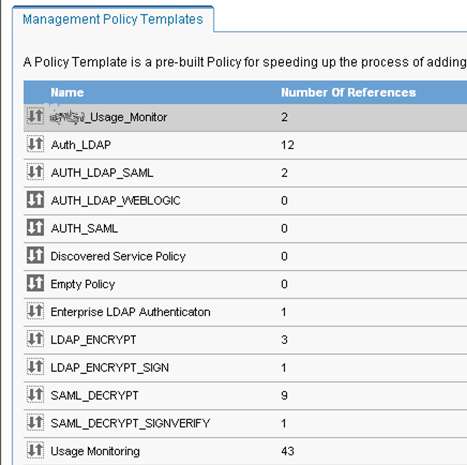
    I can then drill even further, and see each operation using a given policy. That alone is useful, but what if a mass update needed to happen? From this view, I can make bulk changes to each service that uses the policy!

    That’s huge. Otherwise, even 50 services could be a challenge to maintain, not to mention 500!

    It’s a fairly safe assumption that the “policy” functionality of SOA Software is where you find significant business value. All of these policies are applied, and enforced, without touching your service, or creating code. I suspect that my company will use the security-related components most frequently. The non-security policy components will definitely find a home in various policies, but we’ll see a universal adoption of security components off the bat.

    As you’ve seen so far, managing existing services is easy. The only place where a developer needs to be cognizant of the fact that a service is managed is when they CALL that service. The next post is where I bring it all home. Specifically, how can BizTalk Server (or ANY .NET/Java application) make accurate calls to a service managed by SOA Software?

    Technorati Tags: ,