Category: General Architecture

  • Applying Role-Based Security to BizTalk Feeds From RSSBus

    I recently showed how one could use RSSBus to generate RSS feeds for BizTalk service metrics on an application-by-application basis.  The last mile, for me, was getting security applied to a given feed.  I only have a single file that generates all the feeds, but, I still need to apply role-based security restraints on the data.

    This was a fun exercise.  First, I had to switch my RSSBus installation to use Windows authentication, vs. the Forms authentication that the default installation uses.  Next I removed the “anonymous access” capabilities from the IIS web site virtual directory.  I need those steps done first because I plan on checking to see if the calling user is in the Active Directory group associated with a given BizTalk application.

    Now the interesting part.  RSSBus allows you to generate custom “formatters” for presenting data in the feed.  In my case, I have a formatter which does a security check.  Their great technical folks provided me a skeleton formatter (and way too much personal assistance!) which I’ve embellished a bit.

    First off, I have a class which implements the RSSBus formatter interface.

    public class checksecurity : nsoftware.RSSBus.RSBFormatter
    

    Next I need to implement the required operation, “Format” which is where I’ll check the security credentials of the caller.

    public string Format(string[] value, string[] param)
    {
       string appname = "not_defined";
       string username = "anonymous";
       bool hasAccess = false;
    	
       //check inbound params for null
       if (value != null && value[0] != null)
       {
         appname = value[0];
         //grab username of RSS caller
         username = HttpContext.Current.User.Identity.Name;
         if (HttpContext.Current != null)
         {
            //check cache
    	if (HttpContext.Current.Cache["BizTalkAppMapping"] == null)
            {
              //inflate object from XML config file
              BizTalkAppMappingManager appMapping = LoadBizTalkMappings();
    
              //read role associated with input BizTalk app name
              string mappedRole = appMapping.BizTalkMapping[appname];
    
              //check access for this user
              hasAccess = HttpContext.Current.User.IsInRole(mappedRole);
    
              //pop object into cache with file dependency
              System.Web.Caching.CacheDependency fileDep = 
                   new System.Web.Caching.CacheDependency
                       (@"BizTalkApplicationMapping.xml");
              HttpContext.Current.Cache.Insert
                       ("BizTalkAppMapping", appMapping, fileDep);
             }
            else
             {
              //read object and allowable role from cache
              string mappedRole = 
                   ((BizTalkAppMappingManager)
                        HttpContext.Current.Cache["BizTalkAppMapping"])
                           .BizTalkMapping[appname];
    
             //check access for this user
             hasAccess = HttpContext.Current.User.IsInRole(mappedRole);
              }
         }
      }
      if (hasAccess == false) 
            throw new RSBException("access_violation", "Access denied.");
                
      //no need to return any value
      return "";
    }
    

    A few things to note in the code above.  I call a function named “LoadBizTalkMappings” which reads an XML file from disk (BizTalkApplicationMapping.xml), serializes it into an object, and returns that object.  That XML file contains name/value pairs of BizTalk application names and Active Directory domain groups.  Notice that I use the “IsInRole” operation on the Principal object to discover if this user can view this particular feed.  Finally, see that I’m using web caching with a file dependency.  After the first load, my mapping object is read from cache instead of pulled from disk. When new applications come on board, or a AD group account changes, simply changing my XML configuration file will invalidate my cache and force a reload on the next RSS request.  Neato.

    That’s all well and good, but how do I use this thing?  First, in my RSSBus web directory, I created an “App_Code” directory and put my class files (formatter and BizTalkApplicationMappingManager) in there.  Then they get dynamically compiled upon web request.  The next step is tricky.  I originally had my formatter called within my RSSBus file where my input parameters were set.  However, I discovered that due to my RSS caching setup, once the feed was cached, the security check was bypassed!  So, instead, I put my formatter request in the RSSBus cache statement itself.  Now I’m assured that it’ll run each time.

    So what do I have now?  I have RSS urls such as http://server/rssbus/BizTalkOperations.rsb?app=Application1 which will only return results for “Application1” if the caller is in the AD group defined in my XML configuration file.  Even though I have caching turned on, the RSSBus engine checks my security formatter prior to returning the cached RSS feed.  Cool.

    Is this the most practical application in the world?  Nah.  But, RSS can play an interesting role inside enterprises when tracking operational performance and this was a fun way to demonstrate that.  And now, I have a secure way of allowing business personnel to see the levels of activity through the BizTalk systems they own.  That’s not a bad thing.

    Technorati Tags: ,

  • Building an RSSBus Feed for BizTalk Server

    A few months back, I demonstrated how to build a SQL query against the BizTalk databases which returned application-level activity metrics.   Now that the RSSBus Server has moved further along in its release cycle, I went ahead and built a more full-featured RSS feed out of BizTalk.

    Within the RSSBus infrastructure, one can build an “.rsb” file, which can be syndicated as RSS.

    So what’s contained in this “.rsb” file that makes my RSS feed so exciting?  Let’s look.  First off, I can specify input parameters to my feed, which are received via the URI itself.  Notice that you can also specify a default value, and, a restricted list of values.  In my case below, I’m only accepting activity metrics for one, two, seven and fourteen days back.

    <rsb:info 
    title="BizTalk Operations" description="BizTalk Operations Feed">
      <input name="app" default="App1" 
    desc="This is the name of the BizTalk application to query">
      <input name="interval" default="1" 
    desc="The number of historical days to show" values="1,2,7,14">
      <input name="servicefilter" default="" 
    desc="Keyword filter of results">
      <input name="typefilter" default="all" 
    desc="Show all service types/just messaging/just orchestration" 
    required="false">
     </rsb:info>

    What I’m trying to do here is have a single “feed” file, which can actually serve RSS data for a wide variety of applications and scenarios.  Instead of having to create a new RSS feed for each newly deployed BizTalk “application”, I can simply generate a new URI and not deploy a single new object.

    Now arguably the only way this solution will work is if we aren’t actually hitting the BizTalk databases each time a person refreshes their RSS feed.  I don’t want that additional load on our production system.  So, what are my caching options?  As it turns out (thanks to the spectacularly helpful RSSBus techs who helped me out), the caching capabilities are quite robust.  Here’s my caching declaration in my “.rsb” file ..

    <rsb:cache duration="120" 
    file="cache\\cache_[_input.app | tofilename]_
    [_input.interval | tofilename]_[_input.servicefilter | tofilename]_
    [_input.typefilter | tofilename].xml" />

    The first time this feed is hit (or when the cache duration has been exceeded), a cache file is created and named according to the URI parameters.  So if I hit this feed for application “ABC” and a “7 day” duration, filtered by all services with “SOAP” in the name, and only wanted “messaging” services, my cache file on disk would be named “cache_ABC_7_SOAP_messaging.xml”.  If someone else makes the same RSS request within the cache duration interval, then RSSBus will return the cached data (stored in the file) instead of actually querying my BizTalk databases again.  As you would expect, I have many cache files on my system at any one time to reflect the many RSS query permutations.

    Then, within my “.rsb” file, I use the RSSBus “sqlCall” connector and format all the results.  The “<rsb:match>” keyword is in place to suppress resulting values that don’t contain the input “service filter” value.   I then use the “<rsb:select>” and “<rsb:case>” keywords to do a switch statement based on the “type filter” value.  This allows me to show only orchestration services, messaging (send/receive) services, or both.

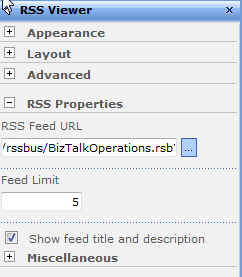
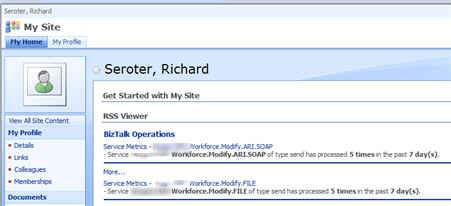
    So what’s the result?  To demonstrate the RSSBus server to some colleagues, I utilized our newly deployed MOSS 2007 infrastructure to add RSS data to my personal site.  After putting together the RSS query URI just the way I want it, I take that URI and apply it to the RSS webpart on my site.

    I chose to show both the feed AND description since I put the BizTalk activity count in the item description.  After saving my web part changes, I can now see my RSS data from our “development” server.


    Now I can provide URLs to the business owners of our various BizTalk applications and they can see regular performance metrics for their system.  RSSBus provides a pretty unique platform for building and maintaining RSS feeds from a wide variety of sources.  Providing operational metrics from enterprise systems may be one way that my company actually uses RSS to further business objectives.

    My last step is to add security to a given feed query, and the RSSBus folks are helping me through that right now.  I’d like to be able to restrict viewership of a given feed based on Active Directory group membership.  I’ll report back on the results.

    Technorati Tags: ,

  • Changing Roles

    It’s been just about a year since I left Microsoft to take my current job, and after some success in my initial role, I’m switching teams and responsibilities.

    I was brought into this company to help establish our BizTalk practice.  After participating in 10 projects, teaching 8 classes (to 110+ colleagues), creating a few tools and frameworks, and writing up some best practices and checklists, it was time for new challenges.

    So, I’ve moved into our Solutions Architecture team as a Solutions Architect.  My job now is to execute architecture reviews, help define and guide architectural principles, design and model new systems, research and introduce new technologies, and more.   While I’ll remain the “BizTalk guy” here for a while, that’s no longer my central technology each and every day.

    Blog-wise, expect to continue seeing various tidbits and demonstrations of BizTalk concepts (because it’s still fun for me), but I’ll probably start peppering in other architectural topics that are on my mind.

    Technorati Tags: , ,

  • Microsoft Architecture Journal Reader Tool

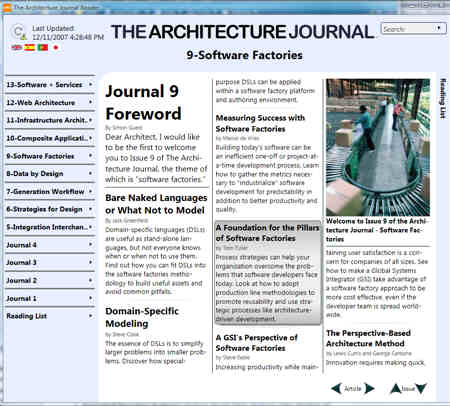
    Yesterday I was checking out the MSDN Architecture Center and noticed a reader application for the Architecture Journal.

    This interface makes the Journal easy to read, and demonstrates a few nice UI concepts.

    This tool is auto-updating, so it should automatically pull down the latest versions of the Journal.  You can add interesting articles to a “reading list” for later reference.   For each particular article, you have the option of saving it to the desktop, emailing it, or copying the summary to the Windows clipboard.

    Another nice feature is the ability to add notes to each article.  Once a note is added to a particular passage or section, that area is highlighted with a different color.  I was hoping that my notes would show up in the search results, but alas, I’d have to remember where I had added notes vs. finding them later via broad search.

    I find this more interesting as a UI design then for actually reading the Journal.  There probably aren’t enough issues to justify reading list and search functionality (I’d like to see this tool for MSDN Magazine!), but, it does offer a few interesting ideas about an internet-updated thick client.

    Technorati Tags: ,

  • New Whitepaper on BizTalk + WCF

    Just finished reading the excellent new whitepaper from Aaron Skonnard (hat tip: Jesus) entitled Windows Communication Foundation Adapters in Microsoft BizTalk Server 2006 R2. Very well written and it provides an exceptionally useful dissection of the BizTalk 2006 R2 usage of WCF. Can’t recommend it enough.

    That said, I still have yet to entirely “jump into the pool” on WCF yet. It’s like a delicious, plump steak (WCF) when all I’m really want is a hamburger (SOAP Basic Profile). My shop is very SOAP-over-HTTP focused for services, so the choice of channel bindings is a non-starter for me. Security for us is handled by SOA Software, so I really don’t need an elaborate services security scheme. I like the transaction and reliability support, so that may be where the lightbulb really goes on for me. I probably need to look harder for overall use cases inside my company, but for me, that’s often an indicator that I have a solution with no problem. Or, that I’m a narrow-minded idiot who has to consider more options when architecting a solution. Of course with the direction that BizTalk is heading, and all this Oslo stuff, I understand perfectly that WCF needs to be a beefy part of my repetoire moving forward.

    In the spirit of discussing services, I also just finished the book RESTful Web Services and found it an extremely useful, and well-written, explanation of RESTful design and Resource Oriented Architecture. The authors provided a detailed description of how to identify and effectively expose resources, while still getting their digs at “Big Web Services” and the challenges with WSDL and SOAP. As others have stated, it seems to me that a RESTful design works great with CRUD operations on defined resources, but within enterprise applications (which aren’t discussed AT ALL in this book), I like having a strong contract, implementation flexibility (on hazier or aggregate resources) and access to WS* aspects when I need them. For me, the book did a bit of disservice only focusing on Amazon S3 and Flickr (and like services) without identifying how this sort of design holds up for the many enterprise applications that developers build web services integration for. On a day to day basis, aren’t significantly more developers building services to integrate with SAP/Oracle/custom app then the internet-facing services used as the examples in the book?

    All of this is fairly irrelevant to me since WCF has pleasant support for both URI-based services (through UriTemplate) and RPC-style services and developers can simply choose the right design for each situation. Having a readable URI is smart whether you’re doing RFC-style SOAP calls using only HTTP POST, or doing the academically friendly RESTful manner. The REST vs. WS* debate reminds me of a statement by my co-worker a few weeks back (and probably lifted from elsewhere): “The reason that debates in academia are so intense is because the stakes are so small.” Does it really matter which service design style your developers go with, assuming they are built well? Seems like a lot of digital ink has been spent on a topic that shouldn’t cause anyone to lose sleep.

    Speaking of losing sleep, it’s time for me to change and feed my new boy. As you were.

    Technorati Tags:

  • Securely Storing Passwords for Accessing SOA Software Managed Services

    One tricky aspect of consuming a web service managed by SOA Software is that the credentials used in calling the service must be explicitly identified in the calling code. So, I came up with a solution to securely and efficiently manage many credentials using a single password stored in Enterprise Single Sign On

    A web service managed by SOA Software may have many different policies attached. There are options for authentication, authorization, encryption, monitoring and much more. To ease the confusion on the developers calling such services, SOA Software provides a clean API that abstracts away the underlying policy requirements. This API speaks to the Gateway, which attaches all the headers needed to comply with the policy and then forwards the call to the service itself. The code that a service client would implement might look like this …

    Credential soaCredential = 
        new Credential("soa user", "soa password");
    
    //Bridge is not required if we are not load balancing
    SDKBridgeLBHAMgr lbhamgr = new SDKBridgeLBHAMgr();
    lbhamgr.AddAddress("http://server:9999");
    
    //pass in credential and boolean indicating whether to 
    //encrypt content being passed to Gateway
    WSClient wscl = new WSClient(soaCredential, false);
    WSClientRequest wsreq = wscl.CreateRequest();
    
    //This credential is for requesting (domain) user. 
    Credential requestCredential = 
        new Credential("DOMAIN\user", "domain password");
    
    wsreq.BindToServiceAutoConfigureNoHALB("unique service key", 
        WSClientConstants.QOS_HTTP, requestCredential);
    

    The “Credential” object here doesn’t accept a Principal object or anything similar, but rather, needs specific values entered. Hence my problem. Clearly, I’m not going to store clear text values here. Given that I will have dozens of these service consumers, I hesitate to use Single Sign On to store all of these individual sets of credentials (even though my tool makes it much simpler to do so).

    My solution? I decided to generate a single key (and salt) that will be used to hash the username and password values. We originally were going to store these hashed values in the code base, but realized that the credentials kept changing between environments. So, I’ve created a database that stores the secure values. At no point are the credentials stored in clear text in the database, configuration files, or source code.

    Let’s walk through each component of the solution.

    Step #1

    Create an SSO application to store the single password and salt used to encrypt/decrypt all the individual credential components. I used the SSO Configuration Store Application Manager tool to whip something up. Then upon instantiation of my “CryptoManager”, I retrieve those values from SSO and cache them in the singleton (thus saving the SSO roundtrip upon each service call).

    Step #2

    I need a strong encryption mechanism to take the SOA Software service passwords and turn them into gibberish to the snooping eye. So, I built a class that encrypts a string (for design time), and then decrypts the string (for runtime). You’ll notice my usage of the ssoPassword and ssoSalt values retrieved from SSO. The encryption operation looks like this …

    /// <summary>
    /// Symmetric encryption algorithm which uses a single key and salt 
    /// securely stored in Enterprise Single Sign On.  There are four 
    /// possible symmetric algorithms available in the .NET Framework 
    /// (including DES, Triple-DES, RC2, Rijndael/AES). Rijndael offers 
    /// the greatest key length of .NET encryption algorithms (256 bit) 
    /// and is currently the most secure encryption method.  
    /// For more on the Rijndael algorithm, see 
    /// http://en.wikipedia.org/wiki/Rijndael
    /// </summary>
    /// <param name="clearString"></param>
    /// <returns></returns>
    public string EncryptStringValue(string clearString)
    {
        //create instance of Rijndael class
        RijndaelManaged RijnadaelCipher = new RijndaelManaged();
        //let add padding to ensure no problems with encrypted data 
        //not being an even multiple of block size
        //ISO10126 adds random padding bytes, vs. PKCS7 which does an 
        //identical sequence of bytes
        RijnadaelCipher.Padding = PaddingMode.ISO10126;
    
        //convert input string to a byte array
        byte[] inputBytes = Encoding.Unicode.GetBytes(clearString);
    
        //using a salt makes it harder to guess the password.
        byte[] saltBytes = Encoding.Unicode.GetBytes(ssoSalt);
    
        //Derives a key from a password
        PasswordDeriveBytes secretKey = 
    	    new PasswordDeriveBytes(ssoPassword, saltBytes);
    
        //create encryptor which converts blocks of text to cipher value 
        //use 32 bytes for secret key
        //and 16 bytes for initialization vector (IV)
        ICryptoTransform Encryptor = 
    	    RijnadaelCipher.CreateEncryptor(secretKey.GetBytes(32), 
                     secretKey.GetBytes(16));
    
        //stream to hold the response of the encryption process
        MemoryStream ms = new MemoryStream();
    
        //process data through CryptoStream and fill MemoryStream
        CryptoStream cryptoStream = 
    	    new CryptoStream(ms, Encryptor, CryptoStreamMode.Write);
        cryptoStream.Write(inputBytes, 0, inputBytes.Length);
    
        //flush encrypted bytes
        cryptoStream.FlushFinalBlock();
    
        //convert value into byte array from MemoryStream
        byte[] cipherByte = ms.ToArray();
    
        //cleanup
        //technically closing the CryptoStream also flushes
        cryptoStream.Close();
        cryptoStream.Dispose();
        ms.Close();
        ms.Dispose();
    
        //put value into base64 encoded string
        string encryptedValue = 
            System.Convert.ToBase64String(cipherByte);
    
        //return string to caller
        return encryptedValue;
    }
    

    For decryption, it looks pretty similar to the encryption operation …

    public string DecryptStringValue(string hashString)
    {
        //create instance of Rijndael class
        RijndaelManaged RijnadaelCipher = new RijndaelManaged();
        RijnadaelCipher.Padding = PaddingMode.ISO10126;
    
        //convert input (hashed) string to a byte array
        byte[] encryptedBytes = Convert.FromBase64String(hashString);
    
        //convert salt value to byte array
        byte[] saltBytes = Encoding.Unicode.GetBytes(ssoSalt);
    
        //Derives a key from a password
        PasswordDeriveBytes secretKey = 
    	    new PasswordDeriveBytes(ssoPassword, saltBytes);
    
        //create decryptor which converts blocks of text to cipher value
    	//use 32 bytes for secret key
        //and 16 bytes for initialization vector (IV)
        ICryptoTransform Decryptor = 
    	    RijnadaelCipher.CreateDecryptor(secretKey.GetBytes(32), 
                     secretKey.GetBytes(16));
    
        MemoryStream ms = new MemoryStream(encryptedBytes);
    
        //process data through CryptoStream and fill MemoryStream
        CryptoStream cryptoStream = 
    	    new CryptoStream(ms, Decryptor, CryptoStreamMode.Read);
    
        //leave enough room for plain text byte array by using length of 
    	//encrypted value (which won't ever be longer than clear text)
        byte[] plainText = new byte[encryptedBytes.Length];
    
        //do decryption
        int decryptedCount = 
            cryptoStream.Read(plainText, 0, plainText.Length);
    
        //cleanup
        ms.Close();
        ms.Dispose();
        cryptoStream.Close();
        cryptoStream.Dispose();
    
        //convert byte array of characters back to Unicode string
        string decryptedValue = 
            Encoding.Unicode.GetString(plainText, 0, decryptedCount);
    
        //return plain text value to caller
        return decryptedValue;
    }
    

    Step #3

    All right. Now I have an object that BizTalk will call to decrypt credentials at runtime. However, I don’t want these (hashed) credentials stored in the source code itself. This would force the team to rebuild the components for each deployment environment. So, I created a small database (SOAServiceUserDb) that stores the service destination URL (as the primary key) and credentials for each service.

    Step #4

    Now I built a “DatabaseManager” singleton object which upon instantiation, queries my SOAServiceUserDb database for all the web service entries, and loads them into a member Dictionary object. The “value” of my dictionary’s name/value pair is a ServiceUser object that stores the two sets of credentials that SOA Software needs.

    Finally, I have my actual implementation object that ties it all together. The web service proxy class first talks to the DatabaseManager to get back a loaded “ServiceUser” object containing the hashed credentials for the service endpoint about to be called.

    //read the URL used in the web service proxy; call DatabaseManager
    ServiceUser svcUser = 
        DatabaseManager.Instance.GetServiceUserAccountByUrl(this.Url);
    

    I then call into my CrytoManager class to take these hashed member values and convert them back to clear text.

    string bridgeUser = 
        CryptoManager.Instance.DecryptStringValue(svcUser.BridgeUserHash);
    string bridgePw = 
        CryptoManager.Instance.DecryptStringValue(svcUser.BridgePwHash);
    string reqUser = 
        CryptoManager.Instance.DecryptStringValue(svcUser.RequestUserHash);
    string reqPw = 
        CryptoManager.Instance.DecryptStringValue(svcUser.RequestPwHash);
    

    Now the SOA Software gateway API uses these variables instead of hard coded text.

    So, when a new service comes online, we take the required credentials and pass them through my encryption algorithm to get a hash value, then add a record in the SOAServiceUserDb to store the hash value, and that’s about it. As we migrate between environments, we simply have to keep our database in sync. Given that my only real risk in this solution is using a single password/salt to hash all my values, I feel much better knowing that the critical password is securely stored in Single Sign On.

    I would think that this strategy stretches well beyond my use case here. Thoughts as to how this could apply in other “single password” scenarios?

    Technorati Tags:

  • BizTalk SSO Configuration Data Storage Tool

    If you’ve been in the BizTalk world long enough, you’ve probably heard that you can securely store name/value pairs in the Enterprise Single Sign-On (SSO) database. However, I’ve never been thrilled with the mechanism for inserting and managing these settings, so, I’ve built a tool to fill the void.

    Jon Flanders did some great work with SSO for storing configuration data, and the Microsoft MSDN site also has a sample application for using SSO as a Configuration Store, but, neither gave me exactly what I wanted. I want to lower the barrier of entry for SSO since it’s such a useful way to securely store configuration data.

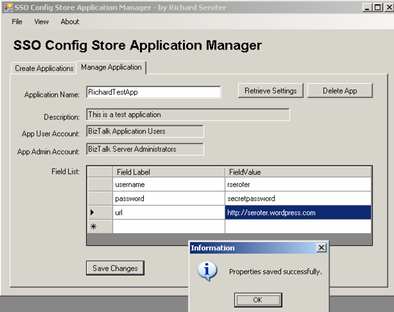
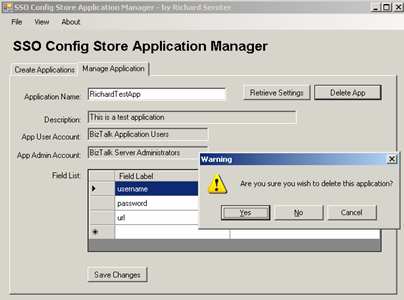
    So, I built the SSO Config Store Application Manager.

    I can go ahead and enter in an application name, description, account groups with access permissions, and finally, a collection of fields that I want to store. “Masking” has to do with confidential values and making sure they are only returned “in the clear” at runtime (using the SSO_FLAG_RUNTIME flag). Everything in the SSO database is fully encrypted, but this flag has to do with only returning clear values for runtime queries.

    You may not want to abandon the “ssomanage” command line completely. So, I let you export out the “new application” configuration into the SSO-ready format. You could also change this file for each environment (different user accounts, for instance), and then from the tool, load a particular XML configuration file during installation. So, I could create XML instances for development/test/production environments, open this tool in each environment, and load the appropriate file. Then, all you have to do is click “Create.”


    If you flip to the “Manage” tab of the application, you can set the field values, or delete the application. Querying an application returns all the necessary info, and, the list of property names you previously defined.

    If you’re REALLY observant, and use the “ssomanage” tool to check out the created application, you’ll notice that the first field is always named “dummy.” This is because if every case I’ve tested, the SSO query API doesn’t return the first property value from the database. Drove me crazy. So, I put a “dummy” in there, so that you’re always guaranteed to get back what you put in (e.g. put in four fields, including dummy, and always get back the three you actually entered). So, you can go ahead and safely enter values for each property in the list.

    So how do we actually test that this works? I’ve included a class, SSOConfigHelper.cs (slightly modified from the MSDN SSO sample) in the below zip file, that you would included in your application or class library. This class has the “read” operation you need to grab the value from any SSO application. The command is as simple as:

    string response = SSOConfigHelper.Read(queryName, propertyName);

    Finally, when you’re done messing around in development, you can delete the application.

    I have plenty of situations coming up where the development team will need to secure store passwords and connection strings and I didn’t like the idea of trying to encrypt the BizTalk configuration file, or worse, just being lazy and embedding the credentials in the code itself. Now, with this tool, there’s really no excuse not to quickly build an SSO Config Store application and jam your values in there.

    You can download this tool from here.

    Technorati Tags:

  • Utilizing Spring.NET To Integrate BizTalk and SOA Software

    I recently had the situation where I wanted to reuse a web service proxy class for multiple BizTalk send ports but I required a unique code snippet specific to each send port.

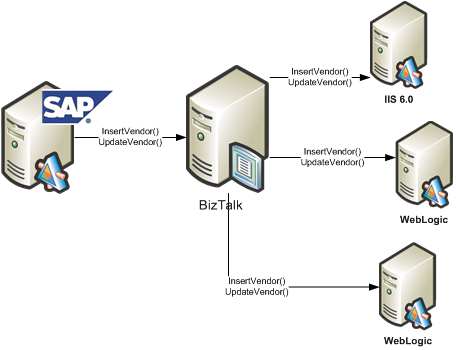
    We use SAP XI to send data to BizTalk which in turn, fans out the data to interested systems. Let’s say that one of those SAP objects pertains to each of our external Vendors. Each consumer of the Vendor data (i.e. BizTalk, and then each downstream system) consumes the same WSDL. That is, each subscriber of Vendor data receives the same object type and has the same service operations.

    So, I can generate a single proxy class using WSDL.exe and my “Vendor” WSDL, and use that proxy class for each BizTalk send port. It doesn’t matter the technology platform of my destination system, as this proxy should work fine whether the downstream service is Java, .NET, Unix, Windows, whatever.

    Now the challenge. We use SOA Software Service Manager to manage and secure our web services. As I pointed out during my posts about SOA Software and BizTalk, each caller of a service managed by Service Manager needs to add the appropriate headers to conform to the service policy. That is, if the web service operation requires a SAML token, then the service caller must inject that. Instead of forcing the developer to figure out how to correctly add the required headers, SOA Software provides an SDK which does this logic for you. However, each service may have different policies with different credentials required. So, how do I use the same proxy class, but inject subscriber-specific code at runtime in the send port?

    What I wanted was to do a basic Inversion of Control (IOC) pattern and inject code at runtime. At its base, an IOC pattern is simply really, really, really late binding. That’s all there is to it. So, the key is to find an easy to use framework that exploits this pattern. We are fairly regular uses of Spring (for Java), so I thought I’d utilize Spring.NET in my adventures here.

    I need four things to make this solution work:

      • A simple interface created that is implemented by the subscribing service team and contains the code specific to their Service Manager policy settings.
      • A Spring.NET configuration file which references these implemented interfaces
      • A singleton object which reads the configuration file once and provides BizTalk with pointers to these objects

    A modified web service proxy class that consumes the correct Service Manager code for a given send port

    First, I need an interface defined. Mine is comically simple.

    public interface IExecServiceManager
    {
    bool PrepareServiceCall();
    }

    Each web service subscriber can build a .NET component library that implements that interface. The “PrepareServiceCall” operation contains the code necessary to apply Service Manager policies.

    Next I need a valid Spring.NET configuration file. Now, I could have extended the standard btsntsvc.exe.config BizTalk configuration file (ala Enterprise Library), but, I actually PREFER keeping this separate. Easier to maintain, less clutter in the BizTalk configuration file. My Spring.NET configuration looks like this …

    <object name=”http://localhost/ERP.Vendor.Subscriber2
    /SubscriberService.asmx”
    type=”Demonstration.IOC.SystemBServiceSetup.ServiceSetup, Demonstration.IOC.SystemBServiceSetup” singleton=”false”/>
    </objects>

    I created two classes which implemented the previously defined interface and referenced them in that configuration file.

    Next I wanted a singleton object to load the configuration file and keep in memory. This is what trigger my research into BizTalk and singletons a while back. My singleton has a primary operation called LoadFactory during the initial constructor …

    using Spring.Context;
    using Spring.Objects.Factory.Xml;
    using Spring.Core.IO;

    private void LoadFactory()
    {
    IResource objectList = new FileSystemResource
    (@”C:\BizTalk\Projects\Demonstration.IOC\ServiceSetupObjects.xml”);
    //set private static value
    xmlFactory = new XmlObjectFactory(objectList);}

    Finally, I modified the auto-generated web service proxy class to utilize Spring.NET and load my Service Manager implementation class at runtime.

    using Spring.Context;
    using Spring.Objects.Factory.Xml;
    using Spring.Core.IO;
    using Demonstration.IOC.InterfaceObject;

    public void ProcessNewVendor(NewVendorType NewVendor)
    {//get WS URL, which can be used as our Spring config key
    string factoryKey = this.Url;

    //get pointer to factory
    XmlObjectFactory xmlFactory =
    XmlObjectFactorySingleton.Instance.GetFactory();

    //get the implementation object as an interface
    IExecServiceManager serviceSetup =
    xmlFactory.GetObject(factoryKey) as IExecServiceManager;

    //execute send port-specific code
    bool responseValue = serviceSetup.PrepareServiceCall();

    this.Invoke(“ProcessNewVendor”, new object[] {
    NewVendor});
    }

    Now, when a new subscriber comes online, all we do is create an implementation of IExecServiceManager, GAC it, and update the Spring.NET configuration file. The other option would have been to create separate web service proxy classes for each downstream subscriber, which would be a mess to maintain.

    I’m sure we’ll come up with many other ways to use Spring.NET and IOC patterns within BizTalk. However, you can easily go overboard with this dependency injection stuff and end up with an academically brilliant, but practically stupid architecture. I’m a big fan of maintainable simplicity.

    Technorati Tags:

  • My BizTalk Code Review Checklist

    I recently put together a BizTalk Code Review checklist for our development teams, and thought I’d share the results.

    We didn’t want some gargantuan list of questions that made code review prohibitive and grueling. Instead, we wanted a collection of common sense, but concrete, guidelines for what a BizTalk solution should look like. I submit that any decent BizTalk code reviewer would already know to look out for the items below, but, having the checklist in written form ensures that developers starting new projects know EXACTLY what’s expected of them.

    I’m sure that I’ve missed a few things, and would welcome any substantive points that I’ve missed.

    BizTalk Code Review Checklist

    Naming Standards Review
    Standard Result Correction Details
    Pass Fail
    Visual Studio.NET solution name follows convention of:
    [Company].[Dept].[Project]
    Visual Studio.NET project name follows convention of:
    [Company].[Dept].[Project].[Function]

    Schema name follows convention of:
    [RootNodeName]_[Format].xsd

    Property schema name follows convention of:
    [DescriptiveName]_PropSchema.xsd

    XSLT map name follows convention of:
    [Source Schema]_To_[Dest Schema].btm

    Orchestration name follows convention of:
    [Meaningful name with verb-noun pattern].odx

    Pipeline name follows convention of:
    Rcv_[Description].btp /
    Snd_[Description].btp

    Orchestration shape names match BizTalk Naming Standards document
    Receive port name follow convention of:
    [ApplicationName].Receive[Description]

    Receive location name follows convention of:
    [Receive port name].[Transport]

    Send port name follows convention of:
    [ApplicationName].Send[Description].[Transport]

    Schema Review
    Standard Result Correction Details
    Pass Fail
    Namespace choice consistent across schemas in project/name
    Nodes have appropriate data types selected
    Nodes have restrictions in place (e.g. field length, pattern matching)
    Nodes have proper maxOccurs and minOccurs values
    Node names are specific to function and clearly identify their contents
    Auto-generated schemas (via adapters) have descriptive file names and “types”
    Schemas are imported from other locations where appropriate to prevent duplication
    Schemas that import other schemas have a “root reference” explicitly set
    Clear reasons exist for the values promoted in the schema
    Schema elements are distinguished appropriately
    Schema successfully “validates” in Visual Studio.NET
    Multiple different instance files successfully validate against the schema

    Mapping Review
    Standard Result Correction Details
    Pass Fail
    Destination schema has ALL elements defined with either an inbound link, functoid, or value.
    Functoids are used correctly
    Scripting functoid has limited inline code or XSLT.
    Scripting functoid with inline code or XSLT is well commented
    Database functoids are not used
    Multiple “pages” are set up for complex maps
    Conversion between data types is done in functoids (where necessary)
    Map can be validated with no errors
    Multiple different input instance files successfully validate against the map

    Orchestration Review
    Standard Result Correction Details
    Pass Fail
    Each message and variable defined in the orchestration are used by the process
    Transactions are used appropriately
    All calls to external components are wrapped in an exception-handling Scope
    No Expression shape contains an excessive amount of code that could alternately be included in an external component
    The Parallel shape is used correctly
    The Listen shape is not used in place of transaction timeouts
    All Loops have clearly defined exit conditions
    Where possible, message transformations are done at the “edges” (i.e. port configurations)
    Calling one orchestration from another orchestration is done in a manner that supports upgrades
    Correlation is configured appropriately
    All messages are created in an efficient manner
    The message is not “opened” in unnecessary locations
    All variables are explicitly instantiated
    No port operations are named the default “Operation_1”
    Port Types are reused where possible
    All Request/Response ports exposed as a web service are equipped with a SOAP fault message.
    Orchestration has trace points inserted to enable debugging in later environments
    Orchestration design patterns are used wherever possible

    Business Rule Review
    Standard Result Correction Details
    Pass Fail
    Business rule output tested for all variations of input
    Conflict resolution scenarios are non-existent or limited
    Long-term fact retrievers used for static facts
    Business Rule vocabulary defined for complex rule sets

    Configuration Review
    Standard Result Correction Details
    Pass Fail
    Receive Port / Send Port tracking configurations appropriately set
    Maps are applied on the Receive Port where appropriate
    Send port retry interval set according to use case
    Maps are applied on Send Port where appropriate
    Send port does NOT have filter attached if connected to an orchestration
    Subscriptions exist for every message processed by the application

    Deployment Package Review
    Standard Result Correction Details
    Pass Fail
    “Destination Location” for each artifact uses “%BTAD_InstallDir%” token vs. hard coded file path
    All supporting artifacts (e.g. helper components, web services, configuration files) are added as Resources
    Binding file is NOT a resource if ports use transports with passwords

    Overall Solution Architecture Review
    Standard Result Correction Details
    Pass Fail
    Solution is organized in Visual Studio.NET and on disk in a standard fashion
    Passwords are never stored in clear text
    All references to explicit file paths are removed / minimized
    All two-way services INTO BizTalk produce a response (either expected acknowledgement or controlled exception message)
    Calls to request/response web services that take an exceptional amount of time to process are reengineered to use an “asynchronous callback” pattern
    Exceptions are logged to an agreed upon location
    Long-running processes have a way to inspect progress to date
    Solution has been successfully tested with REAL data from source systems
    Solution has been successfully tested while running under user accounts with permissions identical to the production environment
    Messages are validated against their schema per use case requirements
    Processes are designed to be loosely coupled and promote reuse where possible

    Technorati Tags:

  • BizTalk Pattern For Scheduled “Fan Out” Of Database Records

    We recently implemented a BizTalk design pattern where on schedule (or demand), records are retrieved from a database, debatched, returned to the MessageBox, and subscribed to by various systems.

    Normally, “datastore to datastore” synchronization is a job for an ETL tool, but in our case, using our ETL platform (Informatica) wasn’t a good fit for the use case. Specifically, handling web service destinations and exceptions wasn’t robust enough, and we’d have to modify the existing ETL jobs (or create new ones) for each system who wanted the same data. We also wanted the capability for users to make “on demand” request for historical data to be targeted to their system. A message broker made sense for us.

    Here are the steps I followed to create a simple prototype of our solution.

    Step #1. Create trigger message/process. A control message is needed to feed into the Bus and kick off the process that retrieves data from the database. We could do straight database polling via an adapter, but we wanted more control than that. So, I utilized Greg’s great Scheduled Task Adapter which can send a message into BizTalk on a defined interval. We also have a manual channel to receive this trigger message if we wish to run an off-cycle data push.

    Step #2. Create database and database schemas. I’ve got a simple test table with 30 columns of data.

    I then used the Add Generated Items wizard to build a schema for that database table.

    Now, because my goal is to retrieve the dataset from the database, and then debatch it, I need a representation of the *single* record. So, I created a new schema, imported the auto-generated schema, set the root node’s “type” to be of the query response record type, and set the Root Reference property.

    Step #3. Build workflow (first take). For the orchestration component, I decided to start with the “simple” debatching solution, XPath. My orchestration takes in the “trigger” message, queries the database, gets the batched results, loops through and extracts each individual record, transforms the individual record to a canonical schema, and sends the message to the MessageBox using a direct-bound port. Got all that?

    When debatching via XPath, I use the schema I created by importing the auto-generated SQL Server schema.

    Note: If you get an “Inner exception: Received unexpected message type ” does not match expected type ‘http://namespace#node&#8217;. Exception type: UnexpectedMessageTypeException” exception, remember that you need an XmlReceive pipeline on the SQL Adapter request response send port. Otherwise, the type of the response message isn’t set, and the message gets lost on the way back to the orchestration.

    Step #4. Test “first take” workflow. After adding 1000 records to the table (remember, 30 columns each), this orchestration took about 1.5 – 2 minutes to debatch the records from the database and send each individual record to the MessageBox. Not terrible on my virtual machine. However, I was fairly confident that a pipeline-based debatching would be much more efficient.

    So, to modify the artifacts above to support pipeline-based debatching, I did the following steps.

    Step #1. Modify schemas. Automatic debatching requires the pipeline to process an envelope schema. So, I took my auto-generated SQL Server schema, set its Envelope property to true, and picked the response node as the body. If everything is set up right, then the result message of the pipeline debatching is that schema we built that imports the auto-generated schema.

    Step #2. Modify SQL send port and orchestration message type. This is a good one. I mentioned above that you need to use the XmlReceive pipeline for the response channel in the SQL Server request-response send port. However, if I pass the response message through an XmlReceive pipeline with the chosen schema set as an “envelope”, the message will debatch BEFORE it reaches the orchestration. Then I get all sorts of type mismatch exceptions. So, what I did, was change the type of the message coming back from the request-response port to XmlDocument and switched the physical send port to to a passthrough pipeline. Using XmlDocument, any message coming back from the SQL Server send port will get routed back to the orchestration, and using the passthrough pipeline, no debatching will occur.

    Step #3. Switch looping to use pipeline debatching. In BizTalk Server 2006, you can call pipelines from orchestrations. I have a variable of type Microsoft.XLANGs.Pipeline.ReceivePipelineOutputMessages, and then (within an Atomic Scope), I called the *default* XmlReceive pipeline using the following code:

    rcvPipeOutputMsgs =
    Microsoft.XLANGs.Pipeline.XLANGPipelineManager
    .ExecuteReceivePipeline(typeof(Microsoft.BizTalk.DefaultPipelines.XMLReceive),
    QueryWorkforce_Response);

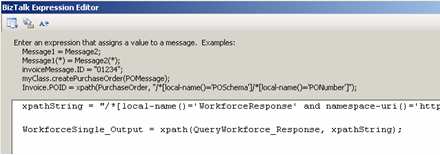
    Then, my loop condition is simply rcvPipeOutputMsgs.MoveNext(), and within a Construct shape, I can extract the individual, debatched message with this code:

    //WorkforceSingle_Output is a BizTalk message
    WorkforceSingle_Output = null;
    rcvPipeOutputMsgs.GetCurrent(WorkforceSingle_Output);

    Step #4. Test “final” workflow. Using the same batch size as before (30 columns, 1000 records), it took between 29-36 seconds to debatch and return each individual message to the MessageBox. Compared to nearly 2 minutes for the XPath way, pipeline debatching is significantly more efficient.

    So, using this pattern, we can easily add subscribers to these database-only entities with very little impact. One thing I didn’t show here, but in our case, I also stamp each outbound message (from the orchestration) with the “target system.” The trigger message sent from the Scheduled Task Adapter will have this field empty, but if a particular system wants a historical batch of records, we can now send an off-cycle request, and have those records only go to the Send Port owned by that “target system”. Neat stuff.

    Technorati Tags: