Category: General Architecture

  • Building Enterprise Mashups using RSSBus: Part IV

    We conclude this series of blog posts by demonstrating how to take a set of feeds, and mash them up into a single RSS feed using RSSBus.

    If you’ve been following this blog series, you’ll know that I was asked by my leadership to prove that RSSBus could generate a 360° view of a “contact” by (a) producing RSS feeds from disparate data sources such as databases, web services and Excel workbooks and (b) combining multiple feeds to produce a unified view of a data entity.  Our target architecture looks a bit like this:

    In this post, I’ll show you how to mash up all those individual feeds, and also how to put a friendly HTML front end on the resulting RSS data.

    Building the Aggregate Feed

    First off, my new aggregate feed asks for two required parameters: first name and last name of the desired contact.

    Next, I’m ready to call my first sub-feed.  Here, I set the input parameter required by the feed (“in.lastname”), and make a call to the existing feed.  Recall that this feed calls my “object registry service” which tells me every system that knows about this contact.  I’ve taken the values I get back, and put them into a “person” namespace.  The “call” block executes for each response value (e.g. if the user is in 5 systems, this block will execute 5 times), so I have a conditional statement (see red box) that looks to see which system is being returned, and setting a specific feed value based on that.
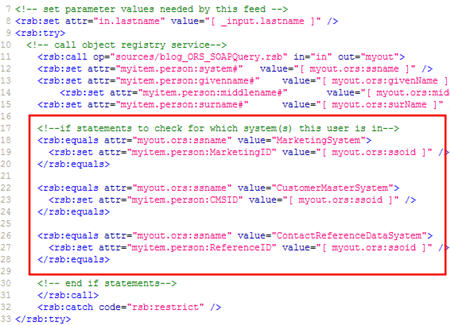
    I set unique feed items for each system (e.g. “person:MarketingID”) so that I can later do a check to see if a particular item exists prior to calling the feed for that system.  See here that I do a “check” to see if “MarketingID” exists, and if so, I set the input parameter for that feed, and call that feed.

    You may notice that I have “try … catch” blocks in the script.  Here I’m specifically catching “access denied” blocks and writing a note to the feed instead of just blowing up with a permission error.

    Next, I called the other data feeds in the same manner as this one above.  That is, I checked to see if the system-specific attribute existed, and if so, called the feed corresponding to that system.   My “reference data” feed which serves up Microsoft Excel data returns a data node that holds the blog feed for the contact.  I took that value (if it exists) and then called the built-in RSSBus Feed Connector’s feedGet operation and passed in the URL of my contact’s blog feed.  This returns me whatever is served up by my contact’s external blog.

    Neat.  So, now I have a single RSS feed that combines data from web services, Google web queries, Excel workbooks, SQL Server databases, and external blog feeds.  If I view this new, monster feed, I get a very denormalized, flat data set.

    You can see (in red) that when data repeating occurred (for example, multiple contact “interactions”), the related values, such as which date goes with which location, isn’t immediately obvious.  Nonetheless, I have a feed that can be consumed in SharePoint, Microsoft Outlook 2007, Newsgator, or any of your favorite RSS readers.

    Building a RSSBus HTML Template

    How about presenting this data entity in a business-friendly HTML template instead of a scary XML file?  No problem.  RSSBus offers the concept of “templates” where you can design an HTML front end for the feed.

    Much like an ASP.NET page, you can mix script and server side code in the HTML form.  Here, I call the mashup feed in my template, and begin processing the result set (from the “object registry service”).  Notice that I can use an enumeration to loop through, and print out, each of the systems that my contact resides in.  This enumeration (and being able to pull out the “_value” index) is a critical way to associate data elements that are part of a repeating result set.

    To further drive that point home, consider the repeating set of “interactions” I have for each contact.  I might have a dozen sets of “interaction type + date + location” values that must be presented together in order to make sense.  Here you can see that I once again use an enumeration to  print out each date/type/location that are related.

    The result?  I constructed a single “dashboard” that shows me the results of each feed as a different widget on the page.   For a sales rep about to visit a physician, this is a great way for them to get a holistic customer view made up of attributes from every system that knows anything about that customer.  This even includes a public web (Google) query and a feed from their personal, professional, or organization’s blog.  No need for our user to log into 6 different systems to get data, rather, I present my own little virtual data store.

    Conclusion

    In these four blog posts, I explained a common data visibility problem, and showed how RSSBus is one creative tool you can use to solve it.  I suspect that no organization has all their data in an RSS-ready format, so applications like RSSBus are a great example of adapter technology that makes data extraction and integration seamless.  Mashups are a powerful way to get a single real-time look at information that spans applications/systems/organizations and they enable users to make more informed decisions, faster.
    Technorati Tags: ,

  • Building Enterprise Mashups using RSSBus: Part III

    In the first two posts of this series, I looked at how to aggregate data from multiple sources and mash them up into a single data entity that could be consumed by an RSS client.  In this post, I will show off the new SOAP Connector from RSSBus.

    Earlier in this series, I talked about mashing up data residing in databases, Excel workbooks and existing web services.  In my scenario, I have an existing web service that returns a set of master data about our customers.  This includes contact details and which sales reps are assigned to this customer.  Let’s see how I can go about calling this service through RSSBus.

    Building an SOAP Feed

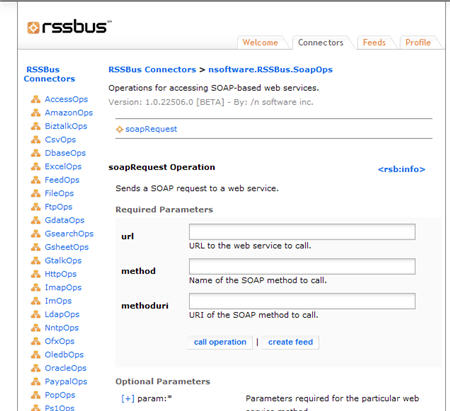
    First of all, let’s take a look at what parameters are available to the new RSSBus SOAP Connector.  The default properties that this connector needs are: URL, web method, and method URI (SOAP action).  However, there are a generous amount of additional, optional parameters such as parameter declaration, specific XML nodes to return, SOAP header, credentials, proxy server details and more.

    At the beginning of my RSSBus *.rsb file (which generates the XML feed), I specify the name of the feed, and, call out a specific input parameter (“customerid”) that the feed will require.

    Next, I set the properties that I want to pass to the connector.  Specifically, I identify the web service URL, method name, SOAP action, input parameter, and the place where I want to log all inbound requests and outbound responses.

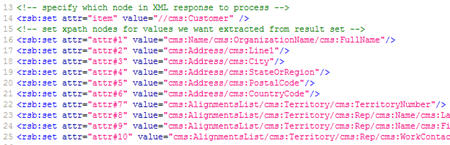
    Now I can get a bit fancy.  I can pull out a particular node of the response, and work just with that.  Here, I dig into the XML service response and indicate that I only want the “Customer” node to be included in the result stream.  After that, I call out a series of XPath statements that point to the individual target nodes within that “Customer” node.  So, the final result stream will only contain these target nodes.

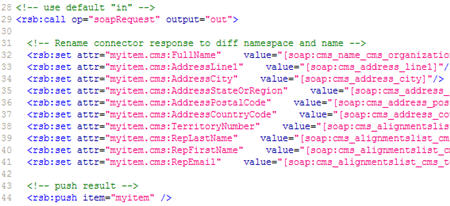
    Here I call the web method, and take the response values and put them into a new “cms” (“Customer Master System”) namespace with friendlier node names.  Note that the values returned by the SOAP connector are named after the XPath used to locate them.  For example, an XPath of “/Name/OrganizationName/FullName” would result in a SOAP Connector response element named “Name_OrganizationName_FullName.”  As you can imagine, the names for deep XPath statements could get quite unwieldy.

    If I make a request to this feed, I get back a nice clean result set.

    Now, I have one additional web service that I need to call from RSSBus.  If you recall from part I of this series, I need a way to know WHICH systems a particular contact resides in.  My company has a “object registry service” that stores contacts along with a pointer to the systems (and keys) that know something about that contact.  So, I can use this service to identify which feeds I need to call in order to get a complete picture of my contact.

    This RSSBus script takes in the name of the contact to find, calls my ORS (“object registry service”) service, and returns the systems that this person resides in.  In the resulting feed below, you can see that the ORS service found three records for this contact, and provides the name of the system (and primary key identifier) for each one.

    What’s Next?

    We’re close now.  I have feeds for a database, Excel workbook, Google web query, and two SOAP queries.  All that remains is to create the single feed that mashes up these system feeds and returns the single data result.

    Stay tuned for the exciting conclusion.

    Technorati Tags: ,

  • Building Enterprise Mashups using RSSBus: Part II

    In the previous post, I laid out a data visibility problem and proposed using RSSBus to build an enterprise mashup that inflates a single data entity whose attributes reside in multiple disparate systems.

    Before a mashup can be built, we actually need the source data in a ready-to-mashup format.   For the mashup I am building, my “contact” data resides in 3 different repositories:

    • Database containing the interactions we’ve had with a particular contact
    • Web service talking to a CRM system which holds core contact information
    • Excel spreadsheet containing external reference data such as the contact’s public web page and blog

    On top of this, my mashup will also return a Google result set based on the contact’s first and last name.  If available, I also want to retrieve the latest information from the contact’s personal blog (if they have one).

    In this post, I will show how to create the feeds for the database, Excel spreadsheet, and Google query.

    Building an Excel Feed

    My first data source is an Excel spreadsheet.  The Excel Connector provided by RSSBus has a variety of operations that let you add rows to sheets, list worksheets in a workbook, create new workbooks, and get data out of an existing spreadsheet.

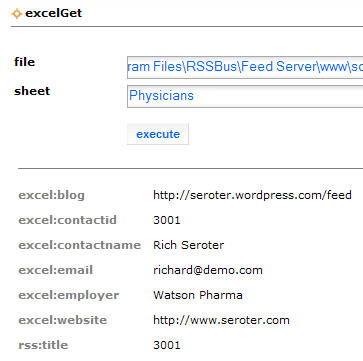
    For our case, we used the excelGet operation that accepts the file path of the workbook, and which sheet to pull data from.  A simple test can be executed right from the connector page.

    The result of this query (formatted in HTML) looks like this:

    Notice how the Excel data comes back using an “excel” namespace prefix.

    In my case, I don’t want to return the contents of the entire workbook, but rather, only the record for an individual contact.  So, from this Connector page, I can choose to create a feed out of my sample query, and then I can modify the RSBScript to filter my results, and, to put my result set into a different namespace than “excel.”

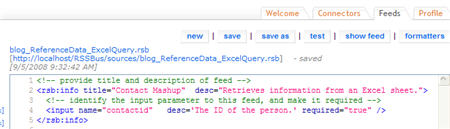
    At the top of my new feed, I outline the title of the feed, and, create a new required input parameter named “contactid.”  Input parameters are passed to the feed via the querystring.

    Next, I need to set the parameters needed by the Excel Connector.  You may recall that we set the parameters when we tested the Connector earlier.

    Now comes the meat of the feed.  Here I “call” the Excel operation, do an “equals” check to see if the row in the spreadsheet is for the contact with the designated contact ID.  If I find such a row, then I create a new “myitem” entity and populate this hash with the values returned by the Connector and sitting in an “excel” namespace.  Finally, I “push” this item to the response stream.

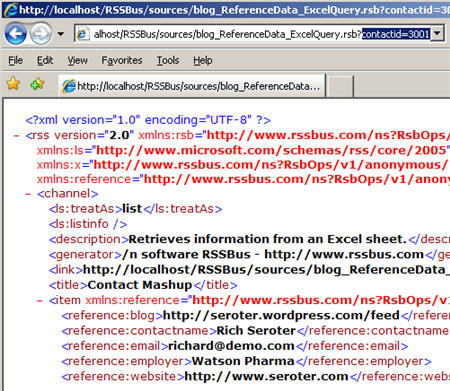
    So what does this completed feed look like?  Below you can see our feed item containing the nodes in a “reference” namespace.  I now have a valid RSS feed that monitors an Excel workbook.  Hooray for me!

    Building a Database Feed

    Now, let’s take an existing SQL Server database and return some results as RSS.  In my scenario, I have a table for all our contacts, and another table with all the interactions we’ve had with that customer (e.g. lunch, office visit, speaker invitation).  The RSSBus SQL Server Connector has a wide range of operations available which perform database inserts, updates, deletes, as well as stored procedure calls, and schema queries for tables, views and more.

    This feed starts much the same as the last one with a title and description.  I’ve also added a required input parameter for the contact ID stored in the database.  Next I have to set the parameters (connection and query) needed by the sqlQuery operation.

    Note that most connector operations have a wide range of optional parameters.  For the sqlQuery operation, these optional parameters include things like “maxrows” and “timeout.”

    Now I need to call the operation.  Like the feed above, this feed takes things that come back in the “sql” namespace and put it into an “interactions” namespace.  Be aware that the “push” statement pushes EACH returned row as a separate feed item.

    What does my response look like?  The image below shows how I returned three items in this feed; each represents a different interaction with this contact.

    Now I have two feeds based on existing data repositories, and didn’t have to make a single change to those applications to support their RSS-ification.

    Building a Google Feed

    The final feed we’ll look at here is public internet search for our selected contact.  The Google search results should come back in an RSS format that can be consumed by my mashup feed.

    My feed takes in two required parameters: “firstname” and “lastname.”   Next, I need the two critical parameters for the Google gSearchWeb operation.  I first must pass in a valid Google API token (you’ll need to acquire one), and, the search string.

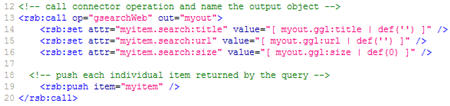
    Now I call the operation, and push each result out.

    Neato.  I can call Google on the fly and make custom queries based on my contact.

    What’s Next?

    Here we saw how easy it is to build the RSSBus script necessary to expose RSS feeds from systems that don’t actually speak RSS.

    Next, we’ll see how to work with new RSSBus SOAP connector to query our CRM system, AND, to query my “object registry service” which returns all the system primary keys related to my contact.  After that, we’ll see how to mash all these feeds up, and return a single “contact” entity to the RSS client.

    Technorati Tags: ,

  • Building Enterprise Mashups using RSSBus: Part I

    I’ve been a fan of RSSBus from /n software for some time. A few weeks ago our Executive Director / Chief Architect / Technology Overlord recently asked me to build a real, live enterprise mashup application to demonstrate for our IT leadership group. Our goal was to show that RSSBus could be used to quickly and efficiently aggregate data in compelling new ways.   In the next few posts, I’m going to walk through our use case, and how I built a solution to solve this.

    Before getting into the “what” and “how”, I want to first say that the “how I built a solution” line above isn’t entirely true.  The folks at RSSBus actually built most of the solution for me, and all I did was tweak and customize it a bit.  If you ever get a chance to work with rock stars Ralph James, Amit Sharma or Tom Hearn, jump at it.  I’ll also note that I am working with a pre-release version 2.0 of RSSBus that has new features such as a SOAP connector.

    The Problem

    As with most large organizations, we have a multiple systems and repositories that contain different aspects of the same data entity.  A “contact” at my company has some attributes stored in our ERP system, some in custom built systems, and some more in COTS applications.  Maintaining a true system of record is difficult in our environment and trying to keep enterprise data repositories in sync is no small task.

    Some questions I want answers to …

    • How does a sales rep heading out on a physician visit get a full 360 degree view of the customer that shows EVERYTHING we know about this person?
    • How do I allow people to be proactively notified of any changes to a given sales region or key contact?
    • How do I easily accommodate new data sources (e.g. COTS application, public internet blog or website)?
    • Where can I apply the appropriate security measures to make sure that sensitive contact details are only available for those allowed to see them?  For instance, sales folks may not be allowed to see what clinical trials a physician is participating in, while scientists are not allowed to see marketing activities that a physician has been involved with.

    This category of problem can also extend to “complex event processing” scenarios where you want to be able to perform intelligent surveillance on related events that span systems.   However, the problem I’m addressing for us at this moment has to do with data aggregation, not event aggregation.

    A Solution

    One valid solution to this problem is to use XML feeds (RSS / Atom) from source systems and aggregate them to return a single, complete view of the target data entity.

    Why XML feeds instead of a new database repository?  Our reasons include:

    • Subscription model using XML feeds provides users with a great ability to discover, organize and monitor data that sits in multiple places
    • Consumption experience NOT dictated by data generator as end users can choose to eat this data in their feed reader (e.g. Outlook 2007), Excel, SharePoint or custom application
    • Provides a virtual, on-demand data aggregation with minimal changes needed in source systems
    • The pub/sub nature of XML feeds gives users more “sensors” into key data elements in an organization and allows them to receive and act on data in a more timely fashion
    • XML feeds allow an alternate level of service where a query does not have to return real time data or in an immediate fashion

    Once I have a feed for each system that stores “contact” details, I want to mash them all up and return a single XML feed that shows an entity whose data comes from all types of data stores.

    Now, how do I know which systems this “contact” exists in? At my company, we have a “object registry service” that our applications use to both publish and query enterprise objects.  For instance, we have CRM applications which send “insert” and “update” commands to this service when contact data has changed.  This service is responsible for performing data cleansing on inbound data, and matching inbound objects to existing objects.  The “Richard Seroter” contact inserted by System A should be matched to the “Richard L Seroter” that was already inserted by System B.  What this service stores is only enough information to perform this matching, and, the originating system and primary key.  So, the point is, I can query this service for “Richard Seroter”, and get back all records matching this query, AND, which system (and ID) stores information about this handsome character.

    One other wrinkle.  Clearly, many (most?) COTS and custom applications do NOT offer RSS feeds for their underlying data.   So how do I go down this route of XML feeds with systems that don’t natively “talk” RSS? This is where RSSBus comes in.

    What is RSSBus?

    RSSBus is a lightweight, completely web-based platform for building and publishing XML feeds out of a wide variety of source systems.  It’s a service bus of sorts that takes advantage of the loose contract of RSS to expose and aggregate feeds into interesting business services.

    RSSBus uses an impressive array of “connectors” to sources such as Amazon Web Services, PayPal, Microsoft CRM, MySQL databases, Federal Express, Twitter, FTP, LDAP, BizTalk Server and much more.  This means that you can create a feed out of a file directory, or use XML feeds to create new LDAP accounts.   Endless possibilities.

    The RSSBus Administration Console can be used to browse connectors, and then use a visual wizard to prototype and generate XML feeds.  You also have full access to the robust RSBScript language which is actually used to generate the raw feeds and optionally, the RSBTemplates which present feed data in an HTML format.  It’s almost a misnomer to call the product RSSBus since data can be emitted not only as RSS, but also ATOM, XLS, CSV, JSON, HTML and SOAP.

    Why is RSSBus a good solution for my problem?  Some reasons include:

    • Minimal programming needed to connect to a wide range of mixed platform technologies
    • Strong ability to combine feeds into a single information source
    • Deep scripting and function library for working with and formatting feed data
    • Nice support for feed caching and feed security
    • Can separate data (XML) from presentation logic

    RSSBus is NOT a complete XML feed management solution by itself.  That is, RSSBus doesn’t have the full feed discovery and management that an Enterprise Server (NGES) from Newsgator is.  However, note that NGES now plays with RSSBus so that the powerful feeds generated by RSSBus can be managed by NGES.

    What’s Next?

    In the next set of posts, I’ll look at how I exposed individual RSS feeds from a mix of data sources including Microsoft Excel spreadsheets, databases, web services, and Google queries.  After that, I’ll show you how to mash up the individual feeds into a single entity.  Then, I MAY demonstrate how to apply security and caching aspects to the mashup.

    Technorati Tags: ,

  • What Does an Architect Do?

    Great pointer from Mike Walker yesterday to an IASA blog post highlighting their Architect Taxonomy and what it means to be an architect.  Reading things like this are always a reminder to me that I’m not remotely great at my job yet.

    The author of the IASA post, Paul Preiss, first links to the list of “Certified Architect” requirements from Microsoft which focus on five broad competency areas:

    • Leadership.  Are you providing thought leadership, mentoring and able to build consensus for important ideas and standards?
    • Communication.  Can you effectively share your ideas both orally and in the written word, and do so for a variety of audiences? 
    • Organizational dynamics.  Do you have a feel for your company’s key decision makers and can you work through these organizational structures to get things done?
    • Strategy.  Can your knowledge of technology help your organizational position itself favorably for the future while also applying the frameworks and principles to make you successful today?
    • Process and Tactics.  Are you able to navigate the project lifecycle and efficiently work through system requirements, design, prototyping, documentation and deployment?
    • Technology Breadth.   Do you have a grasp on a wide range of technologies and concepts that may comprise a complete organizational solution? 
    • Technology Depth.  Are you a thought leader within your organization on specific topics?

    The IASA taxonomy is even more in depth than what Microsoft provided.   They bunch up their expected skill set into five buckets:

    • IT Environment
    • Business-Technology Strategy
    • Design Skills
    • Quality Attributes
    • Human Dynamics

    I really liked their breakdown of each category and the specifics listed under each.  After calling out the core skill buckets, they go into the expectations for a number of different flavors of architect: software architect, infrastructure architect, and business architect.

    Very useful to read, if nothing else, than to help plan a roadmap for things to strengthen in the upcoming years.  Also, this is a great cheat-sheet for coming up with questions during an architecture interview!

    Technorati Tags: Architecture

  • Trying *Real* Contract First Development With BizTalk Server

    A while back on my old MSDN blog, I demonstrated the concept of “contract first” development in BizTalk through the publishing of schema-only web services using the Web Services Publishing Wizard.  However, Paul Petrov rightly pointed out later that my summary didn’t truly reflect a contract-first development style.

    Recently my manager had asked me about contract-first development in WCF, and casually asked if we had ever identified that pattern for BizTalk-based development.  So, I thought I’d revisit this topic, but start with the WSDL this time.  I’m in the UK this week on business, so what better use of my depressing awake-way-to-early mornings than writing BizTalk posts?

    So like Paul had mentioned in his post, a true service contract isn’t just the schema, but contains all sort of characteristics that may often be found in a WSDL file.  In many cases (including my company), a service is designed first using tools that generate WSDLs and XSDs. Then, those artifacts are shared with service developers who build services that either conform to that service (if exposing an endpoint) or consume it from other applications.

    I’ll start with a simple WSDL file that contains a schema definition and a request/response operation called HelloWorld.  The schema contains a few constraints such as maxOccurs and minOccurs, and a length restriction on one of the fields.

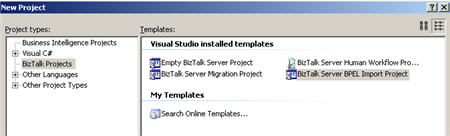
    What I’d like to do is have BizTalk consume the WSDL, and then generate a service that respects that WSDL.  How does BizTalk eat a WSDL?  Through the use of the dark and mysterious BPEL Import BizTalk project type.

    After choosing this project type, a wizard pops up and asks you for the artifacts that make up the service.  In my case, I just pointed it to the WSDL which had an embedded schema definition.

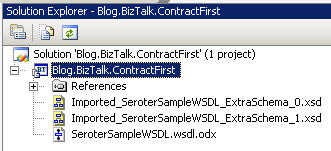
    After an “import succeeded” message, I’m left with a new project and three files which represent my schema (and base types), and an orchestration that includes the auto-generated port types and schemas.

    For simplicity’s sake, I’ll just build out the provided orchestration, with the goal of exposing it as a web service.  First, I add a new configured port to the orchestration design surface, careful to choose the generated port type provided to me.

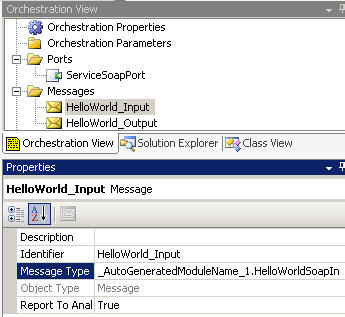
    I’m not sure why, but my generated multi-part message isn’t configured right, and I had to manually choose the correct schema type for the message part.

    Next, I built two messages (request and response) which used the generated multi-part message types.

    Finally, I added send/receive shapes (and a construct) in order to complete the simple orchestration.

    I’ll show what happens when using the ASMX Web Publishing Wizard, but first, let’s be forward thinking and use the WCF Service Publishing Wizard.  I chose a WCF-BasicHTTP endpoint with metadata so that I can inspect the WSDL generated by my service and compare it against the original.  You’ll notice that the “service name” of the service is a combination of the orchestration type name and namespace, and, the “service port” is the name of the orchestration port.  Feel free to change those.

    I then had to change the target namespace value to reflect the target namespace I used in the original WSDL file.

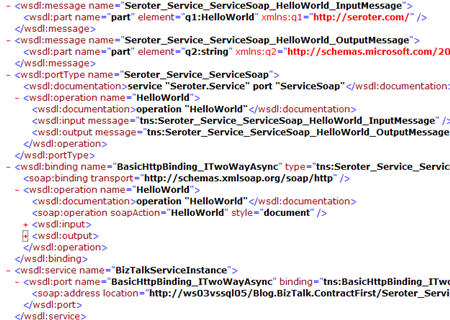
    After completing the wizard (and build a receive location so that my service could be hosted and activated), I compared the WSDL generated by BizTalk with my original one.  While all of the schema attributes were successfully preserved (including original restrictions), the rest of the base WSDL attributes did not transfer.  Specifically, things like the SOAP action and service name were different, not to mention all the other attribute names.
    I went back and repeated this process with the ASMX Web Publishing Wizard, and there were differences.  First, the wizard actually kept my original target namespace (probably by reading the Module XML Target Namespace property of the generated orchestration) and also allowed manual choice of “bare” or “wrapped” services.  The actual generated WSDL wasn’t much better than the WCF wizard (SOAPAction still not right), and worse, the schema definition was stripped of important restriction characteristics.  This is a known problem, but, annoying nonetheless.

    At this point, you can argue that this is a moo point since I can take advantage of the ExternalMetadataLocation property on the Metadata Behavior in my generated configuration file.  What this does is allow me to point to any WSDL and use IT as the external facing contract definition.  This doesn’t change my service implementation, but, would allow me to use the original WSDL file.  If I set that configuration attribute, then browsing my BizTalk-generated service’s metadata returns the base WSDL.

    One of the key things to remember here is that the SOAPAction value you use is the value set in the BizTalk “MethodName” context attribute.  This value is used to match inbound messages to their orchestration subscription (when bound to a SOAP port).  If these don’t line up, you get “subscription not found” errors when you call this service.  So, if I generate my WCF contract using the original WSDL, and submit that message to my WCF endpoint, the message context looks like this:

    And remember that my orchestration port’s generated “operation” property was “HelloWorld” and thus my MessageBox subscription is:

    So, if you plan on using an external WSDL, make sure you line these values up.  Also note that the orchestration port’s “operation” property doesn’t accept an “http://xxx” style value, so pick something else 😉

    I plan on including this topic in the upcoming book, but didn’t feel like squirreling it away until then.   It’s an interesting topic, and I’d be curious as to other’s attempts and getting BizTalk to conform to existing service contracts.

    Technorati Tags: , BizTalk

  • Checklist for Reviewing Services for SOA Compatibility

    I’ve got SOA on the brain lately.  I’m in the process of writing a book on building service-oriented solutions using BizTalk Server 2006 R3 (due out right around the product release), and, trying to organize a service review board at my company.  Good times.

    So what’s a “service review board”?  It’s a chance to look at services that have been deployed within our development environment and chat with the developer/architect about various design and deployment considerations.  In reality, it’s a way to move from “just a bunch of web services” (JBOWS) to an architecture that truly supports our stated service-oriented principles.  Now, clearly there are services that are meant to solve a specific purpose, and may not be appropriate for “enterprise” scale.  But, I would argue that the goal of any service is to be designed with principles of reuse in mind, even if service reuse never happens.

    Who should attend such a review board besides the service developer?  I’d suggest the following representatives:

    • Infrastructure.  Make sure that all deployment considerations have been taken into account such as a host server (dev/test/prod), required platforms and the like.
    • Enterprise architecture.  Look at the service and compare that to other enterprise projects to see if there is overlap with existing services, or, the possibility to reuse the new service in an upcoming project.
    • Data architecture.  Confirm best practices for the data being sent as part of service requests or responses.   Also, consider the data security and data privacy.
    • Solution architecture.  Review software patterns used and ensure that the service has the appropriate security considerations and repository registration.

    With that in mind, what questions do we want to ask to verify whether this service is enterprise-ready?

    Infrastructure
    Question Answer
    What is the technology platform that this service is built upon (e.g. Java, .NET)?  
    Do you have host servers identified for all deployment environments?  
    Are there any SLAs defined for this service as a result of non-functional requirements?  
    Have the appropriate service repository metadata elements been identified for this service?  
    Has this service been sufficiently load tested?  
    Security
    Question Answer
    Has a security policy been identified?  
    Does this service use either transport-level security or message-based security, and if so, does it match corporate standards?  
    Have the appropriate directory accounts/groups been created and assigned?  
    Data
    Question Answer
    What type of data is received by the service: document, event or function parameter?  
    Are the input/output types complex or simple types?  
    Were standard, cross-platform data types used?  
    Does this service use an enterprise shared entity as its input or output?  
    If the answer above is “no”, should the input/output parameter be considered for a new shared entity definition?  
    Is the input message self-contained?  
    Software Architecture
    Question Answer
    Is this a data service, event service, or functional service?  
    Does it support both synchronous and asynchronous invocation?  
    Is the service an encapsulated, stand-alone entity?  
    Are service dependencies dynamically loaded or configurable?  
    Has the service been tested for cross-platform invocation?  
    Does this service use an transactions?  
    Can the service accept a flowed transaction?  
    Has a lifecycle versioning strategy been defined?  
    Is the interface SOAP, REST or POX based?  
    Do common functions like exception handling and logging use enterprise aspects?  
    Is the service contract coarse grained or fine grained?  
    Is the WSDL too complicated (e.g. numerous imports) to be consumed by BizTalk Server?  
    How are exceptions handled and thrown?  
    Does the service maintain any state?  
    Do the service namespace and operations have valid and understandable identifiers?  

    The goal of this is not to torture service developers, but rather to consider enterprise implications of new services being developed.  Did I miss anything, or include something that doesn’t matter to you?  I’d  love your thoughts on this.

    Technorati Tags:

  • Microsoft "Zermatt" Developer Identity Framework

    The concept of “Identity Management” is not my strongest suit, so I’ve been spending more time this year reading up on the topic and trying to gain additional perspective.  Noticed yesterday on Vittorio’s blog that he announced the beta release of a new Identity Framework code named “Zermatt” targeted towards developers.   Ignoring the fact that the code name sounds like either a robot villain or a rejected Muppet, this is actually a pretty interesting release.  It’s basically a set of .NET framework objects that you use to implement claims-based identity models in your applications, thus avoiding tight coupling to custom user stores or particular directories.

    Check out the great whitepaper for more information and examples of how it works.  I’ve read it once, but need to re-read it about 6 more times.

    Technorati Tags:

  • Quick Look at UML in VSTS "Rosario"

    During the MVP Summit this past April, I saw a presentation of UML capabilities that are part of the Visual Studio Team System “Rosario” April 2008 Preview.  I immediately downloaded the monstrous virtual machine containing the bits … and finally took a quick look at things today.

    In my current job, I find myself creating a fair amount of UML diagrams.   My company uses the very powerful Sparx Enterprise Architect (EA) for UML modeling, and despite that fact that some days I spend as much time in EA as I do Microsoft Outlook, I still probably only touch 10% of the functionality of that application.  How does Visual Studio measure up?  I thought I’d take a quick look at the diagram types that I’ve created most recently in EA: use case, component, sequence and activity.

    When you look to create a new Visual Studio project, you now see “Modeling Projects” as an option.

    Funny, but all the modeling diagram types (logical, use case, component and sequence) can be added to existing VS.NET projects, EXCEPT “activity diagrams” which must be created as a standalone project.  Alrighty then.

    For the use case diagram, there’s a fair representation of the standard UML shapes.

    Can’t seem to create a system boundary though.  That seems odd.  The “use case details” is a nice touch.

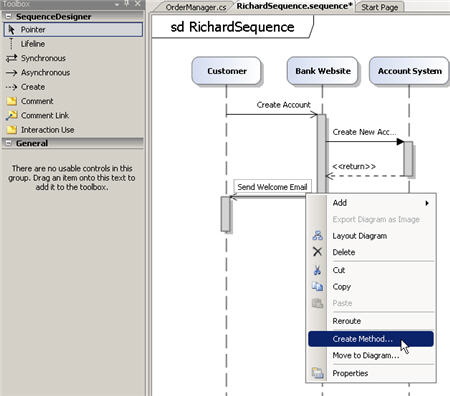
    The sequence diagram also looks pretty decent.  What’s nice is that you can generate operations on classes, or the classes themselves directly from the diagram.

    How about component diagrams?  We actually use a few flavors of these to create system dependency diagrams as well as functional decomposition diagrams.  Not sure I could do that particularly easily with this template.

    Doesn’t look like I can change the stereotypes at all on either the components or links, so it’s tough to make a “high level” component design.  But wait!  Looks like I can do a “application design” or “system design” diagram.

    Here is a system design.

    I couldn’t figure out how to associate multiple systems, but that’s probably my stupidity at work.    Pretty nice diagram though, with the ability to add deployment details and constraints.

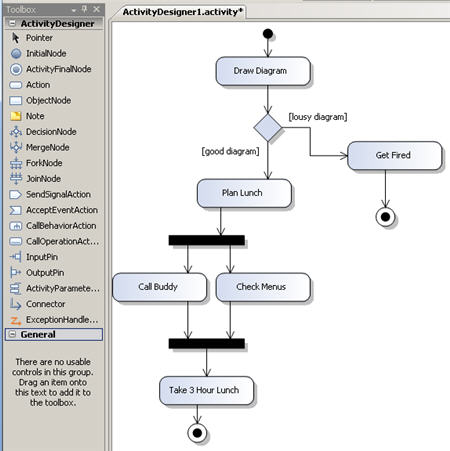
    Finally, you have the activity diagram.  This has many of the standard UML activity shapes, and looks pretty solid.

    The basic verdict?  Looks promising.  I have to do a bit too much clicking to make things happen (e.g. no “drag from shape corner to connect to another shape”), and it would be nice if it exported to the industry standard format, but overall, it’s a step in the right direction.  I’d also like to see a “lite” version that folks (e.g. business analysts) could use without having to install Visual Studio.

    This wouldn’t make me stop using or recommending Sparx EA, but, let’s keep an eye on this.

    Technorati Tags: , UML

  • New Code Samples for WCF Adapter Pack

    I’ll admit to being fairly underwhelmed with the sample bits for the BizTalk Server 2006 LOB adapters.  If was often trial and error to figure out how to get the Oracle adapter working right, or figuring out how to do something specific with the Siebel adapter.  Very few details or examples were provided.

    That said, looks like the Connected Systems team is much more aggressively sharing information about the new [BizTalk] Adapter Pack.  I just noticed a cornucopia of new code samples for the WCF LOB Adapter Pack.    For each of the three available adapters (SAP, Oracle, Siebel),  you’ll find samples for using the adapter with BizTalk, and, as a standalone WCF LOB adapter.  The Oracle adapter has lots of examples that will prove useful (invoking functions, using cursors, executing select queries, etc).  I also like that each adapter has a brief example of how to convert from using the BizTalk LOB adapters to the new Adapter Pack.

    As part of my “BizTalk + WCF” series for TopXML.com, I’ll be demonstrating a few scenarios with the new Oracle adapter.  These samples mean that I’ll spend less time punching myself in the head and more time building useful demonstrations.

    Well done Microsoft.


    Technorati Tags: ,