Category: General Architecture

  • Code was the least interesting part of my multi-agent app, and here’s what that means to me

    Code was the least interesting part of my multi-agent app, and here’s what that means to me

    At least 80% of the code I’ve ever written could have been written by AI, probably at higher quality. I’ve been “in tech” for twenty seven years and spent seven of those as a software developer. Even when I stopped getting paid for it, I never stopped coding. But little of it’s been truly novel; most of my code has been straightforward database access code, web APIs, presentation logic, and a handful of reasonably-complex systems. No doubt, many of you have done truly sophisticated things in code—compilers, performance-tuned algorithms, language frameworks—and AI isn’t replacing that any time soon. But I’d bet that much of the interesting tech work is moving away from raw code, and towards higher-order architecture.

    I wanted to build out an agentic solution, and I used AI to generate 90% of the code. That code isn’t where the unique value was at. None of it was particularly noteworthy. You can find the whole app here. The most interesting work related to architectural decisions. Here are eight choices I had to make, and I suspect you’ll have fun wrestling with the same ones.

    Choice #1 – What am I trying to accomplish and do agents make sense?

    My goal was to build an app that could take in a customer’s roofing needs, create a service appointment, and generate a personalized invoice for the work. I’m cheating here, since this exercise started as “Richard wants to learn some agent tech.” So I did start with the end in mind. Judge me accordingly.
    But in every legit situation, we start by evaluating the user need. What functional requirements do I need to satisfy? What performance or quality attributes are necessary? Can I solve this with a simple service, or modular monolith? Is the user flow deterministic or variable?

    This scenario could certainly be solved by a simple data collection form and PDF generator. What requirements might make an agentic architecture the truly correct choice?

    • Data collection from the user requires image, video, and audio input to best scope the services and pricing we should offer.
    • The scheduling or invoicing process requires a dynamic workflow based on a variety of factors, and hard-coding all the conditions would be tricky.

    Either way, this is always a critical choice before you write a single line of code.

    Choice #2 – What data or services are available to work with?

    Before we build anything new, what do we already have at our disposal?

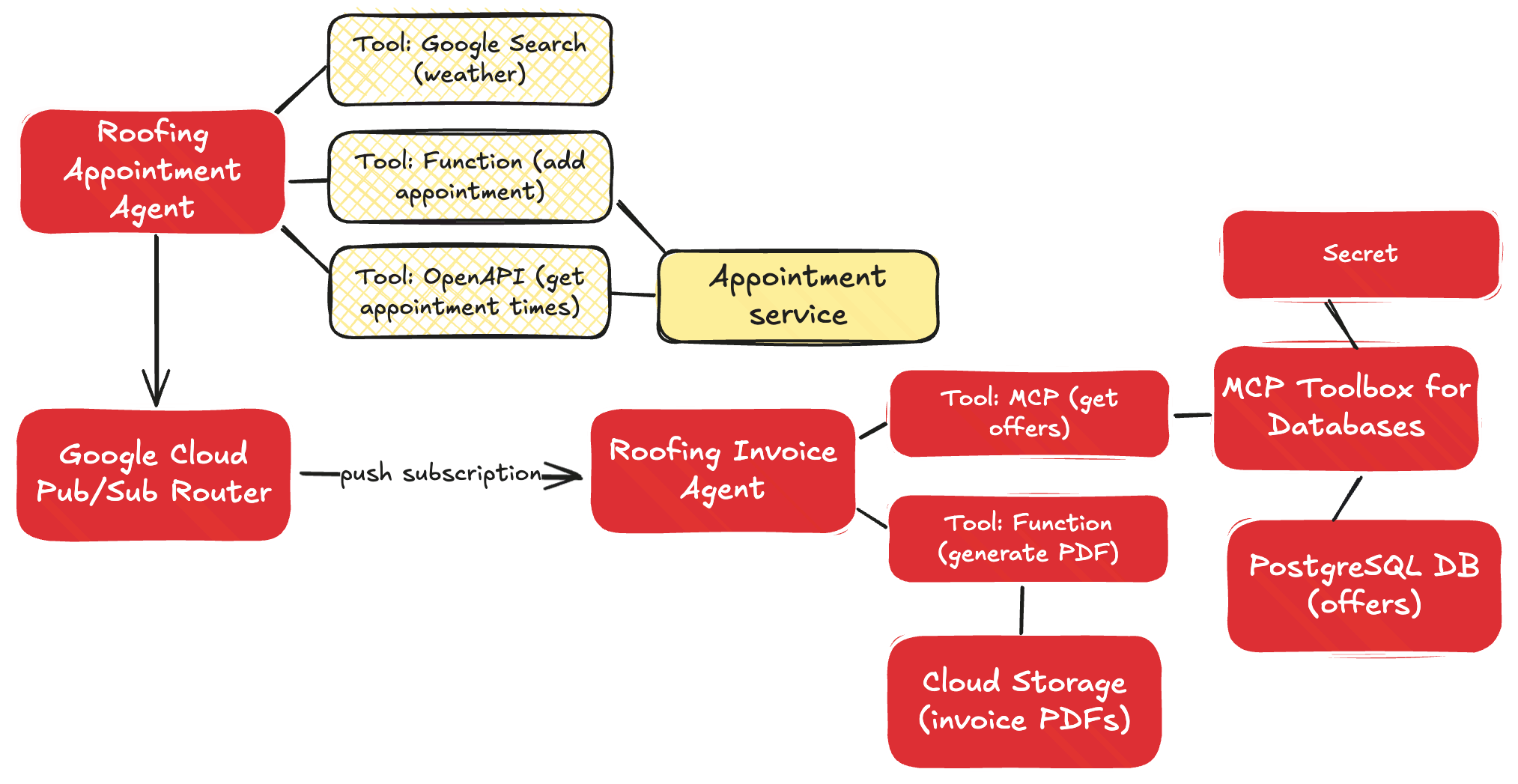
    In my case, let’s assume I already have an appointments web API for retrieving available appointment times and making new appointments. I’ve also got an existing database that stores promotional offers that I want to conditionally add to my customer invoice. And I’ve got an existing Cloud Storage bucket where I store customer invoice PDFs.

    It’s easy to just jump into the application build, but pause for a few moments and take stock of your existing inventory and what you can build around.

    Choice #3 – What (agent) framework should I use and why?

    So. Many. Choices.

    There’s AI app frameworks like Genkit, LlamaIndex, and Spring AI. There are agent frameworks like LangChain, LangGraph, Autogen, CrewAI, and more. Google recently shipped the Agent Development Kit, available for Python and Java developers. An agent built with something like ADK is basically made up of three things: a model, instructions, and tools. ADK adds sweeteners that give you a lot of flexibility. Things I like about ADK:

    And look, I like it because my employer invests in it. So, that’s a big factor. I also wanted to build agents in both Python and Java, and this made ADK a great choice.

    Don’t get married to any framework, but learn the fundamentals of tool use, memory management, and agent patterns.

    Choice #4 – How should I use tools in the appointment agent?

    I suspect that tool selection will be a fascinating area for many builders in the years ahead. In this scenario, I had some decisions to make.

    I don’t want to book any roof repairs on rainy days. But where can I get the weather forecast from? I chose the built-in Google Search tool instead of trying to find some weather API on the internet.

    weather_agent = Agent(
        name="weather_agent",
        model="gemini-2.0-flash",
        description=(
            "Agent answers questions about the current and future weather in any city"
        ),
        instruction=(
            "You are an agent for Seroter Roofing. You can answer user questions about the weather in their city right now or in the near future"
    ),
        tools=[google_search],
    )
    

    For interacting with my existing appointments API, what’s the right tool choice? Using the OpenAPI tool baked into the ADK, I can just hand the agent an OpenAPI spec and it’ll figure out the right functions to call. For retrieving open appointment times, that’s a straightforward choice.

    openapi_spec = openapi_spec_template.replace("{API_BASE_URL}", config.API_BASE_URL)
    
    toolset = OpenAPIToolset(spec_str=openapi_spec, spec_str_type="json")
    api_tool_get_appointments = toolset.get_tool("get_available_appointments")
    

    But what about booking appointments? While that’s also an API operation, I want to piggyback a successful booking with a message to Google Cloud Pub/Sub that downstream subscribers can read from. That’s not part of the appointments API (nor should it be). Instead, I think a function tool makes sense here, where I manually invoke the appointments API, and then make as subsequent call to Pub/Sub.

    def add_appointment(customer: str, slotid: str, address: str, services: List[str], tool_context: ToolContext) -> dict:
        """Adds a roofing appointment by calling the booking API and logs the conversation history.
    
        This function serves as a tool for the agent. It orchestrates the booking process by:
        1. Calling the internal `_book_appointment_api_call` function to make the actual API request.
        2. If the booking is successful, it retrieves the conversation history from the
           `tool_context` and logs it to a Pub/Sub topic via `_log_history_to_pubsub`.
    
        Args:
            customer: The name of the customer.
            slotid: The ID of the appointment slot to book.
            address: The full address for the appointment.
            services: A list of services to be booked for the appointment.
            tool_context: The context provided by the ADK, containing session information.
    
        Returns:
            A dictionary containing the booking confirmation details from the API,
            or an error dictionary if the booking failed.
        """
        booking_response = _book_appointment_api_call(customer, slotid, address, services)
    
        if "error" not in booking_response:
            history_list: List[Event] = tool_context._invocation_context.session.events # type: ignore
            _log_history_to_pubsub(history_list)
        
        return booking_response
    

    Choice #5 – When/how do I separate agent boundaries?

    There’s a good chance that an agentic app has more than one agent. Stuffing everything into a single agent with a complex prompt and a dozen tools seems … suboptimal.

    But multi-agent doesn’t have to mean you’re sliding into a distributed system. You can include multiple agents in the same process space and deployment artifact. The Sequential Agent pattern in the ADK makes it simple to define distinct agents that run one and at time. So it seems wise to think of service boundaries for your agents, and only make a hard split when the context changes.
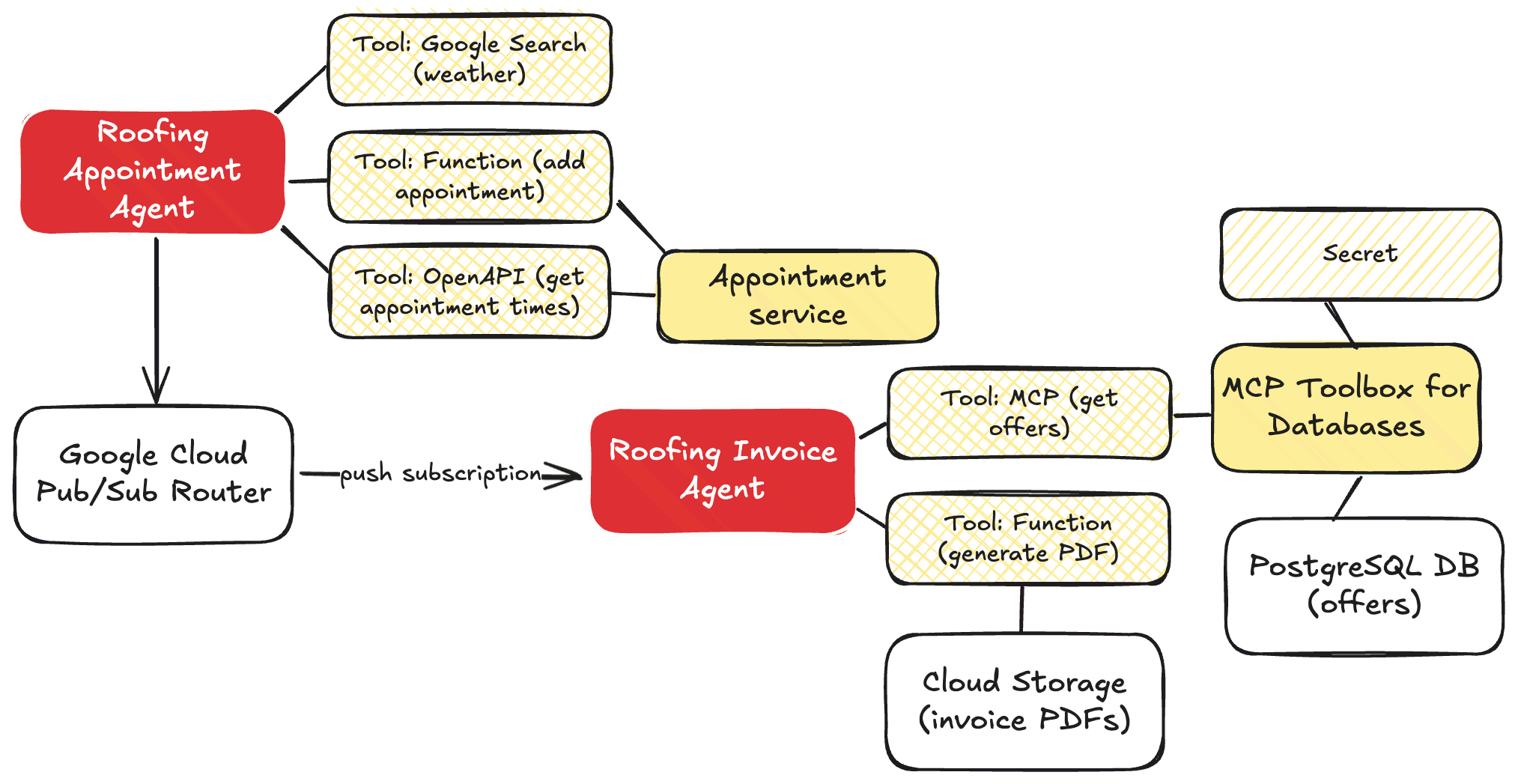
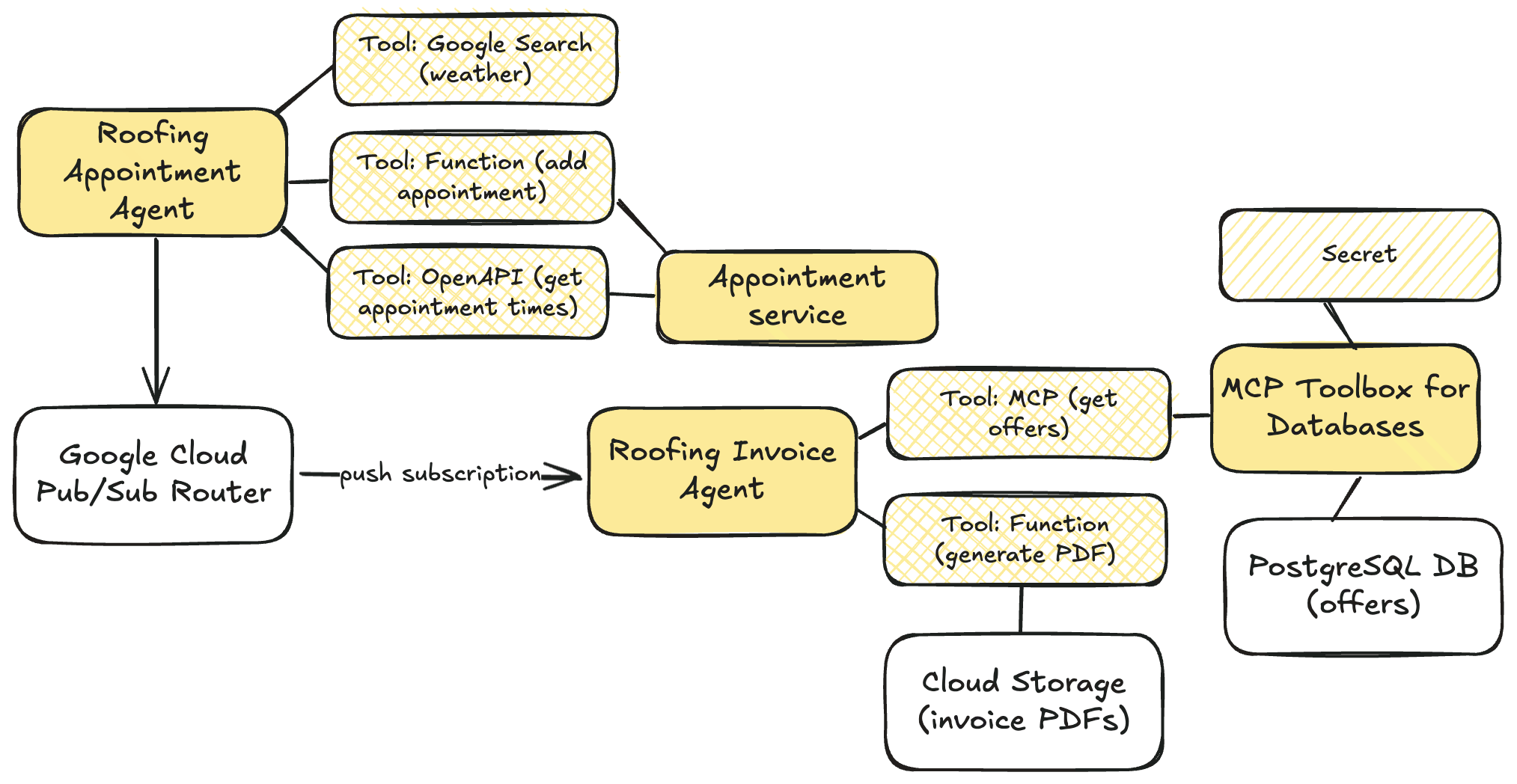
    For me, that meant one set of agents handling all the appointment stuff, and another distinct set of agents that worked on invoices. These don’t depend on each other, and should run separately. Both sets of agents use the Sequential Agent pattern.

    The appointment agent has sub-agents to look up the weather, and uses that agent as a tool within the primary root agent.

    The invoicing agent is more complex with sub-agents to build up HTML out of the chat history, another agent that looks up the best promotional offers to attach to the invoice, and a final agent that generates a PDF.

    private SequentialAgent createInvoiceAgent(
                PdfTool pdfTool,
                String mcpServerUrl,
                Resource htmlGeneratorPrompt,
                Resource bestOfferPrompt,
                Resource pdfWriterPrompt
        ) {
            String modelName = properties.getAgent().getModelName();
    
            LlmAgent htmlGeneratorAgent = LlmAgent.builder().model(modelName).name("htmlGeneratorAgent").description("Generates an HTML invoice from conversation data.").instruction(resourceToString(htmlGeneratorPrompt)).outputKey("invoicehtml").build();
    
            List<BaseTool> mcpTools = loadMcpTools(mcpServerUrl);
    
            LlmAgent bestOfferAgent = LlmAgent.builder().model(modelName).name("bestOfferAgent").description("Applies the best offers available to the invoice").instruction(resourceToString(bestOfferPrompt)).tools(mcpTools).outputKey("bestinvoicehtml").build();
    
            FunctionTool generatePdfTool = FunctionTool.create(PdfTool.class, "generatePdfFromHtml");
    
            LlmAgent pdfWriterAgent = LlmAgent.builder().model(modelName).name("pdfWriterAgent").description("Creates a PDF from HTML and saves it to cloud storage.").instruction(resourceToString(pdfWriterPrompt)).tools(List.of(generatePdfTool)).build();
    
            return SequentialAgent.builder().name(properties.getAgent().getAppName()).description("Execute the complete sequence to generate, improve, and publish an PDF invoice to Google Cloud Storage.").subAgents(htmlGeneratorAgent, bestOfferAgent, pdfWriterAgent).build();
        }
    

    How should I connect these agents? I didn’t want hard-coded links between the services, as they can operate async and independently. You could imagine other services being interested in a booking too. So I put Google Cloud Pub/Sub in the middle. I used a push notification (to the invoice agent’s HTTP endpoint), but I’ll probably refactor it and make it a pull subscription that listens for work.

    Choice #6 – What’s needed in my agent instructions?

    I’m getting better at this. Still not great. But I’m using AI to help me, and learning more about what constraints and direction make the biggest impact.

    For the booking agent, my goal was to collect all the data needed, while factoring in constraints such as weather. My agent instructions here included core principles, operational steps, the must-have data to collect, which decisions to make, and how to use the available tools.

    root_agent = Agent(
        name="root_agent",
        model="gemini-2.5-flash",
        description="This is the starting agent for Seroter Roofing and customers who want to book a roofing appointment",
        instruction=(
            """
    You are an AI agent specialized in booking roofing appointments. Your primary goal is to find available appointments for roofing services, and preferably on days where the weather forecast predicts dry weather.
    
    ## Core Principles:
    
        *   **Information First:** You must gather the necessary information from the user *before* attempting to use any tools.
        *   **Logical Flow:** Follow the steps outlined below strictly.
        *   **Professional & Helpful:** Maintain a polite, professional, and helpful tone throughout the interaction.
    
    ## Operational Steps:
    
    1.  **Greeting:**
        *   Start by politely greeting the user and stating your purpose (booking roofing appointments).
        *   *Example:* "Hello! I can help you book a roofing appointment. What kind of service are you looking for today?"
    
    2.  **Information Gathering:**
        *   You need two key pieces of information from the user:
            *   **Type of Service:** What kind of roofing service is needed? (e.g., repair, replacement, inspection, estimate)
            *   **Service Location:** What city is the service required in?
        *   Ask for this information clearly if the user doesn't provide it upfront. You *cannot* proceed to tool usage until you have both the service type and the city.
        *   *Example follow-up:* "Great, and in which city is the property located?"
    
    3.  **Tool Usage - Step 1: Check Appointment Availability (Filtered):**
        *   Get information about available appointment times:
        *   **[Use Tool: Appointment availability]** for the specified city.
        *   **Crucially:** When processing the results from the appointment tool, **filter** the available appointments to show *only* those that fall on the specific dates without rain in the forecast. You should also consider the service type if the booking tool supports filtering by type.
    
    4.  **Tool Usage - Step 2: Check Weather Forecast:**
        *   Once you have the service type and city, your next action is to check the weather.
        *   **[Use Tool: 7-day weather forecast]** for the specified city.
        *   Analyze the forecast data returned by the tool. Identify which days within the next 7 days are predicted to be 'sunny' or at least dry. Be specific about what constitutes 'dry' based on the tool's output.
    
    5.  **Decision Point 1: Are there Appointments on Dry Days?**
        *   If the appointment availability tool returns available slots *specifically* on the identified dry days:
            *   Present these available options clearly to the user, including the date, time, and potentially the service type (if applicable).
            *   Explain that these options meet the dry weather preference.
            *   Prompt the user to choose an option to book.
            *   *Example:* "Great news! The forecast for [City] shows dry weather on [Date 1], [Date 2], etc. I've checked our schedule and found these available appointments on those days: [List appointments]."
    
        *   If the appointment availability tool returns slots, but *none* of them fall on the identified sunny days (or if the tool returns no slots at all):
            *   Inform the user that while there are dry days coming up, there are currently no appointments available on those specific dry dates within the next 7 days.
            *   Explain that your search was limited to the dry days based on the forecast.
            *   Suggest they might want to try a different service type (if relevant) or check back later as availability changes.
            *   *Example:* "While the forecast for [City] does show some dry days coming up, I wasn't able to find any available appointments specifically on those dates within the next week. Our schedule on sunny days is quite popular. Please try again in a few days, as availability changes, or let me know if you need a different type of service."
    
    6.  **Confirmation/Booking (If Applicable):**
        *   Be sure to get the full name and full address of the location for the appointment.
             
    **Tools**
        You have access to the following tools to assist you:
        `weather_agent`: use this tool to find the upcoming weather forecast and identify rainy days
        `api_tool_get_appointments -> json`: use this OpenAPI tool to answer any questions about available appointments
        `add_appointment(customer: str, slotid: str, address: str, services: List[str]) -> dict`: use this tool to add a new appointment
    """
        ),
        tools=[agent_tool.AgentTool(weather_agent), api_tool_get_appointments, tools.add_appointment],
    )
    

    The invoicing agent had a more complex prompt as I wanted to shape the blob of chat history into a structured JSON and then into valid HTML. Of course, I could have (should have?) structured the raw data before it left the original agent, but I wanted try it this way. My agent instructions show an example of the preferred JSON, and also the valid HTML structure.

    **Role:** You are a specialized agent designed to generate an HTML invoice from a successful appointment booking history.
    
    **Task:** Process the entire user prompt, which contains conversation history in a JSON format. Your goal is to create a complete HTML invoice based on the details found in that JSON.
    
    [...]
    
    4.  **Invoice JSON Structure:** The JSON invoice you internally generate **must** strictly adhere to the format provided in the example below. Do not add extra fields or change field names. Ensure numbers are formatted correctly (e.g., 100.00, 0.00).
        ```json
        {
        "invoiceNumber": "INV-BOOKING-[Current Date YYYYMMDD]", // Generate based on date
        "issueDate": [YYYY, M, D], // Current Date
        "dueDate": [YYYY, M, D], // Current Date + 30 days
        "customerName": "[Extracted Customer Name]",
        "customerAddress": "[Extracted Customer Address]",
        "items": [
            {
            "description": "[Description of Booked Service]",
            "quantity": 1,
            "unitPrice": [Price of Service],
            "lineTotal": [Price of Service]
            }
        ],
        "subtotal": [Price of Service],
        "taxAmount": 0.00,
        "summary": "Invoice for booked [Service Name]",
        "totalAmount": [Price of Service]
        }
        ```
    
    [...]
    
    7.  ** Create an HTML string based on the example structure here **
    ```html
    <!DOCTYPE html>
    <html>
    <head>
    	<meta charset="UTF-8" />
    	<title>Seroter Roofing Invoice</title>
    	<style type="text/css">
    		body { font-family: sans-serif; margin: 20px; }
    		h1 { color: navy; }
    		.header, .customer-info, .summary-block, .footer { margin-bottom: 20px; }
    		.invoice-details { margin-top: 20px; padding: 10px; border: 1px solid #ccc; }
    		.invoice-details p { margin: 5px 0; }
    		table { width: 100%; border-collapse: collapse; margin-top: 20px; }
    		.summary-block { padding: 10px; border: 1px dashed #eee; background-color: #f9f9f9; }
    		th, td { border: 1px solid #ddd; padding: 8px; text-align: left; }
    		th { background-color: #f2f2f2; }
    		.text-right { text-align: right; }
    	</style>
    </head>
    <body>
    	<h1>Invoice</h1>
    
    	<div class="header">
    		<p><strong>Invoice Number:</strong>INV-001</p>
    		<p><strong>Date Issued:</strong>January 01, 2024</p>
    		<p><strong>Date Due:</strong>January 15, 2024</p>
    	</div>
    
    	<div class="customer-info">
    		<h2>Bill To:</h2>
    		<p>Customer Name</p>
    		<p>123 Customer Street, Denver, CO 80012</p>
    	</div>
    
    	<div class="summary-block">
    		<h2>Summary</h2>
    		<p>Details about the appointment and order...</p>
    	</div>
    
    	<table>
    		<thead>
    			<tr>
    				<th>Description</th>
    				<th>Quantity</th>
    				<th>Unit Price</th>
    				<th>Line Total</th>
    			</tr>
    		</thead>
    		<tbody>
    			<tr >
    				<td>Sample Item</td>
    				<td class="text-right">1</td>
    				<td class="text-right">10.00</td>
    				<td class="text-right">10.00</td>
    			</tr>
    		</tbody>
    	</table>
    
    	<div class="invoice-details">
    		<p class="text-right"><strong>Subtotal:</strong>>0.00</p>
    		<p class="text-right"><strong>Tax:</strong>0.00</p>
    		<p class="text-right"><strong>Total Amount:</strong> <strong>$123.45</strong></p>
    	</div>
    	<div class="footer">
    		<p>Thank you for your business!</p>
    	</div>
    </body>
    </html>
    ```
    

    Doing this “context engineering” well is important. Think through the instructions, data, and tools that you’re giving an agent to work with.

    Choice #7 – What’s the right approach to accessing Cloud services?

    My agent solution sent data to Pub/Sub (addressed above), but also relied on data sitting in a PostgreSQL database. And PDF blobs sitting in Cloud Storage.
    I had at least three implementation options here for PostgreSQL and Cloud Storage:

    • Function calling. Use functions that call the Cloud APIs directly, and leverage those functions as tools.
    • Model Context Protocol (MCP). Use MCP servers that act as API proxies for the LLM to use
    • YOLO mode. Ask the LLM to figure out the right API call to make for the given service.

    The last option works (mostly), but would be an absurd choice to make in 99.98% of situations.

    The appointment agent calls the Pub/Sub API directly by using that encompassing function as a tool. For the database access, I chose MCP. The MCP Toolbox for Databases is open source and fairly simple to use. It saves me from a lot of boilerplate database access code.

    private List<BaseTool> loadMcpTools(String mcpServerUrl) {
            try {
                SseServerParameters params = SseServerParameters.builder().url(mcpServerUrl).build();
                logger.info("Initializing MCP toolset with params: {}", params);
                McpToolset.McpToolsAndToolsetResult result = McpToolset.fromServer(params, new ObjectMapper()).get();
                if (result.getTools() != null && !result.getTools().isEmpty()) {
                    logger.info("MCP tools loaded: {}", result.getTools().size());
                    return result.getTools().stream().map(mcpTool -> (BaseTool) mcpTool).collect(Collectors.toList());
                }
            } catch (Exception e) {
                logger.error("Error initializing MCP toolset", e);
            }
            return new ArrayList<>();
        }
    

    When creating the PDF and adding it to Cloud Storage, I decided to use a robust function that I passed to the agent as a tool.

    private Map<String, Object> generatePdfFromHtmlInternal(String htmlContent) throws IOException {
            if (htmlContent == null || htmlContent.trim().isEmpty()) {
                throw new IllegalArgumentException("HTML content cannot be null or empty.");
            }
    
            try (ByteArrayOutputStream baos = new ByteArrayOutputStream()) {
                ITextRenderer renderer = new ITextRenderer();
                renderer.setDocumentFromString(htmlContent);
                renderer.layout();
                renderer.createPDF(baos);
    
                String timestamp = LocalDateTime.now().format(DateTimeFormatter.ofPattern("yyyyMMddHHmmssSSS"));
                String uniquePdfFilename = OUTPUT_PDF_FILENAME.replace(".pdf", "_" + timestamp + ".pdf");
                String bucketName = properties.getGcs().getBucketName();
    
                BlobId blobId = BlobId.of(bucketName, uniquePdfFilename);
                BlobInfo blobInfo = BlobInfo.newBuilder(blobId).setContentType("application/pdf").build();
    
                storage.create(blobInfo, baos.toByteArray());
    
                String gcsPath = "gs://" + bucketName + "/" + uniquePdfFilename;
                logger.info("Successfully generated PDF and uploaded to GCS: {}", gcsPath);
                return Map.of("status", "success", "file_path", gcsPath);
    
            } catch (DocumentException e) {
                logger.error("Error during PDF document generation", e);
                throw new IOException("Error during PDF document generation: " + e.getMessage(), e);
            } catch (Exception e) {
                logger.error("Error during PDF generation or GCS upload", e);
                throw new IOException("Error during PDF generation or GCS upload: " + e.getMessage(), e);
            }
        }
    

    Choice #8 – How do I package up and run the agents?

    This choice may depend on who the agent is for (internal or external audiences), who has to support the agent, and how often you expect to update the agent.

    I chose to containerize the components so that I had maximum flexibility. I could have easily used the ADK CLI to deploy directly to Vertex AI Agent Engine—which comes with convenient features like memory management—but wanted more control than that. So I have Dockerfiles for each agent, and deploy them to Google Cloud Run. Here I get easy scale, tons of optional configurations, and I don’t pay for anything when the agent is dormant.
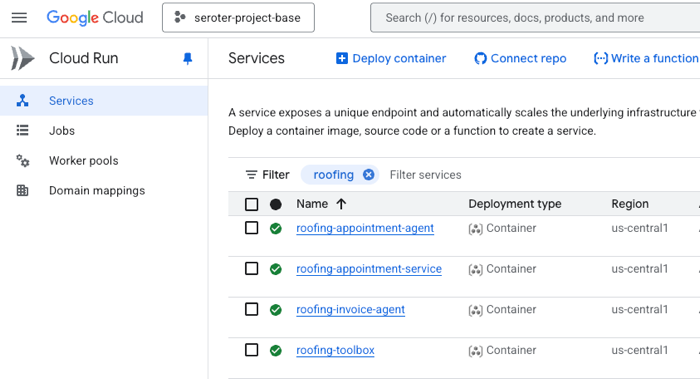
    In this case, I’m just treating the agent like any other type of code. You might make a different choice based on your use case.

    The final solution in action

    Let’s run this thing through. All the source code is sitting in my GitHub repo.

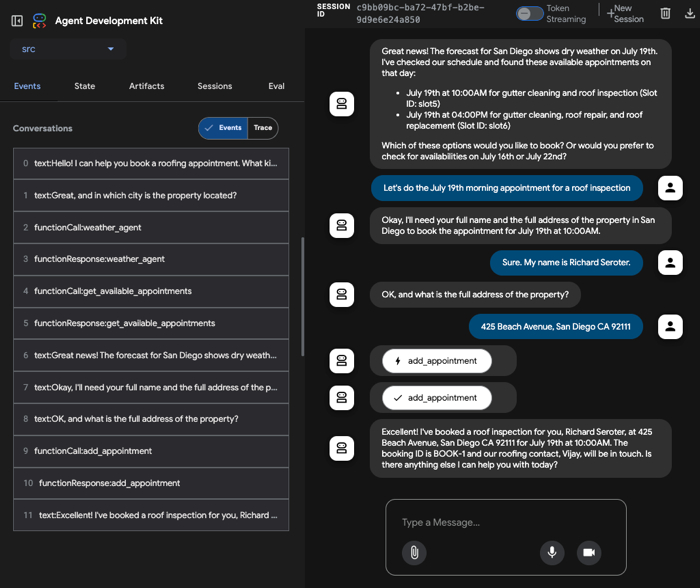
    I start by opening the the appointment agent hosted in Cloud Run. I’m using the built-in ADK web UI to have a conversational chat with the initial agent. I mention that I might have a leaky roof and want an inspection or repair. The agent then follows its instructions. After checking the weather in the city I’m in, it retrieves appointments via the API. On the left, there’s a handy set of tools to trace events, do evals, and more.

    At this point, I chose an available appointment, and the agent followed it’s next set of instructions. The appointment required two pieces of info (my name, and address), and wouldn’t proceed until I provided it. Once it had the data, it called the right function to make an appointment and publish a message to Pub/Sub.
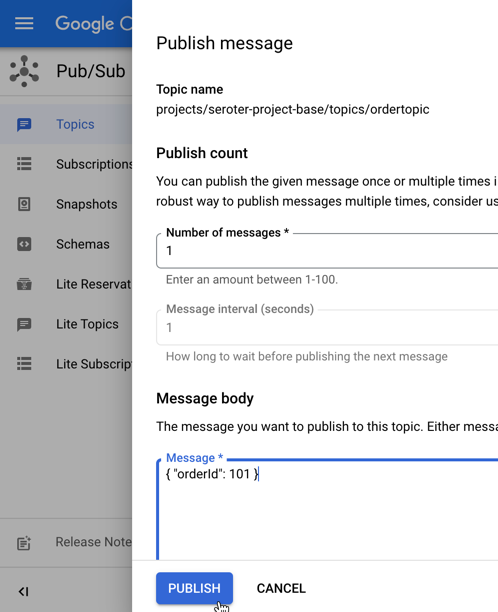
    That data flowed through Google Cloud Pub/Sub, and got pushed to another agent hosted in Cloud Run.

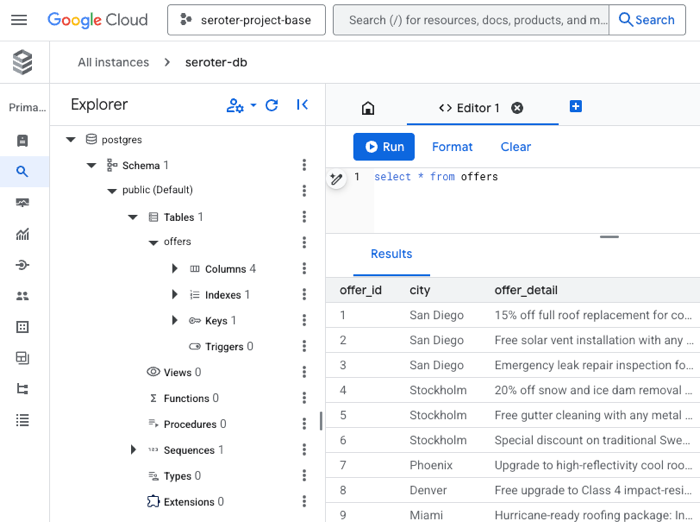
    That agent immediately loaded up its MCP tools by calling the MCP server also hosted in Cloud Run. That server retrieved the list of offers for the city in question.
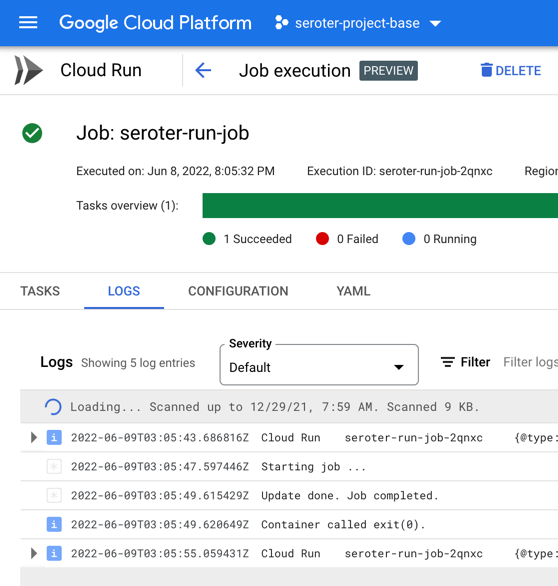
    This agent runs unattended in the background, so there’s no chat interface or interactivity. Instead, I can track progress by reading the log stream.
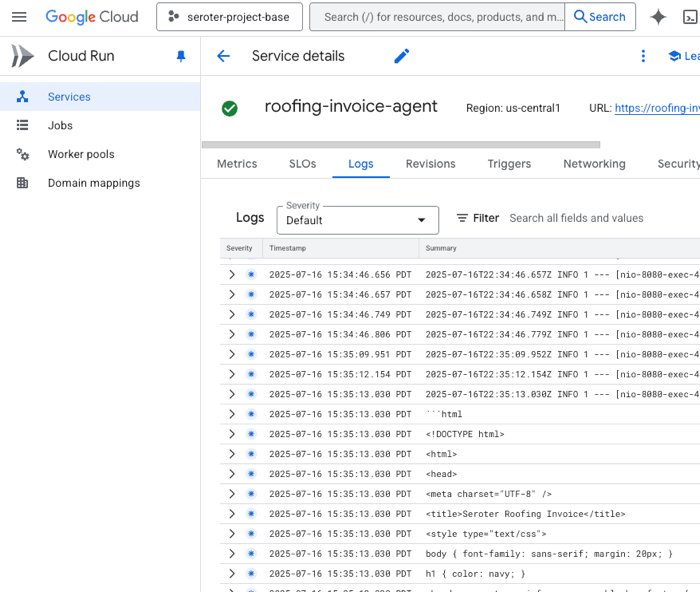
    When this agent got done converting the chat blob to JSON, then creating an HTML template, and calling the MCP tools to attach offers, it wrote the final PDF to Cloud Storage.
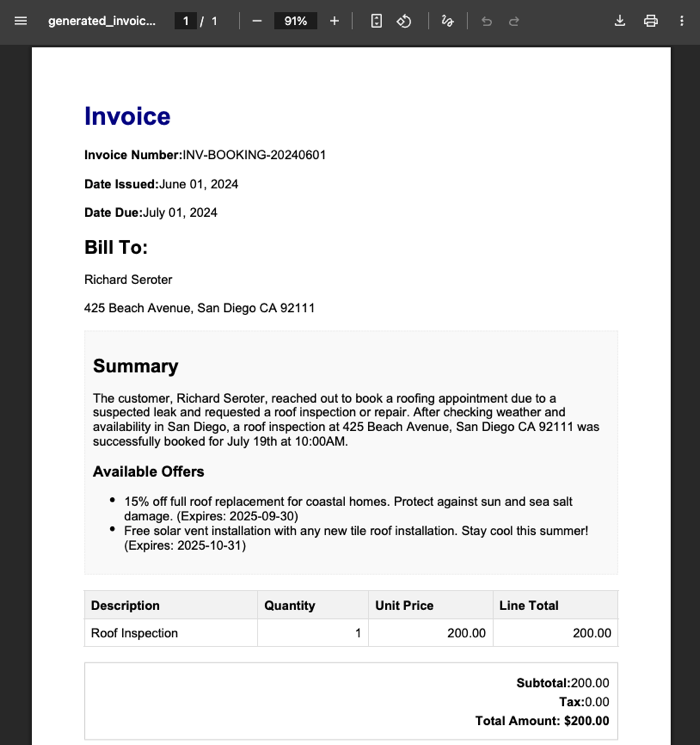
    There you go. It’s not perfect and I have improvements I want to make. Heck, the example here has the wrong date in the invoice, which didn’t happen before. So I need better instructions there. I’d like to switch the second agent from a push to a pull. It’d be fun to add some video or audio intake to the initial agent.

    Nobody knows the future, but it looks we’ll be building more agents, and fewer standalone apps. APIs matter more than ever, as do architectural decisions. Make good ones!

  • From AI-assisted creation to smart test plans, I like all the recent updates to this cloud integration service

    From AI-assisted creation to smart test plans, I like all the recent updates to this cloud integration service

    I’m approaching twenty-five years of connecting systems together. Yikes. In the summer of 2000, I met a new product called BizTalk Server that included a visual design tool for building workflows. In the years following, that particular toolset got better (see image), and a host of other cloud-based point-and-click services emerged. Cloud integration platforms are solid now, but fairly stagnant. I haven’t noticed a ton of improvements over the past twelve months. That said, Google Cloud’s Application Integration service is improving (and catching up) month over month, and I wanted to try out the latest and greatest capabilities. I think you’ll see something you like.

    Could you use code (and AI-generated code) to create all your app integrations instead of using visual modeling tools like this? Probably. But you’d see scope creep. You’d have to recreate system connectors (e.g. Salesforce, Stripe, databases, Google Sheets), data transformation logic, event triggers, and a fault-tolerant runtime for async runners. You might find yourself creating a fairly massive system to replace one you can use as-a-service. So what’s new with Google Cloud Application Integration?

    Project setup improvements

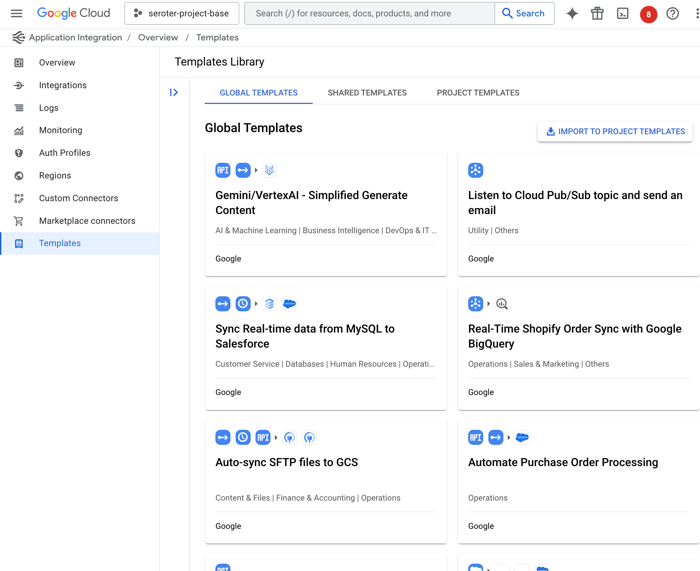
    Let’s first look at templates. These are pre-baked blueprints that you can use to start a new project. Google now offers a handful of built-in templates, and you can see custom ones shared with you by others.

    I like that anyone can define a new template from an existing integration, as I show here.

    Once I create a template, it shows up under “project templates” along with a visual preview of the integration, the option to edit, share or download as JSON, and any related templates.

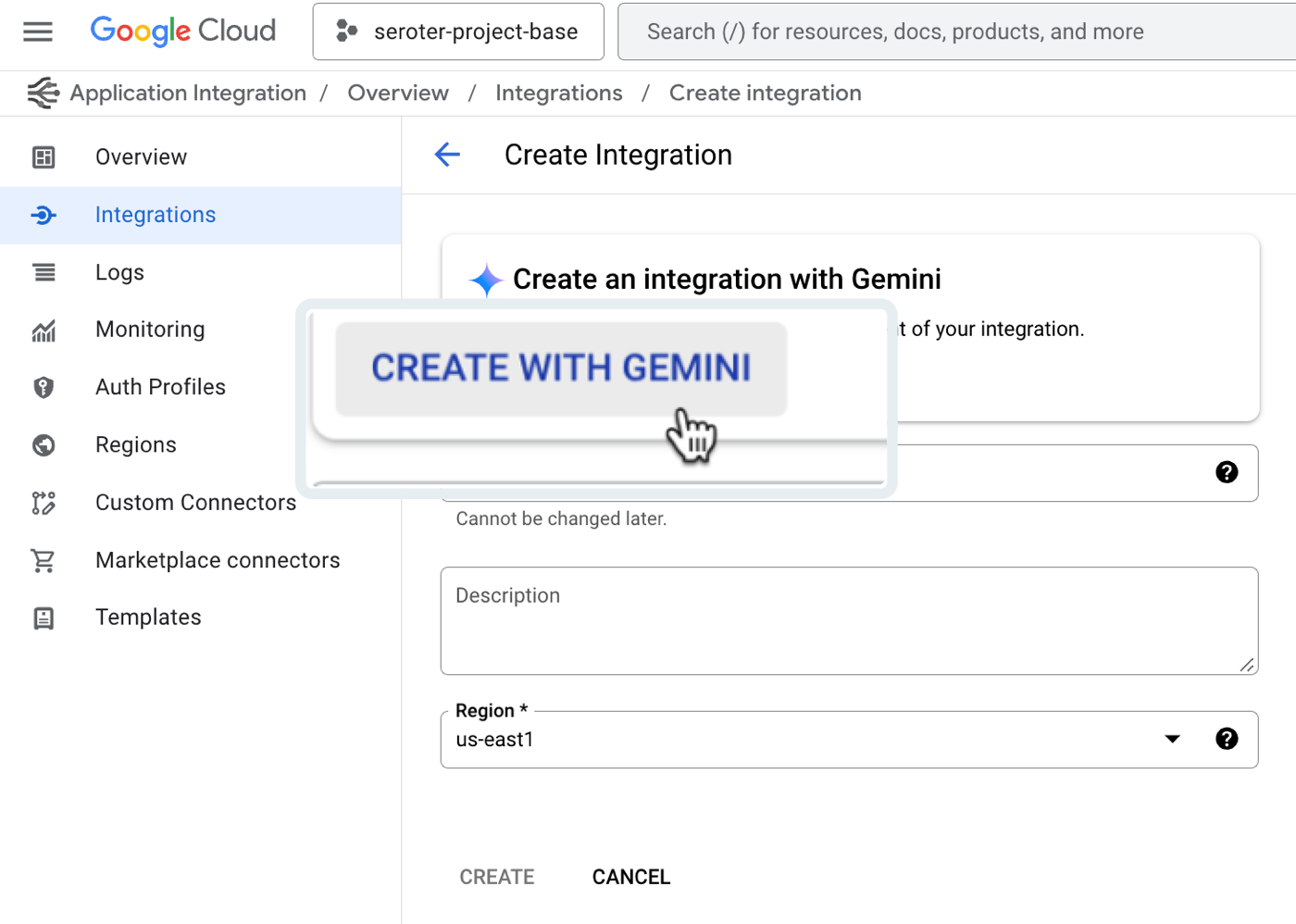
    The next new feature of Google Cloud Application Integration related to setup is the Gemini assistance. This is woven into a few different features—I’ll show another later—including the ability to create new integrations with natural language.

    After clicking that button, I’m asked to provide a natural language description of the integration I want to create. There’s a subset of triggers and tasks recognized here. See here that I’m asking for a message to be read from Pub/Sub, approvals sent, and a serverless function called if the approval is provided.

    I’m shown the resulting integration, and iterate in place as much as I want. Once I land on the desired integration, I accept the Gemini-created configuration and start working with the resulting workflow.

    This feels like a very useful AI feature that helps folks learn the platform, and set up integrations.

    New design and development features

    Let’s look at new features for doing the core design and development of integrations.

    First up, there’s a new experience for seeing and editing configuration variables. What are these? Think of config variable as settings for the integration itself that you can set at deploy time. It might be something like a connection string or desired log level.

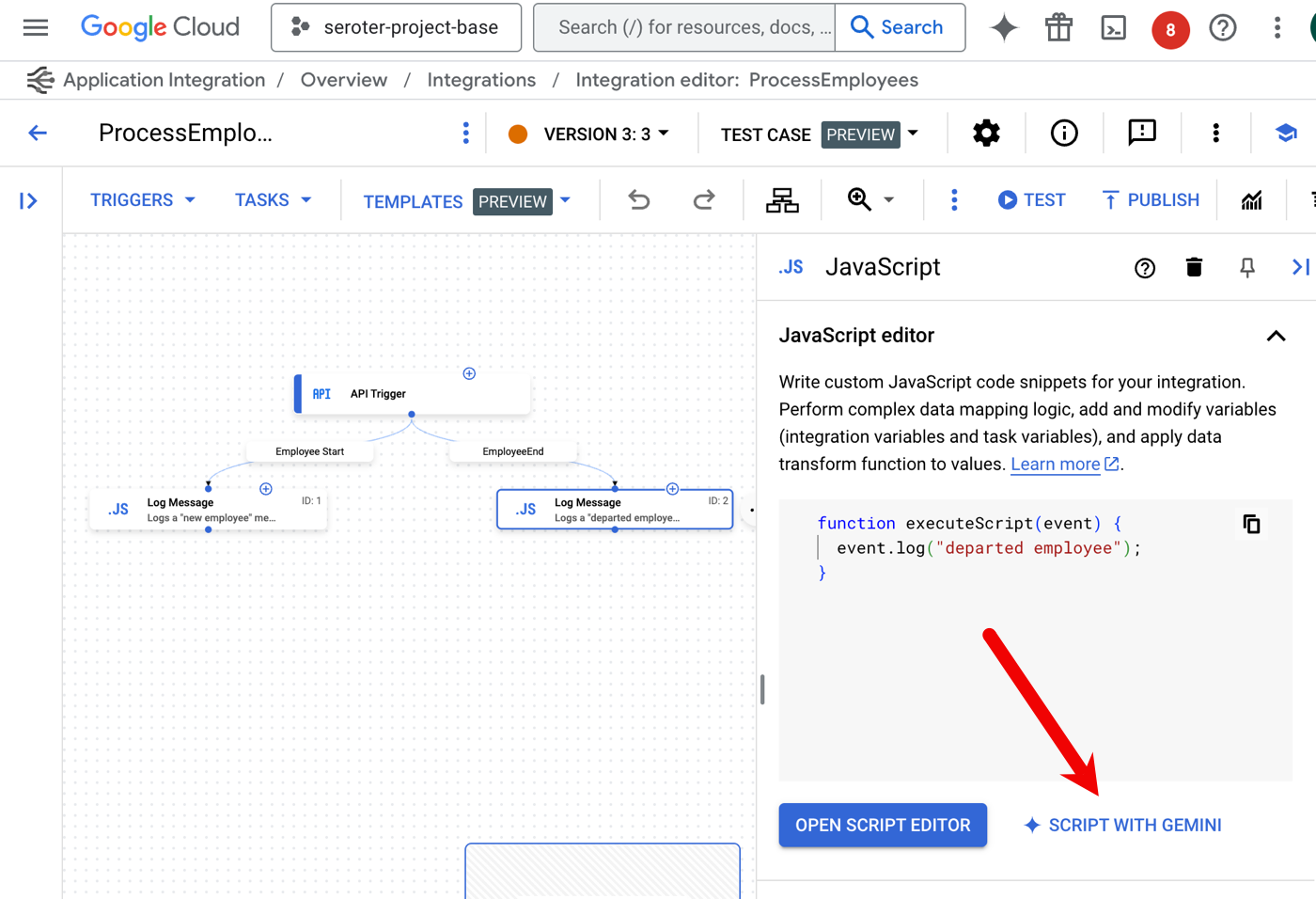
    Here’s another great use of AI assistance. The do-whatever-you-want JavaScript task in an integration can now be created with Gemini. Instead of writing the JavaScript yourself, use Gemini to craft it.

    I’m provided a prompt and asked for updated JavaScript to also log the ID of the employee record. I’m then shown a diff view that I can confirm, or continue editing.

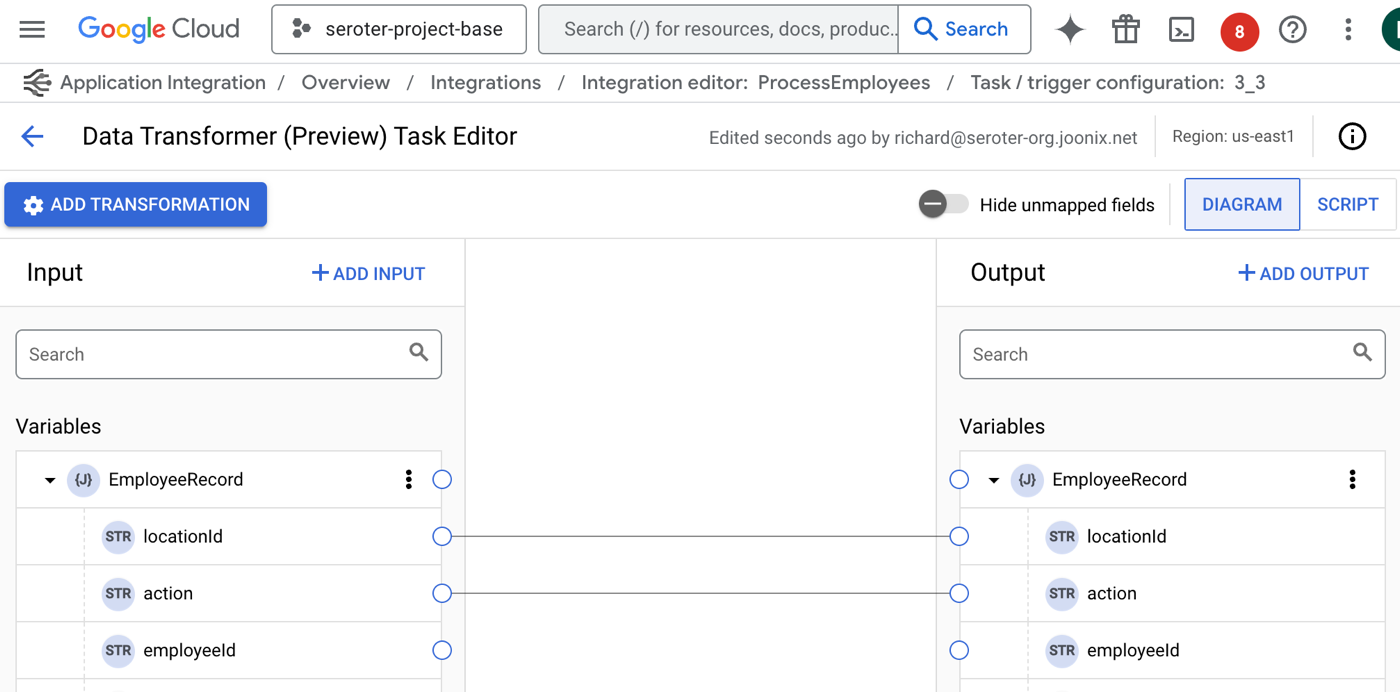
    As you move data between applications or systems, you likely need to switch up structure and format. I’ve long been jealous of the nice experience in Azure Logic Apps, and now our mapping experience is finally catching up.

    The Data Transformer task now has a visual mapping tool for the Jsonnet templates. This provides a drag-and-drop experience between data structures.

    Is the mapping not as easy as one to one? No problem. There are now transformation operations for messing with arrays, performing JSON operations, manipulating strings, and much more.

    I’m sure your integrations NEVER fail, but for everyone else, it’s useful to know have advanced failure policies for rich error handling strategies. For a given task, I can set up one or more failure policies that tell the integration what to do when an issue occurs? Quit? Retry? Ignore it? I like the choices I have available.

    There’s a lot to like the authoring experience, but these recent updates make it even better.

    Fresh testing capabilities

    Testing? Who wants to test anything? Not me, but that’s because I’m not a good software engineer.

    We shipped a couple of interesting features for those who want to test their integrations.

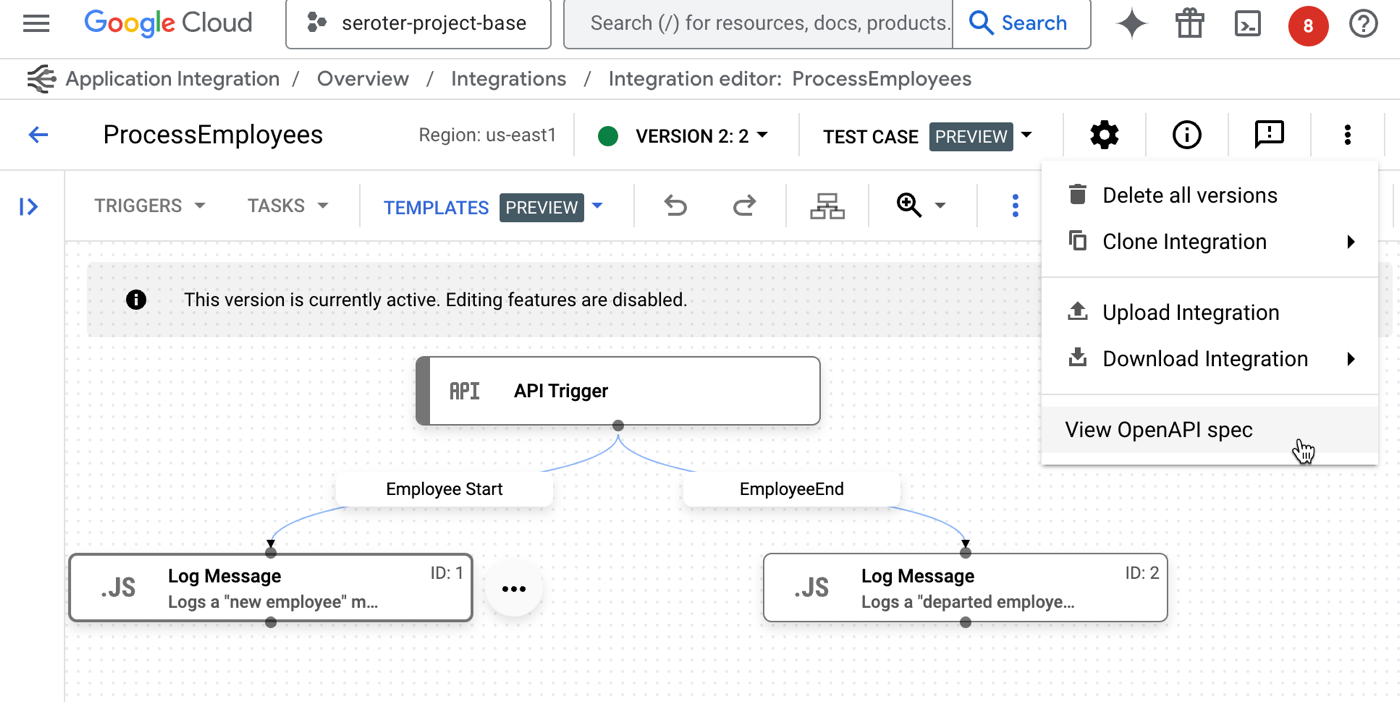
    First, it’s a small thing, but when you have an API Trigger kicking off your integration—which means that someone invokes it via web request—we now make it easy to see the associated OpenAPI spec. This makes it easier to understand a service, and even consume it from external testing tools.

    Once I choose to “view OpenAPI spec“, I get a slide-out pane with the specification, along with options to copy or download the details.

    But by far, the biggest addition to the Application Integration toolchain for testers is the ability to create and run test plans. Add one or more test cases to an integration, and apply some sophisticated configurations to a test.

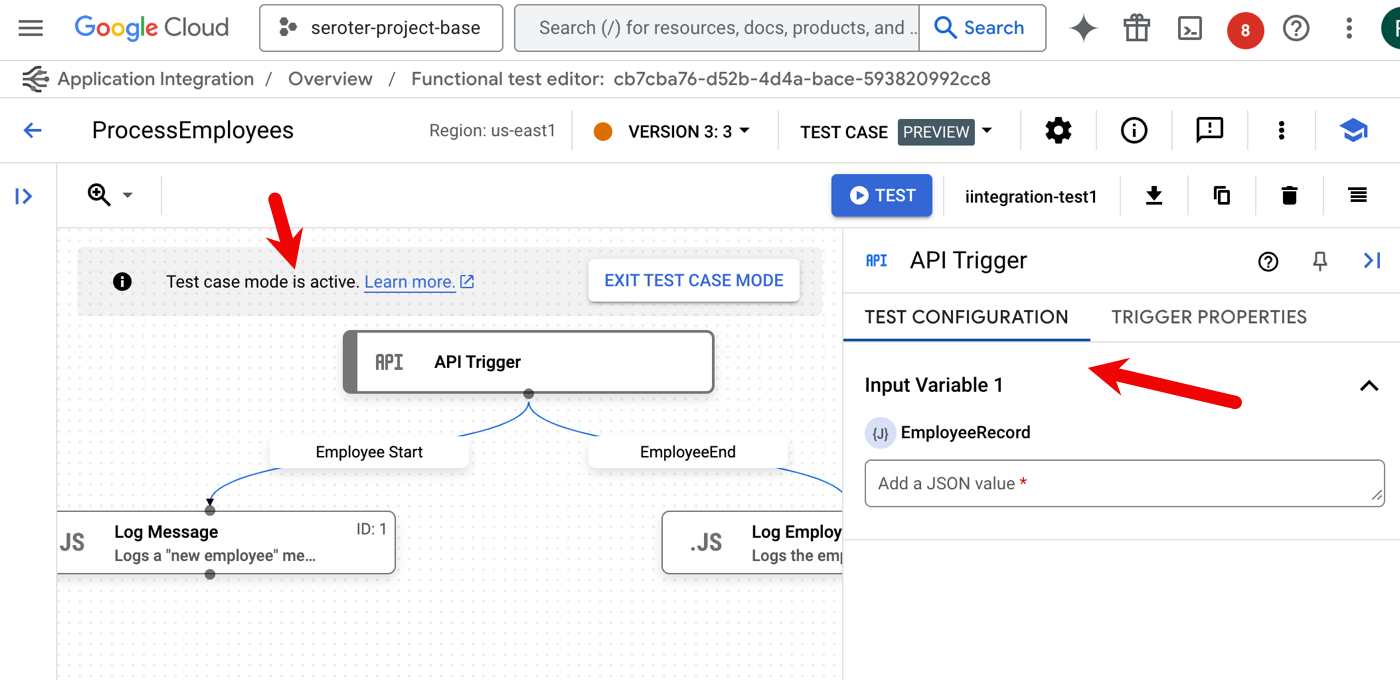
    When I choose that option, I’m first asked to name the test case and optionally provide a description. Then, I enter “test mode” and set up test configurations for the given components in the integration. For instance, here I’ve chosen the initial API trigger. I can see the properties of the trigger, and then set a test input value.

    A “task” in the integration has more test case configuration options. When I choose the JavaScript task, I see that I can choose a mocking strategy. Do you play it straight with the data coming in, purposely trigger a skip or failure, or manipulate the output?

    Then I add one or more “assertions” for the test case. I can check whether the step succeeded or failed, if a variable equals what I think it should, or if a variable meets a specific condition.

    Once I have a set of test cases, the service makes it easy to list them, duplicate them, download them, and manage them. But I want to run them.

    Even if you don’t use test cases, you can run a test. In that case, you click the “Test” button and provide an input value. If you’re using test cases, you stay in (or enter) “test case mode” and then the “Test” button runs your test cases.

    Very nice. There’s a lot you can do here to create integrations that exist in a typical Ci/CD environment.

    Better “day 2” management

    This final category looks at operational features for integrations.

    This first feature shipped a few days ago. Now we’re offering more detailed execution logs that you can also download as JSON. A complaint with systems like this is that they’re a black box and you can’t tell what’s going on. The more transparency, the better. Lots of log details now!

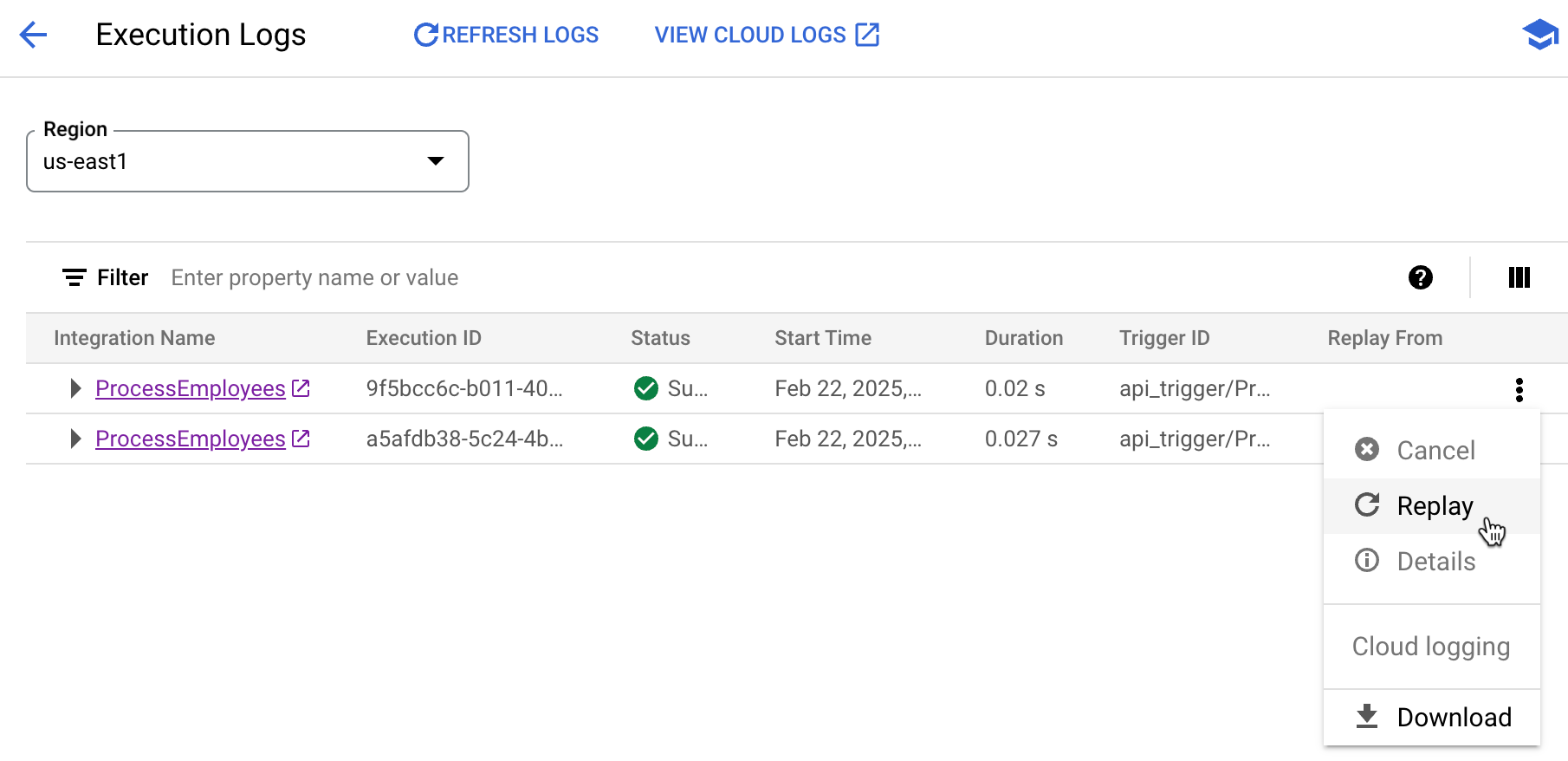
    Another new operational feature is the ability replay an integration. Maybe something failed downstream and you want to retry the whole process. Or something transient happened and you need a fresh run. No problem. Now I can pick any completed (or failed) integration and run it again.

    When I use this, I’m asked for a reason to replay. And what I liked is that after the replay occurs, there’s an annotation indicating that this given execution was the result of a replay.

    Also be aware that you can now cancel an execution. This is hand for long-running instances that may no longer matter.

    Summary

    You don’t need to use tools like this, of course. You can connect your systems together with code or scripts. But I personally like managed experiences like this that handle the machinery of connecting to systems, transforming data, and dealing with running the dozens or thousands of hourly events between systems.

    If you’re hunting for a solution here, give Google Cloud Application Integration a good look.

  • Weekly Reading List Podcast – Oct 28-Nov1 2024

    Do you happen to subscribe my daily reading list? If you don’t, that’s ok. We’re still friends.

    I shared a lot of links last week, and maybe it’s easier to listen to an audio recap instead. I just fed in last week’s reading list (all five days) to NotebookLM and generated a 20 minute engaging podcast. Great summary and analysis. Listen!

  • Weekly Reading List Podcast – Oct 21-25 2024

    Each day I publish a reading list, but maybe you aren’t sifting through ~50 links per week. Understandable.

    But what if you could listen to a recap instead? Thanks to a prompt from my boss, I fed in last week’s reading list (all five days) to NotebookLM and generated a 20 minute engaging podcast. It’s so good! Listen below.

    If you like this, I’ll start generating these recaps every week too.

  • More than serverless: Why Cloud Run should be your first choice for any new web app.

    More than serverless: Why Cloud Run should be your first choice for any new web app.

    I’ll admit it, I’m a PaaS guy. Platform-as-a-Service is an ideal abstraction for those that don’t get joy from fiddling with infrastructure. From Google App Engine, to Heroku, to Cloud Foundry, I’ve appreciated attempts to deliver runtimes that makes it easier to ship and run code. Classic PaaS-type services were great at what they did. The problem with all of them—this includes all the first generation serverless products like Amazon Lambda—were that they were limited. Some of the necessary compromises were well-meaning and even healthy: build 12-factor apps, create loose coupling, write less code and orchestrate manage services instead. But in the end, all these platforms, while successful in various ways, were too constrained to take on a majority of apps for a majority of people. Times have changed.

    Google Cloud Run started as a serverless product, but it’s more of an application platform at this point. It’s reminiscent of a PaaS, but much better. While not perfect for everything—don’t bring Windows apps, always-on background components, or giant middleware—it’s becoming my starting point for nearly every web app I build. There are ten reasons why Cloud Run isn’t limited by PaaS-t constraints, is suitable for devs at every skill level, and can run almost any web app.

    1. It’s for functions AND apps.
    2. You can run old AND new apps.
    3. Use by itself AND as part of a full cloud solution.
    4. Choose simple AND sophisticated configurations.
    5. Create public AND private services.
    6. Scale to zero AND scale to 1.
    7. Do one-off deploys AND set up continuous delivery pipelines.
    8. Own aspects of security AND offload responsibility.
    9. Treat as post-build target AND as upfront platform choice.
    10. Rely on built-in SLOs, logs, metrics AND use your own observability tools.

    Let’s get to it.

    #1. It’s for functions AND apps.

    Note that Cloud Run also has “jobs” for run-to-completion batch work. I’m focusing solely on Cloud Run web services here.

    I like “functions.” Write short code blocks that respond to events, and perform an isolated piece of work. There are many great uses cases for this.

    The new Cloud Run functions experience makes it easy to bang out a function in minutes. It’s baked into CLI and UI. Once I decide to create a function ….

    I only need to pick a service name, region, language runtime, and whether access to this function is authenticated or not.

    Then, I see a browser-based editor where I can write, test, and deploy my function. Simple, and something most of us equate with “serverless.”

    But there’s more. Cloud Run does apps too. That means instead of a few standalone functions to serve a rich REST endpoint, you’re deploying one Spring Boot app with all the requisite listeners. Instead of serving out a static site, you could return a full web app with server-side capabilities. You’ve got nearly endless possibilities when you can serve any container that accepts HTTP, HTTP/2, WebSockets, or gRPC traffic.

    Use either abstraction, but stay above the infrastructure and ship quickly.

    Docs:Deploy container images, Deploy functions, Using gRPC, Invoke with an HTTPS request
    Code labs to try:Hello Cloud Run with Python, Getting Started with Cloud Run functions

    #2. You can run old AND new apps.

    This is where the power of containers shows up, and why many previous attempts at PaaS didn’t break through. It’s ok if a platform only supports new architectures and new apps. But then you’re accepting that you’ll need an additional stack for EVERYTHING ELSE.

    Cloud Run is a great choice because you don’t HAVE to start fresh to use it. Deploy from source in an existing GitHub repo or from cloned code on your machine. Maybe you’ve got an existing Next.js app sitting around that you want to deploy to Cloud Run. Run a headless CMS. Does your old app require local volume mounts for NFS file shares? Easy to do. Heck, I took a silly app I built 4 1/2 years ago, deployed it from the Docker Hub, and it just worked.

    Of course, Cloud Run shines when you’re building new apps. Especially when you want fast experimentation with new paradigms. With its new GPU support, Cloud Run lets you do things like serve LLMs via tools like Ollama. Or deploy generative AI apps based on LangChain or Firebase Genkit. Build powerful web apps in Go, Java, Python, .NET, and more. Cloud Run’s clean developer experience and simple workflow makes it ideal for whatever you’re building next.

    Docs:Migrate an existing web service, Optimize Java applications for Cloud Run, Supported runtime base images, Run LLM inference on Cloud Run GPUs with Ollama
    Code labs to try:How to deploy all the JavaScript frameworks to Cloud Run, Django CMS on Cloud Run, How to run LLM inference on Cloud Run GPUs with vLLM and the OpenAI Python SDK

    #3. Use by itself AND as part of a full cloud solution.

    There aren’t many tech products that everyone seems to like. But folks seem to really like Cloud Run, and it regularly wins over the Hacker News crowd! Some classic PaaS solutions were lifestyle choices; you had to be all in. Use the platform and its whole way of working. Powerful, but limiting.

    You can choose to use Cloud Run all by itself. It’s got a generous free tier, doesn’t require complicated HTTP gateways or routers to configure, and won’t force you to use a bunch of other Google Cloud services. Call out to databases hosted elsewhere, respond to webhooks from SaaS platforms, or just serve up static sites. Use Cloud Run, and Cloud Run alone, and be happy.

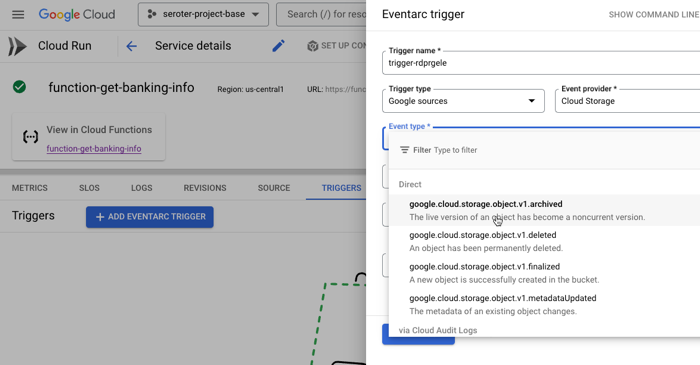
    And of course, you can use it along with other great cloud services. Tack on a Firestore database for a flexible storage option. Add a Memorystore caching layer. Take advantage of our global load balancer. Call models hosted in Vertex AI. If you’re using Cloud Run as part of an event-driven architecture, you might also use built-in connections to Eventarc to trigger Cloud Run services when interesting things happen in your account—think file uploaded to object storage, user role deleted, database backup completes.

    Use it by itself or “with the cloud”, but either way, there’s value.

    Docs:Hosting webhooks targets, Connect to a Firestore database, Invoke services from Workflows
    Code labs to try:How to use Cloud Run functions and Gemini to summarize a text file uploaded to a Cloud Storage bucket

    #4. Choose simple AND sophisticated configurations.

    One reason PaaS-like services are so beloved is because they often provide a simple onramp without requiring tons of configuration. “cf push” to get an app to Cloud Foundry. Easy! Getting an app to Cloud Run is simple too. If you have a container, it’s a single command:

    rseroter$ gcloud run deploy go-app --image=gcr.io/seroter-project-base/go-restapi

    If all you have is source code, it’s also a single command:

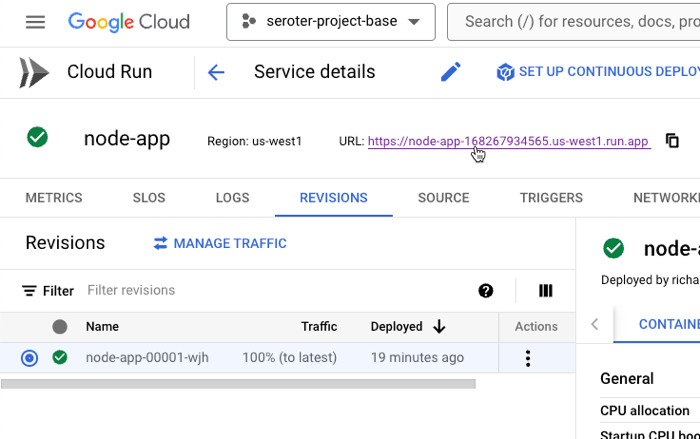
    rseroter$ gcloud run deploy node-app --source .

    In both cases, the CLI asks me to pick a region and whether I want requests authenticated, and that’s it. Seconds later, my app is running.

    This works because Cloud Run sets a series of smart, reasonable default settings.

    But sometimes you do want more control over service configuration, and Cloud Run opens up dozens of possible settings. What kind of sophisticated settings do you have control over?

    • CPU allocation. Do you want CPU to be always on, or quit when idle?
    • Ingress controls. Do you want VPC-only access or public access?
    • Multi-container services. Add a sidecar.
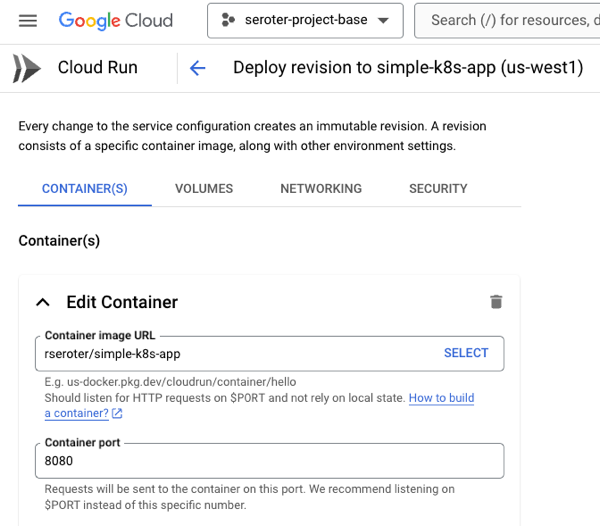
    • Container port. The default is 8080, but set to whatever you want.
    • Memory. The default value is 512 MiB per instance, but you can go up to 32GB.
    • CPU. It defaults to 1, but you can go less than 1, or up to 8.
    • Healthchecks. Define startup or liveliness checks that ping specific endpoints on a schedule.
    • Variables and secrets. Define environment variables that get injected at runtime. Same with secrets that get mounted at runtime.
    • Persistent storage volumes. There’s ephemeral scratch storage in every Cloud Run instance, but you can also mount volumes from Cloud Storage buckets or NFS shares.
    • Request timeout. The default value is 5 minutes, but you can go up to 60 minutes.
    • Max concurrency. A given service instance can handle more than one request. The default value is 80, but you can go up to 1000!
    • and much more!

    You can do something simple, you can do something sophisticated, or a bit of both.

    Docs:Configure container health checks, Maximum concurrent requests per instance, CPU allocation, Configure secrets, Deploying multiple containers to a service (sidecars)
    Code labs to try:How to use Ollama as a sidecar with Cloud Run GPUs and Open WebUI as a frontend ingress container

    #5. Create public AND private services.

    One of the challenge with early PaaS services was that they were just sitting on the public internet. That’s no good as you get to serious, internal-facing systems.

    First off, Cloud Run services are public by default. You control the authentication level (anonymous access, or authenticated user) and need to explicitly set that. But the service itself is publicly reachable. What’s great is that this doesn’t require you to set up any weird gateways or load balancers to make it work. As soon as you deploy a service, you get a reachable address.

    Awesome! Very easy. But what if you want to lock things down? This isn’t difficult either.

    Cloud Run lets me specify that I’ll only accept traffic from my VPC networks. I can also choose to securely send messages to IPs within a VPC. This comes into play as well if you’re routing requests to a private on-premises network peered with a cloud VPC. We even just added support for adding Cloud Run services to a service mesh for more networking flexibility. All of this gives you a lot of control to create truly private services.

    Docs:Private networking and Cloud Run, Restrict network ingress for Cloud Run, Cloud Service Mesh
    Code labs to try:How to configure a Cloud Run service to access an internal Cloud Run service using direct VPC egress, Configure a Cloud Run service to access both an internal Cloud Run service and public Internet

    #6. Scale to zero AND scale to 1.

    I don’t necessarily believe that cloud is more expensive than on-premises—regardless of some well-publicized stories—but keeping idle cloud services running isn’t helping your cost posture.

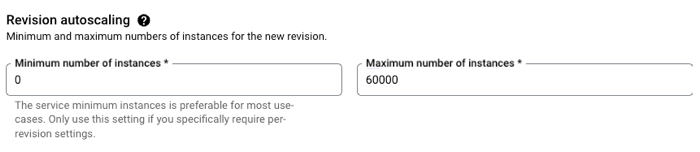
    Google Cloud Run truly scales to zero. If nothing is happening, nothing is running (or costing you anything). However, when you need to scale, Cloud Run scales quickly. Like, a-thousand-instances-in-seconds quickly. This is great for bursty workloads that don’t have a consistent usage pattern.

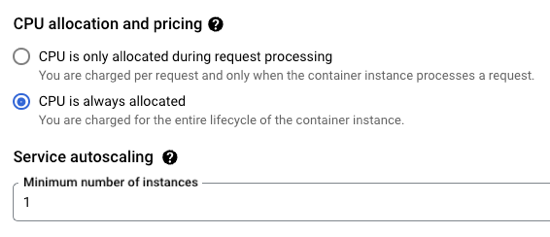
    But you probably want the option to have an affordable way to keep a consistent pool of compute online to handle a steady stream of requests. No problem. Set the minimum instance to 1 (or 2, or 10) and keep instances warm. And, set concurrency high for apps that can handle it.

    If you don’t have CPU always allocated, but keep a minimum instance online, we actually charge you significantly less for that “warm” instance. And you can apply committed use discounts when you know you’ll have a service running for a while.

    Run bursty workloads or steadily-used workloads all in a single platform.

    Docs:About instance autoscaling in Cloud Run services, Set minimum instances, Load testing best practices
    Code labs to try:Cloud Run service with minimum instances

    #7. Do one-off deploys AND set up continuous delivery pipelines.

    I mentioned above that it’s easy to use a single command or single screen to get an app to Cloud Run. Go from source code or container to running app in seconds. And you don’t have to set up any other routing middleware or Cloud networking to get a routable serivce.

    Sometimes you just want to do a one-off deploy without all the ceremony. Run the CLI, use the Console UI, and get on with life. Amazing.

    But if that was your only option, you’d feel constrained. So you can use something like GitHub Actions to deploy to Cloud Run. Most major CI/CD products support it.

    Another great option is Google Cloud Deploy. This managed service takes container artifacts and deploys them to Google Kubernetes Engine or Google Cloud Run. It offers some sophisticated controls for canary deploys, parallel deploys, post-deploy hooks, and more.

    Cloud Deploy has built-in support for Cloud Run. A basic pipeline (defined in YAML, but also configured via point-and-click in the UI if you want) might show three stages for dev, test, and prod.

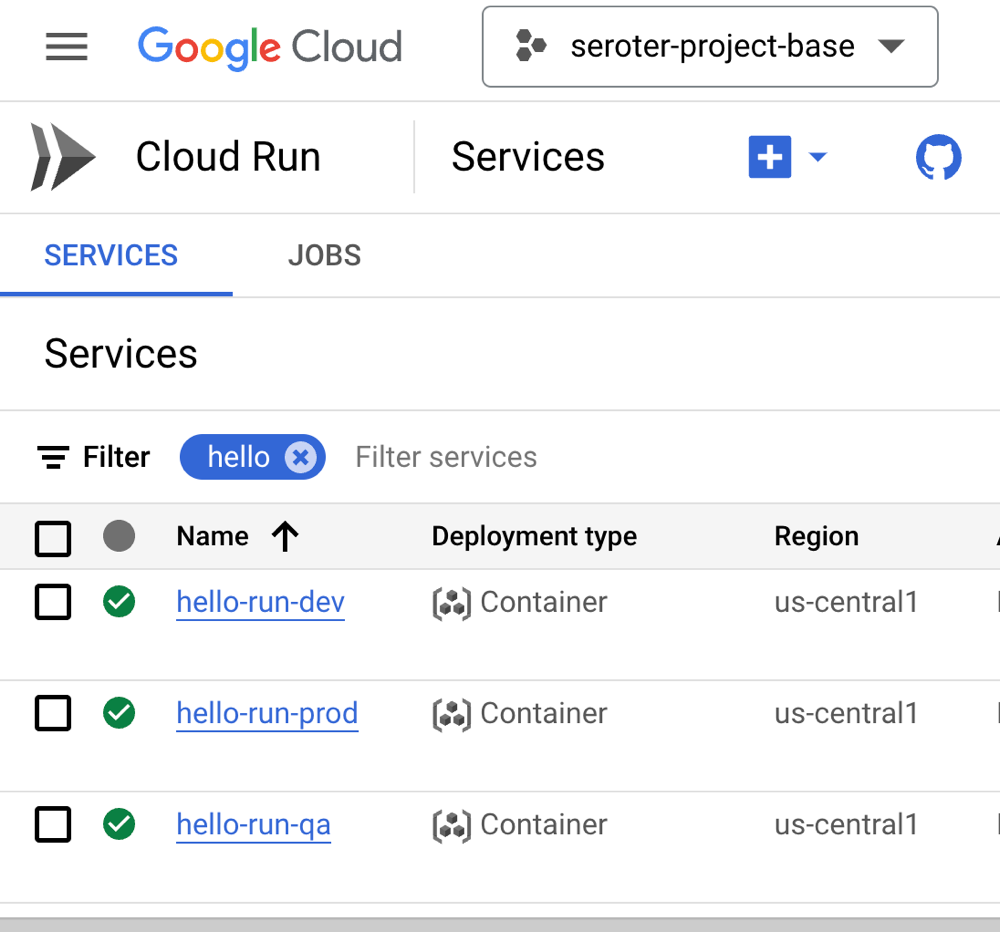
    When the pipeline completes, we see three separate Cloud Run instances deployed, representing each stage of the pipeline.

    You want something more sophisticated? Ok. Cloud Deploy supports Cloud Run canary deployments. You’d use this if you want a subset of traffic to go to the new instance before deciding to cut over fully.

    This is taking advantage of Cloud Run’s built-in traffic management feature. When I check the deployed service, I see that after advancing my pipeline to 75% of production traffic for the new app version, the traffic settings are properly set in Cloud Run.

    Serving traffic in multiple regions? Cloud Deploy makes it possible to ship a release to dozens of places simultaneously. Here’s a multi-target pipeline. The production stage deploys to multiple Cloud Run regions in the US.

    When I checked Cloud Run, I saw instances in all the target regions. Very cool!

    If you want a simple deploy, do that with the CLI or UI. Nothing stops you. However, if you’re aiming for a more robust deployment strategy, Cloud Run readily handles it through services like Cloud Deploy.

    Docs:Use a canary deployment strategy, Deploy to multiple targets at the same time, Deploying container images to Cloud Run
    Code labs to try:How to Deploy a Gemini-powered chat app on Cloud Run, How to automatically deploy your changes from GitHub to Cloud Run using Cloud Build

    #8. Own aspects of security AND offload responsibility.

    On reason that you choose managed compute platforms is to outsource operational tasks. It doesn’t mean you’re not capable of patching infrastructure, scaling compute nodes, or securing workloads. It means you don’t want to, and there are better uses of your time.

    With Cloud Run, you can drive aspects of your security posture, and also let Cloud Run handle key aspects on your behalf.

    What are you responsible for? You choose an authentication approach, including public or private services. This includes control of how you want to authenticate developers who use Cloud Run. You can authenticate end users, internal or external ones, using a handful of supported methods.

    It’s also up to you to decide which service account the Cloud Service instance should impersonate. This controls what a given instance has access to. If you want to ensure that only containers with verified provenance get deployed, you can also choose to turn on Binary Authorization.

    So what are you offloading to Cloud Run and Google Cloud?

    You can outsource protection from DDoS and other threats by turning on Cloud Armor. The underlying infrastructure beneath Cloud Run is completely managed, so you don’t need to worry about upgrading or patching any of that. What’s also awesome is that if you deploy Cloud Run services from source, you can sign up for automatic base image updates. This means we’ll patch the OS and runtime of your containers. Importantly, it’s still up to you to patch your app dependencies. But this is still very valuable!

    Docs:Security design overview, Introduction to service identity, Use Binary Authorization. Configure automatic base image updates
    Code labs to try:How to configure a Cloud Run service to access an internal Cloud Run service using direct VPC egress, How to connect a Node.js application on Cloud Run to a Cloud SQL for PostgreSQL database

    #9. Treat as post-build target AND as upfront platform choice.

    You might just want a compute host for your finished app. You don’t want to have to pick that host up front, and just want a way to run your app. Fair enough! There aren’t “Cloud Run apps”; they’re just containers. That said, there are general tips that make an app more suitable for Cloud Run than not. But the key is, for modern apps, you can often choose to treat Cloud Run as a post-build decision.

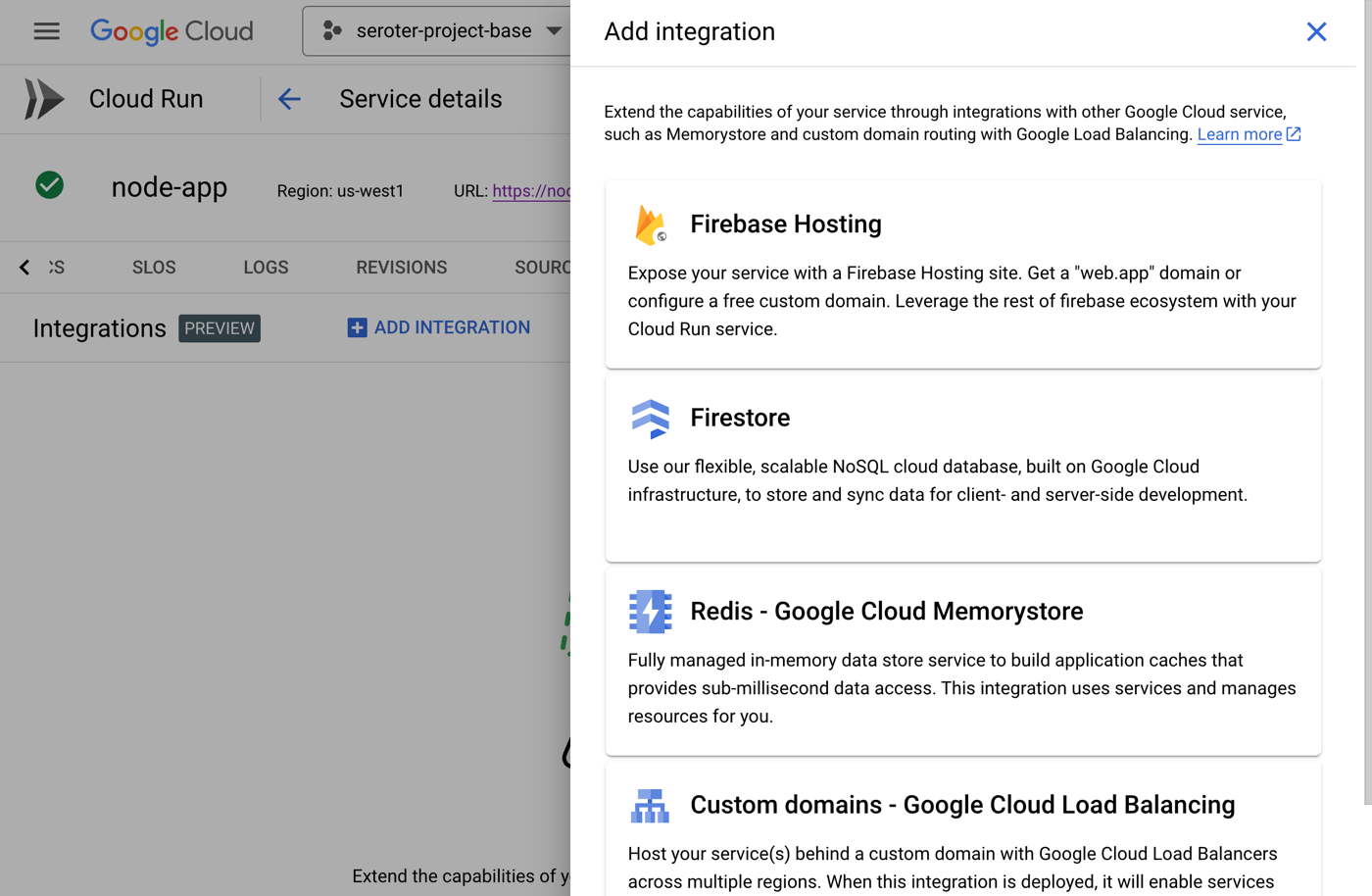
    Or, you can design with Cloud Run in mind. Maybe you want to trigger Cloud Run based on a specific Eventarc event. Or you want to capitalize on Cloud Run concurrency so you code accordingly. You could choose to build based on a specific integration provided by Cloud Run (e.g. Memorystore, Firestore, or Firebase Hosting).

    There are times that you build with the target platform in mind. In other cases, you want a general purpose host. Cloud Run is suitable for either situation, which makes it feel unique to me.

    Docs:Optimize Java applications for Cloud Run, Integrate with Google Cloud products in Cloud Run, Trigger with events
    Code labs to try:Trigger Cloud Run with Eventarc events

    #10. Rely on built-in SLOs, logs, metrics AND use your own observability tools.

    If you want it to be, Cloud Run can feel like an all-in-one solution. Do everything from one place. That’s how classic PaaS was, and there was value in having a tightly-integrated experience. From within Cloud Run, you have built-in access to logs, metrics, and even setting up SLOs.

    The metrics experience is powered by Cloud Monitoring. I can customize event types, the dashboards, time window, and more. This even includes the ability to set uptime checks which periodically ping your service and let you know if everything is ok.

    The embedded logging experience is powered by Cloud Logging and gives you a view into all your system and custom logs.

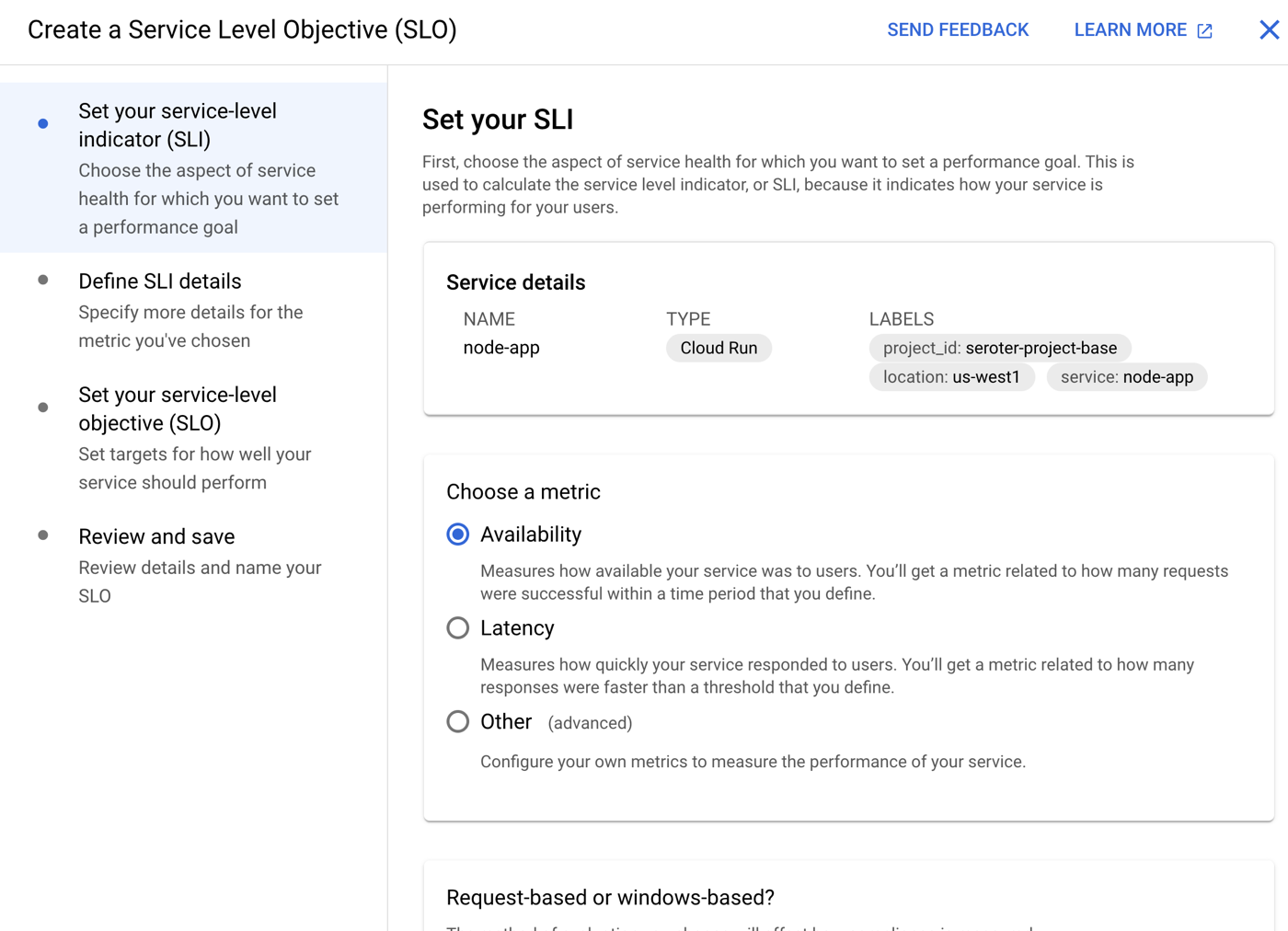
    We’ve even added an SLO capability where you can define SLIs based on availability, latency, or custom metrics. Then you set up service level objectives for service performance.

    While all these integrations are terrific, you don’t have to only use this. You can feed metrics and logs into Datadog. Same with Dynatrace. You can also write out OpenTelemetry metrics or Prometheus metrics and consume those how you want.

    Docs:Monitor Health and Performance, Logging and viewing logs in Cloud Run, Using distributed tracing

    Kubernetes, virtual machines, and bare metal boxes all play a key role for many workloads. But you also may want to start with the highest abstraction possible so that you can focus on apps, not infrastructure. IMHO, Google Cloud Run is the best around and satisfies the needs of most any modern web app. Give it a try!

  • 4 ways to pay down tech debt by ruthlessly removing stuff from your architecture

    4 ways to pay down tech debt by ruthlessly removing stuff from your architecture

    What advice do you get if you’re lugging around a lot of financial debt? Many folks will tell you to start purging expenses. Stop eating out at restaurants, go down to one family car, cancel streaming subscriptions, and sell unnecessary luxuries. For some reason, I don’t see the same aggressive advice when it comes to technical debt. I hear soft language around “optimization” or “management” versus assertive stances that take a meat cleaver to your architectural excesses.

    What is architectural debt? I’m thinking about bloated software portfolios where you’re carrying eight products in every category. Brittle automation that only partially works and still requires manual workarounds and black magic. Unique customizations to packaged software that’s now keeping you from being able to upgrade to modern versions. Also half-finished “ivory tower” designs where the complex distributed system isn’t fully in place, and may never be. You might have too much coupling, too little coupling, unsupported frameworks, and all sorts of things that make deployments slow, maintenance expensive, and wholesale improvements impossible.

    This stuff matters. The latest StackOverflow developer survey shows that the most common frustration is the “amount of technical debt.” It’s wasting up to eight hours a week for each developer! Number two and three are around stack complexity. Your code and architectural tech debt is slowing down your release velocity, creating attrition with your best employees, and limiting how much you can invest in new tech areas. It’s well-past time to simplify by purging architecture components that have built up (and calcified) over time. Let’s write bigger checks to pay down this debt faster.

    Explore these four areas, all focused on simplification. There are obviously tradeoffs and cost with each suggestion, but you’re not going to make meaningful progress by being timid. Note there are other dimensions to fixing tech debt besides simplification, but that’s one I see discussed the least often. I’ll use Google Cloud to offer some examples of how you might specifically tackle each, given we’re the best cloud for those making a firm shift away from legacy tech debt.

    1. Stop moving so much data around.

    If you zoom out on your architecture, how many components do you have that get data from point A to point B? I’d bet that you have lots of ETL pipelines to consolidate data into a warehouse or data lake, messaging and event processing solutions to shunt data around, and even API calls that suck data from one system into another. That’s a lot of machinery you have to create, update, and manage every day.

    Can you get rid of some of this? Can you access more of the data where it rests, versus copying it all over the place? Or use software that act on data in different ways without forcing you to migrate it for further processing? I think so.

    Let’s see some examples.

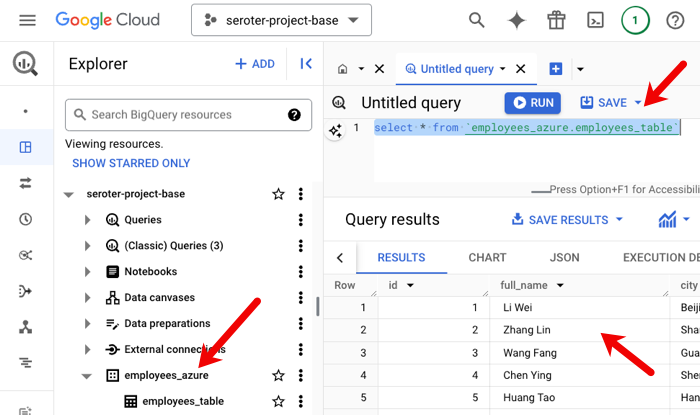
    Perform analytical queries against data sitting in different places? Google Cloud supports that with BigQuery Omni. We run BigQuery in AWS and Azure so that you can access data at rest, and not be forced to consolidate it in a single data lake. Here, I have an Excel file sitting in an Azure blob storage account. I could copy that data over to Google Cloud, but that’s more components for me to create and manage.

    Rather, I can set up a pointer to Azure from within BigQuery, and treat it like any other table. The data is processed in Azure, and only summary info travels across the wire.

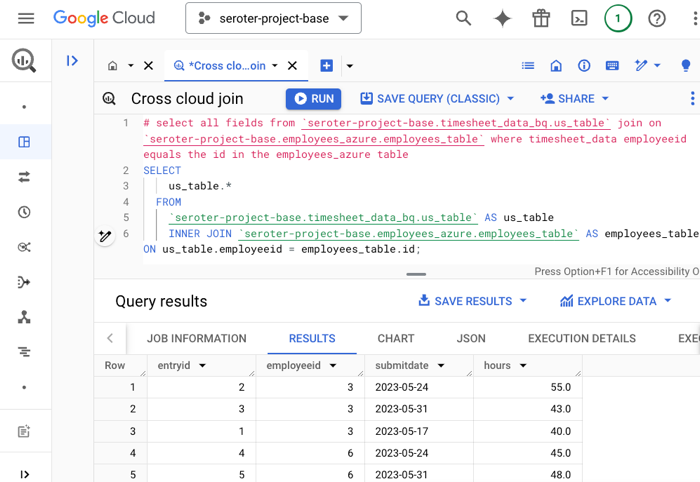
    You might say “that’s cool, but I have related data in another cloud, so I’d have to move it anyway to do joins and such.” You’d think so. But we also offer cross-cloud joins with BigQuery Omni. Check this out. I’ve got that employee data in Azure, but timesheet data in Google Cloud.

    With a single SQL statement, I’m joining data across clouds. No data movement required. Less debt.

    Enrich data in analytical queries from outside databases? You might have ETL jobs in place to bring reference data into your data warehouse to supplement what’s already there. That may be unnecessary.

    With BigQuery’s Federated Queries, I can reach live into PostgreSQL, MySQL, Cloud Spanner, and even SAP Datasphere sources. Access data where it rests. Here, I’m using the EXTERNAL_QUERY function to retrieve data from a Cloud SQL database instance.

    I could use that syntax to perform joins, and do all sorts of things without ever moving data around.

    Perform complex SQL analytics against log data? Does your architecture have data copying jobs for operational data? Maybe to get it into a system where you can perform SQL queries against logs? There’s a better way.

    Google Cloud Log Analytics lets you query, view, and analyze log data without moving it anywhere.

    You can’t avoid moving data around. It’s often required. But I’m fairly sure that through smart product selection and some redesign of the architecture, you could eliminate a lot of unnecessary traffic.

    2. Compress the stack by removing duplicative components.

    Break out the chainsaw. Do you have multiple products for each software category? Or too many fine-grained categories full of best-of-breed technology? It’s time to trim.

    My former colleague Josh McKenty used to say something along the lines of “if it’s emerging buy a few, it’s a mature, no more than two.”

    You don’t need a dozen project management software products. Or more than two relational database platforms. In many cases, you can use multi-purpose services and embrace “good enough.”

    There should be a fifteen day cooling off period before you buy a specialized vector database. Just use PostgreSQL. Or, any number of existing databases that now support vector capabilities. Maybe you can even skip RAG-based solutions (and infrastructure) all together for certain use cases and just use Gemini with its long context.

    Do you have a half-dozen different event buses and stream processors? Maybe you don’t need all that? Composite services like Google Cloud Pub/Sub can be a publish/subscribe message broker, apply a log-like approach with a replay-able stream, and do push-based notifications.

    You could use Spanner Graph instead of a dedicated graph database, or Artifact Registry as a single place for OS and application packages.

    I’m keen on the new continuous queries for BigQuery where you can do stream analytics and processing as data comes into the warehouse. Enrich data, call AI models, and more. Instead of a separate service or component, it’s just part of the BigQuery engine. Turn off some stuff?

    I suspect that this one is among the hardest for folks to act upon. We often hold onto technology because it’s familiar, or even because of misplaced loyalty. But be bold. Simplify your stack by getting rid of technology that’s no longer differentiated. Make a goal of having 30% fewer software products or platforms in your architecture in 2025.

    3. Replace hyper-customized software and automation with managed services and vanilla infrastructure.

    Hear me out. You’re not that unique. There are a handful of things that your company does which are the “secret sauce” for your success, and the rest is the same as everyone else.

    More often than not, you should be fitting your team to the software, not your software to the team. I’ve personally configured and extended packaged software to a point that it was unrecognizable. For what? Because we thought our customer service intake process was SO MUCH different than anyone else’s? It wasn’t. So much tech debt happens because we want to shape technology to our existing requirements, or we want to avoid “lock-in” by committing to a vendor’s way of doing things. I think both are misguided.

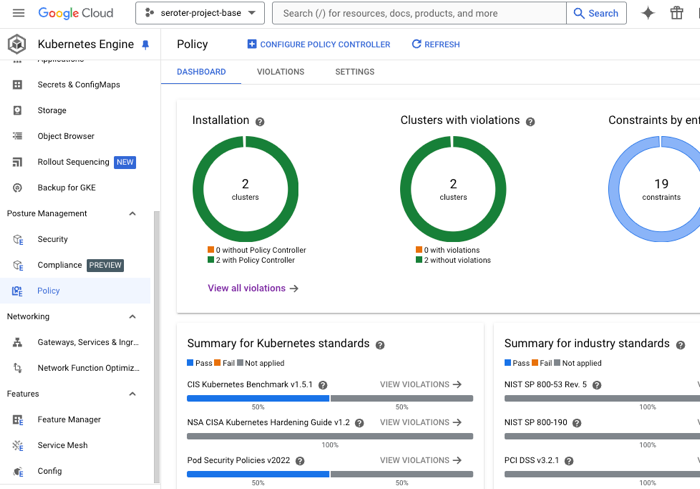
    I read a lot of annual reports from public companies. I’ve never seen “we slayed at Kubernetes this year” called out. Nobody cares. A cleverly scripted, hyper-customized setup that looks like the CNCF landscape diagram is more boat anchor than accelerator. Consider switching a fully automated managed cluster in something like GKE Autopilot. Pay per pod, and get automatic upgrades, secure-by-default configurations, and a host of GKE Enterprise features to create sameness across clusters.

    Or thank-and-retire that customized or legacy workflow engine (code framework, or software product) that only four people actually understand. Use a nicely API-enabled managed product with useful control-flow actions, or a full-fledged cloud-hosted integration engine.

    You probably don’t need a customized database, caching solution, or even CI/CD stack. These are all super mature solution spaces, where whatever is provided out of the box is likely suitable for what you really need.

    4. Tone it down on the microservices and distributed systems.

    Look, I get excited about technology and want to use all the latest things. But it’s often overkill, especially in the early (or late) stages of a product.

    You simply don’t need a couple dozen serverless functions to serve a static web app. Simmer down. Or a big complex JavaScript framework when your site has a pair of pages. So much technical debt comes from over-engineering systems to use the latest patterns and technology, when the classic ones will do.

    Smash most of your serverless functions back into an “app” hosted in Cloud Run. Fewer moving parts, and all the agility you want. Use vanilla JavaScript where you can. Use small, geo-located databases until you MUST to do cross-region or global replication. Don’t build “developer platforms” and IDPs until you actually need them.

    I’m not going all DHH on you, but most folks would be better off defaulting to more monolithic systems running on a server or two. We’ve all over-distributed too many services and created unnecessarily complex architectures that are now brittle or impossible to understand. If you need the scale and resilience of distributed systems RIGHT NOW then go build one. But most of us have gotten burned from premature optimization because we assumed that our system had to handle 100x user growth overnight.

    Wrap Up

    Every company has tech debt, whether the business is 100 years old or started last week. Google has it, big banks have it, the governments have it, and YC companies have it. And “managing it” is probably a responsible thing to do. But sometimes, when you need to make a step-function improvement in how you work, incremental changes aren’t good enough. Simplify by removing the cruft, and take big cuts out of your architecture to do it!

  • Here’s what I’d use to build a generative AI application in 2024

    Here’s what I’d use to build a generative AI application in 2024

    What exactly is a “generative AI app”? Do you think of chatbots, image creation tools, or music makers? What about document analysis services, text summarization capabilities, or widgets that “fix” your writing? These all seem to apply in one way or another! I see a lot written about tools and techniques for training, fine-tuning, and serving models, but what about us app builders? How do we actually build generative AI apps without obsessing over the models? Here’s what I’d consider using in 2024. And note that there’s much more to cover besides just building—think designing, testing, deploying, operating—but I’m just focusing on the builder tools today.

    Find a sandbox for experimenting with prompts

    A successful generative AI app depends on a useful model, good data, and quality prompts. Before going to deep on the app itself, it’s good to have a sandbox to play in.

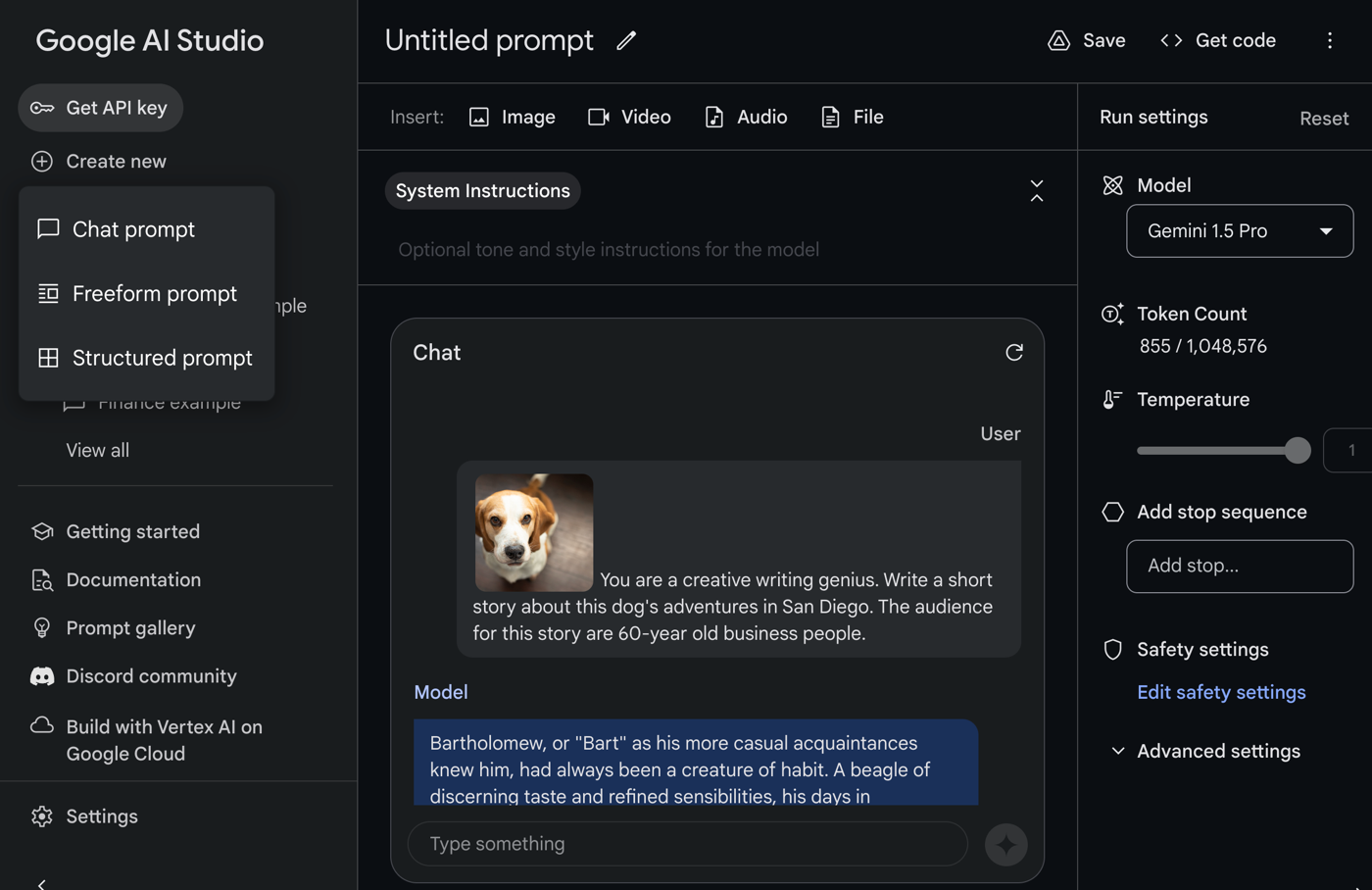
    You can definitely start with chat tools like Gemini and ChatGPT. That’s not a bad way to get your hands dirty. There’s also a set of developer-centric surfaces such as Google Colab or Google AI Studio. Once you sign in with a Google ID, you get free access to environments to experiment.

    Let’s look at Google AI Studio. Once you’re in this UI, you have the ability to simulate a back-and-forth chat, create freeform prompts that include uploaded media, or even structured prompts for more complex interactions.

    If you find yourself staring at an empty console wondering what to try, check out this prompt gallery that shows off a lot of unique scenarios.

    Once you’re doing more “serious” work, you might upgrade to a proper cloud service that offers a sandbox along with SLAs and prompt lifecycle capabilities. Google Cloud Vertex AI is one example. Here, I created a named prompt.

    With my language prompts, I can also jump into a nice “compare” experience where I can try out variations of my prompt and see if the results are graded as better or worse. I can even set one as “ground truth” used as a baseline for all comparisons.

    Whatever sandbox tools you use, make sure they help you iterate quickly, while also matching the enterprise-y needs of the use case or company you work for.

    Consume native APIs when working with specific models or platforms

    At this point, you might be ready to start building your generative AI app. There seems to be a new, interesting foundation model up on Hugging Face every couple of days. You might have a lot of affection for a specific model family, or not. If you care about the model, you might choose the APIs for that specific model or provider.

    For example, let’s say you were making good choices and anchored your app to the Gemini model. I’d go straight to the Vertex AI SDK for Python, Node, Java, or Go. I might even jump to the raw REST API and build my app with that.

    If I were baking a chat-like API call into my Node.js app, the quickest way to get the code I need is to go into Vertex AI, create a sample prompt, and click the “get code” button.

    I took that code, ran it in a Cloud Shell instance, and it worked perfectly. I could easily tweak it for my specific needs from here. Drop this code into a serverless function, Kubernetes pod, or VM and you’ve got a working generative AI app.

    You could follow this same direct API approach when building out more sophisticated retrieval augmented generation (RAG) apps. In a Google Cloud world, you might use the Vertex AI APIs to get text embeddings. Or you could choose something more general purpose and interact with a PostgreSQL database to generate, store, and query embeddings. This is an excellent example of this approach.

    If you have a specific model preference, you might choose to use the API for Gemini, Llama, Mistral, or whatever. And you might choose to directly interact with database or function APIs to augment the input to those models. That’s cool, and is the right choice for many scenarios.

    Use meta-frameworks for consistent experiences across models and providers

    As expected, the AI builder space is now full of higher-order frameworks that help developers incorporate generative AI into their apps. These frameworks help you call LLMs, work with embeddings and vector databases, and even support actions like function calling.

    LangChain is a big one. You don’t need to be bothered with many model details, and you can chain together tasks to get results. It’s for Python devs, so your choice is either to use Python, or, embrace one of the many offshoots. There’s LangChain4J for Java devs, LangChain Go for Go devs, and LangChain.js for JavaScript devs.

    You have other choices if LangChain-style frameworks aren’t your jam. There’s Spring AI, which has a fairly straightforward set of objects and methods for interacting with models. I tried it out for interacting with the Gemini model, and almost found it easier to use than our native API! It takes one update to my POM file:

    <dependency>
    			<groupId>org.springframework.ai</groupId>
    			<artifactId>spring-ai-vertex-ai-gemini-spring-boot-starter</artifactId>
    </dependency>
    

    One set of application properties:

    spring.application.name=demo
    spring.ai.vertex.ai.gemini.projectId=seroter-dev
    spring.ai.vertex.ai.gemini.location=us-central1
    spring.ai.vertex.ai.gemini.chat.options.model=gemini-pro-vision
    

    And then an autowired chat object that I call from anywhere, like in this REST endpoint.

    @RestController
    @SpringBootApplication
    public class DemoApplication {
    
    	public static void main(String[] args) {
    		SpringApplication.run(DemoApplication.class, args);
    	}
    
    	private final VertexAiGeminiChatClient chatClient;
    
    	@Autowired
        public DemoApplication(VertexAiGeminiChatClient chatClient) {
            this.chatClient = chatClient;
        }
    
    	@GetMapping("/")
    	public String getGeneratedText() {
    		String generatedResponse = chatClient.call("Tell me a joke");
    		return generatedResponse;
    	}
    }
    

    Super easy. There are other frameworks too. Use something like AI.JSX for building JavaScript apps and components. BotSharp is a framework for .NET devs building conversational apps with LLMs. Hugging Face has frameworks that help you abstract the LLM, including Transformers.js and agents.js.

    There’s no shortage of these types of frameworks. If you’re iterating through LLMs and want consistent code regardless of which model you use, these are good choices.

    Create with low-code tools when available

    If I had an idea for a generative AI app, I’d want to figure out how much I actually had to build myself. There are a LOT of tools for building entire apps, components, or widgets, and many require very little coding.

    Everyone’s in this game. Zapier has some cool integration flows. Gradio lets you expose models and APIs as web pages. Langflow got snapped up by DataStax, but still offers a way to create AI apps without much required coding. Flowise offers some nice tooling for orchestration or AI agents. Microsoft’s Power Platform is useful for low-code AI app builders. AWS is in the game now with Amazon Bedrock Agents. ServiceNow is baking generative AI into their builder tools, Salesforce is doing their thing, and basically every traditional low-code app vendor is playing along. See OutSystems, Mendix, and everyone else.

    As you would imagine, Google does a fair bit here as well. The Vertex AI Agent Builder offers four different app types that you basically build through point-and-click. These include personalized search engines, chat, recommendation engine, and connected agents.

    Search apps can tap into a variety of data sources including crawled websites, data warehouses, relational databases, and more.

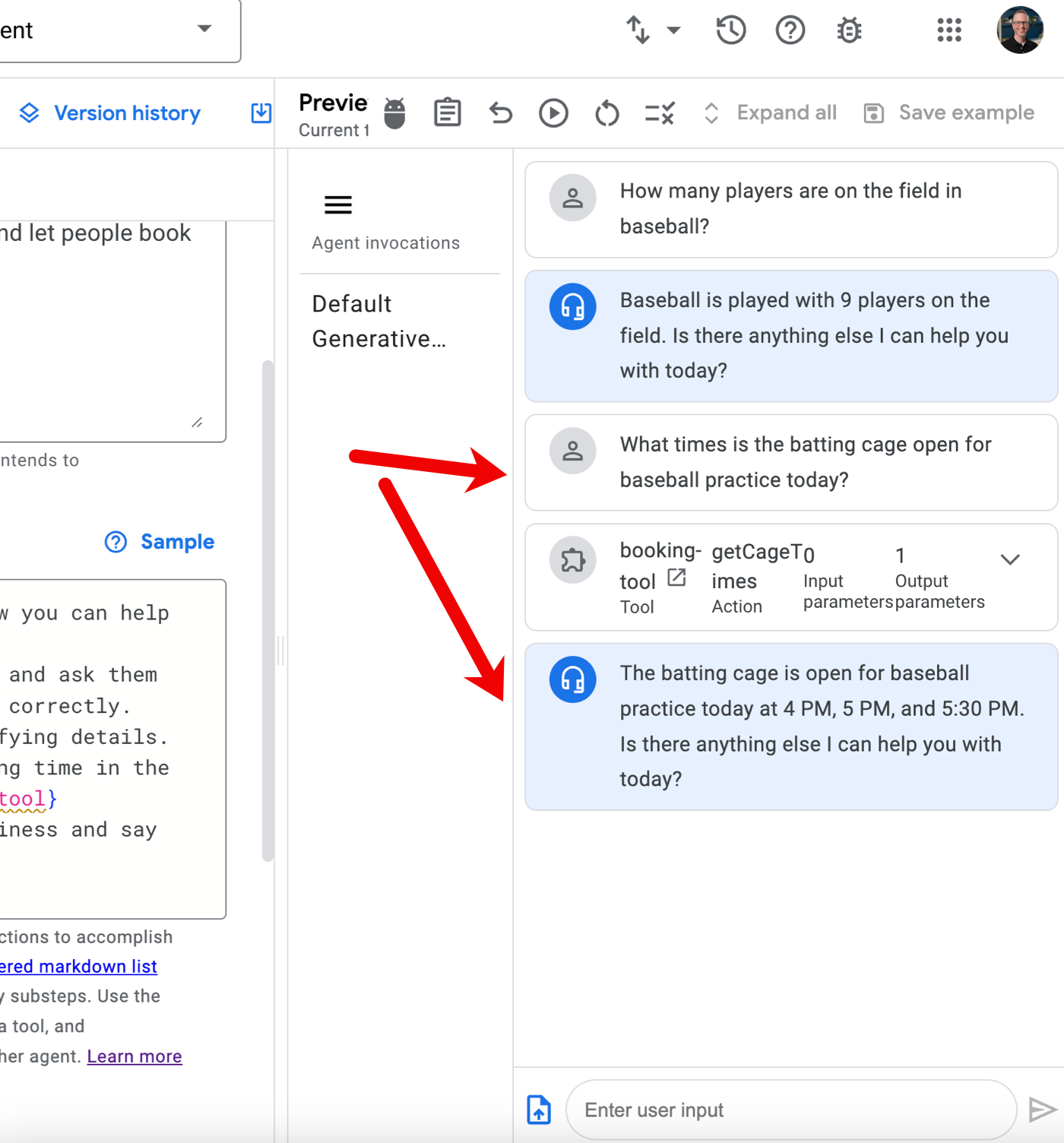
    What’s fairly new is the “agent app” so let’s try building one of those. Specifically, let’s say I run a baseball clinic (sigh, someday) and help people tune their swing in our batting cages. I might want a chat experience for those looking for help with swing mechanics, and then also offer the ability to book time in the batting cage. I need data, but also interactivity.

    Before building the AI app, I need a Cloud Function that returns available times for the batting cage.

    This Node.js function returns an array of book-able timeslots. I’ve hard-coded the data, but you get the idea.

    I also jumped into the Google Cloud IAM interface to ensure that the Dialogflow service account (which the AI agent operates as) has permission to invoke the serverless function.

    Let’s build the agent. Back in the Vertex AI Agent Builder interface, I choose “new app” and pick “agent.”

    Now I’m dropped into the agent builder interface. On the left, I have navigation for agents, tools, test cases, and more. In the next column, I set the goal of the agent, the instructions, and any tools I want to use with the agent. On the right, I preview my agent.

    I set a goal of “Answer questions about baseball and let people book time in the batting cage” and then get to the instructions. There’s a “sample” set of instructions that are useful for getting started. I used those, but removed references to other agents or tools, as we don’t have that yet.

    But now I want to add a tool, as I need a way to show available booking times if the user asks. I have a choice of adding a data store—this is useful if you want to source Q&A from a BigQuery table, crawl a website, or get data from an API. I clicked the “manage all tools” button and chose to add a new tool. Here I give the tool a name, and very importantly, a description. This description is used by the AI agent to figure out when to invoke it.

    Because I chose OpenAPI as the tool type, I need to provide an OpenAPI spec for my Cloud Function. There’s a sample provided, and I used that to put together my spec. Note that the URL is the function’s base URL, and the path contains the specific function name.

    {
        "openapi": "3.0.0",
        "info": {
            "title": "Cage API",
            "version": "1.0.0"
        },
        "servers": [
            {
                "url": "https://us-central1-seroter-anthos.cloudfunctions.net"
            }
        ],
        "paths": {
            "/function-get-cage-times": {
                "get": {
                    "summary": "List all open cage times",
                    "operationId": "getCageTimes",
                    "responses": {
                        "200": {
                            "description": "An array of cage times",
                            "content": {
                                "application/json": {
                                    "schema": {
                                        "type": "array",
                                        "items": {
                                            "$ref": "#/components/schemas/CageTimes"
                                        }
                                    }
                                }
                            }
                        }
                    }
                }
            }
        },
        "components": {
            "schemas": {
                "CageTimes": {
                    "type": "object",
                    "required": [
                        "cageNumber",
                        "openSlot",
                        "cageType"
                    ],
                    "properties": {
                        "cageNumber": {
                            "type": "integer",
                            "format": "int64"
                        },
                        "openSlot": {
                            "type": "string"
                        },
                        "cageType": {
                            "type": "string"
                        }
                    }
                }
            }
        }
    }
    

    Finally, in this “tool setup” I define the authentication to that API. I chose “service agent token” and because I’m calling a specific instance of a service (versus the platform APIs), I picked “ID token.”

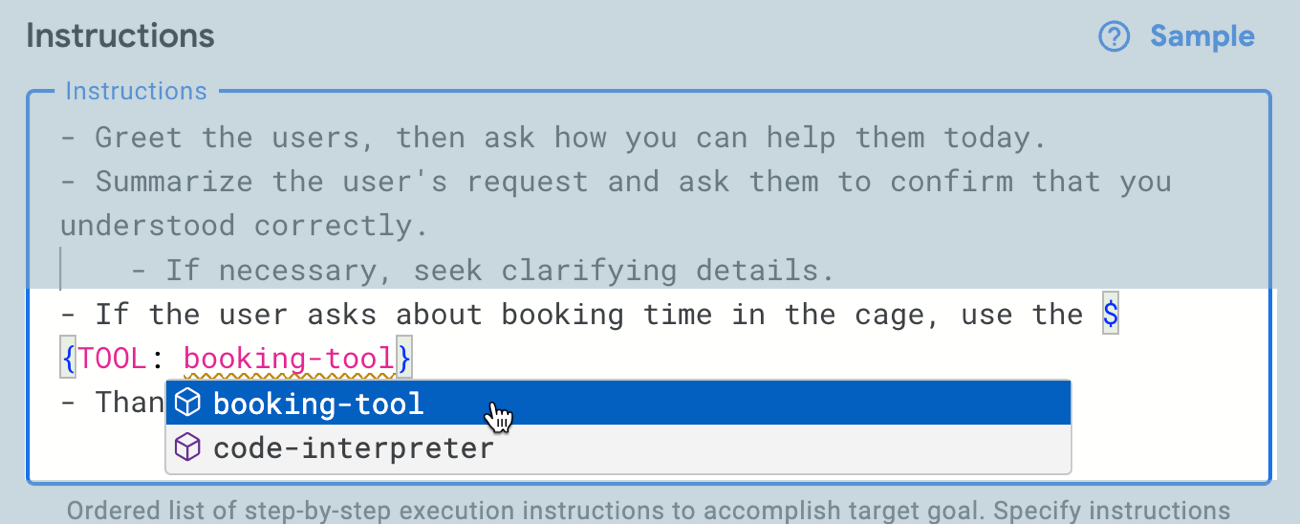
    After saving the tool, I go back to the agent definition and want to update the instructions to invoke the tool. I use the syntax, and appreciated the auto-completion help.

    Let’s see if it works. I went to the right-hand preview pane and asked it a generic baseball question. Good. Then I asked it for open times in the batting cage. Look at that! It didn’t just return a blob of JSON; it parsed the result and worded it well.

    Very cool. There are some quirks with this tool, but it’s early, and I like where it’s going. This was MUCH simpler than me building a RAG-style or function-calling solution by hand.

    Summary

    The AI assistance and model building products get a lot of attention, but some of the most interesting work is happening in the tools for AI app builders. Whether you’re experimenting with prompts, coding up a solution, or assembling an app out of pre-built components, it’s a fun time to be developer. What products, tools, or frameworks did I miss from my assessment?

  • Is “Wiring the Winning Organization” a book for you? Read my five takeaways and decide for yourself.

    Are you still reading technology books? Or do you get your short-form insights from blogs and long-form perspectives from YouTube videos? While I buy fewer books about specific technologies—the landscape changes so fast!—I still regularly pick up tech and business books that explore a particular topic in depth. So when Gene Kim reached out to me in October about reading and reviewing his upcoming book, it was an easy “yes.”

    You know Gene, right? Wrote the Phoenix Project? Unicorn Project? DevOps Handbook? I’ve always enjoyed his writing style and his way of using analogies and storytelling to make complex topics feel more approachable. Gene’s new book, written with Steven J Spear, is called Wiring the Winning Organization. This book isn’t for everyone, and that’s ok. Here were my five major takeaways after reading this book, and hopefully this helps you decide if you should pick up a copy.

    The book could have been a 2-page paper, but I’m glad it wasn’t. The running joke with most business-focused books is that they contain a single good idea that somehow bloats to three hundred pages. Honestly, this book could have been delivered as a long online article. The idea is fairly straightforward: great organizational performance is tied to creating conditions for folks to do their best work, and this is done by creating efficient “social circuitry” that uses three key practices for solving problems. To be sure, Gene’s already published some articles containing bits from the book on topics like layers of work, social circuitry, and what “slowification” means. He could have stopped there. But this topic feels new to me, and it benefitted from the myriad case studies the authors used to make their case. Was it repetitive at times? Sure. But I think that was needed and it helped establish the framework.

    I wouldn’t have liked this book fifteen years ago. Books like the Phoenix Project are for anyone. It doesn’t matter if you’re an architect, program lead, developer, sysadmin, or whatever, there’s something for you. And, it reads like a novel, so even if you don’t want to “learn” anything, it’s still entertaining. Wiring the Winning Organization is different. There are no heroes and villains. It’s more “study guide” than “beach read.” The book is specifically for those leading teams or those in horizontal roles (e.g. architects, security teams) that impact how cross-team work gets done. If I had started reading this when I was an individual contributor, I wouldn’t have liked it. Today, as a manager, it was compelling to me.

    I have a new vocabulary to use. Every industry, company, and person has words or phrases of their own. And in tech, we’re particularly awful about over-using or mis-using terms so that they no longer mean anything. I’m looking at you, “DevOps”, “cloud”, and now “observability.” But I hope that a lot of folks read this book and start using a few of its terms. Social circuitry is a great one. The authors use this to refer to the “wiring” of a team and how knowledge and ideas flow. I’ve used this term a dozen times at work in the past month. The triplet of practices called out in the book—amplification (where are the problems) which results in slowificaion (create space for problem solving) and simplification (make problems themselves easier to solve)—should become common as well. The book introduced a handful of other phrasings that may catch on as well. That’s the hallmark of an impactful book.

    A business strategy without a corresponding change in social circuitry is likely flawed. Early in the book, the authors make the point that we’ve been trained to think that competitive advantage comes from creating an unfair playing field resulting from superior understanding of Porter’s five forces. Or from having a better map of the territory than anyone else. Those things are important, but the book reinforces that you need leaders who “wire” the organization for success. Having the right people, the right tools, and a differentiated strategy may not be enough to win if the circuitry is off. What this tells me is that if companies announce big strategic pivots without a thoughtful change in org structure and circuitry, it’s unlikely to succeed.

    Good management is deliberate. My biggest mistake (of many) in the early years of my management career was undervaluing the “management” aspect. Management isn’t a promotion for a job well done as an individual contributor; it’s a new job with entirely different responsibilities. Good managers activate their team, and constantly assess the environment for roadblocks. This book reminded me to think about how to create better amplification channels for my team so that we hear about problems sooner. It reminded me to embrace slowification and define space for thinking and experimentation outside of the regular operating channels. And it reminded me to ruthlessly pursue simplification and make it easier for my team to solve problems. The most important thing managers do is create conditions for great work!

    I enjoyed the book. It changed some of my thinking and impacted how I work. If you grab a copy let me know!

  • Would generative AI have made me a better software architect? Probably.

    Would generative AI have made me a better software architect? Probably.

    Much has been written—some by me—about how generative AI and large language models help developers. While that’s true, there are plenty of tech roles that stand to get a boost from AI assistance. I sometimes describe myself as a “recovering architect” when referring back to my six years in enterprise IT as a solutions/functional architect. It’s not easy being an architect. You lead with influence not authority, you’re often part of small architecture teams and working solo on projects, and tech teams can be skeptical of the value you add. When I look at what’s possible with generative AI today, I think about how I would have used it to be better at the architecture function. As an architect, I’d have used it in the following ways:

    Help stay up-to-date on technology trends

    It’s not hard for architects to get stale on their technical knowledge. Plenty of other responsibilities take architects away from hands-on learning. I once worked with a smart architect who was years removed from coding. He was flabbergasted that our project team was doing client-side JavaScript and was certain that server-side logic was the only way to go. He missed the JavaScript revolution and as a result, the team was skeptical of his future recommendations.

    If you have an Internet-connected generative AI experience, you can start with that to explore modern trends in tech. I say “internet-connected” because if you’re using a model trained and frozen at a point in time, it won’t “know” about anything that happened after it’s training period.

    For example, I might ask a service like Google Bard for help understanding the current landscape for server-side JavaScript.

    I could imagine regularly using generative AI to do research, or engaging in back-and-forth discussion to upgrade my dated knowledge about a topic.

    Assess weaknesses in my architectures

    Architects are famous (infamous?) for their focus on the non-functional requirements of a system. You know, the “-ilities” like scalability, usability, reliability, extensibility, operability, and dozens of others.

    While no substitute for your own experience and knowledge, an LLM can offer a perspective on the quality attributes of your architecture.

    For example, I could take one of the architectures from the Google Cloud Jump Start Solutions. These are high-quality reference apps that you deploy to Google Cloud with a single click. Let’s look at the 3-tier web app, for example.

    It’s a very solid architecture. I can take this diagram, send it to Google Bard, and ask how it measures up against core quality attributes I care about.

    What came back from Bard were sections for each quality attribute, and a handful of recommendations. With better prompting, I could get even more useful data back! Whether you’re a new architect or an experienced one, I’d bet that this offers some fresh perspectives that would validate or challenge your own assumptions.

    Validate architectures against corporate specifications

    Through fine-tuning, retrieval augmented generation, or simply good prompting, you can give LLMs context about your specific environment. As an architect, I’d want to factor in my architecture standards into any evaluation.

    In this example, I give Bard some more context about corporate standards when assessing the above architecture diagram.

    In my experience, architecture is local. Each company has different standards, choices of foundational technologies, and strategic goals. Asking LLMs for generic architecture advice is helpful, but not sufficient. Feeding your context into a model is critical.

    Build prototypes to hand over to engineers

    Good architects regularly escape their ivory tower and stay close to the builders. And ideally, you’re bringing new ideas, and maybe even working code, to the teams you support.

    Services like Bard help me create frontend web pages without any work on my part. And I can quickly prototype with cloud services or open source software thanks to AI-assisted coding tools. Instead of handing over whiteboard sketches or UML diagrams, we can hand over rudimentary working apps.

    Help me write sections of my architecture or design specs

    Don’t outsource any of the serious thinking that goes into your design docs or architecture specs. But that doesn’t mean you can’t get help on boilerplate content. What if I have various sections for “background info” in my docs, and want to include tech assessments?

    I used the new “help me write” feature in Google Docs to summarize the current state of Java and call out popular web frameworks. This might be good for bolstering an architecture decision to choose a particular framework.

    Quickly generating templates or content blocks may prove a very useful job for generative AI.

    Bootstrap new architectural standards

    In addition to helping you write design docs, generative AI may help you lay a foundation for new architecture standards. Plenty of architects write SOPs or usage standards, and I would have used LLMs to make my life easier.

    Here, I once again asked the “help me write” capability in Google Docs to give me the baseline of a new spec for database selection in the enterprise. I get back a useful foundation to build upon.

    Summarize docs or notes to pull out key decisions

    Architects can tend to be … verbose. That’s ok. The new Duet AI in Workspace does a good job summarizing long docs or extracting insights. I would have loved to use this on the 30-50 page architecture specs or design docs I used to work with! Readers could have quickly gotten the gist of the doc, or found the handful of decisions that mattered most. Architects will get plenty of value from this.

    A good architect is worth their weight in gold right now. Software systems have never been more powerful, complicated, and important. Good architecture can accelerate a company or sink it. But the role of the architect is evolving, and generative AI can give architects new ways. to create, assess, and communicate. Start experimenting now!

  • Running serverless web, batch, and worker apps with Google Cloud Run and Cloud Spanner

    Running serverless web, batch, and worker apps with Google Cloud Run and Cloud Spanner

    If it seems to you that cloud providers offer distinct compute services for every specific type of workload, you’re not imagining things. Fifteen years ago when I was building an app, my hosting choices included a virtual machine or a physical server. Today? You’ll find services targeting web apps, batch apps, commercial apps, containerized apps, Windows apps, Spring apps, VMware-based apps, and more. It’s a lot. So, it catches my eye when I find a modern cloud service that support a few different types of workloads. Our serverless compute service Google Cloud Run might be the fastest and easiest way to get web apps running in the cloud, and we just added support for background jobs. I figured I’d try out Cloud Run for three distinct scenarios: web app (responds to HTTP requests, scales to zero), job (triggered, runs to completion), and worker (processes background work continuously).

    Let’s make this scenario come alive. I want a web interface that takes in “orders” and shows existing orders (via Cloud Run web app). There’s a separate system that prepares orders for delivery and we poll that system occasionally (via Cloud Run job) to update the status of our orders. And when the order itself is delivered, the mobile app used by the delivery-person sends a message to a queue that a worker is constantly listening to (via Cloud Run app). The basic architecture is something like this:

    Ok, how about we build it out!

    Setting up our Cloud Spanner database

    The underlying database for this system is Cloud Spanner. Why? Because it’s awesome and I want to start using it more. Now, I should probably have a services layer sitting in front of the database instead of doing direct read/write, but this is my demo and I’ll architect however I damn well please!

    I started by creating a Spanner instance. We’ve recently made it possible to create smaller instances, which means you can get started at less cost, without sacrificing resilience. Regardless of the number of “processing units” I choose, I get 3 replicas and the same availability SLA. The best database in the cloud just got a lot more affordable.

    Next, I add a database to this instance. After giving it a name, I choose the “Google Standard SQL” option, but I could have also chosen a PostgreSQL interface. When defining my schema, I like that we offer script templates for actions like “create table”, “create index”, and “create change stream.” Below, you see my table definition.

    With that, I have a database. There’s nothing left to do, besides bask in the glory of having a regionally-deployed, highly available relational database instance at my disposal in about 60 seconds.

    Creating the web app in Go and deploying to Cloud Run

    With the database in place, I can build a web app with read/write capabilities.

    This app is written in Go and uses the echo web framework. I defined a basic struct that matches the fields in the database.

    package model
    
    type Order struct {
    	OrderId        int64
    	ProductId      int64
    	CustomerId     int64
    	Quantity       int64
    	Status         string
    	OrderDate      string
    	FulfillmentHub string
    }
    

    I’m using the Go driver for Spanner and the core of the logic consists of the operations to retrieve Spanner data and create a new record. I need to be smarter about reusing the connection, but I’ll refactor it later. Narrator: He probably won’t refactor it.

    package web
    
    import (
    	"context"
    	"log"
    	"time"
    	"cloud.google.com/go/spanner"
    	"github.com/labstack/echo/v4"
    	"google.golang.org/api/iterator"
    	"seroter.com/serotershop/model"
    )
    
    func GetOrders() []*model.Order {
    
    	//create empty slice
    	var data []*model.Order
    
    	//set up context and client
    	ctx := context.Background()
    	db := "projects/seroter-project-base/instances/seroter-spanner/databases/seroterdb"
    	client, err := spanner.NewClient(ctx, db)
    	if err != nil {
    		log.Fatal(err)
    	}
    
    	defer client.Close()
        //get all the records in the table
    	iter := client.Single().Read(ctx, "Orders", spanner.AllKeys(), []string{"OrderId", "ProductId", "CustomerId", "Quantity", "Status", "OrderDate", "FulfillmentHub"})
    
    	defer iter.Stop()
    
    	for {
    		row, e := iter.Next()
    		if e == iterator.Done {
    			break
    		}
    		if e != nil {
    			log.Println(e)
    		}
    
    		//create object for each row
    		o := new(model.Order)
    
    		//load row into struct that maps to same shape
    		rerr := row.ToStruct(o)
    		if rerr != nil {
    			log.Println(rerr)
    		}
    		//append to collection
    		data = append(data, o)
    
    	}
    	return data
    }
    
    func AddOrder(c echo.Context) {
    
    	//retrieve values
    	orderid := c.FormValue("orderid")
    	productid := c.FormValue("productid")
    	customerid := c.FormValue("customerid")
    	quantity := c.FormValue("quantity")
    	status := c.FormValue("status")
    	hub := c.FormValue("hub")
    	orderdate := time.Now().Format("2006-01-02")
    
    	//set up context and client
    	ctx := context.Background()
    	db := "projects/seroter-project-base/instances/seroter-spanner/databases/seroterdb"
    	client, err := spanner.NewClient(ctx, db)
    	if err != nil {
    		log.Fatal(err)
    	}
    
    	defer client.Close()
    
    	//do database table write
    	_, e := client.Apply(ctx, []*spanner.Mutation{
    		spanner.Insert("Orders",
    			[]string{"OrderId", "ProductId", "CustomerId", "Quantity", "Status", "FulfillmentHub", "OrderDate"},
    			[]interface{}{orderid, productid, customerid, quantity, status, hub, orderdate})})
    
    	if e != nil {
    		log.Println(e)
    	}
    }
    

    Time to deploy! I’m using Cloud Build to generate a container image without using a Dockerfile. A single command triggers the upload, build, and packaging of my app.

    gcloud builds submit --pack image=gcr.io/seroter-project-base/seroter-run-web
    

    After a moment, I have a container image ready to go. I jumped in the Cloud Run experience and chose to create a new service. After picking the container image I just created, I kept the default autoscaling (minimum of zero instances), concurrency, and CPU allocation settings.

    The app started in seconds, and when I call up the URL, I see my application. And I went ahead and submitted a few orders, which then show up in the list.

    Checking Cloud Spanner—just to ensure this wasn’t only data sitting client-side—shows that I have rows in my database table.

    Ok, my front end web application is running (when requests come in) and successfully talking to my Cloud Spanner database.

    Creating the batch processor in .NET and deploying to Cloud Run jobs

    As mentioned in the scenario summary, let’s assume we have some shipping system that prepares the order for delivery. Every so often, we want to poll that system for changes, and update the order status in the Spanner database accordingly.

    Until lately, you’d run these batch jobs in App Engine, Functions, a GKE pod, or some other compute service that you could trigger on a schedule. But we just previewed Cloud Run jobs which offers a natural choice moving forward. Here, I can run anything that can be containerized, and the workload runs until completion. You might trigger these via Cloud Scheduler, or kick them off manually.

    Let’s write a .NET console application that does the work. I’m using the new minimal API that hides a bunch of boilerplate code. All I have is a Program.cs file, and a package dependency on Google.Cloud.Spanner.Data. Because I don’t like you THAT much, I didn’t actually create a stub for the shipping system, and decided to update the status of all the rows at once.

    using Google.Cloud.Spanner.Data;
    
    Console.WriteLine("Starting job ...");
    
    //connection string
    string conn = "Data Source=projects/seroter-project-base/instances/seroter-spanner/databases/seroterdb";
    
    using (var connection = new SpannerConnection(conn)) {
    
        //command that updates all rows with the initial status
        SpannerCommand cmd = connection.CreateDmlCommand("UPDATE Orders SET Status = 'SHIPPED' WHERE Status = 'SUBMITTED'");
    
        //execute and hope for the best
        cmd.ExecuteNonQuery();
    }
    
    //job should end after this
    Console.WriteLine("Update done. Job completed.");


    Like before, I use a single Cloud Build command to compile and package my app into a container image: gcloud builds submit --pack image=gcr.io/seroter-project-base/seroter-run-job

    Let’s go back into the Cloud Run interface, where we just turned on a UI for creating and managing jobs. I start by choosing my just-now-created container image and keeping the “number of tasks” to 1.

    For reference, there are other fun “job” settings. I can allocate up to 32GB of memory and 8 vCPUs. I can set the timeout (up to an hour), choose how much parallelism I want, and even select the option to run the job right away.

    After creating the job, I click the button that says “execute” and run my job. I see job status and application logs, updated live. My job succeeded!

    Checking Cloud Spanner confirms that my all table rows were updated to a status of “SHIPPED”.

    It’s great that I didn’t have to leave the Cloud Run API or interface to build this batch processor. Super convenient!

    Creating the queue listener in Spring and deploying to Cloud Run

    The final piece of our architecture requires a queue listener. When our delivery drivers drop off a package, their system sends a message to Google Cloud Pub/Sub, our pretty remarkable messaging system. To be sure, I could trigger Cloud Run (or Cloud Functions) automatically whenever a message hits Pub/Sub. That’s a built-in capability. I don’t need to use a processor that directly pulls from the queue.

    But maybe I want to control the pull from the queue. I could do stateful processing over a series of messages, or pull batches instead of one-at-a-time. Here, I’m going to use Spring Cloud Stream which talks to any major messaging system and triggers a function whenever a message arrives.

    Also note that Cloud Run doesn’t explicitly support this worker pattern, but you can make it work fairly easily. I’ll show you.

    I went to start.spring.io and configured my app by choosing a Spring Web and GCP Support dependency. Why “web” if this is a background worker? Cloud Run still expects a workload that binds to a web port, so we’ll embed a web server that’s never used.

    After generating the project and opening it, I deleted the “GCP support” dependency (I just wanted an auto-generated dependency management value) and added a couple of POM dependencies that my app needs. The first is the Google Cloud Pub/Sub “binder” for Spring Cloud Stream, and the second is the JDBC driver for Cloud Spanner.

    <dependency>
    	<groupId>org.springframework.cloud</groupId>
    	<artifactId>spring-cloud-gcp-pubsub-stream-binder</artifactId>
    	<version>1.2.8.RELEASE</version>
    </dependency>
    <dependency>
    	<groupId>com.google.cloud</groupId>
    	<artifactId>google-cloud-spanner-jdbc</artifactId>
    </dependency>
    

    I then created an object definition for “Order” with the necessary fields and getters/setters. Let’s review the primary class that does all the work. The way Spring Cloud Stream works is that reactive functions annotated as beans are invoked when a message comes in. The Spring machinery wires up the connection to the message broker and does most of the work. In this case, when I get an order message, I update the order status in Cloud Spanner to “DELIVERED.”

    package com.seroter.runworker;
    
    
    import java.util.function.Consumer;
    import org.springframework.boot.SpringApplication;
    import org.springframework.boot.autoconfigure.SpringBootApplication;
    import org.springframework.context.annotation.Bean;
    import reactor.core.publisher.Flux;
    import java.sql.Connection;
    import java.sql.DriverManager;
    import java.sql.Statement;
    import java.sql.SQLException;
    
    @SpringBootApplication
    public class RunWorkerApplication {
    
    	public static void main(String[] args) {
    		SpringApplication.run(RunWorkerApplication.class, args);
    	}
    
    	//takes in a Flux (stream) of orders
    	@Bean
    	public Consumer<Flux<Order>> reactiveReadOrders() {
    
    		//connection to my database
    		String connectionUrl = "jdbc:cloudspanner:/projects/seroter-project-base/instances/seroter-spanner/databases/seroterdb";
    		
    		return value -> 
    			value.subscribe(v -> { 
    				try (Connection c = DriverManager.getConnection(connectionUrl); Statement statement = c.createStatement()) {
    					String command = "UPDATE Orders SET Status = 'DELIVERED' WHERE OrderId = " + v.getOrderId().toString();
    					statement.executeUpdate(command);
    				} catch (SQLException e) {
    					System.out.println(e.toString());
    				}
    			});
    	}
    }
    

    My corresponding properties file has the few values Spring Cloud Stream needs to know about. Specifically, I’m specifying the Pub/Sub topic, indicating that I can take in batches of data, and setting the “group” which corresponds to the topic subscription. What’s cool is that if these topics and subscriptions don’t exist already, Spring Cloud Stream creates them for me.

    server.port=8080
    spring.cloud.stream.bindings.reactiveReadOrders-in-0.destination=ordertopic
    spring.cloud.stream.bindings.reactiveReadOrders-in-0.consumer.batch-mode=true
    spring.cloud.stream.bindings.reactiveReadOrders-in-0.content-type=application/json
    spring.cloud.stream.bindings.reactiveReadOrders-in-0.group=orderGroup
    

    For the final time, I run the Cloud Build command to build and package my Java app into a container image: gcloud builds submit --pack image=gcr.io/seroter-project-base/seroter-run-worker

    With this container image ready to go, I slide back to the Cloud Run UI and create a new service instance. This time, after choosing my image, I choose “always allocated CPU” to ensure that the CPU stays on the whole time. And I picked a minimum instance of one so that I have a single always-on worker pulling from Pub/Sub. I also chose “internal only” traffic and require authentication to make this harder for someone to randomly invoke.

    My service quickly starts up, and upon initialization, creates both the topic and queue for my app.

    I go into the Pub/Sub UI where I can send a message directly into a topic. All I need to send in is a JSON payload that holds the order ID of the record to update.

    The result? My database record is updated, and I see this by viewing my web application and noticing the second row has a new “status” value.

    Wrap up

    Instead of using two or three distinct cloud compute services to satisfy this architecture, I used one. Cloud Run defies your expectations of what serverless can be, especially now that you can run serverless jobs or even continuously-running apps. In all cases, I have no infrastructure to provision, scale, or manage.

    You can use Cloud Run, Pub/Sub, and Cloud Build with our generous free tier, and Spanner has never been cheaper to try out. Give it a whirl, and tell me what you think of Cloud Run jobs.