Category: Dynamics CRM

  • Creating Complex Records in Dynamics CRM 2011 from BizTalk Server 2010

    A little while back I did a blog post that showed how to query and create Dynamics CRM 2011 records from BizTalk Server.  This post will demonstrate how to handle more complex scenarios including creating fields that use option sets (list of values) or entity references (fields that point to another record).

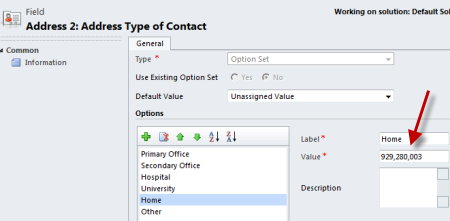
    To start with, my Dynamics CRM environment has an entity called Contact which represents a person that the CRM system has interacted with.  The Contact entity has fields to hold basic demographics and the like.  For this demonstration, the Address Type is set to an option set (e.g. Home, Work, Hospital, Temporary).  Notice that an option set entry has both a name and value.  FYI, custom option set entries apparently use a large prefix number which is why my value for “Home” is 929,280,003.
    2011.5.20crm01

    The State is a lookup to another entity which holds details about a particular US state.  This could have been an option set as well, but in this case, it’s an entity.

    2011.5.20crm02

    With that information out of the way, we can now jump into our integration solution.  Within a BizTalk Server 2010 project, I’ve added a Generated Item which consumed the Organization SOAP service exposed by Dynamics CRM 2011.  This brought in a host of things of which I deleted virtually all of them.  The CRM 2011 SDK has an "Integration” folder which has valid schemas that BizTalk can use.  The schemas generated by the service reference are useless.  So why add the service reference at all?  I like getting the binding file that we can later use to generate the BizTalk send port that communicates with Dynamics CRM 2011.

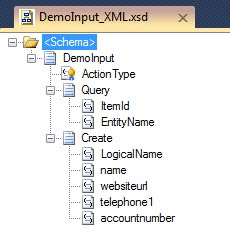
    Next up, I created a new XSD schema which represented the customer record coming into BizTalk Server.  This is a simple message that has some basic demographic details.  One key thing to notice is that both the AddressType and State elements are XSD records (of simple type, so they can hold text) with attributes.  The attribute values will hold the identifiers that Dynamics CRM needs to create the record for the contact.

    2011.5.20crm04

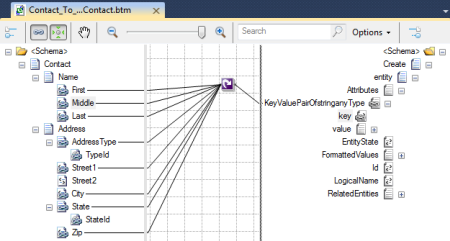
    Now comes the meat of the solution: the map.  I am NOT using an orchestration in this example.  You certainly could, and in real life, you might want to.  In this case, I have a messaging only solution.  The first thing that my map does is connect each of the source nodes to a Looping functoid which in turn connects to the repeating node (KeyValuePairOfstringanyType) in the destination Create schema.  This ensures that we create one of these destination nodes for each source node.
    2011.5.20crm05

    On the next map page, I’m using Scripting functoids to properly define the key/value pairs underneath the KeyValuePairOfstringanyType node.  For instance, the source node named First under the Name record maps to a Scripting functoid that has the following Inline XSLT Call Template set:

    <xsl:template name="SetFNameValue">
    <xsl:param name="param1" />
    <key 
     xmlns="http://schemas.datacontract.org/2004/07/System.Collections.Generic">
      firstname</key>
    <value 
     xmlns="http://schemas.datacontract.org/2004/07/System.Collections.Generic" 
     xmlns:xs="http://www.w3.org/2001/XMLSchema" 
     xmlns:xsi="http://www.w3.org/2001/XMLSchema-instance">
       <xsl:attribute name="xsi:type">
         <xsl:value-of select="'xs:string'" />
       </xsl:attribute>
       <xsl:value-of select="$param1" />
      </value>
    
    </xsl:template>

    Notice there that I am “typing” the value node to be a xs:string.  This is the same script used for the Middle, Last, Street1, City, and Zip nodes.  They are all simple string values.  As you may recall, the AddressType is an option set.  If I simply pass its value as a xs:string, nothing actually gets added on the record.  If I try and send in a node on the FormattedValues node (which when querying, pulls back friendly names of option set values), nothing happens.  From what I can tell, the only way to set the value of an option set field is to send in the value associated with the option set entry.

    In this case, I connect the TypeId node to the Scripting functoid and have the following Inline XSLT Call Template set:

    <xsl:template name="SetAddrTypeValue">
    <xsl:param name="param1" />
    <key xmlns="http://schemas.datacontract.org/2004/07/System.Collections.Generic">
       address2_addresstypecode</key>
    <value 
      xmlns="http://schemas.datacontract.org/2004/07/System.Collections.Generic" 
      xmlns:xs="http://www.w3.org/2001/XMLSchema" 
      xmlns:xsi="http://www.w3.org/2001/XMLSchema-instance"
      xmlns:a="http://schemas.microsoft.com/xrm/2011/Contracts">
       <xsl:attribute name="xsi:type">
        <xsl:value-of select="'a:OptionSetValue'" />
       </xsl:attribute>
       <Value xmlns="http://schemas.microsoft.com/xrm/2011/Contracts">
           <xsl:value-of select="$param1" />
       </Value>
      </value>
    </xsl:template>

    A few things to point out.  First, notice that the “type” of my value node is an OptionSetValue.  Also see that this value node contains ANOTHER Value node (notice capitalization difference) which holds the numerical value associated with the option set entry.

    The last node to map is the StateId from the source schema through a Scripting functoid with the following Inline XSLT Call Template:

    <xsl:template name="SetStateValue">
    <xsl:param name="param1" />
    <key xmlns="http://schemas.datacontract.org/2004/07/System.Collections.Generic">
        address2stateorprovinceid</key>
    <value xmlns="http://schemas.datacontract.org/2004/07/System.Collections.Generic" 
             xmlns:xs="http://www.w3.org/2001/XMLSchema" 
             xmlns:xsi="http://www.w3.org/2001/XMLSchema-instance"
             xmlns:a="http://schemas.microsoft.com/xrm/2011/Contracts">
       <xsl:attribute name="xsi:type">
        <xsl:value-of select="'a:EntityReference'" />
       </xsl:attribute>
       <Id xmlns="http://schemas.microsoft.com/xrm/2011/Contracts" 
            xmlns:ser="http://schemas.microsoft.com/2003/10/Serialization/">
          <xsl:attribute name="xsi:type">
             <xsl:value-of select="'ser:guid'" />
    	 <xsl:value-of select="$param1" />
          </xsl:attribute>
        </Id>   
       <LogicalName xmlns="http://schemas.microsoft.com/xrm/2011/Contracts">
           custom_stateorprovince</LogicalName>
       <Name xmlns="http://schemas.microsoft.com/xrm/2011/Contracts" />  
    </value>
    </xsl:template>

    So what did we just do?  We once again have a value node with a lot of stuff jammed in there.  Our “type” is EntityReference and has three elements underneath it: Id, LogicalName, Name.  It seems that only the first two are required.  The Id (which is of type guid) accepts the record identifier for the referenced entity, and the LogicalName is the friendly name of the entity.  Note that in real life, you would probably want to use an orchestration to first query Dynamics CRM to get the record identifier for the referenced entity, and THEN call the “create” service.  Here, I’ve assumed that I know the record identifier ahead of time.

    This second page of my map now looks like this:

    2011.5.20crm06

    We’re now ready to deploy.  After deploying the solution, I imported the generated binding file that in turn, created my send port.  Because I am doing a messaging only solution and I don’t want to build a pipeline component which sets the SOAP operation to apply, I stripped out all the “actions” in the SOAP action section of the WCF-Custom adapter. 

     2011.5.20crm07

    After creating a receive location that is bound to this send port (and another send port which listens to responses from the WCF-Custom send port and sends the CRM acknowledgements to the file system), I created an valid XML instance file.  Notice that I have both the option set ID and referenced entity ID in this message.

    2011.5.20crm08

    After sending this message in, I’m able to see the new record in Dynamics CRM 2011. 

    2011.5.20crm09

    Neato!  Notice that the Address Type and State or Province values have data in them.

    Overall, I wish this were a bit simpler.  Even if you use the CRM SDK and build a proxy web service, you still have to pass in the entity reference GUID values and option set numerical values.  So, consider strategies for either caching slow-changing values, or doing lookups against the CRM services to get the underlying GUIDs/numbers.

    Special thanks to blog reader David Sporer for some info that helped me complete this post.

  • The Good, Bad and Ugly of Integrating Dynamics CRM 2011 and BizTalk Server 2010

    Microsoft Dynamics CRM 2011 is the latest version of Microsoft’s CRM platform.  The SaaS version is already live and the on-site version will likely be released within a couple weeks.  Unlike previous versions of Dynamics CRM, the 2011 release does NOT have a BizTalk-specific send adapter.  The stated guidance is to use the existing SOAP endpoints through the BizTalk WCF adapter.  So what is this experience like?  In a word, mixed.  In this post, I’ll show you what it takes to perform both “query” and “create” operations against Dynamics CRM 2011 using BizTalk Server.

    Before I start, I’ll say that I really like using Dynamics CRM 2011.  It’s a marked improvement over the previous version (CRM 4) and is a very simple to use application platform.  I’m the architect of a project that is leveraging it and am a fan overall.  It competes directly with Salesforce.com, which I also like very much, and has areas where it is better and areas where it is worse.  I’ll say up front that I think the integration between Salesforce.com and BizTalk is MUCH cleaner than the integration between Dynamics CRM 2011 and BizTalk, but see if you agree with me after this post.

    Integration Strategies

    Right up front, you have a choice to make.  Now, I’m working against a Release Candidate, so there’s a chance that things change by the formal release but I doubt it.  Dynamics CRM 2011 has a diverse set of integration options (see MSDN page on Web Service integration here).  They have a very nice REST interface for interacting with standard and custom entities in the system.  BizTalk Server can’t talk “REST”, so that’s out.  They have (I think it’s still in the RC) as ASMX endpoint for legacy clients, and that is available for BizTalk consumers.  The final option is their new WCF SOAP endpoint.  Microsoft made a distinct choice to build an untyped interface into their SOAP service.  That is, the operations like Create or Update take in a generic Entity object.  An Entity has a name and a property bag of name/value pairs that hold the record’s columns and values.  If you are a building a .NET client to call Dynamics CRM 2011, you can use the rich SDK provided and generate some early bound classes which can be passed to a special proxy class (OrganizationServiceProxy) which hides the underlying translation between typed objects and the Entity object. There’s a special WCF behavior (ProxyTypesBehavior) in play there too.  So for .NET WCF clients, you don’t know you’re dealing with an untyped SOAP interface.  For non-.NET clients, or software that can’t leverage their SDK service proxy, you have to use the untyped interface directly.

    So in real life, your choice as a BizTalk developer will have to be either (a) deal with messiness of creating and consuming untyped messages, or (b) build proxy services for BizTalk to invoke that take in typed objects and communicate to Dynamics CRM.  Ideally the Microsoft team would ship a WCF behavior that I could add to the BizTalk adapter that would do this typed-to-untyped translation both inbound and outbound, but I haven’t heard any mention of anything like that.

    In this post, I’ll show option A which includes dealing directly with the bare Entity message type.  I’m scared.  Hold me.

    Referencing the Service

    First off, we need to add a reference to the SOAP endpoint.  Within Dynamics CRM, all the links to service endpoints can be found in the Customization menu under Developer Resources.  I’ve chosen the Organization Service which has a WSDL to point to.

    2011.2.10crm01

    Within a BizTalk project in Visual Studio.NET, I added a generated item, and chose to consume a WCF service.  After added the reference, I get a ton of generated artifacts.

    2011.2.10crm02

    Now in an ideal world, these schemas would be considered valid.  Alas, that is not the case.  When opening the schemas, I got all sorts of “end of the world” errors claiming that types couldn’t be found.  Apparently there is a lot of cross-schema-referencing missing from the schemas.  Wonderful.  So, I had to manually add a bunch of import statements to each schema.  To save someone else the pain, I’ll list out what I did:

    • To OrganizationService_schemas_datacontract_org_2004_07_System_Collections_
      Generic.xsd schema, I added an Import directive to OrganizationService_schemas_microsoft_com_xrm_2011_Contracts.xsd.
    • To OrganizationService_schemas_microsoft_com_2003_10_Serialization_Arrays.xsd schema I added an Import directive to OrganizationService_schemas_microsoft_com_2003_10_Serialization.xsd.
    • To OrganizationService_schemas_microsoft_com_crm_2011_Contracts.xsd schema I added Import directives to both OrganizationService_schemas_microsoft_com_2003_10_Serialization_Arrays.xsd and OrganizationService_schemas_microsoft_com_xrm_2011_Contracts.xsd.
    • To OrganizationService_schemas_microsoft_com_xrm_2011_Contracts.xsd schema, I added an Import directive to OrganizationService_schemas_microsoft_com_2003_10_Serialization_Arrays.xsd, OrganizationService_schemas_microsoft_com_xrm_2011_Metadata.xsd and OrganizationService_schemas_datacontract_org_2004_07_System_Collections_
      Generic.xsd.
    • To OrganizationService_schemas_microsoft_com_xrm_2011_Contracts_Services.xsd schema I added Import directives to both OrganizationService_schemas_microsoft_com_2003_10_Serialization_Arrays.xsd and OrganizationService_schemas_microsoft_com_xrm_2011_Contracts.xsd.
    • To OrganizationService_schemas_microsoft_com_xrm_2011_Metadata.xsd schema I added an Import directive to OrganizationService_schemas_datacontract_org_2004_07_System_Collections_
      Generic.xsd and OrganizationService_schemas_microsoft_com_xrm_2011_Contracts.xsd.

    Ugh.  Note that even consuming their SOAP service from a custom .NET app required me to add some KnownType directives to the generated classes in order to make the service call work.  So, there is some work to do on interface definitions before the final launch of the product.

    UPDATE (2/17/11): The latest CRM SDK version 5.0.1 includes compliant BizTalk Server schemas that can replace the ones added by the service reference.

    For my simple demo scenario, I have a single message that holds details used for both querying and creating CRM records.  It holds the GUID identifier for a record in its Query node and in its Create node, it has a series of record attributes to apply to a new record.

    2011.2.10crm03

    Mapping the Query Message

    Retrieving a record is pretty simple.  In this case, all you need to populate is the name of the entity (e.g “contact”, “account”, “restaurant”), the record identifier, and which columns to retrieve.  In my map, I’ve set the AllColumns node to true which means that everything comes back. Otherwise, I’d need some custom XSLT in a functoid to populate the Columns node.

    2011.2.10crm04

    Mapping the Create Message

    The “create” message is more complicated as we need to successfully build up a set of name/value pairs.  Let’s walk through the steps.

    The first “page” of my map links the entity’s name and sets a few unused elements to null.

    2011.2.10crm05

    Now it gets fun. You see a node there named KeyValuePairOfstringanyType.  This node is repeated for each column that I want to populate in my created Entity.  I’m going to show one way to populate it; there are others.  On this map page, I’ve connected each source node (related to a column) to a Looping functoid.  This will allow me to create one KeyValuePairOfstringanyType for each source node.

    2011.2.10crm06

    Got that?  Now I have to actually map the name and value across.  Let’s break this into two parts.  First, I need to get the node name into the “key” field.  We can do this by dragging each source node to the “key” field, and setting the map link’s Source Links property to Copy Name. This copies the name of the node across, not the value.

    2011.2.10crm07

    So far so good.  Now I need the node’s value.  You might say, “Richard, that part is easy.”  I’ll respond with “Nothing is easy.”  No, the node’s name, KeyValuePairOfstringanyType, gives it away. I actually need to set an XSD “type” property on the “value” node itself.  If I do a standard mapping and call the service, I get a serialization error because the data type of the “value” node is xsd:anyType and Dynamic CRM expects us to tell it which type the node is behaving like for the given column.  Because of this, I’m using a Scripting functoid to manually define the “value” node and attach a type attribute.

    2011.2.10crm08

    My functoid uses the Inline XSLT Call Template script type and contains the following:

    <xsl:template name="SetNameValue">
    <xsl:param name="param1" />
    <value xmlns="http://schemas.datacontract.org/2004/07/System.Collections.Generic" xmlns:xs="http://www.w3.org/2001/XMLSchema" xmlns:xsi="http://www.w3.org/2001/XMLSchema-instance">
       <xsl:attribute name="xsi:type">
        <xsl:value-of select="'xs:string'" />
       </xsl:attribute>
       <xsl:value-of select="$param1" />
      </value>
    </xsl:template>
    

    I also built an orchestration that calls the service and spits the result to disk, but there’s not much to that.  At this point, I deployed the solution.

    Configuring the Send Port

    Now within the BizTalk Admin Console, I imported one of the bindings that the WCF Service Consuming Wizard produced.  This makes life simple since there’s virtually nothing you have to change in the BizTalk send port that this binding produces.

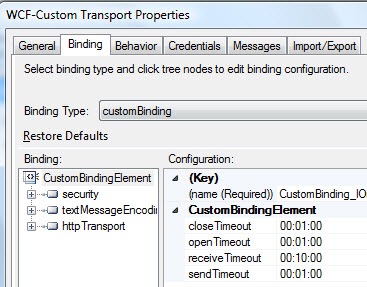
    The WCF-Custom adapter uses a custom WCF binding.

    2011.2.10crm09

    The only thing I added was on the Credentials tab, I added my Windows credentials for calling the service.  After creating the necessary receive port/location to pick up my initial file, send port to emit the service result to disk, and bound my orchestration, I was ready to go.

    Executing the Query

    In my Dynamics CRM environment, I added a customer account record for “Contoso”.  You can see a few data points which should show up in my service result when querying this record.

    2011.2.10crm10

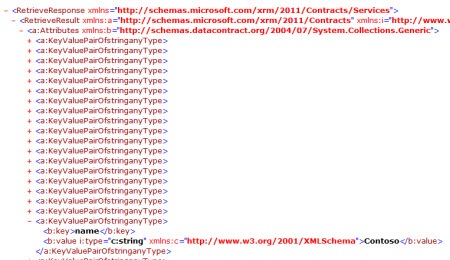
    After calling the “Query” operation, I can see the result of the service call.  Not particularly pretty.  In reality, you’d have to build some mapping between this result and a canonical schema.

    2011.2.10crm11

    As for creating the record, when I send my command message in to create a new record, I see the new (Fabrikam) record in Dynamics CRM and a file on disk with the unique identifier for the new record.

    2011.2.10crm12

    Summary

    So what’s “good”?  Dynamics CRM 2011 is an excellent application platform for building relationship-based solutions and has a wide range of integration options.  The REST interface is great and the SOAP interface will be useful for those that can leverage the CRM SDK.  What’s “bad”?  I don’t like the untyped interface.  I know it makes future flexibility easier (“add an attribute to an entity, don’t change the interface!”), but it really handicaps BizTalk and other tools that can’t leverage their SDK components.  I can’t see that many people choosing to build these functoid heavy maps just to create key/value pairs.  I’d probably opt to just use a custom XSLT stylesheet every time.  What’s “ugly”?  Not thrilled with the shape of the software, from an integration perspective, this close to general release.  Adding a simple WCF service reference to a .NET app should work.  It doesn’t.   Generated BizTalk schemas should be valid XSD.  They aren’t.  I don’t like the required “typing” of a node that forces me to do custom XSLT, even on a simple mapping.

    I suspect that we’ll either see partner solutions, or even Microsoft ones, that make the integration story from BizTalk a tad simpler.  And for all I know, I’m missing something here.  I’ve vetted my concerns with the Microsoft folks, and I think I’ve got the story straight, however.

    Thoughts from you all?  Are you a fan of untyped interfaces and willing to deal with the mapping sloppiness that ensues?  Other suggestions for how to make this process easier for developers?

  • Top 9 Things To Focus On When Learning New Platform Technologies

    Last week I attended the Microsoft Convergence conference in Atlanta, GA where I got a deeper dive into a technology that I’m spending a lot of time with right now.  You could say that Microsoft Dynamics CRM and I are seriously dating and she’s keeping things in my medicine cabinet.

    While sitting in a tips-and-tricks session, I started jotting down a list of things that I should focus on to REALLY understand how to use Dynamics CRM to build a solution.  Microsoft is pitching Dynamics CRM as a multi-purpose platform (labeled xRM) for those looking to build relational database-driven apps that can leverage an the Dynamics CRM UI model, security framework, data structure, etc.

    I realized that my list of platform “to do” things would be virtually identical for ANY technology platform that I was picking up and trying to use efficiently.  Whether BizTalk Server, Force.com, Windows Communication Foundation, Google App Engine, or Amazon AWS Simple Notification Services, a brilliant developer can still get into trouble by not understanding a few core dimensions of the platform.  Just because you’re a .NET rock star it doesn’t mean you could pick up WCF or BizTalk and just start building solutions.

    So, if I were plopping down in front of a new platform and wanted to learn to use it correctly, I’d focus on (in order of importance)  …

    1. Which things are configuration vs. code? To me, this seems like the one that could bite you the most (depending on the platform, of course).  I’d hate to waste a few days coding up a capability that I later discovered was built in, and available with a checkbox.  When do I have to jump into code, and when can I just flip some switches?  For something like Force.com, there are just tons of configuration settings.  If I don’t understand the key configurations and their impact across the platform, I will likely make the solution harder to maintain and less elegant.  WCF has an almost embarrassing number of configurations that I could accidentally skip and end up wasting time writing a redundant service behavior.
    2. What are the core capabilities within the platform? You really need to know what this platform is good at.  What are the critical subsystems and built in functions?  This relates to the previous one, but does it have a security framework, logging, data access?  What should I use/write outside services for, and what is baked right in?  Functionally, what is it great at?  I’d hate to misuse it because I didn’t grasp the core use cases. 
    3. How do I interface with external sources? Hugely important.  I like to know how to share data/logic/services from my platform with another, and how to leverage data/logic/services from another platform into mine. 
    4. When do I plug-in vs. embed?  I like to know when it is smartest to embed a particular piece of logic within a component instead of linking to an external component.  For instance, in BizTalk, when would I write code in a map or orchestration versus call out to an external assembly?  That may seem obvious to a BizTalk guru, but not so much to a .NET guru who picks up BizTalk for the first time.  For Dynamics CRM, should I embed JavaScript on a form or reference an external JS file?
    5. What changes affect the object at an API level? This may relate to more UI-heavy platforms.  If I add validation or authorization requirements to a data entity on a screen, do those validation and security restrictions also come into play when accessing the object via the API?  Basically, I’m looking for which manipulations of an object are on a more superficial level versus all encompassing.
    6. How do you package up artifacts for source control or deployment? You can learn a lot about a platform by seeing how to package up a solution.  Is it a hodge podge of configuration files or a neat little installable package?  What are all the things that go into a deployment package?  This may give me an appreciation for how to build the solution on the platform.
    7. What is shared between components of the framework? I like to know what artifacts are leveraged across all pieces of the platform.  Are security roles visible everywhere?  What if I build a code contract or schema and want to use it in multiple subsystems?  Can I write a helper function and use that all over the place?
    8. What is supported vs. unsupported code/activities/tweaks? Most platforms that I’ve come across allow you to do all sorts of things that make your life harder later.  So I like to know which things break my support contract (e.g. screwing with underlying database indexes), are just flat out disallowed (e.g. Google App Engine and saving files to the VM disk), or just not a good idea.  In Dynamics CRM, this could include the types of javascript that you can include on the page.  There are things you CAN do, but things that won’t survive an upgrade.
    9. Where to go for help? I like to hack around as much as the next guy, but I don’t have time to bang my head against the wall for hours on end just to figure out a simple thing.  So one of the first things I look for is the support forums, best blogs, product whitepapers, etc.

    Did I miss anything, or are my priorities (ranking) off?