Category: CenturyLink Cloud

  • What Would the Best Franken-Cloud Look Like?

    What if you could take all infrastructure cloud providers and combine their best assets into a single, perfect cloud? What would it look like?

    In my day job, I regularly see the sorts of things that cloud users ask for from a public cloud. These 9 things represent some of the most common requests:

    1. Scale. Can the platform give me virtually infinite capacity anywhere in the world?
    2. Low price. Is the cost of compute/storage low?
    3. Innovative internal platform. Does the underlying platform reflect next-generation thinking that will be relevant in years to come?
    4. On-premises parity. Can I use on-premises tools and technologies alongside this cloud platform?
    5. Strong ecosystem. Is it possible to fill in gaps or enrich the platform through the use of 3rd party products or services? Is there a solid API that partners can work with?
    6. Application services. Are there services I can use to compose applications faster and reduce ongoing maintenance cost?
    7. Management experience. Does the platform have good “day 2” management capabilities that let me function at scale with a large footprint?
    8. Available support. How can I get help setting up and running my cloud?
    9. Simplicity. Is there an easy on-ramp and can I quickly get tasks done?

    Which cloud providers offer the BEST option for each capability? We could argue until we’re blue in the face, but we’re just having fun here. In many cases, the gap between the “best” and “second best” is tiny and I could make the case that a few different clouds do every single item above pretty well. But that’s no fun, so here’s what components of each vendor that I’d combine into the “perfect” cloud.

    DISCLAIMER: I’m the product owner for the CenturyLink Cloud. Obviously my perspective is colored by that. However, I’ve taught three well-received courses on AWS, use Microsoft Azure often as part of my Microsoft MVP status, and spend my day studying the cloud market and playing with cloud technology. While I’m not unbiased, I’m also realistic and can recognize strengths and weaknesses of many vendors in the space.

    2014.08.26cloud1

    Google Compute Engine – BEST: Innovative Platform

    Difficult to judge without insider knowledge of everyone’s cloud guts, but I’ll throw this one to Google. Every cloud provider has solved some tricky distributed systems problems, but Google’s forward-thinking work with containers has made it possible for them to do things at massive scale. While their current Windows Server support is pretty lame – and that could impact whether this is really a legit “use-for-everything cloud” for large companies – I believe they’ll keep applying their unique knowledge to the cloud platform.

    Microsoft Azure – BEST: On-premises Parity, Application Services

    It’s unrealistic to ask any established company to throw away all their investments in on-premises technology and tools, so clouds that ease the transition have a leg up. Microsoft offers a handful of cloud services with on-premises parallels (Active Directory, SQL Server, SharePoint Online, VMs based on Hyper-V) that make the transition simpler. There’s management through System Center, and a good set of hybrid networking options. They still have a lot of cloud-only products or cloud-only constraints, but they do a solid job of creating a unified story.

    It’s difficult to say who has a “better” set of application services, AWS or Microsoft. AWS has a very powerful catalog of services for data storage, application streaming, queuing, and mobile development. I’ll give a slight edge to Microsoft for a better set of application integration services, web app hosting services, and identity services.

    Most of these are modular microservices that can be mashed up with applications running in any other cloud. That’s welcome news to those who prefer other clouds for primary workloads, but can benefit from the point services offered by companies like Microsoft.

    CenturyLink Cloud – BEST: Management Experience

    2014.08.26cloud2Many cloud providers focus on the “acquire stuff” experience and leave the “manage stuff” experience lacking. Whether your cloud resources live for 3 days or three years, there are maintenance activities. CenturyLink Cloud lets you create account hierarchies to represent your org, organize virtual servers into “groups”, act on those servers as a group, see cross-DC server health at a glance, and more. It’s a focus of this platform, and it differs from most other clouds that give you a flat list of cloud servers per data center and a limited number of UI-driven management tools. With the rise of configuration management as a mainstream toolset, platforms with limited UIs can still offer robust means for managing servers at scale. But, CenturyLink Cloud is focused on everything from account management and price transparency, to bulk server management in the platform.


    Rackspace – BEST: Support

    Rackspace has recently pivoted from offering a do-it-yourself IaaS and now offers cloud with managed services. “Fanantical Support” has been Rackspace’s mantra for years – and by all accounts, one they’ve lived up to – and now they are committing fully to a white-glove, managed cloud. In addition, they offer DevOps consultative services, DBA services, general professional services, and more. They’ve also got solid support documentation and support forums for those who are trying to do some things on their own. Many (most?) other clouds do a nice job of offering up self-service or consultative support, but Rackspace makes it a core focus.

    Amazon Web Services – BEST: Scale, Ecosystem

    Yes, AWS does a lot of things very well. If you’re looking for a lot of web-scale capacity anywhere in the world, AWS is tough to beat. They clearly have lots of capacity, and run more cloud workloads that pretty much everyone else combined. Each cloud provider seems to be expanding rapidly, but if you are identifying who has scaled the most, you have to say AWS.

    On “ecosystem” you could ague that Microsoft has a strong story, but realistically, Amazon’s got everyone beat. Any decent cloud-enabled tool knows how to talk to the AWS API, there are entire OSS toolsets built around the platform, and they have a marketplace stuffed with virtual appliances and compatible products. Not to mention, there are lots of AWS developers out there writing about the services, attending meetups, and building tools to help other developers out.

    Digital Ocean – BEST: Low Price, Simplicity

    Digital Ocean has really become a darling of developers. Why? Even with the infrastructure price wars going on among the large cloud providers, Digital Ocean has a really easy-to-understand, low price. Whether kicking the tires or deploying massive apps, Digital Ocean gives you a very price-competitive Linux-hosting service. Now, the “total cost of cloud” is a heck of a lot more than compute and storage costs, but, those are factors that resonates with people the most when first assessing clouds.

    For “simplicity”, you could argue for a lot of different providers here. Digital Ocean doesn’t offer a lots of knobs to turn, or organize their platform in a way that maps to most enterprise IT org structures, but you can’t argue with the straightforward user experience. You can go from “Hmm, I wonder what this is?” to “I’m up and running!” in about 60 seconds. That’s … a frictionless experience.

    Summary

    If you did this exercise on your own, you could easily expand the list of capabilities (e.g. ancillary services, performance, configuration options, security compliance), and swap around some of the providers. I didn’t even list out other nice cloud vendors like IBM/SoftLayer, Linode, and Joyent. You could probably slot them into some of the “winner” positions based on your own perspective.

    In reality, there is no “perfect” cloud (yet). There are always tradeoffs associated with each service and some capabilities that matter to you more than others. This thought experiment helped me think through the market, and hopefully gave you a something to consider!
  • Upcoming Speaking Engagements in London and Seattle

    In a few weeks, I’ll kick off a run of conference presentations that I’m really looking forward to.

    First, I’ll be in London for the BizTalk Summit 2014 event put on by the BizTalk360 team. In my talk “When To Use What: A Look at Choosing Integration Technology”, I take a fresh look at the topic of my book from a few years ago. I’ll walk through each integration-related technology from Microsoft and use a “buy, hold, or sell” rating to indicate my opinion on its suitability for a project today. Then I’ll discuss a decision framework for choosing among this wide variety of technologies, before closing with an example solution. The speaker list for this event is fantastic, and apparently there are only a handful of tickets remaining.

    The month after this, I’ll be in Seattle speaking at the ALM Forum. This well-respected event for agile software practitioners is held annually and I’m very excited to be part of the program. I am clearly the least distinguished speaker in the group, and I’m totally ok with that. I’m speaking in the Practices of DevOps track and my topic is “How Any Organization Can Transition to DevOps – 10 Practical Strategies Gleaned from a Cloud Startup.” Here I’ll drill into a practical set of tips I learned by witnessing (and participating in) a DevOps transformation at Tier 3 (now CenturyLink Cloud). I’m amped for this event as it’s fun to do case studies and share advice that can help others.

    If you’re able to attend either of those events, look me up!

  • Data Stream Processing with Amazon Kinesis and .NET Applications

    Amazon Kinesis is a new data stream processing service from AWS that makes it possible to ingest and read high volumes of data in real-time. That description may sound vaguely familiar to those who followed Microsoft’s attempts to put their CEP engine StreamInsight into the Windows Azure cloud as part of “Project Austin.” Two major differences between the two: Kinesis doesn’t have the stream query aspects of StreamInsight, and Amazon actually SHIPPED their product.

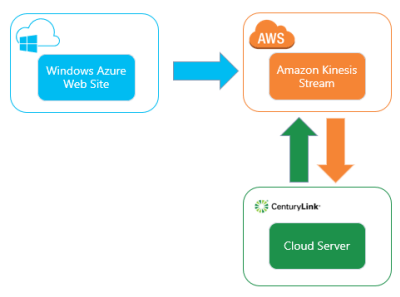
    Kinesis looks pretty cool, and I wanted to try out a scenario where I have (1) a Windows Azure Web Site that generates data, (2) Amazon Kinesis processing data, and (3) an application in the CenturyLink Cloud which is reading the data stream.

    2014.01.08kinesis05

    What is Amazon Kinesis?

    Kinesis provides a managed service that handles the intake, storage, and transportation of real-time streams of data. Each stream can handle nearly unlimited data volumes. Users set up shards which are the means for scaling up (and down) the capacity of the stream. All the data that comes into the a Kinesis stream is replicated across AWS availability zones within a region. This provides a great high availability story. Additionally, multiple sources can write to a stream, and a stream can be read by multiple applications.

    Data is available in the stream for up to 24 hours, meaning that applications (readers) can pull shard records based on multiple schemes: given sequence number, oldest record, latest record. Kinesis uses DynamoDB to store application state (like checkpoints). You can interact with Kinesis via the provided REST API or via platform SDKs.

    What DOESN’T Kinesis do? It doesn’t have any sort of adapter model, so it’s up to the developer to build producers (writers) and applications (readers). There is a nice client library for Java that has a lot of built in logic for application load balancing and such. But for the most part, this is still a developer-oriented solution for building big data processing solutions.

    Setting up Amazon Kinesis

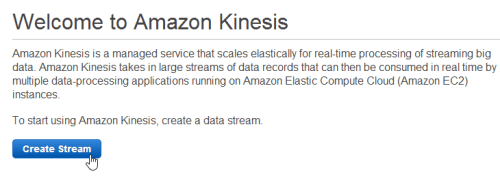
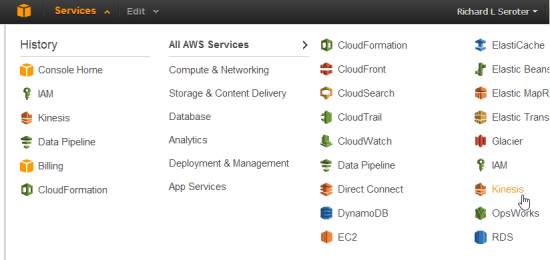
    First off, I logged into the AWS console and located Kinesis in the navigation menu.

    2014.01.08kinesis01

    I’m then given the choice to create a new stream.

    2014.01.08kinesis02

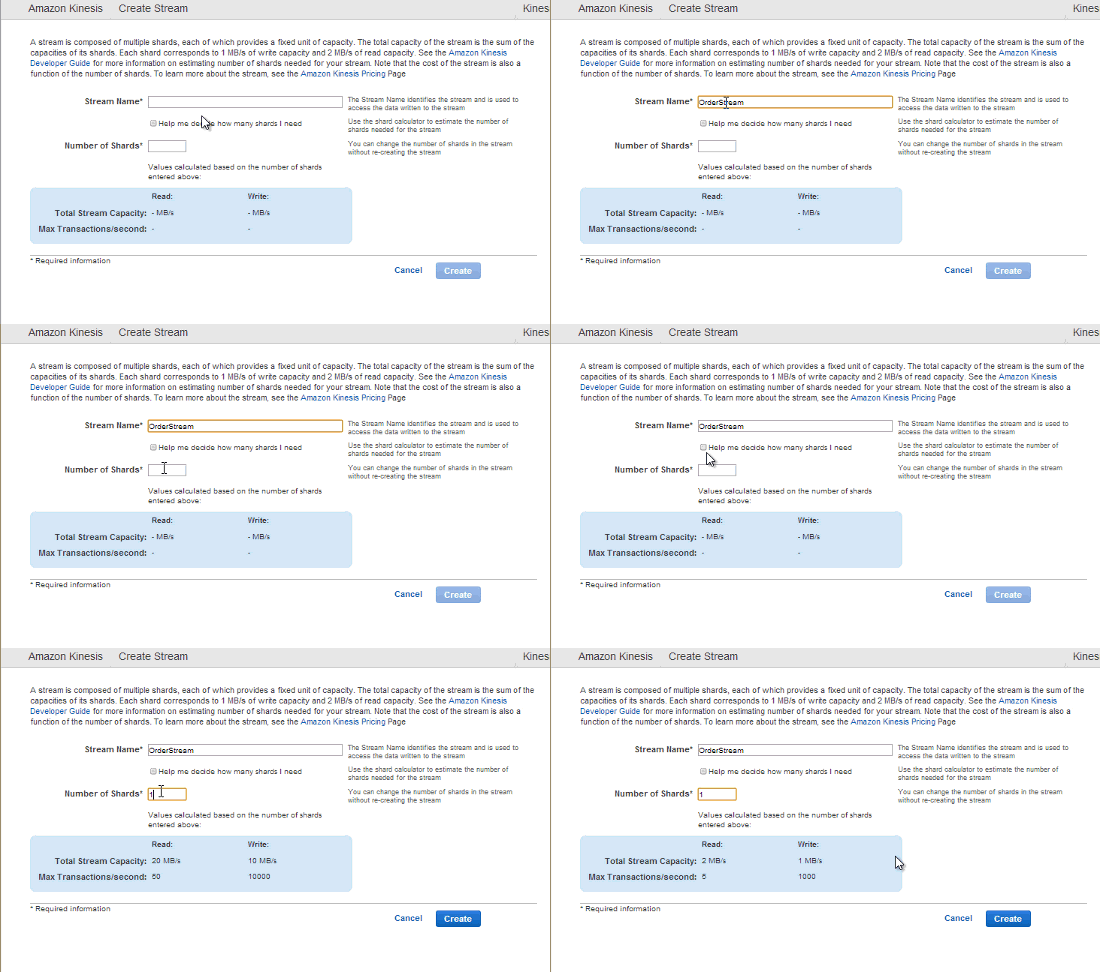
    Next, I need to choose the initial number of shards for the stream. I can either put in the number myself, or use a calculator that helps me estimate how many shards I’ll need based on my data volume.

    2014.01.08kinesis03

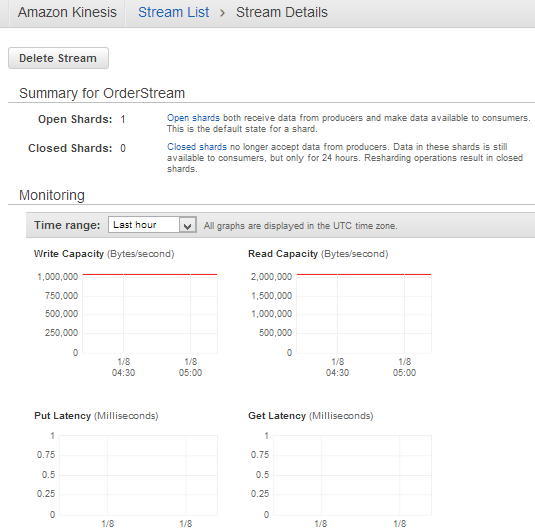
    After a few seconds, my managed Kinesis stream is ready to use. For a given stream, I can see available shards, and some CloudWatch metrics related to capacity, latency, and requests.

    2014.01.08kinesis04

    I now have an environment for use!

    Creating a data producer

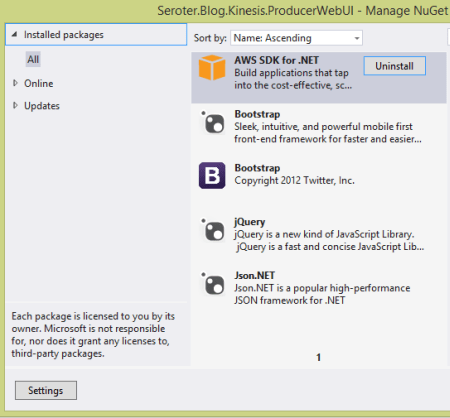
    Now I was ready to build an ASP.NET web site that publishes data to the Kinesis endpoint. The AWS SDK for .NET already Kinesis objects, so no reason to make this more complicated than it has to be. My ASP.NET site has NuGet packages that reference JSON.NET (for JSON serialization), AWS SDK, jQuery, and Bootstrap.

    2014.01.08kinesis06

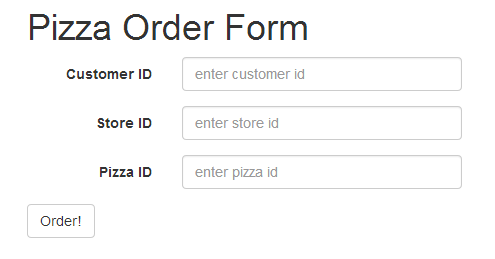
    The web application is fairly basic. It’s for ordering pizza from a global chain. Imagine sending order info to Kinesis and seeing real-time reactions to marketing campaigns, weather trends, and more. Kinesis isn’t a messaging engine per se, but it’s for collecting and analyzing data. Here, I’m collecting some simplistic data in a form.

    2014.01.08kinesis07

    When clicking the “order” button, I build up the request and send it to a particular Kinesis stream. First, I added the following “using” statements:

    using Newtonsoft.Json;
    using Amazon.Kinesis;
    using Amazon.Kinesis.Model;
    using System.IO;
    using System.Text;
    

    The button click event has the following (documented) code.  Notice a few things. My AWS credentials are stored in the web.config file, and I pass in an AmazonKinesisConfig to the client constructor. Why? I need to tell the client library which AWS region my Kinesis stream is in so that it can build the proper request URL. See that I added a few properties to the actual put request object. First, I set the stream name. Second, I added a partition key which is used to place the record in a given shard. It’s a way of putting “like” records in a particular shard.

    protected void btnOrder_Click(object sender, EventArgs e)
        {
            //generate unique order id
            string orderId = System.Guid.NewGuid().ToString();
    
            //build up the CLR order object
            Order o = new Order() { Id = orderId, Source = "web", StoreId = storeid.Text, PizzaId = pizzaid.Text, Timestamp = DateTime.Now.ToString() };
    
            //convert to byte array in prep for adding to stream
            byte[] oByte = Encoding.UTF8.GetBytes(JsonConvert.SerializeObject(o));
    
            //create stream object to add to Kinesis request
            using (MemoryStream ms = new MemoryStream(oByte))
            {
                //create config that points to AWS region
                AmazonKinesisConfig config = new AmazonKinesisConfig();
                config.RegionEndpoint = Amazon.RegionEndpoint.USEast1;
    
                //create client that pulls creds from web.config and takes in Kinesis config
                AmazonKinesisClient client = new AmazonKinesisClient(config);
    
                //create put request
                PutRecordRequest requestRecord = new PutRecordRequest();
                //list name of Kinesis stream
                requestRecord.StreamName = "OrderStream";
                //give partition key that is used to place record in particular shard
                requestRecord.PartitionKey = "weborder";
                //add record as memorystream
                requestRecord.Data = ms;
    
                //PUT the record to Kinesis
                PutRecordResponse responseRecord = client.PutRecord(requestRecord);
    
                //show shard ID and sequence number to user
                lblShardId.Text = "Shard ID: " + responseRecord.ShardId;
                lblSequence.Text = "Sequence #:" + responseRecord.SequenceNumber;
            }
        }
    

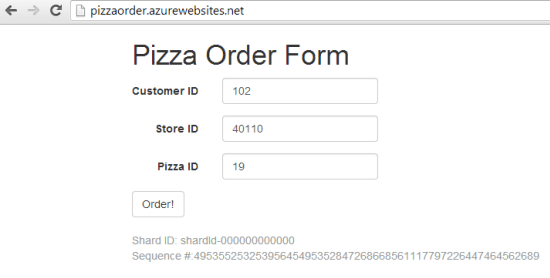
    With the web application done, I published it to a Windows Azure Web Site. This is super easy to do with Visual Studio 2013, and within a few seconds my application was there.

    2014.01.08kinesis08

    Finally, I submitted a bunch of records to Kinesis by adding pizza orders. Notice the shard ID and sequence number that Kinesis returns from each PUT request.

    2014.01.08kinesis09

    Creating a Kinesis application (record consumer)

    To realistically read data from a Kinesis stream, there are three steps. First, you need to describe the stream in order to find out the shards. If I want a fleet of servers to run this application and read the stream, I’d need a way for each application to claim a shard to work on. The second step is to retrieve a “shard iterator” for a given shard. The iterator points to a place in the shard where I want to start reading data. Recall from above that I can start with the latest unread records, oldest records, or at a specific point in the shard. The third and final step is to get the records from a particular iterator. Part of the result set of this operation is a “next iterator” value. In my code, if I find another iterator value, I once again call the “get records” operation to pull any records from that iterator position.

    Here’s the total code block, documented for your benefit.

    private static void ReadFromKinesis()
    {
        //create config that points to Kinesis region
        AmazonKinesisConfig config = new AmazonKinesisConfig();
        config.RegionEndpoint = Amazon.RegionEndpoint.USEast1;
    
       //create new client object
       AmazonKinesisClient client = new AmazonKinesisClient(config);
    
       //Step #1 - describe stream to find out the shards it contains
       DescribeStreamRequest describeRequest = new DescribeStreamRequest();
       describeRequest.StreamName = "OrderStream";
    
       DescribeStreamResponse describeResponse = client.DescribeStream(describeRequest);
       List<Shard> shards = describeResponse.StreamDescription.Shards;
       foreach(Shard s in shards)
       {
           Console.WriteLine("shard: " + s.ShardId);
       }
    
       //grab the only shard ID in this stream
       string primaryShardId = shards[0].ShardId;
    
       //Step #2 - get iterator for this shard
       GetShardIteratorRequest iteratorRequest = new GetShardIteratorRequest();
       iteratorRequest.StreamName = "OrderStream";
       iteratorRequest.ShardId = primaryShardId;
       iteratorRequest.ShardIteratorType = ShardIteratorType.TRIM_HORIZON;
    
       GetShardIteratorResponse iteratorResponse = client.GetShardIterator(iteratorRequest);
       string iterator = iteratorResponse.ShardIterator;
    
       Console.WriteLine("Iterator: " + iterator);
    
       //Step #3 - get records in this iterator
       GetShardRecords(client, iterator);
    
       Console.WriteLine("All records read.");
       Console.ReadLine();
    }
    
    private static void GetShardRecords(AmazonKinesisClient client, string iteratorId)
    {
       //create reqest
       GetRecordsRequest getRequest = new GetRecordsRequest();
       getRequest.Limit = 100;
       getRequest.ShardIterator = iteratorId;
    
       //call "get" operation and get everything in this shard range
       GetRecordsResponse getResponse = client.GetRecords(getRequest);
       //get reference to next iterator for this shard
       string nextIterator = getResponse.NextShardIterator;
       //retrieve records
       List<Record> records = getResponse.Records;
    
       //print out each record's data value
       foreach (Record r in records)
       {
           //pull out (JSON) data in this record
           string s = Encoding.UTF8.GetString(r.Data.ToArray());
           Console.WriteLine("Record: " + s);
           Console.WriteLine("Partition Key: " + r.PartitionKey);
       }
    
       if(null != nextIterator)
       {
           //if there's another iterator, call operation again
           GetShardRecords(client, nextIterator);
       }
    }
    

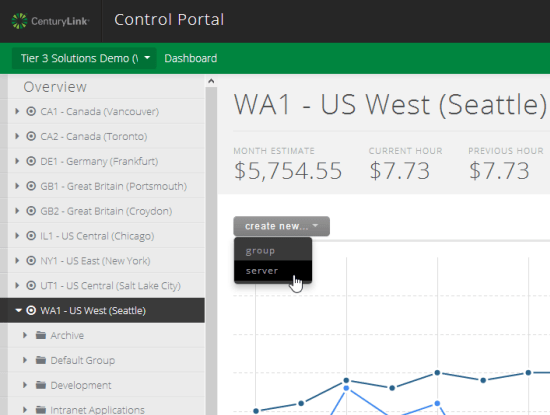
    Now I had a working Kinesis application that can run anywhere. Clearly it’s easy to run this on AWS EC2 servers (and the SDK does a nice job with retrieving temporary credentials for apps running within EC2), but there’s a good chance that cloud users have a diverse portfolio of providers. Let’s say I love the application services from AWS, but like the server performance and management capabilities from CenturyLink. In this case, I built a Windows Server to run my Kinesis application.

    2014.01.08kinesis10

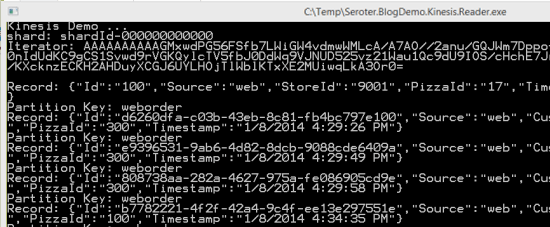
    With my server ready, I ran the application and saw my shards, my iterators, and my data records.

    2014.01.08kinesis11

    Very cool and pretty simple. Don’t forget that each data consumer has some work to do to parse the stream, find the (partition) data they want, and perform queries on it. You can imagine loading this into an Observable and using LINQ queries on it to aggregate data. Regardless, it’s very nice to have a durable stream processing service that supports replays and multiple readers.

    Summary

    The “internet of things” is here, and companies that can quickly gather and analyze data will have a major advantage. Amazon Kinesis is an important service to that end, but don’t think of it as something that ONLY works with other applications in the AWS cloud. We saw here that you could have all sorts of data producers running on devices, on-premises, or in other clouds. The Kinesis applications that consume data can also run virtually anywhere. The modern architect recognizes that composite applications are the way to go, and hopefully this helped you understand another services that’s available to you!