Category: BizTalk

  • Walkthrough of New Windows Azure BizTalk Services

    The Windows Azure EAI Bridges are dead. Long live BizTalk Services! Initially released last year as a “lab” project, the Service Bus EAI Bridges were a technology for connecting cloud and on-premises endpoints through an Azure-hosted broker. This technology has been rebranded (“Windows Azure BizTalk Services”) and upgraded and is now available as a public preview. In this blog post, I’ll give you a quick tour around the developer experience.

    First off, what actually *is* Windows Azure BizTalk Services (WABS)? Is it BizTalk Server running in the cloud? Does it run on-premises? Check out the announcement blog posts from the Windows Azure and BizTalk teams, respectively, for more. But basically, it’s separate technology from BizTalk Server, but meant to be highly complementary. Even though It uses a few of the same types of artifacts such as schemas and maps, they aren’t interchangeable. For example, WABS maps don’t run in BizTalk Server, and vice versa. Also, there’s no concept of long-running workflow (i.e. orchestration), and none of the value-added services that BizTalk Server provides (e.g. Rules Engine, BAM). All that said, this is still an important technology as it makes it quick and easy to connect a variety of endpoints regardless of location. It’s a powerful way to expose line-of-business apps to cloud systems, and Windows Azure hosting model makes it possible to rapidly scale solutions. Check out the pricing FAQ page for more details on the scaling functionality, and the reasonable pricing.

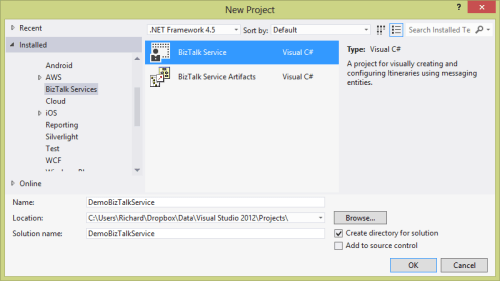
    Let’s get started. When you install the preview components, you’ll get a new project type in Visual Studio 2012.
    2013.06.03wabs01

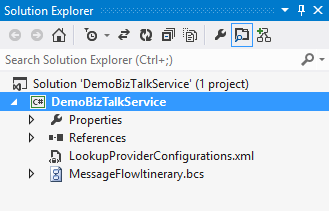
    Each WABS project can contain a single “bridge configuration” file. This file defines the flow of data between source and destination endpoints. Once you have a WABS project, you can add XML schemas, flat-file schemas, and maps.
    2013.06.03wabs02

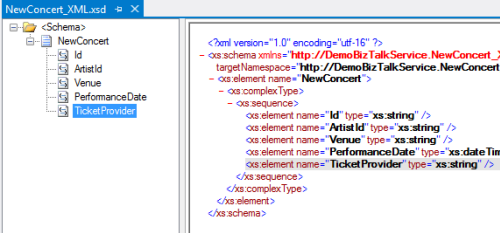
    The WABS Schema Editor looks identical to the BizTalk Server Schema Editor and lets you define XML or flat file message structures. While the right-click menu promises the ability to generate and validate file instances, my pre-preview version of the bits only let me validate messages, not generate sample ones.
    2013.06.03wabs03

    The WABS schema mapper is very different from the BizTalk Mapper. And that’s a good thing. The UI has subtle alterations, but the more important change is in the palette of available “functoids” (components for manipulating data). First, you’ll see more sophisticated looping and logical expression handling. This include a ForEach Loop and finally, an If-Then-Else Expression option.
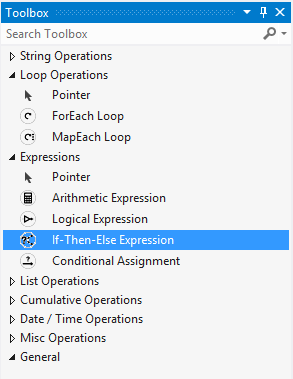
    2013.06.03wabs04

    The concept of “lists” are also entirely new. You can populate, persist, and query lists of data and create powerfully complex mappings between structures.
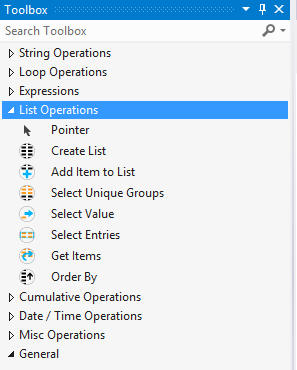
    2013.06.03wabs05

    Finally, there are some “miscellaneous” operations that introduce small – but helpful – capabilities. These functoids let you grab a property from the message’s context (metadata), generate a random ID, and even embed custom C# code into a map. I seem to recall that custom code was excluded from the EAI Bridges preview, and many folks expressed concern that this would limit the usefulness of these maps for tricky, real-world scenarios. Now, it looks like this is the most powerful data mapping tool that Microsoft has ever produced. I suspect that an entire book could be written about how to properly use this Mapper.
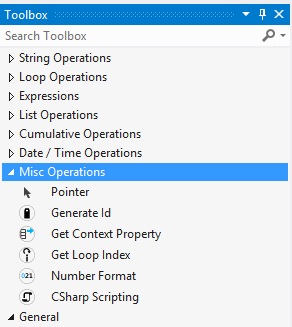
    2013.06.03wabs06

    Next up, let’s take a look at the bridge configuration and what source and destination endpoints are supported. The toolbox for the bridge configuration file shows three different types of bridges: XML One-Way Bridge, XML Request-Reply Bridge, and Pass-Through Bridge.
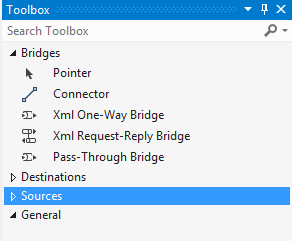
    2013.06.03wabs07

    You’d use each depending on whether you were doing synchronous or asynchronous XML messaging, or any flat file transmission. To get data into a bridge, today you can use HTTP, FTP, or SFTP. Notice that “HTTP” doesn’t show up in that list as each bridge automatically has a Windows Azure ACS-secured HTTP endpoint associated with it.
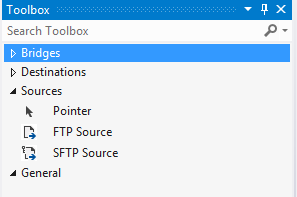
    2013.06.03wabs08

    While the currently available set of sources is a bit thin, the destination options are solid. You can consume web services, Service Bus Relay endpoints, Service Bus Queues / Topics, Windows Azure Blobs, FTP and SFTP endpoints.
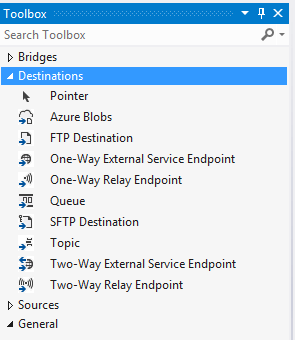
    2013.06.03wabs09

    A given bridge configuration file will often contain a mix of these endpoints. For instance, consider a case where you want to route a message to one of three different endpoints based on some value in the message itself. Also imagine wanting to do a special transformation heading to one endpoint, and not the others. In the configuration below, I’m chaining together XML bridges to route to the Service Bus Queue, and directly routing to either the Service Bus Topic or Relay Service based on the message content.
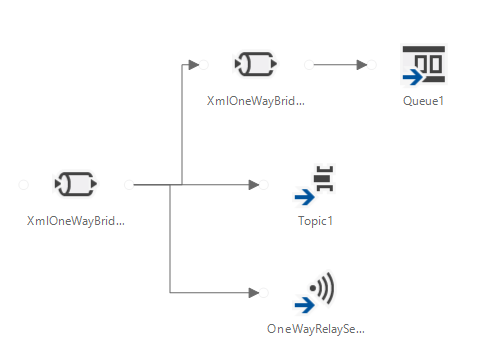
    2013.06.03wabs10

    An individual bridge has a number of stages that a message passes through. Double-clicking a bridge reveals steps for identifying, decoding, validating, enriching, encoding, and transforming messages.
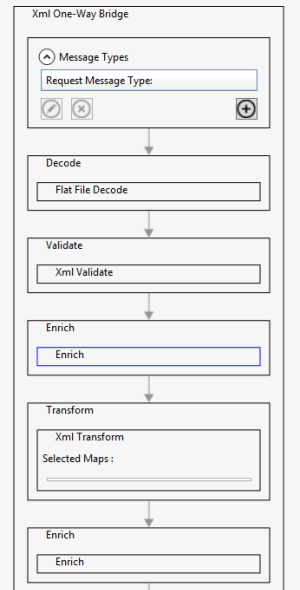
    2013.06.03wabs11

    An individual step exposes relevant configuration properties. For instance, the “Enrich” stage of a bridge lets you choose a way to populate data in the outbound message’s metadata (context) properties. Options include pulling values from the source message’s SOAP or HTTP headers, XPath against the source message body, lookup to a Windows Azure SQL database, and more.
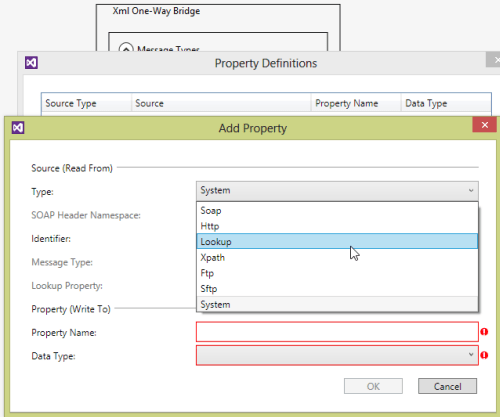
    2013.06.03wabs12

    When a bridge configuration is completed and ready for deployment, simply right-click the Visual Studio project and choose Deploy and fill in valid credentials for the WABS preview.

    Wrap Up

    This is definitely preview software as there are a number of things we’ll likely see added before it’s ready for production use (e.g. enhanced management). However, it’s a good time to start poking around and getting a feel for when you might use this. On a broad scale, you COULD choose to use this instead of something like MuleSoft’s CloudHub to do pure cloud-to-cloud integration, but WABS is drastically less mature than what MuleSoft  has to offer. Moving forward, it’d be great to see a durable workflow component added, additional sources, and Microsoft really needs to start baking JSON support into more products from the get-go.

    What do you think? Plan on trying this out? Have ideas for where you could use it?
  • Going to Microsoft TechEd (North America) to Speak About Cloud Integration

    In a few weeks, I’ll be heading to New Orleans to speak at Microsoft TechEd for the first time. My topic – Patterns of Cloud Integration – is an extension of things I’ve talked about this year in Amsterdam, Gothenburg, and in my latest Pluralsight course. However, I’ll also be covering some entirely new ground and showcasing some brand new technologies.

    TechEd is a great conference with tons of interesting sessions, and I’m thrilled to be part of it. In my talk, I’ll spend 75 minutes discussing practical considerations for application, data, identity, and network integration with cloud systems. Expect lots of demonstrations of Microsoft (and non-Microsoft) technology that can help organizations cleanly link all IT assets, regardless of physical location. I’ll show off some of the best tools from Microsoft, Salesforce.com, AWS (assuming no one tackles me when I bring it up), Informatica, and more.

    Any of you plan on going to North America TechEd this year? If so, hope to see you there!

  • My New Pluralsight Course – Patterns of Cloud Integration – Is Now Live

    I’ve been hard at work on a new Pluralsight video course and it’s now live and available for viewing. This course, Patterns of Cloud Integration,  takes you through how application and data integration differ when adding cloud endpoints. The course highlights the 4 integration styles/patterns introduced in the excellent Enterprise Integration Patterns book and discusses the considerations, benefits, and challenges of using them with cloud systems. There are five core modules in the course:

    • Integration in the Cloud. An overview of the new challenges of integrating with cloud systems as well as a summary of each of the four integration patterns that are covered in the rest of the course.
    • Remote Procedure Call. Sometimes you need information or business logic stored in an independent system and RPC is still a valid way to get it. Doing this with a cloud system on one (or both!) ends can be a challenge and we cover the technologies and gotchas here.
    • Asynchronous Messaging. Messaging is a fantastic way to do loosely coupled system architecture, but there are still a number of things to consider when doing this with the cloud.
    • Shared Database. If every system has to be consistent at the same time, then using a shared database is the way to go. This can be a challenge at cloud scale, and we review some options.
    • File Transfer. Good old-fashioned file transfers still make sense in many cases. Here I show a new crop of tools that make ETL easy to use!

    Because “the cloud” consists of so many unique and interesting technologies, I was determined to not just focus on the products and services from any one vendor. So, I decided to show off a ton of different technologies including:

    Whew! This represents years of work as I’ve written about or spoken on this topic for a while. It was fun to collect all sorts of tidbits, talk to colleagues, and experiment with technologies in order to create a formal course on the topic. There’s a ton more to talk about besides just what’s in this 4 hour course, but I hope that it sparks discussion and helps us continue to get better at linking systems, regardless of their physical location.

  • Yes Richard, You Can Use Ampersands in the BizTalk REST Adapter (And Some ASP.NET Web API Tips)

    A few months back, I wrote up a pair of blog posts (part 1, part 2) about the new BizTalk Server 2013 REST adapter. Overall, I liked it, but I complained about the  apparent lack of support for using ampersands (&) when calling REST services. That seemed like a pretty big whiff as you find many REST services that use ampersands to add filter parameters and such to GET requests. Thankfully, my readers set me straight. Thanks Henry Houdmont and Sam Vanhoutte! You CAN use ampersands in this adapter, and it’s pretty simple once you know the trick. In this post, I’ll first show you how to consume a REST service that has an ampersand in the URL, and, I’ll show you a big gotcha when consuming ASP.NET Web API services from BizTalk Server.

    First off, to demonstrate this I created a new ASP.NET MVC 4 project to hold my Web API service. This service takes in new invoices (and assigns them an invoice number) and returns invoices (based on query parameters). The “model” associated with the service is pretty basic.

    public class Invoice
        {
            public string InvoiceNumber { get; set; }
            public DateTime IssueDate { get; set; }
            public float PreviousBalance { get; set; }
            public float CurrentBalance { get; set; }
    
        }
    

    The controller is the only other thing to add in order to get a working service. My controller is pretty basic as well. Just for fun, I used a non-standard name for my query operation (instead of the standard pattern of Get<model type>) and decorated the method with an attribute that tells the Web API engine to call this operation on GET requests. The POST operation uses the expected naming pattern and therefore doesn’t require any special attributes.

    public class InvoicesController : ApiController
        {
            [System.Web.Http.HttpGet]
            public IEnumerable<Invoice> Lookup(string id, string startrange, string endrange)
            {
                //yank out date values; should probably check for not null!
                DateTime start = DateTime.Parse(startrange);
                DateTime end = DateTime.Parse(endrange);
    
                List<Invoice> invoices = new List<Invoice>();
    
                //create invoices
                invoices.Add(new Invoice() { InvoiceNumber = "A100", IssueDate = DateTime.Parse("2012-12-01"), PreviousBalance = 1000f, CurrentBalance = 1200f });
                invoices.Add(new Invoice() { InvoiceNumber = "A200", IssueDate = DateTime.Parse("2013-01-01"), PreviousBalance = 1200f, CurrentBalance = 1600f });
                invoices.Add(new Invoice() { InvoiceNumber = "A300", IssueDate = DateTime.Parse("2013-02-01"), PreviousBalance = 1600f, CurrentBalance = 1100f });
    
                //get invoices within the specified date range
                var matchinginvoices = from i in invoices
                                       where i.IssueDate >= start && i.IssueDate <= end
                                       select i;
    
                //return any matching invoices
                return matchinginvoices;
            }
    
            public Invoice PostInvoice(Invoice newInvoice)
            {
                newInvoice.InvoiceNumber = System.Guid.NewGuid().ToString();
    
                return newInvoice;
            }
        }
    

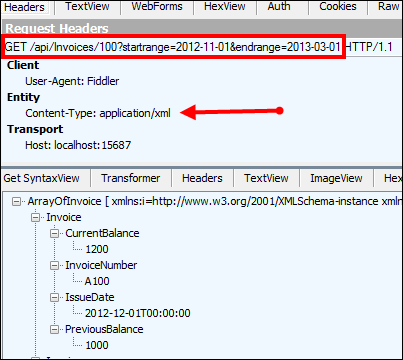
    That’s it! Notice that I expect the date range to appear as query string parameters, and those will automatically map to the two input parameters in the method signature. I tested this service using Fiddler and could make JSON or XML come back based on which Content-Type HTTP header I sent in.

    2013.03.19.rest01

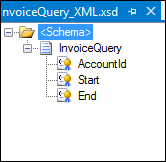
    Next, I created a BizTalk Server 2013 project in Visual Studio 2012 and defined a schema that represents the “invoice request” message sent from a source system. It has fields for the account ID, start date, and end date. All those fields were promoted into a property schema so that I could use their values later in the REST adapter.

    2013.03.19.rest03

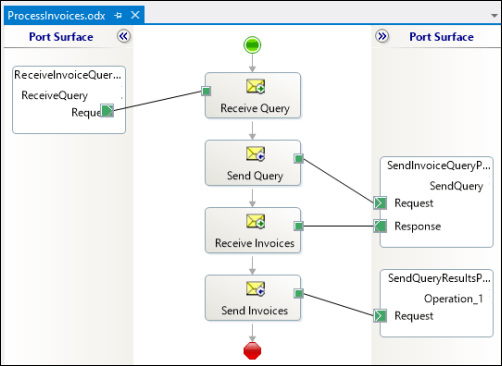
    Then I built an orchestration to send the request to the REST adapter. You don’t NEED To use an orchestration, but I wanted to show how the “operation name” on an orchestration port is used within the adapter. Note below that the message is sent to the REST adapter via the “SendQuery” orchestration port operation.

    2013.03.19.rest02

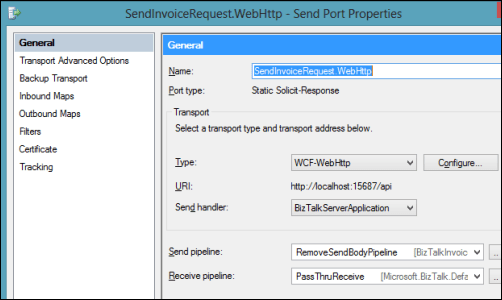
    In the BizTalk Administration console, I configured the necessary send and receive ports. The send port that calls the ASP.NET Web API service uses the WCF-WebHttp adapter and a custom pipeline that strips out the message of the GET request (example here; note that this will likely be corrected in the final release of BizTalk 2013).

    2013.03.19.rest04

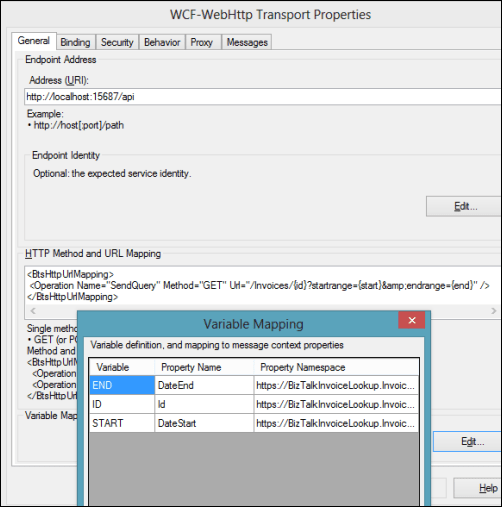
    In the adapter configuration, notice a few things. See that the “HTTP Method and URL Mapping” section has an entry that maps the orchestration port operation name to a URI. Also, you can see that I use an escaped ampersand (&amp;) in place of an actual ampersand. The latter throws and error, while the former works fine. I mapped the values from the message itself (via the use of a property schema) to the various URL variables.

    2013.03.19.rest05

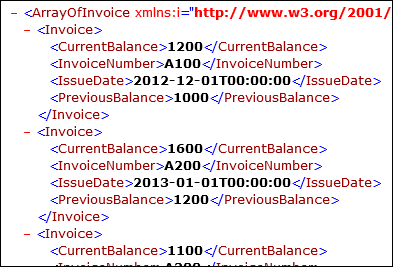
    When I started everything up and send a “invoice query” message into BizTalk, I quickly got back an XML document containing all the invoices for that account that were timestamped within the chosen date range.

    2013.03.19.rest06

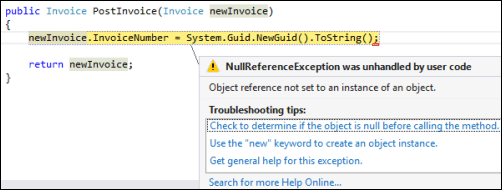
    Wonderful. So where’s the big “gotcha” that I promised? When you send a message to an ASP.NET Web API endpoint, the endpoint seems to expect a UTF-8 unless otherwise designated. However, if you use the default XMLTransmit pipeline component on the outbound message, BizTalk applies a UTF-16 encoding. What happens?

    2013.03.19.rest07

    Ack! The “newInvoice” parameter is null. This took me a while to debug, probably because I’m occasionally incompetent and there were also no errors in the Event Log or elsewhere. Once I figured out that this was an encoding problem, the fix was easy!

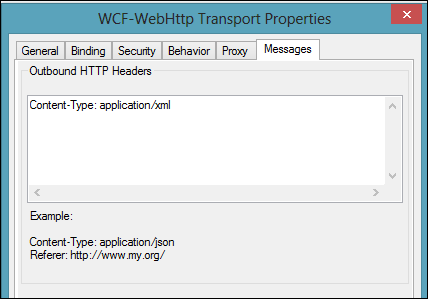
    The REST adapter is pretty configurable, including the ability to add outbound headers to the HTTP message. This is the HTTP header I added that still caused the error above.

    2013.03.19.rest08

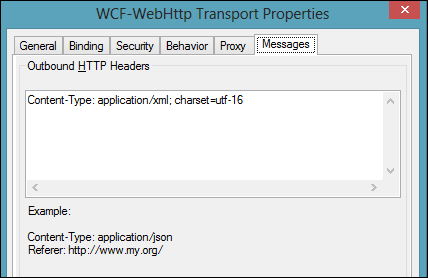
    I changed this value to also specify which encoding I was sending (charset=utf16).

    2013.03.19.rest09

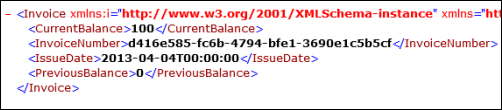
    After saving this updated adapter configuration and sending in another “new invoice” message, I got back an invoice with a new (GUID) invoice number.

    2013.03.19.rest10

    I really enjoy using the ASP.NET Web API, but make sure you’re sending what the REST service expects!

  • Using ASP.NET SignalR to Publish Incremental Responses from Scatter-Gather BizTalk Workflow

    While in Europe last week presenting at the Integration Days event, I showed off some demonstration of cool new technologies working with existing integration tools. One of those demos combined SignalR and BizTalk Server in a novel way.

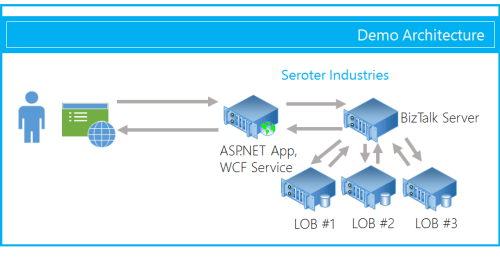
    One of the use cases for an integration bus like BizTalk Server is to aggregate data from multiple back end systems and return a composite message (also known as a Scatter-Gather pattern). In some cases, it may make sense to do this as part of a synchronous endpoint where a web service caller makes a request, and BizTalk returns an aggregated response. However, we all know that BizTalk Server’s durable messaging architecture introduces latency into the communication flow, and trying to do this sort of operation may not scale well when the number of callers goes way up. So how can we deliver a high-performing, scalable solution that will accommodate today’s highly interactive web applications? In this solution that I build, I used ASP.NET and SignalR to send incremental messages from BizTalk back to the calling web application.

    2013.02.01signalr01

    The end user wants to search for product inventory that may be recorded in multiple systems. We don’t want our web application to have to query these systems individually, and would rather put an aggregator in the middle. Instead of exposing the scatter-gather BizTalk orchestration in a request-response fashion, I’ve chosen to expose an asynchronous inbound channel, and will then send messages back to the ASP.NET web application as soon as each inventory system respond.

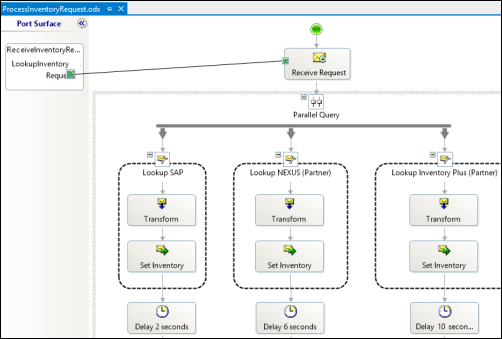
    First off, I have a BizTalk orchestration. It takes in the inventory lookup request and makes a parallel query to three different inventory systems. In this demonstration, I don’t actually query back-end systems, but simulate the activity by introducing a delay into each parallel branch.

    2013.02.01signalr02

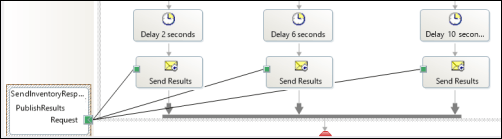
    As each branch concludes, I send the response immediately to a one-way send port. This is in contrast to the “standard” scatter-gather pattern where we’d wait for all parallel branches to complete and then aggregate all the responses into a single message. This way, we are providing incremental feedback, a more responsive application, and protection against a poor-performing inventory system.

    2013.02.01signalr03

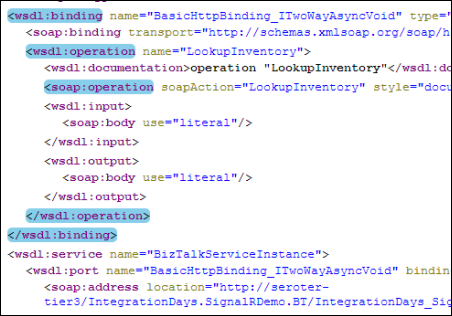
    After building and deploying this solution, I walked through the WCF Service Publishing Wizard in order to create the web service on-ramp into the BizTalk orchestration.

    2013.02.01signalr04

    I couldn’t yet create the BizTalk send port as I didn’t have an endpoint to send the inventory responses to. Next up, I built the ASP.NET web application that also had a WCF service for accepting the inventory messages. First, in a new ASP.NET project in Visual Studio, I added a service reference to my BizTalk-generated service. I then added the NuGet package for SignalR, and a new class to act as my SignalR “hub.” The Hub represents the code that the client browser will invoke on the server. In this case, the client code needs to invoke a “lookup inventory” action which will forwards a request to BizTalk Server. It’s important to notice that I’m acquiring and transmitting the unique connection ID associated with the particular browser client.

    public class NotifyHub : Hub
        {
            /// <summary>
            /// Operation called by client code to lookup inventory for a given item #
            /// </summary>
            /// <param name="itemId"></param>
            public void LookupInventory(string itemId)
            {
                //get this caller's unique browser connection ID
                string clientId = Context.ConnectionId;
    
                LookupService.IntegrationDays_SignalRDemo_BT_ProcessInventoryRequest_ReceiveInventoryRequestPortClient c =
                    new LookupService.IntegrationDays_SignalRDemo_BT_ProcessInventoryRequest_ReceiveInventoryRequestPortClient();
    
                LookupService.InventoryLookupRequest req = new LookupService.InventoryLookupRequest();
                req.ClientId = clientId;
                req.ItemId = itemId;
    
                //invoke async service
                c.LookupInventory(req);
            }
        }
    

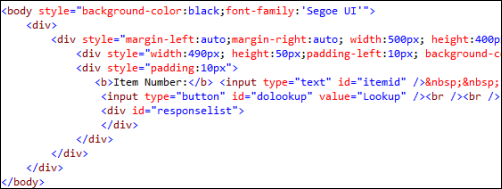
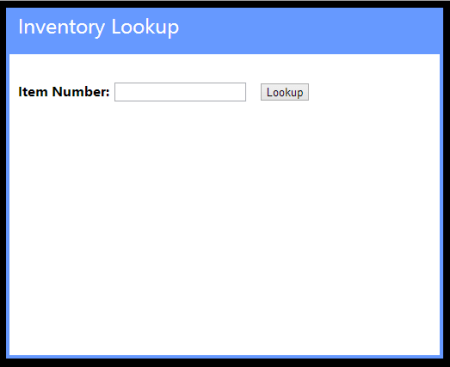
    Next, I added a single Web Form to this ASP.NET project. There’s nothing in the code-behind file as we’re dealing entirely with jQuery and client-side fun. The HTML markup of the page is pretty simple and contains a single textbox that accepts a inventory part number, and a button that triggers a lookup. You’ll also notice a DIV with an ID of “responselist” which will hold all the responses sent back from BizTalk Server.

    2013.02.01signalr07

    The real magic of the page (and SignalR) happens in the head of the HTML page. Here I referenced all the necessary JavaScript libraries for SignalR and jQuery. Then I established a reference to the server-side SignalR Hub. Then you’ll notice that I create a function that the *server* can call when it has data for me. So the *server* will call the “addLookupResponse” operation on my page. Awesome. Finally, I start up the connection and define the click function that the button on the page triggers.

    <head runat="server">
        <title>Inventory Lookup</title>
        <!--Script references. -->
        <!--Reference the jQuery library. -->
        <script src="Scripts/jquery-1.6.4.min.js" ></script>
        <!--Reference the SignalR library. -->
        <script src="Scripts/jquery.signalR-1.0.0-rc1.js"></script>
        <!--Reference the autogenerated SignalR hub script. -->
        <script src="<%= ResolveUrl("~/signalr/hubs") %>"></script>
        <!--Add script to update the page--> 
        <script type="text/javascript">
            $(function () {
                // Declare a proxy to reference the hub. 
                var notify = $.connection.notifyHub;
    
                // Create a function that the hub can call to broadcast messages.
                notify.client.addLookupResponse = function (providerId, stockAmount) {
                    $('#responselist').append('<div>Provider <b>' + providerId + '</b> has <b>' + stockAmount + '</b> units in stock.</div>');
                };
    
                // Start the connection.
                $.connection.hub.start().done(function () {
                    $('#dolookup').click(function () {
                        notify.server.lookupInventory($('#itemid').val());
                        $('#responselist').append('<div>Checking global inventory ...</div>');
                    });
                });
            });
        </script>
    </head>
    

    Nearly done! All that’s left is to open up a channel for BizTalk to send messages to the target browser connection. I added a WCF service to this existing ASP.NET project. The WCF contract has a single operation for BizTalk to call.

    [ServiceContract]
        public interface IInventoryResponseService
        {
            [OperationContract]
            void PublishResults(string clientId, string providerId, string itemId, int stockAmount);
        }
    

    Notice that BizTalk is sending back the client (connection) ID corresponding to whoever made this inventory request. SignalR makes it possible to send messages to ALL connected clients, a group of clients, or even individual clients. In this case, I only want to transmit a message to the browser client that made this specific request.

    public class InventoryResponseService : IInventoryResponseService
        {
            /// <summary>
            /// Send message to single connected client
            /// </summary>
            /// <param name="clientId"></param>
            /// <param name="providerId"></param>
            /// <param name="itemId"></param>
            /// <param name="stockAmount"></param>
            public void PublishResults(string clientId, string providerId, string itemId, int stockAmount)
            {
                var context = GlobalHost.ConnectionManager.GetHubContext<NotifyHub>();
    
    			 //send the inventory stock amount to an individual client
                context.Clients.Client(clientId).addLookupResponse(providerId, stockAmount);
            }
        }
    

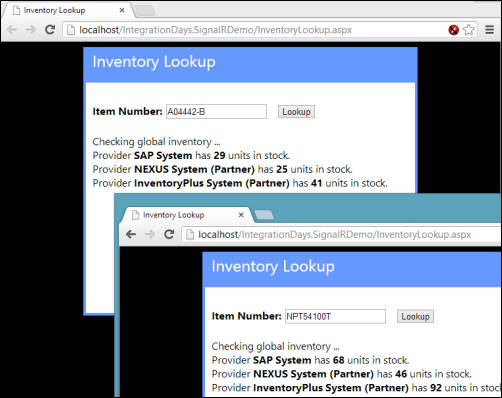
    After adding the rest of the necessary WCF service details to the web.config file of the project, I added a new BizTalk send port targeting the service. Once the entire BizTalk project was started up (receive location for the on-ramp WCF service, orchestration that calls inventory systems, send port that sends responses to the web application), I browsed to my ASP.NET site.

    2013.02.01signalr05

    For this demonstration, I opened a couple browser instances to prove that each one was getting unique results based on whatever inventory part was queried. Sure enough, a few seconds after entering in a random part identifier, data starting trickling back. On each browser client, results were returned in a staggered fashion as each back-end system returned data.

    2013.02.01signalr06

    I’m biased of course, but I think that this is a pretty cool query pattern. You can have the best of BizTalk (e.g. visually modeled workflow for scatter-gather, broad application adapter choice) while not sacrificing interactivity and performance.

    In the spirit of sharing, I’ve made the source code available on GitHub. Feel free to browse it, pull it, and try this on your own. Let me know what you think!

  • January 2013 Trip to Europe to Speak on (Cloud) Integration, Identity Management

    In a couple weeks, I’m off to Amsterdam and Gothenburg to speak at a pair of events. First, on January 22nd I’ll be in Amsterdam at an event hosted by middleware service provider ESTREME. There will be a handful of speakers, and I’ll be presenting on the Patterns of Cloud Integration. It should be a fun chat about the challenges and techniques for applying application integration patterns in cloud settings.

    Next up, I’m heading to Gothenburg (Sweden) to speak at the annual Integration Days event hosted by Enfo Zystems. This two day event is held January 24th and 25th and features multiple tracks and a couple dozen sessions. My session on the 24th, called Cross Platform Security Done Right, focuses on identity management in distributed scenarios. I’ve got 7 demos lined up that take advantage of Windows Azure ACS, Active Directory Federation Services, Node.js, Salesforce.com and more. My session on the 25th, called Embracing the Emerging Integration Endpoints, looks at how existing integration tools can connect to up-and-coming technologies. Here I have another 7 demos that show off the ASP.NET Web API, SignalR, StreamInsight, Node.js, Amazon Web Services, Windows Azure Service Bus, Salesforce.com and the Informatica Cloud. Mikael Hakansson will be taking bets as to whether I’ll make it through all the demos in the allotted time.

    It should be a fun trip, and thanks to Steef-Jan Wiggers and Mikael for organizing my agenda. I hope to see some of you all in the audience!

  • Interview Series: Four Questions With … Tom Canter

    Happy New Year! Thanks for checking out my 45th interview with a thought leader in the “connected technologies” space. This month, we’re talking to Tom Canter who is the Director of Development for consultancy CCI Tec, a Microsoft “Virtual Technology Specialist (V-TS)” for BizTalk Server, and a smart, grizzled middleware guy. He’s seen it all, and I thought it’d be fun to pick his brain. Let’s jump in!

    Q: We both recently attended the Microsoft BizTalk Summit in Redmond where the product team debriefed various partners, customers and MVPs. While we can’t share much of what we heard, what were some of your general takeaways from this session?

    A: First and foremost, the clarification of the current BizTalk Roadmap. There was significant confusion with the messages that were shared earlier. Renaming the next release of BizTalk from BizTalk Server 2010 R2 to BizTalk Server 2013 demonstrates Microsoft’s long-term commitment to BizTalk. The summit also highlighted the maturity of the product. CCI Tec and the other vendors showing at the Summit have a mature product and a long path of opportunity with BizTalk Server. We continue to invest, specialize, and grow our BizTalk expertise with that belief.

    Q: You’ve been working with BizTalk in the Healthcare space for quite a while now and it seems like the product has always had a loyal following in this industry. What about the healthcare industry has made it such a natural fit for integration middleware, and what components do you use (and not use) on most every project?

    A: I think there are a number of distinct reasons for this. First is the startup cost of BizTalk Server, which is relatively low. Next is the protocol support–H HIPAA and HL7 protocols have been a part of the BizTalk product since BizTalk Server 2002 (HIPAA) and BizTalk Server 2004 (HL7). Follow this with the long, stable product life, which has enabled some mature installations to grow from back room projects to essential parts of the enterprise.

    Every healthcare organization that needs BizTalk has been around for a while. They are inherently homogenous computing environments almost certainly using mainframes, but just as likely to have SAP or a custom homegrown solution. BizTalk Server has an implementation pattern (as opposed to a SOA pattern) that allows integration with existing applications. Using BizTalk Server as the integration engine enables customers to leverage existing systems, thus preventing the “Rip and Replace” solution. So in summary: cost, native protocol support, length of product life, and flexible integration options.

    Q: What are some of the integration designs that work well on paper, but rarely succeed in real life? Do you have some anti-patterns that you always watch out for when integrating systems?

    A: I don’t know how well the concept of pattern/anti-pattern works in the in the real world. The idea of a pattern normalizing an approach is a great concept, but I think you can get into pattern lock–trying to form a generalization around a concept and spending all of your time justifying the pattern. What I can talk about is some simple approaches that have worked for me.

    Most people know that I started as an electrician in the US Navy, specifically, as a nuclear power plant operator, and I spent about 4 ½ years of my 12-year career under water in a submarine, i.e., as a nuke. This puts a particular approach to situations and one that stands out in particular is the choice of simplicity versus architecture. I don’t necessarily see them as opposing, but in a lot of situations, I see simplicity fall by the way-side for the sake of architectural prettiness.

    What I learned as a nuke is that simplicity is king. When something must work 100% of the time and never fail, simplicity is the solution. So the pattern is simplicity, and the anti-pattern is complexity. When you are running a nuclear reactor and you want the control rods to go in, you have to shut down the reactor, and you can’t call technical support. IT JUST MUST WORK! Likewise, when you submit a lab result, and the customer is an emergency room patient waiting for that result, IT JUST MUST WORK—100% of the time.

    Complexity is necessary for large-scale solutions and environments, but this is something I rarely need in my integration solutions. One notable thing I’ve learned in this regard is requirements, like archiving every message. Somewhere in the past everyone got the idea that the DTA Tracking should be avoided. Over the years the product team has worked out the bugs, and the DTA Tracking is a solid, reliable tool. Unfortunately that belief is still out there, and customers avoid the DTA Engine.

    Setting the current state aside, what happened in the early days? Everyone started writing their own solutions, like pipeline components (and I wrote my share) that archived to the databases or to the file system abounded. The simple solution to me was simply to categorize the defects as I found them, call Microsoft Support, demonstrate the problem, and let them fix it. As a customer using BizTalk Server, would I rather pay a consultant to write custom code, or not pay anyone, depend on the built-in features and when they didn’t work, submit a trouble ticket and get the company I bought it from (i.e., Microsoft) to fix it? As I said in my presentation at the Summit, I code only as a last resort, reluctantly, when I have exhausted all built-in options.
    Q [stupid question]: Last night I killed a spider that was the size of a baby’s fist. After playing with my son’s Christmas superhero toys all day, my first thought (before deciding to crush the spider) was “this is probably the type of spider that would give me super powers if it bit me.” That’s an example of when something from a fictional source affected my thoughts in the real world. Give us an example of where a movie/book/television show/musical affected how you approached something in your actual life.

    A: I’ve lived an odd life, with a lot of jobs. I’ve done everything from driving a truck in Cleveland, telephone operator, nuclear power plant operator, submarine sailor, appliance repairman to my current job (and a few more thrown in for fun), whatever you might call that. I’ve got a fair amount of experience to draw from, a lot of different ways of thinking to solve problems.

    Having said all that, I love reading fiction. One book that comes to mind is The Sand Pebbles (the movie had Steve McQueen and Candice Bergen). Machinist Jake Holman decides to repair a recurring bearing problem with the main engine. What I loved about that is how Jake depended on his experience and understanding of the machinery to actually get to the root of the problem and solve the problem. So, if I had a super hero power it would be the power of “getting it”—understanding the problem, figuring out if I am solving a problem or just reacting to a symptom, and by getting to the core problem, figuring out to solve the problem without breaking everything else.

    As always, great insights Tom!

  • 2012 Year in Review

    2012 was a fun year. I added 50+ blog posts, built Pluralsight courses about Force.com and Amazon Web Services, kept writing regularly for InfoQ.com, and got 2/3 of the way done my graduate degree in Engineering. It was a blast visiting Australia to talk about integration technologies, going to Microsoft Convergence to talk about CRM best practices, speaking about security at the Dreamforce conference, and attending the inaugural AWS re:Invent conference in Las Vegas. Besides all that, I changed employers, got married, sold my home and adopted some dogs.

    Below are some highlights of what I’ve written and books that I’ve read this past year.

    These are a handful of the blog posts that I enjoyed writing the most.

    I read a number of interesting books this year, and these were some of my favorites.

    A sincere thanks to all of you for continuing to read what I write, and I hope to keep throwing out posts that you find useful (or at least mildly amusing).

  • Exploring REST Capabilities of BizTalk Server 2013 (Part 2: Consuming REST Endpoints)

    In my previous post, I looked at how the BizTalk Server 2013 beta supports the receipt of messages through REST endpoints. In this post, I’ll show off a couple of scenarios for sending BizTalk messages to REST service endpoints. Even though the BizTalk adapter is based on the WCF REST binding, all my demonstrations are with non-WCF services (just to prove everything works the same).

    Scenario #1 Consuming “GET” Service From an Orchestration

    In this first case, I planned on invoking a “GET” operation and processing the response in an orchestration. Specifically, I wanted to receive an invoice in one currency, and use a RESTful currency conversation service to flip the currency to US dollars.  There are two key quirks to this adapter that you should be aware of:

    • Consumed REST services cannot have an “&” symbol in the URL. This meant that I had to find a currency conversion service that did NOT use ampersands. You’d think that this would be easy, but many services use a syntax like “/currency?from=AUD&to=USD”, and the adapter doesn’t like that one bit. While “?” seems acceptable, ampersands most definitely are not.
    • The adapter throws an error on GET. Neither GET nor DELETE requests expect a message payload (as they are entirely URL driven), and the adapter throws an error if you send a GET request to an endpoint. This is a problem because you can’t natively send an empty message to an adapter endpoint. Below, I’ll show you one way to get around this. However, I consider this an unacceptable flaw that deserves to be fixed before BizTalk Server 2013 is released.

    For this demonstration, I used the adapter-friendly currency conversion service at Exchange Rate API. To get started, I created a new schema for “Invoice” and a property schema that held the values that needed to be passed to the send adapter.

    2012.11.19rest01

    Next, I built an orchestration that received this message from a (FILE) adapter, routed a GET request to the currency conversion service, and then multiplied the source currency by the returned conversion rate. In the orchestration, I routed the original Invoice message to the GET service, even though I knew I’d have to strip out the body before completing the request. Also, the Exchange Rate API service returns its result as text (not XML or JSON), so I set the response message type as XmlDocument. I then built a helper component that took in the service response message and returned a string.

    public static class Utilities
        {
            public static string ConvertMessageToString(XLANGMessage msg)
            {
                string retval = "0";
    
                using (StreamReader reader = new StreamReader((Stream)msg[0].RetrieveAs(typeof(Stream))))
                {
                    retval = reader.ReadToEnd();
                }
    
                return retval;
            }
        }
    

    Here’s the final orchestration.

    2012.11.19rest02

    After building and deploying this BizTalk project (with the two schemas and one orchestration), I created a FILE receive location to pull in the original invoice. I then configured a WCF-WebHttp send port. First, I set the base address to the Exchange Rate API URL, and then set an operation (which matched the name of the operation I set on the orchestration send port) that mapped to the GET verb with a parameterized URL.

    2012.11.19rest03

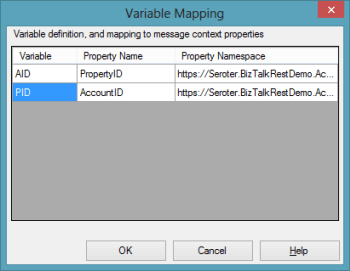
    I set those URL parameters by clicking the Edit button under Variable Mapping and choosing which property schema value mapped to each URL parameter.

    2012.11.19rest04

    This scenario was nearly done. All that was left was to strip out the body of message so that the GET wouldn’t fail. Fortunately, Saravana Kumar already built a simple pipeline component that erases the message body. I built the pipeline component, added it to a custom pipeline, and deployed the pipeline.

    2012.11.19rest05

    Finally, I made sure that my send port used this new pipeline.

    2012.11.19rest06

    With all my receive/send ports created and configured, and my orchestration enlisted, I dropped a sample file into a folder monitored by the FILE receive adapter. This sample invoice was for 100 Australian dollars, and I wanted the output invoice to translate that amount to U.S. dollars. Sure enough, the REST service was called, and I got back a modified invoice.

    <ns0:Invoice xmlns:ns0="http://Seroter.BizTalkRestDemo">
      <ID>100</ID>
      <CustomerID>10022</CustomerID>
      <OriginalInvoiceAmount>100</OriginalInvoiceAmount>
      <OriginalInvoiceCurrency>AUD</OriginalInvoiceCurrency>
      <ConvertedInvoiceAmount>103.935900</ConvertedInvoiceAmount>
      <ConvertedInvoiceCurrency>USD</ConvertedInvoiceCurrency>
    </ns0:Invoice>
    

    So we can see that GET works pretty well (and should prove to be VERY useful as more and more services switch to a RESTful model), but you have to be careful on both the URLs you access, and the body you (don’t) send.

    Scenario #2 Invoking a “DELETE” Command Via Messaging Only

    Let’s try a messaging-only solution that avoids orchestration and calls a service with a DELETE verb. For fun, I wanted to try using the WCF-WebHttp adapter with the “single operation format” instead of the XML format that lets you list multiple operations, verbs and URLs.

    In this case, I wrote an ASP.NET Web API service that defines an “Invoice” model, and has a controller with a single operation that responds to DELETE requests (and writes a trace statement).

    public class InvoiceController : ApiController
        {
            public HttpResponseMessage DeleteInvoice(string id)
            {
                System.Diagnostics.Debug.WriteLine("Deleting invoice ... " + id);
                return new HttpResponseMessage(HttpStatusCode.NoContent);
            }
        }
    

    With my REST service ready to go, I created a new send port that would subscribe directly on the input message and call this service. The structured of the “single operation format” isn’t really explained, so I surmised that all it included was the HTTP verb that would be executed against the adapter’s URL. So, the URL must be fixed, and cannot contain any dynamic parameter values. For instance:

    2012.11.19rest08

    To be sure, the scenario above make zero sense. You’d never  really hardcode a URL that pointed to a specific transaction resource. HOWEVER, there could be a reference data URL (think of lists of US states, or current currency value) that might be fixed and useful to embed in an adapter. Nonetheless, my demos aren’t always about making sense, but about flexing the technology. So, I went ahead and started this send port (WITHOUT changing it’s pipeline from “passthrough” to “remove body”) and dropped an invoice file to be picked up. Sure enough, the file was picked up, the service was called, and the output was visible in my Visual Studio 2012 output window.

    2012.11.19rest09

    Interestingly enough, the call to DELETE did NOT require me to suppress the message body. Seems that Microsoft doesn’t explicitly forbid this, even though payloads aren’t typically sent as part of DELETE requests.

    Summary

    In these two articles, we looked at REST support in the BizTalk Server 2013 (beta). Overall, I like what I see. SOAP services aren’t going anywhere anytime soon, but the trend is clear: more and more services use a RESTful API and a modern integration bus has to adapt. I’d like to see more JSON support, but admittedly haven’t tried those scenarios with these adapters.

    What do you think? Will the addition of REST adapters make your life easier for both exposing and consuming endpoints?
  • Exploring REST Capabilities of BizTalk Server 2013 (Part 1: Exposing REST Endpoints)

    The BizTalk Server 2013 beta is out there now and I thought I’d take a look at one of the key additions to the platform. In this current age of lightweight integration and IFTTT simplicity, one has to wonder where BizTalk will continue to play. That said, a clean support of RESTful services will go a long way to keeping BizTalk relevant for both on-premises and cloud-based integration scenarios. Some smart folks have messed around with getting previous version of BizTalk to behave RESTfully, but now there is REAL support for GET/POST/PUT/DELETE in the BizTalk engine.

    I decided to play with two aspects of REST services and BizTalk Server 2013: exposing REST endpoints and consuming REST endpoints. In this first post, I’ll take a look at exposing REST endpoints.

    Scenario #1: Exposing Synchronous REST Service with Orchestration

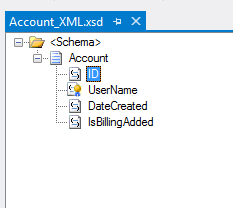
    In this scenario, I wanted to use the BizTalk-provided WCF Service Publishing Wizard to generate a REST endpoint. Let’s assume that I want to let modern web applications send new “account” records into our ESB for further processing. Since these accounts are associated with different websites, we want a REST service URL that identifies which website property they are part of. The simple schema of an account looked like this:

    2012.11.12rest01

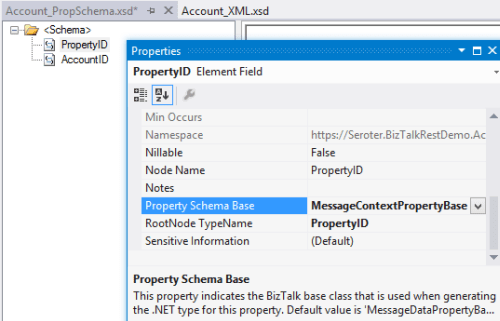
    I also added a property schema that had fields for the website property ID and the account ID. The “property ID” node’s source was set to MessageContextPropertyBase because its value wouldn’t exist in the message itself, but rather, it would solely exists in the message context.

    2012.11.12rest02

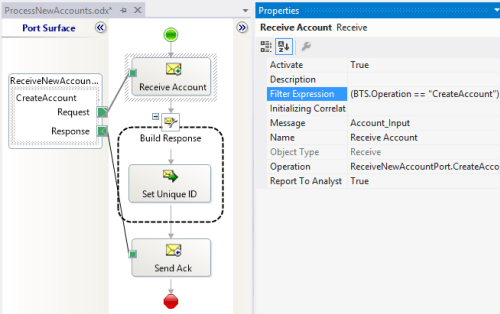
    I could stop here and just deploy this, but let’s explore a bit further. Specifically, I want an orchestration that receives new account messages and sets the unique ID value before returning a message to the caller. This orchestration directly subscribes to the BizTalk MessageBox and looks for any messages with a target operation called “CreateAccount.”

    2012.11.12rest03

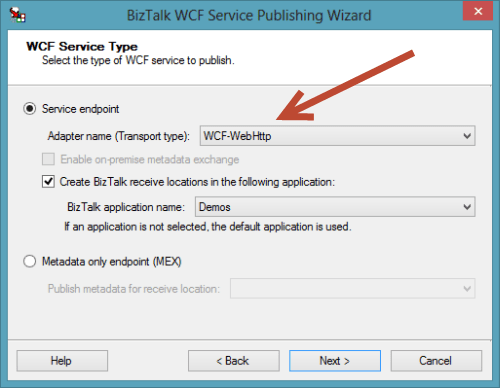
    After building and deploying the project, I then started up the WCF Service Publishing Wizard. Notice that we can now select WCF-WebHttp as a valid source adapter type. Recall that this is the WCF binding that supports RESTful services.

    2012.11.12rest04

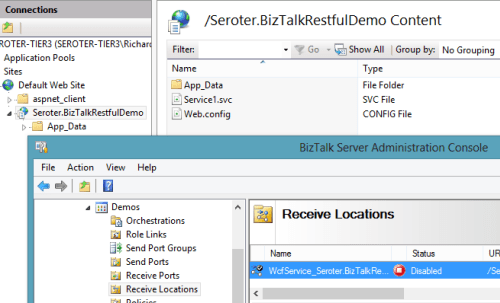
    After choosing the new web service address, I located my new service in IIS and a new Receive Location in the BizTalk Engine.

    2012.11.12rest05

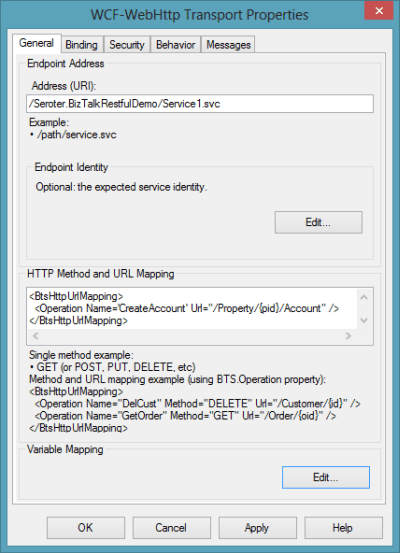
    The new Receive Location had a number of interesting REST-based settings. First, I could choose the URL and map the URL parameters to message property (schema) values. Notice here that I created a single operation called “CreateAccount” and associated with the HTTP POST verb.

    2012.11.12rest06

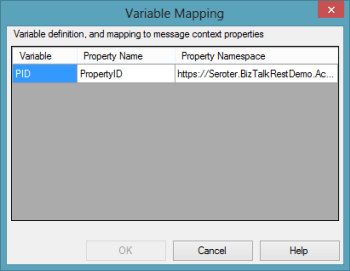
    How do I access that “{pid}” value (which holds the website property identifier) in the URL from within my BizTalk process? The Variable Mapping section of the adapter configuration lets me put these URL values into the message context.

    2012.11.12rest07

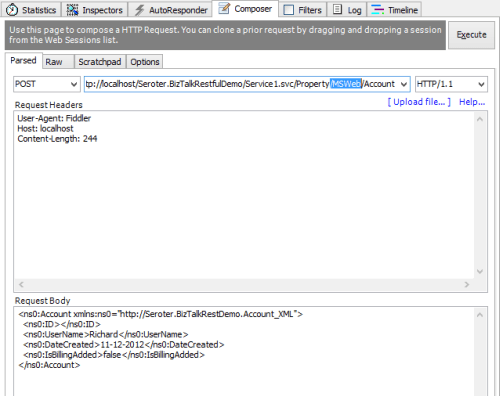
    With that done, I bound this receive port/location to the orchestration, started everything up, and fired up Fiddler. I used Fiddler to invoke the service because I wanted to ensure that there was no WCF-specific stuff visible from the service consumer’s perspective. Below, you can see that I crafted a URL that included a website property (“MSWeb”) and a message body that is missing an account ID.

    2012.11.12rest08

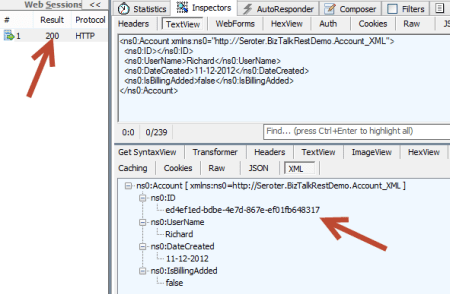
    After performing an HTTP POST to that address, I immediately got back an HTTP 200 code and a message containing the newly minted account ID.

    2012.11.12rest09

    There is a setting in the adapter to set outbound headers, but I haven’t seen a way yet to change the HTTP status code itself. Ideally, the scenario above would have returned an HTTP 202 code (“accepted”) vs. a 200. Either way, what an easy, quick way to generate interoperable REST endpoints!


    Scenario #2: Exposing Asynchronous REST Service for Messaging-Only Solution

    Let’s do a variation on our previous example so that we can investigate the messages a bit further. In this messaging-only solution (i.e. no orchestration in the middle), I wanted to receive either PUT or DELETE messages and asynchronously route them to a subsequent system. There are no new bits to deploy as I reused the schemas that were built earlier. However, I  did generate a new, one-way WCF REST service for getting these messages into the engine.

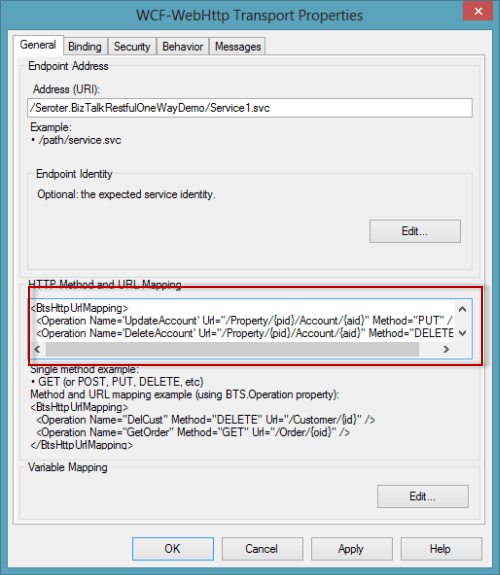
    In this receive location configuration, I added two operations (“UpdateAccount”, “DeleteAccount”) and set the corresponding HTTP verb and URI template.

    2012.11.12rest12

    I could list as many service operations as I wanted here, and notice  that I had TWO parameters (“pid”, “aid”) in the URI template. I was glad to see that I could build up complex addresses with multiple parameters. Each parameter was then mapping to a property schema entry.

    2012.11.12rest13

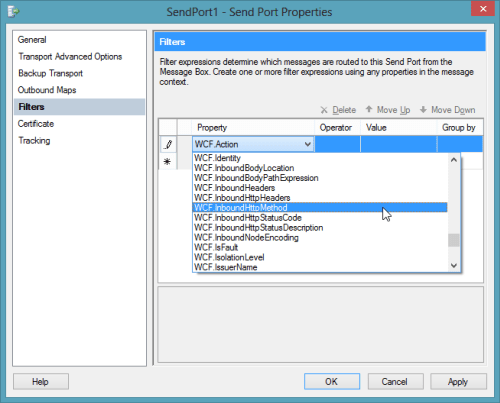
    After saving the receive location configuration, I configured a quick FILE send port. I left this port enlisted (but not started) so that I could see what the message looked like as it traveled through BizTalk. On the send port, I had a choice of new filter criteria that were related to the new WCF-WebHttp adapter. Notice that I could filter messages based on inbound HTTP method, headers, and more.

    2012.11.12rest14

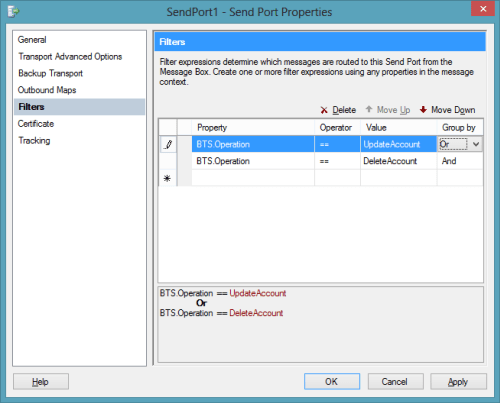
    For this particular example, I filtered on the BTS.Operation which is set based on whatever URL is invoked.

    2012.11.12rest15

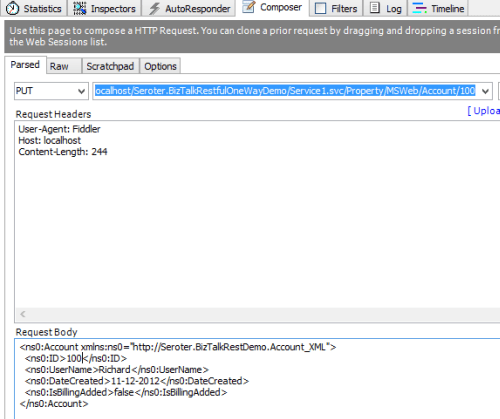
    I returned to Fiddler and changed the URL, switched my HTTP method from POST to PUT and submitted the request.

    2012.11.12rest16

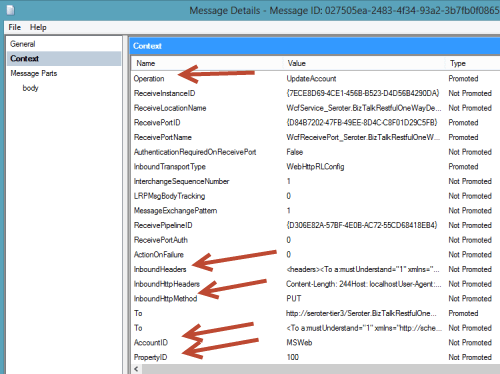
    I got an HTTP 200 code back, and within BizTalk, I could see a single suspended message that was waiting for my Send Port to start. Opening that message revealed all the interesting context properties that were available. Notice that the operation name that I mapped to a URL in the receive adapter is there, along with various HTTP header and verbs. Also see that my two URL parameters were successfully promoted into context.

    2012.11.12rest17


    Summary

    That was a quick look at exposing REST endpoints. Hopefully that gives you a sense of the native aspect of this new capability. In the next post, I’ll show you how to consume REST services.