Category: BizTalk

  • Valid Operators In BizTalk Expression Shapes

    I was looking for something in the online MSDN help for BizTalk today, and I came across an article that isn’t in my local CHM help file. 

    Here’s a list of all the valid operators that you can use in an orchestration’s Expression Shape.  Also for reference, here are all the various limitations and requirements of an Expression Shape.  I had seen “succeeded()” referenced before, but never used it.  Same with “exists()” which I should be using more often.

    Technorati Tags:

  • Interacting With The MessageBox

    Lee doesn’t post too frequently over at the BizTalk Core Engine blog, but when he does, it’s solid stuff.  This time he writes about the things you can, and most important CAN’T, change in the MessageBox.  Even better, he provides nice reasoning behind his statements.

    Good stuff.

    Technorati Tags: BizTalk

  • Debatching Inbound Messages From BizTalk SQL Adapter

    A buddy of mine asked me this morning how to do debatching with the SQL Adapter.  While I fully understand XML and flat file debatching, the SQL Adapter uses a generated XSD schema, and I wasn’t 110% sure of the best way to handle that.  So, as usual, I figured I’d build it and see what happened.

    [04/08/2010 Update: I’ve done a new post showing how to do this with the new WCF-SQL adapter.  You can read that here.]

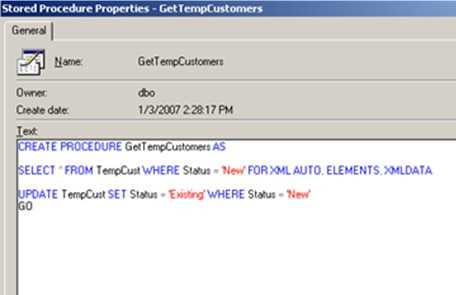
    So let’s start with a database table and stored procedure.  I created a simple “Customers” table and a procedure that grabs every customer flagged as “New” and then sets those values to “Existing” after pulling them.

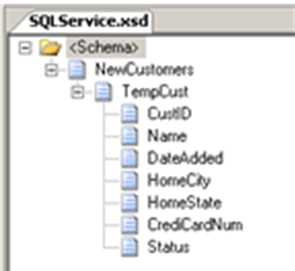
    Next, I constructed a BizTalk project, and did an Add –> Generated Items and chose to build a schema from an adapter.  After picking the SQL adapter, I chose to use the stored proc built above.  The auto-generated schema then looked like this …

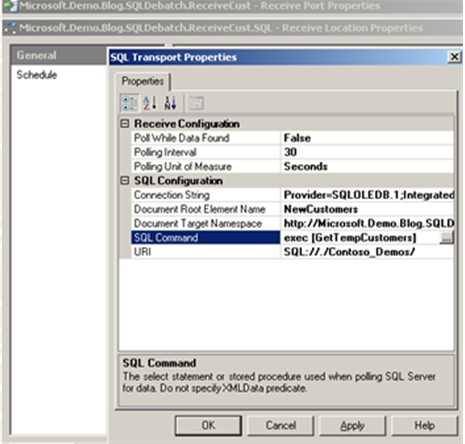
    Make sure you go back afterwards and remove the XMLDATA clause since it’s only used when you need to generate the schema.  Next I built and deployed the project.  Finally, I set up receive and send ports.  The send port simply has a filter subscription pointing to BTS.ReceivePortName.  The Receive Location uses the XML Receive pipeline and the SQL adapter, configured as such …

    Remember that the out-of-the-box XML Receive pipeline will do the debatching for you if the schemas are set up right.  If you use the Passthrough pipeline, nothing’s going to happen.  So what happens when I enable the Receive Location and turn on the Send Port?  I get a single message, holding all three records pulled.  That’s the default behavior here.

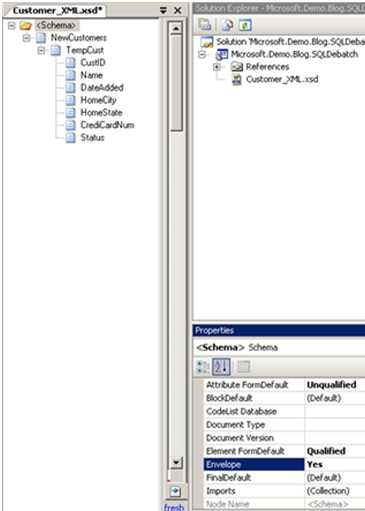
    So now I went back to my schema to convert it to a recognized “envelope” schema.  You do this by setting the Envelope property to “Yes”, and setting the Body XPath on the root node.  In my case, the Body XPath should point to the root, since we want everything under it (the TempCust node instances) to be yanked off.  I also set the Max Occurs on the TempCust node to 1.

    Now after deploying this updated project and resetting the database table, what do you expect will happen?  If you said “you’ll get some beat error message” then you win.

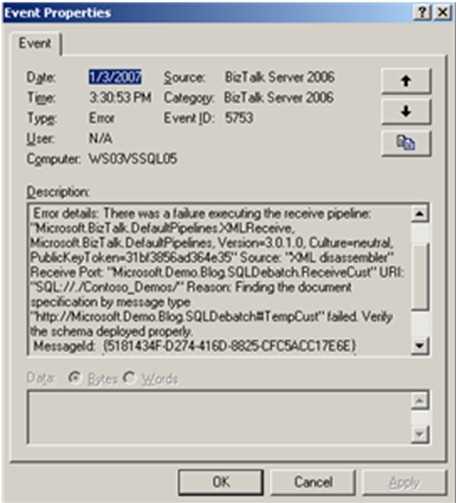
    See what happened there?  Each message got debatched, but when trying to find a schema for the TempCust message type, BizTalk failed since no such schema exists.  We only have a schema for the NewCustomers type.

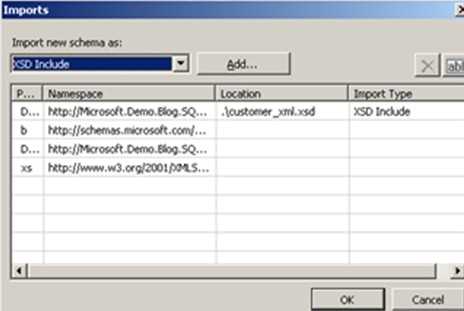
    So how do we fix that?  Easy, create a schema for the TempCust body message.  The trick is to not create any more work for ourselves than we have to.  So, I created a brand new schema, and chose the Imports option.  Here I pointed to the “Envelope” schema we created above.

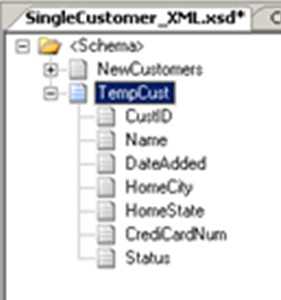
    Now I can reuse the previous schema without manually re-creating the TempCust format.  After importing, I pointed to the root node of my new schema and set its Data Structure Type property to the TempCustType option in the drop down list.  Immediately, the type gets loaded into my new schema.  I changed the root node name to “TempCust” and set the Root Reference of the schema to the “TempCust” node (since we now have a multi-root schema).  Now, when the BizTalk engine debatches the NewCustomers message and is looking for a schema that corresponds to the TempCust message, we’ve got one.

    Nice!  Now if I deploy, and reset my database, I see three individual messages get sent out of BizTalk, one for each row in the database table.  This model works well because if any changes are made to the auto-generated schema, my “SingleCustomer” message also gets updated.  I don’t have to keep two separate (but related) schemas manually in sync.

    Also note that now you’ll want to be binding to the http://%5Bnamespace%5D#TempCust type, not the original schema generated by the SQL adapter.  So an orchestration message would be of the above type, not the envelope.  Or if you have a send port listening for message types, the http://%5Bnamespace%5D#TempCust is the type that matters, since the http://%5Bnamespace%5D#NewCustomers format no longer exists after the pipeline debatches the original message into the resulting individual messages.

    There you go.  Any other ways you folks handle this sort of thing?

    Technorati Tags:

  • Orchestration Handling of Suspended Messages

    I spent a bit of time digging into how BizTalk handles various orchestration exceptions and what to expect when resuming suspended orchestrations.  Here are a few results.

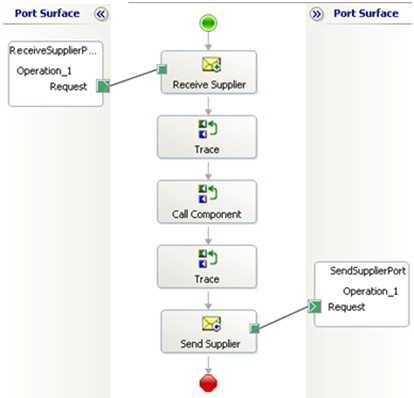
    First off, I created a simple orchestration that calls out to an external .NET component.  I inserted a few Expression Shapes which write trace statements out.  We’ll view those statements using the Debug Viewer.
    When I run this orchestration in a valid scenario, I get the following trace statements …
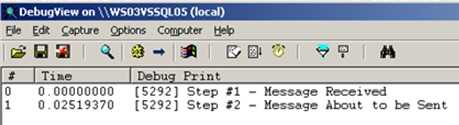
    Now what happens if I submit a message that causes the .NET component to divide by 0?  I naturally get an exception …
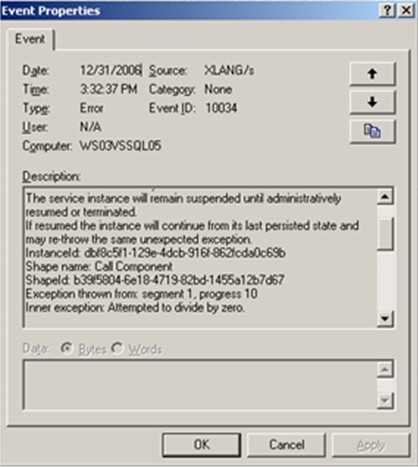
    Notice that the exception tells me that the workflow will continue from the “last persisted state.”  If I fix the component (to avoid “divide by 0” exceptions), re-GAC the component and bounce the BizTalk host, I can resume the orchestration instance.   That results in this …
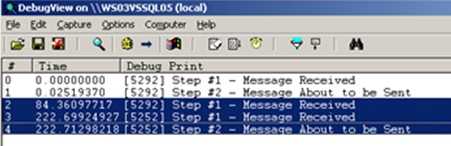
    Notice on the highlighted lines that “Step #1” fired again after resuming the process.  That’s because the last available persistence point was the initial Receive Shape so, the orchestration picked up from there, thus running the first trace statement again.

    Now what if I purposely suspend a message using the Suspend Shape?  That workflow looks like this …
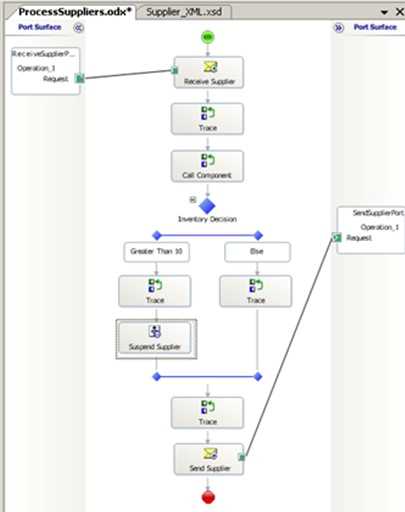
    If I pass in a message that goes down the left decision path, the orchestration gets suspended.  If I resume that workflow, then the orchestration will pick up WHERE IT LEFT OFF.  It won’t jump back to an earlier point since a Suspend Shape is a persistence point.  So, running this, suspending it, and resuming it yields the following log …
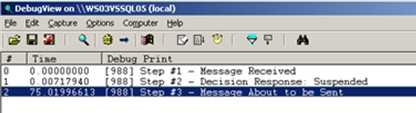
    You’ll see that all the steps get fired, and none of them fire twice upon the orchestration resuming.  If you feel like throwing a process into a Long Running Scope and raising an exception, like this …
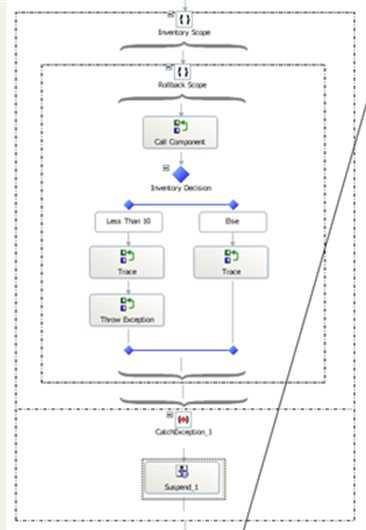
    That works, but, the result is the same as above.  When the orchestration gets resumed, it’ll pick up right after the Scope Shape.   If we WANT the rollback to a previous step to occur, we can remove the Exception Block from the Scope Shape.
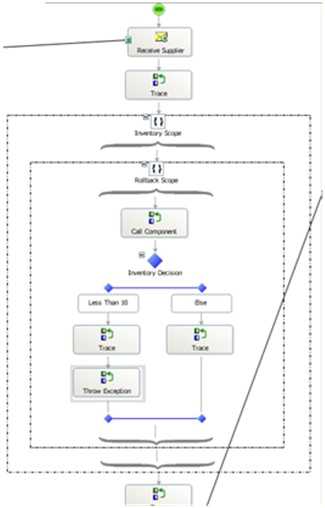
    Now if an exception occurs, the orchestration will resume at the last known persistence point, which is the initial Receive Shape.  If I start the orchestration, throw an error, suspend the message, fix the component and resume the orchestration, I get these results …
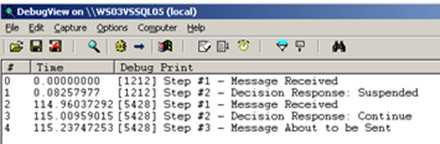
    You can see here that the orchestration jumps back to Step #1 after I resume the workflow.  Now the Atomic Scope above may be unnecessary given that no other persistence points exist within it, so if an error occurred, it would always jump back to the Receive Shape.  But, what if I added a Construct Shape and move the Send Shape to a spot earlier in the process.  Now, I have ANOTHER persistence point at the top of my workflow.  If I cause an error, the workflow now jumps back to the Send Shape, not all the way back to the beginning.
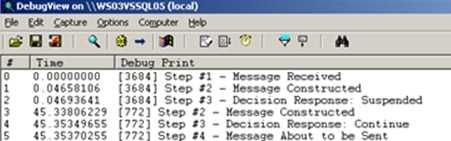
    You can see here that after Step #3 (which is where the suspension occurred), that upon resuming, we only go back to the Step #2 trace point.  That’s because there’s a persistence point between Step #1 and Step #2.  If you want more control over where you get resumed at, use the Atomic Scopes strategically.

    For instance, you could write my latest orchestration like this …
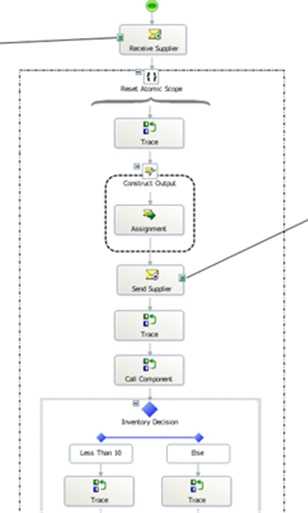
    Now, the Construct and Send are both within a Scope Shape, where NO persistence points are recorded.  If I raise an error, fix the offending component, and resume my workflow, the output now looks like this …
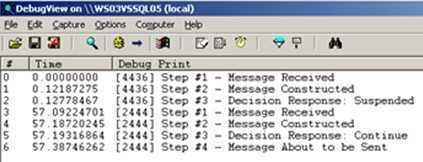
    Nice!  You can see that after Step #3 (where the error occurred), I resume, and jump all the way back to Step #1 where I wanted.

    So, think about how you want your orchestrations to resume, WHERE you want them to resume, and test accordingly.  You don’t want any surprises!

    Technorati Tags: