Category: BizTalk

  • Script for Automatically Creating BizTalk Solution Structure

    Every organization (and developer) has their own development project structure. I’ve set up a BizTalk project structure that my company will use for all new BizTalk projects. To make life easy, I also built a simple VBScript file to automatically build the structure for us.

    My folder structure looks like this:
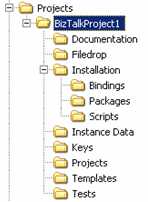
    I’ve got a spot for deployment packages (Installation), test files, instance data, file adapter pickup/dropoff (Filedrops), strong name key(s), and the actual projects. What’s nice is that each BizTalk project’s strong name key reference looks the same (..\..\..\..\Keys\MyCompany.snk). No hard coded file path. So far, this has worked really well for me.

    To make construction of this structure easier, I built the following script. Just copy and paste it into a .vbs file and you’re good to go.

    ‘*******************************************

    ‘ BizTalk Project Structure Creation Script
    ‘ Created by: Richard Seroter
    https://seroter.wordpress.com

    ‘*******************************************

    ‘declare variables
    Dim objFSO, objFolder, strDirectory, strProjectName, strRootFolder, strCurrentFolder

    ‘request data from user
    strDirectory = InputBox(“Set path here (e.g. C:\BizTalk\Projects)”, “Set path”)
    strProjectName = InputBox(“Set project here (e.g. MyCompany.Department.Project):”, “Set project”)

    ‘set root folder of the project
    strRootFolder = strDirectory & “\” & strProjectName

    ‘ Create FileSystemObject
    Set objFSO = CreateObject(“Scripting.FileSystemObject”)

    ‘ Create BizTalk project root folder
    Set objFolder = objFSO.CreateFolder(strRootFolder)

    ‘create BizTalk folder: Documentation
    strCurrentFolder = strRootFolder & “\” & “Documentation”
    Set objFolder = objFSO.CreateFolder(strCurrentFolder)

    ‘create BizTalk folder: Filedrop
    strCurrentFolder = strRootFolder & “\” & “Filedrop”
    Set objFolder = objFSO.CreateFolder(strCurrentFolder)

    ‘create BizTalk folder: Installation
    strCurrentFolder = strRootFolder & “\” & “Installation”
    Set objFolder = objFSO.CreateFolder(strCurrentFolder)

    ‘create BizTalk folder: Installation –> Bindings
    strCurrentFolder = strRootFolder & “\” & “Installation” & “\” & “Bindings”
    Set objFolder = objFSO.CreateFolder(strCurrentFolder)

    ‘create BizTalk folder: Installation –> Packages
    strCurrentFolder = strRootFolder & “\” & “Installation” & “\” & “Packages”
    Set objFolder = objFSO.CreateFolder(strCurrentFolder)

    ‘create BizTalk folder: Installation –> Scripts
    strCurrentFolder = strRootFolder & “\” & “Installation” & “\” & “Scripts”
    Set objFolder = objFSO.CreateFolder(strCurrentFolder)

    ‘create BizTalk folder: Instance Data
    strCurrentFolder = strRootFolder & “\” & “Instance Data”
    Set objFolder = objFSO.CreateFolder(strCurrentFolder)

    ‘create BizTalk folder: Keys
    strCurrentFolder = strRootFolder & “\” & “Keys”
    Set objFolder = objFSO.CreateFolder(strCurrentFolder)

    ‘create BizTalk folder: Projects
    strCurrentFolder = strRootFolder & “\” & “Projects”
    Set objFolder = objFSO.CreateFolder(strCurrentFolder)

    ‘create BizTalk folder: Templates
    strCurrentFolder = strRootFolder & “\” & “Templates”
    Set objFolder = objFSO.CreateFolder(strCurrentFolder)

    ‘create BizTalk folder: Tests
    strCurrentFolder = strRootFolder & “\” & “Tests”
    Set objFolder = objFSO.CreateFolder(strCurrentFolder)

    WScript.Echo “Finished creating ” & strProjectName
    WScript.Quit

    Any changes you might suggest?

    Technorati Tags:

  • Reusing BizTalk Oracle Adapter DSN

    I finally had the excuse to use BizTalk Server 2006 Single Sign On for application configuration data. In one of my current BizTalk projects, I’m using a long running transaction which loops through and starts up other orchestrations. When those orchestrations finish, I’m using partner bound ports to return a response. As I receive batches of responses back, I’m logging the “last update time” to an Oracle table.

    Side note: I’m a believer in *not* using the database adapters (i.e. SQL Server, Oracle) for every possible database interaction. That is, for scalar queries, or simple updates, I like just using a basic utility component and ADO.NET. It’s a little less overhead and saves me from unnecessarily creating orchestration messages. Now, there’s plenty of value in using database adapters (scalability, retries, generated schemas, etc), but for quick and dirty database communication, I’ll stick with the no-adapter solution.

    So, since this solution already includes Oracle database access (and thus has a System DSN set up), I wanted to try and reuse that configuration in my Utility component. The ADO.NET OracleConnection didn’t like the “DSN” connection property, so I used the OdbcConnection instead. However, I still have to enter a password for the connection string. So using the various resources for doing “SSO as a configuration store” (see here, here, and here) I’m able to store the password in SSO, and still reuse my existing DSN configuration. My final code looked like this …


    //get the encrypted password from BizTalk SSO using SSOConfigHelper from BizTalk sample
    string oraclePasswordString = SSOConfigHelper.Read(“ProjCode”, “passwordString”);

    //create the connection string
    oracleConnString = “DSN=ProjDevDb;pwd=” + oraclePasswordString + “;”;

    //instantiate the connection and command
    OdbcConnection oracleConn = new OdbcConnection(oracleConnString);
    OdbcCommand oracleComm = new OdbcCommand(oracleQueryString, oracleConn);

    Now I haven’t implemented any sort of caching, but the “oraclePasswordString” is set in the class constructor, and then I have a method that uses it for the logging function. So, I only make the call to SSO once per process.

    So there you go. Reusing an existing Oracle DSN in custom code, while securely storing the password in Enterprise Single Sign On.

    Technorati Tags:

  • New BizTalk Book Out

    Big congrats to Darren Jefford for finishing Professional BizTalk 2006. Darren throws out a quick summary of each chapter here. Given how few books existed for those struggling to learn BizTalk Server 2004, it’s a welcome change to see so many topoftheline books available for BizTalk Server 2006.

    Technorati Tags:

  • Fun With BizTalk, XPath, and Namespaces

    The BizTalk Xpath statements usually required for my projects never seem to be as simple as the examples I find online. Usually, it’s because I’m stuck using namespaces, unlike virtually every sample Xpath ever written.

    Last week I was working with an XML document where I wanted to capture the unique values in a repeating set. There are a few ways to do this, but I ended up going with the way Stephen Kaufman showed here:

    <xsl:variable name=”unique-countries”
    select=”//cities/city[not(@country=preceding-sibling::city/@country)]/@country” />

    In the above example, you end up with a variable containing all the unique countries that correspond to the many cities in the list. My challenge was that I was going to use this variable within a map, using Inline XSLT as part of the Scripting functoid. And, my inbound document has elements from multiple namespaces. Using a namespace prefix was not going to work, so I had to write my elements in the
    “//*[localname()=’node’ namespaceuri()=’namespace’]” way instead of the easier “//node” or (“//ns1:node”) way. Thank goodness for the Visual XPath tool which made testing my Xpath much easier.

    You can’t just swap the node names in the above Xpath with the “[localname()=” namespaceuri()=”]” equivalent, as there are subtle differences. So given that my XML looked like this:


    <Results>
     <QueryRecord>
      <DomainID></DomainID>
      <PageName></PageName>
    </QueryRecord>
    <QueryRecord>
      <DomainID></DomainID>
      <PageName></PageName>
     </QueryRecord>
    </Results>

    Let’s say I have two nodes I need to use in the Xpath statement:

    My “converted” Xpath now looks like this:

    <xsl:variable name=”unique-domains” select=”//*[local-name()=’QueryRecord’ and namespace-uri()=’http://namespace1′%5D[not(*[local-name()=’DOMAINID’ and namespace-uri()=’http://namespace1′%5D/text()=preceding-sibling::*[local-name()=’QueryRecord’ and namespace-uri()=’http://namespace1′%5D/*[local-name()=’DOMAINID’ and namespace-uri()=’http://namespace1′%5D/text())]/*[local-name()=’DOMAINID’ and namespace-uri()=’http://namespace1′%5D” />

    Got that? Yowza. So I’m getting all the unique “domain ids” by grabbing each “domain id” where it doesn’t match a previous instance in the node tree. The main syntax difference between this Xpath and the one at the top is the “*” peppered around. If not included, you’ll get all sorts of does not evaluate to node set errors.

    Any other “Xpath with namespaces in BizTalk” war stories or tips to share?

    Technorati Tags:

  • A Walk Through the BizTalk 2006 Oracle Adapter

    Two of the six BizTalk projects I’m currently working on require me to access Oracle databases. So, I set out to prove out four major uses cases for the out-of-the-box Oracle BizTalk adapter.

    Scenario #1 – Receive messages into BizTalk by polling an entire table

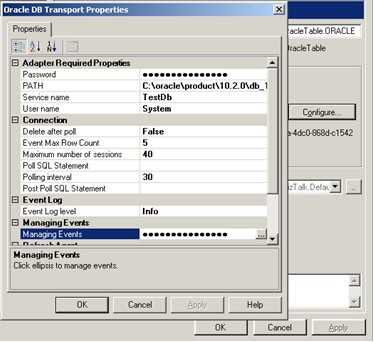
    In this case, I need to pull in all of records for a given table. To do this, I created a new Oracle receive location in BizTalk. Under Managing Events I chose the table I wanted to poll.


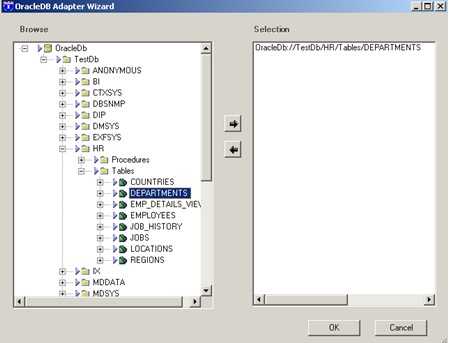
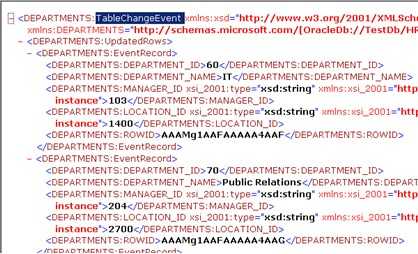
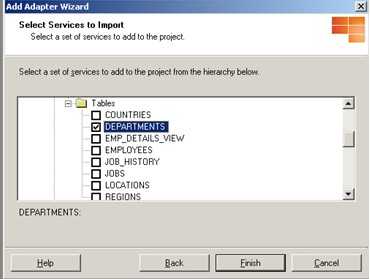
    That “adapter wizard” form opens up when selecting Managing Events. Then, using a previously set up ODBC connection, the adapter interrogates the Oracle database for available tables. Here I’ve chosen the “Departments” table. Next I created a send port that had a subscription to the receive port (basic “wiretap” pattern). The output from the Oracle polling looked like this …

    Notice that the message root is TableChangeEvent and that the message has well-defined fields.

    Scenario #2 – Receive messages into BizTalk using custom SQL script

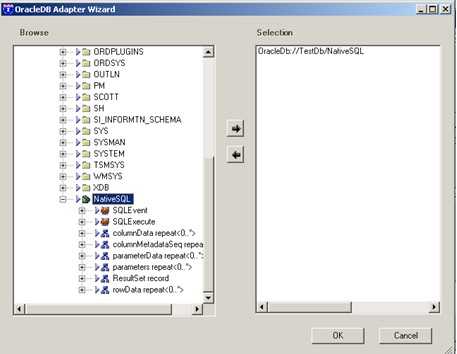
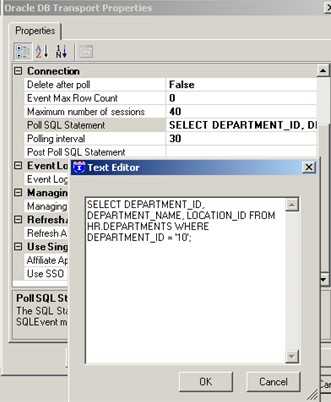
    Now I also want to poll the Oracle table with more detail than the “select * from department” which is used by the direct table polling above. So in the Managing Events for the receive location, I now choose the NativeSQL option …

    Now, because I’m using NativeSQL I can utilize the “Poll SQL Statement” field in the receive location.

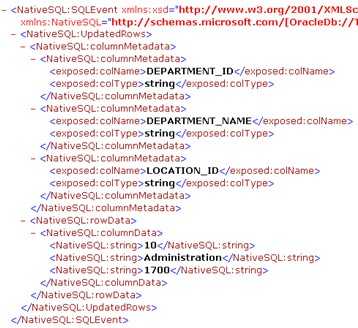
    As you can see, my fancy SQL code is simply returning a subset of fields, and only where the “department_id = 10”. After setting up another send port to grab this message directly from the receive location, I got the following output …

    Notice now that my root node is SQLEvent and that I don’t get an easy-to-use response. I get a collection of parameters, and then I get the actual values which correspond to those parameters. I can understand why it’s returned this way, but, it’ll require me to use an intelligent map to normalize the data to a more usable structure.

    Scenario #3 – Send message to Oracle using table-specific operator

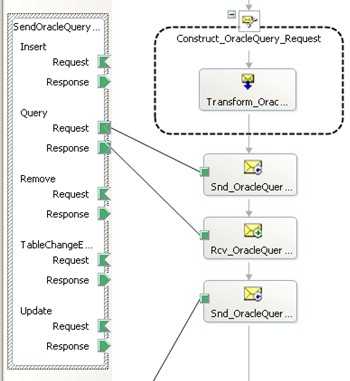
    So what happens if I want to use an orchestration to call into Oracle and retrieve a dataset? First I did an “Add Generated Items” and pointed to a pre-configured Oracle receive/send port, and then I browsed to the table I wanted …

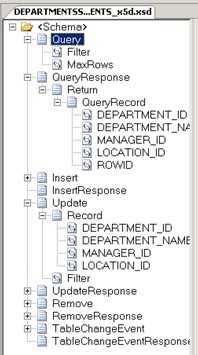
    Once again I’m using the “Departments” table. When I finish up the wizard, I end up with a schema like this …

    This may look familiar to you if you’ve used some of the other line-of-business adapters. You’ve got what amounts to a multi-part schema where you choose the “operation” you wish to consume. So if you want to do an “Insert” into the Oracle table, you pass in a message of type “Insert” and expect back an “InsertResponse”. In our case, I want to use the “Query” message, which allows me to apply both a filter (e.g. “department_id = 10”) and a “maxRows” property. My orchestration now looks like this after I reference the auto-generated “port type” …

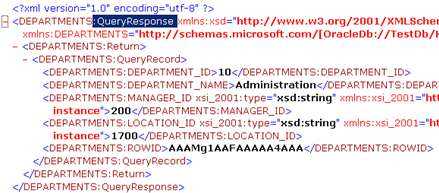
    I can simply use the port operation that corresponds to my desired table function. The response returned from the Oracle adapter in this scenario looks like this …

    Notice that it is of type “QueryResponse” and that it has a nicely typed schema.

    Scenario #4 – Send message to Oracle based on custom SQL

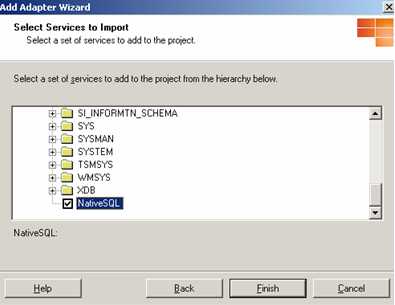
    The final case involves using the orchestration to make a more complicated call to the Oracle database. For instance, if you wanted to do a cross-table insert, or do any sort of operation where the “stock” operations were too restrictive. I started by using the “Add Generated Items” wizard again, but this time, I chose NativeSQL as my service to consume.

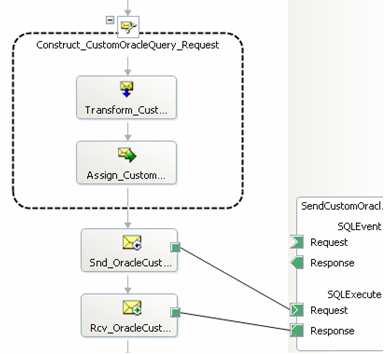
    In my example, the “custom” SQL was still very simplistic. The orchestration’s Construct shape included the instruction:

    OracleCustomQuery_Request.parameters.StatementText = “SELECT DEPARTMENT_ID, DEPARTMENT_NAME FROM HR.DEPARTMENTS WHERE DEPARTMENT_ID = 30;”;

    So, a very similar query to the one in “scenario #3”, but, here I chose only a subset of columns. The auto-generated port type causes my orchestration to look like this …

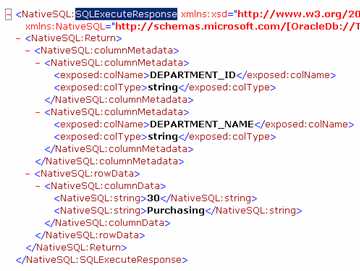
    So what does this custom call output? As you might guess, something a lot like “scenario #2” …

    So there you go, a quick lap around the adapter. I know some folks rave about the TopXML Oracle adapter, but for now, this is what I’ll be working with.

    Technorati Tags:

  • Building a Complete Certificate Scenario With BizTalk Server 2006

    I’m working on a BizTalk project where we’re testing the use of security certificates, and I’ve just had a bear of a time finding thorough walkthroughs of setting this up. It’s barely mentioned in the available BizTalk books, and while the BizTalk 2004 whitepaper (which has now been added to the BizTalk 2006 documentation) has some very nice coverage, it wasn’t exactly what I wanted. So, after much toil (and threats of lighting myself on fire), I present a step-by-step for building a certificate scenario using test certificates.

    I’ve used the .NET Framework tool makecert to build local test certificates. The hardest part for me was getting the correct series of command line parameters to build the cert I wanted. I finally put together one that worked:


    makecert -r -pe -n “CN=www.seroter.com” -b 02/01/2007 -e 01/01/2036 -eku 1.3.6.1.5.5.7.3.1 -ss my -sr currentuser -sky exchange -sp “Microsoft RSA SChannel Cryptographic Provider” -sy 12

    For a description of the available parameters, check out the MSDN page for makecert.

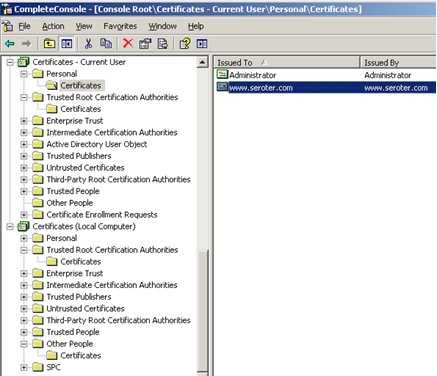
    What this did, was create a (self-signed) certificate, and placed it in my “current user” personal store.

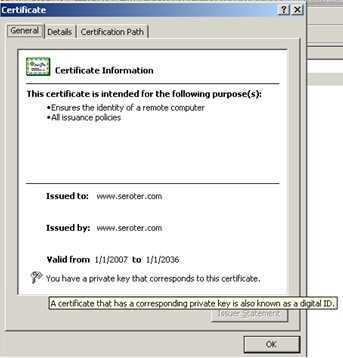
    You can see from the shot here that the certificate’s private key is included.

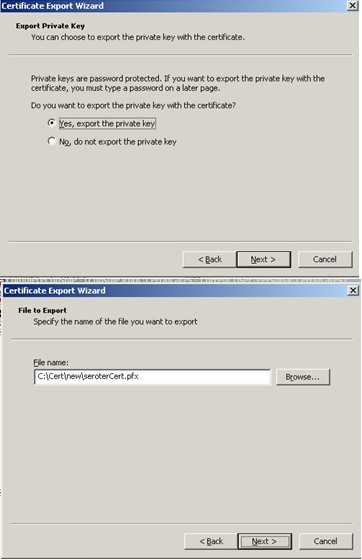
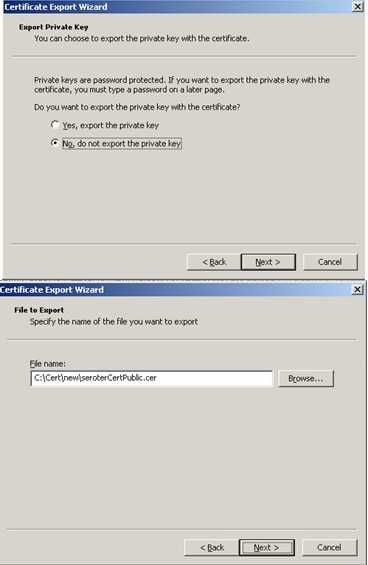
    So first, I exported the private key certificate out. To do this, I selected the certificate, right-clicked, and chose export. As you can see below, I chose to Yes, export the private key and created the .pfx file.

    Next I exported the public key. This is the one that I would give partners. I selected the certificate again, right-clicked and exported. This time, I chose not to export the public key, and created a .cer file.

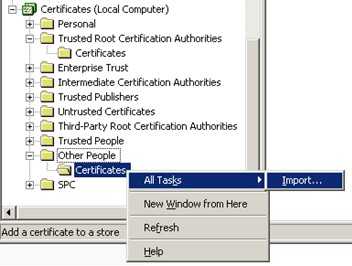
    Now I jumped into the Other People certificate store to import the public certificate (.cer file). Why? Well the Current User/Personal/Certificates store is where certificates go for decrypting inbound messages. This store is account specific, so I’m using the account that the receiving host is running under. The store under the Local Computer/Other People/Certificates is for public certificates used to sign outbound messages. The “other people” then have a corresponding private key to decrypt the inbound messages.

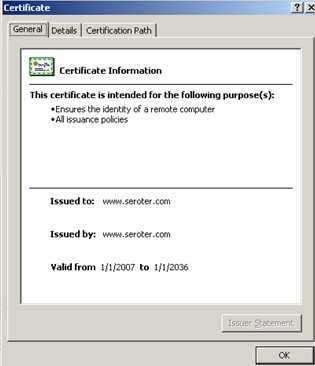
    As you can see here, the public certificate doesn’t have a private key attached.

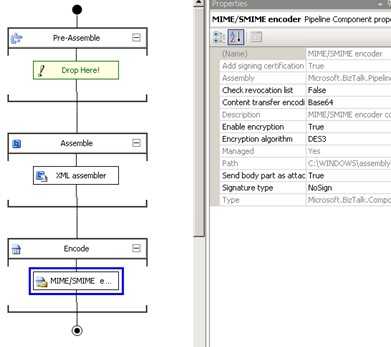
    Within BizTalk, I created both send and receive pipelines. The send pipeline has the MIME/SMIME Encoder component included with the Enable Encryption set to true.

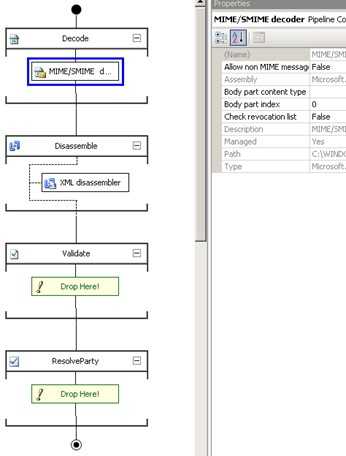
    The receive pipeline has the MIME/SMIME Decoder component.

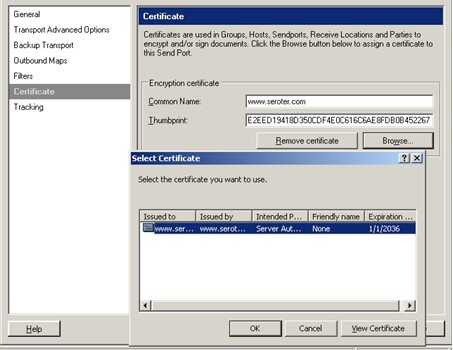
    Within my send port (which uses my new send pipeline), I set up the Certificates tab to point to the public certificate. The Browse button pulls up any certs in the Other People store.

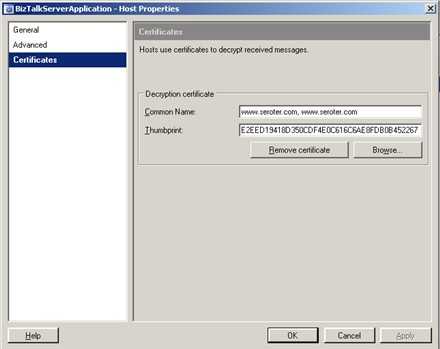
    Finally, the BizTalk Host that contains the receive pipeline (and port) must be configured. The host has a Certificates tab where once again I can browse. This time, it looks for the Personal store of the BizTalk Host account.

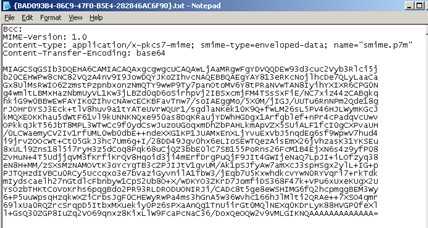
    After creating a local folder structure for dropping off and picking messages up (e.g. pick up clear text, drop off encrypted, pick up encrypted, drop off clear text), and setting up the ports, the “encryption” send port outputs the following message …

    After picking the encrypted message up, BizTalk decrypts it and sends me this …

    There you go. Let me tell you, there was a LOT of silent fist-pumping in my office this afternoon after I got this working. Hopefully someone else finds this useful as well!

    Technorati Tags:

  • BizTalk BAM Gotcha

    So I’ve built a “BizTalk For Business Analysts” class that I’m delivering next week to 20 or so of my new co-workers. We’re covering the basics of BizTalk, and I’ve built three lab exercises that deal with the Orchestration Designer for Business Analysts, using SharePoint/InfoPath with BizTalk, and building and consuming BAM models. When testing my BAM lab, I kept encountered a scenario where I deployed the BAM infrastructure, used the Tracking Profile Editor (TPE) to associate the orchestration with the BAM model, but for some reason, barely any data was getting captured.

    After trying a few things, I finally found the reason. I had built a partial orchestration (that the class will complete) that looks like this …

    The idea is that the class will fill in the shapes for each placeholder. Well, what I figured out was that every send/receive that was contained in a Group shape failed to get recorded. Now Stephen Thomas mentioned an issue with using a Group as the last shape in the orchestration (which I did NOT), and I haven’t seen anything noted about avoiding Groups altogether for BAM scenarios. The help docs mention that the Group shape can’t be used for tracking, so I decided to take it a step further and just flip all my Group shapes to non-transactional Scope shapes. Sure enough, now everything gets tracked. Good way to end a week.

    Technorati Tags:

  • My MS Replacement Hired, Other Musings, Certificate Help Needed

    So it looks like my Microsoft replacement has finally been hired. My buddy Chris Romp has taken over the role of BizTalk Technology Specialist for Microsoft SoCal. He’ll do a great job, but if any of my former customers are reading this, please give the poor guy a little time to get up to speed on the beast that is Microsoft!

    Other random BizTalk musings on my mind today (and a plea for help) …

    I wasn’t 100% sure at what point the ErrorReport for a Send port gets generated. That is, if a (send) port has 5 retries, does it wait until all those retries are exhausted? After a quick test, indeed, no ErrorReport is sent to the MessageBox until retries are done.

    Today for the first time, I had to send a message to a SharePoint library and DIDN’T apply the InfoPath declaration in the Xml pipeline. Instead, I wanted to see if sending the “naked” message to a SharePoint forms library (which had an InfoPath form associated with it) would still cause it to get opened with library’s template. Sure enough, it worked. I guess I knew it SHOULD work, but simply never tried.


    Anyone have success doing BizTalk message encryption/decryption using certificates created with the .NET makecert tool? I’m getting owned right now. I built a certificate (makecert -n “CN=CompanyCA” -pe -r -sv “c:\cert\CompanyCAPrivate.pvk” “c:\cert\CompanyCAPublic.cer”), installed the public certificate in the machine’s Other People store (for BizTalk to use when encrypting outbound messages). I then put the private key certificate in the BizTalk host account’s Personal store so that BizTalk could use it to decrypt inbound messages. I created send/receive pipelines with the necessary MIME encoding/decoding and picked the certificate at the right places (send port, receive host).

    When I send a file out from BizTalk, it shows up perfectly encrypted. However, if I drop that same file into a location for BizTalk to pickup and decrypt, I get “There was an authentication failure. ‘Failed to decode the S/MIME message. The S/MIME message may not be valid’.” After spending waaaay to long on this, I’m about to light myself on fire.

    Any thoughts?

    Technorati Tags:

  • Handling and Throwing SOAP Exceptions from BizTalk

    I’m building the “system qualification” applications for our new BizTalk Server 2006 environment, and one use case consisted of both consuming and exposing web services using BizTalk. Given that I frequently forget the process for handling SOAP exceptions, I figured I’d document it here for future reference.

    In this case, I’m receiving a message, using a message value to call a web service, and assuming everything goes fine, I construct a message response to the caller. I’ve wrapped my Send shape and Receive shape into a non-transactional Scope shape. This allows me to have exception handlers. In the exception handler below, I’m catching SOAP exceptions (found in System.Web.Services.Protocols.SoapException). I’ve created a message named “FaultMsgOutput” of type “string.” In the exception block I construct that fault string (FaultMsgOutput = “ProcessOrder.odx had a SOAP error occur!”) and send it out via a Fault operation method. If you have an inbound request/response port, you can add any number of fault messages.

    After building and deploying this project (and generating a web service using the Web Services Publishing Wizard), I had to remember to jump into the auto-generated send port and switch the Retries number to 0. Otherwise, BizTalk would retry the SOAP call a few times, while the original caller ends up with a timeout. This way, the exception is immediately returned to me in the orchestration.

    To test this, I built a small WinForm application to call the BizTalk generated web service. In the portion of the code where I call my BizTalk web service, I included the following “catch” statement …

    catch (System.Web.Services.Protocols.SoapException soapEx)
    {
    MessageBox.Show(soapEx.Detail.InnerText);
    }

    First I naturally executed a “standard” scenario with everything working. Next, I changed the web service that my orchestration calls to include the following line at the top of called method …

    throw new Exception(“bad inventory service exception”);

    Nothing too exciting. As expected, this exception was shown in my WinForm app was the text I typed in the “FaultMsgOutput” string message. Next, I went to the called web service in IIS, and changed the permissions. As I hoped, this error was also caught by my orchestration and gracefully returned to the initial caller.

    So, it’s fairly easy to catch web services exceptions, whether they are specific to the code itself, or infrastructure (e.g. IIS) related.

    Technorati Tags: ,

  • BizTalk 2006 Technical Articles

    So the BizTalk 2004 Technical Articles page is one that’s at the top of my browser’s bookmarks list. It’s still very relevant for BizTalk 2006 design/development. Today I bumped into the BizTalk 2006 Technical Articles page, which I swear hasn’t been there that long. Individually I’ve seen some of these white papers, just not all in one spot. Specifically, take a look at the scalability study for the SOAP adapter, and Doug’s paper on testing and evaluating BizTalk servers before going live. Even if you aren’t personally concerned with hardware capabilities, check out the sections labeled Basic Questioning and Detailed Questioning for topics you should bring up when scoping out and planning your BizTalk projects.