Category: BizTalk

  • Automatically Generating Complex Types in BizTalk Schemas

    I’m currently teaching a “BizTalk Developer” class for my colleagues and as usual, I learned something I didn’t know before. Maybe it’s common knowledge, but it was new to me.

    Specifically, I never had figured out how to turn nodes in my schema into actual “complex types” to be used elsewhere. Let’s say I start with a “TrainingBooking” schema that validates messages from folks that are requesting training rooms for course delivery.

    We’ll also assume that I want to build a “room” object that other schemas may want to reuse. My “room” schema may look like this …

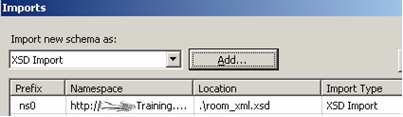
    Now I can import this “room” schema into my “booking” schema and reuse the defined types.

    However, the only “types” available from that schema when looking at the Data Structure Type in my “booking” schema is the root type. What if I want the “room details” node from my schema instead?

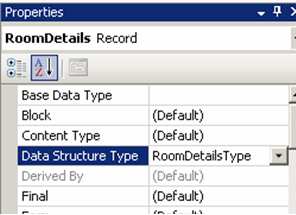
    What I just learned, was that if I go to my “room” schema, click my “room details” record node, and type in a value for the DataStructureType, then automagically, a “type” is created for me (see here for more details on creating global definitions).

    Sweet. Now if I go back to my “booking” schema, the new “RoomDetailsType” is accessible.

    I’ve had a lot of cases the past few months where I would have liked “real” complex types created, and now I know how. Learning is half the battle.

    Technorati Tags:

  • New “BizTalkHotRod” Newsletter Out

    Well, count me among the folks who thought that the BizTalk HotRod magazine would be a “one hit wonder.” I’m very happily proven wrong as there was a great new issue released this week. Some highlights include:

    • Deep look at various complicated BizTalk mapping scenarios and solutions
    • “Smack down” between a BizTalk and comparable WF/WCF solution with very thorough results
    • Look at BizTalk Server 2006 R2 EDI functionality
    • “Myth busting” about BizTalk distinguished fields
    • Throttling “how to”
    • Links to a comical amount of webcasts and resources

    Bravo to Todd and Sal (and all the contributors of this issue) for a very professional, must-read newsletter. Obviously a lot of work goes into these things, so make sure you go sign yourself up.

    Technorati Tags:

  • Choosing Between WF Rules and BizTalk Business Rules Engine

    If you’re still facing issues deciding which sort of workflow/rules technology from Microsoft to use (e.g. Windows Workflow vs. BizTalk), check out the latest well-written piece by Charles Young. He covers many of the specific differences to consider when deciding which Microsoft technology will work best for your given application.

    Technorati Tags: , ,

  • Preventing Stale Artifacts in BizTalk Application Packages

    A misunderstanding about how BizTalk builds MSI packages for applications caused me some recent heartache.

    Let’s say I have a BizTalk “application” with the following resources:

    As you can see, I’ve got a BizTalk assembly, a “standard” .NET assembly, binding file, text file, and virtual directory (for a web service). In my simple mind, I see the “Source Location” column, and assume that when I walk through the wizard to build an MSI package, BizTalk goes and grabs the file from that location and jams it into the final package.

    I was quite wrong. I learned this when I made updates to my web service and helper components, rebuilt my MSI package, deployed it, and learned to my horror that “old” components had been installed on the destination server. What gives?

    Whenever you add a “resource” to a BizTalk application (either by deploying your BizTalk library, or manually adding an artifact), it is added to a CAB file and stored in the database. In the BizTalkMgmtDb database there is an amazingly well-hidden table named adpl_sat which holds these uploaded resources.

    You can see in that picture that properties for each artifact are stored (e.g. GAC-ing components on install), and there’s also a column called “cabContent” which stores binary data. Updating artifacts on your file system does NOT mean they will get included in your MSI packages.

    So what’s a guy to do? Well, you may have noticed that for most resources, when you right-click and choose “Modify”, there is a button where you can “Refresh”. Now, instead of just refreshing the file from the spot designated in the “Source Location”, it asks you to browse to where the updated file resides. That seems a bit unnecessary, but whatever.

    So, that’s how you refresh MOST resources and make sure that your BizTalk application stays in sync with your developed artifacts. A big gotcha is, you CANNOT do this for virtual directories. I can’t seem to identify any way to refresh a modified web service short of removing the resource, and adding it back in. Big pain. Given how crucial web services are to many BizTalk applications, I would think that both adding them as resources (via UI vs. command line), and easily refreshing them, should be a priority for future releases.

    Technorati Tags:

  • Avoiding Service Timeouts In High Volume Orchestration Scenarios

    We were recently architecting a solution that involved BizTalk calling a synchronous web service from an orchestration in a high volume scenario. What happens if the web service takes a long time to complete? Do you run the risk of timeouts in orchestrations that hadn’t even had a chance to call the service yet?

    Let’s say you have an orchestration that calls a synchronous web service, like so …
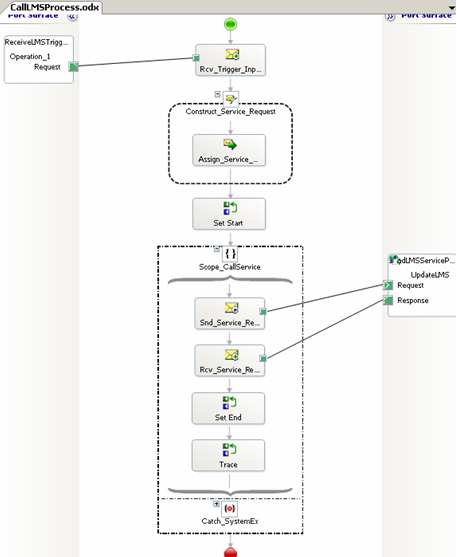
    Assume that the downstream system (reached through the web service interface) cannot handle more than a few simultaneous connections. So, you can add the <add address = “*” maxconnection = “2” /> directive to your btsntsvc.exe.config file (actually, you should filter by IP address as to not affect the entire server).

    What happens if I have 20 simultaneous orchestrations? I’ve reduced the outbound SOAP threadpool to “2”, so do the orchestrations wait patiently, or fail if they don’t call the service in the allotted time? I started up 3 orchestrations, and called my service (which purposely “sleeps” for 60 seconds to simulate a LONG-running service). As you can see below, I have 3 running instances, but my destination server’s event log only shows the first 2 connections.

    The first two calls take 60 seconds, meaning the third message doesn’t call the service until 60 seconds have passed. You can see from my event log below that while the first 2 returned successfully, the third message/orchestration timed out. So, the “timeout” counter starts as soon as the send port is triggered, even if no threads are available.
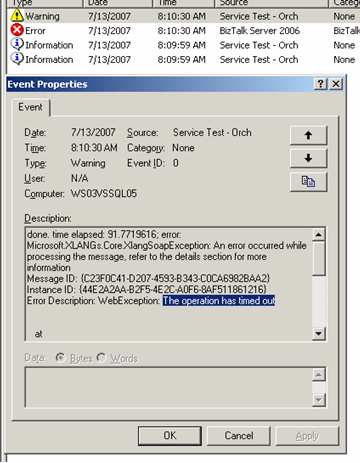
    Now, what I found unexpected was the state of affairs after the timeouts. My next scenario involved dropping a larger batch size (13 messages) and predictably, I had 2 successes and 11 failures on the BizTalk server.

    HOWEVER, on my web server, the service actually got called 13 times! That is, the 11 messages that timed out (as far as BizTalk knows), actually went across the wire to the service. I added a unique key to each message just to be sure. It was interesting that after the BizTalk side timed out, all the queued up requests came over at once. So, if you have significant business logic in such a service, you’d want to make sure your orchestration had a compensating step. If you catch a timeout in the orchestration, there should be a compensating step to roll back any action that the service may have committed.

    So, how do you avoid this scenario? I tried a few things. First, I wondered if it was the orchestration itself starting the clock on the timeout when it detected a web port, so I removed the web port from the orchestration and used a “regular” port instead. No difference. It became crystal clear that the send port itself is starting the timeout clock, and even if no thread is available, the seconds are clicking by. I also considered using a singleton pattern to throttle the outbound calls, but didn’t love that idea.

    Finally, I came upon a solution that worked. If you turn on ordered delivery for the send port, then the send port isn’t called for a message until the previous one succeeds.

    This is one way to force throttling of the send port itself. To test this, I dropped 13 messages, and sure enough, the messages queued up in the send port, and no timeouts occurred.
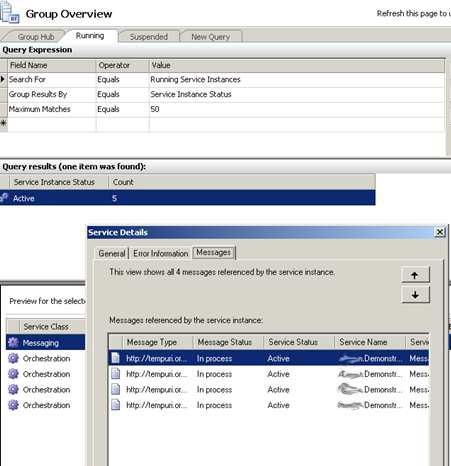
    Even though the final orchestration didn’t get its service response back for nearly 13 minutes, it didn’t timeout.
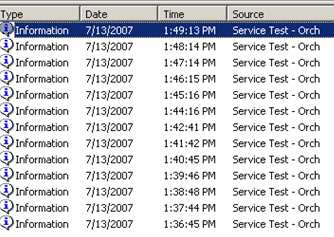
    So, while not a fabulous solution, it IS a relatively clean way to make sure that timeouts don’t occur in high volume orchestration-to-service scenarios.

    Technorati Tags: ,

  • New BizTalk Whitepapers on SQL Adapter, Web Services

    A couple of useful BizTalk whitepapers released today. It’s good to see two once-dormant BizTalk blogs (first MartyWaz, now Doug from the CSD Customer Experience) wake up in the past couple weeks.

    The first paper, Best Practices for the SQL Adapter, covers how to properly write SQL receive location queries, deal with unsupported data types, handle annoying MSDTC errors, and resolve SQL Adapter Schema Wizard problems. It’s only 14 pages long, so you clearly have time to go read it right now. I’ll wait.

    Welcome back. The second paper, Sample Design Patterns for Consuming and Exposing Web Services from an Orchestration, explains in words and pictures how to best set up templates to consume and expose services from BizTalk orchestrations. It’s fairly short, but, should help people who are getting started with web services and orchestration.

    Technorati Tags:

  • Querying and Syndicating BizTalk Traffic Metrics By Application

    Have you ever wanted a clean query of traffic through BizTalk on a per application basis? And, how about exposing that information to your internal users in a very Web 2.0 fashion?

    Our chief architect asked me if it was feasible to syndicate BizTalk metrics using a product like RSSBus. Given that BizTalk’s messaging metrics are stored in a database, I figured it would be fairly straightforward. However, my goal was to not only present overall BizTalk traffic information, but ALSO do it on a per application basis so that project teams could keep track of their BizTalk components.

    So, the first step was to write the SQL queries that would extract the data from the BizTalk databases. I wanted two queries: one for all messaging metrics per application, and, one for all suspended messages per application. I figured that it’d be useful for folks to be able to see, real-time, how many messages had failed for their application.

    My “traffic” query returns a result set like this:

    Based on the interval you provide (past day, 2 weeks, 6 months, etc), all services for the given application are shown. Getting the “application” information required joining with the BizTalkMgmtDb database. Also, I had to take into account that BizTalk database timestamps are based on UTC. So, I subtracted 7 hours from the service completion time to get accurate counts.

    Next is the “suspended messages by application” query. For this one, I got inspiration from Scott Woodgate’s old Advanced MessageBox Queries paper. Once again, I had to join on the BizTalkMgmtDb database in order to filter by application. The result of this query looks like this:

    For each service, you see the type and the count by status.

    The next step was taking this from “randomly executed SQL query” to syndicated feed. RSSBus is a pretty cool product that we’ve been looking for an excuse to use for quite some time. RSSBus comes with all sorts of connectors that can be used to generate RSS feeds. Naturally, you can write your own as well. This shot below is of a Yahoo! connector that’s included …

    I took my SQL scripts and turned those into stored procedures (in a new database, avoiding any changes to the BizTalk databases). I then used the “SQL Connector” provided by RSSBus to call the stored procedure. Since we don’t have an enterprise RSS reader yet at my company, I used the RSSBus option of exposing a “template” instead. I added some HTML so that a browser-user could get a formatted look at the traffic statistics …

    To prevent unnecessary load on the MessageBox and other BizTalk databases, I set the cache interval, so that the query will be executed no more than once per hour.

    Pretty cool, eh? “Traffic by Application” was something I wanted to see for a while, so hopefully that helps somebody out.

    Technorati Tags:

  • More on Microsoft’s ESB Guidance

    Marty Wasznicky of the BizTalk product team is back from the blogging dead and talking about Microsoft’s ESB Guidance.

    The last time this character posted on the blog was immediately after he and I taught a brutal BizTalk “commando” class in 2005. Keep an eye on him since he’s the primary architect behind the ESB Guidance bits and a wealth of BizTalk knowledge.

    My company is actually running the “Exception Management” bits from ESB Guidance in production as we speak. I put some of the early release bits into a key application, and it’s great to now allow business users to review and resubmit business exception data from a SharePoint site.

    Technorati Tags:

  • New “BizTalk Performance” Blog To Check Out

    I’m happy to see Rob starting a “BizTalk Performance” blog, and have high hopes that this doesn’t fall into the BizTalk team dust bin of dead blogs.

    Subscribe to both of Rob’s blogs (personal BizTalk thoughts here and reference-oriented content here). You’ll find that he’s already put some good content down around planning performance labs.

    Technorati Tags:

  • BizTalk BAM Data Archiving Explained

    I’ll be honest. I can’t say that I’ve ever fully understood all the nuances of the BizTalk BAM infrastructure layer. Sure, I have the basics down, but I often found myself turned around when talking about some of the movement between the BAM databases (specifically, archiving).

    Something in Darren’s Professional BizTalk Server 2006 book got me thinking, so I did a quick test to truly see how the BizTalk BAM process archived and partitioned data. The BAMPrimaryImport database has a table named bam_[ActivityName]_Activity_Completed which stores completed records. According to the documentation, once a given amount of time has passed, the records are moved from the bam_[ActivityName]_Activity_Completed table to a newly created partition named bam_[ActivityName]_Activity_[GUID}.

    One of the views (named bam_[ActivityName]_Activity_AllInstances) in the BAMPrimaryImport database aggregates the bam_[ActivityName]_Activity_Completed and all the various partitions. This view is used by the BAM Portal. So if you count up the records in the bam_[ActivityName]_Activity_AllInstances view, it should:

    • equal the number of rows in your “Activity Search” from the BAM Portal
    • equal the number of rows in the bam_[ActivityName]_Activity_Completed table and all subsequent partitions

    Now, you may ask, what creates these partitions, and how the heck do I get rid of them over time?

    There is a table named BAMArchive created during the BAM Configuration. By default, this table is empty. The SSIS/DTS jobs that get created when deploying your BAM infrastructure do pretty much all of the archiving work for you. Until recently, my understanding of the BAM_DM_[ActivityName] SSIS job was that it “cleaned stuff up”. Let’s look closer. When the BAM_DM_[ActivityName] job runs, it creates new partitions, and also purges old ones. So when you run this job, you’ll often see new partitions show up the BAMPrimaryImport database. This job ALSO rebuilds the view, so that the new partition is included in queries to the bam_[ActivityName]_Activity_AllInstances view. Neato.

    How does this BAM_DM_[ActivityName] archive stuff? It uses the Metadata_Activities table in the BAMPrimaryImport database to determine how long before data should be archived. As you can see below, the default for an activity is 6 months.

    You could set this OnlineWindowTimeLength to 30 minutes, or 10 days or 18 months. Whatever you want. You can either change this directly in the database table, or more appropriately, use the bm.exe set-activitywindow -Activity: -TimeLength: -TimeUnit:Month|Day|Hour|Minute command. In my case, I set this to a short range in order to prove that data is archived. I then executed the BAM_DM_[ActivityName] job to see what happened.

    As hoped for, the BAMPrimaryImport now had fewer partitions as the ones containing old data were removed. Where did the data go? If I check out my BAMArchive database, I now see new tables stamped with the time the data was archived.

    If I go to the BAM Portal (or check out the bam_[ActivityName]_Activity_AllInstances view directly) my result set is now much smaller. The BAMArchive data does NOT show up in any BAM query, and is only accessible through direct access to the database via custom queries. BAMArchive is purely an archive, not a readily accessible query store.

    There you go. A peek into BAM archiving and bit of detail in what that darn BAM_DM_[ActivityName] job does. It’s also important to ask consumers of BAM data what they expect the “active window” to be. Maybe the default of 6 months is fine, but, you better ask that up front or else face the wrath of users who can’t access the BAM data so easily anymore!

    Technorati Tags: