Category: BizTalk

  • Behavior Of Static Objects In BizTalk Runtime

    I recently answered a BizTalk newsgroup post where the fellow was asking how static objects would be shared amongst BizTalk components. I stated that a correctly built singleton should be available to all artifacts in the host’s AppDomain. However, I wasn’t 1000% sure what that looked like, so I had to build out an example.

    When I say a “correctly built singleton”, I mean a thread-safe static object. My particular singleton for this example looks like this:

    public class CommonLogger
        {
            //static members are lazily initialized, but thread-safe
            private static readonly CommonLogger singleton =
                new CommonLogger();
            private int Id;
            private string appDomainName;
    
            //Explicit static constructor 
            static CommonLogger() { }
            private CommonLogger() 
            {
                appDomainName = AppDomain.CurrentDomain.FriendlyName;
    
                System.Random r = new Random();
                //set "unique" id
                Id = r.Next(0, 100);
    
                //trace
                System.Diagnostics.Debug.WriteLine
    	("[AppDomain: " + appDomainName + ", ID: " + 
                    Id.ToString() + "] Logger started up ... ");
            }
    
            //Accessor
            public static CommonLogger Instance
            {
                get
                {
                    return singleton;
                }
            }
    
            public void LogMessage(string msg)
            {
                System.Diagnostics.Debug.WriteLine
    	("[AppDomain: " + appDomainName + "; ID: " + 
                      Id.ToString() + "] Message logged ... " + msg);
            }
        }
    

    I also built a “wrapper” class which retrieves the “Instance” object for BizTalk artifacts that couldn’t access the Instance directly (e.g. maps, orchestration).

    Next, I built a custom pipeline component (send or receive) where the “Execute” operation makes a call to my CommonLogger component. That code is fairly straightforward and looks like this …

    public IBaseMessage Execute(IPipelineContext pc, IBaseMessage inmsg)
            {
                //call singleton logger
                CommonLogger.Instance.LogMessage
                   ("calling from " + _PipelineType + " component");
    
                // this way, it's a passthrough pipeline component
                return inmsg;
            }
    

    Next, I created a simple map containing a Scripting functoid that called out to my CommonLogger. Because the Scripting functoid can’t call an operation on my Instance property, I used the “Wrapper” class which executes the operation on the Instance.

    Then I went ahead and created both a send and receive pipeline, each with my custom “logging” component built in. After deploying the BizTalk projects, I added my map and pipeline to both the receive and send port. So, there are four places that should be interacting with my CommonLogger object. What’s the expected result of this run? I should see “Logger started up” (constructor) once, and then a bunch of logged messages using the same instance. Sure enough …

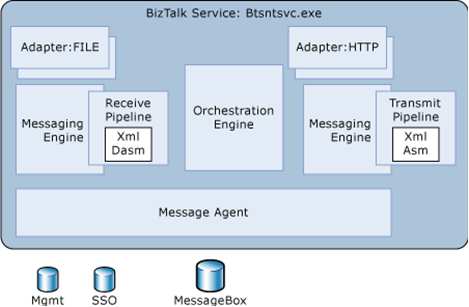
    Nice. What happens if I throw orchestration into the mix? Would it share the object instantiated by the End Point Manager (EPM)? If you read Saravana’s post, you get the impression that every object in a single host should share an AppDomain, and thus static objects. I wasn’t convinced that this was the case.

    I’ve also added a business rule to the equation, to see how that plays with the orchestration.

    I bounced my host instance (thus flushing any cached objects), and reran my initial scenario (with orchestration/rules included):
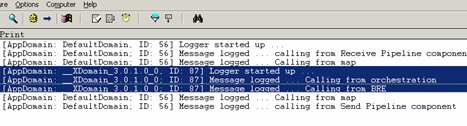
    Very interesting. The orchestration ran in a different AppDomain, and thus created its own CommonLogger instance. Given that XLANG is a separate subsystem within the BizTalk service, its not impossible to believe that it runs in a separate AppDomain.
    If I run my scenario again, without bouncing the host instance, I would expect to see no new instantiations, and objects being reused. Image below is the same as the previous one (first run), with the subsequent run in the same window.

    Indeed, the maps/pipeline reused their singleton instance, and the orchestration/rules reused their particular instance. Now you can read all about creating your own named AppDomains for orchestrations in this MSDN documentation, and maybe, because I don’t have a named instance for this orchestration to run in, an ad-hoc one is being created and used. Either way, it seems that the EPM and XLANG subsystems run in different AppDomains within a given host instance.

    I also experimented with moving my artifacts into different hosts. In this scenario, I moved my send port out of the shared host, and into a new host. Given that we’re now in an entirely different Windows service, I’d hardly expect any object sharing. Sure enough …

    As you can see, now three different instances of my singleton object exist and are actively being used within their given AppDomain. Does this matter much? In most cases, not really. I’m still getting the value of caching and using a thread-safe singleton object. There just happen to be more than one instance being used by the BizTalk subsystems. That doesn’t negate the value of the pattern. But, still valuable to know.

    Technorati Tags:

  • BizTalk Property Schemas Separated From Associated Schemas, Take II

    Back on the old Microsoft blog, I wrote about not separating a property schema from its implementation schema. I concluded that this “tip” in the documentation seemed to be more like a guideline vs. a rule.

    Today, I realized it’s more like a rule. I had a BizTalk project containing ONLY a property schema, then a BizTalk project ONLY containing the schemas that reference the property schema, and finally a BizTalk project containing an orchestration that used the various schemas. For the life of me, I couldn’t figure out why my promoted fields wouldn’t show up in the Receive shape’s filter expression, or, as part of the message (by doing “myMessage(Namespace.PropSchemaValue) = 1234). Funny enough, the property schema value marked as MessageContextPropertyBase DID show up, but any of the MessageDataPropertyBase were noticeably absent.

    So, I added the property schema to my “schemas” project, rebuilt, and sure enough, all the expected promoted values showed up in the orchestration. Now, I’d bet (as in my old example) that the engine can still promote the values with no problem. But, the design time (and maybe the orchestration runtime) has issues with this setup. Either way, seems safe to say that you should keep your property schemas alongside the implementation schemas. This means, ignore the old post and file it under the “Seroter Corollary.” That is, when all else fails, let’s assume I’m an idiot.

    Technorati Tags:

  • Performance Showdown Between BRE and WF

    If you’ve got a couple hours free, and are interested in the performance of the two primary business rules offerings from Microsoft, check out the latest post by Charles Young.

    Charles does some comically thorough analysis and comparison of the Windows Workflow rules engine and the Microsoft Business Rules Engine that ships with BizTalk Server. He looks at performance with relation to rule set size, startup time, fact size, caching and so forth. His conclusion is that the Microsoft Business Rules Engine generally performs better than the WF Rules Engine. However, there are lots of considerations that go into that conclusion, so I heartily encourage you to read and digest Charles’ post.

    Technorati Tags:

  • BizTalk Pattern For Scheduled “Fan Out” Of Database Records

    We recently implemented a BizTalk design pattern where on schedule (or demand), records are retrieved from a database, debatched, returned to the MessageBox, and subscribed to by various systems.

    Normally, “datastore to datastore” synchronization is a job for an ETL tool, but in our case, using our ETL platform (Informatica) wasn’t a good fit for the use case. Specifically, handling web service destinations and exceptions wasn’t robust enough, and we’d have to modify the existing ETL jobs (or create new ones) for each system who wanted the same data. We also wanted the capability for users to make “on demand” request for historical data to be targeted to their system. A message broker made sense for us.

    Here are the steps I followed to create a simple prototype of our solution.

    Step #1. Create trigger message/process. A control message is needed to feed into the Bus and kick off the process that retrieves data from the database. We could do straight database polling via an adapter, but we wanted more control than that. So, I utilized Greg’s great Scheduled Task Adapter which can send a message into BizTalk on a defined interval. We also have a manual channel to receive this trigger message if we wish to run an off-cycle data push.

    Step #2. Create database and database schemas. I’ve got a simple test table with 30 columns of data.

    I then used the Add Generated Items wizard to build a schema for that database table.

    Now, because my goal is to retrieve the dataset from the database, and then debatch it, I need a representation of the *single* record. So, I created a new schema, imported the auto-generated schema, set the root node’s “type” to be of the query response record type, and set the Root Reference property.

    Step #3. Build workflow (first take). For the orchestration component, I decided to start with the “simple” debatching solution, XPath. My orchestration takes in the “trigger” message, queries the database, gets the batched results, loops through and extracts each individual record, transforms the individual record to a canonical schema, and sends the message to the MessageBox using a direct-bound port. Got all that?

    When debatching via XPath, I use the schema I created by importing the auto-generated SQL Server schema.

    Note: If you get an “Inner exception: Received unexpected message type ” does not match expected type ‘http://namespace#node’. Exception type: UnexpectedMessageTypeException” exception, remember that you need an XmlReceive pipeline on the SQL Adapter request response send port. Otherwise, the type of the response message isn’t set, and the message gets lost on the way back to the orchestration.

    Step #4. Test “first take” workflow. After adding 1000 records to the table (remember, 30 columns each), this orchestration took about 1.5 – 2 minutes to debatch the records from the database and send each individual record to the MessageBox. Not terrible on my virtual machine. However, I was fairly confident that a pipeline-based debatching would be much more efficient.

    So, to modify the artifacts above to support pipeline-based debatching, I did the following steps.

    Step #1. Modify schemas. Automatic debatching requires the pipeline to process an envelope schema. So, I took my auto-generated SQL Server schema, set its Envelope property to true, and picked the response node as the body. If everything is set up right, then the result message of the pipeline debatching is that schema we built that imports the auto-generated schema.

    Step #2. Modify SQL send port and orchestration message type. This is a good one. I mentioned above that you need to use the XmlReceive pipeline for the response channel in the SQL Server request-response send port. However, if I pass the response message through an XmlReceive pipeline with the chosen schema set as an “envelope”, the message will debatch BEFORE it reaches the orchestration. Then I get all sorts of type mismatch exceptions. So, what I did, was change the type of the message coming back from the request-response port to XmlDocument and switched the physical send port to to a passthrough pipeline. Using XmlDocument, any message coming back from the SQL Server send port will get routed back to the orchestration, and using the passthrough pipeline, no debatching will occur.

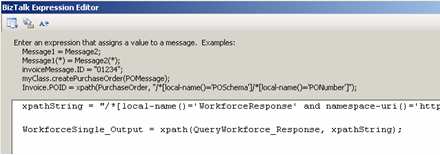
    Step #3. Switch looping to use pipeline debatching. In BizTalk Server 2006, you can call pipelines from orchestrations. I have a variable of type Microsoft.XLANGs.Pipeline.ReceivePipelineOutputMessages, and then (within an Atomic Scope), I called the *default* XmlReceive pipeline using the following code:

    rcvPipeOutputMsgs =
    Microsoft.XLANGs.Pipeline.XLANGPipelineManager
    .ExecuteReceivePipeline(typeof(Microsoft.BizTalk.DefaultPipelines.XMLReceive),
    QueryWorkforce_Response);

    Then, my loop condition is simply rcvPipeOutputMsgs.MoveNext(), and within a Construct shape, I can extract the individual, debatched message with this code:

    //WorkforceSingle_Output is a BizTalk message
    WorkforceSingle_Output = null;
    rcvPipeOutputMsgs.GetCurrent(WorkforceSingle_Output);

    Step #4. Test “final” workflow. Using the same batch size as before (30 columns, 1000 records), it took between 29-36 seconds to debatch and return each individual message to the MessageBox. Compared to nearly 2 minutes for the XPath way, pipeline debatching is significantly more efficient.

    So, using this pattern, we can easily add subscribers to these database-only entities with very little impact. One thing I didn’t show here, but in our case, I also stamp each outbound message (from the orchestration) with the “target system.” The trigger message sent from the Scheduled Task Adapter will have this field empty, but if a particular system wants a historical batch of records, we can now send an off-cycle request, and have those records only go to the Send Port owned by that “target system”. Neat stuff.

    Technorati Tags:

  • Tool: BizTalk Send Port Duplicator

    Often times during development, and even in production, you have a need to create new BizTalk ports that are virtually identical to an existing one.

    For instance, in a “content based routing” scenario, odds are you would test this by creating multiple send ports, all with a slight deviation in subscription criteria and destination path. We also have a case where data received by SAP is sent to a series of virtually identical send ports. Because all the SOAP send ports use the same proxy class for transmitting the service, the ONLY difference is the URL itself. But, it’s a hassle to create a new send port each time.

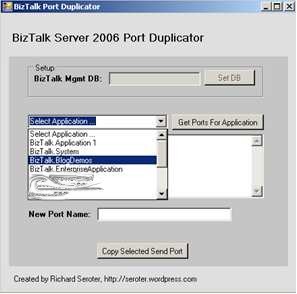
    So, I took a few minutes yesterday, and using a BizTalk SDK example as inspiration, wrote a small tool that duplicates existing send ports. If I felt more ambitious I’d make it a custom MMC action, but alas, I’m not that motivated.

    When you fire the BizTalk Send Port Duplicator (patent pending) up, the first thing you do is set the server where the BizTalk Management Database resides.

    Then, you optionally choose which BizTalk “application” has the port you wish to copy. If you don’t choose an application from the drop down list, then you’ll get all send ports in your BizTalk environment.

    Next, select the send port from the listbox, and type in a name that will be used for the port copy.

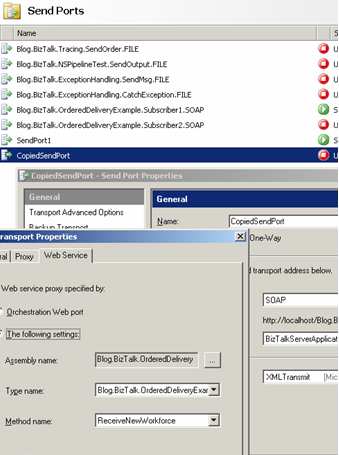
    The copied send port shows up in the BizTalk Administration Console in the same “application” as the source send port. You can open it up and see nearly all properties copied across. What properties are included? You can copy one-way or two-way ports, filter/subscription, primary transport details (address, retry, handlers), maps, and pipelines. At the moment, I’m not copying secondary transport details, certificates, tracking details, or dynamic ports.

    You can download the BizTalk Send Port Duplicator here. I’ve included the source code as well, so feel free to mess around with it.

    [UPDATE (10/02/2007)] I’ve updated the application to also support choosing the name of the Management database. Prior, I had hard-coded this value.

    Technorati Tags:

  • CTP3 of ESB Guidance Released

    Some very cool updates in the just-released CTP3 of ESB Guidance. The changes that caught my eye include:

    • Download the full Help file in CHM format. Check out what’s new in this release, sample projects, and a fair explanation of how to perform basic tasks using the package.
    • New endpoint “resolver” framework. Dynamically determine endpoint and mapping settings for inbound messages. Interesting capability that I don’t have much use for (yet).
    • Partial support for request/response on-ramps. An on-ramp is the way to generically accept messages onto the bus by receiving in an XmlDocument parameter. I’ll have to dig in and see what “partial support” means. Obviously the bus would need to send a response back to the caller, so I’ll be interested to see how that’s done.
    • BizTalk runtime query services. Looks like it uses the BizTalk WMI interfaces to pull back information about hosts, applications, messages, message bodies and more. I could see a variety of ways I can use this to surface up environment data.
    • SOA Software integration. This one excites me the most. I’m a fan (and user) of SOA Software’s web service management platform, and from the looks of it, I can now more easily plug in any (?) receive location and send port into Service Manager’s monitoring infrastructure. Nice.

    I also noticed a few things on Exception Management that I hadn’t seen yet. It’s going to be a pain to rebuild all my existing ESB Guidance Exception Management solution bits, so I’ll wait to recommend an upgrade until after the final release (which isn’t far off!).

    All in all, this is maturing quite nicely. Well done guys.

    Technorati Tags: ,

  • Troubleshooting “Canceled Web Request”

    Recently, when calling web services from the BizTalk environment, we were seeing intermittent instances of the “WebException: The request was aborted: The request was canceled” error message in the application Event Log. This occurred mostly under heavy load situations, but could be duplicated even with fairly small load.

    If you search online for this exception, you’ll often see folks just say to “turn off keep-alives” which we all agreed was a cheap way to solve a issue while introducing performance problems. To dig further into why this connection to the WebLogic server was getting dropped, we actually began listening in on protocol communication using Wireshark. I started going bleary-eyed looking for ACK and FIN and everything else, so I went and applied .NET tracing to the BizTalk configuration file (btsntsvc.exe.config). The BizTalk documentation shows you how to set up System.Net logging in BizTalk (for more information on the settings, you can read this).

    My config is slightly different, but looks like this …

    <system.diagnostics>
        <sources>
          <source name="System.Net">
            <listeners>
              <add name="System.Net"/>
            </listeners>
          </source>
          <source name="System.Net.Sockets">
            <listeners>
              <add name="System.Net"/>
            </listeners>
          </source>
          <source name="System.Net.Cache">
            <listeners>
              <add name="System.Net"/>
            </listeners>
          </source>
        </sources>
        <switches>
          <add name="System.Net" value="Verbose" />
          <add name="System.Net.Sockets" value="Error" />
          <add name="System.Net.Cache"  value="Verbose" />
        </switches>
        <sharedListeners>
          <add name="System.Net"
               type="System.Diagnostics.TextWriterTraceListener"
               initializeData="c:\BizTalkTrace.log"   />
        </sharedListeners>
        <trace autoflush="true" />
      </system.diagnostics>
      

    What this yielded was a great log file containing a more readable format than reading straight network communication. Specifically, when the request was canceled message showed up in the Event Log, I jumped to the .NET trace log and found this message …
    A connection that was expected to be kept alive was closed by the server.

    So indeed, keep-alives were causing a problem. Much more useful than the message that pops up in the Event Log. When we did turn keep-alives off on the destination WebLogic server (just as a test), the problem went away. But, that couldn’t be our final solution. We finally discovered that the keep-alive timeouts were different on the .NET box (BizTalk) and the WebLogic server. WebLogic had a keep-alive of 30 seconds, while it appears that the .NET framework uses the same value for keep-alives as for service timeouts (e.g. 90 seconds). The Windows box was attempting to reuse a connection while the WebLogic box had disconnected it. So, we modified the WebLogic application by synchronizing the keep-alive timeout with the Windows/BizTalk box, and the problem went away complete.

    Now, we still get the responsible network connection pooling of keep-alives, while still solving the problem of canceled web requests.

    Technorati Tags:

  • Upcoming SOA and Business Process Conference

    Chris and Mike confirm the details of the upcoming SOA and Business Process conference in October 2007.

    I was fortunate enough to attend last year’s event, and would highly encourage folks to attend this year. It’s a great place to meet up in person with BizTalk community folks and receive a fair mix of high level strategy overview and deep technical content. It’s always fun to put a face with a particular BizTalk blogger. I usually find that my mental image of the person is woefully inaccurate. I have a picture of someone like Tomas Restrepo in my head, but watch, I’ll meet him in person and find out that he’s a 82 year old Korean woman with bionic legs.

    That said, I actually can’t attend this year, and am quite disappointed. My wife and I chose THAT week to be due with our first child. The nerve. Maybe I can convince Chris Romp to bring a cardboard cut-out of me so that I can be there in spirit.

    Technorati Tags:

  • BizTalk Sending Updated Version of Message to SOAP Recipients

    What happens to downstream SOAP recipients if the message sent from BizTalk is a different “version” than the original?

    Let’s assume I have an enterprise schema that represents my company’s employees (e.g. “Workforce”). BizTalk receives this object from SAP and fans it out to a variety of downstream systems (via SOAP). Because direct messaging with the SOAP adapter is occurring, a proxy class is needed to call the web service (vs. an orchestration). Because every subscriber service implements the same enterprise schema and WSDL, a single proxy class in BizTalk can be reused for each recipient.

    Using “wsdl.exe” I do code generation on the enterprise WSDL to build an interface object (using the wsdl /serverinterface command) that is implemented by the subscribing web service (thus ensuring that each subscriber respects the enterprise WSDL contract). I also use wsdl.exe to build the service proxy component that BizTalk requires to call the service. Finally, I use xsd.exe to build a separate class with the types represented in the enterprise schema.

    Now what if a department requests new fields to be added to this object? How will this affect each downstream subscriber? For significant changes (e.g. backwards breaking changes such as removal of required fields, changing node names), the namespace of the schema will be updated to reflect the change. This would force a rebuild and recompile of subscribers of this new message. For more minor changes, no namespace update will occur.

    We had a debate about how a .NET web service would handle the receipt of “unexpected” elements when the namespace has not been changed. That is, what if we just sent this new data to each subscriber without having them recompile their project with the latest auto-generated code (interface, proxy, types) from the enterprise schema/WSDL? Some folks thought that the .NET web service would reject the inbound message because it wouldn’t serialize the unknown types. I wasn’t 100% sure of that, so I ran a few tests.

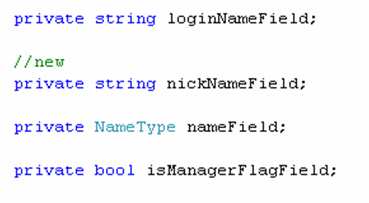
    For this test, I added a new value to the auto-generated “types” class (which is used by the interface class and proxy class).

    I then build and GAC the updated proxy component. I also made sure that the subscriber web service still has the “old” auto-generated code.

    {New) Object used by BizTalk service proxy:

    {Old) Object used by subscriber web service:

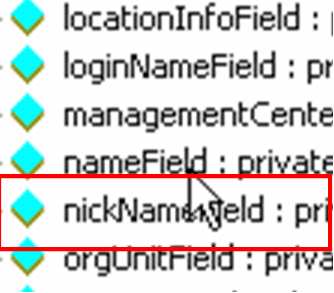
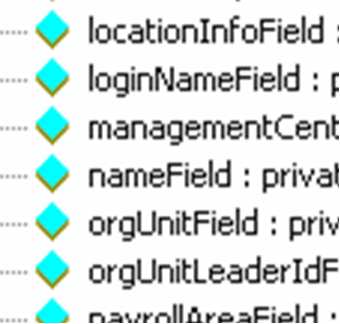
    So, we’ve established that the web service knows nothing about “nickname”. If I add that field to my input document, and pass it in, route it to my subscriber port, what do you think happens? The first line of the web service writes a message to the event log, thus proving whether or not the service has successfully been called.

    I’ve turned on tcptrace so that I can ensure that “nickname” actually got transferred over the wire. Sure enough, the SOAP request contains my new field …

    Most importantly, an Event Log entry shows up, proving that my service was called with no problem.

    Interesting. So unexpected data elements are simply not serialized into the input object type, and no exception is thrown. I also tried using the “old” proxy class (e.g. without “nickname” in it) within BizTalk, and if schema validation is turned OFF, BizTalk also accepts the “extra” fields, but, since the “nickname” doesn’t exist in the proxy, does NOT send it over the wire, even though it was in the original XML message. Within the subscriber service, I could have serialized the object BACK into its XML format, and then applied an XML schema validation, and this would have raised a validation exception.

    Conclusion
    This is all good to know, but NOT a pattern or principle we will adopt. Instead, when changes are made to the enterprise schemas, we will create a new BizTalk map that “downgrades” the message in the subscriber send port. This way, we can gracefully update the subscribers at a later time, while still ensuring that they get the same message format today as they did yesterday. When the subscriber has recompiled their service with the latest auto-generated code, THEN we can remove the map from their send port and let them receive the newest elements.

    Technorati Tags: ,

  • [BizTalk] Interview Advice

    I recently completed another round of interviews for my company in the search for BizTalk consultants. Yet again, it was a fairly depressing experience. I offer a few humble tips to folks claiming to be BizTalk architects/developers.

    My first pet peeve is gigantic resumes. I know that headhunters often beef these things up, but if your resume has more pages than you have years of job experience, that’s a red flag. Brevity, people. If you’re still listing the top 14 accomplishments from your college internship in 1999, it’s time to reevaluate your resume building skills.

    In terms of the interview itself, I do NOT favor the types of questions that can be answered with one word or sentence (e.g. “tell me all the options when right-clicking a functoid” or “list me all the BizTalk adapters”). That doesn’t tell me anything about your skills. Tell me why you’d choose the HTTP adapter over the SOAP adapter. THAT’S a question.

    A few tips if you’re out there selling yourself as a BizTalk person …

    • Don’t list every possible subsystem/feature in BizTalk on your resume and claim experience. I simply don’t believe that EVERY person has used BAS. Come on. FYI, if you throw “Enterprise Single Sign On” on your resume, be ready for a question from me.
    • When you claim to be a BizTalk architect, and I ask you to explain the concept of “promoted values”, and you tell me that “I like to just promote any values in a schema that feel important”, the next sound you will hear is me stabbing myself in the neck.
    • When I see “experience building complicated orchestrations” on your resume, but my questions about “patterns” or “exception handling strategies” completely befuddle you, you’ve destroyed a piece of my soul.
    • When you tell me that you’ve participated in full lifecycle implementations (design –> test) on BizTalk projects, and I ask you what your next step is after requirements have been gathered by the business, and your answer is “start coding” … you’re not getting the job.
    • If you claim extensive experience with BizTalk application deployment, but you can’t tell me what artifacts may go into an MSI package, you’re not scoring any points.
    • While I appreciate honestly when I ask you for your BizTalk strengths and weaknesses, your chosen weakness should not be listed on your resume as an “expert with …”
    • If you tell me that you’ve spent significant time building BizTalk solutions that integrate with a database, and I ask how you poll for database records to kick off a process, the answer I’m looking for does not include “I build lots of custom data access classes.”
    • Finally, an interviewer can tell when you’re simply regurgitating an answer from a book or website. I want to hear answers in your own words. If you’ve stammered through the entire interview, but when I ask about the Business Rules Engine you provide an sweeping, poetic answer, I know you’re faking it.

    Sigh. I go into virtually every interview wanting to love the candidate, and roughly 75% of the time, I complete the interview sitting in a pool of my own tears. Any other tips you want to throw out there for BizTalk job candidates?

    Technorati Tags: