In the last post, I kicked off this series of blogs addressing how we can apply classic enterprise integration patterns to cloud scenarios. Let’s look at the first pattern: shared database.
What Is It?
Sharing data via extract-transform-load (ETL) obviously isn’t timely. So what if system need the absolute latest data available? I might need a shared database for reporting purposes, reference data, or even transactional data. You would use this pattern when you have common data (or a common data structure) but multiple different consuming interfaces.
For transactional data, a multi-tenant cloud application typically uses a shared database for all customers (because a common data model is used), but the data itself is segmented by customer. In a reference data scenario, we may have both a common schema AND a shared set of data. This gives everyone a single data definition and encourages consistency across applications as everyone leverages the shared data.
Challenges
We face a few different challenges when planning to use this pattern.
- It can be tough to design. Getting consensus on anything in IT isn’t easy, and common, reusable data schemas are no different. It takes a concerted effort to define a shared format that everyone will leverage.
- You may bump into contention problems. If you have multiple applications manipulating the same transactional data, they you can experience locks or attempts to overwrite new data with old data.
- There may be performance issues if there are multiple heavy users of shared databases. This is where concepts like sharding can come into play as a way to alleviate contention.
- Packaged software products rarely (if ever) allow you to use a different primary data store. Some software does let you call out to shared databases for reference data, however.
Cloud Considerations
When doing “shared databases” in the cloud, you have to consider the following things:
- Web-only access protocols. While SQL Azure actually lets you use traditional database protocols, the vast majority of online databases have (RESTful) web APIs only.
- Identity handling will likely be unique per database provider, unlike in an on-premises environment where you can leverage a shared user directory. You’ll have to see what identity providers are available for a given cloud database provider, and if you can do role-based, granular access controls.
- Many providers use sharding techniques by default and separate data into distinct domains. You’ll have to factor this into how you define your data profile. How will you build a data model based on split data?
- Using relational databases or schema-less databases. We have this same choice for on-premises databases, but something to consider when thinking about HOW your cloud database is being used. One style may make more sense than another based on the scenario.
- Cloud providers may throttle usage. A cloud database like AWS SimpleDB throttles the number of web service PUTs per second. You could get around this by using multiple domains (since you are throttled per domain) or by batching commands and executing fewer commands.
Solution Demonstration
So here’s what I built. The solution uses a shared AWS SimpleDB to store “interactions” with a given customer of a fictitious company (the wildly successful Seroter Corporation). A Salesforce.com user adds customer interactions from the sales team, and an on-site CRM system adds interactions with the customer from our on-site call center. Customers want to see all the different interactions they have had with the company. Seroter Corporation could build an application that virtually aggregates this data on the fly, or, they could always put all their interactions into a single database that everyone can reference. In this case, I built a Ruby application in VMWare’s Cloud Foundry which views this shared database and lets customers view their history with the company.

Let’s walk through each piece, and the tips/tricks that I can offer from making Salesforce.com, Ruby and .NET all use the same API to pull data from Amazon SimpleDB.
SimpleDB
First off, I created a SimpleDB domain to hold all the customer Interactions. Right now, it has four rows in it. Note that I’m using the AWS Toolkit for Visual Studio to muck with the database.

I leveraged the AWS Identity and Access Management to create a user account for all my applications to use. This user has limited rights on this database and can only do read operations.

That’s about it. I’m ready to build my three consuming applications.
.NET Client Calling AWS
The basic steps of consuming most of the AWS platform services are: create timestamp, create signture string, hash the signature string, build query string, call service. I decided to NOT use any SDKs and instead call the native SimpleDB REST API from all three consuming applications. This way, I don’t learn one SDK just to have to start over again when I consume the database from a different client.
First off, let’s build the timestamp string which must be in a specific format. Note that encoded values must be uppercase. If you forget this, plan on losing a Sunday afternoon.
//take current date time and format it as AWS expects
timestamp = DateTime.Now.ToUniversalTime().ToString("yyyy-MM-ddTHH:mm:ss.fffZ");
//switch the lowercase encoded value to uppercase to avoid Armageddon
timestamp = HttpUtility.UrlEncode(timestamp).Replace("%3a", "%3A");
Next, I built my querystring against the SimpleDB database. Here, I’m getting back all interactions for a customer with a given ID.
//define querystring
string selectExpression = "select * from SeroterInteractions where CustomerId = '" + CustomerId + "'";
//encode it, and uppercase the encoded values
string fSelectExpression = HttpUtility.UrlPathEncode(selectExpression).Replace("*", "%2A").Replace("=", "%3D").Replace("'", "%27");
Now I build the string that gets hashed as request signature. The point here is that AWS compares the hashed string with the request it receives and verifies that the payload of the request wasn’t tampered with. Note that all parameters after the AWSAccessKeyId field must be listed in alphabetical order.
string stringToConvert2 = "GET\n" +
            "sdb.amazonaws.com\n" +
            "/\n" +
            "AWSAccessKeyId=ACCESS_KEY" +
            "&Action=Select" +
            "&SelectExpression=" + fSelectExpression +
            "&SignatureMethod=HmacSHA1" +
            "&SignatureVersion=2" +
            "&Timestamp=" + timestamp +
            "&Version=2009-04-15";
Now, we encode the string. I used the HMACSHA1 encoding algorithm.
//private key tied to my AWS user account
string awsPrivateKey = "PRIVATE KEY";
Encoding ae = new UTF8Encoding();
HMACSHA1 signature = new HMACSHA1();
//set key of signature to byte array of private key
signature.Key = ae.GetBytes(awsPrivateKey);
//convert signature string
byte[] bytes = ae.GetBytes(stringtoConvert2);
//hash it
 byte[] moreBytes = signature.ComputeHash(bytes);
//base64 encode the string
string encodedCanonical = Convert.ToBase64String(moreBytes);
//URL encode the string
 string urlEncodedCanonical = HttpUtility.UrlEncode(encodedCanonical).Replace("%3d", "%3D");
We’re ready to build the actual RESTful request URL for SimpleDB. This contains most of the values from the signature string plus the hashed value of the signature string itself. Note that failures to properly encode values, or order the attributes will result in maddening “signature does not match” exceptions from the AWS service. Whenever I encountered that (which was often) it was because I had messed up encoding or ordering.
string simpleDbUrl2 = "https://sdb.amazonaws.com/?Action=Select" +
            "&Version=2009-04-15" +
            "&Timestamp=" + timestamp +
            "&SelectExpression=" + fSelectExpression +
            "&Signature=" + urlEncodedCanonical +
            "&SignatureVersion=2" +
            "&SignatureMethod=HmacSHA1" +
            "&AWSAccessKeyId=ACCESS_KEY";
Finally, I used the HttpWebRequest object to call the AWS endpoint using this URL and get the response. What I didn’t show is that I parsed the response XML and loaded it into a DataGrid on my WinForm application.
HttpWebRequest req = WebRequest.Create(simpleDbUrl2) as HttpWebRequest;

using (HttpWebResponse resp = req.GetResponse() as HttpWebResponse)
 {
       StreamReader reader = new StreamReader(resp.GetResponseStream());

        string responseXml = reader.ReadToEnd();
         XmlDocument doc = new XmlDocument();
         doc.LoadXml(responseXml);

         //parse and load result into objects bound to data grid
  }
The .NET client application looks like this after it retrieves the three SimpleDB domain rows tied to the customer ID provided.

Ruby App in Cloud Foundry Calling AWS
Let’s see how I built a Ruby application that talks to AWS SimpleDB. This won’t be a walkthrough of Ruby or Cloud Foundry, but rather, just the key parts of the web application that I built.
My first decision was how to process the results of the AWS call. I decided to use XSLT to parse the XML response. I chose the Nokogiri gem for Ruby which lets me process XML content pretty easily. One wrinkle with this is because I’m working on a Windows machine, and using a Windows gem (which isn’t supported once deployed to Cloud Foundry), I need to do some tweaking with my Gemfile file. After building the web app (“bundle package”) but before deployment (“bundle install”), I have to open the Gemfile.lock file and remove all the “Windows stuff” from the “nokogiri” entry.
That said, below is my Ruby code that starts with the libraries that I used.
require 'sinatra' # includes the library
require 'haml'
require 'nokogiri'
require 'date'
require 'uri'
require 'openssl'
require 'base64'
require 'open-uri'
require 'cgi'
Next, I have defined a “get” operation which responds when someone hits the “lookup” path and passes in a customer ID. I’ll use this customer ID to query AWS. Then, I extract the path parameter into a local variable and then define the XSLT that will parse the AWS SimpleDB results. I don’t love my XPath on the template match, but it works.
get '/lookup/:uid' do	# method call, on get of the lookup path, do the following

	@userid = params[:uid]

	#-- define stylesheet
	xsl ="
		<xsl:stylesheet version='1.0' xmlns:xsl='http://www.w3.org/1999/XSL/Transform' xmlns:aws='http://sdb.amazonaws.com/doc/2009-04-15/'>
  		<xsl:output method='xml' encoding='UTF-8' indent='yes'/>
  		<xsl:strip-space elements='*'/>
		<xsl:template match='/'>
			<table class='interactionTable' cellspacing='0' cellpadding='4'>
				<tr>
					<td class='iHeader'>Customer ID</td>
					<td class='iHeader'>Date</td>
					<td class='iHeader'>Inquiry Type</td>
					<td class='iHeader'>Product</td>
					<td class='iHeader'>Source</td>
					<td class='iHeader'>Interaction ID</td>
				</tr>
				<xsl:apply-templates select='//aws:Item' />
			</table>
		</xsl:template>
  		<xsl:template match='aws:Item'>

			<tr>
				<td class='iRow'><xsl:value-of select='./aws:Attribute[1]/aws:Value' /></td>
				<td class='iRow'><xsl:value-of select='./aws:Attribute[4]/aws:Value' /></td>
				<td class='iRow'><xsl:value-of select='./aws:Attribute[3]/aws:Value' /></td>
				<td class='iRow'><xsl:value-of select='./aws:Attribute[5]/aws:Value' /></td>
				<td class='iRow'><xsl:value-of select='./aws:Attribute[2]/aws:Value' /></td>
				<td class='iRow'><xsl:value-of select='./aws:Name' /></td>

			</tr>

  		</xsl:template>
		</xsl:stylesheet>
		"

	#-- load stylesheet
	xsltdoc = Nokogiri::XSLT(xsl)
Next is my AWS-specific code which creates a properly formatted/encoded timestamp, encoded query statement, signature string, and query string. Then I call the URL and send the response through the XSLT which I end up displaying in a template file.
#-- define timestamp variable and format
	@timestamp = Time.now
	@timestamp = @timestamp.strftime("%Y-%m-%dT%H:%M:%SZ")
	@ftimestamp = CGI.escape(@timestamp)

	#-- define query statement and encode correctly
	#@querystatement = "select * from SeroterInteractions"
	@fquerystatement = CGI.escape("select * from SeroterInteractions where CustomerId = '" + @userid + "'")
	@fquerystatement = @fquerystatement.gsub("+", "%20")

	#-- create signing string
	@stringtosign = "GET\nsdb.amazonaws.com\n/\nAWSAccessKeyId=ACCESS_KEY&Action=Select&SelectExpression=" + @fquerystatement + "&SignatureMethod=HmacSHA1&SignatureVersion=2&Timestamp=" + @ftimestamp + "&Version=2009-04-15"

	#-- create hashed signature using key variable defined elsewhere
	@esignature = CGI.escape(Base64.encode64(OpenSSL::HMAC.digest('sha1',@@awskey, @stringtosign)).chomp)

	#-- create AWS SimpleDb query URL
	@dburl = "https://sdb.amazonaws.com/?Action=Select&Version=2009-04-15&Timestamp=" + @ftimestamp + "&SelectExpression=" + @fquerystatement + "&Signature=" + @esignature + "&SignatureVersion=2&SignatureMethod=HmacSHA1&AWSAccessKeyId=ACCESS_KEY"

	#-- load XML returned from query
	@doc = Nokogiri::XML(open(@dburl))

	#-- transform result using XSLT
	@var = xsltdoc.transform(@doc)
When everything is in place, I hit my URL and the Ruby code calls the AWS service for the requested customer ID, passes the result through the XSLT, and emits a table of matching “customer interactions.”
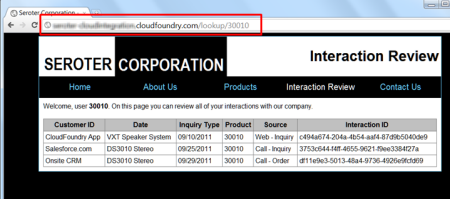
Neat. So now I have two applications (my .NET client and Ruby app in Cloud Foundry) that have live looks into the same shared database. One more to go!
Force.com Application Calling AWS
Making a (Sales)force.com application talk to AWS SimpleDB is pretty easy once you follow the same steps as I have in the previous two applications. It’s just a matter of slightly different syntax. In this case, I’m going to present the results on a Force.com Apex page using a “data table” which means i need typed objects for each “customer interaction” that comes back from AWS. So, after creating a custom Apex object of type UserInteraction, I started my custom controller for my Apex page.
public class interactionLookupExtension
{
 private final Contact myContact;
//create list array of UserInteractions
 private List<UserInteractions> interactionsList = new List<UserInteractions>();
//define namespace used by SimpleDB
 private String ns = 'http://sdb.amazonaws.com/doc/2009-04-15/';

 public interactionLookupExtension(ApexPages.StandardController controller) {
       //get reference to Force.com contact used on the Apex page
		this.myContact = (Contact)controller.getRecord();
    }
Now comes the fun part: calling the service. You may notice that the sequence is nearly identical to the other code we’ve built.
public void GetInteractions()
 {
     //get customer ID for selected contact
     String inputId = myContact.Global_ID__c;
     interactionsList.Clear();

     //create objects for HTTP communication
     Http httpProxy = new Http();
     HttpRequest simpleDbReq = new HttpRequest();

	  //format timestamp
     Datetime currentTime = System.now();
     String formattedTime = currentTime.formatGmt('yyyy-MM-dd')+'T'+ currentTime.formatGmt('HH:mm:ss')+'.'+ currentTime.formatGmt('SSS')+'Z';
     formattedTime = EncodingUtil.urlEncode(formattedTime, 'UTF-8');

 	  //create and encode query statement
     String selectExpression = EncodingUtil.urlEncode('select * from SeroterInteractions where CustomerId=\'' + inputId + '\'', 'UTF-8');
     selectExpression = selectExpression.replace('+','%20');
     selectExpression = selectExpression.replace('*', '%2A');

	  //create signing string
     String stringToSign = 'GET\nsdb.amazonaws.com\n/\nAWSAccessKeyId=ACCESS_KEY&Action=Select&SelectExpression=' + selectExpression + '&SignatureMethod=HmacSHA1&SignatureVersion=2&Timestamp=' + formattedTime + '&Version=2009-04-15';
     String algorithmName = 'HMacSHA1';
     Blob mac = Crypto.generateMac(algorithmName, Blob.valueOf(stringToSign),Blob.valueOf(awsKey));
     String macUrl = EncodingUtil.urlEncode(EncodingUtil.base64Encode(mac), 'UTF-8');

	  //build up AWS request URL
     String dbUrl = 'https://sdb.amazonaws.com/?Action=Select&Version=2009-04-15&Timestamp=' + formattedTime + '&SelectExpression=' + selectExpression + '&Signature=' + macUrl + '&SignatureVersion=2&SignatureMethod=HmacSHA1&AWSAccessKeyId=ACCESS_KEY';

	  //set HTTP values
     simpleDbReq.setEndpoint(dbUrl);
     simpleDbReq.setMethod('GET');
     //call URL
     HttpResponse dbResponse = httpProxy.send(simpleDbReq);
     //Use XML DOM objects to load response
     Dom.Document responseDoc = dbResponse.getBodyDocument();
     Dom.XMLNode selectResponse = responseDoc.getRootElement();
     Dom.XMLNode selectResult = selectResponse.getChildElements()[0];

     //loop through each returned interaction and add it to array
     for(Dom.XMLNode itemNode: selectResult.getChildElements())
     {
        String interactionId = itemNode.getChildElements()[0].getText();
        String interactionType = itemNode.getChildElements()[2].getChildElement('Value', ns).getText();
        String customerId= itemNode.getChildElements()[5].getChildElement('Value', ns).getText();
        String interactionDate = itemNode.getChildElements()[3].getChildElement('Value', ns).getText();
        String interactionSource = itemNode.getChildElements()[2].getChildElement('Value', ns).getText();
        String interactionProduct = itemNode.getChildElements()[4].getChildElement('Value', ns).getText();

        UserInteractions i2 = new UserInteractions();
        i2.InteractionId = interactionId;
        i2.InteractionType = interactionType;
        i2.CustomerId = customerId;
        i2.InteractionDate = interactionDate;
        i2.InteractionSource = interactionSource;
        i2.InteractionProduct = interactionProduct;

        interactionsList.Add(i2);
     }
   }
Then, on my Apex page, I have a data table bound to the interactionList variable. As a result, my final page looks like this:
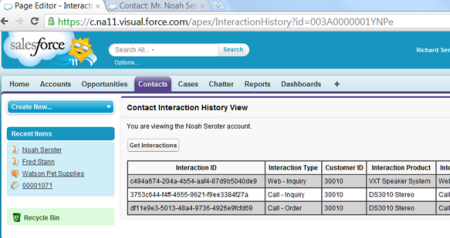
That’s all there is to it. When I add a new row to my SimpleDB database, it is instantly shown in my on-site .NET app, my Cloud Foundry app and my Force.com app. No file sharing, no synchronization needed.
Summary
The shared database pattern is a useful one when you need to have the same data instantly available to all consumers. In my three examples here, both on-site and cloud applications shared a single cloud database. This allowed them to all have a completely accurate view of whatever interactions a given customer had with a company. This sort of pattern works well for reference data where you have limited points of possible contention.
In the next post, I’ll walk through a way to do remote procedure invocation with cloud applications.

 Richard Seroter's Architecture Musings