Category: AWS

  • Comparing Clouds : IaaS Scalability Options

    In my first post of this series, I looked at the provisioning experience of five leading cloud Infrastructure-as-a-Service providers. No two were alike, as each offered a unique take.

    Elasticity is an oft-cited reason for using the cloud, so scalability is a key way to assess the suitability of a given cloud to your workloads. Like before, I’ll assess Google Compute Engine, Microsoft Azure, AWS, CenturyLink Cloud, and Digital Ocean. Each cloud will be evaluated based on the ability to scale vertically (i.e. add/remove instance capacity) and horizontally (i.e. add/remove instances) either manually or automatically.

    Let’s get going in alphabetical order.

    DISCLAIMER: I’m the product owner for the CenturyLink Cloud. Obviously my perspective is colored by that. However, I’ve taught three well-received courses on AWS, use Microsoft Azure often as part of my Microsoft MVP status, and spend my day studying the cloud market and playing with cloud technology. While I’m not unbiased, I’m also realistic and can recognize strengths and weaknesses of many vendors in the space.

    Amazon Web Services

    How do you scale vertically?

    In reality, AWS treats individual virtual servers as immutable. There are some complex resizing rules, and local storage cannot be resized at any time.  Resizing an AWS image also results in all new public and private IP addresses. Honestly, you’re really building a new server when you choose to resize.

    If you want to add CPU/memory capacity to a running virtual machine – and you’re not trying to resize to an instance type of a different virtualization type – then you must stop it first.  You cannot resize instances between different virtualization types, so you may want to carefully plan for this. Note that stopping an AWS VM means that anything on the ephemeral storage is destroyed.

    2014.11.19cloud01

    Once the VM is stopped, it’s easy to switch to a new instance type. Note that you have to be familiar with the instance types (e.g. size and cost) as you aren’t given any visual indicator of what you’re signing up for. Once you choose a new instance type, simply start up the instance.

    2014.11.19cloud02

    Want to add storage to an existing AWS instance? You don’t do that from the “instances” view in their Console, but instead, create an EBS volume separately and attach it later.
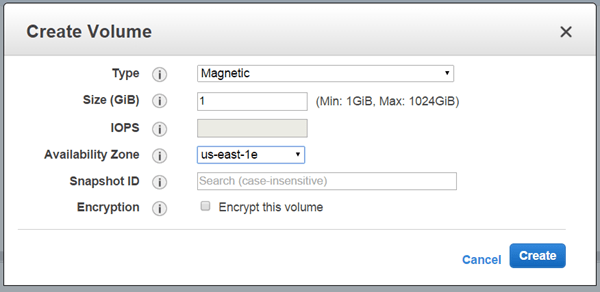
    2014.11.19cloud03

    Attaching is easy, but you do have to remember your instance name.
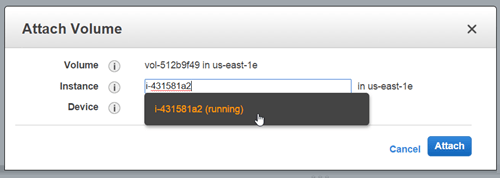
    2014.11.19cloud04

    By changing instance type, and adding EBS volumes, teams can vertically scale their resources.

    How do you scale horizontally?

    AWS strongly encourages customers to build horizontally-scalable apps, and their rich Auto Scaling service supports that. Auto Scaling works by adding (or removing) virtual resources from a pool based on policies.

    2014.11.19cloud05

    When creating an Auto Scaling policy, you first choose the machine image profile (the instance type and template to add to the Auto Scale group), and then define the Auto Scale group. These details include which availability zone(s) to add servers to, how many servers to start with, and which load balancer pool to use.

    2014.11.19cloud06

    With those details in place, the user then sets up the scaling policy (if they wish) which controls when to scale out and when to scale in. One can use Auto Scale to keep the group at a fixed size (and turn up instances if one goes away), or keep the pool size fluid based on usage metrics or schedule.
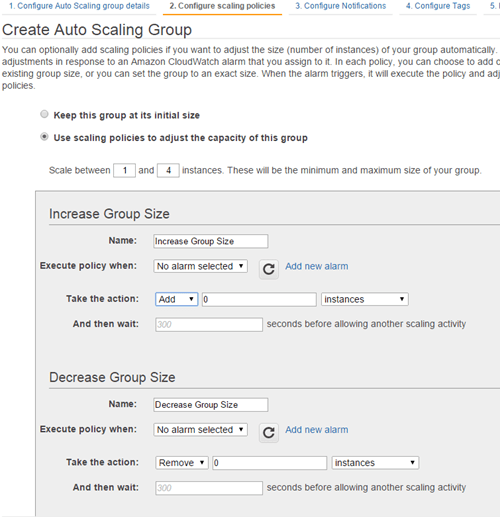
    2014.11.19cloud07

    Amazon has a very nice horizontal scaling solution that works automatically, or manually. Users are free to set up infrastructure Auto Scale groups, or, use AWS-only services like Elastic Beanstalk to wrap up Auto Scale in an application-centric package.

    CenturyLink Cloud

    How do you scale vertically?

    CenturyLink Cloud offers a few ways to add new capacity to existing virtual servers.

    First off, users can resize running servers by adding/removing vCPUs and memory, and growing storage. When adding capacity, the new resources are typically added without requiring a power cycle on the server and there’s no data loss associated with a server resize. Also, note that when you look at dialing resources up and down, the projected impact on cost is reflected.

    2014.11.19cloud08

    Users add more storage to a given server by resizing any existing drives (including root) and by adding entirely new volumes.

    2014.11.19cloud10

    If the cloud workload has spiky CPU consumption, then the user can set up a vertical Autoscale policy that adds and removes CPU capacity. When creating these per-server policies, users choose a CPU min/max range, how long to collect metrics before scaling, and how long to wait before another scale event (“cool down period”). Because scaling down (removing vCPUs) requires a reboot, the user is asked for a time window when it’s ok to cycle the server.
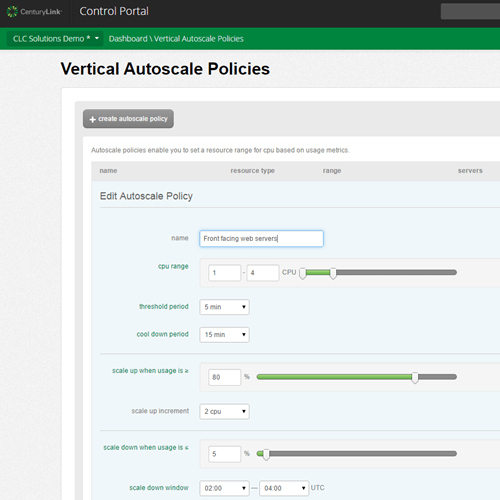
    2014.11.19cloud09


    How do you scale horizontally?

    Like any cloud, CenturyLink Cloud makes it easy to manually add new servers to a fleet. Over the summer, CenturyLink added a Horizontal Autoscale service that powers servers on and off based on CPU and memory consumption thresholds. These policies – defined once and available in any region – call out minimum sizing, monitoring period threshold, cool down period, scale out increment, scale in increment, and CPU/RAM utilization thresholds.

    2014.11.19cloud11

    Unlike other public clouds, CenturyLink organizes servers by “groups.” Horizontal Autoscale policies are applied at the Group level, and are bound to a load balancer pool when applied. When a scale event occurs, the servers are powered on and off within seconds. Parked servers only incur cost for storage and OS licensing (if applicable), but there still is a cost to this model that doesn’t exist in the AWS-like model of instantiating and tearing down servers each time.

    2014.11.19cloud12

    CenturyLink Cloud provides a few ways to quickly scale vertically (manually or automatically without rebooting), and now, horizontally. While the autoscaling capability isn’t as feature-rich as what AWS offers, the platform recognizes the fact that workloads have different scale vectors and benefit from capacity being added up or out.

    Digital Ocean

    How do you scale vertically?

    Digital Ocean offers a pair of ways to scale a droplet (virtual instance).

    First, users can do a “Fast-Resize” which quickly increases or decreases CPU and memory. A droplet must be powered off to resize.

    2014.11.19cloud13

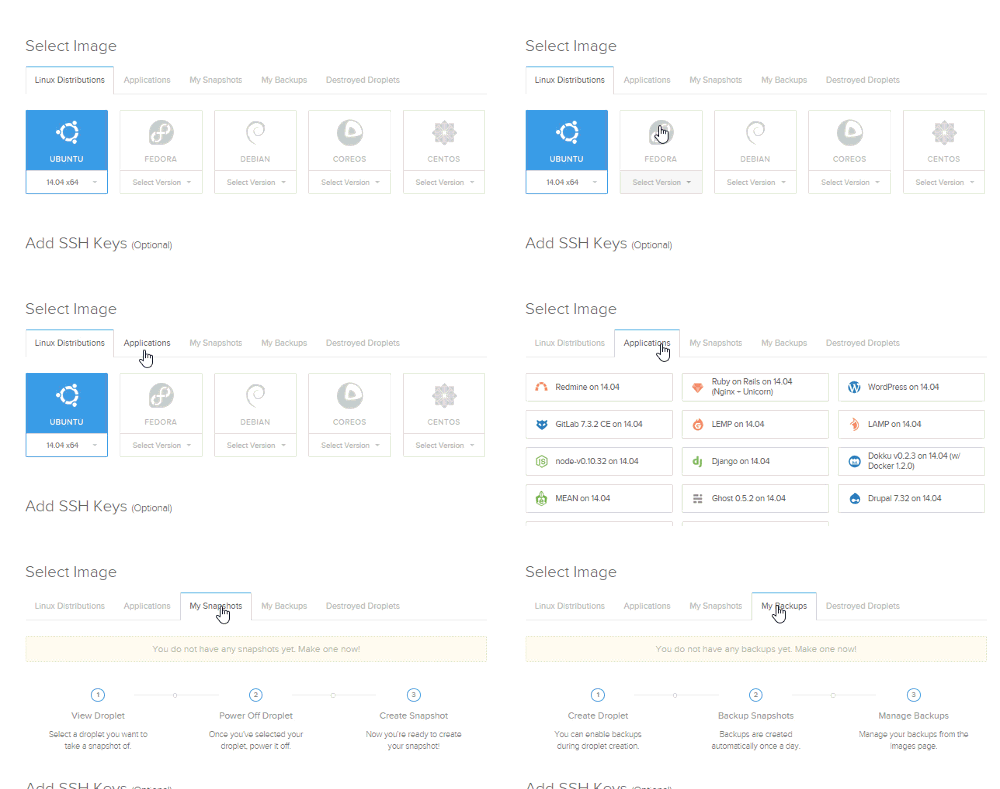
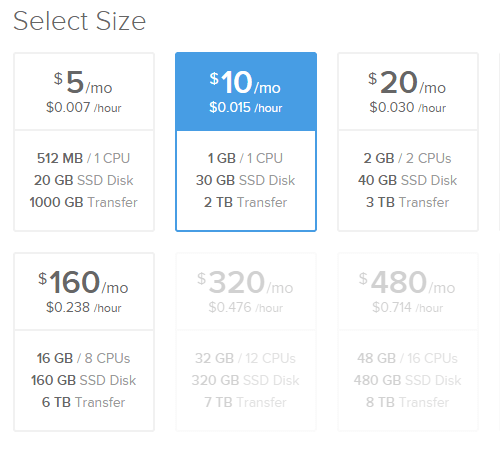
    After shutting the droplet down and choosing a new droplet size, the additional capacity is added in seconds.
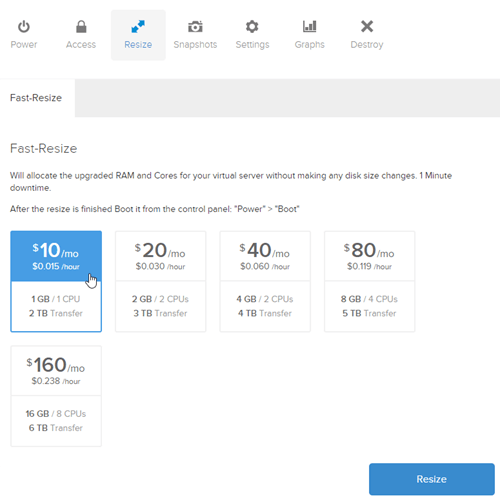
    2014.11.19cloud15

    Once a droplet is sized up, it’s easy to (power off) and size down again.
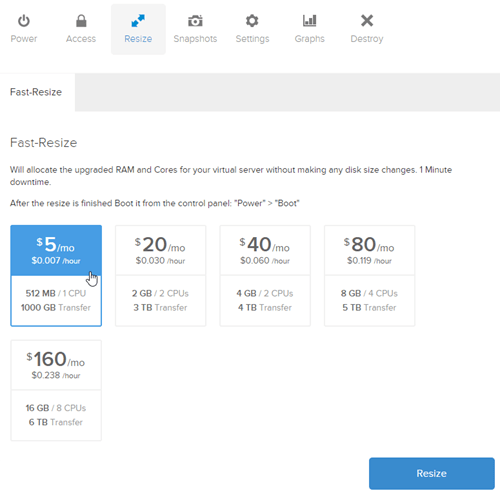
    2014.11.19cloud16

    If you want to change your disk size as well, Digital Ocean offers a “Migrate-Resize” model where you first take a snapshot of your (powered off) droplet.

    2014.11.19cloud17

    Then, you create an entirely new droplet, but choose that snapshot as the “base.” This way, you end up with a new (larger) droplet with all the data from the original one.

    2014.11.19cloud18


    How do you scale horizontally?

    You do it manually. There are no automated techniques for adding more machines when a usage threshold is exceeded. They do tout their API as a way to detect scale conditions and quickly clone droplets to add more to a running fleet.

    Digital Ocean is known for its ease, performance, and simplicity. There isn’t the level of sophistication and automation you find elsewhere, but the scaling experience is very straightforward.

    Google Compute Engine

    How do you scale vertically?

    Google lets you add more storage to a running virtual machine. Persistent disks can be shared among many machines, although only one machine at a time can have read/write permission.

    2014.11.19cloud20

    Interestingly, Google Compute Engine doesn’t support an upgrade/downgrade to different instance types, so there’s no way to add/remove CPU or memory from a machine. They recommend creating a new virtual machine and attaching the persistent disks from the original one. So, “more storage” is the only vertical scaling capability currently offered here.

    How do you scale horizontally?

    Up until a week ago, Google didn’t have an auto scaling solution. That changed, and now the Compute Engine Autoscaler is in beta.

    First, you need to set up an instance template for use by the Autoscaler. This is the same data you provide when creating an actual running instance. In this case, it’s template-ized for future use.

    2014.11.19cloud21

    Then, create an instance group that lets you collectively manage a group of resources. Here’s the view of it, before I chose to set “Autoscaling” to “On.”
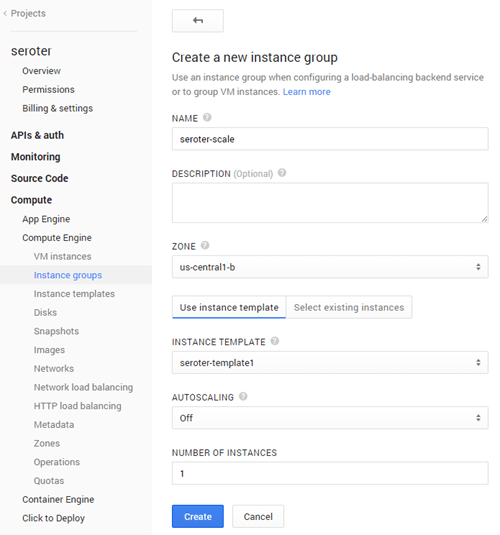
    2014.11.19cloud22

    Turning Autoscaling on results in new settings popping up. Specifically, the autoscale trigger (choices: CPU usage, HTTP load balancer usage, monitoring metric), the usage threshold, instance min/max, and cool-down period.
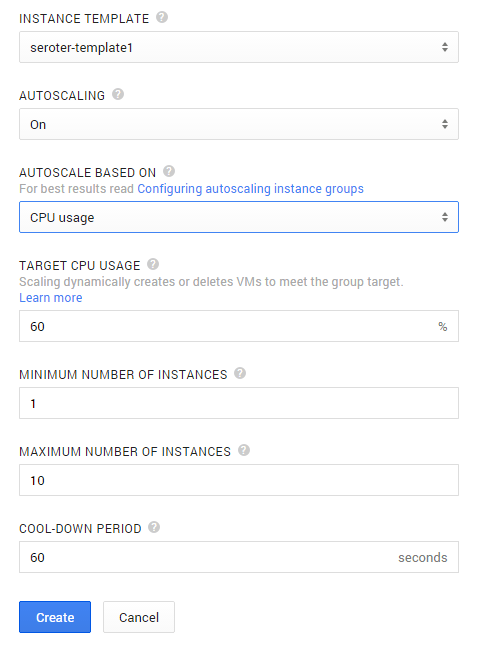
    2014.11.19cloud23

    You can use this with HTTP or network load balanced instance groups to load balance multiple app tiers independently.

    Google doesn’t offer much in the way of vertical resizing, but the horizontal auto scaling story is quickly catching up to the rest.

    Microsoft Azure

    How do you scale vertically?

    Microsoft provides a handful of vertical scaling options. For a virtual server instance, a user can change the instance type in order to get more/less CPU and memory. It appears from my testing that this typically requires a reboot of the server.

    2014.11.19cloud24

    Azure users can also add new, empty disks to a given server. It doesn’t appear as if you can resize existing disks.

    2014.11.19cloud25

    How do you scale horizontally?

    Microsoft, like all clouds, makes it easy to add more virtual instances manually. They also have a horizontal auto scale capability. First, you must put servers into an “availability set” together. This is accomplished by first putting them into the same “cloud service” in Azure. In the screenshot below, seroterscale is the name of my cloud service, and both the two instances are part of the same availability set.

    2014.11.19cloud26

    Somewhat annoyingly, all these machines have to be the exact same size (which is the requirement in some other clouds too, minus CenturyLink). So after I resized my second server, I was able to muck with the auto scale settings. Note that Azure auto scale also works by enabling/disabling existing virtual instances versus creating or destroying instances.
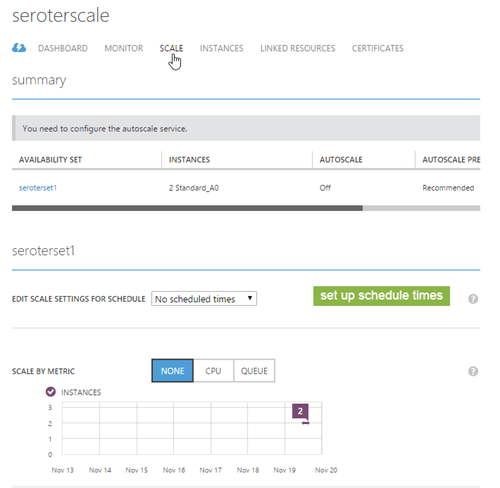
    2014.11.19cloud27

    Notice that you have two choices. First, you can scale based on scheduled time.

    2014.11.19cloud28

    Either by schedule or by metric, you specify how many instances to turn on/off based on the upper/lower CPU threshold. It’s also possible to scale based on the queue depth of a Service Bus queue.

    2014.11.19cloud29

    Microsoft gives you a few good options for bumping up the resources on existing machines, while also enabling more servers in the fleet to offset planned or unplanned demand.

    Summary

    As with my assessment of cloud provisioning experiences, each cloud provider’s scaling story mirrors their view of the world. Amazon has a broad, sophisticated, and complex feature set, and their manual and Auto Scaling capabilities reflects that. CenturyLink Cloud focuses on greenfield and legacy workloads, and thus has a scaling story that’s focused on supporting both modern scale-out systems as well as traditional systems that prefer to scale up. Digital Ocean is all about fast acquisition of resources and an API centric management story, and their basic scaling options demonstrate that. Google focuses a lot on quickly getting lots of immutable resources, and their limited vertical scaling shows that. Their new horizontal scaling service complements their perspective. Finally, Microsoft’s experience for vertical scaling mirrors AWS, while their horizontal scaling is a bit complicated, but functional.

    Unless you’re only working with modern applications, it’s likely your scaling needs will differ by application. Hopefully this look across providers gave you a sense for the different capabilities out there, and what you might want to keep in mind when designing your systems!

  • Comparing Clouds: IaaS Provisioning Experience

    Comparing Clouds: IaaS Provisioning Experience

    There is no perfect cloud platform. Shocking, I know. Organizations choose the cloud that best fits their values and needs. Many factors go into those choices, and it can depend on who is evaluating the options. A CIO may care most about the vendor’s total product portfolio, strategic direction, and ability to fit into the organization’s IT environment. A developer may look at which cloud offers the ability to compose and deploy the most scalable, feature-rich applications. An Ops engineer may care about which cloud gives them the best way to design and manage a robust, durable environment. In this series of blogs posts, I’m going to look at five leading cloud platforms (Microsoft Azure, Google Compute Engine, AWS, Digital Ocean, and CenturyLink Cloud) and briefly assess the experience they offer to those building and managing their cloud portfolio. In this first post, I’ll flex the infrastructure provisioning experience of each provider.

    DISCLAIMER: I’m the product owner for the CenturyLink Cloud. Obviously my perspective is colored by that. However, I’ve taught three well-received courses on AWS, use Microsoft Azure often as part of my Microsoft MVP status, and spend my day studying the cloud market and playing with cloud technology. While I’m not unbiased, I’m also realistic and can recognize strengths and weaknesses of many vendors in the space.

    I’m going to assess each vendor across three major criteria: how do you provision resources, what key options are available, and what stands out in the experience.

    Microsoft Azure

    Microsoft added an IaaS service last year. Their portfolio of cloud services is impressive as they continue to add unique capabilities.

    How do you provision resources?

    Nearly all Azure resources are provisioned from the same Portal (except for a few new services that are only available in their next generation Preview Portal). Servers can be built via API as well. Users can select from a range of Windows and Linux templates (but no Red Hat Linux). Microsoft also offers some templates loaded with Microsoft software like SharePoint, Dynamics, and BizTalk Server.

    2014.10.19provision01

    When building a server, users can set the server’s name and select from a handful of pre-defined instance sizes.

    2014.10.19provision02

    Finally, the user sets the virtual machine configuration attributes and access ports.

    2014.10.19provision03

    What key options are available?

    Microsoft makes it fairly easy to reference to custom-built virtual machine image templates when building new servers.

    2014.10.19provision04

    Microsoft lets you set up or reference a “cloud service” in order to set up a load balanced pool

    2014.10.19provision06

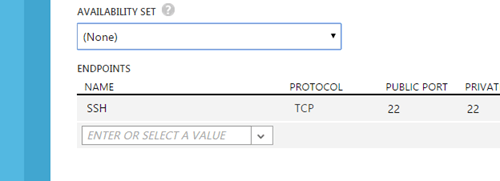
    Finally, there’s an option to spread the server across fault domains via “availability sets” and set up ports for public access.

    2014.10.19provision07

    What stands out?

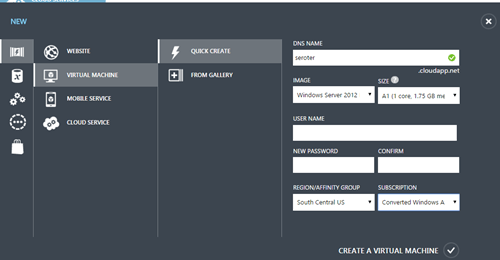
    Microsoft offers a “Quick Create” option where users can spin up VMs by just providing a couple basic values.

    2014.10.19provision08

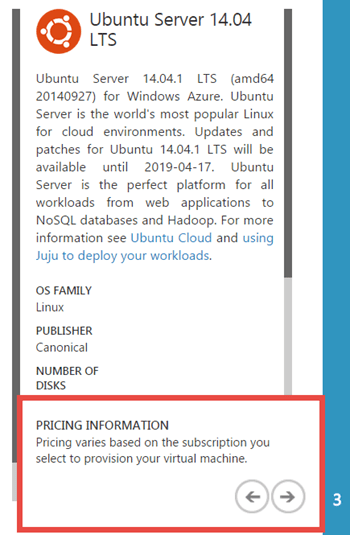
    Lots of VM instance sizes, no sense of the cost while you’re walking through the provisioning process.

    2014.10.19provision09

    Developers can choose from any open source image hosted in the VM Depot. This gives users a fairly easy way to deploy a variety of open source platforms onto Azure.

    2014.10.19provision05

    Google Compute Engine

    Google also added an IaaS product to their portfolio last year. They don’t appear to be investing much in the UI experience, but their commitment to fast acquisition of robust servers is undeniable.

    How do you provision resources?

    Servers are provisioned from the same console used to deploy most any Google cloud service. Of course, you can also provision servers via the REST API.

    2014.10.19provision10

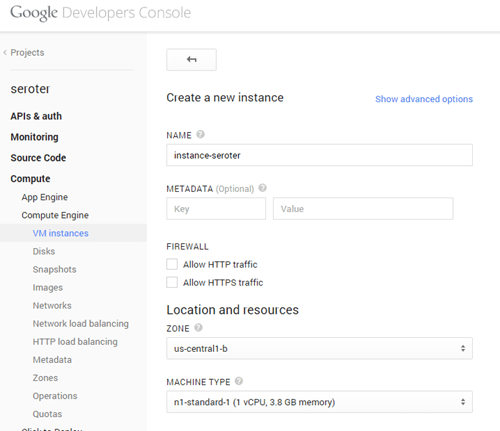
    By default, users see a basic server provisioning page.

    2014.10.19provision11

    The user chooses a location for their server, what instance size to use, the base OS image, which network to join, and whether to provide a public IP address.

    2014.10.19provision12

    What key options are available?

    Google lets you pick your boot disk (standard or SSD type).

    2014.10.19provision13

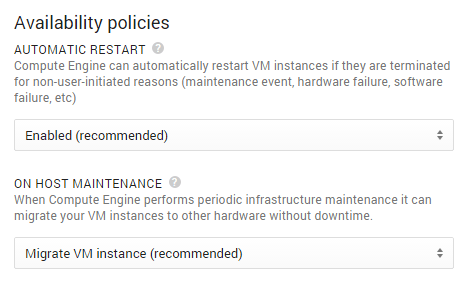
    Users have the choice of a few “availability options.” This includes an automatic VM restart for non-user initiated actions (e.g. hardware failure), and the choice to migrate or terminate VMs when host maintenance occurs.

    2014.10.19provision14

    Google let’s you choose which other Google services you can access from a cloud VM.

    2014.10.19provision15

    What stands out?

    Google does a nice job of letting you opt-in to specific behavior. For instance, you choose whether to allow HTTP/HTTPS traffic, whether to use fixed or ephemeral public IPs, how host failures/maintenance should be handled, and which other services can be accessed, Google gives a lot of say to the user. It’s very clear as to what each option does. While there are some things you may have to look up to understand (e.g. “what exactly is their concept of a ‘network’?”), the user experience is very straightforward and easy enough for a newbie and powerful enough for a pro.

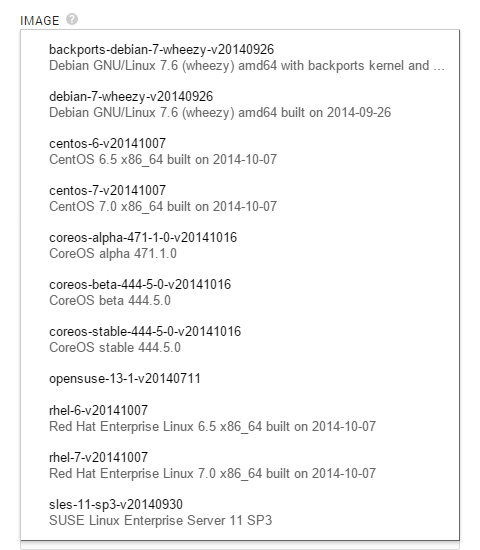
    Another thing that stands out here is the relatively sparse set of built-in OS options. You get a decent variety of Linux flavors, but no Ubuntu. And no Windows.

    2014.10.19provision16

    Amazon Web Services

    Amazon EC2 is the original IaaS, and AWS has since added tons of additional application services to their catalog.

    How do you provision resources?

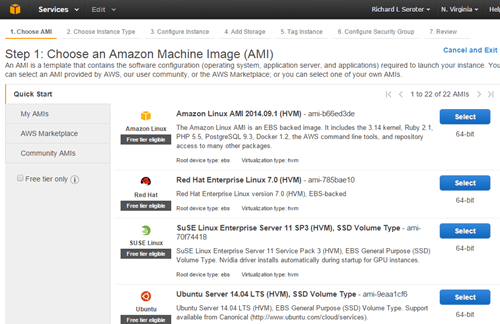
    AWS gives you both a web console and API to provision resources. Provisioning in the UI starts by asking the user to choose a base machine image. There are a set of “quick start” ones, you can browse a massive catalog, or use a custom-built one.

    2014.10.19provision17

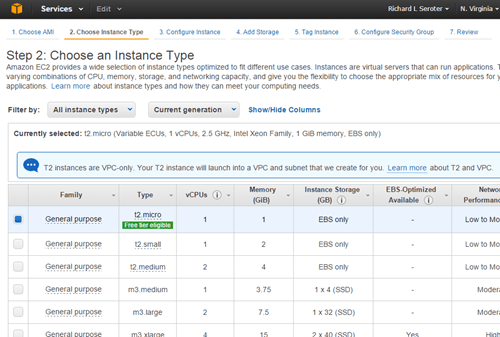
    Once the user chooses the base template, they select from a giant list of instance types. Like the above providers, this instance type list contains a mix of different sizes and performance levels.

    2014.10.19provision18

    At this stage, you CAN “review and launch” and skip the more advanced configuration. But, we’ll keep going. This next step gives you options for how many instances to spin up, where to put this (optionally) in a virtual private space,

    2014.10.19provision19

    Next you can add storage volumes to the instance, set metadata tags on the instance, and finally configure which security group to apply. Security groups act like a firewall policy.

    2014.10.19provision20

    What key options are available?

    The broader question might be what is NOT available! Amazon gives users a broad set of image templates to pick from. That’s very nice for those who want to stand up pre-configured boxes with software ready to go. EC2 instance sizes represent a key decision point, as you have 30+ different choices. Each one serves a different purpose.

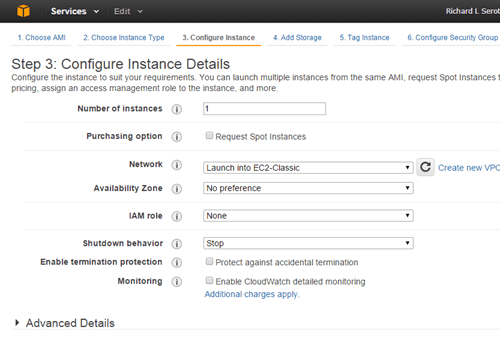
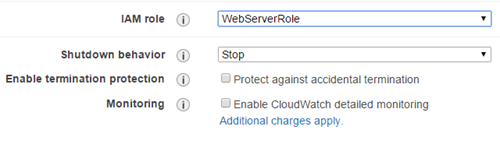
    AWS offers some instance configurations that are very important to the user. Identity and Access Management (IAM) roles are nice because it lets the server run with a certain set of credentials. This way, the developer doesn’t have to embed credentials on the server itself when accessing other AWS services.  The local storage in EC2 is ephemeral, so the “shutdown behavior” option is important. If you stop a box, you retain storage, if you terminate it, any local storage is destroyed.

    2014.10.19provision21

    Security groups (shown above) are ridiculously important as they control inbound traffic. A casual policy gives you a large attack surface.

    What stands out?

    It’s hard to ignore the complexity of the EC2 provisioning process. It’s very powerful, but there are a LOT of decisions to make and opportunities to go sideways. Users need to be smart and consider their choices carefully (although admittedly, many instance-level settings can be changed after the fact if a mistake is made).

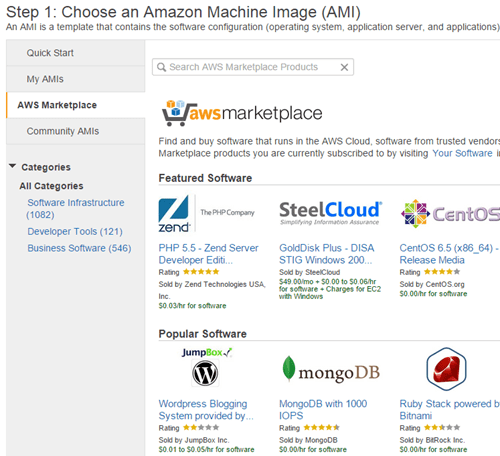
    The AWS community catalog has 34,000+ machine images, and the official marketplace has nearly 2000 machine images. Pretty epic.

    2014.10.19provision23

    Amazon makes it easy to spin up many instances of the same type. Very handy when building large clusters of identical machines.

    2014.10.19provision22

    Digital Ocean

    Digital Ocean is a fast-growing, successful provider of virtual infrastructure.

    How do you provision resources?

    Droplets (the Digital Ocean equivalent of a virtual machine) are provisioned via web console and API. For the web console, it’s a very straightforward process that’s completed in a single page. There are 9 possible options (of which 3 require approval to use) for Droplet sizing.

    2014.10.19provision24

    The user then chooses where to run the Droplet, and which image to use. That’s about it!

    What key options are available?

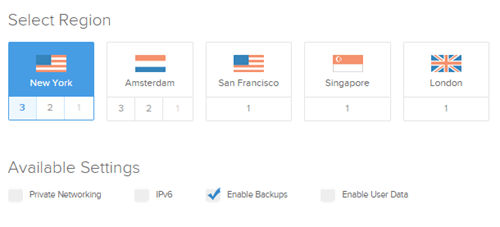
    Hidden beneath this simple façade are some useful options.  First, Digital Ocean makes it easy to choose which location, and see what extended options are available in each. The descriptions for each “available setting” are a bit light, so it’s up the user to figure out the implications of each.

    2014.10.19provision25

    Digital Ocean just supports Linux, but they offer a good list of distributions, and even some ready-to-go application environments.

    2014.10.19provision26

    What stands out?

    Digital Ocean thrives on simplicity and clear pricing. Developers can fly through this process when creating servers, and the cost of each Droplet is obvious.

    2014.10.19provision27

    CenturyLink Cloud

    CenturyLink – a global telecommunications company with 50+ data centers and $20 billion in annual revenue –  has used acquisitions to build out its cloud portfolio. Starting with Savvis in 2011, and then continuing with AppFog and Tier 3 in 2013.

    How do you provision resources?

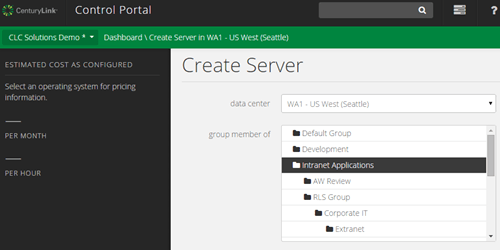
    Like everyone else, CenturyLink Cloud provides both a web and API channel for creating virtual servers. The process starts in the web console by selecting a data center to deploy to, and which collection of servers (called a “group”) to add this to.

    2014.10.19provision28

    Next, the user chooses whether to make the server “managed” or not. A managed server is secured, administered, and monitored by CenturyLink engineers, while still giving the user full access to the virtual server. There are just two server “types” in the CenturyLink Cloud: standard servers with SAN-backed storage, or Hyperscale servers with local SSD storage. If the user chooses a Hyperscale server, they can then select an anti-affinity policy. The user then selects an operating system (or customized template), and will see the projected price show up on the left hand side.

    2014.10.19provision29

    The user then chooses the size of the server and which network to put it on.

    What key options are available?

    Unlike the other clouds highlighted here, the CenturyLink Cloud doesn’t have the concept of “instance sizes.” Instead, users choose the exact amount of CPU, memory, and storage to add to a server. For CPU, users can also choose vertical Autoscale policies that scale a server up and down based on CPU consumption.

    2014.10.19provision30

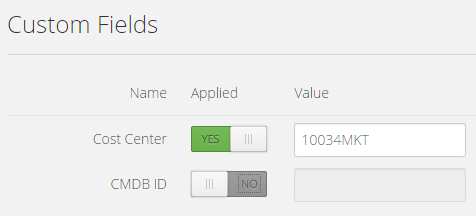
    Like a few other clouds, CenturyLink offers a tagging ability. These “custom fields” can store data that describes the server.

    2014.10.19provision31

    It’s easy to forget to delete a temporary server, so the platform offers the ability to set a time-to-live. The server gets deleted on the date selected.

    2014.10.19provision32

    What stands out?

    In this assessment, only Digital Ocean and CenturyLink actually have price transparency. It’s nice to actually know what you’re spending.

    2014.10.19provision33

    CenturyLink’s flexible sizing is convenient for those who don’t want to fit their app or workload into a fixed instance size. Similar to Digital Ocean, CenturyLink doesn’t offer 19 different types of servers to choose from. Every server has the same performance profile.

    Summary

    Each cloud offers their own unique way of creating virtual assets. There’s great power in offering rich, sophisticated provisioning controls, but there’s also benefit to delivering a slimmed down, focused provisioning experience. There are many commonalities between these services, but each one has a unique value proposition. In my subsequent posts in this series, I’ll look at the post-provisioning management experience, APIs, and more.

  • What Would the Best Franken-Cloud Look Like?

    What if you could take all infrastructure cloud providers and combine their best assets into a single, perfect cloud? What would it look like?

    In my day job, I regularly see the sorts of things that cloud users ask for from a public cloud. These 9 things represent some of the most common requests:

    1. Scale. Can the platform give me virtually infinite capacity anywhere in the world?
    2. Low price. Is the cost of compute/storage low?
    3. Innovative internal platform. Does the underlying platform reflect next-generation thinking that will be relevant in years to come?
    4. On-premises parity. Can I use on-premises tools and technologies alongside this cloud platform?
    5. Strong ecosystem. Is it possible to fill in gaps or enrich the platform through the use of 3rd party products or services? Is there a solid API that partners can work with?
    6. Application services. Are there services I can use to compose applications faster and reduce ongoing maintenance cost?
    7. Management experience. Does the platform have good “day 2” management capabilities that let me function at scale with a large footprint?
    8. Available support. How can I get help setting up and running my cloud?
    9. Simplicity. Is there an easy on-ramp and can I quickly get tasks done?

    Which cloud providers offer the BEST option for each capability? We could argue until we’re blue in the face, but we’re just having fun here. In many cases, the gap between the “best” and “second best” is tiny and I could make the case that a few different clouds do every single item above pretty well. But that’s no fun, so here’s what components of each vendor that I’d combine into the “perfect” cloud.

    DISCLAIMER: I’m the product owner for the CenturyLink Cloud. Obviously my perspective is colored by that. However, I’ve taught three well-received courses on AWS, use Microsoft Azure often as part of my Microsoft MVP status, and spend my day studying the cloud market and playing with cloud technology. While I’m not unbiased, I’m also realistic and can recognize strengths and weaknesses of many vendors in the space.

    2014.08.26cloud1

    Google Compute Engine – BEST: Innovative Platform

    Difficult to judge without insider knowledge of everyone’s cloud guts, but I’ll throw this one to Google. Every cloud provider has solved some tricky distributed systems problems, but Google’s forward-thinking work with containers has made it possible for them to do things at massive scale. While their current Windows Server support is pretty lame – and that could impact whether this is really a legit “use-for-everything cloud” for large companies – I believe they’ll keep applying their unique knowledge to the cloud platform.

    Microsoft Azure – BEST: On-premises Parity, Application Services

    It’s unrealistic to ask any established company to throw away all their investments in on-premises technology and tools, so clouds that ease the transition have a leg up. Microsoft offers a handful of cloud services with on-premises parallels (Active Directory, SQL Server, SharePoint Online, VMs based on Hyper-V) that make the transition simpler. There’s management through System Center, and a good set of hybrid networking options. They still have a lot of cloud-only products or cloud-only constraints, but they do a solid job of creating a unified story.

    It’s difficult to say who has a “better” set of application services, AWS or Microsoft. AWS has a very powerful catalog of services for data storage, application streaming, queuing, and mobile development. I’ll give a slight edge to Microsoft for a better set of application integration services, web app hosting services, and identity services.

    Most of these are modular microservices that can be mashed up with applications running in any other cloud. That’s welcome news to those who prefer other clouds for primary workloads, but can benefit from the point services offered by companies like Microsoft.

    CenturyLink Cloud – BEST: Management Experience

    2014.08.26cloud2Many cloud providers focus on the “acquire stuff” experience and leave the “manage stuff” experience lacking. Whether your cloud resources live for 3 days or three years, there are maintenance activities. CenturyLink Cloud lets you create account hierarchies to represent your org, organize virtual servers into “groups”, act on those servers as a group, see cross-DC server health at a glance, and more. It’s a focus of this platform, and it differs from most other clouds that give you a flat list of cloud servers per data center and a limited number of UI-driven management tools. With the rise of configuration management as a mainstream toolset, platforms with limited UIs can still offer robust means for managing servers at scale. But, CenturyLink Cloud is focused on everything from account management and price transparency, to bulk server management in the platform.
     

    Rackspace – BEST: Support

    Rackspace has recently pivoted from offering a do-it-yourself IaaS and now offers cloud with managed services. “Fanantical Support” has been Rackspace’s mantra for years – and by all accounts, one they’ve lived up to – and now they are committing fully to a white-glove, managed cloud. In addition, they offer DevOps consultative services, DBA services, general professional services, and more. They’ve also got solid support documentation and support forums for those who are trying to do some things on their own. Many (most?) other clouds do a nice job of offering up self-service or consultative support, but Rackspace makes it a core focus.

    Amazon Web Services – BEST: Scale, Ecosystem

    Yes, AWS does a lot of things very well. If you’re looking for a lot of web-scale capacity anywhere in the world, AWS is tough to beat. They clearly have lots of capacity, and run more cloud workloads that pretty much everyone else combined. Each cloud provider seems to be expanding rapidly, but if you are identifying who has scaled the most, you have to say AWS.

    On “ecosystem” you could ague that Microsoft has a strong story, but realistically, Amazon’s got everyone beat. Any decent cloud-enabled tool knows how to talk to the AWS API, there are entire OSS toolsets built around the platform, and they have a marketplace stuffed with virtual appliances and compatible products. Not to mention, there are lots of AWS developers out there writing about the services, attending meetups, and building tools to help other developers out.

    Digital Ocean – BEST: Low Price, Simplicity

    Digital Ocean has really become a darling of developers. Why? Even with the infrastructure price wars going on among the large cloud providers, Digital Ocean has a really easy-to-understand, low price. Whether kicking the tires or deploying massive apps, Digital Ocean gives you a very price-competitive Linux-hosting service. Now, the “total cost of cloud” is a heck of a lot more than compute and storage costs, but, those are factors that resonates with people the most when first assessing clouds.

    For “simplicity”, you could argue for a lot of different providers here. Digital Ocean doesn’t offer a lots of knobs to turn, or organize their platform in a way that maps to most enterprise IT org structures, but you can’t argue with the straightforward user experience. You can go from “Hmm, I wonder what this is?” to “I’m up and running!” in about 60 seconds. That’s … a frictionless experience.

    Summary

    If you did this exercise on your own, you could easily expand the list of capabilities (e.g. ancillary services, performance, configuration options, security compliance), and swap around some of the providers. I didn’t even list out other nice cloud vendors like IBM/SoftLayer, Linode, and Joyent. You could probably slot them into some of the “winner” positions based on your own perspective.

    In reality, there is no “perfect” cloud (yet). There are always tradeoffs associated with each service and some capabilities that matter to you more than others. This thought experiment helped me think through the market, and hopefully gave you a something to consider!

  • Data Stream Processing with Amazon Kinesis and .NET Applications

    Amazon Kinesis is a new data stream processing service from AWS that makes it possible to ingest and read high volumes of data in real-time. That description may sound vaguely familiar to those who followed Microsoft’s attempts to put their CEP engine StreamInsight into the Windows Azure cloud as part of “Project Austin.” Two major differences between the two: Kinesis doesn’t have the stream query aspects of StreamInsight, and Amazon actually SHIPPED their product.

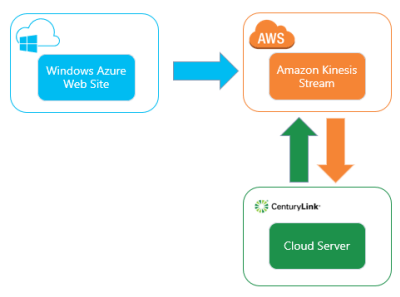
    Kinesis looks pretty cool, and I wanted to try out a scenario where I have (1) a Windows Azure Web Site that generates data, (2) Amazon Kinesis processing data, and (3) an application in the CenturyLink Cloud which is reading the data stream.

    2014.01.08kinesis05

    What is Amazon Kinesis?

    Kinesis provides a managed service that handles the intake, storage, and transportation of real-time streams of data. Each stream can handle nearly unlimited data volumes. Users set up shards which are the means for scaling up (and down) the capacity of the stream. All the data that comes into the a Kinesis stream is replicated across AWS availability zones within a region. This provides a great high availability story. Additionally, multiple sources can write to a stream, and a stream can be read by multiple applications.

    Data is available in the stream for up to 24 hours, meaning that applications (readers) can pull shard records based on multiple schemes: given sequence number, oldest record, latest record. Kinesis uses DynamoDB to store application state (like checkpoints). You can interact with Kinesis via the provided REST API or via platform SDKs.

    What DOESN’T Kinesis do? It doesn’t have any sort of adapter model, so it’s up to the developer to build producers (writers) and applications (readers). There is a nice client library for Java that has a lot of built in logic for application load balancing and such. But for the most part, this is still a developer-oriented solution for building big data processing solutions.

    Setting up Amazon Kinesis

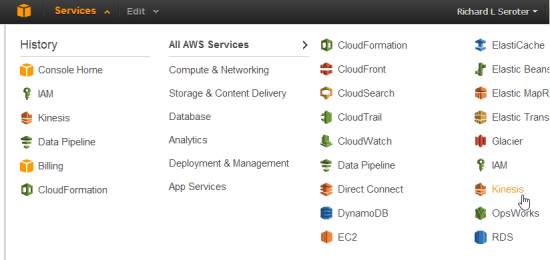
    First off, I logged into the AWS console and located Kinesis in the navigation menu.

    2014.01.08kinesis01

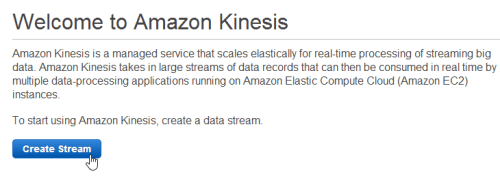
    I’m then given the choice to create a new stream.

    2014.01.08kinesis02

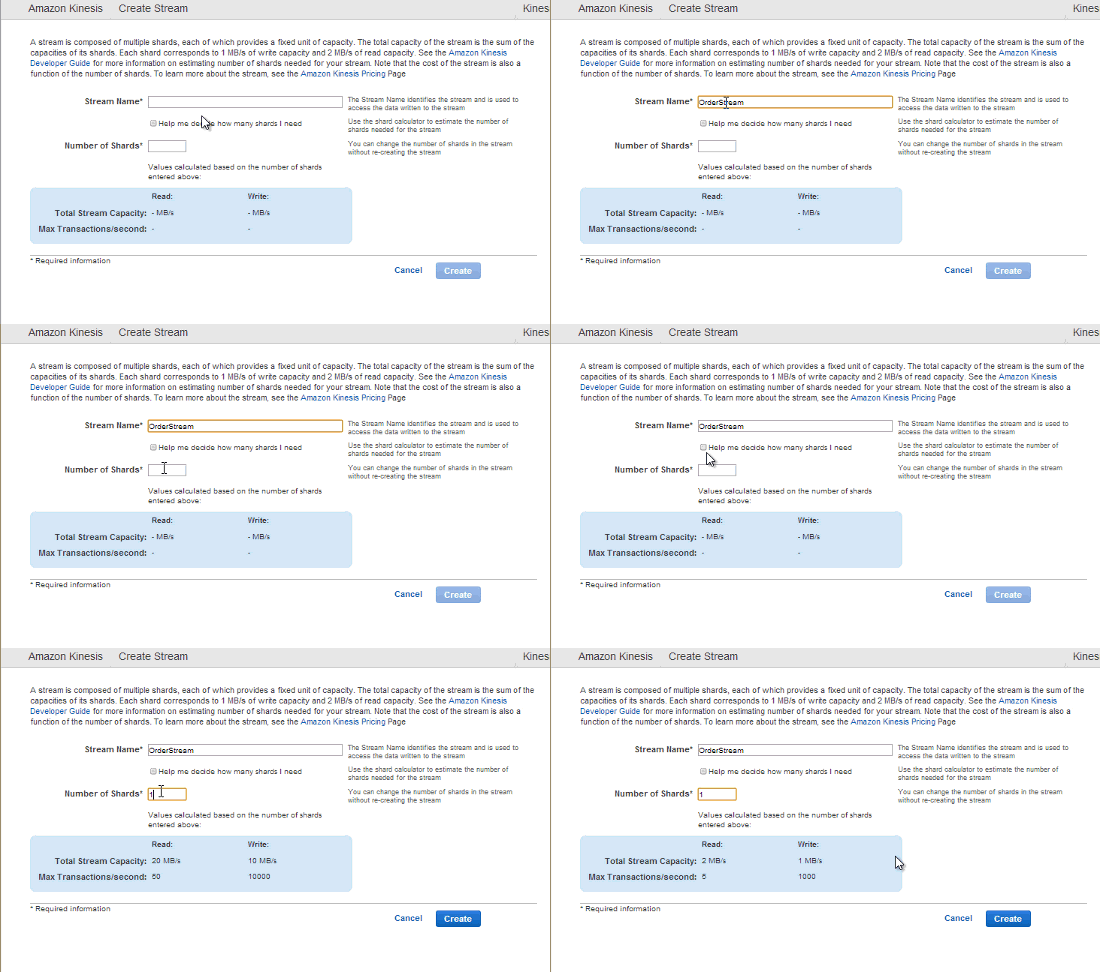
    Next, I need to choose the initial number of shards for the stream. I can either put in the number myself, or use a calculator that helps me estimate how many shards I’ll need based on my data volume.

    2014.01.08kinesis03

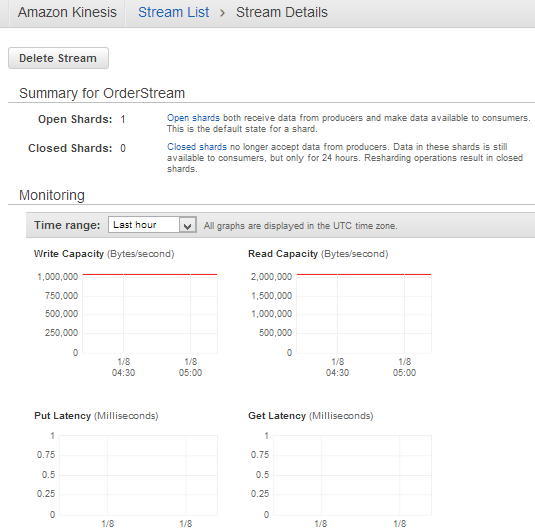
    After a few seconds, my managed Kinesis stream is ready to use. For a given stream, I can see available shards, and some CloudWatch metrics related to capacity, latency, and requests.

    2014.01.08kinesis04

    I now have an environment for use!

    Creating a data producer

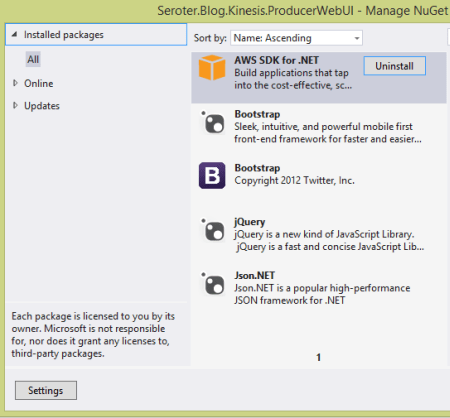
    Now I was ready to build an ASP.NET web site that publishes data to the Kinesis endpoint. The AWS SDK for .NET already Kinesis objects, so no reason to make this more complicated than it has to be. My ASP.NET site has NuGet packages that reference JSON.NET (for JSON serialization), AWS SDK, jQuery, and Bootstrap.

    2014.01.08kinesis06

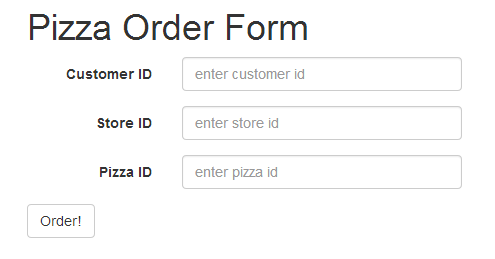
    The web application is fairly basic. It’s for ordering pizza from a global chain. Imagine sending order info to Kinesis and seeing real-time reactions to marketing campaigns, weather trends, and more. Kinesis isn’t a messaging engine per se, but it’s for collecting and analyzing data. Here, I’m collecting some simplistic data in a form.

    2014.01.08kinesis07

    When clicking the “order” button, I build up the request and send it to a particular Kinesis stream. First, I added the following “using” statements:

    using Newtonsoft.Json;
    using Amazon.Kinesis;
    using Amazon.Kinesis.Model;
    using System.IO;
    using System.Text;
    

    The button click event has the following (documented) code.  Notice a few things. My AWS credentials are stored in the web.config file, and I pass in an AmazonKinesisConfig to the client constructor. Why? I need to tell the client library which AWS region my Kinesis stream is in so that it can build the proper request URL. See that I added a few properties to the actual put request object. First, I set the stream name. Second, I added a partition key which is used to place the record in a given shard. It’s a way of putting “like” records in a particular shard.

    protected void btnOrder_Click(object sender, EventArgs e)
        {
            //generate unique order id
            string orderId = System.Guid.NewGuid().ToString();
    
            //build up the CLR order object
            Order o = new Order() { Id = orderId, Source = "web", StoreId = storeid.Text, PizzaId = pizzaid.Text, Timestamp = DateTime.Now.ToString() };
    
            //convert to byte array in prep for adding to stream
            byte[] oByte = Encoding.UTF8.GetBytes(JsonConvert.SerializeObject(o));
    
            //create stream object to add to Kinesis request
            using (MemoryStream ms = new MemoryStream(oByte))
            {
                //create config that points to AWS region
                AmazonKinesisConfig config = new AmazonKinesisConfig();
                config.RegionEndpoint = Amazon.RegionEndpoint.USEast1;
    
                //create client that pulls creds from web.config and takes in Kinesis config
                AmazonKinesisClient client = new AmazonKinesisClient(config);
    
                //create put request
                PutRecordRequest requestRecord = new PutRecordRequest();
                //list name of Kinesis stream
                requestRecord.StreamName = "OrderStream";
                //give partition key that is used to place record in particular shard
                requestRecord.PartitionKey = "weborder";
                //add record as memorystream
                requestRecord.Data = ms;
    
                //PUT the record to Kinesis
                PutRecordResponse responseRecord = client.PutRecord(requestRecord);
    
                //show shard ID and sequence number to user
                lblShardId.Text = "Shard ID: " + responseRecord.ShardId;
                lblSequence.Text = "Sequence #:" + responseRecord.SequenceNumber;
            }
        }
    

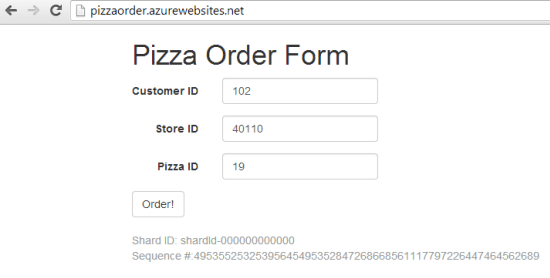
    With the web application done, I published it to a Windows Azure Web Site. This is super easy to do with Visual Studio 2013, and within a few seconds my application was there.

    2014.01.08kinesis08

    Finally, I submitted a bunch of records to Kinesis by adding pizza orders. Notice the shard ID and sequence number that Kinesis returns from each PUT request.

    2014.01.08kinesis09

    Creating a Kinesis application (record consumer)

    To realistically read data from a Kinesis stream, there are three steps. First, you need to describe the stream in order to find out the shards. If I want a fleet of servers to run this application and read the stream, I’d need a way for each application to claim a shard to work on. The second step is to retrieve a “shard iterator” for a given shard. The iterator points to a place in the shard where I want to start reading data. Recall from above that I can start with the latest unread records, oldest records, or at a specific point in the shard. The third and final step is to get the records from a particular iterator. Part of the result set of this operation is a “next iterator” value. In my code, if I find another iterator value, I once again call the “get records” operation to pull any records from that iterator position.

    Here’s the total code block, documented for your benefit.

    private static void ReadFromKinesis()
    {
        //create config that points to Kinesis region
        AmazonKinesisConfig config = new AmazonKinesisConfig();
        config.RegionEndpoint = Amazon.RegionEndpoint.USEast1;
    
       //create new client object
       AmazonKinesisClient client = new AmazonKinesisClient(config);
    
       //Step #1 - describe stream to find out the shards it contains
       DescribeStreamRequest describeRequest = new DescribeStreamRequest();
       describeRequest.StreamName = "OrderStream";
    
       DescribeStreamResponse describeResponse = client.DescribeStream(describeRequest);
       List<Shard> shards = describeResponse.StreamDescription.Shards;
       foreach(Shard s in shards)
       {
           Console.WriteLine("shard: " + s.ShardId);
       }
    
       //grab the only shard ID in this stream
       string primaryShardId = shards[0].ShardId;
    
       //Step #2 - get iterator for this shard
       GetShardIteratorRequest iteratorRequest = new GetShardIteratorRequest();
       iteratorRequest.StreamName = "OrderStream";
       iteratorRequest.ShardId = primaryShardId;
       iteratorRequest.ShardIteratorType = ShardIteratorType.TRIM_HORIZON;
    
       GetShardIteratorResponse iteratorResponse = client.GetShardIterator(iteratorRequest);
       string iterator = iteratorResponse.ShardIterator;
    
       Console.WriteLine("Iterator: " + iterator);
    
       //Step #3 - get records in this iterator
       GetShardRecords(client, iterator);
    
       Console.WriteLine("All records read.");
       Console.ReadLine();
    }
    
    private static void GetShardRecords(AmazonKinesisClient client, string iteratorId)
    {
       //create reqest
       GetRecordsRequest getRequest = new GetRecordsRequest();
       getRequest.Limit = 100;
       getRequest.ShardIterator = iteratorId;
    
       //call "get" operation and get everything in this shard range
       GetRecordsResponse getResponse = client.GetRecords(getRequest);
       //get reference to next iterator for this shard
       string nextIterator = getResponse.NextShardIterator;
       //retrieve records
       List<Record> records = getResponse.Records;
    
       //print out each record's data value
       foreach (Record r in records)
       {
           //pull out (JSON) data in this record
           string s = Encoding.UTF8.GetString(r.Data.ToArray());
           Console.WriteLine("Record: " + s);
           Console.WriteLine("Partition Key: " + r.PartitionKey);
       }
    
       if(null != nextIterator)
       {
           //if there's another iterator, call operation again
           GetShardRecords(client, nextIterator);
       }
    }
    

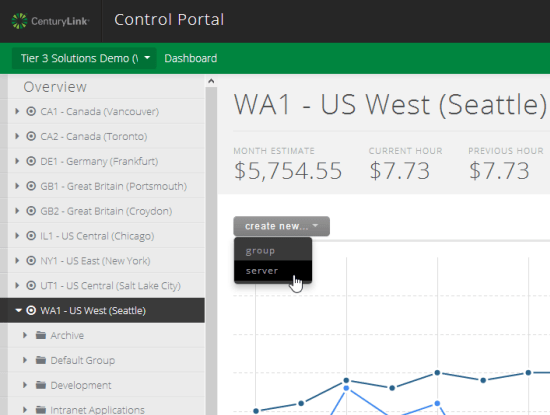
    Now I had a working Kinesis application that can run anywhere. Clearly it’s easy to run this on AWS EC2 servers (and the SDK does a nice job with retrieving temporary credentials for apps running within EC2), but there’s a good chance that cloud users have a diverse portfolio of providers. Let’s say I love the application services from AWS, but like the server performance and management capabilities from CenturyLink. In this case, I built a Windows Server to run my Kinesis application.

    2014.01.08kinesis10

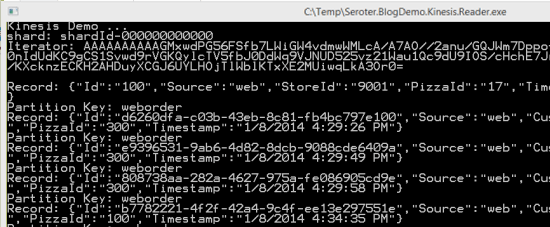
    With my server ready, I ran the application and saw my shards, my iterators, and my data records.

    2014.01.08kinesis11

    Very cool and pretty simple. Don’t forget that each data consumer has some work to do to parse the stream, find the (partition) data they want, and perform queries on it. You can imagine loading this into an Observable and using LINQ queries on it to aggregate data. Regardless, it’s very nice to have a durable stream processing service that supports replays and multiple readers.

    Summary

    The “internet of things” is here, and companies that can quickly gather and analyze data will have a major advantage. Amazon Kinesis is an important service to that end, but don’t think of it as something that ONLY works with other applications in the AWS cloud. We saw here that you could have all sorts of data producers running on devices, on-premises, or in other clouds. The Kinesis applications that consume data can also run virtually anywhere. The modern architect recognizes that composite applications are the way to go, and hopefully this helped you understand another services that’s available to you!

  • Where the heck do I host my … cloud database?

    So far, I’ve looked at options for hosting .NET and Node.js applications in the cloud. But what about the  services that web applications rely on? It’s unlikely that your cloud application will use many on-premises services, so you’ll need things like databases nearby. There are a LOT of relational and NoSQL cloud databases out there. While it’s a perfectly reasonable choice to install and operate a database yourself on someone’s cloud VMs, this assessment looks at “managed” cloud databases. A managed cloud database typically takes care of underlying VM management as well as database tasks like backups.

    I’ve picked out 8 diverse choices (although MANY other interesting services exist), and evaluated them using the following criteria:

    • Type of offering (RDBMS, NoSQL)
    • Technology and versions supported
    • Scalability story
    • High availability options
    • Imposed constraints
    • Pricing plans
    • Administrative access
    • Support material offered

    There are other important factors to consider before actually selecting one of the services below. Make sure to look deeply at the feature set (and lack thereof), SLAs, and data privacy policies.

    Once again, I’m putting these in alphabetical order, which means that Amazon Web Services shows up first, and Windows Azure last. Just like that crafty Jeff Bezos wants.

    Amazon Web Services

    AWS has a variety of database services that offer excellent scale and innovative features.

    Type of Offering Tech and Versions Scalability High Availability
    Relational, NoSQL, and warehouse RDS uses MySQL (5.6.13 and lower), SQL Server (2012, 2008 R2), and Oracle (11.2)DynamoDB is proprietary NoSQL database.

    Redshift is a proprietary data warehouse platform.

    Manually scale RDS instances up and down with minimal downtime.DynamoDB scaling is done by increasing or decreasing the “provisioned throughput”  with impacting availability.

    Redshift scaling occurs by adding or removing nodes in the cluster.

    RDS instances scale up, but do support high availability through “Multi-AZ Deployments” for MySQL or Oracle.DynamoDB is built for high availability by default. Its data is spread across AZs in a region and can withstand server or AZ failure.

    Redshift replicates data across nodes in a (single AZ) cluster and constantly backs up to S3.


    Constraints Pricing Admin Access Support
    For RDS, MySQL or Oracle databases can be up to 3TB in size with 30k IOPS. SQL Server databases can be 1TB in size with up to 10k IOPS.DynamoDB supports up to 10k read/write capacity units (unless you receive special permission). Items can only be 64kb in size, but there is no size limit on an entire table.

    Redshift supports 16 XL nodes (2TB apiece) or 16 8XL nodes (16 TB apiece) per cluster.

    RDS pricing includes an hourly charge for the instance, primary storage, Multi-AZ storage, backup storage, and data transfer out.The pricing in DynamoDB is pretty simple. Pay for provisioned throughput units, storage, and data transfer out.

    For Redshift, you pay for capacity per hour, backup storage, and in some cases, data transfer.

    RDS users can create firewall policies that let them use standard client tools for connecting to DB instances.Few admin tasks exist for DynamoDB, but can use AWS Console and API.

    Access Redshift via API, and database/BI tools.

    For RDS, lots of documentation, some tutorials, support forums, and paid support.DynamoDB has documentation, forums, and paid support.

    Redshift is new, but you’ll find good documentation, forums, and paid support.

    Cloudant

    Cool provider of a distributed, cloud-scale JSON document database. Good when you need a high-performing, CouchDB-friendly environment.

    Type of Offering Tech and Versions Scalability High Availability
    NoSQL (document DB) Cloudant developed BigCouch which is a fork of CouchDB. Scaled horizontally by Cloudant. Run as shared (AWS, Azure, Joyent, Rackspace, SoftLayer) or dedicated (AWS, Rackspace, SoftLayer). Supports cross-data center, multiple writable masters.


    Constraints Pricing Admin Access Support
    No apparent limits on DB size. For shared hosting, pay for data volume and HTTP requests. Compatible with CouchDB API so admins can use other CouchDB-friendly tools. Most of the admin activities are performed by Cloudant. Some documentation, and 24×7 support.

    Engine Yard

    Long-time PaaS provider offers a handful of different managed databases. One of the rare Riak hosters online so far, Engine Yard is good bet for DB hosting if your app is running in their cloud.

    Type of Offering Tech and Versions Scalability High Availability
    Relational and NoSQL. Relational options include PostgreSQL (9.2.x) and MySQL (5.0.x).For NoSQL, EngineYard offers hosted Riak and supports all possible Riak storage backends.

    EngineYard databases run in AWS.

    Can scale PostgreSQL and MySQL servers up to larger server sizes.Riak is setup in a cluster, and it appears that clusters can be resized. PostgreSQL and MySQL can be set up with read replicas, and replication, but those appear to be only HA options.Riak cluster is set up in an AWS region, and balanced between AZs.


    Constraints Pricing Admin Access Support
    PostgreSQL and MySQL databases can be up to 1TB in size (EBS backed).Riak service appears to support up to 1TB per node. Hourly pricing (based on server size), with no extra charge for the database software. Also pay for backups and bandwidth. Access databases from the outside using SSH tunnels and then your preferred management tool. Offer knowledge base, ticketing system, and paid support plans.

    Google

    Google offers a couple different databases for cloud developers. The options differ in maturity, but both offer viable repositories.

    Type of Offering Tech and Versions Scalability High Availability
    Relational and NoSQL. Google Cloud SQL in based on MySQL (5.5).The Google Cloud Datastore is a preview service and came from the Google App Engine High Replication Datastore (BigTable). For Cloud SQL, users can switch between instance sizes to adjust capacity.Cloud Datastore writes scales automatically. Cloud SQL supports either sync or async replication to multiple geographic locations.Cloud Datastore is replicated (in real time) across data centers.


    Constraints Pricing Admin Access Support
    For Google Cloud SQL, Maximum request/response size is 16MB. Databases can be up to 100GB in size.The Cloud Datastore has no maximum amount of stored data, up to 200 indexes, and no limit on reads/writes. Google Cloud SQL can be paid for in package (per day) or per-use (hourly) billing plans. Per-use plans include additional per-hour charge for storage. Both plans requirement payment for outbound traffic.For the Cloud Datastore, you pay an hourly per-GB charge, plus a cost per 100k API operations. Use client tools that support a JDBC connection and Google Cloud SQL driver. Also supports a command line tool.Developers use a tool from Google (gcd) to manage the Cloud Datastore. For Google Cloud SQL, you’ll find documentation, discussion forums, and paid support.Support for the Cloud Datastore can be found in communities, documentation, and a free/paid ticketing system.

    NuoDB

    Offers a “newSQL” product which is an object-oriented, peer-to-peer, transactional database. Powerful choice for on-premises or cloud data storage.

    Type of Offering Tech and Versions Scalability High Availability
    Relational. Proprietary, patented technology base. Supports manual scale out of more hosts and can also apparently add capacity to existing hosts. Journaling ensures that writes are committed to disk, and they offer multiple ways to configure the hosts in a highly available (geo-distributed, multi-master) way.


    Constraints Pricing Admin Access Support
    Amazon-hosted version has 1TB of storage, although seemingly you could add more.They also list a handful of SQL-related limits for the platform. NuoDB has three editions. The developer edition is free, the Pro version is “pay as you scale”, and the cloud version is based on usage in AWS. See here for a comparison of each. Offer a handful of CLI tools, visual consoles, and integration with 3rd party management tools. NuoDB offers documentation, GitHub samples, and support forums.

    Rackspace

    This leading cloud provider sells their own managed cloud database, and recently acquired another. Good choice for apps running in the Rackspace cloud, or if you need a well-engineering MongoDB environment.

    Type of Offering Tech and Versions Scalability High Availability
    Relational and NoSQL (document) Cloud Databases run MySQL (5.1).ObjectRocket is based on MongoDB. Cloud Databases can be scaled up, but not out.ObjectRocket scales out to more sharded instances. Can happen automatically or manually. The Cloud Database relies on SAN-level replication of data, and not MySQL replication (unsupported).The ObjectRocket “pod” architecture makes it possible to replicate data easily. load balancers are in place, geo-redundancy is available, and backups are built in.


    Constraints Pricing Admin Access Support
    Looks like most Cloud Database interactions are through the API, and rate limits are applied. You are also able to have up to 25 instances, at 150GB each.CloudRocket offers unlimited data storage if you have defined shard keys. Contact them if you need more than 200k operations/second. Cloud Databases are charged per hour. Storage is charged at $0.75 per month.ObjectRocket has four different plans where you pay monthly, per-shard. Some Cloud Database admin functions are exposed through their Control Panel (e.g. provision, resize) and others through API (e.e. backup) or client tools (e.g. import). See more on how to access the DB instance itself. Rackspace provides lots of support options for Cloud Databases, including a ticketing system, community, help desk, and managed services.ObjectRocket support is done via email/chat/phone.

    Salesforce.com (Database.com)

    Recently made a standalone product after providing the backend to Salesforce.com for years, Database.com offers a feature-rich, metadata-driven database for cloud apps.

    Type of Offering Tech and Versions Scalability High Availability
    Relational Oracle underneath, but no exposure of direct capabilities. interact solely with Database.com interface. Pod architecture designed to scale up and out automatically based on demand. Geographically distinct data centers and near real-time replication between them.


    Constraints Pricing Admin Access Support
    No upper limit on storage. Does impose API limits. Free for 3 users, 100k records, 50k transactions. Pay for users, records, and transactions above that. Manage Database.com via web console, Workbench, SOAP/REST API, and platform SDKs. Offer a dev center, discussion boards, support tickets, and paid support plans.

    Windows Azure

    Microsoft has a set of database options that are similar in scope to what AWS offers. Great fit for shared databases between partners or as a companion to a web app running in Windows Azure.

    Type of Offering Tech and Versions Scalability High Availability
    Relational and NoSQL Windows Azure SQL Database runs SQL Server (2012).Windows Azure Table Storage provides a custom, schema-less repository. SQL Database servers can be scaled up. Can also scale usage out through Federations to shard data.Azure Table data is sharded according to a partition key and can support up to 20k transactions per second. For SQL Databases, backups are taken regularly. At least 3 replicas exist for each database.Azure Tables are replicated three times within a given data center.


    Constraints Pricing Admin Access Support
    SQL Databases can be up to 150GB in size. SQL Databases don’t support the full feature set of SQL Server 2012.Azure Table entities can be up to 1MB in size, and tables/accounts can store up to 200TB of data. Pay as you go for SQL Database instances. Different price for reserved capacity. Also pay for bandwidth consumption.Azure Table pricing is rolled up into “Storage” where you pay per GB/hr, and for bandwidth. SQL Databases via REST API, web Management Console, or client tools.Azure Tables can be accessed via REST API (OData) and platform SDKs. Whitepapers, documentation, community forums all free. Also offer paid support plans.

    Summary

    Clearly, there are a ton of choices when considering where to run a database in the cloud. You could choose to run a database yourself on a virtual machine (as all IaaS vendors promote), or move to a managed service where you give up some control, but get back time from offloading management tasks. Most of these services have straightforward web APIs, but do note that migration between each of them isn’t a one-click experience.

    Are there other cloud databases that you like? Add them to the comments below!

  • New Pluralsight course released: “Optimizing and Managing Distributed Systems on AWS”

    My trilogy of AWS courses for Pluralsight is complete. I originally created AWS Developer Fundamentals, then added Architecting Highly Available Systems on AWS, and today released Optimizing and Managing Distributed Systems on AWS.

    This course picks up from where we left off with the last one. By the end of the Architecting Highly Available Systems on AWS course, we had built a fault tolerant ASP.NET-based cloud system that used relational databases, NoSQL databases, queues, load balancers, auto scaling, and more. Now, we’re looking at what it takes to monitor the system, deploy code, add CDNs, and introduce application caching. All of this helps us create a truly high performing, self-healing environment in the cloud. This course has a total of four modules, and each one covers the relevant AWS service, how to consume it, and what the best practices are.

    • Monitoring Cloud Systems with Amazon CloudWatch. Here we talk about the role of monitoring in distributed systems, and dig into CloudWatch. After inspecting the various metrics available to us, we test one and see how to send email-based alerts. We then jump into more complex scenarios and see how to configure Auto Scaling policies that alter the size of the cloud environment based on server CPU utilization.
    • Deploying Web Application Stacks. Deploying apps to cloud servers often requires a new way of thinking. AWS provides three useful deployment frameworks, and this module goes over each one. We discuss the AWS Elastic Beanstalk and see how to push our web application to cloud servers directly from Visual Studio. Then to see how easy it is to change an application – and demonstrate the fun of custom CloudWatch metrics – we deploy a new version of the application that captures unique business metrics. We then look at CloudFormation and how to use the CloudFormer tool to generate comprehensive templates that can deploy an entire system. Finally, we review the new OpsWorks framework and where it’s the right fit.
    • Placing Content Close to Users with CDNs. Content Delivery Networks are an awesome way to offload static content to edge locations that are closer to your users. This module talks about why CDNs matter in distributed systems and shows off Amazon CloudFront. We set up a CloudFront distribution, update our ASP.NET application to use it, and even try out the “invalidation” function to get rid of an old image.
    • Improving Application Performance with ElastiCache. Application caching is super handy and ElastiCache gives you a managed, Memcached-compliant solution. Here we talk about when and what to cache, how Memcached works, what ElastiCache is, how to create and scale clusters, and how to use the cache from .NET code. There’s a handful of demos sprinkled in, and you should get a good sense of how to configure and test a cache.

    It’s been fun crafting these two AWS courses over the summer and I hope you enjoy them!

  • Where the heck do I host my … .NET app?

    In this short series of posts, I’m looking at the various options for hosting different types of applications. I first looked at Node.js and its diverse ecosystem of providers, and now I’m looking at where to host your .NET application. Regardless of whether you think .NET is passé or not, the reality is that there are millions upon millions of .NET developers and it’s one of the standard platforms at enterprises worldwide. Obviously Microsoft’s own cloud will be an attractive place to run .NET web applications, but there may be more options than you think.

    I’m not listing a giant matrix of providers, but rather, I’m going briefly describe 6 different .NET PaaS-like providers and assess them against the following criteria:

    • Versions of the .NET framework supported.
    • Supported capabilities.
    • Commitment to the platform.
    • Complementary services offered.
    • Pricing plans.
    • Access to underlying hosting infrastructure.
    • API and tools available.
    • Support material offered.

    The providers below are NOT ranked. I made it alphabetical to ensure no perception of preference.

    Amazon Web Services

    AWS offers a few ways to host .NET applications, including running them raw on Windows EC2 instances, or via Elastic Beanstalk or CloudFormation for a more orchestrated experience. The AWS Toolkit for Visual Studio gives Windows developers an easy experience for provisioning and managing their .NET applications.

    Versions Capabilities Commitment Add’l Services
    Works with .NET 4.5 and below. Load balancing, health monitoring, versioning (w/ Elastic Beanstalk), environmental variables, Auto Scaling Early partner with Microsoft on licensing, and dedicated Windows and .NET Dev Center, and regularly updated SDKs. AWS has a vast array of complementary services including caching, relational and NoSQL databases, queuing, workflow, and more. Note that many are proprietary to AWS.


    Pricing Plans Infrastructure Access API and Tools Support
    There is no charge for the Elastic Beanstalk or CloudFormation for deployment, and you just pay for consumed compute, memory, storage, and bandwidth. While deployment frameworks like Elastic Beanstalk and CloudFormation wrap an application into a container, you can still RDP into the host Windows servers. AWS has both SOAP and REST APIs for the platform, and apps deployed via Elastic Beanstalk or Cloud Formation can be managed by API. SDK for .NET includes full set of typed objects and Visual Studio plugins. Pretty comprehensive documentation, active discussion forums for .NET, and the option of paid support plans.

    AppHarbor

    AppHarbor has been around for a while and offers a .NET only PaaS platform that actually runs on AWS servers.

    Versions Capabilities Commitment Add’l Services
    Supports .NET 4.5 and older versions. Push via Git/Mercurial/
    Subversion/TFS, unit test integration, load balancing, auto scaling, SSL, worker processes, logging, application management console
    Focused solely on .NET and regularly updated blog indicates active evangelism. Offers an add-ons repository where you can add databases, New Relic APM, queuing, search, email, caching, and more to a given app.


    Pricing Plans Infrastructure Access API and Tools Support
    Pricing page shows three different models ranging from a free tier to $199 per month for more compute capacity. No direct virtual machine access. Fairly comprehensive API for deploying and managing apps and environments. Management console for GUI interactions. Offer knowledge base, discussion forums. Also encourage use of StackOverflow.

    Apprenda

    While not a public PaaS provider, you’d be remiss to ignore this innovative, comprehensive private PaaS for .NET applications. Their SaaS-oriented history is evident in their product which excels at making internal .NET applications multi-tenant, metered, billable, and manageable.

    Versions Capabilities Commitment Add’l Services
    Supports .NET 4.5 and some earlier versions. Load balancing, scaling, versioning, failure recovery, authentication and authorization services, logging, metering, account management, worker processes, rich web UI. Very focused on private PaaS and .NET and recognized by Gartner as a leader in this space. Not going anywhere. Can integrate and manage databases, queuing systems.


    Pricing Plans Infrastructure Access API and Tools Support
    They do not publicly list pricing, but offer a free cloud sandbox, downloadable dev version, and a licensed, subscription based product. It manages existing server environments, and makes it simple to remote desktop into a server. Have REST-based management API, and an SDK for using Apprenda services from .NET application. Visual Studio extension for deploying apps. Offers forums, very thorough documentation, and assumingly some specific support plans for paid customers.

    Snapp

    Brand new product who offers an interesting-looking (beta) public PaaS for .NET applications. Launched by longtime .NET hosting provider DiscountASP.net.

    Versions Capabilities Commitment Add’l Services
    Support for .NET 4.5 Deploy via FTP/Git/web/TFS, staging environment baked in, exception management, versioning, reporting Obviously very new, but good backing and sole focus is .NET. None that I can tell.


    Pricing Plans Infrastructure Access API and Tools Support
    Free beta from now until Sept 2013 when pricing will be announced. None mentioned; using Microsoft Anteres (Web Sites for Windows Server) technology. No API or SDKs identified yet. Developer uses their web UI interface. No KB yet, but forums started.

    Tier 3

    Cloud IaaS provider who also offers a Cloud Foundry-based PaaS called Web Fabric that also supports .NET through the open-source Iron Foundry extensions. Anyone can also take Cloud Foundry + Iron Foundry and run their own multi-language private PaaS within their own data center. FULL DISCLOSURE: This is the company I work for!

    Versions Capabilities Commitment Add’l Services
    .NET 4.0 and previous versions. Scaling, logging, load balancing, per-customer isolated environments, multi-language (Ruby, Java, .NET, Node.js, PHP, Python), basic management from web UI. Strong. Founder and CTO of Tier 3 started Iron Foundry project. Comes with databases such as SQL Server, MySQL, Redis, MongoDB, PostgreSQL. Includes RabbitMQ service. New Relic integration included. Connect with IaaS instances.


    Pricing Plans Infrastructure Access API and Tools Support
    Currently costs $360 for software stack plus IaaS charges. No direct access to underlying VMs, but tunneling to database instances supported. Support for Cloud Foundry APIs. Use Cloud Foundry management tools or community ones like Thor. Knowledge base, ticketing system, phone support included.

    Windows Azure

    The big kahuna. The Microsoft cloud is clearly one to consider whenever evaluating destinations for a .NET application. Depending on the use case, applications can be deployed in virtual machines, Cloud Services, or Web Sites. For this assessment, I’m considering Windows Azure Web Sites.

    Versions Capabilities Commitment Add’l Services
    Support for .NET 4.5 and previous versions. Deploy via Git/TFS/Dropbox, load balancing, auto scaling, SSL, logging, multi-language support (.NET, Node.js, PHP, Python), strong management interface. Do I have to really answer this? Obviously very strong. Access to the wide array of Azure services including SQL Server databases, Service Bus (queues/relay/topics), IaaS services, mobile services and much more.


    Pricing Plans Infrastructure Access API and Tools Support
    Pay as you go, with features dependent on whether you’re using free, shared, or standard tier. None for Windows Azure Web Sites. Can switch to Cloud Services if you need VM-level access. Management via REST API, integrated with Visual Studio tools, PowerShell commandlets available, and SDKs available for different languages. Support forums, good documentation and samples, and paid support available.

    Summary

    The .NET cloud hosting ecosystem may be more diverse than you thought! It’s not as broad as with an open-source platform like Node.js, but that’s not really a surprise given the necessity of running .NET on Windows (ignoring Mono for this discussion). These providers run the gamut from straight up PaaS providers like AppHarbor, to ones with an infrastructure-bent like AWS. Apprenda does a nice job with the private space, and Microsoft clearly offers the widest range of options for hosting a .NET application. However, there are plenty of valid reasons to choose one of the other vendors, so keep your options open when assessing the marketplace!

  • Pluralsight course on “Architecting Highly Available Systems on AWS” is live!

    This summer I’ve been busy putting together my seventh video-on-demand training course for Pluralsight. This one – called Architecting Highly Available Systems on AWS – is now online and ready for your viewing pleasure.

    Of all the courses that I’ve done for Pluralsight, my previous Amazon Web Services one (AWS Developer Fundamentals) remains my most popular. I wanted to stay with this industry-leading cloud platform but try something completely different. It’s one thing to do “how to” courses that just walk through various components independently, but it’s another thing entirely to show how to integrate, secure, and configure a real-life system with a given technology. Building and deploying cloud-scale systems requires thoughtful planning and it’s easy to make incorrect assumptions, so I developed a 4+ hour course that showcases the best practices for architecting and deploying fault tolerant, resilient systems on the AWS cloud.

    2013.07.31aws01

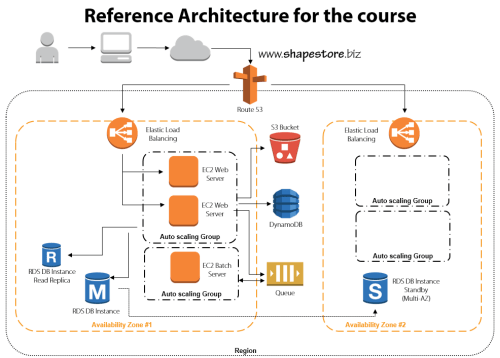
    This course has eight total modules that show you how to build up a bullet-proof cloud app, piece-by-piece. In each module, I explain the role of the technology, how to use it, and the best practices for using it effectively.

    • Module 1: Distributed Systems and AWS. This introductory session jumps right to it. We discuss the characteristics and fallacies of distributed systems, practices for making distributed systems highly available, look at the entire AWS portfolio, and walk through the reference architecture for the course.
    • Module 2: Provisioning Durable Storage with EBS and S3. Here we lay the foundation and choose the appropriate type of storage for our system. We discuss the use of EBS volumes and dig into Amazon S3. This module includes a walkthrough of adding objects to S3, making them public, and configuring a website hosted in S3.
    • Module 3: Setting Up Databases in RDS and DynamoDB. I had the most fun with this module. I do a deep review of Amazon RDS including setting up a MySQL instance, setting up multi-AZ replication for high availability, and read-replicas for better performance. We then test how RDS handles failure with automatic failover to the multi-AZ instance. Next we investigate DynamoDB and use it store ASP.NET session state thanks to the fantastic AWS SDK for .NET.
    • Module 4: Leveraging SQS for Scalable Processing. Queuing can be a key part of a successful distributed application, so we look at how to set up an Amazon SQS queue for sharing content between application tiers.
    • Module 5: Adding EC2 Virtual Machines. We’re finally ready to configure the actual application and web servers! This beefy module jumps into EC2 and how to use Identity and Access Management (IAM) and Security Groups to efficiently and securely provision servers. Then we deploy applications, create Amazon Machine Image (IAM) templates, deploy custom IAM instances, and configure Elastic IPs. Whew.
    • Module 6: Using ELB to Scale Applications. With a basic application running, now it’s time to enhance application availability further. Here we look at the Elastic Load Balancer and how to configure and test it.
    • Module 7: Enabling Auto Scale to Handle Spikes and Troughs. Ideally, (cloud) distributed systems are self-healing and self-regulating and Amazon Auto Scaling is a big part of this. This module shows you how to add Auto Scaling to a system and test it out.
    • Module 8: Configuring DNS with Route 53. The final module ties it all together by adding DNS services. Here you see where I register a domain name, and use Amazon Route 53 to manage the DNS entries and route traffic to the Elastic Load Balancers.

    I had a blast preparing this course, and the “part II” is in progress now. The sequel focuses on tuning and maintaining AWS cloud applications and will build upon everything shown here. If you’re not already a Pluralsight subscriber, now’s a great time to make an investment in yourself and learn all sorts of new things!

  • 3 Rarely Discussed, But Valuable, Uses for Cloud Object Storage

    I’ve got object storage on the brain. I’m finishing up a new Pluralsight course on distributed systems in AWS that uses Amazon S3 in a few places, and my employer Tier 3 just shipped a new Object Storage service based on Riak CS Enterprise. While many of the most touted uses for cloud-based object storage focus on archived data, backups, media files and the like, there are actually 3 more really helpful uses for cloud-based object storage.

    1. Provided a Degraded “Emergency Mode” Website

    For a while, AWS has supported running static websites in S3. What this means is that customers can serve simple static HTML sites out of S3 buckets. Why might you want to do this? A cool blog post last week pointed out the benefits of having a “hot spare” website running in S3 for when the primary site is flooded with traffic. The corresponding discussion on Hacker News called out a bit more of the logistics. Basically, you can use the AWS Route 53 DNS service to mark the S3-hosted website as a failover that is only used when health checks are failing on the primary site. For cases when a website is overloaded because it gets linked from a high-profile social site, or gets flooded with orders from a popular discount promotion, it’s handy to use a scalable, rock solid object storage platform to host the degraded, simple version of a website.

    2013.07.15os01

    2. Partner file transfer

    Last year I wrote about using Amazon S3 or Windows Azure Blob Storage for managed file transfer. While these are no substitute for enterprise-class MFT products, they are also a heck of a lot cheaper. Why use cloud-based object storage to transfer files between business partners? Simplicity, accessibility, and cost. For plenty of companies, those three words do not describe their existing B2B services that rely on old FTP infrastructure. I’d bet that plenty of rogue/creative employees are leveraging services like Dropbox or Skydrive to transfer files that are too big for email and too urgent to wait for enterprise IT staff to configure FTP. Using something like Amazon S3, you have access to ultra-cheap storage that has extreme high availability and is (securely) accessible by anyone with an internet connection.

    I’ve spent time recently looking at the ecosystem of tools for Amazon S3, and it’s robust! You’ll find free, freemium, and paid software options that let you use a GUI tool (much like an FTP browser) or even mount S3 object storage as a virtual disk on your computer. Check out the really nice solutions from S3 Browser, Cloud Berry, DragonDisk, Bucket Explorer, Cross FTP, Cyberduck, ExpanDrive, and more. And because products like Riak CS support the S3 API, most of these tools “just work” with any S3-compliant service. For instance, I wrote up a Tier 3 knowledge base article on how to use S3 Browser and ExpanDrive with our own Tier 3 Object Storage service.

    3. Bootstrap server builds

    You have many choices when deciding how to deploy cloud servers. You could create templates (or “AMIs” in the AWS world) that have all the software and configurations built in, or you could build up the server on the fly with software and configuration scripts stored elsewhere.

    By using cloud-based object storage as a repository for software and scripts, you don’t have to embed them in the templates and have to maintain them. Instead, you can pass in arguments to the cloud server build process and pull the latest bits from a common repository. Given that you shouldn’t ever embed credentials in a cloud VM (because they can change, among other reasons), you can use this process (and built in identity management integration) to have a cloud server request sensitive content – such as ASP.NET web.config with database connection strings – from object storage and load it onto the machine. This could be part of the provisioning process itself (see example of doing it with AWS EMR clusters) or as a startup script that runs on the server. Either way,  consider using object storage as a centrally accessible source for cloud deployments and upgrades!

    Summary

    Cloud-based object storage has lots of uses besides just stashing database backups and giant video files. The easy access and low cost makes it a viable option for the reasons I’ve outlined here. Any other ways you can imagine using it?

  • Creating a “Flat File” Shared Database with Amazon S3 and Node.js

    In my latest Pluralsight video training course – Patterns of Cloud Integration – I addressed application and data integration scenarios that involve cloud endpoints. In the “shared database” module of the course, I discussed integration options where parties relied on a common (cloud) data repository. One of my solutions was inspired by Amazon CTO Werner Vogels who briefly discussed this scenario during his keynote at last Fall’s AWS re:Invent conference. Vogels talked about the tight coupling that initially existed between Amazon.com and IMDB (the Internet Movie Database). Amazon.com pulls data from IMDB to supplement various pages, but they saw that they were forcing IMDB to scale whenever Amazon.com had a burst. Their solution was to decouple Amazon.com and IMDB by injecting a a shared database between them. What was that database? It was HTML snippets produced by IMDB and stored in the hyper-scalable Amazon S3 object storage. In this way, the source system (IMDB) could make scheduled or real-time updates to their HTML snippet library, and Amazon.com (and others) could pummel S3 as much as they wanted without impacting IMDB. You can also read a great Hacker News thread on this “flat file database” pattern as well. In this blog post, I’m going to show you how I created a flat file database in S3 and pulled the data into a Node.js application.

    Creating HTML Snippets

    This pattern relies on a process that takes data from a source, and converts it into ready to consume HTML. That source – whether a (relational) database or line of business system – may have data organized in a different way that what’s needed by the consumer. In this case, imagine combining data from multiple database tables into a single HTML representation. This particular demo addresses farm animals, so assume that I pulled data (pictures, record details) into one HTML file for each animal.

    2013.05.06-s301

    In my demo, I simply built these HTML files by hand, but in real-life, you’d use a scheduled service or trigger action to produce these HTML files. If the HTML files need to be closely in sync with the data source, then you’d probably look to establish an HTML build engine that ran whenever the source data changed. If you’re dealing with relatively static information, then a scheduled job is fine.

    Adding HTML Snippets to Amazon S3

    Amazon S3 has a useful portal and robust API. For my demonstration I loaded these snippets into a “bucket” via the AWS portal. In real life, you’d probably publish these objects to S3 via the API as the final stage of an HTML build pipeline.

    In this case, I created a bucket called “FarmSnippets” and uploaded four different HTML files.

    2013.05.06-s302

    My goal was to be able to list all the items in a bucket and see meaningful descriptions of each animal (and not the meaningless name of an HTML file). So, I renamed each object to something that described the animal. The S3 API (exposed through the Node.js module) doesn’t give you access to much metadata, so this was one way to share information about what was in each file.

    2013.05.06-s303

    At this point, I had a set of HTML files in an Amazon S3 bucket that other applications could access.

    Reading those HTML Snippets from a Node.js Application

    Next, I created a Node.js application that consumed the new AWS SDK for Node.js. Note that AWS also ships SDKs for Ruby, Python, .NET, Java and more, so this demo can work for most any development stack. In this case, I used JetBrains WebStorm and the Express framework  and Jade template engine to quickly crank out an application that listed everything in my S3 bucket showed individual items.

    In the Node.js router (controller) handling the default page of the web site, I loaded up the AWS SDK and issued a simple listObjects command.

    //reference the AWS SDK
    var aws = require('aws-sdk');
    
    exports.index = function(req, res){
    
        //load AWS credentials
        aws.config.loadFromPath('./credentials.json');
        //instantiate S3 manager
        var svc = new aws.S3;
    
        //set bucket query parameter
        var params = {
          Bucket: "FarmSnippets"
        };
    
        //list all the objects in a bucket
        svc.client.listObjects(params, function(err, data){
            if(err){
                console.log(err);
            } else {
                console.log(data);
                //yank out the contents
                var results = data.Contents;
                //send parameters to the page for rendering
                res.render('index', { title: 'Product List', objs: results });
            }
        });
    };
    

    Next, I built out the Jade template page that renders these results. Here I looped through each object in the collection and used the “Key” value to create a hyperlink and show the HTML file’s name.

    block content
        div.content
          h1 Seroter Farms - Animal Marketplace
          h2= title
          p Browse for animals that you'd like to purchase from our farm.
          b Cows
          p
              table.producttable
                tr
                    td.header Animal Details
                each obj in objs
                    tr
                        td.cell
                            a(href='/animal/#{obj.Key}') #{obj.Key}
    

    When the user clicks the hyperlink on this page, it should take them to a “details” page. The route (controller) for this page takes the object ID from the querystring and retrieves the individual HTML snippet from S3. It then reads the content of the HTML file and makes it available for the rendered page.

    //reference the AWS SDK
    var aws = require('aws-sdk');
    
    exports.list = function(req, res){
    
        //get the animal ID from the querystring
        var animalid = req.params.id;
    
        //load up AWS credentials
        aws.config.loadFromPath('./credentials.json');
        //instantiate S3 manager
        var svc = new aws.S3;
    
        //get object parameters
        var params = {
            Bucket: "FarmSnippets",
            Key: animalid
        };
    
        //get an individual object and return the string of HTML within it
        svc.client.getObject(params, function(err, data){
            if(err){
                console.log(err);
            } else {
                console.log(data.Body.toString());
                var snippet = data.Body.toString();
                res.render('animal', { title: 'Animal Details', details: snippet });
            }
        });
    };
    

    Finally, I built the Jade template that shows our selected animal. In this case, I used a Jade technique to unescaped HTML so that the tags in the HTML file (held in the “details” variable) were actually interpreted.

    block content
        div.content
            h1 Seroter Farms - Animal Marketplace
            h2= title
            p Good choice! Here are the details for the selected animal.
            | !{details}
    

    That’s all there was! Let’s test it out.

    Testing the Solution

    After starting up my Node.js project, I visited the URL.

    2013.05.06-s304

    You can see that it lists each object in the S3 bucket and shows the (friendly) name of the object. Clicking the hyperlink for a given object sends me to the details page which renders the HTML within the S3 object.

    2013.05.06-s305

    Sure enough, it rendered the exact HTML that was included in the snippet. If my source system changes and updates S3 with new or changed HTML snippets, the consuming application(s) will instantly see it. This “database” can easily be consumed by Node.js applications or any application that can talk to the Amazon S3 web API.

    Summary

    While it definitely makes sense in some cases to provide shared access to the source repository, the pattern shown here is a nice fit for loosely coupled scenarios where we don’t want – or need – consuming systems to bang on our source data systems.

    What do you think? Have you used this sort of pattern before? Do you have cases where providing pre-formatted content might be better than asking consumers to query and merge the data themselves?

    Want to see more about this pattern and others? Check out my Pluralsight course called Patterns of Cloud Integration.