Category: ASP.NET Web API

  • Creating a continuous integration pipeline in Concourse for a test-infused ASP.NET Core app

    Creating a continuous integration pipeline in Concourse for a test-infused ASP.NET Core app

    Trying to significantly improve your company’s ability to build and run good software? Forget Docker, public cloud, Kubernetes, service meshes, Cloud Foundry, serverless, and the rest of it. Over the years, I’ve learned the most important place you should start: continuous integration and delivery pipelines. Arguably, “apps on pipeline” is the most important “transformation” metric to track. Not “deploys per day” or “number of microservices.” It’s about how many apps you’ve lit up for repeatable, automated deployment. That’s a legit measure of how serious you are about being responsive and secure.

    All this means I needed to get smarter with Concourse, one of my favorite tools for CI (and a little CD). I decided to build an ASP.NET Core app, and continuously integrate and deliver it to a Cloud Foundry environment running in AWS. Let’s go!

    First off, I needed an app. I spun up a new ASP.NET Core Web API project with a couple REST endpoints. You can grab the source code here. Most of my code demos don’t include tests because I’m in marketing now, so YOLO, but a trustworthy pipeline needs testable code. If you’re a .NET dev, xUnit is your friend. It’s maintained by my friend Brad, so I basically chose it because of peer pressure. My .csproj file included a few references to bring xUnit into my project:

    • “Microsoft.NET.Test.Sdk” Version=”15.7.0″
    • “xunit” Version=”2.3.1″
    • “xunit.runner.visualstudio” Version=”2.3.1″

    Then, I created a class to hold the tests for my web controller. I included one test with a basic assertion, and another “theory” with an input data set. These are comically simple, but prove the point!

       public class TestClass {
            private ValuesController _vc;
    public TestClass() {
                _vc = new ValuesController();
            }
    
            [Fact]
            public void Test1(){
                Assert.Equal("pivotal", _vc.Get(1));
            }
    
            [Theory]
            [InlineData(1)]
            [InlineData(3)]
            [InlineData(20)]
            public void Test2(int value) {
                Assert.Equal("public", _vc.GetPublicStatus(value));
            }
        }
    

    When I ran dotnet test against the above app, I got an expected error because the third inline data source led to a test failure, since my controller only returns “public” companies when the input value is between 1 and 10. Commenting the offending inline data source led to a successful test run.

    2018.06.06-concourse-02

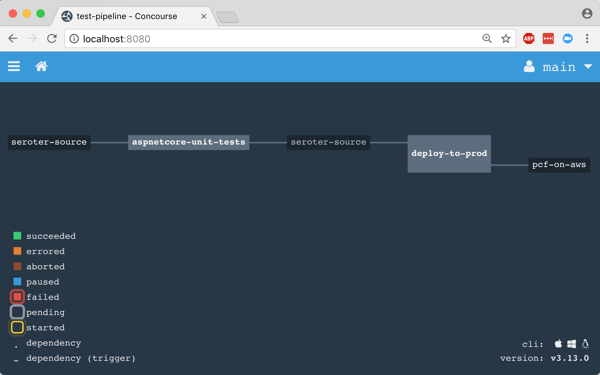
    Ok, the app was done. Now, to put it on a pipeline. If you’ve ever used shameful swear words when wrangling your CI server, maybe it’s worth joining all the folks who switched to Concourse. It’s a pretty straightforward OSS tool that uses a declarative model and containers for defining and running pipelines, respectively. Getting started is super simple. If you’re running Docker on your desktop, that’s your easiest route. Just grab this Docker Compose file from the Concourse GitHub repo. I renamed mine to docker-compose.yml, jumped into a Terminal session, switched to the folder holding this YAML file, and ran docker-compose up -d. After a second or two, I had a PostgreSQL server (for state) and a Concourse server. PROVE IT, you say. Hit localhost:8080, and you’ll see the Concourse dashboard.

    2018.06.06-concourse-01

    Besides this UX, we interface with Concourse via a CLI tool called fly. I downloaded it from here. I then used fly to add my local environment as a “target” to manage. Instead of plugging in the whole URL every time I interacted with Concourse, I created an alias (“rs”) using fly -t rs login -c http://localhost:8080. If you get a warning to sync your version of fly with your version of Concourse, just enter fly -t rs sync and it gets updated. Neato.

    Next up? The pipeline. Pipelines are defined in YAML and are made up of resources and jobs. One of the great things about a declarative model, is that I can run my CI tests against any Concourse by just passing in this (source-controlled) pipeline definition. No point-and-ciick configurations, no prerequisite components to install. Love it. First up, I defined a couple resources. One was my GitHub repo, the second was my target Cloud Foundry environment. In the real world, you’d externalize the Cloud Foundry credentials, and call out to files to build the app, etc. For your benefit, I compressed to a single YAML file.

    resources:
    - name: seroter-source
      type: git
      source:
        uri: https://github.com/rseroter/xunit-tested-dotnetcore
        branch: master
    - name: pcf-on-aws
      type: cf
      source:
        api: https://api.run.pivotal.io
        skip_cert_check: false
        username: XXXXX
        password: XXXXX
        organization: seroter-dev
        space: development
    

    Those resources tell Concourse where to get the stuff it needs to run the jobs. The first job used the GitHub resource to grab the source code. Then it used the Microsoft-provided Docker image to run the dotnet test command.

    jobs:
    - name: aspnetcore-unit-tests
      plan:
        - get: seroter-source
          trigger: true
        - task: run-tests
          privileged: true
          config:
            platform: linux
            inputs:
            - name: seroter-source
            image_resource:
                type: docker-image
                source:
                  repository: microsoft/aspnetcore-build
            run:
                path: sh
                args:
                - -exc
                - |
                    cd ./seroter-source
                    dotnet restore
                    dotnet test
    

    Concourse isn’t really a CD tool, but it does a nice basic job of getting code to a defined destination. The second job deploys the code to Cloud Foundry. It also uses the source code resource and only fires if the test job succeeds. This ensures that only fully-tested code makes its way to the hosting environment. If I were being more responsible, I’d take the results of the test job, drop it into an artifact repo, and then use that artifact for deployment. But hey, you get the idea!

    jobs:
    - name: aspnetcore-unit-tests
      [...]
    - name: deploy-to-prod
      plan:
        - get: seroter-source
          trigger: true
          passed: [aspnetcore-unit-tests]
        - put: pcf-on-aws
          params:
            manifest: seroter-source/manifest.yml
    

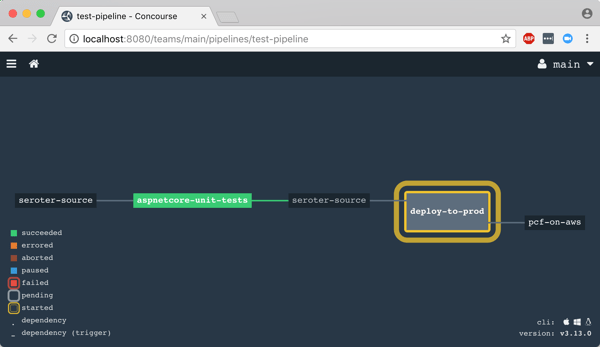
    That was it! I was ready to deploy the pipeline (pipeline.yml) to Concourse. From the Terminal, I executed fly -t rs set-pipeline -p test-pipeline -c pipeline.yml. Immediately, I saw my pipeline show up in the Concourse Dashboard.
    2018.06.06-concourse-03

    After I unpaused my pipeline, it fired up automatically.
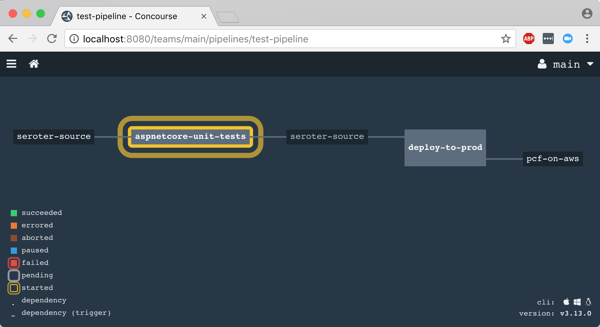
    2018.06.06-concourse-05

    Remember, my job specified a Microsoft-provided container for building the app. Concourse started this job by downloading the Docker image.

    2018.06.06-concourse-04

    After downloading the image, the job kicked off the dotnet test command and confirmed that all my tests passed.
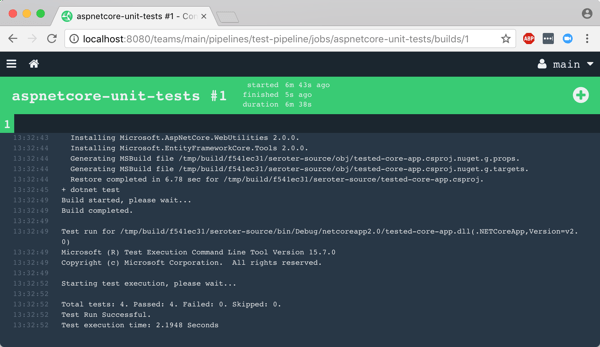
    2018.06.06-concourse-06

    Terrific. Since my next job was set to trigger when the first one succeeded, I immediately saw the “deploy” job spin up.

    2018.06.06-concourse-07

    This job knew how to publish content to Cloud Foundry, and used the provided parameters to deploy the app in a few seconds. Note that there are other resource types if you’re not a Cloud Foundry user. Nobody’s perfect!

    2018.06.06-concourse-08

    The pipeline run was finished, and I confirmed that the app was actually deployed.

    2018.06.06-concourse-09

    Finished? Yes, but I wanted to see a failure in my pipeline! So, I changed my xUnit tests and defined inline data that wouldn’t pass. After committing code to GitHub, my pipeline kicked off automatically. Once again it was tested in the pipeline, and this time, failed. Because it failed, the next step (deployment) didn’t happen. Perfect.
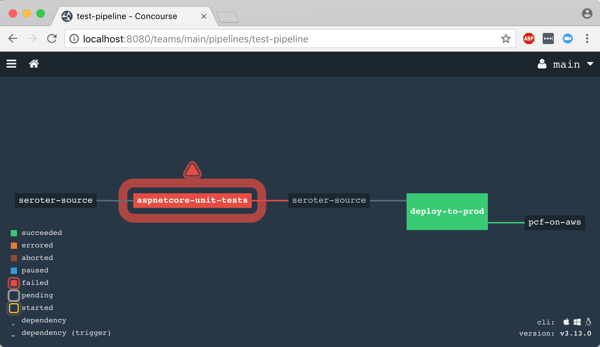
    2018.06.06-concourse-10

    If you’re looking for a CI tool that people actually like using, check out Concourse. Regardless of what you use, focus your energy on getting (all?) apps on pipelines. You don’t do it because you have to ship software every hour, as most apps don’t need it. It’s about shipping whenever you need to, with no drama. Whether you’re adding features or patching vulnerabilities, having pipelines for your apps means you’re actually becoming a customer-centric, software-driven company.

  • Yes, You Can Use a Single Service Registry for .NET and Java Microservices

    Years ago, I could recall lots of phone numbers from memory. Now? It’d be tough to come up with more than two. There’s so many ways to contact each person that I know (phone, email(s), Twitter, WhatsApp, etc) and I depend heavily on my address book. As you start using microservices in your architecture, you’ll discover that you also need a good address book to find services at runtime. But unlike classic solutions such as configuration management databases or UDDI registries, a modern “address book” is different. Why? As microservices get deployed, scaled, and updated, their “address” is fluid. To account for that, any modern address book cannot have stale references. Enter Eureka from Netflix. While baked into Spring Cloud for Java users, Eureka isn’t easily available to .NET microservices. That changed with the OSS Steeltoe library, and I thought I’d show that off here.

    Building a Eureka Server

    Thanks to Spring Cloud, it’s easy to set up a Eureka registry for your services to talk to.

    First, I used Spring Tool Suite to build a new Spring Boot app. In the app creation wizard, I chose the “Eureka Server” package dependency (spring-cloud-starter-eureka-server). If you aren’t using Spring Tool Suite, check out the awesome web-based Spring Intializr to generate project scaffolding to import into any Java IDE.

    2017.03.29-eureka-01

    Next up, there was a LOT of code to write to bring up a Eureka server.

    @EnableEurekaServer
    @SpringBootApplication
    public class PsPlaceholderEurekaServerApplication {
    
      public static void main(String[] args) {
        SpringApplication.run(PsPlaceholderEurekaServerApplication.class, args);
      }
    }
    

    Seriously, that’s it. Bonkers. All that remained was adding a few properties. I set a couple of cosmetic properties (“datacenter” and “environment”), and then told Eureka to NOT register itself with the server, and to NOT retrieve a copy of the registry.

    server.port=8761
    
    # value used for AWS, here can be anything
    eureka.datacenter=seattle
    eureka.environment=prod
    
    # no need to register the server with the server
    eureka.client.register-with-eureka=false
    
    # don't need a local copy of the registry
    eureka.client.fetch-registry=false
    

    I started up the app, navigated to the right URL, and saw the Eureka Server dashboard. There was a bunch of system status info, and an (empty) list of registered servers. Note that Eureka stores its registry in memory. The registry is a live look at the environment because services send a heartbeat to state that they’re online. No need to persist anything to disk.

    2017.03.29-eureka-02

    Building a Eureka Server (Alternative, No-Java Way)

    Now you might say “I don’t know Java and don’t want to learn it.” Fair enough. If you’re a Pivotal customer, than you’re in luck. Spring Cloud Services bundles up key Spring Cloud projects and runs them “as a service” in your Cloud Foundry environment. One such service is the Eureka Service Registry. You can try this out for free in Pivotal Web Services.

    2017.03.29-eureka-03

    After clicking a couple buttons, and waiting about 30 seconds, I had a registry! No Java required.

    2017.03.29-eureka-04

    Registering a Java Service

    Great, I had a registry. Now what? I wanted to add a Java and .NET service to my local registry.

    First up, Java. I created a new Spring Boot application, and chose the “Eureka Discovery” package dependency (spring-cloud-starter-eureka).

    I set up a super awesome REST service that says “hello from Spring Boot.” What about registering with Eureka? It took a single @EnableEurekaClient annotation in my code.

    @EnableEurekaClient
    @RestController
    @SpringBootApplication
    public class PsPlaceholderEurekaServiceApplication {
    
       public static void main(String[] args) {
    
          SpringApplication.run(PsPlaceholderEurekaServiceApplication.class, args);
       }
    
       @RequestMapping("/")
       public String SayHello() {
          return "hello from Spring Boot!";
       }
    }
    

    In the bootstrap.properties file, I set the “spring.application.name” property. This told Eureka what to label my service in the registry. In my application.properties file, I specified that I should register with Eureka, and to send health data along with my service’s heartbeat.

    eureka.client.register-with-eureka=true
    eureka.client.fetch-registry=false
    
    #can intentionally set the host name
    eureka.instance.hostname=localhost
    
    eureka.client.healthcheck.enabled=true
    

    With this in place, I started up my Java service, and sure enough, saw it in the Eureka registry. Cool!

    2017.03.29-eureka-05

    Registering a .NET Service

    .NET developers, rejoice! We can enjoy all kinds of microservices goodness by using libraries like Steeltoe. And it works with .NET Framework and .NET Core apps.

    In this example, I chose to use .NET Core. Here’s my sequence of commands in the wicked .NET Core CLI:

    dotnet new webapi
    dotnet add package Steeltoe.Discovery.Client -v 1.0.0-rc2
    dotnet restore
    dotnet build
    dotnet run

    Just running those commands gave me a Web API project with a dependency on Steeltoe’s discovery package. The latter two commands built and ran the app itself.

    The “webapi” project shell sets up a default REST controller, and for this demo, I just kept that. The only necessary code changes occurred in the Startup.cs class.

    Here, I added a using directive for “Steeltoe.Discovery.Client”, and updated the ConfigureServices and Configure operations to each include references to the discovery client.

    // This method gets called by the runtime. Use this method to add services to the container.
     public void ConfigureServices(IServiceCollection services)
            {
                // Add framework services.
                services.AddMvc();
                services.AddDiscoveryClient(Configuration);
            }
    
    // This method gets called by the runtime. Use this method to configure the HTTP request pipeline.
    public void Configure(IApplicationBuilder app, IHostingEnvironment env, ILoggerFactory loggerFactory)
            {
                loggerFactory.AddConsole(Configuration.GetSection("Logging"));
                loggerFactory.AddDebug();
    
                app.UseMvc();
                app.UseDiscoveryClient();
            }
    

    Finally, I added a few entries to the appsettings.json file. First I set a “spring.application.name” value, just like I did with my Spring Boot app. This tells the registry what to label my service. Then I have a block of Eureka settings including the registry URL, whether I should register with Eureka (yes!), pull a local copy of the registry (no!), and how to find my instance.

    {
      "Logging": {
        "IncludeScopes": false,
        "LogLevel": {
          "Default": "Warning",
          "System": "Information",
          "Microsoft": "Information"
        }
      },
      "spring": {
        "application": {
          "name":  "dotnet-demo-service"
        }
      },
      "eureka": {
        "client": {
          "serviceUrl": "http://localhost:8761/eureka/",
          "shouldRegisterWithEureka": true,
          "shouldFetchRegistry": false
        },
        "instance": {
          "hostname": "localhost",
          "port": 5000
        }
      }
    }
    

    When I ran the “dotnet build” and “dotnet run” commands, I saw my .NET service show up in the Eureka registry. BAM!

    2017.03.29-eureka-06

    Performing Discovery From a Java App

    It’s all nice and good to have an up-to-date address book, but it’s kinda worthless if nobody ever calls you!

    How would I yank service information from the registry for a Java app? It’s easy. First, I created a new Spring Boot project, and used the same “Eureka Discovery” package dependency (spring-cloud-starter-eureka) as before.

    In the application properties file, I specified that I *do* want a local copy of the registry, but do *not* need to register the client app as an available service. I’m just a client here, so no need to do register or give heartbeats.

    server.port=8081
    eureka.client.register-with-eureka=false
    eureka.client.fetch-registry=true
    eureka.client.healthcheck.enabled=false
    

    In my application code, I annotated my main class with @EnableDiscoveryClient, created a load balanced RestTemplate bean, autowired a variable to it, and then defined an operation that used it.

    @EnableDiscoveryClient
    @SpringBootApplication
    public class PsPlaceholderEurekaServiceConsumerApplication {
    
      public static void main(String[] args) {
        SpringApplication.run(PsPlaceholderEurekaServiceConsumerApplication.class, args);
      }
    
      @LoadBalanced
      @Bean
      public RestTemplate restTemplate(RestTemplateBuilder builder) {
         return builder.build();
      }
    }
    
    @RestController
    @Component
    class ConsumerController {
    
      //available now with load balanced bean
      @Autowired
      private RestTemplate restTemplate;
    
      @RequestMapping("/service-instancesrt")
      public String GetServiceInstancesRt() {
    
        String response = restTemplate.getForObject("http://dotnet-demo-service/api/values", String.class);
        return response;
      }
    }
    

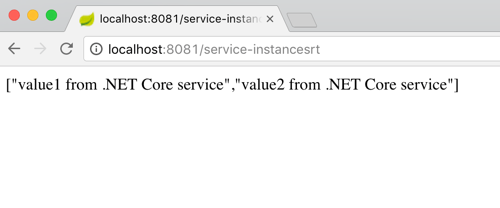
    What’s pretty cool is that RestTemplate object is injected with enough smarts to replace the service name from the registry (“dotnet-demo-service”) with the actual URL when it makes the API call. When I invoked my local endpoint, it passed through the request to the microservice it looked up in the registry, and returned the result.

    2017.03.29-eureka-07

    Performing Discovery From a .NET App

    Finally, let’s see how a .NET app would pull a reference from the Eureka registry and use it.

    I created a new project based on the ASP.NET Core MVC template. And then I added the Steeltoe package for service discovery.

    dotnet new mvc
    dotnet add package Steeltoe.Discovery.Client -v 1.0.0-rc2
    dotnet restore

    With this MVC template, I got some basic scaffolding for a sample website. I just extended this by adding a new view (called “Demo”) and controller method. No content in the method right away.

    Just like before, I updated the Startup.cs class by first adding a reference to “Steeltoe.Discovery.Client” and updating the “ConfigureServices” and “Configure” methods.

    ASP.NET Core offers some nice dependency injection stuff. So with the code update above, I now had a “DiscoveryClient” object available for any controller or service to use. So, back in the controller, I added a variable for DiscoveryHttpClientHandler. Then I instantiated that object in the controller constructor, and used it in the new controller method to call a Eureka-registered Java service. Note once again that I only needed the registered service name, and the client libraries flipped this to the address/port of my actual service.

    public class HomeController : Controller
    {
      //added for demonstration
      DiscoveryHttpClientHandler _handler;
    
      public HomeController(IDiscoveryClient client) {
          _handler = new DiscoveryHttpClientHandler(client);
      }
    
      public IActionResult Demo()
      {
          HttpClient c = new HttpClient(_handler, false);
          //call service using registered alias
          string s = c.GetStringAsync("http://boot-customer-service").Result;
    
          ViewData["Message"] = "Service result is: " + s;
    
          return View();
       }
    }
    

    Finally, I added a few things to my appsettings.json file so that the Steeltoe client library knew how to behave. I gave the application a name, and told it to *not* register itself with Eureka, but only to fetch the registry and cache it locally.

    {
      "Logging": {
        "IncludeScopes": false,
        "LogLevel": {
          "Default": "Warning"
        }
      },
      "spring": {
        "application": {
          "name":  "dotnet-demo-service-client"
        }
      },
      "eureka": {
        "client": {
          "serviceUrl": "http://localhost:8761/eureka/",
          "shouldRegisterWithEureka": false,
          "shouldFetchRegistry": true
        },
        "instance": {
          "hostname": "localhost",
          "port": 5001
        }
      }
    }
    

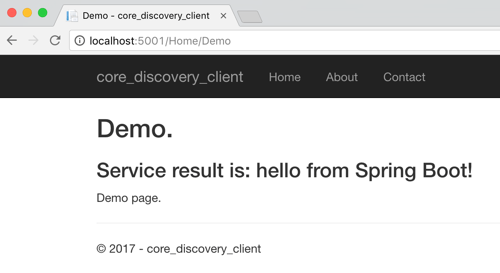
    After that, I started up by ASP.NET Core app, hit the webpage, and saw a result from my Spring Boot service.

    2017.03.29-eureka-08

    That was fun! Some sort of service registry is extremely helpful when adopting a microservices architecture. Instead of using hard-coding references or stale data stores, an always-accurate registry gives you the best chance of surviving in a fluid microservices environment. Now, thanks to Steeltoe, you can use the same registry for your Java, .NET (and even Node.js) services.

  • My New Pluralsight Course – Patterns of Cloud Integration – Is Now Live

    I’ve been hard at work on a new Pluralsight video course and it’s now live and available for viewing. This course, Patterns of Cloud Integration,  takes you through how application and data integration differ when adding cloud endpoints. The course highlights the 4 integration styles/patterns introduced in the excellent Enterprise Integration Patterns book and discusses the considerations, benefits, and challenges of using them with cloud systems. There are five core modules in the course:

    • Integration in the Cloud. An overview of the new challenges of integrating with cloud systems as well as a summary of each of the four integration patterns that are covered in the rest of the course.
    • Remote Procedure Call. Sometimes you need information or business logic stored in an independent system and RPC is still a valid way to get it. Doing this with a cloud system on one (or both!) ends can be a challenge and we cover the technologies and gotchas here.
    • Asynchronous Messaging. Messaging is a fantastic way to do loosely coupled system architecture, but there are still a number of things to consider when doing this with the cloud.
    • Shared Database. If every system has to be consistent at the same time, then using a shared database is the way to go. This can be a challenge at cloud scale, and we review some options.
    • File Transfer. Good old-fashioned file transfers still make sense in many cases. Here I show a new crop of tools that make ETL easy to use!

    Because “the cloud” consists of so many unique and interesting technologies, I was determined to not just focus on the products and services from any one vendor. So, I decided to show off a ton of different technologies including:

    Whew! This represents years of work as I’ve written about or spoken on this topic for a while. It was fun to collect all sorts of tidbits, talk to colleagues, and experiment with technologies in order to create a formal course on the topic. There’s a ton more to talk about besides just what’s in this 4 hour course, but I hope that it sparks discussion and helps us continue to get better at linking systems, regardless of their physical location.

  • Yes Richard, You Can Use Ampersands in the BizTalk REST Adapter (And Some ASP.NET Web API Tips)

    A few months back, I wrote up a pair of blog posts (part 1, part 2) about the new BizTalk Server 2013 REST adapter. Overall, I liked it, but I complained about the  apparent lack of support for using ampersands (&) when calling REST services. That seemed like a pretty big whiff as you find many REST services that use ampersands to add filter parameters and such to GET requests. Thankfully, my readers set me straight. Thanks Henry Houdmont and Sam Vanhoutte! You CAN use ampersands in this adapter, and it’s pretty simple once you know the trick. In this post, I’ll first show you how to consume a REST service that has an ampersand in the URL, and, I’ll show you a big gotcha when consuming ASP.NET Web API services from BizTalk Server.

    First off, to demonstrate this I created a new ASP.NET MVC 4 project to hold my Web API service. This service takes in new invoices (and assigns them an invoice number) and returns invoices (based on query parameters). The “model” associated with the service is pretty basic.

    public class Invoice
        {
            public string InvoiceNumber { get; set; }
            public DateTime IssueDate { get; set; }
            public float PreviousBalance { get; set; }
            public float CurrentBalance { get; set; }
    
        }
    

    The controller is the only other thing to add in order to get a working service. My controller is pretty basic as well. Just for fun, I used a non-standard name for my query operation (instead of the standard pattern of Get<model type>) and decorated the method with an attribute that tells the Web API engine to call this operation on GET requests. The POST operation uses the expected naming pattern and therefore doesn’t require any special attributes.

    public class InvoicesController : ApiController
        {
            [System.Web.Http.HttpGet]
            public IEnumerable<Invoice> Lookup(string id, string startrange, string endrange)
            {
                //yank out date values; should probably check for not null!
                DateTime start = DateTime.Parse(startrange);
                DateTime end = DateTime.Parse(endrange);
    
                List<Invoice> invoices = new List<Invoice>();
    
                //create invoices
                invoices.Add(new Invoice() { InvoiceNumber = "A100", IssueDate = DateTime.Parse("2012-12-01"), PreviousBalance = 1000f, CurrentBalance = 1200f });
                invoices.Add(new Invoice() { InvoiceNumber = "A200", IssueDate = DateTime.Parse("2013-01-01"), PreviousBalance = 1200f, CurrentBalance = 1600f });
                invoices.Add(new Invoice() { InvoiceNumber = "A300", IssueDate = DateTime.Parse("2013-02-01"), PreviousBalance = 1600f, CurrentBalance = 1100f });
    
                //get invoices within the specified date range
                var matchinginvoices = from i in invoices
                                       where i.IssueDate >= start && i.IssueDate <= end
                                       select i;
    
                //return any matching invoices
                return matchinginvoices;
            }
    
            public Invoice PostInvoice(Invoice newInvoice)
            {
                newInvoice.InvoiceNumber = System.Guid.NewGuid().ToString();
    
                return newInvoice;
            }
        }
    

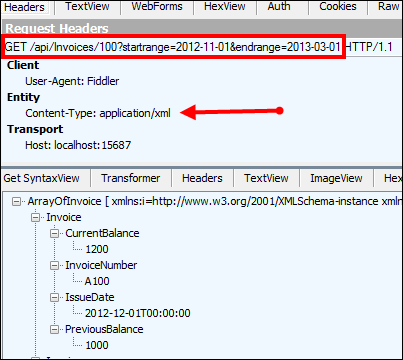
    That’s it! Notice that I expect the date range to appear as query string parameters, and those will automatically map to the two input parameters in the method signature. I tested this service using Fiddler and could make JSON or XML come back based on which Content-Type HTTP header I sent in.

    2013.03.19.rest01

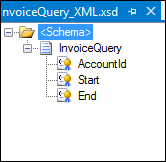
    Next, I created a BizTalk Server 2013 project in Visual Studio 2012 and defined a schema that represents the “invoice request” message sent from a source system. It has fields for the account ID, start date, and end date. All those fields were promoted into a property schema so that I could use their values later in the REST adapter.

    2013.03.19.rest03

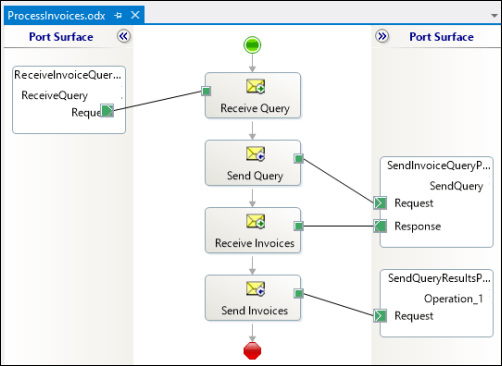
    Then I built an orchestration to send the request to the REST adapter. You don’t NEED To use an orchestration, but I wanted to show how the “operation name” on an orchestration port is used within the adapter. Note below that the message is sent to the REST adapter via the “SendQuery” orchestration port operation.

    2013.03.19.rest02

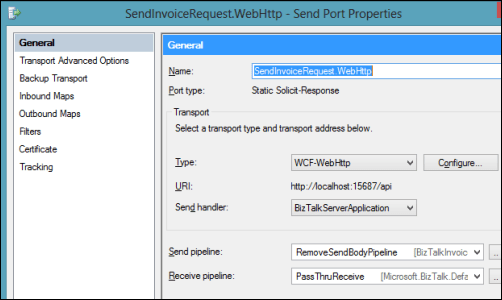
    In the BizTalk Administration console, I configured the necessary send and receive ports. The send port that calls the ASP.NET Web API service uses the WCF-WebHttp adapter and a custom pipeline that strips out the message of the GET request (example here; note that this will likely be corrected in the final release of BizTalk 2013).

    2013.03.19.rest04

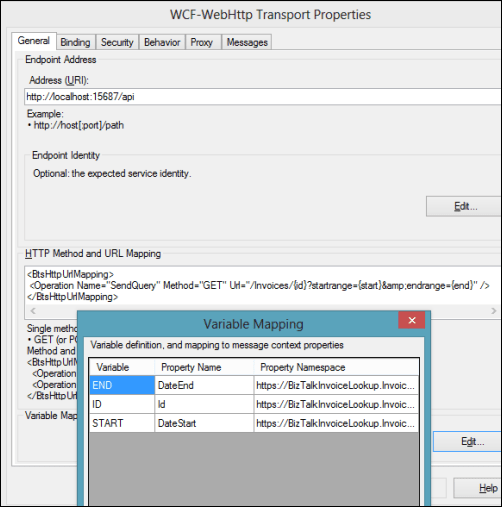
    In the adapter configuration, notice a few things. See that the “HTTP Method and URL Mapping” section has an entry that maps the orchestration port operation name to a URI. Also, you can see that I use an escaped ampersand (&amp;) in place of an actual ampersand. The latter throws and error, while the former works fine. I mapped the values from the message itself (via the use of a property schema) to the various URL variables.

    2013.03.19.rest05

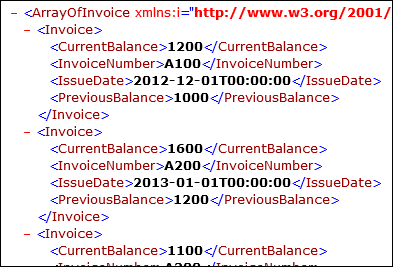
    When I started everything up and send a “invoice query” message into BizTalk, I quickly got back an XML document containing all the invoices for that account that were timestamped within the chosen date range.

    2013.03.19.rest06

    Wonderful. So where’s the big “gotcha” that I promised? When you send a message to an ASP.NET Web API endpoint, the endpoint seems to expect a UTF-8 unless otherwise designated. However, if you use the default XMLTransmit pipeline component on the outbound message, BizTalk applies a UTF-16 encoding. What happens?

    2013.03.19.rest07

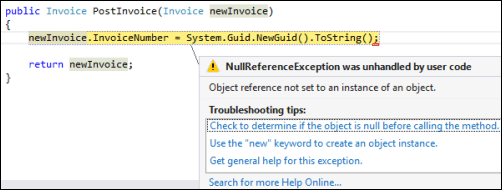
    Ack! The “newInvoice” parameter is null. This took me a while to debug, probably because I’m occasionally incompetent and there were also no errors in the Event Log or elsewhere. Once I figured out that this was an encoding problem, the fix was easy!

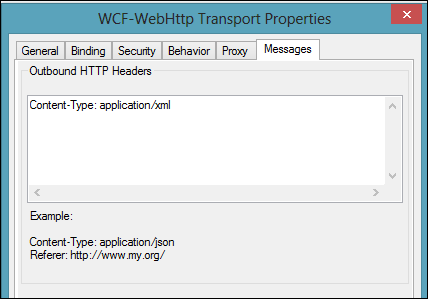
    The REST adapter is pretty configurable, including the ability to add outbound headers to the HTTP message. This is the HTTP header I added that still caused the error above.

    2013.03.19.rest08

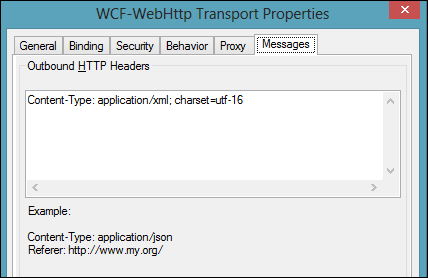
    I changed this value to also specify which encoding I was sending (charset=utf16).

    2013.03.19.rest09

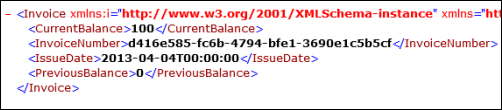
    After saving this updated adapter configuration and sending in another “new invoice” message, I got back an invoice with a new (GUID) invoice number.

    2013.03.19.rest10

    I really enjoy using the ASP.NET Web API, but make sure you’re sending what the REST service expects!

  • January 2013 Trip to Europe to Speak on (Cloud) Integration, Identity Management

    In a couple weeks, I’m off to Amsterdam and Gothenburg to speak at a pair of events. First, on January 22nd I’ll be in Amsterdam at an event hosted by middleware service provider ESTREME. There will be a handful of speakers, and I’ll be presenting on the Patterns of Cloud Integration. It should be a fun chat about the challenges and techniques for applying application integration patterns in cloud settings.

    Next up, I’m heading to Gothenburg (Sweden) to speak at the annual Integration Days event hosted by Enfo Zystems. This two day event is held January 24th and 25th and features multiple tracks and a couple dozen sessions. My session on the 24th, called Cross Platform Security Done Right, focuses on identity management in distributed scenarios. I’ve got 7 demos lined up that take advantage of Windows Azure ACS, Active Directory Federation Services, Node.js, Salesforce.com and more. My session on the 25th, called Embracing the Emerging Integration Endpoints, looks at how existing integration tools can connect to up-and-coming technologies. Here I have another 7 demos that show off the ASP.NET Web API, SignalR, StreamInsight, Node.js, Amazon Web Services, Windows Azure Service Bus, Salesforce.com and the Informatica Cloud. Mikael Hakansson will be taking bets as to whether I’ll make it through all the demos in the allotted time.

    It should be a fun trip, and thanks to Steef-Jan Wiggers and Mikael for organizing my agenda. I hope to see some of you all in the audience!

  • 2012 Year in Review

    2012 was a fun year. I added 50+ blog posts, built Pluralsight courses about Force.com and Amazon Web Services, kept writing regularly for InfoQ.com, and got 2/3 of the way done my graduate degree in Engineering. It was a blast visiting Australia to talk about integration technologies, going to Microsoft Convergence to talk about CRM best practices, speaking about security at the Dreamforce conference, and attending the inaugural AWS re:Invent conference in Las Vegas. Besides all that, I changed employers, got married, sold my home and adopted some dogs.

    Below are some highlights of what I’ve written and books that I’ve read this past year.

    These are a handful of the blog posts that I enjoyed writing the most.

    I read a number of interesting books this year, and these were some of my favorites.

    A sincere thanks to all of you for continuing to read what I write, and I hope to keep throwing out posts that you find useful (or at least mildly amusing).

  • Exploring REST Capabilities of BizTalk Server 2013 (Part 2: Consuming REST Endpoints)

    In my previous post, I looked at how the BizTalk Server 2013 beta supports the receipt of messages through REST endpoints. In this post, I’ll show off a couple of scenarios for sending BizTalk messages to REST service endpoints. Even though the BizTalk adapter is based on the WCF REST binding, all my demonstrations are with non-WCF services (just to prove everything works the same).

    Scenario #1 Consuming “GET” Service From an Orchestration

    In this first case, I planned on invoking a “GET” operation and processing the response in an orchestration. Specifically, I wanted to receive an invoice in one currency, and use a RESTful currency conversation service to flip the currency to US dollars.  There are two key quirks to this adapter that you should be aware of:

    • Consumed REST services cannot have an “&” symbol in the URL. This meant that I had to find a currency conversion service that did NOT use ampersands. You’d think that this would be easy, but many services use a syntax like “/currency?from=AUD&to=USD”, and the adapter doesn’t like that one bit. While “?” seems acceptable, ampersands most definitely are not.
    • The adapter throws an error on GET. Neither GET nor DELETE requests expect a message payload (as they are entirely URL driven), and the adapter throws an error if you send a GET request to an endpoint. This is a problem because you can’t natively send an empty message to an adapter endpoint. Below, I’ll show you one way to get around this. However, I consider this an unacceptable flaw that deserves to be fixed before BizTalk Server 2013 is released.

    For this demonstration, I used the adapter-friendly currency conversion service at Exchange Rate API. To get started, I created a new schema for “Invoice” and a property schema that held the values that needed to be passed to the send adapter.

    2012.11.19rest01

    Next, I built an orchestration that received this message from a (FILE) adapter, routed a GET request to the currency conversion service, and then multiplied the source currency by the returned conversion rate. In the orchestration, I routed the original Invoice message to the GET service, even though I knew I’d have to strip out the body before completing the request. Also, the Exchange Rate API service returns its result as text (not XML or JSON), so I set the response message type as XmlDocument. I then built a helper component that took in the service response message and returned a string.

    public static class Utilities
        {
            public static string ConvertMessageToString(XLANGMessage msg)
            {
                string retval = "0";
    
                using (StreamReader reader = new StreamReader((Stream)msg[0].RetrieveAs(typeof(Stream))))
                {
                    retval = reader.ReadToEnd();
                }
    
                return retval;
            }
        }
    

    Here’s the final orchestration.

    2012.11.19rest02

    After building and deploying this BizTalk project (with the two schemas and one orchestration), I created a FILE receive location to pull in the original invoice. I then configured a WCF-WebHttp send port. First, I set the base address to the Exchange Rate API URL, and then set an operation (which matched the name of the operation I set on the orchestration send port) that mapped to the GET verb with a parameterized URL.

    2012.11.19rest03

    I set those URL parameters by clicking the Edit button under Variable Mapping and choosing which property schema value mapped to each URL parameter.

    2012.11.19rest04

    This scenario was nearly done. All that was left was to strip out the body of message so that the GET wouldn’t fail. Fortunately, Saravana Kumar already built a simple pipeline component that erases the message body. I built the pipeline component, added it to a custom pipeline, and deployed the pipeline.

    2012.11.19rest05

    Finally, I made sure that my send port used this new pipeline.

    2012.11.19rest06

    With all my receive/send ports created and configured, and my orchestration enlisted, I dropped a sample file into a folder monitored by the FILE receive adapter. This sample invoice was for 100 Australian dollars, and I wanted the output invoice to translate that amount to U.S. dollars. Sure enough, the REST service was called, and I got back a modified invoice.

    <ns0:Invoice xmlns:ns0="http://Seroter.BizTalkRestDemo">
      <ID>100</ID>
      <CustomerID>10022</CustomerID>
      <OriginalInvoiceAmount>100</OriginalInvoiceAmount>
      <OriginalInvoiceCurrency>AUD</OriginalInvoiceCurrency>
      <ConvertedInvoiceAmount>103.935900</ConvertedInvoiceAmount>
      <ConvertedInvoiceCurrency>USD</ConvertedInvoiceCurrency>
    </ns0:Invoice>
    

    So we can see that GET works pretty well (and should prove to be VERY useful as more and more services switch to a RESTful model), but you have to be careful on both the URLs you access, and the body you (don’t) send.

    Scenario #2 Invoking a “DELETE” Command Via Messaging Only

    Let’s try a messaging-only solution that avoids orchestration and calls a service with a DELETE verb. For fun, I wanted to try using the WCF-WebHttp adapter with the “single operation format” instead of the XML format that lets you list multiple operations, verbs and URLs.

    In this case, I wrote an ASP.NET Web API service that defines an “Invoice” model, and has a controller with a single operation that responds to DELETE requests (and writes a trace statement).

    public class InvoiceController : ApiController
        {
            public HttpResponseMessage DeleteInvoice(string id)
            {
                System.Diagnostics.Debug.WriteLine("Deleting invoice ... " + id);
                return new HttpResponseMessage(HttpStatusCode.NoContent);
            }
        }
    

    With my REST service ready to go, I created a new send port that would subscribe directly on the input message and call this service. The structured of the “single operation format” isn’t really explained, so I surmised that all it included was the HTTP verb that would be executed against the adapter’s URL. So, the URL must be fixed, and cannot contain any dynamic parameter values. For instance:

    2012.11.19rest08

    To be sure, the scenario above make zero sense. You’d never  really hardcode a URL that pointed to a specific transaction resource. HOWEVER, there could be a reference data URL (think of lists of US states, or current currency value) that might be fixed and useful to embed in an adapter. Nonetheless, my demos aren’t always about making sense, but about flexing the technology. So, I went ahead and started this send port (WITHOUT changing it’s pipeline from “passthrough” to “remove body”) and dropped an invoice file to be picked up. Sure enough, the file was picked up, the service was called, and the output was visible in my Visual Studio 2012 output window.

    2012.11.19rest09

    Interestingly enough, the call to DELETE did NOT require me to suppress the message body. Seems that Microsoft doesn’t explicitly forbid this, even though payloads aren’t typically sent as part of DELETE requests.

    Summary

    In these two articles, we looked at REST support in the BizTalk Server 2013 (beta). Overall, I like what I see. SOAP services aren’t going anywhere anytime soon, but the trend is clear: more and more services use a RESTful API and a modern integration bus has to adapt. I’d like to see more JSON support, but admittedly haven’t tried those scenarios with these adapters.

    What do you think? Will the addition of REST adapters make your life easier for both exposing and consuming endpoints?

  • Versioning ASP.NET Web API Services Using HTTP Headers

    I’ve been doing some work with APIs lately and finally had the chance to dig into the ASP.NET Web API a bit more. While it’s technically brand new (released with .NET 4.5 and Visual Studio 2012), the Web API has been around in beta form for quite a bit now. For those of us who have done a fair amount of work with the WCF framework, the Web API is a welcome addition/replacement. Instead of monstrous configuration files and contract-first demands placed on us by WCF, we can now build RESTful web services using a very lightweight and HTTP-focused framework. As I work on designing a new API, one thing that I’m focused on right now is versioning. In this blog post, I’ll show you how to build HTTP-header-based versioning for ASP.NET Web API services.

    Service designers have a few choices when it comes to versioning their services. What seems like the default option for many is to simply replace the existing service with a new one and hope that no consumers get busted. However, that’s pretty rough and hopefully less frequent than it was in the early days of service design. In the must-read REST API Design Handbook (see my review),  author George Reese points out three main options:

    • HTTP Headers. Set the version number in a custom HTTP header for each request.
    • URI Component. This seems to be the most common one. Here, the version is part of the URI (e.g. /customerservice/v1/customers).
    • Query Parameter. In this case, a parameter is added to each incoming request (e.g. /customerservice/customers?version=1).

    George (now) likes the first option, and I tend to agree. It’s nice to not force new URIs on the user each time a service changes. George finds that a version in the header fit nicely with other content negotiations that show up in HTTP headers (e.g. “content-type”). So, does the ASP.NET Web API support this natively? The answer is: pretty much. While you could try and choose different controller operations based on the inbound request, it’s even better to be able to select entirely different controllers based on the API version. Let’s see how that works.

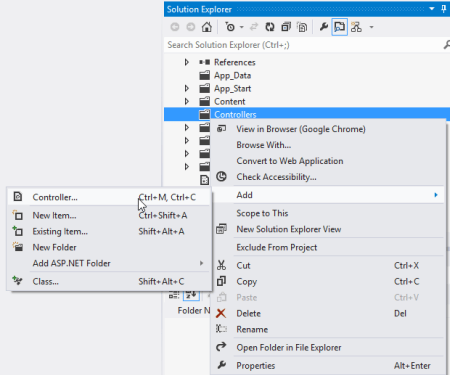
    First, in Visual Studio 2012, I created a new ASP.NET MVC4 project and chose the Web API template.

    2012.09.25webapi01

    Next, I wanted to add a new “model” that is the representation of my resource. In this example, my service works with an “Account” resource that has information about a particular service account owner.

    using System;
    using System.Collections.Generic;
    using System.Linq;
    using System.Web;
    using System.Runtime.Serialization;
    
    namespace Seroter.AspNetWebApi.VersionedSvc.Models
    {
        [DataContract(Name = "Account", Namespace = "")]
        public class Account
        {
            [DataMember]
            public int Id { get; set; }
            [DataMember]
            public string Name { get; set; }
            [DataMember]
            public string TimeZone { get; set; }
            [DataMember]
            public string OwnerName { get; set; }
        }
    }
    

    Note that I don’t HAVE to use the “[DataContract]” and “[DataMember]” attributes, but I wanted a little more control over the outbound naming, so I decided to decorate my model this way. Next up, I created a new controller to respond to HTTP requests.

    2012.09.25webapi02

    The controller does a few things here. It loads up a static list of accounts, responds to “get all” and “get one” requests, and accepts new accounts via HTTP POST. The “GetAllAccounts” operation is named in a way that the Web API will automatically use that operation when the user requests all accounts (/api/accounts). The “GetAccount” operation responds to requests for a specific account via HTTP GET. Finally, the “PostAccount” operation is also named in a way that it is automatically wired up to any POST requests, and it returns the URI of the new resource in the response header.

    public class AccountsController : ApiController
        {
            /// <summary>
            /// instantiate list of accounts
            /// </summary>
            Account[] accounts = new Account[]
            {
                new Account { Id = 100, Name = "Big Time Consulting", OwnerName = "Harry Simpson", TimeZone = "PST"},
                new Account { Id = 101, Name = "BTS Partners", OwnerName = "Bobby Thompson", TimeZone = "MST"},
                new Account { Id = 102, Name = "Westside Industries", OwnerName = "Ken Finley", TimeZone = "EST"},
                new Account { Id = 103, Name = "Cricket Toys", OwnerName = "Tim Headley", TimeZone = "PST"}
            };
    
            /// <summary>
            /// Returns all the accounts; happens automatically based on operation name
            /// </summary>
            /// <returns></returns>
            public IEnumerable<Account> GetAllAccounts()
            {
                return accounts;
            }
    
            /// <summary>
            /// Returns a single account and uses an explicit [HttpGet] attribute
            /// </summary>
            /// <param name="id"></param>
            /// <returns></returns>
            [HttpGet]
            public Account GetAccount(int id)
            {
                Account result = accounts.FirstOrDefault(acct => acct.Id == id);
    
                if (result == null)
                {
                    HttpResponseMessage err = new HttpResponseMessage(HttpStatusCode.NotFound)
                    {
                        ReasonPhrase = "No product found with that ID"
                    };
    
                    throw new HttpResponseException(err);
                }
    
                return result;
            }
    
            /// <summary>
            /// Creates a new account and returns HTTP code and URI of new resource representation
            /// </summary>
            /// <param name="a"></param>
            /// <returns></returns>
            public HttpResponseMessage PostAccount(Account a)
            {
                Random r = new Random(1);
    
                a.Id = r.Next();
                var resp = Request.CreateResponse<Account>(HttpStatusCode.Created, a);
    
                //get URI of new resource and send it back in the header
                string uri = Url.Link("DefaultApi", new { id = a.Id });
                resp.Headers.Location = new Uri(uri);
    
                return resp;
            }
        }
    

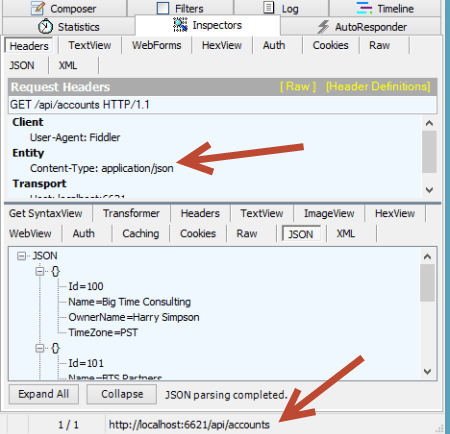
    At this point, I had a working service. Starting up the service and invoking it through Fiddler made it easy to interact with. For instance, a simple “get” targeted at http://localhost:6621/api/accounts returned the following JSON content:

    2012.09.25webapi03

    If I did an HTTP POST of some JSON to that same URI, I’d get back an HTTP 201 code and the location of my newly created resource.

    2012.09.25webapi04

    Neato. Now, something happened in our business and we need to change our API. Instead of just overwriting this one and breaking existing clients, we can easily add a new controller and leverage the very cool IHttpControllerSelector interface to select the right controller at runtime. First, I made a few updates to the Visual Studio project.

    • I added a new class (model) named AccountV2 which has additional data properties not found in the original model.
    • I changed the name of the original controller to AccountsControllerV1 and created a second controller named AccountsControllerV2. The second controller mimics the first, except for the fact that it works with the newer model and new data properties. In reality, it could also have entirely new operations or different plumbing behind existing ones.
    • For kicks and giggles, I also created a new model (Invoice) and controller (InvoicesControllerV1) just to show the flexibility of the controller selector.

    2012.09.25webapi05

    I created a class, HeaderVersionControllerSelector, that will be used at runtime to pick the right controller to respond to the request. Note that my example below is NOT efficiently written, but just meant to show the moving parts. After seeing what I do below, I strongly encourage you to read this great post and very nice accompanying Github code project that shows a clean way to build the selector.

    Basically, there are a few key parts here. First, I created a dictionary to hold the controller (descriptions) and load that within the constructor. These are all the controllers that the selector has to choose from. Second, I added a helper method (thanks to the previously mentioned blog post/code) called “GetControllerNameFromRequest” that yanks out the name of the controller (e.g. “accounts”) provided in the HTTP request. Third, I implemented the required “GetControllerMapping” operation which simply returns my dictionary of controller descriptions. Finally, I implemented the required “SelectController” operation which determines the API version from the HTTP header (“X-Api-Version”), gets the controller name (from the previously created helper function), and builds up the full name of the controller to pull from the dictionary.

     /// <summary>
        /// Selects which controller to serve up based on HTTP header value
        /// </summary>
        public class HeaderVersionControllerSelector : IHttpControllerSelector
        {
            //store config that gets passed on on startup
            private HttpConfiguration _config;
            //dictionary to hold the list of possible controllers
            private Dictionary<string, HttpControllerDescriptor> _controllers = new Dictionary<string, HttpControllerDescriptor>(StringComparer.OrdinalIgnoreCase);
    
            /// <summary>
            /// Constructor
            /// </summary>
            /// <param name="config"></param>
            public HeaderVersionControllerSelector(HttpConfiguration config)
            {
                //set member variable
                _config = config;
    
                //manually inflate controller dictionary
                HttpControllerDescriptor d1 = new HttpControllerDescriptor(_config, "AccountsControllerV1", typeof(AccountsControllerV1));
                HttpControllerDescriptor d2 = new HttpControllerDescriptor(_config, "AccountsControllerV2", typeof(AccountsControllerV2));
                HttpControllerDescriptor d3 = new HttpControllerDescriptor(_config, "InvoicesControllerV1", typeof(InvoicesControllerV1));
                _controllers.Add("AccountsControllerV1", d1);
                _controllers.Add("AccountsControllerV2", d2);
                _controllers.Add("InvoicesControllerV1", d3);
            }
    
            /// <summary>
            /// Implement required operation and return list of controllers
            /// </summary>
            /// <returns></returns>
            public IDictionary<string, HttpControllerDescriptor> GetControllerMapping()
            {
                return _controllers;
            }
    
            /// <summary>
            /// Implement required operation that returns controller based on version, URL path
            /// </summary>
            /// <param name="request"></param>
            /// <returns></returns>
            public HttpControllerDescriptor SelectController(System.Net.Http.HttpRequestMessage request)
            {
                //yank out version value from HTTP header
                IEnumerable<string> values;
                int? apiVersion = null;
                if (request.Headers.TryGetValues("X-Api-Version", out values))
                {
                    foreach (string value in values)
                    {
                        int version;
                        if (Int32.TryParse(value, out version))
                        {
                            apiVersion = version;
                            break;
                        }
                    }
                }
    
                //get the name of the route used to identify the controller
                string controllerRouteName = this.GetControllerNameFromRequest(request);
    
                //build up controller name from route and version #
                string controllerName = controllerRouteName + "ControllerV" + apiVersion;
    
                //yank controller type out of dictionary
                HttpControllerDescriptor controllerDescriptor;
                if (this._controllers.TryGetValue(controllerName, out controllerDescriptor))
                {
                    return controllerDescriptor;
                }
                else
                {
                    return null;
                }
            }
    
            /// <summary>
            /// Helper method that pulls the name of the controller from the route
            /// </summary>
            /// <param name="request"></param>
            /// <returns></returns>
            private string GetControllerNameFromRequest(HttpRequestMessage request)
            {
                IHttpRouteData routeData = request.GetRouteData();
    
                // Look up controller in route data
                object controllerName;
                routeData.Values.TryGetValue("controller", out controllerName);
    
                return controllerName.ToString();
            }
        }
    

    Nearly done. All that was left was to update the global.asax.cs file to ignore the default controller handling (where it looks for the controller name from the URI and appends “Controller” to it) and replace it with our new controller selector.

    public class WebApiApplication : System.Web.HttpApplication
        {
            protected void Application_Start()
            {
                AreaRegistration.RegisterAllAreas();
    
                WebApiConfig.Register(GlobalConfiguration.Configuration);
                FilterConfig.RegisterGlobalFilters(GlobalFilters.Filters);
                RouteConfig.RegisterRoutes(RouteTable.Routes);
                BundleConfig.RegisterBundles(BundleTable.Bundles);
    
                //added to support runtime controller selection
                GlobalConfiguration.Configuration.Services.Replace(typeof(IHttpControllerSelector),
                                                               new HeaderVersionControllerSelector(GlobalConfiguration.Configuration));
            }
        }
    

    That’s it! Let’s try this bad boy out. First, I tried retrieving an individual record using the “version 1” API. Notice that I added an HTTP header entry for X-Api-Version.

    2012.09.25webapi06

    Did you also see how easy it is to switch content formats? Just changing the” Content-Type” HTTP header to “application/xml” resulted in an XML response without me doing anything to my service. Next, I did a GET against the same URI, but set the X-Api-Version to 2.

    2012.09.25webapi07

    The second version of the API now returns the “sub accounts” for a given account, while not breaking the original consumers of the first version. Success!

    Summary

    The ASP.NET Web API clearly multiple versioning strategies, and I personally like this one the best. You saw how it was really easy to carve out entirely new controllers, and thus new client experiences, without negatively impacting existing service clients.

    What do you think? Are you a fan of version information in the URI, or are HTTP headers the way to go?