Category: AI/ML

  • Make Any Catalog-Driven App More Personalized to Your Users: How I used Generative AI Coding Tools to Improve a Go App With Gemini.

    Make Any Catalog-Driven App More Personalized to Your Users: How I used Generative AI Coding Tools to Improve a Go App With Gemini.

    How many chatbots do we really need? While chatbots are a terrific example app for generative AI use cases, I’ve been thinking about how developers may roll generative AI into existing “boring” apps and make them better.

    As I finished all my Christmas shopping—much of it online—I thought about all the digital storefronts and how they provide recommended items based on my buying patterns, but serve up the same static item descriptions, regardless of who I am. We see the same situation with real estate listings, online restaurant menus, travel packages, or most any catalog of items! What if generative AI could create a personalized story for each item instead? Wouldn’t that create such a different shopping experience?

    Maybe this is actually a terrible idea, but during the Christmas break, I wanted to code an app from scratch using nothing but Google Cloud’s Duet AI while trying out our terrific Gemini LLM, and this seemed like a fun use case.

    The final app (and codebase)

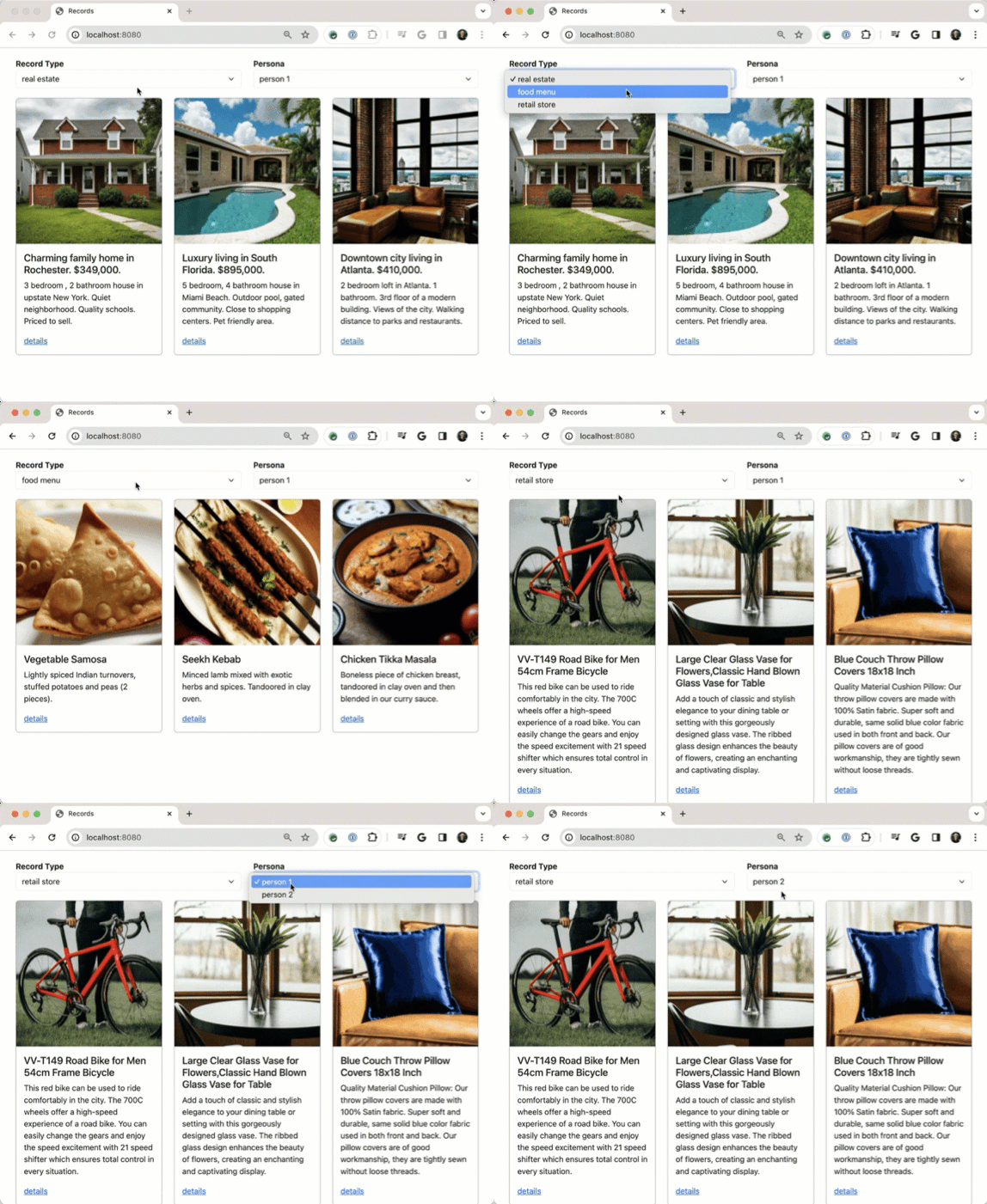
    The app shows three types of catalogs and offers two different personas with different interests. Everything here is written in Go and uses local files for “databases” so that it’s completely self-contained. And all the images are AI-generated from Google’s Imagen2 model.
    When the user clicks on a particular catalog entry, the go to a “details” page where the generic product summary from the overview page is sent along with a description of the user’s preferences to the Google Gemini model to get a personalized, AI-powered product summary.
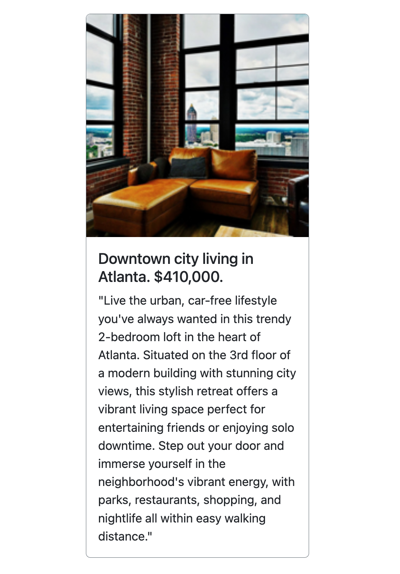
    That’s all there is to it, but I think it demonstrates the idea.

    How it works

    Let’s look at what we’ve got here. Here’s the basic flow of the AI-augmented catalog request.

    How did I build the app itself (GitHub repo here)? My goal was to only use LLM-based guidance either within the IDE using Duet AI in Google Cloud, or burst out to Bard where needed. No internet searches, no docs allowed.

    I started at the very beginning with a basic prompt.

    What are the CLI commands to create a new Go project locally?

    The answer offered the correct steps for getting the project rolling.

    The next commands are where AI assistance made a huge difference for me. With this series of natural language prompts in the Duet AI chat within VS Code, I got the foundation of this app set up in about five minutes. This would have easily taken me 5 or 10x longer if I did it manually.

    Give me a main.go file that responds to a GET request by reading records from a local JSON file called property.json and passes the results to an existing html/template named home.html. The record should be defined in a struct with fields for ID, Name, Description, and ImageUrl.
    Create an html/template for my Go app that uses Bootstrap for styling, and loops through records. For each loop, create a box with a thin border, an image at the top, and text below that. The first piece of text is "title" and is a header. Below that is a short description of the item. Ensure that there's room for four boxes in a single row.
    Give me an example data.json that works with this struct
    Add a second function to the class that responds to HTML requests for details for a given record. Accept a record id in the querystring and retrieve just that record from the array before sending to a different html/template

    With these few prompts, I had 75% of my app completed. Wild! I took this baseline, and extended it. The final result has folders for data, personas, images, a couple HTML files, and a single main.go file.
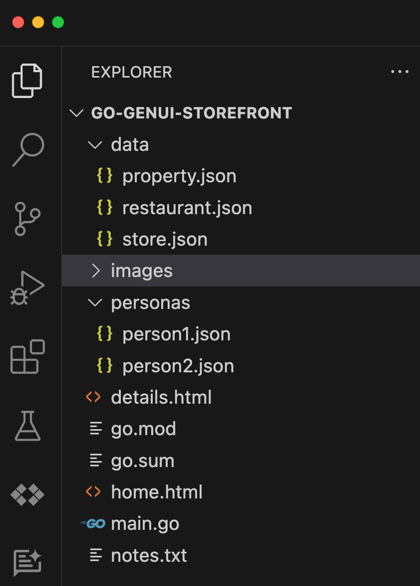
    Let’s look at the main.go file, and I’ll highlight a handful of noteworthy bits.

    package main
    
    import (
    	"context"
    	"encoding/json"
    	"fmt"
    	"html/template"
    	"log"
    	"net/http"
    	"os"
    	"strconv"
    
    	"github.com/google/generative-ai-go/genai"
    	"google.golang.org/api/option"
    )
    
    // Define a struct to hold the data from your JSON file
    type Record struct {
    	ID          int
    	Name        string
    	Description string
    	ImageURL    string
    }
    
    type UserPref struct {
    	Name        string
    	Preferences string
    }
    
    func main() {
    
    	// Parse the HTML templates
    	tmpl := template.Must(template.ParseFiles("home.html", "details.html"))
    
    	//return the home page
    	http.HandleFunc("/", func(w http.ResponseWriter, r *http.Request) {
    
    		var recordType string
    		var recordDataFile string
    		var personId string
    
    		//if a post-back from a change in record type or persona
    		if r.Method == "POST" {
    			// Handle POST request:
    			err := r.ParseForm()
    			if err != nil {
    				http.Error(w, "Error parsing form data", http.StatusInternalServerError)
    				return
    			}
    
    			// Extract values from POST data
    			recordType = r.FormValue("recordtype")
    			recordDataFile = "data/" + recordType + ".json"
    			personId = r.FormValue("person")
    
    		} else {
    			// Handle GET request (or other methods):
    			// Load default values
    			recordType = "property"
    			recordDataFile = "data/property.json"
    			personId = "person1" // Or any other default person
    		}
    
    		// Parse the JSON file
    		data, err := os.ReadFile(recordDataFile)
    		if err != nil {
    			fmt.Println("Error reading JSON file:", err)
    			return
    		}
    
    		var records []Record
    		err = json.Unmarshal(data, &records)
    		if err != nil {
    			fmt.Println("Error unmarshaling JSON:", err)
    			return
    		}
    
    		// Execute the template and send the results to the browser
    		err = tmpl.ExecuteTemplate(w, "home.html", struct {
    			RecordType string
    			Records    []Record
    			Person     string
    		}{
    			RecordType: recordType,
    			Records:    records,
    			Person:     personId,
    		})
    		if err != nil {
    			fmt.Println("Error executing template:", err)
    		}
    	})
    
    	//returns the details page using AI assistance
    	http.HandleFunc("/details", func(w http.ResponseWriter, r *http.Request) {
    
    		id, err := strconv.Atoi(r.URL.Query().Get("id"))
    		if err != nil {
    			fmt.Println("Error parsing ID:", err)
    			// Handle the error appropriately (e.g., redirect to error page)
    			return
    		}
    
    		// Extract values from querystring data
    		recordType := r.URL.Query().Get("recordtype")
    		recordDataFile := "data/" + recordType + ".json"
    
    		//declare recordtype map and extract selected entry
    		typeMap := make(map[string]string)
    		typeMap["property"] = "Create an improved home listing description that's seven sentences long and oriented towards a a person with these preferences:"
    		typeMap["store"] = "Create an updated paragraph-long summary of this store item that's colored by these preferences:"
    		typeMap["restaurant"] = "Create a two sentence summary for this menu item that factors in one or two of these preferences:"
    		//get the preamble for the chosen record type
    		aiPremble := typeMap[recordType]
    
    		// Parse the JSON file
    		data, err := os.ReadFile(recordDataFile)
    		if err != nil {
    			fmt.Println("Error reading JSON file:", err)
    			return
    		}
    
    		var records []Record
    		err = json.Unmarshal(data, &records)
    		if err != nil {
    			fmt.Println("Error unmarshaling JSON:", err)
    			return
    		}
    
    		// Find the record with the matching ID
    		var record Record
    		for _, rec := range records {
    			if rec.ID == id { // Assuming your struct has an "ID" field
    				record = rec
    				break
    			}
    		}
    
    		if record.ID == 0 { // Record not found
    			// Handle the error appropriately (e.g., redirect to error page)
    			return
    		}
    
    		//get a reference to the persona
    		person := "personas/" + (r.URL.Query().Get("person") + ".json")
    
    		//retrieve preference data from file name matching person variable value
    		preferenceData, err := os.ReadFile(person)
    		if err != nil {
    			fmt.Println("Error reading JSON file:", err)
    			return
    		}
    		//unmarshal the preferenceData response into an UserPref struct
    		var userpref UserPref
    		err = json.Unmarshal(preferenceData, &userpref)
    		if err != nil {
    			fmt.Println("Error unmarshaling JSON:", err)
    			return
    		}
    
    		//improve the message using Gemini
    		ctx := context.Background()
    		// Access your API key as an environment variable (see "Set up your API key" above)
    		client, err := genai.NewClient(ctx, option.WithAPIKey(os.Getenv("GEMINI_API_KEY")))
    		if err != nil {
    			log.Fatal(err)
    		}
    		defer client.Close()
    
    		// For text-only input, use the gemini-pro model
    		model := client.GenerativeModel("gemini-pro")
    		resp, err := model.GenerateContent(ctx, genai.Text(aiPremble+" "+userpref.Preferences+". "+record.Description))
    		if err != nil {
    			log.Fatal(err)
    		}
    
    		//parse the response from Gemini
    		bs, _ := json.Marshal(resp.Candidates[0].Content.Parts[0])
    		record.Description = string(bs)
    
    		//execute the template, and pass in the record
    		err = tmpl.ExecuteTemplate(w, "details.html", record)
    		if err != nil {
    			fmt.Println("Error executing template:", err)
    		}
    	})
    
    	fmt.Println("Server listening on port 8080")
    	fs := http.FileServer(http.Dir("./images"))
    	http.Handle("/images/", http.StripPrefix("/images/", fs))
    	http.ListenAndServe(":8080", nil)
    }
    

    I do not write great Go code, but it compiles, which is good enough for me!

    On line 13, see that I refer to the Go package for interacting with the Gemini model. All you need is an API key, and we have a generous free tier.

    On line 53, notice that I’m loading the data file based on the type of record picked on the HTML template.

    On line 79, I’m executing the HTML template and sending the type of record (e.g. property, restaurant, store), the records themselves, and the persona.

    On lines 108-113, I’m storing a map of prompt values to use for each type of record. These aren’t terrific, and could be written better to get smarter results, but it’ll do.

    Notice on line 147 that I’m grabbing the user preferences we use for customization.

    On line 163, I create a Gemini client so that I can interact with the LLM.

    On line 171, see that I’m generating AI content based on the record-specific preamble, the record details, and the user preference data.

    On line 177, notice that I’m extracting the payload from Gemini’s response.

    Finally, on line 181 I’m executing the “details” template and passing in the AI-augmented record.

    None of this is rocket science, and you can check out the whole project on GitHub.

    What an “enterprise” version might look like

    What I have here is a local example app. How would I make this more production grade?

    • Store catalog images in an object storage service. All my product images shouldn’t be local, of course. They belong in something like Google Cloud Storage.
    • Add catalog items and user preferences to a database. Likewise, JSON files aren’t a great database. The various items should all be in a relational database.
    • Write better prompts for the LLM. My prompts into Gemini are meh. You can run this yourself and see that I get some silly responses, like personalizing the message for a pillow by mentioning sporting events. In reality, I’d write smarter prompts that ensured the responding personalized item summary was entirely relevant.
    • Use Vertex AI APIs for accessing Gemini. Google AI Studio is terrific. For production scenarios, I’d use the Gemini models hosted in full-fledged MLOps platform like Vertex AI.
    • Run app in a proper cloud service. If I were really building this app, I’d host it in something like Google Cloud Run, or maybe GKE if it was part of a more complex set of components.
    • Explore whether pre-generating AI-augmented results and caching them would be more performant. It’s probably not realistic to call LLM endpoints on each “details” page. Maybe I’d pre-warm certain responses, or come up with other ways to not do everything on the fly.

    This exercise helped me see the value of AI-assisted developer tooling firsthand. And, it feels like there’s something useful about LLM summarization being applied to a variety of “boring” app scenarios. What do you think?

  • Would generative AI have made me a better software architect? Probably.

    Would generative AI have made me a better software architect? Probably.

    Much has been written—some by me—about how generative AI and large language models help developers. While that’s true, there are plenty of tech roles that stand to get a boost from AI assistance. I sometimes describe myself as a “recovering architect” when referring back to my six years in enterprise IT as a solutions/functional architect. It’s not easy being an architect. You lead with influence not authority, you’re often part of small architecture teams and working solo on projects, and tech teams can be skeptical of the value you add. When I look at what’s possible with generative AI today, I think about how I would have used it to be better at the architecture function. As an architect, I’d have used it in the following ways:

    Help stay up-to-date on technology trends

    It’s not hard for architects to get stale on their technical knowledge. Plenty of other responsibilities take architects away from hands-on learning. I once worked with a smart architect who was years removed from coding. He was flabbergasted that our project team was doing client-side JavaScript and was certain that server-side logic was the only way to go. He missed the JavaScript revolution and as a result, the team was skeptical of his future recommendations.

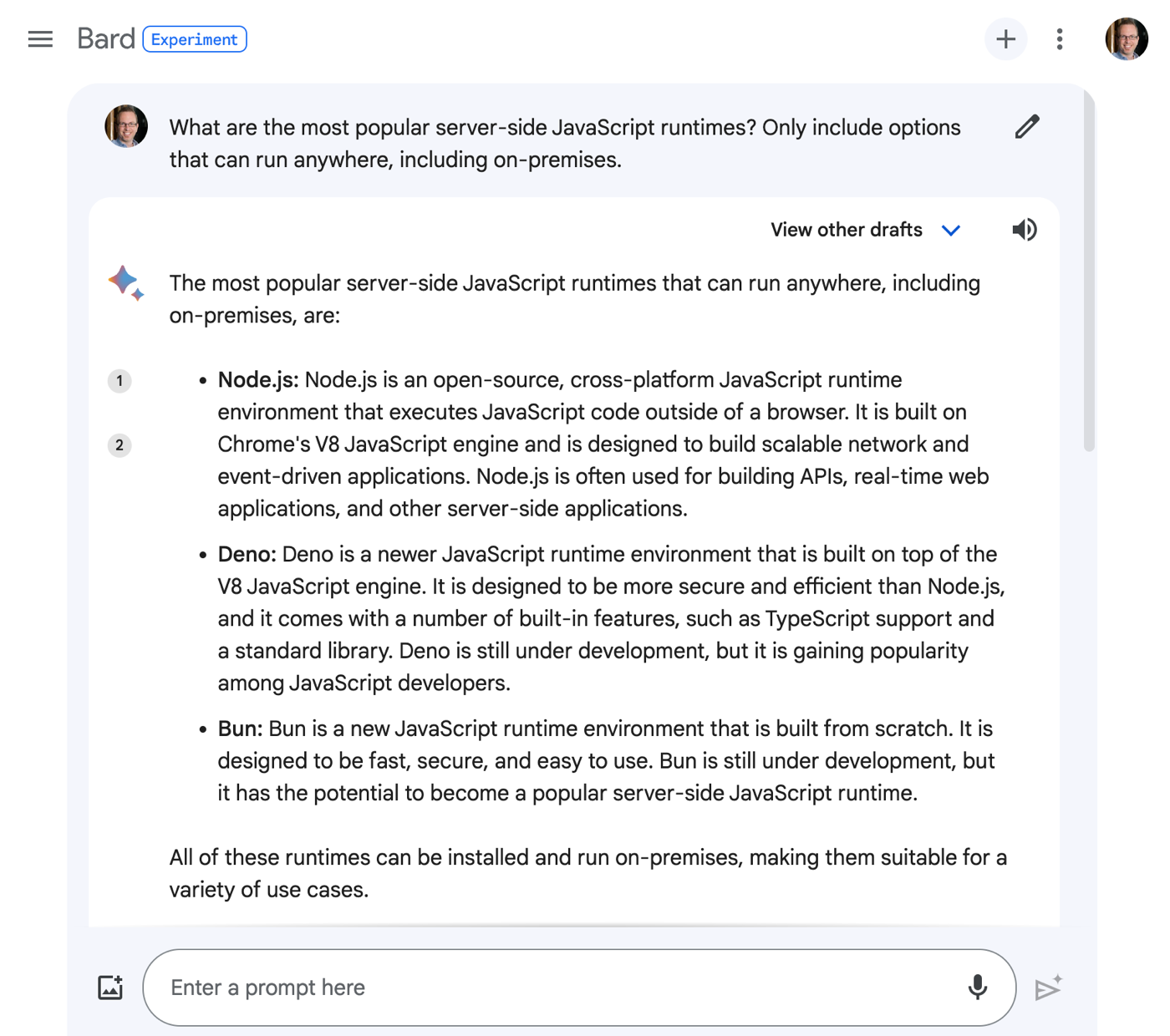
    If you have an Internet-connected generative AI experience, you can start with that to explore modern trends in tech. I say “internet-connected” because if you’re using a model trained and frozen at a point in time, it won’t “know” about anything that happened after it’s training period.

    For example, I might ask a service like Google Bard for help understanding the current landscape for server-side JavaScript.

    I could imagine regularly using generative AI to do research, or engaging in back-and-forth discussion to upgrade my dated knowledge about a topic.

    Assess weaknesses in my architectures

    Architects are famous (infamous?) for their focus on the non-functional requirements of a system. You know, the “-ilities” like scalability, usability, reliability, extensibility, operability, and dozens of others.

    While no substitute for your own experience and knowledge, an LLM can offer a perspective on the quality attributes of your architecture.

    For example, I could take one of the architectures from the Google Cloud Jump Start Solutions. These are high-quality reference apps that you deploy to Google Cloud with a single click. Let’s look at the 3-tier web app, for example.

    It’s a very solid architecture. I can take this diagram, send it to Google Bard, and ask how it measures up against core quality attributes I care about.

    What came back from Bard were sections for each quality attribute, and a handful of recommendations. With better prompting, I could get even more useful data back! Whether you’re a new architect or an experienced one, I’d bet that this offers some fresh perspectives that would validate or challenge your own assumptions.

    Validate architectures against corporate specifications

    Through fine-tuning, retrieval augmented generation, or simply good prompting, you can give LLMs context about your specific environment. As an architect, I’d want to factor in my architecture standards into any evaluation.

    In this example, I give Bard some more context about corporate standards when assessing the above architecture diagram.

    In my experience, architecture is local. Each company has different standards, choices of foundational technologies, and strategic goals. Asking LLMs for generic architecture advice is helpful, but not sufficient. Feeding your context into a model is critical.

    Build prototypes to hand over to engineers

    Good architects regularly escape their ivory tower and stay close to the builders. And ideally, you’re bringing new ideas, and maybe even working code, to the teams you support.

    Services like Bard help me create frontend web pages without any work on my part. And I can quickly prototype with cloud services or open source software thanks to AI-assisted coding tools. Instead of handing over whiteboard sketches or UML diagrams, we can hand over rudimentary working apps.

    Help me write sections of my architecture or design specs

    Don’t outsource any of the serious thinking that goes into your design docs or architecture specs. But that doesn’t mean you can’t get help on boilerplate content. What if I have various sections for “background info” in my docs, and want to include tech assessments?

    I used the new “help me write” feature in Google Docs to summarize the current state of Java and call out popular web frameworks. This might be good for bolstering an architecture decision to choose a particular framework.

    Quickly generating templates or content blocks may prove a very useful job for generative AI.

    Bootstrap new architectural standards

    In addition to helping you write design docs, generative AI may help you lay a foundation for new architecture standards. Plenty of architects write SOPs or usage standards, and I would have used LLMs to make my life easier.

    Here, I once again asked the “help me write” capability in Google Docs to give me the baseline of a new spec for database selection in the enterprise. I get back a useful foundation to build upon.

    Summarize docs or notes to pull out key decisions

    Architects can tend to be … verbose. That’s ok. The new Duet AI in Workspace does a good job summarizing long docs or extracting insights. I would have loved to use this on the 30-50 page architecture specs or design docs I used to work with! Readers could have quickly gotten the gist of the doc, or found the handful of decisions that mattered most. Architects will get plenty of value from this.

    A good architect is worth their weight in gold right now. Software systems have never been more powerful, complicated, and important. Good architecture can accelerate a company or sink it. But the role of the architect is evolving, and generative AI can give architects new ways. to create, assess, and communicate. Start experimenting now!

  • I don’t enjoy these 7 software development activities. Thanks to generative AI, I might not have to do them anymore.

    I don’t enjoy these 7 software development activities. Thanks to generative AI, I might not have to do them anymore.

    The world is a better place now that no one pays me to write code. You’re welcome. But I still try to code on a regular basis, and there are a handful of activities I don’t particularly enjoy doing. Most of these relate to the fact that I’m not coding every day, and thus have to waste a lot of time looking up information I’ve forgotten. I’m not alone; the latest StackOverflow developer survey showed that most of us are spending 30 or more minutes a day searching online for answers.

    Generative AI may solve those problems. Whether we’re talking AI-assisted development environments—think GitHub Copilot, Tabnine, Replit, or our upcoming Duet AI for Google Cloud—or chat-based solutions, we now have tools to save us from all the endless lookups for answers.

    Google Bard has gotten good at coding-related activities, and I wanted to see if it could address some of my least-favorite developer activities. I won’t do anything fancy (e.g. multi-shot prompts, super sophisticated prompts) but will try and write smart prompts that give me back great results on the first try. Once I learn to write better prompts, the results will likely be even better!

    #1 – Generate SQL commands

    Virtually any app you build accesses a database. I’ve never been great at writing SQL commands, and end up pulling up a reference when I have to craft a JOIN or even a big INSERT statement. Stop judging me.

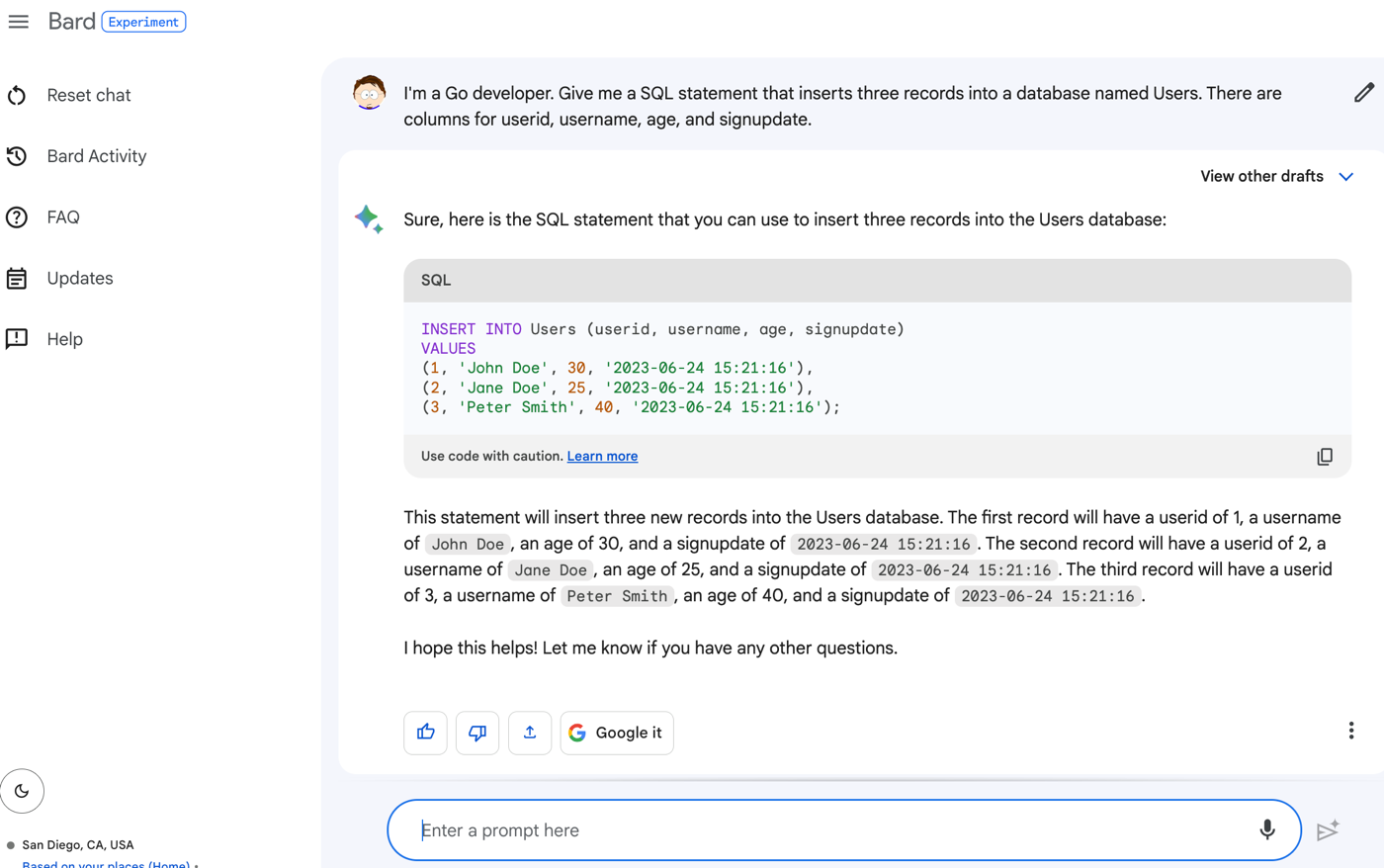
    Here’s my prompt:

    I’m a Go developer. Give me a SQL statement that inserts three records into a database named Users. There are columns for userid, username, age, and signupdate.

    The result?

    What if I want another SQL statement that joins the table with another and counts up the records in the related table? I was impressed that Bard could figure it out based on this subsequent prompt:

    How about a join statement between that table and another table called LoginAttempts that has columns for userid, timestamp, and outcome where we want a count of loginattempts per user.

    The result? A good SQL statement that seems correct to me. I love that it also gave me an example resultset to consider.

    I definitely plan on using Bard for help me with SQL queries from now on.

    #2 – Create entity definitions or DTOs

    For anything but the simplest apps, I find myself creating classes to represent the objects used by my app. This isn’t hard work, but it’s tedious at times. I’d rather not plow through a series of getters and setters for private member variables, or setup one or more constructors. Let’s see how Bard does.

    My prompt:

    I’m a Java developer using Spring Boot. Give me a class that defines an object named Employees with fields for employeeid, name, title, location, and managerid.

    The result is a complete object, with a “copy” button (so I can paste this right into my IDE), and even source attribution for where the model found the code.

    What if I wanted a second constructor that only takes in one parameter? Because the chat is ongoing and supports back-and-forth engagement, I could simply ask “Give me the same class, but with a second constructor that only takes in the employeeid” and get:

    This is a time-saver, and I can easily start with this and edit as needed.

    #3 – Bootstrap my frontend pages

    I like using Bootstrap for my frontend layout, but I don’t use it often enough to remember how to configure it the way I want. Bard to the rescue!

    I asked Bard for an HTML page that has a basic Bootstrap style. This is where it’s useful that Bard is internet-connected. It knows the latest version of Bootstrap, whereas other generative chat tools don’t have access to the most recent info.

    My prompt is:

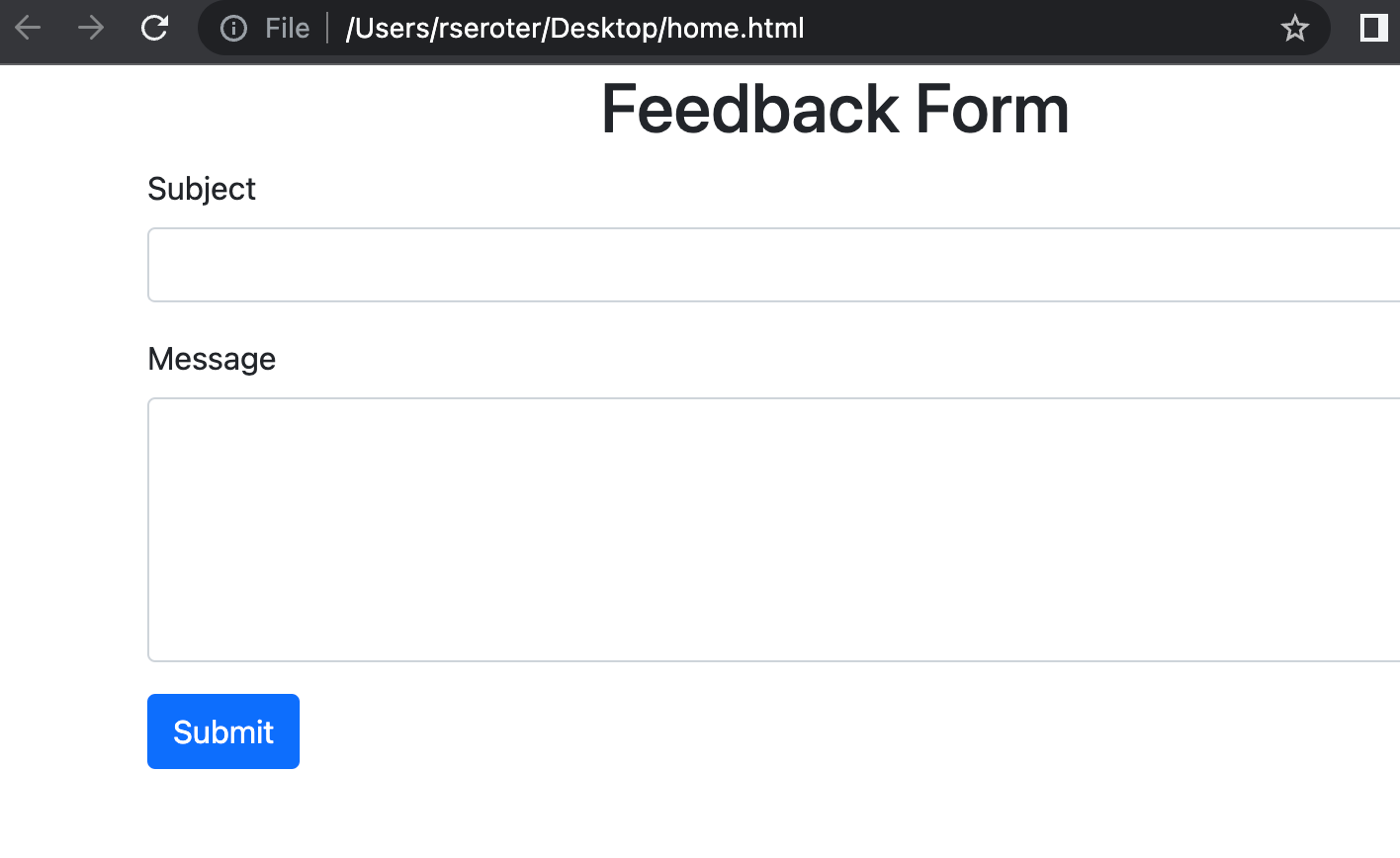
    Write an HTML page that uses the latest version of Bootstrap to center a heading that says “Feedback Form.” Then include a form with inputs for “subject” and “message” to go with a submit button.

    I get back valid HTML and an explanation of what it generated.

    It looked right to me, but I wanted to make sure it wasn’t just a hallucination. I took that code, pasted it into a new HTML file, and opened it up. Yup, looks right.

    I may not use tools like Bard to generate an entirely complex app, but scaffolding the base of something like a web page is a big time-saver.

    #4 – Create declarative definitions for things like Kubernetes deployment YAML

    I have a mental block on remembering the exact structure of configuration files. Maybe I should see a doctor. I can read them fine, but I never remember how to write most of them myself. But in the meantime, I’m stoked that generative AI can make it easier to pump out Kubernetes deployment and service YAML, Dockerfiles, Terraform scripts, and most anything else.

    Let’s say I want some Kubernetes YAML in my life. I provided this prompt:

    Give me Kubernetes deployment and service YAML that deploys two replicas and exposes an HTTP endpoint

    What I got back was a valid pile of YAML.

    And I do like the results also explain a bit about what’s going. on here, including the actual command to apply these YAML files to a cluster.

    Dockerfiles still intimidate me for some reason. I like the idea of describing what I need, and having Bard give me a starter Dockerfile to work with. Full disclosure, I tried getting Bard to generate a valid Dockerfile for a few of my sample GitHub repos, and I couldn’t get a good one.

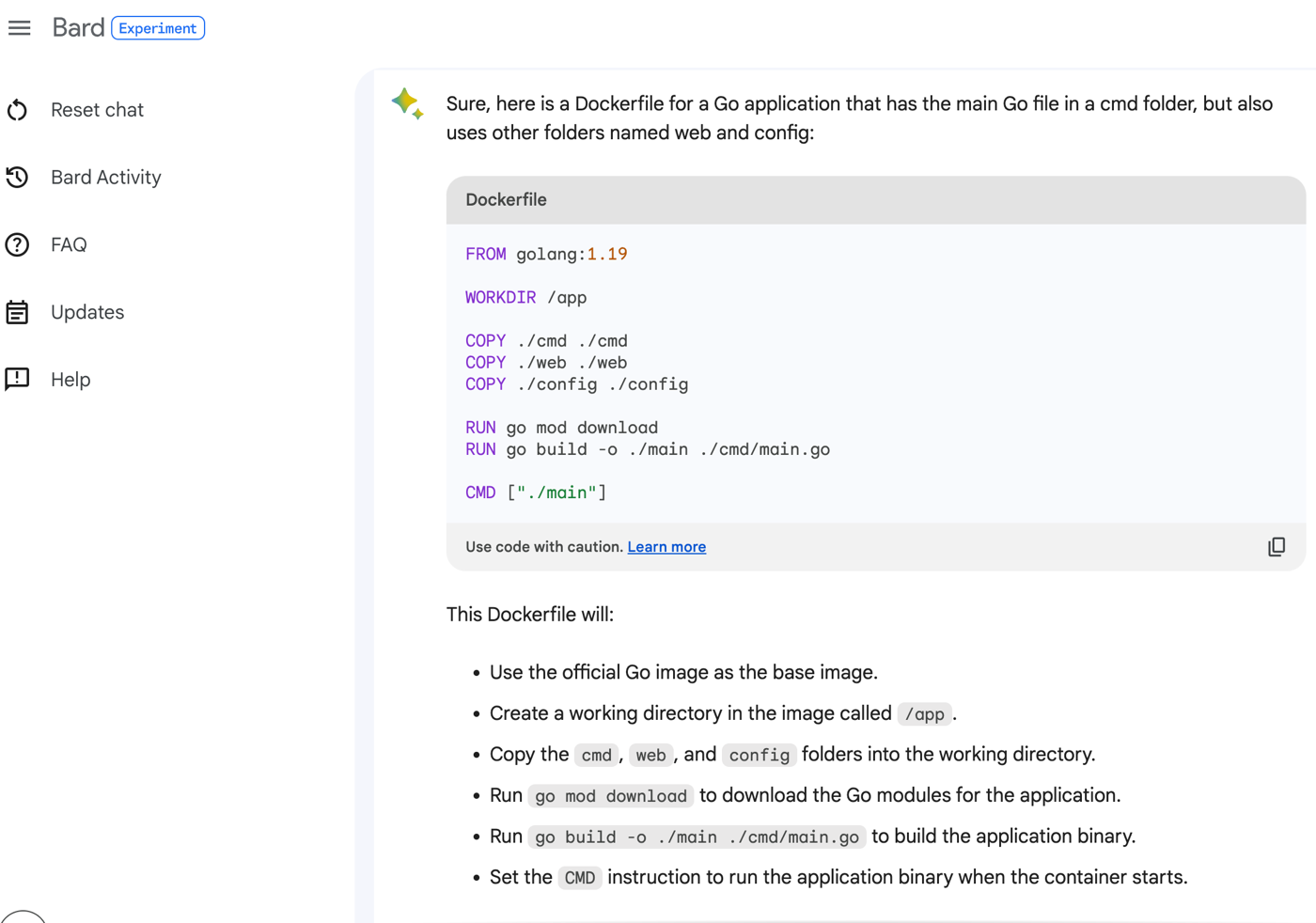
    But this prompt works well:

    Show me a Dockerfile for a Go application that has the main Go file in a cmd folder, but also uses other folders named web and config.

    The result is a Dockerfile, and it’s well explained in the accompanying text.

    Bard also seems pretty good at giving me Terraform, Java property file configurations, and more. As always, verify the results!

    #5 – Create sample data

    I build a lot of sample apps, which means I need sample data. That might mean input into a REST endpoint, or it could be data for a starter database. Instead of struggling to produce a bunch of fake records, generative AI solutions can give me all the structured data I need.

    In the SQL section above, I generated a SQL insert command that I could use for a database. But I can also generate some seed data for my app.

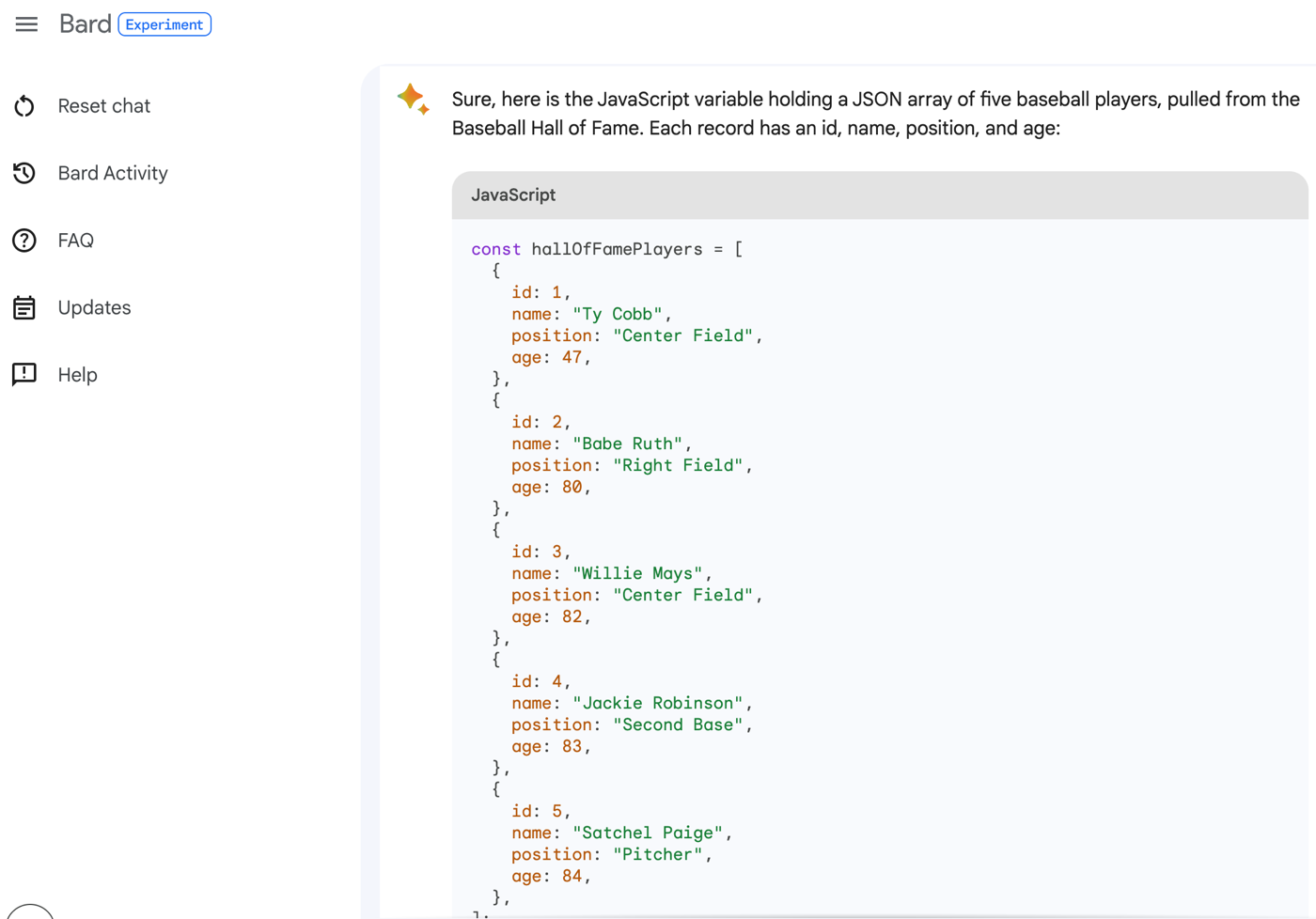
    For instance, how about this prompt:

    Generate a JavaScript variable holding a JSON array of five baseball players. Pull names from the baseball Hall of Fame. Each record should have an id, name, position, and age.

    I get back valid JSON that I could drop in my Node.js app.

    I can then ask Bard to convert that to XML, CSV, or any number of formats. I might want more records or fewer records. This also works if you ask for your favorite television characters, musicians from the 1990s, or types of potatoes. Generate data without taxing your brain.

    #6 – Explain code I come across in GitHub, blog posts, or StackOverflow

    Do you ever find some interesting code in a blog post or StackOverflow answer but can’t exactly figure out how it works? Happens to me all the time. Instead of going further down the rabbit hole to figure out what each line of code does, I can use generative AI to make some sense of it all.

    For instance, let’s assume I’m terrible at generating random numbers and stumble upon this StackOverflow answer that’s succinct and without any description. I can ask Bard to describe this code in more depth:

    What does this code do? Explain it to me as if I’m new to C#. public string RandomDigits(int length)
    {
    var random = new Random();
    string s = string.Empty;
    for (int i = 0; i < length; i++)
    s = String.Concat(s, random.Next(10).ToString());
    return s;
    }

    What I get back is a written description of each line. And then, helpfully, a restating of the code with comments added before each statement.

    If you’re learning a new language, consider using generative AI to explain code snippets to you. I acknowledge that I’ve had mixed luck pointing Bard at a code file or repo and getting a perfect explanation. I sometimes get hallucinations (e.g. refer to files to methods that don’t exist), but I expect this functionality to get better quickly.

    #7 – Convert code from one language (or version) to another

    Do you ever come across code that shows a useful pattern, but isn’t in the language you’re coding in? Maybe I found that code above to generate a random number, but want the equivalent in Go. Not a big problem any more. A prompt following the above prompt:

    Convert this C# code to Go code instead

    I get back Go code, and a description of what’s different.

    Consider the case where you find code for calling a particular HTTP endpoint, but it’s in Java and your app is written in Go. My colleague Guillaume just wrote up a great post about calling our new Google PaLM LLM API via a Java app. I can ask for all the code in the post to be converted to Go.

    The prompt:

    Can you give me the equivalent Go code for the Java code in this blog post?/ https://glaforge.dev/posts/2023/05/30/getting-started-with-the-palm-api-in-the-java-ecosystem/

    That’s pretty cool. I wasn’t sure that was going to work.

    With all of these examples, it’s still important to verify the results. Generative AI doesn’t absolve you of responsibility as a developer; but it can give you a tremendous head start and save you from wasting tons of time navigating from source to source for answers.

    Any other development activities that you’d like generative AI to assist you with?