In this fourth article in the running series on BizTalk Server 2006 R2 and Windows Communication Foundation (WCF) integration, the focus continues to be on consuming advanced services. Specifically, this article investigates the SOAP Message Transmission Optimization Mechanism (MTOM) binding option for a WCF service.
MTOM Primer
What is MTOM? It is a W3C recommended way to transmit binary data while still maintaining the overall structure of an XML Infoset. If someone needs to return a binary object from a web service call (e.g. Microsoft Word document, JPEG image, etc), one would typically build a code block which returned a byte array from the operation.

The code above returns a byte array of the selected JPEG image file. A standard SOAP message is represented via XML, and this particular service operation returns the binary encoded data in a text node.
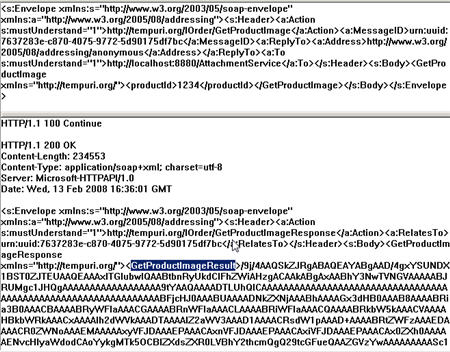
In the response message above, notice that a Base64Binary encoded node is embedded directly in the message along with any other XML nodes (if part of the response). The serialization to a Base64Binary XML node results in a data block larger than the original binary file size. As for consuming this response, be aware that the XSD Base64Binary type maps directly to a Byte array in the .NET Framework.
Under the MTOM model, the binary part of the response is converted to a Multipurpose Internet Mail Extensions (MIME) attachment. The SOAP response message is still in XML, with an “include” reference to the MIME attachment. If the WCF service above has its binding’s messageEncoding node switched from “Text” (the default value) to “Mtom”, and the WCF client also switches its binding, then the WCF operation ‘s response message looks like this:
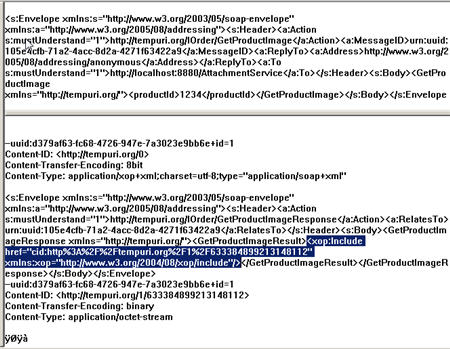
A few changes are visible. First the Content-Type value of the response message is “application/xop+xml”. XOP stands for Xml-binary Optimized Packaging. Also notice that in place of a value in the “GetProductImageResult” node, instead there is an node that holds a reference to the MIME attachment. It’s then up to the service client (built into the WCF infrastructure) to take this raw binary attachment and convert it back to a Base64Binary encoded data for the client to consume.
An MTOM encoding type is supposed to decrease the size of a binary node by ~30%. Given the original, bloated size, this means that the MTOM encoded message should be roughly the same size as the actual binary file.
How to test the change in message size between the two message encoding options? This is where WCF Endpoint behaviors are a useful component. A “message inspector” can be created to grab the outbound/inbound message and do something with it. In this case, the message size needs to be captured by the service before the response is sent back to the caller. A class is created which implements the IDispatchMessageInspector interface. The “BeforeSendReply” interface operation is used in this example.
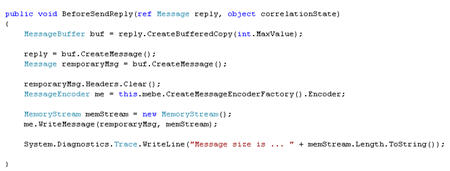
A WCF message can only be read once, so a buffered copy gets created to hold the referenced “reply” message. Next another copy is made for use by the operation in capturing message size. After the headers are removed, the MessageEncoder (which can write messages to streams) is created a member object of type MessageEncodingBindingElement. The MessageEncoder writes the contents of the current message to a new MemoryStream object. Finally, the stream is measured and the message size is output to a trace log.
Next the actual endpoint behavior that uses this message inspector gets created. This class inherits IEndpointBehavior and the “ApplyDispatchBehavior” operation is used to add the message inspector to the runtime behavior. This operation is where the current binding encoding is discovered and passed to the message inspector (and set the value of the MessageEncodingBindingElement mentioned above) via the [endpoint.Binding.CreateBindingElements().Find()] command.
Finally, if the goal is to set this behavior at design time in the application configuration file of the service, then a class overriding the BehaviorExtensionElement object needs to be defined. This class points to the endpoint behavior created earlier.
[Note: More about WCF custom behaviors can be found in Aaron Skonnard’s MSDN Magazine article entitled “Extending WCF with Custom Behaviors.” ]
In the WCF service’s configuration file, a new custom behavior was added.
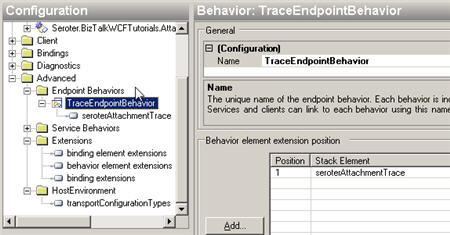
Then the WCF service endpoint used that behavior in its BehaviorConfiguration setting. To see this in action, the service was called, and the trace viewer monitored. First, the original, text-based encoding was tested.
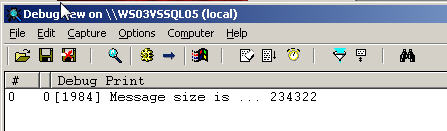
The text-based encoding resulted in a WCF message that was 234KB. Note that the original JPEG image file on disk weighs in at 172KB. So the binary encoded added some 36% to the original size of the message. Think of what this does to a multi-MB binary file. If the configuration files of the client and service were switched to use “Mtom” vs. “Text” message encoding, the service call printed this output:
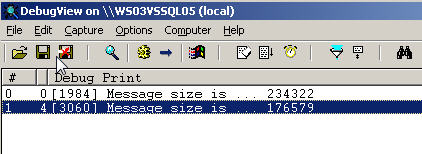
This message is significant smaller than the previous one. An interesting note is that MTOM is LESS efficient for standard, non-binary payloads. Another simple operation exists on this demonstration service which accepts a string value, and returns a string value. If that operation was called first with Text encoding, and then Mtom encoding, the following logs were noted:
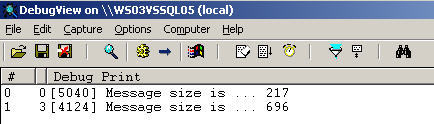
The Text encoding resulted in a payload of 217 bytes, while the MTOM encoding caused a payload of nearly 700 bytes. Keep this in mind when choosing how to build service contracts and selecting binding encodings.
Note: In order for this example to work, the MaxArrayLength attribute of the readerQuotas node of the binding needs to be increased, otherwise the following error will occur: “The maximum array length quota (16384) has been exceeded while reading XML data. This quota may be increased by changing the MaxArrayLength property on the XmlDictionaryReaderQuotas object used when creating the XML reader.” The default max array length for the caller is 16384. For this demonstration, this MaxArrayLength value was changed to 2147483647.
MTOM is the most efficient option for transporting binary data, but also the least cross-platform. It requires the service consumer digest MTOM data. Sending the binary data via text encoding is the least efficient model, but, the currently most supported among platforms and tools.
BizTalk Development For Binary Messages
The usage of MTOM encoding in a BizTalk Server 2006 R2 environment is very subtle. A developer needs virtually no knowledge of the chosen binding encoding when constructing their solution.
If the above WCF service is referenced using the BizTalk WCF Service Consuming Wizard within a BizTalk Visual Studio project, then the generated schema would look like this:
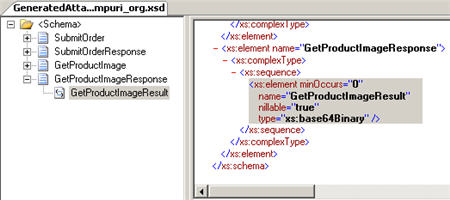
Notice that the response type is of Base64Binary. A schema node of this type CANNOT be distinguished by BizTalk Server. So how to get at this response value and do something with the binary data? A tactic similar to one I used on my MSDN blog was applied here. In a helper assembly, a class was built that inherited the IStreamFactory interface from the Microsoft.XLANGs.BaseTypes namespace. The AttachmentMessageCreator class then uses the stream factory class to return a valid Orchestration message (XLANGMessage) from the byte string passed in.
public class AttachmentStreamFactory : IStreamFactory
    {
        private string attachment;
        public AttachmentStreamFactory(string inAttachmentData)
        {
            attachment = inAttachmentData;
        }
        #region IStreamFactory Members
        System.IO.Stream IStreamFactory.CreateStream()
        {
            byte[] attachmentByteArray = Convert.FromBase64String(attachment);
            return new MemoryStream(attachmentByteArray);
        }
        #endregion
    }
    public class AttachmentMessageCreator
    {
        public void CreateAttachmentMessage(XLANGMessage outMessage, string inAttachmentData)
        {
            outMessage[0].LoadFrom(new AttachmentStreamFactory(inAttachmentData));
        }
    }
From within the orchestration, the Orchestration message (of type System.Xml.XmlDocument which holds any structure or format) was constructed inside an atomic scope because this helper class with non-serializable types was used. Inside the BizTalk orchestration “message assignment” shape, the Base64Binary node was retrieved as a string using Xpath, and passed to the AttachmentMessageCreator object. The resulting message was then sent to the file system to confirm that it was put back together correctly. The bound physical send port (which must use a pass-through pipeline), prints out the message with a JPEG extension.
BizTalk Configuration For Binary Messages
Once the above BizTalk solution was deployed, the wizard-generated send port binding files were imported. The only place where “encoding” is referenced is on the “Binding” tab of the BizTalk WCF Adapter configuration.
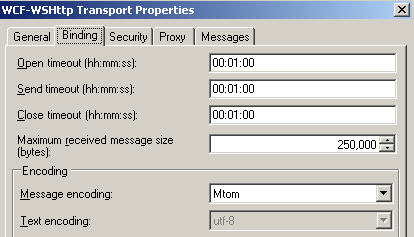
For the “Message encoding” value, valid entries are “Mtom” and “Text.” Also notice the Maximum received message size (bytes) setting which was changed for this demonstration. The default adapter value is 65,536.
The “message inspector” messages above were generated from a custom WinForm client, but a BizTalk Server caller should generate identical values since the tracing happens on the service side (not client side).
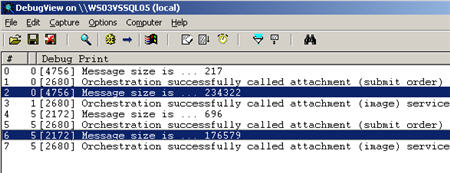
A quick check of the final send port’s output directory confirms that not only did BizTalk properly print out the JPEG files, but that the content is still correct (these are my articles, so I get to include my son in the content!).
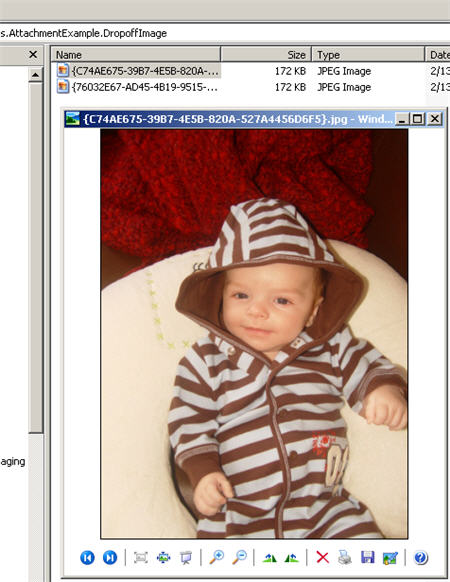
What this also demonstrates is that regardless of message encoding choice, the BizTalk orchestration and development bits are abstracted from that choice. The orchestration didn’t have to be rebuilt or redeployed because of a change in binding. The WCF adapter takes care of properly serializing the result, whether it traveled across the wire as a MIME attachment or embedded text. Powerful stuff.
Summary
This article demonstrated how MTOM encoding differs from text encoding, how to capture the size of a message going across the wire, and how to configure BizTalk to consume binary data, whether that data is received as MTOM or text.
Once this entire BizTalk+WCF series is complete, I will make the entire source code available.
Questions, comments or corrections? Go ahead and leave a comment on my blog post about this article.
You can read more about BizTalk, SOA and enterprise architecture on my blog at https://seroter.wordpress.com.
 Richard Seroter's Architecture Musings