It’s good to be home after a busy week, and today I’m celebrating three years since I joined Google. Monday is a US holiday, so no reading list until next Tuesday. But enjoy some fun items below!
[article] Amazing federated multicloud apps. A single management tool for your multi-site Kubernetes environments makes sense to me. But a single app across those clusters does not. More risk than benefit.
[blog] Google Research at I/O 2023. Excellent look at some of the important work the Google Research team delivered at Google I/O this year.
[blog] Announcing the launch of GUAC v0.1. Google security experts shipped this new product to help make sense of software metadata and help security professionals take more control over their supply chains.
Spent half of today flying home from Miami to San Diego after last night’s flight got delayed twice. It was nice to get a decent night’s sleep though! And I was able to read a few more things today. Glance through the items below.
[article] When Great Minds Don’t Think Alike. Do you have different types of thinkers in your org? Do they have a voice? Good post on how to recognize and leverage our differences.
[blog] 3 new ways generative AI can help you search. What happens when you mash up generative AI results with “standard” search results? It’s a better experience, as I’ve been using internally for a few weeks. Now, more folks can try it out.
[blog] Dancing with the cloud. Michele makes the point that doing “best in class” across clouds expands your failure domain.
[blog] A Hidden Serverless Peril. Serverless makes it easy to deploy apps quickly. But we can also take shortcuts, and Corey recommends we’re all more diligent about deployment pipelines.
[blog] Google Cloud Pub/Sub + AsyncAPI. If you’ve used Swagger for REST APIs, you might want to look at Async API as well. Here, Mete shows how to use it to describe an endpoint in our messaging engine.
##
Want to get this update sent to you every day? Subscribe to my RSS feed or subscribe via email below:
I had a blast today at our Google I/O Connect event in Miami. I did a presentation, and got to hang out with folks from my team and our community. I missed this sort of thing. I also read some terrific content, which you’ll find below.
[article] Organize Your Change Initiative Around Purpose and Benefits. It’s not your imagination; there are more “change” projects at your company now than before. This article talks about how to help them land, including “digital transformation” projects.
[blog] Cloud CISO Perspectives: Early May 2023. Good security links to check out here, along with some justification for pursuing (or encouraging) a security certification.
[survey] Accelerate State of DevOps Report. This might be the most cited and well-regarded DevOps survey each year, and the 2023 edition is now open. Every reader should fill this out!
[article] LLMs and the rise of the AI code generators. Detailed look at the landscape. It’s somehow already out of date given how fast things change, but it’s a good baseline.
[blog] Angular Developer Survey 2022 Results Summary. Even if you use a different frontend framework, or don’t use them at all, there’s useful data here for learning about where devs learn, and what they care about.
##
Want to get this update sent to you every day? Subscribe to my RSS feed or subscribe via email below:
Short reading list today, as I spent the morning in Day 2 of the Gartner conference, and then just got off a 5 hour flight to Miami with no in-plane wifi. But still some good things to check out below.
[article] Anthropic raises $450M to build next-gen AI assistants. The games have begun. And the customer should end up the winner. These folks are doing some terrific work, and I’m not just saying that because we’re their preferred cloud.
[blog] Strategy = Insights^Conviction. I like the point John makes here about not just saying you won’t do something (as part of your strategy), but also setting up the investments that reinforce that.
I’m in Las Vegas today for a Gartner conference and learned a few things. Below, you’ll also see a few items I read (or watched) today. Dig in!
[article] How CIOs overcome internal resistance to digital transformation. Inertia is usually the biggest competitor for any technology or process. How do you introduce change to an org? This post talks about the need to get leadership momentum and win the “middle.”
[youtube-video] How would AI impact the future of DevOps. Good, short chat between two of my colleagues who discuss where AI speeds us up and helps us get things done.
[article] Prompt Engineering: Get LLMs to Generate the Content You Want. If you’re feeling behind on “getting” many of these AI and LLM concepts, you’re not alone. At all. I like posts like this which clearly explain “prompt engineering” and the different types of prompts we can ask these large language models.
[blog] The Death Of Microservices? Nothing new here, but also a reminder that the answer to many things is “it depends.” Except when I ask my kids if they love me.
Just a few things for you on this Friday. Learn a bit more about AI, what tools Kubernetes users care about, and how to keep up with what’s going on in this industry.
[blog] How I learn and where I learn from. If I link to a blog that links to THIS blog, does the internet collapse in upon itself? LET’S FIND OUT. Brian has a terrific post on how he learns and his learning sources.
You’ll get a wide variety of things from today’s reading list. Check out some must-watch YouTube videos, some guidance on manager burnout, and a great site to monitor what each cloud is shipping.
[article] Datadog’s $65M Bill and Why Developers Should Care. The number is eye-popping, but big companies spend big dollars on all sorts of things that add value. This article offers a reasonable point of view.
[article] More Than 50% of Managers Feel Burned Out. It’s not hard to overlook managers when considering employee burnout. But managers have had is particularly rough these past few years. This post looks at why, and how to help.
[blog] Enriching GKE observability-in-context with uptime checks. I’m a fan of integrated experiences that don’t make me bounce all over the place. Here, we added the ability to set “uptime checks” for a Kubernetes-based workload, all from within the GKE console.
##
Want to get this update sent to you every day? Subscribe to my RSS feed or subscribe via email below:
Had a good Wednesday? I was able to write up a demo of cloud migration, do some real work, and read a few interesting items. Take a look at a handful of pieces below, many of which have a focus on technology tools.
[blog] Making Cloudflare the best place for your web applications. Cloudflare keep shipping interesting things. They sit in this fascinating in-between space nowadays with JAMstack-type vendors to one side, and hyperscale cloud platforms on the other.
[blog] AI-powered coding, free of charge with Colab. Millions of devs use Colab to program in Python for free. Now you’re getting some of the awesome AI assistance we announced last week.
[article] How to reduce your devops tool sprawl. Related to the above, tool sprawl is a real thing, and you should be aiming to consolidate in a few areas.
[blog] Deprecating an Open Source Project, Part 2. When is it time to put that product or open source project in the icebox? This post takes a look at how to handle an open source project that’s nearing its end.
##
Want to get this update sent to you every day? Subscribe to my RSS feed or subscribe via email below:
Moving isn’t fun. At least not for me. Even if you can move from one place to another, there are plenty of things that add friction. In the public cloud, you might want to switch from your first cloud to your next one, but it just feels like a lot of work. And while we cloud vendors like to talk about flashy serverless/container compute options, let’s be honest, most companies have their important workloads running in virtual machines. So how do you move those VMs from one place to another without a ton of effort? I’m going to look at four of the options, including one we just shipped at Google Cloud.
Option #1 – Move the workload, not the VM
In this case, you take what was on the original VM, and install it onto a fresh instance in the next cloud. The VM doesn’t move, the workload does. Maybe you do move the software manually, or re-point your build system to a VM instance in the new cloud.
Why do this? It’s a clean start and might give you the opportunity to do that OS upgrade (or swap) you’ve been putting off. Or you could use this time to split up the websites on a stuff server into multiple servers. This is also the one option that’s mostly guaranteed to work regardless of where you’re coming from, and where you’re going to.
The downside? It’s the most work of any of these options. You’ve got to install software, move state around, reconfigure things. Even if you do automated deployments, there’s likely new work here to bake golden images or deploy to a new cloud.
Option #2 – Export the VM images from one cloud and import into the next one
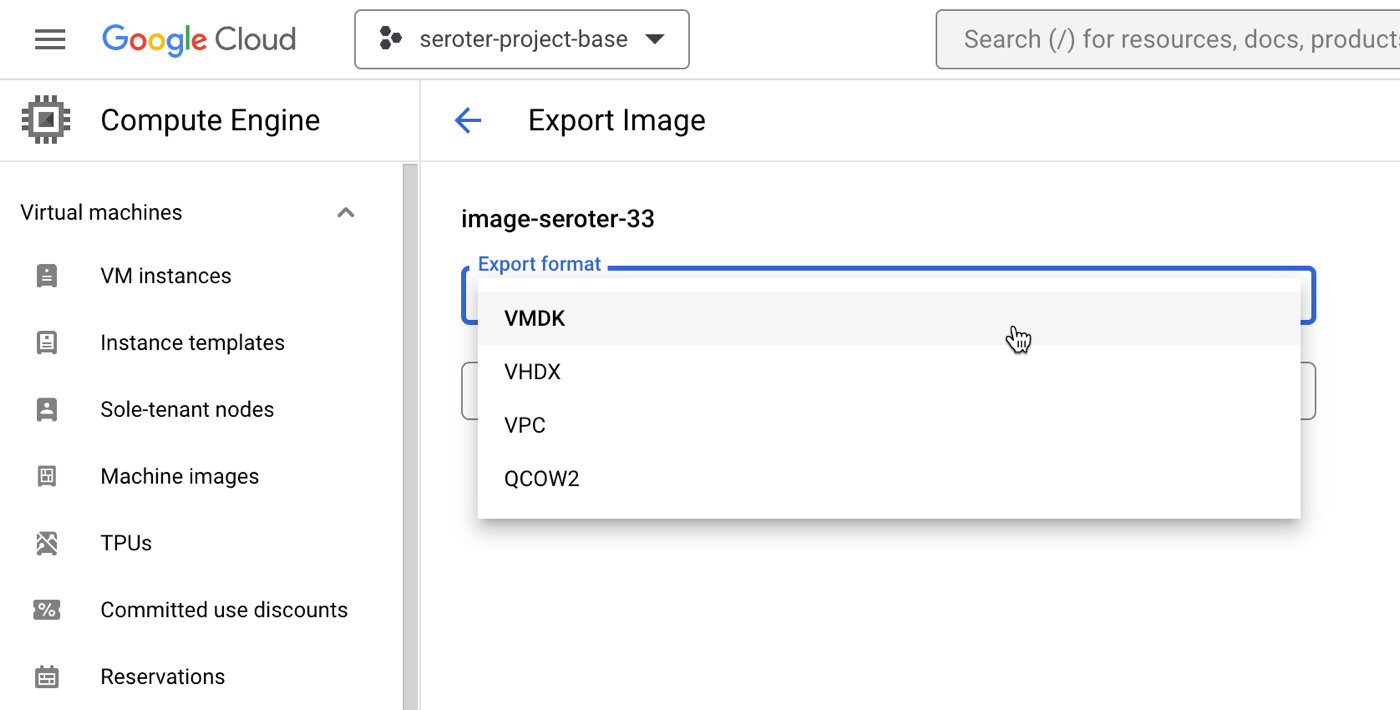
All the major clouds (and software vendors) support exporting and importing a VM image. These images come in all sorts of formats (e.g. VMDK, VHDX).
Why do this? It gives you a portable artifact that you can bring to another cloud and deploy. It’s a standard approach, and gives you a manageable asset to catalog, secure, backup, and use wherever you want. AWS offers guidance, so does Azure, as does Google Cloud. This usually carries no explicit cost, but brings with it costs for storage of the assets.
The downsides? This too is manual, although can be automated with APIs. It also moves the entire VM image without an opportunity to shrink or modernize any aspect of it. Additionally, it usually requires extra configuration of storage buckets and permissions to store the temporary artifacts.
Option #3 – Convert the VM to a container and move that artifact to the new cloud
Another way to move a VM to another cloud is to extract the VM-based application to a container image. The workload moves, but in a different format. All the major public clouds have something here. Azure Migrate helps with this, AWS provides an App2Container CLI tool, and Google Cloud offers Migrate to Containers as a CLI and UI-based experience.
So, what do you do with those existing .NET Framework apps on Windows? Most advice is "upgrade to #dotnet Core." But I hear that many folks want to freeze on .NET 4.8 for now.
Why do this? This offers a means of “shrinking” the workload by reducing it to its own components, without bringing along the OS with it. This can bring higher workload density in the target cloud (if you throw a bunch of app containers onto consolidated hardware) and reduce cost. Also, this gives you flexibility on where you run the workload next. For instance, the container image you generate from the Google Cloud tool can run on a Kubernetes cluster or serverless Cloud Run environment.
Downsides? This doesn’t work for all workload types. Don’t shove SharePoint into a container, for example. And not all tools work with all the various clouds, so you might have to move the VM manually and then run the containerization tool. Also, doing this may give the impression you’re modernizing the app, but in reality, you’re only modernizing the underlying platform. That is valuable, but doesn’t remove the need for other modernization activities.
Option #4 – Use a managed service that moves the VM and turns down the old instance
Can migration be easier? Can you move VMs around with fewer steps and moving parts? There are definitely solutions for this from a variety of vendors. Among cloud providers, what Google Cloud has is unique. We just added a new experience, and figured we could walk through it together.
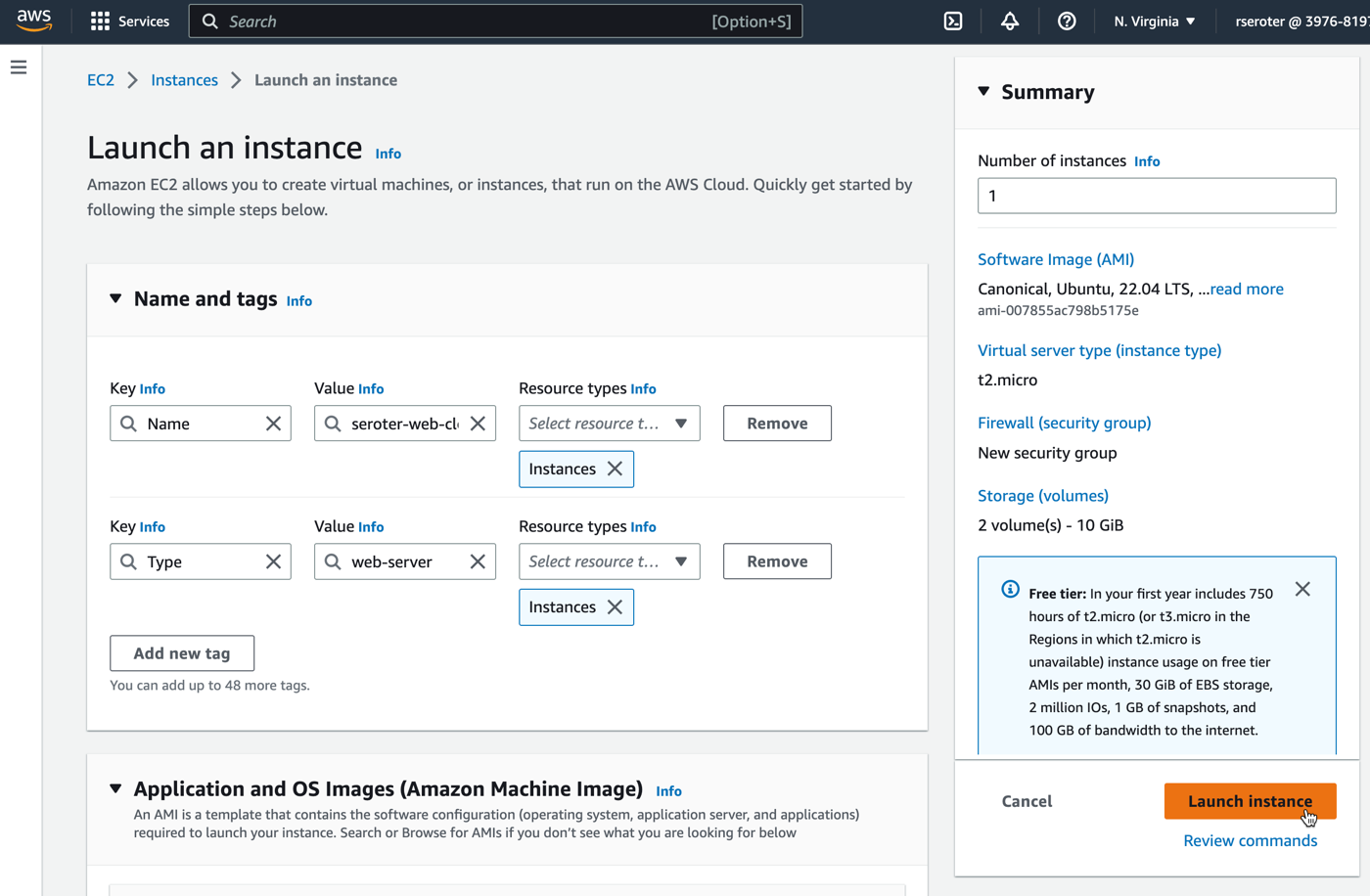
First, I built an Amazon EC2 instance and installed a web server onto it. I added a custom tag with the key “type” and value “web-server” so that I could easily find this VM later. I also added two total volumes in order to see if they successfully move alongside the VM itself.
After a few moments, I had my EC2 instance up and running.
Let’s fast forward for a period of time, and maybe it’s time to evolve and pick my next cloud. I chose Google Cloud, WHICH MUST SHOCK YOU. This workload needs a happier home.
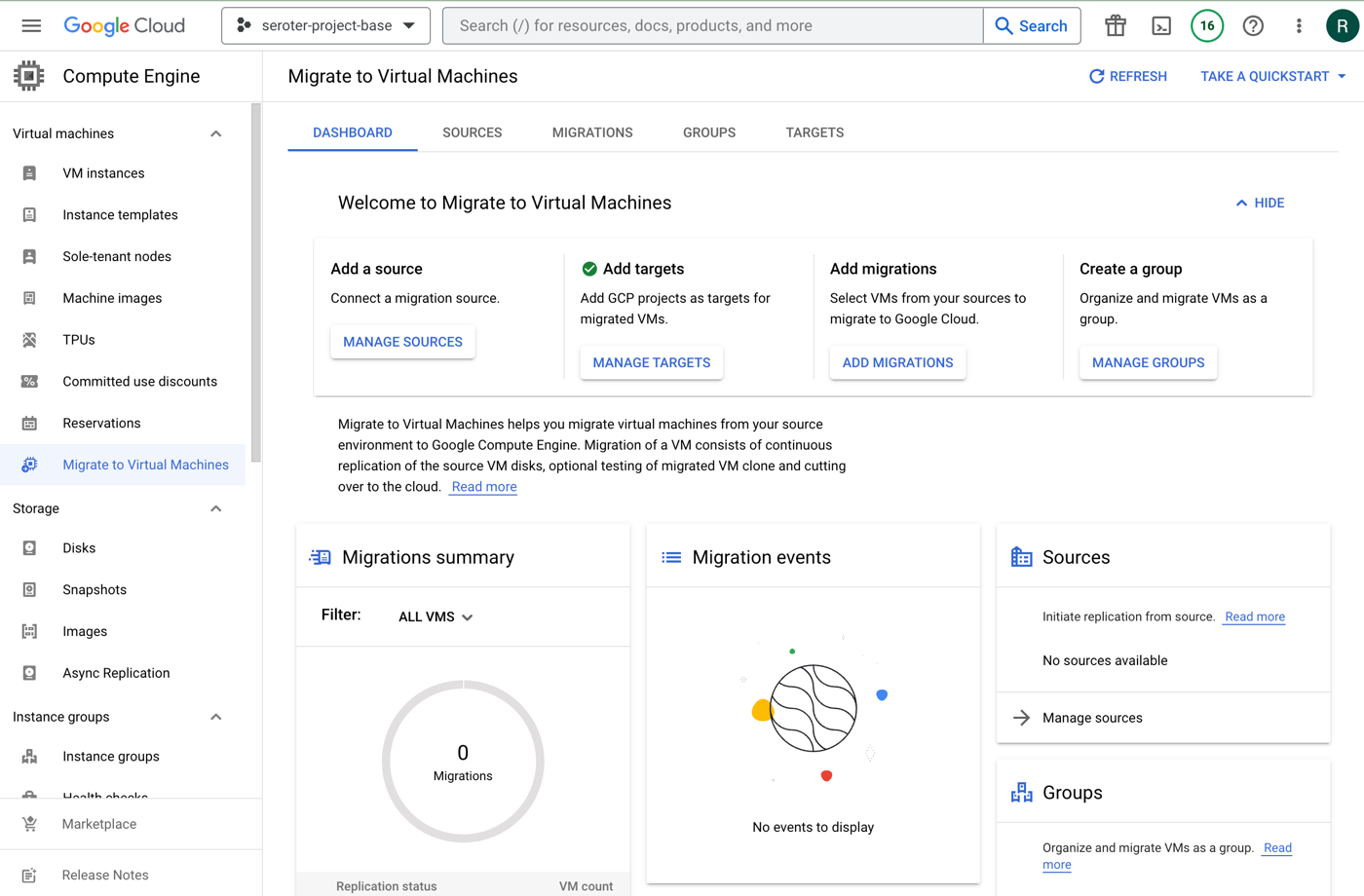
The new Migrate to Virtual Machines experience in the Google Cloud console is pretty sweet. From here, I can add migration sources, target projects, create groups of VMs for migration, and monitor the progress.
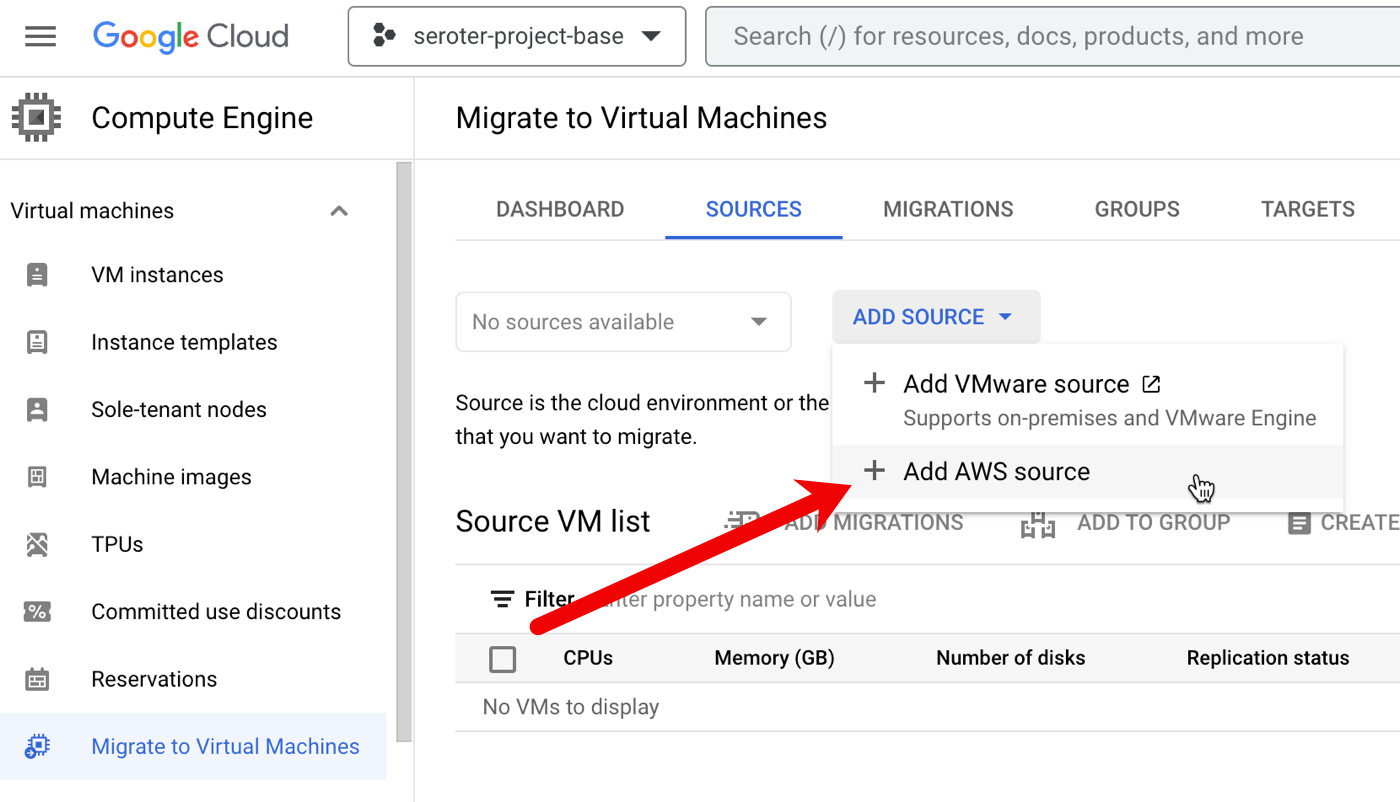
First, I needed to create a source. We recently added AWS as a built-in option. We’ve supported VMware-based migrations for a while now.
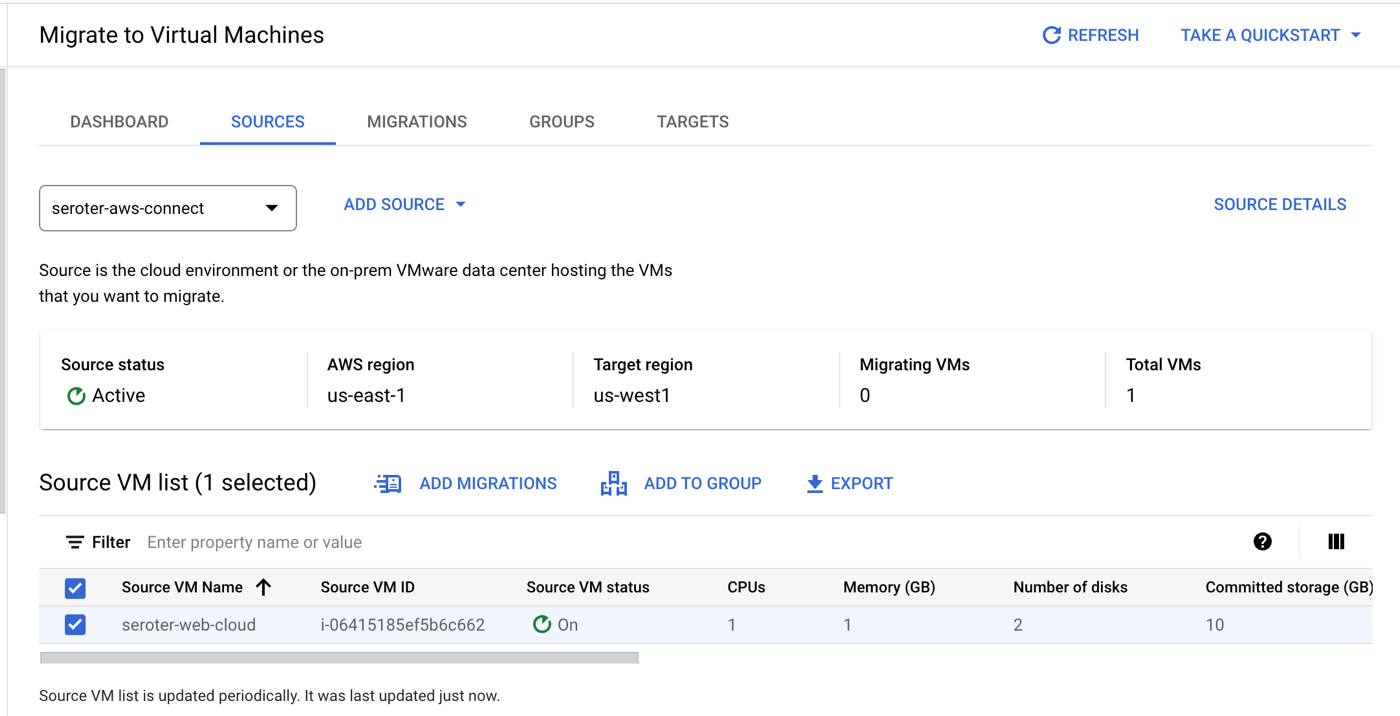
I created the “AWS source” by giving it a name, choosing the source AWS region, the target Google Cloud region, and providing credentials to access my account. Also note that I added an (optional) tag to search for when retrieving instances, and an (optional) tag for the migrated VMs.
My connection was in a “pending” state for a couple of minutes, and after that, showed me a list of VMs that met the criteria (AWS region, tag). Pretty cool.
From here, I chose that VM and picked the option to “add migration.” This added this particular VM into a migration set. Now I could set the “target” details of the VM in Google Cloud Compute Engine that this AWS image loads into. That means the desired machine name, machine type, network, subnet, and such.
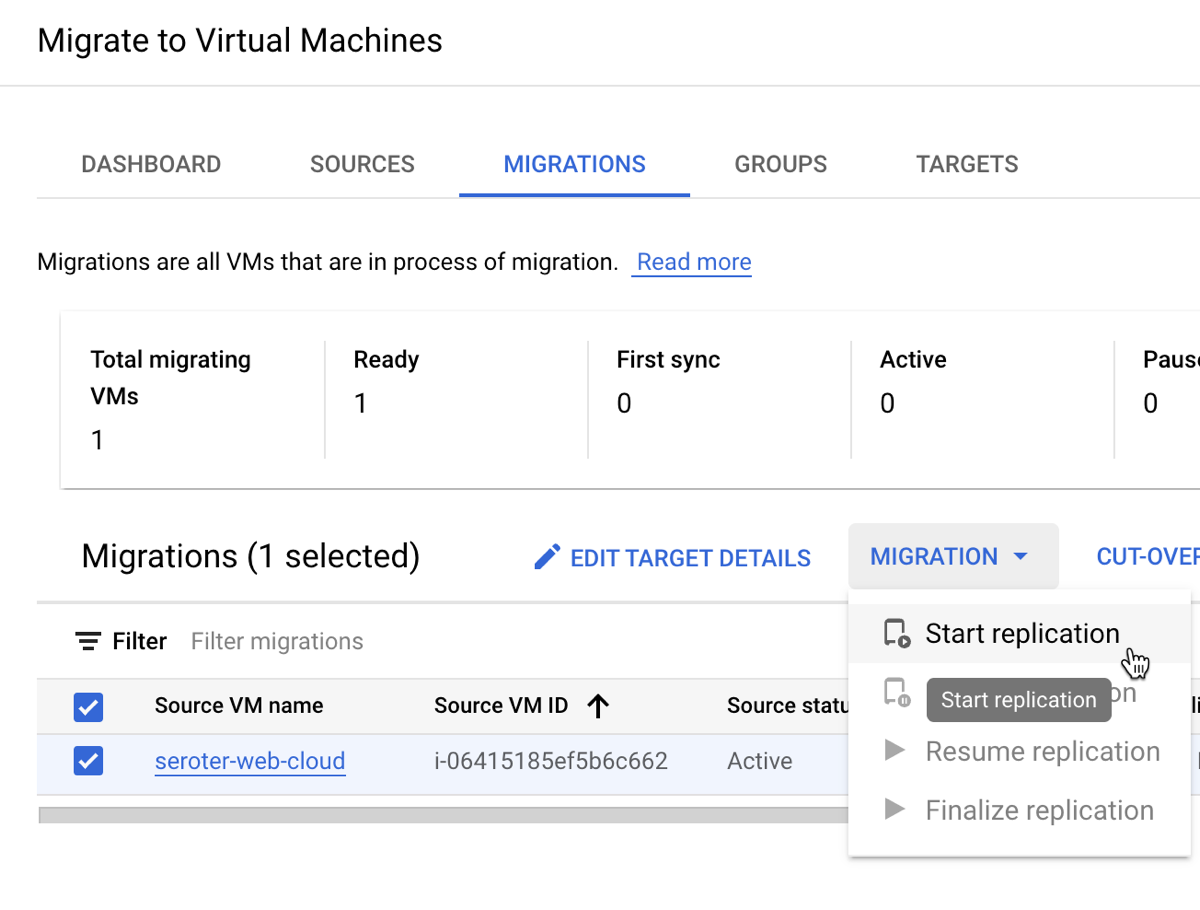
I started the migration. Note that I did not have to stop the VM on AWS for this migration to commence.
When it’s done replicating, I don’t yet have a running VM. My last major step is choosing to do a test-clone phase where I test my app before making it “live”, or, jump right to cut-over. In cut-over, the services takes a final data replica, stops the original VM, and makes a Compute Engine instance using the replicated data.
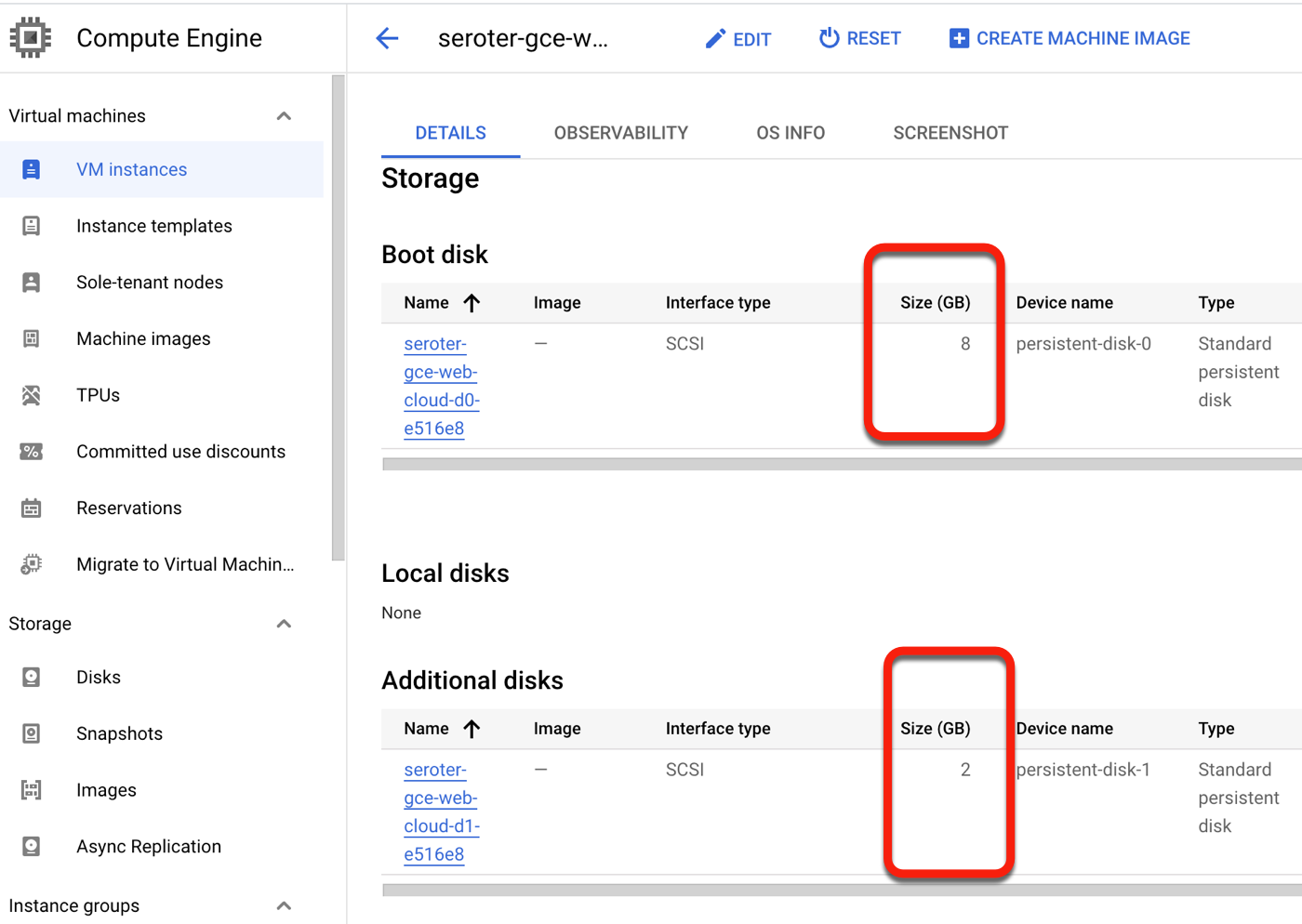
After a few more minutes, I saw a running Google Cloud Compute Engine VM, and a stopped EC2 instance.
I “finalized” the migration to clean up all the temporary data replicas and the like. After not being sure if this migration experience grabbed the secondary disks from my EC2 instance, I confirmed that yes, we brought them all over. Very nice!
Why do this? The Migrate to Virtual Machines experience offers a clean way to move one or multiple VMs from AWS, vSphere, or Azure (preview) to Google Cloud. There’s very little that you have to do yourself. And I like that it handles the shut down of the initial VM, and offers ways to pause and resume the migration.
The downsides? It’s specific to Google Cloud as a target. You’re not using this to move workloads out of Google Cloud. It’s also not yet available in every single Google Cloud region, but will be soon.
What did I miss? How do you prefer to move your VMs or VM-based workloads around?
I can across some good thinking and analysis today. Check out how Spotify and Chick-fil-A manage their fleets of infrastructure, and what Gartner sees shaping the future of cloud.
[blog] Stumbling Into GitOps at the Edge. Good story from the Chick-fil-A team that was an early adopter of a GitOps approach for distributed deployment of apps.
[blog] This Week in Spring – May 16th 2023. I still use Spring Boot when I get the chance, and I like some of the integrations coming in Spring Boot 3.1.
[article] When Your Employee Tells You They’re Burned Out. Don’t tell your team to “tough it out” or “this is what you’re paid to do” when they tell you they’re wiped. Here’s a good article on acknowledging and addressing burnout.
[article] DevEx, a New Metrics Framework From the Authors of SPACE. If you’ve struggled to measure (dev) productivity, you’re not alone. It’s hard and fraught with fake metrics. here’s one look at a new way to assess dev experience.
##
Want to get this update sent to you every day? Subscribe to my RSS feed or subscribe via email below:






 Richard Seroter's Architecture Musings