Today’s reading list is full of pieces where I said “that’s interesting” after finishing. I imagine that you’ll say the same thing after a few of these.
[article] Software Architecture in an AI World. Big post, but an important topic. I haven’t seen as much written on the impact of AI on software architecture practices.
[blog] Orchestrate Generative AI Applications. Can you coordinate a bunch of interacts with LLMs without ever writing a line of code? Yes, when you use no-code workflow engines like Cloud Workflows. I like this new integration with Vertex AI endpoints.
[blog] Is AWS Lambda a Halo Product? Are serverless products just shiny services that get you in the door to then buy the steady and dependable cloud infrastructure services? It’s likely revisionist history to say that Lambda was never intended to “win” or make money, but this is still a great argument.
[article] Research: How Passion Can Backfire at Work. What an interesting point of view! Do passionate people have an inflated sense of their importance, and act consistently over-confident?
I like remote work as much as the next person, but I’ve been in at least two long-running group chats at work today that would have been “solved” in minutes if we were all sitting in a room together. Yes, video chats help, but nothing beats an intense, spontaneous collaboration of people in the same space.
[report] State of Enterprise Tech 2024. There’s a lot here in a survey of enterprise tech leaders. Some of the AI investment findings were fascinating—why are so many folks fine-tuning models?—and answers on dev productivity reinforced other data I’ve seen.
[blog] Meta’s Llama 3.1 is now available on Google Cloud. The latest and greatest model from Meta is out, and already available in your public cloud of choice. When you try it out in Vertex AI on Google Cloud, you get some nice features for tuning, agent building, and grounding.
[blog] Profiling in Go: A Practical Guide. Go has a built-in profiler to collect CPU and memory usage that you can then study afterwards and use to optimize your app. Good walkthrough.
[blog] Maestro: Netflix’s Workflow Orchestrator. Big post from the Netflix team about their open source product for managing “large scale workflows such as data pipelines.”
[blog] How Airbnb Smoothly Upgrades React. Solid post about what it means to keep the frontend in a good state, and how the team at Airbnb does it.
[article] Avoid These 3 Pitfalls When Giving a Sales Presentation. This is targeted at folks doing sales presentations, but this advice works for anyone “pitching” to an audience. It could apply to architects selling a new internal strategy, a proposal for a new product, etc.
I was called for jury duty today, which meant I waited in a room with a couple hundred folks to see if I was needed for a trial. Alas, I wasn’t chosen. But I was able to do some reading while I waited!
[article] Hands On. I often wonder when I stop going on “hands on” with tech, and I think the answer is “never.” I find it rewarding to roll up my sleeves and use whatever I talk about.
[blog] Control LLM costs with context caching. Here’s a nice little example of the power of context caching for LLMs like Gemini that take in a long context.
[article] State of Developer Experience 2024, This offers a deeper dive into some of the data I shared last week. See what developers care about.
Want to get this update sent to you every day? Subscribe to my RSS feed or subscribe via email below:
I had a strong end to the week. Thanks to help from a teammate, I figured out my silly SQL error from yesterday and finished building demos for my upcoming keynote at Google IO Connect in China. I also started to dig out of my email hole, and still made time to read some informative items.
[blog] Accelerating code migrations with AI. Here’s a detailed story of a new internal Google tool that helps our team generate and validate code changes for migration.
[blog] The case for conferences in 2024. It might be easier to justify conference travel now than a few years ago (fewer health risks, more dynamic tech environment), but it’s still not easy. Forrest looks at how to make the case.
[docs] Releasing code. How does Google open source its code? This documents our process for releasing any of our source code outside of Google. It might be useful to you if you’re crafting or updating your company’s OSS strategy.
[blog] Story Points are Pointless, Measure Queues. If you have agile software teams, you might be familiar with estimation of work through “story points.” This post takes that apart.
[article] AI budgets poised to surge in 2025. Many folks will spend something on AI, but as this article rightly points out, a trained workforce and solid data foundation are a must-have.
I spent an hour today trying to get a SQL query to work. How was YOUR day? I’m sure it’s something silly, and at some point I’ll downgrade the conference demo to something simpler, but I can’t quit yet. Meanwhile, I also read some good items today.
[article] Developer Experience in the Age of Generative AI. This video and transcript offers a panel’s perspective on wide set of topics. How does AI help developers? What are the pitfalls? What’s the future of developer experience?
[blog] Is a Zero Temperature Deterministic? Karl wrote such an interesting piece about the temperature parameter of LLM requests. What impact does it have on creativity in response? Read to find out.
Want to get this update sent to you every day? Subscribe to my RSS feed or subscribe via email below:
Do you ever get that dopamine hit when a meeting gets cancelled? I admit that I rarely feel upset when I see a cancellation come across. Today had a couple of cancelled meetings, which meant I was able to complete a few tasks unexpectedly. Win!
[blog] Import and export Markdown in Google Docs. This is great. Import and export Docs as Markdown. For those writing tech docs or sharing content in a standard format, this is a big time saver.
[docs] When to use generative AI or traditional AI. Related to the above, I came across these docs today and thought it was a very helpful way to think about which AI is right for you.
[blog] 10 fun facts about emoji for World Emoji Day. Wow, World Emoji Day really snuck up on me this year. I didn’t have time to buy a new suit. Oh well, celebrate with new emojis and some fun insider info.
[article] What do developers perceive as productive days? It wouldn’t surprise you to learn that developers feel most productive when they complete tasks without a lot of interruption or context switching.
Want to get this update sent to you every day? Subscribe to my RSS feed or subscribe via email below:
Today’s reading list is once again full of lots of thought-provoking content and solid advice. Check out some good pieces on open source strategy, controlling LLM output, creating pull requests, and making software for a living.
[docs] Google models. We shipped a new page in our Cloud docs that explains our LLMs well, and, lets you click through to run them in Vertex AI even if you don’t have a Cloud account.
[blog] The Post-Valkey World. Launch an open source project, reach scale, and relicense to something proprietary. This has been a popular playbook as of late, but Stephen wonders if the tide has turned.
[blog] Amazon GenAI Services. I saw a lot of hand-wringing last week from AWS customers/superfans after the AWS Summit. Maybe it was ok when other clouds focused heavily on AI, but not when AWS does it? Or, the concern could be that the AWS approach isn’t differentiated, and they’re clearly behind in mindshare? Either way, interesting.
[blog] In Praise of Small Pull Requests. A small pull request (or changelist, in Google terms) isn’t always possible, but should be the goal. That’s according to this short post from our Testing blog.
[docs] Advanced load balancing overview. Some of the planet-scale, battle-tested load balancing algorithms used by Google itself are now available in the Cloud Service Mesh product.
Happy Monday! I had a productive weekend and also a lot of fun with the family. During some quiet time, I wrote up a blog post about using Apache Kafka in the cloud. That was the result of a dozen or so hours of experimentation during my vacation week.
[article] What exactly is an AI agent? There’s not exactly consensus here, so this article explores how a handful of folks are defining it.
[docs] Disaster recovery planning guide. How often are you exercising your DR plans? Be honest with me. Do you have DR plans that you trust? This is a great set of documentation for those properly planning for disasters.
[blog] Text classification with Gemini and LangChain4j. This is a terrific look at text classification techniques with generative AI. All Java fans should be reading Guillaume if they aren’t already.
[article] Designing a Successful Reskilling Program. Are you planning or running a reskilling program right now? I thought this article had good guidance on metrics, bringing the team along, and providing the right air cover.
[blog] Flexible committed-use discounts are now even more flexible. Smart tech leaders use whatever financial instruments they have at their disposal, and CUDs are an important one. I like that you can now use them across compute products in Google Cloud.
[blog] GenAI or Die. Some blazing hot perspective, but I do think the underlying point is right. This time it’s different, and disruption is going to hit some harder than others.
Yes, people are doing things besides generative AI. You’ve still got other problems to solve, systems to connect, and data to analyze. Apache Kafka remains a very popular product for event and data processing, and I was thinking about how someone might use it in the cloud right now. I think there are three major options, and one of them (built-in managed service) is now offered by Google Cloud. So we’ll take that for a spin.
Option 1: Run it yourself on (managed) infrastructure
Many companies choose to run Apache Kafka themselves on bare metal, virtual machines, or Kubernetes clusters. It’s easy to find stories about companies like Netflix, Pinterest, and Cloudflare running their own Apache Kafka instances. Same goes for big (and small) enterprises that choose to setup and operate dedicated Apache Kafka environments.
Why do this? It’s the usual reasons why people decide to manage their own infrastructure! Kafka has a lot of configurability, and experienced folks may like the flexibility and cost profile of running Apache Kafka themselves. Pick your infrastructure, tune every setting, and upgrade on your timetable. On the downside, self-managed Apache Kafka can result in a higher total cost of ownership, requires specialized skills in-house, and could distract you from other high-priority work.
If you want to go that route, I see a few choices.
Download the components and install them. Grab the latest release and throw it onto a set of appropriate virtual machine instances or bare metal machines. You might use Terraform or something similar to template out the necessary activities.
Use a pre-packaged virtual machine image. Providers like Bitnami (part of VMware, part of Broadcom) offer a catalog of packaged and supported images that contain popular software packages, including Apache Kafka. These can be deployed directly from your cloud provider as well, as I show here with Google Cloud.
There’s no shame in going this route! It’s actually very useful to know how to run software like Apache Kafka yourself, even if you decide to switch to a managed service later.
Option 2: Use a built-in managed service
You might want Apache Kafka, but not want to run Apache Kafka. I’m with you. Many folks, including those at big web companies and classic enterprises, depend on managed services instead of running the software themselves.
Why do this? You’d sign up for this option when you want the API, but not the ops. It may be more elastic and cost-effective than self-managed hosting. Or, it might cost more from a licensing perspective, but provide more flexibility on total cost of ownership. On the downside, you might not have full access to every raw configuration option, and may pay for features or vendor-dictated architecture choices you wouldn’t have made yourself.
First, I needed to enable the API within Google Cloud. This gave me the ability to use the service. Note that this is NOT FREE while in preview, so recognize that you’ll incur changes.
Next, I wanted a dedicated service account for accessing the Kafka service from client applications. The service supports OAuth and SASL_PLAIN with service account keys. The latter is appropriate for testing, so I chose that.
I created a new service account named seroter-bq-kafka and gave it the roles/managedkafka.client role. I also created a JSON private key and saved it to my local machine.
That’s it. Now I was ready to get going with the cluster.
Provision the cluster and topic
I went into the Apache Kafka for BigQuery dashboard in the Google Cloud console—I could have also used the CLI which has the full set of control plane commands—to spin up a new cluster. I get very few choices, and that’s not a bad thing. You give the CPU and RAM capacity for the cluster, and Google Cloud creates the right shape for the brokers, and creates a highly available architecture. You’ll also see that I choose the VPC for the cluster, but that’s about it. Pretty nice!
In about twenty minutes, my cluster was ready. Using the console or CLI, I could see the details of my cluster.
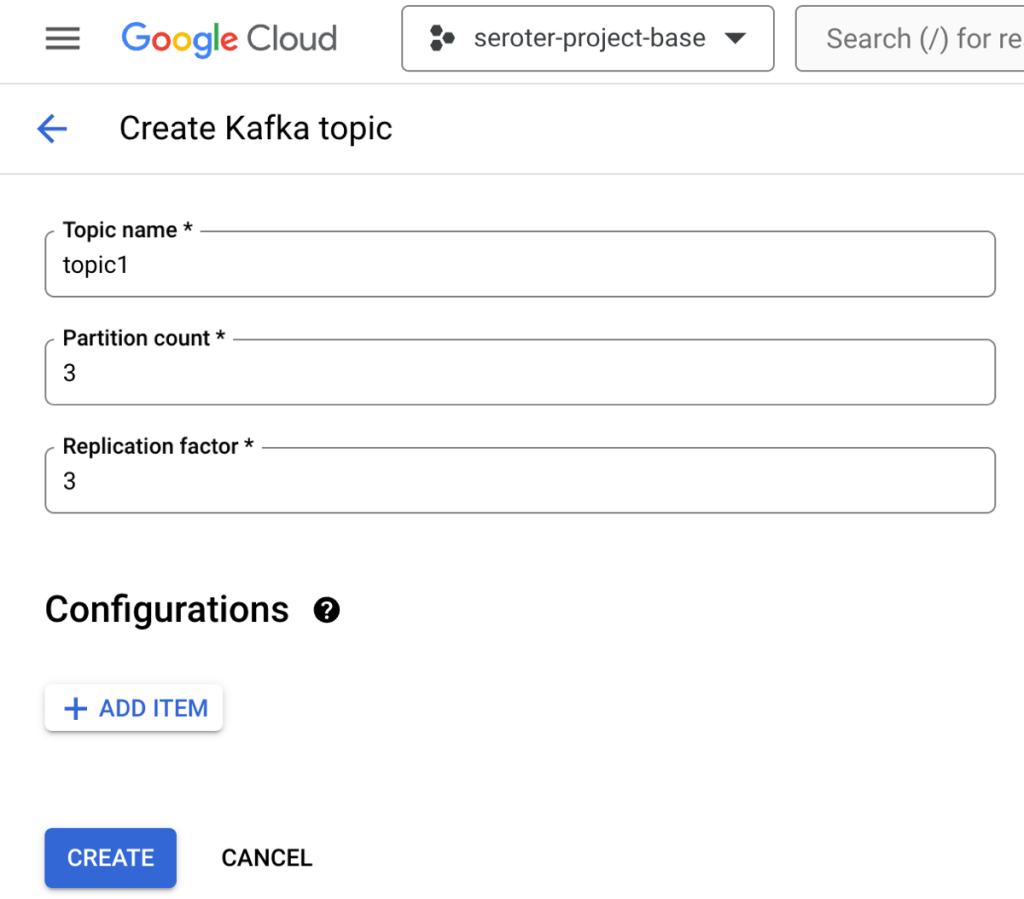
Topics are a core part of Apache Kafka represent the resource you publish and subscribe to. I could create a topic via the UI or CLI. I created a topic called “topic1”.
Build the producer and consumer apps
I wanted two client apps. One to publish new messages to Apache Kafka, and another to consume messages. I chose Node.js and JavaScript as the language for the app. There are a handful of libraries for interacting with Apache Kafka, and I chose the mature kafkajs.
Let’s start with the consuming app. I need (a) the cluster’s bootstrap server URL and (b) the encoded client credentials. We access the cluster through the bootstrap URL and it’s accessible via the CLI or the cluster details (see above). The client credentials for SASL_PLAIN authentication consists of the base64 encoded service account key JSON file.
My index.js file defines a Kafka object with the client ID (which identifies our consumer), the bootstrap server URL, and SASL credentials. Then I define a consumer with a consumer group ID and subscribe to the “topic1” we created earlier. I process and log each message before appending to an array variable. There’s an HTTP GET endpoint that returns the array. See the whole index.js below, and the GitHub repo here.
const express = require('express');
const { Kafka, logLevel } = require('kafkajs');
const app = express();
const port = 8080;

const kafka = new Kafka({
  clientId: 'seroter-consumer',
  brokers: ['bootstrap.seroter-kafka.us-west1.managedkafka.seroter-project-base.cloud.goog:9092'],
  ssl: {
    rejectUnauthorized: false
  },
  logLevel: logLevel.DEBUG,
  sasl: {
    mechanism: 'plain', // scram-sha-256 or scram-sha-512
    username: 'seroter-bq-kafka@seroter-project-base.iam.gserviceaccount.com',
    password: 'tybgIC ... pp4Fg=='
  },
});

const consumer = kafka.consumer({ groupId: 'message-retrieval-group' });

//create variable that holds an array of "messages" that are strings
let messages = [];

async function run() {
  await consumer.connect();
  //provide topic name when subscribing
  await consumer.subscribe({ topic: 'topic1', fromBeginning: true });

  await consumer.run({
    eachMessage: async ({ topic, partition, message }) => {
      console.log(`################# Received message: ${message.value.toString()} from topic: ${topic}`);
      //add message to local array
      messages.push(message.value.toString());
    },
  });
}

app.get('/consume', (req, res) => {
    //return the array of messages consumed thus far
    res.send(messages);
});

run().catch(console.error);

app.listen(port, () => {
  console.log(`App listening at http://localhost:${port}`);
});
Now we switch gears and go through the producer app that publishes to Apache Kafka.
This app starts off almost identically to the consumer app. There’s a Kafka object with a client ID (different for the producer) and the same pointer to the bootstrap server URL and credentials. I’ve got an HTTP GET endpoint that takes the querystring parameters and publishes the key and value content to the request payload. The code is below, and the GitHub repo is here.
const express = require('express');
const { Kafka, logLevel } = require('kafkajs');
const app = express();
const port = 8080; // Use a different port than the consumer app

const kafka = new Kafka({
    clientId: 'seroter-publisher',
    brokers: ['bootstrap.seroter-kafka.us-west1.managedkafka.seroter-project-base.cloud.goog:9092'],
    ssl: {
      rejectUnauthorized: false
    },
    logLevel: logLevel.DEBUG,
    sasl: {
      mechanism: 'plain', // scram-sha-256 or scram-sha-512
      username: 'seroter-bq-kafka@seroter-project-base.iam.gserviceaccount.com',
      password: 'tybgIC ... pp4Fg=='
    },
  });

const producer = kafka.producer();

app.get('/publish', async (req, res) => {
  try {
    await producer.connect();

    const _key = req.query.key; // Extract key from querystring
    console.log('key is ' + _key);
    const _value = req.query.value // Extract value from querystring
    console.log('value is ' + _value);

    const message = {
      key: _key, // Optional key for partitioning
      value: _value
    };

    await producer.send({
      topic: 'topic1', // Replace with your topic name
      messages: [message]
    });

    res.status(200).json({ message: 'Message sent successfully' });

  } catch (error) {
    console.error('Error sending message:', error);
    res.status(500).json({ error: 'Failed to send message' });
  }
});

app.listen(port, () => {
  console.log(`Producer listening at http://localhost:${port}`);
});
Next up, containerizing both apps so that I could deploy to a runtime.
I used Google Cloud Artifact Registry as my container store, and created a Docker image from source code using Cloud Native buildpacks. It took one command for each app:
Now we had everything needed to deploy and test our client apps.
Deploy apps to Cloud Run and test it out
I chose Google Cloud Run because I like nice things. It’s still one of the best two or three ways to host apps in the cloud. We also make it much easier now to connect to a VPC, which is what I need. Instead of creating some tunnel out of my cluster, I’d rather access it more securely.
Here’s how I configured the consuming app. I first picked my container image and a target location.
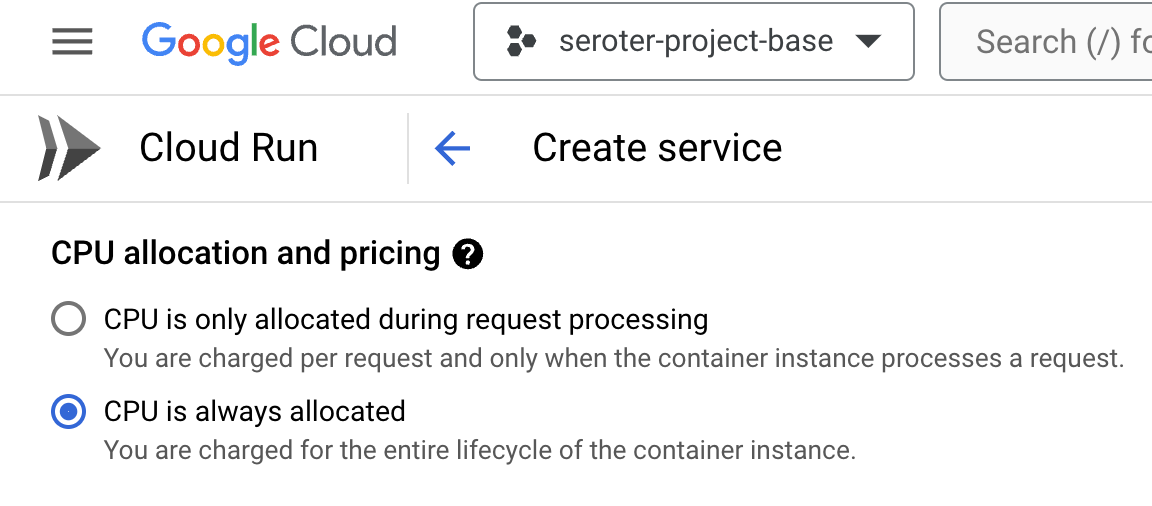
Then I chose to use always-on CPU for the consumer, as I had connection issues when I had a purely ephemeral container.
The last setting was the VPC egress that made it possible for this instance to talk to the Apache Kafka cluster.
About three seconds later, I had a running Cloud Run instance ready to consume.
I ran through a similar deployment process for the publisher app, except I kept the true “scale to zero” setting turned on since it doesn’t matter if the publisher app comes and goes.
With all apps deployed, I fired up the browser and issued a pair of requests to the “publish” endpoint.
I checked the consumer app’s logs and saw that messages were successfully retrieved.
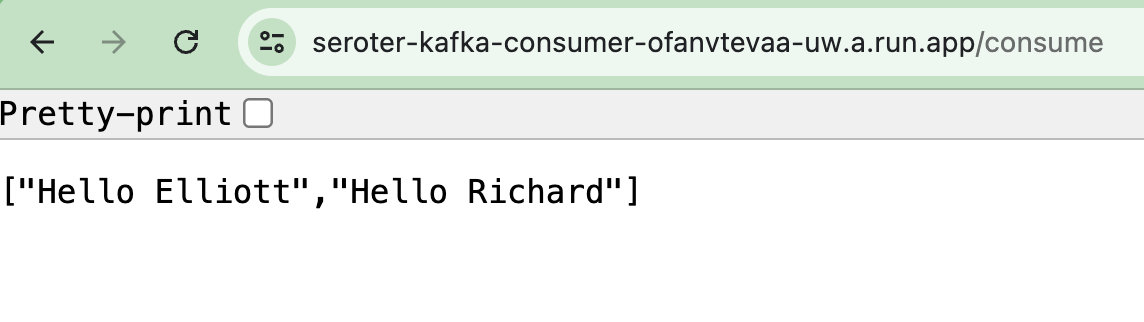
Sending a request to the GET endpoint on the consumer app returns the pair of messages I sent from the publisher app.
Sweet! We proved that we could send messages to the Apache Kafka cluster, and retrieve them. I get all the benefits of Apache Kafka, integrated into Google Cloud, with none of the operational toil.
Option 3: Use a managed provider on your cloud(s) of choice
The final way you might choose to run Apache Kafka in the cloud is to use a SaaS product designed to work on different infrastructures.
The team at Confluent does much of the work on open source Apache Kafka and offers a managed product via Confluent Cloud. It’s performant, feature-rich, and runs in AWS, Azure, and Google Cloud. Another option is Redpanda, who offer a managed cloud service that they operate on their infrastructure in AWS or Google Cloud.
Why do this? Choosing a “best of breed” type of managed service is going to give you excellent feature coverage and operational benefits. These platforms are typically operated by experts and finely tuned for performance and scale. Are there any downside? These platforms aren’t free, and don’t always have all the native integrations into their target cloud (logging, data services, identity, etc) that a built-in service does. And you won’t have all the configurability or infrastructure choice that you’d have running it yourself.
Wrap up
It’s a great time to run Apache Kafka in the cloud. You can go full DIY or take advantage of managed services. As always, there are tradeoffs with each. You might even use a mix of products and approaches for different stages (dev/test/prod) and departments within your company. Are there any options I missed? Let me know!
Finished the week mostly caught up and ready for the weekend. I’m trying to finish writing a tech blog post for publication here, but my demo app is misbehaving. Hopefully better luck this weekend.
[article] How To Measure Platform Engineering. This article proposes using a series of specific metrics to measure how useful your platform is for developers and the business overall.
[blog] How to Implement OAuth 2.0 into a Golang App. I’ll be honest with you, authentication protocols (SAML, OAuth, OIDC) are not my love language. I like my security stuff to be as invisible as possible. But this is a good walkthrough of the plumbing.
[blog] IAM so lost: A guide to identity in Google Cloud. Relatedly, identity management is my kryptonite. It’s easy for it to kill my momentum when building an app. However, I liked the way it was explained in this post.
[article] Barriers to AI adoption. So good. This summary of a recent research paper provides such a relatable set of concerns that AI superfans need to consider as they try to grow adoption.