We shipped a new Google Cloud Developer Center this morning, and I had a hand in the content we’re showing. Check it out and tell me what you think. I know there’s no “one way” that everybody wants to learn, so we tried to offer a mix of content types.
[article] A Vision For Product Teams. What’s generative AI going to mean for product managers and product teams? Be careful; a lot of today’s job can be done (to some extent) with AI.
[article] How does learning debt impact engineering teams? Knowledge sharing sometimes takes a back seat to “shipping.” But that leads to a learning debt. This post looks at the problem, and some solutions.
[blog] Advanced RAG — Sentence Window Retrieval. Cool technique that’s likely very applicable if you have dense source content that requires context to “match” effectively.
[blog] HashiCorp officially joins the IBM family. Feels like this one took a while, but congrats to all involved. I hope Hashicorp continues to ship great software.
Want to get this update sent to you every day? Subscribe to my RSS feed or subscribe via email below:
Today we reached issue #500. I think that’s pretty cool. There was no telling where this would go when I started a couple years back, but hopefully you’re enjoying it. Or at least tolerating it.
[article] Introduction to Frontend Development. I suspect that AI will keep making it possible to blur the lines between frontend and backend code, but there’s still very distinct tech and skills involved at either tier.
[article] What makes a code review useful? Do you employ code reviews? Hopefully. This post looks at research that uncovers what attributes of review comments determine how useful a code review is, and how you can make your’s better.
[blog] Introducing the new Google Cloud Trace Explorer. Our logging and monitoring services get more attention, but Cloud Trace is a very cool service too. If you want more visibility into latency issues in your apps, use something like this.
[article] AI Essentials for Tech Executives. I thought this piece had a lot of helpful definitions and framing that can help someone a few steps removed from the AI tech itself.
I’m in Sunnyvale today talking to a customer, and now flying home. It was fun to be part of a product launch today (see first item below) and learn from our users.
[blog] Get coding help from Gemini Code Assist — now for free. We like giving developers free tools. Folks love Google AI Studio as a way to work with Gemini models, and now we’re making Gemini Code Assist free for individuals. Virtually unlimited usage, no cloud account required. More coverage here and here.
[article] Introduction to Service Mesh. “The hard way” was the only way with service meshes for a while there. Now it appears to have gotten simpler, and I hope folks take a second look.
[article] How AI generated code compounds technical debt. We’re definitely cranking out more code thanks to AI, and reusing less. There’s growing concern that this will cause problems down the road.
[blog] Testing concurrent code with testing/synctest. Your app probably has a bunch of async and concurrent operations if it’s written in a modern language. That’s not easy to test. It’s now easier in Go.
[article] The Hidden Toll of Meeting Hangovers. You might have a good hangover recipe when you drank to much, and this article offers advice to avoid the hangover of a lousy meeting.
[blog] AI Agents and the CEOs. Kate looks at recent exec statements around agents and detects eagerness to reduce headcount by deploying intelligent agents. No self-respecting exec is looking at agents because of the tech alone; a responsible business leader should only adopt any technology because it helps them increase profit or reduce cost.
It’s already a busy AI-related start to the week with Anthropic shipping a new model. Buckle up for yet another week of exciting tech updates in the industry.
[blog] Reimagining development with intent-based engineering. “Intent” seems to be the next abstraction for software engineers. This post says that from infrastructure-as-code to IDPs, tools and platforms that apply “intent-based engineering” can fix the developer workflow.
[blog] When to give up. “Never give up” is a dumb mantra. Smart people quit things all the time. Of course there’s value in perseverance through struggle to reach a desired state. But there are clearly times where you’re wasting effort/time/money towards an undesirable end state. Quit.
[blog] Using LLMs effectively isn’t about prompting. Sean’s point is to learn what models are good at, versus investing too much in prompting. I think there’s still a lot to good prompting, though.
[article] The Serverless Hype Is Over. Now What? First-generation serverless hype is definitely over. It was over-hyped with too few real-world use cases. But second-generation serverless, personified by Google Cloud Run, is absolutely the right abstraction for significantly more use cases.
[blog] AI disruption – code editors are up for grabs. Your developers may have less loyalty to their IDE than any time in recent memory. James looks at this, and I’d love to see more folks chiming in on this idea.
Want to get this update sent to you every day? Subscribe to my RSS feed or subscribe via email below:
I’m approaching twenty-five years of connecting systems together. Yikes. In the summer of 2000, I met a new product called BizTalk Server that included a visual design tool for building workflows. In the years following, that particular toolset got better (see image), and a host of other cloud-based point-and-click services emerged. Cloud integration platforms are solid now, but fairly stagnant. I haven’t noticed a ton of improvements over the past twelve months. That said, Google Cloud’s Application Integration service is improving (and catching up) month over month, and I wanted to try out the latest and greatest capabilities. I think you’ll see something you like.
Could you use code (and AI-generated code) to create all your app integrations instead of using visual modeling tools like this? Probably. But you’d see scope creep. You’d have to recreate system connectors (e.g. Salesforce, Stripe, databases, Google Sheets), data transformation logic, event triggers, and a fault-tolerant runtime for async runners. You might find yourself creating a fairly massive system to replace one you can use as-a-service. So what’s new with Google Cloud Application Integration?
Project setup improvements
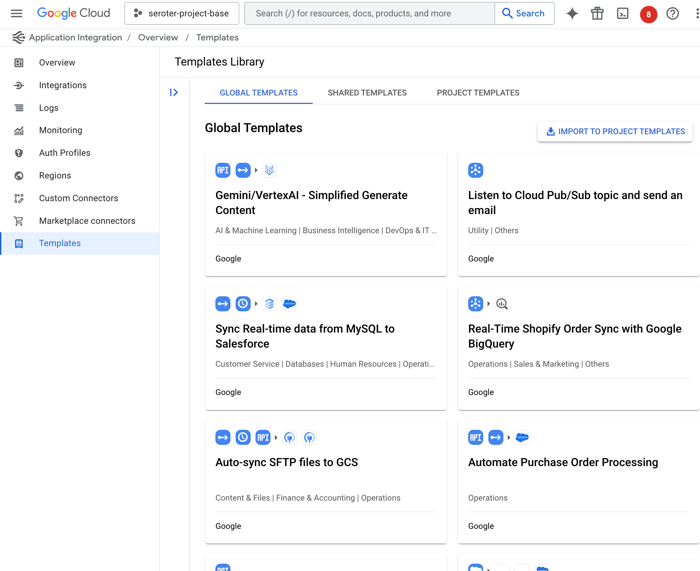
Let’s first look at templates. These are pre-baked blueprints that you can use to start a new project. Google now offers a handful of built-in templates, and you can see custom ones shared with you by others.
I like that anyone can define a new template from an existing integration, as I show here.
Once I create a template, it shows up under “project templates” along with a visual preview of the integration, the option to edit, share or download as JSON, and any related templates.
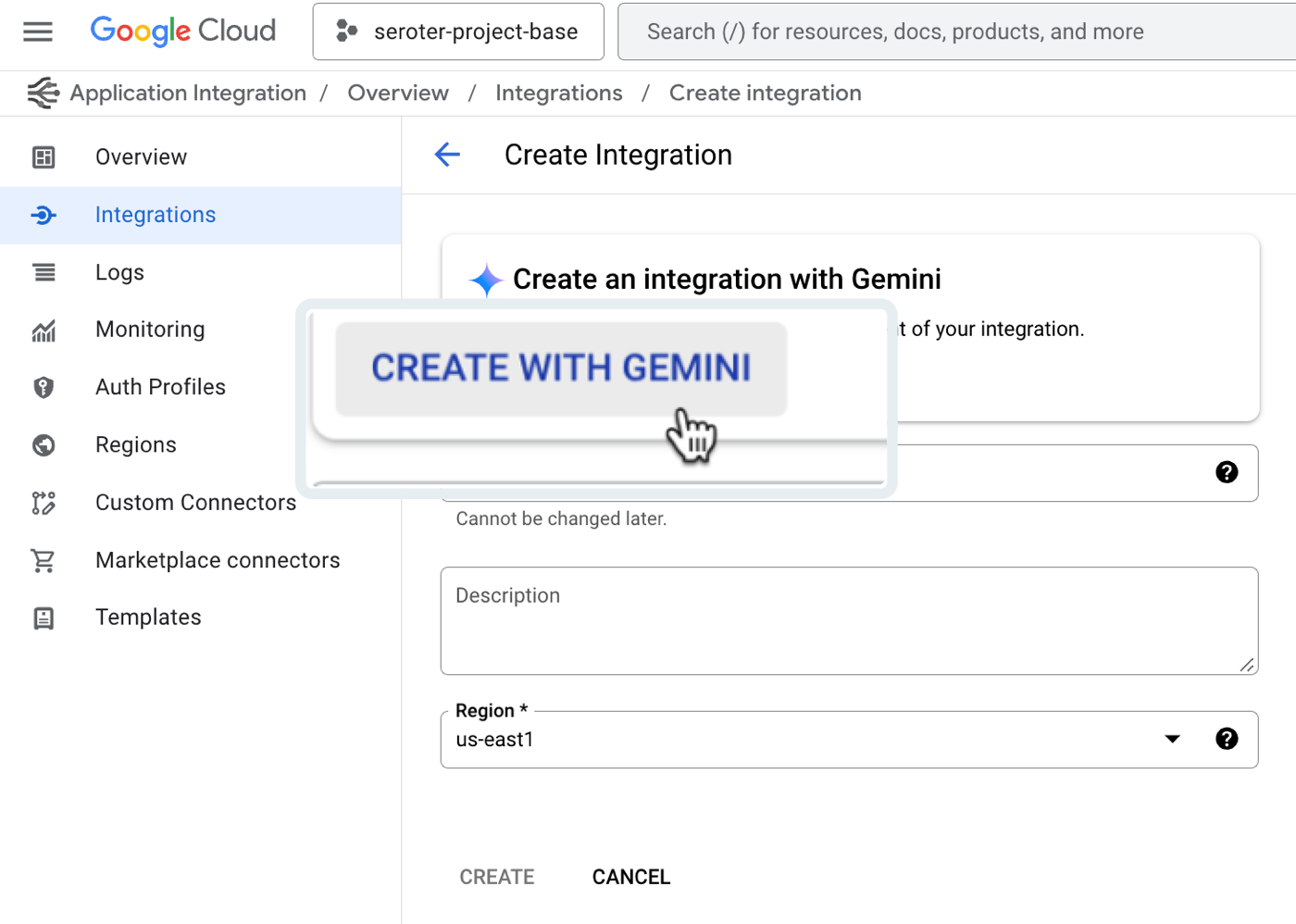
The next new feature of Google Cloud Application Integration related to setup is the Gemini assistance. This is woven into a few different features—I’ll show another later—including the ability to create new integrations with natural language.
After clicking that button, I’m asked to provide a natural language description of the integration I want to create. There’s a subset of triggers and tasks recognized here. See here that I’m asking for a message to be read from Pub/Sub, approvals sent, and a serverless function called if the approval is provided.
I’m shown the resulting integration, and iterate in place as much as I want. Once I land on the desired integration, I accept the Gemini-created configuration and start working with the resulting workflow.
This feels like a very useful AI feature that helps folks learn the platform, and set up integrations.
New design and development features
Let’s look at new features for doing the core design and development of integrations.
First up, there’s a new experience for seeing and editing configuration variables. What are these? Think of config variable as settings for the integration itself that you can set at deploy time. It might be something like a connection string or desired log level.
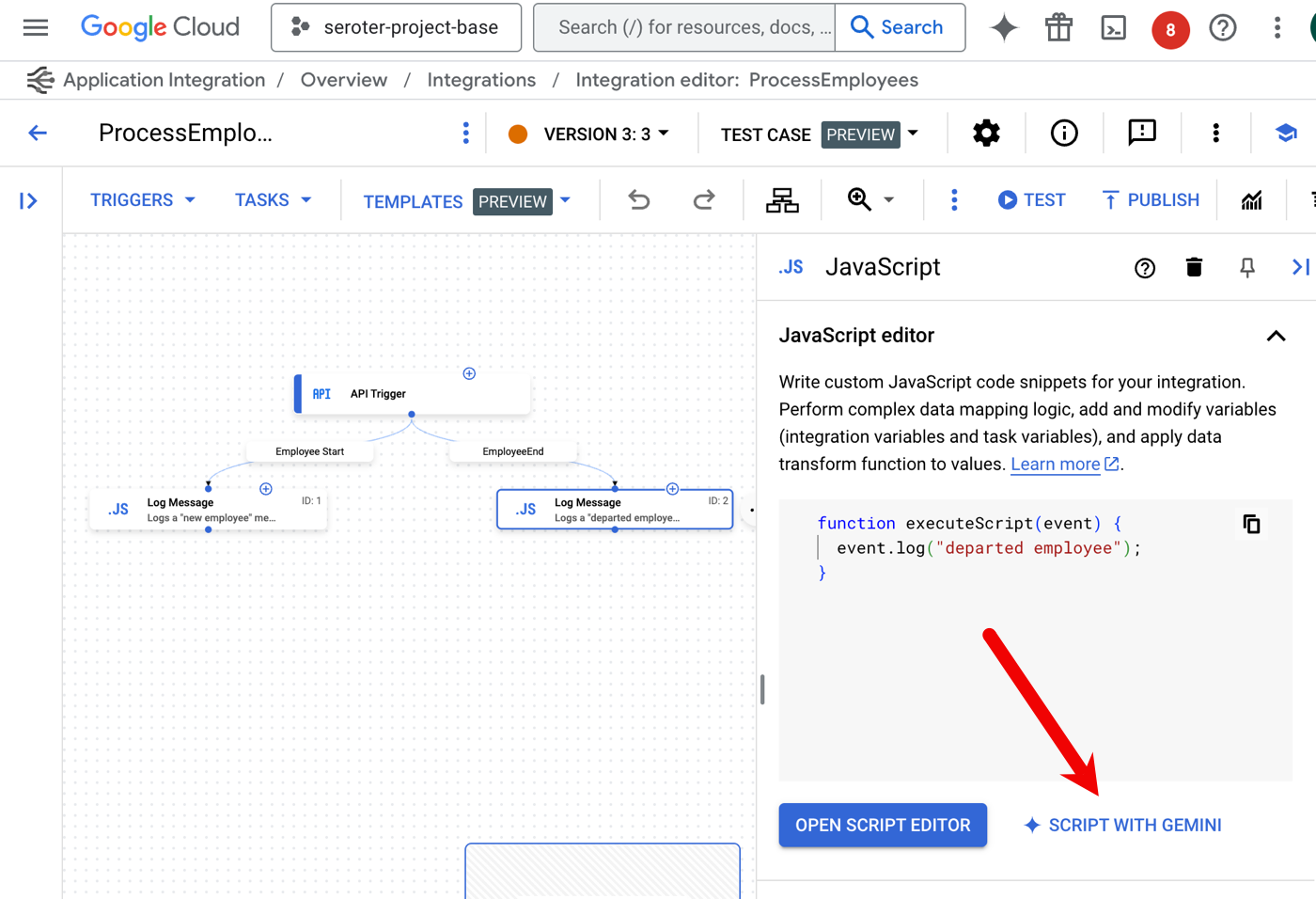
Here’s another great use of AI assistance. The do-whatever-you-want JavaScript task in an integration can now be created with Gemini. Instead of writing the JavaScript yourself, use Gemini to craft it.
I’m provided a prompt and asked for updated JavaScript to also log the ID of the employee record. I’m then shown a diff view that I can confirm, or continue editing.
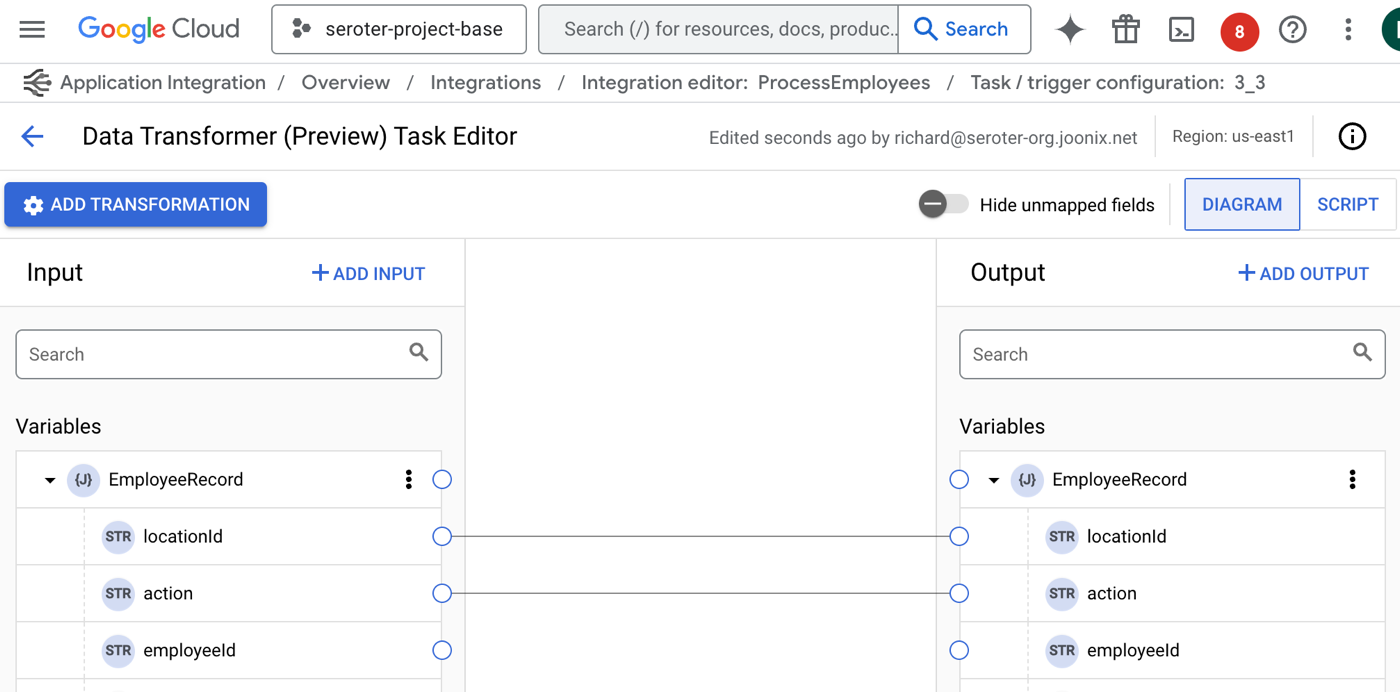
As you move data between applications or systems, you likely need to switch up structure and format. I’ve long been jealous of the nice experience in Azure Logic Apps, and now our mapping experience is finally catching up.
Is the mapping not as easy as one to one? No problem. There are now transformation operations for messing with arrays, performing JSON operations, manipulating strings, and much more.
I’m sure your integrations NEVER fail, but for everyone else, it’s useful to know have advanced failure policies for rich error handling strategies. For a given task, I can set up one or more failure policies that tell the integration what to do when an issue occurs? Quit? Retry? Ignore it? I like the choices I have available.
There’s a lot to like the authoring experience, but these recent updates make it even better.
Fresh testing capabilities
Testing? Who wants to test anything? Not me, but that’s because I’m not a good software engineer.
We shipped a couple of interesting features for those who want to test their integrations.
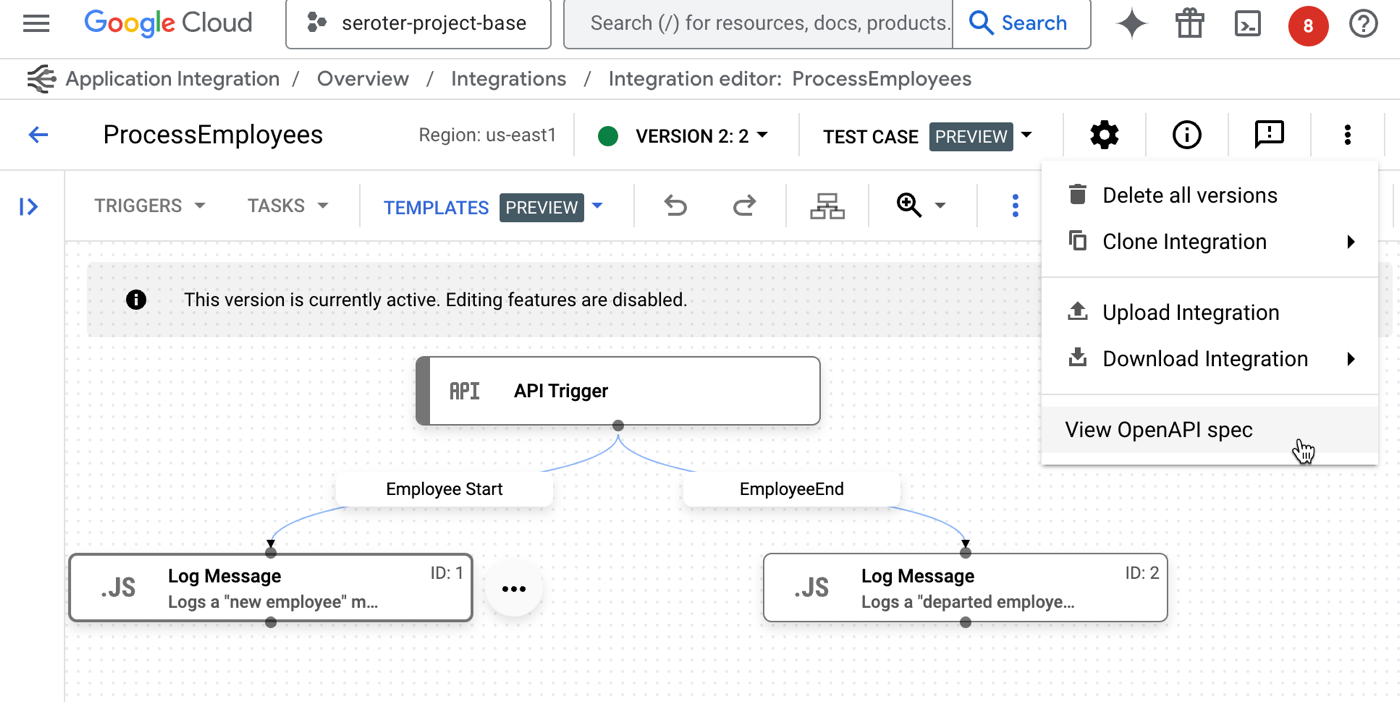
First, it’s a small thing, but when you have an API Trigger kicking off your integration—which means that someone invokes it via web request—we now make it easy to see the associated OpenAPI spec. This makes it easier to understand a service, and even consume it from external testing tools.
Once I choose to “view OpenAPI spec“, I get a slide-out pane with the specification, along with options to copy or download the details.
But by far, the biggest addition to the Application Integration toolchain for testers is the ability to create and run test plans. Add one or more test cases to an integration, and apply some sophisticated configurations to a test.
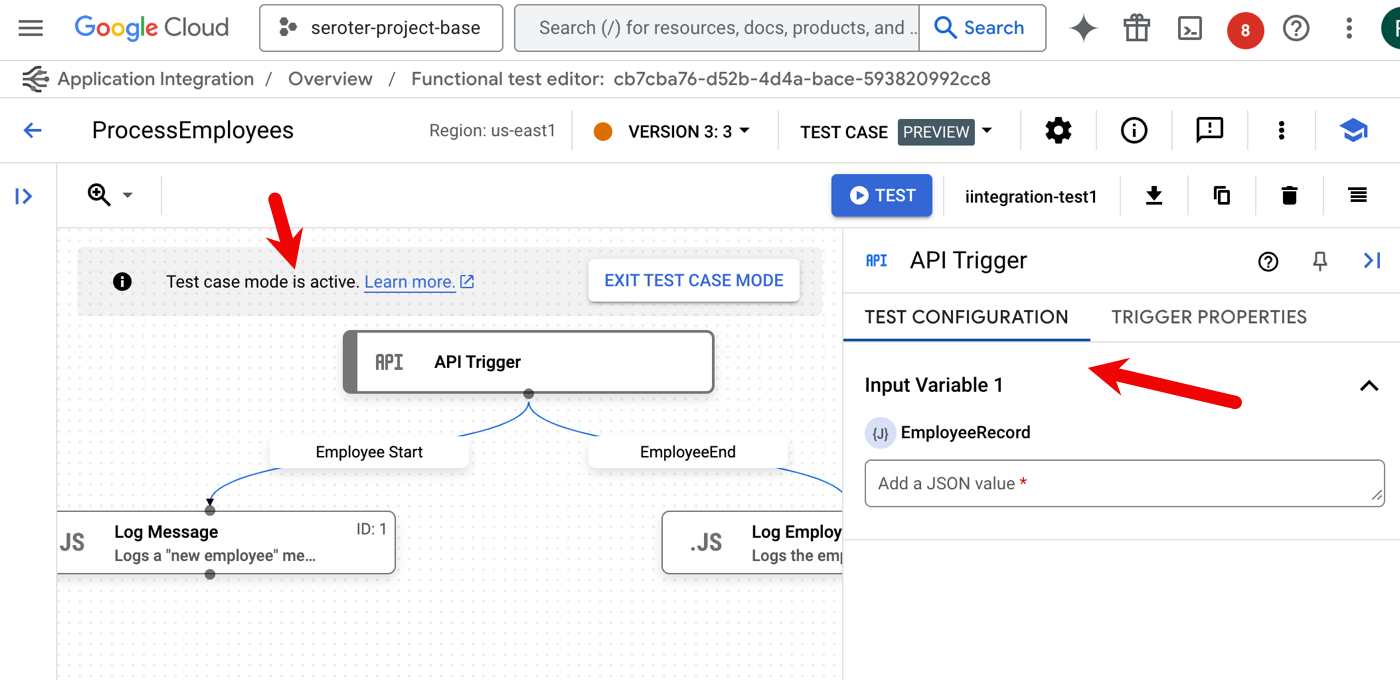
When I choose that option, I’m first asked to name the test case and optionally provide a description. Then, I enter “test mode” and set up test configurations for the given components in the integration. For instance, here I’ve chosen the initial API trigger. I can see the properties of the trigger, and then set a test input value.
A “task” in the integration has more test case configuration options. When I choose the JavaScript task, I see that I can choose a mocking strategy. Do you play it straight with the data coming in, purposely trigger a skip or failure, or manipulate the output?
Then I add one or more “assertions” for the test case. I can check whether the step succeeded or failed, if a variable equals what I think it should, or if a variable meets a specific condition.
Once I have a set of test cases, the service makes it easy to list them, duplicate them, download them, and manage them. But I want to run them.
Even if you don’t use test cases, you can run a test. In that case, you click the “Test” button and provide an input value. If you’re using test cases, you stay in (or enter) “test case mode” and then the “Test” button runs your test cases.
This final category looks at operational features for integrations.
This first feature shipped a few days ago. Now we’re offering more detailed execution logs that you can also download as JSON. A complaint with systems like this is that they’re a black box and you can’t tell what’s going on. The more transparency, the better. Lots of log details now!
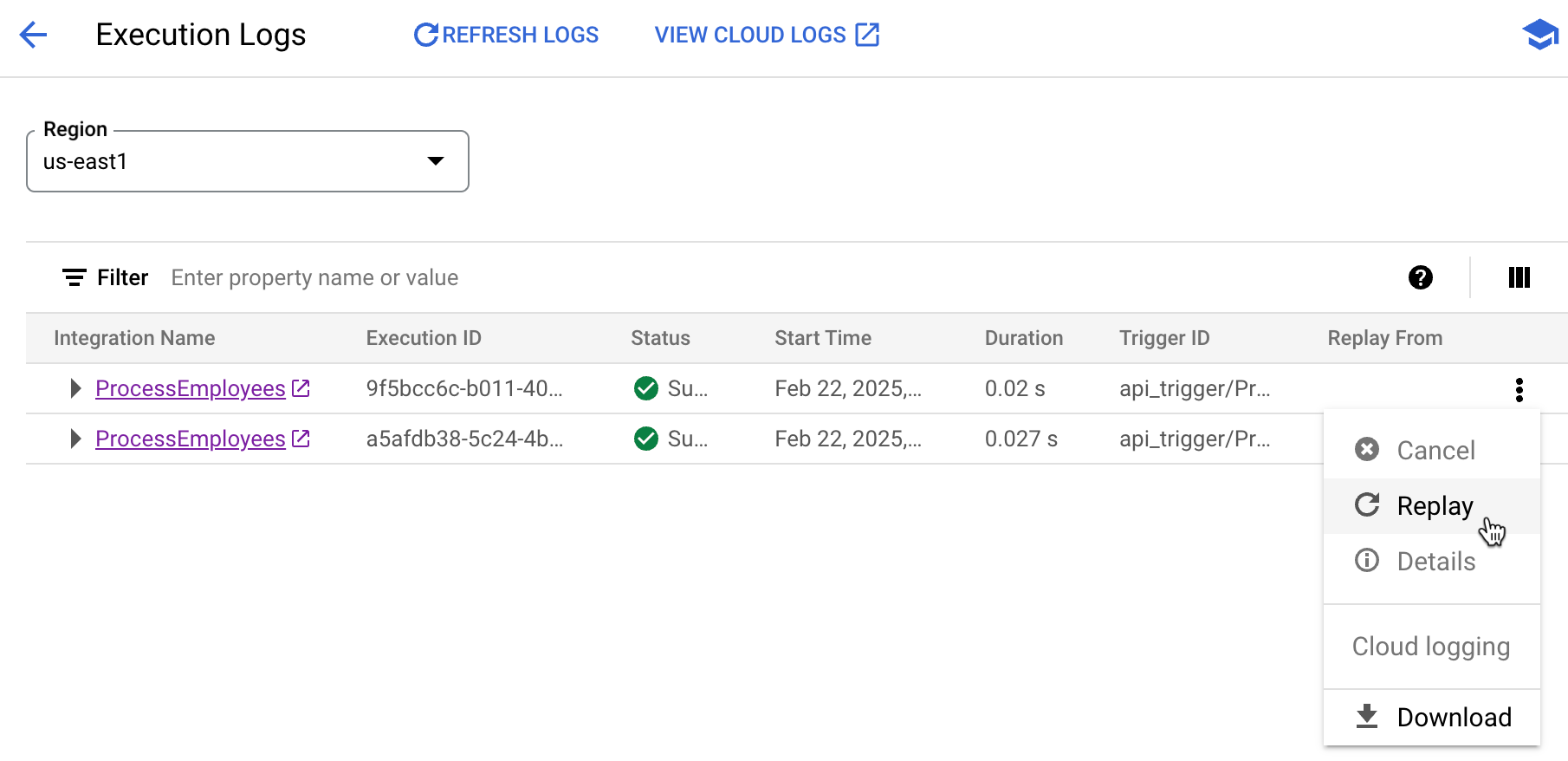
Another new operational feature is the ability replay an integration. Maybe something failed downstream and you want to retry the whole process. Or something transient happened and you need a fresh run. No problem. Now I can pick any completed (or failed) integration and run it again.
When I use this, I’m asked for a reason to replay. And what I liked is that after the replay occurs, there’s an annotation indicating that this given execution was the result of a replay.
Also be aware that you can now cancel an execution. This is hand for long-running instances that may no longer matter.
Summary
You don’t need to use tools like this, of course. You can connect your systems together with code or scripts. But I personally like managed experiences like this that handle the machinery of connecting to systems, transforming data, and dealing with running the dozens or thousands of hourly events between systems.
I went to Disneyland yesterday with my family to have some fun and remind myself of why theme parks are insane. It was refreshing to stay away from work email for a day, and I paid for it today. But all caught up now, and I made a dent in the reading queue!
[article] Software Quality. Abi looks at a research paper that outlines four types of software quality that influence each other. Very helpful.
[blog] The Triangle of Agents. I like seeing folks come at this topic from different angles. Brian explores a framing to think about the capabilities of agents. Analysis like this is necessary before shoving a bunch of new tools into your org.
[article] Design Platforms to Be Replaced, Not Forever. You can’t future-proof. That’s not a thing. You will have to replace things over time. This post makes a good point that you can replace subsystems versus entire platforms.
[blog] We switched from Java to Go and don’t regret it. Java is great, and you can spend your whole career with it and have no regrets. For many types of apps, other languages could be a stronger choice for you.
[blog] A Simple Definition Of “Platform.” That’s … a pretty good definition! Platform is an overloaded term, but this seems like a good way to talk about it.
Want to get this update sent to you every day? Subscribe to my RSS feed or subscribe via email below:
We’re deep into Google Cloud Next ’25 planning with the event just 30-something business days away. I do hope I’ll see a handful of you at the event. It should be quite the FOMO-inducing gathering.
[article] 5 things every new manager needs to do. Good advice. If you’re not at least a little freaked out when you first become a manager, there’s something wrong.
[article] Top 5 Uses of WebAssembly for Web Developers. We’re at a decade of Wasm, and it still feels like it’s hunting for a killer use case. But, it definitely has utility, and this may inspire you.
[blog] How Does Trae, the 100% Free AI IDE, Compare to Cursor? We’re in the early stages of the most unsettled IDE environment that I can recall. Don’t commit to any single choice at this point; you might follow your favorite model around to different surfaces!
[blog] 50 Years of Travel Tips. I’ve done some travel, but nothing approaching this. Here’s some great insight for those who want to see the world the right way.
I’ve mostly adjusted to being back on Pacific Standard Time after a week in India. How long does it take you to switch back from traveling timezones? Meanwhile, I’m clearing out some of the reading queue, as you’ll find below.
[blog] The power of large context windows for your documentation efforts. I learned a LOT from this post! Guillaume explores how to create dynamic tutorials by using AI to ask questions of the docs. Excellent example here, and I’m sure you’ll walk away with a couple of fresh ideas.
[article] Canonical Extends Kubernetes Distro Support to a Dozen Years. Wow, that’s a long time. Assuming you get all the security patches you need, I guess it’s not AWFUL to stay on a given distribution for so long. But I’d be cautious about a plan that depends on it.
[article] Exploring for strategy. I’ve found that the easiest way to avoid falling in love with a given idea is to constantly explore alternate opinions. It doesn’t mean I don’t have convictions; it means the ones I have are well-tested.
[article] Bridging the AI Learning Gap. Different needs at different stages of expertise! Here’s some useful perspective on how to integrate AI into the learning path.
[blog] Deep dive into AI with Google Cloud’s global generative AI roadshow. Speaking of learning new things, commit to a few in-person events this year. Last week, I kicked off this roadshow in India. We’ve got lots more coming up, including my appearance in Paris and Istanbul.
Happy Valentine’s Day! Give someone a hug today. Preferably someone you know. I’m almost home from India, and am looking forward to a three-day weekend.
[youtube-video] How Google AI helps with safer pregnancies. Beautiful story that I got to hear live at one of our events in India. Senthil may be the most user-centric product person I’ve ever met.
I’m flying back to the States after a wild final day in India. At our event in Hyderabad, I had the real privilege of talking to, taking pictures with, and learning from hundreds of developers. Great folks! I was also able to steal a few minutes to read the items you’ll find below.
[blog] Edge Build: Part 1. Brian is building a new local edge environment in his home lab. Follow along!
[article] Preparing for AI. Long-ish piece, but a good one for how to think about the current AI revolution. Don’t ignore it, be realistic about it, and train yourself to use it effectively.
[blog] RAG based application with AlloyDB and Vertex AI. Nothing new here, but still a good look at setting up PostgreSQL as a vector database and hosting a retrieval service on a serverless platform.
[blog] Book Review: The Goal. My friend Traverse takes a look at this classic book that inspired The Phoenix Project. It’s all about streamlining operations and understanding your metrics.
[blog] Developer Relations Belongs in Product. It can sit in all sorts of places within the org, but if you have a devrel team that’s paying attention to product updates and is also a trusted source of customer feedback, being in product management is a plus.
Want to get this update sent to you every day? Subscribe to my RSS feed or subscribe via email below:














 Richard Seroter's Architecture Musings